FlutterFlutter · Chapterبەش 9 · Lectureوانە 9.2
Navigation: Moving Between Screensڕێنیشاندان: جووڵان لە نێوان شاشەکاندا
Routes and the Navigator's stack; going forward with Navigator.push and MaterialPageRoute and back with Navigator.pop; a complete two-screen app; sending data through a constructor and getting a value back with await push and pop; replacing and clearing routes; and named routes and go_router as next steps.
و Navigator؛ چوونە پێشەوە بە Navigator.push و MaterialPageRoute و گەڕانەوە بە Navigator.pop؛ تەواوی دوو شاشەیی؛ ناردنی لە ڕێگەی و وەرگرتنەوەی نرخێک بە await push و pop؛ گۆڕین و پاککردنەوەی ؛ و ناودار و go_router وەک هەنگاوی داهاتوو.
What you will learnچی فێر دەبیت
- Explain routes and how the Navigator keeps them in a stack.
- Move between two screens with Navigator.push, MaterialPageRoute and Navigator.pop.
- Send data to a screen through its constructor, and get a result back with await push and pop.
- Choose pushReplacement or pushAndRemoveUntil when a screen must not come back, and know when to reach for go_router.
- ڕوون بکەیتەوە و بڵێیت Navigator چۆن لە هەڵیاندەگرێت.
- بە Navigator.push، MaterialPageRoute و Navigator.pop لە نێوان دوو شاشەدا بجووڵێیت.
- لە ڕێگەی بنێریت بۆ شاشەیەک و ئەنجامێک بە await push و pop وەربگریتەوە.
- کاتێک نابێت شاشەیەک بگەڕێتەوە pushReplacement یان pushAndRemoveUntil هەڵبژێریت و بزانیت کەی پێویستت بە go_router دەبێت.
Apps have many screensئەپەکان چەندین شاشەیان هەیە
Almost every app has more than one screen. A shop app shows a list of products; you tap one and a details screen opens; you press Back and you are on the list again. Navigation and routing let the user move between the pages of an app in this way.
نزیکەی هەموو زیاتر لە یەک شاشەی هەیە. فرۆشگا لیستی کاڵاکان پیشان دەدات؛ دەست لە یەکێکیان دەدەیت و شاشەی وردەکارییەکان دەکرێتەوە؛ Back دەکەیت و دووبارە لەسەر لیستەکەیت. ڕێگە بە دەدات بەم شێوەیە لە نێوان لاپەڕەکانی بجووڵێت.
Moving between the screens of an app and keeping track of where the user has been, so that Back returns to the previous screen. In Flutter the Navigator keeps the screens () in a .
جووڵان لە نێوان شاشەکانی ئەپێکدا و هەڵگرتنی ئەوەی بەکارهێنەر بە کوێدا ڕۆیشتووە، بۆ ئەوەی گەڕانەوە بیباتەوە بۆ شاشەی پێشوو. لە Navigator شاشەکان () لە هەڵدەگرێت.
In Flutter, the screens or pages of an app are called routes, and a route is just a widget. Each screen you design, such as a list screen or a details screen, is an ordinary widget class.
لە ، شاشە یان لاپەڕەکانی پێیان دەوترێت و تەنها . هەر شاشەیەک کە دیزاینی دەکەیت، وەک شاشەی لیست یان شاشەی وردەکاری، ئاسایی .
The Navigator keeps routes in a stackNavigator ڕێگەکان لە ستاکێکدا هەڵدەگرێت
Creating routes and MaterialPageRouteدروستکردنی ڕێگەکان و MaterialPageRoute
A route is written as a class, using object-oriented ideas: each route is a separate class with its own contents and UI, for example class FirstRoute extends StatelessWidget. To show it, you wrap it in a route object. The usual one is MaterialPageRoute: a full-screen page with the platform's own animation: on iOS it slides in from the right; on Android it slides in from the side while fading in, and on Android 14 and newer it follows the user's finger during the Back swipe (predictive back).
وەک دەنووسرێت، بە بیرۆکەکانی : هەر جیایە بە ناوەڕۆک و شێوەی خۆیەوە، بۆ نموونە class FirstRoute extends StatelessWidget. بۆ پیشاندانی، دەیخەیتە ناو . باوترینیان MaterialPageRouteـە: لاپەڕەیەکی پڕبەشاشە بە تایبەتی : لە iOSـدا لە لای ڕاستەوە دێتە ناوەوە؛ لە Androidـدا لە لاوە دێتە ناوەوە و هێدی هێدی ڕوون دەبێتەوە و لە Android 14 و نوێتردا لە کاتی ڕاکێشانی پەنجە بۆ Back شوێن پەنجەی دەکەوێت (predictive back).
MaterialPageRoute(builder: (context) => const SecondRoute())Explain the codeڕوونکردنەوەی کۆدەکە
- Lineدێڕی 1
builderis a function that returns the screen's widget. Flutter calls it when the route is built.builderکە شاشەکە دەگەڕێنێتەوە. کاتێک دروست دەکرێت بانگی دەکات.
Going to a new screen: Navigator.pushچوون بۆ شاشەیەکی نوێ: Navigator.push
To display the second route, call Navigator.push(). It takes the context (so it can find the Navigator above this widget) and the route to put on top:
بۆ پیشاندانی دووەم، بانگی Navigator.push() بکە. context وەردەگرێت (بۆ ئەوەی Navigatorـی سەرووی ئەم بدۆزێتەوە) و ئەو دەخرێتە سەرەوە:
// Within the HomeRoute widget
onPressed: () {
  Navigator.push(
    context,
    MaterialPageRoute(builder: (context) => const SecondRoute()),
  );
},
Explain the codeڕوونکردنەوەی کۆدەکە
- Lineدێڕی 2
The button's callback: it runs when the button is tapped.
: کاتێک دەست لە دەدرێت جێبەجێ دەبێت.
- Lineدێڕی 4
contextis this widget's place in the tree. The Navigator is found above it.contextشوێنی ئەم لە دارەکەدا. Navigator لە سەرووی ئەوەوە دەدۆزرێتەوە.- Lineدێڕی 5
A new route that builds
SecondRoute.نوێ کە
SecondRouteدروست دەکات.
context is the widget's BuildContext, explained in build and context. Using Navigator.of(context).push(route) is the same call written another way.
context BuildContextـی کە لە build و context ڕوون کراوەتەوە. Navigator.of(context).push(route) هەمان بانگکردنە بە شێوەیەکی تر نووسراوە.
A Kurdish beginner course: what Flutter is, making an Android emulator, creating and running a project in VS Code, Hello World and hot reload.
کۆرسێکی کوردی بۆ سەرەتاییەکان: چییە، دروستکردنی Android، دروستکردن و کارپێکردنی پرۆژەیەک لە VS Codeـدا، Hello World و .
Watch 54:04–56:52 (Kurdish): a second screen in its own file and Navigator.push with MaterialPageRoute.
لە 54:04 تا 56:52 سەیر بکە (بە کوردی): شاشەیەکی دووەم لە خۆیدا و Navigator.push لەگەڵ MaterialPageRoute.
Going back: Navigator.popگەڕانەوە: Navigator.pop
To go back, call Navigator.pop(). It removes the current (top) route, so the route under it, here the home route, is shown again:
بۆ گەڕانەوە، بانگی Navigator.pop() بکە. ئێستا (سەرەوە) لادەبات، بۆیە ئەو لە ژێریدایە، لێرەدا سەرەکی، دووبارە پیشان دەدرێتەوە:
// Within the SecondRoute widget
onPressed: () {
  Navigator.pop(context);
},
You often do not need to write this. When a route is pushed on top of another, the AppBar shows a back arrow by itself, and the Android Back button and the iOS swipe from the edge also pop the route.
زۆرجار پێویست ناکات ئەمە بنووسیت. کاتێک لەسەر یەکێکی تر push دەکرێت، AppBar خۆی تیرێکی گەڕانەوە پیشان دەدات و Backـی Android و ڕاکێشانی پەنجە لە لێوارەوە لە iOSـدا هەمان pop دەکەن.
A complete two-screen appئەپێکی تەواوی دوو شاشەیی
Create two routes (screens):
FirstRouteandSecondRoute.دوو (شاشە) دروست بکە:
FirstRouteوSecondRoute.Go from the first route to the second with
Navigator.push().بە
Navigator.push()لە یەکەمەوە بچۆ بۆ دووەم.Come back to the first route with
Navigator.pop().بە
Navigator.pop()بگەڕێوە بۆ یەکەم.
import 'package:flutter/material.dart';

void main() => runApp(const MaterialApp(home: FirstRoute()));

class FirstRoute extends StatelessWidget {
  const FirstRoute({super.key});

  @override
  Widget build(BuildContext context) {
    return Scaffold(
      appBar: AppBar(title: const Text('First Screen')),
      body: Center(
        child: ElevatedButton(
          style: ElevatedButton.styleFrom(
            backgroundColor: Colors.orangeAccent,
          ),
          onPressed: () {
            // Navigate to the second route when tapped.
            Navigator.push(
              context,
              MaterialPageRoute(builder: (context) => const SecondRoute()),
            );
          },
          child: const Text('Click Here'),
        ),
      ),
    );
  }
}

class SecondRoute extends StatelessWidget {
  const SecondRoute({super.key});

  @override
  Widget build(BuildContext context) {
    return Scaffold(
      appBar: AppBar(title: const Text('Second Screen')),
      body: Center(
        child: ElevatedButton(
          style: ElevatedButton.styleFrom(
            backgroundColor: Colors.red,
            foregroundColor: Colors.white,
          ),
          onPressed: () {
            // Navigate back to the first route when tapped.
            Navigator.pop(context);
          },
          child: const Text('Go Back'),
        ),
      ),
    );
  }
}--- tap Click Here after push: 1 Second Screen --- tap Go Back First Screen is shown again
Explain the codeڕوونکردنەوەی کۆدەکە
- Lineدێڕی 3
home:is the first route at the bottom of the stack.home:یەکەم لە بنی .- Lineدێڕی 5-6
A route is an ordinary widget class with a
constconstructor.ئاسایی بە
constـەوە.- Lineدێڕی 13-16
ElevatedButtonreplaces the oldRaisedButton; its colour goes instyle.ElevatedButtonجێگەیRaisedButtonـی کۆن دەگرێتەوە؛ ڕەنگەکەی دەچێتە ناوstyle.- Lineدێڕی 19-22
push: put
SecondRouteon top.push:
SecondRouteبخە سەرەوە.- Lineدێڕی 46
pop: remove
SecondRoute;FirstRouteshows again.pop:
SecondRouteلاببە؛FirstRouteدووبارە دەردەکەوێتەوە.
Sending data to the next screenناردنی دراوە بۆ شاشەی داهاتوو
Often the second screen needs data from the first: the product that was tapped, a name, a message. The notes explain the way: give the second screen a constructor that receives a key and then the data. The first screen passes the data when it creates the route:
زۆرجار شاشەی دووەم پێویستی بە لە یەکەمەوە هەیە: ئەو کاڵایەی دەستی لێ درا، ناوێک، نامەیەک. تێبینییەکان ڕێگاکە ڕوون دەکەنەوە: بدە بە شاشەی دووەم کە و پاشان وەربگرێت. شاشەی یەکەم کاتێک دروست دەکات دەنێرێت:
ElevatedButton(
  child: Text("Send Data"),
  onPressed:(){
    Navigator.push(
      context,
      MaterialPageRoute(
        builder: (context)=> SecondScreen(getData: "Hello Students")));
  },
),

// in the second screen
String getData = '';
SecondScreen({Key? key, required this.getData}) : super(key: key);
. . .
body: Center(
  child: Text(getData),
),
The idea is right, but the field is written in an old and unsafe way. A widget is immutable: its fields must be final. Today it looks like this:
بیرۆکەکە ڕاستە، بەڵام بە شێوەیەکی کۆن و ناسەلامەت نووسراوە. : دەبێت final بن. ئەمڕۆ بەم شێوەیە دەنووسرێت:
import 'package:flutter/material.dart';

void main() => runApp(const MaterialApp(home: HomeScreen()));

class HomeScreen extends StatelessWidget {
  const HomeScreen({super.key});

  @override
  Widget build(BuildContext context) {
    return Scaffold(
      appBar: AppBar(title: const Text('Home')),
      body: Center(
        child: ElevatedButton(
          child: const Text('Send Data'),
          onPressed: () {
            Navigator.push(
              context,
              MaterialPageRoute(
                builder: (context) =>
                    const SecondScreen(message: 'Hello Students'),
              ),
            );
          },
        ),
      ),
    );
  }
}

class SecondScreen extends StatelessWidget {
  const SecondScreen({super.key, required this.message});

  final String message; // set once, by the constructor

  @override
  Widget build(BuildContext context) {
    return Scaffold(
      appBar: AppBar(title: const Text('Second Screen')),
      body: Center(child: Text(message)),
    );
  }
}--- tap Send Data Second Screen shows: Hello Students
Explain the codeڕوونکردنەوەی کۆدەکە
- Lineدێڕی 19-20
The first screen creates
SecondScreenand gives it the message.شاشەی یەکەم
SecondScreenدروست دەکات و نامەکەی دەداتێ.- Lineدێڕی 31
super.keypasses the key to the parent class;required this.messagemakes the data compulsory.super.keyدەدات بە باوان؛required this.messageناچاری دەکات.- Lineدێڕی 33
final: set once by the constructor, never changed.final: یەک جار لە دادەنرێت و هەرگیز ناگۆڕێت.- Lineدێڕی 39
The screen shows the data it received.
شاشەکە ئەو وەریگرتووە پیشان دەدات.
Getting an answer back: pop with a valueوەرگرتنەوەی وەڵامێک: pop بە نرخێکەوە
Data can also travel back. A screen can ask the user to choose something and return the choice. Two things make this work:
دەتوانێت بگەڕێتەوەش. شاشەیەک دەتوانێت داوا لە بکات شتێک هەڵبژێرێت و هەڵبژاردنەکە بگەڕێنێتەوە. دوو شت ئەمە دەکەن:
Navigator.pushreturns a Future. It completes when the pushed route is popped.awaitwaits for it.Navigator.pop(context, value)takes an optional second argument: the value that completes that Future.
Navigator.pushدەگەڕێنێتەوە. کاتێک pushکراوەکە pop دەکرێت تەواو دەبێت.awaitچاوەڕێی دەکات.Navigator.pop(context, value)دووەمی هەڵبژاردەیی وەردەگرێت: ئەو نرخەی کە پێی تەواو دەبێت.
import 'package:flutter/material.dart';

void main() => runApp(const MaterialApp(home: OrderScreen()));

class OrderScreen extends StatefulWidget {
  const OrderScreen({super.key});

  @override
  State<OrderScreen> createState() => _OrderScreenState();
}

class _OrderScreenState extends State<OrderScreen> {
  String _order = 'Nothing yet';

  Future<void> _chooseTea() async {
    // push returns a Future that completes when the screen is popped
    final String? choice = await Navigator.push<String>(
      context,
      MaterialPageRoute(builder: (context) => const TeaScreen()),
    );

    if (!mounted) return; // this screen may be gone after the await
    if (choice == null) return; // the user pressed Back without choosing
    setState(() => _order = choice);
  }

  @override
  Widget build(BuildContext context) {
    return Scaffold(
      appBar: AppBar(title: const Text('Tea House')),
      body: Center(
        child: Column(
          mainAxisSize: MainAxisSize.min,
          children: [
            Text('Your order: $_order'),
            const SizedBox(height: 16),
            FilledButton(
              onPressed: _chooseTea,
              child: const Text('Choose tea'),
            ),
          ],
        ),
      ),
    );
  }
}

class TeaScreen extends StatelessWidget {
  const TeaScreen({super.key});

  @override
  Widget build(BuildContext context) {
    return Scaffold(
      appBar: AppBar(title: const Text('Choose tea')),
      body: Center(
        child: Column(
          mainAxisSize: MainAxisSize.min,
          children: [
            ElevatedButton(
              onPressed: () => Navigator.pop(context, 'Tea with sugar'),
              child: const Text('With sugar'),
            ),
            const SizedBox(height: 8),
            ElevatedButton(
              onPressed: () => Navigator.pop(context, 'Tea without sugar'),
              child: const Text('Without sugar'),
            ),
          ],
        ),
      ),
    );
  }
}--- tap Choose tea, then With sugar after choosing: Your order: Tea with sugar --- tap Choose tea, then press Back after Back: Your order: Tea with sugar
Explain the codeڕوونکردنەوەی کۆدەکە
- Lineدێڕی 15
An
asyncmethod, because it waits for the other screen.async، چونکە چاوەڕێی شاشەکەی تر دەکات.- Lineدێڕی 17-20
push<String>says the route returns a String.awaitpauses here until TeaScreen is popped; the app keeps running.push<String>دەڵێت دەگەڕێنێتەوە.awaitلێرە ڕادەوەستێت تا TeaScreen pop دەکرێت؛ بەردەوام کار دەکات.- Lineدێڕی 22
After an
await, checkmountedbefore using the State or its context.دوای
await، پێش بەکارهێنانی Stateـەکە یان contextـەکەیmountedبپشکنە.- Lineدێڕی 23
Back without choosing gives
null.Back بەبێ هەڵبژاردن
nullدەدات.- Lineدێڕی 60
pop with a value: TeaScreen closes and
'Tea with sugar'goes back.pop بە نرخێکەوە: TeaScreen دادەخرێت و
'Tea with sugar'دەگەڕێتەوە.
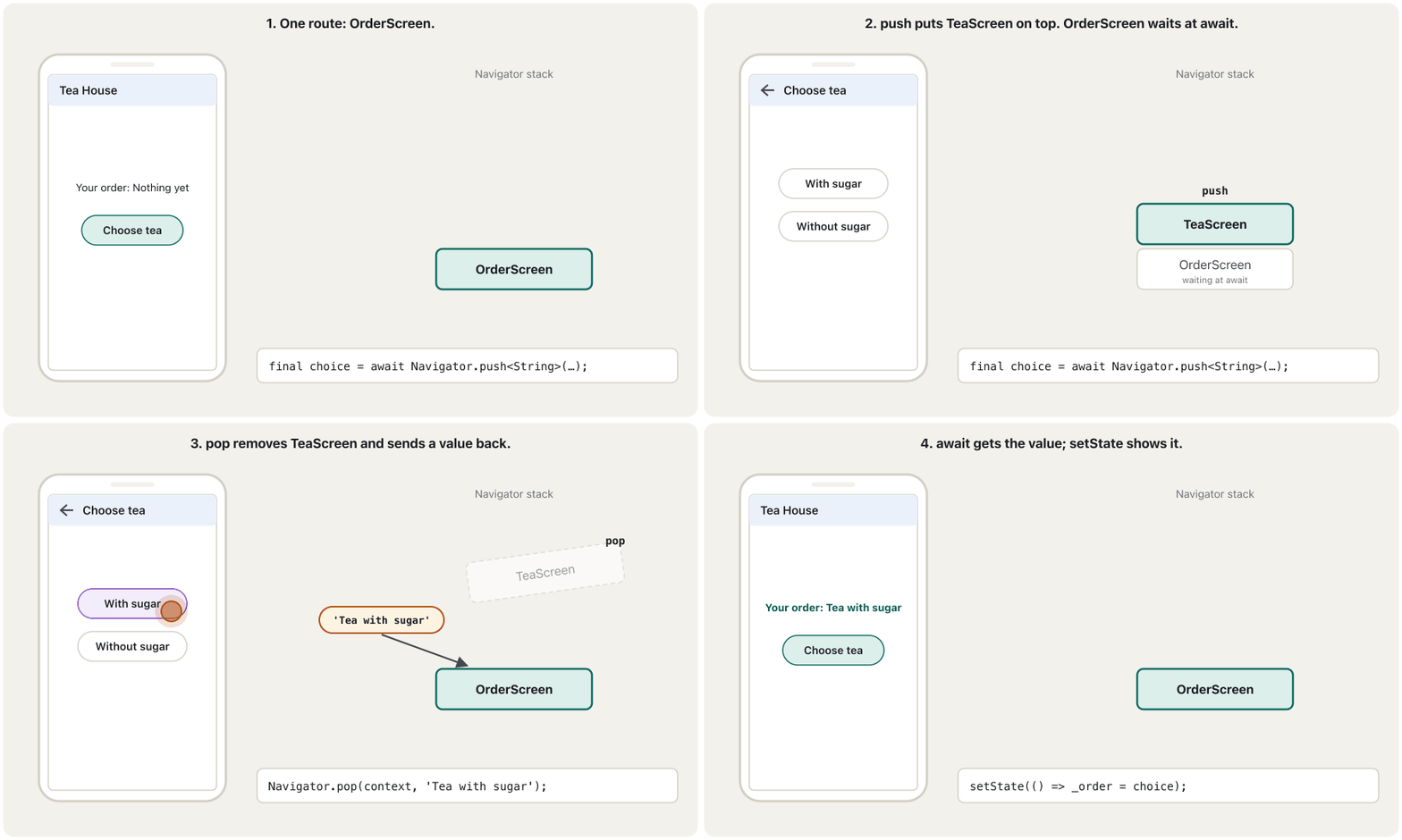
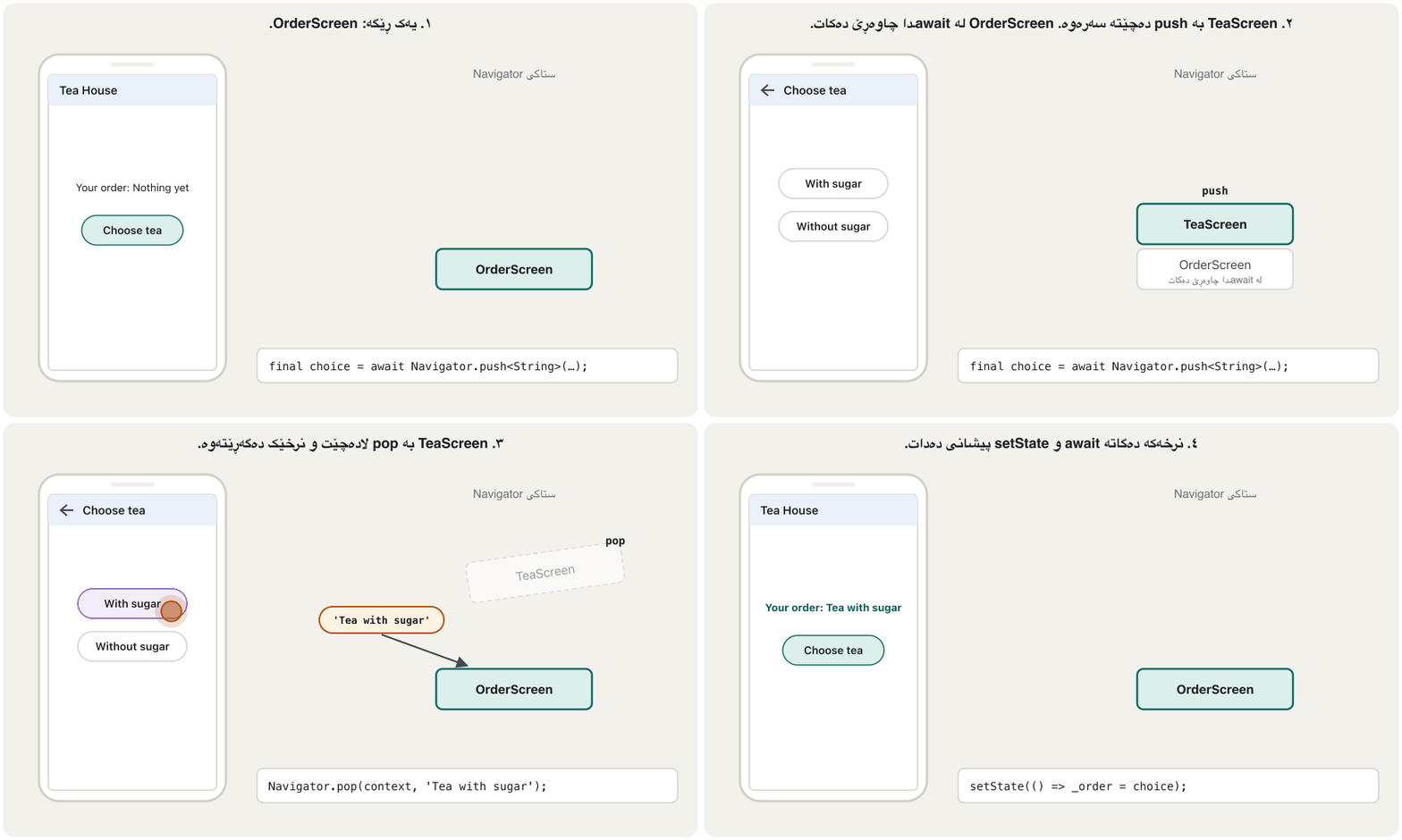
await and Futures are taught in Futures and async. The mounted rule comes from Flutter's cookbook: when you use a context or State after an asynchronous gap, check mounted first.
await و لە Futures و async دەخوێنرێن. یاسای mounted لە cookbookـی هاتووە: کاتێک contextـێک یان Stateـێک دوای بۆشاییەکی بەکار دەهێنیت، سەرەتا mounted بپشکنە.
Next steps: named routes and go_routerهەنگاوەکانی داهاتوو: ڕێگەکانی ناودار و go_router
The notes say that Flutter also uses "URLs" for navigation. This means giving each route a name or path, such as /settings. You will meet two ways. Here is a short overview; build your first apps with push and pop.
تێبینییەکان دەڵێن «URL»ـیش بۆ بەکار دەهێنێت. ئەمە واتە دانانی ناو یان بۆ هەر ، وەک /settings. دوو ڕێگا دەبینیت. ئەمە کورتەیەکە؛ یەکەم بە push و pop دروست بکە.
Next steps: named routes and go_routerهەنگاوەکانی داهاتوو: ڕێگەکانی ناودار و go_router
Named routesڕێگەکانی ناودار
With named routes you list the app's routes once in MaterialApp(routes: …) and open one by its name:
بە ناودار، یەک جار لە MaterialApp(routes: …)ـدا ڕیز دەکەیت و یەکێکیان بە ناوەکەیەوە دەکەیتەوە:
import 'package:flutter/material.dart';

void main() {
  runApp(
    MaterialApp(
      initialRoute: '/',
      routes: {
        '/': (context) => const HomeScreen(),
        '/settings': (context) => const SettingsScreen(),
      },
    ),
  );
}

class HomeScreen extends StatelessWidget {
  const HomeScreen({super.key});

  @override
  Widget build(BuildContext context) {
    return Scaffold(
      appBar: AppBar(title: const Text('Home')),
      body: Center(
        child: ElevatedButton(
          onPressed: () => Navigator.pushNamed(context, '/settings'),
          child: const Text('Settings'),
        ),
      ),
    );
  }
}

class SettingsScreen extends StatelessWidget {
  const SettingsScreen({super.key});

  @override
  Widget build(BuildContext context) {
    return Scaffold(
      appBar: AppBar(title: const Text('Settings')),
      body: const Center(child: Text('Settings')),
    );
  }
}
Explain the codeڕوونکردنەوەی کۆدەکە
- Lineدێڕی 6-10
A map from names to builders.
'/'is the first route.نەخشەیەک لە ناوەکانەوە بۆ builderـەکان.
'/'یەکەم .- Lineدێڕی 24
Open a route by its name.
بە ناوەکەیەوە بکەرەوە.
Go to a new page with Navigator.push, then do the same with named routes: a routes map in MaterialApp and Navigator.pushNamed.
چوون بۆ لاپەڕەیەکی نوێ بە Navigator.push، پاشان هەمان کار بە ناودار: Mapـی routes لە MaterialAppـدا و Navigator.pushNamed.
Watch 0:00–2:00: Navigator.push with MaterialPageRoute (0:30), then a routes map in MaterialApp and Navigator.pushNamed (1:05). The video calls named routes easier; this screen explains why Flutter's docs no longer recommend them for most apps. Stops before an advert for his book.
لە 0:00 تا 2:00 سەیر بکە: Navigator.push لەگەڵ MaterialPageRoute (0:30)، پاشان Mapـی routes لە MaterialAppـدا و Navigator.pushNamed (1:05). ڤیدیۆکە دەڵێت ناودار ئاسانترە؛ ئەم شاشەیە ڕوونی دەکاتەوە بۆچی ئیتر بۆ زۆربەی پێشنیاری ناکەن. پێش ڕیکلامی کتێبەکەی ڕادەوەستێت.
Next steps: named routes and go_routerهەنگاوەکانی داهاتوو: ڕێگەکانی ناودار و go_router
go_router: routes as pathsgo_router: ڕێگەکان وەک ڕێڕەو
Apps with deep links (a link that opens one particular screen inside the app) or a web version use the Router API, usually through the go_router package from the Flutter team (version 18 in 2026). Each route has a path, like a web address, and you navigate with context.go('/settings'):
ئەو یان وەشانی وێبیان هەیە Router API بەکار دەهێنن، زۆرجار لە ڕێگەی go_routerـەوە کە تیمی دروستی کردووە ( 18 لە 2026). هەر هەیە، وەک ناونیشانی وێب. بە context.go('/settings') دەگوازرێیتەوە بۆ شاشەیەکی تر:
A link that opens a particular screen inside an , not just its start screen, for example a link to one product in a shop app.
کە شاشەیەکی دیاریکراو لە ناو دەکاتەوە نەک تەنها شاشەی دەستپێکەکەی، بۆ نموونە بەستەرێک بۆ یەک کاڵا لە ئەپێکی بازاڕکردندا.
import 'package:flutter/material.dart';
import 'package:go_router/go_router.dart';

final _router = GoRouter(
  routes: [
    GoRoute(
      path: '/',
      builder: (context, state) => const HomeScreen(),
      routes: [
        GoRoute(
          path: 'settings', // the full path is /settings
          builder: (context, state) => const SettingsScreen(),
        ),
      ],
    ),
  ],
);

void main() => runApp(MaterialApp.router(routerConfig: _router));

class HomeScreen extends StatelessWidget {
  const HomeScreen({super.key});

  @override
  Widget build(BuildContext context) {
    return Scaffold(
      appBar: AppBar(title: const Text('Home')),
      body: Center(
        child: ElevatedButton(
          onPressed: () => context.go('/settings'),
          child: const Text('Settings'),
        ),
      ),
    );
  }
}

class SettingsScreen extends StatelessWidget {
  const SettingsScreen({super.key});

  @override
  Widget build(BuildContext context) {
    return Scaffold(
      appBar: AppBar(title: const Text('Settings')),
      body: const Center(child: Text('Settings')),
    );
  }
}
Explain the codeڕوونکردنەوەی کۆدەکە
- Lineدێڕی 4-17
All routes in one place, each with a path.
هەموو لە یەک شوێندا، هەر یەکە بە .
- Lineدێڕی 19
MaterialApp.routerhands navigation to the router.MaterialApp.routerدەداتە دەست routerـەکە.- Lineدێڕی 30
Go to a path. A link like myapp://…/settings can open the same screen.
بڕۆ بۆ . وەک myapp://…/settings دەتوانێت هەمان شاشە بکاتەوە.
What go_router is: routes written as paths like web addresses, going to a screen with context.go, and nested routes for a bottom bar.
go_router چییە: وەک دەنووسرێن، هاوشێوەی ، چوون بۆ شاشەیەک بە context.go و لە ناو یەکتردا بۆ .
The whole 1:48 official clip: configuring GoRoute paths (0:23), navigating (0:43), shell routes (1:00).
هەموو کلیپە فەرمییەکە (1:48): دانانی GoRoute (0:23)، (0:43) و ShellRoute (1:00).
Common mistakesهەڵە باوەکان
| Mistakeهەڵە | What happensچی ڕوو دەدات | Fixچاککردن |
|---|---|---|
RaisedButton(color: …) from old tutorialsRaisedButton(color: …) لە فێرکارییە کۆنەکانەوە | Compile error: the class no longer exists کۆمپایل: ئەو چیتر نییە | ElevatedButton(style: ElevatedButton.styleFrom(backgroundColor: …))ElevatedButton(style: ElevatedButton.styleFrom(backgroundColor: …)) |
A non-final field in a screen widget (String getData = '';) ناfinal لە شاشەدا (String getData = '';) | A must_be_immutable warning; data can silently be emptyئاگاداریی must_be_immutable؛ دەکرێت بێدەنگ بەتاڵ بێت | final String message; + required this.messagefinal String message; + required this.message |
Forgetting await before Navigator.push when you need the resultلەبیرچوونی await پێش Navigator.push کاتێک ئەنجامەکەت پێویستە | You get a Future, not the value وەردەگریت، نەک نرخەکە | final result = await Navigator.push<String>(…);final result = await Navigator.push<String>(…); |
Using context or setState after await without a checkبەکارهێنانی context یان setState دوای await بەبێ پشکنین | An error if the screen was closed meanwhile ئەگەر لەم ماوەیەدا شاشەکە داخرابێت | if (!mounted) return; (or context.mounted)if (!mounted) return; (یان context.mounted) |
Not handling null from a popped routeمامەڵە نەکردن لەگەڵ null لە popکراوەوە | "null" shown on screen, or a crash«null» لەسەر شاشە دەردەکەوێت، یان دەتەقێت | Use String? and check for nullString? بەکار بهێنە و null بپشکنە |
push from a splash or login screenpush لە یان شاشەی | Back returns to the splash or login screenBack دەگەڕێتەوە بۆ یان شاشەی | pushReplacementpushReplacement |
Calling pop on the first routeبانگکردنی pop لەسەر یەکەم | The stack is left empty: the user sees a black screen, and the app does not close بەتاڵ دەبێت: شاشەیەکی ڕەش دەبینێت و داناخرێت | Check Navigator.canPop(context) first, or use maybePop, which does nothing on the first routeسەرەتا Navigator.canPop(context) بپشکنە، یان maybePop بەکار بهێنە کە لەسەر یەکەم هیچ ناکات |
Exercisesڕاهێنانەکان
The app starts on Home. The user does: push(Products), push(Details), pop(), push(Cart), pop(), pop(). Write the stack after each step and the screen the user sees at the end.
لە Homeـەوە دەست پێ دەکات. ئەمانە دەکات: push(Products)، push(Details)، pop()، push(Cart)، pop()، pop(). دوای هەر هەنگاوێک و ئەو شاشەیەی لە کۆتاییدا دەیبینێت بنووسە.
Show answerوەڵامەکە پیشان بدە
| Stepهەنگاو | Stack (bottom → top, left to right) (لە چەپەوە بۆ ڕاست: لە خوارەوە بۆ سەرەوە) |
|---|---|
push(Products) | Home, Products |
push(Details) | Home, Products, Details |
pop() | Home, Products |
push(Cart) | Home, Products, Cart |
pop() | Home, Products |
pop() | Home |
At the end the user sees Home.
لە کۆتاییدا Home دەبینێت.
The notes' FirstRoute uses RaisedButton(child: Text('Click Here'), color: Colors.orangeAccent, onPressed: …). Rewrite the button for today's Flutter and fill in its onPressed so it opens SecondRoute.
FirstRouteـی تێبینییەکان RaisedButton(child: Text('Click Here'), color: Colors.orangeAccent, onPressed: …) بەکار دەهێنێت. بۆ ئەمڕۆ بنووسەرەوە و onPressedـەکەی پڕ بکەرەوە بۆ ئەوەی SecondRoute بکاتەوە.
Show answerوەڵامەکە پیشان بدە
ElevatedButton(
  style: ElevatedButton.styleFrom(
    backgroundColor: Colors.orangeAccent,
  ),
  onPressed: () {
    Navigator.push(
      context,
      MaterialPageRoute(builder: (context) => const SecondRoute()),
    );
  },
  child: const Text('Click Here'),
)A shop shows a list of products (name and price). Tapping one opens a ProductScreen that shows its name in the app bar and its price in the body. Pass the whole product, not two separate strings.
فرۆشگایەک لیستێکی کاڵاکان (ناو و نرخ) پیشان دەدات. دەستلێدان لە یەکێکیان ProductScreen دەکاتەوە کە ناوەکەی لە و نرخەکەی لە bodyـدا پیشان دەدات. هەموو کاڵاکە بنێرە، نەک دوو جیا.
Hintئاماژە
Make a Product class with final fields, and give ProductScreen a required this.product parameter.
Product بە final دروست بکە و required this.product بدە بە ProductScreen.
Show answerوەڵامەکە پیشان بدە
import 'package:flutter/material.dart';

class Product {
  const Product(this.name, this.price);

  final String name;
  final int price; // in Iraqi dinars
}

const products = [
  Product('Notebook', 1500),
  Product('Pen', 500),
  Product('Bag', 12000),
];

class ProductListScreen extends StatelessWidget {
  const ProductListScreen({super.key});

  @override
  Widget build(BuildContext context) {
    return Scaffold(
      appBar: AppBar(title: const Text('Shop')),
      body: ListView(
        children: [
          for (final product in products)
            ListTile(
              title: Text(product.name),
              onTap: () {
                Navigator.push(
                  context,
                  MaterialPageRoute(
                    builder: (context) => ProductScreen(product: product),
                  ),
                );
              },
            ),
        ],
      ),
    );
  }
}

class ProductScreen extends StatelessWidget {
  const ProductScreen({super.key, required this.product});

  final Product product;

  @override
  Widget build(BuildContext context) {
    return Scaffold(
      appBar: AppBar(title: Text(product.name)),
      body: Center(child: Text('Price: ${product.price} IQD')),
    );
  }
}
Explain the codeڕوونکردنەوەی کۆدەکە
- Lineدێڕی 3-8
A small immutable class for one product.
بچووکی بۆ یەک کاڵا.
- Lineدێڕی 32
The tapped product goes into the constructor.
ئەو کاڵایەی دەستی لێ درا دەچێتە ناو .
- Lineدێڕی 44-46
final Product product;withrequired this.product.final Product product;لەگەڵrequired this.product.
A settings screen has two buttons, Kurdish and English. Write the code that opens it from the home screen, waits for the choice, and shows it in a Text (Language: Kurdish). What does your code do if the user presses Back?
شاشەیەکی ڕێکخستن دوو هەیە، Kurdish و English. ئەو کۆدە بنووسە کە لە شاشەی سەرەکییەوە دەیکاتەوە، چاوەڕێی هەڵبژاردنەکە دەکات و لە Textـێکدا پیشانی دەدات (Language: Kurdish). ئەگەر Back بکات کۆدەکەت چی دەکات؟
Show answerوەڵامەکە پیشان بدە
// in the home screen's State
String _language = 'English';

Future<void> _chooseLanguage() async {
  final String? choice = await Navigator.push<String>(
    context,
    MaterialPageRoute(builder: (context) => const LanguageScreen()),
  );
  if (!mounted || choice == null) return; // Back: keep the old language
  setState(() => _language = choice);
}

// in LanguageScreen
ElevatedButton(
  onPressed: () => Navigator.pop(context, 'Kurdish'),
  child: const Text('Kurdish'),
),
If the user presses Back, choice is null, the method returns, and the old language stays.
ئەگەر Back بکات، choice nullـە، دەگەڕێتەوە و زمانە کۆنەکە دەمێنێتەوە.
Choose push, pop, pushReplacement or pushAndRemoveUntil for each: (a) open a photo in full screen; (b) close a form after Save and send the new item back; (c) after a successful login; (d) after Log out, from a screen deep in the app.
بۆ هەر یەکێک push، pop، pushReplacement یان pushAndRemoveUntil هەڵبژێرە: (أ) کردنەوەی وێنەیەک بە پڕبەشاشە؛ (ب) داخستنی فۆرمێک دوای Save و ناردنەوەی بڕگە نوێیەکە؛ (ج) دوای سەرکەوتوو؛ (د) دوای ، لە شاشەیەکی قووڵی .
Show answerوەڵامەکە پیشان بدە
- (a)
push - (b)
pop(context, newItem) - (c)
pushReplacement, so Back does not return to the login screen - (d)
pushAndRemoveUntil(…, (route) => false), to clear every screen
- (أ)
push - (ب)
pop(context, newItem) - (ج)
pushReplacement، بۆ ئەوەی Back نەگەڕێتەوە بۆ شاشەی - (د)
pushAndRemoveUntil(…, (route) => false)، بۆ پاککردنەوەی هەموو شاشەکان
Summaryپوختە
- Navigation moves the user between screens. In Flutter, screens are routes, and routes are widgets.
- The Navigator (made by MaterialApp) keeps routes in a stack; the top route is on the screen.
Navigator.push(context, MaterialPageRoute(builder: …))adds a route;Navigator.pop(context)removes the top one. The AppBar's back arrow and the system Back also pop.- Send data forward through the next screen's constructor: a
finalfield,required this.x,super.key. - Get data back with
final result = await Navigator.push<T>(…)andNavigator.pop(context, value); checkmountedandnull. pushReplacementandpushAndRemoveUntilreplace or clear routes (splash, login, logout).- Named routes exist but are not recommended for most apps; for deep links and the web, use the Router API with go_router.
- لە نێوان شاشەکاندا دەگوازێتەوە. لە ، شاشەکان و .
- Navigator (کە
MaterialAppدروستی دەکات) لە هەڵدەگرێت؛ سەرەوە لەسەر شاشەیە. Navigator.push(context, MaterialPageRoute(builder: …))زیاد دەکات؛Navigator.pop(context)ئەوەی سەرەوە لادەبات. تیری گەڕانەوەیAppBarو Backـی سیستەمیش pop دەکەن.- بە شاشەی داهاتوودا بنێرە پێشەوە:
final،required this.x،super.key. - بە
final result = await Navigator.push<T>(…)وNavigator.pop(context, value)وەربگرەوە؛mountedوnullبپشکنە. pushReplacementوpushAndRemoveUntilدەگۆڕن یان پاک دەکەنەوە (، ، ).- ناودار هەن بەڵام بۆ زۆربەی پێشنیار ناکرێن؛ بۆ و وێب، Router API بە go_routerـەوە بەکار بهێنە.
What is the difference between MaterialPageRoute and Navigator?جیاوازیی نێوان MaterialPageRoute و Navigator چییە؟
MaterialPageRoute is one route (a page with its animation). Navigator is the widget that keeps the routes in a stack and has push and pop.
MaterialPageRoute یەک (لاپەڕەیەک بە ). Navigator ئەو کە لە هەڵدەگرێت و push و popـی هەیە.
How does the second screen receive data?شاشەی دووەم چۆن دراوە وەردەگرێت؟
Through its constructor: the first screen writes SecondScreen(message: 'Hello Students') inside the route's builder.
لە ڕێگەی : شاشەی یەکەم لەناو builderـی SecondScreen(message: 'Hello Students') دەنووسێت.
What does await Navigator.push return if the user presses Back?ئەگەر بەکارهێنەرەکە Back بکات await Navigator.push چی دەگەڕێنێتەوە؟
null, because the route was popped without a value.
null، چونکە بەبێ نرخ pop کرا.
Lesson complete!وانەکە تەواو بوو!
Well done. Review the key terms, then go on to the next lesson.دەستخۆش. سەیرێکی زاراوە سەرەکییەکان بکەرەوە، پاشان بڕۆ بۆ وانەی داهاتوو.
Key termsزاراوە سەرەکییەکان
Opening Links and Other Apps with url_launcherکردنەوەی بەستەرەکان و ئەپەکانی تر بە url_launcher
Related lecturesوانە پەیوەندیدارەکان
- Splash Screensشاشەکانی دەستپێک
- Buttonsدوگمەکان
- Futures, async and await in DartFuture،
asyncوawaitلە Dartـدا - Widgets and the Widget Treeویجێتەکان و داری ویجێتەکان
- Drawers, Bottom Bars and Sheetsلیستە لاتەنیشتەکان، شریتەکانی خوارەوە و پەڕەی خوارەوە
- Opening Links and Other Apps with url_launcherکردنەوەی بەستەرەکان و ئەپەکانی تر بە url_launcher
References and further readingسەرچاوەکان و خوێندنەوەی زیاتر
This lecture is a first edition. The Kurdish text and terminology are waiting for review by Kurdish IT teachers.ئەم وانەیە چاپی یەکەمە. دەقە کوردییەکە و زاراوەکانی چاوەڕێی پێداچوونەوەی مامۆستایانی کوردی بواری IT ن.