FlutterFlutter · Chapterبەش 7 · Lectureوانە 7.4
Lists and Gridsلیست و تۆڕ
Scrolling lists and grids in Flutter: the course's ListView of ListTiles, the parts of a ListTile, ListView.builder and lazy loading (measured), separated and horizontal lists, GridView.count, extent and builder, lists inside a Column, SingleChildScrollView, and tips for smooth scrolling.
لیست و تۆڕ لە Flutterـدا: ListViewـی وانەکان لە ListTile، بەشەکانی ListTile، ListView.builder و (پێوراو)، لیستی separated و ئاسۆیی، GridView.count، extent و builder، لیست لە ناو Columnـدا، SingleChildScrollView و ئامۆژگاری بۆ نەرم.
What you will learnچی فێر دەبیت
- Build a ListView of ListTiles and use leading, title, subtitle, trailing and onTap.
- Use ListView.builder and ListView.separated for long, data-driven lists, and explain lazy loading.
- Build grids with GridView.count, GridView.extent and GridView.builder.
- Place a list inside a Column correctly and keep scrolling smooth.
- ListViewـێک لە ListTile دروست بکەیت و leading، title، subtitle، trailing و onTap بەکار بهێنیت.
- ListView.builder و ListView.separated بۆ لیستی درێژی پشتبەستوو بە بەکار بهێنیت و ڕوون بکەیتەوە.
- تۆڕ بە GridView.count، GridView.extent و GridView.builder دروست بکەیت.
- لیستێک بە دروستی لە ناو Columnـدا دابنێیت و نەرم بهێڵیتەوە.
Lists: the most common screen in an appلیست: باوترین شاشە لە ئەپدا
A list is made of rows of similar items, one under another: chats, contacts, products, settings, songs. Each row can hold text, icons, pictures, buttons or switches. Lists are probably the most common part of any mobile or web app, because they let people see many things and pick one — a menu, the tabs of a settings page, or a long feed instead of a wall of plain text.
لیست لە ڕیزی شتی هاوشێوە پێک دێت، لە ژێر یەکەوە: گفتوگۆکان، پەیوەندییەکان، کاڵاکان، ڕێکخستنەکان، گۆرانییەکان. هەر ڕیزێک دەتوانێت دەق، ، وێنە، یان کلیلی هەڵکردن و کوژاندنەوەی تێدا بێت. لیست ڕەنگە باوترین بەشی هەر مۆبایل یان وێب بێت، چونکە ڕێگە بە خەڵک دەدات زۆر شت ببینن و یەکێکیان هەڵبژێرن — هەڵبژاردن، بەشەکانی پەڕەی ڕێکخستنەکان، یان فیدێکی درێژ لە جیاتی دیوارێک لە دەقی ساکار.
A list is usually longer than the screen, so it must scroll. A Column cannot do that (it overflows), so Flutter has scrolling widgets: ListView for lists and GridView for grids of tiles. This lesson starts with the course's simple list and then adds what real apps need: long lists built on demand, separators, horizontal lists, grids, and lists inside other layouts.
لیست زۆرجار لە شاشەکە درێژترە، بۆیە دەبێت توانای هەبێت. Column ناتوانێت ئەوە بکات (لە شاشە دەردەچێت)، بۆیە Flutter بۆ تایبەتی هەیە: ListView بۆ لیست و GridView بۆ تۆڕی خانەکان. ئەم وانەیە بە لیستە سادەکەی وانەکان دەست پێ دەکات و پاشان ئەوەی ڕاستەقینەکان پێویستیانە زیاد دەکات: لیستی درێژ کە بە پێی پێویست دروست دەکرێت، هێڵی جیاکەرەوە، لیستی ئاسۆیی، تۆڕ و لیست لە ناو تردا.
ListView with ListTilesListView لەگەڵ ListTile
The course's list: a ListView whose children are five ListTiles, each with an icon and a title. ListView is like a Column that scrolls; ListTile is a ready-made Material row.
لیستەکەی وانەکان: ListViewـێک کە childrenـەکانی پێنج ListTileن، هەر یەکەیان و ناونیشانێکی هەیە. ListView وەک Columnـێکە کە توانای هەیە؛ ListTile ڕیزێکی ئامادەکراوی Materialـە.
import 'package:flutter/material.dart';

class BasicListDemo extends StatelessWidget {
  const BasicListDemo({super.key});

  @override
  Widget build(BuildContext context) {
    return Scaffold(
      appBar: AppBar(title: const Text('Flutter Basic List Demo')),
      body: ListView(
        children: const [
          ListTile(leading: Icon(Icons.map), title: Text('Map')),
          ListTile(leading: Icon(Icons.photo_album), title: Text('Album')),
          ListTile(leading: Icon(Icons.phone), title: Text('Phone')),
          ListTile(leading: Icon(Icons.contacts), title: Text('Contact')),
          ListTile(leading: Icon(Icons.settings), title: Text('Setting')),
        ],
      ),
    );
  }
}
Explain the codeڕوونکردنەوەی کۆدەکە
- Lineدێڕی 10-11
ListViewtakes a list of children, like a Column, but it can scroll.ListViewلیستێک منداڵ وەردەگرێت وەک Column، بەڵام توانای هەیە.- Lineدێڕی 12
leadingis the widget at the start of the row;titleis the main text.leadingئەو لە سەرەتای ڕیزەکەدایە؛titleدەقە سەرەکییەکەیە.
ListView with ListTilesListView لەگەڵ ListTile
The parts of a ListTileبەشەکانی ListTile
A ListTile has four slots and a tap handler. You fill only the ones you need:
ListTile چوار شوێن و وەڵامدەرەوەیەکی دەست لێدانی هەیە. تەنها ئەوانە پڕ دەکەیتەوە کە پێویستتن:
@override
Widget build(BuildContext context) {
  return ListTile(
    leading: const CircleAvatar(child: Text('S')),
    title: const Text('Shilan'),
    subtitle: const Text('See you at the tea house at 5'),
    trailing: const Text('4:12 PM'),
    onTap: () {
      ScaffoldMessenger.of(context).showSnackBar(
        const SnackBar(content: Text('Opening the chat with Shilan')),
      );
    },
  );
}
Explain the codeڕوونکردنەوەی کۆدەکە
- Lineدێڕی 4
A round avatar with the first letter of the name.
وێنەیەکی خڕ بە یەکەم پیتی ناوەکە.
- Lineدێڕی 6
A subtitle makes a two-line tile (72 pixels high in Material 3).
subtitle خانەیەکی دوو دێڕی دروست دەکات (بەرزیی ٧٢ لە Material 3ـدا).
- Lineدێڕی 8-12
onTapmakes the whole row tappable, with a ripple; here it shows a SnackBar.onTapهەموو ڕیزەکە دەکات بە شوێنی دەست لێدان، بە شەپۆڵێکەوە؛ لێرەدا SnackBarـێک پیشان دەدات.
A friendly 2025 course whose short chapters show one Flutter widget at a time: layouts, the app frame, bars, buttons, lists and pictures.
کۆرسێکی دۆستانەی 2025 کە بەشە کورتەکانی هەر جارە یەک پیشان دەدەن: ، چوارچێوەی ، شریتەکان، ، و وێنەکان.
Watch 38:56-40:59 ('ListTile'): a ready-made row with leading, title, subtitle and trailing.
لە 38:56 تا 40:59 سەیر بکە (ListTile): دێڕێکی ئامادە بە leading، title، subtitle و trailing.
ListView.builder: long lists built on demandListView.builder: لیستی درێژ کە بە پێی پێویست دروست دەکرێت
Writing every child by hand is fine for five rows. For 1000 products, or data that comes from the internet (as in a list from JSON), use ListView.builder. You give it the number of items (itemCount) and a function (itemBuilder) that builds one row for a given index:
نووسینی هەموو منداڵێک بە دەست بۆ پێنج ڕیز باشە. بۆ ١٠٠٠ کاڵا، یان کە لە ئینتەرنێتەوە دێت (وەک لیستێک لە JSON)، ListView.builder بەکار بهێنە. ژمارەی شتەکانی پێ دەدەیت (itemCount) و (itemBuilder) کە یەک ڕیز بۆ دیاریکراو دروست دەکات:
import 'package:flutter/material.dart';

void main() {
  // 1000 products: far more than one screen can show.
  final products = List<String>.generate(1000, (i) => 'Product ${i + 1}');
  runApp(MaterialApp(home: ProductList(products: products)));
}

class ProductList extends StatelessWidget {
  const ProductList({super.key, required this.products});

  final List<String> products;

  @override
  Widget build(BuildContext context) {
    return Scaffold(
      appBar: AppBar(title: const Text('Bazaar')),
      body: ListView.builder(
        itemCount: products.length,
        itemBuilder: (context, index) {
          return ListTile(
            leading: const Icon(Icons.shopping_bag),
            title: Text(products[index]),
          );
        },
      ),
    );
  }
}
Explain the codeڕوونکردنەوەی کۆدەکە
- Lineدێڕی 5
The data: a Dart list of 1000 strings, made with
List.generate.: لە ١٠٠٠ ، بە
List.generateدروستکراو.- Lineدێڕی 19
How many rows exist in total.
کۆی ژمارەی ڕیزەکان.
- Lineدێڕی 20-25
Flutter calls this function only for the rows it needs, with their
index(0 for the first row).Flutter ئەم تەنها بۆ ئەو ڕیزانە بانگ دەکات کە پێویستیەتی، لەگەڵ
indexـەکەیان (0 بۆ یەکەم ڕیز).
ListView.builder: long lists built on demandListView.builder: لیستی درێژ کە بە پێی پێویست دروست دەکرێت
Lazy loading: only the rows you can seeبارکردنی دواخراو: تەنها ئەو ڕیزانەی دەیانبینیت
This is lazy loading: a row is built only when it is about to appear. On a phone 800 pixels tall, with 56-pixel rows, Flutter builds the 14 rows on screen plus a few just outside it (about 250 pixels' worth, so scrolling is smooth) — 18 rows, not 1000. As you scroll, new rows are built and rows far off screen are thrown away.
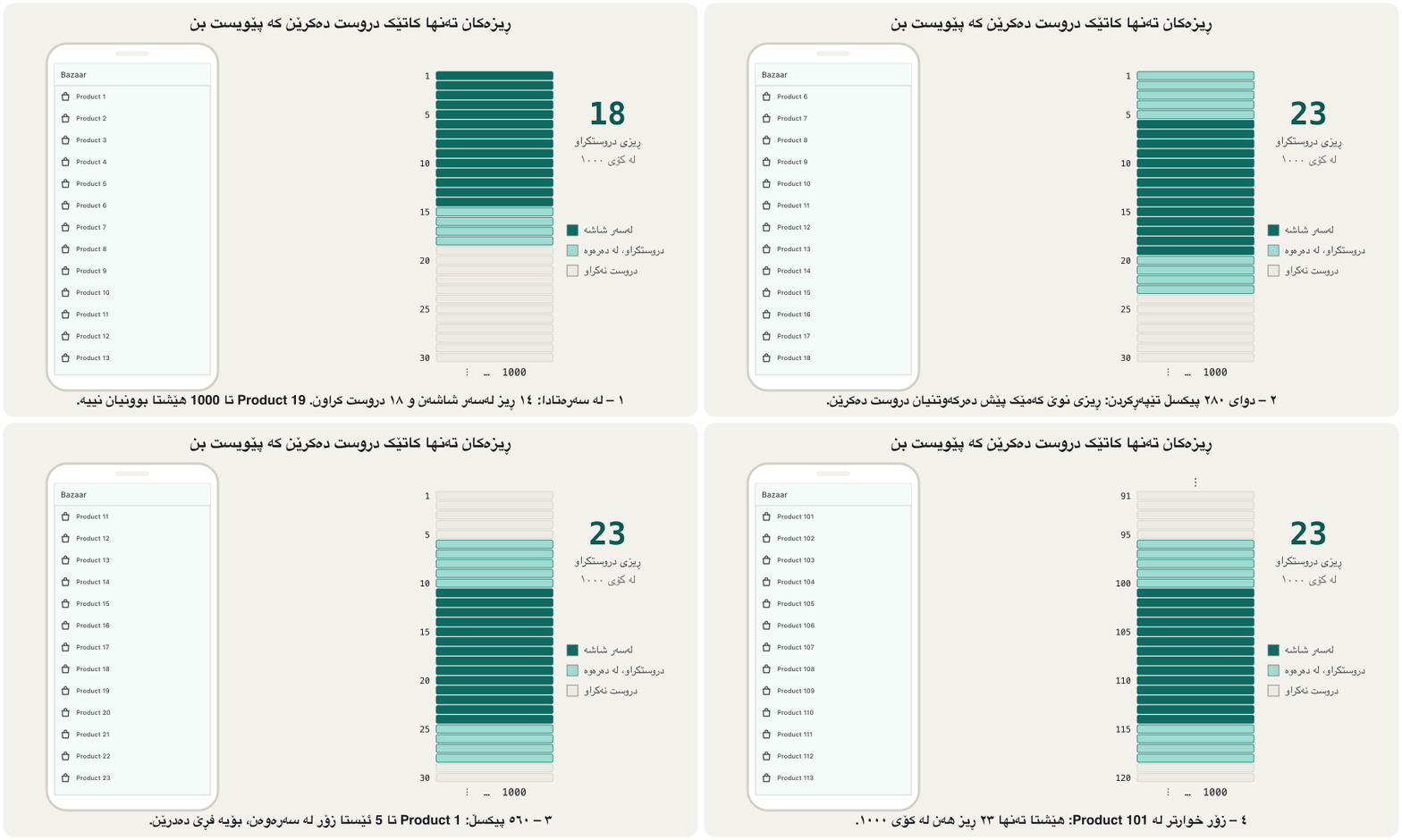
ئەمە ـە: ڕیزێک تەنها کاتێک دروست دەکرێت کە خەریکە دەردەکەوێت. لەسەر مۆبایلێکی ٨٠٠ بەرز، بە ڕیزی ٥٦ ، Flutter ئەو ١٤ ڕیزەی لەسەر شاشەن دروست دەکات لەگەڵ چەند دانەیەک لە دەرەوەی (نزیکەی ٢٥٠ ، بۆ ئەوەی نەرم بێت) — ١٨ ڕیز، نەک ١٠٠٠. لە کاتی لیستەکەدا ڕیزی نوێ دروست دەکرێن و ئەوانەی زۆر دوورن لە شاشە فڕێ دەدرێن.
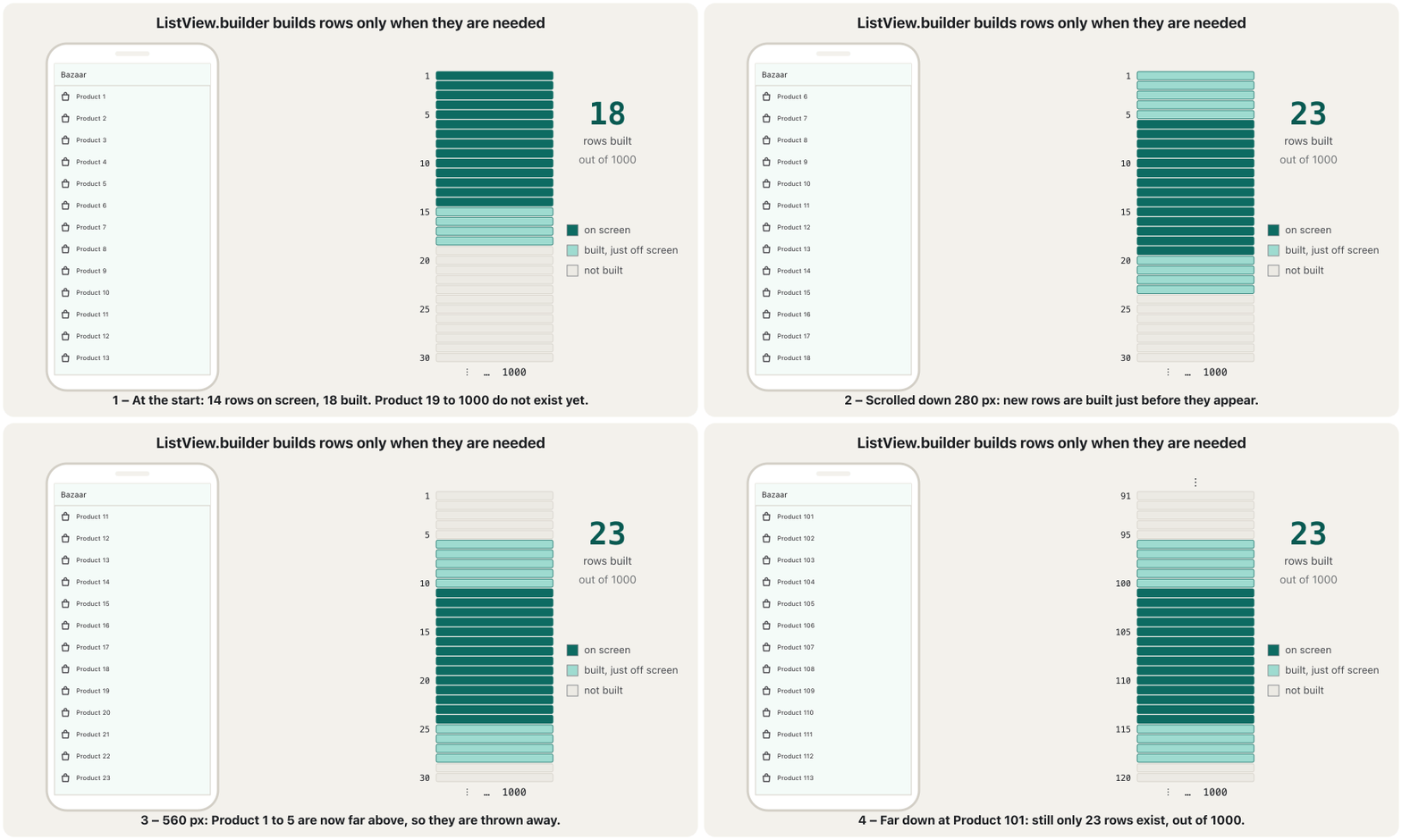
A waiter does not pour 1000 glasses of tea when the tea house opens. He pours a glass when a guest sits down, and clears the glass when the guest leaves. ListView.builder works the same way: rows are made for the tables that are full right now.
چایچی کاتێک چایخانەکە دەکرێتەوە ١٠٠٠ ئیستیکان چا تێناکات. کاتێک میوانێک دادەنیشێت ئیستیکانێک تێدەکات و کاتێک دەڕوات ئیستیکانەکە هەڵدەگرێتەوە. ListView.builder بە هەمان شێوە کار دەکات: ڕیزەکان بۆ ئەو مێزانە دروست دەکرێن کە ئێستا پڕن.
Where the analogy stops workingسنووری ئەم نموونەیە
A good waiter also gets the next glass ready just before a guest arrives — like the rows Flutter builds just outside the screen. And Flutter's rows are rebuilt from your data each time, so nothing is "remembered" in a thrown-away row.
چایچییەکی باش ئیستیکانی داهاتوو کەمێک پێش هاتنی میوان ئامادە دەکات — وەک ئەو ڕیزانەی Flutter لە دەرەوەی شاشە دروستیان دەکات. هەروەها ڕیزەکانی Flutter هەر جارێک لە دروست دەکرێنەوە، بۆیە هیچ شتێک لە ڕیزێکی فڕێدراودا «لە بیر نامێنێتەوە».
ListView.builder: long lists built on demandListView.builder: لیستی درێژ کە بە پێی پێویست دروست دەکرێت
itemCount, endless lists and fixed heightsitemCount، لیستی بێکۆتا و بەرزیی جێگیر
- Leave out
itemCountand the list is endless: Flutter keeps askingitemBuilderfor more rows (useful for a feed that loads more data). ReturnnullfromitemBuilderto say there are no more rows. - If every row has the same height, tell the list with
itemExtent: 56orprototypeItem: …. Then scrolling far (for example dragging the scrollbar) is faster, because Flutter does not have to measure every row. indexstarts at 0: the first row isproducts[0].
- ئەگەر
itemCountنەنووسیت، لیستەکە بێکۆتا دەبێت: Flutter بەردەوام داوای ڕیزی زیاتر لەitemBuilderدەکات (بۆ فیدێک کە زیاتر بار دەکات بەسوودە). لەitemBuilderـەوەnullبگەڕێنەوە بۆ ئەوەی بڵێیت ڕیزی تر نییە. - ئەگەر هەموو ڕیزەکان هەمان بەرزییان هەبێت، بە
itemExtent: 56یانprototypeItem: …بە لیستەکە بڵێ. ئەوکات دوور (بۆ نموونە ڕاکێشانی scrollbar) خێراترە، چونکە Flutter پێویست ناکات هەموو ڕیزێک بپێوێت. indexلە 0ـەوە دەست پێ دەکات: یەکەم ڕیزproducts[0]ـە.
ListView.separated and horizontal listsListView.separated و لیستی ئاسۆیی
ListView.separated is a builder with a second function, separatorBuilder, which builds a widget between every two rows — usually a thin Divider line. With 5 cities there are 4 separators.
ListView.separated builderـێکە بە دووەمەوە، separatorBuilder، کە لە نێوان هەر دوو ڕیزێکدا دروست دەکات — زۆرجار هێڵێکی باریکی Divider. بە ٥ شار، ٤ جیاکەرەوە هەن.
@override
Widget build(BuildContext context) {
  return ListView.separated(
    itemCount: cities.length,
    itemBuilder: (context, index) => ListTile(title: Text(cities[index])),
    separatorBuilder: (context, index) => const Divider(),
  );
}
Explain the codeڕوونکردنەوەی کۆدەکە
- Lineدێڕی 5
One row per city.
citiesis aList<String>of city names.یەک ڕیز بۆ هەر شارێک.
citiesلە ناوی شارەکان (List<String>).- Lineدێڕی 6
One Divider between every two rows (not after the last).
یەک Divider لە نێوان هەر دوو ڕیزێکدا (نەک لە دوای دوایینیان).
A list can also scroll sideways: set scrollDirection: Axis.horizontal. A horizontal list has no natural height, so put it in a SizedBox with a height — a common pattern for a strip of categories above a product list.
لیست دەتوانێت ئاسۆییشی هەبێت: scrollDirection: Axis.horizontal دابنێ. لیستی ئاسۆیی بەرزیی سروشتیی نییە، بۆیە بیخە ناو SizedBoxـێک بە بەرزییەکەوە — شێوازێکی باوە بۆ شریتێکی پۆلەکان لە سەرووی لیستی کاڵاکانەوە.
@override
Widget build(BuildContext context) {
  return SizedBox(
    height: 56, // a horizontal list needs a height
    child: ListView.builder(
      scrollDirection: Axis.horizontal,
      itemCount: categories.length,
      itemBuilder: (context, index) => Padding(
        padding: const EdgeInsets.all(8),
        child: Chip(label: Text(categories[index])),
      ),
    ),
  );
}
Explain the codeڕوونکردنەوەی کۆدەکە
- Lineدێڕی 3-4
The list needs a fixed height; 56 fits one row of chips.
لیستەکە بەرزییەکی جێگیری پێویستە؛ ٥٦ بۆ یەک ڕیز chip دەگونجێت.
- Lineدێڕی 6
Scroll left and right instead of up and down. In a Kurdish app the first chip is on the right.
بۆ چەپ و ڕاست لە جیاتی سەرەوە و خوارەوە. لە کوردیدا یەکەم chip لە ڕاستە.
- Lineدێڕی 7-8
categoriesis aList<String>such as Phones, Books, Toys.categoriesلە ناوی پۆلەکان (List<String>)، وەک Phones، Books، Toys.
GridView: tiles in rows and columnsGridView: خانەکان لە ڕیز و ستووندا
A grid shows tiles in rows and columns, like a photo gallery or a shop window. GridView scrolls along its main axis (down, by default) and puts several tiles across its cross axis. There are three common ways to make one:
تۆڕ خانەکان لە ڕیز و ستووندا پیشان دەدات، وەک گەلەرییەکی وێنە یان جامخانەی دوکانێک. GridView بە درێژایی توانای هەیە (بە شێوەی بنەڕەت بەرەو خوار) و چەند خانەیەک لەسەر دادەنێت. سێ ڕێگای باو هەیە بۆ دروستکردنی:
@override
Widget build(BuildContext context) {
  return GridView.count(
    crossAxisCount: 2, // two tiles in every row
    mainAxisSpacing: 8, // space between rows
    crossAxisSpacing: 8, // space between columns
    padding: const EdgeInsets.all(8),
    children: List.generate(6, (i) {
      return Container(
        color: Colors.teal[100 * (i + 1)],
        alignment: Alignment.center,
        child: Text('Photo ${i + 1}'),
      );
    }),
  );
}
Explain the codeڕوونکردنەوەی کۆدەکە
- Lineدێڕی 4
Always two tiles across, whatever the screen width.
هەمیشە دوو خانە بە پانی، پانیی شاشەکە هەرچی بێت.
- Lineدێڕی 5-6
The gaps between rows and between columns.
بۆشایی نێوان ڕیزەکان و نێوان ستوونەکان.
- Lineدێڕی 8-14
Six coloured tiles; tiles are square unless you set
childAspectRatio.شەش خانەی ڕەنگاوڕەنگ؛ خانەکان چوارگۆشەن مەگەر
childAspectRatioدابنێیت.
@override
Widget build(BuildContext context) {
  return GridView.extent(
    maxCrossAxisExtent: 120, // each tile at most 120 wide
    children: List.generate(12, (i) => Center(child: Text('${i + 1}'))),
  );
}
Explain the codeڕوونکردنەوەی کۆدەکە
- Lineدێڕی 4
Each tile is at most 120 wide. A 400-wide phone gets 4 columns (100 each); a wide tablet gets more.
هەر خانەیەک لە ١٢٠ پانتر نابێت. مۆبایلێکی ٤٠٠ پان ٤ ستوون وەردەگرێت (هەر یەکە ١٠٠)؛ پان زیاتر.
GridView: tiles in rows and columnsGridView: خانەکان لە ڕیز و ستووندا
GridView.builder for long gridsGridView.builder بۆ تۆڕی درێژ
Both constructors above take a children list, so every tile is created in advance. For a long or data-driven grid, use GridView.builder, which builds tiles lazily like ListView.builder. Its layout comes from a grid delegate:
هەردوو سەرەوە لیستی children وەردەگرن، بۆیە هەموو خانەیەک پێشوەختە دروست دەکرێت. بۆ تۆڕێکی درێژ یان پشتبەستوو بە ، GridView.builder بەکار بهێنە کە وەک ListView.builder خانەکان بە دروست دەکات. شێوەی تۆڕەکەی لە grid delegateـێکەوە دێت:
@override
Widget build(BuildContext context) {
  return GridView.builder(
    padding: const EdgeInsets.all(8),
    gridDelegate: const SliverGridDelegateWithFixedCrossAxisCount(
      crossAxisCount: 2,
      mainAxisSpacing: 8,
      crossAxisSpacing: 8,
      childAspectRatio: 3 / 4, // tiles taller than wide
    ),
    itemCount: products.length,
    itemBuilder: (context, index) {
      return Card(
        child: Column(
          children: [
            const Expanded(child: Icon(Icons.image, size: 64)),
            Padding(
              padding: const EdgeInsets.all(8),
              child: Text(products[index]),
            ),
          ],
        ),
      );
    },
  );
}
Explain the codeڕوونکردنەوەی کۆدەکە
- Lineدێڕی 5-10
SliverGridDelegateWithFixedCrossAxisCountis the builder version ofGridView.count. (…WithMaxCrossAxisExtentis the version ofextent.)SliverGridDelegateWithFixedCrossAxisCountوەشانی builderـیGridView.countـە. (…WithMaxCrossAxisExtentوەشانیextentـە.)- Lineدێڕی 9
childAspectRatiois the width divided by the height.3 / 4makes tiles taller than they are wide (the default 1.0 makes squares).childAspectRatioپانییە دابەش بەسەر بەرزیدا.3 / 4خانەکان لە پانییان بەرزتر دەکات (بنەڕەتی 1.0 چوارگۆشە دروست دەکات).- Lineدێڕی 11-24
One Card per product: a picture area that takes the free height (
Expanded) and the name under it.یەک Card بۆ هەر کاڵایەک: ناوچەیەکی وێنە کە بەرزییە بەتاڵەکە دەگرێت (
Expanded) و ناوەکە لە ژێریدا.
The course's product-catalogue project builds a full screen like this one: Project: a product catalogue screen.
پڕۆژەی کاتالۆگی کاڵای وانەکان شاشەیەکی تەواوی وەک ئەمە دروست دەکات: پڕۆژە: شاشەی کاتالۆگی کاڵا.
Lists inside a Column, and scrolling a whole screenلیست لە ناو Columnـدا و تێپەڕکردنی هەموو شاشەیەک
A very common error: you put a heading and a ListView in a Column. A ListView wants to be as tall as possible, and a Column gives its normal children unlimited height, so the ListView would be infinitely tall. Flutter stops with Vertical viewport was given unbounded height.
زۆر باو: سەردێڕێک و ListViewـێک دەخەیتە ناو Columnـێکەوە. ListView دەیەوێت هێندەی بکرێت بەرز بێت و Column بەرزیی بێسنوور دەدات بە منداڵە ئاساییەکانی، بۆیە ListViewـەکە بەرزییەکی بێکۆتای دەبوو. Flutter بەم پەیامە دەوەستێت: Vertical viewport was given unbounded height.
@override
Widget build(BuildContext context) {
  // Runtime error: "Vertical viewport was given unbounded height."
  return Column(
    children: [
      const Text('Messages'),
      ListView.builder(
        itemCount: 50,
        itemBuilder: (context, index) => ListTile(title: Text('Message $index')),
      ),
    ],
  );
}
Explain the codeڕوونکردنەوەی کۆدەکە
- Lineدێڕی 7-10
A ListView straight inside a Column: no height limit.
ListViewـێک ڕاستەوخۆ لە ناو Columnـدا: هیچ سنوورێکی بەرزی نییە.
@override
Widget build(BuildContext context) {
  return Column(
    children: [
      const Text('Messages'),
      Expanded(
        child: ListView.builder(
          itemCount: 50,
          itemBuilder: (context, index) => ListTile(title: Text('Message $index')),
        ),
      ),
    ],
  );
}
Explain the codeڕوونکردنەوەی کۆدەکە
- Lineدێڕی 6-11
Expanded gives the ListView exactly the height that is left under the heading.
Expanded ڕێک ئەو بەرزییە دەداتە ListView کە لە ژێر سەردێڕەکەدا ماوەتەوە.
Why a ListView inside a Column gives the 'unbounded height' error, and what each fix costs: Expanded, a fixed height or shrinkWrap.
بۆچی ListView لە ناو Columnـدا هەڵەی «unbounded height» دەدات و هەر چارەسەرێک چ نرخێکی هەیە: Expanded، بەرزییەکی جێگیر یان shrinkWrap.
Whole video (4:54, June 2021): the error, why a Column causes it and the fixes; Expanded, the fix on this screen, still works the same way.
هەموو ڤیدیۆکە (4:54، ساڵی 2021): هەڵەکە، بۆچی Column دروستی دەکات و چارەسەرەکان؛ Expanded، کە چارەسەری ئەم شاشەیەیە، هێشتا هەروا کار دەکات.
Lists inside a Column, and scrolling a whole screenلیست لە ناو Columnـدا و تێپەڕکردنی هەموو شاشەیەک
SingleChildScrollView: a whole screen that scrollsSingleChildScrollView: شاشەیەکی تەواو کە توانای تێپەڕکردنی هەیە
Sometimes the whole screen is a short Column that might not fit — a form on a small phone, or when the keyboard opens. Then wrap the Column in a SingleChildScrollView: it scrolls one child (the Column) as a whole. (It builds everything at once, so it is for forms, not for long lists.) The keyboard case is shown in drawers, bottom bars and sheets.
هەندێک جار هەموو شاشەکە Columnـێکی کورتە کە لەوانەیە جێی نەبێتەوە — لەسەر مۆبایلێکی بچووک، یان کاتێک دەکرێتەوە. ئەوکات Columnـەکە لە ناو SingleChildScrollViewـدا دابنێ: بۆ یەک منداڵ (Columnـەکە) بە تەواوی دابین دەکات. (هەموو شتێک یەکجار دروست دەکات، بۆیە بۆ ، نەک بۆ لیستی درێژ.) حاڵەتی لە لیستە لاتەنیشتەکان، شریتەکانی خوارەوە و پەڕەی خوارەوە پیشان دراوە.
@override
Widget build(BuildContext context) {
  return const SingleChildScrollView(
    padding: EdgeInsets.all(16),
    child: Column(
      children: [
        TextField(decoration: InputDecoration(labelText: 'Name')),
        TextField(decoration: InputDecoration(labelText: 'Phone')),
        TextField(decoration: InputDecoration(labelText: 'City')),
        TextField(decoration: InputDecoration(labelText: 'Address')),
      ],
    ),
  );
}
Explain the codeڕوونکردنەوەی کۆدەکە
- Lineدێڕی 3
The Column inside can now be taller than the screen; the user scrolls to see the rest.
Columnـی ناوەوە ئێستا دەتوانێت لە شاشەکە بەرزتر بێت؛ بە ئەوانی تر دەبینێت.
A friendly 2025 course whose short chapters show one Flutter widget at a time: layouts, the app frame, bars, buttons, lists and pictures.
کۆرسێکی دۆستانەی 2025 کە بەشە کورتەکانی هەر جارە یەک پیشان دەدەن: ، چوارچێوەی ، شریتەکان، ، و وێنەکان.
Watch 1:51:12-1:52:51 ('SingleChildScrollView'): making a whole screen scroll.
لە 1:51:12 تا 1:52:51 سەیر بکە (SingleChildScrollView): وا دەکات بتوانیت هەموو شاشەکە بکەیت.
Smooth scrollingتێپەڕکردنی نەرم
A phone redraws the screen 60 or more times a second while you scroll, so each row must be quick to build. A checklist:
مۆبایل لە کاتی ٦٠ جار یان زیاتر لە چرکەیەکدا شاشەکە دەکێشێتەوە، بۆیە هەر ڕیزێک دەبێت بە خێرایی دروست بکرێت. لیستی پشکنین:
- Use
ListView.builder/GridView.builderfor long or unknown-length lists. - Keep
itemBuilderlight: prepare the data first (sorting, filtering, formatting) instead of doing it for every row on every scroll. - Mark widgets that never change
const, so Flutter can reuse them. - Give fixed-height rows an
itemExtentorprototypeItem. - Load pictures at the size you show them, and do not wrap long lists in
shrinkWraporSingleChildScrollView. - If rows can be reordered or removed, give each one a
keybuilt from its data, so Flutter keeps the right state with the right row — see keys.
- بۆ لیستی درێژ یان نەزانراو
ListView.builder/GridView.builderبەکار بهێنە. itemBuilderسووک بهێڵەوە: سەرەتا ئامادە بکە (ڕیزکردن، پاڵاوتن، شێوەدان) لە جیاتی ئەوەی بۆ هەر ڕیزێک لە هەر بیکەیت.- کە هەرگیز ناگۆڕێن بە
constدیاری بکە، بۆ ئەوەی Flutter دووبارە بەکاریان بهێنێتەوە. - بۆ ڕیزی بەرزی جێگیر
itemExtentیانprototypeItemدابنێ. - وێنەکان بەو قەبارەیەی پیشانیان دەدەیت بار بکە و لیستی درێژ لە
shrinkWrapیانSingleChildScrollViewـدا دامەنێ. - ئەگەر ڕیزەکان ڕیزبەندییان دەگۆڕێت یان لادەبرێن، لە بدە بە هەر یەکەیان، بۆ ئەوەی Flutter دروست لەگەڵ ڕیزی دروست بپارێزێت — سەیری کلیلەکان بکە.
Common mistakesهەڵە باوەکان
| Mistakeهەڵە | Fixچارەسەر |
|---|---|
A long list written as Column(children: …): it overflows.لیستێکی درێژ بە Column(children: …): لە شاشە دەردەچێت. | Use ListView / ListView.builder.ListView / ListView.builder بەکار بهێنە. |
ListView(children: …) for hundreds of rows.ListView(children: …) بۆ سەدان ڕیز. | ListView.builder with itemCount.ListView.builder لەگەڵ itemCount. |
| A ListView straight inside a Column or another ListView.ListViewـێک ڕاستەوخۆ لە ناو Column یان ListViewـێکی تردا. | Give it a height: Expanded or SizedBox(height: …).بەرزییەکی بدەرێ: Expanded یان SizedBox(height: …). |
| A horizontal ListView with no height.ListViewـێکی ئاسۆیی بەبێ بەرزی. | Put it in a SizedBox(height: …).بیخە ناو SizedBox(height: …)ـەوە. |
Forgetting itemCount and reading past the end of the data.لەبیرکردنی itemCount و خوێندنەوە لە دوای کۆتایی . | itemCount: items.length (a missing count means an endless list and a RangeError).itemCount: items.length (نەبوونی ژمارە واتە لیستی بێکۆتا و RangeError). |
maxCrossAxisExtent: 2 when you meant two columns.maxCrossAxisExtent: 2 کاتێک مەبەستت دوو ستوون بوو. | crossAxisCount: 2 (or GridView.count).crossAxisCount: 2 (یان GridView.count). |
Exercisesڕاهێنانەکان
Given a List<String> names, build a contacts list: each row has a round avatar with the first letter, the name, and a call icon at the end, with a thin line between rows. It must work for 5 or 5000 names.
بە List<String> namesـێک، لیستێکی پەیوەندی دروست بکە: هەر ڕیزێک وێنەیەکی خڕی بە یەکەم پیت، ناوەکە و پەیوەندی لە کۆتایی هەیە و هێڵێکی باریک لە نێوان ڕیزەکاندایە. دەبێت بۆ ٥ یان ٥٠٠٠ ناو کار بکات.
Hintئاماژە
ListView.separated with itemCount: names.length.
ListView.separated لەگەڵ itemCount: names.length.
Show answerوەڵامەکە پیشان بدە
@override
Widget build(BuildContext context) {
  return ListView.separated(
    itemCount: names.length,
    itemBuilder: (context, index) {
      final name = names[index];
      return ListTile(
        leading: CircleAvatar(child: Text(name[0])),
        title: Text(name),
        trailing: const Icon(Icons.call),
      );
    },
    separatorBuilder: (context, index) => const Divider(height: 1),
  );
}
Explain the codeڕوونکردنەوەی کۆدەکە
- Lineدێڕی 3
separatedis a lazy builder that also adds separators.separatedbuilderـێکە کە بە کار دەکات و جیاکەرەوەش زیاد دەکات.- Lineدێڕی 8
name[0]is the first letter of the name.name[0]یەکەم پیتی ناوەکەیە.- Lineدێڕی 13
Divider(height: 1)keeps the line thin and close.Divider(height: 1)هێڵەکە باریک و نزیک دەهێڵێتەوە.
Show the numbers 1 to 30 in a grid of 3 columns with 8-pixel gaps, built lazily.
ژمارەکانی ١ تا ٣٠ لە تۆڕێکی ٣ ستوونیدا بە بۆشایی ٨ پیشان بدە، بە .
Show answerوەڵامەکە پیشان بدە
@override
Widget build(BuildContext context) {
  return GridView.builder(
    padding: const EdgeInsets.all(8),
    gridDelegate: const SliverGridDelegateWithFixedCrossAxisCount(
      crossAxisCount: 3,
      mainAxisSpacing: 8,
      crossAxisSpacing: 8,
    ),
    itemCount: 30,
    itemBuilder: (context, index) => Container(
      alignment: Alignment.center,
      color: Colors.amber[100],
      child: Text('${index + 1}', style: const TextStyle(fontSize: 24)),
    ),
  );
}
Explain the codeڕوونکردنەوەی کۆدەکە
- Lineدێڕی 5-9
3 columns, 8 pixels between rows and columns.
٣ ستوون، ٨ لە نێوان ڕیز و ستوونەکاندا.
- Lineدێڕی 14
indexstarts at 0, so the label isindex + 1.indexلە 0ـەوە دەست پێ دەکات، بۆیە ناونیشانەکەindex + 1ـە.
Rewrite the course's five-item list (Map, Album, Phone, Contact, Setting) with ListView.builder, using a list of records (IconData, String) for the data.
لیستە پێنج دانەییەکەی وانەکان (Map، Album، Phone، Contact، Setting) بە ListView.builder دووبارە بنووسەوە و بۆ لیستێک لە recordـی (IconData, String) بەکار بهێنە.
Show answerوەڵامەکە پیشان بدە
static const items = [
  (Icons.map, 'Map'),
  (Icons.photo_album, 'Album'),
  (Icons.phone, 'Phone'),
  (Icons.contacts, 'Contact'),
  (Icons.settings, 'Setting'),
];

@override
Widget build(BuildContext context) {
  return ListView.builder(
    itemCount: items.length,
    itemBuilder: (context, index) {
      final (icon, label) = items[index];
      return ListTile(leading: Icon(icon), title: Text(label));
    },
  );
}
The rows now come from data, so adding a sixth item means adding one line to items, not copying a whole ListTile. final (icon, label) = items[index]; takes the record apart (Dart 3 patterns).
ئێستا ڕیزەکان لە دێن، بۆیە زیادکردنی شتی شەشەم واتە زیادکردنی یەک دێڕ بۆ items، نەک لەبەرگرتنەوەی ListTileـێکی تەواو. final (icon, label) = items[index]; recordـەکە لێک دەکاتەوە (patternـەکانی 3).
Summaryپوختە
- A list shows rows of similar items and must scroll; use
ListView, not a Column. ListTilehas leading, title, subtitle, trailing and onTap; it mirrors in a Kurdish app.ListView.builder(itemCount, itemBuilder)builds rows lazily: about 20 of 1000 exist at once.ListView.separatedadds separators between rows.scrollDirection: Axis.horizontal, with a SizedBox height, for sideways lists.- Grids:
GridView.count(fixed columns),GridView.extent(max tile width),GridView.builderwith a grid delegate (lazy). - A ListView in a Column needs
Expanded; a short screen that might not fit usesSingleChildScrollView.
- لیست ڕیزی شتی هاوشێوە پیشان دەدات و دەبێت توانای هەبێت؛
ListViewبەکار بهێنە، نەک Column. ListTileleading، title، subtitle، trailing و onTapـی هەیە؛ لە کوردیدا هەڵدەگەڕێتەوە.ListView.builder(itemCount, itemBuilder)ڕیزەکان بە دروست دەکات: لە ١٠٠٠ تەنها نزیکەی ٢٠ پێکەوە هەن.ListView.separatedجیاکەرەوە لە نێوان ڕیزەکاندا زیاد دەکات.scrollDirection: Axis.horizontalلەگەڵ بەرزییەکی SizedBox بۆ لیستی ئاسۆیی.- تۆڕ:
GridView.count(ستوونی جێگیر)،GridView.extent(زۆرترین پانیی خانە)،GridView.builderلەگەڵ grid delegate (). - ListView لە ناو Columnـدا
Expandedـی پێویستە؛ شاشەیەکی کورت کە لەوانەیە جێی نەبێتەوەSingleChildScrollViewبەکار دەهێنێت.
Why is ListView.builder better than ListView(children: …) for 1000 rows?بۆچی ListView.builder بۆ ١٠٠٠ ڕیز لە ListView(children: …) باشترە؟
Because it creates a row only when it is needed and throws away rows far off screen, instead of creating all 1000 widgets in advance.
چونکە ڕیزێک تەنها کاتی پێویست دروست دەکات و ڕیزە دوورەکانی دەرەوەی شاشە فڕێ دەدات، لە جیاتی ئەوەی هەموو ١٠٠٠ پێشوەختە دروست بکات.
What is the difference between crossAxisCount and maxCrossAxisExtent?جیاوازیی نێوان crossAxisCount و maxCrossAxisExtent چییە؟
crossAxisCount fixes how many tiles go across; maxCrossAxisExtent fixes the largest tile width, so wider screens get more columns.
crossAxisCount ژمارەی خانەکان بە پانی جێگیر دەکات؛ maxCrossAxisExtent گەورەترین پانیی خانە جێگیر دەکات، بۆیە شاشەی پانتر ستوونی زیاتر وەردەگرن.
Why does a ListView inside a Column cause an error?بۆچی ListView لە ناو Columnـدا هەڵە دروست دەکات؟
The Column gives it unlimited height while the ListView wants to be as tall as possible. Expanded gives it a limit.
Column بەرزیی بێسنووری دەداتێ لە کاتێکدا ListView دەیەوێت هێندەی بکرێت بەرز بێت. Expanded سنوورێکی دەداتێ.
Videoڤیدیۆ
Watch a videoسەیری ڤیدیۆیەک بکە
A video that viewers liked a lot and praised in their comments, chosen for this lesson.ڤیدیۆیەک کە بینەران زۆریان پێ خۆش بووە و لە کۆمێنتەکانیاندا ستایشیان کردووە، بۆ ئەم وانەیە هەڵبژێردراوە.
Mitch Koko's calm beginner course in Dart and Flutter: variables, operators, if/else, switch, loops, functions, collections, a first screen and a counter.
کۆرسە ئارامەکەی Mitch Koko بۆ سەرەتاییەکان لە و : ، ، if/else، switch، ، ، List/Set/Map، یەکەم شاشە و .
Watch 41:52-45:28: a ListView that scrolls (also horizontally), ListView.builder with ListTiles and itemCount, then GridView.builder with crossAxisCount.
لە 41:52 تا 45:28 سەیر بکە: ListViewـێک کە دەکرێت (بە ئاسۆییش)، ListView.builder لەگەڵ ListTile و itemCount، پاشان GridView.builder لەگەڵ crossAxisCount.
Lesson complete!وانەکە تەواو بوو!
Well done. Review the key terms, then go on to the next lesson.دەستخۆش. سەیرێکی زاراوە سەرەکییەکان بکەرەوە، پاشان بڕۆ بۆ وانەی داهاتوو.
Key termsزاراوە سەرەکییەکان
Project: A Product Catalogue Screenپرۆژە: شاشەی کەتەلۆگی کاڵاکان
Related lecturesوانە پەیوەندیدارەکان
- Layout Widgets: One Child or Manyویجێتەکانی ڕێکخستنی ڕووکار: یەک نۆدی منداڵ یان چەند دانەیەک
- Main-Axis and Cross-Axis Alignmentڕێکخستنی شوێن لەسەر تەوەرەی سەرەکی و تەوەرەی ئاوەڵ
- Drawers, Bottom Bars and Sheetsلیستە لاتەنیشتەکان، شریتەکانی خوارەوە و پەڕەی خوارەوە
- Project: A Product Catalogue Screenپرۆژە: شاشەی کەتەلۆگی کاڵاکان
- Widgets and the Widget Treeویجێتەکان و داری ویجێتەکان
- Getting Data from the Internet: HTTP and JSONوەرگرتنی دراوە لە ئینتەرنێت: HTTP و JSON
References and further readingسەرچاوەکان و خوێندنەوەی زیاتر
This lecture is a first edition. The Kurdish text and terminology are waiting for review by Kurdish IT teachers.ئەم وانەیە چاپی یەکەمە. دەقە کوردییەکە و زاراوەکانی چاوەڕێی پێداچوونەوەی مامۆستایانی کوردی بواری IT ن.