FlutterFlutter · Chapterبەش 8 · Lectureوانە 8.2
Buttonsدوگمەکان
What a button is and how onPressed enables or disables it; the course's button kinds and today's names (FlatButton, RaisedButton and OutlineButton were removed); Material 3's FilledButton, ElevatedButton, OutlinedButton, TextButton, IconButton, FAB and SegmentedButton; InkWell and button states; styling with styleFrom, ButtonStyle, WidgetStateProperty and themes; DropdownMenu and PopupMenuButton.
چییە و onPressed چۆن چالاک یان ناچالاکی دەکات؛ جۆرەکانی لە وانەکەدا و ناوەکانیان ئەمڕۆ (FlatButton، RaisedButton و OutlineButton لابران)؛ FilledButton، ElevatedButton، OutlinedButton، TextButton، IconButton، FAB و SegmentedButtonـی Material 3؛ InkWell و دۆخەکانی ؛ شێوازدان بە styleFrom، ButtonStyle، WidgetStateProperty و ؛ DropdownMenu و PopupMenuButton.
What you will learnچی فێر دەبیت
- Explain what a button is, and enable or disable one with onPressed.
- Replace FlatButton, RaisedButton and OutlineButton with today's buttons.
- Choose between FilledButton, ElevatedButton, OutlinedButton, TextButton, IconButton and FAB by importance.
- Style buttons with styleFrom, ButtonStyle + WidgetStateProperty and themes.
- Use SegmentedButton, DropdownMenu and PopupMenuButton with state.
- ڕوون بکەیتەوە چییە و بە onPressed یەکێک چالاک یان ناچالاک بکەیت.
- FlatButton، RaisedButton و OutlineButton بە ئەمڕۆ بگۆڕیت.
- بە گوێرەی گرنگی لە نێوان FilledButton، ElevatedButton، OutlinedButton، TextButton، IconButton و FABـدا هەڵبژێریت.
- شێواز بدەیت بە بە styleFrom، ButtonStyle + WidgetStateProperty و .
- SegmentedButton، DropdownMenu و PopupMenuButton لەگەڵ بەکار بهێنیت.
What a button isدوگمە چییە
The course defines a button as the graphical control element that lets a user trigger an event: take an action, make a choice, search for something and more. Buttons can sit anywhere in a screen — in dialogs, forms, cards and toolbars.
وانەکە وا پێناسە دەکات: ئەو توخمە وێنەییەی کۆنترۆڵ کە ڕێگە بە بەکارهێنەر دەدات بەڕێ بخات: کردەوەیەک ئەنجام بدات، هەڵبژاردنێک بکات، بەدوای شتێکدا بگەڕێت و زیاتر. دەتوانن لە هەر شوێنێکی شاشەدا بن — لە ، ، کارت و شریتی ئامرازەکاندا.
Every Flutter button has two important parts: a child (what the button shows, usually a Text or an Icon) and onPressed, a callback — a function that Flutter calls when the user taps. Give onPressed a function and the button is enabled; give it null and the button is disabled: grey, and it ignores taps.
هەموو Flutter دوو بەشی گرنگی هەیە: child (ئەوەی پیشانی دەدات، زۆربەی جار Text یان Icon) و onPressed، کە — کە Flutter کاتێک بەکارهێنەر دەستی لێ دەدات بانگی دەکات. بدە بە onPressed و چالاکە؛ nullـی بدەیتێ ناچالاکە: خۆڵەمێشییە و گوێ بە دەستلێدان نادات.
A button is like the small bell on the counter of a tea house. Its look tells you press me; pressing it makes something happen somewhere else (the tea maker comes). When the tea house closes, the owner covers the bell: it is still there, but pressing it does nothing — that is a disabled button.
وەک ئەو زەنگە بچووکەیە کە لەسەر مێزی چایخانەیەکە. شێوەکەی پێت دەڵێت دامبگرە؛ داگرتنی وا دەکات شتێک لە شوێنێکی تر ڕوو بدات (چایچییەکە دێت). کاتێک چایخانەکە دادەخرێت، خاوەنەکەی زەنگەکە دادەپۆشێت: هێشتا لەوێیە، بەڵام داگرتنی هیچ ناکات — ئەوە ناچالاکە.
Where the analogy stops workingسنووری ئەم نموونەیە
A real bell rings the same way every time. A button's onPressed can run any code: save a form, open a page, add to a basket.
زەنگی ڕاستەقینە هەموو جارێک بە هەمان شێوە دەزرینگێتەوە. onPressedـی دەتوانێت هەر کۆدێک ڕابکات: پاشەکەوت بکات، پەڕەیەک بکاتەوە، بخاتە ناو سەبەتەوە.
The course's button kinds, and their names todayجۆرەکانی دوگمە لە وانەکەدا و ناوەکانیان ئەمڕۆ
The course lists eight kinds of button: Flat, Raised, Floating, Drop Down, Icon, Inkwell, Outline and PopupMenu. Its picture comes from an older Flutter. Three of those classes no longer exist, and Material 3 added new ones. This table maps every course name to today's widget:
وانەکە هەشت جۆری دەژمێرێت: Flat، Raised، Floating، Drop Down، Icon، Inkwell، Outline و PopupMenu. وێنەکەی لە Flutterـێکی کۆنترەوەیە. سێ لەوانە ئیتر بوونیان نییە و Material 3 هی نوێی زیاد کردووە. ئەم خشتەیە هەر ناوێکی وانەکە دەبەستێتەوە بە ئەمڕۆ:
| Courseوانەکە | Todayئەمڕۆ | Use it forبۆ چی |
|---|---|---|
FlatButton | TextButton | A quiet action: More details, Cancel.کردەوەیەکی کپ: More details، Cancel. |
RaisedButton | ElevatedButton | A button that must stand out from a busy background. کە دەبێت لە پاشبنەمایەکی قەرەباڵغ جیا ببێتەوە. |
OutlineButton | OutlinedButton | A medium action next to a main one.کردەوەیەکی ناوەند لە تەنیشت کردەوەیەکی سەرەکییەوە. |
| Floating Button | FloatingActionButton | The screen's most important action.گرنگترین کردەوەی شاشەکە. |
| Drop Down Button | DropdownMenu | Choosing one value from a list (DropdownButton still works).هەڵبژاردنی یەک بەها لە چەند بژاردەیەک (DropdownButtonیش هێشتا کار دەکات). |
| Icon Button | IconButton | An action shown only as an icon.کردەوەیەک کە تەنها وەک پیشان دەدرێت. |
| Inkwell Button | InkWell | Not a button class: makes any widget tappable with a ripple. نییە: هەر بە شەپۆلەوە دەکات بە دەستلێدراو. |
| PopupMenu Button | PopupMenuButton | A ⋮ button that opens a small menu of actions. ⋮ کە بچووکی کردەوەکان دەکاتەوە. |
The course's button kinds, and their names todayجۆرەکانی دوگمە لە وانەکەدا و ناوەکانیان ئەمڕۆ
FlatButton and RaisedButton are goneFlatButton و RaisedButton نەماون
Material 3 buttons: from strong to quietدوگمەکانی Material 3: لە بەهێزەوە بۆ کپ
Material 3 has five common buttons. They do the same job — run onPressed — but they look more or less important. Choose by importance, not by taste: the strongest for the one action you want most users to take, the quietest for small extras.
Material 3 پێنج باوی هەیە. هەمان کار دەکەن — onPressed ڕادەکەن — بەڵام کەمتر یان زیاتر گرنگ دەردەکەون. بە گوێرەی گرنگی هەڵیانبژێرە، نەک بە گوێرەی چێژ: بەهێزترینیان بۆ ئەو یەک کردەوەیەی دەتەوێت زۆربەی بەکارهێنەران بیکەن، کپترینیان بۆ شتی زیادەی بچووک.
import 'package:flutter/material.dart';
class ButtonGallery extends StatelessWidget {
const ButtonGallery({super.key});
void _buy() => debugPrint('Buy pressed');
@override
Widget build(BuildContext context) {
return Column(
mainAxisAlignment: MainAxisAlignment.center,
children: [
FilledButton(onPressed: _buy, child: const Text('Buy now')),
FilledButton.tonal(onPressed: _buy, child: const Text('Add to basket')),
ElevatedButton(onPressed: _buy, child: const Text('Save for later')),
OutlinedButton(onPressed: _buy, child: const Text('Compare')),
TextButton(onPressed: _buy, child: const Text('More details')),
// onPressed: null -> the button is disabled (greyed out, no ripple)
const FilledButton(onPressed: null, child: Text('Sold out')),
],
);
}
}┌─────────────────────────────┐ │ ( Buy now ) │ │ ( Add to basket ) │ │ ( Save for later ) │ │ ( Compare ) │ │ More details │ │ ( Sold out ) ← grey│ └─────────────────────────────┘
Six buttons in a column: 'Buy now' (solid teal), 'Add to basket' (light teal), 'Save for later' (light with a shadow), 'Compare' (outlined), 'More details' (teal text only) and a grey 'Sold out'.
شەش لە ستوونێکدا: 'Buy now' (شینی سەوزباوی پڕ)، 'Add to basket' (شینی سەوزباوی کاڵ)، 'Save for later' (کاڵ بە سێبەرەوە)، 'Compare' (هێڵدار)، 'More details' (تەنها دەقی شینی سەوزباو) و 'Sold out'ـی خۆڵەمێشی.
Explain the codeڕوونکردنەوەی کۆدەکە
- Lineدێڕی 6
One callback for all buttons. Pass the function's name — no
().یەک بۆ هەموو . ناوی بدە — بەبێ
().- Lineدێڕی 13
The strongest button: solid primary colour.
بەهێزترین : ڕەنگی سەرەکیی پڕ.
- Lineدێڕی 19
null→ disabled. It can even beconst.null← ناچالاک. تەنانەت دەتوانێتconstبێت.
Material 3 buttons: from strong to quietدوگمەکانی Material 3: لە بەهێزەوە بۆ کپ
Buttons with an iconدوگمە لەگەڵ ئایکۆن
Most button classes have an .icon constructor that puts an icon before a label. In a right-to-left app the icon moves to the right side of the label automatically.
زۆربەی .iconـیان هەیە کە iconـێک دەخاتە پێش labelـێکەوە. لە خۆکارانە دەچێتە لای ڕاستی .
import 'package:flutter/material.dart';
class IconLabelButtons extends StatelessWidget {
const IconLabelButtons({super.key});
@override
Widget build(BuildContext context) {
return Wrap(
spacing: 8,
children: [
FilledButton.icon(
onPressed: () {},
icon: const Icon(Icons.shopping_cart),
label: const Text('Order'),
),
OutlinedButton.icon(
onPressed: () {},
icon: const Icon(Icons.share),
label: const Text('Share'),
),
TextButton.icon(
onPressed: () {},
icon: const Icon(Icons.call),
label: const Text('Call the shop'),
),
],
);
}
}┌─────────────────────────────┐ │ │ │ (⊕ Order) (⇪ Share) │ │ ☏ Call the shop │ │ │ └─────────────────────────────┘
Three buttons side by side: a filled 'Order' with a cart icon, an outlined 'Share' with a share icon, and a text button 'Call the shop' with a phone icon.
سێ لە تەنیشت یەکەوە: 'Order'ـی پڕ بە سەبەتە، 'Share'ـی هێڵدار بە هاوبەشکردن و دەقی 'Call the shop' بە تەلەفۆن.
Explain the codeڕوونکردنەوەی کۆدەکە
- Lineدێڕی 8
Wrapputs the buttons in a row and moves them to a new line when there is no room.Wrapلە ڕیزێکدا دادەنێت و کاتێک شوێن نییە دەیانباتە دێڕێکی نوێ.- Lineدێڕی 13-14
icon:andlabel:instead ofchild:.icon:وlabel:لە جیاتیchild:.
IconButton: an icon you can tapIconButton: ئایکۆنێک کە دەستی لێ دەدرێت
IconButton is a round tap area around an Icon. Material 3 adds styled versions — IconButton.filled, .filledTonal and .outlined — and toggle buttons: with isSelected and selectedIcon, the same button shows a different icon when it is on. Because there is no text, always give a tooltip: it appears on a long press and screen readers read it aloud.
IconButton ناوچەیەکی خڕی دەستلێدانە بە دەوری Iconـێکدا. Material 3 وەشانی شێوازداری زیاد کردووە — IconButton.filled، .filledTonal و .outlined — و هەڵکردن و کوژاندنەوە: بە isSelected و selectedIcon، هەمان کاتێک داگیرساوە جیاواز پیشان دەدات. چونکە دەقی نییە، هەمیشە tooltipـێک بدە: بە پەنجەڕاگرتنی درێژ دەردەکەوێت و بە دەنگی بەرز دەیخوێننەوە.
import 'package:flutter/material.dart';
class FavouriteButton extends StatefulWidget {
const FavouriteButton({super.key});
@override
State<FavouriteButton> createState() => _FavouriteButtonState();
}
class _FavouriteButtonState extends State<FavouriteButton> {
bool _liked = false;
@override
Widget build(BuildContext context) {
return Row(
mainAxisAlignment: MainAxisAlignment.center,
children: [
IconButton(
tooltip: 'Favourite',
isSelected: _liked,
icon: const Icon(Icons.favorite_border),
selectedIcon: const Icon(Icons.favorite, color: Colors.red),
onPressed: () => setState(() => _liked = !_liked),
),
IconButton.filled(
tooltip: 'Search',
onPressed: () {},
icon: const Icon(Icons.search),
),
IconButton.filledTonal(
tooltip: 'Share',
onPressed: () {},
icon: const Icon(Icons.share),
),
IconButton.outlined(
tooltip: 'Delete',
onPressed: () {},
icon: const Icon(Icons.delete_outline),
),
],
);
}
}┌─────────────────────────────┐ │ │ │ ♡ (⌕) (⇪) (✕) │ │ │ └─────────────────────────────┘
A row of four round buttons: an empty heart (red and filled after a tap), a filled teal search, a light-teal share and an outlined delete.
ڕیزێک لە چوار خڕ: دڵێکی بەتاڵ (دوای دەستلێدان سوور و پڕ)، گەڕانی شینی سەوزباوی پڕ، هاوبەشکردنی شینی سەوزباوی کاڵ و سڕینەوەی هێڵدار.
Explain the codeڕوونکردنەوەی کۆدەکە
- Lineدێڕی 11
The on/off state lives in a State object.
هەڵکراو/کوژاوە لە دەژی.
- Lineدێڕی 20-22
Off: an empty heart. On: a red, filled heart.
کوژاوە: دڵێکی بەتاڵ. هەڵکراو: دڵێکی سووری پڕ.
- Lineدێڕی 23
Each tap flips the value and rebuilds.
هەر دەستلێدانێک بەهاکە پێچەوانە دەکاتەوە و دووبارە دروست دەکاتەوە.
FloatingActionButtonدوگمەی فڕیو: FloatingActionButton
The course's Floating Button is the FloatingActionButton (FAB): one button for the screen's most important action, floating above the content in the Scaffold's floatingActionButton slot. FloatingActionButton.extended adds a text label, and .small / .large change the size. Where it sits and how it looks is taught in floatingActionButton and Where the floating button sits.
Floating Buttonـی وانەکە FloatingActionButtonـە (FAB): یەک بۆ گرنگترین کردەوەی شاشەکە کە لە شوێنی floatingActionButtonـی Scaffoldـدا لە سەرووی ناوەڕۆکەوە دەفڕێت. FloatingActionButton.extended دەق زیاد دەکات و .small / .large قەبارەکە دەگۆڕن. شوێن و شێوەکەی لە floatingActionButton و دوگمەی کردەوەی سەرەکی لە کوێ دادەنیشێتدا فێر دەکرێت.
import 'package:flutter/material.dart';
class OrdersPage extends StatelessWidget {
const OrdersPage({super.key});
@override
Widget build(BuildContext context) {
return Scaffold(
appBar: AppBar(title: const Text('Orders')),
body: const Center(child: Text('No orders yet')),
floatingActionButton: FloatingActionButton.extended(
onPressed: () {},
icon: const Icon(Icons.add),
label: const Text('New order'),
),
);
}
}┌─────────────────────────────┐ │ Orders │ ├─────────────────────────────┤ │ │ │ No orders yet │ │ │ │ ( + New order )│ └─────────────────────────────┘
'No orders yet' in the middle and, at the bottom end corner, a wide rounded button with + and 'New order'.
'No orders yet' لە ناوەڕاستدا و لە گۆشەی خوارەوەی کۆتاییدا پانی گۆشەخڕ بە + و 'New order'.
Explain the codeڕوونکردنەوەی کۆدەکە
- Lineدێڕی 11
Icon + label in one wide floating button.
+ لە یەک فڕیوی پاندا.
A button's states: normal, pressed, disabledدۆخەکانی دوگمە: ئاسایی، داگیراو، ناچالاک
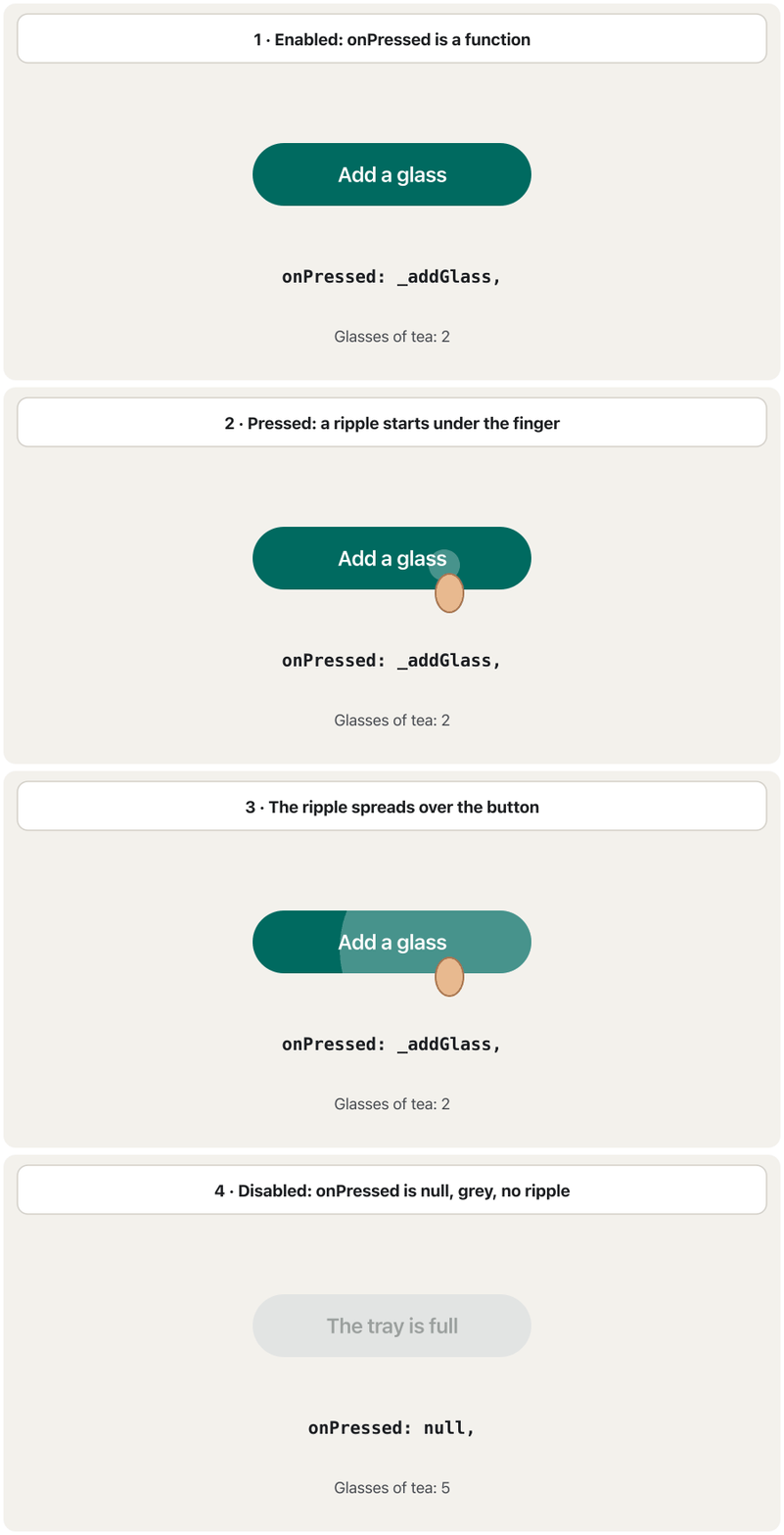
A button changes its look to tell the user what is happening. Flutter calls these states: enabled (normal), hovered (a mouse is over it), focused (selected with the keyboard), pressed (a finger is on it — the ripple spreads from the touch point) and disabled (grey, no ripple, no onPressed).
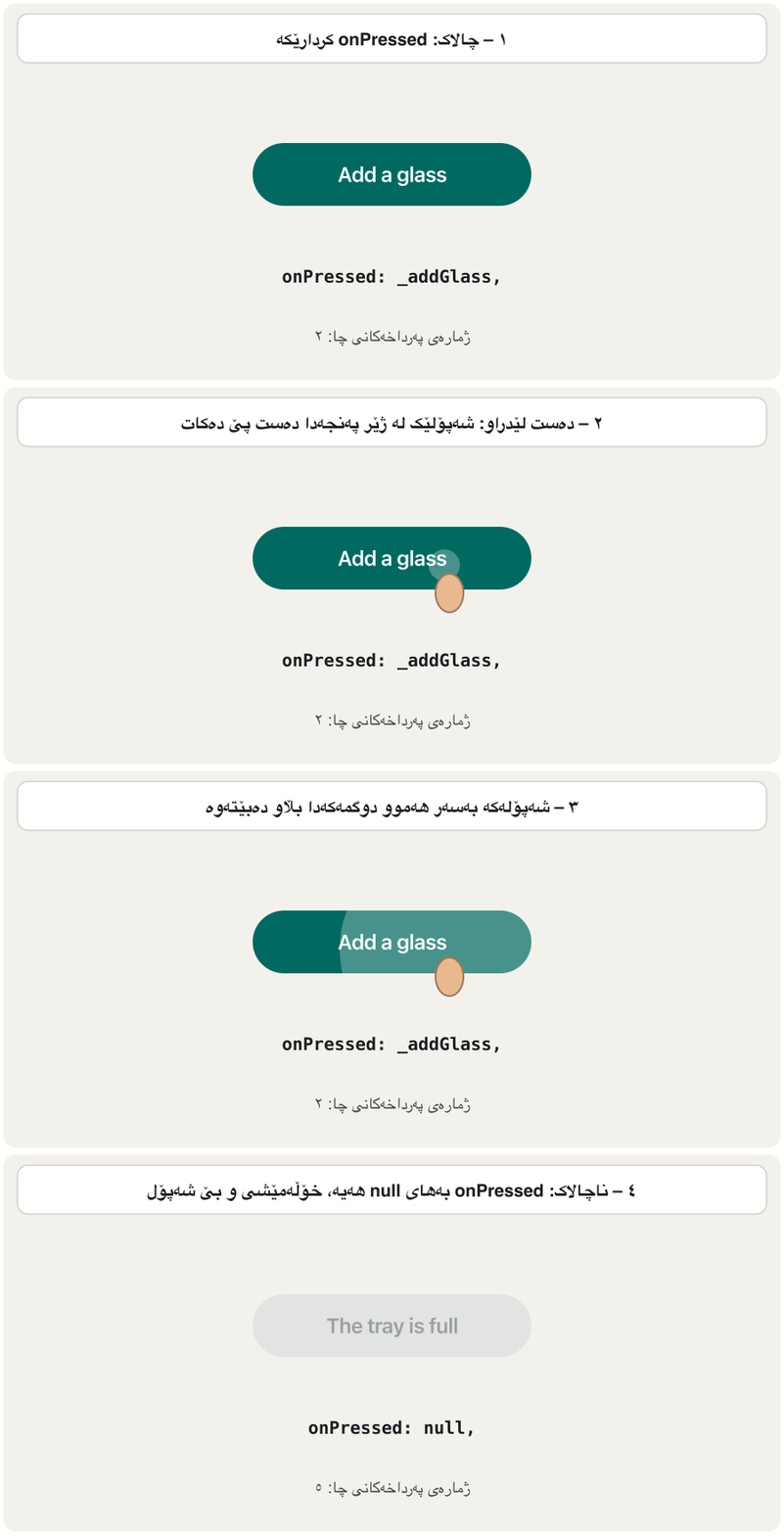
شێوەی خۆی دەگۆڕێت بۆ ئەوەی بە بەکارهێنەر بڵێت چی ڕوو دەدات. Flutter ئەمانە ناو دەنێت دۆخ: enabled (ئاسایی)، hovered ( لەسەریەتی)، focused (بە هەڵبژێردراوە)، pressed (پەنجەیەک لەسەریەتی — شەپۆلەکە لە خاڵی دەستلێدانەوە بڵاو دەبێتەوە) و disabled (خۆڵەمێشی، بێ شەپۆل، بێ onPressed).
import 'package:flutter/material.dart';
class TeaCounter extends StatefulWidget {
const TeaCounter({super.key});
@override
State<TeaCounter> createState() => _TeaCounterState();
}
class _TeaCounterState extends State<TeaCounter> {
static const int maxGlasses = 5;
int _glasses = 0;
void _addGlass() {
setState(() => _glasses++);
}
@override
Widget build(BuildContext context) {
final bool full = _glasses >= maxGlasses;
return Column(
mainAxisSize: MainAxisSize.min,
children: [
Text('Glasses of tea: $_glasses', style: const TextStyle(fontSize: 22)),
const SizedBox(height: 12),
FilledButton(
// A function -> enabled. null -> disabled.
onPressed: full ? null : _addGlass,
child: Text(full ? 'The tray is full' : 'Add a glass'),
),
],
);
}
}┌─────────────────────────────┐ │ │ │ Glasses of tea: 0 │ │ │ │ ( Add a glass ) │ │ │ │ after 5 taps: │ │ Glasses of tea: 5 │ │ ( The tray is full ) ← grey│ └─────────────────────────────┘
'Glasses of tea: 0' and a teal 'Add a glass' button. After five taps: 'Glasses of tea: 5' and a grey, disabled 'The tray is full'.
'Glasses of tea: 0' و شینی سەوزباوی 'Add a glass'. دوای پێنج دەستلێدان: 'Glasses of tea: 5' و 'The tray is full'ـی خۆڵەمێشیی ناچالاک.
Explain the codeڕوونکردنەوەی کۆدەکە
- Lineدێڕی 20
Decide from the state whether the button may be used.
لە بڕیار بدە ئایا دەتوانرێت بەکار بهێنرێت.
- Lineدێڕی 28
A function → enabled;
null→ disabled. Flutter draws the grey look for you.← چالاک؛
null← ناچالاک. Flutter خۆی شێوە خۆڵەمێشییەکە دەکێشێت.- Lineدێڕی 29
Tell the user why the button is off.
بە بەکارهێنەر بڵێ بۆچی کوژاوەتەوە.
A button's states: normal, pressed, disabledدۆخەکانی دوگمە: ئاسایی، داگیراو، ناچالاک
InkWell: make anything tappableInkWell: هەر شتێک بکە بە دەستلێدراو
The course's Inkwell Button is not a button class. InkWell wraps any widget — a card, a row, a picture — and gives it onTap, onLongPress and the Material ripple. The ripple is drawn on the nearest Material widget above it (a Card, a Scaffold or Material itself). An InkWell must have one: without it, Flutter stops with the error No Material widget found.
Inkwell Buttonـی وانەکە نییە. InkWell هەر — کارتێک، ڕیزێک، وێنەیەک — لە خۆ دەگرێت و onTap، onLongPress و شەپۆلی Material دەداتێ. شەپۆلەکە لەسەر نزیکترین Material لە سەرووییەوە دەکێشرێت (Card، Scaffold یان خودی Material). InkWell دەبێت یەکێکی هەبێت: بەبێ ئەو، Flutter بە No Material widget found دەوەستێت.
import 'package:flutter/material.dart';
class TappableCard extends StatelessWidget {
const TappableCard({super.key});
@override
Widget build(BuildContext context) {
return Card(
// Card is a Material, so InkWell can draw its ripple on it.
clipBehavior: Clip.antiAlias,
child: InkWell(
onTap: () => debugPrint('Card tapped'),
onLongPress: () => debugPrint('Card long-pressed'),
child: const Padding(
padding: EdgeInsets.all(16),
child: Row(
children: [
Icon(Icons.local_cafe),
SizedBox(width: 12),
Text('Kurdish tea · 500 IQD'),
],
),
),
),
);
}
}┌─────────────────────────────┐ │ │ │ ┌─────────────────────────┐ │ │ │ ♨ Kurdish tea · 500 IQD│ │ │ └─────────────────────────┘ │ │ │ └─────────────────────────────┘
A card with a cup icon and 'Kurdish tea · 500 IQD'. Tapping it spreads a ripple over the card.
کارتێک بە کوپ و 'Kurdish tea · 500 IQD'. دەستلێدانی شەپۆلێک بەسەر کارتەکەدا بڵاو دەکاتەوە.
Explain the codeڕوونکردنەوەی کۆدەکە
- Lineدێڕی 10
Keeps the ripple inside the card's round corners.
شەپۆلەکە لە ناو گۆشە خڕەکانی کارتەکەدا دەهێڵێتەوە.
- Lineدێڕی 12-13
A tap and a long press can do different things.
دەستلێدان و پەنجەڕاگرتنی درێژ دەتوانن کاری جیاواز بکەن.
Styling a button: styleFromشێوازدان بە دوگمە: styleFrom
The course lists the standard features of buttons: they can be themed (shape, colour, animation, behaviour), the icons and text inside them can be styled, and a button can be composed of different child widgets — its child can be any widget, such as a Row with an icon and two texts.
وانەکە تایبەتمەندییە ستانداردەکانی دەژمێرێت: دەتوانرێت پێ بدرێت (شێوە، ڕەنگ، جووڵە، ڕەفتار)، و دەقی ناویان دەتوانرێت شێوازیان پێ بدرێت و دەتوانێت لە منداڵی جیاواز پێک بێت — childـەکەی دەتوانێت هەر بێت، وەک Rowـێک بە و دوو دەقەوە.
Today all of a button's looks live in one ButtonStyle given to style:. The easy way to make one is the button's static styleFrom method. Here are the course's FlatButton and RaisedButton rewritten: color becomes backgroundColor, textColor becomes foregroundColor (it colours the text, the icon and the ripple), and the text size moves into textStyle.
ئەمڕۆ هەموو شێوەکانی لە یەک ButtonStyleـدان کە دەدرێت بە style:. ڕێگە ئاسانەکە بۆ دروستکردنی، styleFromـی . ئەمە FlatButton و RaisedButtonـی وانەکەیە بە نووسینەوەی نوێ: color دەبێت بە backgroundColor، textColor دەبێت بە foregroundColor (دەق، و شەپۆلەکە ڕەنگ دەکات) و قەبارەی دەق دەچێتە ناو textStyleـەوە.
import 'package:flutter/material.dart';
class CourseButtonsToday extends StatelessWidget {
const CourseButtonsToday({super.key});
@override
Widget build(BuildContext context) {
return Column(
mainAxisSize: MainAxisSize.min,
children: [
// The course's FlatButton, today: a TextButton
TextButton(
style: TextButton.styleFrom(
backgroundColor: Colors.blueAccent,
foregroundColor: Colors.white,
textStyle: const TextStyle(fontSize: 20),
),
onPressed: () {},
child: const Text('Login'),
),
const SizedBox(height: 12),
// The course's RaisedButton, today: an ElevatedButton
ElevatedButton(
style: ElevatedButton.styleFrom(
backgroundColor: Colors.green,
foregroundColor: Colors.white,
padding: const EdgeInsets.all(8),
textStyle: const TextStyle(fontSize: 20),
),
onPressed: () {},
child: const Text('Press Here'),
),
],
);
}
}┌─────────────────────────────┐ │ │ │ [ Login ] ← blue │ │ │ │ [ Press Here ] ← green│ │ │ └─────────────────────────────┘
A blue 'Login' button with white letters (size 20) and, under it, a green 'Press Here' button with white letters and a small shadow.
شینی 'Login' بە پیتی سپی (قەبارە ٢٠) و لە ژێریدا سەوزی 'Press Here' بە پیتی سپی و سێبەرێکی بچووک.
Explain the codeڕوونکردنەوەی کۆدەکە
- Lineدێڕی 12-14
FlatButton→TextButton;color→backgroundColor.FlatButton←TextButton؛color←backgroundColor.- Lineدێڕی 15
textColor→foregroundColor.textColor←foregroundColor.- Lineدێڕی 23-27
RaisedButton→ElevatedButton;paddingmoves into the style.RaisedButton←ElevatedButton؛paddingدەچێتە ناو شێوازەکەوە.- Lineدێڕی 31
childcomes last (a lint rule), and the Text can beconst.childلە کۆتاییدا دێت (یاسایەکی lint) و Textـەکە دەتوانێتconstبێت.
import 'package:flutter/material.dart';
class PayButton extends StatelessWidget {
const PayButton({super.key});
@override
Widget build(BuildContext context) {
return ElevatedButton(
style: ElevatedButton.styleFrom(
backgroundColor: Colors.teal,
foregroundColor: Colors.white, // text, icon and ripple colour
disabledBackgroundColor: Colors.grey.shade300,
minimumSize: const Size.fromHeight(56), // full width, 56 high
padding: const EdgeInsets.symmetric(horizontal: 24),
shape: RoundedRectangleBorder(borderRadius: BorderRadius.circular(12)),
elevation: 4,
textStyle: const TextStyle(fontSize: 18, fontWeight: FontWeight.bold),
),
onPressed: () {},
child: const Text('Pay 12,000 IQD'),
);
}
}┌─────────────────────────────┐ │ │ │ ╭─────────────────────────╮ │ │ │ Pay 12,000 IQD │ │ │ ╰─────────────────────────╯ │ │ │ └─────────────────────────────┘
A full-width teal button, 56 pixels high, with rounded corners, a shadow and bold white text 'Pay 12,000 IQD'.
شینی سەوزباوی بە پانیی تەواو، ٥٦ بەرز، بە گۆشەی خڕ، سێبەر و دەقی سپیی ئەستووری 'Pay 12,000 IQD'.
Explain the codeڕوونکردنەوەی کۆدەکە
- Lineدێڕی 12
The colour when
onPressedis null.ڕەنگەکە کاتێک
onPressednullـە.- Lineدێڕی 13
As wide as possible, 56 pixels high — a typical Pay button.
هێندەی دەکرێت پان، ٥٦ بەرز — ئاسایی Pay.
- Lineدێڕی 15
Rounded rectangle instead of the default pill.
لاکێشەیەکی گۆشەخڕ لە جیاتی کەپسوولە بنەڕەتییەکە.
- Lineدێڕی 16
The shadow's height.
بەرزیی سێبەرەکە.
A Kurdish beginner course: what Flutter is, making an Android emulator, creating and running a project in VS Code, Hello World and hot reload.
کۆرسێکی کوردی بۆ سەرەتاییەکان: چییە، دروستکردنی Android، دروستکردن و کارپێکردنی پرۆژەیەک لە VS Codeـدا، Hello World و .
Watch 45:16–50:20 (Kurdish): an ElevatedButton is added and styled with ElevatedButton.styleFrom (backgroundColor, foregroundColor, shape).
لە 45:16 تا 50:20 سەیر بکە (بە کوردی): ElevatedButtonـێک زیاد دەکرێت و بە ElevatedButton.styleFrom شێوەی پێ دەدرێت (backgroundColor، foregroundColor، shape).
Styling a button: styleFromشێوازدان بە دوگمە: styleFrom
Different looks for different states: WidgetStatePropertyشێوەی جیاواز بۆ دۆخی جیاواز: WidgetStateProperty
styleFrom gives one value for the normal state and picks sensible values for the others. For full control, build a ButtonStyle yourself. Its properties are WidgetStateProperty values: either one value for every state (WidgetStatePropertyAll(…)), or a function that receives the button's current set of states and returns a value (WidgetStateProperty.resolveWith). Return null to keep the default.
styleFrom بەهایەک بۆ دۆخی ئاسایی دەدات و بۆ دۆخەکانی تر بەهای گونجاو هەڵدەبژێرێت. بۆ کۆنترۆڵی تەواو، خۆت ButtonStyleـێک دروست بکە. ئەو بەهای WidgetStatePropertyن: یان یەک بەها بۆ هەموو دۆخێک (WidgetStatePropertyAll(…))، یان کە دۆخەکانی ئێستای وەردەگرێت و بەهایەک دەگەڕێنێتەوە (WidgetStateProperty.resolveWith). null بگەڕێنەوە بۆ هێشتنەوەی بنەڕەتییەکە.
import 'package:flutter/material.dart';
class StateColourButton extends StatelessWidget {
const StateColourButton({super.key, required this.onPressed});
final VoidCallback? onPressed;
@override
Widget build(BuildContext context) {
return FilledButton(
style: ButtonStyle(
backgroundColor: WidgetStateProperty.resolveWith<Color?>((states) {
if (states.contains(WidgetState.disabled)) return Colors.grey;
if (states.contains(WidgetState.pressed)) return Colors.deepOrange;
return Colors.orange; // the normal state
}),
foregroundColor: const WidgetStatePropertyAll(Colors.white),
padding: const WidgetStatePropertyAll(EdgeInsets.all(16)),
),
onPressed: onPressed,
child: const Text('Send order'),
);
}
}┌─────────────────────────────┐ │ │ │ ( Send order ) ← orange │ │ │ └─────────────────────────────┘
An orange 'Send order' button with white text; while a finger is on it, it turns deep orange; with onPressed null it is grey.
پرتەقاڵیی 'Send order' بە دەقی سپی؛ کاتێک پەنجەیەک لەسەریەتی پرتەقاڵیی تۆخ دەبێت؛ بە onPressed null خۆڵەمێشییە.
Explain the codeڕوونکردنەوەی کۆدەکە
- Lineدێڕی 12
statesis a Set such as{WidgetState.pressed}or{WidgetState.disabled}.statesوەک{WidgetState.pressed}یان{WidgetState.disabled}.- Lineدێڕی 13
Check disabled first: a disabled button is never pressed.
سەرەتا disabled بپشکنە: ناچالاک هەرگیز داناگیرێت.
- Lineدێڕی 17
One value for every state.
یەک بەها بۆ هەموو دۆخێک.
Styling a button: styleFromشێوازدان بە دوگمە: styleFrom
One style for every button: themesیەک شێواز بۆ هەموو دوگمەیەک: تێمەکان
The course says themes can be applied to buttons: shapes, colour, animation and behaviour. Instead of styling each button, put one style in the app's theme: ThemeData has elevatedButtonTheme, filledButtonTheme, outlinedButtonTheme, textButtonTheme and more. A button's own style still wins over the theme for the properties it sets.
وانەکە دەڵێت دەکرێت بدرێت بە : شێوە، ڕەنگ، جووڵە و ڕەفتار. لە جیاتی شێوازدان بە هەر ، یەک شێواز بخە ناو : ThemeData elevatedButtonTheme، filledButtonTheme، outlinedButtonTheme، textButtonTheme و زیاتری هەیە. styleـی خودی هێشتا بۆ هەر کە خۆی دایدەنێت بەسەر زاڵە.
import 'package:flutter/material.dart';
void main() {
runApp(
MaterialApp(
theme: ThemeData(
colorScheme: ColorScheme.fromSeed(seedColor: Colors.teal),
// Every ElevatedButton in the app gets this style.
elevatedButtonTheme: ElevatedButtonThemeData(
style: ElevatedButton.styleFrom(
minimumSize: const Size(120, 48),
shape: RoundedRectangleBorder(
borderRadius: BorderRadius.circular(8),
),
),
),
),
home: Scaffold(
body: Center(
child: ElevatedButton(onPressed: () {}, child: const Text('Themed')),
),
),
),
);
}┌─────────────────────────────┐ │ │ │ │ │ [ Themed ] │ │ │ │ │ └─────────────────────────────┘
A single 'Themed' ElevatedButton in the middle, at least 120 × 48 with slightly rounded corners and teal text.
یەک ElevatedButtonـی 'Themed' لە ناوەڕاستدا، لانیکەم ١٢٠ × ٤٨ بە گۆشەی کەمێک خڕ و دەقی شینی سەوزباو.
Explain the codeڕوونکردنەوەی کۆدەکە
- Lineدێڕی 7
All button colours come from the colour scheme (see Theming with Material 3).
هەموو ڕەنگەکانی لە colorSchemeـەوە دێن (سەیری تێم لە Material 3ـدا بکە).
- Lineدێڕی 11-13
Every ElevatedButton in the app: at least 120 × 48, corners of radius 8.
هەموو ElevatedButtonـێکی : لانیکەم ١٢٠ × ٤٨، گۆشە بە نیوەتیرەی ٨.
SegmentedButton: choose one (or more) of a fewSegmentedButton: یەکێک (یان زیاتر) لە چەند دانەیەک هەڵبژێرە
A SegmentedButton is a row of 2–5 joined buttons for choosing between a few options: a size, a view, a sort order. It replaces the older ToggleButtons. Its selected value is a Set, because with multiSelectionEnabled: true several segments can be on. Like every input, the selection is state: keep it in a State and update it in onSelectionChanged.
SegmentedButton ڕیزێکە لە ٢–٥ پێکەوەلکاو بۆ هەڵبژاردن لە نێوان چەند بژاردەیەکدا: قەبارەیەک، شێوەی پیشاندانێک، ڕیزبەندییەک. جێگەی ToggleButtonsـی کۆنتر دەگرێتەوە. بەهای selectedـەکەی ، چونکە بە multiSelectionEnabled: true چەند بەشێک دەتوانن هەڵبژێردرابن. وەک هەموو ، هەڵبژاردنەکە : لە Stateـێکدا هەڵیبگرە و لە onSelectionChangedـدا نوێی بکەرەوە.
import 'package:flutter/material.dart';
enum GlassSize { small, medium, large }
class GlassSizePicker extends StatefulWidget {
const GlassSizePicker({super.key});
@override
State<GlassSizePicker> createState() => _GlassSizePickerState();
}
class _GlassSizePickerState extends State<GlassSizePicker> {
GlassSize _size = GlassSize.medium;
@override
Widget build(BuildContext context) {
return SegmentedButton<GlassSize>(
segments: const [
ButtonSegment(value: GlassSize.small, label: Text('Small')),
ButtonSegment(value: GlassSize.medium, label: Text('Medium')),
ButtonSegment(
value: GlassSize.large,
label: Text('Large'),
icon: Icon(Icons.local_cafe),
),
],
selected: {_size}, // a Set, because several may be selected
onSelectionChanged: (Set<GlassSize> newSelection) {
setState(() => _size = newSelection.first);
},
);
}
}┌─────────────────────────────┐ │ │ │ (Small|✓ Medium|♨ Large) │ │ │ └─────────────────────────────┘
Three joined segments 'Small', 'Medium' (selected, with a check mark and a tinted background) and 'Large' with a cup icon.
سێ بەشی پێکەوەلکاو 'Small'، 'Medium' (هەڵبژێردراو، بە نیشانەی ✓ و پاشبنەمای ڕەنگکراو) و 'Large' بە کوپ.
Explain the codeڕوونکردنەوەی کۆدەکە
- Lineدێڕی 3
An
enumlists the possible values; the compiler knows there are exactly three.enumبەها ئەگەرییەکان دەژمێرێت؛ دەزانێت ڕێک سێ دانەن.- Lineدێڕی 27
A set with one element: single selection.
بە یەک توخمەوە: هەڵبژاردنی تاک.
- Lineدێڕی 28-29
Flutter gives the new set; store it and rebuild.
Flutter نوێ دەدات؛ هەڵیبگرە و دووبارە دروستی بکەرەوە.
Flutter's official short video on SegmentedButton: a row of segments, the selected Set, multi-select and styling.
ڤیدیۆ کورتە فەرمییەکەی دەربارەی SegmentedButton: چەند بەشێک لە تەنیشت یەکەوە، Setـی هەڵبژێردراوەکان، هەڵبژاردنی زیاتر لە یەک و شێوەدان.
The whole 1:27 official clip: segments (0:07), handling the selected Set (0:17) and styling (1:07).
هەموو کلیپە فەرمییەکە (1:27): بەشەکان (0:07)، مامەڵەکردن لەگەڵ Setـی هەڵبژێردراوەکان (0:17) و شێوەدان (1:07).
Common mistakesهەڵە باوەکان
| Mistakeهەڵە | What happensچی ڕوو دەدات | Fixچاککردن |
|---|---|---|
onPressed: save() — calling the function.onPressed: save() — بانگکردنی . | A compile error (This expression has a type of 'void' so its value can't be used): the brackets call save while the button is built and pass its result, not the function. (This expression has a type of 'void' so its value can't be used): کەوانەکان لە کاتی دروستکردنی save بانگ دەکەن و ئەنجامەکەی دەنێرن، نەک خودی . | Pass it: onPressed: save or onPressed: () => save().بینێرە: onPressed: save یان onPressed: () => save(). |
onPressed: () {} to make a button look disabled.onPressed: () {} بۆ ئەوەی ناچالاک دەربکەوێت. | It looks enabled and ripples, but nothing happens.چالاک دەردەکەوێت و شەپۆل دەدات، بەڵام هیچ ڕوو نادات. | onPressed: null.onPressed: null. |
FlatButton, RaisedButton, OutlineButton from old tutorials.FlatButton، RaisedButton، OutlineButton لە فێرکارییە کۆنەکانەوە. | Compile error: the classes were removed.: لابراون. | TextButton, ElevatedButton, OutlinedButton + styleFrom.TextButton، ElevatedButton، OutlinedButton + styleFrom. |
color: or textColor: on a new button.color: یان textColor: لەسەر نوێ. | Compile error: no such parameter.: ئەم نییە. | styleFrom(backgroundColor:, foregroundColor:).styleFrom(backgroundColor:, foregroundColor:). |
MaterialStateProperty / MaterialState.MaterialStateProperty / MaterialState. | Deprecation warnings.ئاگادارکردنەوە کە ناوەکان . | WidgetStateProperty / WidgetState (or dart fix --apply).WidgetStateProperty / WidgetState (یان dart fix --apply). |
SegmentedButton or DropdownMenu without setState.SegmentedButton یان DropdownMenu بەبێ setState. | The choice jumps back; the UI does not follow.هەڵبژاردنەکە دەگەڕێتەوە؛ شوێنی ناکەوێت. | Keep the value in a State and update it with setState.بەهاکە لە Stateـێکدا هەڵبگرە و بە setState نوێی بکەرەوە. |
| An IconButton with no tooltip.IconButtonـێک بەبێ tooltip. | Unclear icon; screen readers say just button. ناڕوون؛ تەنها دەڵێن button. | Add tooltip: 'Search'.tooltip: 'Search' زیاد بکە. |
| Several filled buttons on one screen.چەند filled لە یەک شاشەدا. | Nothing stands out.هیچ شتێک دیار نییە. | One filled button; the others outlined or text.یەک filled؛ ئەوانی تر outlined یان text. |
Exercisesڕاهێنانەکان
Rewrite the course's FlatButton for today's Flutter: blue accent background, white text of size 20, the word Login.
FlatButtonـی وانەکە بۆ Flutterـی ئەمڕۆ بنووسەرەوە: پاشبنەمای blueAccent، دەقی سپی بە قەبارەی ٢٠، وشەی Login.
FlatButton(
  child: Text('Login', style: TextStyle(fontSize: 20.0),),
  color: Colors.blueAccent,
  textColor: Colors.white,
  onPressed: () {},
),Hintئاماژە
color → backgroundColor, textColor → foregroundColor; the TextStyle goes into textStyle.
color ← backgroundColor، textColor ← foregroundColor؛ TextStyleـەکە دەچێتە ناو textStyle.
Show answerوەڵامەکە پیشان بدە
TextButton(
style: TextButton.styleFrom(
backgroundColor: Colors.blueAccent,
foregroundColor: Colors.white,
textStyle: const TextStyle(fontSize: 20),
),
onPressed: () {},
child: const Text('Login'),
)Rewrite the course's green RaisedButton Press Here (white text, size 20, padding 8).
RaisedButtonـی سەوزی Press Hereـی وانەکە بنووسەرەوە (دەقی سپی، قەبارە ٢٠، ٨).
RaisedButton(
  child: Text("Press Here", style: TextStyle(fontSize: 20),),
  onPressed: (){},
  color: Colors.green,
  textColor: Colors.white,
  padding: EdgeInsets.all(8.0),
),Show answerوەڵامەکە پیشان بدە
ElevatedButton(
  style: ElevatedButton.styleFrom(
    backgroundColor: Colors.green,
    foregroundColor: Colors.white,
    padding: const EdgeInsets.all(8),
    textStyle: const TextStyle(fontSize: 20),
  ),
  onPressed: () {},
  child: const Text('Press Here'),
)Build a counter with an outlined − icon button, the number, and a filled + icon button. The − button must be disabled at 0, so the number never becomes negative. Give both buttons tooltips.
دروست بکە بە IconButtonـی هێڵداری −، ژمارەکە و IconButtonـی پڕی +. − دەبێت لە 0دا ناچالاک بێت، بۆ ئەوەی ژمارەکە هەرگیز نەبێتە سالب. tooltip بدە بە هەردوو .
Show answerوەڵامەکە پیشان بدە
import 'package:flutter/material.dart';

class GlassCounter extends StatefulWidget {
  const GlassCounter({super.key});

  @override
  State<GlassCounter> createState() => _GlassCounterState();
}

class _GlassCounterState extends State<GlassCounter> {
  int _count = 0;

  @override
  Widget build(BuildContext context) {
    return Row(
      mainAxisSize: MainAxisSize.min,
      children: [
        IconButton.outlined(
          tooltip: 'One less',
          icon: const Icon(Icons.remove),
          // disabled at 0: the count can never become negative
          onPressed: _count == 0 ? null : () => setState(() => _count--),
        ),
        Padding(
          padding: const EdgeInsets.symmetric(horizontal: 16),
          child: Text('$_count', style: const TextStyle(fontSize: 24)),
        ),
        IconButton.filled(
          tooltip: 'One more',
          icon: const Icon(Icons.add),
          onPressed: () => setState(() => _count++),
        ),
      ],
    );
  }
}┌─────────────────────────────┐ │ │ │ ( − ) 0 ( + ) │ │ │ └─────────────────────────────┘
( − ) 0 ( + ) — the minus is grey at 0; after one tap on +, it shows 1 and the minus is active.
( − ) 0 ( + ) — کەمەکە لە 0دا خۆڵەمێشییە؛ دوای یەک دەستلێدان لە +، 1 پیشان دەدات و کەمەکە چالاک دەبێت.
Explain the codeڕوونکردنەوەی کۆدەکە
- Lineدێڕی 22
null at 0 → disabled: the rule is in the button itself.
null لە 0دا ← ناچالاک: یاساکە لە خودی .
Combine three kinds of buttons: a SegmentedButton for Small / Medium / Large, a DropdownMenu for the city, and a FilledButton Order that stays disabled until a city is chosen and then shows a snackbar such as medium tea to Erbil.
سێ جۆری تێکەڵ بکە: SegmentedButtonـێک بۆ Small / Medium / Large، DropdownMenuـێک بۆ شار و FilledButtonـی Order کە تا شارێک هەڵنەبژێردرێت ناچالاک دەمێنێتەوە و پاشان پیشان دەدات وەک medium tea to Erbil.
Show answerوەڵامەکە پیشان بدە
import 'package:flutter/material.dart';

enum TeaSize { small, medium, large }

class OrderRow extends StatefulWidget {
  const OrderRow({super.key});

  @override
  State<OrderRow> createState() => _OrderRowState();
}

class _OrderRowState extends State<OrderRow> {
  TeaSize _size = TeaSize.medium;
  String? _city; // null until the user chooses

  @override
  Widget build(BuildContext context) {
    return Column(
      mainAxisSize: MainAxisSize.min,
      children: [
        SegmentedButton<TeaSize>(
          segments: const [
            ButtonSegment(value: TeaSize.small, label: Text('Small')),
            ButtonSegment(value: TeaSize.medium, label: Text('Medium')),
            ButtonSegment(value: TeaSize.large, label: Text('Large')),
          ],
          selected: {_size},
          onSelectionChanged: (s) => setState(() => _size = s.first),
        ),
        const SizedBox(height: 16),
        DropdownMenu<String>(
          label: const Text('City'),
          dropdownMenuEntries: const [
            DropdownMenuEntry(value: 'Erbil', label: 'Erbil'),
            DropdownMenuEntry(value: 'Duhok', label: 'Duhok'),
            DropdownMenuEntry(value: 'Halabja', label: 'Halabja'),
          ],
          onSelected: (value) => setState(() => _city = value),
        ),
        const SizedBox(height: 16),
        FilledButton(
          // only possible once a city is chosen
          onPressed: _city == null
              ? null
              : () => ScaffoldMessenger.of(context).showSnackBar(
                    SnackBar(content: Text('${_size.name} tea to $_city')),
                  ),
          child: const Text('Order'),
        ),
      ],
    );
  }
}
Explain the codeڕوونکردنەوەی کۆدەکە
- Lineدێڕی 14
Nullable: no city at the start.
Nullable: لە سەرەتادا هیچ شارێک نییە.
- Lineدێڕی 43
The order button follows the state.
داواکاری شوێن دەکەوێت.
- Lineدێڕی 46
.namegives an enum value's name: medium..nameناوی بەهایەکی enum دەدات: medium.
A student writes FilledButton(onPressed: addGlass(), child: Text('Add')), where addGlass is a void function. The app does not compile: the analyzer says This expression has a type of 'void' so its value can't be used. Explain the mistake and fix it.
قوتابییەک دەنووسێت FilledButton(onPressed: addGlass(), child: Text('Add'))، کە addGlass voidـە. کۆمپایل نابێت: analyzer دەڵێت This expression has a type of 'void' so its value can't be used. هەڵەکە ڕوون بکەرەوە و چاکی بکە.
Hintئاماژە
Look at the brackets after addGlass. See Pass it, do not call it.
سەیری کەوانەکانی دوای addGlass بکە. سەیری بینێرە، بانگی مەکە بکە.
Show answerوەڵامەکە پیشان بدە
addGlass() with brackets calls the function while the button is being built and hands its result to onPressed. That result is void — nothing — but onPressed expects a function, so Dart refuses to compile. (If it did compile, the glass would be added on every build instead of on a tap.) Write onPressed: addGlass (the function itself, no brackets) or onPressed: () => addGlass().
addGlass() بە کەوانەوە لە کاتی دروستکردنی بانگ دەکات و ئەنجامەکەی دەدات بە onPressed. ئەو ئەنجامە voidـە — هیچ نییە — بەڵام onPressed چاوەڕێی دەکات، بۆیە Dart کۆمپایلی ناکات. (ئەگەر کۆمپایل ببوایە، لە هەموو buildـێکدا پەرداخێک زیاد دەکرا نەک بە دەستلێدان.) بنووسە onPressed: addGlass (خودی ، بێ کەوانە) یان onPressed: () => addGlass().
Summaryپوختە
- A button shows a
childand runs itsonPressedcallback;onPressed: nulldisables it. - Removed:
FlatButton,RaisedButton,OutlineButton→TextButton,ElevatedButton,OutlinedButton. New in Material 3: FilledButton (+ tonal), SegmentedButton, IconButton.filled/filledTonal/outlined. - Choose by importance: Filled > tonal > Elevated > Outlined > Text; one filled button per screen; one FAB for the main action.
- Style with
styleFrom(backgroundColor, foregroundColor, padding, minimumSize, shape, textStyle…), per state withButtonStyle+WidgetStateProperty, app-wide with button themes. InkWellmakes any widget tappable with a ripple (needs a Material ancestor);DropdownMenukeeps a chosen value;PopupMenuButtonoffers actions.
-
childـێک پیشان دەدات وonPressedـەکەی ڕادەکات؛onPressed: nullناچالاکی دەکات. - لابراو:
FlatButton،RaisedButton،OutlineButton←TextButton،ElevatedButton،OutlinedButton. نوێ لە Material 3ـدا: FilledButton (+ tonal)، SegmentedButton، IconButton.filled/filledTonal/outlined. - بە گوێرەی گرنگی هەڵبژێرە: Filled > tonal > Elevated > Outlined > Text؛ لە هەر شاشەیەکدا یەک filled؛ یەک FAB بۆ کردەوە سەرەکییەکە.
- شێواز بدە بە
styleFrom(backgroundColor، foregroundColor، padding، minimumSize، shape، textStyle…)، بۆ هەر دۆخێک بەButtonStyle+WidgetStateProperty، بۆ هەموو بە . InkWellهەر بە شەپۆلەوە دەکات بە دەستلێدراو (پێویستی بە Materialـێکی باوان هەیە)؛DropdownMenuبەهایەکی هەڵبژێردراو هەڵدەگرێت؛PopupMenuButtonچەند کردەوەیەک پێشکەش دەکات.
What is the difference between onPressed: null and onPressed: () {}?جیاوازیی نێوان onPressed: null و onPressed: () {} چییە؟
null disables the button (grey, no ripple). An empty function keeps it enabled, so it looks clickable but does nothing.
null ناچالاک دەکات (خۆڵەمێشی، بێ شەپۆل). بەتاڵ چالاکی دەهێڵێتەوە، بۆیە وەک دەستلێدراو دەردەکەوێت بەڵام هیچ ناکات.
Which properties replace FlatButton's color and textColor?لە جیاتی color و textColorـی FlatButton چی دەنووسیت؟
backgroundColor and foregroundColor in TextButton.styleFrom(...).
backgroundColor و foregroundColor لە TextButton.styleFrom(...)ـدا.
When do you need WidgetStateProperty.resolveWith?کەی پێویستت بە WidgetStateProperty.resolveWith هەیە؟
When a property must change with the button's state, for example a different colour while pressed or disabled.
کاتێک دەبێت لەگەڵ دۆخی بگۆڕێت، بۆ نموونە ڕەنگێکی جیاواز کاتێک داگیراوە یان ناچالاکە.
Lesson complete!وانەکە تەواو بوو!
Well done. Review the key terms, then go on to the next lesson.دەستخۆش. سەیرێکی زاراوە سەرەکییەکان بکەرەوە، پاشان بڕۆ بۆ وانەی داهاتوو.
Key termsزاراوە سەرەکییەکان
Text Fields and Formsخانەکانی دەق و فۆرمەکان
Related lecturesوانە پەیوەندیدارەکان
References and further readingسەرچاوەکان و خوێندنەوەی زیاتر
This lecture is a first edition. The Kurdish text and terminology are waiting for review by Kurdish IT teachers.ئەم وانەیە چاپی یەکەمە. دەقە کوردییەکە و زاراوەکانی چاوەڕێی پێداچوونەوەی مامۆستایانی کوردی بواری IT ن.