FlutterFlutter · Chapterبەش 7 · Lectureوانە 7.2
Row and ColumnRow و Column
Row and Column, the most used layout widgets: main and cross axes, the course's examples, all their properties (with textDirection for right-to-left apps and verticalDirection), nesting with a recipe card, sharing space with Expanded, Flexible, Spacer and spacing, and fixing overflow.
Row و Column، زۆرترین بەکارهێنراوی : و ، نموونەکانی وانەکان، هەموو (لەگەڵ textDirection بۆ و verticalDirection)، ناوەکیکردن بە کارتێکی خواردن، دابەشکردنی بۆشایی بە Expanded، Flexible، Spacer و spacing و چارەسەرکردنی overflow.
What you will learnچی فێر دەبیت
- Use Row and Column and name their main axis and cross axis.
- Set their properties, including textDirection and verticalDirection, and explain why a Row starts on the right in a Kurdish app.
- Nest rows and columns to build a card, and share space with Expanded, Flexible, Spacer and spacing.
- Recognise and fix an overflow error.
- Row و Column بەکار بهێنیت و و دیاری بکەیت.
- دیاری بکەیت، لەوانە textDirection و verticalDirection و ڕوون بکەیتەوە بۆچی Row لە کوردیدا لە ڕاستەوە دەست پێ دەکات.
- ڕیز و ستوون بخەیتە ناو یەکترەوە بۆ دروستکردنی کارتێک و بۆشایی بە Expanded، Flexible، Spacer و spacing دابەش بکەیت.
- overflow بناسیتەوە و چارەسەری بکەیت.
Row and Column: the workhorses of layoutRow و Column: سەرەکیترین ویجێتەکانی ڕێکخستنی ڕووکار
Look at almost any app screen and you will find things side by side and things one under another. In Flutter, a Row puts its children side by side and a Column puts them one under another. You need them so often that most screens are rows inside columns inside rows.
سەیری هەر شاشەیەکی بکەیت، شتێک دەبینیت کە لە تەنیشت یەکەوەن و شتێک کە لە ژێر یەکەوەن. لە Flutterـدا Row لە تەنیشت یەکەوە دادەنێت و Column لە ژێر یەکەوە. ئەوەندە زۆر پێویستیان دەبێت کە زۆربەی شاشەکان ڕیزن لە ناو ستوونەکاندا و ستوونن لە ناو ڕیزەکاندا.
The course sums them up in five points:
وانەکان بە پێنج خاڵ کورتیان دەکەنەوە:
- They are the most used layout widgets.
- Each takes several children in a
childrenlist. - A child can itself be a Row or Column — they nest.
- You can stretch one child to fill space, or limit its size.
- You decide how the children share the space of the Row or Column.
- لە هەموو زیاتر بەکار دەهێنرێن.
- هەر یەکەیان چەند منداڵێک لە لیستی
childrenـدا وەردەگرێت. - منداڵێک دەتوانێت خۆی Row یان Column بێت — دەچنە ناو یەکترەوە.
- دەتوانیت منداڵێک ڕابکێشیت تا بۆشاییەکە پڕ بکاتەوە، یان قەبارەکەی سنووردار بکەیت.
- تۆ بڕیار دەدەیت منداڵەکان چۆن بۆشایی Row یان Column دابەش بکەن.
Each point gets its own screen below. The details of alignment have their own lesson: main-axis and cross-axis alignment.
هەر خاڵێک لە خوارەوە شاشەیەکی خۆی هەیە. وردەکاریی وانەیەکی تایبەتی هەیە: ڕێکخستنی شوێن لەسەر تەوەرەی سەرەکی و تەوەرەی ئاوەڵ.
Row: children side by sideRow: منداڵەکان لە تەنیشت یەکەوە
A Row arranges its children horizontally. Every Row has two directions, called axes:
Row بە ئاسۆیی ڕیز دەکات. هەر Rowـێک دوو ئاڕاستەی هەیە کە پێیان دەوترێت تەوەرە:
- The main axis is the direction the children are lined up in. For a Row it is horizontal.
- The cross axis runs at a right angle to it. For a Row it is vertical.
- ئەو ئاڕاستەیەیە کە منداڵەکان تێیدا ڕیز دەکرێن. بۆ Row ئاسۆییە.
- بە گۆشەی ڕاست بەسەریدا دەبڕێت. بۆ Row ستوونییە.
Why give them names instead of just saying horizontal and vertical? Because the same properties work for both widgets: mainAxisAlignment places children along the main axis and crossAxisAlignment along the cross axis, whichever way those axes point.
بۆچی ناویان لێ دەنرێت لە جیاتی ئەوەی تەنها بڵێین ئاسۆیی و ستوونی؟ چونکە هەمان بۆ هەردوو کار دەکەن: mainAxisAlignment منداڵەکان بە درێژایی دادەنێت و crossAxisAlignment بە درێژایی ، ئەو تەوەرانە بەرەو هەر لایەک بن.
return const Row(
  children: [
    Icon(Icons.star, color: Colors.amber),
    Text('4.8'),
    Text(' (120 reviews)'),
  ],
);┌────────────────────────┐ │★ 4.8 (120 reviews) │ └────────────────────────┘
A yellow star, then '4.8', then ' (120 reviews)', on one line from the left.
ئەستێرەیەکی زەرد، پاشان '4.8' و پاشان ' (120 reviews)'، لە یەک هێڵدا لە لای چەپەوە.
A Kurdish beginner course: what Flutter is, making an Android emulator, creating and running a project in VS Code, Hello World and hot reload.
کۆرسێکی کوردی بۆ سەرەتاییەکان: چییە، دروستکردنی Android، دروستکردن و کارپێکردنی پرۆژەیەک لە VS Codeـدا، Hello World و .
In Kurdish. Watch 1:12:56-1:17:40 ('Row widget'): children side by side.
بە کوردی. لە 1:12:56 تا 1:17:40 سەیر بکە (Row widget): لە تەنیشت یەکترەوە.
Column: children one under anotherColumn: منداڵەکان لە ژێر یەکەوە
A Column arranges its children vertically. Its axes are the other way round from a Row's: the main axis runs down and the cross axis runs across (the right half of the picture on the Row screen).
Column بە ستوونی ڕیز دەکات. تەوەرەکانی بە پێچەوانەی Rowـن: بەرەو خوارەوەیە و ئاسۆییە (نیوەی ڕاستی وێنەکەی شاشەی Row).
The course's Column holds three buttons and an icon. Here it is in today's Flutter:
Columnـەکەی وانەکان سێ و تێدایە. ئەمە بە Flutterـی ئەمڕۆ:
return Center(
  child: Column(
    children: [
      ElevatedButton(onPressed: () {}, child: const Text('Button 1')),
      const Icon(Icons.ac_unit, size: 48, color: Colors.blue),
      ElevatedButton(
        onPressed: () {},
        style: ElevatedButton.styleFrom(
          minimumSize: const Size.square(70),
        ),
        child: const Text('Button 2'),
      ),
      ElevatedButton(
        onPressed: () {},
        child: const Text('Very Long Button 3'),
      ),
    ],
  ),
);
Explain the codeڕوونکردنەوەی کۆدەکە
- Lineدێڕی 4
A normal ElevatedButton: as wide as its text plus padding.
ElevatedButtonـێکی ئاسایی: هێندەی دەقەکەی لەگەڵ بۆشاییەکەی پانە.
- Lineدێڕی 5
An icon 48 pixels big, in blue.
٤٨ شین.
- Lineدێڕی 8-10
ElevatedButton.styleFrom(minimumSize: …)makes this button at least 70 × 70.ElevatedButton.styleFrom(minimumSize: …)وا دەکات ئەم لانیکەم بێت.
The properties of Row and Columnتایبەتمەندییەکانی Row و Column
Row and Column have exactly the same properties (both are kinds of Flex). Only the direction of the main axis differs.
Row و Column ڕێک هەمان هەیە (هەردووکیان جۆرێکن لە Flex). تەنها ئاڕاستەی جیاوازە.
| Property | What it decidesچی دیاری دەکات | Defaultبنەڕەت |
|---|---|---|
children | The list of child widgets.لیستی منداڵ. | [] |
mainAxisAlignment | How the children are placed along the main axis (start, center, end, spread out…).منداڵەکان بە درێژایی چۆن دادەنرێن (سەرەتا، ناوەڕاست، کۆتایی، بڵاو…). | start |
mainAxisSize | How much main-axis space the Row or Column takes: max = as much as it can, min = just enough for the children.Row یان Column چەند بۆشایی لەسەر دەگرێت: max = هێندەی بتوانێت، min = تەنها هێندەی منداڵەکان. | max |
crossAxisAlignment | How the children are placed along the cross axis (start, center, end, stretch, baseline).منداڵەکان بە درێژایی چۆن دادەنرێن (start، center، end، stretch، baseline). | center |
textDirection | The order across: left-to-right or right-to-left. It decides which side is start.ڕیزبەندیی ئاسۆیی: چەپ بۆ ڕاست یان . دیاری دەکات کام لا startـە. | The app's directionئاڕاستەی |
verticalDirection | The order up and down: down (first child on top) or up.ڕیزبەندیی سەرەوە و خوارەوە: down (یەکەم منداڵ لە سەرەوە) یان up. | down |
spacing | A fixed gap between every two children along the main axis (new in Flutter 3.27).بۆشاییەکی جێگیر لە نێوان هەر دوو منداڵێکدا بە درێژایی (نوێیە لە Flutter 3.27ـدا). | 0 |
textBaseline | Which text baseline to use when crossAxisAlignment is baseline.کاتێک crossAxisAlignment بریتییە لە baseline، کام هێڵی ژێرەوەی دەق بەکار بێت. | noneهیچ |
mainAxisSize: MainAxisSize.max is the default, so a Row tries to take the whole width it is allowed and a Column the whole height. The two alignment properties and mainAxisSize are shown value by value in the alignment lesson.
mainAxisSize: MainAxisSize.max بنەڕەتە، بۆیە Row هەوڵ دەدات هەموو ئەو پانییە بگرێت کە ڕێگەی پێ دەدرێت و Column هەموو بەرزییەکە. هەردوو و mainAxisSize نرخ بە نرخ لە وانەی ڕێکخستنی شوێن پیشان دەدرێن.
The properties of Row and Columnتایبەتمەندییەکانی Row و Column
textDirection and verticalDirectiontextDirection و verticalDirection
textDirection decides where a Row starts. You rarely set it yourself: by default a Row takes the direction of the app (from the surrounding Directionality, which MaterialApp sets from the language). So in a Kurdish app the first child of a Row is on the right — Flutter mirrors the layout for you.
textDirection دیاری دەکات Row لە کوێوە دەست پێ دەکات. کەم جار خۆت دیاری دەکەیت: Row بە شێوەی بنەڕەت ئاڕاستەی وەردەگرێت (لە Directionalityـی دەوروبەری، کە MaterialApp لە زمانەکەوە دیاری دەکات). بۆیە لە کوردیدا یەکەم منداڵی Row لە لای ڕاستە — Flutter خۆی هەڵدەگەڕێنێتەوە.
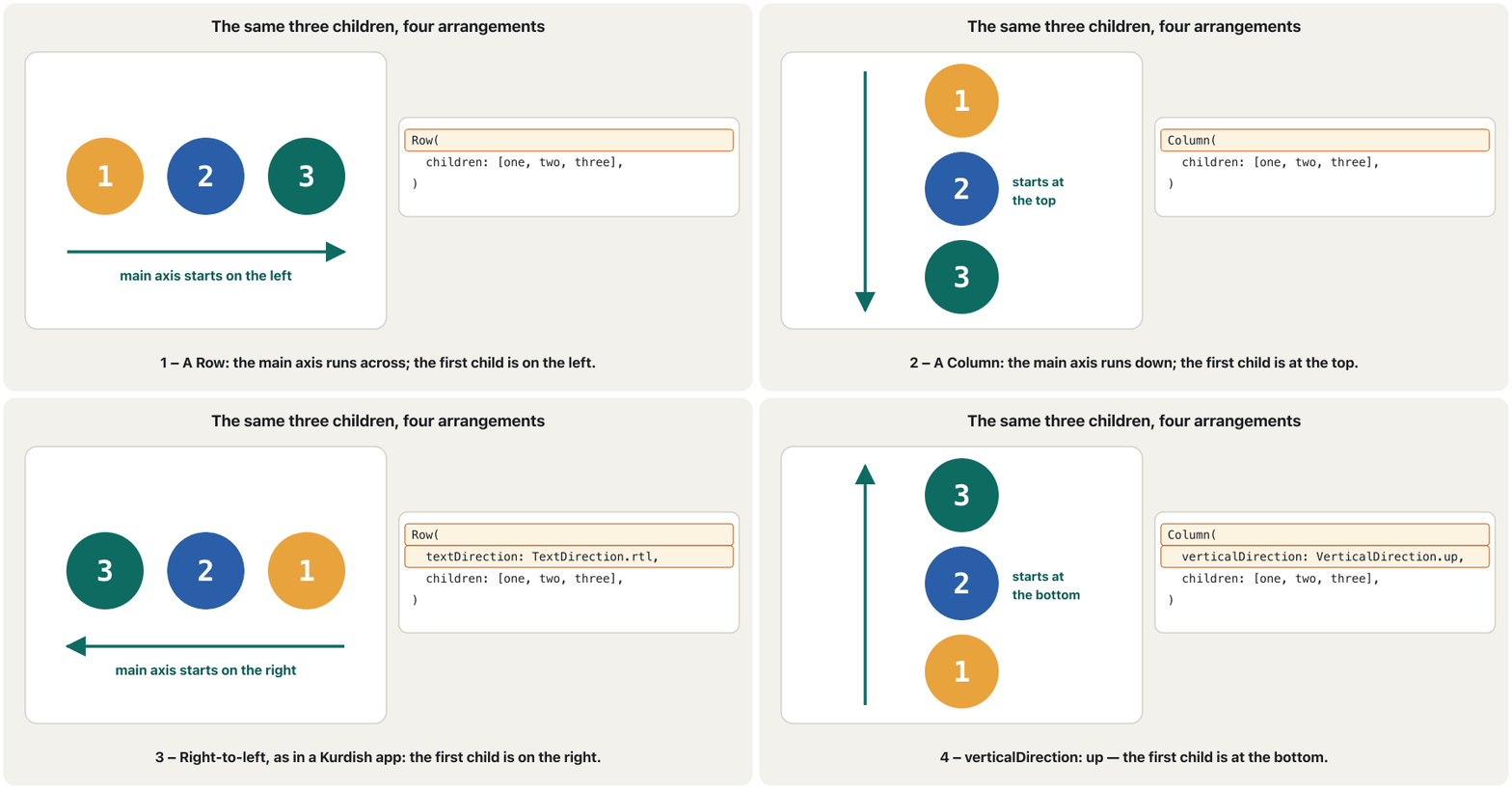
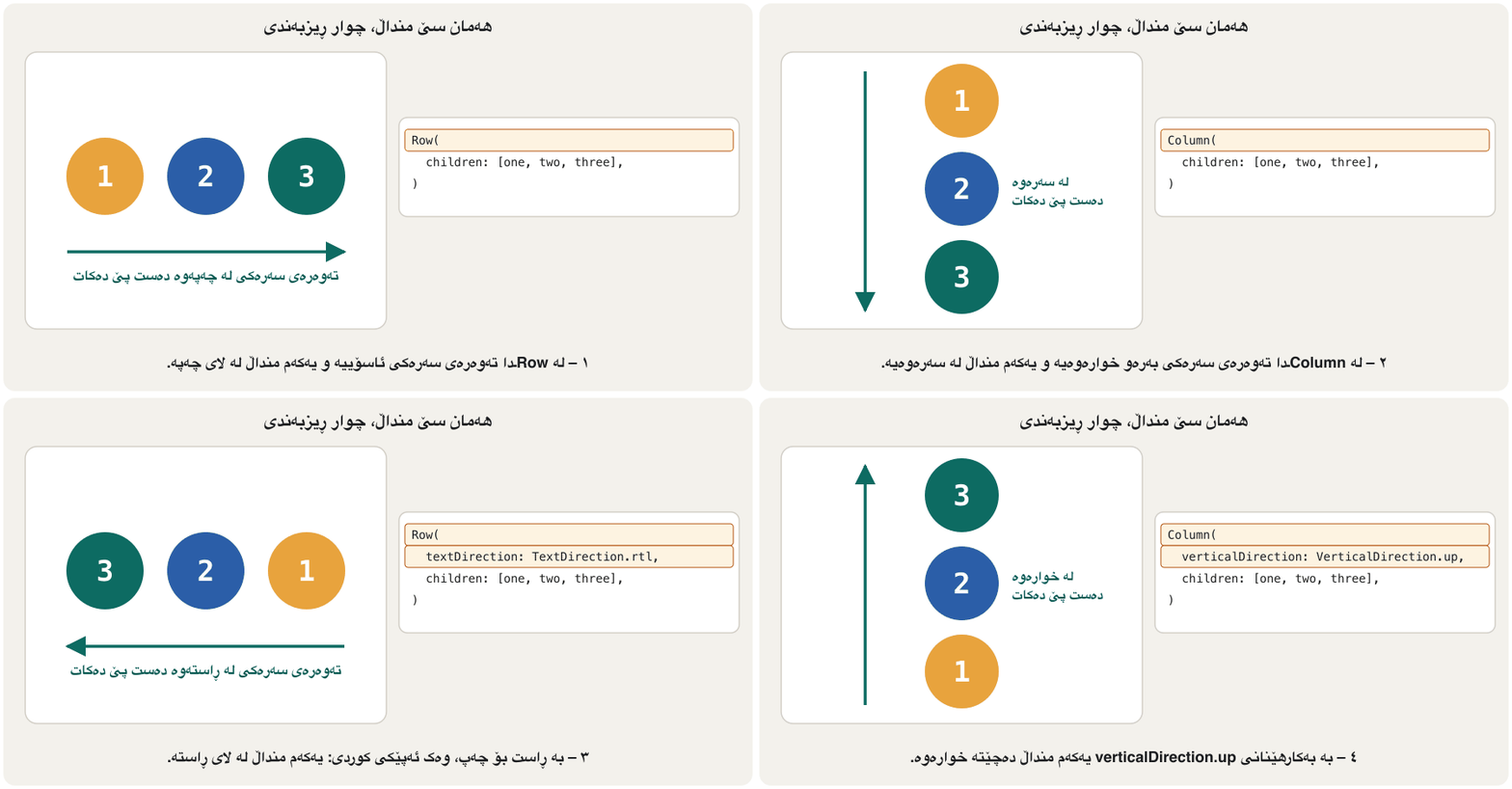
const Row(
  textDirection: TextDirection.rtl,
  children: [
    Text('1'),
    Text('2'),
    Text('3'),
  ],
),

const Column(
  verticalDirection: VerticalDirection.up,
  children: [
    Text('first'),
    Text('second'),
    Text('third'),
  ],
),
Explain the codeڕوونکردنەوەی کۆدەکە
- Lineدێڕی 2
Right-to-left: '1' is on the right, '3' on the left.
: '1' لە ڕاستە و '3' لە چەپ.
- Lineدێڕی 11
Upwards: 'first' is at the bottom, 'third' at the top.
بەرەو سەرەوە: 'first' لە خوارەوەیە و 'third' لە سەرەوە.
The properties of Row and Columnتایبەتمەندییەکانی Row و Column
verticalDirection, and practising right-to-leftverticalDirection و ڕاهێنان لەسەر ڕاست بۆ چەپ
verticalDirection mostly matters for a Column. In a Row it only flips what start and end mean on the cross axis (top and bottom). To see a whole screen right-to-left while you practise, wrap it in a Directionality:
verticalDirection زیاتر بۆ Column گرنگە. لە Rowـدا تەنها واتای start و end لەسەر (سەرەوە و خوارەوە) هەڵدەگەڕێنێتەوە. بۆ ئەوەی لە کاتی ڕاهێناندا هەموو شاشەیەک بە ببینیت، لە ناو Directionalityـدا دایبنێ:
class KurdishApp extends StatelessWidget {
  const KurdishApp({super.key});

  @override
  Widget build(BuildContext context) {
    return const Directionality(
      textDirection: TextDirection.rtl,
      child: Row(
        children: [
          Icon(Icons.home), // first child: on the RIGHT
          Text('ماڵەوە'),
        ],
      ),
    );
  }
}
Explain the codeڕوونکردنەوەی کۆدەکە
- Lineدێڕی 6-7
Everything inside this Directionality is laid out right-to-left.
هەموو شتێک لە ناو ئەم Directionalityـیەدا بە ڕیز دەکرێت.
- Lineدێڕی 10
The first child goes to the right edge; you do not reverse the list yourself.
یەکەم منداڵ دەچێتە لێواری ڕاست؛ خۆت لیستەکە پێچەوانە ناکەیتەوە.
Rows inside columns inside rowsڕیز لە ناو ستوون لە ناو ڕیزدا
A child of a Row or Column can itself be a Row or Column. The course shows this with a recipe card from the Flutter documentation. Here is the same idea with a Kurdish dish: the card is a Row of two parts — a Column of text on the start side and a big icon on the end side. Inside that Column are two more Rows: the stars, and three small Columns of information.
منداڵێکی Row یان Column دەتوانێت خۆی Row یان Column بێت. وانەکان ئەمە بە کارتێکی خواردن لە بەڵگەنامەکانی Flutter پیشان دەدەن. ئەمە هەمان بیرۆکەیە بە خواردنێکی کوردی: کارتەکە Rowـێکە لە دوو بەش — Columnـێک لە دەق لە لای سەرەتا و گەورە لە لای کۆتایی. لە ناو ئەو Columnـەدا دوو Rowـی تر هەن: ئەستێرەکان و سێ Columnـی بچووکی زانیاری.
import 'package:flutter/material.dart';

class RecipeCard extends StatelessWidget {
  const RecipeCard({super.key});

  @override
  Widget build(BuildContext context) {
    return const Card(
      child: Padding(
        padding: EdgeInsets.all(16),
        child: Row(
          children: [
            Expanded(child: _RecipeText()),
            SizedBox(width: 16),
            Icon(Icons.rice_bowl, size: 96, color: Colors.green),
          ],
        ),
      ),
    );
  }
}

class _RecipeText extends StatelessWidget {
  const _RecipeText();

  @override
  Widget build(BuildContext context) {
    return const Column(
      crossAxisAlignment: CrossAxisAlignment.start,
      children: [
        Text('Dolma', style: TextStyle(fontSize: 24)),
        Text('Vine leaves and vegetables filled with rice.'),
        SizedBox(height: 8),
        Row(
          children: [
            Icon(Icons.star, color: Colors.amber),
            Icon(Icons.star, color: Colors.amber),
            Icon(Icons.star, color: Colors.amber),
            Icon(Icons.star, color: Colors.amber),
            Icon(Icons.star_half, color: Colors.amber),
            Text(' 120 reviews'),
          ],
        ),
        SizedBox(height: 8),
        Row(
          mainAxisAlignment: MainAxisAlignment.spaceBetween,
          children: [
            _Info(icon: Icons.kitchen, label: 'PREP', value: '45 min'),
            _Info(icon: Icons.timer, label: 'COOK', value: '1 h'),
            _Info(icon: Icons.restaurant, label: 'FEEDS', value: '6'),
          ],
        ),
      ],
    );
  }
}

class _Info extends StatelessWidget {
  const _Info({required this.icon, required this.label, required this.value});

  final IconData icon;
  final String label;
  final String value;

  @override
  Widget build(BuildContext context) {
    return Column(
      children: [
        Icon(icon, color: Colors.green),
        Text(label),
        Text(value),
      ],
    );
  }
}
Explain the codeڕوونکردنەوەی کۆدەکە
- Lineدێڕی 11-17
The outer Row: the text side in
Expanded(it takes the free width), a 16-pixel gap, then the big icon.Rowـە دەرەکییەکە: لای دەق لە ناو
Expandedـدا (پانییە بەتاڵەکە دەگرێت)، بۆشاییەکی ١٦ و پاشان گەورەکە.- Lineدێڕی 28-29
The text Column starts its children at the start side instead of centring them.
Columnـی دەق منداڵەکانی لە لای سەرەتاوە دادەنێت لە جیاتی ناوەڕاست.
- Lineدێڕی 34-43
A Row of stars and a review count.
Rowـێک لە ئەستێرە و ژمارەی هەڵسەنگاندنەکان.
- Lineدێڕی 45-52
A Row of three small Columns, spread out with
spaceBetween.Rowـێک لە سێ Columnـی بچووک، بە
spaceBetweenبڵاو کراونەتەوە.- Lineدێڕی 58-75
_Infois a small widget of our own: an icon above two texts. Writing it once avoids repeating the same Column three times._Infoبچووکی خۆمانە: لە سەرووی دوو دەقەوە. یەک جار نووسینی ڕێگری لە سێ جار دووبارەکردنەوەی هەمان Column دەکات.
Sharing the space: Expanded, Flexible, Spacer, spacingدابەشکردنی بۆشایی: Expanded، Flexible، Spacer و spacing
How does a Row decide the width of each child? First it lets every normal child take its own natural width. Whatever width is left is the free space. Children wrapped in Expanded or Flexible then share that free space by their flex number (default 1).
Row چۆن پانیی هەر منداڵێک دیاری دەکات؟ سەرەتا ڕێگە بە هەر منداڵێکی ئاسایی دەدات پانیی سروشتیی خۆی بگرێت. ئەوەی لە پانییەکە دەمێنێتەوە بۆشایی بەتاڵە. پاشان ئەو منداڵانەی لە ناو Expanded یان Flexibleـدان ئەو بۆشاییە بەتاڵە بەپێی ژمارەی flexـیان (بنەڕەت 1) دابەش دەکەن.
Row(
  children: [
    Container(width: 80, height: 50, color: Colors.blue),
    Expanded(
      child: Container(height: 50, color: Colors.amber),
    ),
    Container(width: 80, height: 50, color: Colors.blue),
  ],
),

Row(
  children: [
    Expanded(
      flex: 2,
      child: Container(height: 50, color: Colors.green),
    ),
    Expanded(
      child: Container(height: 50, color: Colors.orange),
    ),
  ],
),

Row(
  children: [
    Flexible(
      child: Container(width: 60, height: 50, color: Colors.purple),
    ),
    Expanded(
      child: Container(height: 50, color: Colors.teal),
    ),
  ],
),
Explain the codeڕوونکردنەوەی کۆدەکە
- Lineدێڕی 4-6
On a 400-wide row the two blue boxes take 80 each; Expanded gives the amber box the other 240.
لەسەر Rowـێکی ٤٠٠ پان، هەر سندووقێکی شین ٨٠ دەگرێت؛ Expanded ٢٤٠ـەکەی تر دەداتە سندووقە زەردەکە.
- Lineدێڕی 13-15
flex: 2gets two shares and the other Expanded one share: and of the free space.flex: 2دوو بەش وەردەگرێت و Expandedـەکەی تر یەک بەش: و ی بۆشاییە بەتاڵەکە.- Lineدێڕی 25-27
Flexible is offered half the free space (200) but may be smaller: the purple box keeps its 60. Expanded must fill its 200. The last 140 stay empty.
نیوەی بۆشاییە بەتاڵەکە (٢٠٠) پێشکەشی Flexible دەکرێت بەڵام دەتوانێت بچووکتر بێت: سندووقە مۆرەکە ٦٠ـەکەی خۆی دەپارێزێت. Expanded دەبێت ٢٠٠ـەکەی پڕ بکاتەوە. ١٤٠ـی کۆتایی بەتاڵ دەمێنێتەوە.
Mitch Koko's calm beginner course in Dart and Flutter: variables, operators, if/else, switch, loops, functions, collections, a first screen and a counter.
کۆرسە ئارامەکەی Mitch Koko بۆ سەرەتاییەکان لە و : ، ، if/else، switch، ، ، List/Set/Map، یەکەم شاشە و .
Watch 39:36-41:27: Expanded makes children share the free space of a Column, and flex sets their ratio.
لە 39:36 تا 41:27 سەیر بکە: Expanded وا دەکات ناو Column شوێنە بەتاڵەکە بەش بکەن و flex ڕێژەی بەشەکانیان دیاری دەکات.
Sharing the space: Expanded, Flexible, Spacer, spacingدابەشکردنی بۆشایی: Expanded، Flexible، Spacer و spacing
Spacer, spacing, and a message barSpacer، spacing و شریتی نامە
Two more helpers share the space without Expanded around your own widgets: Spacer fills the free space with nothing, and the Row’s spacing property puts the same gap between every two children.
دوو یاریدەدەری تر بۆشاییەکە دابەش دەکەن بەبێ ئەوەی Expanded بە دەوری خۆتدا دابنێیت: Spacer بۆشاییە بەتاڵەکە بە هیچ پڕ دەکاتەوە و spacingـی Row هەمان بۆشایی لە نێوان هەر دوو منداڵێکدا دادەنێت.
const Row(
  children: [
    Text('Total'),
    Spacer(),
    Text('12,000 IQD'),
  ],
),

const Row(
  spacing: 12,
  children: [
    Icon(Icons.call),
    Icon(Icons.message),
    Icon(Icons.share),
  ],
),
Explain the codeڕوونکردنەوەی کۆدەکە
- Lineدێڕی 4
Spacer()is an empty Expanded: it pushes 'Total' to the start and the price to the end.Spacer()Expandedـێکی بەتاڵە: 'Total' بۆ سەرەتا و نرخەکە بۆ کۆتایی پاڵ دەنێت.- Lineدێڕی 10
spacing: 12puts 12 pixels between every two children — no SizedBoxes needed.spacing: 12١٢ لە نێوان هەر دوو منداڵێکدا دادەنێت — پێویست بە SizedBox ناکات.
A very common use: a text field and a send button in one Row. The text field has no natural width, so it must be in Expanded (text fields are taught in text fields and forms):
بەکارهێنانێکی زۆر باو: و ناردن لە یەک Rowـدا. پانیی سروشتیی نییە، بۆیە دەبێت لە ناو Expandedـدا بێت ( لە خانەکانی دەق و فۆرمەکان فێر دەکرێن):
@override
Widget build(BuildContext context) {
  return Row(
    children: [
      const Expanded(
        child: TextField(
          decoration: InputDecoration(hintText: 'Write a message'),
        ),
      ),
      IconButton(onPressed: () {}, icon: const Icon(Icons.send)),
    ],
  );
}
Explain the codeڕوونکردنەوەی کۆدەکە
- Lineدێڕی 5-9
Without Expanded, Flutter cannot decide the TextField's width inside a Row and reports an error.
بەبێ Expanded، Flutter ناتوانێت پانیی TextField لە ناو Rowـدا دیاری بکات و ڕادەگەیەنێت.
When a Row is too wide: overflowکاتێک Row زۆر پانە: overflow
A Row lets its normal children be as wide as they like. If they add up to more than the screen, the Row overflows: Flutter paints yellow and black stripes on that edge and writes an error in the console, such as A RenderFlex overflowed by 120 pixels on the right. (RenderFlex is the render object behind every Row and Column.)
Row ڕێگە بە منداڵە ئاساییەکانی دەدات هێندەی خۆیان بیانەوێت پان بن. ئەگەر کۆیان لە شاشەکە زیاتر بێت، Row overflow دەکات: Flutter هێڵی زەرد و ڕەش لەو لێوارەدا دەکێشێت و لە console دەنووسێت، وەک A RenderFlex overflowed by 120 pixels on the right. (RenderFlex ئەو کە لە پشت هەموو Row و Columnـێکەوەیە.)
@override
Widget build(BuildContext context) {
  return const Row(
    children: [
      Icon(Icons.info),
      Text(
        'Flutter lays out this long sentence on one line, '
        'so it does not fit on a phone screen.',
      ),
    ],
  );
}
Explain the codeڕوونکردنەوەی کۆدەکە
- Lineدێڕی 6-9
A Text wants to be one long line; inside a Row nothing tells it to wrap.
Text دەیەوێت یەک دێڕی درێژ بێت؛ لە ناو Rowـدا هیچ شتێک پێی ناڵێت بچێتە دێڕی نوێ.
When a Row is too wide: overflowکاتێک Row زۆر پانە: overflow
Fixing overflow: Expanded, Wrap and moreچارەسەرکردنی overflow: Expanded، Wrap و زیاتر
@override
Widget build(BuildContext context) {
  return const Row(
    children: [
      Icon(Icons.info),
      Expanded(
        child: Text(
          'Flutter lays out this long sentence on one line, '
          'so it does not fit on a phone screen.',
        ),
      ),
    ],
  );
}
Explain the codeڕوونکردنەوەی کۆدەکە
- Lineدێڕی 6-11
Expanded gives the Text exactly the width that is left after the icon, so the Text wraps onto more lines.
Expanded ڕێک ئەو پانییە دەداتە Text کە لە دوای ماوەتەوە، بۆیە Textـەکە دەچێتە چەند دێڕێکەوە.
@override
Widget build(BuildContext context) {
  return const Wrap(
    spacing: 8,
    runSpacing: 8,
    children: [
      Chip(label: Text('Erbil')),
      Chip(label: Text('Sulaymaniyah')),
      Chip(label: Text('Duhok')),
      Chip(label: Text('Halabja')),
      Chip(label: Text('Kirkuk')),
    ],
  );
}
Explain the codeڕوونکردنەوەی کۆدەکە
- Lineدێڕی 4-5
spacingis the gap between chips on a line;runSpacingis the gap between the lines.spacingبۆشایی نێوان chipـەکانە لە یەک دێڕدا؛runSpacingبۆشایی نێوان دێڕەکانە.
Other fixes: make the content scrollable (see Lists and grids), or shrink it with FittedBox (see Layout widgets). The stripes appear only while you develop (debug mode), but the cut-off part is missing in the released app too, so always fix overflow.
چارەسەری تر: ناوەڕۆکەکە وا لێ بکە توانای هەبێت (سەیری لیست و تۆڕ بکە)، یان بە FittedBox بچووکی بکەرەوە (سەیری ویجێتەکانی ڕێکخستنی ڕووکار بکە). هێڵەکان تەنها لە کاتی گەشەپێداندا (debug mode) دەردەکەون، بەڵام بەشە بڕاوەکە لە بڵاوکراوەکەشدا نابینرێت، بۆیە هەمیشە overflow چارەسەر بکە.
A friendly 2025 course whose short chapters show one Flutter widget at a time: layouts, the app frame, bars, buttons, lists and pictures.
کۆرسێکی دۆستانەی 2025 کە بەشە کورتەکانی هەر جارە یەک پیشان دەدەن: ، چوارچێوەی ، شریتەکان، ، و وێنەکان.
Watch 41:47-43:17 ('Wrap'): children that continue on a new line instead of overflowing.
لە 41:47 تا 43:17 سەیر بکە (Wrap): لە جیاتی ئەوەی لە شاشە بچنە دەرەوە، لە دێڕێکی نوێدا بەردەوام دەبن.
Common mistakesهەڵە باوەکان
| Mistakeهەڵە | Fixچارەسەر |
|---|---|
Writing child: on a Row or Column.نووسینی child: بۆ Row یان Column. | They take a list: children: [ … ].لیست وەردەگرن: children: [ … ]. |
Writing horizontalDirection.نووسینی horizontalDirection. | It does not exist; use textDirection.بوونی نییە؛ textDirection بەکار بهێنە. |
A long Text (or a TextField) in a Row without Expanded.Textـێکی درێژ (یان TextField) لە Rowـدا بەبێ Expanded. | Wrap it in Expanded (or Flexible).بیخە ناو Expanded (یان Flexible)ـەوە. |
Reversing children by hand for Kurdish.پێچەوانەکردنەوەی children بە دەست بۆ کوردی. | Keep reading order; the app's direction mirrors the Row.ڕیزبەندیی خوێندنەوە بپارێزە؛ ئاڕاستەی Row هەڵدەگەڕێنێتەوە. |
Expecting CrossAxisAlignment.end to move children to the screen's edge, but the Column is only as wide as its widest child.چاوەڕوانی ئەوەی CrossAxisAlignment.end منداڵەکان ببات بۆ لێواری شاشە، بەڵام Column تەنها هێندەی پانترین منداڵی پانە. | Give the Column the full width (for example SizedBox(width: double.infinity, …)); see column alignment.هەموو پانییەکە بدە بە Column (بۆ نموونە SizedBox(width: double.infinity, …))؛ سەیری ڕێکخستنی شوێنی Column بکە. |
Putting a ListView straight into a Column.دانانی ListView ڕاستەوخۆ لە ناو Columnـدا. | Wrap the ListView in Expanded; see lists inside a Column.ListViewـەکە بخە ناو Expandedـەوە؛ سەیری لیست لە ناو Columnـدا بکە. |
Exercisesڕاهێنانەکان
Build one row of a contacts list: a round avatar with the letter K, then the name 'Karwan' in bold above the number '0750 000 0000', and a call button at the end. Long names must not overflow.
یەک ڕیزی لیستی پەیوەندییەکان دروست بکە: وێنەیەکی خڕ بە پیتی K، پاشان ناوی 'Karwan' بە تۆخی لە سەرووی ژمارەی '0750 000 0000' و پەیوەندی لە کۆتایی. ناوی درێژ نابێت overflow بکات.
Hintئاماژە
Row → [avatar, Expanded(Column), IconButton].
Row ← [وێنە، Expanded(Column)، IconButton].
Show answerوەڵامەکە پیشان بدە
@override
Widget build(BuildContext context) {
  return Padding(
    padding: const EdgeInsets.all(12),
    child: Row(
      spacing: 12,
      children: [
        const CircleAvatar(child: Text('K')),
        const Expanded(
          child: Column(
            crossAxisAlignment: CrossAxisAlignment.start,
            children: [
              Text('Karwan', style: TextStyle(fontWeight: FontWeight.bold)),
              Text('0750 000 0000'),
            ],
          ),
        ),
        IconButton(onPressed: () {}, icon: const Icon(Icons.call)),
      ],
    ),
  );
}
Explain the codeڕوونکردنەوەی کۆدەکە
- Lineدێڕی 6
spacing: 12keeps the three parts apart.spacing: 12سێ بەشەکە لێک دوور دەخاتەوە.- Lineدێڕی 9-17
The name and number form a Column; Expanded gives it all the free width, so a long name wraps and the button stays at the end.
ناو و ژمارەکە Columnـێک پێک دەهێنن؛ Expanded هەموو پانییە بەتاڵەکەی دەداتێ، بۆیە ناوی درێژ دەچێتە دێڕی نوێ و لە کۆتایی دەمێنێتەوە.
- Lineدێڕی 11
Start-aligned text, so the two lines line up on the start side.
دەق لە سەرەتاوە، بۆ ئەوەی دوو دێڕەکە لە لای سەرەتا ڕێک بن.
Make three buttons — Back, Save, Send — that share the width of the screen equally, with 8 pixels between them.
سێ دروست بکە — Back، Save، Send — کە پانیی شاشەکە بە یەکسانی دابەش بکەن و ٨ لە نێوانیاندا بێت.
Hintئاماژە
Expanded with equal flex values shares the space equally.
Expanded بە نرخی flexـی یەکسان بۆشاییەکە بە یەکسانی دابەش دەکات.
Show answerوەڵامەکە پیشان بدە
@override
Widget build(BuildContext context) {
  return Row(
    spacing: 8,
    children: [
      Expanded(
        child: OutlinedButton(onPressed: () {}, child: const Text('Back')),
      ),
      Expanded(
        child: OutlinedButton(onPressed: () {}, child: const Text('Save')),
      ),
      Expanded(
        child: FilledButton(onPressed: () {}, child: const Text('Send')),
      ),
    ],
  );
}
Each button is in an Expanded with the default flex: 1, so each gets one third of the free width.
هەر لە ناو Expandedـێکدایە بە flex: 1ـی بنەڕەت، بۆیە هەر یەکەیان سێیەکی پانییە بەتاڵەکە وەردەگرێت.
What do you see, reading from left to right, for Row(textDirection: TextDirection.rtl, children: [Text('A'), Text('B'), Text('C')])? And from top to bottom for the same children in Column(verticalDirection: VerticalDirection.up, …)?
بۆ Row(textDirection: TextDirection.rtl, children: [Text('A'), Text('B'), Text('C')]) لە چەپەوە بۆ ڕاست چی دەبینیت؟ هەروەها بۆ هەمان منداڵەکان لە Column(verticalDirection: VerticalDirection.up, …) لە سەرەوە بۆ خوارەوە چی دەبینیت؟
Show answerوەڵامەکە پیشان بدە
Row: C B A from left to right — A, the first child, is on the right. Column: C, B, A from top to bottom — A is at the bottom.
Row: لە چەپەوە بۆ ڕاست C B A — A، یەکەم منداڵ، لە ڕاستە. Column: لە سەرەوە بۆ خوارەوە C، B، A — A لە خوارەوەیە.
Summaryپوختە
Rowarranges children horizontally,Columnvertically. Both take achildrenlist and can be nested.- The main axis is the direction of the children (Row: across, Column: down); the cross axis crosses it.
- Properties: children, mainAxisAlignment (start), mainAxisSize (max), crossAxisAlignment (center), textDirection, verticalDirection (down), spacing (0), textBaseline.
- There is no
horizontalDirection:textDirectionsets the order across. In a Kurdish app a Row starts on the right by itself. - Expanded and Flexible share the free space by
flex; Spacer pushes children apart;spacingadds equal gaps. - Overflow (yellow and black stripes) means the children are too wide: use Expanded, Wrap, scrolling or FittedBox.
Rowمنداڵەکان بە ئاسۆیی ڕیز دەکات وColumnبە ستوونی. هەردووکیان لیستیchildrenوەردەگرن و دەچنە ناو یەکترەوە.- ئاڕاستەی منداڵەکانە (Row: ئاسۆیی، Column: بەرەو خوار)؛ بەسەریدا دەبڕێت.
- : children، mainAxisAlignment (start)، mainAxisSize (max)، crossAxisAlignment (center)، textDirection، verticalDirection (down)، spacing (0)، textBaseline.
horizontalDirectionبوونی نییە:textDirectionڕیزبەندیی ئاسۆیی دیاری دەکات. لە کوردیدا Row خۆی لە ڕاستەوە دەست پێ دەکات.- Expanded و Flexible بۆشایی بەتاڵ بەپێی
flexدابەش دەکەن؛ Spacer منداڵەکان لێک دوور دەخاتەوە؛spacingبۆشایی یەکسان زیاد دەکات. - overflow (هێڵی زەرد و ڕەش) واتە منداڵەکان زۆر پانن: Expanded، Wrap، یان FittedBox بەکار بهێنە.
What is the difference between the main axis of a Row and of a Column?جیاوازیی نێوان تەوەرەی سەرەکیی Row و Column چییە؟
A Row's main axis is horizontal; a Column's is vertical. In both, the cross axis is the other direction.
Row ئاسۆییە و هی Column ستوونییە. لە هەردووکیاندا ئاڕاستەکەی ترە.
Why does a long Text in a Row overflow, but not in a Column?بۆچی Textـێکی درێژ لە Rowـدا overflow دەکات، بەڵام لە Columnـدا نا؟
A Row gives its normal children unlimited width, so the Text stays on one line. A Column gives its children the screen's width as a limit, so the Text wraps.
Row پانیی بێسنوور دەدات بە منداڵە ئاساییەکانی، بۆیە Textـەکە لە یەک دێڕدا دەمێنێتەوە. Column پانیی شاشەکە وەک سنوور دەدات بە منداڵەکانی، بۆیە Textـەکە دەچێتە دێڕی نوێ.
When do you use Flexible instead of Expanded?کەی لە جیاتی Expanded، Flexible بەکار دەهێنیت؟
When the child may be smaller than its share of the free space (Flexible); Expanded forces the child to fill its share.
کاتێک منداڵەکە دەتوانێت لە بەشەکەی خۆی لە بۆشاییە بەتاڵەکە بچووکتر بێت (Flexible)؛ Expanded منداڵەکە ناچار دەکات بەشەکەی پڕ بکاتەوە.
Videoڤیدیۆ
Watch a videoسەیری ڤیدیۆیەک بکە
A video that viewers liked a lot and praised in their comments, chosen for this lesson.ڤیدیۆیەک کە بینەران زۆریان پێ خۆش بووە و لە کۆمێنتەکانیاندا ستایشیان کردووە، بۆ ئەم وانەیە هەڵبژێردراوە.
A friendly 2025 course whose short chapters show one Flutter widget at a time: layouts, the app frame, bars, buttons, lists and pictures.
کۆرسێکی دۆستانەی 2025 کە بەشە کورتەکانی هەر جارە یەک پیشان دەدەن: ، چوارچێوەی ، شریتەکان، ، و وێنەکان.
Watch 16:48-25:22 ('Column' and 'Row'): children one under another, then side by side.
لە 16:48 تا 25:22 سەیر بکە (Column و Row): یەک لە ژێر یەکەوە، پاشان لە تەنیشت یەکەوە.
Lesson complete!وانەکە تەواو بوو!
Well done. Review the key terms, then go on to the next lesson.دەستخۆش. سەیرێکی زاراوە سەرەکییەکان بکەرەوە، پاشان بڕۆ بۆ وانەی داهاتوو.
Key termsزاراوە سەرەکییەکان
Main-Axis and Cross-Axis Alignmentڕێکخستنی شوێن لەسەر تەوەرەی سەرەکی و تەوەرەی ئاوەڵ
Related lecturesوانە پەیوەندیدارەکان
References and further readingسەرچاوەکان و خوێندنەوەی زیاتر
This lecture is a first edition. The Kurdish text and terminology are waiting for review by Kurdish IT teachers.ئەم وانەیە چاپی یەکەمە. دەقە کوردییەکە و زاراوەکانی چاوەڕێی پێداچوونەوەی مامۆستایانی کوردی بواری IT ن.