FlutterFlutter · Chapterبەش 6 · Lectureوانە 6.4
Drawers, Bottom Bars and Sheetsلیستە لاتەنیشتەکان، شریتەکانی خوارەوە و پەڕەی خوارەوە
The rest of the Scaffold: where the floating action button can sit, drawers and end drawers (and Material 3's NavigationDrawer), working bottom navigation bars with state (and NavigationBar), footer buttons, the page colour, bottom sheets and what happens when the keyboard opens.
بەشەکانی تری Scaffold: لە کوێ دادەنرێت، drawer و endDrawer (و NavigationDrawerـی Material 3)، کارپێکراو بە (و NavigationBar)، دوگمەکانی خوارەوە، ڕەنگی پەڕە، و ئەوەی کاتی کرانەوەی ڕوو دەدات.
What you will learnچی فێر دەبیت
- Place a floating action button with floatingActionButtonLocation and explain float, docked, start and end.
- Build a drawer and an end drawer with a header and items that close the drawer, and know NavigationDrawer.
- Make a bottom navigation bar switch pages with state and setState, with BottomNavigationBar or NavigationBar.
- Use persistentFooterButtons, backgroundColor, bottomSheet, showModalBottomSheet and resizeToAvoidBottomInset correctly.
- بە floatingActionButtonLocation دابنێیت و float، docked، start و end ڕوون بکەیتەوە.
- drawer و endDrawer بە سەردێڕ و بڕگەی داخەرەوە دروست بکەیت و NavigationDrawer بناسیت.
- بە و setState پەڕەکان بگۆڕێت، بە BottomNavigationBar یان NavigationBar.
- persistentFooterButtons، backgroundColor، bottomSheet، showModalBottomSheet و resizeToAvoidBottomInset بە دروستی بەکار بهێنیت.
The rest of the Scaffoldشوێنەکانی تری Scaffold
In MaterialApp and Scaffold you met the Scaffold and three of its slots: appBar, body and floatingActionButton. This lesson fills in the rest of the screen: where else the floating button can sit, the panels that slide in from the side, the bars at the bottom, buttons and sheets that stay at the bottom, the page colour and what happens when the keyboard opens.
لە وانەی MaterialApp و Scaffoldدا Scaffoldت ناسی لەگەڵ سێ شوێنی ناوی: appBar، body و floatingActionButton. ئەم وانەیە بەشەکانی تری شاشەکە پڕ دەکاتەوە: لە کوێی تر دادەنرێت، ئەو پانێڵانەی لە لاتەنیشتەوە دێنە ناوەوە، شریتەکانی خوارەوە، ئەو دوگمە و پەڕانەی لە خوارەوە دەمێننەوە، ڕەنگی پەڕەکە و ئەوەی کاتی کرانەوەی ڕوو دەدات.
| Scaffold property Scaffold | What it gives the screenچی دەدات بە شاشەکە |
|---|---|
floatingActionButtonLocation | Where the floating action button sits. لە کوێ دادەنرێت. |
drawer, endDrawer | Panels that slide in from the side.ئەو پانێڵانەی لە لاتەنیشتەوە دێنە ناوەوە. |
bottomNavigationBar | A bar with the app's main sections.شریتێک بە بەشە سەرەکییەکانی . |
persistentFooterButtons | Buttons that never scroll away.ئەو دوگمانەی هەرگیز بە ون نابن. |
backgroundColor | The colour of the whole page.ڕەنگی هەموو پەڕەکە. |
bottomSheet | Extra information fixed at the bottom.زانیاریی زیادە کە لە خوارەوە جێگیرە. |
resizeToAvoidBottomInset | Whether the body shrinks when the keyboard opens.ئایا body بچووک دەبێتەوە کاتێک دەکرێتەوە. |
Every one of these properties is optional. You add only the parts a screen really needs; a simple screen may use none of them.
هەموو ئەم ئارەزوومەندانەن. تەنها ئەو بەشانە زیاد دەکەیت کە شاشەکە بەڕاستی پێویستی پێیانە؛ دەکرێت شاشەیەکی سادە هیچیان بەکار نەهێنێت.
Where the floating button sitsدوگمەی کردەوەی سەرەکی لە کوێ دادەنرێت
floatingActionButtonLocation decides where the Scaffold puts its floating action button. You do not give it numbers; you choose one of the ready-made constants of the class FloatingActionButtonLocation. The course names four:
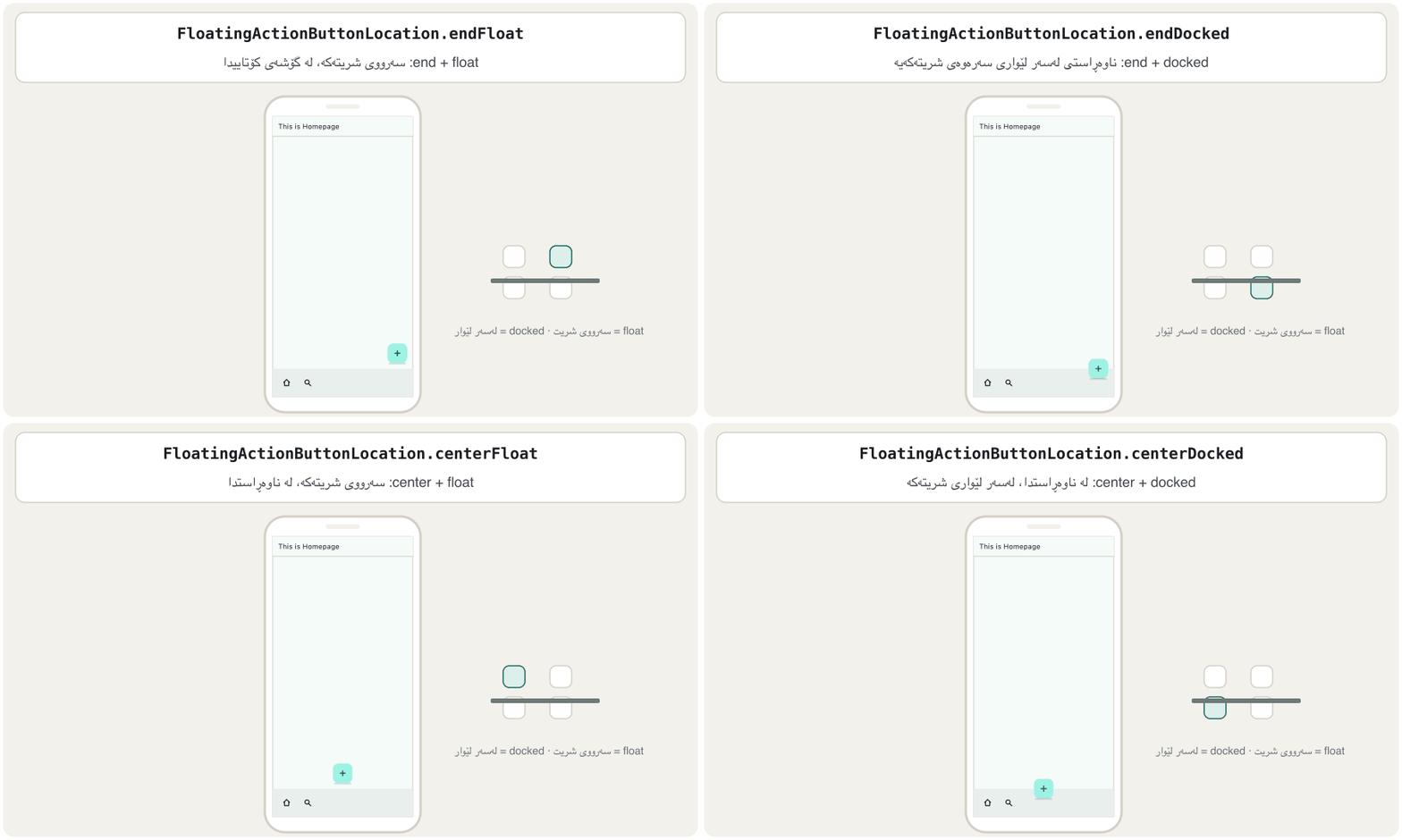
floatingActionButtonLocation دیاری دەکات Scaffold لە کوێ دابنێت. ژمارەی پێ نادەیت؛ یەکێک لە نرخە ئامادەکراوەکانی FloatingActionButtonLocation هەڵدەبژێریت. وانەکە چواریان دەژمێرێت:
endFloat— the default: it floats in the bottom end corner, above any bottom bar.endDocked— at the end, with its centre sitting on the top edge of the bottom bar.centerFloat— it floats in the middle at the bottom of the screen.centerDocked— in the middle, sitting on the bottom bar's top edge.
endFloat— بنەڕەتە: لە گۆشەی خوارەوەی کۆتایی و لە سەرووی هەر شریتێکی خوارەوە دەوەستێت.endDocked— لە لای کۆتایی، ناوەڕاستەکەی لەسەر لێواری سەرەوەی شریتی خوارەوەیە.centerFloat— لە ناوەڕاستی خوارەوەی شاشەکەدا دەوەستێت.centerDocked— لە ناوەڕاستدا، لەسەر لێواری سەرەوەی شریتی خوارەوە.
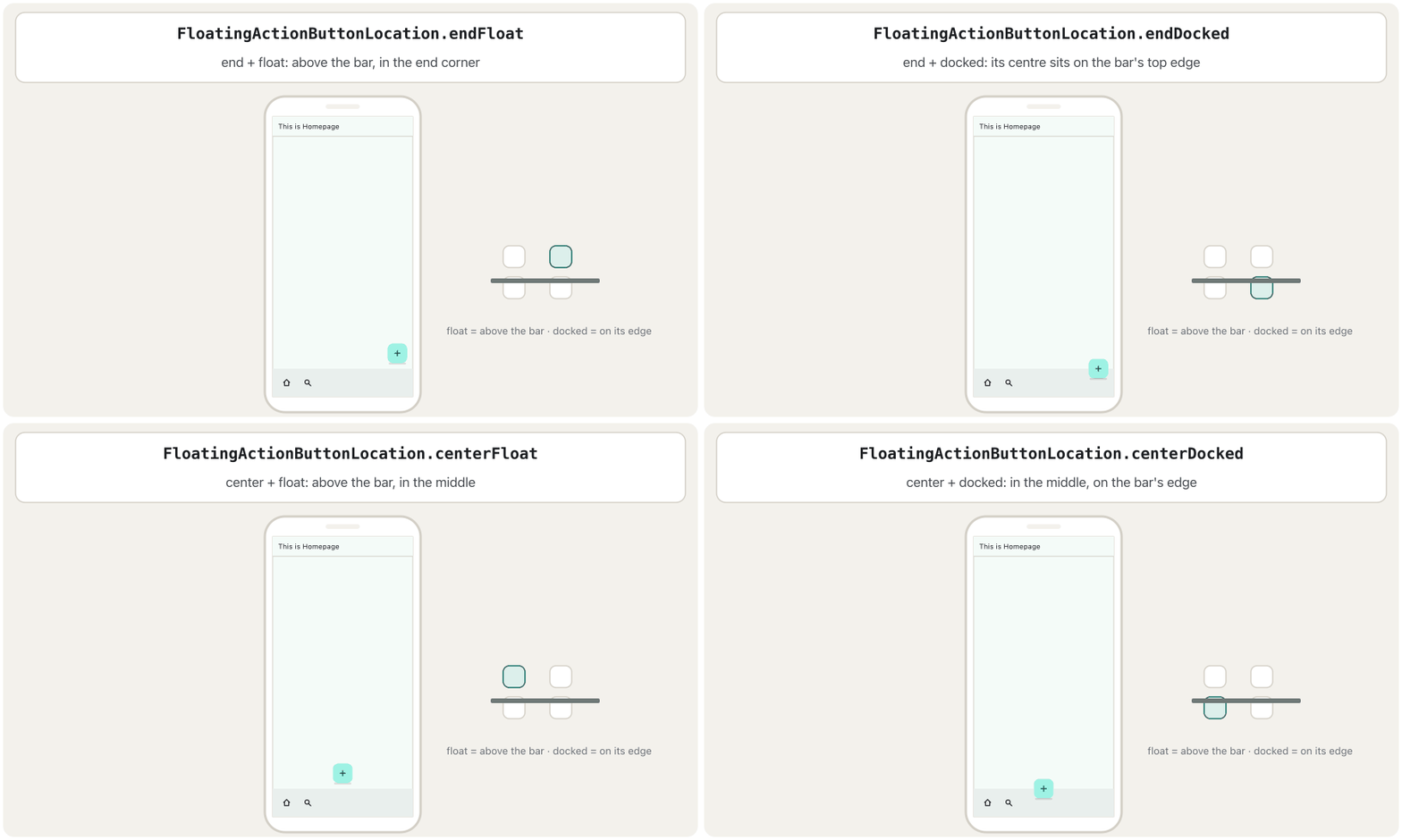
Float means the button hovers 16 pixels above the bottom bar (or above the bottom of the screen). Docked means the button's centre lies on the top edge of the bottomNavigationBar, so it looks fixed to the bar. Docked places are made for screens that have a bottom bar; without one, the button just sits against the bottom edge.
Float واتە ١٦ لە سەرووی شریتی خوارەوە (یان لە سەرووی خوارەوەی شاشەکە) ڕادەوەستێت. Docked واتە ناوەڕاستی دەکەوێتە سەر لێواری سەرەوەی bottomNavigationBar، بۆیە وا دەردەکەوێت کە بە شریتەکەوە نووساوە. شوێنە dockedـەکان بۆ ئەو شاشانەن کە شریتی خوارەوەیان هەیە؛ بەبێ شریت تەنها بە لێواری خوارەوەی شاشەکەوە دەنووسێت.
import 'package:flutter/material.dart';

class FabLocationDemo extends StatelessWidget {
  const FabLocationDemo({super.key});

  @override
  Widget build(BuildContext context) {
    return Scaffold(
      appBar: AppBar(title: const Text('This is Homepage')),
      floatingActionButton: FloatingActionButton(
        onPressed: () {},
        child: const Icon(Icons.add),
      ),
      floatingActionButtonLocation: FloatingActionButtonLocation.centerDocked,
      bottomNavigationBar: const BottomAppBar(
        child: Row(
          children: [Icon(Icons.home), Spacer(), Icon(Icons.settings)],
        ),
      ),
    );
  }
}┌─────────────────────────────┐ │ This is Homepage │ ├─────────────────────────────┤ │ │ │ │ │ │ ├─────────────(+)─────────────┤ │ [home] [setti…│ └─────────────────────────────┘
A 'This is Homepage' app bar, an empty page and a bar at the bottom with a home icon and a settings icon. The + button sits in the middle, half on top of that bar.
بە 'This is Homepage'، پەڕەیەکی بەتاڵ و شریتێک لە خوارەوە بە ماڵ و ڕێکخستن. دوگمەی + لە ناوەڕاستدایە و نیوەی لەسەر ئەو شریتەیە.
Explain the codeڕوونکردنەوەی کۆدەکە
- Lineدێڕی 10
The button itself, as in the previous lesson.
خودی ، وەک وانەی پێشوو.
- Lineدێڕی 14
The course's line: one constant chooses the place.
دێڕەکەی وانەکە: یەک نرخی جێگیر شوێنەکە هەڵدەبژێرێت.
- Lineدێڕی 15-17
A simple
BottomAppBargives the docked button a bar to sit on.BottomAppBarـێکی سادە شریتێک دەدات بە تا لەسەری دابنیشێت.
Where the floating button sitsدوگمەی کردەوەی سەرەکی لە کوێ دادەنرێت
All 19 FAB locationsهەر ١٩ شوێنەکەی دوگمەی کردەوەی سەرەکی
drawer: a panel from the sidedrawer: پانێڵێک لە لاتەنیشتەوە
A drawer is a panel that slides in from the side of the screen, over the page. It usually holds links to the app's main places. It stays hidden until the user taps the ☰ (menu) button in the app bar or swipes in from the edge of the screen.
پانێڵێکە لە لاتەنیشتی شاشەوە دێتە ناوەوە و دەکەوێتە سەر پەڕەکە. زۆربەی جار بەستەری شوێنە سەرەکییەکانی لە خۆ دەگرێت. شاراوە دەمێنێتەوە تا دەست لە دوگمەی ☰ () لە دەدات، یان پەنجە لە لێواری شاشەکەوە بەرەو ناوەوە ڕادەکێشێت.
You give the Scaffold's drawer property a widget, usually a Drawer. If the AppBar has no leading widget, Flutter adds the ☰ button for you.
دەدەیت بە drawerـی Scaffold، زۆربەی جار Drawerـێک. ئەگەر AppBar هیچ leadingـێکی نەبێت، Flutter خۆی دوگمەی ☰ زیاد دەکات.
A shopkeeper keeps a drawer under the counter. Customers do not see it, so the counter stays tidy, and he pulls it out only when he needs the receipt book. A Flutter drawer is the same: the menu stays hidden, so the page has more room, until the user pulls it out with ☰ or a swipe.
دووکاندارێک چەکمەجەیەکی لە ژێر مێزەکەیدا هەیە. کڕیاران نایبینن، بۆیە مێزەکە ڕێکوپێک دەمێنێتەوە و تەنها کاتێک دەیکێشێتە دەرەوە کە پێویستی بە دەفتەری پسوولە دەبێت. لە Flutterـدا هەروایە: شاراوە دەمێنێتەوە، بۆیە پەڕەکە شوێنی زیاترە، تا بە ☰ یان بە ڕاکێشانی پەنجە دەیکێشێتە دەرەوە.
Where the analogy stops workingسنووری ئەم نموونەیە
A Flutter drawer closes when the user taps outside it. Tapping an item inside it does not close it unless your code calls Navigator.pop(context) — the call that also closes a page (pop).
لە Flutterـدا کاتێک دەست لە دەرەوەی دەدات دادەخرێت. دەست لێدانی بڕگەیەک لە ناویدا دایناخات مەگەر کۆدەکەت Navigator.pop(context) بانگ بکات — هەمان بانگکردن کە پەڕەیەکیش دادەخات (pop).
Mitch Koko's calm beginner course in Dart and Flutter: variables, operators, if/else, switch, loops, functions, collections, a first screen and a counter.
کۆرسە ئارامەکەی Mitch Koko بۆ سەرەتاییەکان لە و : ، ، if/else، switch، ، ، List/Set/Map، یەکەم شاشە و .
Watch 51:33-55:36 ('DRAWER'): the Scaffold's drawer adds the menu button, a DrawerHeader, ListTiles that open pages, and Navigator.pop to close the drawer.
لە 51:33 تا 55:36 سەیر بکە (DRAWER): drawerـی Scaffold زیاد دەکات؛ پاشان DrawerHeader، چەند ListTileـێک کە لاپەڕەی تر دەکەنەوە و Navigator.pop بۆ داخستنی .
drawer: a panel from the sidedrawer: پانێڵێک لە لاتەنیشتەوە
Which edge does a drawer open from?لیستی لاتەنیشت لە کام لێوارەوە دەکرێتەوە؟
drawer: a panel from the sidedrawer: پانێڵێک لە لاتەنیشتەوە
Inside a drawer: a header and tilesناوەوەی لیستی لاتەنیشت: سەردێڕێک و ListTile
Lec4 gives the common recipe: a ListView with a DrawerHeader at the top, followed by ListTile items. The course has two drawer examples (Lec3 and Lec4); here they are joined into one complete, runnable screen:
Lec4 ڕێگە باوەکە دەدات: ListViewـێک کە DrawerHeaderـێک لە سەرەوەیەتی و دوای ئەو چەند ListTileـێک. وانەکە دوو نموونەی هەیە (Lec3 و Lec4)؛ لێرەدا هەردووکیان بوونەتە یەک شاشەی تەواو کە جێبەجێ دەکرێت:
import 'package:flutter/material.dart';

void main() => runApp(const MaterialApp(home: CoursePage()));

class CoursePage extends StatelessWidget {
  const CoursePage({super.key});

  @override
  Widget build(BuildContext context) {
    return Scaffold(
      appBar: AppBar(title: const Text('Mobile App Course')),
      drawer: Drawer(
        child: ListView(
          padding: EdgeInsets.zero,
          children: [
            const DrawerHeader(
              decoration: BoxDecoration(color: Colors.green),
              child: Text(
                'Drawer Panel',
                style: TextStyle(color: Colors.white, fontSize: 24),
              ),
            ),
            ListTile(
              leading: const Icon(Icons.people),
              title: const Text('Share'),
              onTap: () => Navigator.pop(context),
            ),
            ListTile(
              leading: const Icon(Icons.mail),
              title: const Text('Email'),
              onTap: () => Navigator.pop(context),
            ),
            const Divider(),
            ListTile(
              leading: const Icon(Icons.inbox),
              title: const Text('Primary'),
              onTap: () => Navigator.pop(context),
            ),
            ListTile(
              leading: const Icon(Icons.group),
              title: const Text('Social'),
              onTap: () => Navigator.pop(context),
            ),
            ListTile(
              leading: const Icon(Icons.local_offer),
              title: const Text('Promotions'),
              onTap: () => Navigator.pop(context),
            ),
          ],
        ),
      ),
      body: const Center(child: Text('Swipe from the edge or tap ☰')),
    );
  }
}┌─────────────────────────────┐ │ Drawer Panel │▒▒▒▒▒▒▒▒│ │───────────────────┤▒▒▒▒▒▒▒▒ │ │ [i] Share │▒▒▒▒▒▒▒▒│ │ [i] Email │▒▒▒▒▒▒▒▒│ │ ────────────────── │▒▒▒▒▒▒▒▒│ │ [i] Primary │▒▒▒▒▒▒▒▒│ │ [i] Social │▒▒▒▒▒▒▒▒│ │ [i] Promotions │▒▒▒▒▒▒▒▒│ └─────────────────────────────┘
A 'Mobile App Course' app bar with a ☰ button. Tapping ☰ (or swiping from the left edge) slides in a panel: a green header 'Drawer Panel', then Share and Email with icons, a line, and Primary, Social and Promotions. Tapping an item closes the panel.
بە 'Mobile App Course' و دوگمەی ☰. دەست لێدانی ☰ (یان ڕاکێشانی پەنجە لە لێواری چەپەوە) پانێڵێک دەهێنێتە ناوەوە: سەردێڕێکی سەوز 'Drawer Panel'، پاشان Share و Email لەگەڵ ، هێڵێک، پاشان Primary و Social و Promotions. دەست لێدانی بڕگەیەک پانێڵەکە دادەخات.
Explain the codeڕوونکردنەوەی کۆدەکە
- Lineدێڕی 13
A
ListViewscrolls when the items do not fit on the screen.ListViewدەکرێت کاتێک بڕگەکان جێیان نابێتەوە.- Lineدێڕی 14
Removes the list's automatic top padding, so the header reaches the top edge (the Flutter cookbook marks this line as important).
خۆکاری سەرەوەی لیستەکە لادەبات، بۆ ئەوەی سەردێڕەکە بگاتە لێواری سەرەوە (کتێبی ڕێنمایی Flutter ئەم دێڕە بە گرنگ دادەنێت).
- Lineدێڕی 16-17
DrawerHeader: a coloured box at the top of the drawer.DrawerHeader: سندووقێکی ڕەنگاوڕەنگ لە سەرەوەی .- Lineدێڕی 24
leading: an icon before the item's text.leading: پێش دەقی بڕگەکە.- Lineدێڕی 26
Closes the drawer when the item is tapped.
کاتێک دەست لە بڕگەکە دەدرێت دادەخات.
- Lineدێڕی 33
A thin line between two groups of items.
هێڵێکی باریک لە نێوان دوو کۆمەڵە بڕگەدا.
drawer: a panel from the sidedrawer: پانێڵێک لە لاتەنیشتەوە
endDrawer: the panel on the other sideendDrawer: پانێڵەکەی لای تر
endDrawer is the same kind of panel, but on the opposite edge: the end edge. The course says it appears on the right side "by default"; more exactly, it is on the right in an English app and on the left in a Kurdish app. A screen may have both: the main menu in drawer and, for example, account settings or filters in endDrawer.
endDrawer هەمان جۆری پانێڵە، بەڵام لە لێواری بەرامبەر: لێواری کۆتایی. وانەکە دەڵێت بە بنەڕەت لە لای ڕاست دەردەکەوێت؛ وردتر، لە ئینگلیزیدا لە ڕاستە و لە کوردیدا لە چەپ. شاشەیەک دەتوانێت هەردووکیانی هەبێت: سەرەکی لە drawerدا و بۆ نموونە ڕێکخستنەکانی هەژمار یان پاڵێوەرەکان لە endDrawerدا.
import 'package:flutter/material.dart';

class SettingsPage extends StatelessWidget {
  const SettingsPage({super.key});

  @override
  Widget build(BuildContext context) {
    return Scaffold(
      appBar: AppBar(title: const Text('Shop')),
      drawer: const Drawer(child: Center(child: Text('Main menu'))),
      endDrawer: Drawer(
        child: ListView(
          children: [
            const ListTile(title: Text('Account Settings')),
            ListTile(
              leading: const Icon(Icons.notifications),
              title: const Text('Notifications'),
              onTap: () => Navigator.pop(context),
            ),
            ListTile(
              leading: const Icon(Icons.close),
              title: const Text('Close Menu'),
              onTap: () => Navigator.pop(context),
            ),
          ],
        ),
      ),
      body: const Center(child: Text('Products')),
    );
  }
}┌─────────────────────────────┐ │ ☰ Shop ☰ │ ├─────────────────────────────┤ │ │ │ Products │ │ │ │ │ └─────────────────────────────┘
The app bar 'Shop' has a ☰ button at the start and a second ☰ button at the end. The first opens 'Main menu' from the start edge; the second opens 'Account Settings' with Notifications and Close Menu from the end edge.
'Shop' دوگمەیەکی ☰ لە سەرەتا و دوگمەیەکی ☰ـی تر لە کۆتایی هەیە. یەکەم 'Main menu' لە لێواری سەرەتاوە دەکاتەوە؛ دووەم 'Account Settings' لەگەڵ Notifications و Close Menu لە لێواری کۆتاییەوە دەکاتەوە.
Explain the codeڕوونکردنەوەی کۆدەکە
- Lineدێڕی 10
The main menu, at the start edge.
سەرەکی، لە لێواری سەرەتا.
- Lineدێڕی 11
The second panel, at the end edge.
پانێڵی دووەم، لە لێواری کۆتایی.
When the Scaffold has an endDrawer and the AppBar has no actions, Flutter adds a ☰ button at the end of the app bar too, so the user can open it.
کاتێک Scaffold endDrawerـی هەیە و AppBar هیچ actionsـێکی نییە، Flutter دوگمەیەکی ☰ لە کۆتایی زیاد دەکات، بۆ ئەوەی بتوانێت بیکاتەوە.
bottomSheet: extra information at the bottombottomSheet: زانیاریی زیادە لە خوارەوە
bottomSheet shows a piece of extra information about the page's main content, fixed at the bottom: for example the address and phone number of a shop under its list of offers. It stays visible (a persistent bottom sheet) and sits above the footer buttons and the bottom bar.
bottomSheet پارچەیەک زانیاریی زیادە دەربارەی ناوەڕۆکی سەرەکیی پەڕەکە پیشان دەدات کە لە خوارەوە جێگیرە: بۆ نموونە ناونیشان و ژمارەی تەلەفۆنی دووکانێک لە ژێر لیستی داشکاندنەکانی. دیار دەمێنێتەوە ( persistent) و لە سەرووی دوگمەکانی خوارەوە و شریتی خوارەوە دادەنیشێت.
Here is the course's screen with all three bottom parts and a yellow page:
ئەمە شاشەکەی وانەکەیە لەگەڵ هەر سێ بەشەکەی خوارەوە و پەڕەیەکی زەرد:
import 'package:flutter/material.dart';
class ShopPage extends StatelessWidget {
const ShopPage({super.key});
@override
Widget build(BuildContext context) {
return Scaffold(
appBar: AppBar(title: const Text('Mobile App Course')),
backgroundColor: Colors.yellow,
body: const Center(child: Text('Today\'s offers')),
bottomSheet: Container(
height: 70,
color: Colors.cyan[50],
child: const Column(
children: [
Row(
children: [
Icon(Icons.place),
SizedBox(width: 7),
Text('12 Bazaar Street, Sulaymaniyah'),
],
),
Row(
children: [
Icon(Icons.phone),
SizedBox(width: 7),
Text('0750 000 0000'),
],
),
],
),
),
persistentFooterButtons: [
  ElevatedButton(
    onPressed: () {},
    child: const Icon(Icons.add),
  ),
  ElevatedButton(
    onPressed: () {},
    child: const Icon(Icons.clear, color: Colors.amber),
  ),
],
bottomNavigationBar: NavigationBar(
destinations: const [
NavigationDestination(icon: Icon(Icons.home), label: 'Home'),
NavigationDestination(icon: Icon(Icons.search), label: 'Search'),
NavigationDestination(icon: Icon(Icons.account_circle), label: 'Profile'),
],
),
);
}
}┌─────────────────────────────┐ │ Mobile App Course │ ├─────────────────────────────┤ │ │ │ Today's offers │ │ │ ├─────────────────────────────┤ │ @ 12 Bazaar Street, Sulayma…│ │ # 0750 000 0000 │ ├─────────────────────────────┤ │ [+] [×]│ ├─────────────────────────────┤ │ (Home) Search Profile │ └─────────────────────────────┘
A yellow page with 'Today's offers'. From the bottom up: the bar with Home, Search and Profile; the + and × buttons; a light-cyan strip with a pin icon and the address, and a phone icon and the number.
پەڕەیەکی زەرد بە 'Today's offers'. لە خوارەوە بۆ سەرەوە: شریتەکە بە Home، Search و Profile؛ دوگمەکانی + و ×؛ پارچەیەکی شینی کاڵ بە شوێن لەگەڵ ناونیشانەکە و تەلەفۆن لەگەڵ ژمارەکە.
Explain the codeڕوونکردنەوەی کۆدەکە
- Lineدێڕی 10
The page colour — with a comma.
ڕەنگی پەڕەکە — بە فاریزەوە.
- Lineدێڕی 12
The sheet: a light-cyan box 70 pixels high.
: سندووقێکی شینی کاڵ بە بەرزیی ٧٠ .
- Lineدێڕی 20
A small gap between the icon and the text.
بۆشاییەکی بچووک لە نێوان و دەقەکەدا.
- Lineدێڕی 21
Made-up sample data, never a real address or phone number.
دراوەی نموونەی دروستکراو، هەرگیز ناونیشان یان ژمارەی ڕاستەقینە نا.
- Lineدێڕی 34
The footer buttons.
دوگمەکانی خوارەوە.
- Lineدێڕی 44
The bar at the very bottom.
شریتەکە لە خوارترین بەش.
bottomSheet: extra information at the bottombottomSheet: زانیاریی زیادە لە خوارەوە
A sheet on demand: showModalBottomSheetپەڕەیەک کاتی پێویست: showModalBottomSheet
The bottomSheet property is always there. Often you want a sheet only for a moment: the user taps Options, a panel with choices slides up, the page behind it gets darker and cannot be used until the sheet closes. That is a modal bottom sheet. You do not put it in a property; you call showModalBottomSheet.
bottomSheet هەمیشە لەوێیە. زۆر جار پەڕەیەکت تەنها بۆ کاتێکی کورت دەوێت: دەست لە Options دەدات، پانێڵێک بە هەڵبژاردنەکانەوە لە خوارەوە بەرز دەبێتەوە، پەڕەی پشتەوە تاریکتر دەبێت و تا پەڕەکە دانەخرێت بەکار نایەت. ئەمە modalـە. نایخەیتە ناو ؛ showModalBottomSheet بانگ دەکەیت.
import 'package:flutter/material.dart';

class PhotoPage extends StatelessWidget {
  const PhotoPage({super.key});

  @override
  Widget build(BuildContext context) {
    return Scaffold(
      appBar: AppBar(title: const Text('Photo')),
      body: Center(
        child: FilledButton(
          onPressed: () {
            showModalBottomSheet<void>(
              context: context,
              builder: (BuildContext context) {
                return SizedBox(
                  height: 160,
                  child: ListView(
                    children: [
                      ListTile(
                        leading: const Icon(Icons.share),
                        title: const Text('Share'),
                        onTap: () => Navigator.pop(context),
                      ),
                      ListTile(
                        leading: const Icon(Icons.delete),
                        title: const Text('Delete'),
                        onTap: () => Navigator.pop(context),
                      ),
                    ],
                  ),
                );
              },
            );
          },
          child: const Text('Options'),
        ),
      ),
    );
  }
}┌─────────────────────────────┐ │ Photo │ ├─────────────────────────────┤ │▒▒▒▒▒▒▒▒▒ [Options] ▒▒▒▒▒▒▒▒…│ │▒▒▒▒▒▒▒▒▒▒▒▒▒▒▒▒▒▒▒▒▒▒▒▒▒▒▒▒▒│ ├─────────────────────────────┤ │ [i] Share │ │ [i] Delete │ └─────────────────────────────┘
A 'Photo' page with an 'Options' button. Tapping it darkens the page and slides up a panel with Share and Delete. Tapping a choice, the dark area or swiping down closes it.
پەڕەیەکی 'Photo' بە دوگمەی 'Options'. دەست لێدانی ئەو دوگمەیە پەڕەکە تاریک دەکات و پانێڵێک بە Share و Delete بەرز دەکاتەوە. دەست لێدانی هەڵبژاردنێک، ناوچە تاریکەکە یان ڕاکێشانی پەنجە بەرەو خوارەوە دایدەخات.
Explain the codeڕوونکردنەوەی کۆدەکە
- Lineدێڕی 13
Opens the sheet on top of the page.
پەڕەکە لەسەر پەڕەی سەرەکی دەکاتەوە.
- Lineدێڕی 15
builderreturns what the sheet shows.builderئەوە دەگەڕێنێتەوە کە پەڕەکە پیشانی دەدات.- Lineدێڕی 23
Choosing an item closes the sheet, like a drawer.
هەڵبژاردنی بڕگەیەک پەڕەکە دادەخات، وەک .
| Compareبەراوردکردن | Scaffold.bottomSheetScaffold.bottomSheet | showModalBottomSheetshowModalBottomSheet |
|---|---|---|
| When is it shown?کەی پیشان دەدرێت؟ | Always, while the page is openهەمیشە، تا پەڕەکە کراوە بێت | Only when your code calls itتەنها کاتێک کۆدەکەت بانگی دەکات |
| The page behindپەڕەی پشتەوە | Still usableهێشتا بەکار دێت | Darkened and blockedتاریک کراوە و داخراوە |
| How it closesچۆن دادەخرێت | It does not; remove it from the codeداناخرێت؛ لە کۆدەکەدا لای ببە | Navigator.pop, a tap outside or a swipe downNavigator.pop، دەست لێدان لە دەرەوە یان ڕاکێشانی پەنجە بۆ خوارەوە |
resizeToAvoidBottomInset: making room for the keyboardresizeToAvoidBottomInset: جێکردنەوە بۆ کیبۆرد
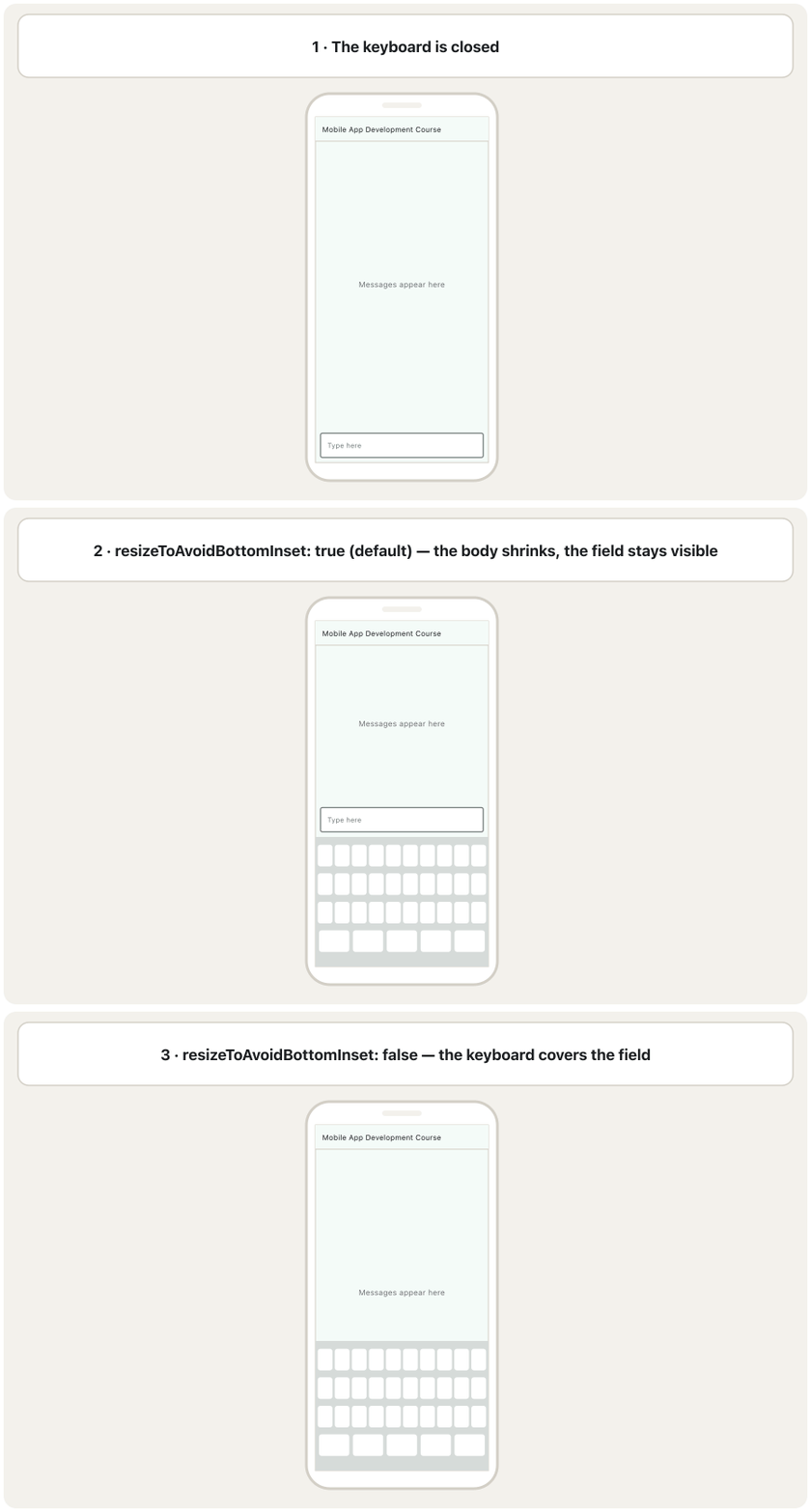
When a text field gets focus, the phone's on-screen keyboard slides up and covers the bottom part of the screen. That covered strip is called the bottom inset. resizeToAvoidBottomInset decides what the Scaffold does about it:
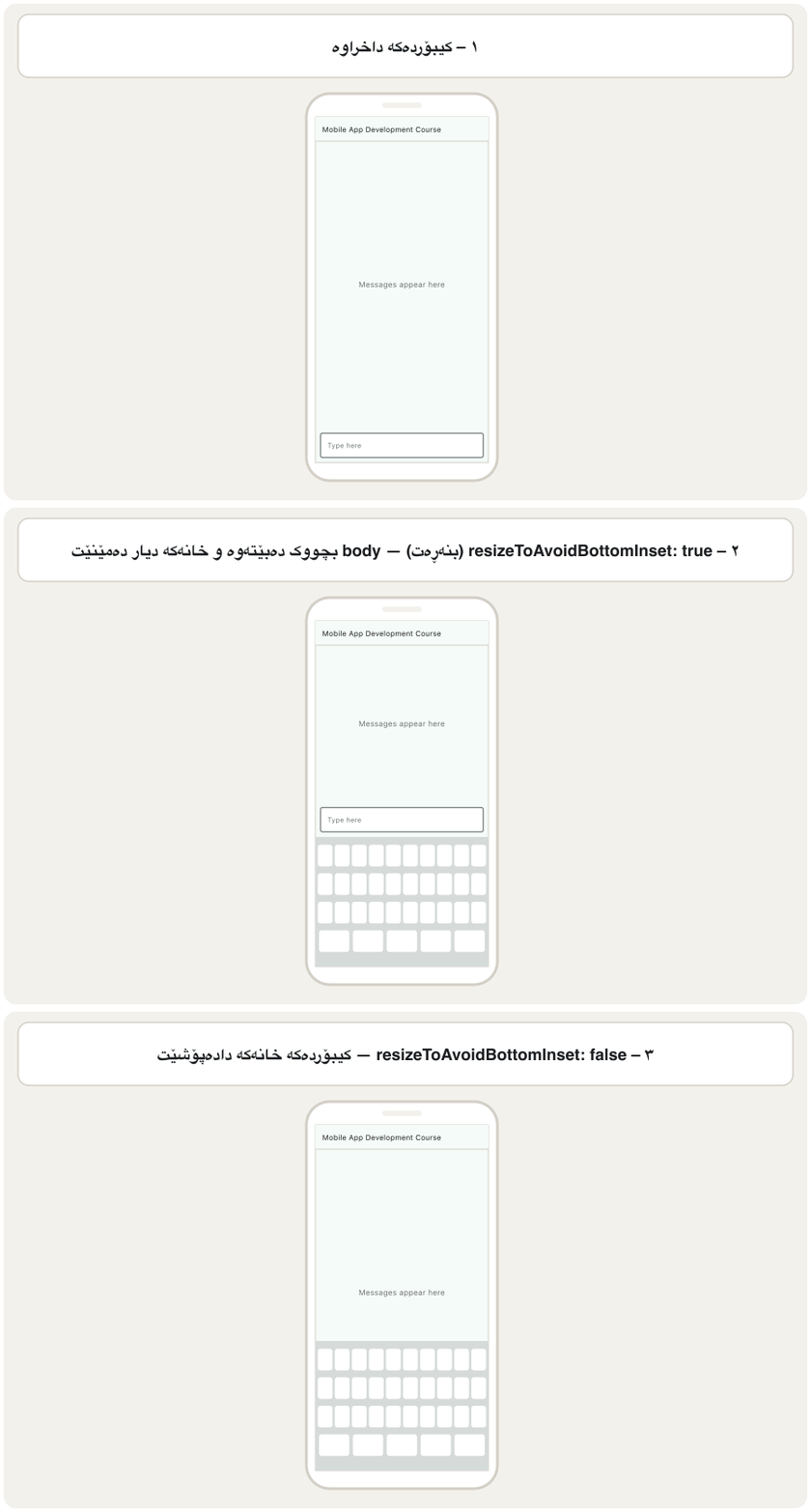
کاتێک ئامادە دەبێت بۆ نووسین، سەر شاشەی مۆبایلەکە بەرز دەبێتەوە و بەشی خوارەوەی شاشەکە دادەپۆشێت. ئەو پارچە داپۆشراوە پێی دەوترێت bottom inset. resizeToAvoidBottomInset بڕیار دەدات Scaffold چی بکات:
true(the default): the body becomes shorter, so widgets at its bottom, such as a text field, move up above the keyboard. Floating widgets such as the FAB move up too.false: the body keeps its full height and the keyboard simply covers its bottom part.
true(بنەڕەت): body کورتتر دەبێتەوە، بۆیە ئەو لە خوارەوەیدان، وەک ، دەچنە سەرووی . ئەو لەسەر پەڕەکە دەوەستن، وەک FAB، ئەوانیش بەرز دەبنەوە.false: body هەموو بەرزییەکەی دەپارێزێت و تەنها بەشی خوارەوەی دادەپۆشێت.
import 'package:flutter/material.dart';

class MessagePage extends StatelessWidget {
  const MessagePage({super.key});

  @override
  Widget build(BuildContext context) {
    return Scaffold(
      appBar: AppBar(title: const Text('Mobile App Development Course')),
      resizeToAvoidBottomInset: true, // the default: make room for the keyboard
      body: const Column(
        children: [
          Expanded(
            child: Center(child: Text('Messages appear here')),
          ),
          Padding(
            padding: EdgeInsets.all(12),
            child: TextField(
              decoration: InputDecoration(
                border: OutlineInputBorder(),
                labelText: 'Type here',
              ),
            ),
          ),
        ],
      ),
    );
  }
}┌─────────────────────────────┐ │ Mobile App Development Cour…│ ├─────────────────────────────┤ │ Messages appear here │ │ ┌─────────────────────────┐ │ │ │ Type here| │ │ │ └─────────────────────────┘ │ ├─────────────────────────────┤ │ q w e r t y u i o p │ │ a s d f g h j k l │ │ z x c v b n m │ └─────────────────────────────┘
'Messages appear here' in the middle and a 'Type here' box at the bottom. Tapping the box opens the keyboard, and the box moves up so it stays visible above it.
'Messages appear here' لە ناوەڕاست و خانەی 'Type here' لە خوارەوە. دەست لێدانی خانەکە دەکاتەوە و خانەکە بەرز دەبێتەوە بۆ ئەوەی لە سەرووی دیار بمێنێت.
Explain the codeڕوونکردنەوەی کۆدەکە
- Lineدێڕی 10
The default value, written out to show it. Try
false.، نووسراوە تا ببینرێت.
falseتاقی بکەرەوە.- Lineدێڕی 13
Expandedtakes the free height, so the field stays at the bottom of the body.Expandedبەرزییە بەتاڵەکە دەگرێت، بۆیە خانەکە لە خوارەوەی body دەمێنێتەوە.- Lineدێڕی 18
Tapping the field opens the keyboard.
دەست لێدانی خانەکە دەکاتەوە.
Common mistakesهەڵە باوەکان
| Mistakeهەڵە | What happensچی ڕوو دەدات | Fixچاککردن |
|---|---|---|
A drawer item with no onTap, or without Navigator.pop(context)بڕگەیەکی بەبێ onTap یان بەبێ Navigator.pop(context) | Tapping does nothing, or the drawer stays openدەست لێدان هیچ ناکات، یان کراوە دەمێنێتەوە | Act, then call Navigator.pop(context)کارەکە بکە، پاشان Navigator.pop(context) بانگ بکە |
currentIndex: 0 written as a fixed numbercurrentIndex: 0 وەک ژمارەیەکی جێگیر نووسراوە | The bottom bar never changesشریتی خوارەوە هەرگیز ناگۆڕێت | Keep the index in a StatefulWidget and update it with setStateژمارەکە لە StatefulWidgetـێکدا هەڵبگرە و بە setState نوێی بکەرەوە |
Calling setState in a StatelessWidgetبانگکردنی setState لە StatelessWidgetـێکدا | Compile error: there is no setState there: لەوێ setState نییە | Turn the screen into a StatefulWidgetشاشەکە بکە بە StatefulWidget |
A drawer's ListView without padding: EdgeInsets.zeroListViewـی بەبێ padding: EdgeInsets.zero | A gap above the headerبۆشاییەک لە سەرووی سەردێڕەکە | Add padding: EdgeInsets.zeropadding: EdgeInsets.zero زیاد بکە |
Thinking endDrawer is always on the rightوا بیر بکەیتەوە کە endDrawer هەمیشە لە ڕاستە | Wrong design for a Kurdish appدیزاینی هەڵە بۆ کوردی | Think start and end: in Kurdish apps the end is the leftبە start و end بیر بکەرەوە: لە کوردییەکاندا کۆتایی لای چەپە |
backgroundColor: Colors.yellow; inside Scaffold(...)backgroundColor: Colors.yellow; لە ناو Scaffold(...) | Syntax errorهەڵەی | End the argument with a comma بە فاریزە کۆتایی پێ بهێنە |
Using resizeToAvoidBottomPaddingبەکارهێنانی resizeToAvoidBottomPadding | The parameter does not exist any moreئەو ئیتر بوونی نییە | Use resizeToAvoidBottomInsetresizeToAvoidBottomInset بەکار بهێنە |
| A docked FAB location on a screen with no bottom barشوێنێکی docked بۆ FAB لە شاشەیەکی بێ شریتی خوارەوە | The button sits against the bottom edge بە لێواری خوارەوەوە دەنووسێت | Use a Float location, or add a bottom barشوێنێکی Float بەکار بهێنە، یان شریتێکی خوارەوە زیاد بکە |
Exercisesڕاهێنانەکان
Build a screen 'My School' with a drawer. The drawer has an indigo header with the white text 'My School' and three items with icons: Timetable, Marks and Library. Tapping an item closes the drawer.
شاشەیەکی 'My School' دروست بکە کە هەبێت. سەردێڕێکی نیلی بە دەقی سپی 'My School' و سێ بڕگەی هەیە کە هەریەکەیان هەیە: Timetable، Marks و Library. دەست لێدانی بڕگەیەک دادەخات.
Hintئاماژە
Drawer → ListView(padding: EdgeInsets.zero) → DrawerHeader + ListTile(leading, title, onTap).
ڕیزبەندییەکە: Drawer ← ListView(padding: EdgeInsets.zero) ← DrawerHeader + ListTile(leading, title, onTap).
Show answerوەڵامەکە پیشان بدە
import 'package:flutter/material.dart';

class SchoolHome extends StatelessWidget {
  const SchoolHome({super.key});

  @override
  Widget build(BuildContext context) {
    return Scaffold(
      appBar: AppBar(title: const Text('My School')),
      drawer: Drawer(
        child: ListView(
          padding: EdgeInsets.zero,
          children: [
            const DrawerHeader(
              decoration: BoxDecoration(color: Colors.indigo),
              child: Text(
                'My School',
                style: TextStyle(color: Colors.white, fontSize: 24),
              ),
            ),
            ListTile(
              leading: const Icon(Icons.calendar_month),
              title: const Text('Timetable'),
              onTap: () => Navigator.pop(context),
            ),
            ListTile(
              leading: const Icon(Icons.grade),
              title: const Text('Marks'),
              onTap: () => Navigator.pop(context),
            ),
            ListTile(
              leading: const Icon(Icons.local_library),
              title: const Text('Library'),
              onTap: () => Navigator.pop(context),
            ),
          ],
        ),
      ),
      body: const Center(child: Text('Welcome!')),
    );
  }
}
Explain the codeڕوونکردنەوەی کۆدەکە
- Lineدێڕی 12
No gap above the header.
هیچ بۆشاییەک لە سەرووی سەردێڕەکە نییە.
- Lineدێڕی 24
Each item closes the drawer.
هەر بڕگەیەک دادەخات.
The course shows an end drawer called 'Account Settings' with the items Profile & Security, Notifications, Favorites, About and Log Out & Exit. Build it as an endDrawer with an icon before each item. Which edge will it open from in a Kurdish app?
وانەکە endDrawerـێک پیشان دەدات بە ناوی 'Account Settings' بە بڕگەکانی Profile & Security، Notifications، Favorites، About و Log Out & Exit. وەک endDrawer دروستی بکە و پێش هەر بڕگەیەک دابنێ. لە کوردیدا لە کام لێوارەوە دەکرێتەوە؟
Show answerوەڵامەکە پیشان بدە
import 'package:flutter/material.dart';

class StorePage extends StatelessWidget {
  const StorePage({super.key});

  @override
  Widget build(BuildContext context) {
    return Scaffold(
      appBar: AppBar(title: const Text('Store')),
      endDrawer: Drawer(
        child: ListView(
          children: [
            const ListTile(
              title: Text('Account Settings', style: TextStyle(fontSize: 20)),
            ),
            ListTile(
              leading: const Icon(Icons.security),
              title: const Text('Profile & Security'),
              onTap: () => Navigator.pop(context),
            ),
            ListTile(
              leading: const Icon(Icons.notifications),
              title: const Text('Notifications'),
              onTap: () => Navigator.pop(context),
            ),
            ListTile(
              leading: const Icon(Icons.favorite),
              title: const Text('Favorites'),
              onTap: () => Navigator.pop(context),
            ),
            ListTile(
              leading: const Icon(Icons.info),
              title: const Text('About'),
              onTap: () => Navigator.pop(context),
            ),
            const Divider(),
            ListTile(
              leading: const Icon(Icons.logout),
              title: const Text('Log Out & Exit'),
              onTap: () => Navigator.pop(context),
            ),
          ],
        ),
      ),
      body: const Center(child: Text('Products')),
    );
  }
}
In a Kurdish (right-to-left) app the end drawer opens from the left edge; in an English app from the right.
لە کوردیدا () endDrawer لە لێواری چەپەوە دەکرێتەوە؛ لە ئینگلیزیدا لە ڕاستەوە.
A notes app has a BottomAppBar with a menu icon and a search icon. Put a + button with the tooltip 'New note' in the middle, sitting on the bar's top edge. Which two Scaffold properties do you need?
تێبینی BottomAppBarـێکی هەیە بە و گەڕان. دوگمەیەکی + بە tooltipـی 'New note' لە ناوەڕاستدا دابنێ کە لەسەر لێواری سەرەوەی شریتەکە دانیشێت. پێویستت بە کام دوو Scaffold هەیە؟
Show answerوەڵامەکە پیشان بدە
floatingActionButton for the button and floatingActionButtonLocation: FloatingActionButtonLocation.centerDocked for its place:
floatingActionButton بۆ و floatingActionButtonLocation: FloatingActionButtonLocation.centerDocked بۆ شوێنەکەی:
import 'package:flutter/material.dart';

class NotesHome extends StatelessWidget {
  const NotesHome({super.key});

  @override
  Widget build(BuildContext context) {
    return Scaffold(
      appBar: AppBar(title: const Text('Notes')),
      body: const Center(child: Text('No notes yet')),
      floatingActionButton: FloatingActionButton(
        onPressed: () {},
        tooltip: 'New note',
        child: const Icon(Icons.add),
      ),
      floatingActionButtonLocation: FloatingActionButtonLocation.centerDocked,
      bottomNavigationBar: const BottomAppBar(
        child: Row(
          mainAxisAlignment: MainAxisAlignment.spaceBetween,
          children: [Icon(Icons.menu), Icon(Icons.search)],
        ),
      ),
    );
  }
}
Explain the codeڕوونکردنەوەی کۆدەکە
- Lineدێڕی 16
center + docked.
center (ناوەڕاست) + docked (نووساو بە شریتەوە).
Change the course's bottom bar into a Material 3 NavigationBar with four destinations: Home, Search, Profile and Settings. The app bar title and the text in the middle of the page must show the name of the selected section.
شریتی خوارەوەی وانەکە بگۆڕە بۆ NavigationBarـی Material 3 بە چوار شوێنەوە: Home، Search، Profile و Settings. ناونیشانی و دەقی ناوەڕاستی پەڕەکە دەبێت ناوی بەشی هەڵبژێردراو پیشان بدەن.
Hintئاماژە
You need a StatefulWidget, an int _index and setState.
پێویستت بە StatefulWidget، int _index و setState هەیە.
Show answerوەڵامەکە پیشان بدە
import 'package:flutter/material.dart';

class ShopHome extends StatefulWidget {
  const ShopHome({super.key});

  @override
  State<ShopHome> createState() => _ShopHomeState();
}

class _ShopHomeState extends State<ShopHome> {
  int _index = 0;

  static const _titles = ['Home', 'Search', 'Profile', 'Settings'];

  @override
  Widget build(BuildContext context) {
    return Scaffold(
      appBar: AppBar(title: Text(_titles[_index])),
      body: Center(child: Text('This is the ${_titles[_index]} page')),
      bottomNavigationBar: NavigationBar(
        selectedIndex: _index,
        onDestinationSelected: (int index) {
          setState(() => _index = index);
        },
        destinations: const [
          NavigationDestination(icon: Icon(Icons.home), label: 'Home'),
          NavigationDestination(icon: Icon(Icons.search), label: 'Search'),
          NavigationDestination(icon: Icon(Icons.account_circle), label: 'Profile'),
          NavigationDestination(icon: Icon(Icons.settings), label: 'Settings'),
        ],
      ),
    );
  }
}
Explain the codeڕوونکردنەوەی کۆدەکە
- Lineدێڕی 13
One list of names serves the title, the page and the bar's order.
یەک لیستی ناو بۆ ناونیشان، پەڕە و ڕیزبەندیی شریتەکە بەکار دێت.
- Lineدێڕی 23
The state changes, so the title and the body change too.
دەگۆڕێت، بۆیە ناونیشان و bodyـیش دەگۆڕێن.
A login screen has two text fields at the bottom of a Column and resizeToAvoidBottomInset: false. What does the user see after tapping the second field? Suggest two ways to fix it.
شاشەیەکی چوونەژوورەوە دوو لە خوارەوەی Columnـێکدا هەیە و resizeToAvoidBottomInset: false. دوای دەست لێدانی خانەی دووەم چی دەبینێت؟ دوو ڕێگەی چاککردن پێشنیار بکە.
Show answerوەڵامەکە پیشان بدە
The keyboard opens over the bottom of the screen and covers the fields, because the body keeps its full height. Fix 1: remove the line (the default true shrinks the body). Fix 2: if the body must keep its height (for example a background picture), put the form in a SingleChildScrollView so the user can scroll the field into view.
لەسەر خوارەوەی شاشەکە دەکرێتەوە و خانەکان دادەپۆشێت، چونکە body هەموو بەرزییەکەی دەپارێزێت. چاککردنی ١: ئەو دێڕە لابە (trueـی بنەڕەت body بچووک دەکاتەوە). چاککردنی ٢: ئەگەر body دەبێت بەرزییەکەی بپارێزێت (بۆ نموونە وێنەیەکی پاشبنەما)، فۆڕمەکە بخە ناو SingleChildScrollView بۆ ئەوەی بتوانێت خانەکە بە بهێنێتە بەرچاو.
Summaryپوختە
floatingActionButtonLocationplaces the FAB:endFloat(default),endDocked,centerFloat,centerDockedand 15 more; end is the left in Kurdish apps.drawerslides in from the start edge,endDrawerfrom the end edge. A drawer is usuallyDrawer→ListView→DrawerHeader+ListTiles, and each item closes it withNavigator.pop(context). Material 3 addsNavigationDrawer.bottomNavigationBarshows the main sections. The selected index is state: keep it in aStatefulWidgetand update it withsetState. Material 3's bar isNavigationBar.persistentFooterButtonsstay above the bottom bar and never scroll;backgroundColorcolours the whole page;bottomSheetshows fixed extra information;showModalBottomSheetopens a sheet on demand.resizeToAvoidBottomInset(defaulttrue) shrinks the body when the keyboard opens.resizeToAvoidBottomPaddingno longer exists.
floatingActionButtonLocationFAB دادەنێت:endFloat(بنەڕەت)،endDocked،centerFloat،centerDockedو ١٥ی تر؛ end لە کوردییەکاندا چەپە.drawerلە لێواری سەرەتاوە دێتە ناوەوە وendDrawerلە لێواری کۆتاییەوە. زۆربەی جارDrawer←ListView←DrawerHeader+ListTileـە و هەر بڕگەیەک بەNavigator.pop(context)دایدەخات. Material 3NavigationDrawerزیاد دەکات.bottomNavigationBarبەشە سەرەکییەکان پیشان دەدات. ژمارەی هەڵبژێردراو : لەStatefulWidgetـێکدا هەڵیبگرە و بەsetStateنوێی بکەرەوە. شریتی Material 3NavigationBarـە.persistentFooterButtonsلە سەرووی شریتی خوارەوە دەمێننەوە و هەرگیز ناکرێن؛backgroundColorهەموو پەڕەکە ڕەنگ دەکات؛bottomSheetزانیاریی زیادەی جێگیر پیشان دەدات؛showModalBottomSheetپەڕەیەک کاتی پێویست دەکاتەوە.resizeToAvoidBottomInset(بنەڕەتtrue) body بچووک دەکاتەوە کاتێک دەکرێتەوە.resizeToAvoidBottomPaddingئیتر بوونی نییە.
What is the difference between drawer and endDrawer?جیاوازیی drawer و endDrawer چییە؟
Only the edge: drawer opens from the start edge (left in English, right in Kurdish apps), endDrawer from the end edge.
تەنها لێوارەکە: drawer لە لێواری سەرەتاوە دەکرێتەوە (لە ئینگلیزییەکاندا چەپ، لە کوردییەکاندا ڕاست) و endDrawer لە لێواری کۆتاییەوە.
Why must a working bottom navigation bar be inside a StatefulWidget?بۆچی شریتی ڕێنیشاندانی خوارەوەی کارپێکراو دەبێت لە ناو StatefulWidgetـێکدا بێت؟
The selected index changes when the user taps. It must be kept in a State object and changed with setState, so the bar and the body are built again.
ژمارەی هەڵبژێردراو کاتی دەست لێدان دەگۆڕێت. دەبێت لە Stateـدا هەڵبگیرێت و بە setState بگۆڕدرێت، بۆ ئەوەی شریتەکە و body دووبارە دروست ببنەوە.
What is the difference between float and docked FAB locations?جیاوازیی شوێنەکانی float و dockedـی FAB چییە؟
A floating FAB hovers above the bottom bar; a docked FAB has its centre on the bar's top edge.
FABـی float لە سەرووی شریتی خوارەوە ڕادەوەستێت؛ FABـی docked ناوەڕاستەکەی لەسەر لێواری سەرەوەی شریتەکەیە.
What replaced resizeToAvoidBottomPadding?چی جێگەی resizeToAvoidBottomPaddingـی گرتەوە؟
resizeToAvoidBottomInset. The old parameter was deprecated in Flutter 1.1.9 and later removed.
resizeToAvoidBottomInset. کۆنەکە لە Flutter 1.1.9ـدا کرا و دواتر لابرا.
Lesson complete!وانەکە تەواو بوو!
Well done. Review the key terms, then go on to the next lesson.دەستخۆش. سەیرێکی زاراوە سەرەکییەکان بکەرەوە، پاشان بڕۆ بۆ وانەی داهاتوو.
Key termsزاراوە سەرەکییەکان
Container: Size, Padding, Margin and AlignmentContainer: قەبارە، بۆشایی ناوەوە، پەراوێز و ڕێکخستنی شوێن
Related lecturesوانە پەیوەندیدارەکان
References and further readingسەرچاوەکان و خوێندنەوەی زیاتر
This lecture is a first edition. The Kurdish text and terminology are waiting for review by Kurdish IT teachers.ئەم وانەیە چاپی یەکەمە. دەقە کوردییەکە و زاراوەکانی چاوەڕێی پێداچوونەوەی مامۆستایانی کوردی بواری IT ن.