FlutterFlutter · Chapterبەش 7 · Lectureوانە 7.5
Project: A Product Catalogue Screenپرۆژە: شاشەی کەتەلۆگی کاڵاکان
The course's Assignment 2 rebuilt step by step: product data as a List of Maps and then a Product class, tilted decorated cards as a StatelessWidget, local asset pictures, rows of two turned into a scrolling GridView, one drawer class for drawer and endDrawer, and a bottom bar with state — plus review exercises.
ئەرکی دووەمی وانەکە هەنگاو بە هەنگاو دووبارە دروست کراوەتەوە: کاڵا وەک لیستێک لە Map و پاشان Product، کارتی ڕازێنراوەی لار وەک StatelessWidget، وێنەی ناوخۆیی، ڕیزی دوو کارتی کە دەبێت بە GridViewـێک کە دەکات، یەک بۆ drawer و endDrawer و بە — لەگەڵ ڕاهێنانی پێداچوونەوە.
What you will learnچی فێر دەبیت
- Read a complete Flutter screen and list what to improve.
- Turn a List of Maps into a list of objects of a class with final fields.
- Build a reusable card widget with decoration, transform and an asset picture.
- Trace the rows-of-two loop and replace it with a scrolling GridView.
- Share one drawer class between drawer and endDrawer, and give the bottom bar state.
- شاشەیەکی تەواوی Flutter بخوێنیتەوە و ئەوانە بژمێریت کە دەبێت باشتر بکرێن.
- لیستێک لە Map بکەیت بە لیستێک لە بە خانەی final.
- کارتی دووبارە بەکارهاتوو بە decoration، transform و وێنەیەکی دروست بکەیت.
- ڕیزی دوو کارتی بەدوادا بچیت و بە GridViewـێک کە دەکات بیگۆڕیت.
- یەک لە نێوان drawer و endDrawerـدا هاوبەش بکەیت و بدەیت بە شریتی خوارەوە.
What you will buildچی دروست دەکەیت
This lesson is a project. You rebuild the course's Assignment 2 — a shop screen — step by step, with today's Flutter. The finished screen has a coloured app bar, a grid of slightly tilted product cards (name, short description, picture, price), a side panel on each side of the screen, and a bottom bar with three sections.
ئەم وانەیە پرۆژەیەکە. ئەرکی دووەمی وانەکە — شاشەی دوکانێک — هەنگاو بە هەنگاو بە Flutterـی ئەمڕۆ دووبارە دروست دەکەیتەوە. شاشە تەواوەکە ڕەنگاوڕەنگ، تۆڕێک لە کارتی کاڵای کەمێک لار (ناو، وەسفێکی کورت، وێنە، نرخ)، پانێڵێکی لاتەنیشت لە هەر لایەکی شاشەکە و بە سێ بەشەوە هەیە.
Every step uses something from an earlier lesson. Open it again whenever a step feels new:
هەر هەنگاوێک شتێک لە وانەیەکی پێشوو بەکار دەهێنێت. هەر کاتێک هەنگاوێک نامۆ بوو، دووبارە بیکەرەوە:
- Lists and Maps of data — Maps; a class for the data — Classes and objects.
- A decorated, rotated Container — transform.
- Rows of cards and a grid — Row and Lists and Grids.
- Side panels and a bottom bar with state — Drawers, Bottom Bars and Sheets.
- و Mapـەکانی — Mapـەکان؛ بۆ — کلاسەکان و ئۆبجێکتەکان.
- Containerـێکی ڕازێنراوەی سووڕاو — transform.
- ڕیزی کارت و تۆڕێک — Row و لیست و تۆڕ.
- پانێڵی لاتەنیشت و شریتی خوارەوە بە — لیستە لاتەنیشتەکان، شریتەکانی خوارەوە و پەڕەی خوارەوە.
The assignment's code, read firstسەرەتا کۆدی ئەرکەکە بخوێنەوە
Here is the assignment's lib/main.dart as the group handed it in. Only the four picture addresses are shortened to https://…: they pointed at photos on other shops' and a stock-photo site's servers, which must not be copied (see the warning below).
ئەمە lib/main.dartـی ئەرکەکەیە وەک گرووپەکە ڕادەستی کرد. تەنها چوار ناونیشانی وێنەکان کورت کراونەتەوە بۆ https://…: ئاماژەیان بە وێنەی سەر دوکانی تر و ماڵپەڕێکی فرۆشتنی وێنە دەکرد کە نابێت کۆپی بکرێن (سەیری ئاگادارکردنەوەکەی خوارەوە بکە).
import 'package:flutter/material.dart';

void main() {
  runApp(const MaterialApp(home: MyWidget()));
}

class MyWidget extends StatefulWidget {
  const MyWidget({super.key});

  @override
  State<MyWidget> createState() => _MyWidgetState();
}

class _MyWidgetState extends State<MyWidget> {
  List<Map<String, dynamic>> products = [
    {
      'name': 'Product1',
      'description': 'Description of Product1',
      'price': 3.0,
      'image': 'https://…',
    },
    {
      'name': 'Product2',
      'description': 'Description of Product2',
      'price': 4.0,
      'image': 'https://…',
    },
    {
      'name': 'Product3',
      'description': 'Description of Product3',
      'price': 5.0,
      'image': 'https://…',
    },
    {
      'name': 'Product3',
      'description': 'Description of Product3',
      'price': 9.0,
      'image': 'https://…',
    },
  ];

  @override
  Widget build(BuildContext context) {
    List<Row> rows = [];

    for (int i = 0; i < products.length; i += 2) {
      int endIndex = (i + 2 <= products.length) ? i + 2 : products.length;

      rows.add(
        Row(
          mainAxisAlignment: MainAxisAlignment.spaceAround,
          children: products.sublist(i, endIndex).map((product) {
            return ProductCard(product);
          }).toList(),
        ),
      );
    }

    return Scaffold(
      backgroundColor: Colors.white,
      appBar: AppBar(
        backgroundColor: Colors.cyan,
        title: const Text('My App'),
      ),
      body: Column(
        mainAxisAlignment: MainAxisAlignment.spaceAround,
        children: rows,
      ),
      drawer: Drawer(
        child: ListView(
          children: [
            DrawerHeader(
              decoration: BoxDecoration(
                color: Colors.blue,
              ),
              child: Text('Default Drawer Header'),
            ),
            ListTile(
              title: const Text('Item 1'),
              onTap: () {
                debugPrint("Item 1 tapped");
              },
            ),
            ListTile(
              title: const Text('Item 2'),
              onTap: () {
                debugPrint("Item 2 tapped");
              },
            ),
          ],
        ),
      ),
      endDrawer: Drawer(
        child: ListView(
          children: [
            DrawerHeader(
              decoration: BoxDecoration(
                color: Colors.blue,
              ),
              child: Text('EndDrawer Header'),
            ),
            ListTile(
              title: const Text('Item 1'),
              onTap: () {
                debugPrint("Item 1 tapped");
              },
            ),
            ListTile(
              title: const Text('Item 2'),
              onTap: () {
                debugPrint("Item 2 tapped");
              },
            ),
          ],
        ),
      ),
      bottomNavigationBar: BottomNavigationBar(
        backgroundColor: Colors.cyan[100],
        currentIndex: 0,
        items: [
          BottomNavigationBarItem(icon: Icon(Icons.home), label: "Home"),
          BottomNavigationBarItem(icon: Icon(Icons.search), label: "Search"),
          BottomNavigationBarItem(icon: Icon(Icons.people), label: "Profile")
        ],
      ),
    );
  }

  Widget ProductCard(Map<String, dynamic> product) {
    return Container(
      transform: Matrix4.rotationZ(0.05),
      height: 200,
      width: 150,
      padding: const EdgeInsets.all(10),
      decoration: BoxDecoration(
        color: Colors.lightBlue[100],
        border: Border.all(color: Colors.grey, width: 2.0),
        borderRadius: BorderRadius.circular(8),
      ),
      child: Column(
        mainAxisAlignment: MainAxisAlignment.spaceAround,
        children: [
          Text(
            product['name'], // Display product name
            style: const TextStyle(fontSize: 16, fontWeight: FontWeight.bold),
          ),
          Text(
            product['description'], // Display product name
            style: const TextStyle(fontSize: 14),
          ),
          Image.network(
            product['image'], // Display product image
            width: 50,
            height: 50,
            fit: BoxFit.cover,
          ),
          const SizedBox(height: 5), // Space between image and price
          Text(
            '\$${product['price'].toStringAsFixed(2)}', // Display price
            style: const TextStyle(fontSize: 14, color: Colors.grey),
          ),
        ],
      ),
    );
  }
}┌─────────────────────────────┐ │ ☰ My App ☰ │ ├─────────────────────────────┤ │ ╱Product1╲ ╱Product2╲ │ │ │ Descr. │ │ Descr. │ │ │ │ [img] │ │ [img] │ │ │ │ $3.00 │ │ $4.00 │ │ │ │ │ ╱Product3╲ ╱Product3╲ │ │ │ ... │ │ ... │ │ │ │ $5.00 │ │ $9.00 │ │ ├─────────────────────────────┤ │ Home Search Profile │ └─────────────────────────────┘
A white screen with a cyan app bar 'My App', a 2 × 2 grid of slightly tilted light-blue cards (name, description, a 50 × 50 picture from the internet, a grey price such as '$3.00'), a drawer and an end drawer with two items each, and a bottom bar Home / Search / Profile.
شاشەیەکی سپی بە شینی ئاسمانی 'My App'، تۆڕێکی ٢ × ٢ لە کارتی شینی کاڵی کەمێک لار (ناو، وەسف، وێنەیەکی ٥٠ × ٥٠ لە ، نرخێکی خۆڵەمێشی وەک '$3.00')، drawer و endDrawerـێک هەر یەکەیان بە دوو بڕگەوە و Home / Search / Profile.
Explain the codeڕوونکردنەوەی کۆدەکە
- Lineدێڕی 15
The data: a list of four maps, one per product.
: لە چوار Map، بۆ هەر کاڵایەک یەک.
- Lineدێڕی 46
A loop that packs the cards into rows of two.
کە کارتەکان دوو دوو دەخاتە ناو ڕیزەکانەوە.
- Lineدێڕی 69
A drawer on the start side…
لە لای سەرەتا…
- Lineدێڕی 93
…and an almost identical one on the end side.
…و یەکێکی نزیکەی وەک یەک لە لای کۆتایی.
- Lineدێڕی 117
A bottom bar with three items.
بە سێ بڕگە.
- Lineدێڕی 129
A method that builds one card.
کە یەک کارت دروست دەکات.
The code compiles and runs. It already practises a lot (the course's own summary of it): building rows of two cards from a List<Map<String, dynamic>> with a for loop, sublist and map(...).toList(); a Container's transform and decoration; Image.network; drawer and endDrawer; a BottomNavigationBar; and a price string with an escaped \$ and toStringAsFixed(2). flutter analyze reports just one issue: the method name ProductCard should be lowerCamelCase.
کۆدەکە کۆمپایل دەبێت و کار دەکات. پێشتر زۆر شت ڕاهێنان دەکات (پوختەی وانەکە خۆی): دروستکردنی ڕیزی دوو کارتی لە List<Map<String, dynamic>>ـێک بە ، sublist و map(...).toList()؛ transform و decorationـی Container؛ Image.network؛ drawer و endDrawer؛ BottomNavigationBarـێک؛ و نرخ بە \$ـی ڕزگارکراو و toStringAsFixed(2). flutter analyze تەنها یەک کێشە ڕادەگەیەنێت: ناوی ProductCard دەبێت lowerCamelCase بێت.
The assignment's code, read firstسەرەتا کۆدی ئەرکەکە بخوێنەوە
Six things to improveشەش شت بۆ باشترکردن
Working is not the same as finished. These are the six things the next steps improve:
کارکردن هەمان تەواوبوون نییە. ئەمانە ئەو شەش شتەن کە هەنگاوەکانی داهاتوو باشتریان دەکەن:
- The data is a list of maps: a typo in a key (
'nmae') is not caught, and two products are both called Product3. ProductCardis a method whose name looks like a class; a realStatelessWidgetclass is clearer and can beconst.- The pictures are hot-linked from other websites, and
Image.networkhas noerrorBuilderfor when they fail. - A Column of Rows does not scroll: with more products it overflows the screen.
- The two drawers repeat the same twenty lines.
- The bottom bar has
currentIndex: 0and noonTap, so tapping it changes nothing. A comment also says Display product name on the description line.
- لە Map: هەڵەی نووسین لە (
'nmae') نادۆزرێتەوە و دوو کاڵا هەردووکیان ناویان Product3ـە. ProductCardکە ناوەکەی وەک دەردەکەوێت؛ ڕاستەقینەیStatelessWidgetڕوونترە و دەتوانێتconstبێت.- وێنەکان ڕاستەوخۆ لە ماڵپەڕی ترەوە بەستراون و
Image.networkهیچerrorBuilderـێکی نییە بۆ کاتی شکستیان. - Columnـێک لە Row ناکات: بە کاڵای زیاتر لە شاشەکە دەڕژێتە دەرەوە.
- هەردوو هەمان بیست دێڕ دووبارە دەکەنەوە.
- شریتی خوارەوە
currentIndex: 0ـی هەیە وonTapـی نییە، بۆیە دەستدان لێی هیچ ناگۆڕێت. هەروەها تێبینییەک لەسەر دێڕی وەسفەکە دەڵێت Display product name.
Step 1: the data as a List of Mapsهەنگاوی ١: دراوە وەک لیستێک لە Map
The assignment keeps each product in a Map: a set of key–value pairs such as 'name': 'Product1'. All products go into a List. The type List<Map<String, dynamic>> reads: a list of maps whose keys are strings and whose values can be anything (dynamic).
ئەرکەکە هەر کاڵایەک لە Mapـێکدا هەڵدەگرێت: کۆمەڵێک وەک 'name': 'Product1'. هەموو کاڵاکان دەچنە ناو . جۆری List<Map<String, dynamic>> بەم شێوەیە دەخوێنرێتەوە: لە Map کە و بەهاکانیان دەتوانن هەر شتێک بن (dynamic).
// Step 1: the assignment's data — a List of Maps.
List<Map<String, dynamic>> products = [
  {
    'name': 'Tea glass',
    'description': 'Istikan, 100 ml',
    'price': 3.0,
    'image': 'assets/products/tea_glass.png',
  },
  {
    'name': 'Teaspoon',
    'description': 'Steel, set of 6',
    'price': 4.0,
    'image': 'assets/products/teaspoon.png',
  },
];

void main() {
  final first = products[0];
  print(first['name']); // Tea glass
  print(first['price'] + 1); // 4.0
  print(first['nmae']); // null: a typo, but no error until it is used
}Tea glass 4.0 null
Explain the codeڕوونکردنەوەی کۆدەکە
- Lineدێڕی 2
Values are
dynamic, so Dart does not check them.بەهاکان
dynamicن، بۆیە Dart نایانپشکنێت.- Lineدێڕی 21
A misspelt key is not an error: the map just answers
null. In a widget,Text(product['nmae'])would crash only when that screen is built.هەڵە نووسراو نییە: Mapـەکە تەنها
nullدەداتەوە. لە ،Text(product['nmae'])تەنها کاتی دروستکردنی ئەو شاشەیە دەتەقێتەوە.
Step 1: the data as a List of Mapsهەنگاوی ١: دراوە وەک لیستێک لە Map
Step 2: a Product classهەنگاوی ٢: کلاسی Product
A class describes the shape of the data once: every product has a name, a description, a price and a picture, with fixed types. Then each product is an object of that class. final fields and a const constructor make the products unchangeable values that Flutter can reuse.
یەک جار شێوەی وەسف دەکات: هەموو کاڵایەک ناو، وەسف، نرخ و وێنەیەکی هەیە، بە جۆری جێگیر. پاشان هەر کاڵایەک ئەو . خانەکانی final و const کاڵاکان دەکەن بە بەهای نەگۆڕ کە Flutter دەتوانێت دووبارە بەکاریان بهێنێتەوە.
// Step 2: a Product class instead of a Map.
class Product {
  const Product({
    required this.name,
    required this.description,
    required this.price,
    required this.image,
  });

  final String name;
  final String description;
  final double price;
  final String image; // the path of an asset picture
}

const List<Product> products = [
  Product(
    name: 'Tea glass',
    description: 'Istikan, 100 ml',
    price: 3.0,
    image: 'assets/products/tea_glass.png',
  ),
  Product(
    name: 'Teaspoon',
    description: 'Steel, set of 6',
    price: 4.0,
    image: 'assets/products/teaspoon.png',
  ),
  Product(
    name: 'Sugar bowl',
    description: 'Glass, with a lid',
    price: 5.0,
    image: 'assets/products/sugar_bowl.png',
  ),
  Product(
    name: 'Teapot',
    description: 'Steel, 1 litre',
    price: 9.0,
    image: 'assets/products/teapot.png',
  ),
];

void main() {
  final first = products[0];
  print(first.name); // Tea glass
  print('\$${first.price.toStringAsFixed(2)}'); // $3.00
  // print(first.nmae); // compile error: The getter 'nmae' isn't defined
}Tea glass $3.00
With the commented line switched on, the program does not even start: Error: The getter 'nmae' isn't defined for the type 'Product'.
ئەگەر دێڕە تێبینییەکە چالاک بکەیت، تەنانەت دەست پێ ناکات: Error: The getter 'nmae' isn't defined for the type 'Product'.
Explain the codeڕوونکردنەوەی کۆدەکە
- Lineدێڕی 2-7
A
constconstructor with required named parameters: you cannot forget a field.constبە پێویست: ناتوانیت خانەیەک لەبیر بکەیت.- Lineدێڕی 12
The price is always a
double, checked by the compiler.نرخەکە هەمیشە
doubleـە و دەیپشکنێت.- Lineدێڕی 46
\$prints a real dollar sign;${…}inserts a value;toStringAsFixed(2)gives two decimals.\$نیشانەی دۆلارێکی ڕاستەقینە چاپ دەکات؛${…}بەهایەک دەخاتە ناوەوە؛toStringAsFixed(2)دوو ژمارەی دوای خاڵ دەدات.
| Pointخاڵ | List of Mapsلیستی Map | List of Product objectsلیستی Product |
|---|---|---|
| Typo in a field nameهەڵەی نووسین لە ناوی خانەیەکدا | Found only when that line runs (null).تەنها کاتێک ئەو دێڕە کار دەکات دەدۆزرێتەوە (null). | Found before the app starts (compile error).پێش دەستپێکردنی دەدۆزرێتەوە (). |
| Type of the priceجۆری نرخ | dynamic: anything is accepted.dynamic: هەموو شتێک وەردەگیرێت. | double: only numbers.double: تەنها ژمارە. |
| Editor helpیارمەتیی دەستکاریکەر | No suggestions for keys.هیچ پێشنیارێک بۆ نییە. | Autocomplete for product.تەواوکردنی خۆکار بۆ product. |
| Can be constدەتوانێت const بێت | Usually not.زۆربەی جار نا. | Yes: const Product(...).بەڵێ: const Product(...). |
A fast real-project video: adds a custom font in pubspec.yaml and the theme, and describes items with a model class instead of index checks.
ڤیدیۆیەکی خێرا لەسەر پرۆژەیەکی ڕاستەقینە: تایبەت لە pubspec.yaml و زیاد دەکات و لە جیاتی پشکنین بە ، شتەکان بە وەسف دەکات.
Watch 14:40-17:21: instead of checking each item with if, a model class with required fields describes every item, a static method returns a list of objects, and ListView.builder reads them.
لە 14:40 تا 17:21 سەیر بکە: لە جیاتی پشکنینی هەر شتێک بە if، بە required هەموو شتەکان وەسف دەکات، static لە دەگەڕێنێتەوە و ListView.builder دەیانخوێنێتەوە.
Step 3: one card as a widget classهەنگاوی ٣: یەک کارت وەک کلاسی ویجێت
The assignment builds a card with a method called ProductCard(...). Dart's style guide says method names start with a small letter, and a capital letter makes a reader expect a class. Better still, make the card a real StatelessWidget: it gets its own build, it can be const, and Flutter can skip rebuilding it when nothing about it changed.
ئەرکەکە کارتێک بە بە ناوی ProductCard(...) دروست دەکات. ڕێنمایی شێوازی Dart دەڵێت ناوی بە پیتی بچووک دەست پێ دەکات و پیتی گەورە خوێنەر وا لێ دەکات چاوەڕێی بکات. باشتر لەوەش، کارتەکە بکە بە StatelessWidgetـێکی ڕاستەقینە: buildـی خۆی دەبێت، دەتوانێت const بێت و Flutter دەتوانێت کاتێک هیچ شتێکی نەگۆڕاوە دووبارە دروستکردنەوەی بپەڕێنێت.
import 'package:flutter/material.dart';

import 'product.dart'; // the Product class (Step 2)

// Step 3: one card as a real widget class.
class ProductCard extends StatelessWidget {
  const ProductCard({super.key, required this.product});

  final Product product;

  @override
  Widget build(BuildContext context) {
    return Container(
      width: 150,
      height: 200,
      padding: const EdgeInsets.all(10),
      transform: Matrix4.rotationZ(0.05),
      transformAlignment: Alignment.center,
      decoration: BoxDecoration(
        color: Colors.lightBlue[100],
        border: Border.all(color: Colors.grey, width: 2),
        borderRadius: BorderRadius.circular(8),
      ),
      child: Column(
        mainAxisAlignment: MainAxisAlignment.spaceAround,
        children: [
          Text(
            product.name,
            style: const TextStyle(fontSize: 16, fontWeight: FontWeight.bold),
          ),
          Text(product.description, style: const TextStyle(fontSize: 14)),
          Image.asset(
            product.image,
            width: 50,
            height: 50,
            fit: BoxFit.cover,
            errorBuilder: (context, error, stackTrace) =>
                const Icon(Icons.image_not_supported, size: 50),
          ),
          const SizedBox(height: 5), // space between picture and price
          Text(
            '\$${product.price.toStringAsFixed(2)}',
            style: const TextStyle(fontSize: 14, color: Colors.grey),
          ),
        ],
      ),
    );
  }
}┌─────────────────────────────┐ │ ╭──────────╮ │ │ │Tea glass │ │ │ │Istikan, │ │ │ │ 100 ml │ │ │ │ [▽] │ │ │ │ $3.00 │ │ │ ╰──────────╯ │ └─────────────────────────────┘
A light-blue card 150 × 200 with a grey border and round corners, tilted a little clockwise: 'Tea glass' in bold, 'Istikan, 100 ml', the picture, and '$3.00' in grey.
کارتێکی شینی کاڵی ١٥٠ × ٢٠٠ بە خۆڵەمێشی و گۆشەی خڕ، کەمێک بە ئاڕاستەی مێلی کاتژمێر لار: 'Tea glass' بە ئەستووری، 'Istikan, 100 ml'، وێنەکە و '$3.00' بە خۆڵەمێشی.
Explain the codeڕوونکردنەوەی کۆدەکە
- Lineدێڕی 7
The card receives one
Productobject.کارتەکە
Productوەردەگرێت.- Lineدێڕی 17
Turns the card 0.05 radians (about 2.9°) clockwise — the assignment's tilt.
کارتەکە ٠٫٠٥ (نزیکەی ٢٫٩ پلە) بە ئاڕاستەی مێلی کاتژمێر دەسووڕێنێت — لاربوونەکەی ئەرکەکە.
- Lineدێڕی 18
New: turn around the centre, so the card does not swing out of its place.
نوێ: بە دەوری ناوەڕاستدا بسووڕێ، بۆ ئەوەی کارتەکە لە شوێنی خۆی دەرنەچێت.
- Lineدێڕی 37
New: a missing picture shows an icon instead of an error box.
نوێ: وێنەیەکی نەبوو پیشان دەدات لە جیاتی سندووقی .
- Lineدێڕی 42
\$is a real dollar sign,${…}inserts the price: 3.0 becomes '$3.00'.\$نیشانەی دۆلارێکی ڕاستەقینەیە،${…}نرخەکە دادەنێت: 3.0 دەبێت بە '$3.00'.
Step 3: one card as a widget classهەنگاوی ٣: یەک کارت وەک کلاسی ویجێت
Step 4: pictures from the app's assetsهەنگاوی ٤: وێنە لە ئەسێتەکانی ئەپەکە
Instead of photos from other websites, the app ships its own pictures. Draw simple pictures of the products (or photograph things you own), save them as PNG files and put them in a folder assets/products/ next to lib/. Then list the folder in pubspec.yaml:
لە جیاتی وێنەی ماڵپەڕەکانی تر، وێنەی خۆی لەگەڵ خۆیدا دەبات. وێنەی سادەی کاڵاکان بکێشە (یان وێنەی شتەکانی خۆت بگرە)، وەک PNG پاشەکەوتیان بکە و بیانخە ناو assets/products/ لە تەنیشت lib/. پاشان لە pubspec.yamlـدا بنووسە:
flutter:
  uses-material-design: true
  assets:
    - assets/products/
Explain the codeڕوونکردنەوەی کۆدەکە
- Lineدێڕی 3-4
Two spaces before
assets:, four before the folder. Every PNG directly inassets/products/is packed into the app.دوو بۆشایی پێش
assets:، چوار پێش . هەموو PNGـێک کە ڕاستەوخۆ لەassets/products/ـدایە دەخرێتە ناو .
In the card, Image.asset(product.image, …) loads the file whose path is stored in the product. If a file is missing, errorBuilder shows a grey icon instead of a red error box. The full story of assets — sub-folders, 2.0x/3.0x pictures, AssetImage — is in Assets: files packed inside the app.
لە کارتەکەدا، Image.asset(product.image, …) ئەو بار دەکات کە لە کاڵاکەدا هەڵگیراوە. ئەگەر نەبێت، errorBuilder لە جیاتی سندووقێکی سووری خۆڵەمێشی پیشان دەدات. هەموو چیرۆکی — ناوەوە، وێنەی 2.0x/3.0x، AssetImage — لە ئەسێتەکاندایە.
Step 5: the assignment's rows of twoهەنگاوی ٥: ڕیزە دوو کارتییەکانی ئەرکەکە
The assignment builds the layout by hand: it walks through the products two at a time and makes one Row for each pair. Here is that loop, now with the Product class and the ProductCard widget:
ئەرکەکە بە دەست دروست دەکات: بە ناو کاڵاکاندا دوو دوو دەڕوات و بۆ هەر جووتێک Rowـێک دروست دەکات. ئەمە ئەو ، ئێستا لەگەڵ Product و ProductCard:
import 'package:flutter/material.dart';

import 'product.dart'; // the Product class (Step 2)
import 'product_card.dart'; // ProductCard (Step 3)

// Step 5: the assignment's way — rows of two cards in a Column.
class RowsOfTwo extends StatelessWidget {
  const RowsOfTwo({super.key});

  @override
  Widget build(BuildContext context) {
    final List<Row> rows = [];
    for (int i = 0; i < products.length; i += 2) {
      final int endIndex = (i + 2 <= products.length) ? i + 2 : products.length;
      rows.add(
        Row(
          mainAxisAlignment: MainAxisAlignment.spaceAround,
          children: products.sublist(i, endIndex).map((product) {
            return ProductCard(product: product);
          }).toList(),
        ),
      );
    }
    return Column(
      mainAxisAlignment: MainAxisAlignment.spaceAround,
      children: rows,
    );
  }
}
Explain the codeڕوونکردنەوەی کۆدەکە
- Lineدێڕی 13
ijumps 0, 2, 4, …: the first product of each row.iبازدەدات 0، 2، 4، …: یەکەم کاڵای هەر ڕیزێک.- Lineدێڕی 14
Normally the row ends two further on; for an odd last product it stops at the end of the list.
بە شێوەی ئاسایی ڕیزەکە دوو هەنگاو دواتر کۆتایی دێت؛ بۆ کاڵایەکی تاکی کۆتایی لە کۆتایی دەوەستێت.
- Lineدێڕی 18-20
sublisttakes the pair,mapturns each product into a card,toListmakes the list of children.sublistجووتەکە وەردەگرێت،mapهەر کاڵایەک دەکات بە کارت،toListمنداڵەکان دروست دەکات.- Lineدێڕی 24
All rows go into one Column.
هەموو ڕیزەکان دەچنە ناو یەک Columnـەوە.
Step 5: the assignment's rows of twoهەنگاوی ٥: ڕیزە دوو کارتییەکانی ئەرکەکە
Tracing the rows loopبەدواداچوونی خولی ڕیزەکان
Follow the loop with five products (P1 … P5). A trace table shows each round:
لەگەڵ پێنج کاڵادا (P1 … P5) بەدوادا بچۆ. هەر خولێک پیشان دەدات:
i | i + 2 <= 5?i + 2 <= 5؟ | endIndex | sublist(i, endIndex) | Rowڕیز |
|---|---|---|---|---|
| 0 | yes (2)بەڵێ (2) | 2 | [P1, P2] | two cardsدوو کارت |
| 2 | yes (4)بەڵێ (4) | 4 | [P3, P4] | two cardsدوو کارت |
| 4 | no (6 > 5)نەخێر (6 > 5) | 5 | [P5] | one cardیەک کارت |
| 6 | — | — | loop ends: 6 < 5 is false کۆتایی دێت: 6 < 5 هەڵەیە | — |
Step 5: the assignment's rows of twoهەنگاوی ٥: ڕیزە دوو کارتییەکانی ئەرکەکە
Step 6: GridView does it for youهەنگاوی ٦: GridView بۆت دەکات
A grid is exactly rows of N items. GridView.count(crossAxisCount: 2) places its children two per row, scrolls when they do not fit, and needs no loop and no sublist. Each card gets a cell: its width is the screen width divided between the two columns, and childAspectRatio (width ÷ height) sets the height.
تۆڕ ڕێک ڕیزی N بڕگەیە. GridView.count(crossAxisCount: 2) منداڵەکانی دوو دوو لە هەر ڕیزێکدا دادەنێت، کاتێک جێیان نابێتەوە دەکات و نە و نە sublistـی پێویست نییە. هەر کارتێک خانەیەک وەردەگرێت: پانییەکەی پانیی شاشەیە کە بەسەر دوو ستووندا دابەش کراوە و childAspectRatio (پانی ÷ بەرزی) بەرزییەکەی دیاری دەکات.
import 'package:flutter/material.dart';

import 'product.dart'; // the Product class (Step 2)
import 'product_card.dart'; // ProductCard (Step 3)

// Step 6: the same layout with GridView — it scrolls.
class ProductGrid extends StatelessWidget {
  const ProductGrid({super.key});

  @override
  Widget build(BuildContext context) {
    return GridView.count(
      crossAxisCount: 2, // two cards in every row
      padding: const EdgeInsets.all(16),
      mainAxisSpacing: 24,
      crossAxisSpacing: 24,
      childAspectRatio: 150 / 200, // width ÷ height of one cell
      children: [
        for (final product in products) ProductCard(product: product),
      ],
    );
  }
}

// For a long list from a server: build only the visible cards.
class LongProductGrid extends StatelessWidget {
  const LongProductGrid({super.key, required this.items});

  final List<Product> items;

  @override
  Widget build(BuildContext context) {
    return GridView.builder(
      padding: const EdgeInsets.all(16),
      gridDelegate: const SliverGridDelegateWithFixedCrossAxisCount(
        crossAxisCount: 2,
        mainAxisSpacing: 24,
        crossAxisSpacing: 24,
        childAspectRatio: 150 / 200,
      ),
      itemCount: items.length,
      itemBuilder: (context, index) => ProductCard(product: items[index]),
    );
  }
}┌─────────────────────────────┐ │ │ │ ╱Tea glass╲ ╱Teaspoon ╲ │ │ │ [▽] │ │ [⌐] │ │ │ │ $3.00 │ │ $4.00 │ │ │ │ │ ╱Sugar bowl╲ ╱ Teapot ╲ │ │ │ [◡] │ │ [♨] │ │ │ │ $5.00 │ │ $9.00 │ │ │ ⋮ scrolls ⋮ │ └─────────────────────────────┘
Four tilted cards in two rows with 24-pixel gaps; with more products the grid scrolls instead of overflowing.
چوار کارتی لار لە دوو ڕیزدا بە بۆشایی ٢٤ ؛ بە کاڵای زیاتر تۆڕەکە دەکات لە جیاتی ڕژانە دەرەوە.
Explain the codeڕوونکردنەوەی کۆدەکە
- Lineدێڕی 13
Two columns — the assignment's rows of two.
دوو ستوون — ڕیزە دوو کارتییەکانی ئەرکەکە.
- Lineدێڕی 15-16
Space between rows and between columns, so the tilted cards do not touch.
بۆشایی لە نێوان ڕیزەکان و لە نێوان ستوونەکاندا، بۆ ئەوەی کارتە لارەکان بەریەک نەکەون.
- Lineدێڕی 17
Cells keep the card's 150 × 200 shape.
خانەکان شێوەی ١٥٠ × ٢٠٠ـی کارتەکە دەپارێزن.
- Lineدێڕی 19
A collection for makes one card per product.
collection for بۆ هەر کاڵایەک کارتێک دروست دەکات.
- Lineدێڕی 33
For a long list (for example 500 products from a server),
GridView.builderbuilds only the cards that are on screen.بۆ درێژ (بۆ نموونە ٥٠٠ کاڵا لە )،
GridView.builderتەنها ئەو کارتانە دروست دەکات کە لەسەر شاشەن.
One cell: 150 wide ÷ 200 high. A ratio below 1 makes cells taller than they are wide.
یەک خانە: پانی 150 دابەش بەسەر بەرزی 200. ڕێژەیەکی کەمتر لە ١ خانەکان لە پانییان بەرزتر دەکات.
Builds a shop grid: GridView puts two items per row; each item is one tile widget class that takes a name, price and picture.
پیشانگای کاڵاکانی دوکانێک دروست دەکات: GridView لە هەر دێڕێکدا دوو کاڵا دادەنێت؛ هەر کاڵایەک یەک کە ناو، نرخ و وێنە وەردەگرێت.
Watch 7:20-8:58: a GridView.builder with two items in each row, whose itemBuilder returns one tile widget class that needs a name, a price, a picture and a colour.
لە 7:20 تا 8:58 سەیر بکە: GridView.builder بە دوو کاڵا لە هەر دێڕێکدا، کە itemBuilderـەکەی یەک دەگەڕێنێتەوە کە ناو، نرخ، وێنە و ڕەنگێکی پێویستە.
Step 7: two drawers from one classهەنگاوی ٧: دوو لیستی لاتەنیشت لە یەک کلاسەوە
The assignment has a drawer (start side) and an endDrawer (end side), each a Drawer with a ListView: a coloured DrawerHeader on top and two ListTiles that print a message when tapped. The two blocks are the same twenty lines with two different words. When code repeats, make one widget with parameters and use it twice.
ئەرکەکە drawerـێکی (لای سەرەتا) و endDrawerـێکی (لای کۆتایی) هەیە، هەر یەکەیان Drawerـێکە بە ListViewـێکەوە: DrawerHeaderـێکی ڕەنگاوڕەنگ لە سەرەوە و دوو ListTile کە کاتی دەستلێدان نامەیەک چاپ دەکەن. دوو بلۆکەکە هەمان بیست دێڕن بە دوو وشەی جیاواز. کاتێک کۆد دووبارە دەبێتەوە، یەک بە دروست بکە و دوو جار بەکاری بهێنە.
import 'package:flutter/material.dart';

// Step 7: one drawer class used twice (drawer and endDrawer).
class ShopDrawer extends StatelessWidget {
  const ShopDrawer({super.key, required this.title, required this.items});

  final String title;
  final List<String> items;

  @override
  Widget build(BuildContext context) {
    return Drawer(
      child: ListView(
        children: [
          DrawerHeader(
            decoration: const BoxDecoration(color: Colors.blue),
            child: Text(
              title,
              style: const TextStyle(color: Colors.white, fontSize: 24),
            ),
          ),
          for (final item in items)
            ListTile(
              title: Text(item),
              onTap: () {
                debugPrint('$item tapped');
                Navigator.pop(context); // close the drawer
              },
            ),
        ],
      ),
    );
  }
}

class DrawersDemo extends StatelessWidget {
  const DrawersDemo({super.key});

  @override
  Widget build(BuildContext context) {
    return Scaffold(
      appBar: AppBar(title: const Text('My Shop')),
      drawer: const ShopDrawer(title: 'Categories', items: ['Glasses', 'Spoons']),
      endDrawer: const ShopDrawer(title: 'My account', items: ['Orders', 'Settings']),
      body: const Center(child: Text('Products')),
    );
  }
}┌─────────────────────────────┐ │┌──────────────────┐▒▒▒▒▒▒▒▒ │ ││██ Categories ████│▒▒▒▒▒▒▒▒ │ ││ Glasses │▒▒▒▒▒▒▒▒ │ ││ Spoons │▒▒▒▒▒▒▒▒ │ ││ │▒▒▒▒▒▒▒▒ │ │└──────────────────┘▒▒▒▒▒▒▒▒ │ └─────────────────────────────┘
A ☰ button at each end of the app bar. The start one slides in 'Categories' (Glasses, Spoons); the end one slides in 'My account' (Orders, Settings) from the other side.
دوگمەی ☰ لە هەر سەرێکی . ئەوەی سەرەتا 'Categories' (Glasses، Spoons) دەهێنێتە ناوەوە؛ ئەوەی کۆتایی 'My account' (Orders، Settings) لە لاکەی ترەوە دەهێنێتە ناوەوە.
Explain the codeڕوونکردنەوەی کۆدەکە
- Lineدێڕی 5
What differs between the two drawers becomes a parameter.
ئەوەی لە نێوان هەردوو جیاوازە دەبێت بە .
- Lineدێڕی 22
One ListTile per item.
بۆ هەر بڕگەیەک ListTileـێک.
- Lineدێڕی 27
New: a tap also closes the panel. The assignment only printed a message.
نوێ: دەستلێدان پانێڵەکەش دادەخات. ئەرکەکە تەنها نامەیەکی چاپ دەکرد.
- Lineدێڕی 43-44
The same class twice, with different words.
هەمان دوو جار، بە وشەی جیاوازەوە.
debugPrint writes to the debug console, which is useful while you test. In a Kurdish (right-to-left) app the drawer comes from the right and the endDrawer from the left. More about drawers: Inside a drawer and endDrawer.
debugPrint لە کۆنسۆڵی debugـدا دەنووسێت کە لە کاتی تاقیکردنەوەدا بەسوودە. لە کوردیدا () drawer لە ڕاستەوە دێت و endDrawer لە چەپەوە. زیاتر دەربارەی : ناوەوەی لیستی لاتەنیشت و endDrawer.
Step 8: a bottom bar that worksهەنگاوی ٨: شریتێکی خوارەوە کە کار دەکات
The selected item of a bottom bar is state: it changes when the user taps. So the screen becomes a StatefulWidget that keeps an int _tab, gives it to currentIndex, and changes it in onTap with setState — Flutter then builds the screen again with the new page in body.
بڕگەی هەڵبژێردراوی شریتێکی خوارەوە : کاتێک بەکارهێنەر دەستی لێ دەدات دەگۆڕێت. بۆیە شاشەکە دەبێت بە StatefulWidgetـێک کە int _tabـێک هەڵدەگرێت، دەیدات بە currentIndex و لە onTapـدا بە setState دەیگۆڕێت — پاشان Flutter شاشەکە بە پەڕە نوێیەکەی ناو body دووبارە دروست دەکاتەوە.
import 'package:flutter/material.dart';

// Step 8: a bottom bar that really changes the page.
class TabsDemo extends StatefulWidget {
  const TabsDemo({super.key});

  @override
  State<TabsDemo> createState() => _TabsDemoState();
}

class _TabsDemoState extends State<TabsDemo> {
  int _tab = 0; // 0 = Home, 1 = Search, 2 = Profile

  static const _pages = [
    Center(child: Text('Products')),
    Center(child: Text('Search')),
    Center(child: Text('Profile')),
  ];

  @override
  Widget build(BuildContext context) {
    return Scaffold(
      appBar: AppBar(title: const Text('My Shop')),
      body: _pages[_tab],
      bottomNavigationBar: BottomNavigationBar(
        backgroundColor: Colors.cyan[100],
        currentIndex: _tab,
        onTap: (index) => setState(() => _tab = index),
        items: const [
          BottomNavigationBarItem(icon: Icon(Icons.home), label: 'Home'),
          BottomNavigationBarItem(icon: Icon(Icons.search), label: 'Search'),
          BottomNavigationBarItem(icon: Icon(Icons.people), label: 'Profile'),
        ],
      ),
    );
  }
}┌─────────────────────────────┐ │ My Shop │ ├─────────────────────────────┤ │ │ │ Search │ │ │ ├─────────────────────────────┤ │ Home [Search] Profile │ └─────────────────────────────┘
'Products' in the middle and a light-cyan bar Home / Search / Profile. Tapping Search highlights it and the middle now says 'Search'.
'Products' لە ناوەڕاستدا و شریتێکی شینی ئاسمانیی کاڵ Home / Search / Profile. دەستدان لە Search ڕەنگی دەکات و ناوەڕاستەکە ئێستا دەڵێت 'Search'.
Explain the codeڕوونکردنەوەی کۆدەکە
- Lineدێڕی 12
The state: which item is selected.
: کام بڕگە هەڵبژێردراوە.
- Lineدێڕی 24
The body shows the page of the selected item.
body پەڕەی بڕگە هەڵبژێردراوەکە پیشان دەدات.
- Lineدێڕی 27-28
Read the state, and change it on a tap — the two lines the assignment was missing.
بخوێنەرەوە و بە دەستلێدان بیگۆڕە — ئەو دوو دێڕەی ئەرکەکە نەیبوو.
The finished appئەپی تەواوکراو
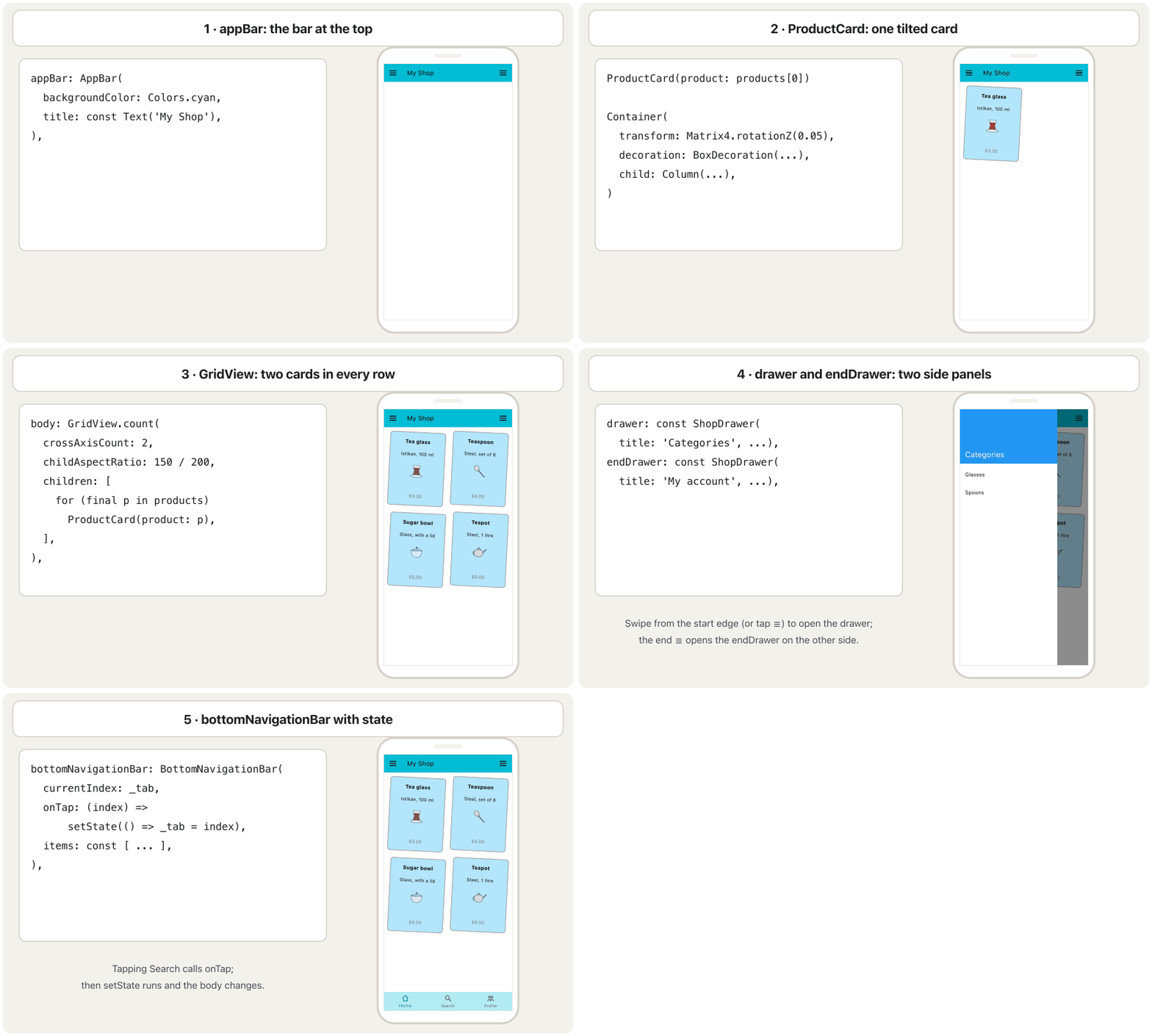
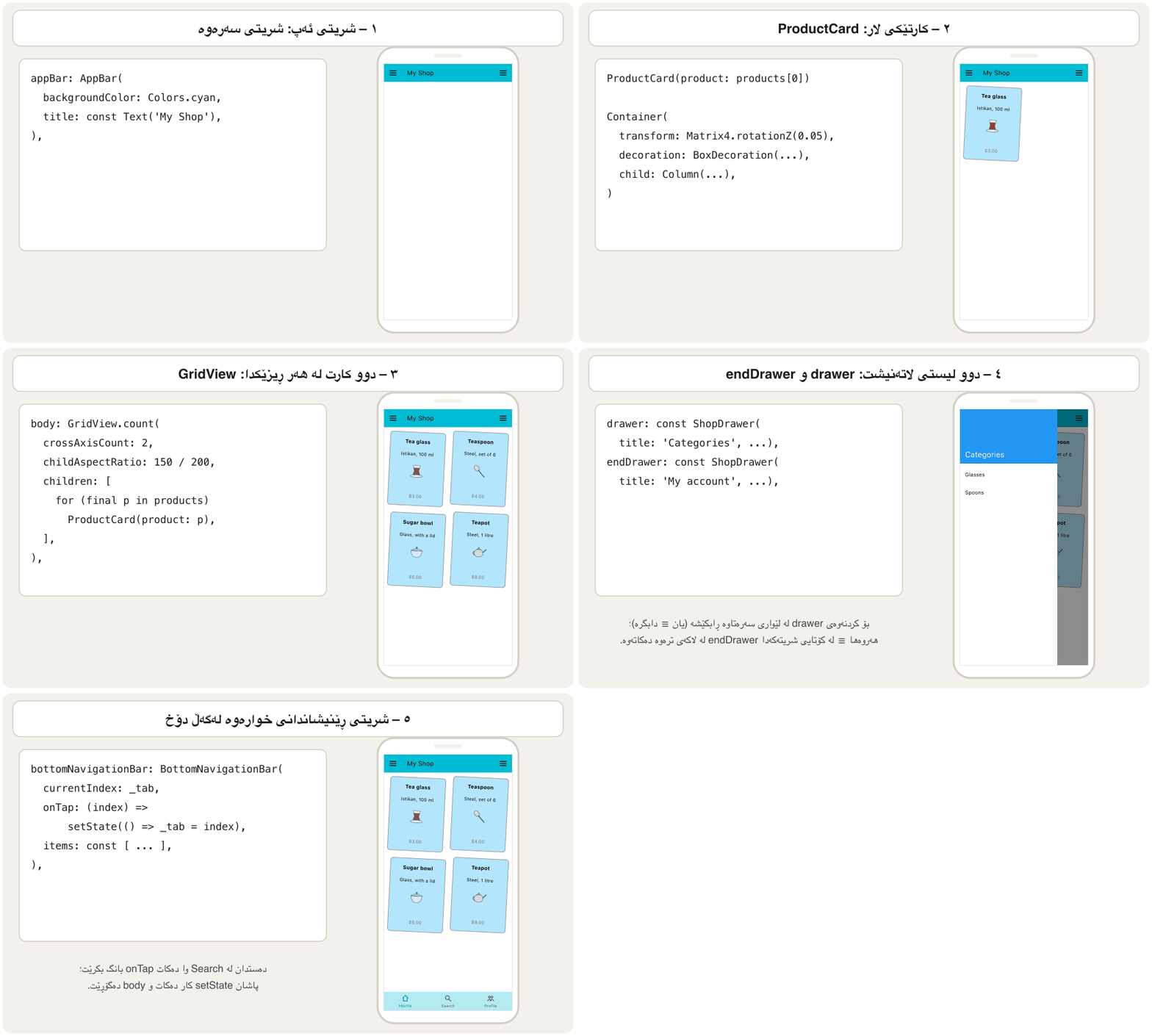
Here are all the steps together in one lib/main.dart. The animation builds the screen in the same order as the lesson:
ئەمە هەموو هەنگاوەکانە پێکەوە لە یەک lib/main.dartـدا. ئەم جووڵەیە شاشەکە بە هەمان ڕیزبەندیی وانەکە دروست دەکات:
import 'package:flutter/material.dart';

void main() {
  runApp(const MaterialApp(home: CatalogueScreen()));
}

// ---------- the data ----------
class Product {
  const Product({
    required this.name,
    required this.description,
    required this.price,
    required this.image,
  });

  final String name;
  final String description;
  final double price;
  final String image; // the path of an asset picture
}

const List<Product> products = [
  Product(
    name: 'Tea glass',
    description: 'Istikan, 100 ml',
    price: 3.0,
    image: 'assets/products/tea_glass.png',
  ),
  Product(
    name: 'Teaspoon',
    description: 'Steel, set of 6',
    price: 4.0,
    image: 'assets/products/teaspoon.png',
  ),
  Product(
    name: 'Sugar bowl',
    description: 'Glass, with a lid',
    price: 5.0,
    image: 'assets/products/sugar_bowl.png',
  ),
  Product(
    name: 'Teapot',
    description: 'Steel, 1 litre',
    price: 9.0,
    image: 'assets/products/teapot.png',
  ),
];

// ---------- the screen ----------
class CatalogueScreen extends StatefulWidget {
  const CatalogueScreen({super.key});

  @override
  State<CatalogueScreen> createState() => _CatalogueScreenState();
}

class _CatalogueScreenState extends State<CatalogueScreen> {
  int _tab = 0; // the selected item of the bottom bar

  static const _pages = [
    ProductGrid(),
    Center(child: Text('Search')),
    Center(child: Text('Profile')),
  ];

  @override
  Widget build(BuildContext context) {
    return Scaffold(
      backgroundColor: Colors.white,
      appBar: AppBar(
        backgroundColor: Colors.cyan,
        title: const Text('My Shop'),
      ),
      drawer: const ShopDrawer(title: 'Categories', items: ['Glasses', 'Spoons']),
      endDrawer: const ShopDrawer(title: 'My account', items: ['Orders', 'Settings']),
      body: _pages[_tab],
      bottomNavigationBar: BottomNavigationBar(
        backgroundColor: Colors.cyan[100],
        currentIndex: _tab,
        onTap: (index) => setState(() => _tab = index),
        items: const [
          BottomNavigationBarItem(icon: Icon(Icons.home), label: 'Home'),
          BottomNavigationBarItem(icon: Icon(Icons.search), label: 'Search'),
          BottomNavigationBarItem(icon: Icon(Icons.people), label: 'Profile'),
        ],
      ),
    );
  }
}

// ---------- the grid ----------
class ProductGrid extends StatelessWidget {
  const ProductGrid({super.key});

  @override
  Widget build(BuildContext context) {
    return GridView.count(
      crossAxisCount: 2,
      padding: const EdgeInsets.all(16),
      mainAxisSpacing: 24,
      crossAxisSpacing: 24,
      childAspectRatio: 150 / 200,
      children: [
        for (final product in products) ProductCard(product: product),
      ],
    );
  }
}

// ---------- one card ----------
class ProductCard extends StatelessWidget {
  const ProductCard({super.key, required this.product});

  final Product product;

  @override
  Widget build(BuildContext context) {
    return Container(
      padding: const EdgeInsets.all(10),
      transform: Matrix4.rotationZ(0.05),
      transformAlignment: Alignment.center,
      decoration: BoxDecoration(
        color: Colors.lightBlue[100],
        border: Border.all(color: Colors.grey, width: 2),
        borderRadius: BorderRadius.circular(8),
      ),
      child: Column(
        mainAxisAlignment: MainAxisAlignment.spaceAround,
        children: [
          Text(
            product.name,
            style: const TextStyle(fontSize: 16, fontWeight: FontWeight.bold),
          ),
          Text(product.description, style: const TextStyle(fontSize: 14)),
          Image.asset(
            product.image,
            width: 50,
            height: 50,
            fit: BoxFit.cover,
            errorBuilder: (context, error, stackTrace) =>
                const Icon(Icons.image_not_supported, size: 50),
          ),
          const SizedBox(height: 5),
          Text(
            '\$${product.price.toStringAsFixed(2)}',
            style: const TextStyle(fontSize: 14, color: Colors.grey),
          ),
        ],
      ),
    );
  }
}

// ---------- the drawers ----------
class ShopDrawer extends StatelessWidget {
  const ShopDrawer({super.key, required this.title, required this.items});

  final String title;
  final List<String> items;

  @override
  Widget build(BuildContext context) {
    return Drawer(
      child: ListView(
        children: [
          DrawerHeader(
            decoration: const BoxDecoration(color: Colors.blue),
            child: Text(
              title,
              style: const TextStyle(color: Colors.white, fontSize: 24),
            ),
          ),
          for (final item in items)
            ListTile(
              title: Text(item),
              onTap: () {
                debugPrint('$item tapped');
                Navigator.pop(context);
              },
            ),
        ],
      ),
    );
  }
}┌─────────────────────────────┐ │ ☰ My Shop ☰ │ ├─────────────────────────────┤ │ ╱Tea glass╲ ╱Teaspoon ╲ │ │ │ $3.00 │ │ $4.00 │ │ │ │ │ ╱Sugar bowl╲ ╱ Teapot ╲ │ │ │ $5.00 │ │ $9.00 │ │ ├─────────────────────────────┤ │ [Home] Search Profile │ └─────────────────────────────┘
The screen of the wireframe: cyan app bar 'My Shop' with ☰ at both ends, four tilted product cards in a scrolling grid, and the bottom bar; Search and Profile show their own page.
شاشەی وێنە ڕووتەکە: شینی ئاسمانی 'My Shop' بە ☰ لە هەردوو سەرەوە، چوار کارتی کاڵای لار لە تۆڕێکدا کە دەکرێت و شریتی خوارەوە؛ Search و Profile پەڕەی خۆیان پیشان دەدەن.
Explain the codeڕوونکردنەوەی کۆدەکە
- Lineدێڕی 8-47
Step 2: the data as Product objects.
هەنگاوی ٢: وەک Product.
- Lineدێڕی 50-81
Steps 7 and 8: the Scaffold with two drawers and a bottom bar with state.
هەنگاوەکانی ٧ و ٨: Scaffold بە دوو و شریتێکی خوارەوە بە .
- Lineدێڕی 92-104
Step 6: the grid.
هەنگاوی ٦: تۆڕەکە.
- Lineدێڕی 111-121
Step 3: the card — without width and height, because the grid cell sets the size.
هەنگاوی ٣: کارتەکە — بەبێ width و height، چونکە خانەی تۆڕەکە قەبارە دیاری دەکات.
Common mistakesهەڵە باوەکان
| Mistakeهەڵە | What happensچی ڕوو دەدات | Fixچاککردن |
|---|---|---|
A widget built by a method named like a class (Widget ProductCard(...)). کە بە دروست دەکرێت و ناوەکەی وەک وایە (Widget ProductCard(...)). | A lint warning; harder to read, cannot be const.ئاگادارکردنەوەی lint؛ خوێندنەوەی قورسترە، ناتوانێت const بێت. | Make it a StatelessWidget class.بیکە بە StatelessWidget. |
| Pictures hot-linked from other websites.وێنە کە ڕاستەوخۆ لە ماڵپەڕی ترەوە بەستراون. | Copyright problems; empty cards when the site changes or the phone is offline.کێشەی ؛ کارتی بەتاڵ کاتێک ماڵپەڕەکە دەگۆڕێت یان مۆبایلەکە نییە. | Your own pictures as assets (or on your own server).وێنەی خۆت وەک (یان لەسەر خۆت). |
| A Column of Rows for a list that can grow.Columnـێک لە Row بۆ لیستێک کە دەتوانێت گەورە ببێت. | Overflow stripes with more items.هێڵی overflow بە بڕگەی زیاتر. | GridView.count / GridView.builder.GridView.count / GridView.builder. |
Maps with dynamic values for your own data.Map بە بەهای dynamic بۆ خۆت. | Typos in keys become null at run time.هەڵەی نووسین لە لە کاتی جێبەجێکردندا دەبنە null. | A class with typed final fields. بە خانەی finalـی جۆرداری. |
currentIndex: 0 and no onTap.currentIndex: 0 و onTap نییە. | The bottom bar never changes.شریتی خوارەوە هەرگیز ناگۆڕێت. | State + setState in onTap. + setState لە onTapـدا. |
| The same drawer code copied twice.هەمان کۆدی دوو جار کۆپی کراوە. | Every change must be made twice.هەموو گۆڕانکارییەک دەبێت دوو جار بکرێت. | One widget with parameters.یەک بە . |
| Two products with the same name ('Product3').دوو کاڵا بە هەمان ناو ('Product3'). | Users cannot tell them apart.بەکارهێنەر ناتوانێت لە یەکیان جیا بکاتەوە. | Check the data; give every product its own name. بپشکنە؛ ناوی تایبەت بدە بە هەر کاڵایەک. |
A dollar sign without a backslash: '$${price}'.نیشانەی دۆلار بەبێ هێڵی لار: '$${price}'. | A compile error: A '$' has special meaning inside a string.: A '$' has special meaning inside a string. | Write '\$${price.toStringAsFixed(2)}'.بنووسە '\$${price.toStringAsFixed(2)}'. |
Review exercisesڕاهێنانەکانی پێداچوونەوە
The assignment's rows loop runs with five products. Write the trace table: the value of i, endIndex and the products in each row. How many rows, and how many cards in the last one?
ڕیزەکانی ئەرکەکە بە پێنج کاڵا کار دەکات. بنووسە: بەهای i، endIndex و کاڵاکانی هەر ڕیزێک. چەند ڕیز هەیە و ڕیزی کۆتایی چەند کارتی تێدایە؟
Show answerوەڵامەکە پیشان بدە
i | i + 2 <= 5?i + 2 <= 5؟ | endIndex | sublist(i, endIndex) | Rowڕیز |
|---|---|---|---|---|
| 0 | yes (2)بەڵێ (2) | 2 | [P1, P2] | two cardsدوو کارت |
| 2 | yes (4)بەڵێ (4) | 4 | [P3, P4] | two cardsدوو کارت |
| 4 | no (6 > 5)نەخێر (6 > 5) | 5 | [P5] | one cardیەک کارت |
| 6 | — | — | loop ends: 6 < 5 is false کۆتایی دێت: 6 < 5 هەڵەیە | — |
Three rows; the last one has a single card (P5). The check i + 2 <= products.length is what stops sublist from going past the end of the list.
سێ ڕیز؛ ڕیزی کۆتایی تەنها یەک کارتی هەیە (P5). پشکنینی i + 2 <= products.length ئەوەیە کە ڕێگە نادات sublist لە کۆتایی تێپەڕێت.
Add four more products. What do you see with the assignment's Column of Rows, and what with the GridView version?
چوار کاڵای تر زیاد بکە. بە Columnـی Rowـەکانی ئەرکەکە چی دەبینیت و بە وەشانی GridView چی؟
Show answerوەڵامەکە پیشان بدە
Column of Rows: four rows of 200 pixels plus the bars are taller than most screens, so yellow-and-black overflow stripes appear and the last cards cannot be reached. GridView: the grid simply scrolls; no other code changes.
Columnـی Rowـەکان: چوار ڕیزی ٢٠٠ لەگەڵ شریتەکان لە زۆربەی شاشەکان بەرزترن، بۆیە هێڵی زەرد و ڕەشی overflow دەردەکەون و ناتوانیت بگەیتە کارتەکانی کۆتایی. GridView: تۆڕەکە تەنها دەکات؛ هیچ کۆدێکی تر ناگۆڕێت.
Make the cards tilt in turn: even positions radians, odd positions . Use GridView.builder so that you know each card's index.
وا بکە کارتەکان بە نۆرە لار ببن: شوێنە جووتەکان ، شوێنە تاکەکان . GridView.builder بەکار بهێنە بۆ ئەوەی ئیندێکسی هەر کارتێک بزانیت.
Hintئاماژە
itemBuilder: (context, index) => … and index.isEven.
itemBuilder: (context, index) => … و index.isEven.
Show answerوەڵامەکە پیشان بدە
import 'package:flutter/material.dart';

import 'product.dart'; // the Product class (Step 2)

// Exercise: cards tilt left and right in turn.
class TiltedGrid extends StatelessWidget {
  const TiltedGrid({super.key});

  @override
  Widget build(BuildContext context) {
    return GridView.builder(
      padding: const EdgeInsets.all(16),
      gridDelegate: const SliverGridDelegateWithFixedCrossAxisCount(
        crossAxisCount: 2,
        mainAxisSpacing: 24,
        crossAxisSpacing: 24,
        childAspectRatio: 150 / 200,
      ),
      itemCount: products.length,
      itemBuilder: (context, index) => TiltedCard(
        product: products[index],
        angle: index.isEven ? 0.05 : -0.05,
      ),
    );
  }
}

class TiltedCard extends StatelessWidget {
  const TiltedCard({super.key, required this.product, required this.angle});

  final Product product;
  final double angle; // in radians

  @override
  Widget build(BuildContext context) {
    return Container(
      padding: const EdgeInsets.all(10),
      transform: Matrix4.rotationZ(angle),
      transformAlignment: Alignment.center,
      decoration: BoxDecoration(
        color: Colors.lightBlue[100],
        border: Border.all(color: Colors.grey, width: 2),
        borderRadius: BorderRadius.circular(8),
      ),
      child: Center(
        child: Text(
          product.name,
          style: const TextStyle(fontWeight: FontWeight.bold),
        ),
      ),
    );
  }
}
Explain the codeڕوونکردنەوەی کۆدەکە
- Lineدێڕی 22
The builder gives the index;
isEvenchooses the direction.builderـەکە ئیندێکس دەدات؛
isEvenئاڕاستەکە هەڵدەبژێرێت.- Lineدێڕی 32
The angle becomes a parameter of the card.
گۆشەکە دەبێت بە کارتەکە.
Give products a field inStock (true by default). A sold-out card gets a grey see-through layer on top and a red Sold out line.
خانەیەکی inStock (بە شێوەی بنەڕەتی true) بدە بە کاڵاکان. کارتی کاڵایەکی نەماو چینێکی خۆڵەمێشیی ڕوون لە سەرەوە و دێڕێکی سووری Sold out وەردەگرێت.
Show answerوەڵامەکە پیشان بدە
import 'package:flutter/material.dart';

class Item {
  const Item({required this.name, required this.price, this.inStock = true});

  final String name;
  final double price;
  final bool inStock; // true unless we say otherwise
}

class ItemCard extends StatelessWidget {
  const ItemCard({super.key, required this.item});

  final Item item;

  @override
  Widget build(BuildContext context) {
    return Container(
      padding: const EdgeInsets.all(10),
      decoration: BoxDecoration(
        color: Colors.lightBlue[100],
        borderRadius: BorderRadius.circular(8),
      ),
      // a grey veil only when the item is sold out
      foregroundDecoration: item.inStock
          ? null
          : BoxDecoration(
              color: Colors.grey.withValues(alpha: 0.6),
              borderRadius: BorderRadius.circular(8),
            ),
      child: Column(
        mainAxisAlignment: MainAxisAlignment.spaceAround,
        children: [
          Text(item.name, style: const TextStyle(fontWeight: FontWeight.bold)),
          Text('\$${item.price.toStringAsFixed(2)}'),
          if (!item.inStock)
            const Text('Sold out', style: TextStyle(color: Colors.red)),
        ],
      ),
    );
  }
}

const sugarBowl = Item(name: 'Sugar bowl', price: 5.0, inStock: false);
Explain the codeڕوونکردنەوەی کۆدەکە
- Lineدێڕی 4
A named parameter with a default value: old products need no change.
بە : کاڵا کۆنەکان پێویستیان بە گۆڕین نییە.
- Lineدێڕی 25
The veil from foregroundDecoration, only when sold out.
پەردەکە لە foregroundDecorationـەوە، تەنها کاتێک نەماوە.
- Lineدێڕی 36
collection if: the extra line only for sold-out items.
collection if: دێڕە زیادەکە تەنها بۆ کاڵای نەماو.
Make the Search page show how many products the shop has, for example 4 products.
وا بکە پەڕەی Search پیشان بدات دوکانەکە چەند کاڵای هەیە، بۆ نموونە 4 products.
Show answerوەڵامەکە پیشان بدە
The pages can no longer be const, because the text is computed. Build the list in build:
پەڕەکان ئیتر ناتوانن const بن، چونکە دەقەکە هەژمار دەکرێت. لە buildـدا دروست بکە:
final pages = [
  const ProductGrid(),
  Center(child: Text('${products.length} products')),
  const Center(child: Text('Profile')),
];Summaryپوختە
- The assignment's shop screen works, but it keeps data in
dynamicmaps, builds cards with a method, hot-links pictures, does not scroll, repeats the drawer code and has a bottom bar that cannot change. - A
Productclass withfinalfields catches mistakes before the app runs. ProductCardas aStatelessWidget: decorated, tilted 0.05 rad around its centre, with an asset picture and anerrorBuilder.- The rows-of-two loop (
i += 2,endIndex,sublist,map,toList) is replaced byGridView.count(crossAxisCount: 2, childAspectRatio: 0.75), which scrolls. - One
ShopDrawerclass serves bothdrawerandendDrawer; aStatefulWidgetkeeps the selected tab and updates it withsetState.
- شاشەی دوکانی ئەرکەکە کار دەکات، بەڵام لە Mapـی
dynamicـدا هەڵدەگرێت، کارت بە دروست دەکات، وێنە ڕاستەوخۆ دەبەستێتەوە، ناکات، کۆدی دووبارە دەکاتەوە و شریتێکی خوارەوەی هەیە کە ناتوانێت بگۆڕێت. -
Productبە خانەیfinalهەڵەکان پێش ڕاکردنی دەگرێت. ProductCardوەکStatelessWidget: ڕازێنراوە، ٠٫٠٥ بە دەوری ناوەڕاستیدا لار، بە وێنەیەکی وerrorBuilder.- ڕیزی دوو کارتی (
i += 2،endIndex،sublist،map،toList) بەGridView.count(crossAxisCount: 2, childAspectRatio: 0.75)گۆڕدرا کە دەکات. - یەک
ShopDrawerبۆ هەردووdrawerوendDrawerبەکار دێت؛StatefulWidgetـێک تابی هەڵبژێردراو هەڵدەگرێت و بەsetStateنوێی دەکاتەوە.
Why does the assignment's layout overflow with many products?بۆچی ڕێکخستنی ڕووکاری ئەرکەکە بە کاڵای زۆر overflow دەکات؟
A Column does not scroll; its rows simply add up. A GridView (or ListView) scrolls.
Column ناکات؛ ڕیزەکانی تەنها کۆ دەبنەوە. GridView (یان ListView) دەکات.
What does childAspectRatio: 150 / 200 mean?childAspectRatio: 150 / 200 واتای چییە؟
Each grid cell is 0.75 times as wide as it is tall — the shape of the original 150 × 200 card.
پانیی هەر خانەیەکی تۆڕەکە ٠٫٧٥ هێندەی بەرزییەکەیەتی — شێوەی کارتی ١٥٠ × ٢٠٠ـی ئەسڵی.
Where does the selected tab live, and why there?تابی هەڵبژێردراو لە کوێ دەژی و بۆچی لەوێ؟
In the State of the screen (_tab), because the bottom bar and the body both depend on it and it changes when the user taps.
لە Stateـی شاشەکەدا (_tab)، چونکە شریتی خوارەوە و body هەردووکیان پشتی پێ دەبەستن و کاتێک بەکارهێنەر دەست دەدات دەگۆڕێت.
Lesson complete!وانەکە تەواو بوو!
Well done. Review the key terms, then go on to the next lesson.دەستخۆش. سەیرێکی زاراوە سەرەکییەکان بکەرەوە، پاشان بڕۆ بۆ وانەی داهاتوو.
Key termsزاراوە سەرەکییەکان
Text, Images and Iconsدەق، وێنە و ئایکۆنەکان
Related lecturesوانە پەیوەندیدارەکان
References and further readingسەرچاوەکان و خوێندنەوەی زیاتر
This lecture is a first edition. The Kurdish text and terminology are waiting for review by Kurdish IT teachers.ئەم وانەیە چاپی یەکەمە. دەقە کوردییەکە و زاراوەکانی چاوەڕێی پێداچوونەوەی مامۆستایانی کوردی بواری IT ن.