FlutterFlutter · Chapterبەش 11 · Lectureوانە 11.1
State Management with Providerبەڕێوەبردنی دۆخ بە Provider
Why app-wide state needs more than setState, the ways to manage state (built-in ChangeNotifier + ListenableBuilder, InheritedWidget, and the provider package), what Provider is (a wrapper around InheritedWidget, dependency injection, publish–subscribe), providers, consumers and sources, providing a typed value above MaterialApp (create vs .value), the six kinds of provider, and reading with Provider.of, context.watch, context.read and context.select.
بۆچی پێویستی بە زیاتر لە setState هەیە، ڕێگاکانی (ChangeNotifier + ListenableBuilderـی ناوەکی، InheritedWidget و provider)، Provider چییە (پێچەرێک بە دەوری InheritedWidgetـدا، ، )، providerـەکان، و ، دابینکردنی نرخێکی جۆردار لە سەرووی MaterialApp (create یان .value)، شەش جۆری provider و خوێندنەوە بە Provider.of، context.watch، context.read و context.select.
What you will learnچی فێر دەبیت
- Explain why app-wide state needs a state-management approach and name the built-in options and packages.
- Manage shared state with Flutter's built-in ChangeNotifier and ListenableBuilder.
- Describe Provider as InheritedWidget made easy, dependency injection and publish–subscribe, with providers, consumers and sources.
- Provide a typed value above MaterialApp and choose correctly between create and .value.
- Read a provider with Provider.of (with and without listen), context.watch, context.read and context.select.
- ڕوون بکەیتەوە بۆچی پێویستی بە ڕێگایەکی هەیە و بژاردە ناوەکییەکان و ناو ببەیت.
- بە ChangeNotifier و ListenableBuilderـی ناوەکیی Flutter بەڕێوە ببەیت.
- Provider وەک InheritedWidgetـێکی ئاسانکراو، و وەسف بکەیت، لەگەڵ providerـەکان، و .
- نرخێکی جۆردار لە سەرووی MaterialApp دابین بکەیت و بە دروستی لە نێوان create و .value هەڵبژێریت.
- providerـێک بە Provider.of (بە listen و بەبێ)، context.watch، context.read و context.select بخوێنیتەوە.
When setState is not enoughکاتێک setState بەس نییە
setState is perfect for state that belongs to one widget: a switch, a text field, a selected tab. But some state is needed all over the app: the signed-in user, the shopping cart, the chosen language. That is app-wide state.
setState بۆ ئەو هی یەک زۆر باشە: سویچێک، ، تابێکی هەڵبژێردراو. بەڵام هەندێک لە هەموو پێویستە: چووە ژوورەوە، سەبەتەی کڕین، زمانی هەڵبژێردراو. ئەوە دۆخی هاوبەشـە.
With only setState you lift that state up to a widget high in the tree and pass it down through every constructor on the way, even through screens that never use it. In a real app that means long constructor lists and many rebuilds. A state-management approach solves both: it puts the data in one place above the tree and lets any widget below ask for it directly and be told when it changes.
تەنها بە setState، ئەو بەرز دەکەیتەوە بۆ لە بەرزایی و بە ناو هەموو ڕێگادا دەینێریتە خوارەوە، تەنانەت بە ناو ئەو شاشانەدا کە هەرگیز بەکاری ناهێنن. لە ڕاستەقینەدا ئەمە واتە لیستی درێژی و دووبارە دروستکردنەوەی زۆر. ڕێگایەکی هەردووکیان چارەسەر دەکات: دراوەکە لە یەک شوێندا لە سەرووی دادەنێت و ڕێگە دەدات هەر لە خوارەوە ڕاستەوخۆ داوای بکات و کاتێک دەگۆڕێت ئاگادار بکرێتەوە.
The ways to manage state in Flutterڕێگاکانی بەڕێوەبردنی دۆخ لە Flutterـدا
The lecture lists several approaches: stateful widgets, inherited widgets, StreamBuilder, Scoped Model, Provider, BLoC, Redux, MobX and more. They fall into two groups. Some are built into Flutter; the rest are packages from pub.dev that you add to pubspec.yaml:
وانەکە چەند ڕێگایەک دەژمێرێت: ، inherited widgetـەکان، StreamBuilder، Scoped Model، Provider، BLoC، Redux، MobX و زیاتر. ئەمانە دوو گرووپن. هەندێکیان لەناو خودی Flutterـدان؛ ئەوانی تر pub.devـن کە بۆ pubspec.yaml زیادیان دەکەیت:
| Approachڕێگا | Built in or package?ناوەکی یان ؟ | Good forباشە بۆ |
|---|---|---|
setState (StatefulWidget) | Built inناوەکی | State of one widget (ephemeral state) یەک () |
ChangeNotifier / ValueNotifier + ListenableBuilder | Built inناوەکی | App state without any package (the official learning pathway) بەبێ هیچ (ڕێڕەوی فێربوونی فەرمی) |
InheritedWidget / InheritedModel | Built inناوەکی | The low-level way to share data down the tree; others use it insideڕێگای نزمئاست بۆ هاوبەشکردنی دراوە بۆ خوارەوەی ؛ ئەوانی تر لە ناوەوە بەکاری دەهێنن |
StreamBuilder | Built inناوەکی | Showing a stream of values (Firestore, timers)پیشاندانی نرخەکان (Firestore، کاتژمێر) |
provider | Package | Easy app state; used by the Flutter docs and this course ئاسان؛ بەڵگەنامەکانی Flutter و ئەم کۆرسە بەکاری دەهێنن |
riverpod, flutter_bloc, redux, mobx, … | Packages | Bigger apps and team preferences گەورەتر و حەزی تیمەکان |
The built-in way: ChangeNotifier and ListenableBuilderڕێگای ناوەکی: ChangeNotifier و ListenableBuilder
Flutter's official learning pathway manages app state with two classes that ship with Flutter. A ChangeNotifier holds the data and calls notifyListeners() after every change. A ListenableBuilder listens to it and rebuilds only its own part of the screen. No package is needed:
ڕێڕەوی فێربوونی فەرمیی Flutter بە دوو بەڕێوە دەبات کە لەگەڵ Flutter دێن. ChangeNotifier دراوەکە هەڵدەگرێت و دوای هەر گۆڕانێک بانگی notifyListeners() دەکات. ListenableBuilder گوێی لێ دەگرێت و تەنها بەشی خۆی لە شاشەکە دووبارە دروست دەکاتەوە. هیچ پێویست نییە:
import 'package:flutter/material.dart';

// Built into Flutter: no package needed.
class CartModel extends ChangeNotifier {
  int _count = 0;
  int get count => _count;

  void add() {
    _count++;
    notifyListeners(); // tell everyone who listens: "I changed"
  }
}

void main() => runApp(MaterialApp(home: ShopScreen(cart: CartModel())));

class ShopScreen extends StatelessWidget {
  const ShopScreen({super.key, required this.cart});

  final CartModel cart;

  @override
  Widget build(BuildContext context) {
    return Scaffold(
      appBar: AppBar(
        title: const Text('Shop'),
        actions: [CartBadge(cart: cart)], // passed down by hand
      ),
      body: Center(
        child: FilledButton(onPressed: cart.add, child: const Text('Add tea')),
      ),
    );
  }
}

class CartBadge extends StatelessWidget {
  const CartBadge({super.key, required this.cart});

  final CartModel cart;

  @override
  Widget build(BuildContext context) {
    return ListenableBuilder(
      listenable: cart, // rebuild this part when cart notifies
      builder: (context, child) => Padding(
        padding: const EdgeInsets.all(16),
        child: Text('Cart: ${cart.count}'),
      ),
    );
  }
}
Explain the codeڕوونکردنەوەی کۆدەکە
- Lineدێڕی 4-12
The model extends
ChangeNotifier(amixin classin Flutter's foundation library) and callsnotifyListeners()when it changes.ChangeNotifierextends دەکات (mixin classـێک لە foundationـی Flutter) و کاتێک دەگۆڕێت بانگیnotifyListeners()دەکات.- Lineدێڕی 14
One CartModel is created at the top…
یەک CartModel لە سەرەوە دروست دەکرێت…
- Lineدێڕی 19, 26, 38
…and passed down by hand through constructors.
…و بە دەست بە ناو دەنێردرێتە خوارەوە.
- Lineدێڕی 42-47
ListenableBuilderrebuilds only the badge text when the cart notifies; the rest of the screen stays as it is.ListenableBuilderکاتێک سەبەتەکە ئاگادار دەکاتەوە تەنها دەقی نیشانەکە دووبارە دروست دەکاتەوە؛ ئەوانی تری شاشەکە وەک خۆیان دەمێننەوە.
This is a good, official way, and the MVVM lessons use it (ChangeNotifier has its own lesson). Its one weakness is visible in the code: the model still travels through every constructor. The provider package removes that step, and that is why the lectures, the Flutter state-management docs and much existing code use it.
ئەمە ڕێگایەکی باش و فەرمییە و وانەکانی MVVM بەکاری دەهێنن (ChangeNotifier وانەی تایبەتی خۆی هەیە). یەک لاوازیی لە کۆدەکەدا دیارە: هێشتا بە ناو هەموو دەڕوات. provider ئەو هەنگاوە لادەبات و ئەمە هۆکاری ئەوەیە کە وانەکان، بەڵگەنامەکانی Flutter و زۆر کۆدی هەبوو بەکاری دەهێنن.
What Provider isProvider چییە
The lecture describes Provider in three sentences. Each one is worth unpacking:
وانەکە Provider بە سێ ڕستە وەسف دەکات. هەر یەکێکیان شایەنی ڕوونکردنەوەیە:
- A wrapper around InheritedWidget.
InheritedWidgetis Flutter's built-in way for a widget to make data available to everything below it; it is howTheme.of(context)andMediaQuery.of(context)find their data. Writing one by hand needs a lot of code. Provider wraps it so that you write one line, and it also creates and disposes your object for you. - Used for dependency injection and state management. It hands objects to the widgets that need them (dependency injection, below), and when such an object changes, it updates the screen (state management).
- It follows the publish–subscribe pattern. The provider is the publisher: when its data changes it announces it. The widgets that use the data are subscribers: they registered once and are told about every change; each then reads the new data itself.
- پێچەرێک بە دەوری InheritedWidgetـدا.
InheritedWidgetڕێگای ناوەکیی Flutterـە بۆ ئەوەی دراوە بەردەست بکات بۆ هەموو ئەوەی لە خوارییەوەیە؛Theme.of(context)وMediaQuery.of(context)بەم ڕێگایە دراوەکانیان دەدۆزنەوە. نووسینی یەکێکی وا بە دەست کۆدی زۆری دەوێت. Provider دەیپێچێتەوە بۆ ئەوەی یەک دێڕ بنووسیت، هەروەها بۆ دروست دەکات و فڕێی دەدات. - بۆ و بەکار دێت. دەدات بەو پێویستیان پێیانە (، لە خوارەوە) و کاتێک وا دەگۆڕێت، شاشەکە نوێ دەکاتەوە ().
- پەیڕەو دەکات. providerـەکە بڵاوکەرەوەیە: کاتێک دراوەکەی دەگۆڕێت ڕایدەگەیەنێت. ئەو دراوەکە بەکار دەهێنن بەشداربووانن: یەک جار خۆیان تۆمار کردووە و دەربارەی هەموو گۆڕانێک ئاگادار دەکرێنەوە؛ پاشان هەر یەکەیان خۆی دراوە نوێیەکە دەخوێنێتەوە.
What Provider isProvider چییە
Publish–subscribe: a class Telegram channelشێوازی بڵاوکردنەوە و بەشداربوون: کەناڵی تێلێگرامی پۆلەکە
The third sentence is the heart of Provider. An everyday picture makes it clear:
ڕستەی سێیەم دڵی Providerـە. وێنەیەکی ڕۆژانە ڕوونی دەکاتەوە:
A teacher runs a Telegram channel for the class. Students who joined the channel get a notification whenever the teacher posts; they open the channel and read the new post themselves. Students who did not join hear nothing and are not disturbed. The channel is the provider, the joined students are the consumers, and the teacher who writes the posts is the source.
مامۆستایەک کەناڵێکی تێلێگرام بۆ پۆلەکە بەڕێوە دەبات. ئەو قوتابییانەی بەشداری کەناڵەکە بوون هەر کاتێک مامۆستاکە پۆستێک دادەنێت ئاگادارکردنەوە وەردەگرن؛ کەناڵەکە دەکەنەوە و خۆیان پۆستە نوێیەکە دەخوێننەوە. ئەو قوتابییانەی بەشداری نەبوون هیچ نابیستن و بێزار ناکرێن. کەناڵەکە providerـەکەیە، قوتابییە بەشداربووەکان و ئەو مامۆستایەی پۆستەکان دەنووسێت .
Where the analogy stops workingسنووری ئەم نموونەیە
A Telegram channel sends the message to everyone; a provider only says “something changed”, and each widget reads what it needs. Widgets also stop listening automatically when they leave the screen.
کەناڵی تێلێگرام نامەکە بۆ هەمووان دەنێرێت؛ provider تەنها دەڵێت «شتێک گۆڕا» و هەر ئەوەی پێویستیەتی دەیخوێنێتەوە. هەروەها کاتێک لە شاشەکە دەردەچن خۆکارانە گوێگرتن ڕادەگرن.
What Provider isProvider چییە
How it works: providers, consumers and sourcesچۆن کار دەکات: providerـەکان، گوێگرەکان و سەرچاوەکانی دراوە
The lecture's picture has three parts. Read them with the diagram below:
وێنەکەی وانەکە سێ بەشی هەیە. لەگەڵ هێڵکارییەکەی خوارەوەدا بیانخوێنەرەوە:
- Providers hold the data and make it available (the lecture calls this data the dependencies, because the app depends on it), and they signal the consumers when it is updated.
- Consumers must register with the provider to be told about changes, and must pull the new data from the provider themselves.
- The source feeds the dependencies and makes the changes. Possible sources: an API, Firebase, widgets, Streams, Futures, ChangeNotifiers, even other providers.
- providerـەکان دراوەکە هەڵدەگرن و بەردەستی دەکەن (وانەکە بەم دراوەیە دەڵێت ، چونکە پشتی پێ دەبەستێت) و کاتێک نوێ دەبێتەوە ئاگاداری دەکەنەوە.
- دەبێت لای providerـەکە خۆیان تۆمار بکەن بۆ ئەوەی ئاگاداری گۆڕانەکان بکرێنەوە و دەبێت خۆیان دراوە نوێیەکە لە providerـەکەوە بهێنن.
- دابین دەکات و گۆڕانەکان دەکات. دەکرێت ئەمانە بن: ، Firebase، ، Streamـەکان، Futureـەکان، ChangeNotifierـەکان، تەنانەت providerـەکانی تر.
What Provider isProvider چییە
Dependency injection in one screenتێخستنی وابەستەیی لە یەک شاشەدا
Giving an object the things it needs (its ) from outside, instead of letting it create them itself. Then a real service can be swapped for a test one without changing the object.
پێدانی ئەو شتانەیە کە ئۆبجێکتێک پێویستی پێیانە () لە دەرەوە، لە جیاتی ئەوەی خۆی دروستیان بکات. بەم شێوەیە دەتوانرێت خزمەتگوزارییەکی ڕاستەقینە بە یەکێکی تاقیکردنەوە بگۆڕدرێتەوە بەبێ گۆڕینی ئۆبجێکتەکە.
Imagine a TodoListScreen that needs the current user and a TodoService to load to-dos. If the screen creates them itself (final service = TodoService();), it is glued to that one class: you cannot give it a fake service for a test or a different user. With dependency injection, the screen only says what it needs, and something outside gives it. A provider is that something: put Provider<TodoService> above the app, and every screen asks context.read<TodoService>(). Later you can swap in a test service in one place.
وێنای TodoListScreenـێک بکە کە پێویستی بە ئێستا و TodoServiceـێک هەیە بۆ بارکردنی ئەرکەکان. ئەگەر شاشەکە خۆی دروستیان بکات (final service = TodoService();)، بەو یەک دەنووسێت: ناتوانیت ساختەی پێ بدەیت بۆ تاقیکردنەوە یان تر. بە ، شاشەکە تەنها دەڵێت چی پێویستە و شتێکی دەرەکی پێی دەدات. providerـێک ئەو شتەیە: Provider<TodoService> لە سەرووی دابنێ و هەموو شاشەیەک context.read<TodoService>() دەپرسێت. دواتر دەتوانیت لە یەک شوێندا تاقیکردنەوە دابنێیت.
What Provider isProvider چییە
Why use Provider: three benefitsبۆچی Provider: سێ سوود
The lecture notes list three benefits, in Kurdish:
تێبینییەکانی وانەکە بە کوردی سێ سوود دەژمێرن:
- Centralised data management: Provider lets the data be reached, managed and changed from one place.
- Simpler code: instead of sending data by hand from place to place, Provider spreads it automatically.
- Automatic updates: if a piece of data (such as the user's information) changes, every widget that uses it updates itself.
- بەڕێوەبردنێکی ناوەندییانەی دراوە (Centralized Data Management): Provider یاریدەدەرە تاکو دراوەکان لە یەک شوێنەوە دەستیان پێ بگەیەنرێت، بەڕێوە ببرێن و دەستکاری بکرێن.
- کۆدی پوختتر (Simpler Code): لەبری ناردنی دراوە بە شێوەی دەستی لە جێگەیەکەوە بۆ جێگەیەکی تر، Provider خۆکارانە بڵاوی دەکاتەوە.
- نوێکردنەوەی خۆکارانە (Dynamic Updates): ئەگەر دراوەیەک (وەک زانیاریی ) بگۆڕدرێت، ئەوا هەر کە ئەو دراوەیە بەکار بهێنێت دراوەکە لە خۆیدا نوێ دەکاتەوە.
The package's README adds a few more: less code than a hand-written InheritedWidget, objects created only when first needed (lazy loading) and disposed for you, and the provided values are visible in Flutter DevTools.
READMEـی چەند سوودێکی تر زیاد دەکات: کۆدی کەمتر لە InheritedWidgetـێکی دەستنووس، تەنها کاتێک یەکەم جار پێویست بن دروست دەکرێن () و بۆت فڕێ دەدرێن و نرخە دابینکراوەکان لە Flutter DevToolsـدا دەبینرێن.
Providing a value above MaterialAppدابینکردنی نرخێک لە سەرووی MaterialApp
A provider is a widget. You wrap it around the part of the tree whose widgets need the data: the parent of all the consumers. Data that every screen needs goes above MaterialApp, so that every route the app opens is below it. Add the package first with flutter pub add provider:
providerـێک . دەیپێچیت بە دەوری ئەو بەشەی کە پێویستیان بە دراوەکەیە: هەموو . ئەو دراوەیەی هەموو شاشەیەک پێویستی پێیەتی دەچێتە سەرووی MaterialApp، بۆ ئەوەی هەموو ڕێگایەک کە دەیکاتەوە لە خوارییەوە بێت. سەرەتا بە flutter pub add provider زیاد بکە:
import 'package:flutter/material.dart';
import 'package:provider/provider.dart';

class User {
  final String name;
  final String city;

  const User({required this.name, required this.city});
}

void main() {
  runApp(
    // The provider sits ABOVE MaterialApp, so every screen can reach it.
    Provider<User>(
      create: (_) => const User(name: 'Aram', city: 'Erbil'),
      child: const MaterialApp(home: TodoListScreen()),
    ),
  );
}

class TodoListScreen extends StatelessWidget {
  const TodoListScreen({super.key});

  @override
  Widget build(BuildContext context) {
    final user = Provider.of<User>(context); // find the nearest User
    return Scaffold(
      appBar: AppBar(title: Text("${user.name}'s to-dos")),
      body: const Center(child: Text('No to-dos yet.')),
    );
  }
}
Explain the codeڕوونکردنەوەی کۆدەکە
- Lineدێڕی 3-9
A plain, immutable data class. Provider works with any type.
سادە و دراوە. Provider لەگەڵ هەر جۆرێک کار دەکات.
- Lineدێڕی 14
Provider<User>: the type in angle brackets is how widgets will find it.Provider<User>: جۆری ناو کەوانە تیژەکان ئەوەیە کە پێی دەیدۆزنەوە.- Lineدێڕی 15
createmakes the object the first time someone asks for it.createیەکەم جار کە کەسێک داوای دەکات دروست دەکات.- Lineدێڕی 16
MaterialApp and every screen inside it are below the provider.
MaterialApp و هەموو شاشەیەکی ناوی لە خوارەوەی providerـەکەن.
- Lineدێڕی 26
Provider.of<User>(context)finds the nearestUserprovider above this widget.Provider.of<User>(context)نزیکترین providerـیUserلە سەرووی ئەم دەدۆزێتەوە.
Providing a value above MaterialAppدابینکردنی نرخێک لە سەرووی MaterialApp
create or .value?create یان .value؟
The lecture's slide wrote Provider<User>.value(value: user, child: MaterialApp(...)). That works when user already exists, but the package's README gives a clear rule:
سلایدەکەی وانەکە Provider<User>.value(value: user, child: MaterialApp(...))ـی نووسیبوو. ئەمە کاتێک کار دەکات کە user پێشتر هەبێت، بەڵام READMEـی یاسایەکی ڕوون دەدات:
| Situationحاڵەت | Useبەکاری بهێنە | Whyبۆچی |
|---|---|---|
| You create a new object for the provider نوێ بۆ providerـەکە دروست دەکەیت | Provider(create: (_) => User(...)) | Provider creates it once, lazily, and disposes a ChangeNotifier for youProvider یەک جار و بە دواخراوی دروستی دەکات و ChangeNotifierـێک بۆت فڕێ دەدات |
| You pass an object that already exists (for example to a new route) دەنێریت کە پێشتر هەیە (بۆ نموونە بۆ ڕێگایەکی نوێ) | Provider.value(value: existing) | Provider must not dispose an object it did not createProvider نابێت فڕێ بدات کە خۆی دروستی نەکردووە |
A new object inside .value نوێ لەناو .value | Don'tمەیکە | It can be recreated on every rebuild, losing its stateلەوانەیە لە هەر دووبارە دروستکردنەوەیەکدا نوێ دروست بکرێتەوە و ون بێت |
.valueDARTRuns on a phone (or an emulator)لەسەر مۆبایل کار دەکاتimport 'package:flutter/material.dart';
import 'package:provider/provider.dart';
import 'user_model.dart'; // UserModel, a ChangeNotifier (full code under "Reading a provider")
// .value: hand an object that ALREADY EXISTS to a new part of the tree,
// for example to a screen opened with Navigator.push.
void openDetails(BuildContext context) {
final user = context.read<UserModel>(); // the existing object
Navigator.of(context).push(
MaterialPageRoute<void>(
builder: (_) => ChangeNotifierProvider<UserModel>.value(
value: user, // reuse it, do not create a new one
child: const DetailsScreen(),
),
),
);
}
class DetailsScreen extends StatelessWidget {
const DetailsScreen({super.key});
@override
Widget build(BuildContext context) {
final name = context.select((UserModel u) => u.name);
return Scaffold(appBar: AppBar(title: Text(name)));
}
}Explain the codeڕوونکردنەوەی کۆدەکە
- Lineدێڕی 9
The object already exists; read it once (
context.readandcontext.selectare explained in Reading a provider).پێشتر هەیە؛ یەک جار بیخوێنەرەوە (
context.readوcontext.selectلە خوێندنەوەی provider ڕوون دەکرێنەوە).- Lineدێڕی 12-15
.valuehands the same object to the new screen. Useful when the original provider was placed inside one screen rather than above MaterialApp..valueهەمان دەدات بە شاشە نوێیەکە. بەسوودە کاتێک providerـە سەرەکییەکە لەناو یەک شاشەدا دانرابێت نەک لە سەرووی MaterialAppـەوە.
Providing a value above MaterialAppدابینکردنی نرخێک لە سەرووی MaterialApp
Providers are found by typeproviderـەکان بەپێی جۆر دەدۆزرێنەوە
A provider must be given a type: the type of the data it provides, written in angle brackets (Provider<User>). It is a generic type, and the type is the address widgets use to find it: Provider.of<User>(context) searches up the tree for the nearest provider of User.
پێویستە جۆرێک بۆ providerـێک دیاری بکرێت: جۆری ئەو دراوەیەی دابینی دەکات، لەناو کەوانە تیژەکاندا (Provider<User>). ئەمە جۆری گشتیـە و جۆرەکە ئەو ناونیشانەیە کە بۆ دۆزینەوەی بەکاری دەهێنن: Provider.of<User>(context) لە بەرەو سەرەوە بەدوای نزیکترین providerـی Userـدا دەگەڕێت.
Reading a provider: Provider.of, watch, read and selectخوێندنەوەی provider: Provider.of، watch، read و select
All widgets under a provider can reach it. The lecture's way is Provider.of<T>(context). This call does two things: it returns the nearest T, and it registers the calling widget as a listener (a consumer, a subscriber), so the widget rebuilds when the provider notifies. Here is the lecture's main screen, written for today's Dart:
هەموو ئەو لە خوارەوەی providerـێکن دەتوانن پێی بگەن. ڕێگای وانەکە Provider.of<T>(context)ـە. ئەم بانگکردنە دوو کار دەکات: نزیکترین T دەگەڕێنێتەوە و ئەو بانگی دەکات وەک (consumer، بەشداربوو) تۆمار دەکات، بۆیە کاتێک providerـەکە ئاگادار دەکاتەوە دووبارە دروست دەبێتەوە. ئەمە شاشە سەرەکییەکەی وانەکەیە، بۆ Dartـی ئەمڕۆ نووسراوەتەوە:
import 'package:flutter/material.dart';
import 'package:provider/provider.dart';

import 'user.dart'; // the User class from "Providing a value above MaterialApp"

Scaffold buildMainScreen(BuildContext context) {
  final user = Provider.of<User>(context); // 1. access  2. register as a listener

  return Scaffold(
    appBar: AppBar(
      leading: CircleAvatar(child: Text(user.name[0])), // first letter
      title: Text(user.name),
    ),
    body: Center(child: Text('${user.name} lives in ${user.city}')),
  );
}
Explain the codeڕوونکردنەوەی کۆدەکە
- Lineدێڕی 6
BuildContext context: the lecture's_buildMainScreen(context)had no type on the parameter.BuildContext context:_buildMainScreen(context)ـی وانەکە جۆری بۆ دانەنابوو.- Lineدێڕی 7
Access and register: this screen rebuilds when the
Userprovider changes.دەستپێگەیشتن و تۆمارکردن: ئەم شاشەیە کاتێک providerـی
Userدەگۆڕێت دووبارە دروست دەبێتەوە.- Lineدێڕی 11
The lecture showed a photo with
NetworkImage(user.avatar); here the first letter of the name keeps the example offline and private.وانەکە بە
NetworkImage(user.avatar)وێنەیەکی پیشان دەدا؛ لێرە یەکەم پیتی ناوەکە نموونەکە بێ و تایبەت دەهێڵێتەوە.
When you only want to call something on the provider, for example in a button's onPressed, you do not want to rebuild on every change. Then write Provider.of<T>(context, listen: false): it returns the object without registering.
کاتێک تەنها دەتەوێت شتێک لەسەر providerـەکە بانگ بکەیت، بۆ نموونە لە onPressedـی ، ناتەوێت لە هەر گۆڕانێکدا دووبارە دروست ببیتەوە. ئەو کاتە Provider.of<T>(context, listen: false) بنووسە: بەبێ تۆمارکردن دەگەڕێنێتەوە.
Reading a provider: Provider.of, watch, read and selectخوێندنەوەی provider: Provider.of، watch، read و select
Shorter names: watch, read and selectناوە کورتترەکان: watch، read و select
Version 6 of the provider package adds shorter names for the same two ideas, which its README now recommends:
وەشانی 6ـی provider ناوی کورتتر بۆ هەمان دوو بیرۆکە زیاد دەکات، کە READMEـەکەی ئێستا پێشنیاریان دەکات:
| Writeبنووسە | Same asوەک | Listens?گوێ دەگرێت؟ | Use it inلە کوێ بەکاری بهێنە |
|---|---|---|---|
context.watch<T>() | Provider.of<T>(context) | Yes: rebuilds on every changeبەڵێ: لە هەر گۆڕانێکدا دووبارە دروست دەبێتەوە | build, to show databuild، بۆ پیشاندانی دراوە |
context.read<T>() | Provider.of<T>(context, listen: false) | Noنەخێر | Callbacks such as onPressed; never inside build وەک onPressed؛ هەرگیز لەناو build |
context.select((T t) => t.part) | — | Only when part changesتەنها کاتێک part دەگۆڕێت | build, to show one propertybuild، بۆ پیشاندانی یەک |
watch، read و select پێکەوەDARTRuns on a phone (or an emulator)لەسەر مۆبایل کار دەکاتimport 'package:flutter/material.dart';
import 'package:provider/provider.dart';
class UserModel extends ChangeNotifier {
String _name = 'Aram';
int _age = 21;
String get name => _name;
int get age => _age;
void rename(String newName) {
_name = newName;
notifyListeners();
}
void birthday() {
_age++;
notifyListeners();
}
}
void main() {
runApp(
ChangeNotifierProvider(
create: (_) => UserModel(),
child: const MaterialApp(home: ProfileScreen()),
),
);
}
class ProfileScreen extends StatelessWidget {
const ProfileScreen({super.key});
@override
Widget build(BuildContext context) {
return Scaffold(
appBar: AppBar(title: const NameTitle()),
body: const Center(child: AgeText()),
floatingActionButton: FloatingActionButton(
// read: get the object once, do not listen
onPressed: () => context.read<UserModel>().rename('Shilan'),
child: const Icon(Icons.edit),
),
);
}
}
class NameTitle extends StatelessWidget {
const NameTitle({super.key});
@override
Widget build(BuildContext context) {
// watch: rebuild whenever UserModel notifies
final user = context.watch<UserModel>();
return Text(user.name);
}
}
class AgeText extends StatelessWidget {
const AgeText({super.key});
@override
Widget build(BuildContext context) {
// select: rebuild only when the age itself changes
final age = context.select((UserModel u) => u.age);
return Text('Age: $age');
}
}Explain the codeڕوونکردنەوەی کۆدەکە
- Lineدێڕی 4-20
A ChangeNotifier with two pieces of state; each change calls
notifyListeners(). (ChangeNotifier and ChangeNotifierProvider are taught fully in ChangeNotifier, ChangeNotifierProvider and MultiProvider.)ChangeNotifierـێک بە دوو پارچە ؛ هەر گۆڕانێک بانگی
notifyListeners()دەکات. (ChangeNotifier و ChangeNotifierProvider لە ChangeNotifier، ChangeNotifierProvider و MultiProvider بە تەواوی فێر دەکرێن.)- Lineدێڕی 24-27
ChangeNotifierProviderprovides it and listens to it.ChangeNotifierProviderدابینی دەکات و گوێی لێ دەگرێت.- Lineدێڕی 41
readin a callback: change the model, do not subscribe.readلە : بگۆڕە، بەشدار مەبە.- Lineدێڕی 54
watch: this title rebuilds after any notification.watch: ئەم ناونیشانە دوای هەر ئاگادارکردنەوەیەک دووبارە دروست دەبێتەوە.- Lineدێڕی 65
select: this text rebuilds only whenageis different.select: ئەم دەقە تەنها کاتێکageجیاواز بێت دووبارە دروست دەبێتەوە.
The difference between context.watch and context.read in Provider, shown on a small example.
جیاوازیی نێوان context.watch و context.read لە Providerـدا، بە نموونەیەکی بچووک.
Watch 2:05–4:13: context.watch shows the name and rebuilds when it changes; context.read in onPressed calls the change method without listening, and why read is used there.
لە 2:05 تا 4:13 سەیر بکە: context.watch ناوەکە پیشان دەدات و کاتێک دەگۆڕێت دووبارە build دەکاتەوە؛ context.read لە onPressedـدا گۆڕینەکە بانگ دەکات بەبێ ئەوەی چاودێریی گۆڕانکاری بکات، هەروەها بۆچی لەوێدا read بەکار دێت.
Reading a provider: Provider.of, watch, read and selectخوێندنەوەی provider: Provider.of، watch، read و select
Only the listeners rebuildتەنها گوێگرەکان دووبارە دروست دەبنەوە
Put the pieces together. When the source changes, the provider notifies; only the widgets that registered with watch (or Provider.of, or a select whose value changed) rebuild. The rest of the tree is untouched, which is what keeps a provider app fast:
پارچەکان پێکەوە دابنێ. کاتێک دەگۆڕێت، providerـەکە ئاگادار دەکاتەوە؛ تەنها ئەو بە watch (یان Provider.of، یان selectـێک کە نرخەکەی گۆڕا) خۆیان تۆمار کردووە دووبارە دروست دەبنەوە. ئەوانی تری دەستیان لێ نادرێت و ئەمە ئەوەیە کە provider خێرا دەهێڵێتەوە:
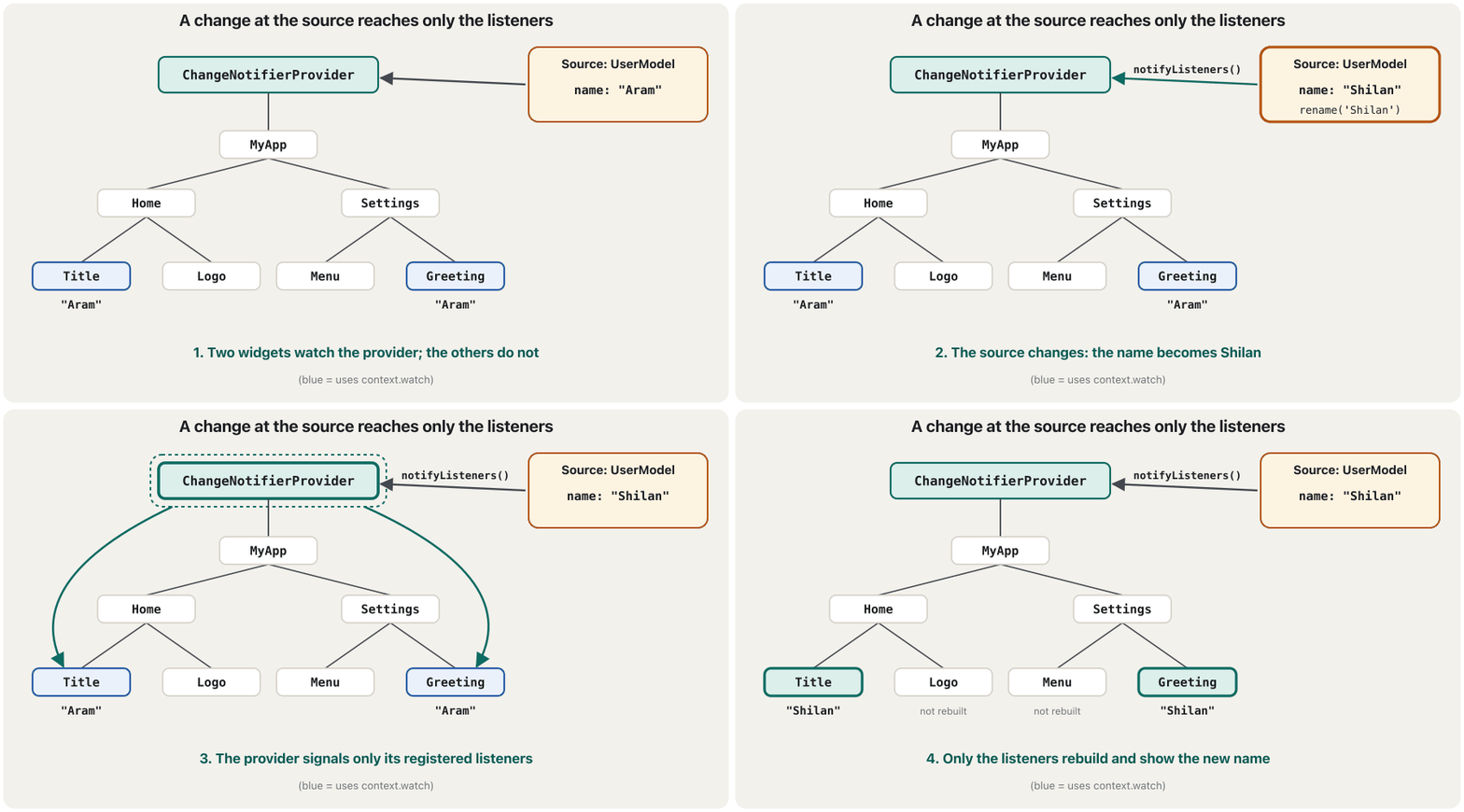
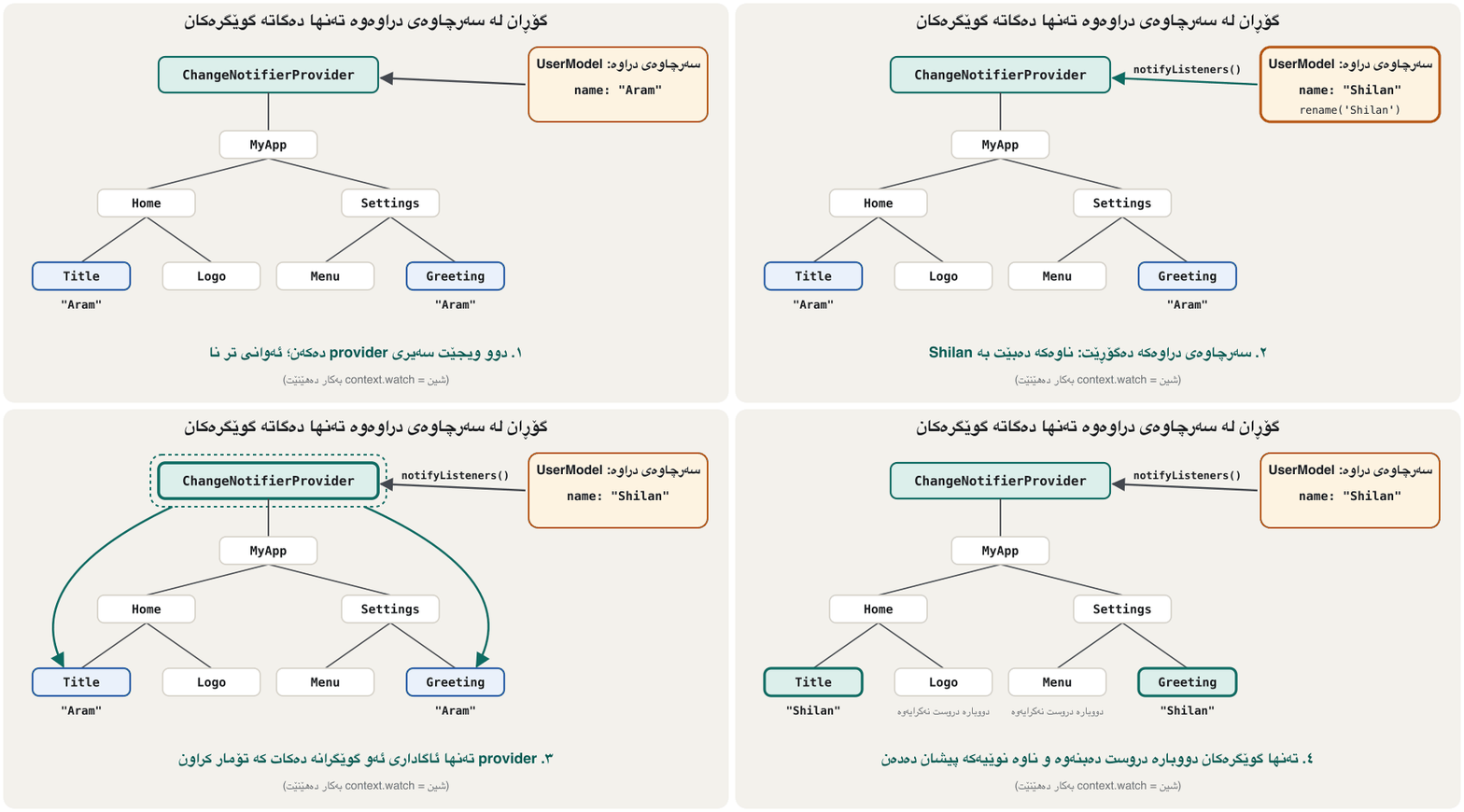
A Flutter widget test counted the builds of three widgets under the same UserModel: one using watch, one using select on the age, and one that never asks the provider. Renaming rebuilt only the watcher; the birthday rebuilt the watcher and the age selector; the third widget never rebuilt:
تاقیکردنەوەیەکی Flutter ژمارەی buildـی سێ لە خوارەوەی هەمان UserModel ژمارد: یەکێک watch بەکار دەهێنێت، یەکێک select لەسەر تەمەن و یەکێک کە هەرگیز داوا لە providerـەکە ناکات. گۆڕینی ناو تەنها watchـەکەی دووبارە دروست کردەوە؛ ڕۆژی لەدایکبوون watchـەکە و selectـی تەمەنی دووبارە دروست کردەوە؛ سێیەم هەرگیز دووبارە دروست نەبووەوە:
start:            {watch name: 1, select age: 1, no listener: 1}
after rename:     {watch name: 2, select age: 1, no listener: 1}
after birthday: {watch name: 3, select age: 2, no listener: 1}Reading a provider: Provider.of, watch, read and selectخوێندنەوەی provider: Provider.of، watch، read و select
Consumer and Selector: the same idea as widgetsConsumer و Selector: هەمان بیرۆکە وەک ویجێت
The lecture names two convenient widgets that call Provider.of for you. Consumer<T> gives its builder the value, so only the builder's part of the tree rebuilds, and it can keep an unchanging child out of the rebuild. Selector<T, R> rebuilds only when one selected part of T changes, like context.select. Each has its own lesson in this course: The Consumer Widget and The Selector Widget (which also teaches context.select in depth).
وانەکە ناوی دوو ئاسان دەبات کە بۆت Provider.of بانگ دەکەن. Consumer<T> نرخەکە دەدات بە builderـەکەی، بۆیە تەنها بەشی builderـەکە لە دووبارە دروست دەبێتەوە و دەتوانێت childـێکی نەگۆڕ لە دەرەوەی دووبارە دروستکردنەوە بهێڵێتەوە. Selector<T, R> تەنها کاتێک دووبارە دروست دەبێتەوە کە یەک بەشی هەڵبژێردراوی T بگۆڕێت، وەک context.select. هەر یەکەیان وانەی خۆی لەم کۆرسەدا هەیە: ویجێتی Consumer و ویجێتی Selector (کە context.selectـیش بە وردی فێر دەکات).
Consumer<UserModel>(
  builder: (context, user, child) => Text(user.name),
)The kinds of providerجۆرەکانی provider
The lecture lists six kinds of provider. They all put a value into the tree in the same way; they differ in what kind of value they hold and whether they listen to it. This lesson used the first one; the next lessons of this chapter take the others one by one:
وانەکە شەش جۆر provider دەژمێرێت. هەموویان بە هەمان شێوە نرخێک دەخەنە نێو ؛ جیاوازییان لەوەدایە چ جۆرە نرخێک هەڵدەگرن و ئایا گوێی لێ دەگرن. ئەم وانەیە یەکەمیانی بەکار هێنا؛ وانەکانی داهاتووی ئەم بەشە ئەوانی تر یەک بە یەک دەخەنە ڕوو:
| Providerجۆری provider | Holdsهەڵدەگرێت | Rebuilds listeners whenکەی دووبارە دروست دەکاتەوە | Lessonوانە |
|---|---|---|---|
Provider | Any value (a user, a service)هەر نرخێک (، ) | Never by itself: it does not listen to the valueهەرگیز بە خۆی: گوێ لە نرخەکە ناگرێت | This lessonئەم وانەیە |
ChangeNotifierProvider | A ChangeNotifierChangeNotifierـێک | It calls notifyListeners()بانگی notifyListeners() دەکات | ChangeNotifier, ChangeNotifierProvider and MultiProviderChangeNotifier، ChangeNotifierProvider و MultiProvider |
FutureProvider | The result of a Future (needs initialData)ئەنجامی (پێویستی بە initialData هەیە) | The Future completes تەواو دەبێت | FutureProvider and StreamProviderFutureProvider و StreamProvider |
StreamProvider | The latest value of a Stream (needs initialData)دوایین نرخی (پێویستی بە initialData هەیە) | A new value arrivesنرخێکی نوێ دەگات | FutureProvider and StreamProviderFutureProvider و StreamProvider |
ProxyProvider | A value built from other providersنرخێک کە لە providerـەکانی ترەوە دروست دەکرێت | A provider it depends on changesproviderـێک کە پشتی پێ دەبەستێت دەگۆڕێت | ProxyProvider and ChangeNotifierProxyProviderProxyProvider و ChangeNotifierProxyProvider |
ChangeNotifierProxyProvider | A ChangeNotifier kept in sync with other providersChangeNotifierـێک کە لەگەڵ providerـەکانی تر هاوکات دەهێڵدرێتەوە | Either changesهەر کامیان بگۆڕێت | ProxyProvider and ChangeNotifierProxyProviderProxyProvider و ChangeNotifierProxyProvider |
Common mistakesهەڵە باوەکان
| Mistakeهەڵە | What happensچی ڕوو دەدات | Fixچاکردنەوە |
|---|---|---|
| Reading a provider that is not above the widget (or has another type)خوێندنەوەی providerـێک کە لە سەرووی نییە (یان جۆرێکی تری هەیە) | ProviderNotFoundExceptionProviderNotFoundException | Move the provider higher (above MaterialApp) and use the exact typeproviderـەکە بەرزتر بکەرەوە (سەرووی MaterialApp) و هەمان جۆر بەکار بهێنە |
Provider.value(value: Model())Provider.value(value: Model()) | A new model on rebuilds; state lost; not disposed نوێ لە دووبارە دروستکردنەوەدا؛ ون دەبێت؛ فڕێ نادرێت | create: (_) => Model()create: (_) => Model() |
context.watch in onPressedcontext.watch لە onPressedـدا | Error: tried to listen to a value outside of the widget tree: هەوڵی گوێگرتن لە نرخێک لە دەرەوەی | context.read in callbackscontext.read لە |
context.read in build to show datacontext.read لە buildـدا بۆ پیشاندانی دراوە | The widget does not update when the data changes کاتێک دراوەکە دەگۆڕێت نوێ نابێتەوە | context.watch or context.selectcontext.watch یان context.select |
Changing fields of an object in a plain Providerگۆڕینی لە Providerـی سادەدا | Nothing rebuildsهیچ شتێک دووبارە دروست نابێتەوە | ChangeNotifierProvider + notifyListeners()ChangeNotifierProvider + notifyListeners() |
Forgetting notifyListeners()لەبیرکردنی notifyListeners() | Data changes, the screen does notدراوە دەگۆڕێت، شاشە ناگۆڕێت | Call it after every changeدوای هەر گۆڕانێک بانگی بکە |
| Two providers of one type for two meaningsدوو providerـی هەمان جۆر بۆ دوو واتا | Widgets see only the nearest one تەنها نزیکترینیان دەبینن | Give each meaning its own classبۆ هەر واتایەک تایبەتی خۆی دابنێ |
watch on a whole big object to show one fieldwatch لەسەر هەموو گەورە بۆ پیشاندانی یەک | Rebuilds on every unrelated changeلە هەر گۆڕانێکی بێپەیوەندیدا دووبارە دروست دەبێتەوە | context.select (or Selector)context.select (یان Selector) |
Exercisesڕاهێنانەکان
Choose an approach for each: (a) whether a password field is shown or hidden; (b) the signed-in user, needed on six screens; (c) a cart badge in a small app that must not add packages; (d) the app's language, read on every screen but changed only in Settings.
بۆ هەر یەکێک ڕێگایەک هەڵبژێرە: (أ) ئایا پیشان دەدرێت یان دەشاردرێتەوە؛ (ب) چووە ژوورەوە کە لە شەش شاشەدا پێویستە؛ (ج) نیشانەی سەبەتە لە بچووکدا کە نابێت زیاد بکات؛ (د) زمانی ، لە هەموو شاشەیەکدا دەخوێنرێتەوە بەڵام تەنها لە Settingsـدا دەگۆڕدرێت.
Show answerوەڵامەکە پیشان بدە
- (a)
setStatein that widget: local state. - (b) A provider above MaterialApp (
ChangeNotifierProviderif it can change). - (c) ChangeNotifier + ListenableBuilder: built in, no package.
- (d) A ChangeNotifierProvider; screens
watchorselectthe language, Settings usesreadto change it.
- (أ)
setStateلەو : . - (ب) providerـێک لە سەرووی MaterialAppـەوە (
ChangeNotifierProviderئەگەر بگۆڕێت). - (ج) ChangeNotifier + ListenableBuilder: ناوەکی، بێ .
- (د) ChangeNotifierProviderـێک؛ شاشەکان بە
watchیانselectزمانەکە دەخوێننەوە، Settings بەreadدەیگۆڕێت.
Make an immutable Settings class (language, font size). Provide one instance to the whole app with create, and use it in a LessonScreen for the app bar title and the text size.
Settings دروست بکە (زمان، قەبارەی ). بە create یەک نموونەی بە هەموو بدە و لە LessonScreenـێکدا بۆ ناونیشانی app bar و قەبارەی دەقەکە بەکاری بهێنە.
Show answerوەڵامەکە پیشان بدە
import 'package:flutter/material.dart';
import 'package:provider/provider.dart';

class Settings {
  final String language;
  final double fontSize;

  const Settings({required this.language, required this.fontSize});
}

void main() {
  runApp(
    Provider<Settings>(
      create: (_) => const Settings(language: 'ckb', fontSize: 18),
      child: const MaterialApp(home: LessonScreen()),
    ),
  );
}

class LessonScreen extends StatelessWidget {
  const LessonScreen({super.key});

  @override
  Widget build(BuildContext context) {
    final settings = context.watch<Settings>();
    return Scaffold(
      appBar: AppBar(title: Text('Language: ${settings.language}')),
      body: Text('Lesson text', style: TextStyle(fontSize: settings.fontSize)),
    );
  }
}This code has three provider mistakes. Find and fix them.
ئەم کۆدە سێ هەڵەی providerـی تێدایە. بیاندۆزەرەوە و چاکیان بکەرەوە.
void main() {
  runApp(
    ChangeNotifierProvider.value(
      value: CartModel(),
      child: const MaterialApp(home: CartScreen()),
    ),
  );
}

// inside CartScreen.build:
final count = context.read<CartModel>().count;
// ...
onPressed: () => context.watch<CartModel>().add('Tea'),
Show answerوەڵامەکە پیشان بدە
Fixed version:
وەشانی چاککراو:
import 'package:flutter/material.dart';
import 'package:provider/provider.dart';

class CartModel extends ChangeNotifier {
  final List<String> _items = [];
  int get count => _items.length;

  void add(String item) {
    _items.add(item);
    notifyListeners();
  }
}

void main() {
  runApp(
    ChangeNotifierProvider(
      create: (_) => CartModel(), // fix 1: create, not .value
      child: const MaterialApp(home: CartScreen()),
    ),
  );
}

class CartScreen extends StatelessWidget {
  const CartScreen({super.key});

  @override
  Widget build(BuildContext context) {
    final count = context.watch<CartModel>().count; // fix 2: watch in build
    return Scaffold(
      appBar: AppBar(title: Text('Cart ($count)')),
      body: Center(
        child: FilledButton(
          // fix 3: read in a callback
          onPressed: () => context.read<CartModel>().add('Tea'),
          child: const Text('Add tea'),
        ),
      ),
    );
  }
}
Explain the codeڕوونکردنەوەی کۆدەکە
- Lineدێڕی 17
1. A new model belongs in
create, not.value.١. نوێ شوێنی لە
createـدایە، نەک.value.- Lineدێڕی 28
2. Show data with
watchin build (it wasread, so the title never updated).٢. دراوە بە
watchلە buildـدا پیشان بدە (readبوو، بۆیە ناونیشانەکە هەرگیز نوێ نەدەبووەوە).- Lineدێڕی 34
3. Act in a callback with
read(it waswatch, which throws outside build).٣. لە بە
readکار بکە (watchبوو، کە لە دەرەوەی build فڕێ دەدات).
Write a counter whose number is shown by a ListenableBuilder, using only Flutter's built-in classes. Which class can you use instead of a hand-written ChangeNotifier when the state is a single value?
بنووسە کە ژمارەکەی بە ListenableBuilder پیشان دەدرێت، تەنها بەو لەگەڵ Flutter دێن. کاتێک تەنها یەک نرخە، چ دەتوانیت لە جیاتی ChangeNotifierـێکی دەستنووس بەکار بهێنیت؟
Show answerوەڵامەکە پیشان بدە
import 'package:flutter/material.dart';

class Counter extends ValueNotifier<int> {
  Counter() : super(0);

  void increment() => value++; // ValueNotifier notifies by itself
}

final counter = Counter();

void main() => runApp(const MaterialApp(home: CounterScreen()));

class CounterScreen extends StatelessWidget {
  const CounterScreen({super.key});

  @override
  Widget build(BuildContext context) {
    return Scaffold(
      body: Center(
        child: ListenableBuilder(
          listenable: counter,
          builder: (context, _) => Text('${counter.value}'),
        ),
      ),
      floatingActionButton: FloatingActionButton(
        onPressed: counter.increment,
        child: const Icon(Icons.add),
      ),
    );
  }
}
ValueNotifier<int> is a ChangeNotifier that holds one value and notifies whenever value is set. (A top-level object keeps this example short; in an app, create it in a State or provide it.)
ValueNotifier<int> ChangeNotifierـێکە کە یەک نرخ هەڵدەگرێت و هەر کاتێک value دابنرێت ئاگادار دەکاتەوە. ( سەرئاستی ئەم نموونەیە کورت دەهێڵێتەوە؛ لە ، لە Stateـێکدا دروستی بکە یان دابینی بکە.)
Under one ChangeNotifierProvider<UserModel> there are: A uses context.watch<UserModel>(); B uses context.select((UserModel u) => u.age); C uses context.read<UserModel>() only in onPressed. The model's name changes and it calls notifyListeners(). Which widgets rebuild?
لە خوارەوەی یەک ChangeNotifierProvider<UserModel> ئەمانە هەن: A context.watch<UserModel>() بەکار دەهێنێت؛ B context.select((UserModel u) => u.age)؛ C تەنها لە onPressedـدا context.read<UserModel>() بەکار دەهێنێت. ناوی دەگۆڕێت و بانگی notifyListeners() دەکات. کام دووبارە دروست دەبنەوە؟
Show answerوەڵامەکە پیشان بدە
Only A. B's selected value (the age) is the same, and C never subscribed. The widget test in this lesson shows exactly this: after a rename only the watcher's build count went up.
تەنها A. نرخە هەڵبژێردراوەکەی B (تەمەن) وەک خۆیەتی و C هەرگیز بەشدار نەبووە. تاقیکردنەوەی ئەم وانەیە ڕێک ئەمە پیشان دەدات: دوای گۆڕینی ناو تەنها ژمارەی buildـی watchـەکە زیادی کرد.
Summaryپوختە
setStateis for one widget's state; app-wide state needs a state-management approach so data is not passed through every constructor.- Built in: ChangeNotifier/ValueNotifier + ListenableBuilder (the official pathway), InheritedWidget, StreamBuilder. Package:
provider(and others on pub.dev). - Provider wraps InheritedWidget; it does dependency injection and state management with the publish–subscribe pattern: source → provider → registered consumers.
- A provider is a typed widget placed above the widgets that need it (above MaterialApp for app-wide data). Use
createfor new objects,.valuefor existing ones. Provider.of<T>(context)= access + listen (context.watch);listen: false=context.readfor callbacks;context.selectlistens to one part.- Six kinds: Provider, ChangeNotifierProvider, FutureProvider, StreamProvider, ProxyProvider, ChangeNotifierProxyProvider; Consumer and Selector are widget forms of reading.
setStateبۆ یەک ؛ پێویستی بە ڕێگایەکی هەیە بۆ ئەوەی دراوە بە ناو هەموو نەنێردرێت.- ناوەکی: ChangeNotifier/ValueNotifier + ListenableBuilder (ڕێڕەوی فەرمی)، InheritedWidget، StreamBuilder. :
provider(و ئەوانی تر لە pub.dev). - Provider InheritedWidget دەپێچێتەوە؛ و بە دەکات: ← provider ← تۆمارکراو.
- provider جۆردارە کە لە سەرووی ئەو دادەنرێت کە پێویستیان پێیەتی (بۆ دراوەی هەموو لە سەرووی MaterialAppـەوە).
createبۆ نوێ،.valueبۆ ئەوانەی هەن. Provider.of<T>(context)= دەستپێگەیشتن + گوێگرتن (context.watch)؛listen: false=context.readبۆ ؛context.selectگوێ لە یەک بەش دەگرێت.- شەش جۆر: Provider، ChangeNotifierProvider، FutureProvider، StreamProvider، ProxyProvider، ChangeNotifierProxyProvider؛ Consumer و Selector شێوەی خوێندنەوەن.
Which classes are built into Flutter, and which come from the provider package?کام کلاسانە لەناو Flutterـدان و کامیان لە کتێبخانەی providerـەوە دێن؟
Built in: ChangeNotifier, ValueNotifier, ListenableBuilder, InheritedWidget. From provider: Provider, ChangeNotifierProvider, Consumer, Selector, MultiProvider and the context.watch/read/select extensions.
ناوەکی: ChangeNotifier، ValueNotifier، ListenableBuilder، InheritedWidget. لە providerـەوە: Provider، ChangeNotifierProvider، Consumer، Selector، MultiProvider و ئامرازەکانی context.watch/read/select.
Why is create preferred over .value for a new object?بۆچی بۆ ئۆبجێکتێکی نوێ create لە .value باشترە؟
Provider then creates it once, lazily, and disposes it; with .value a new object may be recreated on rebuilds and is never disposed.
ئەو کاتە Provider یەک جار و بە دواخراوی دروستی دەکات و فڕێی دەدات؛ بە .value نوێ لەوانەیە لە دووبارە دروستکردنەوەدا نوێ ببێتەوە و هەرگیز فڕێ نادرێت.
When do you use context.read instead of context.watch?کەی لە جیاتی context.watch context.read بەکار دەهێنیت؟
In callbacks such as onPressed, where you act on the object but must not subscribe.
لە وەک onPressedـدا، کە کار لەسەر دەکەیت بەڵام نابێت بەشدار ببیت.
Videoڤیدیۆ
Watch a videoسەیری ڤیدیۆیەک بکە
A video that viewers liked a lot and praised in their comments, chosen for this lesson.ڤیدیۆیەک کە بینەران زۆریان پێ خۆش بووە و لە کۆمێنتەکانیاندا ستایشیان کردووە، بۆ ئەم وانەیە هەڵبژێردراوە.
The counter app rebuilt with Provider: one class holds the state, a provider sits above the app and widgets read and update it.
بە Provider دووبارە دروست دەکرێتەوە: یەک هەڵدەگرێت، provider لە سەرووی دادەنرێت و دەیخوێننەوە و نوێی دەکەنەوە.
Plays 0:00–3:41: why state management, the counter app, the ChangeNotifier class and the provider above the app; its "Consuming state" chapter is on flutter-consumer-widget.
لە 0:00 تا 3:41 پەخش دەبێت: بۆچی پێویستی بە بەڕێوەبردن هەیە (0:00)، ، ChangeNotifier، زیادکردنی provider (2:13) و دانانی لە سەرووی (3:17). بەشی Consuming state لە وانەی Consumerـدایە.
Lesson complete!وانەکە تەواو بوو!
Well done. Review the key terms, then go on to the next lesson.دەستخۆش. سەیرێکی زاراوە سەرەکییەکان بکەرەوە، پاشان بڕۆ بۆ وانەی داهاتوو.
Key termsزاراوە سەرەکییەکان
The Consumer Widgetویجێتی Consumer
Related lecturesوانە پەیوەندیدارەکان
References and further readingسەرچاوەکان و خوێندنەوەی زیاتر
This lecture is a first edition. The Kurdish text and terminology are waiting for review by Kurdish IT teachers.ئەم وانەیە چاپی یەکەمە. دەقە کوردییەکە و زاراوەکانی چاوەڕێی پێداچوونەوەی مامۆستایانی کوردی بواری IT ن.