FlutterFlutter · Chapterبەش 6 · Lectureوانە 6.6
Decorating a Container: Border, Radius, Shadow, Transformڕازاندنەوەی Container: سنوور، گۆشەی خڕ، سێبەر، transform
BoxDecoration behind the child and foregroundDecoration in front; the rule that color and decoration never go together; borders, rounded corners and circles, shadows, gradients, background pictures from pubspec assets, and turning a box with Matrix4.rotationZ in radians around a chosen pivot.
BoxDecoration لە پشت منداڵەکەوە و foregroundDecoration لە پێشیەوە؛ ئەو ڕێسایەی color و decoration هەرگیز پێکەوە نابن؛ ، گۆشەی خڕ و بازنە، سێبەر، ، وێنەی پاشبنەما لە pubspec و سووڕاندنی سندووقێک بە Matrix4.rotationZ بە بە دەوری خاڵێکی هەڵبژێردراودا.
What you will learnچی فێر دەبیت
- Decorate a Container with BoxDecoration and explain decoration vs foregroundDecoration.
- Apply the colour rule: never use Container.color together with decoration.
- Add borders, rounded corners, circles, shadows, gradients and background images (with pubspec assets).
- Turn a Container with Matrix4.rotationZ, converting between degrees and radians and choosing the pivot.
- Containerـێک بە BoxDecoration بڕازێنیتەوە و جیاوازیی decoration و foregroundDecoration ڕوون بکەیتەوە.
- ڕێسای ڕەنگ جێبەجێ بکەیت: هەرگیز Container.color لەگەڵ decoration بەکار مەهێنە.
- ، گۆشەی خڕ، بازنە، سێبەر، و وێنەی پاشبنەما (لەگەڵ pubspec) زیاد بکەیت.
- Containerـێک بە Matrix4.rotationZ بسووڕێنیت، لە نێوان پلە و بگۆڕیت و خاڵی سووڕانەوە هەڵبژێریت.
decoration: painting the boxdecoration: ڕەنگکردنی سندووقەکە
In Container: Size, Padding, Margin and Alignment you gave a Container a size, space and one flat colour. Its decoration property can do much more: a border, rounded corners, a shadow, a colour gradient and a background picture. You give it a BoxDecoration object, and Flutter paints it behind the child.
لە Container: قەبارە، بۆشایی ناوەوە، پەراوێز و ڕێکخستنی شوێندا قەبارە، بۆشایی و یەک ڕەنگی سادەت دا بە Container. decorationـەکەی دەتوانێت زۆر زیاتر بکات: ، گۆشەی خڕ، سێبەر، و وێنەیەکی پاشبنەما. BoxDecorationـی پێ دەدەیت و Flutter لە پشت منداڵەکەوە دەیکێشێت.
There is a second, rarer property: foregroundDecoration. It is painted in front of the child. So a decorated Container has three layers, painted in this order: decoration, then the child, then foregroundDecoration on top.
دووەمی کەمتر بەکارهاتووش هەیە: foregroundDecoration. لە پێش منداڵەکەوە دەکێشرێت. بۆیە Containerـێکی ڕازێنراوە سێ چینی هەیە کە بەم ڕیزبەندییە دەکێشرێن: decoration، پاشان child، پاشان foregroundDecoration لە سەرەوە.
decoration → child → foregroundDecoration.ڕیزبەندیی کێشان: decoration ← child ← foregroundDecoration.CêITA good use of foregroundDecoration: a see-through grey layer over a product that is sold out. The child (the price) stays in place, but it looks switched off:
بەکارهێنانێکی باشی foregroundDecoration: چینێکی خۆڵەمێشیی ڕوون لەسەر کاڵایەک کە نەماوە. منداڵەکە (نرخەکە) لە شوێنی خۆی دەمێنێتەوە، بەڵام وا دەردەکەوێت کە کوژاوەتەوە:
import 'package:flutter/material.dart';

class SoldOutCard extends StatelessWidget {
  const SoldOutCard({super.key});

  @override
  Widget build(BuildContext context) {
    return Container(
      width: 220,
      height: 120,
      alignment: Alignment.center,
      // behind the child
      decoration: BoxDecoration(
        color: Colors.orange[100],
        borderRadius: BorderRadius.circular(12),
      ),
      // in front of the child: a see-through grey layer
      foregroundDecoration: BoxDecoration(
        color: Colors.grey.withValues(alpha: 0.6),
        borderRadius: BorderRadius.circular(12),
      ),
      child: const Text('Naan: 250 IQD', style: TextStyle(fontSize: 22)),
    );
  }
}┌─────────────────────────────┐ │ │ │ ╭────────────────────╮ │ │ │▒▒▒▒▒▒▒▒▒▒▒▒▒▒▒▒▒▒▒▒│ │ │ │▒▒ Naan: 250 IQD ▒▒▒│ │ │ │▒▒▒▒▒▒▒▒▒▒▒▒▒▒▒▒▒▒▒▒│ │ │ ╰────────────────────╯ │ │ │ └─────────────────────────────┘
A rounded light-orange card with 'Naan: 250 IQD' in the middle, covered by a grey veil so it looks greyed out.
کارتێکی پرتەقاڵیی کاڵی گۆشەخڕ بە 'Naan: 250 IQD' لە ناوەڕاستدا، پەردەیەکی خۆڵەمێشی دایپۆشیوە بۆیە کاڵ و کوژاوە دەردەکەوێت.
Explain the codeڕوونکردنەوەی کۆدەکە
- Lineدێڕی 13-15
Behind the child: a light-orange rounded card.
لە پشت منداڵەکەوە: کارتێکی پرتەقاڵیی کاڵی گۆشەخڕ.
- Lineدێڕی 18-19
In front of the child: grey at 60 % opacity.
لە پێش منداڵەکەوە: خۆڵەمێشی بە ٦٠٪ ڕوونی.
- Lineدێڕی 19
withValues(alpha: …)is today's way to make a colour see-through (withOpacityis deprecated).withValues(alpha: …)ڕێگەی ئەمڕۆیە بۆ ڕوونکردنی ڕەنگێک (withOpacity).
A decorated box, step by stepسندووقێکی ڕازێنراوە، هەنگاو بە هەنگاو
The course's first decoration example uses three of BoxDecoration's properties at once: a black border, rounded corners and a green shadow.
یەکەم نموونەی ڕازاندنەوەی وانەکە سێ لە BoxDecoration پێکەوە بەکار دەهێنێت: ڕەش، گۆشەی خڕ و سێبەرێکی سەوز.
import 'package:flutter/material.dart';

void main() => runApp(const MaterialApp(home: DecoratedPage()));

class DecoratedPage extends StatelessWidget {
  const DecoratedPage({super.key});

  @override
  Widget build(BuildContext context) {
    return Scaffold(
      appBar: AppBar(title: const Text('Decoration')),
      body: Container(
        padding: const EdgeInsets.all(35),
        margin: const EdgeInsets.all(20),
        decoration: BoxDecoration(
          border: Border.all(color: Colors.black, width: 4),
          borderRadius: BorderRadius.circular(8),
          boxShadow: const [
            BoxShadow(color: Colors.green, offset: Offset(6, 6)),
          ],
        ),
        child: const Text(
          'Hello! I am in the container widget decoration box!!',
          style: TextStyle(fontSize: 30),
        ),
      ),
    );
  }
}┌─────────────────────────────┐ │ Decoration │ ├─────────────────────────────┤ │ │ │ ╭───────────────────────╮ │ │ │ Hello! I am in the │▓ │ │ │ container widget │▓ │ │ │ decoration box!! │▓ │ │ ╰───────────────────────╯▓ │ │ ▓▓▓▓▓▓▓▓▓▓▓▓▓▓▓▓▓▓▓▓▓▓▓▓ │ │ │ └─────────────────────────────┘
Under the app bar, a white box with a thick black rounded border and a green shadow at its bottom-right. Inside, in big letters: 'Hello! I am in the container widget decoration box!!'
لە ژێر ، سندووقێکی سپی بە ڕەشی ئەستووری گۆشەخڕ و سێبەرێکی سەوز لە خوارەوەی ڕاستی. لە ناویدا، بە پیتی گەورە: 'Hello! I am in the container widget decoration box!!'
Explain the codeڕوونکردنەوەی کۆدەکە
- Lineدێڕی 13
35 pixels between the border and the text.
٣٥ لە نێوان و دەقەکەدا.
- Lineدێڕی 14
20 pixels of space outside the box.
٢٠ بۆشایی لە دەرەوەی سندووقەکە.
- Lineدێڕی 16
A 4-pixel black line on all four sides.
هێڵێکی ڕەشی ٤ لە هەر چوار لاوە.
- Lineدێڕی 17
Corners rounded with a radius of 8.
گۆشەکان بە نیوەتیرەی ٨ خڕ کراون.
- Lineدێڕی 19
A green shadow 6 pixels right and 6 down.
سێبەرێکی سەوز ٦ بەرەو ڕاست و ٦ بەرەو خوارەوە.
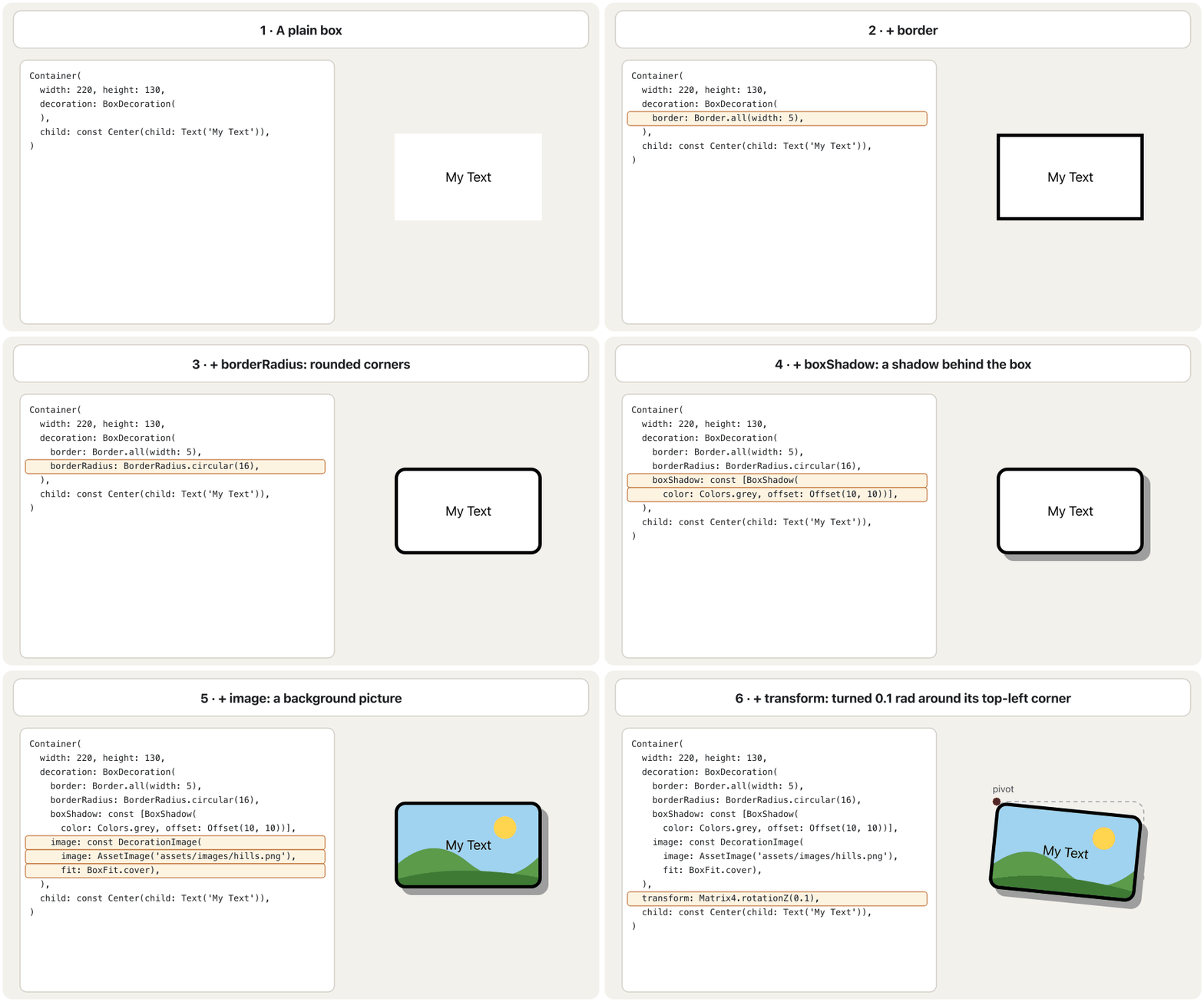
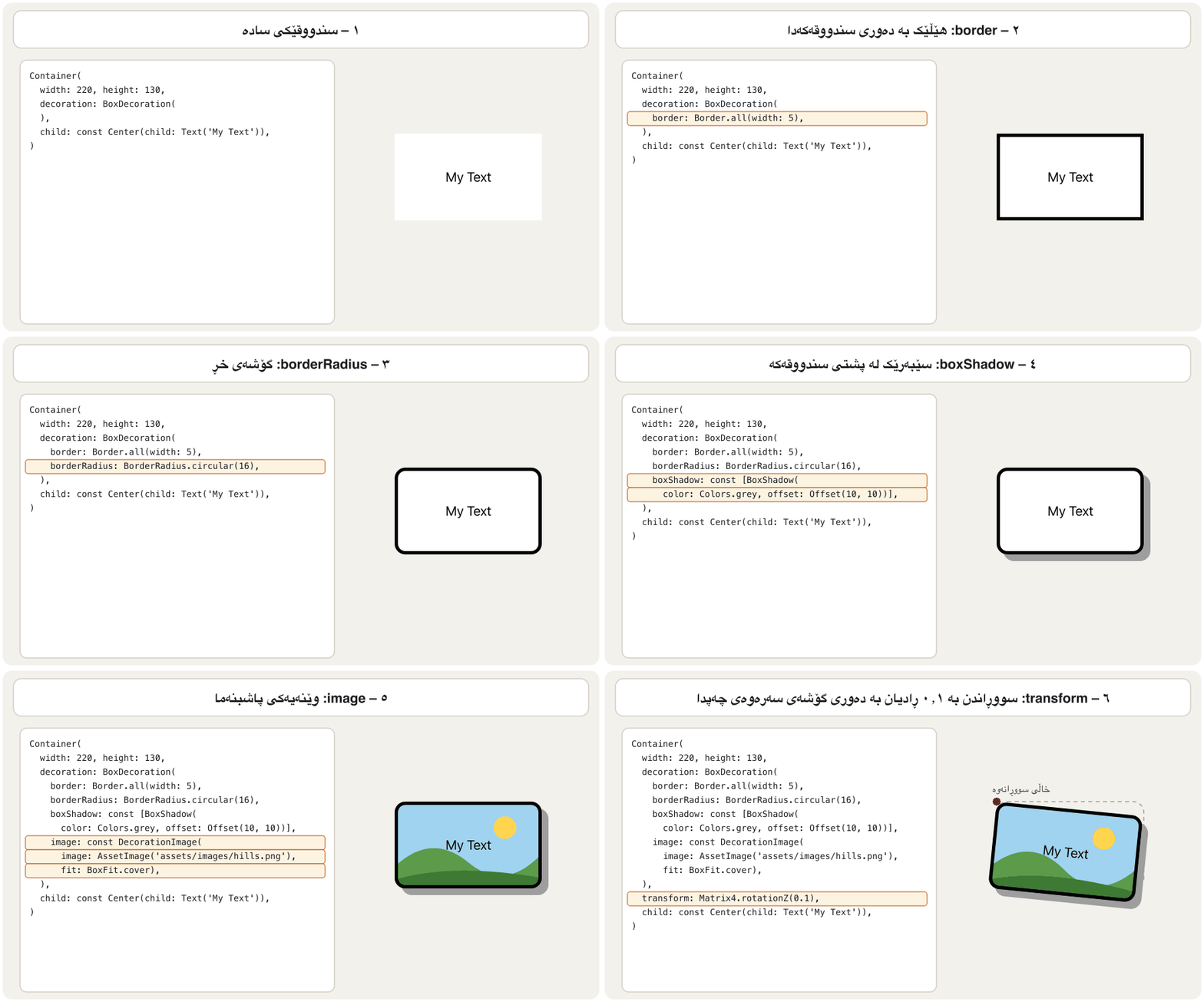
border → borderRadius → boxShadow → image → transform.یەک سندووق، لە هەر وێنەیەکدا نوێ: border ← borderRadius ← boxShadow ← image ← transform.CêITThe colour rule: color or decoration, never bothڕێسای ڕەنگ: color یان decoration، نەک هەردووکیان پێکەوە
BoxDecoration has its own color property: it sets the box's colour. Here is the course's example, a light-blue box with a black border:
BoxDecoration colorـی خۆی هەیە: ڕەنگی سندووقەکە دیاری دەکات. ئەمە نموونەکەی وانەکەیە، سندووقێکی شینی کاڵ بە ڕەشەوە:
The note is right, and Flutter enforces it. A Container's color is only a shortcut for decoration: BoxDecoration(color: ...), so giving both would mean two backgrounds. In debug mode Flutter stops with this message:
تێبینییەکە ڕاستە و Flutter ناچاری دەکات. colorـی Container تەنها کورتکراوەی decoration: BoxDecoration(color: ...)ـە، بۆیە دانی هەردووکیان واتای دوو پاشبنەمایە. لە دۆخی debugـدا Flutter بەم پەیامە دەوەستێت:
import 'package:flutter/material.dart';

// WRONG: compiles, but in debug mode Flutter stops with
// "Cannot provide both a color and a decoration."
class WrongBox extends StatelessWidget {
  const WrongBox({super.key});

  @override
  Widget build(BuildContext context) {
    return Container(
      color: Colors.lightBlueAccent,
      decoration: BoxDecoration(
        border: Border.all(color: Colors.black, width: 5),
      ),
      child: const Center(child: Text('My Text')),
    );
  }
}

// RIGHT: the colour moves inside the BoxDecoration.
class RightBox extends StatelessWidget {
  const RightBox({super.key});

  @override
  Widget build(BuildContext context) {
    return Container(
      decoration: BoxDecoration(
        color: Colors.lightBlueAccent,
        border: Border.all(color: Colors.black, width: 5),
      ),
      child: const Center(
        child: Text('My Text', style: TextStyle(fontSize: 20)),
      ),
    );
  }
}'package:flutter/src/widgets/container.dart': Failed assertion: Cannot provide both a color and a decoration. The color argument is just a shorthand for "decoration: BoxDecoration(color: color)". To use both a color and other decoration properties, set the color in the BoxDecoration instead.
RightBox shows a light-blue box with a 5-pixel black border and 'My Text' in the middle.
RightBox سندووقێکی شینی کاڵ بە ڕەشی ٥ و 'My Text' لە ناوەڕاستدا پیشان دەدات.
Explain the codeڕوونکردنەوەی کۆدەکە
- Lineدێڕی 11-12
WRONG:
colornext todecoration.هەڵە:
colorلە تەنیشتdecoration.- Lineدێڕی 21
RIGHT: the colour moves inside the
BoxDecoration.ڕاست: ڕەنگەکە دەچێتە ناو
BoxDecoration.- Lineدێڕی 32
The course's text, centred in the box.
دەقەکەی وانەکە، لە ناوەڕاستی سندووقەکەدا.
The code compiles; the problem appears when the screen is built. In a release build the check is skipped, but the code is still wrong, so always follow the rule: with a decoration, put the colour inside it.
کۆدەکە کۆمپایل دەبێت؛ کێشەکە کاتی دروستکردنی شاشەکە دەردەکەوێت. لە وەشانی releaseـدا ئەم پشکنینە ناکرێت، بەڵام کۆدەکە هەر هەڵەیە، بۆیە هەمیشە پەیڕەوی ڕێساکە بکە: ئەگەر decoration هەیە، ڕەنگەکە بخە ناوییەوە.
Mitch Koko's calm beginner course in Dart and Flutter: variables, operators, if/else, switch, loops, functions, collections, a first screen and a counter.
کۆرسە ئارامەکەی Mitch Koko بۆ سەرەتاییەکان لە و : ، ، if/else، switch، ، ، List/Set/Map، یەکەم شاشە و .
Watch 33:29-34:18: the error 'cannot provide both a color and a decoration', moving the colour into BoxDecoration, then rounded corners with borderRadius.
لە 33:29 تا 34:18 سەیر بکە: Cannot provide both a color and a decoration، گواستنەوەی ڕەنگەکە بۆ ناو BoxDecoration، پاشان گۆشەی خڕ بە borderRadius.
border: a line around the boxborder: هێڵێک بە دەوری سندووقەکەدا
border draws a line around the edge of the box. Border.all(color: ..., width: ...) puts the same line on all four sides; the course uses a 5-pixel black one.
border هێڵێک بە دەوری لێواری سندووقەکەدا دەکێشێت. Border.all(color: ..., width: ...) هەمان هێڵ لە هەر چوار لادا دادەنێت؛ وانەکە هێڵێکی ڕەشی ٥ بەکار دەهێنێت.
import 'package:flutter/material.dart';

class BorderDemo extends StatelessWidget {
  const BorderDemo({super.key});

  @override
  Widget build(BuildContext context) {
    return Column(
      children: [
        // the course example: the same line on all four sides
        Container(
          width: 220,
          height: 120,
          decoration: BoxDecoration(
            border: Border.all(color: Colors.black, width: 5),
          ),
          child: const Center(
            child: Text('My Text', style: TextStyle(fontSize: 20)),
          ),
        ),
        const SizedBox(height: 16),
        // one side only: a line under a heading
        Container(
          padding: const EdgeInsets.only(bottom: 4),
          decoration: const BoxDecoration(
            border: Border(
              bottom: BorderSide(color: Colors.teal, width: 3),
            ),
          ),
          child: const Text('Today\'s lessons', style: TextStyle(fontSize: 20)),
        ),
        const SizedBox(height: 16),
        // start side: left in English apps, right in Kurdish apps
        Container(
          padding: const EdgeInsetsDirectional.only(start: 12),
          decoration: const BoxDecoration(
            border: BorderDirectional(
              start: BorderSide(color: Colors.orange, width: 6),
            ),
          ),
          child: const Text('A note with a coloured edge'),
        ),
      ],
    );
  }
}┌─────────────────────────────┐ │ │ │ ┏━━━━━━━━━━━━━━━━━━━━┓ │ │ ┃ My Text ┃ │ │ ┗━━━━━━━━━━━━━━━━━━━━┛ │ │ │ │ Today's lessons │ │ ═══════════════ │ │ │ │ ▌ A note with a coloured …│ │ │ └─────────────────────────────┘
A white box with a thick black frame and 'My Text' in the middle; under it the heading 'Today's lessons' underlined in teal; then a note with a thick orange line on its left (start) side.
سندووقێکی سپی بە چوارچێوەیەکی ڕەشی ئەستوور و 'My Text' لە ناوەڕاستدا؛ لە ژێریدا سەردێڕی 'Today's lessons' کە هێڵێکی شینی سەوزباوی لە ژێرەوەیە؛ پاشان تێبینییەک بە هێڵێکی پرتەقاڵیی ئەستوور لە لای چەپی (سەرەتا).
Explain the codeڕوونکردنەوەی کۆدەکە
- Lineدێڕی 15
The course's example: all four sides.
نموونەکەی وانەکە: هەر چوار لا.
- Lineدێڕی 26-27
One side only: a line under a heading.
تەنها یەک لا: هێڵێک لە ژێر سەردێڕێکدا.
- Lineدێڕی 37-38
startfollows the reading direction: the right side in a Kurdish app.startبەدوای ئاڕاستەی خوێندنەوەدا دەڕوات: لە کوردیدا لای ڕاست.
borderRadius: rounded cornersborderRadius: گۆشەی خڕ
borderRadius makes the corners of the box round. BorderRadius.circular(10) rounds all four corners with a radius of 10 pixels: the bigger the number, the rounder the corner. It rounds the background and the border together.
borderRadius گۆشەکانی سندووقەکە خڕ دەکات. BorderRadius.circular(10) هەر چوار گۆشە بە نیوەتیرەی ١٠ خڕ دەکات: ژمارەکە گەورەتر بێت، گۆشەکە خڕترە. پاشبنەما و پێکەوە خڕ دەکات.
import 'package:flutter/material.dart';

class RadiusDemo extends StatelessWidget {
  const RadiusDemo({super.key});

  @override
  Widget build(BuildContext context) {
    return Column(
      children: [
        // the course example: all four corners rounded by 10
        Container(
          width: 220,
          height: 120,
          decoration: BoxDecoration(
            border: Border.all(color: Colors.black, width: 5),
            borderRadius: BorderRadius.circular(10),
          ),
          child: const Center(
            child: Text('My Text', style: TextStyle(fontSize: 20)),
          ),
        ),
        const SizedBox(height: 16),
        // only the top corners: the shape of a tab or a bottom sheet
        Container(
          width: 220,
          height: 60,
          decoration: const BoxDecoration(
            color: Colors.teal,
            borderRadius: BorderRadius.vertical(top: Radius.circular(24)),
          ),
        ),
        const SizedBox(height: 16),
        // a circle: use shape, not borderRadius
        Container(
          width: 80,
          height: 80,
          decoration: BoxDecoration(
            color: Colors.amber,
            shape: BoxShape.circle,
            border: Border.all(color: Colors.brown, width: 3),
          ),
        ),
      ],
    );
  }
}┌─────────────────────────────┐ │ │ │ ╭━━━━━━━━━━━━━━━━━━━━╮ │ │ ┃ My Text ┃ │ │ ╰━━━━━━━━━━━━━━━━━━━━╯ │ │ ╭────────────────────╮ │ │ │▓▓▓▓▓▓▓▓▓▓▓▓▓▓▓▓▓▓▓▓│ │ │ │ │ ( ● ) │ │ │ └─────────────────────────────┘
A box with a thick black rounded frame and 'My Text'; a teal bar whose top corners are round; an amber circle with a brown ring.
سندووقێک بە چوارچێوەیەکی ڕەشی ئەستووری گۆشەخڕ و 'My Text'؛ شریتێکی شینی سەوزباو کە گۆشەکانی سەرەوەی خڕن؛ بازنەیەکی زەردی تۆخ بە ئەڵقەیەکی قاوەیی.
Explain the codeڕوونکردنەوەی کۆدەکە
- Lineدێڕی 16
The course's example: all corners, radius 10.
نموونەکەی وانەکە: هەموو گۆشەکان، نیوەتیرەی ١٠.
- Lineدێڕی 29
Only the two top corners — the shape of a tab or a bottom sheet.
تەنها دوو گۆشەی سەرەوە — شێوەی تابێک یان .
- Lineدێڕی 39
A circle: use
shape, not a huge radius.بازنە:
shapeبەکار بهێنە، نەک نیوەتیرەیەکی زۆر گەورە.
boxShadow: shadows behind the boxboxShadow: سێبەر لە پشت سندووقەکەوە
boxShadow takes a list of BoxShadow objects that the box casts behind itself. A list, because you can stack several shadows. Each BoxShadow has four main properties:
boxShadow لیستێک لە BoxShadow وەردەگرێت کە سندووقەکە لە پشت خۆیەوە دەیانخات. لیستە، چونکە دەتوانیت چەند سێبەرێک بەسەر یەکدا دابنێیت. هەر BoxShadowـێک چوار سەرەکیی هەیە:
color— the shadow's colour, usually black or grey and partly see-through.offset— how far the shadow moves:Offset(dx, dy), right and down.blurRadius— how soft the edge is (0 = a sharp copy of the box).spreadRadius— how much bigger than the box the shadow is.
color— ڕەنگی سێبەرەکە، زۆربەی جار ڕەش یان خۆڵەمێشی و تا ڕادەیەک ڕوون.offset— سێبەرەکە چەند دەجووڵێت:Offset(dx, dy)، بەرەو ڕاست و خوارەوە.blurRadius— لێوارەکە چەند نەرمە (0 = وێنەیەکی تیژی سندووقەکە).spreadRadius— سێبەرەکە چەند لە سندووقەکە گەورەترە.
import 'package:flutter/material.dart';

class ShadowDemo extends StatelessWidget {
  const ShadowDemo({super.key});

  @override
  Widget build(BuildContext context) {
    return Column(
      children: [
        // the course example, corrected
        Container(
          width: 220,
          height: 120,
          decoration: BoxDecoration(
            color: Colors.grey,
            border: Border.all(color: Colors.black, width: 5),
            borderRadius: BorderRadius.circular(10),
            boxShadow: const [
              BoxShadow(
                color: Colors.grey,
                offset: Offset(10, 10),
              ),
            ],
          ),
          child: const Center(
            child: Text('My Text', style: TextStyle(fontSize: 20)),
          ),
        ),
        const SizedBox(height: 32),
        // a soft, modern shadow
        Container(
          width: 220,
          height: 120,
          decoration: BoxDecoration(
            color: Colors.white,
            borderRadius: BorderRadius.circular(16),
            boxShadow: [
              BoxShadow(
                color: Colors.black.withValues(alpha: 0.2),
                offset: const Offset(0, 4),
                blurRadius: 12,
                spreadRadius: 1,
              ),
            ],
          ),
          child: const Center(child: Text('Soft card')),
        ),
      ],
    );
  }
}┌─────────────────────────────┐ │ │ │ ╭━━━━━━━━━━━━━━━━━━╮ │ │ ┃ My Text ┃▒ │ │ ╰━━━━━━━━━━━━━━━━━━╯▒ │ │ ▒▒▒▒▒▒▒▒▒▒▒▒▒▒▒▒▒▒▒▒ │ │ │ │ ╭──────────────────╮ │ │ │ Soft card │ │ │ ╰──────────────────╯ │ │ ░░░░░░░░░░░░░░░░░░ │ │ │ └─────────────────────────────┘
A grey box with a black rounded frame, 'My Text' and a hard grey shadow at its bottom-right; below it a white card 'Soft card' that seems to float above the page.
سندووقێکی خۆڵەمێشی بە چوارچێوەیەکی ڕەشی گۆشەخڕ، 'My Text' و سێبەرێکی خۆڵەمێشیی ڕەق لە خوارەوەی ڕاستی؛ لە ژێریدا کارتێکی سپی 'Soft card' کە وا دەردەکەوێت لە سەرووی پەڕەکەوە بێت.
Explain the codeڕوونکردنەوەی کۆدەکە
- Lineدێڕی 18-23
The course's shadow: grey, 10 right and 10 down, sharp.
سێبەرەکەی وانەکە: خۆڵەمێشی، ١٠ بەرەو ڕاست و ١٠ بەرەو خوارەوە، تیژ.
- Lineدێڕی 39
A soft shadow: 20 % black…
سێبەرێکی نەرم: ٢٠٪ ڕەش…
- Lineدێڕی 40-42
…a little below the box, blurred over 12 pixels.
…کەمێک لە ژێر سندووقەکەدا، بە ١٢ نەرم کراوە.
gradient: colours that blendgradient: ڕەنگی تێکەڵ بۆ پاشبنەما
Instead of one flat colour, a BoxDecoration can fill the box with a gradient: two or more colours that blend slowly into each other. Flutter has three kinds:
لە جیاتی یەک ڕەنگی سادە، BoxDecoration دەتوانێت سندووقەکە بە پڕ بکاتەوە: دوو ڕەنگ یان زیاتر کە وردە وردە تێکەڵی یەکتر دەبن. Flutter سێ جۆری هەیە:
LinearGradient— along a line, frombegintoend(for example from the top-left to the bottom-right).RadialGradient— in rings from a centre point outwards.SweepGradient— around a centre, like the hand of a clock.
LinearGradient— بە درێژایی هێڵێک، لەbeginـەوە بۆend(بۆ نموونە لە سەرەوەی چەپەوە بۆ خوارەوەی ڕاست).RadialGradient— بە بازنە لە خاڵێکی ناوەندەوە بەرەو دەرەوە.SweepGradient— بە دەوری ناوەندێکدا، وەک مێلی کاتژمێر.
import 'package:flutter/material.dart';

class GradientDemo extends StatelessWidget {
  const GradientDemo({super.key});

  @override
  Widget build(BuildContext context) {
    return Column(
      children: [
        // linear: along a line, here from the top-left to the bottom-right
        Container(
          width: 220,
          height: 100,
          decoration: const BoxDecoration(
            gradient: LinearGradient(
              begin: Alignment.topLeft,
              end: Alignment.bottomRight,
              colors: [Colors.orange, Colors.deepPurple],
            ),
          ),
        ),
        const SizedBox(height: 12),
        // radial: in circles from a centre point
        Container(
          width: 220,
          height: 100,
          decoration: const BoxDecoration(
            gradient: RadialGradient(
              radius: 0.8,
              colors: [Colors.yellow, Colors.red],
            ),
          ),
        ),
        const SizedBox(height: 12),
        // sweep: around a centre, like the hand of a clock
        Container(
          width: 100,
          height: 100,
          decoration: const BoxDecoration(
            shape: BoxShape.circle,
            gradient: SweepGradient(
              colors: [Colors.red, Colors.yellow, Colors.green, Colors.blue, Colors.red],
            ),
          ),
        ),
        const SizedBox(height: 12),
        // stops: where each colour sits, from 0.0 (start) to 1.0 (end)
        Container(
          width: 220,
          height: 40,
          decoration: const BoxDecoration(
            gradient: LinearGradient(
              colors: [Colors.red, Colors.white, Colors.green],
              stops: [0.0, 0.5, 1.0],
            ),
          ),
        ),
      ],
    );
  }
}┌─────────────────────────────┐ │ │ │ [orange ░▒▓ purple ] │ │ │ │ [red ▒░ yellow ░▒ red ] │ │ │ │ ( rainbow ) │ │ │ │ [red | white | green ] │ │ │ └─────────────────────────────┘
An orange-to-purple diagonal band; a yellow-to-red glowing band; a rainbow-like circle; a thin red–white–green strip.
پارچەیەکی لار لە پرتەقاڵییەوە بۆ مۆر؛ پارچەیەکی دەدرەوشێتەوە لە زەردەوە بۆ سوور؛ بازنەیەکی وەک پەلکەزێڕینە؛ پارچەیەکی باریکی سوور–سپی–سەوز.
Explain the codeڕوونکردنەوەی کۆدەکە
- Lineدێڕی 16-17
beginandendare Alignment points, like in the Container lesson.beginوendخاڵی Alignmentـن، وەک لە وانەی Containerـدا.- Lineدێڕی 29
The radius as a part of the box's size.
نیوەتیرەکە وەک بەشێک لە قەبارەی سندووقەکە.
- Lineدێڕی 42
Repeat the first colour at the end so the circle has no seam.
ڕەنگی یەکەم لە کۆتاییدا دووبارە بکەرەوە بۆ ئەوەی بازنەکە هێڵی جیاکەرەوەی نەبێت.
- Lineدێڕی 54
stops: where each colour sits, from 0.0 (start) to 1.0 (end).stops: هەر ڕەنگێک لە کوێ دادەنیشێت، لە 0.0 (سەرەتا) بۆ 1.0 (کۆتایی).
Shows how LinearGradient blends two or more colours inside a box, and how begin, end and stops change the result.
پیشان دەدات LinearGradient () چۆن دوو ڕەنگ یان زیاتر لە ناو سندووقێکدا تێکەڵ دەکات و begin، end و stops چۆن ئەنجامەکە دەگۆڕن.
The whole video (1:13): LinearGradient in a container's decoration and on text.
هەموو ڤیدیۆکە (1:13): LinearGradient لە decorationـی Containerـێکدا و لەسەر دەق.
image: a background pictureimage: وێنەیەکی پاشبنەما
image puts a picture behind the child with a DecorationImage. Its image says where the picture comes from — AssetImage('assets/images/back_img.jpg') for a file shipped inside the app — and its fit says how the picture fills the box.
image بە DecorationImage وێنەیەک لە پشت منداڵەکەوە دادەنێت. imageـەکەی دەڵێت وێنەکە لە کوێوە دێت — AssetImage('assets/images/back_img.jpg') بۆ فایلێک کە لەگەڵ دەنێردرێت — و fitـەکەی دەڵێت وێنەکە چۆن سندووقەکە پڕ دەکاتەوە.
flutter:
  assets:
    - assets/images/
Explain the codeڕوونکردنەوەی کۆدەکە
- Lineدێڕی 2
assets:is indented two spaces underflutter:— YAML cares about indentation.assets:دوو بۆشایی لە ژێرflutter:چووەتە ناوەوە — گرنگی بە دەدات.- Lineدێڕی 3
A folder ends with
/: every file directly inside it is included.فۆڵدەر بە
/کۆتایی دێت: هەموو فایلێک کە ڕاستەوخۆ لە ناویدایە دەگیرێتە خۆ.
import 'package:flutter/material.dart';

class ImageBox extends StatelessWidget {
  const ImageBox({super.key});

  @override
  Widget build(BuildContext context) {
    return Container(
      width: 300,
      height: 180,
      decoration: BoxDecoration(
        border: Border.all(color: Colors.black, width: 5),
        image: DecorationImage(
          image: const AssetImage('assets/images/back_img.jpg'),
          fit: BoxFit.cover,
          // darken the picture a little so white text stays readable
          colorFilter: ColorFilter.mode(
            Colors.black.withValues(alpha: 0.3),
            BlendMode.darken,
          ),
        ),
      ),
      child: const Center(
        child: Text(
          'My Text',
          style: TextStyle(fontSize: 20, color: Colors.white),
        ),
      ),
    );
  }
}┌─────────────────────────────┐ │ │ │ ┏━━━━━━━━━━━━━━━━━━━━━━┓ │ │ ┃ ~~ picture ~~ ~~ ~~ ┃ │ │ ┃ My Text ┃ │ │ ┃ ~~ ~~ ~~ ~~ ~~ ~~ ~~ ┃ │ │ ┗━━━━━━━━━━━━━━━━━━━━━━┛ │ │ │ └─────────────────────────────┘
A 300 × 180 box with a thick black frame, filled with the (slightly darkened) picture, and the white words 'My Text' in the middle.
سندووقێکی ٣٠٠ × ١٨٠ بە چوارچێوەیەکی ڕەشی ئەستوور، پڕکراوە بە وێنەکە (کەمێک تاریک کراوە) و وشەی سپی 'My Text' لە ناوەڕاستدا.
Explain the codeڕوونکردنەوەی کۆدەکە
- Lineدێڕی 14
The course's file, loaded from the app's assets.
فایلەکەی وانەکە، لە بار دەکرێت.
- Lineدێڕی 15
Fill the whole box; cut what does not fit.
هەموو سندووقەکە پڕ بکەرەوە؛ ئەوەی جێی نابێتەوە ببڕە.
- Lineدێڕی 17-18
Darken the picture so the white text stays readable.
وێنەکە تاریکتر بکە بۆ ئەوەی دەقە سپییەکە بخوێنرێتەوە.
Pictures from the internet use NetworkImage('https://...') in the same place. Images as widgets on their own (Image.asset, Image.network) are taught in Text, Images and Icons.
وێنەکانی ئینتەرنێت لە هەمان شوێندا NetworkImage('https://...') بەکار دەهێنن. وێنە وەک سەربەخۆ (Image.asset، Image.network) لە دەق، وێنە و ئایکۆنەکاندا فێر دەکرێت.
transform: turning the boxtransform: سووڕاندنی سندووقەکە
A Container's transform property changes the box when it is painted: it can turn it, move it or scale it. You give it a Matrix4, a 4 × 4 matrix that describes the change. The course turns a green box a little with Matrix4.rotationZ(0.1):
transformـی Container سندووقەکە لە کاتی کێشاندا دەگۆڕێت: دەتوانێت بیسووڕێنێت، بیجووڵێنێت یان گەورە و بچووکی بکات. Matrix4ـێکی پێ دەدەیت، ٤ × ٤ کە گۆڕانەکە وەسف دەکات. وانەکە سندووقێکی سەوز بە Matrix4.rotationZ(0.1) کەمێک دەسووڕێنێت:
- The angle is in radians, not degrees. A full turn is radians, so 0.1 radians is only about 5.7° (radians are explained in Radians).
- Z is the axis that points out of the screen, so
rotationZturns the box flat on the screen, like the hands of a clock.rotationXandrotationYtip it forwards or sideways in 3D. - A positive angle turns clockwise on the screen (because y points down).
- گۆشەکە بە ، نەک بە پلە. سووڕانەوەیەکی تەواو ، بۆیە 0.1 تەنها نزیکەی 5.7°ـە ( لە ڕادیانەکان ڕوون کراونەتەوە).
- Z ئەو تەوەرەیەیە کە لە شاشەکەوە بەرەو دەرەوە دێت، بۆیە
rotationZسندووقەکە بە تەختی لەسەر شاشەکە دەسووڕێنێت، وەک مێلەکانی کاتژمێر.rotationXوrotationYبە شێوەی سێ ڕەهەندی بەرەو پێشەوە یان لاتەنیشت لاری دەکەنەوە. - گۆشەی موجەب بە ئاڕاستەی مێلی کاتژمێر لەسەر شاشە دەسووڕێنێت (چونکە y بەرەو خوارەوەیە).
Converting the course's two angles from radians to degrees.
گۆڕینی دوو گۆشەکەی وانەکە لە بۆ پلە.
transform: turning the boxtransform: سووڕاندنی سندووقەکە
The pivot: where the box turns aroundخاڵی سووڕانەوە: سندووقەکە بە دەوری کوێدا دەسووڕێتەوە
By default the box turns around its top-left corner (the corner of the whole Container, margin included). transformAlignment moves this pivot, for example to Alignment.topRight or Alignment.center.
بە بنەڕەت سندووقەکە بە دەوری گۆشەی سەرەوەی چەپیدا دەسووڕێتەوە (گۆشەی هەموو Containerـەکە، ). transformAlignment ئەم خاڵی سووڕانەوەیە دەگۆڕێت، بۆ نموونە بۆ Alignment.topRight یان Alignment.center.
import 'package:flutter/material.dart';

class TransformDemo extends StatelessWidget {
  const TransformDemo({super.key});

  @override
  Widget build(BuildContext context) {
    return Column(
      children: [
        // the course example: 0.1 radians around the Z axis
        Container(
          width: 200.0,
          height: 100.0,
          color: Colors.green,
          padding: const EdgeInsets.all(35),
          margin: const EdgeInsets.all(20),
          alignment: Alignment.bottomRight,
          transform: Matrix4.rotationZ(0.1),
          child: const Text('Button1', style: TextStyle(fontSize: 25)),
        ),
        // turn 0.3 radians around the box's top-right corner
        Container(
          width: 150,
          height: 150,
          color: Colors.purpleAccent,
          transform: Matrix4.rotationZ(0.3),
          transformAlignment: Alignment.topRight,
        ),
      ],
    );
  }
}┌─────────────────────────────┐ │ │ │ ▛▀▀▀▀▀▀▀▀▀▀▀▀▀▀▀▀▄▄ │ │ ▌░░░░░░░░░░░░░░░░░▌ │ │ ▌░░░░░░░░ Button1 ▌ │ │ ▀▀▀▀▀▄▄▄▄▄▄▄▄▄▄▄▄▘ │ │ │ │ ◆◆◆◆◆◆◆ │ │ ◆◆◆◆◆◆◆◆◆ │ │ ◆◆◆◆◆◆◆ │ │ │ └─────────────────────────────┘
A green 200 × 100 box tilted a little clockwise, with 'Button1' at its bottom-right; below it a pink-purple square turned clockwise around its top-right corner.
سندووقێکی سەوزی ٢٠٠ × ١٠٠ کە کەمێک بە ئاڕاستەی مێلی کاتژمێر لار بووەتەوە و 'Button1' لە خوارەوەی ڕاستیدایە؛ لە ژێریدا چوارگۆشەیەکی پەمەیی-مۆر کە بە دەوری گۆشەی سەرەوەی ڕاستیدا بە ئاڕاستەی مێلی کاتژمێر سووڕاوە.
Explain the codeڕوونکردنەوەی کۆدەکە
- Lineدێڕی 18
The course's line: 0.1 radians, about 5.7°, clockwise.
دێڕەکەی وانەکە: 0.1 ، نزیکەی 5.7°، بە ئاڕاستەی مێلی کاتژمێر.
- Lineدێڕی 26-27
The rotation picture of the course: 0.3 radians around the top-right corner.
وێنەی سووڕاندنەکەی وانەکە: 0.3 بە دەوری گۆشەی سەرەوەی ڕاستدا.
Common mistakesهەڵە باوەکان
| Mistakeهەڵە | What happensچی ڕوو دەدات | Fixچاککردن |
|---|---|---|
color: on the Container and a decoration: toocolor: لەسەر Container و decoration:یش | Cannot provide both a color and a decorationپەیامی Cannot provide both a color and a decoration | Move the colour into BoxDecoration(color: ...)ڕەنگەکە بگوازەرەوە بۆ BoxDecoration(color: ...) |
Color.greyColor.grey | Compile error | Colors.greyColors.grey |
Closing BoxDecoration( too earlyداخستنی BoxDecoration( زووتر لە کاتی خۆی | borderRadius/boxShadow are unknown arguments of ContainerborderRadius/boxShadow نەناسراوی Containerـن | Keep every decoration property inside BoxDecoration(...)هەموو ڕازاندنەوە لە ناو BoxDecoration(...)دا بهێڵەوە |
| An image not listed in pubspec.yamlوێنەیەک کە لە pubspec.yamlـدا نەنووسراوە | Unable to load asset at run timeUnable to load asset لە کاتی جێبەجێکردندا | Add the file or its folder under flutter: assets:فایلەکە یان فۆڵدەرەکەی لە ژێر flutter: assets: زیاد بکە |
Expecting borderRadius to cut the childچاوەڕوانی ئەوەی borderRadius منداڵەکە ببڕێت | The child's corners stay squareگۆشەکانی منداڵەکە چوارگۆشە دەمێننەوە | Add clipBehavior: Clip.antiAliasclipBehavior: Clip.antiAlias زیاد بکە |
Giving rotationZ degreesدانی پلە بە rotationZ | The box turns far too muchسندووقەکە زۆر زیاتر لە پێویست دەسووڕێت | Use radians: multiply the degrees by بەکار بهێنە: پلەکان لێکبدە لە |
Both color and gradient in one BoxDecorationcolor و gradient پێکەوە لە یەک BoxDecorationـدا | The colour is hiddenڕەنگەکە دەشاردرێتەوە | Use one of themیەکێکیان بەکار بهێنە |
Writing new BoxShadow(...)نووسینی new BoxShadow(...) | Works, but old styleکار دەکات، بەڵام شێوازی کۆنە | const BoxShadow(...) or BoxShadow(...)const BoxShadow(...) یان BoxShadow(...) |
Exercisesڕاهێنانەکان
This Container stops in debug mode. Explain why and fix it so that it keeps the light-blue background and the black border.
ئەم Containerـە لە دۆخی debugـدا دەوەستێت. ڕوونی بکەرەوە بۆچی و چاکی بکەرەوە بۆ ئەوەی پاشبنەمای شینی کاڵ و ڕەشەکەی بمێنێت.
Container(
  color: Colors.lightBlueAccent,
  decoration: BoxDecoration(
    border: Border.all(color: Colors.black, width: 5),
  ),
  child: const Center(child: Text('My Text')),
)
Show answerوەڵامەکە پیشان بدە
A Container's color is a shortcut for BoxDecoration(color: ...), so color and decoration together would give two backgrounds, and Flutter refuses. Move the colour inside the decoration:
colorـی Container کورتکراوەی BoxDecoration(color: ...)ـە، بۆیە color و decoration پێکەوە دوو پاشبنەما دەدەن و Flutter ڕەتی دەکاتەوە. ڕەنگەکە بگوازەرەوە بۆ ناو decoration:
Container(
  decoration: BoxDecoration(
    color: Colors.lightBlueAccent,
    border: Border.all(color: Colors.black, width: 5),
  ),
  child: const Center(
    child: Text('My Text', style: TextStyle(fontSize: 20)),
  ),
)Rewrite the course's boxShadow example so that it compiles: a 5-pixel black border, corners with radius 10, and a grey shadow 10 pixels to the right and 10 down, with 'My Text' (size 20) in the middle.
نموونەی boxShadowـی وانەکە دووبارە بنووسەوە بۆ ئەوەی کۆمپایل ببێت: ڕەشی ٥ ، گۆشە بە نیوەتیرەی ١٠ و سێبەرێکی خۆڵەمێشی ١٠ بەرەو ڕاست و ١٠ بەرەو خوارەوە، لەگەڵ 'My Text' (قەبارە ٢٠) لە ناوەڕاستدا.
Hintئاماژە
Count the brackets: borderRadius and boxShadow belong inside BoxDecoration(.
کەوانەکان بژمێرە: borderRadius و boxShadow دەبێت لە ناو BoxDecoration(دا بن.
Show answerوەڵامەکە پیشان بدە
decoration: BoxDecoration(
  border: Border.all(color: Colors.black, width: 5),
  borderRadius: BorderRadius.circular(10),
  boxShadow: const [
    BoxShadow(color: Colors.grey, offset: Offset(10, 10)),
  ],
),
child: const Center(
  child: Text('My Text', style: TextStyle(fontSize: 20)),
),
Explain the codeڕوونکردنەوەی کۆدەکە
- Lineدێڕی 1-7
Everything about the painting stays inside one
BoxDecoration(...).هەموو شتێکی کێشان لە ناو یەک
BoxDecoration(...)دا دەمێنێتەوە.- Lineدێڕی 5
Colors.grey, nonew.Colors.grey، بەبێnew.
Build a profile card 280 pixels wide: a teal-to-blue linear gradient, corners with radius 20 and a soft shadow below it. Inside, in a row: a white circle with an amber ring and the letter 'A', then the white text 'Aram' and 'Mobile App Course' on two lines.
کارتێکی پرۆفایل بە پانیی ٢٨٠ دروست بکە: linear لە شینی سەوزباوەوە بۆ شین، گۆشە بە نیوەتیرەی ٢٠ و سێبەرێکی نەرم لە ژێریدا. لە ناویدا، لە ڕیزێکدا: بازنەیەکی سپی بە ئەڵقەیەکی زەردی تۆخ و پیتی 'A'، پاشان دەقی سپی 'Aram' و 'Mobile App Course' لە دوو دێڕدا.
Show answerوەڵامەکە پیشان بدە
import 'package:flutter/material.dart';

class ProfileCard extends StatelessWidget {
  const ProfileCard({super.key});

  @override
  Widget build(BuildContext context) {
    return Container(
      width: 280,
      padding: const EdgeInsets.all(16),
      margin: const EdgeInsets.all(24),
      decoration: BoxDecoration(
        gradient: const LinearGradient(
          colors: [Color(0xFF0D6B62), Color(0xFF2B5EA8)],
        ),
        borderRadius: BorderRadius.circular(20),
        boxShadow: [
          BoxShadow(
            color: Colors.black.withValues(alpha: 0.25),
            offset: const Offset(0, 6),
            blurRadius: 14,
          ),
        ],
      ),
      child: Row(
        children: [
          Container(
            width: 56,
            height: 56,
            decoration: BoxDecoration(
              color: Colors.white,
              shape: BoxShape.circle,
              border: Border.all(color: Colors.amber, width: 3),
            ),
            alignment: Alignment.center,
            child: const Text('A', style: TextStyle(fontSize: 24)),
          ),
          const SizedBox(width: 16),
          const Text(
            'Aram\nMobile App Course',
            style: TextStyle(color: Colors.white, fontSize: 16),
          ),
        ],
      ),
    );
  }
}┌─────────────────────────────┐ │ │ │ ╭────────────────────────╮ │ │ │ (A) Aram │ │ │ │ Mobile App Course │ │ │ ╰────────────────────────╯ │ │ ░░░░░░░░░░░░░░░░░░░░░░ │ │ │ └─────────────────────────────┘
A rounded teal-to-blue card with a soft shadow; on the left a white circle with an amber ring and 'A'; next to it 'Aram' and 'Mobile App Course' in white.
کارتێکی گۆشەخڕ لە شینی سەوزباوەوە بۆ شین بە سێبەرێکی نەرم؛ لە چەپ بازنەیەکی سپی بە ئەڵقەی زەردی تۆخ و 'A'؛ لە تەنیشتیەوە 'Aram' و 'Mobile App Course' بە سپی.
Explain the codeڕوونکردنەوەی کۆدەکە
- Lineدێڕی 13
The card's background: a gradient instead of a colour.
پاشبنەمای کارتەکە: لە جیاتی ڕەنگ.
- Lineدێڕی 32
The avatar: a circle with a border.
وێنۆچکەکە: بازنەیەک بە .
Turn a 120 × 120 teal box with the white text 'SALE' by 45° around its centre. What number do you give rotationZ?
سندووقێکی شینی سەوزباوی ١٢٠ × ١٢٠ بە دەقی سپی 'SALE' بە ٤٥° بە دەوری ناوەڕاستیدا بسووڕێنە. چ ژمارەیەک دەدەیت بە rotationZ؟
Show answerوەڵامەکە پیشان بدە
import 'dart:math' as math;

import 'package:flutter/material.dart';

class TiltedLabel extends StatelessWidget {
  const TiltedLabel({super.key});

  @override
  Widget build(BuildContext context) {
    return Center(
      child: Container(
        width: 120,
        height: 120,
        color: Colors.teal,
        alignment: Alignment.center,
        // 45 degrees = pi / 4 radians, turned around the box's centre
        transform: Matrix4.rotationZ(math.pi / 4),
        transformAlignment: Alignment.center,
        child: const Text('SALE', style: TextStyle(color: Colors.white, fontSize: 24)),
      ),
    );
  }
}
Explain the codeڕوونکردنەوەی کۆدەکە
- Lineدێڕی 1
math.picomes fromdart:math.math.piلەdart:mathـەوە دێت.- Lineدێڕی 17-18
radians around the centre.
بە دەوری ناوەڕاستدا.
Summaryپوختە
decorationpaints aBoxDecorationbehind the child;foregroundDecorationpaints in front of it.- Colour rule: with a
decoration, the colour goes inside it.color+decorationon one Container stops with Cannot provide both a color and a decoration. borderdraws a line (its width counts as padding);borderRadiusrounds corners (without clipping the child);shape: BoxShape.circlemakes a circle.boxShadowis a list ofBoxShadow(color, offset, blurRadius, spreadRadius);gradientis Linear, Radial or Sweep;imageis aDecorationImagefrom an asset declared in pubspec.yaml.transform: Matrix4.rotationZ(angle)turns the box clockwise by an angle in radians around its top-left corner;transformAlignmentmoves the pivot.
decorationBoxDecorationـێک لە پشت منداڵەکەوە دەکێشێت؛foregroundDecorationلە پێشیەوە دەکێشێت.- ڕێسای ڕەنگ: ئەگەر
decorationهەبێت، ڕەنگەکە دەچێتە ناوییەوە.color+decorationلەسەر یەک Container بە Cannot provide both a color and a decoration دەوەستێت. borderهێڵێک دەکێشێت (پانییەکەی وەک دەژمێردرێت)؛borderRadiusگۆشەکان خڕ دەکات (بەبێ بڕینی منداڵەکە)؛shape: BoxShape.circleبازنە دروست دەکات.boxShadowلیستێکە لەBoxShadow(color, offset, blurRadius, spreadRadius)؛gradientLinear، Radial یان Sweepـە؛imageDecorationImageـێکە لە کە لە pubspec.yamlـدا ڕاگەیەنراوە.transform: Matrix4.rotationZ(angle)سندووقەکە بە گۆشەیەک بە بە ئاڕاستەی مێلی کاتژمێر بە دەوری گۆشەی سەرەوەی چەپیدا دەسووڕێنێت؛transformAlignmentخاڵی سووڕانەوە دەگۆڕێت.
Why can a Container not have both color and decoration?بۆچی Container ناتوانێت هەم color و هەم decorationـی هەبێت؟
color is only a shortcut for decoration: BoxDecoration(color: ...). Both together would be two decorations, so Flutter's assertion stops the app in debug mode. Put the colour in the BoxDecoration.
color تەنها کورتکراوەی decoration: BoxDecoration(color: ...)ـە. هەردووکیان پێکەوە دەبنە دوو ڕازاندنەوە، بۆیە پشکنینەکەی Flutter لە دۆخی debugـدا دەوەستێنێت. ڕەنگەکە بخە ناو BoxDecoration.
What is the order of painting inside a decorated Container?ڕیزبەندیی کێشان لە ناو Containerـێکی ڕازێنراوەدا چییە؟
Shadow, colour, gradient, image and border (the decoration), then the child, then the foregroundDecoration.
سێبەر، ڕەنگ، ، وێنە و (decoration)، پاشان منداڵەکە، پاشان foregroundDecoration.
How many degrees is Matrix4.rotationZ(0.1)?Matrix4.rotationZ(0.1) چەند پلەیە؟
About 5.7°, because .
نزیکەی 5.7°، چونکە .
Lesson complete!وانەکە تەواو بوو!
Well done. Review the key terms, then go on to the next lesson.دەستخۆش. سەیرێکی زاراوە سەرەکییەکان بکەرەوە، پاشان بڕۆ بۆ وانەی داهاتوو.
Key termsزاراوە سەرەکییەکان
Layout Widgets: One Child or Manyویجێتەکانی ڕێکخستنی ڕووکار: یەک نۆدی منداڵ یان چەند دانەیەک
Related lecturesوانە پەیوەندیدارەکان
References and further readingسەرچاوەکان و خوێندنەوەی زیاتر
This lecture is a first edition. The Kurdish text and terminology are waiting for review by Kurdish IT teachers.ئەم وانەیە چاپی یەکەمە. دەقە کوردییەکە و زاراوەکانی چاوەڕێی پێداچوونەوەی مامۆستایانی کوردی بواری IT ن.