FlutterFlutter · Chapterبەش 11 · Lectureوانە 11.2
The Consumer Widgetویجێتی Consumer
How the Consumer widget reads a provider for you: it registers as a listener, passes the value to its builder callback (context, value, child), gives you a context below the provider, reuses a static child, and keeps rebuilds small when you put it deep in the tree.
Consumer چۆن providerـێک بۆ تۆ دەخوێنێتەوە: وەک خۆی تۆمار دەکات، نرخەکە دەدات بە builderـەکەی (context، value، child)، contextـێک لە خوارەوەی providerـەکە دەدات بە تۆ، childـێکی نەگۆڕ دووبارە بەکار دەهێنێتەوە و کاتێک لە قووڵیی دایدەنێیت دووبارە دروستکردنەوەکان بچووک دەهێڵێتەوە.
What you will learnچی فێر دەبیت
- Explain the difference between Provider.of in a screen and a Consumer below it.
- Use the builder callback and its three parameters correctly with provider 6.
- Read a provider in the build method that creates it by using a Consumer.
- Keep static widgets out of rebuilds with the child parameter.
- Place Consumers deep in the tree and choose between Consumer, context.watch and context.read.
- جیاوازیی نێوان
Provider.ofلەناو شاشەیەکدا و Consumerـێک لە خوارییەوە ڕوون بکەیتەوە. - builder و سێ بە دروستی لەگەڵ provider 6 بەکار بهێنیت.
- بە Consumer providerـێک لەو
buildـەدا بخوێنیتەوە کە دروستی دەکات. - بە
child، نەگۆڕ لە دەرەوەی دووبارە دروستکردنەوە بهێڵیتەوە. - Consumerـەکان لە قووڵیی دابنێیت و لە نێوان Consumer،
context.watchوcontext.readـدا هەڵبژێریت.
Two ways to listen to a providerدوو ڕێگا بۆ گوێگرتن لە providerـێک
In State Management with Provider you read a provider with Provider.of<T>(context) or context.watch<T>(). That call does two jobs: it returns the value, and it registers the widget whose context you passed as a listener. So after every change, that widget's whole build method runs again.
لە بەڕێوەبردنی دۆخ بە Provider providerـێکت بە Provider.of<T>(context) یان context.watch<T>() خوێندەوە. ئەو بانگکردنە دوو کار دەکات: نرخەکە دەگەڕێنێتەوە و ئەو contextـەکەیت پێ داوە وەک تۆمار دەکات. بۆیە دوای هەر گۆڕانێک buildـی ئەو بە تەواوی دووبارە جێبەجێ دەبێتەوە.
The lecture compares this with the Consumer widget on a user-profile screen. A provider of User sits at the top, then MyApp, then MyScreen, which draws a Scaffold with the user's picture and name. With Provider.of, MyScreen itself is the listener. With a Consumer, a new widget between MyScreen and the Scaffold becomes the listener instead:
وانەکە ئەمە لەسەر شاشەیەکی پرۆفایلی لەگەڵ Consumer بەراورد دەکات. providerـێکی User لە سەرەوەیە، پاشان MyApp، پاشان MyScreen کە Scaffoldـێک بە وێنە و ناوی دەکێشێت. بە Provider.of، خودی MyScreen . بە Consumer، نوێ لە نێوان MyScreen و Scaffoldـدا لە جیاتی ئەو دەبێتە :
What the Consumer widget doesویجێتی Consumer چی دەکات
The lecture gives three facts about Consumer<T>. Here is what each one means:
وانەکە سێ ڕاستی دەربارەی Consumer<T> دەڵێت. ئەمە واتای هەر یەکێکیانە:
- It calls
Provider.of()for you. Inside, the Consumer gets the value withProvider.of<T>(context), so it also registers itself as a listener of the provider. The package's own code is only that: one call toProvider.ofin a new, small widget. - It forwards the data through its builder. The value is not kept in a field. It is passed to your
builderfunction as a parameter, and you use it to build the widgets below. - It does not need a
BuildContextfrom you. You never hand acontextto a Consumer; it uses its own. The next screen shows why that matters.
- بانگی
Provider.of()بۆ تۆ دەکات. Consumer لە ناوەوە نرخەکە بەProvider.of<T>(context)وەردەگرێت، بۆیە خۆیشی وەک providerـەکە تۆمار دەکات. کۆدی خودی تەنها ئەوەیە: یەک بانگکردنیProvider.ofلەناو نوێ و بچووکدا. - دراوەکە بە ڕێگەی builderـەکەیەوە دەنێرێتە خوارەوە. نرخەکە لە هەڵناگیرێت. وەک دەدرێت بە
builderـەکەت و تۆ بەکاری دەهێنیت بۆ دروستکردنی ئەو لە خوارەوەن. - پێویستی بە
BuildContextـێک لە تۆوە نییە. هەرگیزcontextـێک نادەیت بە Consumer؛ هی خۆی بەکار دەهێنێت. شاشەی داهاتوو پیشان دەدات بۆچی ئەمە گرنگە.
import 'package:flutter/material.dart';
import 'package:provider/provider.dart';

class User {
  const User({required this.name, required this.city});

  final String name;
  final String city;
}

void main() {
  runApp(
    Provider<User>(
      create: (_) => const User(name: 'Aram', city: 'Erbil'),
      child: const MaterialApp(home: ProfileScreen()),
    ),
  );
}

class ProfileScreen extends StatelessWidget {
  const ProfileScreen({super.key});

  @override
  Widget build(BuildContext context) {
    return Consumer<User>(
      // _ marks a parameter we do not use (here: context and child)
      builder: (_, user, _) => Scaffold(
        appBar: AppBar(
          leading: CircleAvatar(child: Text(user.name[0])),
          title: Text(user.name),
        ),
        body: ListView.separated(
          itemCount: 3,
          separatorBuilder: (_, _) => const Divider(),
          itemBuilder: (_, i) => ListTile(title: Text('To-do ${i + 1}')),
        ),
      ),
    );
  }
}
Explain the codeڕوونکردنەوەی کۆدەکە
- Lineدێڕی 13
The provider of
Usersits aboveMaterialApp, as in the lecture.providerـی
Userلە سەروویMaterialAppـەوەیە، وەک لە وانەکەدا.- Lineدێڕی 25
Always write the type: the Consumer looks for the nearest provider of
User.هەمیشە جۆرەکە بنووسە: Consumer بەدوای نزیکترین providerـی
Userـدا دەگەڕێت.- Lineدێڕی 27
useris the value from the provider._marks the two parameters this builder does not use.userئەو نرخەیە کە لە providerـەکەوە دێت._ئەو دوو نیشان دەدات کە ئەم builderـە بەکاریان ناهێنێت.- Lineدێڕی 29
The first letter of the name instead of a photo from the internet.
یەکەم پیتی ناوەکە لە جیاتی وێنەیەک لە .
What the Consumer widget doesویجێتی Consumer چی دەکات
A context below the providercontextـێک لە خوارەوەی providerـەکە
Provider.of and context.watch search upward from the context you give them. Now picture one widget that creates a provider and wants to show its value in the same build method. Its context belongs to the widget itself, which is above the provider it is creating. The search starts too high and finds nothing:
Provider.of و context.watch لەو contextـەوە کە پێیان دەدەیت بەرەو سەرەوە دەگەڕێن. ئێستا بهێنە پێش چاوت کە providerـێک دروست دەکات و دەیەوێت لە هەمان buildـدا نرخەکەی پیشان بدات. contextـەکەی هی خودی ، کە لە سەرووی ئەو providerـەوەیە کە دروستی دەکات. گەڕانەکە لە شوێنێکی زۆر بەرزەوە دەست پێ دەکات و هیچ نادۆزێتەوە:
buildـداDARTRuns on a phone (or an emulator)لەسەر مۆبایل کار دەکاتimport 'package:flutter/material.dart';
import 'package:provider/provider.dart';
class ScoreModel extends ChangeNotifier {
int _points = 0;
int get points => _points;
void goal() {
_points++;
notifyListeners();
}
}
// WRONG: this context belongs to ScorePageWrong, which is ABOVE
// the provider it creates, so Provider.of cannot find ScoreModel.
class ScorePageWrong extends StatelessWidget {
const ScorePageWrong({super.key});
@override
Widget build(BuildContext context) {
return ChangeNotifierProvider(
create: (_) => ScoreModel(),
child: Text('Score: ${Provider.of<ScoreModel>(context).points}'),
);
}
}
// RIGHT: Consumer brings its own context, which is BELOW the provider.
class ScorePage extends StatelessWidget {
const ScorePage({super.key});
@override
Widget build(BuildContext context) {
return ChangeNotifierProvider(
create: (_) => ScoreModel(),
child: Consumer<ScoreModel>(
builder: (context, score, child) => Text('Score: ${score.points}'),
),
);
}
}ProviderNotFoundException Error: Could not find the correct Provider<ScoreModel> above this ScorePageWrong Widget This happens because you used a `BuildContext` that does not include the provider of your choice. There are a few common scenarios: … ScorePage shows: 1 "Score: 0"
Explain the codeڕوونکردنەوەی کۆدەکە
- Lineدێڕی 23
contexthere isScorePageWrong's, above the new provider:Provider.ofcannot findScoreModel.contextلێرەدا هیScorePageWrongـە، لە سەرووی providerـە نوێیەکەوە:Provider.ofناتوانێتScoreModelبدۆزێتەوە.- Lineدێڕی 36-37
The Consumer is a new widget below the provider, and its builder gets that widget's
context.Consumer نوێیە لە خوارەوەی providerـەکە و builderـەکەی
contextـی ئەو وەردەگرێت.
Consumer solves it because it is a new widget with its own context, placed below the provider. That is what the lecture means by “it does not need a BuildContext object”: you do not have to find or pass a context that is under the provider.
Consumer چارەسەری دەکات چونکە نوێیە و contextـی خۆی هەیە، کە لە خوارەوەی providerـەکەدا دانراوە. ئەمە واتای قسەکەی وانەکەیە کە «پێویستی بە BuildContext نییە»: پێویست ناکات خۆت contextـێک بدۆزیتەوە یان بینێریت کە لە ژێر providerـەکەوە بێت.
The builder callback and its three parametersکرداری بانگکردنەوەی builder و سێ پارامیتەرەکەی
builder is a callback: a function you give to the Consumer, which the Consumer calls whenever it must build: the first time, and again after every change of the provided value. Its job is to build a widget tree from that value and return it. In provider 6 its type is:
builder کردارێکی بانگکردنەوەیە: کە دەیدەیت بە Consumer و Consumer هەر کاتێک پێویست بێت دروست بکات بانگی دەکات: یەکەم جار و دوای هەر گۆڕانێکی نرخە دابینکراوەکە. ئەرکەکەی ئەوەیە لەو نرخەوە دروست بکات و بیگەڕێنێتەوە. لە provider 6ـدا جۆرەکەی ئەمەیە:
Widget Function(BuildContext context, T value, Widget? child)| Parameter | The lecture calls itناوی لە وانەکەدا | What it holdsچی هەڵدەگرێت |
|---|---|---|
context | context | A BuildContext: the Consumer's own, below the providerBuildContextـێک: هی خودی Consumer، لە خوارەوەی providerـەکە |
value (type T) | data | The value obtained from the provider, for example a Userئەو نرخەی لە providerـەکەوە وەرگیراوە، بۆ نموونە Userـێک |
child (type Widget?) | widget | A static widget to use inside the builder; it is whatever you passed to the Consumer's child parameter, or null if you passed nothing نەگۆڕ بۆ بەکارهێنان لەناو builderـەکەدا؛ ئەوەیە کە بە childـی Consumer داتە، یان null ئەگەر هیچت نەدابێت |
The names are your choice; only the order matters. Most code names the second parameter after what it is (user, cart, score) and writes _ for a parameter it does not use.
ناوەکان بە دەستی خۆتن؛ تەنها ڕیزبەندییەکە گرنگە. زۆربەی کۆدەکان دووەم بە ناوی ئەو شتەوە ناو دەنێن کە هەیەتی (user، cart، score) و بۆ کە بەکاری ناهێنن _ دەنووسن.
The counter app rebuilt with Provider: one class holds the state, a provider sits above the app and widgets read and update it.
بە Provider دووبارە دروست دەکرێتەوە: یەک هەڵدەگرێت، provider لە سەرووی دادەنرێت و دەیخوێننەوە و نوێی دەکەنەوە.
Chapter 'Consuming state' (3:41-4:55): Consumer<CounterModel> with builder (context, value, child), value.count in a Text, then context.read in onPressed. Here the Consumer wraps the whole Scaffold; the lesson explains why a deeper Consumer rebuilds less.
بەشی Consuming state (3:41 تا 4:55): Consumer<CounterModel> لەگەڵ builder (context, value, child)، value.count لە ناو Textـێکدا، پاشان context.read لە onPressedـدا. لێرەدا Consumer هەموو Scaffoldـەکە دەگرێتەوە؛ وانەکە ڕوون دەکاتەوە بۆچی Consumerـێک کە قووڵتر لە دانرابێت کەمتر دووبارە build دەکاتەوە.
The child parameter: build once, reuseپارامیتەری child: یەک جار دروستی بکە، دووبارە بەکاری بهێنەرەوە
Some widgets under a Consumer do not depend on the value: an icon, a logo, a long fixed text. If you create them inside the builder, they are made again on every change, for nothing. Give them to the Consumer's child parameter instead. The Consumer builds that widget once and hands the same object back to your builder each time, so Flutter sees an unchanged widget and skips it. The lecture's example puts an alarm icon in the app bar this way:
هەندێک لە ژێر Consumerـدا پشت بە نرخەکە نابەستن: ، لۆگۆیەک، دەقێکی درێژی نەگۆڕ. ئەگەر لەناو builderـەکەدا دروستیان بکەیت، لە هەر گۆڕانێکدا بێهودە دووبارە دروست دەکرێنەوە. لە جیاتی ئەوە بیاندە بە childـی Consumer. Consumer ئەو یەک جار دروست دەکات و هەر جارێک هەمان دەداتەوە بە builderـەکەت، بۆیە Flutter نەگۆڕاو دەبینێت و بازی بەسەردا دەدات. نموونەکەی وانەکە بەم شێوەیە زەنگی ئاگادارکەرەوە دەخاتە :
// The lecture's example, written for provider 6: child is Widget? (nullable).
Widget buildMainScreen(BuildContext context) {
  return Consumer<User>(
    child: const Icon(Icons.access_alarm), // built once, outside the builder
    builder: (_, user, child) => Scaffold(
      appBar: AppBar(
        leading: CircleAvatar(child: Text(user.name[0])),
        title: Text(user.name),
        actions: [?child], // add it only if it is not null
      ),
    ),
  );
}
Explain the codeڕوونکردنەوەی کۆدەکە
- Lineدێڕی 4
Made once, outside the builder.
یەک جار دروست دەکرێت، لە دەرەوەی builderـەکە.
- Lineدێڕی 5
The third parameter receives that same icon. Its type is
Widget?.سێیەم هەمان وەردەگرێت. جۆرەکەی
Widget?ـە.- Lineدێڕی 9
?childadds the icon to the list only if it is notnull.?childتەنها ئەگەرnullنەبێت دەخاتە نێو .
The child parameter: build once, reuseپارامیتەری child: یەک جار دروستی بکە، دووبارە بەکاری بهێنەرەوە
How much the child saveschild چەند کار کەم دەکاتەوە
A bigger example: a team logo above a changing score. The logo goes in child; only the score Text is made again:
نموونەیەکی گەورەتر: لۆگۆی تیمێک لە سەرووی ئەنجامێکی گۆڕاوەوە. لۆگۆکە دەچێتە childـەوە؛ تەنها Textـی ئەنجامەکە دووبارە دروست دەکرێتەوە:
// The logo does not depend on the score, so it goes in child.
class ScoreCard extends StatelessWidget {
  const ScoreCard({super.key});

  @override
  Widget build(BuildContext context) {
    return Consumer<ScoreModel>(
      child: const TeamLogo(), // made ONCE
      builder: (context, score, child) => Column(
        children: [
          ?child, // the same TeamLogo every time: Flutter skips it
          Text('Score: ${score.points}'), // rebuilt with the new value
        ],
      ),
    );
  }
}

class TeamLogo extends StatelessWidget {
  const TeamLogo({super.key});

  @override
  Widget build(BuildContext context) {
    return const Padding(
      padding: EdgeInsets.all(16),
      child: Icon(Icons.sports_soccer, size: 96),
    );
  }
}child after 2 goals: {builder: 3, child: TeamLogo: 1}The builder ran three times (the first build and two goals); TeamLogo was built once. On a real screen the static part is often much bigger than one icon, so this saves real work.
builderـەکە سێ جار جێبەجێ بوو (یەکەم build و دوو گۆڵ)؛ TeamLogo یەک جار دروست کرا. لە شاشەیەکی ڕاستەقینەدا بەشە نەگۆڕەکە زۆرجار زۆر لە یەک گەورەترە، بۆیە ئەمە کاری ڕاستەقینە کەم دەکاتەوە.
Put Consumers deep in the treeConsumerـەکان لە قووڵیی داری ویجێتەکاندا دابنێ
The Flutter documentation gives one rule for Consumers: put them as deep in the tree as possible. A Consumer rebuilds only what is inside its builder, so the smaller that part, the less work each change causes. Here is a match screen written twice. In A, MatchScreenTop calls Provider.of, so the whole screen is the listener. In B, a Consumer wraps only the score Text:
Flutter یەک یاسا بۆ Consumerـەکان دەدەن: تا دەتوانیت لە قووڵیی دایان بنێ. Consumer تەنها ئەوەی لەناو builderـەکەیدایە دووبارە دروست دەکاتەوە، بۆیە تا ئەو بەشە بچووکتر بێت، هەر گۆڕانێک کاری کەمتر دروست دەکات. ئەمە شاشەیەکی یارییە کە دوو جار نووسراوە. لە Aـدا، MatchScreenTop بانگی Provider.of دەکات، بۆیە هەموو شاشەکە . لە Bـدا، Consumerـێک تەنها بە دەوری Textـی ئەنجامەکەدا دەپێچێت:
Provider.of لە سەرەوە، B: Consumerـێکی قووڵDARTRuns on a phone (or an emulator)لەسەر مۆبایل کار دەکاتimport 'package:flutter/material.dart';
import 'package:provider/provider.dart';
class ScoreModel extends ChangeNotifier {
int _points = 0;
int get points => _points;
void goal() {
_points++;
notifyListeners();
}
}
void main() {
runApp(
ChangeNotifierProvider(
create: (_) => ScoreModel(),
child: const MaterialApp(home: MatchScreenDeep()),
),
);
}
// A: Provider.of at the top: MatchScreenTop is the listener,
// so its WHOLE build method runs again after every goal.
class MatchScreenTop extends StatelessWidget {
const MatchScreenTop({super.key});
@override
Widget build(BuildContext context) {
final score = Provider.of<ScoreModel>(context);
return Scaffold(
appBar: AppBar(title: const Text('Erbil – Duhok')),
body: Column(
children: [
const MatchInfo(),
Text('Score: ${score.points}', style: const TextStyle(fontSize: 40)),
],
),
floatingActionButton: FloatingActionButton(
onPressed: () => context.read<ScoreModel>().goal(),
child: const Icon(Icons.add),
),
);
}
}
// B: a Consumer deep in the tree: only its builder runs again.
class MatchScreenDeep extends StatelessWidget {
const MatchScreenDeep({super.key});
@override
Widget build(BuildContext context) {
return Scaffold(
appBar: AppBar(title: const Text('Erbil – Duhok')),
body: Column(
children: [
const MatchInfo(),
Consumer<ScoreModel>(
builder: (context, score, child) => Text(
'Score: ${score.points}',
style: const TextStyle(fontSize: 40),
),
),
],
),
floatingActionButton: FloatingActionButton(
onPressed: () => context.read<ScoreModel>().goal(),
child: const Icon(Icons.add),
),
);
}
}
class MatchInfo extends StatelessWidget {
const MatchInfo({super.key});
@override
Widget build(BuildContext context) {
return const ListTile(
leading: Icon(Icons.stadium),
title: Text('City Stadium'),
subtitle: Text('Kick-off 18:00'),
);
}
}Explain the codeڕوونکردنەوەی کۆدەکە
- Lineدێڕی 30
A:
MatchScreenTopbecomes the listener: its wholebuildruns on every goal.A:
MatchScreenTopدەبێتە : هەمووbuildـەکەی لە هەر گۆڕانێکدا جێبەجێ دەبێتەوە.- Lineدێڕی 58
B: only this builder listens and runs again.
B: تەنها ئەم builderـە گوێ دەگرێت و دووبارە جێبەجێ دەبێتەوە.
- Lineدێڕی 40
The button only calls a method, so it uses
context.readand does not listen.تەنها بانگ دەکات، بۆیە
context.readبەکار دەهێنێت و گوێ ناگرێت.
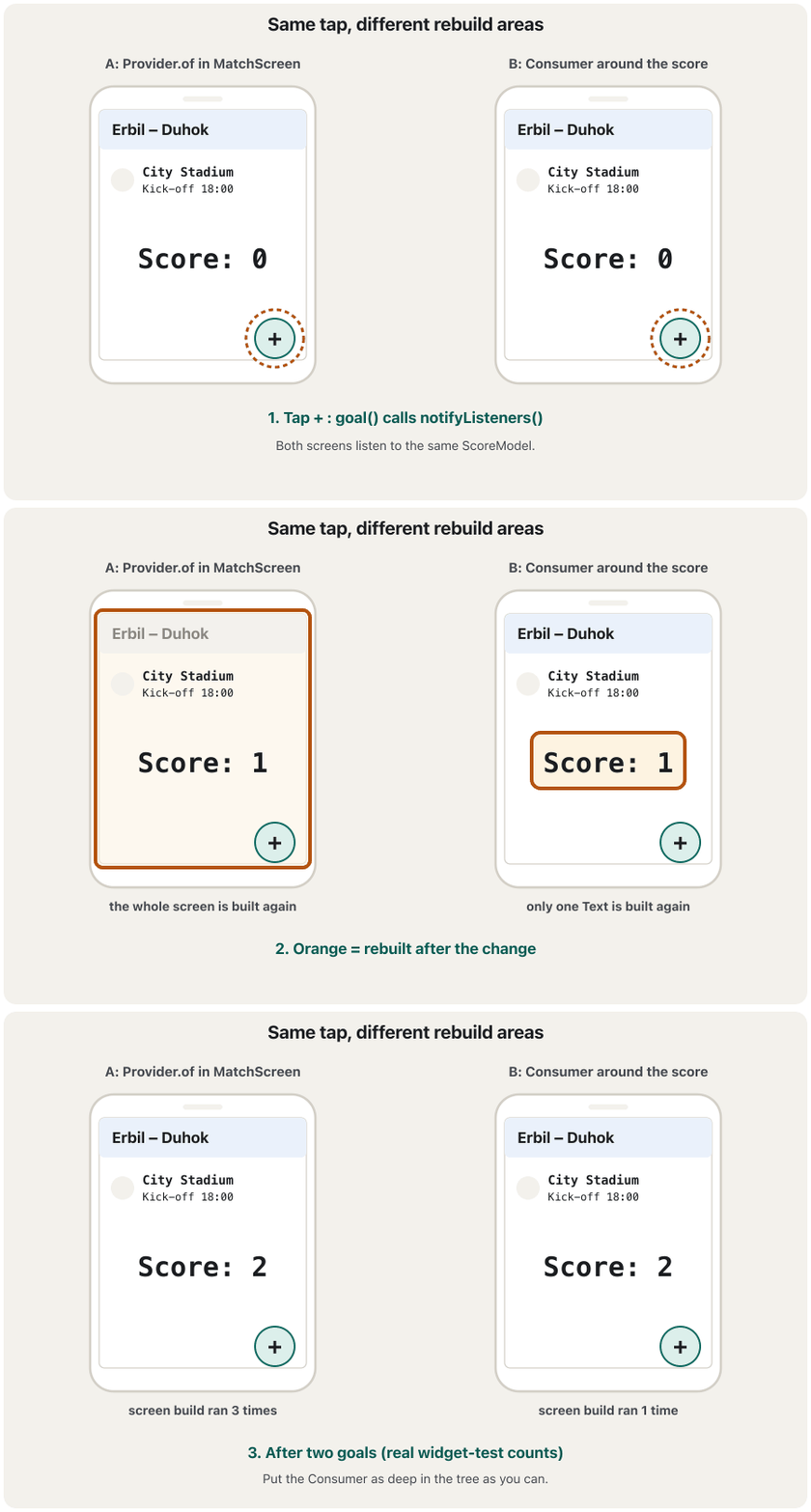
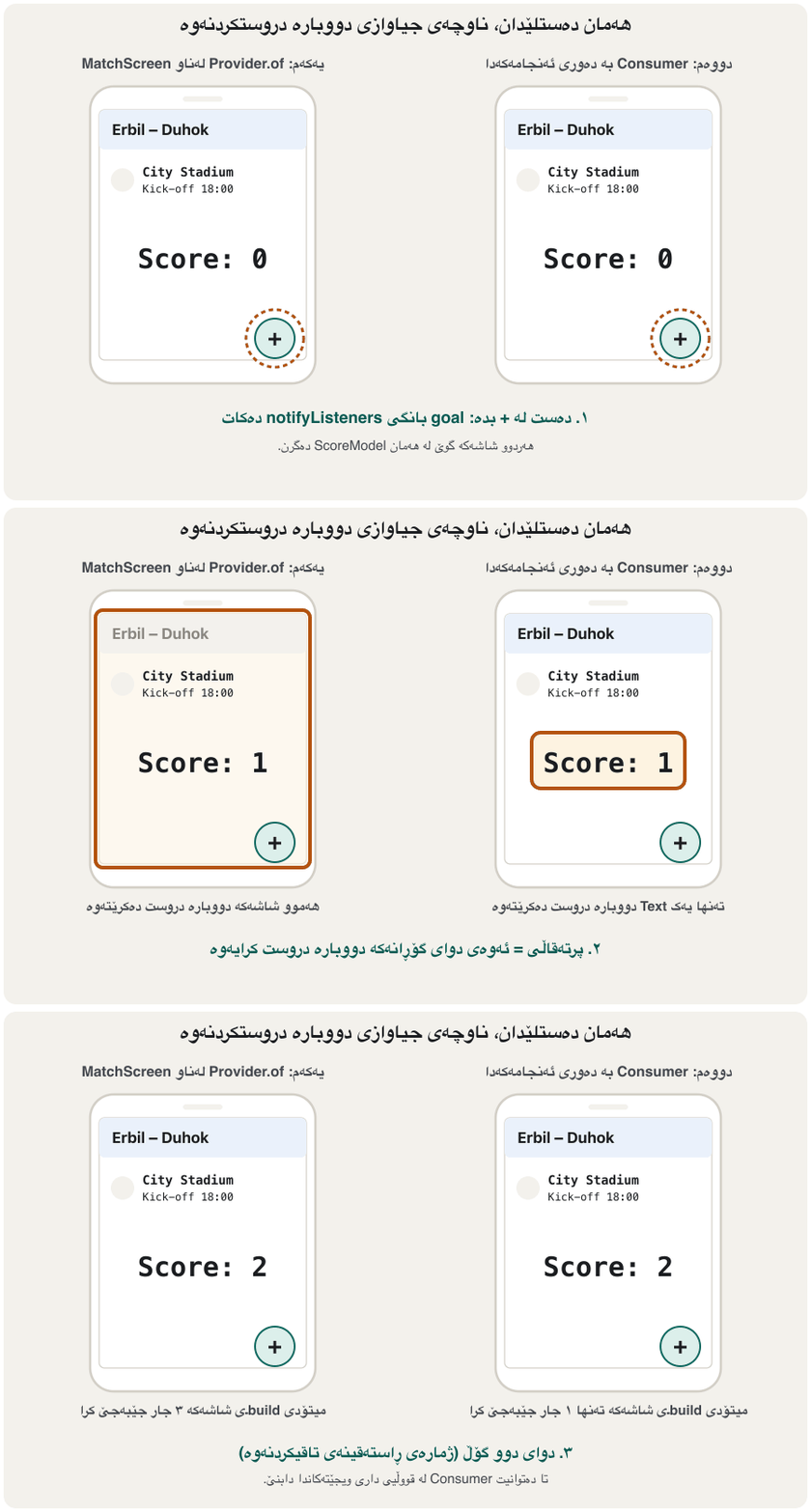
A widget test counted the builds in both versions during two goals:
تاقیکردنەوەیەکی ژمارەی buildـەکانی هەردوو وەشانەکەی لە کاتی دوو گۆڵدا ژمارد:
Provider.of after 2 goals: {top: screen: 3, top: score text: 3, top: info: 1, top (no const): info: 3}
Consumer    after 2 goals: {deep: screen: 1, deep: info: 1, deep: score text: 3}
In A the screen's build ran three times (the first build and two goals); in B it ran once, and only the score's builder ran three times. Look at MatchInfo too: it was built only once even in A, because it is const, and Flutter skips a widget that is the very same object as last time. A copy written without const was rebuilt all three times. So deep Consumers and const widgets work together.
لە Aـدا buildـی شاشەکە سێ جار جێبەجێ بوو (یەکەم build و دوو گۆڵ)؛ لە Bـدا یەک جار و تەنها builderـی ئەنجامەکە سێ جار جێبەجێ بوو. سەیری MatchInfoـیش بکە: تەنانەت لە Aـشدا تەنها یەک جار دروست کرا، چونکە constـە و Flutter بازی بەسەر ئەو دەدات کە ڕێک هەمان جاری پێشووە. کۆپییەکی هەمان کە بەبێ const نووسرابوو هەر سێ جارەکە دووبارە دروست کرایەوە. کەواتە Consumerـی قووڵ و const پێکەوە کار دەکەن.
Consumer, Provider.of or context.watch?Consumer، Provider.of یان context.watch؟
All three listen in the same way. The only difference is which build method runs again. You can get the same small rebuild without a Consumer by moving the Text into its own small widget that calls context.watch. Choose whichever reads more clearly:
هەر سێکیان بە هەمان شێوە گوێ دەگرن. تەنها جیاوازی ئەوەیە کە کام build دووبارە جێبەجێ دەبێتەوە. دەتوانیت بەبێ Consumer هەمان دووبارە دروستکردنەوەی بچووک بەدەست بهێنیت، ئەگەر Textـەکە بخەیتە بچووکی تایبەت بە خۆیەوە کە بانگی context.watch دەکات. ئەوەیان هەڵبژێرە کە ڕوونتر دەخوێندرێتەوە:
| You want to…دەتەوێت… | Writeبنووسە |
|---|---|
| Show a value in a small widget of its ownنرخێک لە بچووکی تایبەت بە خۆیدا پیشان بدەیت | context.watch<T>() in its buildcontext.watch<T>() لەناو buildـەکەیدا |
Rebuild one part of a bigger build method, without writing a new classبەشێکی buildـێکی گەورەتر دووبارە دروست بکەیتەوە، بەبێ نووسینی نوێ | Consumer<T> around that partConsumer<T> بە دەوری ئەو بەشەدا |
Read a provider in the same build that creates itproviderـێک لە هەمان ئەو buildـەدا بخوێنیتەوە کە دروستی دەکات | Consumer<T> |
| Use values from two or more providers in one placeنرخی دوو provider یان زیاتر لە یەک شوێندا بەکار بهێنیت | Consumer2<A, B> … Consumer6 |
| Call a method from a button لە بانگ بکەیت | context.read<T>(): no Consumercontext.read<T>(): بەبێ Consumer |
Common mistakesهەڵە باوەکان
| Mistakeهەڵە | What happensچی ڕوو دەدات | Fixچاکردنەوە |
|---|---|---|
Consumer(builder: (context, cart, child) => …) | No type: Dart uses dynamic, and provider stops with “Tried to call Provider.of<dynamic>”بێ جۆر: Dart dynamic بەکار دەهێنێت و provider بە «Tried to call Provider.of<dynamic>» دەوەستێت | Consumer<CartModel>(…) |
actions: [child] | Compile error: child is Widget? compile: child جۆری Widget?ـە | actions: [?child] |
A widget that uses the value is put in child کە نرخەکە بەکار دەهێنێت خراوەتە childـەوە | It never updates, because child is built only onceهەرگیز نوێ نابێتەوە، چونکە child تەنها یەک جار دروست دەکرێت | Keep it inside the builderلەناو builderـەکەدا بیهێڵەرەوە |
A Consumer around the whole Scaffold to show one numberConsumerـێک بە دەوری هەموو Scaffoldـدا بۆ پیشاندانی یەک ژمارە | The whole screen rebuilds on every changeهەموو شاشەکە لە هەر گۆڕانێکدا دووبارە دروست دەبێتەوە | Wrap only the widget that shows the numberتەنها بە دەوری ئەو بپێچە کە ژمارەکە پیشان دەدات |
A Consumer just to call a method in onPressedConsumerـێک تەنها بۆ بانگکردنی لە onPressedـدا | Needless rebuilds of the buttonدووبارە دروستکردنەوەی بێهودەی | context.read<T>().method() |
Exercisesڕاهێنانەکان
This shop screen reads the cart with Provider.of at the top, so the whole product list is rebuilt every time an item is added. Rewrite it so that only the cart count in the app bar listens.
ئەم شاشەی فرۆشگایە سەبەتەکە بە Provider.of لە سەرەوە دەخوێنێتەوە، بۆیە هەر جارێک کاڵایەک زیاد دەکرێت هەموو بەرهەمەکان دووبارە دروست دەکرێتەوە. دووبارە بینووسەرەوە بۆ ئەوەی تەنها ژمارەی سەبەتەکە لە گوێ بگرێت.
class ShopScreenBefore extends StatelessWidget {
  const ShopScreenBefore({super.key});

  @override
  Widget build(BuildContext context) {
    final cart = Provider.of<CartModel>(context); // the whole screen listens
    return Scaffold(
      appBar: AppBar(title: Text('Cart: ${cart.count}')),
      body: ListView(
        children: [
          for (final p in products)
            ListTile(
              title: Text(p),
              trailing: IconButton(
                icon: const Icon(Icons.add_shopping_cart),
                onPressed: () => cart.add(p),
              ),
            ),
        ],
      ),
    );
  }
}Hintئاماژە
Wrap only the Text in the AppBar in a Consumer<CartModel>.
تەنها Textـی ناو AppBar لە Consumer<CartModel>ـێکدا بپێچە.
Show answerوەڵامەکە پیشان بدە
class ShopScreen extends StatelessWidget {
  const ShopScreen({super.key});

  @override
  Widget build(BuildContext context) {
    return Scaffold(
      appBar: AppBar(
        // only this Text listens and rebuilds
        title: Consumer<CartModel>(
          builder: (context, cart, child) => Text('Cart: ${cart.count}'),
        ),
      ),
      body: ListView(
        children: [
          for (final p in products)
            ListTile(
              title: Text(p),
              trailing: IconButton(
                icon: const Icon(Icons.add_shopping_cart),
                // read: call a method, do not listen
                onPressed: () => context.read<CartModel>().add(p),
              ),
            ),
        ],
      ),
    );
  }
}
The title is the only listener now. The add buttons use context.read, because they only call add and do not show the cart.
ئێستا تەنها ناونیشانەکە . زیادکردن context.read بەکار دەهێنن، چونکە تەنها بانگی add دەکەن و سەبەتەکە پیشان نادەن.
The lecture's code is Consumer<User>(child: Icon(Icons.access_alarm), builder: (_, user, widget) => Scaffold(appBar: AppBar(title: Text(user.name), actions: [widget]))). Explain why it does not compile with provider 6, and fix it.
کۆدەکەی وانەکە ئەمەیە: Consumer<User>(child: Icon(Icons.access_alarm), builder: (_, user, widget) => Scaffold(appBar: AppBar(title: Text(user.name), actions: [widget]))). ڕوونی بکەرەوە بۆچی لەگەڵ provider 6 compile نابێت و چاکی بکەرەوە.
Show answerوەڵامەکە پیشان بدە
The builder's third parameter is Widget?, because a Consumer may have no child. A List<Widget> cannot hold a Widget?. Write actions: [?widget] (or [if (widget != null) widget]), and make the icon const Icon(Icons.access_alarm) so it is never rebuilt.
سێیەمی builder جۆری Widget?ـە، چونکە لەوانەیە Consumer هیچ childـێکی نەبێت. List<Widget> ناتوانێت Widget? هەڵبگرێت. actions: [?widget] بنووسە (یان [if (widget != null) widget]) و بکە بە const Icon(Icons.access_alarm) بۆ ئەوەی هەرگیز دووبارە دروست نەکرێتەوە.
A Consumer<ScoreModel> has child: const TeamLogo() and a builder that returns Column(children: [?child, Text('${score.points}')]). The screen is shown, then goal() is called four times. How many times does the builder run, and how many times is TeamLogo built?
Consumer<ScoreModel>ـێک child: const TeamLogo()ـی هەیە و builderـێک کە Column(children: [?child, Text('${score.points}')]) دەگەڕێنێتەوە. شاشەکە پیشان دەدرێت، پاشان چوار جار بانگی goal() دەکرێت. builderـەکە چەند جار جێبەجێ دەبێت و TeamLogo چەند جار دروست دەکرێت؟
Show answerوەڵامەکە پیشان بدە
The builder runs 5 times: once for the first frame and once after each of the four goals. TeamLogo is built once: the same object comes back through child each time. (The widget test in this lesson showed 3 and 1 for two goals.)
builderـەکە 5 جار جێبەجێ دەبێت: یەک جار بۆ یەکەم پیشاندان و یەک جار دوای هەر یەکێک لە چوار گۆڵەکە. TeamLogo یەک جار دروست دەکرێت: هەر جارێک هەمان لە ڕێگەی childـەوە دەگەڕێتەوە. (تاقیکردنەوەکەی ئەم وانەیە بۆ دوو گۆڵ 3 و 1ـی پیشان دا.)
Summaryپوختە
Consumer<T>callsProvider.of<T>for you, registers itself as a listener and passes the value to itsbuilder.- The builder is a callback with three parameters:
context(the Consumer's own, below the provider), the value, andchild(Widget?). - Because it has its own context, a Consumer can read a provider in the same
buildmethod that creates it. - Pass parts that do not depend on the value as
child: they are built once. In provider 6 use[?child], not[child]. - Put Consumers as deep in the tree as you can: only what is inside the builder is rebuilt.
- For buttons, use
context.readinstead of a Consumer.
Consumer<T>بۆ تۆ بانگیProvider.of<T>دەکات، خۆی وەک تۆمار دەکات و نرخەکە دەدات بەbuilderـەکەی.- builder بە سێ :
context(هی خودی Consumer، لە خوارەوەی provider)، نرخەکە وchild(Widget?). - چونکە
contextـی خۆی هەیە، Consumer دەتوانێت providerـێک لە هەمان ئەوbuildـەدا بخوێنێتەوە کە دروستی دەکات. - ئەو بەشانەی پشت بە نرخەکە نابەستن وەک
childبنێرە: یەک جار دروست دەکرێن. لە provider 6ـدا[?child]بەکار بهێنە، نەک[child]. - Consumerـەکان تا دەتوانیت لە قووڵیی دابنێ: تەنها ئەوەی لەناو builderـەکەدایە دووبارە دروست دەکرێتەوە.
- بۆ ، لە جیاتی Consumer
context.readبەکار بهێنە.
Lesson complete!وانەکە تەواو بوو!
Well done. Review the key terms, then go on to the next lesson.دەستخۆش. سەیرێکی زاراوە سەرەکییەکان بکەرەوە، پاشان بڕۆ بۆ وانەی داهاتوو.
Key termsزاراوە سەرەکییەکان
The Selector Widget: Fewer Rebuildsویجێتی Selector: دووبارە دروستکردنەوەی کەمتر
Related lecturesوانە پەیوەندیدارەکان
References and further readingسەرچاوەکان و خوێندنەوەی زیاتر
This lecture is a first edition. The Kurdish text and terminology are waiting for review by Kurdish IT teachers.ئەم وانەیە چاپی یەکەمە. دەقە کوردییەکە و زاراوەکانی چاوەڕێی پێداچوونەوەی مامۆستایانی کوردی بواری IT ن.