FlutterFlutter · Chapterبەش 9 · Lectureوانە 9.1
Splash Screensشاشەکانی دەستپێک
What a splash (launch) screen is and why apps have one; the native launch screen made with the flutter_native_splash package, including Android 12's rules and keeping it while the app loads; and a timed intro screen in Dart with initState, Timer and pushReplacement, written safely.
چییە و بۆچی هەیانە؛ ڕەسەن کە بە flutter_native_splash دروست دەکرێت، لەگەڵ یاساکانی Android 12 و هێشتنەوەی تا بار دەبێت؛ و شاشەیەکی ناساندنی کاتدار لە بە initState، Timer و pushReplacement، بە شێوەیەکی سەلامەت.
What you will learnچی فێر دەبیت
- Explain what a splash (launch) screen is, what it usually shows and why an app needs one.
- Tell the native launch screen from a Dart intro screen, and say when each one is shown.
- Make a native launch screen with flutter_native_splash, including the android_12 settings, and keep it while the app loads.
- Write a timed intro screen with initState, Timer and pushReplacement that checks mounted and cancels its timer.
- ڕوون بکەیتەوە چییە، زۆرجار چی پیشان دەدات و بۆچی پێویستی پێیەتی.
- ڕەسەن لە شاشەی ناساندنی جیا بکەیتەوە و بڵێیت هەر یەکەیان کەی پیشان دەدرێت.
- ڕەسەن بە flutter_native_splash دروست بکەیت، لەگەڵ ڕێکخستنەکانی android_12 و بیهێڵیتەوە تا بار دەبێت.
- شاشەیەکی ناساندنی کاتدار بە initState، Timer و pushReplacement بنووسیت کە
mountedدەپشکنێت و کاتژمێرەکەی هەڵدەوەشێنێتەوە.
The first screen you seeیەکەم شاشە کە دەیبینیت
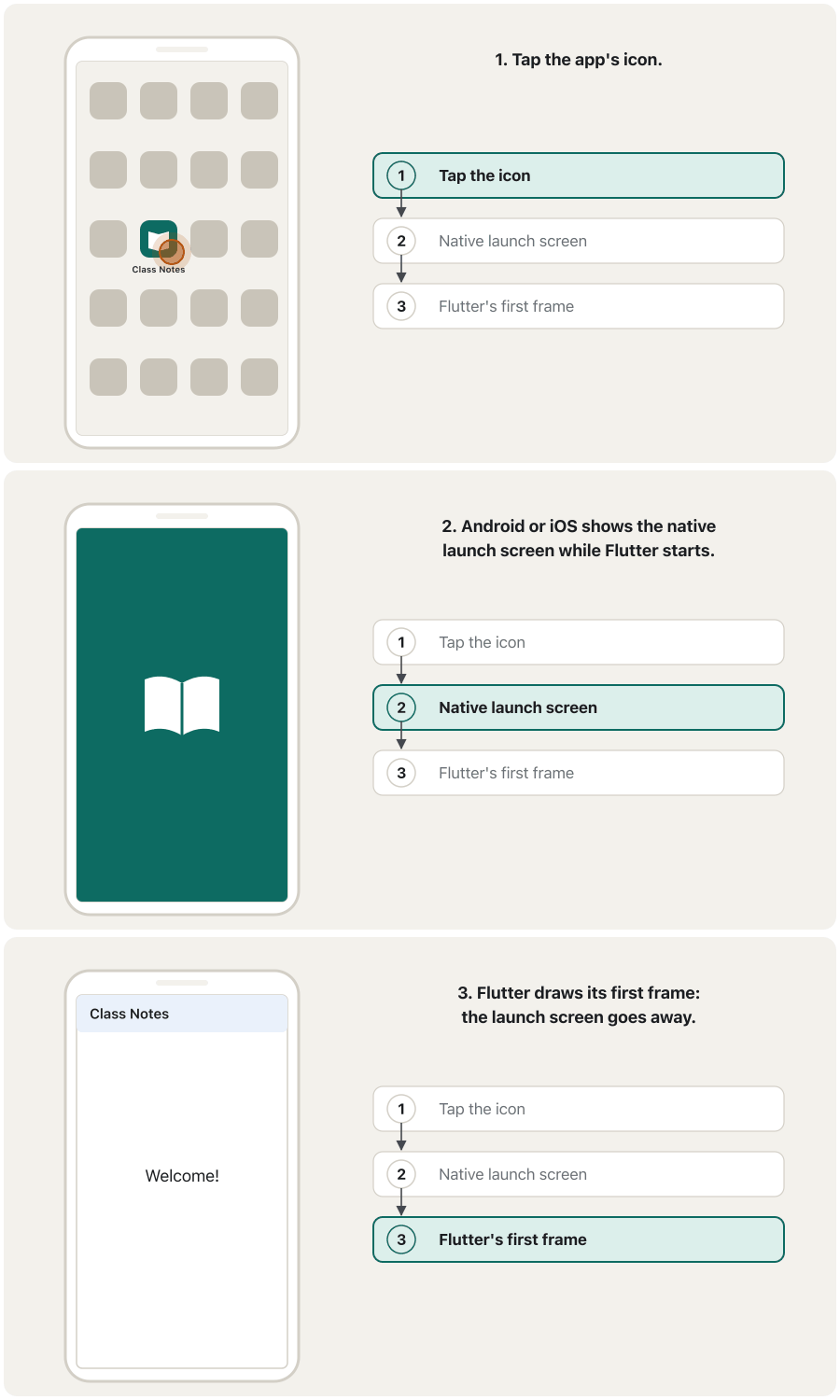
Tap the icon of an app. Before the app is ready, a simple screen appears for a moment, often a logo on a coloured background. This screen is called the splash screen or the launch screen.
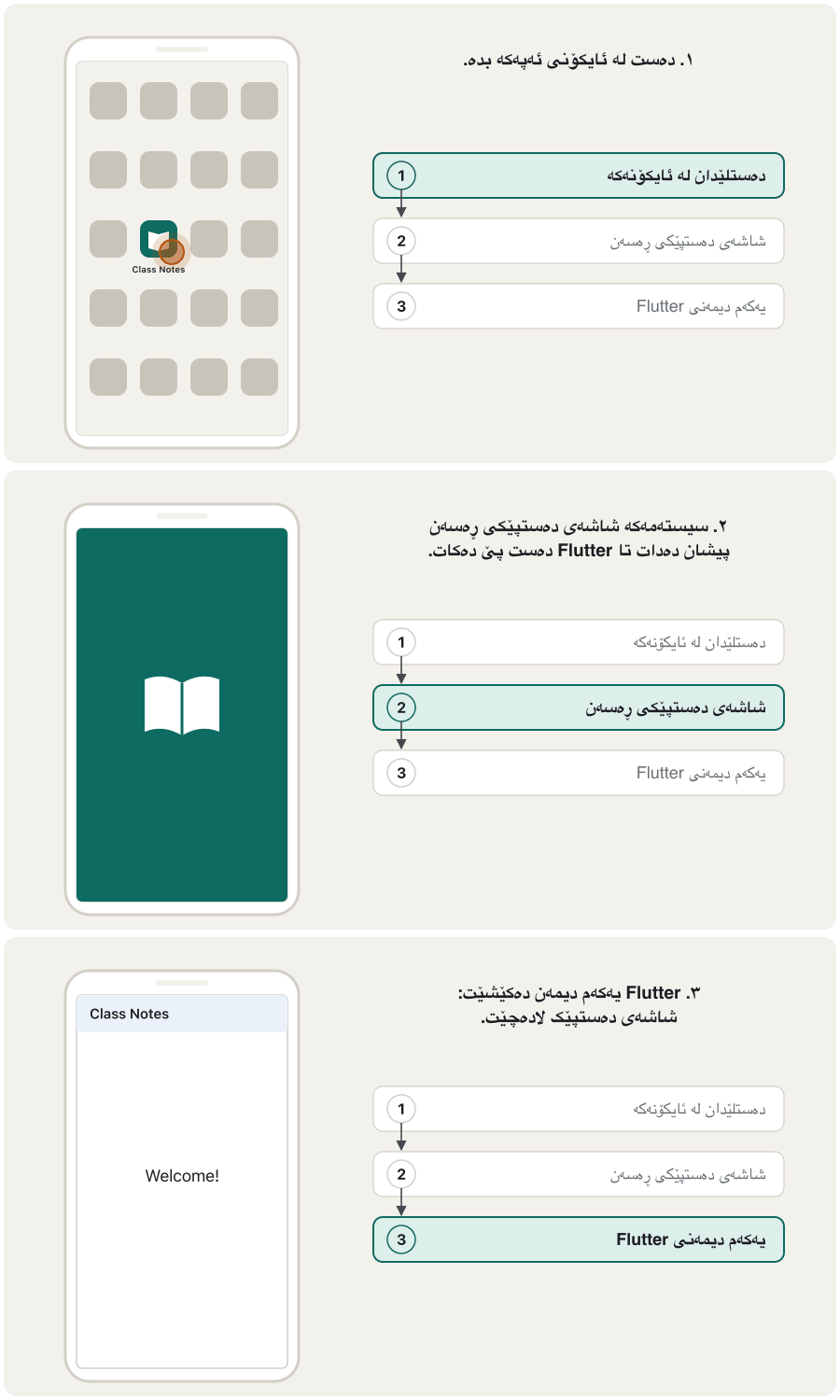
دەست لە بدە. پێش ئەوەی ئامادە بێت، شاشەیەکی سادە بۆ ساتێک دەردەکەوێت، زۆرجار لۆگۆیەک لەسەر پاشبنەمایەکی ڕەنگاوڕەنگ. ئەم شاشەیە پێی دەوترێت .
The first screen shown while an app starts, usually its logo on a plain background. The phone shows a native launch screen first; an app may add its own timed intro screen after it.
یەکەم شاشەیە کە لە کاتی کردنەوەی ئەپێکدا پیشان دەدرێت، زۆرجار لۆگۆکەی لەسەر پاشبنەمایەکی سادە. مۆبایلەکە سەرەتا شاشەی دەستپێکی ڕەسەن پیشان دەدات؛ ئەپ دەتوانێت دوای ئەوە شاشەیەکی ناساندنی کاتدار زیاد بکات.
The course notes describe it like this: it is the first screen you see when you run an app. It is shown only for a short time, so it does not look like much. Its usual elements are the company's name and logo, or the app's title.
تێبینییەکانی وانەکە ئاوا باسی دەکەن: یەکەم شاشەیە کە کاتێک کار پێ دەکەیت دەیبینیت. تەنها بۆ ماوەیەکی کورت پیشان دەدرێت، بۆیە شتێکی زۆری تێدا نییە. بەشە باوەکانی ناو و لۆگۆی کۆمپانیاکە یان ناونیشانی .
The first screen you seeیەکەم شاشە کە دەیبینیت
Why apps need a splash screenبۆچی ئەپەکان پێویستیان بە شاشەی دەستپێک هەیە
Starting an app takes time, even on a fast phone. Several things happen one after the other:
دەستپێکردنی کاتی دەوێت، تەنانەت لەسەر مۆبایلێکی خێراش. چەند شتێک یەک لە دوای یەک ڕوو دەدەن:
- The operating system starts the app's process.
- Flutter loads its engine.
- Your Dart code runs
main(), thenrunApp()builds the first screen. - Flutter draws its first frame: the first picture of your app on the screen.
- پرۆسەی دەست پێ دەکات.
- بزوێنەرەکەی بار دەکات.
- کۆدی
main()جێبەجێ دەکات، پاشانrunApp()یەکەم شاشە دروست دەکات. - یەکەم دیمەن (first frame) دەکێشێت: یەکەم وێنەی لەسەر ڕووکاری مۆبایلەکە.
Without a splash screen the user would stare at a blank or black screen during these steps. The splash screen fills the gap, so the phone answers the tap at once. It should be brief: for phones, Android's guide recommends that even an animated launch icon last no longer than one second (1,000 ms).
بەبێ ، لە ماوەی ئەم هەنگاوانەدا تەماشای شاشەیەکی بەتاڵ یان ڕەش دەکات. ئەم بۆشاییە پڕ دەکاتەوە، بۆیە مۆبایلەکە یەکسەر وەڵامی دەستلێدانەکە دەداتەوە. دەبێت کورت بێت: ڕێنماییەکانی Android بۆ مۆبایل ئامۆژگاری دەکەن کە تەنانەت لە یەک چرکە (1,000 ms) زیاتر نەبێت.
The first screen you seeیەکەم شاشە کە دەیبینیت
A glass of water at the tea houseپەرداخێک ئاو لە چایخانە
You sit down in a tea house. The tea needs a few minutes to brew, but the waiter puts a glass of water on your table at once. You know you have been seen and that your tea is coming. A splash screen is that glass of water: the app is not ready yet, but the user sees right away that it has started.
لە چایخانەیەک دادەنیشیت. چاکە چەند خولەکێکی دەوێت تا دەم بکێشێت، بەڵام چایچییەکە یەکسەر پەرداخێک ئاو لەسەر مێزەکەت دادەنێت. دەزانیت بینراویت و چاکەت لە ڕێگادایە. ئەو پەرداخە ئاوەیە: هێشتا ئامادە نییە، بەڵام یەکسەر دەبینێت کە دەستی پێ کردووە.
Where the analogy stops workingسنووری ئەم نموونەیە
Nobody wants to drink water for half an hour. A splash screen that stays too long, or that only exists to show a logo, makes the app feel slow.
کەس نایەوێت نیو کاتژمێر ئاو بخواتەوە. کە زۆر بمێنێتەوە، یان تەنها بۆ پیشاندانی لۆگۆیەک هەبێت، وا دەکات خاو دیار بێت.
Two kinds: native launch screen and Dart intro screenدوو جۆر: شاشەی دەستپێکی ڕەسەن و شاشەی ناساندنی Dart
The notes give two methods for making a splash screen. They do not make the same thing, and it helps to keep them apart:
تێبینییەکان دوو ڕێگا بۆ دروستکردنی دەدەن. هەردووکیان هەمان شت دروست ناکەن و باشە لێک جیایان بکەینەوە:
| Pointخاڵ | Native launch screen ڕەسەن | Dart intro screenشاشەی ناساندنی |
|---|---|---|
| Made withبە چی دروست دەکرێت | Android and iOS settings files; the flutter_native_splash package writes them for you (the notes' method 2) ڕێکخستنی Android و iOS؛ flutter_native_splash بۆت دەیاننووسێت (ڕێگای دووەمی تێبینییەکان) | An ordinary Flutter screen with a Timer or Future.delayed (the notes' method 1)شاشەیەکی ئاسایی Flutter بە Timer یان Future.delayed (ڕێگای یەکەمی تێبینییەکان) |
| Shownکەی پیشان دەدرێت | From the tap on the icon until Flutter draws its first frameلە دەستلێدان لە تا یەکەم دیمەن دەکێشێت | After the first frame, for as long as your code decidesدوای یەکەم دیمەن، بۆ ئەو ماوەیەی کۆدەکەت بڕیاری دەدات |
| Can it run Dart code?دەتوانێت کۆدی جێبەجێ بکات؟ | No: Flutter is not running yet. It is only a colour and a picture.نەخێر: هێشتا کار ناکات. تەنها ڕەنگێک و وێنەیەکە. | Yes: it is a normal widget with animations, text and buttons.بەڵێ: ئاساییە بە ، دەق و . |
| Needed?پێویستە؟ | Every app has one. A new Flutter project already has a plain white one on Android and a blank one on iOS.هەموو هەیەتی. پڕۆژەیەکی نوێی Flutter پێشتر یەکێکی سپیی سادەی لەسەر Android و یەکێکی بەتاڵی لەسەر iOS هەیە. | Optionalهەڵبژاردەییە |
Apple requires every app on the App Store to provide a launch screen (an Xcode storyboard). A Dart intro screen is extra: add one only when it has a reason, for example a short animation of your logo.
Apple داوا دەکات هەموو لە App Store هەبێت (storyboardـێکی Xcode). شاشەی ناساندنی زیادەیە: تەنها کاتێک زیادی بکە کە هۆکارێکی هەبێت، بۆ نموونە کورتی لۆگۆکەت.
Method 2: a native launch screen with flutter_native_splashڕێگای دووەم: شاشەی دەستپێکی ڕەسەن بە flutter_native_splash
A native launch screen is described in Android and iOS files: styles and pictures in the android/ folder, a storyboard in the ios/ folder, and index.html for the web. You could edit them by hand, but the flutter_native_splash package writes all of them from a few lines in pubspec.yaml.
ڕەسەن لە Android و iOSـدا وەسف دەکرێت: ستایل و وێنە لە android/، storyboardـێک لە ios/ و index.html بۆ وێب. دەتوانیت بە دەست دەستکارییان بکەیت، بەڵام flutter_native_splash هەموویان لە چەند دێڕێکی pubspec.yamlـەوە دەنووسێت.
- Add the packageکتێبخانەکە زیاد بکە
Run
flutter pub add dev:flutter_native_splash. It adds the package todev_dependencies, as in the notes: a tool you run while developing, not needed inside the finished app. (If your code will callpreserve()andremove(), shown later, put it independenciesinstead, as the package README does.) Writing the line inpubspec.yamlyourself and runningflutter pub getdoes the same.فەرمانی
flutter pub add dev:flutter_native_splashجێبەجێ بکە. دەخاتە ناوdev_dependencies، وەک تێبینییەکان: ئامرازێکە لە کاتی گەشەپێداندا بەکاری دەهێنیت و لەناو تەواوبووەکەدا پێویست نییە. (ئەگەر کۆدەکەت بانگیpreserve()وremove()دەکات، کە دواتر دەیانبینیت، لە جیاتی ئەوە بیخە ناوdependencies؛ READMEـی ئاوا دەکات.) ئەگەر خۆت دێڕەکە لەpubspec.yamlـدا بنووسیت وflutter pub getجێبەجێ بکەیت، هەمان کار دەکات. - Write the settingsڕێکخستنەکان بنووسە
Add a
flutter_native_splash:section topubspec.yamlwith a colour and, if you want, a picture.بەشێکی
flutter_native_splash:بۆpubspec.yamlزیاد بکە، بە ڕەنگێک و ئەگەر بتەوێت وێنەیەک. - Generate the filesفایلەکان دروست بکە
Run
dart run flutter_native_splash:create. The package writes the Android, iOS and web files. Run it again after every change to the settings.فەرمانی
dart run flutter_native_splash:createجێبەجێ بکە. Android، iOS و وێب دەنووسێت. دوای هەر گۆڕانکارییەک لە ڕێکخستنەکاندا دووبارە جێبەجێی بکەرەوە. - Run the app againئەپەکە دووبارە کار پێ بکەرەوە
Stop the app and start it again. Hot reload cannot show the change, because the launch screen is native, not Dart.
ڕابگرە و دووبارە دەستی پێ بکەرەوە. ناتوانێت گۆڕانکارییەکە پیشان بدات، چونکە ڕەسەنە، نەک .
$ flutter pub add dev:flutter_native_splash
$ dart run flutter_native_splash:create
$ dart run flutter_native_splash:remove # back to Flutter's plain defaultMake a native launch screen with flutter_native_splash: colour, logo, Android 12 rules, dark mode, and keeping it while the app loads.
دروستکردنی ڕەسەن بە flutter_native_splash: ڕەنگ، لۆگۆ، یاساکانی Android 12، و هێشتنەوەی تا بار دەبێت.
The whole 10-minute guide: splash vs Flutter screens (0:16), package setup (0:51), Android 12+ (5:04), dark mode (6:31), showing the splash during initialisation (7:25).
هەموو فێرکارییە 10 خولەکییەکە: بەرامبەر شاشەکانی (0:16)، ئامادەکردنی پاکێجەکە (0:51)، Android 12+ (5:04)، (6:31) و پیشاندانی تا ئامادە دەبێت (7:25).
Method 2: a native launch screen with flutter_native_splashڕێگای دووەم: شاشەی دەستپێکی ڕەسەن بە flutter_native_splash
The notes' settings, updatedڕێکخستنەکانی تێبینییەکان، نوێکراوە
Step 2 is the flutter_native_splash: section. Here are the notes' settings, updated for today:
هەنگاوی دووەم بەشی flutter_native_splash:ـە. ئەمانە ڕێکخستنەکانی تێبینییەکانن، نوێکراوە بۆ ئەمڕۆ:
dev_dependencies:
  flutter_native_splash: ^2.4.8

flutter_native_splash:
  color: "#42a5f5"
  image: assets/splash.png
  android_gravity: center
Explain the codeڕوونکردنەوەی کۆدەکە
- Lineدێڕی 1-2
The package as a development tool.
^2.4.8means version 2.4.8 or newer, below 3.0.0.وەک ئامرازێکی گەشەپێدان.
^2.4.8واتە 2.4.8 یان نوێتر، لە خوار 3.0.0.- Lineدێڕی 4
The section the package reads. It starts at the left edge, not inside
flutter:.ئەو بەشەی دەیخوێنێتەوە. لە لێواری چەپەوە دەست پێ دەکات، نەک لەناو
flutter:ـدا.- Lineدێڕی 5
The background colour (here a light blue). The quotes are needed because
#starts a comment in YAML.ڕەنگی پاشبنەما (لێرەدا شینێکی کاڵ). کەوانە بچووکەکان پێویستن چونکە لە
#دەست پێ دەکات.- Lineدێڕی 6
A PNG picture in the centre. The file must exist at this path.
وێنەیەکی PNG لە ناوەڕاستدا. دەبێت لەم هەبێت.
- Lineدێڕی 7
Where the picture sits on Android:
center,fill,top,bottom…وێنەکە لە Androidـدا لە کوێ دادەنرێت:
center،fill،top،bottom…
Method 2: a native launch screen with flutter_native_splashڕێگای دووەم: شاشەی دەستپێکی ڕەسەن بە flutter_native_splash
What the settings meanڕێکخستنەکان چی دەگەیەنن
These are the settings you will use most. Only color (or a background picture) is required.
ئەمانە ئەو ڕێکخستنانەن کە زۆرتر بەکاریان دەهێنیت. تەنها color (یان وێنەیەکی پاشبنەما) پێویستە.
| Settingڕێکخستن | What it doesچی دەکات |
|---|---|
color | The background colour, such as "#42a5f5".ڕەنگی پاشبنەما، وەک "#42a5f5". |
image | A PNG in the centre. Make it for a 4× pixel density screen; the package makes the smaller sizes.PNGـێک لە ناوەڕاستدا. بۆ شاشەیەکی چڕیی 4× دروستی بکە؛ قەبارە بچووکترەکان دروست دەکات. |
color_dark, image_dark | The same, for phones in dark mode.هەمان شت، بۆ مۆبایلەکان لە . |
branding | A small picture near the bottom, for example the company's name.وێنەیەکی بچووک لە نزیک خوارەوە، بۆ نموونە ناوی کۆمپانیاکە. |
android_gravity | Where the picture sits on Android: center, fill, top…وێنەکە لە Androidـدا لە کوێ دادەنرێت: center، fill، top… |
ios_content_mode | The same for iOS: center, scaleAspectFit…هەمان شت بۆ iOS: center، scaleAspectFit… |
fullscreen | true hides the status bar on Android while the launch screen shows (the iOS launch screen already hides it).true لە Androidـدا شریتی بارودۆخ دەشارێتەوە تا پیشان دەدرێت ( iOS خۆی دەیشارێتەوە). |
android: false | Do not make a launch screen for this platform (also ios: and web:).بۆ ئەم دروست مەکە (هەروەها ios: و web:). |
Because the native launch screen appears before Flutter runs, it cannot read your app's own settings. It follows the phone's light or dark mode, not a theme switch inside your app.
چونکە ڕەسەن پێش کارکردنی دەردەکەوێت، ناتوانێت ڕێکخستنەکانی خودی بخوێنێتەوە. شوێن دۆخی ڕووناک یان تاریکی مۆبایلەکە دەکەوێت، نەک دوگمەیەکی گۆڕینی لەناو .
Method 2: a native launch screen with flutter_native_splashڕێگای دووەم: شاشەی دەستپێکی ڕەسەن بە flutter_native_splash
Android 12 and newerAndroid 12 و نوێتر
Since Android 12, Android itself shows a launch screen for every app when the app starts from nothing (a cold start) or its screen has to be created again (a warm start): a single background colour with the app's icon in the middle, cut to a circle. It may also show an icon background. So on these phones the top-level settings are ignored, and flutter_native_splash reads an android_12: section instead:
لە Android 12ـەوە، خودی Android بۆ هەموو پیشان دەدات کاتێک لە سفرەوە دەست پێ دەکات (دەستپێکردنی سارد) یان شاشەکەی دەبێت دووبارە دروست بکرێتەوە (دەستپێکردنی گەرم): یەک ڕەنگی پاشبنەما و لە ناوەڕاستدا، بە شێوەی بازنە بڕاوە. دەکرێت پاشبنەمایەکی پیشان بدات. بۆیە لەسەر ئەم مۆبایلانە ڕێکخستنەکانی ئاستی سەرەوە پشتگوێ دەخرێن و flutter_native_splash لە جیاتیان بەشی android_12: دەخوێنێتەوە:
flutter_native_splash:
  color: "#42a5f5"
  image: assets/splash.png

  android_12:
    color: "#42a5f5"
    image: assets/splash_icon.png
    icon_background_color: "#ffffff"
Explain the codeڕوونکردنەوەی کۆدەکە
- Lineدێڕی 5
Indented under
flutter_native_splash:: these settings are only for Android 12 and newer.لە ژێر
flutter_native_splash:ـدا بە بۆشایی سەرەتای دێڕەوە: ئەم ڕێکخستنانە تەنها بۆ Android 12 و نوێترن.- Lineدێڕی 6
One plain colour. A background picture is not allowed here.
یەک ڕەنگی سادە. وێنەی پاشبنەما لێرە ڕێگەپێدراو نییە.
- Lineدێڕی 7
The icon in the circle. Without it, Android uses the app's launcher icon.
لەناو بازنەکەدا. بەبێ ئەو، Android کردنەوەی بەکار دەهێنێت.
- Lineدێڕی 8
An optional circle behind the icon, for more contrast.
بازنەیەکی هەڵبژاردەیی لە پشت ، بۆ جیاوازیی ڕەنگی زیاتر.
- Icon without an icon background: 1152×1152 px, with the logo inside a circle of 768 px.
- Icon with
icon_background_color: 960×960 px, with the logo inside a circle of 640 px. - The background is always one opaque colour; a background picture is not supported.
- A
brandingpicture is allowed (800×320 px), but Android's design guidance advises against it.
- بەبێ پاشبنەمای : 1152×1152 px، لۆگۆکە لەناو بازنەیەکی 768 pxـدا.
- بە
icon_background_color: 960×960 px، لۆگۆکە لەناو بازنەیەکی 640 pxـدا. - پاشبنەما هەمیشە یەک ڕەنگی ناڕوونە؛ وێنەی پاشبنەما پشتگیری ناکرێت.
- وێنەی
brandingڕێگەپێدراوە (800×320 px)، بەڵام ڕێنماییەکانی دیزاینی Android پێشنیاری ناکەن.
Method 2: a native launch screen with flutter_native_splashڕێگای دووەم: شاشەی دەستپێکی ڕەسەن بە flutter_native_splash
Keep the launch screen while the app loadsشاشەی دەستپێکەکە بهێڵەرەوە تا ئەپەکە بار دەبێت
By default the native launch screen disappears as soon as Flutter draws its first frame. Some apps must do work before their first real screen makes sense: read saved settings, open a database, check whether the user is logged in. flutter_native_splash can keep its screen up until you say so:
بە شێوەی بنەڕەتی ڕەسەن هەر کە یەکەم دیمەن دەکێشێت لادەچێت. هەندێک پێش ئەوەی یەکەم شاشەی ڕاستەقینەیان مانای هەبێت دەبێت کارێک بکەن: خوێندنەوەی ڕێکخستنە پاشەکەوتکراوەکان، کردنەوەی ، پشکنینی ئەوەی چووەتە ژوورەوە یان نا. flutter_native_splash دەتوانێت شاشەکەی بهێڵێتەوە تا خۆت دەڵێیت:
import 'package:flutter/material.dart';
import 'package:flutter_native_splash/flutter_native_splash.dart';

void main() {
  final widgetsBinding = WidgetsFlutterBinding.ensureInitialized();
  FlutterNativeSplash.preserve(widgetsBinding: widgetsBinding);
  runApp(const MyApp());
}

class MyApp extends StatefulWidget {
  const MyApp({super.key});

  @override
  State<MyApp> createState() => _MyAppState();
}

class _MyAppState extends State<MyApp> {
  @override
  void initState() {
    super.initState();
    _initialize();
  }

  Future<void> _initialize() async {
    // Real work goes here: read settings, open a database...
    await Future.delayed(const Duration(seconds: 1));
    FlutterNativeSplash.remove(); // now hide the native splash screen
  }

  @override
  Widget build(BuildContext context) {
    return const MaterialApp(
      home: Scaffold(body: Center(child: Text('Ready'))),
    );
  }
}
Explain the codeڕوونکردنەوەی کۆدەکە
- Lineدێڕی 5
Get the binding (Flutter's link to the engine) before
runApp.پێش
runApp، binding وەربگرە (پەیوەندیی بە بزوێنەرەکەوە).- Lineدێڕی 6
preservekeeps the native launch screen after the first frame.preserveڕەسەن دوای یەکەم دیمەنیش دەهێڵێتەوە.- Lineدێڕی 24-28
Do the real loading here; this example only waits one second.
بارکردنی ڕاستەقینە لێرە بکە؛ ئەم نموونەیە تەنها یەک چرکە چاوەڕێ دەکات.
- Lineدێڕی 27
removehides the launch screen and shows your app.removeدەشارێتەوە و پیشان دەدات.
Method 1: a timed intro screen in Dartڕێگای یەکەم: شاشەیەکی ناساندنی کاتدار لە Dartـدا
The notes' first method is a normal Flutter screen: a stateful widget that shows a logo, waits a few seconds, and then puts the home screen in its place. It uses Timer() (or Future.delayed()) and one important method, initState().
ڕێگای یەکەمی تێبینییەکان شاشەیەکی ئاسایی Flutterـە: کە لۆگۆیەک پیشان دەدات، چەند چرکەیەک چاوەڕێ دەکات و پاشان شاشەی سەرەکی دەخاتە شوێنی خۆی. Timer() (یان Future.delayed()) و گرنگ، initState()، بەکار دەهێنێت.
initState()is called once, when the stateful widget is inserted into the widget tree.initState()یەک جار بانگ دەکرێت، کاتێک دەخرێتە ناو .It first calls
super.initState(), then starts a timer for n seconds.سەرەتا بانگی
super.initState()دەکات، پاشان کاتژمێرێک بۆ n چرکە دەست پێ دەکات.When the n seconds are over, the timer calls a function.
کاتێک n چرکەکە تەواو دەبێت، کاتژمێرەکە بانگی دەکات.
That function replaces the current screen with a new one, for example
HomePage().ئەو شاشەی ئێستا بە شاشەیەکی نوێ دەگۆڕێت، بۆ نموونە
HomePage().
This is the code from the notes. Read it first; the next screen shows a safe, complete version.
ئەمە کۆدەکەی تێبینییەکانە. سەرەتا بیخوێنەرەوە؛ شاشەی داهاتوو وەشانێکی سەلامەت و تەواو پیشان دەدات.
@override
void initState() {
  super.initState();
  startTimer();
}
startTimer() async {
  var duration = Duration(seconds: 4);
  return Timer(duration, route);
}
route(){
  Navigator.pushReplacement(context,
    MaterialPageRoute(builder: (context)=> HomePage()));
}
Explain the codeڕوونکردنەوەی کۆدەکە
- Lineدێڕی 1-5
initStateruns once. It callssuper.initState()first, then starts the timer.initStateیەک جار جێبەجێ دەبێت. سەرەتا بانگیsuper.initState()دەکات، پاشان کاتژمێرەکە دەست پێ دەکات.- Lineدێڕی 6-9
Timer(duration, route)callsrouteonce, after 4 seconds.Timer(duration, route)یەک جار، دوای 4 چرکە، بانگیrouteدەکات.- Lineدێڕی 10-13
pushReplacementshowsHomePageand removes the intro screen.pushReplacementشاشەیHomePageپیشان دەدات و شاشەی ناساندنەکە لادەبات.
In Central Kurdish, by CêIT's author: a timed intro screen in Dart: a 5-second Timer in initState, then Navigator.pushReplacement to the home screen.
بە کوردیی ناوەندی، لەلایەن نووسەری CêITـەوە: کاتدار بە Dart — 5 چرکەیی لە initStateـدا، پاشان Navigator.pushReplacement بۆ شاشەی سەرەکی.
Whole video (8:25): Method 1 of this lesson, a StatefulWidget whose initState starts a Timer and then replaces the splash screen with the home screen.
هەموو ڤیدیۆکە (8:25): ڕێگەی 1ی ئەم وانەیە — کە initStateـەکەی دەستپێدەکات و پاشان بە شاشەی سەرەکی دەگۆڕێت.
Method 1: a timed intro screen in Dartڕێگای یەکەم: شاشەیەکی ناساندنی کاتدار لە Dartـدا
A safe, complete intro screenشاشەیەکی ناساندنی سەلامەت و تەواو
Here is the same idea as a complete app. It keeps the timer in a field, so it can stop it, and it checks that the screen still exists before it navigates:
ئەمە هەمان بیرۆکەیە وەک تەواو. کاتژمێرەکە لە هەڵدەگرێت بۆ ئەوەی بتوانێت بیوەستێنێت و پێش گواستنەوە دڵنیا دەبێتەوە کە شاشەکە هێشتا ماوە:
import 'dart:async';

import 'package:flutter/material.dart';

void main() => runApp(const MaterialApp(home: SplashPage()));

class SplashPage extends StatefulWidget {
  const SplashPage({super.key});

  @override
  State<SplashPage> createState() => _SplashPageState();
}

class _SplashPageState extends State<SplashPage> {
  Timer? _timer;

  @override
  void initState() {
    super.initState();
    _timer = Timer(const Duration(seconds: 3), _goHome);
  }

  void _goHome() {
    if (!mounted) return; // the page may already be gone
    Navigator.pushReplacement(
      context,
      MaterialPageRoute(builder: (context) => const HomePage()),
    );
  }

  @override
  void dispose() {
    _timer?.cancel(); // stop the timer if the page closes early
    super.dispose();
  }

  @override
  Widget build(BuildContext context) {
    return const Scaffold(
      backgroundColor: Colors.teal,
      body: Center(
        child: Column(
          mainAxisSize: MainAxisSize.min,
          children: [
            Icon(Icons.menu_book, size: 96, color: Colors.white),
            SizedBox(height: 16),
            Text(
              'Class Notes',
              style: TextStyle(fontSize: 28, color: Colors.white),
            ),
            SizedBox(height: 32),
            CircularProgressIndicator(color: Colors.white),
          ],
        ),
      ),
    );
  }
}

class HomePage extends StatelessWidget {
  const HomePage({super.key});

  @override
  Widget build(BuildContext context) {
    return Scaffold(
      appBar: AppBar(title: const Text('Class Notes')),
      body: const Center(child: Text('Welcome!')),
    );
  }
}--- the app starts: SplashPage with the logo and a spinner after 2 s: splash still shown after 3 s: home shown; canPop = false
Explain the codeڕوونکردنەوەی کۆدەکە
- Lineدێڕی 1
Timerlives indart:async; the notes forgot this import.Timerلەdart:asyncـدایە؛ تێبینییەکان ئەم importـەیان لەبیر چووە.- Lineدێڕی 15
Keep the timer in a field, so
disposecan cancel it.کاتژمێرەکە لە هەڵبگرە، بۆ ئەوەی
disposeبتوانێت هەڵیبوەشێنێتەوە.- Lineدێڕی 18-21
super.initState()first, then start a timer that calls_goHomeonce after 3 seconds.سەرەتا
super.initState()، پاشان کاتژمێرێک دەست پێ بکە کە دوای 3 چرکە یەک جار بانگی_goHomeدەکات.- Lineدێڕی 24
If the page was closed meanwhile,
contextmust not be used: stop here.ئەگەر لەم ماوەیەدا لاپەڕەکە داخرابێت، نابێت
contextبەکار بهێنرێت: لێرە بوەستە.- Lineدێڕی 25-28
Replace this screen with the home page.
ئەم شاشەیە بە شاشەی سەرەکی بگۆڕە.
- Lineدێڕی 31-35
Cancel the timer, then
super.dispose()last.کاتژمێرەکە هەڵبوەشێنەرەوە، پاشان لە کۆتاییدا
super.dispose().
canPop = false in the test means there is no screen under the home page: the intro screen is really gone. The lifecycle methods initState, dispose and the mounted check are explained in the lifecycle of a State object.
canPop = false لە تاقیکردنەوەکەدا واتە هیچ شاشەیەک لە ژێر شاشەی سەرەکییەوە نییە: شاشەی ناساندنەکە بەڕاستی ڕۆیشتووە. initState، dispose و پشکنینی mounted لە سووڕی ژیانی ئۆبجێکتی دۆخ ڕوون کراونەتەوە.
Method 1: a timed intro screen in Dartڕێگای یەکەم: شاشەیەکی ناساندنی کاتدار لە Dartـدا
Why pushReplacement, not push?بۆچی pushReplacement، نەک push؟
Flutter keeps the screens you open in a stack, one on top of the other. Navigator.push puts a new screen on top and keeps the old one under it. Navigator.pushReplacement puts the new screen on top and removes the old one.
ئەو شاشانەی دەیانکەیتەوە لە هەڵدەگرێت، یەک لەسەر یەک. Navigator.push شاشەیەکی نوێ دەخاتە سەرەوە و کۆنەکە لە ژێریدا دەهێڵێتەوە. Navigator.pushReplacement شاشە نوێیەکە دەخاتە سەرەوە و کۆنەکە لادەبات.
With push, the intro screen would stay under the home page, and the Back button would take the user back to the logo. With pushReplacement it is gone, so Back from the home page leaves the app, as users expect. The stack itself is taught in Navigation: moving between screens.
بە push، شاشەی ناساندنەکە لە ژێر شاشەی سەرەکییەوە دەمایەوە و Back دەگەڕاندەوە بۆ لۆگۆکە. بە pushReplacement نامێنێت، بۆیە Back لە شاشەی سەرەکییەوە دادەخات، وەک چاوەڕێی دەکەن. خودی لە ڕێنیشاندان: جووڵان لە نێوان شاشەکاندا دەخوێنرێت.
Method 1: a timed intro screen in Dartڕێگای یەکەم: شاشەیەکی ناساندنی کاتدار لە Dartـدا
The other way: Future.delayedڕێگاکەی تر: Future.delayed
The notes also mention the delayed() function. Future.delayed(duration, callback) waits, then calls the callback, much like a one-time Timer:
تێبینییەکان باسی delayed()ـیش دەکەن. Future.delayed(duration, callback) چاوەڕێ دەکات، پاشان بانگی دەکات، زۆر وەک Timerـێکی یەکجاری:
import 'package:flutter/material.dart';

class SplashPage extends StatefulWidget {
  const SplashPage({super.key});

  @override
  State<SplashPage> createState() => _SplashPageState();
}

class _SplashPageState extends State<SplashPage> {
  @override
  void initState() {
    super.initState();
    Future.delayed(const Duration(seconds: 3), () {
      if (!mounted) return; // a delayed Future cannot be cancelled
      Navigator.pushReplacement(
        context,
        MaterialPageRoute(builder: (context) => const HomePage()),
      );
    });
  }

  @override
  Widget build(BuildContext context) {
    return const Scaffold(
      body: Center(child: FlutterLogo(size: 120)),
    );
  }
}

class HomePage extends StatelessWidget {
  const HomePage({super.key});

  @override
  Widget build(BuildContext context) {
    return const Scaffold(body: Center(child: Text('Home')));
  }
}
Explain the codeڕوونکردنەوەی کۆدەکە
- Lineدێڕی 14-20
Wait 3 seconds, then replace the screen.
3 چرکە چاوەڕێ بکە، پاشان شاشەکە بگۆڕە.
- Lineدێڕی 15
A
Futurecannot be cancelled, so themountedcheck is the only protection here.هەڵناوەشێنرێتەوە، بۆیە پشکنینی
mountedلێرەدا تاکە پاراستنە.
Both work. Prefer the Timer when the user can leave early, for example with a Skip button, because a timer can be cancelled and a delayed Future cannot. Future and await are taught in Futures and async.
هەردووکیان کار دەکەن. کاتێک دەتوانێت زوو بڕوات، بۆ نموونە بە Skip، Timer باشترە، چونکە کاتژمێر هەڵدەوەشێنرێتەوە بەڵام Futureـی دواخراو نا. و await لە Futures و async دەخوێنرێن.
A good splash screenشاشەیەکی دەستپێکی باش
- Keep it short. Android's guide recommends at most one second even for an animated launch icon. Never add a timer only to show a logo longer.
- Match the first screen. Use the same background colour as your first Flutter screen, so the change from native to Flutter does not flash.
- Load real things, not fake waits. If the app truly needs to load data, use
preserve/remove, or show the first screen at once with a progress indicator. - Little or no text. A logo needs no translation; text on a launch screen cannot follow the user's language.
- Think of dark mode. Give
color_dark(andimage_darkif needed).
- کورتی بکەرەوە. ڕێنماییەکانی Android تەنانەت بۆ ئامۆژگاری دەکەن لە یەک چرکە زیاتر نەبێت. هەرگیز کاتژمێر تەنها بۆ پیشاندانی درێژتری لۆگۆیەک زیاد مەکە.
- لەگەڵ یەکەم شاشەدا بیگونجێنە. هەمان ڕەنگی پاشبنەمای یەکەم شاشەی Flutterـەکەت بەکار بهێنە، بۆ ئەوەی گۆڕان لە ڕەسەنەوە بۆ Flutter نەدرەوشێتەوە.
- شتی ڕاستەقینە بار بکە، نەک چاوەڕوانیی ساختە. ئەگەر بەڕاستی پێویستی بە بارکردنی هەیە،
preserve/removeبەکار بهێنە، یان یەکسەر یەکەم شاشە لەگەڵ نیشاندەرێکی پێشکەوتن پیشان بدە. - دەقی کەم یان هیچ. لۆگۆ پێویستی بە وەرگێڕان نییە؛ دەق لەسەر ناتوانێت شوێن زمانی بکەوێت.
- بیر لە بکەرەوە.
color_dark(و ئەگەر پێویست بووimage_dark) دابنێ.
Common mistakesهەڵە باوەکان
| Mistakeهەڵە | What happensچی ڕوو دەدات | Fixچاککردن |
|---|---|---|
Running flutter pub run flutter_native_splash:createجێبەجێکردنی flutter pub run flutter_native_splash:create | A deprecation warning; old guides use itئاگادارییەکی بەسەرچوون؛ ڕێنمایی کۆنەکان بەکاری دەهێنن | dart run flutter_native_splash:createdart run flutter_native_splash:create |
| Changing the settings and pressing hot reloadگۆڕینی ڕێکخستنەکان و | The old launch screen stays کۆن دەمێنێتەوە | Run the create command again, then stop and restart the appدووبارە فەرمانی create جێبەجێ بکە، پاشان ڕابگرە و دەستی پێ بکەرەوە |
| A background picture for Android 12+وێنەی پاشبنەما بۆ Android 12+ | Android shows only a colour and the iconAndroid تەنها ڕەنگێک و پیشان دەدات | Use the android_12: section with a colour and an iconبەشی android_12: بە ڕەنگێک و بەکار بهێنە |
| Checking the launch screen only by running the app from Android Studio on Android 12 (API 31)پشکنینی تەنها بە کارپێکردنی لە Android Studioـەوە لەسەر Android 12 (API 31) | The launch screen may not appear at allلەوانەیە هەر دەرنەکەوێت | Close the app and open it from its icon on the phone دابخە و لە لەسەر مۆبایلەکە بیکەرەوە |
Timer without import 'dart:async';Timer بەبێ import 'dart:async'; | Compile error: Timer is not defined کۆمپایل: Timer پێناسە نەکراوە | Add the importimportـەکە زیاد بکە |
push instead of pushReplacementpush لە جیاتی pushReplacement | Back returns to the intro screenBack دەگەڕێتەوە بۆ شاشەی ناساندنەکە | Navigator.pushReplacementNavigator.pushReplacement |
Not cancelling the timer; no mounted checkهەڵنەوەشاندنەوەی کاتژمێرەکە؛ پشکنینی mounted نییە | The timer may fire after the screen is gone and use a dead contextلەوانەیە کاتژمێرەکە دوای ڕۆیشتنی شاشەکە لێ بدات و contextـێکی مردوو بەکار بهێنێت | _timer?.cancel() in dispose; if (!mounted) return;_timer?.cancel() لە disposeـدا؛ if (!mounted) return; |
Importing flutter_native_splash in code while it is a dev dependencyimport کردنی flutter_native_splash لە کۆددا لە کاتێکدا لە ژێر dev_dependenciesـدایە | A lint warning, and the package may be missing from the released appئاگادارییەکی lint و لەوانەیە لە بڵاوکراوەکەدا نەبێت | Move it to dependenciesبیگوازەرەوە بۆ dependencies |
Exercisesڕاهێنانەکان
Put these in the order a user sees them: the home screen; the native launch screen; the tap on the icon; a Dart intro screen with an animated logo.
ئەمانە بەو ڕیزەیە دابنێ کە دەیانبینێت: شاشەی سەرەکی؛ ڕەسەن؛ دەستلێدان لە ؛ شاشەیەکی ناساندنی بە لۆگۆیەکی جووڵاوەوە.
Show answerوەڵامەکە پیشان بدە
1. The tap on the icon. 2. The native launch screen (until Flutter's first frame). 3. The Dart intro screen. 4. The home screen.
١. دەستلێدان لە . ٢. ڕەسەن (تا یەکەم دیمەنی Flutter). ٣. شاشەی ناساندنی . ٤. شاشەی سەرەکی.
Your logo is assets/logo.png. Write the flutter_native_splash section for a white background (#ffffff) in light mode and a black one (#000000) in dark mode, with the logo centred, and the same colours on Android 12+. Then write the command that generates the files.
لۆگۆکەت assets/logo.pngـە. بەشی flutter_native_splash بنووسە بۆ پاشبنەمایەکی سپی (#ffffff) لە دۆخی ڕووناکدا و ڕەش (#000000) لە ، لۆگۆکە لە ناوەڕاستدا و هەمان ڕەنگەکان لەسەر Android 12+. پاشان ئەو فەرمانە بنووسە کە دروست دەکات.
Hintئاماژە
Remember that Android 12+ reads only its own section.
لەبیرت بێت Android 12+ تەنها بەشی خۆی دەخوێنێتەوە.
Show answerوەڵامەکە پیشان بدە
flutter_native_splash:
  color: "#ffffff"
  color_dark: "#000000"
  image: assets/logo.png
  android_gravity: center
  ios_content_mode: center

  android_12:
    color: "#ffffff"
    color_dark: "#000000"
image: assets/logo.png$ dart run flutter_native_splash:createList four problems in the notes' initState / startTimer / route code, and say how to fix each.
چوار کێشە لە کۆدی initState / startTimer / routeـی تێبینییەکاندا بنووسە و بڵێ هەر یەکەیان چۆن چاک دەکرێت.
Show answerوەڵامەکە پیشان بدە
Timerneedsimport 'dart:async';.startTimerisasyncwith no return type and awaits nothing: make itvoid _startTimer()or create the timer straight ininitState.- The timer is not kept, so it cannot be cancelled: store it in
Timer? _timerand call_timer?.cancel()indispose. routeusescontextafter waiting: start it withif (!mounted) return;.- Also:
HomePage()can beconst HomePage(), and private names (_route) are clearer.
Timerپێویستی بەimport 'dart:async';هەیە.startTimerبەasyncـە و جۆری نییە و چاوەڕێی هیچ ناکات: بیکەvoid _startTimer()یان کاتژمێرەکە ڕاستەوخۆ لەinitStateـدا دروست بکە.- کاتژمێرەکە هەڵنەگیراوە، بۆیە هەڵناوەشێنرێتەوە: لە
Timer? _timerـدا هەڵیبگرە و لەdisposeـدا بانگی_timer?.cancel()بکە. routeدوای چاوەڕوانیcontextبەکار دەهێنێت: بەif (!mounted) return;دەستی پێ بکە.- هەروەها:
HomePage()دەکرێتconst HomePage()بێت و ناوی تایبەت (_route) ڕوونترن.
Change the timed intro screen so it waits 5 seconds, but shows a Skip button in the top corner that goes to the home page at once. Make sure the timer cannot open the home page a second time.
شاشەی ناساندنی کاتدار بگۆڕە بۆ ئەوەی 5 چرکە چاوەڕێ بکات، بەڵام Skip لە گۆشەی سەرەوەدا پیشان بدات کە یەکسەر دەچێت بۆ شاشەی سەرەکی. دڵنیا بە کاتژمێرەکە ناتوانێت جارێکی تر شاشەی سەرەکی بکاتەوە.
Hintئاماژە
Let the timer and the button call the same method.
با کاتژمێرەکە و بانگی هەمان بکەن.
Show answerوەڵامەکە پیشان بدە
import 'dart:async';

import 'package:flutter/material.dart';

class IntroPage extends StatefulWidget {
  const IntroPage({super.key});

  @override
  State<IntroPage> createState() => _IntroPageState();
}

class _IntroPageState extends State<IntroPage> {
  Timer? _timer;

  @override
  void initState() {
    super.initState();
    _timer = Timer(const Duration(seconds: 5), _goHome);
  }

  void _goHome() {
    _timer?.cancel(); // needed when the user taps Skip early
    if (!mounted) return;
    Navigator.pushReplacement(
      context,
      MaterialPageRoute(builder: (context) => const HomePage()),
    );
  }

  @override
  void dispose() {
    _timer?.cancel();
    super.dispose();
  }

  @override
  Widget build(BuildContext context) {
    return Scaffold(
      body: SafeArea(
        child: Stack(
          children: [
            const Center(child: FlutterLogo(size: 120)),
            Align(
              alignment: AlignmentDirectional.topEnd,
              child: TextButton(
                onPressed: _goHome,
                child: const Text('Skip'),
              ),
            ),
          ],
        ),
      ),
    );
  }
}

class HomePage extends StatelessWidget {
  const HomePage({super.key});

  @override
  Widget build(BuildContext context) {
    return const Scaffold(body: Center(child: Text('Home')));
  }
}
Explain the codeڕوونکردنەوەی کۆدەکە
- Lineدێڕی 21-28
Both the timer and the button call
_goHome. It cancels the timer first, so a tap on Skip stops the later call.هەم کاتژمێرەکە و هەم بانگی
_goHomeدەکەن. سەرەتا کاتژمێرەکە هەڵدەوەشێنێتەوە، بۆیە دەستلێدان لە Skip بانگکردنە دواترەکە ڕادەگرێت.- Lineدێڕی 43-49
AlignmentDirectional.topEndputs the button in the top-right corner, or top-left in a right-to-left language such as Kurdish.AlignmentDirectional.topEndلە گۆشەی سەرەوەی ڕاست دادەنێت، یان سەرەوەی چەپ لە زمانێکی وەک کوردیدا.
For each wish, say whether it needs the native launch screen, a Dart intro screen, or preserve/remove: (a) a coloured screen must appear the moment the icon is tapped; (b) the logo should spin for one second; (c) the launch screen must stay until saved settings are loaded.
بۆ هەر ئارەزوویەک بڵێ پێویستی بە ڕەسەن، شاشەیەکی ناساندنی یان preserve/remove هەیە: (أ) شاشەیەکی ڕەنگاوڕەنگ دەبێت هەر کە دەست لە درا دەربکەوێت؛ (ب) لۆگۆکە بۆ یەک چرکە بسووڕێتەوە؛ (ج) دەبێت بمێنێتەوە تا ڕێکخستنە پاشەکەوتکراوەکان بار دەبن.
Show answerوەڵامەکە پیشان بدە
- (a) The native launch screen: only it can appear before Flutter runs.
- (b) A Dart intro screen: animation needs Flutter widgets.
- (c)
FlutterNativeSplash.preserve()inmain,remove()after loading.
- (أ) ڕەسەن: تەنها ئەو دەتوانێت پێش کارکردنی دەربکەوێت.
- (ب) شاشەیەکی ناساندنی : پێویستی بە هەیە.
- (ج)
FlutterNativeSplash.preserve()لەmainـدا،remove()دوای بارکردن.
Summaryپوختە
- A splash (launch) screen is the first screen of an app: usually a logo or name on a plain background, shown while the app starts.
- The native launch screen is drawn by Android/iOS until Flutter's first frame. flutter_native_splash 2.4 makes it: settings in
pubspec.yaml, thendart run flutter_native_splash:create. - Android 12+ uses only its own
android_12:settings: one colour and an icon in a circle. preserve()andremove()keep the native screen while the app loads real data.- A Dart intro screen is optional: a stateful widget that starts a
TimerininitState, cancels it indispose, checksmounted, and leaves withpushReplacement. - Keep splash screens short: they cover start-up time, they are not a place to make users wait.
- یەکەم شاشەی : زۆرجار لۆگۆ یان ناوێک لەسەر پاشبنەمایەکی سادە، کە لە کاتی دەستپێکردنی پیشان دەدرێت.
- ڕەسەن Android/iOS دەیکێشن تا یەکەم دیمەنی Flutter. flutter_native_splash 2.4 دروستی دەکات: ڕێکخستنەکان لە
pubspec.yamlـدا، پاشانdart run flutter_native_splash:create. - Android 12+ تەنها ڕێکخستنەکانی
android_12:ـی خۆی بەکار دەهێنێت: یەک ڕەنگ و لەناو بازنەیەکدا. preserve()وremove()شاشە ڕەسەنەکە دەهێڵنەوە تا ڕاستەقینە بار دەکات.- شاشەی ناساندنی هەڵبژاردەییە: کە لە
initStateـداTimerـێک دەست پێ دەکات، لەdisposeـدا هەڵیدەوەشێنێتەوە،mountedدەپشکنێت و بەpushReplacementدەڕوات. - کورت بهێڵەرەوە: کاتی دەستپێکردن دادەپۆشن، شوێنی چاوەڕێ پێکردنی نین.
Which method of the notes makes the screen that appears before Flutter runs?کام ڕێگای تێبینییەکان ئەو شاشەیە دروست دەکات کە پێش کارکردنی Flutter دەردەکەوێت؟
Method 2, the flutter_native_splash package. Method 1 (the Timer) is a Flutter screen, so it can only appear after Flutter has started.
ڕێگای دووەم، flutter_native_splash. ڕێگای یەکەم (Timer) شاشەیەکی Flutterـە، بۆیە تەنها دوای دەستپێکردنی Flutter دەتوانێت دەربکەوێت.
Why must the timer be cancelled in dispose?بۆچی دەبێت کاتژمێرەکە لە disposeـدا هەڵبوەشێنرێتەوە؟
If the screen closes before the time is up, a waiting timer would still fire and try to navigate with a context that no longer exists.
ئەگەر شاشەکە پێش تەواوبوونی کاتەکە دابخرێت، کاتژمێرێکی چاوەڕوان هێشتا لێ دەدات و هەوڵ دەدات بە contextـێک بگوازێتەوە کە چیتر بوونی نییە.
Where do the android_12 settings go?ڕێکخستنەکانی android_12 کوێ دەچن؟
Indented inside the flutter_native_splash: section of pubspec.yaml, under the key android_12:.
لەناو بەشی flutter_native_splash:ـی pubspec.yamlـدا بە بۆشایی سەرەتای دێڕەوە، لە ژێر کلیلی android_12:ـدا.
Lesson complete!وانەکە تەواو بوو!
Well done. Review the key terms, then go on to the next lesson.دەستخۆش. سەیرێکی زاراوە سەرەکییەکان بکەرەوە، پاشان بڕۆ بۆ وانەی داهاتوو.
Key termsزاراوە سەرەکییەکان
Navigation: Moving Between Screensڕێنیشاندان: جووڵان لە نێوان شاشەکاندا
Related lecturesوانە پەیوەندیدارەکان
References and further readingسەرچاوەکان و خوێندنەوەی زیاتر
- pub.dev: flutter_native_splash (version 2.4.8)
- Flutter docs: Adding a splash screen to your Android app
- Flutter docs: Adding a launch screen to your iOS app
- Android Developers: Splash screens
- Flutter API: Navigator.pushReplacement
- Flutter cookbook: Return data from a screen (the mounted check)
- Android Developers: Behavior changes in Android 12, all apps (App splash screens)
This lecture is a first edition. The Kurdish text and terminology are waiting for review by Kurdish IT teachers.ئەم وانەیە چاپی یەکەمە. دەقە کوردییەکە و زاراوەکانی چاوەڕێی پێداچوونەوەی مامۆستایانی کوردی بواری IT ن.