FlutterFlutter · Chapterبەش 10 · Lectureوانە 10.2
Saving Data on the Deviceپاشەکەوتکردنی دراوە لەسەر ئامێرەکە
Why an app forgets when it closes and how to make it remember: shared_preferences for small settings (SharedPreferencesAsync and SharedPreferencesWithCache, a dark mode that survives a restart, and what not to store there), files with path_provider and dart:io, a local SQLite database with sqflite, and a decision chart for choosing between key–value, files, SQLite, secure storage and the cloud.
بۆچی کاتێک دادەخرێت لەبیر دەکات و چۆن وای لێ بکەیت لەبیری بمێنێت: shared_preferences بۆ بچووک (SharedPreferencesAsync و SharedPreferencesWithCache، کە دوای داخستن و کردنەوە دەمێنێت، هەروەها ئەوەی نابێت لەوێ هەڵبگیرێت)، بە path_provider و dart:io، SQLiteـی ناوخۆیی بە sqflite، لەگەڵ هێڵکارییەکی بڕیار بۆ هەڵبژاردن لە نێوان ، ، SQLite، خەزنکردنی پارێزراو و هەور.
What you will learnچی فێر دەبیت
- Explain why app state is lost when an app closes and what persistent storage is.
- Save and load settings with SharedPreferencesAsync, and know its limits.
- Read and write files in the app's documents folder with path_provider and dart:io.
- Create a local SQLite table with sqflite and query it safely with placeholders.
- Choose the right storage for a kind of data.
- ڕوون بکەیتەوە بۆچی کاتێک دادەخرێت ون دەبێت و چییە.
- بە SharedPreferencesAsync پاشەکەوت بکەیت و بیانخوێنیتەوە و سنوورەکانی بزانیت.
- بە path_provider و dart:io لە documentsـی بخوێنیتەوە و بنووسیت.
- بە sqflite SQLiteـی ناوخۆیی دروست بکەیت و بە شوێنگر بە سەلامەتی لێ بکەیت.
- شوێنی خەزنکردنی گونجاو بۆ هەر جۆرە دراوەیەک هەڵبژێریت.
An app that forgetsئەپێک کە لەبیر دەکات
Turn on dark mode in a new app, close it, open it again: if the app is light again, it forgot. That is normal. Everything the app keeps in variables, its state, lives in memory (RAM), and the system empties that memory when the app is closed or killed to save battery.
لە نوێدا چالاک بکە، دایبخە و دووبارە بیکەرەوە: ئەگەر دووبارە ڕووناک بێتەوە، لەبیری کردووە. ئەمە ئاساییە. هەموو ئەوەی لە هەڵیدەگرێت، واتە دۆخەکەی، لە (RAM) دەژی و سیستەمەکە کاتێک دادەخرێت یان بۆ پاشەکەوتکردنی پاتری دەکوژرێت، ئەو بەتاڵ دەکاتەوە.
To remember something you must save it to storage on the phone (its flash memory) and load it again the next time the app starts. Settings like the language or font size, the last page a student read, notes written offline, a cache of downloaded data: all of these need persistent storage.
بۆ ئەوەی شتێک لەبیرت بمێنێت دەبێت لە بیرگەی هەمیشەیی مۆبایلەکەدا پاشەکەوتی بکەیت و جاری داهاتوو کە دەست پێ دەکات دووبارە بیخوێنیتەوە. وەک زمان یان قەبارەی ، دوایین لاپەڕە کە قوتابییەک خوێندوویەتییەوە، تێبینییە بێ نووسراوەکان، دراوەی دابەزێنراو: هەموو ئەمانە پێویستیان بە هەیە.
Four ways to keep dataچوار ڕێگا بۆ هەڵگرتنی دراوە
Flutter has no database of its own. Instead there are a few well-known packages, each made for one shape of data. This lesson teaches the three that keep data on the device; the fourth, a cloud database, is the next lesson.
Flutter تایبەت بە خۆی نییە. لە جیاتی ئەوە چەند ناسراو هەن، هەر یەکەیان بۆ یەک شێوەی دراوە دروست کراوە. ئەم وانەیە ئەو سیانە فێر دەکات کە دراوە لەسەر ئامێرەکە هەڵدەگرن؛ چوارەمیان، ، وانەی داهاتووە.
| Wayڕێگا | Good forباشە بۆ | Package |
|---|---|---|
| Key–value pairs | A few small settings: dark mode, language, last tabچەند بچووک: ، زمان، دوایین تاب | shared_preferences |
| Files | A document, a picture, an export, one JSON fileبەڵگەیەک، وێنەیەک، دەرهێنانێک، یەک | path_provider + dart:io |
| A local SQL database SQLـی ناوخۆیی | Many records to search, sort and filter زۆر بۆ گەڕان، ڕیزکردن و پاڵاوتن | sqflite, drift |
| A cloud database | Data shared between users and phones, liveدراوەی هاوبەش لە نێوان و مۆبایلەکاندا، ڕاستەوخۆ | cloud_firestore (next lesson) |
shared_preferences: small settingsshared_preferences: ڕێکخستنی بچووک
Example: a dark mode that is rememberedنموونە: دۆخی تاریک کە لەبیر دەمێنێت
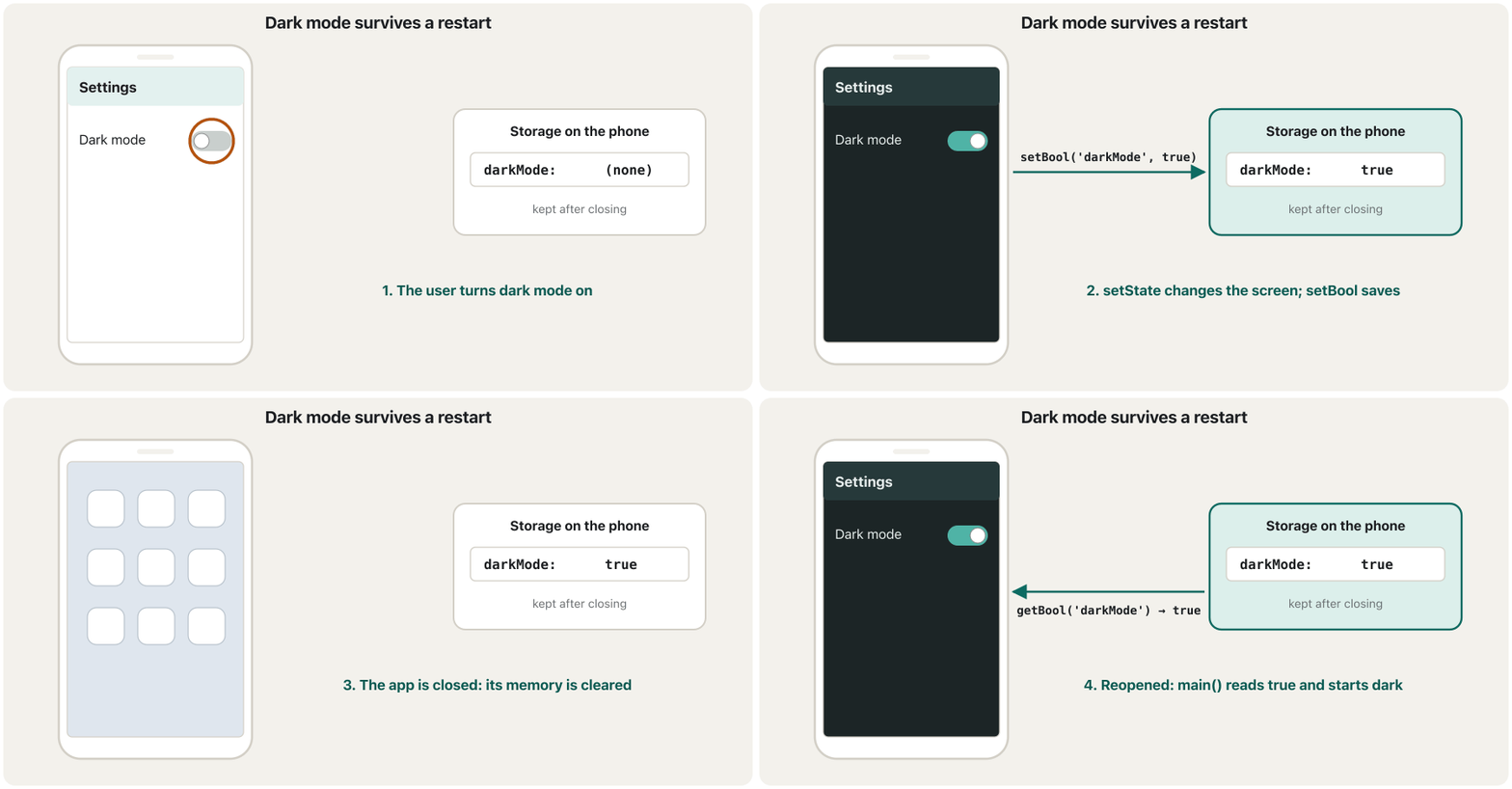
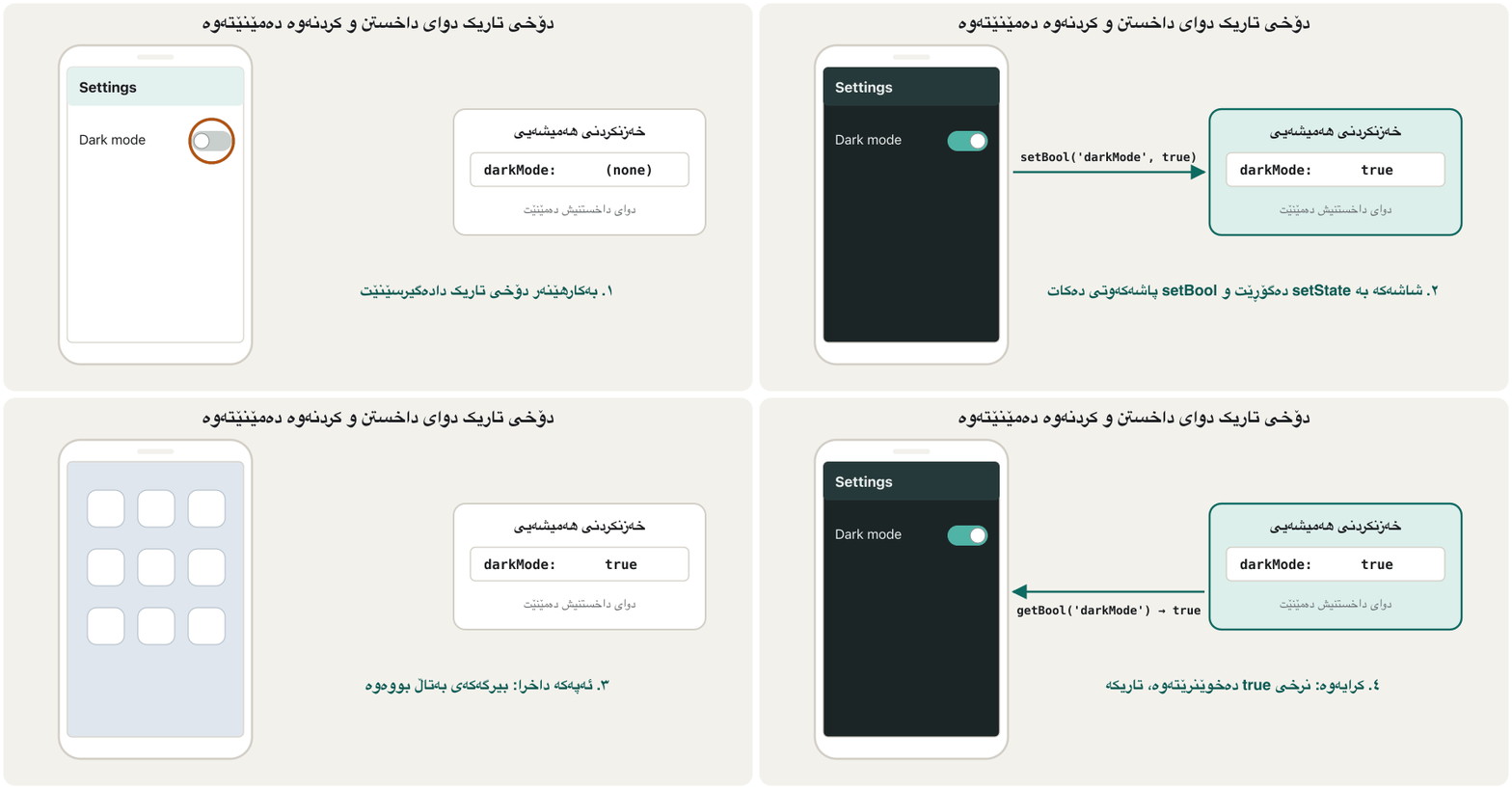
A full app: a switch turns dark mode on or off, and the choice survives closing the app. Two details make it feel right: the screen changes at once with setState, and the saved value is read in main() before runApp, so the app never flashes light for a moment before turning dark.
تەواو: Switchـێک دادەگیرسێنێت یان دەیکوژێنێتەوە و هەڵبژاردنەکە دوای داخستنی دەمێنێتەوە. دوو وردەکاری وای لێ دەکەن باش هەست پێ بکرێت: شاشەکە بە setState دەستبەجێ دەگۆڕێت و نرخە پاشەکەوتکراوەکە لە main()ـدا پێش runApp دەخوێنرێتەوە، بۆیە هەرگیز بۆ ساتێک ڕووناک نابێت پێش ئەوەی تاریک ببێت.
import 'package:flutter/material.dart';
import 'package:shared_preferences/shared_preferences.dart';

const darkModeKey = 'darkMode';

Future<void> main() async {
  // Plugins may be used before runApp only after this line.
  WidgetsFlutterBinding.ensureInitialized();

  // Read the saved choice before the first frame, so the app never
  // flashes in the wrong colours.
  final startDark = await SharedPreferencesAsync().getBool(darkModeKey) ?? false;

  runApp(SettingsApp(startDark: startDark));
}

class SettingsApp extends StatefulWidget {
  const SettingsApp({super.key, required this.startDark});

  final bool startDark;

  @override
  State<SettingsApp> createState() => _SettingsAppState();
}

class _SettingsAppState extends State<SettingsApp> {
  final _prefs = SharedPreferencesAsync();
  late bool _dark = widget.startDark;

  Future<void> _setDark(bool value) async {
    setState(() => _dark = value); // 1. change the screen now
    await _prefs.setBool(darkModeKey, value); // 2. remember it on the device
  }

  @override
  Widget build(BuildContext context) {
    return MaterialApp(
      theme: ThemeData(colorSchemeSeed: Colors.teal),
      darkTheme: ThemeData(
        colorSchemeSeed: Colors.teal,
        brightness: Brightness.dark,
      ),
      themeMode: _dark ? ThemeMode.dark : ThemeMode.light,
      home: Scaffold(
        appBar: AppBar(title: const Text('Settings')),
        body: SwitchListTile(
          title: const Text('Dark mode'),
          value: _dark,
          onChanged: _setDark,
        ),
      ),
    );
  }
}
Explain the codeڕوونکردنەوەی کۆدەکە
- Lineدێڕی 6-8
mainisasync.WidgetsFlutterBinding.ensureInitialized()must run before any plugin call that happens beforerunApp.mainasyncـە.WidgetsFlutterBinding.ensureInitialized()دەبێت پێش هەر بانگکردنێکی جێبەجێ ببێت کە پێشrunAppڕوو دەدات.- Lineدێڕی 12
Read once at start;
?? falsecovers the very first launch.یەک جار لە سەرەتادا بیخوێنەرەوە؛
?? falseیەکەمین کردنەوە دادەپۆشێت.- Lineدێڕی 28
The State starts from the value
mainpassed in.Stateـەکە لەو نرخەوە دەست پێ دەکات کە
mainناردی.- Lineدێڕی 30-33
Change the screen first, then save. The user never waits for the disk.
سەرەتا شاشەکە بگۆڕە، پاشان پاشەکەوت بکە. هەرگیز چاوەڕێی دیسک ناکات.
- Lineدێڕی 38-43
theme,darkThemeandthemeModelet MaterialApp switch between a light and a dark Material 3 theme (see Theming with Material 3).theme،darkThemeوthemeModeڕێگە بە MaterialApp دەدەن لە نێوان ڕووناک و تاریکی Material 3دا بگۆڕێت (بڕوانە Material 3 و تێم).- Lineدێڕی 46-50
SwitchListTileis a row with a title and a switch;onChangedreceives the new value.SwitchListTileڕیزێکە بە ناونیشانێک وSwitchـێک؛onChangedنرخە نوێیەکە وەردەگرێت.
shared_preferences: small settingsshared_preferences: ڕێکخستنی بچووک
SharedPreferencesWithCache: synchronous readsSharedPreferencesWithCache: خوێندنەوەی هاوکات
If you read the same few settings very often, SharedPreferencesWithCache loads them once into memory and then reads them without await. Writes still go to disk in the background. Give it an allowList: the keys it may load and change.
ئەگەر هەمان چەند زۆر جار دەخوێنیتەوە، SharedPreferencesWithCache یەک جار بارییان دەکات بۆ و پاشان بەبێ await دەیانخوێنێتەوە. نووسین هێشتا لە پشتەوە بۆ دیسک دەڕوات. allowListـی پێ بدە: ئەو ڕێگەی هەیە بار و دەستکارییان بکات.
import 'package:shared_preferences/shared_preferences.dart';

Future<String> example() async {
  // Load the allowed keys once; after that, reads are synchronous.
  final prefs = await SharedPreferencesWithCache.create(
    cacheOptions: const SharedPreferencesWithCacheOptions(
      allowList: {'darkMode', 'lastTab'},
    ),
  );

  final bool dark = prefs.getBool('darkMode') ?? false; // no await
  final int tab = prefs.getInt('lastTab') ?? 0;

  await prefs.setInt('lastTab', 2); // writes are still async
  return 'dark: $dark, last tab: $tab';
}
Explain the codeڕوونکردنەوەی کۆدەکە
- Lineدێڕی 5-9
createis awaited once and fills the cache with the allowed keys.createیەک جار await دەکرێت و بەو ڕێگەیان پێدراوە پڕ دەکات.- Lineدێڕی 11-12
Reads come from the cache: no
await.خوێندنەوەکان لە دێن:
awaitنییە.- Lineدێڕی 14
Writes are still asynchronous.
نووسینەکان هێشتا .
Choose SharedPreferencesAsync when the value might be changed elsewhere (for example by a background task) and you always want the latest; choose SharedPreferencesWithCache when you want quick synchronous reads in an app that changes its settings only through this object.
کاتێک نرخەکە لەوانەیە لە شوێنێکی ترەوە بگۆڕدرێت (بۆ نموونە ئەرکێکی پشتەوە) و هەمیشە نوێترینت دەوێت، SharedPreferencesAsync هەڵبژێرە؛ کاتێک خوێندنەوەی خێرای دەوێت لە کە تەنها بەم خۆی دەگۆڕێت، SharedPreferencesWithCache هەڵبژێرە.
shared_preferences: small settingsshared_preferences: ڕێکخستنی بچووک
What shared_preferences is not forshared_preferences بۆ چی نییە
- Not for large data. It is made for a handful of values. A list of 500 notes squeezed into one long string is slow to read and write: use a file or SQLite.
- Not for critical data. The package itself warns that a write is not guaranteed to reach the disk when the call returns. If losing the value would hurt (an unsent order, an exam answer), use a database or send it to a server.
- Not for secrets. Values are kept as plain, unencrypted data in the app's private folder. A backup or a rooted phone can read them. Passwords and sign-in tokens go to
flutter_secure_storage. - Only five types. To keep an object, turn it into a String with
jsonEncodefirst, and only if it is small. - Only this phone. The values stay on one device and are deleted when the app is uninstalled.
- بۆ دراوەی زۆر نییە. بۆ چەند نرخێکی کەم دروست کراوە. 500 تێبینی کە لە یەک درێژدا بخرێتە ناوی، خوێندنەوە و نووسینی خاوە: یان SQLite بەکار بهێنە.
- بۆ دراوەی گرنگ نییە. خودی ئاگادار دەکاتەوە کە دڵنیایی نییە نووسینێک لە کاتی گەڕانەوەی بانگکردنەکەدا گەیشتبێتە دیسک. ئەگەر ونبوونی نرخەکە زیان بگەیەنێت (داواکارییەکی نەنێردراو، وەڵامی تاقیکردنەوەیەک)، بەکار بهێنە یان بینێرە بۆ .
- بۆ نهێنی نییە. نرخەکان وەک دراوەی سادە و بەبێ لە تایبەتی هەڵدەگیرێن. یان مۆبایلێکی root کراو دەتوانێت بیانخوێنێتەوە. و دەچنە نێو
flutter_secure_storage. - تەنها پێنج جۆر. بۆ هەڵگرتنی ، سەرەتا بە
jsonEncodeبیکە بە ، ئەویش تەنها ئەگەر بچووک بێت. - تەنها ئەم مۆبایلە. نرخەکان لەسەر یەک ئامێر دەمێننەوە و کاتێک لادەبرێت دەسڕدرێنەوە.
Files: path_provider and dart:ioفایلەکان: path_provider و dart:io
When the data is a document (a note, a downloaded picture, an exported report, one JSON file) write it to a file. Every app has its own private folders that other apps cannot read. The path_provider plugin tells you where they are, and File from dart:io reads and writes:
کاتێک دراوەکە بەڵگەیەکە (تێبینییەک، وێنەیەکی دابەزێنراو، ڕاپۆرتێکی دەرهێنراو، یەک ) لە بینووسە. هەر تایبەتی خۆی هەیە کە تر ناتوانن بیانخوێننەوە. path_provider پێت دەڵێت لە کوێن و File لە dart:io دەیانخوێنێتەوە و تێیاندا دەنووسێت:
| Function | Folder | Use it forبۆ چی بەکاری بهێنیت |
|---|---|---|
getApplicationDocumentsDirectory() | Documents: kept until the app is uninstalleddocuments: تا لادەبرێت دەمێنێت | Notes, saved games, anything the user would missتێبینی، یاریی پاشەکەوتکراو، هەر شتێک بە ونبوونی نیگەران دەبێت |
getTemporaryDirectory() | Cache: the system may empty it at any time: سیستەم دەتوانێت هەر کاتێک بەتاڵی بکاتەوە | Copies you can download againکۆپییەک کە دەتوانیت دووبارە دایبەزێنیتەوە |
import 'dart:convert';
import 'dart:io';

import 'package:path_provider/path_provider.dart';

class NoteStorage {
  // The app's private documents folder: kept until the app is uninstalled.
  Future<File> _file(String name) async {
    final dir = await getApplicationDocumentsDirectory();
    return File('${dir.path}/$name');
  }

  Future<void> saveNote(String text) async {
    final file = await _file('note.txt');
    await file.writeAsString(text);
  }

  Future<String> readNote() async {
    try {
      final file = await _file('note.txt');
      return await file.readAsString();
    } on FileSystemException {
      return ''; // no note saved yet
    }
  }

  // A list of objects: turn it into JSON text first.
  Future<void> saveShoppingList(List<Map<String, dynamic>> items) async {
    final file = await _file('shopping.json');
    await file.writeAsString(jsonEncode(items));
  }

  Future<List<dynamic>> readShoppingList() async {
    final file = await _file('shopping.json');
    if (!await file.exists()) return [];
    return jsonDecode(await file.readAsString()) as List<dynamic>;
  }
}
Explain the codeڕوونکردنەوەی کۆدەکە
- Lineدێڕی 8-11
Build a
Fileinside the documents folder.path_providergives a different real path on Android and iOS; your code does not care.Fileـێک لەناو documents دروست بکە.path_providerلەسەر Android و iOS ڕاستەقینەی جیاواز دەدات؛ کۆدەکەت گرنگی پێ نادات.- Lineدێڕی 13-16
writeAsStringreplaces the whole file.writeAsStringهەموو ناوەڕۆکی دەگۆڕێت.- Lineدێڕی 18-25
Reading a file that does not exist yet throws a
FileSystemException; treat that as “no note”.خوێندنەوەی کە هێشتا نییە
FileSystemExceptionفڕێ دەدات؛ وەک «تێبینی نییە» مامەڵەی لەگەڵ بکە.- Lineدێڕی 28-37
Objects are stored as JSON text:
jsonEncodeto save,jsonDecodeto load, exactly as with a server (see jsonDecode).وەک دەقی هەڵدەگیرێن:
jsonEncodeبۆ پاشەکەوتکردن،jsonDecodeبۆ خوێندنەوە، ڕێک وەک لەگەڵ (بڕوانە jsonDecode).
dart:io files work the same in plain Dart, so you can watch a save-and-load round trip in the terminal (a temporary folder stands in for the phone's documents folder):
dart:io لە Dartـی سادەشدا وەک یەک کار دەکەن، بۆیە دەتوانیت لە گەشتێکی پاشەکەوتکردن و خوێندنەوە ببینیت ( کاتی جێگەی documentsـی مۆبایل دەگرێتەوە):
import 'dart:convert';
import 'dart:io';

Future<void> main() async {
  // On a phone this folder comes from path_provider;
  // here we use a temporary folder so the program runs anywhere.
  final dir = await Directory.systemTemp.createTemp('notes_demo');
  final file = File('${dir.path}/shopping.json');

  final items = [
    {'name': 'Tea', 'done': false},
    {'name': 'Bread', 'done': true},
  ];

  await file.writeAsString(jsonEncode(items)); // save: objects -> JSON text
  print('Saved ${await file.length()} bytes');
  print('On disk: ${await file.readAsString()}');

  final back = jsonDecode(await file.readAsString()) as List<dynamic>; // load
  for (final item in back) {
    final map = item as Map<String, dynamic>;
    print('${map['done'] == true ? '[x]' : '[ ]'} ${map['name']}');
  }

  await dir.delete(recursive: true); // tidy up
  print('Exists after delete: ${await file.exists()}');
}Saved 58 bytes
On disk: [{"name":"Tea","done":false},{"name":"Bread","done":true}]
[ ] Tea
[x] Bread
Exists after delete: falseFlutter's official 100-second clip: path_provider finds the documents, support and temporary folders where an app can save files.
کلیپی فەرمیی : path_provider documents، support و temporary دەدۆزێتەوە کە دەتوانێت تێیاندا پاشەکەوت بکات.
Whole clip (1:44, December 2021): the three folders and when to use each; the calls it shows still work today.
هەموو کلیپەکە (1:44، ساڵی 2021): هەر سێ و کەی هەریەکەیان بەکاربهێنیت؛ ئەو فەرمانانەی پیشانی دەدات ئەمڕۆش کار دەکەن.
SQLite: a database inside the appSQLite: بنکەدراوەیەک لەناو ئەپەکەدا
For many records that must be searched, sorted or filtered, use a real database. SQLite keeps a whole SQL database in one file inside the app's private folder; Android and iOS both ship it. In Flutter the usual packages are sqflite (you write the SQL yourself; Android, iOS and macOS) and drift (type-safe Dart queries that can also send live updates; also desktop and web). The SQL itself is taught in SQLite Basics; here is how a Flutter app uses it:
بۆ زۆر کە دەبێت بگەڕێن، ڕیز بکرێن یان بپاڵێورێن، ڕاستەقینە بەکار بهێنە. SQLite هەموو SQL لە یەک ـدا لەناو تایبەتی هەڵدەگرێت؛ Android و iOS هەردووکیان لەگەڵ خۆیان دەیهێنن. لە Flutterـدا باوترین sqfliteـن (SQLـەکە خۆت دەنووسیت؛ Android، iOS و macOS) و drift ( Dartـی جۆردار کە دەتوانێت نوێکردنەوەی ڕاستەوخۆش بنێرێت؛ کۆمپیوتەر و وێبیش). خودی SQL لە بنەماکانی SQLite فێر دەکرێت؛ لێرە دەبینیت Flutter چۆن بەکاری دەهێنێت:
$ flutter pub add sqflite pathimport 'package:path/path.dart';
import 'package:sqflite/sqflite.dart';
class Word {
final int? id;
final String english;
final String kurdish;
const Word({this.id, required this.english, required this.kurdish});
Map<String, Object?> toMap() =>
{'id': id, 'english': english, 'kurdish': kurdish};
factory Word.fromMap(Map<String, Object?> map) => Word(
id: map['id'] as int,
english: map['english'] as String,
kurdish: map['kurdish'] as String,
);
}
class WordDatabase {
Database? _db;
Future<Database> get _database async {
return _db ??= await openDatabase(
join(await getDatabasesPath(), 'words.db'),
version: 1,
onCreate: (db, version) => db.execute(
'CREATE TABLE words('
'id INTEGER PRIMARY KEY AUTOINCREMENT, '
'english TEXT NOT NULL, '
'kurdish TEXT NOT NULL)',
),
);
}
Future<int> insertWord(Word word) async {
final db = await _database;
return db.insert('words', word.toMap()); // id is null: SQLite makes one
}
Future<List<Word>> search(String text) async {
final db = await _database;
final rows = await db.query(
'words',
where: 'english LIKE ?',
whereArgs: ['$text%'], // the value travels separately: no SQL injection
orderBy: 'english',
);
return rows.map(Word.fromMap).toList();
}
Future<void> deleteWord(int id) async {
final db = await _database;
await db.delete('words', where: 'id = ?', whereArgs: [id]);
}
}Explain the codeڕوونکردنەوەی کۆدەکە
- Lineدێڕی 4-19
A model class, as for JSON:
toMapfor writing a row,fromMapfor reading one.، وەک بۆ :
toMapبۆ نووسینی ،fromMapبۆ خوێندنەوەی.- Lineدێڕی 24-35
Open the database once and keep it.
onCreateruns only the first time, when the file does not exist yet, and creates the table.یەک جار بکەرەوە و هەڵیبگرە.
onCreateتەنها یەکەم جار جێبەجێ دەبێت، کاتێک هێشتا نییە. ئەو کاتە دروست دەکات.- Lineدێڕی 27
versionmatters later: raise it and addonUpgradewhen you change the table in a new app version.versionدواتر گرنگە: کاتێک لە وەشانێکی نوێی دەگۆڕیت، بەرزی بکەرەوە وonUpgradeزیاد بکە.- Lineدێڕی 37-40
insertreturns the new row's id.insertناسێنەری نوێیەکە دەگەڕێنێتەوە.- Lineدێڕی 44-49
?is a placeholder andwhereArgscarries the value separately, so a user's text can never become SQL.?شوێنگرە وwhereArgsنرخەکە بە جیا دەگوازێتەوە، بۆیە دەقی هەرگیز نابێت بە SQL.- Lineدێڕی 50
Each row arrives as a
Map;Word.fromMapturns it into an object.هەر وەک
Mapـێک دێت؛Word.fromMapدەیکات بە .
Set up a local SQLite database in Flutter with sqflite: find the database path, open the file and create a table in onCreate.
ئامادەکردنی لەسەر خودی ئامێرەکە لە بە sqflite: دۆزینەوەی ، کردنەوەی و دروستکردنی لە onCreateـدا.
Watch 2:39–12:52: a DatabaseService class that finds the path with getDatabasesPath and join, opens the file with openDatabase and creates the tasks table in onCreate.
لە 2:39 تا 12:52 سەیر بکە: بە ناوی DatabaseService کە بە getDatabasesPath و join دەدۆزێتەوە، بە openDatabase دەکاتەوە و لە onCreateـدا tasks دروست دەکات.
Which one should I use?کامیان بەکار بهێنم؟
Ask a few questions, in this order. The first “yes” gives the answer:
چەند پرسیارێک بکە، بەم ڕیزبەندییە. یەکەم «بەڵێ» وەڵامەکە دەدات:
Remember what “local” means: data on the device is not copied to the user's other phones and is usually lost when the app is uninstalled or the user gets a new phone, unless something backs it up or syncs it. If users expect to see their data everywhere, keep it in the cloud. Real apps often mix: a cloud database for shared data and shared_preferences for this phone's settings, such as dark mode.
لەبیرت بێت «ناوخۆیی» واتای چییە: دراوەی سەر ئامێرەکە بۆ مۆبایلەکانی تری کۆپی ناکرێت و زۆرجار کاتێک لادەبرێت یان مۆبایلێکی نوێ دەکڕێت ون دەبێت، مەگەر شتێک لێ بگرێت یان بکات. ئەگەر چاوەڕێ دەکەن دراوەکانیان لە هەموو شوێنێک ببینن، لە هەوردا هەڵیبگرە. ڕاستەقینە زۆرجار تێکەڵ دەکەن: بۆ دراوەی هاوبەش و shared_preferences بۆ ئەم مۆبایلە، وەک .
Common mistakesهەڵە باوەکان
| Mistakeهەڵە | What happensچی ڕوو دەدات | Fixچاکردنەوە |
|---|---|---|
| A password or token in shared_preferences یان لە shared_preferencesـدا | Stored as plain data; a backup or a rooted phone can read itوەک دراوەی سادە هەڵدەگیرێت؛ یان مۆبایلێکی root کراو دەتوانێت بیخوێنێتەوە | Use flutter_secure_storageflutter_secure_storage بەکار بهێنە |
| A big list squeezed into one preference گەورە لە یەک | Slow; the whole list is rewritten on every changeخاوە؛ هەموو لە هەر گۆڕانێکدا دووبارە دەنووسرێتەوە | Use a file for one document, SQLite for many records بۆ یەک بەڵگە، SQLite بۆ زۆر |
| Different spellings of a keyنووسینی جیاوازی یەک | 'darkMode' is saved, 'dark_mode' is read: always the default'darkMode' پاشەکەوت دەکرێت، 'dark_mode' دەخوێنرێتەوە: هەمیشە | Keep keys in constants لە هەڵبگرە |
Reading storage inside buildخوێندنەوەی خەزنکردن لەناو build | Disk work on every rebuild; the screen may flickerکاری دیسک لە هەر دووبارە دروستکردنەوەیەکدا؛ شاشەکە لەوانەیە بلەرزێت | Load in main() or initState, keep it in stateلە main() یان initStateـدا بیخوێنەرەوە، لە هەڵیبگرە |
setState after an await without checkingsetState دوای await بەبێ پشکنین | Error if the screen was closed meanwhile ئەگەر لەو ماوەیەدا شاشەکە داخرابێت | if (!mounted) return; before setStateif (!mounted) return; پێش setState |
| Important files in the temporary folder گرنگ لە کاتیدا | The system deletes them to free spaceسیستەم بۆ ئازادکردنی شوێن دەیانسڕێتەوە | Use the documents folder documents بەکار بهێنە |
| SQL built by joining stringsSQL بە لکاندنی | SQL injection; quotes break the query؛ نیشانەی ' تێک دەدات | ? placeholders and whereArgsشوێنگری ? و whereArgs |
Changing a table without a new versionگۆڕینی بەبێ versionـێکی نوێ | Old installs keep the old table; queries failدامەزراندنە کۆنەکان کۆنەکە دەهێڵنەوە؛ شکست دەهێنن | Raise version and migrate in onUpgradeversion بەرز بکەرەوە و لە onUpgradeـدا بیگوازەرەوە |
Exercisesڕاهێنانەکان
Choose a way to store each: (a) the chosen app language; (b) 3,000 saved Kurdish–English word pairs with search; (c) a PDF report the user exported; (d) a chat between two users; (e) the user's sign-in token; (f) thumbnails that can be downloaded again.
بۆ هەر یەکێک ڕێگایەکی خەزنکردن هەڵبژێرە: (أ) زمانی هەڵبژێردراوی ؛ (ب) 3,000 جووت وشەی کوردی و ئینگلیزی بە گەڕانەوە؛ (ج) ڕاپۆرتێکی PDF کە دەری هێناوە؛ (د) چاتێک لە نێوان دوو ؛ (هـ) ؛ (و) وێنە بچووکەکان کە دەتوانرێت دووبارە دابەزێنرێنەوە.
Show answerوەڵامەکە پیشان بدە
| Dataدراوە | Whereلە کوێ |
|---|---|
| (a) language(أ) زمان | shared_preferences |
| (b) word pairs(ب) جووتە وشەکان | SQLite (sqflite / drift) SQLite (sqflite / drift) |
| (c) PDF report(ج) ڕاپۆرتی PDF | A file in the documents folder لە documents |
| (d) chat(د) چات | A cloud database |
| (e) token(هـ) | flutter_secure_storage |
| (f) thumbnails(و) وێنە بچووکەکان | The temporary (cache) folder کاتی () |
Change the classic counter so the number is still there after the app is closed: load it in initState, save it on every tap.
بەناوبانگەکە بگۆڕە بۆ ئەوەی ژمارەکە دوای داخستنی بمێنێت: لە initStateـدا بیخوێنەرەوە، لە هەر دەستلێدانێکدا پاشەکەوتی بکە.
Hintئاماژە
getInt('counter') ?? 0 and setInt('counter', _count).
getInt('counter') ?? 0 و setInt('counter', _count).
Show answerوەڵامەکە پیشان بدە
import 'package:flutter/material.dart';
import 'package:shared_preferences/shared_preferences.dart';

class SavedCounter extends StatefulWidget {
  const SavedCounter({super.key});

  @override
  State<SavedCounter> createState() => _SavedCounterState();
}

class _SavedCounterState extends State<SavedCounter> {
  final _prefs = SharedPreferencesAsync();
  int _count = 0;

  @override
  void initState() {
    super.initState();
    _load();
  }

  Future<void> _load() async {
    final saved = await _prefs.getInt('counter') ?? 0;
    if (!mounted) return; // the screen may be gone after the await
    setState(() => _count = saved);
  }

  Future<void> _increment() async {
    setState(() => _count++);
    await _prefs.setInt('counter', _count);
  }

  @override
  Widget build(BuildContext context) {
    return Scaffold(
      appBar: AppBar(title: const Text('Saved counter')),
      body: Center(child: Text('$_count', style: const TextStyle(fontSize: 48))),
      floatingActionButton: FloatingActionButton(
        onPressed: _increment,
        child: const Icon(Icons.add),
      ),
    );
  }
}
_load is async, so after the await the screen might already be closed: if (!mounted) return; protects setState. Loading in main() (as in the dark mode app) is the other good choice.
_load ، بۆیە دوای await لەوانەیە شاشەکە داخرابێت: if (!mounted) return; setState دەپارێزێت. خوێندنەوە لە main()ـدا (وەک ) هەڵبژاردە باشەکەی ترە.
An app has three tabs in a NavigationBar. Make it reopen on the tab the user chose last time.
سێ تابی لە NavigationBarـێکدا هەیە. وای لێ بکە لەسەر ئەو تابە بکرێتەوە کە جاری پێشوو هەڵیبژارد.
Show answerوەڵامەکە پیشان بدە
import 'package:flutter/material.dart';
import 'package:shared_preferences/shared_preferences.dart';

const lastTabKey = 'lastTab';

class HomeTabs extends StatefulWidget {
  const HomeTabs({super.key, required this.startTab});

  final int startTab; // read in main() before runApp, like the dark mode app

  @override
  State<HomeTabs> createState() => _HomeTabsState();
}

class _HomeTabsState extends State<HomeTabs> {
  late int _tab = widget.startTab;

  Future<void> _select(int index) async {
    setState(() => _tab = index);
    await SharedPreferencesAsync().setInt(lastTabKey, index);
  }

  @override
  Widget build(BuildContext context) {
    return Scaffold(
      body: Center(child: Text(['Home', 'Search', 'Profile'][_tab])),
      bottomNavigationBar: NavigationBar(
        selectedIndex: _tab,
        onDestinationSelected: _select,
        destinations: const [
          NavigationDestination(icon: Icon(Icons.home), label: 'Home'),
          NavigationDestination(icon: Icon(Icons.search), label: 'Search'),
          NavigationDestination(icon: Icon(Icons.person), label: 'Profile'),
        ],
      ),
    );
  }
}
In main(): final start = await SharedPreferencesAsync().getInt(lastTabKey) ?? 0; then runApp(MaterialApp(home: HomeTabs(startTab: start))).
لە main()ـدا: final start = await SharedPreferencesAsync().getInt(lastTabKey) ?? 0; پاشان runApp(MaterialApp(home: HomeTabs(startTab: start))).
Write saveNames(File, List<String>) and loadNames(File) that keep a list of names in a JSON file. Loading must return an empty list when the file does not exist yet.
saveNames(File, List<String>) و loadNames(File) بنووسە کە ناوەکان لە هەڵدەگرن. خوێندنەوە دەبێت کاتێک هێشتا نییە بەتاڵ بگەڕێنێتەوە.
Show answerوەڵامەکە پیشان بدە
import 'dart:convert';
import 'dart:io';

Future<void> saveNames(File file, List<String> names) =>
    file.writeAsString(jsonEncode(names));

Future<List<String>> loadNames(File file) async {
  if (!await file.exists()) return [];
  final list = jsonDecode(await file.readAsString()) as List<dynamic>;
  return list.cast<String>();
}

Future<void> main() async {
  final dir = await Directory.systemTemp.createTemp('names_demo');
  final file = File('${dir.path}/names.json');

  print('Before saving: ${await loadNames(file)}');
  await saveNames(file, ['Aram', 'Shilan', 'Dilan']);
  print('After saving: ${await loadNames(file)}');

  await dir.delete(recursive: true);
}Before saving: [] After saving: [Aram, Shilan, Dilan]
cast<String>() turns the decoded List<dynamic> into a List<String>. In an app, get the folder from getApplicationDocumentsDirectory().
cast<String>() ئەو List<dynamic>ـەی کراوەتەوە دەکات بە List<String>. لە ، لە getApplicationDocumentsDirectory()ـەوە وەربگرە.
Design a SQLite table notes with an id, a title, a body and a creation time. Write the CREATE TABLE, then the sqflite call that returns the 20 newest notes.
SQLite بە ناوی notes دیزاین بکە کە ناسێنەر، ناونیشان، دەق و کاتی دروستکردنی هەبێت. CREATE TABLEـەکە بنووسە، پاشان ئەو بانگکردنەی sqflite کە 20 نوێترین تێبینی دەگەڕێنێتەوە.
Show answerوەڵامەکە پیشان بدە
CREATE TABLE notes(
  id INTEGER PRIMARY KEY AUTOINCREMENT,
  title TEXT NOT NULL,
  body TEXT NOT NULL,
  created_at INTEGER NOT NULL  -- milliseconds since 1970
);final rows = await db.query(
'notes',
orderBy: 'created_at DESC',
limit: 20,
);SQLite has no date type, so store DateTime.now().millisecondsSinceEpoch as an integer; it sorts correctly.
SQLite جۆری بەروار نییە، بۆیە DateTime.now().millisecondsSinceEpoch وەک هەڵبگرە؛ بە دروستی ڕیز دەکرێت.
Summaryپوختە
- Variables live in memory and are lost when the app closes; save what must survive to persistent storage and load it at start.
- shared_preferences: a few small values (
int,double,bool,String,List<String>) by key; useSharedPreferencesAsyncorSharedPreferencesWithCache; not for large, critical or secret data. - Files:
path_providerfinds the documents (kept) and temporary (cache) folders;Filereads and writes; objects go throughjsonEncode/jsonDecode. - SQLite (
sqflite,drift): many records to search and sort; create tables inonCreate, always use?withwhereArgs. - Secrets go to
flutter_secure_storage; data shared between users or phones goes to a cloud database.
- لە دەژین و کاتێک دادەخرێت ون دەبن؛ ئەوەی دەبێت بمێنێتەوە لە ـدا پاشەکەوت بکە و لە سەرەتادا بیخوێنەرەوە.
- shared_preferences: چەند نرخێکی بچووک (
int،double،bool،String،List<String>) بەپێی ؛SharedPreferencesAsyncیانSharedPreferencesWithCacheبەکار بهێنە؛ بۆ دراوەی زۆر، گرنگ یان نهێنی نییە. - :
path_providerdocuments (دەمێنێت) و کاتی () دەدۆزێتەوە؛Fileدەخوێنێتەوە و دەنووسێت؛ بەjsonEncode/jsonDecodeـدا تێدەپەڕن. - SQLite (
sqflite،drift): زۆر بۆ گەڕان و ڕیزکردن؛ لەonCreateـدا دروست بکە و هەمیشە?لەگەڵwhereArgsبەکار بهێنە. - نهێنییەکان دەچنە
flutter_secure_storage؛ دراوەی هاوبەش لە نێوان یان مۆبایلەکاندا دەچێتە .
Why should you not keep a sign-in token in shared_preferences?بۆچی نابێت تۆکنی چوونەژوورەوە لە shared_preferencesـدا هەڵبگریت؟
Because shared_preferences stores plain, unencrypted data that a backup or rooted phone can read. Use flutter_secure_storage.
چونکە shared_preferences دراوەی سادە و بەبێ هەڵدەگرێت کە یان مۆبایلێکی root کراو دەتوانێت بیخوێنێتەوە. flutter_secure_storage بەکار بهێنە.
What is the difference between the documents folder and the temporary folder?جیاوازیی نێوان فۆڵدەری documents و فۆڵدەری کاتی چییە؟
Documents stay until the app is uninstalled; the temporary folder is a cache the system may empty at any time.
documents تا لابردنی دەمێنێت؛ کاتییەکە کە سیستەم دەتوانێت هەر کاتێک بەتاڵی بکاتەوە.
Why use ? and whereArgs in sqflite queries?بۆچی لە پرسەکانی sqfliteـدا ? و whereArgs بەکار دەهێنین؟
The value is sent separately from the SQL, so user text can never change the query (no SQL injection).
نرخەکە جیا لە SQL دەنێردرێت، بۆیە دەقی هەرگیز ناتوانێت بگۆڕێت ( نییە).
Lesson complete!وانەکە تەواو بوو!
Well done. Review the key terms, then go on to the next lesson.دەستخۆش. سەیرێکی زاراوە سەرەکییەکان بکەرەوە، پاشان بڕۆ بۆ وانەی داهاتوو.
Key termsزاراوە سەرەکییەکان
Firebase and Cloud FirestoreFirebase و Cloud Firestore
Related lecturesوانە پەیوەندیدارەکان
- SQLite Basicsبنەماکانی SQLite
- App State and Declarative UIدۆخ و ڕووکاری وەسفی
- Firebase and Cloud FirestoreFirebase و Cloud Firestore
- MaterialApp and ScaffoldMaterialApp و Scaffold
- Injection Attacks: SQL Injection and Cross-Site Scriptingهێرشەکانی تێخزاندن: تێخزاندنی SQL و XSS
- NoSQL and Big DataNoSQL و دراوەی گەورە
References and further readingسەرچاوەکان و خوێندنەوەی زیاتر
This lecture is a first edition. The Kurdish text and terminology are waiting for review by Kurdish IT teachers.ئەم وانەیە چاپی یەکەمە. دەقە کوردییەکە و زاراوەکانی چاوەڕێی پێداچوونەوەی مامۆستایانی کوردی بواری IT ن.