Chapterبەش 1 · Lectureوانە 1.3
Links: Point-to-Point, Multipoint and Transmission Modesبەستنەوەکان: پەیوەندیی خاڵ بۆ خاڵ، پەیوەندیی فرەخاڵ و شێوازەکانی ناردن
Five ideas describe how devices are connected. This lesson covers two of them: the line configuration — point-to-point or multipoint, shared in time or in space, between equal peers or under a primary — and the transmission mode: simplex, half duplex and full duplex, and where each one appears in real Ethernet and Wi-Fi networks.
پێنج بیرۆکە چۆنیەتیی بەستنەوەی ئامێرەکان وەسف دەکەن. ئەم وانەیە دووانیان دەگرێتەوە: — یان ، هاوبەش بە کات یان بە شوێن، لە نێوان یان لە ژێر سەرەکییەکدا — و : ، و ، هەروەها هەریەکەیان لە کوێی و دەردەکەوێت.
What you will learnچی فێر دەبیت
- Name the five general concepts that describe the relationship between connected devices.
- Tell point-to-point and multipoint links apart and give today’s examples of each.
- Explain spatial and temporal sharing of a multipoint link.
- Compare peer-to-peer and primary–secondary relationships on a link.
- Recognise simplex, half-duplex and full-duplex links in hubs, switches, Wi-Fi and router links.
- پێنج چەمکە گشتییەکە ناو ببەیت کە پەیوەندیی نێوان ئامێرە بەستراوەکان وەسف دەکەن.
- جیاوازیی و بزانیت و نموونەی ئەمڕۆیی بۆ هەریەکەیان بهێنیتەوە.
- هاوبەشکردنی بە شوێن و بە کات ڕوون بکەیتەوە.
- پەیوەندیی یەکسان و سەرەکی و لاوەکی لەسەر بەستنەوەیەک بەراورد بکەیت.
- بەستنەوەی ، و لە ، ، و بەستنەوەی بناسیتەوە.
Five ideas about connected devicesپێنج بیرۆکە لەبارەی ئامێرە بەستراوەکان
Before we look at how bits travel from one device to another, we need words for the relationship between the communicating devices. Five general concepts give us those words:
پێش ئەوەی سەیری ئەوە بکەین چۆن لە ئامێرێکەوە بۆ ئامێرێکی تر دەڕۆن، پێویستمان بە وشە هەیە بۆ پەیوەندیی نێوان ئەو ئامێرانەی پەیوەندی دەکەن. پێنج چەمکی گشتی ئەو وشانەمان پێ دەدەن:
- Line configuration: how devices attach to a link — this lesson.
- Topology: the layout of the devices and links — Physical and Logical Topologies.
- Transmission mode: which way the data flows, and when — this lesson.
- Categories of networks: LAN, MAN and WAN — LANs, MANs, WANs and the Internet.
- Internetworks: networks joined into larger networks — the same lesson.
- : ئامێرەکان چۆن بە بەستنەوەیەکەوە دەبەسترێن — ئەم وانەیە.
- : شێوەی دانانی ئامێر و بەستنەوەکان — تۆپۆلۆجییەکانی ڕایەڵەی فیزیکی و لۆجیکی.
- : بە کام ئاڕاستەدا و کەی دەڕوات — ئەم وانەیە.
- جۆرەکانی : ، و — ڕایەڵەی ناوچەیی، ڕایەڵەی شاری، ڕایەڵەی فراوان و ئینتەرنێت.
- : کە دەبەسترێن بە — هەمان وانە.
Links and line configurationبەستنەوە و جۆری بەستنەوە
A link is the physical pathway that carries data from one device to another: a cable, a fibre or a radio path. The line configuration says how two or more devices attach to a link. There are only two possibilities: point-to-point and multipoint.
بەستنەوە ڕێگا فیزیکییەکەیە کە لە ئامێرێکەوە بۆ ئامێرێکی تر دەبات: کێبڵێک، فایبەرێک یان ڕێگایەکی ڕادیۆیی. دەڵێت دوو ئامێر یان زیاتر چۆن بە بەستنەوەیەکەوە دەبەسترێن. تەنیا دوو ئەگەر هەیە: و .
How devices are attached to a link: (a link only for two devices) or (one link shared by several devices).
شێوەی بەستنەوەی ئامێرەکانە بە بەستەرێکەوە: (بەستەرێک تەنیا بۆ دوو ئامێر) یان (بەستەرێک کە چەند ئامێرێک هاوبەشی دەکەن).
Links and line configurationبەستنەوە و جۆری بەستنەوە
Point-to-point: a link for twoپەیوەندیی خاڵ بۆ خاڵ: بەستنەوەیەک بۆ دوو
A point-to-point line configuration gives two devices a dedicated link: the entire capacity of the channel is reserved for those two. The classic example is a TV remote: its infrared beam talks only to that TV.
بەستنەوەیەکی تایبەت دەداتە دوو ئامێر: هەموو توانای کەناڵەکە بۆ ئەو دووانە تەرخان دەکرێت. نموونە کلاسیکییەکە ڕیمۆتی تیڤییە: تیشکە تەنیا لەگەڵ ئەو تیڤییە قسە دەکات.
In real networks point-to-point links are everywhere: the cable from a PC to one switch port, a fibre between two buildings of a campus, a microwave link between two towers, and the line between two routers. A company with offices in Erbil and Sulaymaniyah can rent a fibre line from a provider; only its two routers use it:
لە لە هەموو شوێنێکدا هەیە: کێبڵی نێوان و ، فایبەرێک لە نێوان دوو بینای کەمپەسێکدا، بەستنەوەیەکی مایکرۆوەیڤ لە نێوان دوو تاوەردا و هێڵی نێوان دوو . کۆمپانیایەک کە ئۆفیسی لە هەولێر و سلێمانی هەیە دەتوانێت هێڵێکی فایبەر لە دابینکەرێک بەکرێ بگرێت؛ تەنیا دوو بەکاری دەهێنن:
A point-to-point link is not the same as a peer-to-peer network: the first is about the cable, the second about who serves whom. See Point-to-point.
هەمان شتی نییە: یەکەمیان لەبارەی کێبڵەکەیە، دووەمیان لەبارەی ئەوەی کێ خزمەتی کێ دەکات. بڕوانە پەیوەندیی خاڵ بۆ خاڵ.
Links and line configurationبەستنەوە و جۆری بەستنەوە
Multipoint: one link, many devicesپەیوەندیی فرەخاڵ: یەک بەستنەوە، چەند ئامێرێک
In a multipoint (multidrop) line configuration, more than two devices share a single link. The capacity of the channel is then shared in one of two ways:
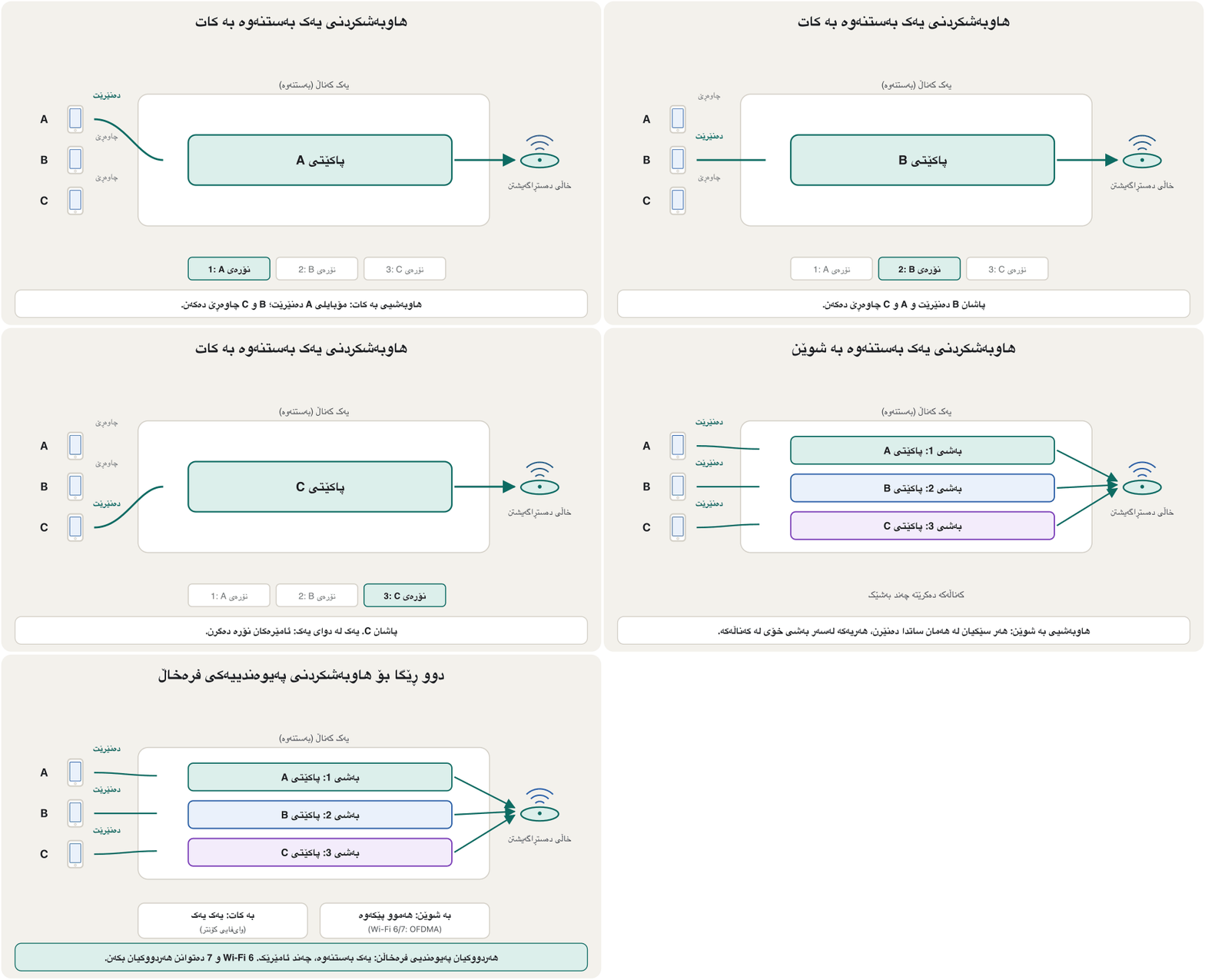
لە زیاتر لە دوو ئامێر یەک بەستنەوە هاوبەش دەکەن. ئەو کاتە توانای کەناڵەکە بە یەکێک لەم دوو ڕێگایە دابەش دەبێت:
- Spatially (in space): several devices use the link at the same time, each on its own part of it, for example its own frequencies. Since Wi-Fi 6, an access point can split one channel and receive from several phones at once.
- Temporally (in time): the devices take turns — a time-shared line. On one Wi-Fi channel this is the usual way: at any moment one radio sends and the others wait.
- بە شوێن: چەند ئامێرێک لە هەمان کاتدا بەستنەوەکە بەکار دەهێنن، هەریەکە لەسەر بەشی خۆی، بۆ نموونە تایبەتی خۆی. لە Wi-Fi 6ـەوە، دەتوانێت یەک کەناڵ دابەش بکات و لە هەمان کاتدا لە چەند مۆبایلێکەوە وەربگرێت.
- بە کات: ئامێرەکان نۆرە دەگرن — هێڵێکی کاتبەش. لەسەر یەک کەناڵی ئەمە ڕێگا ئاساییەکەیە: لە هەر ساتێکدا ڕادیۆیەک دەنێرێت و ئەوانی تر چاوەڕێ دەکەن.
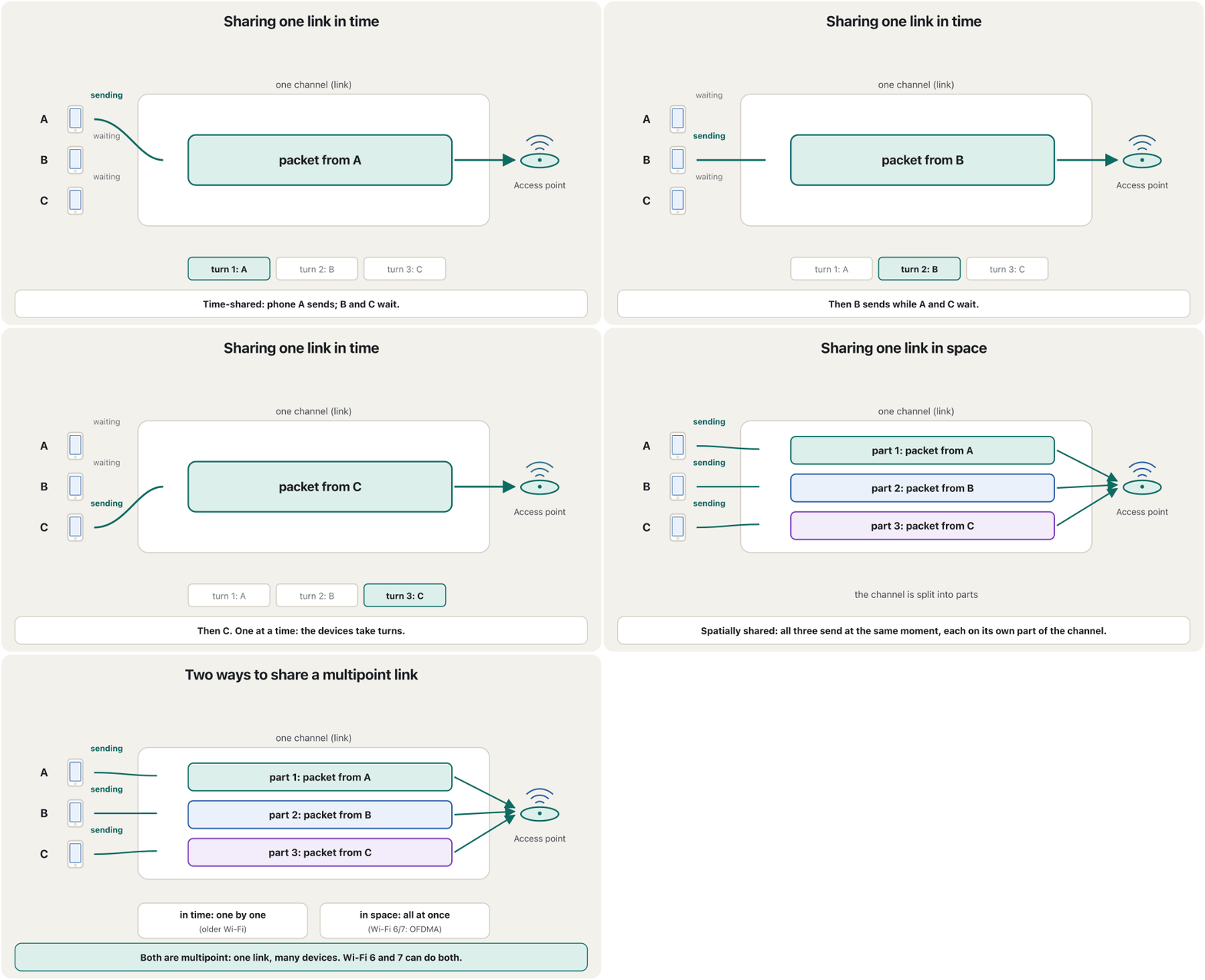
Other multipoint links: the old coaxial bus of 10BASE2 Ethernet (Ethernet: From 10Base-2 to 800 Gigabit), a hub, and a cable-TV line shared by a whole street. Sharing in space uses multiplexing; taking turns needs medium access control, so that signals do not collide.
تر: کۆنی Ethernetـی 10BASE2 بە (Ethernet: لە 10Base-2ـەوە تا 800 گیگابیت)، و هێڵێکی تیڤیی کێبڵی کە شەقامێکی تەواو هاوبەشی دەکەن. هاوبەشکردن بە شوێن مەڵتیپلێکسکردن بەکار دەهێنێت؛ نۆرەگرتن پێویستی بە کۆنترۆڵی نۆرەی ناردن هەیە بۆ ئەوەی بەریەک نەکەون.
Who may speak? Peers and primary–secondaryکێ دەتوانێت قسە بکات؟ تاکەکان و سەرەکی و لاوەکی
On a shared link, devices also need a rule about who may send. There are two relationships:
لەسەر بەستنەوەیەکی هاوبەش، ئامێرەکان پێویستیان بە یاسایەکیش هەیە لەبارەی ئەوەی کێ دەتوانێت بنێرێت. دوو جۆر پەیوەندی هەیە:
- Peer-to-peer: all the devices share the link equally, and any of them may send when the link is free. Ethernet devices on an old shared cable and Wi-Fi devices work this way: each one listens, and then sends.
- Primary–secondary: one device, the primary, controls the traffic; the others, the secondaries, send only through it or when it asks them. Classic Bluetooth works this way — one device controls the piconet and up to seven active devices follow it — and so does USB, where the computer starts every transfer. Old mainframes asked their terminals in turn in the same way. (Older books call this relationship master–slave.)
- یەکسان ( بۆ ): هەموو ئامێرەکان بە یەکسانی بەستنەوەکە بەش دەکەن و هەر یەکێکیان دەتوانێت بنێرێت کاتێک بەستنەوەکە بەتاڵە. ئامێرەکانی لەسەر کێبڵێکی هاوبەشی کۆن و ئامێرەکانی بەم شێوەیە کار دەکەن: هەریەکەیان گوێ دەگرێت و پاشان دەنێرێت.
- سەرەکی و لاوەکی: یەک ئامێر، سەرەکییەکە، هاتوچۆکە کۆنترۆڵ دەکات؛ ئەوانی تر، لاوەکییەکان، تەنیا بە ڕێگەی ئەوەوە یان کاتێک ئەو داوایان لێ دەکات دەنێرن. کلاسیک بەم شێوەیە کار دەکات — یەک ئامێر ڕایەڵە بچووکەکە (piconet) کۆنترۆڵ دەکات و تا حەوت ئامێری چالاک پەیڕەوی دەکەن — هەروایە، کە تێیدا هەموو گواستنەوەیەک دەست پێ دەکات. بەم شێوەیە بە نۆرە پرسیاریان لە تێرمیناڵەکانیان دەکرد. (کتێبە کۆنەکان ئەم پەیوەندییە بە master–slave ناو دەبەن.)
Some topologies suit one relationship better than the other; Physical and Logical Topologies shows which. Careful: “peer-to-peer” here describes a link. A peer-to-peer network is about computers that share files without a server.
هەندێک بۆ یەکێک لەم دوو پەیوەندییە گونجاوترن؛ تۆپۆلۆجییەکانی ڕایەڵەی فیزیکی و لۆجیکی پیشانی دەدات کامیان. ئاگاداربە: «یەکسان» لێرەدا بەستنەوەیەک وەسف دەکات. ڕایەڵەی تاک بۆ تاک لەبارەی ئەو کە بەبێ هاوبەش دەکەن.
Transmission modes: a quick recapشێوازەکانی ناردن: بیرخستنەوەیەکی خێرا
The transmission mode describes the direction of the signal between two linked devices. You met the three modes in Transmission modes:
ئاڕاستەی لە نێوان دوو ئامێری بەستراودا وەسف دەکات. سێ شێوازەکەت لە شێوازەکانی ناردندا ناسی:
| Modeشێواز | Directionئاڕاستە | Like a roadوەک ڕێگایەک | Examplesنموونە |
|---|---|---|---|
| Simplex | one direction only: one station only sends, the other only receivesتەنیا یەک ئاڕاستە: وێستگەیەک تەنیا دەنێرێت، ئەوی تر تەنیا وەردەگرێت | a one-way streetشەقامێکی یەک ئاڕاستە | TV and radio broadcasts, a sensor that only reportsپەخشی تیڤی و ڕادیۆ، کە تەنیا ڕاپۆرت دەدات |
| Half duplex | both directions, but not at the same timeهەردوو ئاڕاستە، بەڵام نەک لە هەمان کاتدا | a one-lane road: cars from the other side waitڕێگایەکی یەک هێڵ: ئۆتۆمبێلەکانی لاکەی تر چاوەڕێ دەکەن | walkie-talkies, a Wi-Fi channel, an old hubبێسیم، کەناڵێکی ، کۆن |
| Full duplex | both directions at the same timeهەردوو ئاڕاستە لە هەمان کاتدا | a two-way streetشەقامێکی دوو ئاڕاستە | a phone call, a switch port, a fibre linkپەیوەندیی تەلەفۆن، ، بەستنەوەی فایبەر |
The same three ideas return higher up, in the session layer, where they decide whose turn it is to talk: Dialog control.
هەمان سێ بیرۆکە لە چینێکی بەرزتردا دەگەڕێنەوە، لە ، کە تێیدا دیاری دەکەن نۆرەی قسەکردنی کێیە: کۆنترۆڵی گفتوگۆ.
Transmission modes: a quick recapشێوازەکانی ناردن: بیرخستنەوەیەکی خێرا
Half and full duplex over timeدوولایەنەی نۆرەیی و دوولایەنەی هاوکات بە درێژایی کات
Draw time from left to right and the difference is clear. In half duplex every moment carries one direction only, and the two sides take turns. In full duplex both directions travel in every moment.
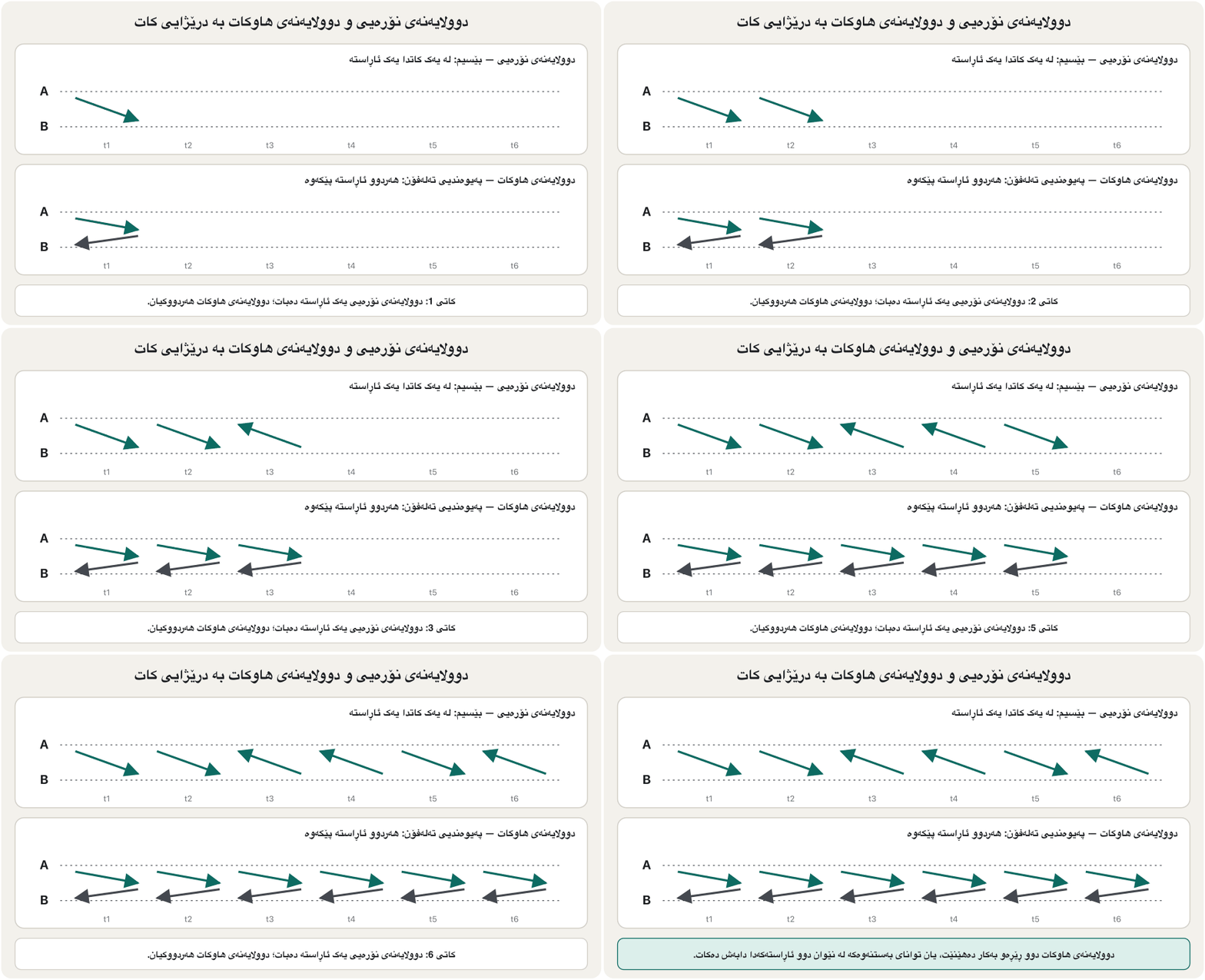
کات لە چەپەوە بۆ ڕاست بکێشە و جیاوازییەکە ڕوون دەبێتەوە. لە هەموو ساتێک تەنیا یەک ئاڕاستە هەڵدەگرێت و هەردوو لا نۆرە دەگرن. لە هەردوو ئاڕاستە لە هەموو ساتێکدا دەڕۆن.
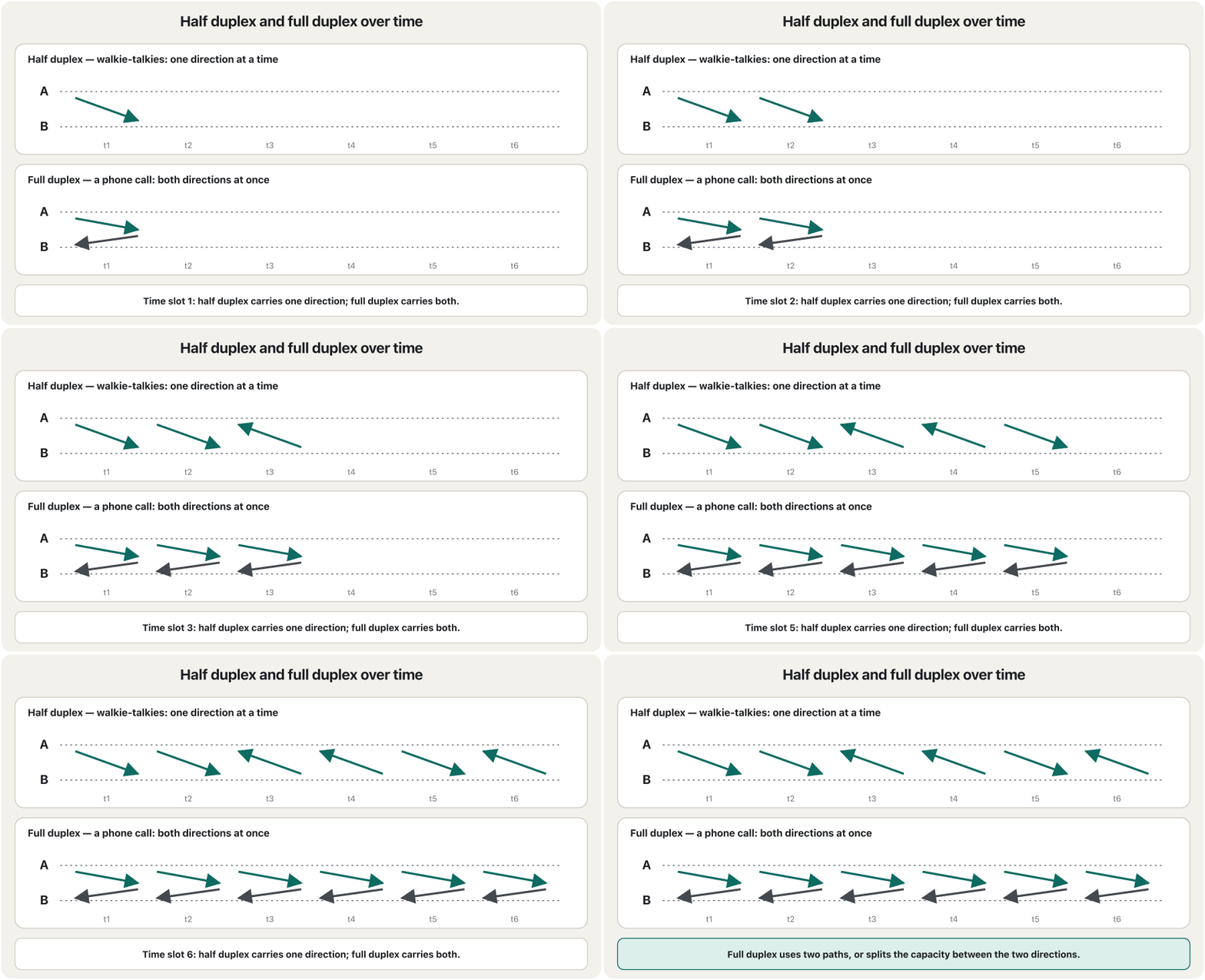
How can full duplex carry two directions at once? Either the link has two paths — separate wire pairs in an Ethernet cable, or two fibres — or the signals going in each direction share the capacity of the link, for example on different frequencies.
چۆن دەتوانێت لە هەمان کاتدا دوو ئاڕاستە هەڵبگرێت؟ یان بەستنەوەکە دوو ڕێڕەوی هەیە — جووتە وایەری جیا لە کێبڵێکی ، یان دوو فایبەر — یان ئەو بە هەر ئاڕاستەیەکدا دەڕۆن توانای بەستنەوەکە بەش دەکەن، بۆ نموونە لەسەر جیاواز.
Transmission modes: a quick recapشێوازەکانی ناردن: بیرخستنەوەیەکی خێرا
Old examples, new examplesنموونە کۆنەکان، نموونە نوێکان
Exam questions often use the classic examples: communication between a computer and its keyboard is simplex, and a traditional monitor only receives. That is the expected answer, because the typing flows one way. Strictly, today’s devices talk back a little — a USB keyboard receives the command to light its Caps Lock lamp, and a monitor tells the computer which resolutions it supports — but the useful data still flows in one direction.
پرسیارەکانی تاقیکردنەوە زۆرجار نموونە کلاسیکییەکان بەکار دەهێنن: پەیوەندیی نێوان و ، کلاسیکیش تەنیا وەردەگرێت. ئەمە وەڵامە چاوەڕوانکراوەکەیە، چونکە نووسینەکە بە یەک ئاڕاستە دەڕوات. بە وردی، ئامێرەکانی ئەمڕۆ کەمێک وەڵام دەدەنەوە — USB فەرمانی هەڵکردنی گڵۆپی Caps Lock وەردەگرێت و بە دەڵێت کام پشتگیری دەکات — بەڵام بەسوود هێشتا بە یەک ئاڕاستە دەڕوات.
Better examples for 2026: simplex — a radio or TV broadcast, GPS satellites sending to your phone, a sensor that only reports; half duplex — walkie-talkies, and every Wi-Fi radio on its channel; full duplex — a phone or video call, a switched Ethernet port, a fibre link.
نموونەی باشتر بۆ 2026: — پەخشی ڕادیۆ یان تیڤی، مانگە دەستکردەکانی کە بۆ مۆبایلەکەت دەنێرن، کە تەنیا ڕاپۆرت دەدات؛ — بێسیم، هەروەها هەموو ڕادیۆیەکی لەسەر کەناڵەکەی خۆی؛ — پەیوەندیی تەلەفۆن یان ڤیدیۆ، Ethernetـی سویچکراو، بەستنەوەی فایبەر.
Where you meet them in real networksلە ڕایەڵە ڕاستەقینەکاندا لە کوێ دەیانبینیت
Put the two ideas together — line configuration and transmission mode — and you can describe any link:
دوو بیرۆکەکە پێکەوە دابنێ — و — و دەتوانیت هەر بەستنەوەیەک وەسف بکەیت:
- An old hub joins its devices into one shared, multipoint link that works in half duplex: when two devices send at once, their signals collide. See Repeaters and Hubs.
- A switch gives every device its own point-to-point link to one switch port, in full duplex: no collisions at all. See Bridges and Switches.
- A Wi-Fi channel is multipoint and half duplex: the radios take turns. See Wireless LANs.
- A fibre link between two routers is point-to-point and full duplex, with one fibre for each direction.
- کۆن ئامێرەکانی دەکاتە یەک بەستنەوەی هاوبەش و کە بە کار دەکات: کاتێک دوو ئامێر پێکەوە دەنێرن، بەریەک دەکەون. بڕوانە دووپاتەکەرەوەکان و هەبەکان.
- بۆ هەموو ئامێرێک بەستنەوەیەکی تایبەت بۆ یەک دروست دەکات — بە : هیچ نییە. بڕوانە پردەکانی ڕایەڵە و سویچەکان.
- کەناڵێکی و : ڕادیۆکان نۆرە دەگرن. بڕوانە ڕایەڵە ناوچەییەکانی بێتەل.
- بەستنەوەی فایبەر لە نێوان دوو و ، فایبەرێک بۆ هەر ئاڕاستەیەک.
Common mistakesهەڵە باوەکان
- Mixing up point-to-point and peer-to-peer. Point-to-point is a link for two devices; peer-to-peer means equal devices, or a network without a server.
- Thinking multipoint means multicast. Multipoint is about a shared link; multicast is about sending one message to a group of receivers.
- Thinking half duplex means “half the speed”. It means “one direction at a time”.
- Calling Wi-Fi full duplex. On one channel a Wi-Fi radio cannot send and receive at the same moment.
- Calling a switch port a shared link. Every switch port is its own point-to-point link.
- Confusing line configuration with topology. The line configuration describes one link; the topology describes the layout of the whole network.
- تێکەڵکردنی و بۆ . بەستنەوەیەکە بۆ دوو ئامێر؛ بۆ واتە ئامێری یەکسان، یان بەبێ .
- وا بزانیت واتە . لەبارەی بەستنەوەیەکی هاوبەشە؛ لەبارەی ناردنی یەک نامەیە بۆ کۆمەڵێک وەرگر.
- وا بزانیت واتە «نیوەی خێرایی». واتای «لە یەک کاتدا یەک ئاڕاستە» دەدات.
- بە دانان. لەسەر یەک کەناڵ ڕادیۆی ناتوانێت لە هەمان ساتدا بنێرێت و وەربگرێت.
- بە بەستنەوەی هاوبەش دانان. هەموو بەستنەوەیەکی سەربەخۆیە: .
- تێکەڵکردنی و . یەک بەستنەوە وەسف دەکات؛ شێوەی هەموو وەسف دەکات.
Exercisesڕاهێنانەکان
Which transmission mode is “transmission in one direction only”?کام شێوازی ناردن «ناردنە تەنیا بە یەک ئاڕاستە»؟
Simplex.
.
Communication between a computer and a keyboard involves ___ transmission.پەیوەندیی نێوان کۆمپیوتەر و کیبۆرد ناردنی ___ لەخۆ دەگرێت.
Simplex (the classic answer; the typing flows one way).
(وەڵامە کلاسیکییەکە؛ نووسینەکە بە یەک ئاڕاستە دەڕوات).
Three or more devices share a link in a ___ connection.سێ ئامێر یان زیاتر لە ___ دا بەستنەوەیەک هاوبەش دەکەن.
Multipoint.
.
In a multipoint line configuration the capacity of the channel is shared either ___ or ___.لە پەیوەندیی فرەخاڵدا توانای کەناڵەکە یان ___ یان ___ دابەش دەبێت.
Spatially or temporally (time-shared).
بە شوێن یان بە کات (کاتبەش).
Name the line configuration and the transmission mode of each link: (a) the leased fibre from the branch router to the head office in Erbil; (b) the Wi-Fi in the waiting room, used by twenty customers’ phones; (c) the cable from a cashier’s PC to the branch switch; (d) the security guards’ walkie-talkies; (e) the waiting-room TV showing a news channel from a satellite dish.
و هەر بەستنەوەیەک بنووسە: (أ) فایبەرە بەکرێگیراوەکە لە لقەکەوە بۆ بنکەی سەرەکی لە هەولێر؛ (ب) ژووری چاوەڕوانی کە مۆبایلی بیست مشتەری بەکاری دەهێنن؛ (ج) کێبڵی نێوان ژمێریار و لقەکە؛ (د) بێسیمی پاسەوانەکان؛ (هـ) تیڤیی ژووری چاوەڕوانی کە کەناڵێکی هەواڵ لە دیشی مانگی دەستکردەوە پیشان دەدات.
Show answerوەڵامەکە پیشان بدە
| Linkبەستنەوە | Line configuration | Transmission mode |
|---|---|---|
| (a) leased fibre to Erbil(أ) فایبەری بەکرێگیراو بۆ هەولێر | point-to-point | full duplex |
| (b) waiting-room Wi-Fi(ب) ژووری چاوەڕوانی | multipoint | half duplex (the radios take turns) (ڕادیۆکان نۆرە دەگرن) |
| (c) cashier’s PC to the switch(ج) ژمێریار بۆ | point-to-point | full duplex |
| (d) walkie-talkies(د) بێسیم | multipoint (one radio channel for all guards) (یەک کەناڵی ڕادیۆ بۆ هەموو پاسەوانەکان) | half duplex |
| (e) satellite TV(هـ) تیڤیی مانگی دەستکرد | multipoint (one satellite, many dishes) (یەک مانگی دەستکرد، زۆر دیش) | simplex |
Open the 3D network lab and load the example “A hub next to a switch”. Ping from one PC on the hub to the other, and from one PC on the switch to the other. Which side is a multipoint, half-duplex link, and how can you see it?
تاقیگەی سێڕەهەندیی ڕایەڵە بکەرەوە و نموونەی « لە تەنیشت » بار بکە. لە سەر بۆ ئەوی تر بنێرە، هەروەها لە سەر بۆ ئەوی تر. کام لایان بەستنەوەیەکی و و چۆن دەیبینیت؟
Show answerوەڵامەکە پیشان بدە
The hub side. The hub repeats every message to all its ports, so every device sees it and only one can send at a time: one shared, multipoint, half-duplex link. On the switch side each PC has its own full-duplex, point-to-point link, and the switch sends the message only to the port of the target.
لای . هەموو نامەیەک بۆ هەموو دووپاتە دەکاتەوە، بۆیە هەموو ئامێرێک دەیبینێت و لە یەک کاتدا تەنیا یەکێکیان دەتوانێت بنێرێت: یەک بەستنەوەی هاوبەش، و . لای هەر بەستنەوەیەکی تایبەتی هەیە: بە . نامەکە تەنیا بۆ ئامێرە مەبەستەکە دەنێرێت.
Summaryپوختە
- Five concepts describe connected devices: line configuration, topology, transmission mode, categories of networks and internetworks.
- A link is the physical path between devices. Point-to-point: a dedicated link for two (a TV remote, a fibre between two routers). Multipoint: one link shared by more than two devices.
- A multipoint link is shared spatially (at the same time, each on its own part) or temporally (taking turns).
- On a shared link devices are peers (equal) or follow a primary (primary–secondary, as in Bluetooth and USB).
- Simplex: one way; half duplex: both ways by turns (walkie-talkie, Wi-Fi, hub); full duplex: both ways at once (phone call, switch port, fibre).
- پێنج چەمک ئامێرە بەستراوەکان وەسف دەکەن: ، ، ، جۆرەکانی و .
- بەستنەوە ڕێگا فیزیکییەکەی نێوان ئامێرەکانە. : بەستنەوەیەکی تایبەت بۆ دوو (ڕیمۆتی تیڤی، فایبەرێک لە نێوان دوو ). : یەک بەستنەوە کە زیاتر لە دوو ئامێر هاوبەشی دەکەن.
- یان بە شوێن (لە هەمان کاتدا، هەریەکە لەسەر بەشی خۆی) یان بە کات (بە نۆرە) هاوبەش دەکرێت.
- لەسەر بەستنەوەیەکی هاوبەش ئامێرەکان یان یان پەیڕەوی سەرەکییەک دەکەن (سەرەکی و لاوەکی، وەک و ).
- : یەک ئاڕاستە؛ : هەردوو ئاڕاستە بە نۆرە (بێسیم، ، )؛ : هەردوو ئاڕاستە پێکەوە (پەیوەندیی تەلەفۆن، ، فایبەر).
Lesson complete!وانەکە تەواو بوو!
Well done. Review the key terms, then go on to the next lesson.دەستخۆش. سەیرێکی زاراوە سەرەکییەکان بکەرەوە، پاشان بڕۆ بۆ وانەی داهاتوو.
Key termsزاراوە سەرەکییەکان
Physical and Logical Topologiesتۆپۆلۆجیی فیزیکی و تۆپۆلۆجیی لۆجیکی
Related lecturesوانە پەیوەندیدارەکان
- Data Communication: Modes, Switching and Protocolsپەیوەندیی دراوە: شێوازەکانی ناردن، سویچکردن و پرۆتۆکۆڵەکان
- Network Topologiesتۆپۆلۆجییەکانی ڕایەڵە
- Physical and Logical Topologiesتۆپۆلۆجیی فیزیکی و تۆپۆلۆجیی لۆجیکی
- Repeaters and Hubsدووپاتەکەرەوەکان و هەبەکان
- Bridges and Switchesپردەکانی ڕایەڵە و سویچەکان
- Wireless LANs: Wi-Fi Standards, Access Points and Securityڕایەڵەی بێتەلی ناوچەیی: ستانداردەکانی وایفای، خاڵەکانی دەستڕاگەیشتن و ئاسایش
References and further readingسەرچاوەکان و خوێندنەوەی زیاتر
- Forouzan, Data Communications and Networking with TCP/IP Protocol Suite, 6th ed. (McGraw Hill) — line configuration and transmission modes
- Cisco Press: Ethernet Switching (ITN v7 sample chapter) — Switch speeds, duplex settings and duplex mismatch
- University of Waterloo IST: Wireless — what you need to know (Wi-Fi is half duplex on a shared medium)
- Wi-Fi Alliance: Wi-Fi CERTIFIED 6 (OFDMA shares channels)
- IEEE 802.11be-2024 (Wi-Fi 7), published 22 July 2025
- Wikipedia: Piconet (one controlling Bluetooth device and up to seven active devices)
This lecture is a first edition. The Kurdish text and terminology are waiting for review by Kurdish IT teachers.ئەم وانەیە چاپی یەکەمە. دەقە کوردییەکە و زاراوەکانی چاوەڕێی پێداچوونەوەی مامۆستایانی کوردی بواری IT ن.