Chapterبەش 3 · Lectureوانە 3.1
Copper Cables, Connectors and Cabling Hardwareکێبڵی مس، سەرەکانی کێبڵ و کەرەستەکانی کێبڵکاری
The copper side of network media: coaxial cable then and now (cable Internet with DOCSIS), twisted pair and why its wires are twisted (balanced signals against EMI and crosstalk), UTP and STP, the cable categories of 2026 from Cat 5e to Cat 8, the 100 m channel, the RJ-45 (8P8C) connector, structured cabling with wall outlets, patch panels and racks, Power over Ethernet, and data over power lines.
لایەنی مسی : لە ڕابردوو و ئەمڕۆدا ( کێبڵ بە )، و بۆچی وایەرەکانی بادەدرێن ( هاوسەنگ دژی و )، و ، پۆلەکانی کێبڵ لە 2026دا لە Cat 5eـەوە تا Cat 8، سنووری 100 مەتر، (8P8C)، بە دیوار، و ، و .
What you will learnچی فێر دەبیت
- Describe coaxial cable — two conductors on one axis — and where coax is used today, including cable Internet with DOCSIS.
- Explain why the wires of a pair are twisted: balanced signals cancel EMI, and different twist rates reduce crosstalk.
- Tell UTP from STP and read cable names such as U/UTP, F/UTP and S/FTP.
- Choose a cable category (Cat 5e, 6, 6A or 8) for a speed and a distance, and keep a link inside the 100 m channel.
- Name the parts of structured cabling — wall outlet, horizontal cable, patch panel, rack and patch cords — and say what PoE and power-line communication do.
- وەسف بکەیت — دوو لەسەر یەک تەوەر — و بڵێیت ئەمڕۆ لە کوێ بەکار دێت، لەوانە کێبڵ بە .
- ڕوونی بکەیتەوە بۆچی وایەرەکانی جووتێک بادەدرێن: هاوسەنگ لادەبەن و ڕێژەی بادانی جیاواز کەم دەکاتەوە.
- جیاوازیی و بزانیت و ناوی کێبڵی وەک U/UTP، F/UTP و S/FTP بخوێنیتەوە.
- پۆلێکی کێبڵ (Cat 5e، 6، 6A یان 8) بۆ خێرایی و دوورییەک هەڵبژێریت و بەستەرێک لە ناو سنووری 100 مەتردا بهێڵیتەوە.
- بەشەکانی ناو ببەیت — ، کێبڵی ئاسۆیی، ، و کێبڵی پاچ — و بڵێیت و چی دەکەن.
Network media: copper, glass and airهۆکارەکانی گواستنەوەی ڕایەڵە: مس، شووشە و هەوا
Every network needs a path for its signals. Network media come in three kinds: copper cables carry electrical pulses, fibre-optic cables carry light, and wireless links carry radio waves. Cables are guided media — the signal follows the cable. Wireless is unguided — the signal spreads through the air. The short version is in Guided and unguided media; Media: the paths for the signal shows the three signals side by side.
هەموو ڕێگایەکی پێویستە بۆ ئەوەی پێیدا بڕۆن. سێ جۆرن: کێبڵی مس لێدانی کارەبایی هەڵدەگرێت، ڕووناکی هەڵدەگرێت و بەستەری هەڵدەگرێت. کێبڵەکان ڕێنماییکراون — شوێن کێبڵەکە دەکەوێت. ڕێنمایینەکراوە — بە ناو هەوادا بڵاو دەبێتەوە. کورتەکەی لە هۆکارەکانی گواستنەوەی ڕێنماییکراو و ڕێنمایینەکراودایە؛ هۆکارەکانی گواستنەوە: ڕێگاکانی سیگناڵ سێ لە تەنیشت یەکتر پیشان دەدات.
This lesson is about copper: coaxial cable and twisted pair — unshielded (UTP) and shielded (STP) — with the connectors and the hardware that hold a building's cabling together. How to make and test a cable is the lab that follows; fibre is in Fibre-Optic Cables and Wi-Fi in Wireless LANs.
ئەم وانەیە لەبارەی مسە: و — نەپارێزراو (UTP) و پارێزراو (STP) — لەگەڵ و ئەو کەرەستانەی کێبڵکاریی بینایەک پێکەوە دەگرن. دروستکردن و پشکنینی کێبڵ لە تاقیگەی دواتردایە؛ فایبەر لە کێبڵەکانی فایبەر ئۆپتیکدایە و لە ڕایەڵە ناوچەییەکانی بێتەلدا.
In the layered models, the cables and their connectors are the physical layer of OSI — see Layer 1: the physical layer — and part of the link layer of TCP/IP. Whatever frame comes down the stack (A new name at every layer: PDUs) leaves the network card as bits on one of these media.
لە مۆدێلە چینبەندییەکاندا، کێبڵەکان و — بڕوانە چینی 1: چینی فیزیکی — و بەشێکن لە چینی بەستەرـی TCP/IP. هەر کە بە ناو چینەکاندا دادەبەزێت (ناوێکی نوێ لە هەر چینێکدا: یەکەکانی دراوەی پرۆتۆکۆڵ) وەک لەسەر یەکێک لەم لە دەردەچێت.
Coaxial cable: two conductors on one axisکێبڵی هاوتەوەر: دوو گەیەنەر لەسەر یەک تەوەر
A coaxial cable (coax) is round. From the centre out it has a copper conductor, a layer of plastic insulation, a braided copper shield and an outer jacket. The copper wire and the shield are its two conductors, and both share one centre line — that is what co-axial means.
(کۆئەکس) خڕە. لە ناوەڕاستەوە بۆ دەرەوە: مس، چینێکی پلاستیکیی ، ڕووپۆشێکی مسی چنراو و بەرگێکی دەرەوە. وایەرە مسەکە و ڕووپۆشەکە دوو کێبڵەکەن و هەردووکیان یەک هێڵی ناوەڕاستیان هەیە — ئەمەیە واتای هاوتەوەر.
The signal travels on the centre conductor and comes back on the shield. Noise from outside lands on the shield, not on the centre wire, so coax carries high frequencies — dozens of TV channels, for example — cleanly. Its connectors screw or twist on: the F connector for TV and satellite, the BNC for CCTV cameras and test equipment.
بە ناوەڕاستدا دەڕوات و بە ڕووپۆشەکەدا دەگەڕێتەوە. دەرەوە بەر ڕووپۆشەکە دەکەوێت، نەک بەر وایەری ناوەڕاست، بۆیە بەرز بە پاکی دەگوازێتەوە — بۆ نموونە دەیان کەناڵی تیڤی. بادەدرێن یان بە سووڕاندن قفڵ دەبن: سەری F بۆ تیڤی و مانگی دەستکرد، بۆ کامێرای CCTV و ئامێرەکانی پێوان.
Coax then and now: from Ethernet to cable Internetکێبڵی هاوتەوەر دوێنێ و ئەمڕۆ: لە Ethernetـەوە بۆ ئینتەرنێتی کێبڵ
The first Ethernet LANs ran on coax: thick 10BASE5, with segments of up to 500 m, and thin 10BASE2, with segments of up to 185 m. Both carried 10 Mb/s, were cheap per computer and used medium-sized connectors — but they were buses, and one break stopped everyone. Twisted pair replaced them in the 1990s. That story is in A real bus: 10BASE2 and Ethernet: From 10Base-2 to 800 Gigabit.
یەکەم Ethernet لەسەر بوون: 10BASE5ـی ئەستوور بە تا 500 m و باریک بە تا 185 m. هەردووکیان 10 Mb/sـیان دەگواستەوە، بۆ هەر هەرزان بوون و مامناوەندیان هەبوو — بەڵام بوون و یەک پچڕان هەمووانی ڕادەگرت. لە ساڵانی 1990دا جێیانی گرتەوە. ئەو چیرۆکە لە ڕایەڵەیەکی هێڵیی ڕاستەقینە: 10BASE2 و Ethernet: لە 10Base-2ـەوە بۆ 800 گیگابیتدایە.
Coax is still all around you: between a satellite dish and the receiver (RG-6, see Coaxial cable), on security cameras, and in cable Internet. A cable company runs fibre to a node in each neighbourhood and coax from there into the homes — a hybrid fibre-coax network. The cable modem speaks DOCSIS: DOCSIS 3.1 is specified for up to 10 Gb/s down and 1–2 Gb/s up, and DOCSIS 4.0 (first issued in 2019) for up to 10 Gb/s down and 6 Gb/s up, shared by all the homes on one coax segment.
هێشتا لە هەموو دەوروبەرتدایە: لە نێوان دیشی مانگی دەستکرد و ڕیسیڤەردا (RG-6، بڕوانە کێبڵی هاوتەوەر)، لەسەر کامێراکانی پاسەوانی و لە کێبڵدا. کۆمپانیای کێبڵ فایبەر دەگەیەنێتە گرێیەک لە هەر گەڕەکێکدا و لەوێوە دەباتە ناو ماڵەکان — تێکەڵەی فایبەر و کۆئەکس. کێبڵ بە قسە دەکات: DOCSIS 3.1 بۆ تا 10 Gb/s و 1 تا 2 Gb/s دیاری کراوە، DOCSIS 4.0 (یەکەم دەرچوون 2019) بۆ تا 10 Gb/s و 6 Gb/s ، کە هەموو ماڵەکانی سەر یەک بەشی کۆئەکس هاوبەشی دەکەن.
Twisted pair: eight wires in four pairsکێبڵی جووتە بادراو: هەشت وایەر لە چوار جووتدا
A twisted-pair Ethernet cable holds eight thin copper wires in four pairs. Each pair has one wire of a solid colour — blue, orange, green or brown — twisted together with a white wire striped in the same colour. Every wire has its own colour-coded plastic insulation, and the outer jacket holds the four pairs together.
Ethernet هەشت وایەری مسی باریک لەخۆ دەگرێت کە لە چوار جووتدا ڕێکخراون. هەر جووتێک وایەرێکی ڕەنگی تەواوی هەیە — شین، پرتەقاڵی، سەوز یان قاوەیی — کە لەگەڵ وایەرێکی سپی بە هێڵێکی هەمان ڕەنگ پێکەوە بادراون. هەر وایەرێک پلاستیکیی ڕەنگکراوی خۆی هەیە و بەرگی دەرەوە چوار جووتەکە پێکەوە دەگرێت.
UTP (unshielded twisted pair) has nothing more inside: it is thin, cheap and easy to bend, and it is the usual cable in homes, offices and schools. It is the least expensive cable per computer, its RJ-45 plug is small, and a link can be up to 100 m long. The basics are in Twisted-pair cable; this lesson shows why the pairs work.
(UTP) هیچی تری تێدا نییە: باریک، هەرزان و ئاسان دەچەمێتەوە و کێبڵی ئاساییە لە ماڵ، ئۆفیس و قوتابخانەدا. بۆ هەر هەرزانترین کێبڵە، بچووکە و بەستەرێک دەتوانێت تا 100 m درێژ بێت. بنەماکان لە کێبڵی جووتە بادراودان؛ ئەم وانەیە پیشانی دەدات جووتەکان بۆچی کار دەکەن.
Why twist the wires? Balanced pairsبۆچی وایەرەکان بادەدرێن؟ جووتی هاوسەنگ
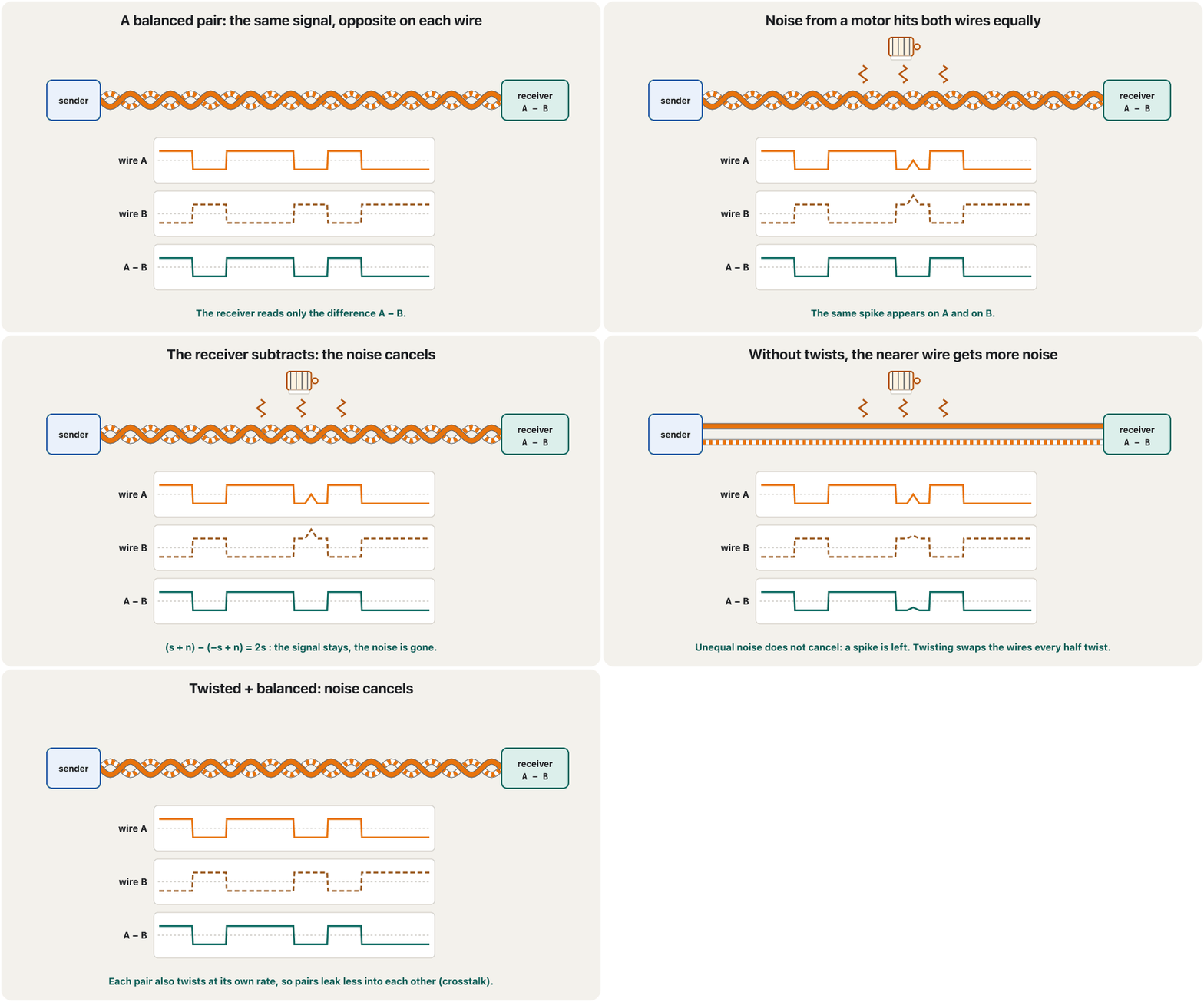
Ethernet sends each signal on a balanced pair: one wire carries the signal and its partner carries the same signal upside down. The receiver never looks at one wire alone — it measures only the difference between the two.
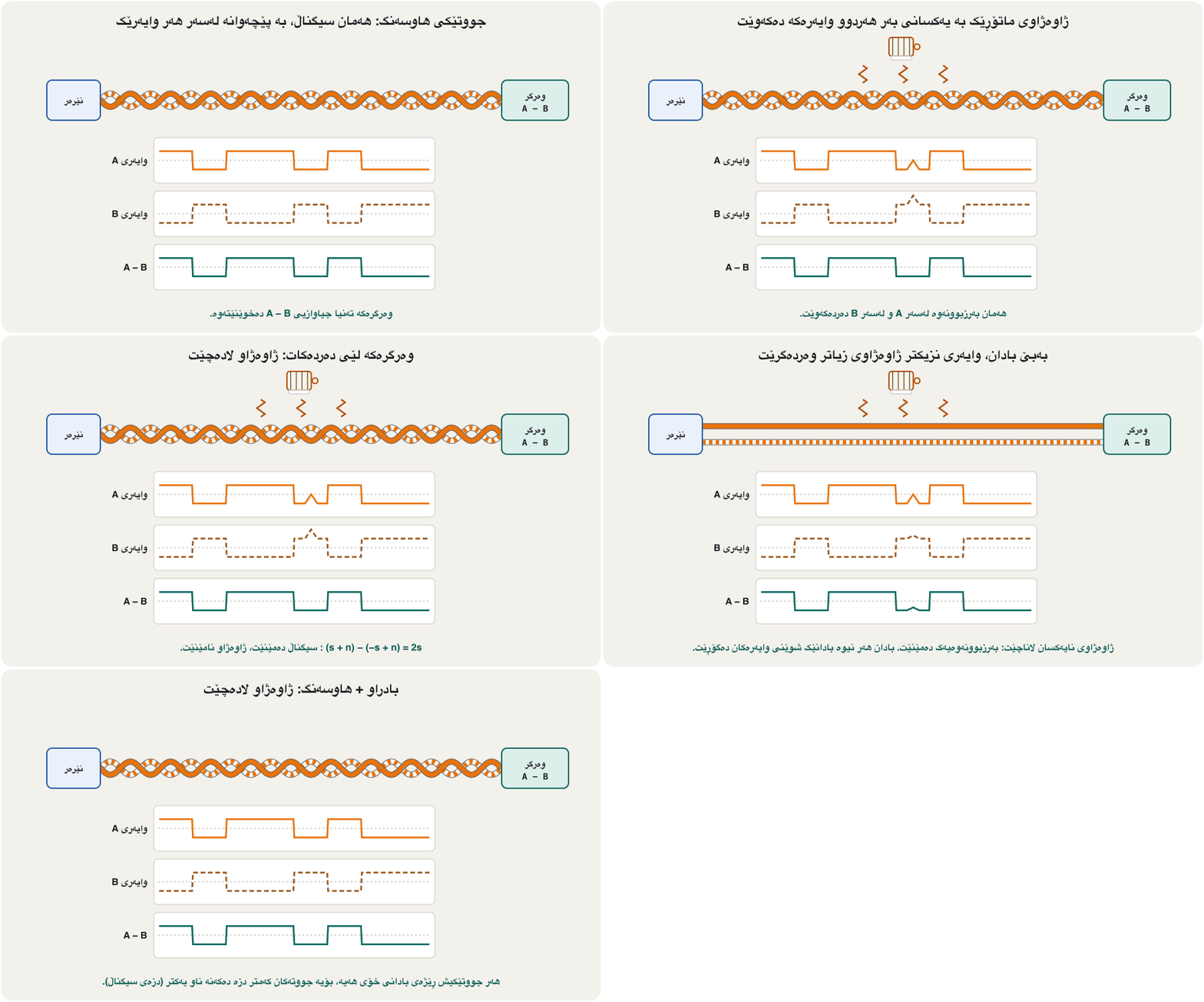
Ethernet هەر لەسەر جووتێکی هاوسەنگ دەنێرێت: وایەرێک هەڵدەگرێت و هاوڕێکەی هەمان بە پێچەوانەوە هەڵدەگرێت. وەرگرەکە هەرگیز تەنیا سەیری یەک وایەر ناکات — تەنیا جیاوازیی نێوان دووەکە دەپێوێت.
Noise from outside — a motor, a lamp, a power cable — pushes both wires the same way, because the twists keep swapping which wire is nearer to it. When the receiver subtracts one wire from the other, the signal doubles and the noise cancels. The opposite currents in the pair also make opposite magnetic fields that cancel, so a twisted pair sends out less noise of its own. The idea is old: Alexander Graham Bell used twisted pairs for telephone lines in 1881.
دەرەوە — ، گڵۆپێک، کێبڵێکی کارەبا — هەردوو وایەرەکە بە هەمان شێوە پاڵ دەنێت، چونکە بادانەکان بەردەوام شوێنی ئەو وایەرەی لێی نزیکترە دەگۆڕن. کاتێک وەرگرەکە وایەرێک لە ئەوی تر دەردەکات، دوو هێندە دەبێت و لادەچێت. پێچەوانەی ناو جووتەکەش کێڵگەی موگناتیسیی پێچەوانە دروست دەکەن کە یەکتر لادەبەن، بۆیە خۆی کەمتر دەردەدات. بیرۆکەکە کۆنە: ئەلێکساندەر گراهام بێڵ لە 1881دا جووتی بادراوی بۆ هێڵی تەلەفۆن بەکار هێنا.
EMI and crosstalkدەستتێوەردانی ئەلیکترۆموگناتیسی و دزەی سیگناڵ
Electromagnetic interference (EMI) is unwanted voltage pushed into a cable by electrical things nearby: motors, fluorescent lamps, power cables, radio transmitters, even lightning. It can arrive through the air, along the power wiring, or from a cable lying right next to the data cable. (Electricity Basics explains voltage and current.)
(EMI) نەخوازراوە کە ئامێرە کارەباییە نزیکەکان دەیخەنە ناو کێبڵێکەوە: ، گڵۆپی فلۆرێسێنت، کێبڵی کارەبا، نێرەری ڕادیۆ، تەنانەت هەورەبروسکە. دەتوانێت بە ناو هەوادا بێت، بە وایەرەکانی کارەبادا، یان لە کێبڵێکەوە کە ڕێک لە تەنیشت کێبڵی دانراوە. (بنەماکانی کارەبا و ڕوون دەکاتەوە.)
You can even hear EMI. Put a mobile phone next to powered speakers: when a call or a message arrives, they may buzz — dit-dit-dit. The phone sends its radio signal in short bursts; the bursts push small voltages into the speaker cables, and the amplifier makes them loud. Older 2G (GSM) phones, which send about 217 bursts a second, do this most; 4G and 5G phones much less.
تەنانەت دەتوانیت گوێت لە بێت. مۆبایلێک لە تەنیشت داگیرساو دابنێ: کاتێک پەیوەندییەک یان نامەیەک دێت، لەوانەیە بزرینگێتەوە — دید-دید-دید. مۆبایلەکە ڕادیۆیی بە پرتەی کورت دەنێرێت؛ ئەم پرتانە بچووک دەخەنە ناو کێبڵەکانی و دەنگیان بەرز دەکاتەوە. مۆبایلی کۆنی 2G (GSM)، کە نزیکەی 217 پرتە لە چرکەیەکدا دەنێرن، زیاتر ئەمە دەکەن؛ مۆبایلی 4G و 5G زۆر کەمتر.
Crosstalk is noise from inside the same cable: a little of one pair's signal leaks into its neighbour. That is why each pair has its own twist rate, and why a plug must keep the pairs twisted almost to the contacts — at most about 13 mm untwisted (see the lab). Cable testers measure near-end crosstalk (NEXT) when they certify a cable.
لە ناوەوەی هەمان کێبڵەوە: کەمێک لە جووتێک دزە دەکاتە ناو جووتی دراوسێوە. بۆیە هەر جووتێک ڕێژەی بادانی خۆی هەیە، بۆیەشە دەبێت جووتەکان تا نزیکی پەیوەندکارەکان بادراو بهێڵێتەوە — بەلای زۆرەوە نزیکەی 13 mm بانەدراو (بڕوانە تاقیگەکە). کاتێک کێبڵێک پەسەند دەکەن، سەرە نزیکەکە (NEXT) دەپێون.
UTP or STP? Shields and their namesجووتە بادراوی نەپارێزراو یان جووتە بادراوی پارێزراو؟ ڕووپۆش و ناوەکانیان
STP (shielded twisted pair) wraps metal round the colour-coded pairs inside the outer jacket: an overall shield round all of them, pair shields round each pair, or both. The shield keeps outside EMI out and stops pairs leaking into neighbouring cables (alien crosstalk). STP costs more, is thicker and stiffer, and works only if the shield is earthed at the patch panel; like UTP, a link may be up to 100 m long.
(STP) کانزا بە دەوری جووتە ڕەنگکراوەکاندا لە ناو بەرگی دەرەوەدا دەپێچێت: ڕووپۆشێکی گشتی بە دەوری هەموویاندا، ڕووپۆشی جووت بە دەوری هەر جووتێکدا، یان هەردووکیان. ڕووپۆشەکە ڕێگە نادات دەرەوە بێتە ژوورەوە و ناهێڵێت جووتەکان دزە بکەنە ناو کێبڵە دراوسێکانەوە ( بێگانە). STP گرانتر، ئەستوورتر و ڕەقترە و تەنیا ئەو کاتە کار دەکات کە ڕووپۆشەکەی لە بە بەسترابێت؛ وەک UTP، بەستەرێک دەتوانێت تا 100 m درێژ بێت.
ISO/IEC 11801 names the build in two parts: before the slash the whole cable, after it each pair; U = no shield, F = foil, S = braid, and TP = twisted pair. U/UTP is plain UTP, F/UTP has foil around all four pairs, and S/FTP has a braid around everything and foil on each pair. A shielded RJ-45 plug has a metal shell but the same small size.
ISO/IEC 11801 ناوی دروستکردنەکە بە دوو بەش دەنووسێت: پێش هێڵە لارەکە هەموو کێبڵەکە، دوای ئەو هەر جووتێک؛ U = بێ ڕووپۆش، F = پەڕەی کانزایی، S = تۆڕی چنراو و TP = جووتی بادراو. U/UTP هەمان UTPـی ئاساییە، F/UTP پەڕەی کانزایی بە دەوری هەر چوار جووتەکەدا هەیە و S/FTP تۆڕێکی چنراو بە دەوری هەموویدا و پەڕەیەک بۆ هەر جووتێکی هەیە. سەری ڕووپۆشدار قاڵبێکی کانزایی هەیە، بەڵام هەمان قەبارەی بچووکی هەیە.
The shield does not decide the speed — the category does (next screen). Choose STP near heavy machines, in factories and hospitals, and for shielded Cat 6A or Cat 8 links; UTP is right for most homes, offices and schools.
ڕووپۆش خێرایی دیاری ناکات — پۆلەکەی دیاری دەکات (شاشەی داهاتوو). STP لە نزیک ئامێری قورس، لە کارگە و نەخۆشخانەدا و بۆ بەستەری ڕووپۆشداری Cat 6A یان Cat 8 هەڵبژێرە؛ UTP بۆ زۆربەی ماڵ، ئۆفیس و قوتابخانەکان دەگونجێت.
Cable categories in 2026پۆلەکانی کێبڵ لە 2026دا
Twisted-pair cable is sold by category (Cat). A higher category is built more carefully — tighter twists, better insulation, sometimes a shield — so it passes its tests at a higher frequency, measured in megahertz (MHz). The US standard ANSI/TIA-568.2-E (October 2024) defines the categories, and the international ISO/IEC 11801 defines the matching classes.
بەپێی پۆل (Cat) دەفرۆشرێت. پۆلی بەرزتر بە وردیی زیاتر دروست دەکرێت — بادانی توندتر، باشتر، هەندێک جار ڕووپۆش — بۆیە لە بەرزتردا تاقیکردنەوەکانی تێدەپەڕێنێت کە بە مێگاهێرتز (MHz) دەپێورێت. ئەمریکیی ANSI/TIA-568.2-E (ئۆکتۆبەری 2024) پۆلەکان دیاری دەکات و ISO/IEC 11801ـی نێودەوڵەتی پۆلە هاوتاکان بە ناوی Class دیاری دەکات.
| Categoryپۆل | ISO classپۆلی ISO | Tested up toتاقیکراوە تا | Ethernet (IEEE 802.3)جۆری Ethernet (IEEE 802.3) | Distanceدووری |
|---|---|---|---|---|
| Cat 5e | D | 100 MHz | 1000BASE-T (1 Gb/s), 2.5GBASE-T1000BASE-T (1 Gb/s)، 2.5GBASE-T | 100 m |
| Cat 6 | E | 250 MHz | 5GBASE-T; 10GBASE-T only up to 55 m5GBASE-T؛ 10GBASE-T تەنیا تا 55 m | 100 m |
| Cat 6A | EA | 500 MHz | 10GBASE-T (10 Gb/s) | 100 m |
| Cat 8 | I / II | 2000 MHz | 25GBASE-T, 40GBASE-T25GBASE-T، 40GBASE-T | 30 m |
Cat 6A is the usual choice for new office and school cabling: it carries 10 Gb/s over the full 100 m and copes better with the heat of PoE. Cat 7 and Cat 7A are ISO classes F and FA only; TIA does not list them, and no Ethernet standard needs them — the next step after Cat 6A is Cat 8, for 30 m links between switches and servers in a data centre. Cat 3 (16 MHz, 10 Mb/s) and Cat 5 (100 MHz, 100 Mb/s) are history.
Cat 6A هەڵبژاردنی ئاساییە بۆ کێبڵکاریی نوێی ئۆفیس و قوتابخانە: 10 Gb/s بە تەواوی 100 مەترەکە دەگوازێتەوە و باشتر بەرگەی گەرمیی دەگرێت. Cat 7 و Cat 7A تەنیا پۆلی F و FAـی ISOـن؛ TIA ناویان نابات و هیچ Ethernet پێویستی پێیان نییە — هەنگاوی دوای Cat 6A، Cat 8ـە، بۆ بەستەری 30 مەتری نێوان و لە . Cat 3 (16 MHz، 10 Mb/s) و Cat 5 (100 MHz، 100 Mb/s) بوونەتە مێژوو.
Cable categories in 2026پۆلەکانی کێبڵ لە 2026دا
Why can a 100 MHz cable carry 1 Gb/s?بۆچی کێبڵێکی 100 MHz دەتوانێت 1 Gb/s ببات؟
MHz and Mb/s measure different things. The MHz number is the highest frequency at which the cable is tested. Gigabit Ethernet (1000BASE-T) sends on all four pairs at once, in both directions, and puts two bits into every signal change (symbol), 125 million times a second on each pair:
MHz و Mb/s دوو شتی جیاواز دەپێون. ژمارەی MHz بەرزترین کە کێبڵەکەی تێدا تاقی دەکرێتەوە. Gigabit Ethernet (1000BASE-T) بە هەر چوار جووتەکە پێکەوە و بە هەردوو ئاڕاستە دەنێرێت و دوو دەخاتە ناو هەر گۆڕانێکی (هێما)، لەسەر هەر جووتێک 125 ملیۆن جار لە چرکەیەکدا:
Four pairs, each carrying 250 Mb/s, give 1 Gb/s — over a cable tested to only 100 MHz.
چوار جووت، هەریەکەیان 250 Mb/s، دەکاتە 1 Gb/s — لەسەر کێبڵێک کە تەنیا تا 100 MHz تاقی کراوەتەوە.
Faster Ethernet packs even more bits into each symbol and uses higher frequencies, which needs better cable: that is why 10GBASE-T asks for Cat 6A.
Ethernetـی خێراتر زیاتر دەخاتە ناو هەر هێمایەکەوە و بەرزتر بەکار دەهێنێت، کە کێبڵی باشتری پێویستە: بۆیە 10GBASE-T داوای Cat 6A دەکات.
The RJ-45 plug: really an 8P8CRJ-45: لە ڕاستیدا 8P8C
A connector is the device at the end of a cable that joins it to a device or to another cable. Twisted-pair Ethernet uses an 8P8C modular connector — 8 positions, 8 contacts — standardised as IEC 60603-7, and everyone calls it RJ-45. Never push the narrower RJ-11 telephone plug into an RJ-45 port (Network and audio ports).
ئەو بەشەیە لە کۆتایی کێبڵێکدا کە بە ئامێرێک یان بە کێبڵێکی ترەوەی دەبەستێتەوە. Ethernet سەری مۆدیولاریی 8P8C بەکار دەهێنێت — 8 شوێن، 8 پەیوەندکار — کە بە IEC 60603-7 ستاندارد کراوە و هەمووان پێی دەڵێن . هەرگیز سەری باریکتری RJ-11ـی تەلەفۆن مەخەرە ناو RJ-45ـەوە (دەرچەکانی ڕایەڵە و دەنگ).
The name comes from the US telephone system: RJ means registered jack, and the original RJ45S was a keyed telephone socket for modems with only two contacts. The Ethernet plug only looks like it, but the name stuck — so 'registered jack 45' is a familiar label, not an exact technical description.
ناوەکە لە سیستەمی تەلەفۆنی ئەمریکاوە هاتووە: RJ واتە registered jack (جەکی تۆمارکراو) و RJ45Sـی ڕەسەن سۆکێتێکی تەلەفۆنی کلیلدار بوو بۆ کە تەنیا دوو پەیوەندکاری هەبوو. Ethernet تەنیا لێی دەچێت، بەڵام ناوەکە مایەوە — بۆیە 'registered jack 45' ناوێکی ناسراوە، نەک وەسفێکی تەکنیکیی ورد.
Pin numbering: hold the plug with its clip underneath and the gold contacts facing you — pin 1 is on the left. On a port, with the latch slot at the bottom, pin 1 is on the left too. 10 and 100 Mb/s Ethernet send on pins 1 and 2 and receive on 3 and 6; Gigabit and faster use all eight pins, in both directions at once.
ژمارەکردنی پینەکان: بە شێوەیەک بگرە کە قولاپەکەی لە ژێرەوە بێت و پەیوەندکارە زەردەکان بەرەو تۆ — پینی 1 لە لای چەپە. لەسەر ، کاتێک کونی قولاپەکە لە خوارەوەیە، پینی 1 لەوێش لە لای چەپە. Ethernetـی 10 و 100 Mb/s بە پینی 1 و 2 دەنێرێت و بە 3 و 6 وەردەگرێت؛ Gigabit و خێراتر هەر هەشت پینەکە بەکار دەهێنن، بە هەردوو ئاڕاستە پێکەوە.
Structured cabling: from the desk to the switchکێبڵکاریی ڕێکخراو: لە مێزەوە بۆ سویچ
A building is not cabled with one long cable from each PC to a switch. Structured cabling — the system described by TIA-568 and ISO/IEC 11801 — splits the path into fixed parts and flexible parts:
بینایەک بە یەک کێبڵی درێژ لە هەر بۆ کێبڵکاری ناکرێت. — ئەو سیستەمەی TIA-568 و ISO/IEC 11801 وەسفی دەکەن — ڕێگاکە دابەش دەکات بۆ بەشی جێگیر و بەشی نەرم:
- Work area: the PC joins the wall outlet with a short, flexible patch cord. The outlet is the place that gives the work area access to the building's cabling.
- Horizontal cable: solid-copper cable inside the walls and ceiling, from the outlet to the network room — installed once, labelled, never moved.
- Patch panel: in the network room every horizontal cable ends on the back of a patch panel.
- Patch cord to the switch: a short patch cord joins each panel port to a switch port.
- Backbone: fibre usually joins the network room of each floor to the main equipment room and to the Internet connection.
- ناوچەی کار: بە کێبڵێکی پاچی کورت و نەرم دەبەسترێتەوە بە . ئەو شوێنەیە کە ڕێگە بە ناوچەی کار دەدات بگاتە کێبڵکاریی بیناکە.
- کێبڵی ئاسۆیی: کێبڵی مسی ڕەق لە ناو دیوار و بنمیچدا، لە بۆ ژووری — یەک جار دادەنرێت، ناوی لێ دەنووسرێت و هەرگیز ناجووڵێنرێت.
- : لە ژووری هەموو کێبڵێکی ئاسۆیی لە پشتی کۆتایی دێت.
- کێبڵی پاچ بۆ : کێبڵێکی پاچی کورت هەر پانێڵەکە بە دەبەستێتەوە.
- : زۆرجار فایبەر ژووری هەر نهۆمێک بە ژووری سەرەکیی ئامێرەکان و بە پەیوەندیی دەبەستێتەوە.
Want to cable a small network yourself? In the CêIT network lab you can place PCs and a switch, join them with cables and ping between them.
دەتەوێت خۆت بچووک کێبڵکاری بکەیت؟ لە تاقیگەی ڕایەڵەی CêIT دەتوانیت و دابنێیت، بە کێبڵ پێکەوەیان ببەستیتەوە و لە نێوانیاندا بکەیت.
Structured cabling: from the desk to the switchکێبڵکاریی ڕێکخراو: لە مێزەوە بۆ سویچ
The 100 m rule: 90 + 10یاسای 100 مەتر: 90 + 10
For 1–10 Gb/s Ethernet over twisted pair, the whole channel, from device to device, may be at most 100 m: up to 90 m of fixed horizontal cable (the permanent link) and up to 10 m of patch cords in total, both ends together. Beyond that the signal becomes too weak (attenuation) and too noisy. Put a switch in the middle, or use fibre. Cat 8 allows only 30 m.
بۆ Ethernetـی 1 تا 10 Gb/s لەسەر ، هەموو ڕێگاکە، لە ئامێرەوە بۆ ئامێر، دەبێت لە 100 m زیاتر نەبێت: تا 90 m کێبڵی ئاسۆیی جێگیر (بەستەری جێگیر) و تا 10 m کێبڵی پاچ بە گشتی، هەردوو سەر پێکەوە. لەوە زیاتر زۆر لاواز دەبێت () و زۆری تێدەکەوێت. لە ناوەڕاستدا دابنێ، یان فایبەر بەکار بهێنە. Cat 8 تەنیا 30 m ڕێگە دەدات.
Example: the farthest classroom of a school in Sulaymaniyah is 84 m of cable from the network room, with a 2 m cord at the switch and a 5 m cord at the desk — the channel is fine. A lab 120 m away needs a switch on the way, or fibre.
نموونە: دوورترین ژووری خوێندنی قوتابخانەیەک لە سلێمانی 84 مەتر کێبڵ لە ژووری دوورە، لەگەڵ کێبڵێکی 2 مەتری لای و کێبڵێکی 5 مەتری لای مێزەکە — ڕێگاکە باشە. تاقیگەیەک کە 120 m دوورە پێویستی بە لە سەر ڕێگاکە یان فایبەر هەیە.
Racks, rack units and patch panelsڕاکەکان، یەکەی ڕاک و پانێڵەکانی پاچ
In the network room the equipment sits in a rack: a standard metal frame 19 inches wide. Heights are counted in rack units: 1U = 44.45 mm (1¾ inches). A typical switch or patch panel is 1U high, and a full-size rack has 42U. The rack keeps switches, patch panels, routers, servers and a UPS tidy, cool and locked.
لە ژووری ئامێرەکان لە ناو دادەنرێن: چوارچێوەیەکی کانزایی ستاندارد بە پانیی 19 ئینج. بەرزی بە یەکەی ڕاک دەژمێردرێت: 1U = 44.45 mm (1¾ ئینج). یان ئاسایی 1U بەرزە و تەواو 42Uـی هەیە. ، ، ، و ڕێکخراو، فێنک و قفڵکراو ڕادەگرێت.
A patch panel is a row of RJ-45 sockets. The building's horizontal cables are punched down onto its back once; at the front, short patch cords join each socket to a switch port. To move a classroom to another switch, the technician moves only a patch cord — the cables in the walls stay untouched. Each wall outlet and its panel port carry the same label, for example R12-03.
ڕیزێک . کێبڵە ئاسۆییەکانی بیناکە یەک جار لە پشتەوەی دەچەقێنرێن؛ لە پێشەوە کێبڵی پاچی کورت هەر بە دەبەستنەوە. بۆ گواستنەوەی ژوورێکی خوێندن بۆ تر، تەکنیکارەکە تەنیا کێبڵێکی پاچ دەجووڵێنێت — کێبڵەکانی ناو دیوار دەست لێنەدراو دەمێننەوە. هەر و سەر پانێڵەکە هەمان ناویان لەسەرە، بۆ نموونە R12-03.
Power over Ethernet (PoE)PoE
Power over Ethernet sends electrical power over the same twisted-pair cable as the data, so a ceiling access point, a camera on a wall or a desk phone needs no power socket. The switch (or a small injector) is the power sourcing equipment (PSE); the device is the powered device (PD). Before sending any power the switch checks that the device asks for it, so a laptop on the same port gets only data.
وزەی کارەبا بە هەمان دەنێرێت کە دەبات، بۆیە لە بنمیچدا، کامێرایەک لەسەر دیوار یان تەلەفۆنێکی سەر مێز پێویستی بە پلاکی کارەبا نییە. (یان ئامێرێکی بچووکی injector) ئامێری دابینکەری کارەبا (PSE)ـیە؛ ئامێرەکەش ئامێری کارەباپێدراو (PD). پێش ناردنی هەر کارەبایەک، دەپشکنێت کە ئامێرەکە داوای دەکات، بۆیە لەسەر هەمان تەنیا وەردەگرێت.
| Standard | Yearساڵ | Power from the switchکارەبا لە | Power at the deviceکارەبا لە ئامێرەکەدا | Pairs usedجووتە بەکارهاتووەکان |
|---|---|---|---|---|
| IEEE 802.3af (PoE) | 2003 | 15.4 W | 12.95 W | 2 |
| IEEE 802.3at (PoE+) | 2009 | 30 W | 25.5 W | 2 |
| IEEE 802.3bt Type 3 | 2018 | 60 W | 51 W | 2 or 42 یان 4 |
| IEEE 802.3bt Type 4 | 2018 | 90 W | 71.3 W | 4 |
Bundles of cables that carry power get warm, which is one reason the TIA cabling standard recommends Cat 6A or better when many cables carry PoE.
کۆمەڵە کێبڵێک کە کارەبا هەڵدەگرن گەرم دەبن، ئەمەش یەکێکە لە هۆکارەکانی ئەوەی کێبڵکاریی TIA ڕاسپاردەی Cat 6A یان باشتر دەکات کاتێک کێبڵی زۆر هەڵدەگرن.
Can data travel over electricity wires?دەتوانرێت دراوە بە وایەری کارەبادا بڕوات؟
Yes. Power-line communication (PLC) sends data over electricity wires. At home, a powerline adapter plugged into a wall socket near the router sends Ethernet over the house wiring to a second adapter in another room (standards IEEE 1901 and ITU-T G.hn). Electricity companies use the same idea to read smart meters.
بەڵێ. (PLC) بە وایەرەکانی کارەبادا دەنێرێت. لە ماڵەوە، ئەداپتەرێکی powerline کە لە نزیک دەخرێتە ناو پلاکی کارەباوە، Ethernet بە وایەرەکانی کارەبای ماڵدا دەنێرێت بۆ ئەداپتەرێکی دووەم لە ژوورێکی تردا ( IEEE 1901 و ITU-T G.hn). کۆمپانیاکانی کارەبا هەمان بیرۆکە بۆ خوێندنەوەی بەکار دەهێنن.
It helps where no network cable can be laid, but it is not as good as a cable: appliances switching on and off add noise, transformers block the signal, and the real speed is usually far below the number on the box. Do not mix it up with PoE: PoE puts power on a data cable; PLC puts data on a power cable.
لەو شوێنانەی کە ناتوانرێت کێبڵی ڕابکێشرێت یارمەتیدەرە، بەڵام وەک کێبڵ باش نییە: هەڵکردن و کوژاندنەوەی ئامێرەکانی ماڵ زیاد دەکەن، ترانسفۆرمەر ڕادەگرێت و خێرایی ڕاستەقینە زۆرجار زۆر لە ژمارەی سەر قوتووەکە کەمترە. لەگەڵ تێکەڵی مەکە: کارەبا دەخاتە سەر کێبڵی ؛ PLC دەخاتە سەر کێبڵی کارەبا.
Common mistakesهەڵە باوەکان
| Mistakeهەڵە | What is trueڕاستییەکە |
|---|---|
| “Coax is still a LAN cable.”« هێشتا کێبڵی .» | Coax LANs (10 Mb/s) ended in the 1990s; today coax carries TV, CCTV and cable Internet (DOCSIS). (10 Mb/s) لە ساڵانی 1990دا کۆتاییان هات؛ ئەمڕۆ تیڤی، CCTV و کێبڵ () دەگوازێتەوە. |
| “The twists only keep the wires tidy.”«بادانەکان تەنیا وایەرەکان ڕێکوپێک ڕادەگرن.» | Twisting makes outside noise hit both wires equally so it cancels; different twist rates reduce crosstalk.بادان وا دەکات دەرەوە بە یەکسانی بەر هەردوو وایەرەکە بکەوێت و لابچێت؛ ڕێژەی بادانی جیاواز کەم دەکاتەوە. |
| “STP is always faster than UTP.”«STP هەمیشە لە UTP خێراترە.» | The category sets the speed; a shield only adds protection from noise.پۆلەکە خێرایی دیاری دەکات؛ ڕووپۆش تەنیا پاراستن لە زیاد دەکات. |
| “Cat 7 comes after Cat 6A.”«Cat 7 دوای Cat 6A دێت.» | Cat 7/7A are ISO classes only; TIA lists Cat 5e, 6, 6A and 8.Cat 7/7A تەنیا پۆلی ISOـن؛ TIA ناوی Cat 5e، 6، 6A و 8 دەبات. |
| “A 100 MHz cable can carry only 100 Mb/s.”«کێبڵی 100 MHz تەنیا دەتوانێت 100 Mb/s ببات.» | Gigabit Ethernet uses four pairs at once with 2 bits per symbol: 1 Gb/s on Cat 5e.Gigabit Ethernet چوار جووت پێکەوە بەکار دەهێنێت بە 2 بۆ هەر هێمایەک: 1 Gb/s لەسەر Cat 5e. |
| “A 130 m Cat 6A cable will still work at 10 Gb/s.”«کێبڵێکی Cat 6Aـی 130 مەتری هێشتا بە 10 Gb/s کار دەکات.» | The channel is at most 100 m (90 m fixed + 10 m of cords); use a switch on the way or fibre.ڕێگاکە بەلای زۆرەوە 100 مەترە (90 m جێگیر + 10 m کێبڵی پاچ)؛ لە سەر ڕێگا یان فایبەر بەکار بهێنە. |
| “RJ-45 is the exact name of the Ethernet plug.”«RJ-45 ناوی وردی Ethernetـە.» | It is an 8P8C modular connector; RJ45S was a telephone jack. ‘RJ-45’ is the everyday name.سەرێکی مۆدیولاریی 8P8Cـە؛ RJ45S جەکێکی تەلەفۆن بوو. 'RJ-45' ناوە ڕۆژانەکەیەتی. |
| “PoE and powerline are the same thing.”« و هەمان شتن.» | PoE: power over a data cable. PLC: data over power wires.: کارەبا بە کێبڵی . PLC: بە وایەری کارەبادا. |
Exercisesڕاهێنانەکان
A school in Sulaymaniyah is being cabled. Choose the medium for each part and say why: (a) a computer lab 25 m of cable from the network room; (b) a classroom block whose farthest room is 85 m away; (c) six cameras and four Wi-Fi access points on the ceilings; (d) the sports hall, 300 m away across the yard.
قوتابخانەیەک لە سلێمانی کێبڵکاری دەکرێت. بۆ هەر بەشێک هەڵبژێرە و بڵێ بۆچی: (a) تاقیگەیەکی کە 25 مەتر کێبڵ لە ژووری دوورە؛ (b) بینایەکی ژووری خوێندن کە دوورترین ژووری 85 m دوورە؛ (c) شەش کامێرا و چوار لەسەر بنمیچەکان؛ (d) هۆڵی وەرزش، کە 300 m دوورە لە ئەو بەری حەوشەکەوە.
Show answerوەڵامەکە پیشان بدە
- (a) Cat 6A (or Cat 6 for 1 Gb/s) UTP: wall outlets, horizontal cables to a patch panel, patch cords to the switch.
- (b) Cat 6A again: 85 m is within the 90 m permanent link, as long as the patch cords add no more than 10 m.
- (c) Cat 6A from a PoE switch: the cameras need PoE (802.3af), the access points PoE+ or 802.3bt. No power sockets are needed on the ceilings.
- (d) Not copper: 300 m is beyond the 100 m channel, and a cable between buildings meets lightning and earth problems. Use fibre — see Fibre-Optic Cables.
- (a) Cat 6A (یان Cat 6 بۆ 1 Gb/s) UTP: دیوار، کێبڵی ئاسۆیی بۆ ، کێبڵی پاچ بۆ .
- (b) دیسان Cat 6A: 85 m لە ناو سنووری 90 مەتری بەستەری جێگیردایە، بەو مەرجەی کێبڵە پاچەکان لە 10 m زیاتر زیاد نەکەن.
- (c) Cat 6A لە PoE: کامێراکان PoE (802.3af)یان پێویستە، PoE+ یان 802.3bt. هیچ پلاکێکی کارەبا لەسەر بنمیچەکان پێویست نییە.
- (d) مس نا: 300 m لە سنووری 100 مەتر زیاترە و کێبڵی نێوان بیناکان تووشی کێشەی هەورەبروسکە و دەبێت. فایبەر بەکار بهێنە — بڕوانە کێبڵەکانی فایبەر ئۆپتیک.
A 24-port PoE+ switch can deliver 370 W in total. It must power 10 cameras (PoE, budget 15.4 W each at the switch) and 6 access points (PoE+, budget 30 W each at the switch). Is the power budget enough?
PoE+ـی 24 دەرچەیی دەتوانێت بە گشتی 370 W بدات. دەبێت کارەبا بداتە 10 کامێرا (PoE، هەریەکە 15.4 W لە ) و 6 (PoE+، هەریەکە 30 W لە ). ئایا بودجەی کارەباکە بەسە؟
Show answerوەڵامەکە پیشان بدە
Yes: 334 W is within the 370 W budget, with 36 W to spare. Switches count the power they send, which is why the budget uses 15.4 W and 30 W, not the 12.95 W and 25.5 W that arrive at the devices.
بەڵێ: 334 W لە ناو بودجەی 370 W دایە و 36 W زیاد دەمێنێتەوە. ئەو کارەبایە دەژمێرن کە دەینێرن، بۆیە بودجەکە 15.4 W و 30 W بەکار دەهێنێت، نەک 12.95 W و 25.5 W کە دەگەنە ئامێرەکان.
Check these two plans against the 100 m rule. Plan A: 88 m of horizontal cable, a 3 m cord at the desk and a 6 m cord in the rack. Plan B: 92 m of horizontal cable and two 2 m cords.
ئەم دوو پلانە بە یاسای 100 مەتر بپشکنە. پلانی A: 88 m کێبڵی ئاسۆیی، کێبڵێکی 3 مەتری لای مێز و کێبڵێکی 6 مەتری لە . پلانی B: 92 m کێبڵی ئاسۆیی و دوو کێبڵی 2 مەتری.
Show answerوەڵامەکە پیشان بدە
- Plan A: permanent link 88 m ≤ 90 m, cords 3 + 6 = 9 m ≤ 10 m, channel 97 m ≤ 100 m — it passes.
- Plan B: the channel is 96 m, but the permanent link is 92 m > 90 m — it fails. Move the rack, add a switch or use a shorter route.
- پلانی A: بەستەری جێگیر 88 m ≤ 90 m، کێبڵە پاچەکان 3 + 6 = 9 m ≤ 10 m، هەموو ڕێگاکە 97 m ≤ 100 m — دەردەچێت.
- پلانی B: هەموو ڕێگاکە 96 مەترە، بەڵام بەستەری جێگیر 92 m > 90 m — دەرناچێت. بگوازەرەوە، زیاد بکە یان ڕێگایەکی کورتتر بەکار بهێنە.
Spot the mistake: a web article says that STP cable has no protective layer and that UTP has an extra protective layer around its pairs.
هەڵەکە بدۆزەرەوە: وتارێکی سەر وێب دەڵێت کێبڵی STP هیچ چینێکی پارێزەری نییە و UTP چینێکی پارێزەری زیادەی بە دەوری جووتەکانیدا هەیە.
Show answerوەڵامەکە پیشان بدە
It is the other way round. STP is the shielded cable, with foil or braid around the pairs; UTP is unshielded and relies on the twists alone. The letters say it: S = shielded, U = unshielded.
پێچەوانەکەیە. STP کێبڵە پارێزراوەکەیە، بە پەڕەی کانزایی یان تۆڕی چنراو بە دەوری جووتەکاندا؛ UTP نەپارێزراوە و تەنیا پشت بە بادانەکان دەبەستێت. پیتەکان خۆیان دەڵێن: S = shielded (پارێزراو)، U = unshielded (نەپارێزراو).
Name the layers of a coaxial cable, from the centre out.چینەکانی کێبڵی هاوتەوەر لە ناوەڕاستەوە بۆ دەرەوە ناو ببە.
Copper centre conductor, plastic insulation, braided copper shield, outer jacket.
مسی ناوەڕاست، پلاستیکی، ڕووپۆشی مسی چنراو، بەرگی دەرەوە.
Name the parts of an STP cable.بەشەکانی کێبڵی STP ناو ببە.
Outer jacket, overall shield, pair shields, the twisted pairs, and the colour-coded plastic insulation of each wire.
بەرگی دەرەوە، ڕووپۆشی گشتی، ڕووپۆشی جووتەکان، جووتە بادراوەکان و پلاستیکیی ڕەنگکراوی هەر وایەرێک.
What is a wall outlet, and what is a patch panel for?دەرچەی دیوار چییە و پانێڵی پاچ بۆ چییە؟
The outlet is the place that gives the work area access to the building's cabling. The patch panel is where the fixed horizontal cables end in the rack; patch cords join its ports to the switch, so connections change without touching the walls.
ئەو شوێنەیە کە ڕێگە بە ناوچەی کار دەدات بگاتە کێبڵکاریی بیناکە. ئەو شوێنەیە کە کێبڵە ئاسۆییە جێگیرەکان لە ناو کۆتایی دێن؛ کێبڵی پاچ بە دەبەستێتەوە، بۆیە پەیوەندییەکان بەبێ دەستلێدانی دیوارەکان دەگۆڕدرێن.
Which three kinds of media can a network use, and which four kinds of cable?ڕایەڵەیەک دەتوانێت کام سێ جۆر هۆکاری گواستنەوە و کام چوار جۆر کێبڵ بەکار بهێنێت؟
Copper, fibre and wireless; coaxial cable, STP, UTP and fibre-optic cable.
مس، فایبەر و ؛ ، STP، UTP و .
Compare coax, STP and UTP: cost per computer, connector size and maximum length.کێبڵی هاوتەوەر، STP و UTP بەراورد بکە: تێچوو بۆ هەر کۆمپیوتەرێک، قەبارەی سەری کێبڵ و زۆرترین درێژی.
UTP: cheapest, small RJ-45 plug, 100 m channel. STP: moderately more expensive, a shielded RJ-45 of the same size, 100 m. Coax: cheap, medium-sized F or BNC connectors; old coax Ethernet allowed 185 m (thin) or 500 m (thick) segments — history today.
UTP: هەرزانترین، ـی بچووک، ڕێگای 100 مەتری. STP: کەمێک گرانتر، RJ-45ـی ڕووپۆشداری هەمان قەبارە، 100 m. : هەرزان، سەری F یان BNCـی مامناوەند؛ Ethernetـی کۆنی 185 m (باریک) یان 500 m (ئەستوور)ـی ڕێگە دەدا — ئەمڕۆ مێژوون.
Summaryپوختە
- Coax has two conductors on one axis — centre wire and braided shield. Coax LANs are history; coax now carries TV, CCTV and cable Internet (DOCSIS 3.1/4.0, up to 10 Gb/s down).
- Twisted pair = 8 wires in 4 colour-coded pairs. Balanced signals plus twisting make outside noise (EMI) cancel; different twist rates keep crosstalk low.
- UTP has no shield; STP adds foil or braid (U/UTP, F/UTP, S/FTP) and must be earthed. The category decides the speed: Cat 5e 1–2.5 Gb/s, Cat 6 5 Gb/s, Cat 6A 10 Gb/s to 100 m, Cat 8 25/40 Gb/s to 30 m.
- The channel is at most 100 m: 90 m fixed + 10 m of cords. The RJ-45 plug is an 8P8C connector; pin 1 is on the left with the clip underneath.
- Structured cabling: desk → patch cord → wall outlet → horizontal cable → patch panel in a 19-inch rack (1U = 44.45 mm) → patch cord → switch.
- PoE puts power on the data cable (802.3af 15.4 W, 802.3at 30 W, 802.3bt up to 90 W from the switch); power-line communication puts data on the power wires.
- دوو لەسەر یەک تەوەر هەیە — وایەری ناوەڕاست و ڕووپۆشی چنراو. بوونەتە مێژوو؛ ئەمڕۆ تیڤی، CCTV و کێبڵ ( 3.1/4.0، تا 10 Gb/s ) دەگوازێتەوە.
- = 8 وایەر لە 4 جووتی ڕەنگکراودا. هاوسەنگ لەگەڵ بادان وا دەکەن دەرەوە () لابچێت؛ ڕێژەی بادانی جیاواز کەم دەکاتەوە.
- ڕووپۆشی نییە؛ پەڕەی کانزایی یان تۆڕی چنراو زیاد دەکات (U/UTP، F/UTP، S/FTP) و دەبێت بە ببەسترێت. پۆل خێرایی دیاری دەکات: Cat 5e ـ 1 تا 2.5 Gb/s، Cat 6 ـ 5 Gb/s، Cat 6A ـ 10 Gb/s تا 100 m، Cat 8 ـ 25/40 Gb/s تا 30 m.
- ڕێگاکە بەلای زۆرەوە 100 mـە: 90 m جێگیر + 10 m کێبڵی پاچ. سەرێکی 8P8Cـە؛ کاتێک قولاپەکە لە ژێرەوەیە پینی 1 لە چەپە.
- : مێز ← کێبڵی پاچ ← ← کێبڵی ئاسۆیی ← لە 19 ئینجیدا (1U = 44.45 mm) ← کێبڵی پاچ ← .
- کارەبا دەخاتە سەر کێبڵی (802.3af ـ 15.4 W، 802.3at ـ 30 W، 802.3bt تا 90 W لە )؛ دەخاتە سەر وایەرەکانی کارەبا.
Lesson complete!وانەکە تەواو بوو!
Well done. Review the key terms, then go on to the next lesson.دەستخۆش. سەیرێکی زاراوە سەرەکییەکان بکەرەوە، پاشان بڕۆ بۆ وانەی داهاتوو.
Key termsزاراوە سەرەکییەکان
Lab: Straight-Through, Crossover and Rollover Cablesتاقیگە: کێبڵی ڕاستەوخۆ، کێبڵی خاچی و کێبڵی rollover
Related lecturesوانە پەیوەندیدارەکان
- Lab: Straight-Through, Crossover and Rollover Cablesتاقیگە: کێبڵی ڕاستەوخۆ، کێبڵی خاچی و کێبڵی rollover
- Fibre-Optic Cables: Single-Mode and Multimodeکێبڵەکانی فایبەر ئۆپتیک: تاکمۆد و فرەمۆد
- Ethernet: From 10Base-2 to 800 GigabitEthernet: لە 10Base-2ـەوە بۆ 800 گیگابیت
- OSI Layers 1–3: Physical, Data Link and Networkچینەکانی 1 تا 3ی OSI: چینی فیزیکی، چینی بەستەری دراوە و چینی ڕایەڵە
- The TCP/IP Model and How It Maps to OSIمۆدێلی TCP/IP و چۆنییەتیی یەکگرتنەوەی لەگەڵ OSI
- Encapsulation, PDUs and Addresses at Each Layerپێچانەوە، یەکەکانی دراوەی پرۆتۆکۆڵ و ناونیشانەکان لە هەر چینێکدا
- Physical and Logical Topologiesتۆپۆلۆجیی فیزیکی و تۆپۆلۆجیی لۆجیکی
- Modems and Routersمۆدێمەکان و ڕێدۆزەکان
- Wireless LANs: Wi-Fi Standards, Access Points and Securityڕایەڵەی بێتەلی ناوچەیی: ستانداردەکانی وایفای، خاڵەکانی دەستڕاگەیشتن و ئاسایش
- Cables and Wireless: Transmission Mediaکێبڵ و بێتەل: هۆکارەکانی گواستنەوە
- Ports and Connectorsدەرچەکان و سەرەکانی کێبڵ
- Computer Communicationsپەیوەندیی کۆمپیوتەر
- Electricity Basics: Voltage, Current and Resistanceبنەماکانی کارەبا: ڤۆڵتیە، تەزوو و بەرگری
References and further readingسەرچاوەکان و خوێندنەوەی زیاتر
- Fluke Networks: Ethernet Cable Categories Explained — A Brief History (Cat 3 to Cat 8, MHz and speeds)
- The Fiber Optic Association: UTP cable for premises cabling (categories, Cat 7 not in TIA-568, untwist no more than 13 mm)
- Siemon: ANSI/TIA-568.2-E released (24 October 2024; power delivery guidance in Annex H)
- Wikipedia: ISO/IEC 11801 (classes D, E, EA, F, FA, I and II)
- Wikipedia: ANSI/TIA-568 (T568A/T568B; 90 m horizontal, 100 m with patch cords)
- Wikipedia: Ethernet over twisted pair (IEEE 802.3 clauses, minimum categories, 10GBASE-T on Cat 6 up to 55 m)
- Wikipedia: Gigabit Ethernet (1000BASE-T: four pairs, 125 megabaud, PAM-5)
- Fluke Networks: Category 8 cable testing (2 GHz, 30 m channels, 25GBASE-T and 40GBASE-T)
- Wikipedia: Twisted pair (Bell 1881, balanced signalling, ISO/IEC 11801 shield codes)
- Syston Cable: Why are wires twisted in twisted pair cables? (EMI, crosstalk, balanced signals)
- TechTarget: What is electromagnetic interference (EMI)?
- Wikipedia: Modular connector (8P8C, RJ45S, IEC 60603-7, pin numbering)
- CableLabs: DOCSIS 4.0 technology (10 Gb/s down, 6 Gb/s up; DOCSIS 3.1 comparison)
- Wikipedia: Power over Ethernet (IEEE 802.3af, 802.3at, 802.3bt power classes)
- Wikipedia: Power-line communication (powerline adapters, IEEE 1901, ITU-T G.hn, smart meters)
- Wikipedia: Rack unit (1U = 44.45 mm, EIA-310, 42U racks)
- Wikipedia: GSM (TDMA noise — a buzzing sound heard on speakers near a GSM phone)
- Science ABC: Why do speakers make a weird noise near a ringing phone? (2G bursts about 217 times a second; 4G and 5G phones hardly buzz)
This lecture is a first edition. The Kurdish text and terminology are waiting for review by Kurdish IT teachers.ئەم وانەیە چاپی یەکەمە. دەقە کوردییەکە و زاراوەکانی چاوەڕێی پێداچوونەوەی مامۆستایانی کوردی بواری IT ن.