Chapterبەش 1 · Lectureوانە 1.4
Physical and Logical Topologiesتۆپۆلۆجیی فیزیکی و تۆپۆلۆجیی لۆجیکی
Every network has two maps: how its devices are cabled and how its signals really travel. This lesson recaps the six shapes, then shows the classic pairs — a coaxial bus, a hub that is a star outside and a bus inside, a switch, Token Ring’s ring in a box and FDDI’s double ring — and explains which shapes suit which relationship, where each one breaks, what a full mesh costs and why the Internet is only a partial mesh.
هەموو دوو نەخشەی هەیە: ئامێرەکانی چۆن بە کێبڵ بەستراون و بە ڕاستی چۆن دەڕۆن. ئەم وانەیە شەش شێوەکە بیر دەخاتەوە، پاشان جووتە ناسراوەکان نیشان دەدات — ، کە لە دەرەوە و لە ناوەوە ، ، ئەڵقەی ناو سندووقی Token Ring و ئەڵقەی دووانەی FDDI — و ڕوونی دەکاتەوە کام شێوە بۆ کام پەیوەندی دەگونجێت، هەریەکەیان لە کوێوە دەشکێت، تەواو چەندی تێدەچێت و بۆچی تەنیا بەشەکییە.
What you will learnچی فێر دەبیت
- Tell the physical topology of a network from its logical topology.
- Give the physical and logical topology of 10BASE2, a hub LAN, a switched LAN, Token Ring, FDDI and Wi-Fi.
- Say which topologies suit peer-to-peer and which suit primary–secondary transmission.
- Predict what one failure does to a bus, a star, a tree, a ring, a double ring and a mesh.
- Count the cables and ports of a full mesh, and explain why the Internet is a partial mesh.
- جیاوازیی و بکەیت.
- و ، بە ، بە ، Token Ring، FDDI و بڵێیت.
- بڵێیت کام بۆ ناردنی یەکسان بە یەکسان و کامیان بۆ سەرەکی و لاوەکی دەگونجێن.
- پێشبینیی ئەوە بکەیت کە یەک تێکچوون چی بە ، ، ، ، ئەڵقەی دووانە و دەکات.
- کێبڵ و تەواو بژمێریت و ڕوونی بکەیتەوە بۆچی بەشەکییە.
One network, two mapsیەک ڕایەڵە، دوو نەخشە
A network topology describes how the devices of a network are connected: the layout of the computers, printers, switches and cables, and the paths the data takes. Engineers describe every network with two maps:
وەسفی ئەوە دەکات کە ئامێرەکانی چۆن پێکەوە بەستراون: شێوەی ڕیزبوونی ، ، و کێبڵەکان، هەروەها ئەو ڕێگایانەی پێیاندا دەڕوات. ئەندازیاران هەر بە دوو نەخشە وەسف دەکەن:
- The physical topology shows how the devices are physically cabled: where each cable, or radio link, really runs.
- The logical topology shows how the devices communicate across that cabling: where each signal really goes, and who may send when.
- نیشان دەدات ئامێرەکان بە شێوەی فیزیکی چۆن بە کێبڵ بەستراون: هەر کێبڵێک، یان بەستنەوەیەکی ڕادیۆیی، بە ڕاستی بە کوێدا دەڕوات.
- نیشان دەدات ئامێرەکان چۆن بەسەر ئەو کێبڵکارییەدا پەیوەندی دەکەن: هەر بە ڕاستی بۆ کوێ دەچێت و کێ کەی بۆی هەیە بنێرێت.
Often the two maps look the same. Sometimes they do not: four PCs cabled to a hub form a star on the floor, but their signals behave as if they shared one cable — a bus. This lesson is about such pairs.
زۆرجار هەردوو نەخشەکە وەک یەکن. هەندێک جار وا نین: چوار PC کە بە بەستراون، لەسەر زەوی پێک دەهێنن، بەڵام وەک ئەوە ڕەفتار دەکەن کە یەک کێبڵیان بە هاوبەشی هەبێت — . ئەم وانەیە باسی ئەم جووتانە دەکات.
The six shapes in one minuteشەش شێوەکە لە یەک خولەکدا
You met the basic shapes in Network Topologies. Each name below is, first of all, a physical topology:
شێوە بنەڕەتییەکانت لە تۆپۆلۆجییەکانی ڕایەڵەدا ناسی. هەر ناوێکی خوارەوە پێش هەموو شتێک :
- Bus: every device hangs from one shared cable, the backbone. More
- Star: every device has its own cable to one central device. More
- Extended star (tree, hierarchical): stars hung below a bigger star. More
- Ring: each device is joined to the next one, and the last to the first. More
- Mesh: devices joined by many point-to-point links, so there are several routes. More
- Hybrid: two or more of these shapes in one network. More
- : هەموو ئامێرێک بە یەک کێبڵی هاوبەشەوە هەڵواسراوە، کە . زیاتر
- : هەموو ئامێرێک کێبڵی خۆی هەیە بۆ یەک ئامێری ناوەڕاست. زیاتر
- ئەستێرەی درێژکراوە (): چەند ئەستێرەیەک لە ژێر ئەستێرەیەکی گەورەتردا. زیاتر
- : هەر ئامێرێک بە ئامێری دواتر بەستراوە و دوایینیش بە یەکەم. زیاتر
- : ئامێرەکان بە زۆر پێکەوە بەستراون، بۆیە چەند ڕێگایەک هەیە. زیاتر
- : دوو یان زیاتر لەم شێوانە لە یەک . زیاتر
The new question of this lesson: does the data follow the same shape as the cables?
پرسیاری نوێی ئەم وانەیە: ئایا هەمان شێوەی کێبڵەکان وەردەگرێت؟
A real bus: 10BASE2 on coaxial cableڕایەڵەیەکی هێڵیی ڕاستەقینە: 10BASE2 لەسەر کێبڵی هاوتەوەر
The first Ethernet LANs were real buses. In 10BASE2 (thin coaxial cable) and the older 10BASE5 (thick coaxial cable), one long coaxial cable — the backbone — ran past every desk. Each computer was attached to it: in 10BASE2 through a T-connector on its network card, in 10BASE5 through a tap and a short drop line.
یەکەم بە ڕاستی بوون. لە ( باریک) و 10BASE5ـی کۆنتردا ( ئەستوور)، یەک درێژ — — بە لای هەموو مێزەکاندا تێدەپەڕی. هەر پێیەوە دەبەسترا: لە بە سەرێکی T شێوە لەسەر ، لە 10BASE5ـدا بە تاپێک و هێڵێکی لاوەکیی کورت.
Here both maps are a bus. The cable is one line, and every signal runs along all of it, in both directions, to every computer: physical bus, logical bus.
لێرەدا هەردوو نەخشەکە . کێبڵەکە یەک هێڵە و هەر بە درێژایی هەمووی، بە هەردوو ئاڕاستە، دەگاتە هەموو : فیزیکی، لۆجیکی.
Why the bus disappearedبۆچی ڕایەڵەی هێڵی نەما
- Cheapest: one cable for everyone, the smallest amount of cabling of any topology.
- Terminators: a 50 Ω resistor at each end absorbs the signal, so it does not bounce back and spoil the next message.
- One break stops everyone: if the backbone breaks anywhere, none of the computers can use the network.
- Weaker with distance: as the signal travels along the backbone, some of its energy turns into heat, so it grows weaker the farther it goes — attenuation. A 10BASE2 segment may be at most 185 m long.
- One sender at a time: the cable is a shared, multipoint link, so when two computers send together their signals collide.
- هەرزانترینە: یەک کێبڵ بۆ هەمووان، کەمترین کێبڵکاری لە هەموو .
- : بەرگرێکی 50 Ω لە هەر سەرێکدا هەڵدەمژێت، تا نەگەڕێتەوە و پەیامی دواتر تێک نەدات.
- یەک پچڕان هەمووان ڕادەگرێت: ئەگەر لە هەر شوێنێکدا بپچڕێت، هیچ کام لە ناتوانن بەکاربهێنن.
- لاوازتر بە دووری: کاتێک بە درێژایی دەڕوات، بەشێک لە وزەکەی دەبێتە گەرما، بۆیە تا دوورتر بڕوات لاوازتر دەبێت — . هەر دەبێت لە 185 m درێژتر نەبێت.
- لە هەر ساتێکدا یەک نێرەر: کێبڵەکە هاوبەشە، بۆیە کاتێک دوو پێکەوە دەنێرن، تووشی دەبن.
Coaxial buses are history. Stars of twisted-pair cable replaced them in the 1990s, and IEEE 802.3 has deprecated 10BASE2 for new installations since 2011. The whole story is in Ethernet: From 10Base-2 to 800 Gigabit. Coaxial cable itself lives on in cable Internet: Coax then and now.
بوونەتە مێژوو. لە ساڵانی 1990دا جێیان گرتنەوە و IEEE 802.3 لە 2011ـەوە بۆ دامەزراندنی نوێ ڕەت دەکاتەوە. هەموو چیرۆکەکە لە Ethernet: لە 10Base-2ـەوە بۆ 800 گیگابیتدایە. خودی لە کێبڵدا ماوەتەوە: کێبڵی هاوتەوەر دوێنێ و ئەمڕۆ.
Star cabling, two behaviours: hub or switchکێبڵکاریی ئەستێرەیی، دوو ڕەفتار: هەب یان سویچ
In the 1990s Ethernet moved to twisted-pair cables in a star (10BASE-T, then 100BASE-T): every PC got its own cable to a box in the middle. Physically this is always a star. What the box does decides the logical topology:
لە ساڵانی 1990دا گوازرایەوە بۆ بە شێوەی ئەستێرە (10BASE-T، پاشان 100BASE-T): هەر PCـیەک کێبڵی خۆی بۆ سندووقێک لە ناوەڕاستدا وەرگرت. بە شێوەی فیزیکی هەمیشە . ئەوەی سندووقەکە دەیکات دیاری دەکات:
- Hub: it repeats every signal out of every port, so every PC hears everything. Physically a star, logically a bus — “Ethernet in a box”. Only one PC can send at a time; if two send together, their signals collide.
- Switch: it learns which PC is on which port and sends each frame only out of the port that leads to its destination. Physically a star, logically a set of point-to-point links: any two PCs talk as if they had their own cable. (Some books call this a logical star or mesh.)
- : هەموو لە هەموو دووپاتە دەکاتەوە، بۆیە هەموو PCـیەک گوێی لە هەموو شتێک دەبێت. بە شێوەی فیزیکی ، بە شێوەی لۆجیکی — «Ethernet لە ناو سندووقێکدا». لە هەر ساتێکدا تەنیا یەک PC دەتوانێت بنێرێت؛ ئەگەر دووان پێکەوە بنێرن، تووشی دەبن.
- : فێر دەبێت کام PC لەسەر کام و هەر تەنیا لەو دەنێرێت کە بەرەو مەبەستەکەی دەچێت. بە شێوەی فیزیکی ، بە شێوەی لۆجیکی کۆمەڵێک : هەر دوو PCـیەک وەک ئەوە قسە دەکەن کە کێبڵی تایبەتی خۆیان هەبێت. (هەندێک کتێب پێی دەڵێن لۆجیکی یان لۆجیکی.)
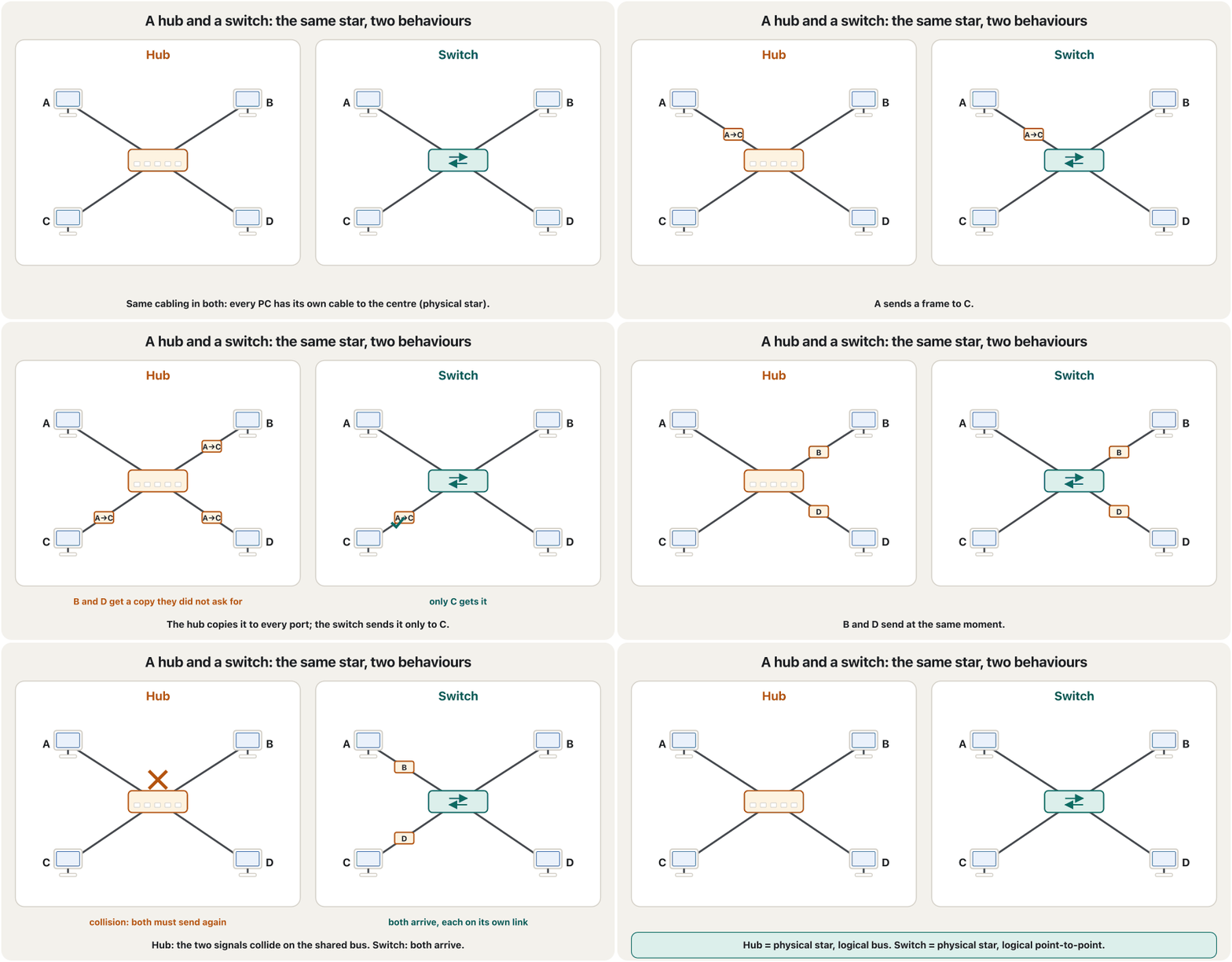
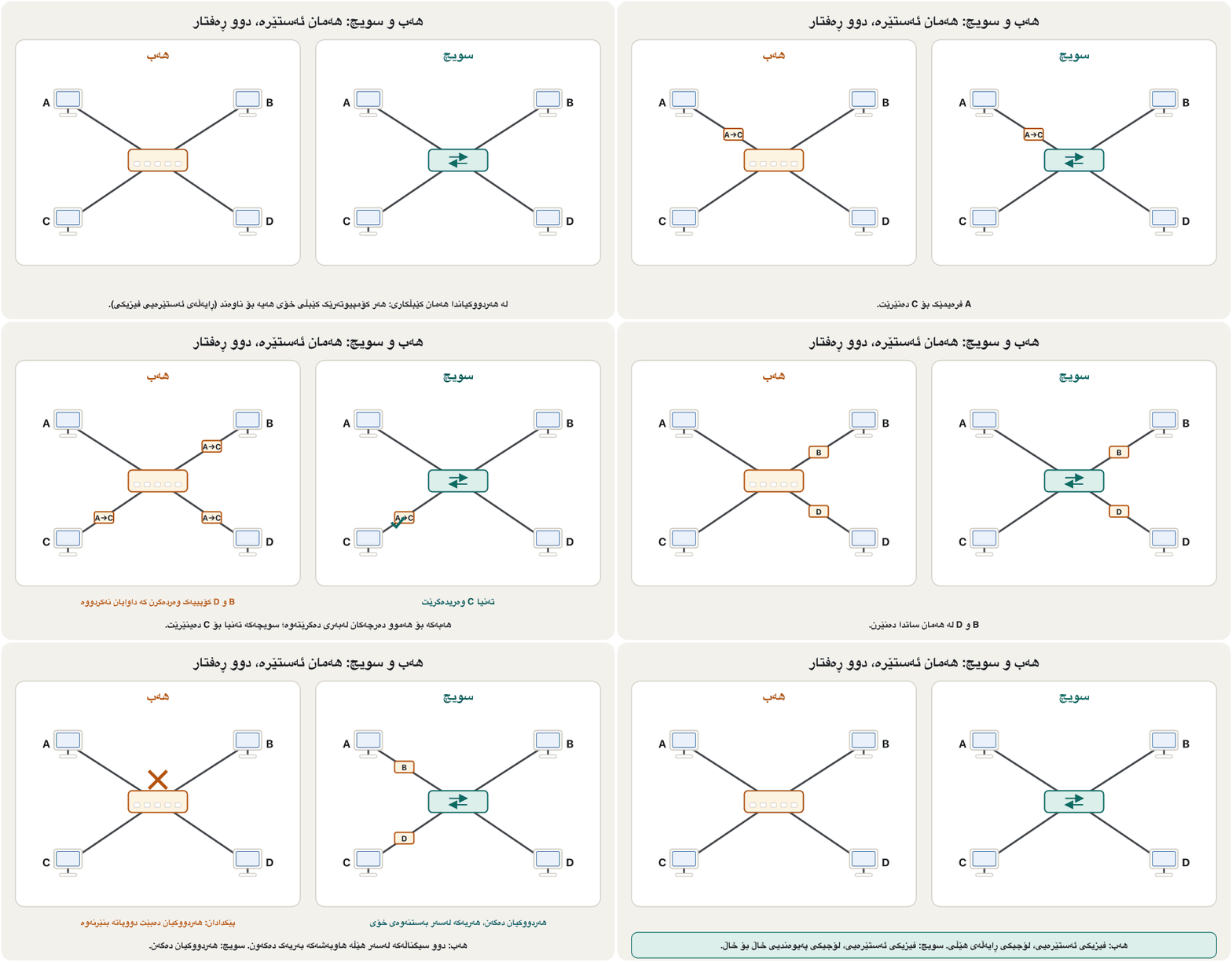
Try it yourself in the CêIT network lab: load the hub example, ping from one PC and watch every PC on the hub receive the frame. Step by step: how a hub floods and how a switch learns.
خۆت لە تاقیگەی ڕایەڵەی CêIT تاقی بکەرەوە: نموونەی باربکە، لە PCـیەکەوە بکە و سەیر بکە چۆن هەموو PCـەکانی سەر وەردەگرن. هەنگاو بە هەنگاو: هەب چۆن بۆ هەمووان دەنێرێت و سویچ چۆن فێر دەبێت.
Same cables, different behaviourهەمان کێبڵ، ڕەفتاری جیاواز
The physical and the logical topology are two separate questions, and every network has an answer to both. Here are the classic pairs side by side:
و دوو پرسیاری جیاوازن و هەموو وەڵامی هەردووکیانی هەیە. جووتە ناسراوەکان لێرەدا لە تەنیشت یەکترن:
Look at the two that are in use today. A switched LAN is a physical star with logical point-to-point links. On Wi-Fi the radios around one access point share one channel and take turns, so logically it behaves much like the old bus.
سەیری ئەو دووانە بکە کە ئەمڕۆ بەکاردێن. بە فیزیکییە بە لۆجیکی. لە ڕادیۆکانی دەوری یەک یەک کەناڵ بە هاوبەشی بەکاردەهێنن و نۆرە دەگرن، بۆیە بە شێوەی لۆجیکی زۆر لە کۆن دەچێت.
Rings, and a ring hidden in a boxڕایەڵە ئەڵقەییەکان و ئەڵقەیەکی شاراوە لە ناو سندووقێکدا
In a ring, each device is joined to the two devices on either side of it, and the last one is joined back to the first. A signal travels round in one direction, from device to device, until it reaches its destination. Every device works as a repeater: it regenerates the bits and passes them on. So when the first host sends to the last one, the data passes through every host in between. The classic ring LANs were Token Ring and FDDI.
لە هەر ئامێرێک بە دوو ئامێرەکەی هەردوو لای خۆیەوە بەستراوە و دوایینیان دەگەڕێتەوە سەر یەکەم. بە یەک ئاڕاستە دەسووڕێتەوە، لە ئامێرێکەوە بۆ ئامێرێکی تر، تا دەگاتە مەبەستەکەی. هەموو ئامێرێک وەک کار دەکات: نوێ دەکاتەوە و دەیاننێرێت بۆ دواتر. بۆیە کاتێک یەکەم بۆ دوایین دەنێرێت، بە ناو هەموو نێوانیاندا تێدەپەڕێت. دوو ئەڵقەیی ناسراو Token Ring و FDDI بوون.
IBM’s Token Ring (4 or 16 Mb/s, IEEE 802.5) hid its ring. The cables ran in a star to a box called a MAU (multistation access unit), but inside the MAU each cable has a path out and a path back, so the signal goes PC1 → PC2 → PC3 → PC4 and back to PC1: physically a star, logically a ring — a “ring in a box”. A relay in the MAU bypasses a PC that is switched off, and a token decides who may send (token passing).
Token Ringـی IBM (4 یان 16 Mb/s، IEEE 802.5) ئەڵقەکەی دەشاردەوە. کێبڵەکانی بە شێوەی ئەستێرە دەچوون بۆ سندووقێک بە ناوی MAU (multistation access unit)، بەڵام لە ناو MAUـدا هەر کێبڵێک ڕێگایەکی چوون و ڕێگایەکی گەڕانەوەی هەیە، بۆیە لە PC1ـەوە دەچێت بۆ PC2، پاشان بۆ PC3 و PC4 و دەگەڕێتەوە بۆ PC1. واتە بە شێوەی فیزیکی ، بە شێوەی لۆجیکی — «ئەڵقەیەک لە ناو سندووقێکدا». ڕیلەیەک لە ناو MAUـدا ئەو PCـیە تێدەپەڕێنێت کە کوژاوەتەوە و تۆکنێک دیاری دەکات کێ بنێرێت (گواستنەوەی تۆکن).
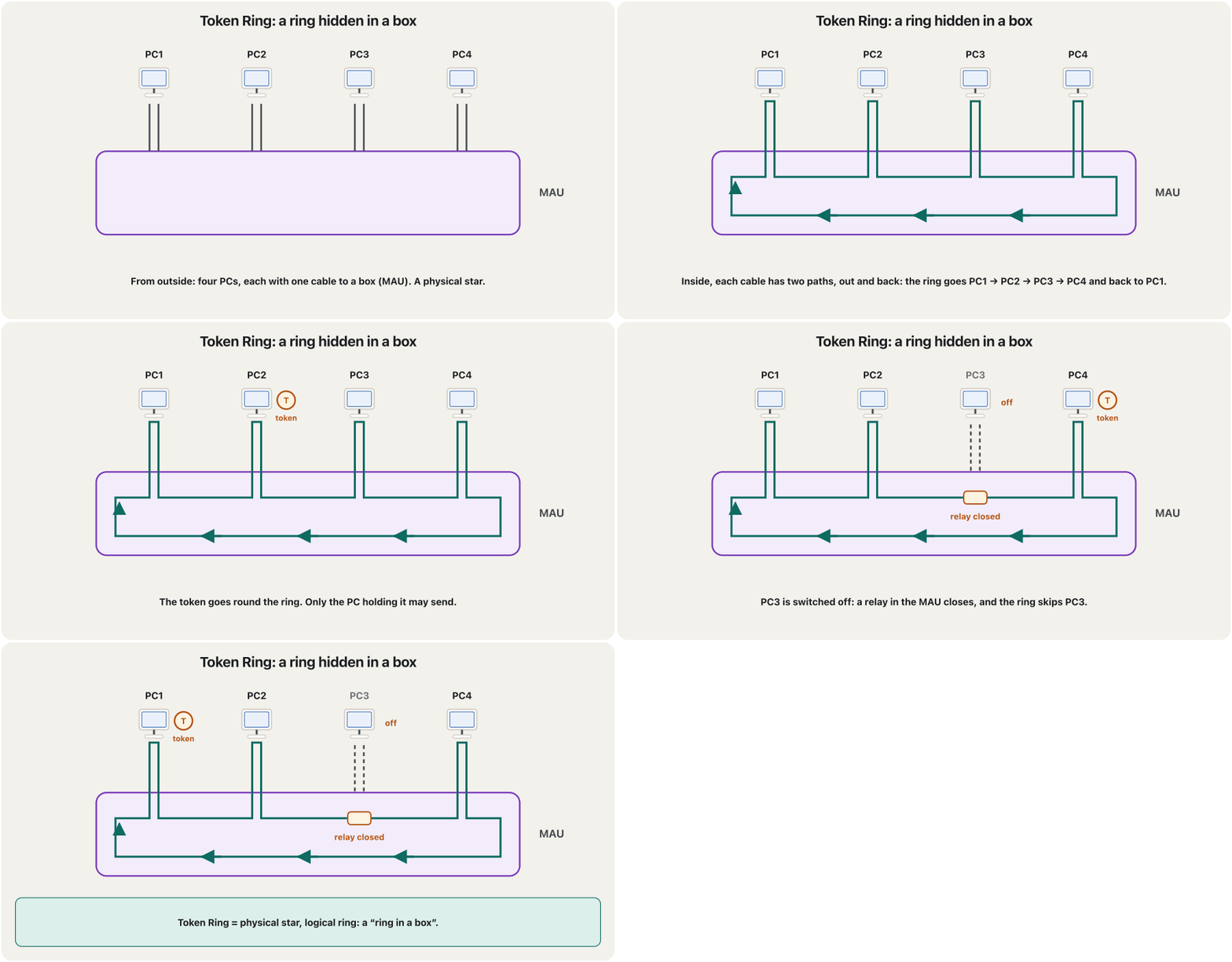
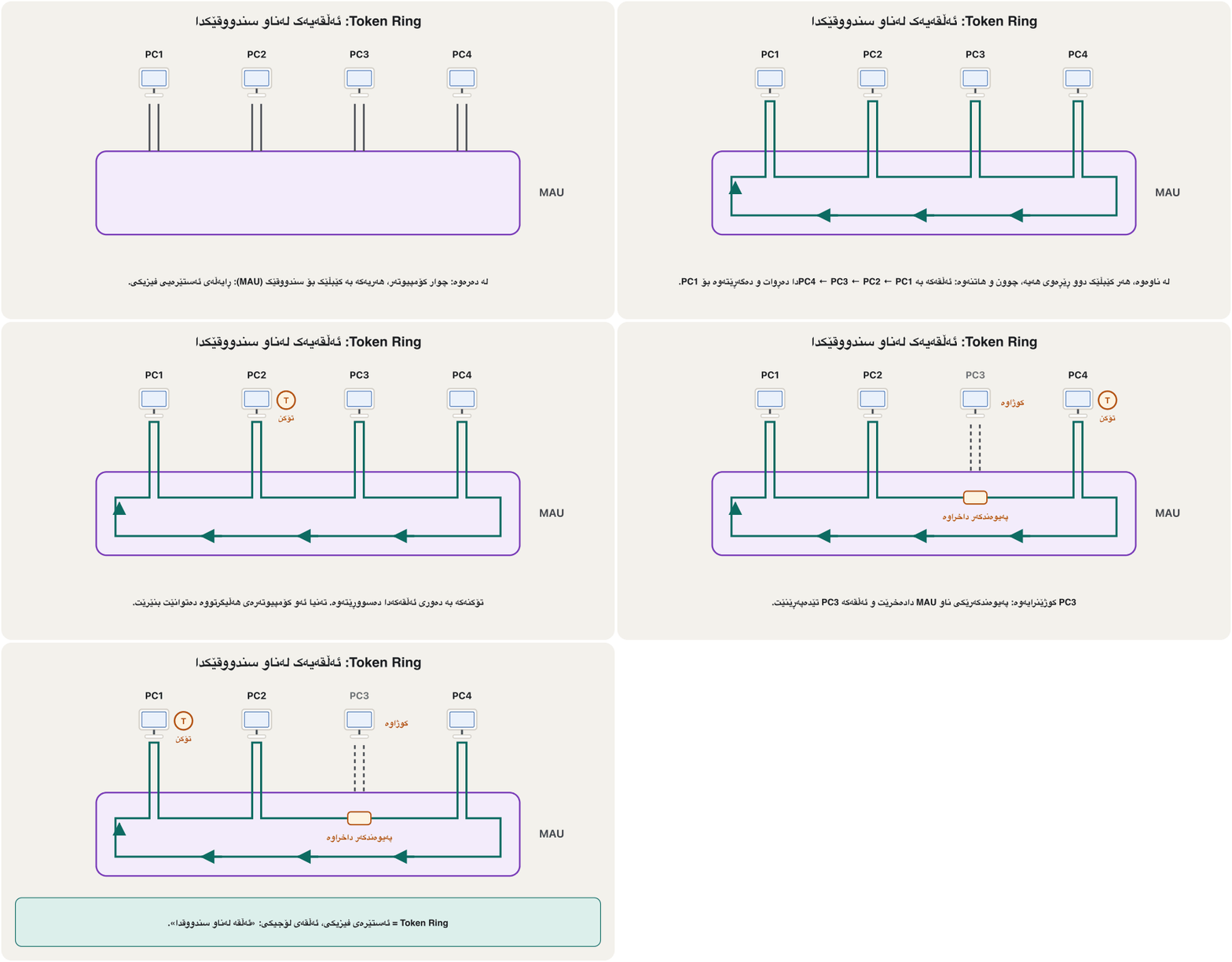
One break, or two rings: FDDIیەک پچڕان، یان دوو ئەڵقە: FDDI
A simple ring has one weak spot: if the cable breaks anywhere, the circle is open and no computer can reach the network. FDDI (Fibre Distributed Data Interface, 100 Mb/s over fibre) is a ring in both maps, built from two rings that turn in opposite directions. Normally the outer, primary ring carries the data and the inner one waits as a spare. When a cable is cut, the two stations next to the cut join the rings into one long loop, and everybody can still send.
سادە یەک لایەنی لاوازی هەیە: ئەگەر کێبڵەکە لە هەر شوێنێکدا بپچڕێت، بازنەکە دەکرێتەوە و هیچ ناگاتە . FDDI (Fibre Distributed Data Interface، 100 Mb/s بەسەر فایبەردا) لە هەردوو نەخشەکەدا و لە دوو ئەڵقە دروست کراوە کە بە دوو ئاڕاستەی پێچەوانە دەسووڕێنەوە. لە دۆخی ئاساییدا ئەڵقە دەرەکییە سەرەکییەکە دەگوازێتەوە و ناوەکییەکە وەک یەدەگ چاوەڕێ دەکات. کاتێک کێبڵێک دەپچڕێت، ئەو دوو وێستگەیەی لای پچڕانەکەن هەردوو ئەڵقەکە دەکەنە یەک ئەڵقەی درێژ و هەموو کەس هێشتا دەتوانێت بنێرێت.
Token Ring and FDDI disappeared from offices when cheaper Fast Ethernet and Gigabit Ethernet arrived in the late 1990s. Rings live on in the fibre networks that operators run between exchanges and cities, usually as double rings, for the same reason as FDDI.
Token Ring و FDDI لە نووسینگەکاندا نەمان کاتێک Fast Ethernet و Gigabit Ethernetـی هەرزانتر لە کۆتایی ساڵانی 1990دا هاتن. لە فایبەری کۆمپانیاکانی پەیوەندیدا لە نێوان ناوەندەکان و شارەکاندا ماونەتەوە، زۆرجار وەک ئەڵقەی دووانە، بە هەمان هۆکاری FDDI.
Which shapes suit which relationship?کام شێوە بۆ کام پەیوەندی دەگونجێت؟
On a link, devices are either equal peers or they follow a primary device that controls the traffic. Both relationships are explained in Who may speak? Peers and primary–secondary. The shape of a network makes one of them easier:
لەسەر بەستنەوەیەک ئامێرەکان یان یەکسانن، یان شوێن ئامێرێکی سەرەکی دەکەون کە هاتوچۆکە کۆنترۆڵ دەکات. هەردوو پەیوەندییەکە لە وانەی بەستنەوەکاندا ڕوون کراونەتەوە. شێوەی یەکێکیان ئاسانتر دەکات:
- Ring and mesh: nobody sits in the middle, and every device reaches its neighbours directly. They suit peer-to-peer transmission. A mesh is made only of point-to-point links between pairs of devices, so it is used peer-to-peer.
- Star and tree: one device sits in the centre and all traffic passes through it. They suit primary–secondary transmission.
- Bus: equally convenient for either.
- و : کەس لە ناوەڕاستدا نییە و هەموو ئامێرێک ڕاستەوخۆ دەگاتە دراوسێکانی. بۆ ناردنی یەکسان بە یەکسان دەگونجێن. تەنیا لە لە نێوان جووتە ئامێرەکاندا پێک دێت، بۆیە بە شێوەی یەکسان بە یەکسان بەکاردێت.
- و : یەک ئامێر لە ناوەندە و هەموو هاتوچۆیەک پێیدا تێدەپەڕێت. بۆ ناردنی سەرەکی و لاوەکی دەگونجێن.
- : بۆ هەردووکیان وەک یەک گونجاوە.
Stars and extended starsڕایەڵەی ئەستێرەیی و ئەستێرەی درێژکراوە
In a star, each device has a dedicated point-to-point link only to a central device, and the devices are not linked to each other. Unlike a mesh, a star allows no direct traffic between two devices: the centre works as an exchange. A PC that wants to reach another sends its data to the centre, and the centre relays it. One broken cable cuts off only its own device; a failed centre stops everyone. In 2026 the centre is a switch, or a Wi-Fi access point — not the “central computer” or hub of old books.
لە هەر ئامێرێک تەنیا یەک بەستنەوەی تایبەتی () هەیە بۆ ئامێرێکی ناوەڕاست و ئامێرەکان بە یەکترەوە نەبەستراون. بە پێچەوانەی ، ڕێ بە هاتوچۆی ڕاستەوخۆ لە نێوان دوو ئامێردا نادات: ناوەندەکە وەک ئاڵوگۆڕخانەیەک کار دەکات. PCـیەک کە دەیەوێت بگاتە یەکێکی تر، بۆ ناوەند دەنێرێت و ناوەندیش دەیگوازێتەوە. پچڕانی یەک کێبڵ تەنیا ئامێری سەر ئەو کێبڵە دادەبڕێت؛ تێکچوونی ناوەند هەمووان ڕادەگرێت. لە 2026دا ناوەندەکە ، یان — نەک « ناوەندی» یان کتێبە کۆنەکان.
An extended star (tree) is a star whose arms are stars too: each device that links to the central device is itself the centre of another star. This limits the cables that must reach the central device and extends the length and size of the network. In old networks the central active hub contained a repeater that regenerated the bits, while the hubs at the edges were passive. Today: a core switch, a switch in every building, one on every floor.
ئەستێرەی درێژکراوە () جۆرێکە لە کە لقەکانیشی ئەستێرەن: هەر ئامێرێک کە بە ئامێری ناوەڕاستەوە دەبەسترێت، خۆی ناوەندی ئەستێرەیەکی ترە. ئەمە ژمارەی ئەو کێبڵانە کەم دەکاتەوە کە دەبێت بگەنە ئامێری ناوەڕاست و درێژی و قەبارەی زیاد دەکات. لە ناوەندەکە چالاک بوو کە تێدا بوو و نوێ دەکردەوە، بەڵام لێوارەکان ناچالاک بوون. ئەمڕۆ: سەرەکی، لە هەر باڵەخانەیەک و یەکێک لە هەر نهۆمێک.
Mesh: protection from interruptionڕایەڵەی چنراو: پاراستن لە پچڕانی خزمەتگوزاری
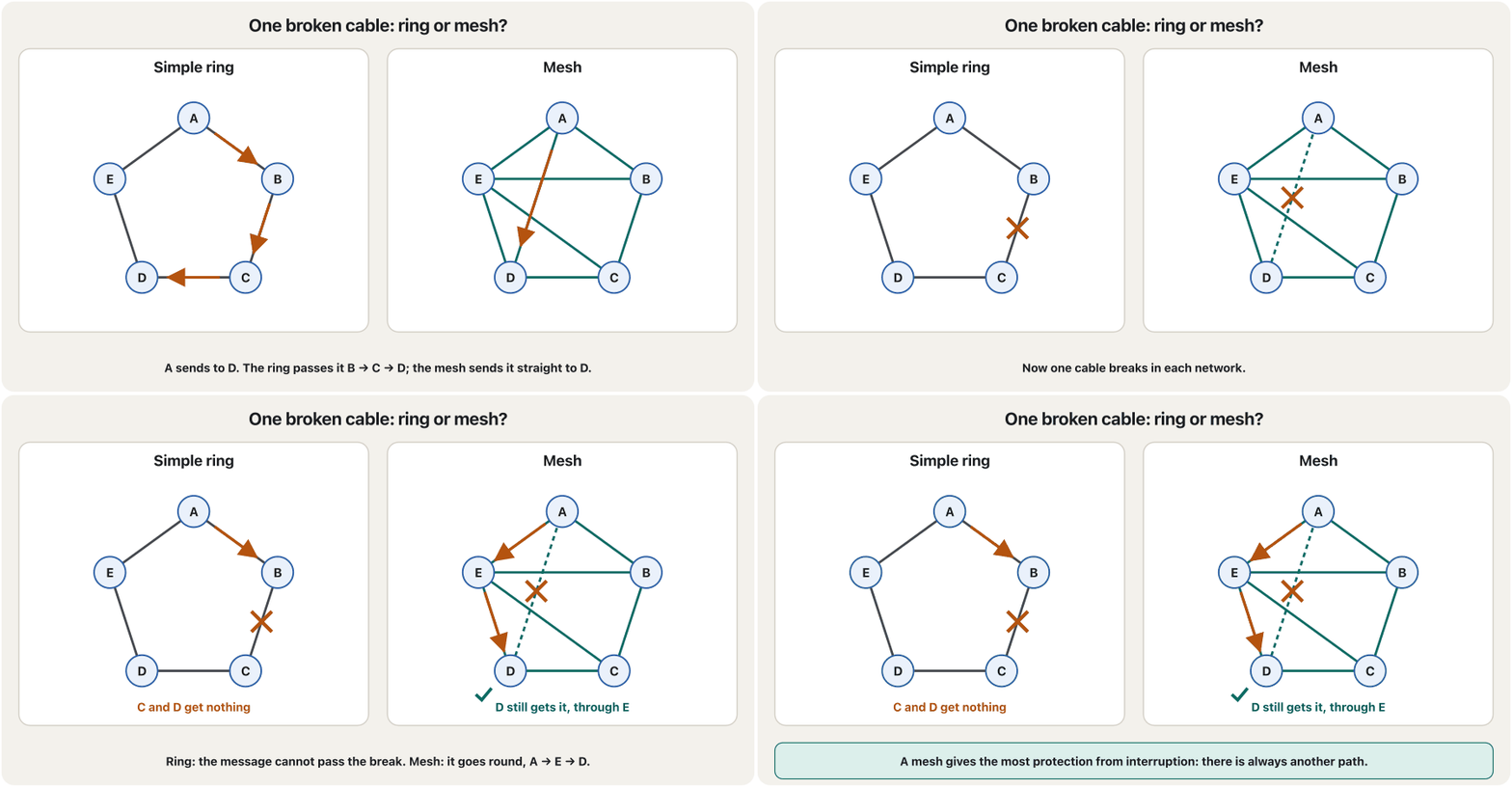
A mesh is built for one purpose: to give as much protection as possible from interruption of service. In a full mesh every host has its own point-to-point link to every other host, so any device can reach any other directly. If one link fails, messages simply take another route. That makes the mesh the most reliable topology: it has redundancy (spare paths) and fault tolerance (it keeps working when a part fails).
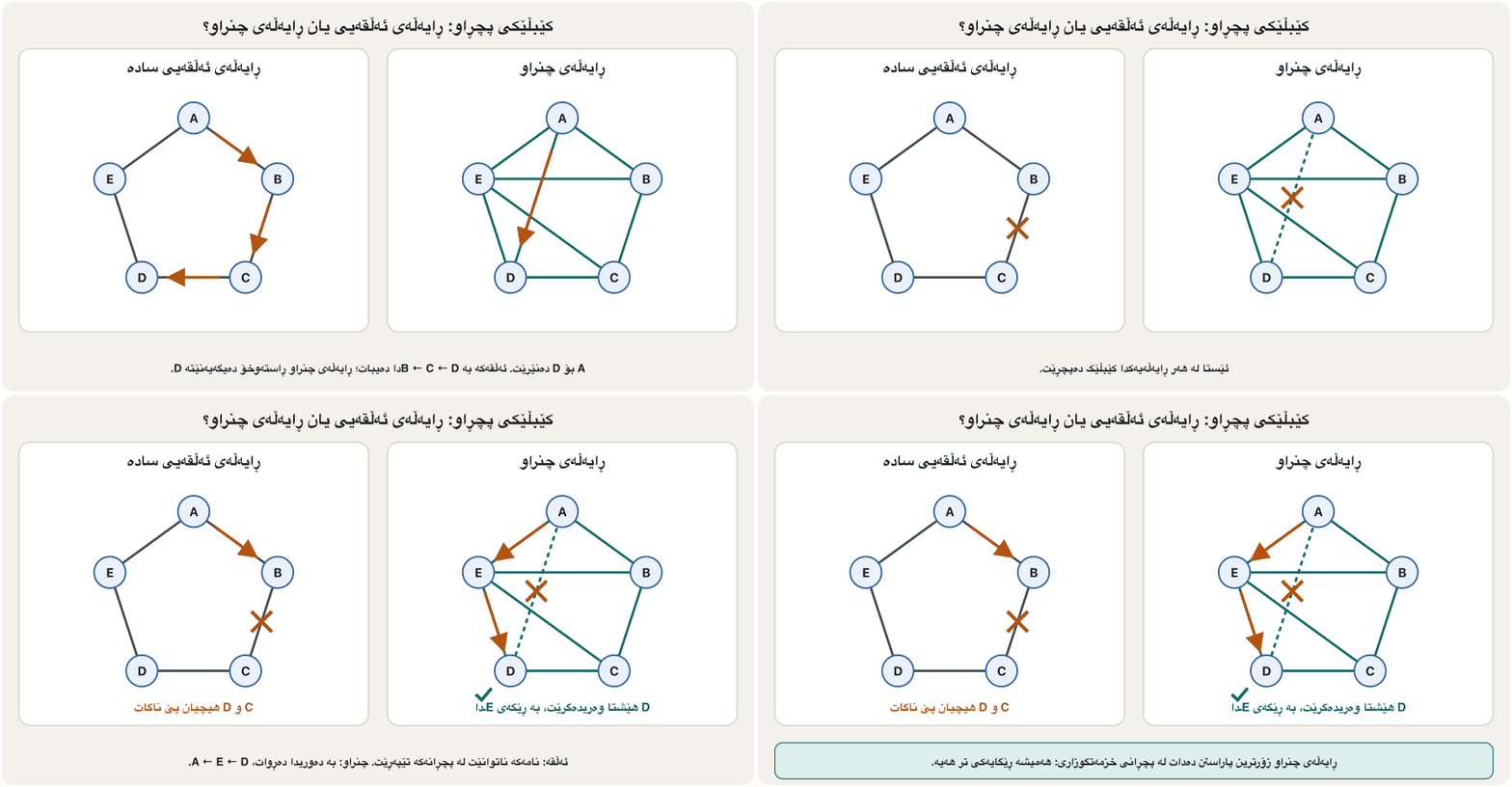
بۆ یەک مەبەست دروست دەکرێت: هەتا بکرێت خزمەتگوزارییەکە لە پچڕان بپارێزێت. لە تەواودا هەر بەستنەوەیەکی تایبەتی () هەیە بۆ هەموو تر، بۆیە هەر ئامێرێک ڕاستەوخۆ دەگاتە هەر ئامێرێکی تر. ئەگەر بەستنەوەیەک تێک بچێت، پەیامەکان بە ڕێگایەکی تردا دەڕۆن. ئەمە دەکاتە متمانەپێکراوترین : هەیە (ڕێگای یەدەگ) و هەیە (کاتێک پارچەیەک تێک دەچێت هەر کار دەکات).
Watch one cable break in a ring and in a mesh:
سەیری پچڕانی یەک کێبڵ بکە لە و لە :
The price of a full mesh, and the Internet’s partial meshنرخی ڕایەڵەی چنراوی تەواو و ڕایەڵەی چنراوی بەشەکیی ئینتەرنێت
Each of devices needs a link to the other devices. So every device needs ports, and the network needs cables, because each cable joins two devices. The counting is explained step by step in How many links does a full mesh need?
هەر یەکێک لە ئامێر پێویستی بە بەستنەوەیەک هەیە بۆ هەر یەکێک لە ئامێرەکەی تر. بۆیە هەر ئامێرێک پێویستی بە هەیە و پێویستی بە کێبڵ هەیە، چونکە هەر کێبڵێک دوو ئامێر پێکەوە دەبەستێت. ژماردنەکە هەنگاو بە هەنگاو لە ژماردنی بەستنەوەکانی ڕایەڵەی چنراوی تەواودا ڕوون کراوەتەوە.
= cables (links), = ports on each device, = number of devices. Five devices: and .
= ژمارەی کێبڵەکان (بەستنەوەکان)، = هەر ئامێرێک، = ژمارەی ئامێرەکان. پێنج ئامێر: و .
The Internet links about 80,000 independent networks (November 2026). As a full mesh they would need about 3.2 billion links. So, although the Internet has several paths to any place, it is not a full mesh but a partial mesh: each network links to only some others, and important places get extra links.
نزیکەی 80,000 سەربەخۆ پێکەوە دەبەستێت (نۆڤەمبەری 2026). ئەگەر تەواو بوونایە، نزیکەی 3.2 ملیار بەستنەوەیان پێویست دەبوو. بۆیە هەرچەندە بۆ هەر شوێنێک چەند ڕێگایەکی هەیە، تەواو نییە بەڵکو بەشەکییە: هەر تەنیا بە هەندێکی ترەوە دەبەسترێت و شوێنە گرنگەکان بەستنەوەی زیادەیان هەیە.
Hybrid: real networks mix shapesڕایەڵەی تێکەڵ: ڕایەڵە ڕاستەقینەکان شێوەکان تێکەڵ دەکەن
Often a network combines several topologies: smaller networks, each with its own shape, linked together into a larger topology. The classic example: one department of a business uses a bus, another uses a ring, and the two are connected through a central device in a star. A hybrid takes the strengths and the weaknesses of every shape inside it.
زۆرجار چەند تێکەڵ دەکات: بچووکتر، هەریەکە بە شێوەی خۆی، کە پێکەوە دەبەسترێن و گەورەتر پێک دەهێنن. نموونە ناسراوەکە: بەشێکی کۆمپانیایەک بەکاردەهێنێت، بەشێکی تر . هەردووکیان لە ڕێگای ئامێرێکی ناوەڕاستەوە بە شێوەی ئەستێرە پێکەوە دەبەسترێن. خاڵە بەهێز و لاوازەکانی هەموو ئەو شێوانە وەردەگرێت کە تێیدان.
Today every big network is a hybrid: stars around switches in each building, joined as a tree across the campus, and a ring or a partial mesh of fibre between cities. More in Hybrid topology.
ئەمڕۆ هەموو گەورە : بە دەوری لە هەر باڵەخانەیەکدا، بە شێوەی لە کەمپەسەکەدا پێکەوە بەستراون و یان بەشەکی لە فایبەر لە نێوان شارەکاندا. زیاتر لە ڕایەڵەی تێکەڵ.
Where does each topology break?هەر تۆپۆلۆجییەکی ڕایەڵە لە کوێوە دەشکێت؟
The most useful question about any topology is: what happens when one part fails? A part whose failure stops everything is a single point of failure.
بەسوودترین پرسیار لەبارەی هەر ئەمەیە: کاتێک پارچەیەک تێک دەچێت چی ڕوو دەدات؟ پارچەیەک کە تێکچوونی هەموو شتێک ڕادەگرێت .
A favourite exam sentence: “In a star topology, a single connection failure makes the whole network break down.” It is false. In a star one broken cable cuts off only its own device; the whole star stops only when the central device fails. A single cable that stops everyone describes a bus, and a simple ring.
ڕستەیەکی خۆشەویستی تاقیکردنەوەکان: «لە ، تێکچوونی یەک بەستنەوە هەموو دەڕووخێنێت.» ئەمە هەڵەیە. لە پچڕانی یەک کێبڵ تەنیا ئامێرەکەی خۆی دادەبڕێت؛ هەموو تەنیا کاتێک دەوەستێت کە ئامێرەکەی ناوەڕاست تێک بچێت. یەک کێبڵ کە هەمووان ڕابگرێت وەسفی دەکات، هەروەها سادە.
Bus or mesh? Building a full exam answerڕایەڵەی هێڵی یان ڕایەڵەی چنراو؟ دروستکردنی وەڵامێکی تەواو
A common exam question asks you to tell a bus and a mesh apart. A strong answer compares them point by point: the cabling, the cost, the kind of link and what happens when a cable breaks.
پرسیارێکی باوی تاقیکردنەوە داوات لێ دەکات جیاوازیی و بکەیت. وەڵامێکی بەهێز خاڵ بە خاڵ بەراوردیان دەکات: کێبڵکاری، تێچوون، شێوەی بەستنەوە و ئەوەی کاتێک کێبڵێک دەپچڕێت ڕوو دەدات.
Differentiate between bus topology and mesh topology. Give at least four differences.
جیاوازیی نێوان و بکە. لانیکەم چوار جیاوازی بنووسە.
Hintئاماژە
Think about the backbone, the number of cables, the kind of link and what one broken cable does.
بیر لە ، ژمارەی کێبڵەکان، شێوەی بەستنەوە و کاریگەریی پچڕانی یەک کێبڵ بکەرەوە.
Show answerوەڵامەکە پیشان بدە
| Pointخاڵ | Bus | Mesh |
|---|---|---|
| Cablingکێبڵکاری | one main cable, the backbone, shared by allیەک کێبڵی سەرەکی، ، کە هەمووان بە هاوبەشی بەکاری دەهێنن | every device has its own link to every other deviceهەموو ئامێرێک بەستنەوەی خۆی هەیە بۆ هەموو ئامێرێکی تر |
| Links per deviceبەستنەوەی هەر ئامێرێک | one, to the backboneیەک، بۆ | (4 computers: 3 each; 5 computers: 4 each) (4 : هەریەکە 3؛ 5 : هەریەکە 4) |
| Costتێچوون | the cheapest: the fewest cablesهەرزانترین: کەمترین کێبڵ | the most cables: زۆرترین کێبڵ: |
| Kind of linkشێوەی بەستنەوە | multipoint: one shared link: یەک بەستنەوەی هاوبەش | point-to-point links |
| Relationshipپەیوەندی | peer-to-peer or primary–secondaryیەکسان بە یەکسان یان سەرەکی و لاوەکی | peer-to-peerیەکسان بە یەکسان |
| One cable breaksیەک کێبڵ دەپچڕێت | the backbone breaks: nobody can send پچڕا: کەس ناتوانێت بنێرێت | the data takes another path: nobody is cut off ڕێگایەکی تر دەگرێت: کەس دانابڕێت |
| Where todayئەمڕۆ لە کوێ | history (old coaxial Ethernet)مێژوو ( کۆنی ) | Internet backbones (partial mesh), mesh Wi-Fi ( بەشەکی)، چنراو |
A common slip: “in a mesh, if a cable breaks, only the computer on that cable is affected.” That describes a star. In a full mesh a broken cable affects nobody, because the data takes another path. And the Internet is a partial mesh, not a full one.
هەڵەیەکی باو: «لە ، ئەگەر کێبڵێک بپچڕێت تەنیا ئەو سەر ئەو کێبڵە کاری تێ دەکرێت.» ئەمە وەسفی دەکات. لە تەواودا پچڕانی کێبڵێک کار لە کەس ناکات، چونکە ڕێگایەکی تر دەگرێتە بەر. هەروەها بەشەکییە، نەک تەواو.
Topologies you meet in 2026تۆپۆلۆجییەکانی ڕایەڵە لە 2026دا
- Wired LANs: stars around switches, joined into trees — a core switch, building switches, floor switches.
- Wi-Fi: every phone and laptop talks to an access point, a star of radio links that share one channel.
- Homes and cafés: mesh Wi-Fi, two or three access points that pass traffic to each other by radio.
- Operators: fibre rings and partial meshes between exchanges and cities.
- The Internet: a partial mesh of about 80,000 networks.
- Internet of Things: meshes of small sensors that pass messages on — see IoT network topologies.
- بە کێبڵ: بە دەوری ، کە وەک پێکەوە بەستراون — سەرەکی، باڵەخانە و نهۆم.
- : هەموو مۆبایل و لەگەڵ قسە دەکات، لە بەستنەوەی ڕادیۆیی کە یەک کەناڵ بە هاوبەشی بەکاردەهێنن.
- ماڵ و کافێکان: چنراو، دوو یان سێ کە بە ڕادیۆ هاتوچۆ بۆ یەکتر دەگوازنەوە.
- کۆمپانیاکانی پەیوەندی: ئەڵقەی فایبەر و بەشەکی لە نێوان ناوەندەکان و شارەکاندا.
- : بەشەکی لە نزیکەی 80,000 .
- : لە کە پەیامەکان دەگوازنەوە — بڕوانە تۆپۆلۆجییەکانی ڕایەڵەی IoT.
History only: coaxial buses, hubs, Token Ring and FDDI. You meet them in old books and exam questions, not in new networks.
تەنیا مێژوو: ، ، Token Ring و FDDI. لە کتێبە کۆنەکان و پرسیارەکانی تاقیکردنەوەدا دەیانبینیت، نەک لە .
Common mistakesهەڵە باوەکان
| Mistakeهەڵە | What is trueڕاستییەکە |
|---|---|
| The physical and the logical topology are always the same. و هەمیشە وەک یەکن. | A hub LAN is a physical star but a logical bus; Token Ring is a physical star but a logical ring. بە فیزیکییە بەڵام لۆجیکی؛ Token Ring فیزیکییە بەڵام لۆجیکی. |
| In a star, one broken cable stops the whole network.لە پچڕانی یەک کێبڵ هەموو ڕادەگرێت. | Only that device is cut off. A failed central device stops everyone.تەنیا ئەو ئامێرە دادەبڕێت. تێکچوونی ئامێری ناوەڕاست هەمووان ڕادەگرێت. |
| The OSI model protects a network from interruption. لە پچڕان دەپارێزێت. | Extra paths do: a mesh. The OSI model only describes network functions in layers.ڕێگای زیادە دەیپارێزێت: . تەنیا ئەرکەکانی بە چین وەسف دەکات. |
| The Internet is a full mesh. تەواوە. | It is a partial mesh: many paths, but no network links to every other one. بەشەکییە: زۆر ڕێگا، بەڵام هیچ بە هەموو ئەوانی ترەوە نەبەستراوە. |
| In a full mesh each computer needs “at least 4 or 5 cables”.لە تەواودا هەر پێویستی بە «لانیکەم 4 یان 5 کێبڵ» هەیە. | Each needs exactly links; the whole mesh needs .هەریەکە ڕێک بەستنەوەی پێویستە؛ هەموو . |
| Any ring survives one broken cable.هەموو لە پچڕانی یەک کێبڵ ڕزگاری دەبێت. | A simple ring stops. Only a double ring, such as FDDI, goes on. سادە دەوەستێت. تەنیا ئەڵقەی دووانە، وەک FDDI، بەردەوام دەبێت. |
| Token Ring, FDDI and coaxial buses are good choices for a new LAN.Token Ring، FDDI و هەڵبژاردەی باشن بۆ نوێ. | They are history. New LANs use switched Ethernet and Wi-Fi.ئەوانە مێژوون. ئەمڕۆ و بەکاردەهێنن. |
Exercisesڕاهێنانەکان
Fill the gap: “___ describes how devices communicate across the physical topology.”بۆشاییەکە پڕ بکەرەوە: «___ وەسفی ئەوە دەکات کە ئامێرەکان چۆن بەسەر تۆپۆلۆجیی فیزیکیدا پەیوەندی دەکەن.»
Logical topology.
.
Fill the gap: “___ is implemented to provide as much protection as possible from interruption of service.”بۆشاییەکە پڕ بکەرەوە: «___ بۆ ئەوە دادەمەزرێت کە هەتا بکرێت لە پچڕانی خزمەتگوزاری بپارێزێت.»
Mesh topology — not the OSI model.
— نەک .
A physical layout of the computer network is called: A topology, B line configuration, C network category, D internetworks.شێوەی ڕیزبوونی فیزیکیی ڕایەڵەی کۆمپیوتەر پێی دەوترێت: A تۆپۆلۆجیی ڕایەڵە، B جۆری بەستنەوە، C پۆلی ڕایەڵە، D ڕایەڵەی ڕایەڵەکان.
A — topology.
A — .
The physical or logical arrangement of a network is: a) topology b) routing c) networking d) control.ڕیزبوونی فیزیکی یان لۆجیکیی ڕایەڵەیەک پێی دەوترێت: a) تۆپۆلۆجیی ڕایەڵە b) ڕێدۆزی c) دروستکردنی ڕایەڵە d) کۆنترۆڵ.
a) topology — and it can be described both ways, physically and logically.
a) — و دەتوانرێت بە هەردوو شێوە وەسف بکرێت، فیزیکی و لۆجیکی.
In ___ topology each computer is connected to a single long cable.لە ___دا هەر کۆمپیوتەرێک بە یەک کێبڵی درێژەوە بەستراوە.
Bus.
.
Which network topology requires a central controller or hub? a) star b) mesh c) ring d) busکام تۆپۆلۆجیی ڕایەڵە پێویستی بە کۆنترۆڵکەرێکی ناوەندی یان هەب هەیە؟ a) ڕایەڵەی ئەستێرەیی b) ڕایەڵەی چنراو c) ڕایەڵەی ئەڵقەیی d) ڕایەڵەی هێڵی
a) star. Today the centre is a switch or an access point.
a) . ئەمڕۆ ناوەندەکە یان .
___ topology requires a multipoint connection: a) star b) mesh c) ring d) bus___ پێویستی بە پەیوەندیی فرەخاڵ هەیە: a) ڕایەڵەی ئەستێرەیی b) ڕایەڵەی چنراو c) ڕایەڵەی ئەڵقەیی d) ڕایەڵەی هێڵی
d) bus: all devices share one cable. The other three are built from point-to-point links.
d) : هەموو ئامێرەکان یەک کێبڵ بە هاوبەشی بەکاردەهێنن. سێکەی تر لە دروست دەبن.
True or false: in a star topology, a single connection failure breaks the whole network.ڕاست یان هەڵە: لە ڕایەڵەی ئەستێرەییدا تێکچوونی یەک بەستنەوە هەموو ڕایەڵەکە تێک دەدات.
False. One broken cable cuts off only its own device; the star stops only if the central device fails. The sentence describes a bus.
هەڵەیە. پچڕانی یەک کێبڵ تەنیا ئامێرەکەی خۆی دادەبڕێت؛ تەنیا ئەو کاتە دەوەستێت کە ئامێری ناوەڕاست تێک بچێت. ڕستەکە وەسفی دەکات.
Name each topology in the picture.
ناوی هەر لە وێنەکەدا بنووسە.
Show answerوەڵامەکە پیشان بدە
- 1: star — six computers around one central device.
- 2: hybrid — a bus, a ring and a small star joined through one central device.
- 3: ring — five computers in a closed circle.
- 4: full mesh — four computers, links.
- 5: extended star (tree) — a central device, two devices below it and computers below those.
- 1: — شەش بە دەوری یەک ئامێری ناوەڕاستدا.
- 2: — ، و بچووک کە لە ڕێگای یەک ئامێری ناوەڕاستەوە بەستراون.
- 3: — پێنج لە بازنەیەکی داخراودا.
- 4: تەواو — چوار ، بەستنەوە.
- 5: ئەستێرەی درێژکراوە () — ئامێرێکی ناوەڕاست، دوو ئامێر لە ژێریدا و لە ژێر ئەوانەوە.
A bank wants a full mesh between its 8 branch routers. How many cables are needed, and how many ports must each router have? Then say why most banks choose a partial mesh.
بانکێک دەیەوێت تەواو لە نێوان 8 لقەکانیدا دروست بکات. چەند کێبڵ پێویستە و هەر دەبێت چەند هەبێت؟ پاشان بڵێ بۆچی زۆربەی بانکەکان بەشەکی هەڵدەبژێرن.
Show answerوەڵامەکە پیشان بدە
Cables: . Ports: on each router. A partial mesh — every branch linked to two or three others — still gives every branch a second path when one link fails, for far fewer cables and ports.
کێبڵ: . : لەسەر هەر . بەشەکی — هەر لقێک بە دوو یان سێ لقی ترەوە بەسترابێت — هێشتا کاتێک بەستنەوەیەک تێک دەچێت ڕێگای دووەم بە هەموو لقێک دەدات، بە کێبڵ و زۆر کەمتر.
In the CêIT network lab, build four PCs around a hub and ping from one PC to another. Then replace the hub with a switch and ping again. Which PCs receive the frames each time, and what are the physical and the logical topology in each case?
لە تاقیگەی ڕایەڵەی CêITدا چوار PC بە دەوری دروست بکە و لە PCـیەکەوە بۆ یەکێکی تر بکە. پاشان بە بگۆڕە و دووپاتە بکە. هەر جارێک کام PC وەردەگرن؟ لە هەر حاڵەتێکیشدا و چین؟
Show answerوەڵامەکە پیشان بدە
With the hub every PC receives every frame: physical star, logical bus. With the switch only the destination PC receives it (after the first broadcast, while the switch is still learning): physical star, logical point-to-point. The cabling did not change at all.
بە هەموو PCـیەک هەموو وەردەگرێت: فیزیکی، لۆجیکی. بە تەنیا PCـی مەبەست وەریدەگرێت (دوای یەکەم ، کاتێک هێشتا فێر دەبێت): فیزیکی، لۆجیکی. کێبڵکارییەکە هیچ نەگۆڕا.
Summaryپوختە
| Network | Physical topology | Logical topology | Statusدۆخ |
|---|---|---|---|
| 10BASE2 / 10BASE5 | bus | bus | historyمێژوو |
| 10BASE-T + hub | star | bus | historyمێژوو |
| Ethernet + switch | star | point-to-point | in useبەکاردێت |
| Token Ring + MAU | star | ring | historyمێژوو |
| FDDI | ring (double) (دووانە) | ring | historyمێژوو |
| Wi-Fi | radio links to an access pointبەستنەوەی ڕادیۆیی بۆ | one shared channelیەک کەناڵی هاوبەش | in useبەکاردێت |
- Physical topology = how the devices are cabled; logical topology = how the signals travel and who may send. The two can differ.
- Bus: cheapest, one break stops all, signals grow weaker with distance; history in LANs.
- Star: everything passes through the centre; one cable cuts off one device, a failed centre stops all. Extended star (tree): stars below stars.
- Ring: data passes every device on the way; a simple ring stops at one break, a double ring (FDDI) wraps round.
- Mesh: the most protection from interruption; a full mesh needs ports per device and cables, so the Internet is a partial mesh.
- Ring and mesh suit peers, star and tree a primary, a bus either. Real networks are hybrids.
- = ئامێرەکان چۆن بە کێبڵ بەستراون؛ = چۆن دەڕۆن و کێ بۆی هەیە بنێرێت. ئەم دووانە دەکرێت جیاواز بن.
- : هەرزانترین، یەک پچڕان هەمووان ڕادەگرێت، بە دووری لاواز دەبن؛ لە مێژوون.
- : هەموو شتێک بە ناوەندا تێدەپەڕێت؛ یەک کێبڵ یەک ئامێر دادەبڕێت، تێکچوونی ناوەند هەمووان ڕادەگرێت. ئەستێرەی درێژکراوە (): ئەستێرە لە ژێر ئەستێرەدا.
- : بە هەموو ئامێرەکانی سەر ڕێگادا تێدەپەڕێت؛ ئەڵقەی سادە بە یەک پچڕان دەوەستێت، ئەڵقەی دووانە (FDDI) دەسووڕێتەوە.
- : زۆرترین پاراستن لە پچڕان؛ تەواو بۆ هەر ئامێرێک و کێبڵی پێویستە، بۆیە بەشەکییە.
- و بۆ یەکسانەکان دەگونجێن، و بۆ ئامێرێکی سەرەکی، بۆ هەردووکیان. .
Lesson complete!وانەکە تەواو بوو!
Well done. Review the key terms, then go on to the next lesson.دەستخۆش. سەیرێکی زاراوە سەرەکییەکان بکەرەوە، پاشان بڕۆ بۆ وانەی داهاتوو.
Key termsزاراوە سەرەکییەکان
LANs, MANs, WANs and the Internetڕایەڵەی ناوچەیی، ڕایەڵەی شاری، ڕایەڵەی فراوان و ئینتەرنێت
Related lecturesوانە پەیوەندیدارەکان
- Network Topologiesتۆپۆلۆجییەکانی ڕایەڵە
- What a Network Is Made Ofڕایەڵە لە چی پێکدێت؟
- LANs, MANs, WANs and the Internetڕایەڵەی ناوچەیی، ڕایەڵەی شاری، ڕایەڵەی فراوان و ئینتەرنێت
- Repeaters and Hubsدووپاتەکەرەوەکان و هەبەکان
- Bridges and Switchesپردەکانی ڕایەڵە و سویچەکان
- Ethernet: From 10Base-2 to 800 GigabitEthernet: لە 10Base-2ـەوە بۆ 800 گیگابیت
- Wireless LANs: Wi-Fi Standards, Access Points and Securityڕایەڵەی بێتەلی ناوچەیی: ستانداردەکانی وایفای، خاڵەکانی دەستڕاگەیشتن و ئاسایش
- Point-to-Point, Star and Mesh Networksپەیوەندیی خاڵ بۆ خاڵ، ڕایەڵەی ئەستێرەیی و ڕایەڵەی چنراو
References and further readingسەرچاوەکان و خوێندنەوەی زیاتر
- Cisco Networking Academy, Introduction to Networks (CCNA v7) Companion Guide — physical and logical topologies
- Wikipedia: 10BASE2 (185 m segments, BNC T-connectors, 50 Ω terminators; deprecated for new installations in 2011)
- Wikipedia: Token Ring (IEEE 802.5; physically a star wired to MAUs, logically a ring)
- Wikipedia: Fiber Distributed Data Interface (dual counter-rotating rings, 100 Mbit/s; replaced by Fast and Gigabit Ethernet)
- CIDR Report, 7 November 2026: number of autonomous systems in the routing system (79,843)
- Forouzan, Data Communications and Networking — topologies and peer-to-peer / primary–secondary relationships
This lecture is a first edition. The Kurdish text and terminology are waiting for review by Kurdish IT teachers.ئەم وانەیە چاپی یەکەمە. دەقە کوردییەکە و زاراوەکانی چاوەڕێی پێداچوونەوەی مامۆستایانی کوردی بواری IT ن.