Chapterبەش 3 · Lectureوانە 3.4
Ethernet: From 10Base-2 to 800 GigabitEthernet: لە 10Base-2ـەوە بۆ 800 گیگابیت
How Ethernet grew from a shared coaxial cable at Xerox PARC into the 800 Gb/s links of today: the 10BASE2 bus and its rules, CSMA/CD, why coax disappeared, and the speed ladder up to 2026.
چۆن لە کێبڵێکی هاوبەشی لە Xerox PARC گەیشتە بەستەرەکانی 800 Gb/sـی ئەمڕۆ: و یاساکانی، CSMA/CD، بۆچی نەما و پەیژەی خێرایی تا 2026.
What you will learnچی فێر دەبیت
- Tell the story of Ethernet from Xerox PARC (1973) to IEEE 802.3 (1983), and explain why it beat Token Ring.
- Read Ethernet names such as 10BASE2, 10BASE-T and 10GBASE-SR.
- Describe the hardware and the rules of a 10BASE2 segment, including the 5-4-3 rule.
- Explain CSMA/CD step by step, with the jam signal, random backoff and the 64-byte minimum.
- Explain why coax buses disappeared and why switched full-duplex Ethernet needs no CSMA/CD.
- Place today's Ethernet speeds, from 1 Gb/s at a desk to 800 Gb/s in a data centre.
- چیرۆکی لە Xerox PARC (1973)ـەوە تا IEEE 802.3 (1983) بگێڕیتەوە و ڕوون بکەیتەوە بۆچی بەسەر Token Ringـدا سەرکەوت.
- ناوەکانی وەک 10BASE2، 10BASE-T و 10GBASE-SR بخوێنیتەوە.
- و یاساکانی بڕێکی وەسف بکەیت، یاسای 5-4-3ـیش لەگەڵیدا.
- CSMA/CD هەنگاو بە هەنگاو ڕوون بکەیتەوە، لەگەڵ ، و کەمترین قەبارەی 64 .
- ڕوون بکەیتەوە بۆچی نەمان و بۆچی سویچکراوی پێویستی بە CSMA/CD نییە.
- خێراییەکانی ئەمڕۆ ڕیز بکەیت، لە 1 Gb/s لەسەر مێزێک تا 800 Gb/s لە .
What Ethernet isEthernet چییە
Ethernet is the family of standards for wired local networks. It covers three things at once: the network cards (NICs), the cables and connectors, and the rules for putting bits on the cable and sharing it. The IEEE publishes it as IEEE 802.3. Whenever you plug a cable into a laptop, a switch or a router, you are using Ethernet.
بریتییە لە کۆمەڵێک بۆ تەلدار. سێ شت پێکەوە دەگرێتەوە: ، کێبڵ و ، هەروەها یاساکانی دانانی لەسەر کێبڵەکە و بەشکردنی لە نێوان ئامێرەکاندا. IEEE بە ناوی IEEE 802.3 بڵاوی دەکاتەوە. هەر کاتێک کێبڵێک بە ، یان دەبەستیتەوە، بەکار دەهێنیت.
Classic Ethernet put every computer on one shared cable, unlike a point-to-point link, which joins only two devices. Today each device has its own cable to a switch. The cables and the speeds changed many times, but the frame format and the MAC addresses stayed the same, so a laptop of 2026 still understands a network card of 1990.
کلاسیک هەموو لەسەر یەک کێبڵی هاوبەش دادەنا، بە پێچەوانەی کە تەنیا دوو ئامێر پێکەوە دەبەستێت. ئەمڕۆ هەر ئامێرێک کێبڵی تایبەتی خۆی هەیە بۆ . کێبڵ و خێرایی زۆر جار گۆڕان، بەڵام شێوەی و وەک خۆیان مانەوە، بۆیە 2026 هێشتا لە 1990 تێدەگات.
Born at Xerox PARC: 1973 to 1983لە Xerox PARC لەدایک بوو: 1973 تا 1983
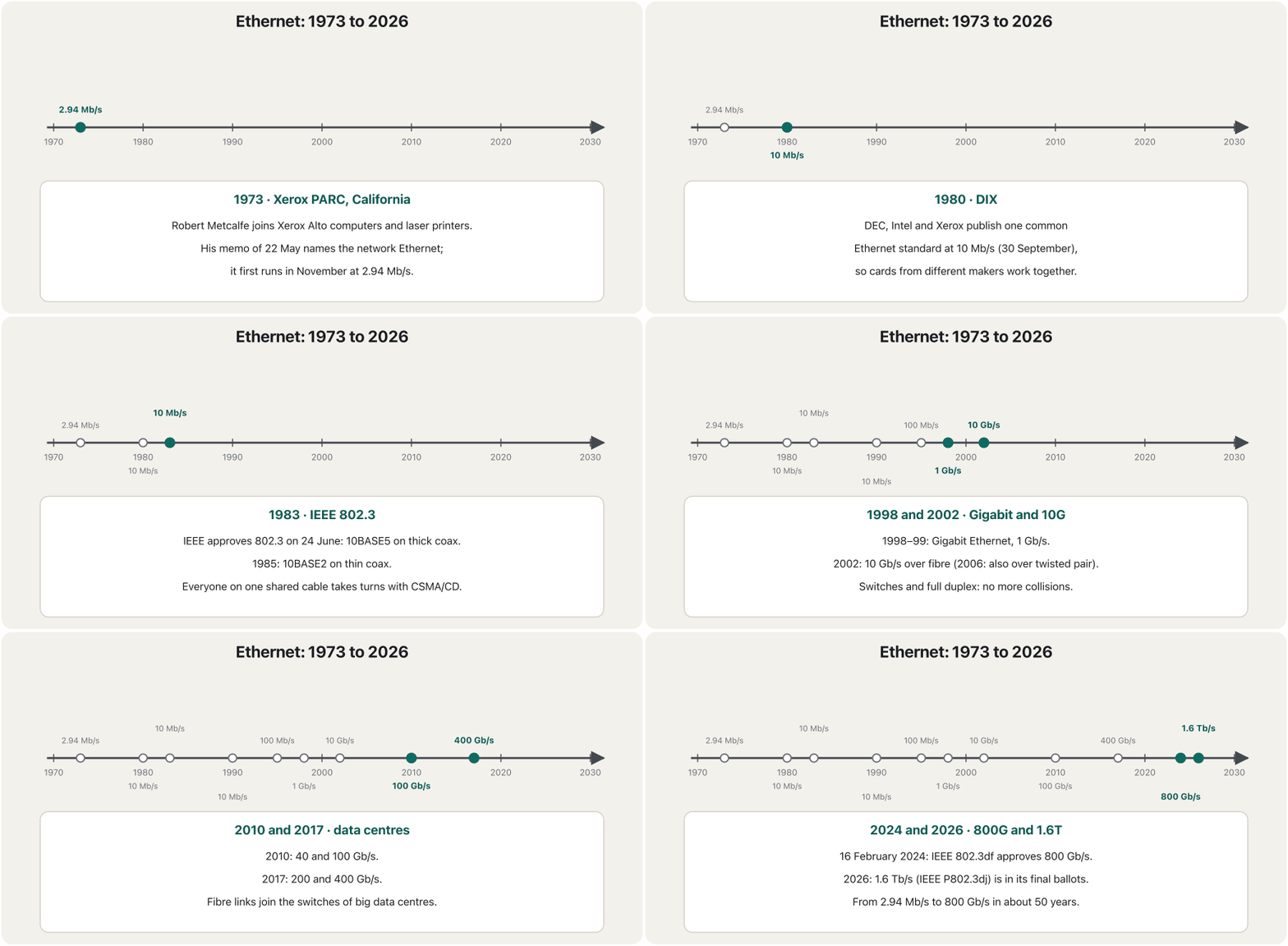
In the early 1970s Xerox's research centre in Palo Alto, California (Xerox PARC), built the Alto, one of the first personal computers with a graphical user interface, and the first laser printers. Robert Metcalfe designed a network for them. He first called it the Alto ALOHA Network, after the Alto and ALOHAnet, a radio network in Hawaii. In his memo of 22 May 1973 he renamed it Ethernet, because it would connect any kind of computer, not only Altos. The name comes from the luminiferous ether, which 19th-century scientists wrongly believed carried light through space — just as the cable carries everyone's signals.
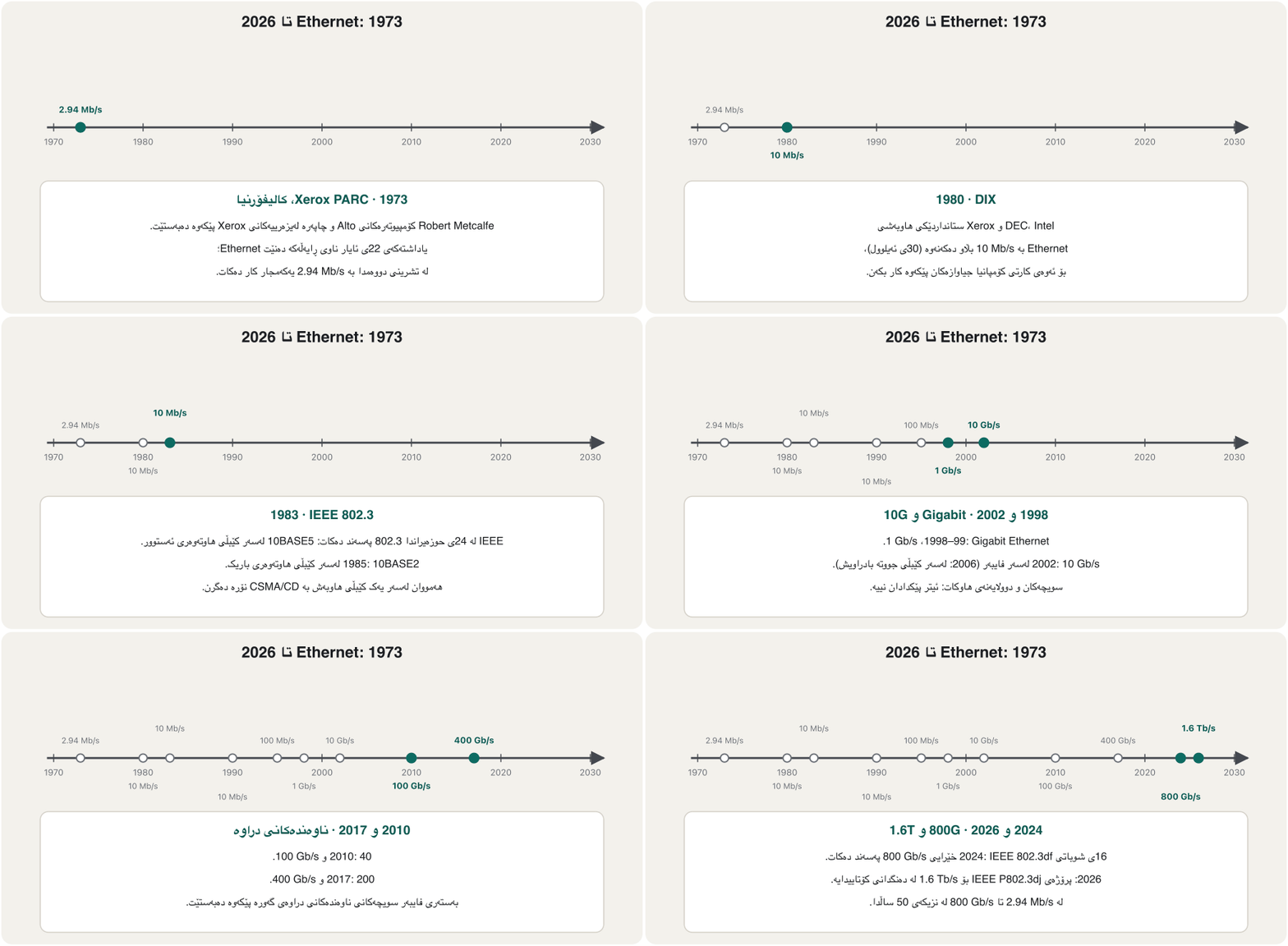
لە سەرەتای ساڵانی 1970دا، ناوەندی توێژینەوەی Xerox لە Palo Altoـی کالیفۆرنیا (Xerox PARC) Altoـی دروست کرد، یەکێک لە یەکەم کەسی بە ، هەروەها یەکەم . پێویستیان بە بوو. Robert Metcalfe دیزاینی کرد. سەرەتا ناوی نا Alto ALOHA Network، بە ناوی Alto و ALOHAnet کە ڕادیۆیی بوو لە Hawaii. لە یاداشتەکەیدا لە 22ی ئایاری 1973 ناوی گۆڕی بۆ ، چونکە هەموو جۆرە دەبەستێتەوە، نەک تەنیا Alto. ناوەکە لە بیرۆکەی کۆنی «luminiferous ether» وەرگیراوە، ئەو ناوەندەی زانایانی سەدەی نۆزدەهەم بە هەڵە وایان دەزانی ڕووناکی بە ناو بۆشاییدا دەبات: کێبڵەکەش وەک ئەو ئێسەرە هەمووان هەڵدەگرێت.
The network first ran in November 1973 at 2.94 Mb/s. In 1979 Metcalfe left Xerox to start his own company, 3Com, and persuaded DEC, Intel and Xerox to agree on one common standard, so that cards from different makers would work together. Their DIX Ethernet, at 10 Mb/s, was published on 30 September 1980. The IEEE based its own standard on it: IEEE 802.3 was approved on 24 June 1983. That is why Ethernet belongs to no single company.
یەکەمجار لە تشرینی دووەمی 1973دا بە 2.94 Mb/s کاری کرد. لە 1979دا Metcalfe لە Xerox ڕۆیشت تا کۆمپانیای خۆی، 3Com، دابمەزرێنێت، هەروەها DEC، Intel و Xeroxـی ڕازی کرد کە لەسەر یەک هاوبەش ڕێک بکەون، بۆ ئەوەی کارتی کۆمپانیا جیاوازەکان پێکەوە کار بکەن. DIX بە 10 Mb/s لە 30ی ئەیلوولی 1980دا بڵاو کرایەوە. IEEE خۆی لەسەر ئەو بنیات نا: IEEE 802.3 لە 24ی حوزەیرانی 1983دا پەسەند کرا. بۆیە هی هیچ کۆمپانیایەکی تاک نییە.
Why Ethernet beat Token Ringبۆچی Ethernet بەسەر Token Ringـدا سەرکەوت
In the 1980s Ethernet had a strong rival: IBM's Token Ring, where the computers take turns by token passing (Rings, and a ring hidden in a box). Many large companies chose Token Ring, because IBM sold it and because a fault was easier to find. Ethernet spread faster in universities and smaller offices: its cards were cheaper, its standard was open, and the free Internet protocols such as IP ran on it without any change.
لە ساڵانی 1980دا ڕکابەرێکی بەهێزی هەبوو: Token Ringـی IBM، کە تێیدا بە نۆرە دەگرن (ڕایەڵە ئەڵقەییەکان و ئەڵقەیەکی شاراوە لە ناو سندووقێکدا). زۆرێک لە کۆمپانیا گەورەکان Token Ringـیان هەڵبژارد، چونکە IBM دەیفرۆشت و دۆزینەوەی شوێنی تێکچوون تێیدا ئاسانتر بوو. لە زانکۆ و ئۆفیسە بچووکەکاندا خێراتر بڵاو بووەوە: کارتەکانی هەرزانتر بوون، کراوە بوو و بێبەرانبەری وەک بەبێ هیچ گۆڕانکارییەک لەسەری کاریان دەکرد.
Early Ethernet had one weakness: all devices shared one cable, later one hub, so a single faulty card or connector could disturb everyone, and finding it took a long time. Switching solved this in the 1990s. A switch gives every device its own link, shows a fault port by port and lets each port run at full speed. Cheap switched Ethernet ended Token Ring, and by the end of the 1990s Ethernet was the LAN technology almost everywhere.
سەرەتا یەک لاوازیی هەبوو: هەموو ئامێرەکان یەک کێبڵیان، دواتر یەک ، بە هاوبەشی بەکار دەهێنا، بۆیە یەک کارت یان یەک تێکچوو دەیتوانی هەمووان تووشی کێشە بکات و دۆزینەوەی کاتێکی زۆری دەبرد. لە ساڵانی 1990دا ئەمەی چارەسەر کرد. بەستەرێکی تایبەت دەداتە هەر ئامێرێک، تێکچوون بە نیشان دەدات و ڕێگە دەدات هەر بە تەواوی خێراییەکەی کار بکات. سویچکراوی هەرزان کۆتایی بە Token Ring هێنا و تا کۆتایی ساڵانی 1990 لە نزیکەی هەموو شوێنێک تەکنەلۆجیای بوو.
| Featureتایبەتمەندی | Ethernet | Token RingToken Ringـی IBM |
|---|---|---|
| Who controlled itکێ کۆنترۆڵی دەکرد | an open standard: DIX, then IEEE 802.3: DIX، پاشان IEEE 802.3 | IBM (later IEEE 802.5)IBM (دواتر IEEE 802.5) |
| Taking turnsنۆرەگرتن | listen, send, back off after a collision (CSMA/CD)گوێگرتن، ناردن، چاوەڕوانی دوای (CSMA/CD) | wait for the tokenچاوەڕوانیی تۆکن |
| Cardsکارتەکان | cheapهەرزان | expensiveگران |
| Speedsخێرایی | 10, then 100 and 1000 Mb/s10، پاشان 100 و 1000 Mb/s | 4 or 16 Mb/s4 یان 16 Mb/s |
| Todayئەمڕۆ | almost every wired LANنزیکەی هەموو تەلدار | historyمێژوو |
Reading the names: 10BASE2, 10BASE-T and the restخوێندنەوەی ناوەکان: 10BASE2، 10BASE-T و ئەوانی تر
Ethernet names follow one pattern: speed + BASE + medium. In 10BASE2, 10 is the speed, 10 Mb/s. BASE means baseband: the cable carries one digital signal that uses its whole capacity, not many channels side by side as TV coax does (Baseband and broadband coax). The 2 comes from the longest segment: about 200 m on paper, 185 m (607 ft) in practice — 185 rounded to 200, with the zeros left out.
ناوەکانی یەک شێوە دەگرنەبەر: خێرایی + BASE + . لە ، 10 خێراییەکەیە، واتە 10 Mb/s. BASE واتە : کێبڵەکە یەک دەبات کە هەموو تواناکەی کێبڵەکە بەکار دەهێنێت، نەک چەندین کەناڵ لە تەنیشت یەکەوە وەک تیڤی (کێبڵی هاوتەوەری baseband و broadband). ژمارە 2ـیش لە درێژترین بڕەوە دێت: لەسەر کاغەز نزیکەی 200 m، لە ڕاستیدا 185 m (607 ft) — 185 بۆ 200 خڕ کراوەتەوە و سفرەکان لابراون.
The last part names the medium or the distance: 5 = 500 m of thick coax (10BASE5) and T = twisted pair, while fibre names use letters such as S (short reach) and L (long reach). Faster names follow the same idea: 100BASE-TX is Fast Ethernet on twisted pair, 1000BASE-T is Gigabit, and 10GBASE-T is 10 Gb/s on twisted pair. The IEEE writes 10BASE2 and 10BASE-T; many books write 10Base-2 or 10Base2. They all mean the same thing.
بەشی کۆتایی یان دووری دەناسێنێت: 5 = 500 m ئەستوور (10BASE5) و T = ، لە کاتێکدا ناوەکانی فایبەر پیتی وەک S (مەودای کورت) و L (مەودای درێژ) بەکار دەهێنن. ناوە خێراترەکانیش هەمان بیرۆکە دەگرنەبەر: 100BASE-TX واتە Fast Ethernet لەسەر ، 1000BASE-T واتە Gigabit و 10GBASE-T واتە 10 Gb/s لەسەر . IEEE دەنووسێت 10BASE2 و 10BASE-T؛ زۆر کتێب دەنووسن 10Base-2 یان 10Base2. هەموویان یەک واتایان هەیە.
Thin coax: cable, T-connectors and terminatorsکێبڵی هاوتەوەری باریک: کێبڵ، سەری T و بەرگرە کۆتاییەکان
10BASE2 is one of the physical media of IEEE 802.3, added in 1985: Ethernet at 10 Mb/s, baseband, on a thin coaxial cable of type RG-58 A/U (50 Ω). This cable is thinner, more flexible, cheaper and easier to lay than the thick cable of 10BASE5 — hence its nicknames thinnet, thin Ethernet, thinwire and Cheapernet. Every piece of cable ends in a BNC plug, which you push on and lock with a quarter turn.
یەکێکە لە فیزیکیی IEEE 802.3 کە لە 1985دا زیاد کرا: بە 10 Mb/s، ، لەسەر باریک لە جۆری RG-58 A/U (50 Ω). ئەم کێبڵە لە کێبڵە ئەستوورەکەی 10BASE5 باریکتر، نەرمتر و هەرزانترە و ئاسانتر ڕادەکێشرێت، بۆیە ئەم نازناوانەی هەیە: thinnet، thin Ethernet، thinwire و Cheapernet. هەر پارچەیەکی کێبڵەکە بە کۆتایی دێت کە دەیخەیتە سەری و بە چارەکە سووڕێک قفڵی دەکەیت.
Each computer joins the cable through a BNC T-connector. The cable from the left plugs into one arm of the T, the cable going on to the right plugs into the other arm, and the stem of the T plugs straight into the network card — never with a short cable in between, because the card itself sends and receives the signal. At the two ends of the cable, a 50 Ω terminator closes the last T. Why the terminators are needed, and what happens when the cable breaks, is in A real bus: 10BASE2 on coaxial cable.
هەر بە سەرێکی T شێوەی BNC بە کێبڵەکەوە دەبەسترێت. کێبڵی لای چەپ دەچێتە یەکێک لە باڵەکانی T، کێبڵی لای ڕاست دەچێتە باڵەکەی تر و قاچی T ڕاستەوخۆ دەچێتە سەر — هەرگیز بە کێبڵێکی کورت لە نێوانیاندا نا، چونکە کارتەکە خۆی دەنێرێت و وەردەگرێت. لە هەردوو سەری کێبڵەکەدا، 50 Ω دوایین سەری T دادەخات. بۆچی پێویستن و کاتێک کێبڵەکە دەپچڕێت چی ڕوو دەدات، لە ڕایەڵەیەکی هێڵیی ڕاستەقینە: 10BASE2 لەسەر کێبڵی هاوتەوەردا هەیە.
The rules of one segmentیاساکانی یەک بڕ
The computers of a 10BASE2 network hang directly on one long cable: a bus. One run of that cable, from terminator to terminator, is a segment, and it has strict rules:
ڕاستەوخۆ بە یەک کێبڵی درێژەوە هەڵواسراون: . یەک ڕیزی ئەو کێبڵە، لە تا ، بڕێکە و یاسای توندی هەیە:
- At most 185 m of cable in one segment.
- At most 30 devices (stations) on one segment.
- At least 0.5 m of cable between two T-connectors.
- A 50 Ω terminator at both ends, and every T directly on its network card.
- More devices or a longer cable? Add a repeater and start a new segment.
- زۆرترین 185 m کێبڵ لە یەک بڕدا.
- زۆرترین 30 ئامێر لەسەر یەک بڕ.
- لانیکەم 0.5 m کێبڵ لە نێوان دوو سەری Tـدا.
- 50 Ω لە هەردوو سەر و هەر سەرێکی T ڕاستەوخۆ لەسەر .
- ئامێری زیاتر یان کێبڵی درێژتر؟ زیاد بکە و بڕێکی نوێ دەست پێ بکە.
Why 185 m? The signal grows weaker as it travels along the cable — attenuation — so after that distance the cards can no longer read it reliably.
بۆچی 185 m؟ تا زیاتر بە درێژایی کێبڵەکەدا بڕوات لاوازتر دەبێت — — بۆیە دوای ئەو دوورییە کارتەکان ئیتر بە باوەڕپێکراوی نایخوێننەوە.
Joining segments: the 5-4-3 ruleبەستنەوەی بڕەکان: یاسای 5-4-3
A repeater takes the weak signal of one segment, regenerates it and sends it on into the next (Repeaters and Hubs). But segments joined by repeaters are still one collision domain: a collision anywhere must be noticed everywhere while the frames are still being sent. That limits how big the network may grow. The 5-4-3 rule of 10 Mb/s Ethernet says: between any two computers, at most 5 segments, joined by at most 4 repeaters, and only 3 of those segments may have computers on them. The other two only link repeaters. So a thin-coax network could stretch at most .
لاوازی بڕێک وەردەگرێت، دووپاتە دروستی دەکاتەوە () و دەینێرێتە بڕی دواتر (دووپاتەکەرەوەکان و هەبەکان). بەڵام ئەو بڕانەی بە بەستراونەتەوە هێشتا یەک : لە هەر شوێنێک ڕوو بدات، دەبێت لە هەموو شوێنێک هەستی پێ بکرێت، لە کاتێکدا هێشتا دەنێردرێن. ئەمە سنوور بۆ گەورەبوونی دادەنێت. یاسای 5-4-3 لە 10 Mb/sـدا دەڵێت: لە نێوان هەر دوو ، زۆرترین 5 بڕ هەیە، بە زۆرترین 4 بەستراونەتەوە و تەنیا 3یان دەتوانن لەسەر بێت. دووانەکەی تر تەنیا پێکەوە دەبەستنەوە. بۆیە باریک لە درێژتر نەدەبوو.
CSMA/CD: taking turns on a shared cableCSMA/CD: نۆرەگرتن لەسەر کێبڵێکی هاوبەش
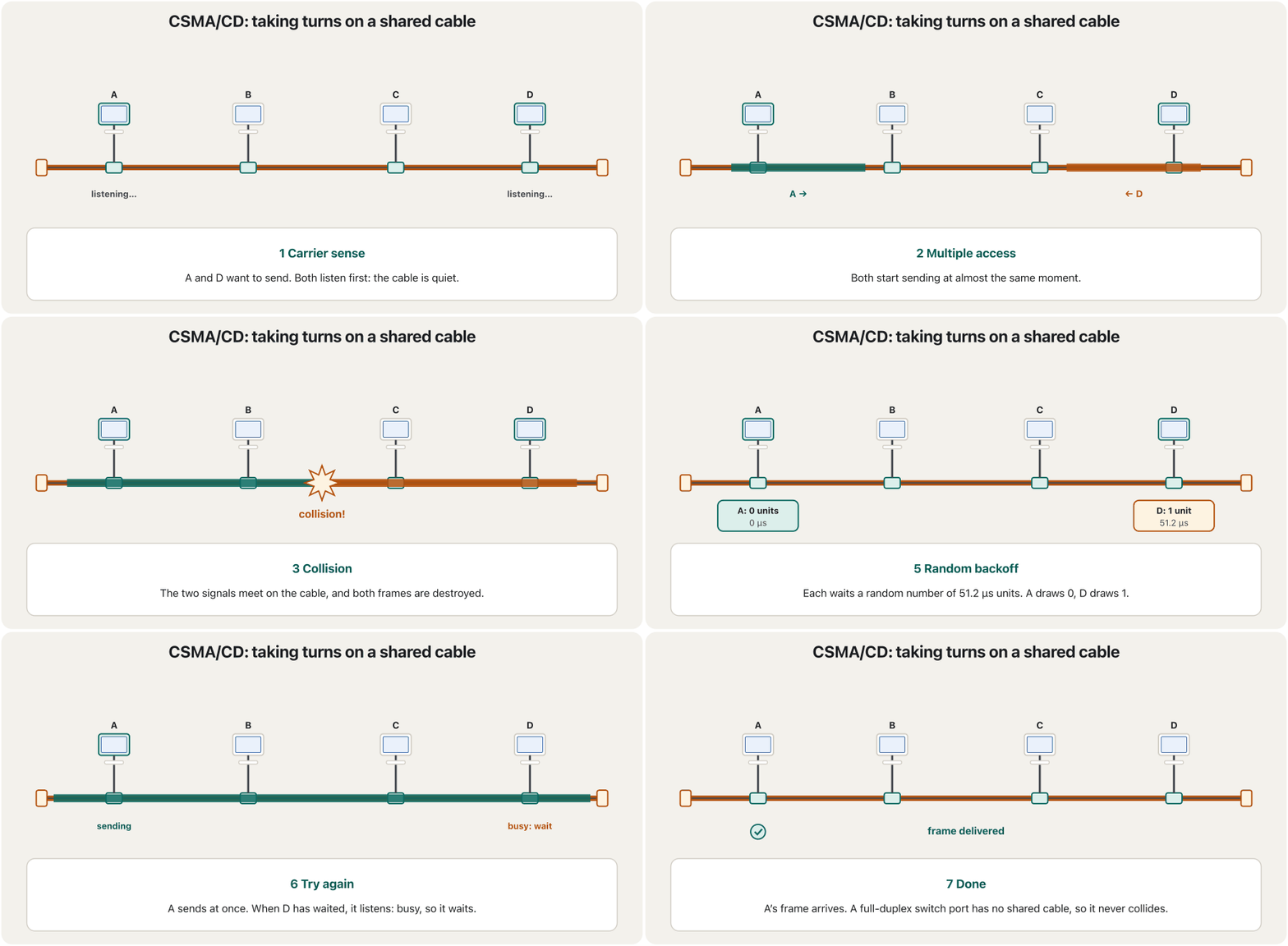
On a shared cable only one computer may send at a time. Classic Ethernet decides who sends with CSMA/CD, carrier sense multiple access with collision detection. Each part of the name is one rule:
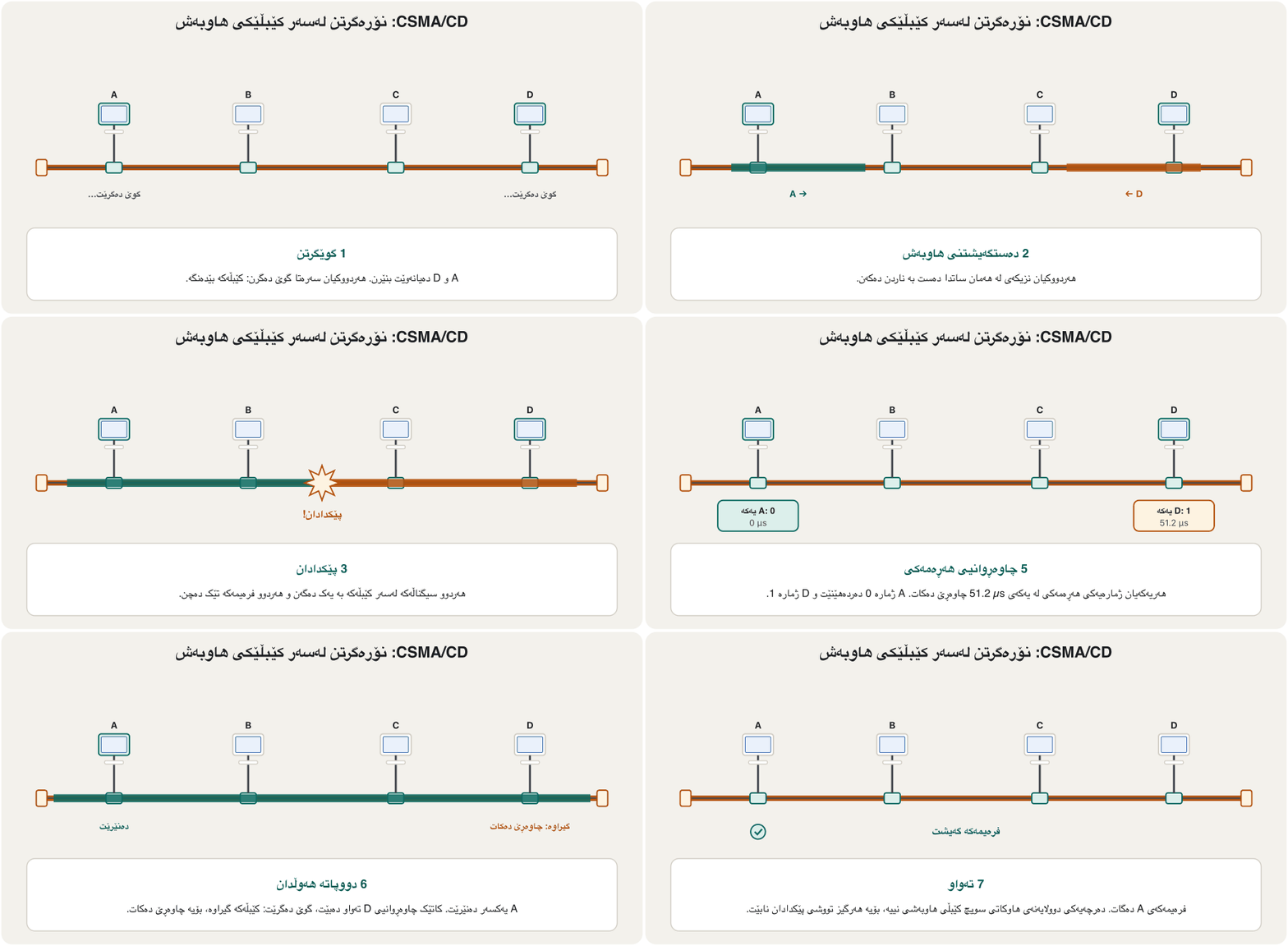
لەسەر کێبڵێکی هاوبەش لە هەر ساتێکدا تەنیا یەک دەتوانێت بنێرێت. کلاسیک بە بڕیار دەدات کێ بنێرێت. هەر بەشێکی ناوەکە یاسایەکە:
- Carrier sense: listen first, and send only when the cable is quiet.
- Multiple access: every computer may start whenever the cable is quiet. A signal needs time to travel, so a far computer may start before it hears another.
- Collision detection: keep listening while you send. If the signal on the cable is not your own, two frames have collided: stop, send a 32-bit jam signal so every station notices, then wait a random backoff time and try again.
- گوێگرتن (carrier sense): سەرەتا گوێ بگرە و تەنیا کاتێک کێبڵەکە بێدەنگ بوو بنێرە.
- دەستگەیشتنی هاوبەش (multiple access): هەموو دەتوانێت هەر کاتێک کێبڵەکە بێدەنگ بوو دەست پێ بکات. کاتی پێویستە تا بڕوات، بۆیە کە دوورە لەوانەیە دەست پێ بکات پێش ئەوەی بزانێت یەکێکی تر دەستی پێ کردووە.
- دۆزینەوەی (collision detection): لە کاتی ناردندا هەر گوێ بگرە. ئەگەر سەر کێبڵەکە هی خۆت نەبوو، دوو تووشی بوون: بوەستە، 32 بنێرە تا هەموو ئامێرێک هەستی پێ بکات، پاشان بکە و دووپاتە هەوڵ بدەوە.
Stations that can collide like this share one collision domain — on a hub too: see One collision domain and Collision domain.
هەموو ئەو ئامێرانەی بەم شێوەیە دەتوانن تووشی ببن، یەک — لەسەر : بڕوانە یەک پاوانی پێکدادان و پاوانی پێکدادان.
Friends talking around a table in a tea house follow the same rules. Nobody starts while someone else is talking (carrier sense). Anyone may start when it is quiet (multiple access). If two start at once, both stop, and each waits a little before trying again (collision detection and backoff).
هاوڕێیان کە لە چایخانەیەکدا بە دەوری مێزێکدا قسە دەکەن، هەمان یاسا پەیڕەو دەکەن. کەس دەست بە قسە ناکات کاتێک کەسێکی تر قسە دەکات (گوێگرتن). هەر کەسێک دەتوانێت دەست پێ بکات کاتێک بێدەنگی بوو (دەستگەیشتنی هاوبەش). ئەگەر دوو کەس پێکەوە دەست پێ بکەن، هەردووکیان دەوەستن و هەریەکەیان کەمێک چاوەڕێ دەکات پێش ئەوەی دووپاتە هەوڵ بداتەوە (دۆزینەوەی و ).
Where the analogy stops workingسنووری ئەم نموونەیە
People can also see each other; Ethernet stations only hear the cable. A full-duplex switch link is like a private phone call: nobody to collide with.
خەڵک یەکتر دەبینن و دەتوانن دەست ڕابوەشێنن؛ ئامێرەکانی تەنیا گوێیان لە کێبڵەکە دەبێت. بەستەری وەک پەیوەندییەکی تەلەفۆنیی تایبەتە: کەس نییە لەگەڵدا ڕوو بدات.
CSMA/CD: taking turns on a shared cableCSMA/CD: نۆرەگرتن لەسەر کێبڵێکی هاوبەش
Random backoff: why the wait doublesچاوەڕوانیی هەڕەمەکی: بۆچی چاوەڕوانی دوو هێندە دەبێت
If both stations waited the same time, they would collide again. So each picks a random number of waiting units; one unit is the time it takes to send 512 bits (51.2 µs at 10 Mb/s). After the first collision the choice is 0 or 1 unit, and after each new collision the range doubles. This is called truncated binary exponential backoff:
ئەگەر هەردوو ئامێرەکە هەمان ماوە چاوەڕێ بکەن، دووپاتە تووشی دەبنەوە. بۆیە هەریەکەیان ژمارەیەکی هەڕەمەکی لە یەکەی چاوەڕوانی هەڵدەبژێرێت؛ هەر یەکەیەک ئەو کاتەیە کە ناردنی 512 دەیخایەنێت (51.2 µs لە 10 Mb/s). دوای یەکەم هەڵبژاردنەکە 0 یان 1 یەکەیە و دوای هەر نوێ مەوداکە دوو هێندە دەبێت. ناوی ئەمە truncated binary exponential backoffـە:
n = how many collisions this frame has had; k = the number of units to wait. From the 10th collision the range stops growing (0 to 1023), and after 16 failed attempts the frame is dropped.
n = ژمارەی ئەو جارانەی ئەم تووشی بووە؛ k = ژمارەی ئەو یەکانەی چاوەڕێی دەکرێت. لە دەیەم مەوداکە ئیتر گەورە نابێت (0 تا 1023) و دوای 16 هەوڵی سەرنەکەوتوو فڕێ دەدرێت.
CSMA/CD: taking turns on a shared cableCSMA/CD: نۆرەگرتن لەسەر کێبڵێکی هاوبەش
Why a frame is at least 64 bytesبۆچی فرەیم لانیکەم 64 بایتە
Collision detection only works while the sender is still sending: a collision near the far end needs time to travel back. So the IEEE fixed a minimum: every frame must last at least 512 bit times — 64 bytes, which take 51.2 µs at 10 Mb/s, longer than a signal's round trip across the largest allowed network. A computer with less data adds padding to reach 64 bytes. The frame fields and the padding are explained in MAC Addresses and Ethernet Frames.
دۆزینەوەی تەنیا کاتێک کار دەکات کە نێرەر هێشتا دەنێرێت: لە نزیک سەری دوورەوە کاتی پێویستە تا هەواڵەکەی بگەڕێتەوە. بۆیە IEEE کەمترین قەبارەیەکی دانا: هەموو دەبێت لانیکەم هێندەی ناردنی 512 بخایەنێت — واتە 64 ، کە لە 10 Mb/s 51.2 µs دەخایەنێت، زیاتر لە بە ناو گەورەترین ڕێگەپێدراودا. کە کەمتری هەیە، پڕکەرەوە زیاد دەکات تا بگاتە 64 . خانەکانی و پڕکەرەوەکە لە ناونیشانەکانی MAC و فرەیمەکانی Ethernetدا ڕوون کراونەتەوە.
What thin coax did wellئەوەی کێبڵی هاوتەوەری باریک باش دەیکرد
In its time, 10BASE2 had real advantages:
لە سەردەمی خۆیدا، سوودی ڕاستەقینەی هەبوو:
- Cheapest: the least expensive way to cable an Ethernet network — for small, budget-conscious offices the most economical choice. Even then the price gap to 10BASE-T was shrinking quickly.
- Simple: the computers were chained one after another with coax and T-connectors, usually with no hub or other box.
- Good noise immunity: the braided shield of the coax kept outside electrical noise away from the signal.
- هەرزانترین: کەمخەرجترین ڕێگا بۆ کێبڵکێشانی — بۆ ئۆفیسی بچووک کە بودجەیان کەمە، ئابوورییترین هەڵبژاردە بوو. تەنانەت ئەو کاتیش جیاوازیی نرخی لەگەڵ 10BASE-T خێرا کەم دەبووەوە.
- سادە: بە و سەری T یەک لە دوای یەک دەبەسترانەوە، زۆربەی جار بەبێ یان هیچ سندووقێکی تر.
- بەرگریی باش لە : ڕووپۆشە چنراوەکەی دەرەوەی لە دوور دەخستەوە.
Compare a modern switched network: one cable per device costs more, but twisted pair matches or beats every other advantage of thin coax, because twisting its pairs cancels most of the noise in offices (Why twist the wires? Balanced pairs).
بەراوردی بکە لەگەڵ سویچکراوی ئەمڕۆ: یەک کێبڵ بۆ هەر ئامێرێک خەرجی زیاترە، بەڵام لە هەموو سوودەکانی تری باریکدا یەکسانە یان باشترە، چونکە بادانی جووتە وایەرەکانی زۆربەی لە ئۆفیسدا دەسڕێتەوە (بۆچی وایەرەکان با دەدرێن؟ جووتی هاوسەنگ).
What went wrong with thin coaxئەوەی لە کێبڵی هاوتەوەری باریکدا خراپ بوو
Its disadvantages decided its fate:
لایەنە خراپەکانی چارەنووسیان دیاری کرد:
- Fault intolerant: one break in the cable, one loose T or a missing terminator brought the whole segment down.
- Hard to change: adding a computer meant opening the bus and putting in a new piece of cable, so everyone had some downtime.
- Hard to troubleshoot: there was no easy way to see which card or piece of cable was at fault, so technicians had to find it by elimination, half by half.
- Special cable, short reach: RG-58 A/U could not be reused for anything else, and repeaters were needed beyond 30 devices or 185 m.
- بەرگەی تێکچوون ناگرێت: یەک پچڕان لە کێبڵەکەدا، یەک سەری Tـی شل یان ون، هەموو بڕەکەی ڕادەگرت.
- گۆڕینی زەحمەت بوو: زیادکردنی واتە کردنەوەی و دانانی پارچەکێبڵێکی نوێ، بۆیە هەمووان تووشی دەبوون.
- زەحمەت بوو: ڕێگەیەکی ئاسان نەبوو بزانیت کام کارت یان کام پارچەی کێبڵ تێکچووە، بۆیە تەکنیکارەکان دەبوو بە لابردن، نیوە بە نیوە، بیدۆزنەوە.
- کێبڵی تایبەت، مەودای کورت: RG-58 A/U بۆ هیچ شتێکی تر بەکار نەدەهاتەوە و لە 30 ئامێر یان 185 m زیاتر پێویست بوو.
Why coax Ethernet disappearedبۆچی Ethernetـی کێبڵی هاوتەوەر نەما
Three steps replaced the coax bus. 1990: 10BASE-T gave each computer its own twisted-pair cable to a hub, so a broken cable stopped only one computer. For a while many buildings kept a short piece of thin coax as a backbone between the hubs of different rooms — the last job of 10BASE2. 1995: Fast Ethernet brought 100 Mb/s on twisted pair; thin coax never got a faster version. Then switches gave every device its own link, and full duplex (IEEE 802.3x, 1997) let both ends of a link send at the same time.
سێ هەنگاو جێگەی گرتەوە. 1990: 10BASE-T هەر بە تایبەتی خۆی بە دەبەست، بۆیە کێبڵێکی پچڕاو تەنیا یەک ڕادەگرت. بۆ ماوەیەک زۆر بینا پارچەیەکی کورتی باریکیان وەک لە نێوان ژوورە جیاوازەکاندا هێشتەوە — دوایین کاری . 1995: Fast Ethernet خێرایی 100 Mb/sـی لەسەر هێنا؛ باریک هەرگیز وەشانێکی خێراتری بۆ نەهات. پاشان بەستەرێکی تایبەتیان دایە هەموو ئامێرێک و (IEEE 802.3x، 1997) ڕێگەی دا هەردوو سەری بەستەرێک لە هەمان کاتدا بنێرن.
On a full-duplex link there is nobody to collide with, so CSMA/CD is switched off. It survives only on half-duplex links such as old hubs (Collision Domains and Broadcast Domains). Since 2011 IEEE 802.3 has marked 10BASE2 as not for new installations. Today you meet thin coax only in museums, very old buildings and exam questions.
لەسەر بەستەرێکی کەس نییە لەگەڵدا ڕوو بدات، بۆیە CSMA/CD کار ناکات. تەنیا لەسەر بەستەرە ماوەتەوە، وەک کۆنەکان (پاوانەکانی پێکدادان و پاوانەکانی پەخش). لە 2011ـەوە IEEE 802.3 بەوە نیشانە دەکات کە بۆ دامەزراندنی نوێ نییە. ئەمڕۆ باریک تەنیا لە مۆزەخانە، بینای زۆر کۆن و پرسیاری تاقیکردنەوەدا دەبینیت.
From 10 Mb/s to 800 Gb/sلە 10 Mb/s تا 800 Gb/s
The first Ethernet ran at about 3 Mb/s (2.94 Mb/s) and the first standard at 10 Mb/s. Older books stop at “10 Mb/s to 10 Gb/s”, but the ladder kept climbing, usually ten times per step. 800 Gb/s became a standard on 16 February 2024 (IEEE 802.3df). 1.6 Tb/s (IEEE P802.3dj) is in its final IEEE ballots: as of November 2026 it is not yet a standard, and its approval is planned for December 2026. Check the IEEE 802.3 pages for the latest news.
یەکەم بە نزیکەی 3 Mb/s (2.94 Mb/s) کاری دەکرد و یەکەم بە 10 Mb/s. کتێبە کۆنەکان لە «10 Mb/s تا 10 Gb/s»دا دەوەستن، بەڵام پەیژەکە هەر بەرز بووەوە، زۆربەی جار لە هەر پلەیەکدا 10 هێندە. 800 Gb/s لە 16ی شوباتی 2024دا بوو بە (IEEE 802.3df). 1.6 Tb/s (IEEE P802.3dj) لە دوایین قۆناغی دەنگدانی IEEEـدایە: تا تشرینی دووەمی 2026 هێشتا نییە و پەسەندکردنی بۆ کانوونی یەکەمی 2026 پلان کراوە. بۆ نوێترین هەواڵ سەیری پەڕەکانی IEEE 802.3 بکە.
From 10 Mb/s to 800 Gb/sلە 10 Mb/s تا 800 Gb/s
Which standard brought which speedکام ستاندارد کام خێرایی هێنا
| Yearساڵ | IEEE 802.3…پاشکۆی IEEE 802.3 | Speedخێرایی | Typical use in 2026بەکارهێنانی ئاسایی لە 2026 |
|---|---|---|---|
| 1983 | 802.3 (10BASE5) | 10 Mb/s | coax buses: history : مێژوو |
| 1995 | 802.3u (Fast Ethernet) | 100 Mb/s | old PCs, printers, IP phonesPCـی کۆن، ، تەلەفۆنی IP |
| 1998–1999 | 802.3z / 802.3ab (Gigabit) | 1 Gb/s | almost every deskنزیکەی هەموو مێزێک |
| 2002 / 2006 | 802.3ae / 802.3an | 10 Gb/s | servers, building uplinks، بەستەری نێوان بیناکان |
| 2010 | 802.3ba | 40 and 100 Gb/s | data-centre and provider linksبەستەرەکانی و دابینکەر |
| 2016 | 802.3bz / 802.3by | 2.5, 5 and 25 Gb/s | Wi-Fi access points on existing cable; servers لەسەر کێبڵی هەبوو؛ |
| 2017 | 802.3bs | 200 and 400 Gb/s | data-centre spinesبڕبڕەی |
| 2024 | 802.3df | 800 Gb/s | AI and cloud data centres AI و هەور |
| 2026 (expected)2026 (چاوەڕوانکراو) | P802.3dj | 1.6 Tb/s | final ballots in autumn 2026دەنگدانی کۆتایی لە پاییزی 2026 |
Ethernet on a campus in 2026Ethernet لە کەمپەسێکدا لە 2026
On a campus in 2026 you meet several Ethernet speeds at once. Desks get 1 Gb/s over Cat 6 cable. Wi-Fi access points need 2.5 or 5 Gb/s — multi-gigabit Ethernet (2016), which runs on the existing Cat 5e and Cat 6 cables — and get their power through the same cable (PoE). Servers use 10 or 25 Gb/s, links between buildings run 10–100 Gb/s over fibre, and big data centres run 400 and 800 Gb/s between their switches. The cables for each speed are in Cable categories in 2026 and Fibre-Optic Cables.
لە کەمپەسێکدا لە 2026دا چەند خێراییەکی پێکەوە دەبینیت. مێزەکان لەسەر کێبڵی Cat 6 1 Gb/s وەردەگرن. پێویستیان بە 2.5 یان 5 Gb/s هەیە — فرەگیگابیت (2016) کە لەسەر کێبڵە هەبووەکانی Cat 5e و Cat 6 کار دەکات — و کارەبایان لە هەمان کێبڵەوە وەردەگرن (). 10 یان 25 Gb/s بەکار دەهێنن، بەستەرەکانی نێوان بیناکان لەسەر فایبەر 10 تا 100 Gb/sن و گەورە لە نێوان 400 و 800 Gb/s بەکار دەهێنن. کێبڵی هەر خێراییەک لە پۆلەکانی کێبڵ لە 2026دا و کێبڵەکانی فایبەر ئۆپتیکدا هەیە.
Common mistakesهەڵە باوەکان
| Mistakeهەڵە | What is trueئەوەی ڕاستە |
|---|---|
| “10BASE2 is a cheap choice for a small network today.”« بۆ بچووک ئەمڕۆ هەڵبژاردنێکی هەرزانە.» | It is history: IEEE 802.3 has marked it not for new installations since 2011. Use twisted pair and Wi-Fi.مێژووە: IEEE 802.3 لە 2011ـەوە بەوە نیشانەی کردووە کە بۆ دامەزراندنی نوێ نییە. و بەکار بهێنە. |
| “BASE means the cable is the base of the network.”«BASE واتە کێبڵەکە بنچینەی .» | BASE means baseband: one digital signal uses the whole cable.BASE واتە : یەک هەموو کێبڵەکە بەکار دەهێنێت. |
| “The 2 in 10BASE2 means exactly 200 m.”«ژمارە 2 لە واتە ڕێک 200 m.» | The real limit is 185 m; 2 is 185 rounded up.سنووری ڕاستەقینە 185 mـە؛ 2 ژمارەی 185ـە کە خڕ کراوەتەوە. |
| “Every Ethernet uses CSMA/CD.”«هەموو CSMA/CD بەکار دەهێنێت.» | Only shared, half-duplex Ethernet. Full-duplex switched links have no collisions and switch CSMA/CD off.تەنیا هاوبەشی . لە بەستەری سویچکراوی نییە و CSMA/CD کار ناکات. |
| “Ethernet's top speed is 10 Gb/s.”«بەرزترین خێرایی 10 Gb/sـە.» | 800 Gb/s has been a standard since February 2024 (IEEE 802.3df), and 1.6 Tb/s is coming.800 Gb/s لە شوباتی 2024ـەوە (IEEE 802.3df) و 1.6 Tb/s لە ڕێگادایە. |
| “A short cable can join the T-connector to the network card.”«کێبڵێکی کورت دەتوانێت سەری T بە ببەستێت.» | The T must sit directly on the card.سەری T دەبێت ڕاستەوخۆ لەسەر کارتەکە بێت. |
| “A short segment works without terminators.”«بڕێکی کورت بەبێ کار دەکات.» | Without terminators the signal bounces back from the open ends and frames are destroyed.بەبێ لە سەرە کراوەکانەوە دەگەڕێتەوە و تێک دەچن. |
| “A repeater splits the network into two collision domains.”« دەکاتە دوو .» | Repeaters and hubs keep one collision domain; bridges and switches split it. و یەک دەهێڵنەوە؛ و دابەشی دەکەن. |
Exercisesڕاهێنانەکان
List three advantages and four disadvantages of 10BASE2, and say in one sentence why it disappeared.
سێ سوود و چوار لایەنی خراپی بنووسە و بە یەک ڕستە بڵێ بۆچی نەما.
Show answerوەڵامەکە پیشان بدە
- Advantages: the cheapest way to cable Ethernet; simple, with no hub; good noise immunity from the coax shield.
- Disadvantages: one break or loose T stops the whole segment; adding a PC means downtime for everyone; faults are hard to find; special cable, at most 30 devices and 185 m per segment.
- Why it disappeared: twisted-pair stars, and then switches, gave each device its own link, so one fault stopped only one device, and they grew to 100 Mb/s and beyond.
- سوودەکان: هەرزانترین ڕێگای کێبڵکێشانی ؛ سادە، بەبێ ؛ بەرگریی باش لە بەهۆی ڕووپۆشی .
- لایەنە خراپەکان: یەک پچڕان یان سەرێکی Tـی شل هەموو بڕەکە ڕادەگرێت؛ زیادکردنی PCـیەک واتە بۆ هەمووان؛ دۆزینەوەی تێکچوون زەحمەتە؛ کێبڵی تایبەت، زۆرترین 30 ئامێر و 185 m بۆ هەر بڕێک.
- بۆچی نەما: ، پاشان ، بەستەرێکی تایبەتیان دایە هەر ئامێرێک، بۆیە یەک تێکچوون تەنیا یەک ئامێری ڕادەگرت، هەروەها گەیشتنە 100 Mb/s و زیاتر.
Decode these names: 10BASE5, 100BASE-TX, 1000BASE-T, 10GBASE-LR.
ئەم ناوانە بخوێنەرەوە: 10BASE5، 100BASE-TX، 1000BASE-T، 10GBASE-LR.
Show answerوەڵامەکە پیشان بدە
- 10BASE5: 10 Mb/s, baseband, thick coax, segments up to 500 m.
- 100BASE-TX: 100 Mb/s (Fast Ethernet), baseband, twisted pair.
- 1000BASE-T: 1 Gb/s (Gigabit Ethernet), baseband, twisted pair up to 100 m.
- 10GBASE-LR: 10 Gb/s, baseband, long-reach single-mode fibre, about 10 km.
- 10BASE5: 10 Mb/s، ، ئەستوور، بڕ تا 500 m.
- 100BASE-TX: 100 Mb/s (Fast Ethernet)، ، .
- 1000BASE-T: 1 Gb/s (Gigabit Ethernet)، ، تا 100 m.
- 10GBASE-LR: 10 Gb/s، ، مەودا درێژ، نزیکەی 10 km.
A company wants 70 computers along a corridor 400 m long, on 10BASE2. How many segments and repeaters does it need at least, and does the design obey the 5-4-3 rule?
کۆمپانیایەک دەیەوێت 70 بە درێژایی ڕاڕەوێکی 400 مەتری لەسەر دابنێت. لانیکەم چەند بڕ و چەند پێویستە و ئایا دیزاینەکە پەیڕەوی یاسای 5-4-3 دەکات؟
Hintئاماژە
Check both limits of a segment: devices and length.
هەردوو سنووری بڕ تاقی بکەرەوە: ژمارەی ئامێر و درێژی.
Show answerوەڵامەکە پیشان بدە
70 computers need at least 3 segments (30 + 30 + 10), and 400 m also needs at least 3 segments of up to 185 m (3 × 185 m = 555 m). So: 3 segments joined by 2 repeaters, all three with computers. That obeys the rule: at most 5 segments, at most 4 repeaters, at most 3 segments with computers. A fourth segment with computers would break it.
70 لانیکەم 3 بڕیان پێویستە (30 + 30 + 10)، هەروەها 400 m لانیکەم 3 بڕی تا 185 مەتری پێویستە (3 × 185 m = 555 m). کەواتە: 3 بڕ کە بە 2 بەستراونەتەوە، هەر سێکیان لەسەرە. ئەمە پەیڕەوی یاساکە دەکات: زۆرترین 5 بڕ، زۆرترین 4 ، زۆرترین 3 بڕ لەگەڵ . بڕی چوارەم لەگەڵ یاساکە دەشکێنێت.
A frame has just collided for the 4th time on a 10 Mb/s network. From which range does the station pick its waiting units, and what is the longest possible wait?
تازە بۆ چوارەمین جار لەسەر 10 Mb/s تووشی بووە. ئامێرەکە یەکەکانی چاوەڕوانی لە کام مەودادا هەڵدەبژێرێت و درێژترین چاوەڕوانیی گونجاو چەندە؟
Show answerوەڵامەکە پیشان بدە
The range is 0 to 15 units; the longest wait is 768 µs.
مەوداکە 0 تا 15 یەکەیە؛ درێژترین چاوەڕوانی 768 µsـە.
How long does it take to send the smallest Ethernet frame (64 bytes) at 10 Mb/s, and at 1 Gb/s?
ناردنی بچووکترین (64 ) لە 10 Mb/s و لە 1 Gb/sـدا چەند دەخایەنێت؟
Show answerوەڵامەکە پیشان بدە
At 1 Gb/s a frame is 100 times shorter in time, which is one reason why half-duplex shared Gigabit Ethernet was hardly ever used: switches made it unnecessary.
لە 1 Gb/sـدا لە ڕووی کاتەوە 100 جار کورتترە؛ ئەمە یەکێکە لە هۆکارەکانی ئەوەی کە گیگابیتی هاوبەشی بە دەگمەن بەکار هات: پێویستییان پێی نەهێشت.
Who invented Ethernet, where and when?کێ Ethernetـی داهێنا، لە کوێ و کەی؟
Robert Metcalfe, at Xerox PARC in California, in 1973 (memo of 22 May; first run in November at 2.94 Mb/s).
Robert Metcalfe، لە Xerox PARC لە کالیفۆرنیا، لە 1973 (یاداشتی 22ی ئایار؛ یەکەم کارکردن لە تشرینی دووەمدا بە 2.94 Mb/s).
What were DIX and IEEE 802.3?DIX و IEEE 802.3 چی بوون؟
DIX was the common 10 Mb/s Ethernet standard of DEC, Intel and Xerox (1980); IEEE 802.3, based on it, was approved on 24 June 1983.
DIX هاوبەشی 10 Mb/sـی DEC، Intel و Xerox بوو (1980)؛ IEEE 802.3، کە لەسەر ئەو بنیات نرا، لە 24ی حوزەیرانی 1983دا پەسەند کرا.
Name the hardware of a 10BASE2 segment.ڕەقەواڵەی بڕێکی 10BASE2 بژمێرە.
RG-58 A/U thin coax, BNC plugs, BNC T-connectors on the network cards and a 50 Ω terminator at each end.
باریکی RG-58 A/U، ، سەری T شێوەی BNC لەسەر و 50 Ω لە هەر سەرێکدا.
What is the jam signal for?سیگناڵی جامکردن بۆ چییە؟
It makes sure that every station on the segment notices the collision, so all of them throw the damaged frame away.
دڵنیا دەبێتەوە کە هەموو ئامێرێکی سەر بڕەکە هەست بە دەکات، بۆیە هەموویان تێکچووەکە فڕێ دەدەن.
Summaryپوختە
- Ethernet (IEEE 802.3) is the family of standards for wired LANs: cards, cables and rules. It was born at Xerox PARC in 1973 (Robert Metcalfe), became the DIX standard in 1980 and IEEE 802.3 in 1983, and beat Token Ring because it was open, cheap and later switched.
- Names: speed + BASE (baseband) + medium. 10BASE2 = 10 Mb/s, baseband, thin coax with segments of 185 m.
- 10BASE2: RG-58 A/U coax, BNC T-connectors straight on the cards, 50 Ω terminators, at most 30 devices, at least 0.5 m apart; segments joined by repeaters under the 5-4-3 rule (at most 925 m).
- CSMA/CD: listen, send, detect a collision, send a 32-bit jam signal, back off randomly (the range doubles), retry; frames last at least 64 bytes so that collisions are noticed.
- Coax disappeared: twisted-pair stars (1990), Fast Ethernet (1995), switches and full duplex (1997) — and full-duplex links need no CSMA/CD.
- Speeds: 10 Mb/s (1983) → 100 Mb/s → 1 Gb/s → 10 Gb/s → 40/100 Gb/s → 200/400 Gb/s → 800 Gb/s (802.3df, 2024); 1.6 Tb/s is expected at the end of 2026.
- (IEEE 802.3) کۆمەڵێک بۆ تەلدار: کارت، کێبڵ و یاسا. لە 1973دا لە Xerox PARC لەدایک بوو (Robert Metcalfe)، لە 1980دا بوو بە DIX و لە 1983دا IEEE 802.3، هەروەها بەسەر Token Ringـدا سەرکەوت چونکە کراوە و هەرزان بوو و دواتر سویچکرا.
- ناوەکان: خێرایی + BASE () + . = 10 Mb/s، ، باریک بە بڕی 185 m.
- : RG-58 A/U، سەری T شێوەی BNC ڕاستەوخۆ لەسەر کارتەکان، 50 Ω، زۆرترین 30 ئامێر، لانیکەم 0.5 m لە یەکتر دوور؛ بڕەکان بە و بەپێی یاسای 5-4-3 دەبەسترێنەوە (زۆرترین 925 m).
- CSMA/CD: گوێ بگرە، بنێرە، بدۆزەوە، 32 بنێرە، بە هەڕەمەکی چاوەڕێ بکە (مەوداکە دوو هێندە دەبێت)، دووپاتە هەوڵ بدەوە؛ لانیکەم 64 دەخایەنن تا هەستیان پێ بکرێت.
- نەما: (1990)، Fast Ethernet (1995)، و (1997) — هەروەها بەستەری پێویستی بە CSMA/CD نییە.
- خێرایی: 10 Mb/s (1983)، پاشان 100 Mb/s، 1 Gb/s، 10 Gb/s، 40/100 Gb/s، 200/400 Gb/s و 800 Gb/s (802.3df، 2024)؛ 1.6 Tb/s چاوەڕوان دەکرێت لە کۆتایی 2026دا.
Lesson complete!وانەکە تەواو بوو!
Well done. Review the key terms, then go on to the next lesson.دەستخۆش. سەیرێکی زاراوە سەرەکییەکان بکەرەوە، پاشان بڕۆ بۆ وانەی داهاتوو.
Key termsزاراوە سەرەکییەکان
MAC Addresses and Ethernet Framesناونیشانەکانی MAC و فرەیمەکانی Ethernet
Related lecturesوانە پەیوەندیدارەکان
- Cables and Wireless: Transmission Mediaکێبڵ و بێتەل: هۆکارەکانی گواستنەوە
- MAC Addresses and Ethernet Framesناونیشانەکانی MAC و فرەیمەکانی Ethernet
- Repeaters and Hubsدووپاتەکەرەوەکان و هەبەکان
- Bridges and Switchesپردەکانی ڕایەڵە و سویچەکان
- Collision Domains and Broadcast Domainsپاوانەکانی پێکدادان و پاوانەکانی پەخش
- Links: Point-to-Point, Multipoint and Transmission Modesبەستنەوەکان: پەیوەندیی خاڵ بۆ خاڵ، پەیوەندیی فرەخاڵ و شێوازەکانی ناردن
- LANs, MANs, WANs and the Internetڕایەڵەی ناوچەیی، ڕایەڵەی شاری، ڕایەڵەی فراوان و ئینتەرنێت
- Fibre-Optic Cables: Single-Mode and Multimodeکێبڵەکانی فایبەر ئۆپتیک: تاکمۆد و فرەمۆد
- Lab: Straight-Through, Crossover and Rollover Cablesتاقیگە: کێبڵی ڕاستەوخۆ، کێبڵی خاچی و کێبڵی rollover
- Wireless LANs: Wi-Fi Standards, Access Points and Securityڕایەڵەی بێتەلی ناوچەیی: ستانداردەکانی وایفای، خاڵەکانی دەستڕاگەیشتن و ئاسایش
References and further readingسەرچاوەکان و خوێندنەوەی زیاتر
- IEEE SA: Ethernet Through the Years — celebrating the technology's 50th year
- ETHW Milestones: Ethernet Local Area Network (LAN), 1973–1985
- The Register (2013): Metcalfe on the birth of Ethernet and its first name
- Wikipedia: Ethernet
- Wikipedia: IEEE 802.3 (list of amendments)
- Wikipedia: 10BASE2
- Wikipedia: 5-4-3 rule
- Wikipedia: Carrier-sense multiple access with collision detection
- Wikipedia: Exponential backoff
- IEEE P802.3df 400 Gb/s and 800 Gb/s Ethernet Task Force (approved 16 February 2024)
- IEEE P802.3dj 200 Gb/s to 1.6 Tb/s Ethernet Task Force
- IEEE 802.3 September 2026 interim: P802.3dj Task Force report (SA recirculation ballots; December 2026 RevCom plan)
This lecture is a first edition. The Kurdish text and terminology are waiting for review by Kurdish IT teachers.ئەم وانەیە چاپی یەکەمە. دەقە کوردییەکە و زاراوەکانی چاوەڕێی پێداچوونەوەی مامۆستایانی کوردی بواری IT ن.