Chapterبەش 4 · Lectureوانە 4.1
Repeaters and Hubsدووپاتەکەرەوەکان و هەبەکان
The simplest network devices work at layer 1: they move bits and read nothing. Why signals fade (attenuation) and how a repeater regenerates them instead of amplifying the noise; the repeater’s features, kinds and limits and its modern heirs (Wi-Fi extenders and mesh); the hub as a multiport repeater that floods every frame to every port in one collision domain, half duplex, with CSMA/CD and the jam signal; passive, active and intelligent hubs, their cables, and why switches replaced them.
سادەترین ئامێرەکانی لە چینی 1دا کار دەکەن: دەگوازنەوە و هیچ ناخوێننەوە. بۆچی کز دەبن () و چۆن سەرلەنوێ دروستیان دەکاتەوە لە جیاتی ئەوەی گەورە بکات؛ تایبەتمەندی، جۆر و سنوورەکانی و میراتگرە نوێیەکانی ( و )؛ وەک فرەدەرچە کە هەموو بۆ هەموو دەنێرێت لە یەک ، ، بە و ؛ ناچالاک، چالاک و زیرەک، کێبڵەکانیان و بۆچی جێیان گرتنەوە.
What you will learnچی فێر دەبیت
- Explain attenuation and noise, and why a repeater regenerates a signal instead of amplifying it.
- Describe the features and kinds of repeaters, and what a repeater cannot do.
- Explain how a hub floods every frame out of every port, and why only the addressed device keeps it.
- Name the problems of hubs — shared bandwidth, half duplex, one collision domain, collisions, poor security — and tell passive, active and intelligent hubs apart.
- Explain why switches replaced hubs and where the repeater idea lives on today.
- و ڕوون بکەیتەوە و بڵێیت بۆچی سەرلەنوێ دروست دەکاتەوە لە جیاتی گەورەکردنی.
- تایبەتمەندی و جۆرەکانی وەسف بکەیت و بڵێیت چی ناتوانێت بکات.
- ڕوونی بکەیتەوە چۆن هەموو لە هەموو دەنێرێت و بۆچی تەنیا ئامێرە مەبەستەکە دەیهێڵێتەوە.
- کێشەکانی بژمێریت — هاوبەش، ، یەک ، ، ئاسایشی لاواز — و ناچالاک، چالاک و زیرەک لە یەک جیا بکەیتەوە.
- ڕوونی بکەیتەوە بۆچی جێی گرتەوە و بیرۆکەی ئەمڕۆ لە کوێدا ماوە.
Network devices, from the simplest upئامێرە نێوەندگیرەکان، لە سادەترینەوە
This chapter opens the boxes in the middle of a network. Hubs, switches and routers can look alike — a row of ports and some blinking lights — and people often say they differ only in how they move data. That is true, but the deeper difference is what each one reads. A repeater or a hub reads nothing: it works at layer 1 and copies bits. A bridge or a switch reads the MAC address in each frame (layer 2). A router reads the IP address in each packet (layer 3).
ئەم بەشە ئەو سندووقانە دەکاتەوە کە لە ناوەڕاستی . ، و لە یەک دەچن — ڕیزێک و چەند گڵۆپێکی تروسکەدار — و زۆرجار دەگوترێت تەنیا لە شێوازی گواستنەوەی جیاوازن. ئەمە ڕاستە، بەڵام جیاوازییە قووڵەکە ئەوەیە کە هەریەکەیان چی دەخوێنێتەوە. یان هیچ ناخوێنێتەوە: لە چینی 1دا کار دەکات و کۆپی دەکات. یان ناو هەر دەخوێنێتەوە (چینی 2). ناو هەر دەخوێنێتەوە (چینی 3).
This lesson starts at the bottom, with the two layer-1 devices. The next lessons climb up: Bridges and Switches and Modems and Routers. The devices of every layer are listed in How the models meet real equipment; the short version from the IT course is Repeaters, bridges, gateways and the rest.
ئەم وانەیە لە خوارەوە دەست پێ دەکات، بە دوو ئامێرەکەی چینی 1. وانەکانی دواتر بەرەو سەرەوە دەچن: پردەکانی ڕایەڵە و سویچەکان و مۆدێمەکان و ڕێدۆزەکان. ئامێرەکانی هەموو چینێک لە مۆدێلەکان و ئامێرە ڕاستەقینەکاندا ڕیز کراون؛ کورتەکەی کۆرسی IT لە دووپاتەکەرەوەکان، پردەکانی ڕایەڵە، دەروازەکانی ڕایەڵە و ئەوانی تردایە.
Why signals need help: attenuation and noiseبۆچی سیگناڵەکان یارمەتییان پێویستە: لاوازبوونی سیگناڵ و ژاوەژاو
A signal gets weaker as it travels. Copper wire resists the current, so every metre turns a little of the signal’s energy into heat; a fibre loses a little light. This loss is called attenuation. On the way, the signal also picks up noise from motors, power cables and other wires. When the signal is both weak and noisy, the receiver can no longer tell a 1 from a 0.
هەتا دوورتر بڕوات لاوازتر دەبێت. وایەری مس بەرگری لە تەزوو دەکات، بۆیە هەر مەترێک بەشێکی بچووک لە وزەی دەکاتە گەرمی؛ فایبەریش کەمێک ڕووناکی لەدەست دەدات. ئەم لەدەستدانە پێی دەگوترێت . لە ڕێگادا یش لە ماتۆڕ، کێبڵی کارەبا و وایەرەکانی تر وەردەگرێت. کاتێک هەم لاواز و هەم پڕ لە بێت، وەرگر ئیتر ناتوانێت 1 لە 0 جیا بکاتەوە.
That is why every medium has a maximum length: a twisted-pair Ethernet channel may be at most 100 m long (the 100 m rule). To go further, a device must catch the signal while it can still be read — and send it on, strong and clean.
لەبەر ئەمەیە هەر درێژییەکی زۆرینەی هەیە: ڕێگای سەر دەبێت لە 100 m درێژتر نەبێت (یاسای 100 مەتر). بۆ دوورتر ڕۆیشتن، ئامێرێک پێویستە کە بگرێت لە کاتێکدا هێشتا دەخوێندرێتەوە — و بە بەهێزی و پاکی بینێرێتە پێشەوە.
The repeater: receive, rebuild, send againدووپاتەکەرەوە: وەرگرتن، دروستکردنەوە، ناردنەوە
A repeater receives a signal that has travelled far and grown weak, and sends it out again at full strength, so that it can travel a longer distance on the medium. The name comes from repeat: the signal leaves the repeater as if it were being sent again, fresh, from that point. It is sometimes called a signal booster. A classic Ethernet repeater had just two ports: one cable in, one cable out.
وەردەگرێت کە ڕێگایەکی دووری بڕیوە و لاواز بووە، پاشان بە هێزی تەواو دووپاتە دەینێرێتەوە بۆ ئەوەی بتوانێت مەودایەکی درێژتر لەسەر ببڕێت. ناوەکەی لە repeatـەوە هاتووە، واتە «دووپاتەکردنەوە»: وا لە دەردەچێت وەک ئەوەی لەو خاڵەوە سەرلەنوێ و تازە نێردرابێت. جاروبار پێی دەگوترێت signal booster. کلاسیکیی تەنیا دوو هەبوو: کێبڵێک بۆ هاتن و کێبڵێک بۆ ڕۆیشتن.
Its job, said precisely, is to regenerate and retime the signal at the bit level. Regenerate means rebuilding every bit at its proper strength and shape; retime means putting the bits back in exact step. Because it handles only signals and bits, a repeater works at layer 1, the physical layer.
ئەرکەکەی، بە وردی، دروستکردنەوە و ڕێکخستنەوەی کاتی لە ئاستی . دروستکردنەوە واتە هەموو بە هێز و شێوەی دروستی خۆی سەرلەنوێ دروست بکرێتەوە؛ ڕێکخستنەوەی کات واتە دووپاتە بە وردی ڕیز بکرێنەوە لە کاتی خۆیاندا. چونکە تەنیا مامەڵە لەگەڵ و دەکات، لە چینی 1دا کار دەکات، چینی فیزیکی.
Regenerating is not amplifyingبەرهەمهێنانەوەی سیگناڵ گەورەکردن نییە
Lists of repeater features start with two words: amplification (making the signal stronger) and regeneration (rebuilding it without the noise). They are not the same thing. An amplifier makes everything bigger — the signal and the noise it has collected. Put several amplifiers in a row and the noise piles up.
لیستی تایبەتمەندییەکانی بە دوو وشە دەست پێ دەکات: گەورەکردن (بەهێزکردنی ) و دروستکردنەوە (سەرلەنوێ دروستکردنەوەی بەبێ ). ئەم دووانە یەک شت نین. هەموو شتێک گەورە دەکات — و ئەو کۆی کردووەتەوە. چەند لە دوای یەک دابنێ و کەڵەکە دەبێت.
A digital repeater does more: for every bit it decides is this a 1 or a 0? and sends a brand-new, clean pulse at the right moment. The noise stays behind. As long as each repeater sits close enough that the bits can still be recognised, a signal can be passed on again and again without getting worse. That is signal regeneration, and it is the reason digital signals resist noise so well (why digital stays clean).
زیاتر دەکات: بۆ هەر بڕیار دەدات ئەمە 1ـە یان 0؟ و لێدانێکی تازە و پاک لە کاتی خۆیدا دەنێرێت. لە دواوە دەمێنێتەوە. تا هەر ئەوەندە نزیک بێت کە هێشتا بناسرێنەوە، دەتوانێت جار لە دوای جار بنێردرێتە پێشەوە بەبێ ئەوەی خراپتر ببێت. ئەمە ە و هۆکاری ئەوەیە کە ئەوەندە باش بەرگەی دەگرێت (بۆچی دیجیتاڵ پاک دەمێنێتەوە).
What else a repeater can doدووپاتەکەرەوە چی تر دەتوانێت بکات
Besides amplification and regeneration, descriptions of repeaters list more features. Some belong to every repeater; others only to certain kinds:
جگە لە گەورەکردن و دروستکردنەوە، باسی تایبەتمەندیی تریش دەژمێرێت. هەندێکیان هی هەموو ؛ هەندێکی تر تەنیا هی هەندێک جۆرن:
| Featureتایبەتمەندی | What it meansواتاکەی | Where you find itلە کوێدا هەیە |
|---|---|---|
| Extending rangeدرێژکردنی مەودا | Because it rebuilds the signal, the total distance gets longer.چونکە سەرلەنوێ دروست دەکاتەوە، کۆی مەوداکە درێژتر دەبێت. | Every repeaterهەموو |
| Several portsچەند | A repeater with many ports is a hub (next screens). A classic Ethernet repeater had two. بە چەندین (شاشەکانی دواتر). کلاسیکیی دوو دانەی هەبوو. | Multiport repeaters = hubs فرەدەرچە = |
| Automatic gain control (AGC)کۆنترۆڵی خۆکاری بەهێزکردن (AGC) | Boosts a weak signal only as much as needed and does not boost a strong one further, so the output is not distorted. لاواز تەنیا بەقەدەر پێویست بەهێز دەکات و بەهێز زیاتر بەهێز ناکات، بۆیە دەرچووەکە تێک ناچێت. | Radio and mobile-signal repeaters ڕادیۆ و مۆبایل |
| Monitoringچاودێری | The administrator sees each signal’s strength and state in monitoring software and gets an alarm when something breaks.بەڕێوەبەر لە چاودێریدا هێز و دۆخی هەر دەبینێت و کاتێک شتێک تێک دەچێت ئاگادار دەکرێتەوە. | Managed radio and mobile repeaters; managed hubs بەڕێوەبراوەکانی ڕادیۆ و مۆبایل؛ بەڕێوەبراوەکان |
| Compatibilityگونجان | Built for one kind of signal: an Ethernet repeater does not repeat Wi-Fi, and a 4G repeater does not repeat bands it was not made for.بۆ یەک جۆر دروست کراوە: دووپاتە ناکاتەوە و 4G تەنیا ئەو باندانە دووپاتە دەکاتەوە کە بۆیان دروست کراوە. | Every repeaterهەموو |
Kinds of repeatersجۆرەکانی دووپاتەکەرەوە
Repeaters are grouped in three ways — by the signal they rebuild, by how far apart the LAN segments are, and by the medium:
بە سێ شێوە پۆلێن دەکرێن — بەپێی ئەو دروستی دەکەنەوە، بەپێی دووریی نێوان بەشەکانی و بەپێی :
- Analog or digital. An analog repeater amplifies a continuous signal, so noise and mixing can damage it. A digital repeater regenerates bits, so damage is very unlikely.
- Local or remote. A local repeater joins segments that are close together; a remote repeater joins segments far apart, with a long link between its two halves.
- Wired or wireless. A wired repeater sits on a cable in a small wired network; a wireless repeater re-sends radio signals, in small wireless networks and in mobile (cellular) networks.
- By place and power: indoor and outdoor (weatherproof) repeaters, and active repeaters, which need electric power — every regenerating repeater is active.
- یان . بەردەوام گەورە دەکات، بۆیە و تێکەڵبوون دەتوانن تێکی بدەن. سەرلەنوێ دروست دەکاتەوە، بۆیە ئەگەری تێکچوون زۆر کەمە.
- ناوخۆیی یان دوورەدەست. ناوخۆیی ئەو بەشانە دەبەستێتەوە کە لە یەکەوە نزیکن؛ دوورەدەست بەشە دوورەکان دەبەستێتەوە، بە بەستەرێکی درێژ لە نێوان دوو نیوەکەیدا.
- تەلدار یان . تەلدار لەسەر کێبڵێک لە تەلداری بچووکدا دادەنرێت؛ ڕادیۆیی دووپاتە دەنێرێتەوە، لە بچووکدا و لە (خانەیی)دا.
- بەپێی شوێن و کارەبا: ناوەوە و دەرەوە (بەرگەی کەشوهەوا دەگرێت) و چالاک کە کارەبای پێویستە — هەر کە سەرلەنوێ دروست بکاتەوە چالاکە.
Kinds of repeatersجۆرەکانی دووپاتەکەرەوە
An everyday example: radio repeatersمیناکێکی ڕۆژانە: دووپاتەکەرەوەکانی ڕادیۆیی
The handheld radios of police officers in a city are a classic everyday example. A handheld radio is weak and buildings block its waves, so a radio repeater on a hill or a tall building listens on one frequency and sends the same message again, at high power, on a second frequency. Every radio in the area can hear the repeater, even when the radios cannot hear each other.
ڕادیۆ دەستییەکانی پۆلیس لە شارێکدا میناکێکی ڕۆژانەی کلاسیکین. ڕادیۆی دەستی لاوازە و بیناکان ڕێگری لە شەپۆلەکانی دەکەن، بۆیە ڕادیۆیی لەسەر گردێک یان بینایەکی بەرز لەسەر گوێ دەگرێت و هەمان پەیام بە هێزێکی زۆر لەسەر دووەم دەنێرێتەوە. هەموو ڕادیۆکانی ناوچەکە گوێیان لە دەبێت، تەنانەت کاتێک ڕادیۆکان گوێیان لە یەکتر نابێت.
Old analog radio systems amplified the hiss along with the voice; you could hear the noise grow. Many radio services today use digital radio, whose repeaters rebuild the digital signal — the same idea as a digital network repeater.
سیستەمە ڕادیۆییە کۆنەکان کە بوون، خشەخشەکەیان لەگەڵ دەنگەکە گەورە دەکرد؛ دەتوانرا گوێ لە زیادبوونی بگیرێت. ئەمڕۆ زۆرێک لە خزمەتگوزارییە ڕادیۆییەکان ڕادیۆی بەکار دەهێنن؛ ئەو سیستەمانە سەرلەنوێ دروست دەکەنەوە — هەمان بیرۆکەی .
What a repeater cannot doئەوەی دووپاتەکەرەوە ناتوانێت بیکات
A repeater has two weak points. First, it does not join different networks — it is not a router! At layer 1 it only moves a stream of bits over copper or fibre. It cannot read an IP address or a MAC address, so the two sides of a repeater are one and the same network.
دوو لایەنی لاوازی هەیە. یەکەم، جیاواز بە یەکەوە نابەستێتەوە — نییە! لە چینی 1دا تەنیا ڕەوتێک بەسەر مس یان فایبەردا دەگوازێتەوە. ناتوانێت یان بخوێنێتەوە، بۆیە هەردوو لای یەک و هەمان .
Second, security. A repeater blocks and filters nothing: everything it receives, it repeats — your private data, but also malware and an attacker’s traffic. A wireless repeater spreads the signal through the air even further, so a skilled attacker nearby can listen in or try to join the network. That is why data that crosses a repeater should be encrypted: on Wi-Fi with WPA2 or WPA3, on the web with HTTPS.
دووەم، ئاسایش. هیچ شتێک ڕاناگرێت و فلتەر ناکات: هەرچی وەری بگرێت دووپاتەی دەکاتەوە — تایبەتی تۆ، بەڵام و هاتوچۆی . بە ناو هەوادا دوورتریش بڵاو دەکاتەوە، بۆیە شارەزا لە نزیکەوە دەتوانێت بکات یان هەوڵ بدات بچێتە ناو . لەبەر ئەوە ئەو بە تێدەپەڕێت دەبێت بە بپارێزرێت: لە بە یان ، لە وێبدا بە HTTPS.
Repeaters today: Wi-Fi extenders and meshدووپاتەکەرەوەکان ئەمڕۆ: دووپاتەکەرەوەکانی وایفای و ڕایەڵەی چنراو
An everyday problem: a family’s Wi-Fi router is in the main house, and the second house across the yard gets only a weak signal — slow Internet, or none. A device halfway between the two houses that receives the signal and sends it on again solves the problem. In 2026 that device is a Wi-Fi range extender, often sold as a ‘repeater’.
کێشەیەکی ڕۆژانە: خێزانێک لە ماڵە سەرەکییەکەدایە و ماڵی دووەم لە ئەوبەری حەوشەکە تەنیا لاواز وەردەگرێت — خاو، یان هیچ. ئامێرێک لە نیوەی ڕێگای نێوان دوو ماڵەکەدا کە وەربگرێت و دووپاتە بینێرێتەوە کێشەکە چارەسەر دەکات. لە 2026دا ئەو ئامێرە کە زۆرجار بە ناوی ‘repeater’ دەفرۆشرێت.
Inside, an extender is really a Wi-Fi access point that receives and re-sends. With a single radio it must hear each frame and then send it again on the same channel, so the speed through it drops to about half. Better choices: a mesh system, whose access points work together as one network and often keep their own radio or a cable for the link between them — or simply a cable to a second access point. More on mesh: ad hoc and mesh.
لە ناوەوە، لە ڕاستیدا کە وەردەگرێت و دووپاتە دەینێرێتەوە. بە یەک ڕادیۆ دەبێت هەر ببیستێت و پاشان لەسەر هەمان کەناڵ دووپاتە بینێرێتەوە، بۆیە خێرایی لە ڕێگەی ئەوەوە نزیکەی نیوە کەم دەبێتەوە. هەڵبژاردەی باشتر: سیستەمێکی کە وەک یەک پێکەوە کار دەکەن و زۆرجار ڕادیۆیەکی تایبەت یان کێبڵێک بۆ بەستەری نێوانیان دادەنێن — یان بە سادەیی کێبڵێک بۆ دووەم. زیاتر لەسەر : ad hoc و ڕایەڵەی چنراو.
The repeater idea also lives on in optical amplifiers on long fibre routes, in mobile-signal repeaters inside large buildings, and in ‘active’ cables with a tiny repeater chip in the plug.
بیرۆکەی لە شوێنی تریشدا ماوە: لە ڕووناکی لەسەر ڕێگا درێژەکانی فایبەر، لە مۆبایل لە ناو بینا گەورەکاندا و لە کێبڵە ‘چالاک’ـەکاندا کە پارچەیەکی بچووکی لە سەرەکەیاندایە.
The hub: a repeater with many portsهەب: دووپاتەکەرەوەیەک بە چەندین دەرچەوە
In English a hub is a centre: the hub of a bicycle wheel, where all the spokes meet, or a city that is a hub of trade. In a network a hub is a central connection point: every computer has its own cable to it, like the spokes of a wheel, so the cabling is a star.
وشەی hub لە ئینگلیزیدا بە واتای ناوەند و نێوجەرگە دێت: چەقی چەرخەی دووچەرخە کە هەموو تیلەکانی لێ کۆ دەبنەوە، یان شارێک کە مەکۆی بازرگانییە. لە خاڵێکی ناوەندیی پێکەوەبەستنە: هەر کێبڵێکی تایبەتی خۆی تا ئەو هەیە، وەک تیلەکانی چەرخ، بۆیە کێبڵکارییەکە شێوەی هەیە.
Inside, a hub is simply a multiport repeater: a signal that enters one port is regenerated and sent out of every other port. Like the repeater, it works at layer 1, the physical layer, and reads no addresses. Its aim is only to connect devices: any device on one port can talk to any device on another. All of them stay in the same network — a hub does not divide the computers into separate networks or segments. A one-table comparison with a switch is in Hub or switch?.
لە ناوەوە، بە سادەیی فرەدەرچەیە: ئەو لە دێتە ژوورەوە سەرلەنوێ دروست دەکرێتەوە و لە هەموو ترەوە دەنێردرێت. وەک ، لە چینی 1دا، ، کار دەکات و هیچ ناونیشانێک ناخوێنێتەوە. ئامانجی تەنیا بەستنەوەی ئامێرەکانە: هەر ئامێرێک لەسەر دەتوانێت لەگەڵ هەر ئامێرێک لەسەر تر قسە بکات. هەموویان لە هەمان دەمێننەوە — دابەش ناکات بۆ یان جیا. بەراوردێکی یەک خشتەیی لەگەڵ لە هەب یان سویچ؟دا هەیە.
Everyone gets everything: floodingهەمووان هەموو شتێک وەردەگرن: لافاوکردن
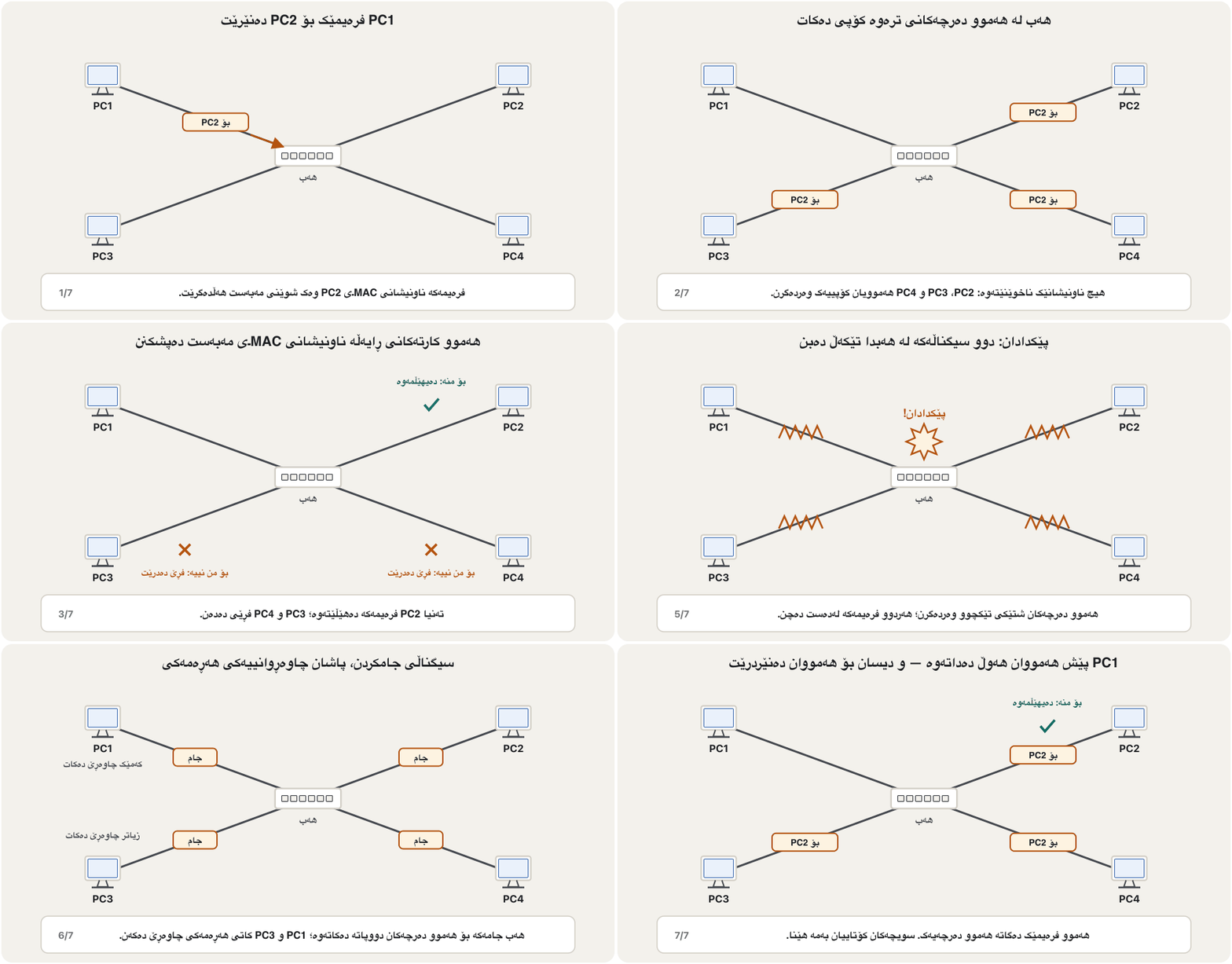
A hub is not clever like a switch or a router: it never looks at where the data should go. Take PC1, PC2 and PC3 on a hub. PC1 sends a frame to PC2. The hub copies it to PC2 — and also to PC3, although nobody wanted PC3 to have it. So how does the right computer get its data? Every frame carries the destination MAC address. Each network card that receives the frame checks that address: if it is not its own, the card ignores the frame; only the addressee keeps it. With four PCs on a hub, a frame from PC1 to PC2 also reaches PC3 and PC4, which drop it.
وەک یان زرنگ نییە: هەرگیز سەیر ناکات دەبێت بۆ کوێ بچێت. PC1، PC2 و PC3 لەسەر دابنێ. PC1 بۆ PC2 دەنێرێت. بۆ PC2ـی کۆپی دەکات — و بۆ PC3ـیش، هەرچەندە کەس نەیویستووە بگاتە PC3. کەواتە دروستەکە چۆن وەردەگرێت؟ هەموو شوێنی مەبەست هەڵدەگرێت. هەر کە وەربگرێت ئەو ناونیشانە دەپشکنێت: ئەگەر هی خۆی نەبێت، پشتگوێی دەخات؛ تەنیا خاوەنەکەی دەیهێڵێتەوە. بە چوار لەسەر ، لە PC1ـەوە بۆ PC2 دەگاتە PC3 و PC4ـیش، کە فڕێی دەدەن.
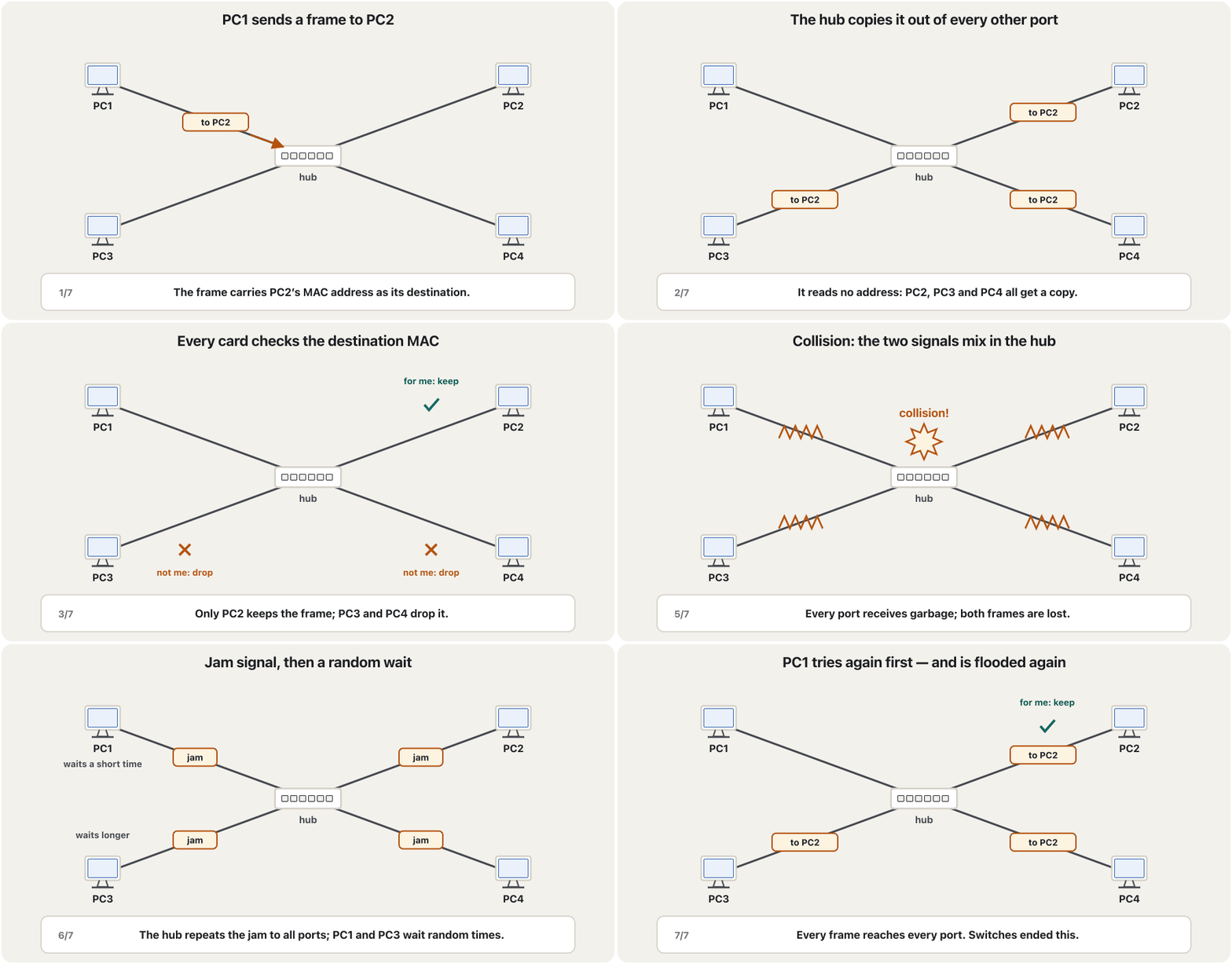
Sending a frame to devices that did not ask for it is called flooding — the English word flood means a great deal of water arriving that nobody wanted. Because everyone hears everything, hub networks were also described as broadcast communication. Do not confuse this with a broadcast frame, which is addressed to every device on purpose (MAC Addresses and Ethernet Frames).
ناردنی بۆ ئەو ئامێرانەی داوایان نەکردووە پێی دەگوترێت — وشەی ئینگلیزیی flood واتە لافاو و تۆفان: ئاوێکی زۆر کە کەس نەیویستووە بێت. چونکە هەمووان گوێیان لە هەموو شتێک دەبێت، هەروەها وەک گفتوگۆی پەخشی ناسێنراون. ئەمە تێکەڵ مەکە لەگەڵ ، کە بە ئەنقەست بۆ هەموو ئامێرەکان نێردراوە (ناونیشانەکانی MAC و فرەیمەکانی Ethernet).
Why a hub is slow and unsafeبۆچی هەب خاو و ناسەلامەتە
Flooding has a price. Traffic: every frame goes to every port, so the network fills with frames that most computers throw away. Security: any computer on the hub — or anyone who plugs a laptop into a free port — receives everybody’s frames and can read whatever is not encrypted. Speed: all the computers share one channel, and only one of them can send at a time (half duplex). Ten PCs on a 100 Mb/s hub share 100 Mb/s between them:
نرخێکی هەیە. هاتوچۆ: هەموو بۆ هەموو دەچێت، بۆیە پڕ دەبێت لە کە زۆربەی فڕێیان دەدەن. ئاسایش: هەر لەسەر — یان هەر کەسێک بە بەتاڵەوە ببەستێت — هەمووان وەردەگرێت و دەتوانێت هەرچی بە نەپارێزرابێت بیخوێنێتەوە. خێرایی: هەموو یەک کەناڵ بەش دەکەن و لە یەک کاتدا تەنیا یەکێکیان دەتوانێت بنێرێت (دوولایەنەی نۆرەیی). دە لەسەر 100 Mb/s، 100 Mb/s لە نێوان خۆیاندا بەش دەکەن:
In practice each PC gets even less, because of collisions.
لە ڕاستیدا هەر لەوەش کەمتر وەردەگرێت، بەهۆی .
And collisions: when two computers send at the same moment, their signals crash into each other in the hub and both frames are lost. The more computers on a hub, the more collisions — and the slower the network.
هەروەها : کاتێک دوو لە هەمان ساتدا دەنێرن، لە بەریەک دەکەون و هەردوو لەدەست دەچن. هەتا زیاتر لەسەر بن، زیاترە — و خاوتر.
A hub is like a classroom where every letter is read aloud to the whole class. Only the student named on the letter keeps it, but everybody hears it — and when two people read at once, nobody understands either of them.
وەک پۆلێکە کە هەموو نامەیەک بە دەنگی بەرز بۆ هەموو پۆلەکە دەخوێندرێتەوە. تەنیا ئەو قوتابییەی ناوی لەسەر نامەکەیە دەیهێڵێتەوە، بەڵام هەمووان گوێیان لێی دەبێت — و کاتێک دوو کەس پێکەوە دەخوێننەوە، کەس لە هیچیان تێناگات.
Where the analogy stops workingسنووری ئەم نموونەیە
Network cards do ignore frames that are not theirs; the danger is a computer set to keep them.
بەڕاستی خەڵکی پشتگوێ دەخەن؛ مەترسییەکە ئەو کە بۆ هێشتنەوەیان ڕێک خراوە.
One collision domain: CSMA/CD and the jam signalیەک پاوانی پێکدادان: CSMA/CD و سیگناڵی جامکردن
All the devices on a hub — passive or active — share one collision domain: the area in which two transmissions can collide. On a switch, by contrast, every port is a collision domain of its own. Counting collision domains in a network diagram is taught in Collision and Broadcast Domains.
هەموو ئەو ئامێرانەی لەسەر — ناچالاک بێت یان چالاک — یەک بەش دەکەن: ئەو ناوچەیەی کە دوو ناردن تێیدا دەتوانن پێکدا بدەن. بەڵام لەسەر ، هەر خۆیەتی. ژماردنی لە لە پاوانەکانی پێکدادان و پاوانەکانی پەخشدا فێر دەکرێت.
Shared Ethernet handled collisions with CSMA/CD (Carrier Sense Multiple Access with Collision Detection). Each network card listens before sending; if it detects a collision while sending, it sends a short jam signal so that every station knows, then waits a random time before trying again. The hub’s part is simple: it repeats the collision and the jam signal out of every port. The full rules are in Ethernet: From 10Base-2 to 800 Gigabit.
هاوبەش بە (Carrier Sense Multiple Access with Collision Detection) چارەسەر دەکرد. هەر پێش ناردن گوێ دەگرێت؛ ئەگەر لە کاتی ناردندا هەستی بە کرد، کورت دەنێرێت بۆ ئەوەی هەموو ئامێرەکان بزانن، پاشان کاتێکی هەڕەمەکی چاوەڕێ دەکات پێش ئەوەی دووپاتە هەوڵ بداتەوە. بەشی سادەیە: و لە هەموو دووپاتە دەکاتەوە. یاساکان بە تەواوی لە Ethernet: لە 10Base-2ـەوە بۆ 800 گیگابیتدان.
Passive, active and ‘intelligent’ hubsهەبی ناچالاک، چالاک و ‘زیرەک’
Hubs came in three main types, used mostly in star topologies:
سێ جۆری سەرەکیی هەبوو، زۆرتر لە بەکار دەهێنران:
- Passive hub: needs no outside power. It only joins the cables, like a hose joint that joins two garden hoses: the signal passes through without being filtered, processed or regenerated, so it gets no stronger. Very rare today.
- Active hub: plugged into electricity. It regenerates weak signals before sending them on — which is why it is called a multiport repeater. It does not filter or divide the traffic: every frame still goes out of every port. A repeater has two ports; a hub has many.
- Intelligent (managed) hub: an active hub with a management card. The administrator sees each port’s traffic and errors from a computer, gets alarms, and can switch a faulty port off. It still floods every frame. Some sources call a switch a ‘smart hub’, but a switch is a different device: it learns addresses and forwards each frame only where it must go.
- ناچالاک: هیچ کارەبایەکی دەرەکی پێویست نییە. تەنیا کێبڵەکان بە یەکەوە دەبەستێت، وەک جومگەی سۆندە کە دوو سۆندەی باخچە بە یەکەوە دەبەستێت: بەبێ فلتەرکردن، پرۆسێسکردن یان دروستکردنەوە تێدەپەڕێت، بۆیە بەهێزتر نابێت. ئەمڕۆ زۆر دەگمەنە.
- چالاک: بە کارەباوە دەبەسترێت. لاوازەکان پێش ناردنیان سەرلەنوێ دروست دەکاتەوە — لەبەر ئەوە پێی دەگوترێت فرەدەرچە. هاتوچۆکە فلتەر یان دابەش ناکات: هێشتا هەموو لە هەموو دەڕوات. دوو هەیە؛ چەندین.
- زیرەک (بەڕێوەبراو): چالاکە بە کارتێکی بەڕێوەبردنەوە. بەڕێوەبەر لە هاتوچۆ و هەڵەکانی هەر دەبینێت، ئاگادار دەکرێتەوە و دەتوانێت تێکچوو بکوژێنێتەوە. هێشتا هەموو بۆ هەمووان دەنێرێت. هەندێک سەرچاوە بە دەڵێن ‘هەبی زیرەک’، بەڵام ئامێرێکی ترە: فێری ناونیشانەکان دەبێت و هەر تەنیا بۆ ئەو شوێنە دەنێرێت کە دەبێت بچێت.
Which cable did a hub use?هەب چ کێبڵێکی بەکار دەهێنا؟
Hubs used twisted-pair Ethernet cable with RJ-45 plugs, and the hub type and the devices decided which cable was needed:
بە سەری بەکار دەهێنا و جۆری و ئامێرەکان دیاریان دەکرد کام کێبڵ پێویستە:
| Ethernet | Speedخێرایی | Minimum cableکەمترین کێبڵ | Hubs?؟ |
|---|---|---|---|
| 10BASE-T (1990) | 10 Mb/s | Cat 3 | Yes — the first hubsبەڵێ — یەکەم |
| 100BASE-TX (1995) | 100 Mb/s | Cat 5 | Yes — Fast Ethernet hubs, the last common onesبەڵێ — Fast Ethernet، دوایین جۆرە باوەکان |
| 1000BASE-T (1999) | 1 Gb/s | Cat 5 (Cat 5e in practice)Cat 5 (لە کرداردا Cat 5e) | In the standard, but no gigabit hub was ever soldلە هەیە، بەڵام هەرگیز گیگابیت نەفرۆشرا |
| 10GBASE-T (2006) | 10 Gb/s | Cat 6A for 100 mCat 6A بۆ 100 m | No — switches only, full duplexنەخێر — تەنیا ، |
So a hub ran at 10 or 100 Mb/s, always shared and half duplex. Cat 5e and Cat 6 cables can carry 1 Gb/s — one gigabit per second, a billion bits, not a gigabyte — but only between switch ports. Cat 7 never belonged to hubs: it is an ISO class that the TIA standard does not list; the categories in use today are Cat 5e, 6, 6A and 8 (Cable categories in 2026).
کەواتە بە 10 یان 100 Mb/s کاری دەکرد، هەمیشە هاوبەش و . کێبڵی Cat 5e و Cat 6 دەتوانن 1 Gb/s بگوازنەوە — یەک گیگابیت لە چرکەیەکدا، واتە یەک ملیار ، نەک گیگابایت — بەڵام تەنیا لە نێوان . Cat 7 هەرگیز هی نەبوو: پۆلێکی ISOـیە کە TIA ناوی نابات؛ پۆلەکانی ئەمڕۆ Cat 5e، 6، 6A و 8ن (پۆلەکانی کێبڵ لە 2026دا).
Why hubs disappearedبۆچی هەبەکان نەمان
Like every invention, the hub prepared the next one. It made star cabling with cheap twisted pair normal, and that paved the way for a smarter box with the same ports: the switch, which learns where each computer is and sends each frame only to its destination. Early switches were sold as ‘switching hubs’, and some people still call a switch a ‘smart hub’. The first multiport Ethernet switch appeared in 1990; by the early 2000s switches cost little more than hubs, and since 2011 the Ethernet standard, IEEE 802.3, has deprecated repeaters and hubs. Gigabit hubs never appeared at all.
وەک هەموو داهێنانێک، ڕێگای بۆ داهێنانی دواتر خۆش کرد. کێبڵکاریی ئەستێرەیی بە هەرزان ئاسایی کردەوە و ئەمە ڕێگای بۆ سندووقێکی زیرەکتر بە هەمان خۆش کرد: ، کە فێر دەبێت هەر لە کوێیە و هەر تەنیا بۆ شوێنی مەبەستی دەنێرێت. یەکەم بە ناوی ‘هەبی سویچکەر’ دەفرۆشران و هێشتا هەندێک کەس بە دەڵێن ‘هەبی زیرەک’. یەکەم فرەدەرچەی لە 1990دا دەرکەوت؛ لە سەرەتای ساڵانی 2000دا نرخی کەمێک لە هی زیاتر بوو و لە 2011ـەوە ، IEEE 802.3، وازی لە و هێناوە. گیگابیت هەرگیز دەرنەکەوت.
Why study a device nobody buys? Because it explains today’s ones: collisions, CSMA/CD, half duplex and flooding all come from shared media, and a switch is best understood as ‘a hub that learns’. Understanding the first devices builds the foundation for the rest. Try it in the CêIT network lab: load ‘A hub next to a switch’, ping between two PCs and read the log — the hub copies the signal to every port, the switch does not.
بۆچی ئامێرێک بخوێنین کە کەس نایکڕێت؟ چونکە ئامێرەکانی ئەمڕۆ ڕوون دەکاتەوە: ، ، و هەموویان لە هاوبەشەوە هاتوون و باشترین ڕێگا بۆ تێگەیشتن لە ئەوەیە وەک ‘ کە فێر دەبێت’ سەیری بکەیت. تێگەیشتن لە یەکەم ئامێرەکان بناغە بۆ ئەوانی تر دادەنێت. لە تاقیگەی ڕایەڵەی CêITدا تاقی بکەرەوە: ‘ لە تەنیشت ’ بکەرەوە، لە نێوان دوو ping بکە و تۆمارەکە بخوێنەرەوە — بۆ هەموو کۆپی دەکات، نا.
Common mistakesهەڵە باوەکان
| Mistakeهەڵە | What is trueڕاستییەکە |
|---|---|
| “A repeater amplifies the signal.”« گەورە دەکات.» | An amplifier boosts the noise too. A digital repeater regenerates clean bits with the right timing. گەورە دەکات. پاک بە کاتی دروست سەرلەنوێ دروست دەکاتەوە. |
| “A repeater or a hub joins two different networks.”« یان دوو جیاواز بە یەکەوە دەبەستێتەوە.» | Layer 1 only: both sides are one network. Joining networks is a router’s job.لە چینی 1دا کار دەکەن: هەردوو لا یەک . بەستنەوەی کاری . |
| “An active hub filters and divides the traffic.”« چالاک هاتوچۆکە فلتەر و دابەش دەکات.» | It only regenerates signals. Filtering is done by bridges and switches.تەنیا سەرلەنوێ دروست دەکاتەوە. فلتەرکردن کاری و . |
| “An intelligent hub is a switch.”« زیرەک .» | A managed hub is monitored but still floods; a switch learns MAC addresses and forwards selectively. بەڕێوەبراو چاودێری دەکرێت بەڵام هێشتا هەموو بۆ هەمووان دەنێرێت؛ فێری دەبێت و بە هەڵبژاردن دەینێرێت. |
| “Gigabit hubs on Cat 7.”« گیگابیت لەسەر Cat 7.» | Hubs were 10/100 Mb/s; gigabit hubs never shipped, and Cat 7 is not a TIA category. 10/100 Mb/s بوون؛ گیگابیت هەرگیز نەفرۆشرا و Cat 7 پۆلێکی TIA نییە. |
| “The hub runs CSMA/CD.”« بەڕێوە دەبات.» | The network cards do. The hub repeats the collision and the jam signal to every port. دەیکەن. و بۆ هەموو دووپاتە دەکاتەوە. |
| “On a hub only the addressed PC receives the frame.”«لەسەر تەنیا ئەو بۆ نێردراوە وەری دەگرێت.» | Every PC receives it; the others drop it after checking the destination MAC.هەموو وەریدەگرن؛ ئەوانی تر دوای پشکنینی مەبەست فڕێی دەدەن. |
| “A Wi-Fi extender doubles my speed.”« خێراییەکەم دوو هێندە دەکات.» | It extends coverage but roughly halves throughput; mesh or a wired access point is better.مەودا درێژ دەکاتەوە، بەڵام یەک ڕادیۆیی نزیکەی نیوە دەکات؛ یان کێبڵدار باشترە. |
| “1 Gb/s means one gigabyte per second.”«1 Gb/s واتە یەک گیگابایت لە چرکەیەکدا.» | It is one gigabit per second, about 125 MB/s (units).واتە یەک گیگابیت لە چرکەیەکدا، نزیکەی 125 MB/s (یەکەکان). |
Exercisesڕاهێنانەکان
True or false? Explain: “A hub connects two different LANs.”
ڕاست یان هەڵە؟ ڕوونی بکەرەوە: « دوو کە جیاوازن بە یەکەوە دەبەستێتەوە.»
Show answerوەڵامەکە پیشان بدە
False. A hub is a multiport repeater at layer 1. It repeats bits inside one LAN: one collision domain and one broadcast domain. Joining different networks is a router’s job (Modems and Routers); joining two segments of the same LAN into one is a bridge’s or a switch’s job (Bridges and Switches).
هەڵەیە. فرەدەرچەیە لە چینی 1دا. لە ناو یەک دووپاتە دەکاتەوە: یەک و یەک . بەستنەوەی جیاواز کاری (مۆدێمەکان و ڕێدۆزەکان)؛ بەستنەوەی دوو بەشی هەمان بۆ یەک کاری یان (پردەکانی ڕایەڵە و سویچەکان).
PC1, PC2, PC3 and PC4 are on a hub. PC4 sends a frame to PC1. Which PCs receive the frame, which one keeps it, and which drop it? Would the answer change with a switch?
PC1، PC2، PC3 و PC4 لەسەر . PC4 بۆ PC1 دەنێرێت. کێ وەردەگرێت، کێ دەیهێڵێتەوە و کێ فڕێی دەدات؟ ئایا لەگەڵ وەڵامەکە دەگۆڕێت؟
Show answerوەڵامەکە پیشان بدە
With the hub, PC1, PC2 and PC3 all receive it. PC1 sees its own MAC address and keeps the frame; PC2 and PC3 see a MAC that is not theirs and drop it. With a switch that already knows where PC1 is, only PC1 receives the frame — the topic of Bridges and Switches.
لەگەڵ ، PC1، PC2 و PC3 هەموویان وەریدەگرن. PC1 خۆی دەبینێت و دەهێڵێتەوە؛ PC2 و PC3 دەبینن کە هی خۆیان نییە و فڕێی دەدەن. لەگەڵ کە پێشتر دەزانێت PC1 لە کوێیە، تەنیا PC1 وەردەگرێت — بابەتی پردەکانی ڕایەڵە و سویچەکان.
A twisted-pair link must reach a workshop 160 m from the switch. Why will a single cable fail, and what are two ways to fix it?
بەستەرێکی دەبێت بگاتە کارگەیەک کە 160 m لە دوورە. بۆچی یەک کێبڵ سەرناکەوێت و دوو ڕێگای چارەسەر چین؟
Show answerوەڵامەکە پیشان بدە
160 m is beyond the 100 m Ethernet channel: attenuation and noise make the bits unreadable. Fix 1: put a device that regenerates the signal in the middle — today a small switch (it regenerates too, and more) at about 80 m, with power there. Fix 2: use fibre, which carries the signal for hundreds of metres or kilometres (Fibre-Optic Cables).
160 m لە سنووری 100 مەتریی زیاترە: و ناخوێندراو دەکەن. چارەسەری 1: ئامێرێک دابنێ کە سەرلەنوێ دروست بکاتەوە لە ناوەڕاستدا — ئەمڕۆ بچووک (ئەویش سەرلەنوێ دروستی دەکاتەوە و زیاتریش) لە نزیکەی 80 مەتردا، بە کارەباوە لەوێ. چارەسەری 2: فایبەر بەکار بهێنە، کە بۆ سەدان مەتر یان کیلۆمەتر دەگوازێتەوە (کێبڵەکانی فایبەر ئۆپتیک).
Eight PCs share a 10 Mb/s hub. What is the best average share for each PC, and why is the real figure lower?
هەشت 10 Mb/s بەش دەکەن. باشترین بەشی تێکڕای هەر چەندە و بۆچی ژمارە ڕاستەقینەکە کەمترە؟
Show answerوەڵامەکە پیشان بدە
In practice less: only one PC can send at a time, and collisions waste time with jam signals and random waits.
لە ڕاستیدا کەمترە: لە یەک کاتدا تەنیا یەک دەتوانێت بنێرێت و کات بە و بە فیڕۆ دەدەن.
Why is a repeater called a ‘repeater’?بۆچی دووپاتەکەرەوە ناوی ‘repeater’ـی لێ نراوە؟
Because it sends the signal out again as if it were being sent fresh from that point — it repeats it.
چونکە دووپاتە دەنێرێتەوە وەک ئەوەی لەو خاڵەوە تازە نێردرابێت — دووپاتەی دەکاتەوە.
What are the two weak points of a repeater?دوو لایەنە لاوازەکەی دووپاتەکەرەوە چین؟
It cannot join different networks (layer 1, no addresses), and it repeats everything, harmful traffic too, so data must be encrypted.
ناتوانێت جیاواز ببەستێتەوە (چینی 1، بێ ناونیشان) و هەموو شتێک دووپاتە دەکاتەوە، هاتوچۆی زیانبەخشیش، بۆیە دەبێت بە بپارێزرێت.
Why is a passive hub compared to a hose joint?بۆچی هەبی ناچالاک بە جومگەی سۆندە دەچوێنرێت؟
It only joins the cables and passes the signal through, without power, processing or regeneration.
تەنیا کێبڵەکان دەبەستێتەوە و تێدەپەڕێنێت، بەبێ کارەبا، پرۆسێسکردن یان دروستکردنەوە.
Why do network students still learn about hubs?بۆچی قوتابیانی ڕایەڵە هێشتا لەبارەی هەب فێر دەبن؟
Hubs explain shared media — collisions, CSMA/CD, half duplex, flooding — and make it clear what a switch improves.
هاوبەش ڕوون دەکاتەوە — ، ، ، — و ئاشکرای دەکات چی باشتر دەکات.
Summaryپوختە
- Attenuation and noise limit every medium (100 m for twisted-pair Ethernet).
- A repeater (layer 1) receives a weak signal and sends it on: it regenerates and retimes the bits. An amplifier would boost the noise too.
- Repeaters are analog or digital, local or remote, wired or wireless; some have AGC and monitoring. They do not join networks and do not filter: encrypt the data. Today’s heirs: Wi-Fi extenders (about half speed), mesh, optical amplifiers.
- A hub is a multiport repeater: it floods every frame out of every port; network cards drop frames whose destination MAC is not theirs.
- A hub is one collision domain, shared and half duplex; the NICs run CSMA/CD and the hub repeats the jam signal. Hubs were slow and unsafe.
- Passive (no power), active (regenerates) and intelligent (managed) hubs all flood. Hubs ran at 10/100 Mb/s on Cat 3/Cat 5; gigabit hubs never shipped, and IEEE 802.3 deprecated hubs in 2011 — switches replaced them.
- و سنوور بۆ هەموو دادەنێن (100 m بۆ ).
- (چینی 1) لاواز وەردەگرێت و دەینێرێتە پێشەوە: سەرلەنوێ دروست دەکاتەوە و کاتیان ڕێک دەخاتەوە. گەورە دەکرد.
- یان ، ناوخۆیی یان دوورەدەست، تەلدار یان ؛ هەندێکیان AGC و چاودێرییان هەیە. نابەستنەوە و فلتەر ناکەن: بە بپارێزە. میراتگرانی ئەمڕۆ: (نزیکەی نیوەی خێرایی)، ، ڕووناکی.
- فرەدەرچەیە: هەموو لە هەموو دەنێرێت ()؛ ئەو فڕێ دەدەن کە مەبەستیان هی خۆیان نییە.
- یەک ، هاوبەش و ؛ بەڕێوە دەبەن و دووپاتە دەکاتەوە. خاو و ناسەلامەت بوون.
- ناچالاک (بێ کارەبا)، چالاک (دروستکردنەوە) و زیرەک (بەڕێوەبراو) هەموویان بۆ هەمووان دەنێرن. بە 10/100 Mb/s لەسەر Cat 3/Cat 5 کاریان دەکرد؛ گیگابیت هەرگیز نەفرۆشرا و IEEE 802.3 لە 2011دا وازی لە هێنا — جێیان گرتنەوە.
Lesson complete!وانەکە تەواو بوو!
Well done. Review the key terms, then go on to the next lesson.دەستخۆش. سەیرێکی زاراوە سەرەکییەکان بکەرەوە، پاشان بڕۆ بۆ وانەی داهاتوو.
Key termsزاراوە سەرەکییەکان
Bridges and Switchesپردەکانی ڕایەڵە و سویچەکان
Related lecturesوانە پەیوەندیدارەکان
- Bridges and Switchesپردەکانی ڕایەڵە و سویچەکان
- Modems and Routersمۆدێمەکان و ڕێدۆزەکان
- Collision Domains and Broadcast Domainsپاوانەکانی پێکدادان و پاوانەکانی پەخش
- Ethernet: From 10Base-2 to 800 GigabitEthernet: لە 10Base-2ـەوە بۆ 800 گیگابیت
- MAC Addresses and Ethernet Framesناونیشانەکانی MAC و فرەیمەکانی Ethernet
- Physical and Logical Topologiesتۆپۆلۆجیی فیزیکی و تۆپۆلۆجیی لۆجیکی
- Wireless LANs: Wi-Fi Standards, Access Points and Securityڕایەڵەی بێتەلی ناوچەیی: ستانداردەکانی وایفای، خاڵەکانی دەستڕاگەیشتن و ئاسایش
- The TCP/IP Model and How It Maps to OSIمۆدێلی TCP/IP و چۆنییەتیی یەکگرتنەوەی لەگەڵ OSI
- Network Hardware: NICs, Switches and Routersڕەقەواڵەی ڕایەڵە: کارتی ڕایەڵە، سویچ و ڕێدۆز
- Analog and Digital Signalsسیگناڵەکانی ئەنالۆگ و دیجیتاڵ
References and further readingسەرچاوەکان و خوێندنەوەی زیاتر
- Wikipedia: Ethernet hub (repeater hubs deprecated by IEEE 802.3 since 2011; gigabit repeater hubs defined but never sold; jam signal; Fast Ethernet class I/II hubs)
- Wikipedia: Repeater (digital repeaters retime and reshape; physical layer; radio repeaters listen on one frequency and send on another)
- RFC 1516: Definitions of Managed Objects for IEEE 802.3 Repeater Devices (single collision domain; jam on all ports; managed hubs: port control, counters, traps)
- Wikipedia: Ethernet over twisted pair (10BASE-T on Cat 3, 100BASE-TX on Cat 5, 10GBASE-T on Cat 6A; 100 m)
- Wikipedia: Wireless repeater (range extenders; throughput reduced by at least 50%)
- Wi-Fi Alliance: Wi-Fi EasyMesh (several access points working as one network)
- Wikipedia: Network switch (Kalpana EtherSwitch, 1989–1990; switching hubs; microsegmentation)
- Wikipedia: Attenuation (loss in dB per length; limits digital transmission distance)
- B. A. Forouzan, Data Communications and Networking with TCP/IP Protocol Suite, 6th ed., McGraw Hill (ch. 6, Connecting Devices and Virtual LANs)
This lecture is a first edition. The Kurdish text and terminology are waiting for review by Kurdish IT teachers.ئەم وانەیە چاپی یەکەمە. دەقە کوردییەکە و زاراوەکانی چاوەڕێی پێداچوونەوەی مامۆستایانی کوردی بواری IT ن.