Chapterبەش 7 · Lectureوانە 7.1
Clients, Servers and Peer-to-Peer: The Application Layerڕاژەخواز، ڕاژەکار و تاکەکان: چینی ئەپ
Every network conversation is really a conversation between two programs. This lesson shows where the application layer sits in OSI and TCP/IP, how clients and servers share the work, what a daemon listening on a port is, and how peer-to-peer networks let every computer be both client and server — from the simplest two-computer network to Napster, Gnutella and Kazaa, and to BitTorrent, WebRTC and blockchain nodes today — and how peers keep permanent names while their addresses change (PNRP then; mDNS and the DHT now). It ends with a map of the protocols of the next lessons and an exam question.
هەموو گفتوگۆیەکی لە ڕاستیدا گفتوگۆی نێوان دوو . ئەم وانەیە نیشان دەدات لە OSI و TCP/IPـدا لە کوێیە، و چۆن کار دابەش دەکەن، کە گوێ لە دەگرێت چییە، هەروەها چۆن ڕێگە دەدات هەر هەم بێت هەم — لە سادەترین ، واتە دوو ، تا Napster، Gnutella و Kazaa و ئەمڕۆش BitTorrent، WebRTC و نۆدەکانی — هەروەها چۆن ناوێکی هەمیشەیی دەپارێزن کاتێک ناونیشانەکانیان دەگۆڕێت (پێشتر PNRP؛ ئێستا mDNS و DHT). بە نەخشەی وانەکانی داهاتوو و پرسیارێکی تاقیکردنەوە کۆتایی دێت.
What you will learnچی فێر دەبیت
- Explain why a network conversation is a conversation between two applications, and how the application layer of OSI and TCP/IP compare.
- Describe the client–server model: requests and responses, downloads and uploads, servers and the daemons that listen on ports.
- Explain peer-to-peer networks, compare the three classic ways of finding files with the P2P systems used today, and explain how peers keep permanent names while their addresses change.
- Name the main application-layer protocols, their jobs and their ports.
- ڕوونی بکەیتەوە بۆچی گفتوگۆی گفتوگۆی نێوان دوو و OSI و TCP/IP بەراورد بکەیت.
- وەسف بکەیت: و ، و ، و ئەو گوێ لە دەگرن.
- ڕوون بکەیتەوە، سێ ڕێگا کلاسیکییەکەی دۆزینەوەی لەگەڵ سیستەمەکانی P2Pـی ئەمڕۆ بەراورد بکەیت و ڕوونی بکەیتەوە چۆن ناوێکی هەمیشەیی دەپارێزن کاتێک ناونیشانەکانیان دەگۆڕێت.
- سەرەکییەکانی ، کارەکانیان و ناو ببەیت.
Two programs, one conversationدوو بەرنامە، یەک گفتوگۆ
When Aram, a student in Duhok, opens his university’s website, we say that his laptop talks to a server. But a laptop does not want anything by itself: the web browser on it wants a page, and the web server program on the other side sends it. So a conversation between two network devices is really a conversation between two applications running on them. The application layer is where those programs meet the network: application-layer protocols are the rules for the data that programs on the source host and the destination host exchange.
کاتێک ئارام، قوتابییەک لە دهۆک، زانکۆکەی دەکاتەوە، دەڵێین قسە لەگەڵ دەکات. بەڵام خۆی هیچی ناوێت: لەسەری دەوێت و لە لایەکەی ترەوە دەینێرێت. کەواتە گفتوگۆی نێوان دوو ئامێری لە ڕاستیدا گفتوگۆی نێوان دوو کە لەسەریان کار دەکەن. ئەو شوێنەیە کە ئەو تێیدا بە دەگەن: ئەو یاسایانەن کە سەر سەرچاوە و مەبەست بەپێیان ئاڵوگۆڕ دەکەن.
Layer 7 is the interface to the network for the programs: they hand their message to it, and the layers below carry it. Layers 6 and 7 themselves were introduced in OSI layers 6 and 7; this chapter goes deeper into the protocols that work there.
چینی 7 دەرگای بۆ : پەیامەکەیان دەدەنێ و چینەکانی خوارەوە دەیگەیەنن. خودی چینەکانی 6 و 7 لە چینەکانی 6 و 7ی OSIـدا ناسێنران؛ ئەم بەشە قووڵتر دەچێتە ناو ئەو لەوێ کار دەکەن.
Applications, services and protocolsئەپ، خزمەتگوزاری و پرۆتۆکۆڵ
Three words are easy to mix up. An application is the program you run, such as a browser or a mail app. A service is what the network gives you through it: web pages, e-mail, a name lookup, an address. A protocol is the set of rules both sides follow on the wire, such as HTTP or SMTP. One service can be reached with many applications — any browser opens the same page — because they all speak the same protocol.
سێ وشە بە ئاسانی تێکەڵ دەبن. ئەو کە دەیکەیتەوە، وەک یان . خزمەتگوزاری ئەوەیە کە لە ڕێگەیەوە پێت دەدات: ، ، دۆزینەوەی ناو، ناونیشانێک. کۆمەڵە یاسایەکە کە هەردوو لا لەسەر هێڵەکە پەیڕەوی دەکەن، وەک یان . یەک خزمەتگوزاری بە زۆر دەگەیەندرێت — هەر هەمان لاپەڕە دەکاتەوە — چونکە هەموویان بە هەمان قسە دەکەن.
The networking book in Kurdish that this course builds on has its own words for some of these ideas — for example «ڕاژە» for a service, which is where («ڕاژەکار», the one who serves) and («ڕاژەخواز», the one who asks for service) come from. On CêIT every technical word is a term you can tap, such as , , and .
ئەو کتێبە کوردییەی ڕایەڵە کە ئەم کۆرسە لەسەری بنیات نراوە وشەی خۆی بۆ هەندێک لەم بیرۆکانە هەیە — بۆ نموونە «ڕاژە» بۆ خزمەتگوزاری، کە (ئەوەی خزمەت دەکات) و (ئەوەی داوای خزمەت دەکات) لێیەوە هاتوون. لە CêITـدا دەتوانیت دەست لە هەموو وشەیەکی تەکنیکی بدەیت، وەک ، ، و .
Three OSI layers, one TCP/IP layerسێ چینی OSI، یەک چینی TCP/IP
In the OSI model the top three layers — application, presentation and session — are often called the application layers: they deal with what the program means. The lower four — transport, network, data link and physical — are the data-flow layers: they move the bits. The TCP/IP model has only one application layer for all three; the program itself handles formats, encryption and sessions. Below it come transport, internet and network access. The mapping is explained in the TCP/IP model.
لە سێ چینی سەرەوە — ئەپ، پێشکەشکردن و سێشن — زۆرجار پێیان دەگوترێت : کار لەسەر واتای دەکەن. چوار چینی خوارەوە — گواستنەوە، ، بەستەری و فیزیکی — چینەکانی ڕۆیشتنی : دەگوازنەوە. مۆدێلی بۆ هەر سێکیان یەک هەیە؛ خودی شێوە، و سێشن ڕادەپەڕێنێت. لە خوارییەوە ، چینی و دەستگەیشتن بە دێن. ئەم بەرانبەرکردنە لە مۆدێلی TCP/IPـدا ڕوون کراوەتەوە.
Five protocols you will meet again and again sit in that layer: DNS (Domain Name System), HTTP (Hypertext Transfer Protocol), SMTP (Simple Mail Transfer Protocol), POP (Post Office Protocol) and DHCP (Dynamic Host Configuration Protocol).
پێنج کە زۆر جار دەیانبینیتەوە لەو چینەدان: (Domain Name System)، (Hypertext Transfer Protocol)، (Simple Mail Transfer Protocol)، POP (Post Office Protocol) و (Dynamic Host Configuration Protocol).
The client–server modelمۆدێلی ڕاژەخواز و ڕاژەکار
Most network services work in the client–server model. The client is the device — hardware with the software on it — that requests information; people use it directly. The server is the device that responds. The client always begins the exchange; the server answers with one or more streams of data. The resources — files, pages, mailboxes — are kept on the server: they are downloaded from the server to the client and uploaded from the client to the server. The application-layer protocol describes the exact format of every request and response.
زۆربەی خزمەتگوزارییەکانی بە کار دەکەن. ئەو ئامێرەیە — لەگەڵ سەری — کە داوای زانیاری دەکات؛ خەڵک ڕاستەوخۆ بەکاری دەهێنن. ئەو ئامێرەیە کە وەڵام دەداتەوە. هەمیشە ئاڵوگۆڕەکە دەست پێ دەکات؛ بە یەک یان چەند ڕەوتێکی وەڵام دەداتەوە. سەرچاوەکان — ، لاپەڕەکان، سندووقی — لەسەر هەڵدەگیرێن: لە بۆ دەکرێن و لە بۆ دەکرێن. شێوەی وردی هەر و دیاری دەکات.
In a client–server network the clients are connected to and served by a central server, often over the Internet: laptops, phones and desktops are all clients. You met the idea in client/server networks and, for the web, in client and server; here we look at the programs inside the server.
لە و بە ناوەندییەوە بەستراون و خزمەت دەکرێن، زۆرجار لە ڕێگەی : ، مۆبایل و هەموویان . ئەم بیرۆکەیەت لە ڕایەڵەکانی ڕاژەخواز و ڕاژەکار و بۆ وێب لە ڕاژەخواز و ڕاژەکارـدا بینیوە؛ لێرەدا سەیری ئەو دەکەین کە لە ناو .
The client–server modelمۆدێلی ڕاژەخواز و ڕاژەکار
Servers: one computer, many servicesڕاژەکارەکان: یەک کۆمپیوتەر، زۆر خزمەتگوزاری
In a client/server network the network services sit on a dedicated computer whose only job is to answer the clients’ requests. It is switched on all the time, so that it is always available. One server — sometimes called a host computer — can keep the file, print, application and security services of a whole office in one central place: it controls who may use the hardware, the software and the other resources, and it is the central store for programs, data and information. The other computers and phones, the clients, rely on it for those resources.
لە و خزمەتگوزارییەکانی لەسەر تایبەتن کە تاکە کاری وەڵامدانەوەی . هەمیشە هەڵکراوە، بۆ ئەوەی هەمیشە ئامادە بێت. یەک — کە هەندێک جار پێی دەگوترێت خانەخوێ — دەتوانێت خزمەتگوزارییەکانی ، چاپکردن، و هەموو ئۆفیسێک لە یەک شوێنی ناوەندیدا ڕابگرێت: بڕیار دەدات کێ ، و سەرچاوەکانی تر بەکار بهێنێت و کۆگای ناوەندیی ، و زانیارییە. و مۆبایلەکانی تر، واتە ، بۆ ئەو سەرچاوانە پشتی پێ دەبەستن.
In TCP/IP every device with an address, client or server, is called a host. And in 2026 a “server” is often not one box: it may be a virtual machine, a cloud service, or hundreds of machines behind one name. At home, your Wi-Fi router is a small server too.
لە هەر ئامێرێک کە ناونیشانی هەبێت، بێت یان ، پێی دەگوترێت . لە 2026دا «» زۆرجار یەک سندووق نییە: دەشێت ئامێری گریمانەیی بێت، خزمەتگوزارییەکی هەور، یان سەدان ئامێر لە پشت یەک ناوەوە. لە ماڵەوەش بچووکە.
The client–server modelمۆدێلی ڕاژەخواز و ڕاژەکار
Daemons: programs that listenدیمۆنەکان: ئەو بەرنامانەی گوێ دەگرن
What does a server actually run? A service, or process, sometimes called a server daemon. A daemon runs in the background, with no window, and is not under the direct control of a user. It is said to be listening: it waits on its port for a request from a client and is programmed to respond whenever a request for its service arrives. When the daemon “hears” a request, it exchanges the messages its protocol requires with the client and then sends the requested data in the proper format.
لە ڕاستیدا چی کار پێ دەکات؟ خزمەتگوزارییەک، یان ، کە هەندێک جار پێی دەگوترێت . لە پشتەوە کار دەکات، بێ و لە ژێر کۆنترۆڵی ڕاستەوخۆی نییە. دەگوترێت گوێ دەگرێت: لەسەر چاوەڕێی دەکات و وا کراوە کە هەر کاتێک بۆ خزمەتگوزارییەکەی گەیشت، وەڵام بداتەوە. کاتێک «دەبیستێت»، ئەو پەیامانەی داوای دەکات لەگەڵ ئاڵوگۆڕ دەکات و پاشان داواکراوەکە بە شێوەی دروست دەنێرێت.
So the answer to the question “what is a daemon in a server?” is: a program that starts with the server, runs in the background and listens on a port for one kind of request. The name comes from Unix; Linux daemons often end in d (sshd, httpd, dhcpd). Windows calls the same thing a service (open the Services app to see them). Port numbers are explained in ports and sockets.
کەواتە وەڵامی پرسیاری « لە چییە؟» ئەمەیە: کە لەگەڵ دەست پێ دەکات، لە پشتەوە کار دەکات و گوێ لە دەگرێت بۆ یەک جۆری . ناوەکە لە Unixـەوە هاتووە؛ Linux زۆرجار بە d کۆتایی دێن (sshd، httpd، dhcpd). Windows هەمان شت ناو دەنێت خزمەتگوزاری (ئەپی Services بکەرەوە بۆ بینینیان). ژمارەی لە پۆرتەکان و سۆکێتەکانـدا ڕوون کراوەتەوە.
Peer-to-peer: every peer is equalڕایەڵەی تاک بۆ تاک: هەموو تاکێک یەکسانە
The simplest network is two computers joined to each other with no network device in between — no switch, no router — and no server. This is a peer-to-peer network: two computers send data to each other directly. Each connected computer is a peer, and the English word means equal: at one moment a peer can be the server, at the next the client. Computer A can send data to B and receive data from B, and B can do the same.
سادەترین دوو کە ڕاستەوخۆ بە یەکەوە بەستراون، بێ هیچ ئامێرێکی لە نێوانیاندا — نە ، نە — و بێ . ئەمە : دوو ڕاستەوخۆ بۆ یەکتر دەنێرن. هەر بەستراو و واتای ڕیشەیی وشە ئینگلیزییەکە یەکسانـە: لە ساتێکدا دەتوانێت بێت و لە ساتێکی تردا . A دەتوانێت بۆ B بنێرێت و لە B وەریبگرێت و Bـیش هەمان شت دەکات.
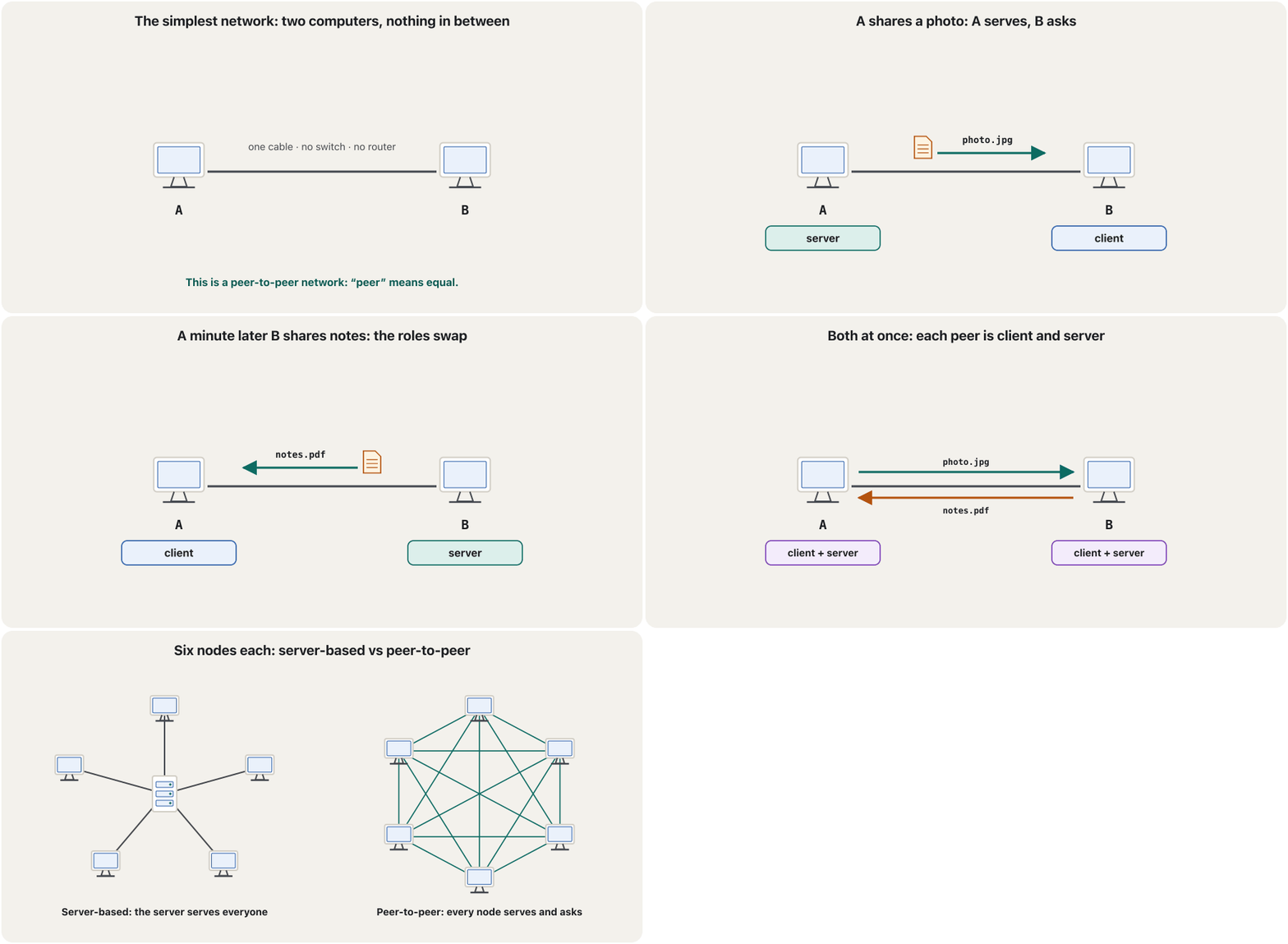
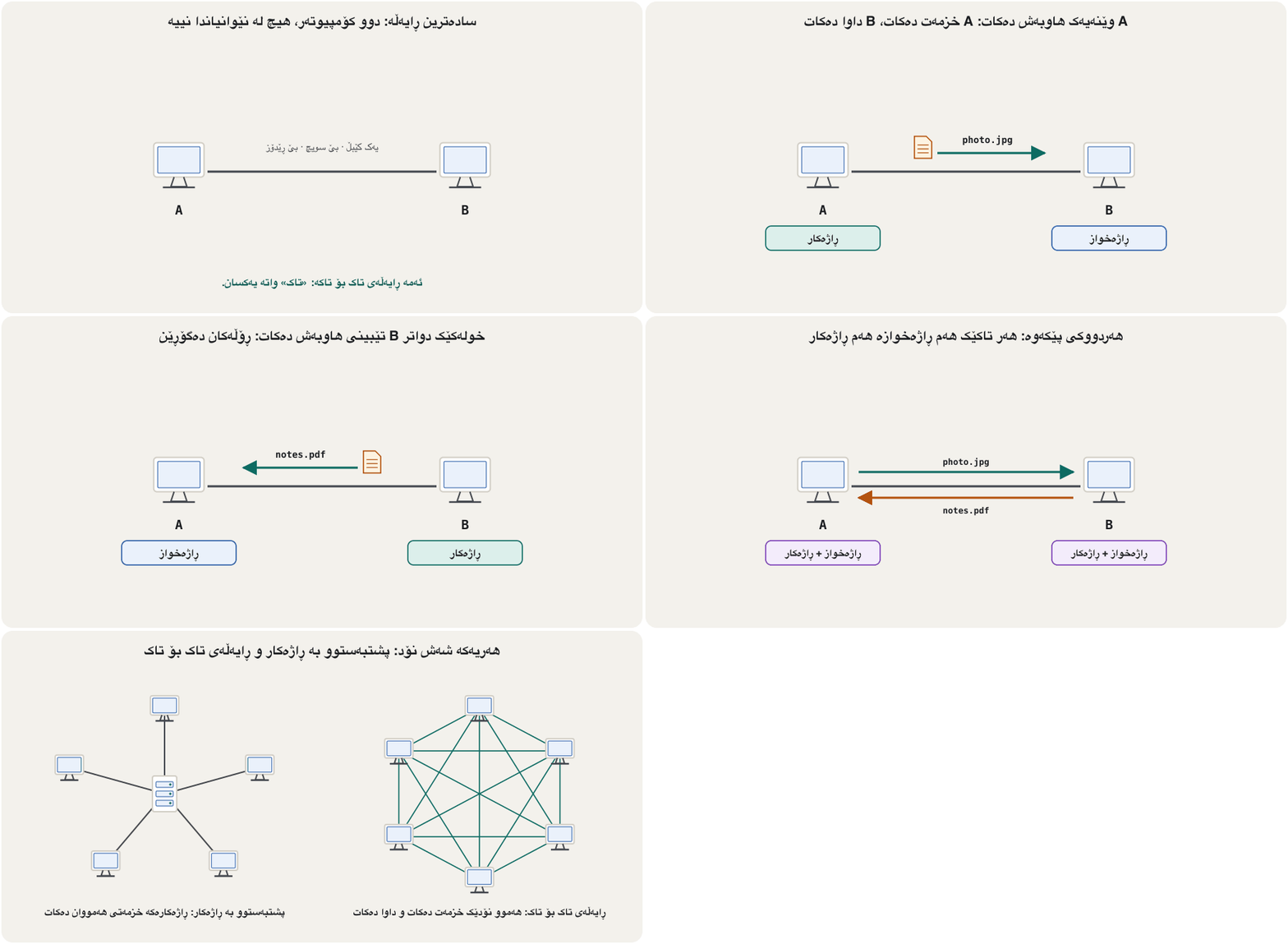
Each peer has equal responsibilities and capabilities: it shares its own hardware (for example a printer), data and information with the others. In the last frame both networks have six nodes; the difference is who serves. Small offices share folders this way (Windows calls such a group a ); the pros and cons are in peer-to-peer networks.
هەر ئەرک و توانای یەکسانی هەیە: خۆی (بۆ نموونە )، و زانیاری لەگەڵ ئەوانی تر هاوبەش دەکات. لە دوایین وێنەدا هەردوو شەش نۆدیان هەیە؛ جیاوازییەکە ئەوەیە کێ خزمەت دەکات. ئۆفیسە بچووکەکان بەم شێوەیە فۆڵدەر هاوبەش دەکەن (Windows بەم کۆمەڵەیە دەڵێت )؛ باشی و خراپییەکانی لە ڕایەڵەکانی تاک بۆ تاکـدا هەن.
A university library is like a server: one place keeps the books, is open all day, and every student goes there to borrow. Classmates swapping lecture notes are like peers: each one lends what they have and borrows what they need, with no library in between.
کتێبخانەی زانکۆ وەک وایە: یەک شوێن کتێبەکان هەڵدەگرێت، هەموو ڕۆژ کراوەیە و هەموو قوتابییەک بۆ وەرگرتنی کتێب دەچێتە ئەوێ. هاوپۆلەکان کە تێبینیی وانەکان ئاڵوگۆڕ دەکەن وەک وان: هەریەکە ئەوەی هەیەتی بە قەرز دەدات و ئەوەی پێویستیەتی وەردەگرێت، بێ کتێبخانە لە نێوانیاندا.
Where the analogy stops workingسنووری ئەم نموونەیە
When a classmate goes home, their notes go with them — just as a peer that switches off takes its files offline. The library stays open.
کاتێک هاوپۆلێک دەچێتەوە ماڵەوە، تێبینییەکانیشی لەگەڵ خۆی دەبات — وەک چۆن کە دەکوژێتەوە لەگەڵ خۆی دەبات. کتێبخانەکە کراوە دەمێنێتەوە.
Peer-to-peer: every peer is equalڕایەڵەی تاک بۆ تاک: هەموو تاکێک یەکسانە
P2P on the Internet: then and nowP2P لە ئینتەرنێتدا: ئەوکات و ئێستا
On the Internet, P2P file sharing let millions of home computers share music and films directly. The peers (hosts) act as both clients and servers, so there is no central file server; the file itself is usually fetched with ordinary HTTP GET requests and responses between two peers. Around 2004 P2P file sharing carried more Internet traffic than any other application. That is history now: in 2022 video streaming made up about 65% of all Internet traffic, sent mostly from big server farms.
لە ، هاوبەشکردنی بە P2P ڕێگەی دا بە ملیۆنان ماڵەوە کە گۆرانی و فیلم ڕاستەوخۆ هاوبەش بکەن. () هەم هەم ، بۆیە هیچ ناوەندیی نییە؛ خودی زۆرجار بە و ئاسایی HTTP GET لە نێوان دوو وەردەگیرێت. نزیکەی 2004، هاوبەشکردنی بە P2P زیاتر لە هەر تر هاتوچۆی هەبوو. ئەمە ئێستا مێژووە: لە 2022دا ڤیدیۆ نزیکەی 65%ـی هەموو هاتوچۆی پێک دەهێنا، کە زۆربەی لە دەنێردرا.
Downloading is easy once you know where the file is. The hard question for P2P is the search: which peer has the file I want? Three designs answered it, one after another — the next three screens.
ئاسانە کاتێک بزانیت لە کوێیە. پرسیارە قورسەکەی P2P گەڕانە: کام ئەو هەیە کە دەمەوێت؟ سێ دیزاین یەک لە دوای یەک وەڵامیان دایەوە — سێ شاشەی داهاتوو.
Peer-to-peer: every peer is equalڕایەڵەی تاک بۆ تاک: هەموو تاکێک یەکسانە
Design 1: a central directoryدیزاینی 1: لیستێکی ناوەندی
Peer A starts the P2P application.
A P2P دەکاتەوە.
It tells the directory server its IP address and the names of the objects it shares (MP3s, videos…).
و ناوی ئەو شتانەی هاوبەشیان دەکات (MP3، ڤیدیۆ…) بە لیست دەڵێت.
The directory server collects this from every peer that comes online: a dynamic database that maps IP addresses to object names.
لیست ئەمە لە هەموو کۆ دەکاتەوە کە ئۆنلاین دەبێت: گۆڕاو کە بە ناوی شتەکان دەبەستێتەوە.
Peer A asks the directory who has a certain file; the directory returns the IP addresses of those peers, for example Peer B.
A لە لیستەکە دەپرسێت کێ دیاریکراوی هەیە؛ لیستەکە ئەو دەگەڕێنێتەوە، بۆ نموونە B.
Peer A opens a TCP connection to Peer B and downloads the file directly (HTTP GET).
A پەیوەندییەکی لەگەڵ B دەکاتەوە و ڕاستەوخۆ دەکات (HTTP GET).
When a peer closes the application or leaves the Internet, the directory removes it; it checks with periodic messages (pings).
کاتێک دادەخات یان لە دەردەچێت، لیستەکە لای دەبات؛ بە پەیامی ماوە ماوە () دەپشکنێت.
Peer-to-peer: every peer is equalڕایەڵەی تاک بۆ تاک: هەموو تاکێک یەکسانە
Design 2: query floodingدیزاینی 2: لافاوکردنی پرسیار
Gnutella (2000) removed the directory. To find a file, peer A:
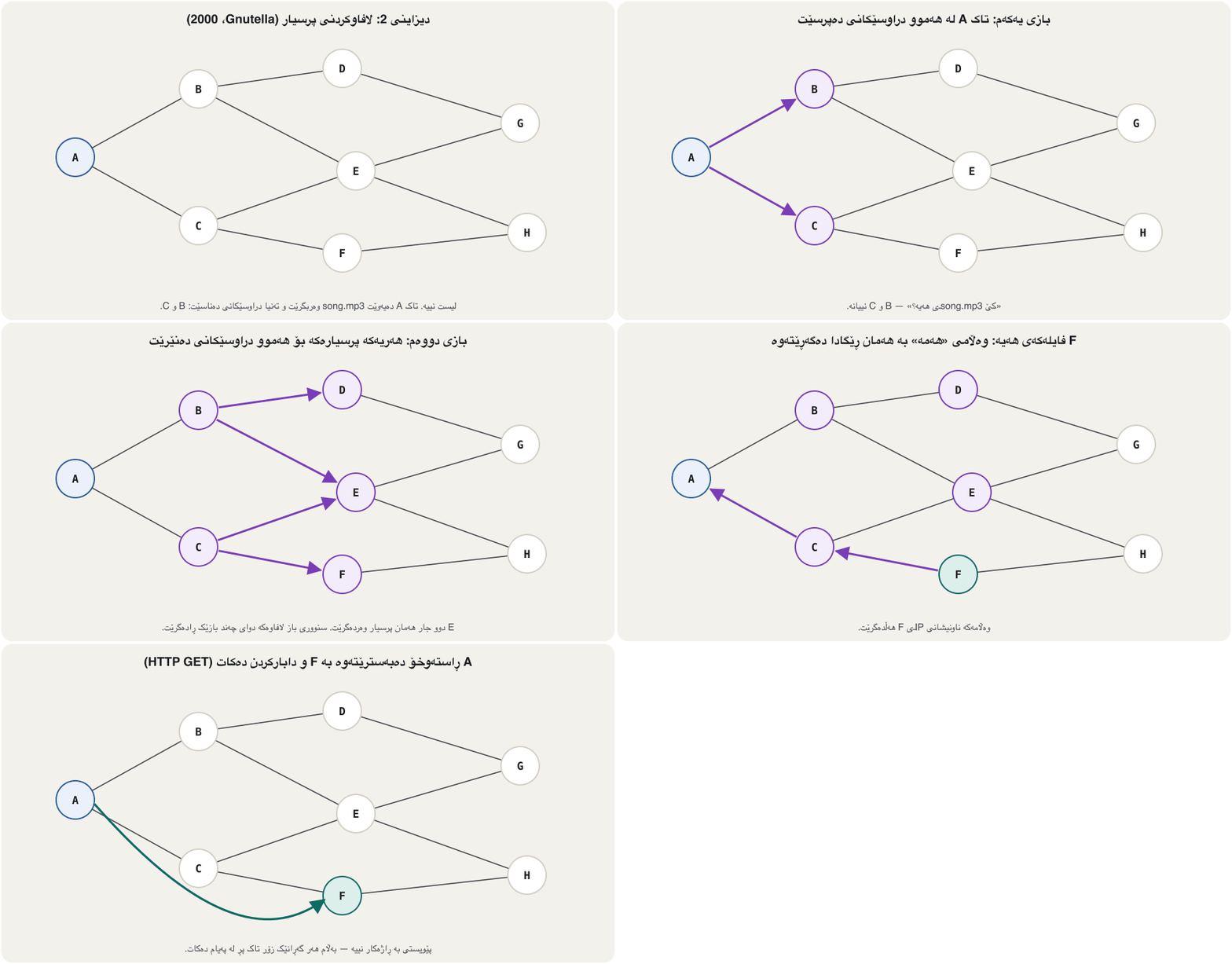
Gnutella (2000) لیستەکەی لابرد. بۆ دۆزینەوەی ، A:
sends the query to all its neighbouring peers;
پرسیارەکە بۆ هەموو دراوسێکانی دەنێرێت؛
a neighbour that does not have the file forwards the query to all its neighbours;
دراوسێیەک کە نییە پرسیارەکە بۆ هەموو دراوسێکانی خۆی دەنێرێت؛
any peer that has the file returns a query-hit message;
هەر کە هەبێت پەیامی «هەمە» (query hit) دەگەڕێنێتەوە؛
A chooses one of them, say peer F, to get the file from;
A یەکێکیان هەڵدەبژێرێت، بۆ نموونە F، بۆ وەرگرتنی ؛
A makes a direct TCP connection to F;
A پەیوەندییەکی ڕاستەوخۆی لەگەڵ F دروست دەکات؛
F sends the file in the HTTP response.
F لە دەنێرێت.
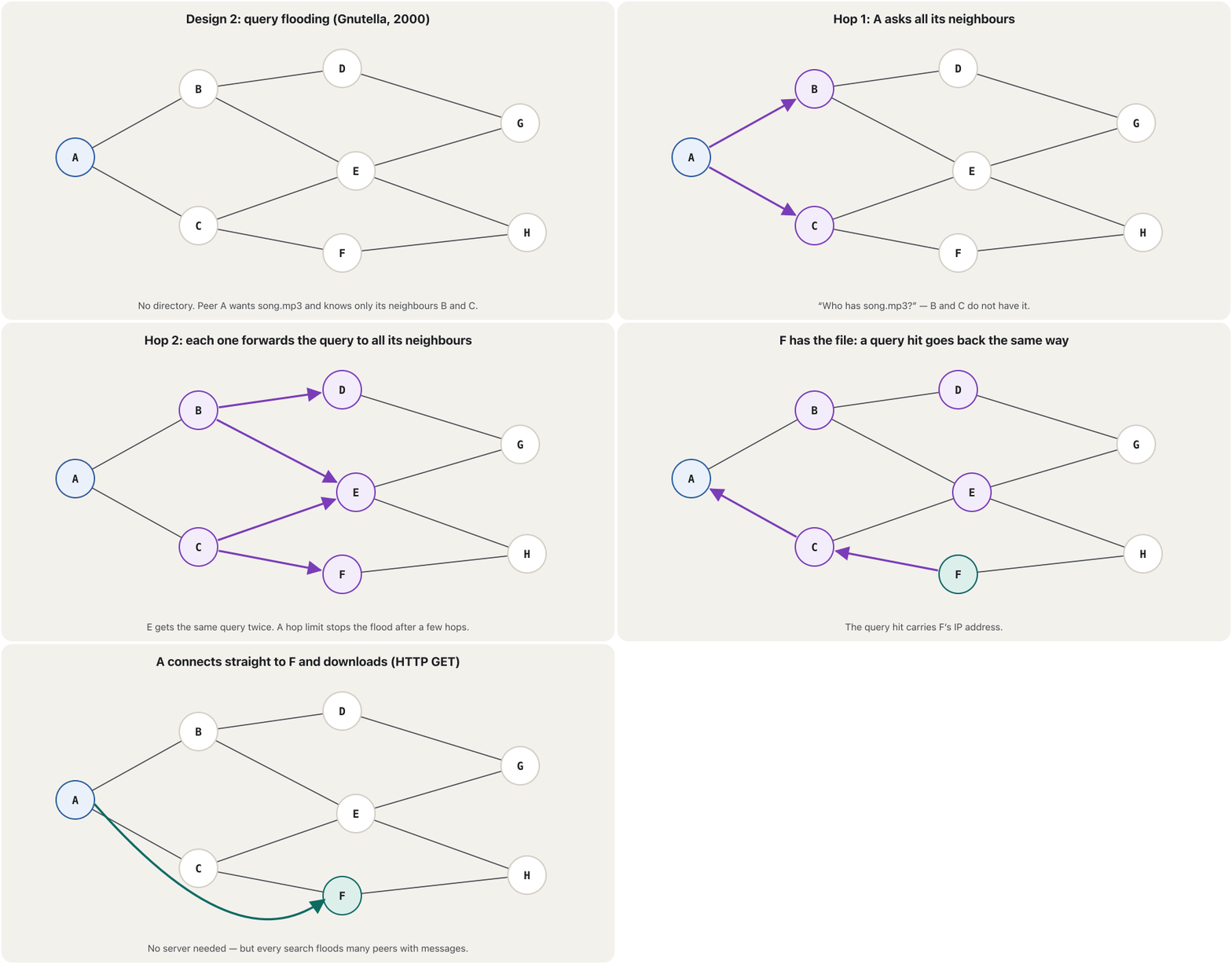
Nothing central can fail, but each search sends a message to a huge number of peers. Early Gnutella stopped a query after at most seven hops — so a file that was further away was simply not found.
هیچ شتێکی ناوەندی نییە تێک بچێت، بەڵام هەر گەڕانێک پەیام بۆ ژمارەیەکی زۆر دەنێرێت. Gnutellaـی سەرەتا پرسیارێکی دوای زۆرترین حەوت باز ڕادەگرت — بۆیە کە دوورتر بوو هەر نەدەدۆزرایەوە.
Peer-to-peer: every peer is equalڕایەڵەی تاک بۆ تاک: هەموو تاکێک یەکسانە
Design 3: group leaders (supernodes)دیزاینی 3: سەرۆکی گرووپ
Kazaa (2001), on the FastTrack network, combined the two earlier ideas: Napster’s directory and Gnutella’s flooding. Powerful peers with good connections became group leaders, also called supernodes. Each leader keeps an index of the files of the ordinary peers in its group, like a small Napster, and the leaders pass queries among themselves, like a small Gnutella. The file itself still comes straight from the peer that has it.
Kazaa (2001)، لەسەر FastTrack، هەردوو بیرۆکە کۆنەکەی تێکەڵ کرد: لیستی Napster و Gnutella. بەهێز کە پەیوەندیی باشیان هەبوو بوونە سەرۆکی گرووپ (supernode). هەر سەرۆکێک لیستی ئاساییەکانی گرووپەکەی هەڵدەگرێت، وەک Napsterـێکی بچووک. سەرۆکەکانیش پرسیار بۆ یەکتر دەنێرن، وەک Gnutellaـیەکی بچووک. خودی هەر ڕاستەوخۆ لەو دێت کە هەیەتی.
In 2004 Kazaa produced more Internet traffic than any other application; by 2007 BitTorrent had become the leading P2P application. Kazaa’s FastTrack protocol was proprietary (closed), and the service ended after a legal settlement with the music industry in 2006. Skype, which used supernodes for calls, moved to Microsoft’s own servers and was retired on 5 May 2025 in favour of Microsoft Teams.
لە 2004دا Kazaa زیاتر لە هەر تر هاتوچۆی دروست دەکرد؛ تا 2007 BitTorrent بوو بە سەرەکیترین P2P. FastTrackـی Kazaa تایبەت (داخراو) بوو و خزمەتگوزارییەکە دوای ڕێککەوتنێکی یاسایی لەگەڵ کۆمپانیاکانی مۆسیقا لە 2006دا کۆتایی هات. Skype، کە بۆ پەیوەندییەکان سەرۆکی گرووپی بەکار دەهێنا، گوازرایەوە بۆ خودی Microsoft و لە 5ی ئایاری 2025دا کۆتایی پێ هێنرا و Microsoft Teams جێگەی گرتەوە.
Peer-to-peer: every peer is equalڕایەڵەی تاک بۆ تاک: هەموو تاکێک یەکسانە
P2P today: BitTorrent, WebRTC and blockchainsP2P ئەمڕۆ: BitTorrent، WebRTC و بلۆکچەینەکان
Peer-to-peer did not die with Napster. BitTorrent (2001) cuts a file into pieces, each with its own hash so it can be checked; a tracker, or the trackerless DHT, only tells a peer who else is in the swarm. Everyone downloads some pieces and uploads others at the same time, so a popular file gets faster as more peers join. Linux distributions and many game updates are shared this way.
P2P لەگەڵ Napster نەمرد. BitTorrent (2001) دەکات بە پارچە، هەر پارچەیەک هاشی خۆی هەیە بۆ ئەوەی بپشکنرێت؛ ڕێنیشاندەرێک (tracker)، یان DHTـی بێ ڕێنیشاندەر، تەنیا بە دەڵێت کێی تر لە کۆمەڵەکەدایە. هەمووان لە یەک کاتدا هەندێک پارچە دەکەن و هەندێکی تر دەکەن، بۆیە بەناوبانگ هەتا زیاتر بێن خێراتر دەبێت. دابەشکراوەکانی Linux و زۆر نوێکردنەوەی یاری بەم شێوەیە هاوبەش دەکرێن.
- WebRTC (2011; a W3C Recommendation since 2021) lets two web browsers send voice, video and data directly to each other. A server is still needed at the start, to help the two browsers find each other (signalling), and a relay server when firewalls or NAT block the direct path.
- Blockchain nodes: a Bitcoin full node keeps its own copy of the ledger, checks every transaction and block itself, and talks to other nodes over a P2P network (usually about ten outgoing connections; port 8333).
- WebRTC (2011؛ لە 2021ـەوە ڕاسپاردەی W3C) ڕێگە دەدات دوو دەنگ، ڤیدیۆ و ڕاستەوخۆ بۆ یەکتر بنێرن. لە سەرەتادا هێشتا پێویستە بۆ ئەوەی یارمەتی دوو بدات یەکتر بدۆزنەوە، هەروەها گوازەرەوە کاتێک یان ڕێگە ڕاستەوخۆکە دادەخەن.
- نۆدەکانی : نۆدێکی تەواوی Bitcoin کۆپییەکی خۆی لە هەڵدەگرێت، هەموو مامەڵەیەک و بلۆکێک خۆی دەپشکنێت و لە ڕێگەی P2Pـەوە قسە لەگەڵ نۆدەکانی تر دەکات (زۆرجار نزیکەی دە پەیوەندیی دەرچوو؛ 8333).
Peer-to-peer: every peer is equalڕایەڵەی تاک بۆ تاک: هەموو تاکێک یەکسانە
Peer names: when the address keeps changingناوی تاکەکان: کاتێک ناونیشان هەر دەگۆڕێت
To connect to a peer you need its IP address — and on a P2P network that address does not stay the same. A laptop moves from home Wi-Fi to the university network, a phone switches to mobile data, a DHCP lease ends and a new address is given, or the network's topology changes. A saved address then reaches nobody, or the wrong computer. It is like calling a friend whose name never changes but whose phone number does: the old number reaches nobody, or a stranger.
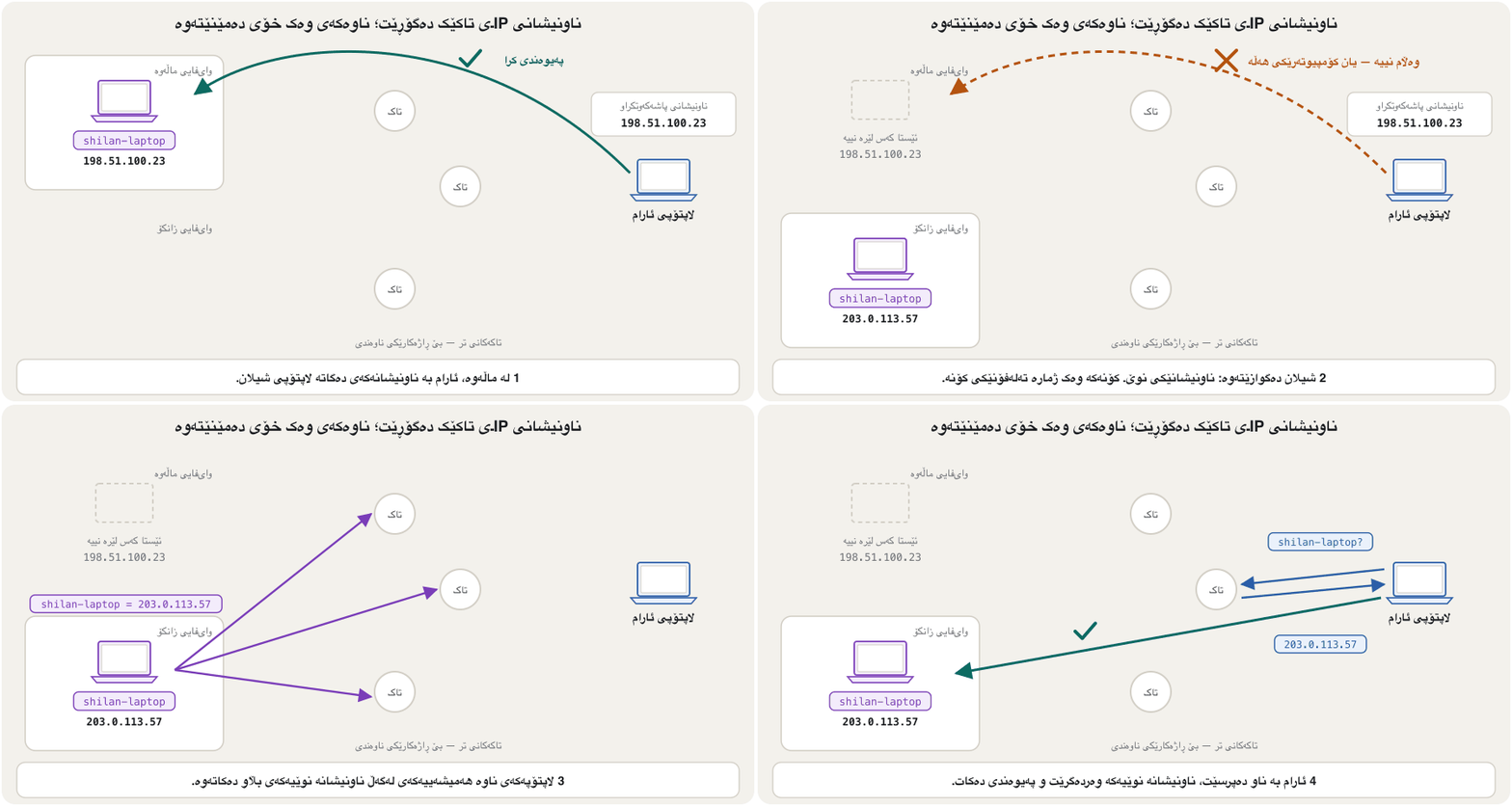
بۆ پەیوەندیکردن بە پێویستت بە هەیە — و لە ئەو ناونیشانە وەک خۆی نامێنێتەوە. لە ماڵەوە دەچێتە سەر زانکۆ، مۆبایلێک دەچێتە سەر مۆبایل، کۆتایی دێت و ناونیشانێکی نوێ دەدرێت، یان دەگۆڕێت. ئیتر ناونیشانێکی پاشەکەوتکراو بە هیچ کەس ناگات، یان بە هەڵە دەگات. وەک ئەوە وایە پەیوەندی بە هاوڕێیەکەوە بکەیت کە ناوی هەرگیز ناگۆڕێت، بەڵام ژمارە تەلەفۆنەکەی گۆڕاوە: ژمارە کۆنەکە بە هیچ کەس یان بە کەسێکی نەناسراو دەگات.
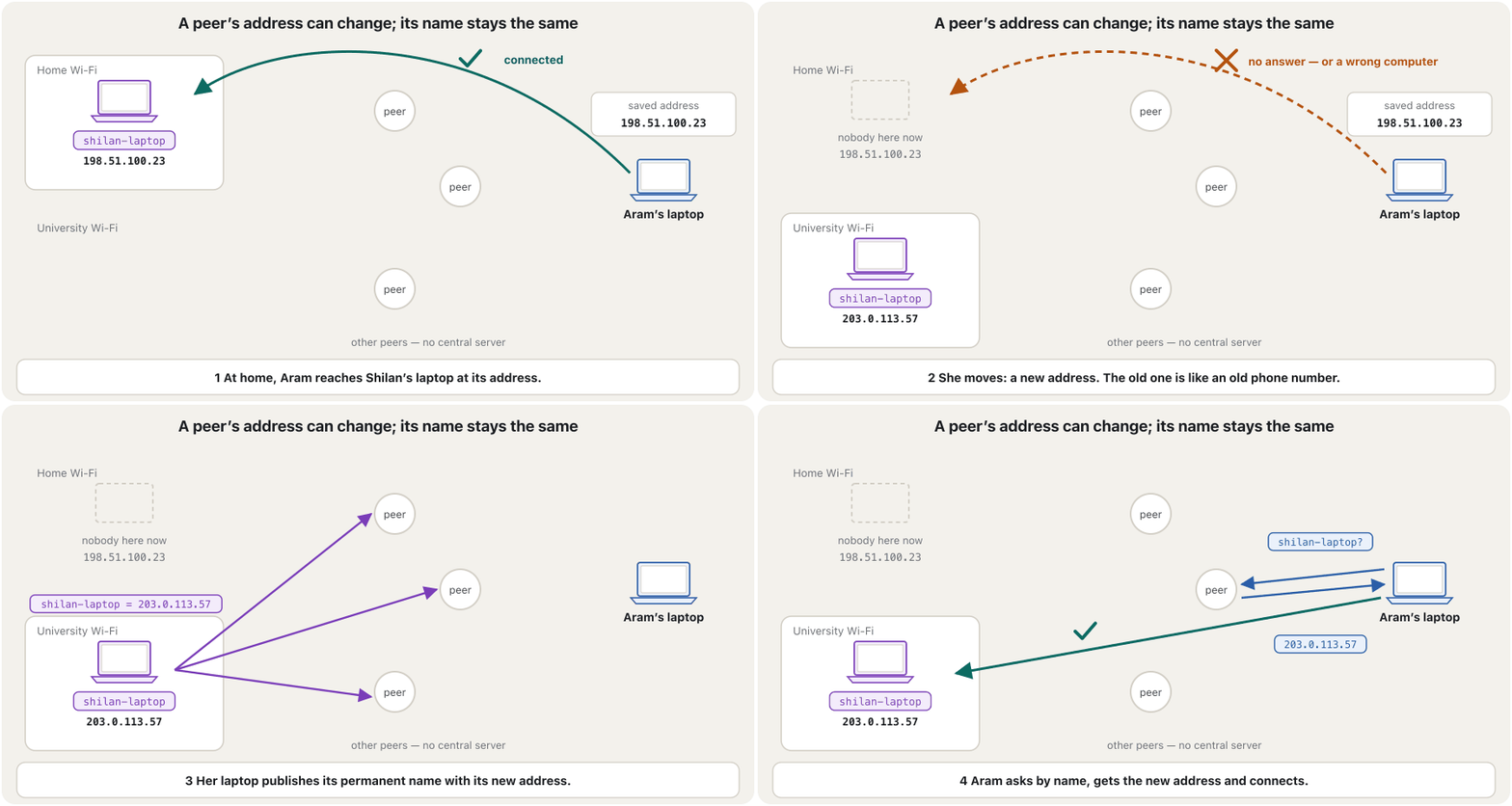
The answer is a permanent name for every peer — like a username — kept up to date without a central server. Each peer publishes its name together with its current address; another peer resolves the name to find that address; and when the address changes, the peer simply publishes again, so nobody has to update a connection by hand. Microsoft's PNRP (Peer Name Resolution Protocol, 2003) did exactly this in Windows. It is history now: Microsoft shut down its Internet service in 2018 (Windows 10, version 1809) and removed it completely in Windows 11, version 24H2 (2024).
چارەسەرەکە بریتییە لە ناوێکی هەمیشەیی بۆ هەر — وەک — کە بێ ناوەندی نوێ دەکرێتەوە. هەر ناوەکەی لەگەڵ ناونیشانی ئێستای بڵاو دەکاتەوە؛ تر لە ڕێی ناوەکەوە ناونیشانەکە دەدۆزێتەوە؛ کاتێکیش ناونیشانەکە دەگۆڕێت، تەنیا دووپاتە بڵاوی دەکاتەوە، بۆیە کەس پێویست ناکات بە دەست پەیوەندییەک نوێ بکاتەوە. PNRPـی Microsoft (Peer Name Resolution Protocol، 2003) ڕێک ئەم کارەی لە Windowsـدا دەکرد. ئێستا مێژووە: Microsoft لە 2018 خزمەتگوزارییەکەی لە داخست (Windows 10، وەشانی 1809) و لە Windows 11، وەشانی 24H2 (2024) بە تەواوی لای برد.
Peer-to-peer: every peer is equalڕایەڵەی تاک بۆ تاک: هەموو تاکێک یەکسانە
Peer names today: mDNS on the LAN, the DHT on the Internetناوی تاکەکان ئەمڕۆ: mDNS لە ڕایەڵەی ناوچەییدا، DHT لە ئینتەرنێتدا
Microsoft itself recommends mDNS (multicast DNS, RFC 6762) with DNS-SD in place of PNRP. On a LAN, a device that wants the address of printer.local multicasts the question to UDP port 5353 (why UDP); every device hears it, and the printer answers with its current address — no DNS server is needed. Phones, printers, smart TVs and computers find each other this way: Apple calls it Bonjour, and Windows, Android and Linux devices use it too. Names that end in .local work only on the local network.
خودی Microsoft لە جیاتی PNRP پێشنیاری mDNS (multicast DNS، RFC 6762) لەگەڵ DNS-SD دەکات. لە ، ئامێرێک کە دەیەوێت ناونیشانی printer.local بزانێت، پرسیارەکە بە بۆ 5353ی دەنێرێت (بۆچی UDP)؛ هەموو ئامێرێک گوێی لێ دەبێت و بە ناونیشانی ئێستای وەڵام دەداتەوە — پێویست بە ناکات. مۆبایلەکان، ، و بەم شێوەیە یەکتر دەدۆزنەوە: Apple پێی دەڵێت Bonjour و ئامێرەکانی Windows، Android و Linuxـیش بەکاری دەهێنن. ئەو ناوانەی بە .local کۆتایی دێن تەنیا لە ناوخۆییدا کار دەکەن.
On the Internet, BitTorrent's trackerless DHT (distributed hash table) does the same job for millions of peers. Every node picks a random 160-bit ID. A torrent is known by its info-hash, a number of the same size, and the nodes whose IDs are closest to it keep the list of peers that share the file. A new peer asks nodes closer and closer to the info-hash until it reaches that list — with no tracker and no central server.
لە ، DHTـی بێ ڕێنیشاندەری BitTorrent (distributed hash table، دابەشکراو) هەمان کار بۆ ملیۆنان دەکات. هەر هەڕەمەکیی 160 بۆ خۆی هەڵدەبژێرێت. تۆرێنتێک بە info-hashـەکەی دەناسرێت، کە ژمارەیەکە بە هەمان قەبارە و ئەو لێیەوە نزیکترە لیستی ئەو هەڵدەگرن کە هاوبەش دەکەن. نوێ لە دەپرسێت کە هەنگاو بە هەنگاو لە info-hashـەکە نزیکتر دەبنەوە، تا دەگاتە ئەو لیستە — بێ ڕێنیشاندەر و بێ ناوەندی.
The protocol mapنەخشەی پرۆتۆکۆڵەکان
Here are the application-layer protocols of this chapter, grouped by the job they do. Each one has a daemon listening on a well-known port, and each runs over TCP or UDP (see TCP and UDP). The next lessons open them one by one: DNS, DHCP, web and e-mail protocols and file transfer and remote access.
ئەمانە ئەم بەشەن، بەپێی ئەو کارەی دەیکەن ڕیز کراون. هەریەکەیان هەیە کە گوێ لە ناسراو دەگرێت و هەریەکە لەسەر یان کار دەکات (بڕوانە TCP و UDP). وانەکانی داهاتوو یەک بە یەک دەیانکەنەوە: DNS، DHCP، پرۆتۆکۆڵەکانی وێب و ئیمەیڵ و گواستنەوەی فایل و دەستگەیشتن لە دوورەوە.
The protocol mapنەخشەی پرۆتۆکۆڵەکان
What each protocol doesهەر پرۆتۆکۆڵێک چی دەکات
| Protocol | Jobکار | Todayئەمڕۆ |
|---|---|---|
| HTTP / HTTPS | The Web: a browser asks a web server for pages.وێب: لە داوا دەکات. | Almost always HTTPS (encrypted).نزیکەی هەمیشە HTTPS (شفرەکراو). |
| FTP | File transfer between a client and a server.گواستنەوەی لە نێوان و . | Plain text; SFTP or HTTPS instead.؛ لەبری ئەو SFTP یان HTTPS. |
| SMTP | Sending e-mail and passing it between mail servers.ناردنی و گواستنەوەی لە نێوان . | Encrypted with TLS.بە شفرە دەکرێت. |
| POP3 | Fetching e-mail: downloads the messages, and the client usually deletes them from the server.وەرگرتنی : پەیامەکان دەکات و زۆرجار لەسەر دەیانسڕێتەوە. | Best for one device.باشترە بۆ یەک ئامێر. |
| IMAP | Fetching e-mail but keeping it on the server, organised in folders.وەرگرتنی بەڵام هێشتنەوەی لەسەر ، ڕێکخراو لە فۆڵدەردا. | Phones and laptops stay in sync.مۆبایل و وەک یەک دەمێننەوە. |
| Telnet | Remote login to another computer.چوونەژوورەوە بۆ تر لە دوورەوە. | Plain text — use SSH. — SSH بەکار بهێنە. |
| DHCP | Gives a host its address and settings automatically (configuration).ناونیشان و ڕێکخستنەکانی بە خۆکاری دەداتە (). | Every home router.هەموو ماڵەوە. |
| DNS | Turns domain names into IP addresses (name resolution). دەکات بە (دۆزینەوەی ناو). | Can be encrypted (DoH, DoT).دەکرێت شفرە بکرێت (DoH، DoT). |
| SMB | Shared folders and printers in Windows networks.فۆڵدەر و هاوبەشەکان لە Windowsـدا. | Keep it inside the LAN.لە ناو بیهێڵەرەوە. |
| P2P (BitTorrent) | File sharing directly between peers.هاوبەشکردنی ڕاستەوخۆ لە نێوان . | Still used.هێشتا بەکار دێت. |
Exam practice: describe the application layerڕاهێنانی تاقیکردنەوە: چینی ئەپ وەسف بکە
A midterm asked: “What is the application layer? Describe the application layer with all the protocols applied in this model.” One student wrote: it provides a user interface to the network, where the user interacts with the other layers; its PDU is user data; protocols: Telnet (has authorisation but no encryption), SSH, SMTP, POP3 and HTTP. Improve the answer.
تاقیکردنەوەیەکی نیوەی وەرز پرسی: « چییە؟ لەگەڵ هەموو ئەو لەم مۆدێلەدا بەکار دێن وەسف بکە.» قوتابییەک نووسی: بۆ دابین دەکات، کە لێیەوە مامەڵە لەگەڵ چینەکانی تر دەکات؛ ؛ : Telnet (ڕێگەپێدانی هەیە بەڵام شفرەکردنی نییە)، SSH، SMTP، POP3 و HTTP. وەڵامەکە باشتر بکە.
Hintئاماژە
Say what the layer does, name its unit of data, then group the protocols by job.
بڵێ چینەکە چی دەکات، ناوی یەکەی ببە، پاشان بەپێی کار ڕیز بکە.
Show answerوەڵامەکە پیشان بدە
Model answer. The application layer is the top layer of both models (layer 7 in OSI; in TCP/IP it also does the work of OSI layers 5 and 6). It is the programs’ interface to the network: it gives network services to applications — and through them to users — and its protocols fix the format of the messages that programs on two hosts exchange, usually in the client–server model. Its PDU is simply called data (a message). It runs in the end hosts, not in routers.
وەڵامی نموونە. سەرەوەترین چینی هەردوو مۆدێلەکەیە (لە OSIـدا چینی 7؛ لە TCP/IPـدا کاری چینەکانی 5 و 6ی OSIـیش دەکات). دەرگای بۆ : خزمەتگوزاریی دەداتە — و لە ڕێگەیانەوە بە — و شێوەی ئەو پەیامانە دیاری دەکەن کە سەر دوو ئاڵوگۆڕی دەکەن، زۆرجار بە . تەنیا پێی دەگوترێت (پەیام). لە کۆتاییەکاندا کار دەکات، نەک لە .
- Web: HTTP and HTTPS.
- E-mail: SMTP to send; POP3 or IMAP to fetch.
- Names and addresses: DNS (names to IP addresses) and DHCP (automatic address configuration).
- Files: FTP (or SFTP), SMB, P2P file sharing.
- Remote access and management: SSH (encrypted), Telnet (plain text, labs only), RDP, and SNMP for monitoring devices.
- وێب: و .
- : بۆ ناردن؛ یان بۆ وەرگرتن.
- ناو و ناونیشان: (ناو بۆ ) و (ڕێکخستنی خۆکاری ناونیشان).
- : (یان )، ، هاوبەشکردنی بە P2P.
- دەستگەیشتن و بەڕێوەبردن لە دوورەوە: (شفرەکراو)، (، تەنیا تاقیگە)، و SNMP بۆ چاودێریکردنی ئامێرەکان.
What changed: “a user interface” became “an interface for programs” (the window you click is the program, not the layer); “user data” became “data”; Telnet is described honestly — its login travels unencrypted, so SSH replaces it; and the list now covers the whole map, not five protocols.
چی گۆڕا: «» بوو بە «دەرگایەک بۆ » (ئەو کلیکی لێ دەکەیت ، نەک چینەکە)؛ « » بوو بە «»؛ Telnet بە ڕاستی وەسف کرا — چوونەژوورەوەکەی بێ شفرە دەڕوات، بۆیە جێگەی دەگرێتەوە؛ و لیستەکە ئێستا هەموو نەخشەکە دەگرێتەوە، نەک پێنج .
Common mistakesهەڵە باوەکان
- “The server is the bigger computer.” Client and server are roles: the one that asks is the client, the one that answers is the server. A small phone can serve a file to a big PC.
- “Peer-to-peer means point-to-point.” Peer-to-peer is about roles (no dedicated server); point-to-point is a topology (one link between two devices).
- “A daemon is a virus.” It is a normal background program that waits on a port — the web server and the SSH server are daemons.
- “DHCP resolves IP addresses.” DHCP configures hosts (gives them an address); resolving an IP address to a MAC address is ARP’s job, and resolving a name is DNS’s.
- “POP3 always deletes mail from the server.” The client asks the server to delete the messages it downloaded; most clients do this by default, but it can be switched off. IMAP is made to keep mail on the server.
- Using Telnet because it “has authorisation”. The password crosses the network readable; use SSH.
- Thinking Napster, Kazaa, Skype or PNRP are current. They are history; BitTorrent, WebRTC and blockchain nodes are the P2P systems in use today.
- “A peer is its IP address.” The address can change many times a day; a peer keeps a permanent name or ID, and others resolve it to the current address (mDNS on a LAN, the DHT on the Internet).
- « ئەو کە گەورەترە.» و ڕۆڵن: ئەوەی دەپرسێت ، ئەوەی وەڵام دەداتەوە . مۆبایلێکی بچووکیش دەتوانێت بداتە گەورە.
- « واتە .» پەیوەندی بە ڕۆڵەکانەوە هەیە (بێ تایبەت)؛ پەیوەندی بە هەیە (یەک بەستەر لە نێوان دوو ئامێردا).
- « ڤایرۆسە.» ئاسایی پشتەوەیە کە لەسەر چاوەڕێ دەکات — و SSH .
- « دەدۆزێتەوە.» ڕێکدەخات (ناونیشانیان دەداتێ)؛ دۆزینەوەی بۆ کاری و دۆزینەوەی ناو کاری .
- « هەمیشە لەسەر دەسڕێتەوە.» داوا لە دەکات ئەو پەیامانەی کردوون بیانسڕێتەوە؛ زۆربەی بە شێوەی بنەڕەت ئەمە دەکەن، بەڵام دەکرێت بکوژێنرێتەوە. بۆ هێشتنەوەی لەسەر دروست کراوە.
- بەکارهێنانی Telnet چونکە «ڕێگەپێدانی هەیە». بە خوێندراوەیی بە دەڕوات؛ بەکار بهێنە.
- وا بیر کردنەوە کە Napster، Kazaa، Skype یان PNRP ئێستاش هەن. مێژوون؛ BitTorrent، WebRTC و نۆدەکانی ئەو سیستەمانەی P2Pـن کە ئەمڕۆ بەکار دێن.
- « هەمان .» ناونیشانەکە لەوانەیە ڕۆژێک چەند جار بگۆڕێت؛ ناو یان هەمیشەیی هەیە و ئەوانی تر لە ڕێیەوە ناونیشانی ئێستای دەدۆزنەوە (mDNS لە ، DHT لە ).
Exercisesڕاهێنانەکان
True or false? (a) In a peer-to-peer network, any client computer can also be a server. (b) The simplest form of a network is a client/server network. (c) A daemon needs a user to open its window before it can answer.
ڕاست یان هەڵە؟ (a) لە هەر دەتوانێت بێت. (b) سادەترین شێوەی و . (c) پێویستی بە هەیە کە بکاتەوە پێش ئەوەی بتوانێت وەڵام بداتەوە.
Show answerوەڵامەکە پیشان بدە
- (a) True — every peer can play both roles.
- (b) False — the simplest network is two computers joined directly with no server: peer-to-peer.
- (c) False — a daemon runs in the background with no window and answers on its own.
- (a) ڕاستە — هەر دەتوانێت هەردوو ڕۆڵ ببینێت.
- (b) هەڵەیە — سادەترین دوو کە ڕاستەوخۆ بەستراون بێ : .
- (c) هەڵەیە — لە پشتەوە بێ کار دەکات و خۆی وەڵام دەداتەوە.
Client–server or peer-to-peer? (a) Dilan watches a lecture video on the university’s e-learning site. (b) Two friends in a café send photos phone to phone with Quick Share. (c) Rebin downloads a Linux image with BitTorrent. (d) Karwan and Lana talk in a browser video call that uses WebRTC.
و یان ؟ (a) دیلان ڤیدیۆی وانەیەک لە ماڵپەڕی زانکۆ دەبینێت. (b) دوو هاوڕێ لە چایخانەیەک بە Quick Share وێنە لە مۆبایلەوە بۆ مۆبایل دەنێرن. (c) ڕێبین وێنەیەکی Linux بە BitTorrent دەکات. (d) کاروان و لانا لە پەیوەندییەکی ڤیدیۆیی قسە دەکەن کە WebRTC بەکار دەهێنێت.
Show answerوەڵامەکە پیشان بدە
- (a) Client–server: the site’s servers serve every student.
- (b) Peer-to-peer: the two phones send directly to each other.
- (c) Peer-to-peer: pieces come from many peers (a tracker only introduces them).
- (d) Mostly peer-to-peer: the media flows browser to browser, after a signalling server has introduced them — a mix.
- (a) و : ماڵپەڕەکە خزمەتی هەموو قوتابییەک دەکەن.
- (b) : دوو مۆبایلەکە ڕاستەوخۆ بۆ یەکتر دەنێرن.
- (c) : پارچەکان لە زۆر دێن (ڕێنیشاندەر تەنیا دەیانناسێنێت).
- (d) زۆرتر : دەنگ و ڤیدیۆ لە بۆ دەڕوات، دوای ئەوەی بە یەکتریانی ناساندووە — تێکەڵەیەک.
Put the steps of the central-directory design in order: (1) A downloads the file from B; (2) A tells the directory what it shares; (3) the directory answers with B’s IP address; (4) A asks the directory who has the file.
هەنگاوەکانی دیزاینی لیستی ناوەندی ڕیز بکە: (1) A لە B دەکات؛ (2) A بە لیستەکە دەڵێت چی هاوبەش دەکات؛ (3) لیستەکە بە B وەڵام دەداتەوە؛ (4) A لە لیستەکە دەپرسێت کێ هەیە.
Show answerوەڵامەکە پیشان بدە
2 → 4 → 3 → 1. The directory only answers the search; the file travels directly from peer to peer.
2 ← 4 ← 3 ← 1. لیستەکە تەنیا وەڵامی گەڕانەکە دەداتەوە؛ ڕاستەوخۆ لە بۆ دەڕوات.
What is the difference between an application and an application-layer protocol?جیاوازیی نێوان ئەپ و پرۆتۆکۆڵی چینی ئەپ چییە؟
The application is the program you run (a browser); the protocol is the set of rules it uses on the network (HTTP). Different applications can share one protocol.
ئەو کە دەیکەیتەوە ()؛ ئەو کۆمەڵە یاسایەیە کە لەسەر بەکاری دەهێنێت (). جیاواز دەتوانن یەک بەکار بهێنن.
Why does a server need daemons, and how do clients reach the right one?بۆچی ڕاژەکار پێویستی بە دیمۆن هەیە و ڕاژەخوازەکان چۆن دەگەنە دانە دروستەکە؟
Each service is a background program that waits for requests; clients send their request to the service’s port (53 for DNS, 443 for HTTPS), and the daemon listening there answers.
هەر خزمەتگوزارییەک پشتەوەیە کە چاوەڕێی دەکات؛ بۆ خزمەتگوزارییەکە دەنێرن (53 بۆ DNS، 443 بۆ HTTPS) و ئەو لەوێ گوێ دەگرێت وەڵام دەداتەوە.
Name one strength and one weakness of each P2P search design.یەک لایەنی بەهێز و یەک لایەنی لاوازی هەر دیزاینێکی گەڕانی P2P ناو ببە.
Central directory: fast search / one point of failure. Query flooding: nothing central / floods the network and misses far files. Supernodes: fast and spread out / depends on powerful peers staying online.
لیستی ناوەندی: گەڕانی خێرا / یەک خاڵی شکان. پرسیار: هیچ شتێکی ناوەندی نییە / پڕ دەکات و دوور نادۆزێتەوە. سەرۆکی گرووپ: خێرا و بڵاوە / پشت بەوە دەبەستێت کە بەهێزەکان ئۆنلاین بمێننەوە.
Summaryپوختە
- Every network conversation is between two programs; the application layer is their interface to the network, and its protocols fix the format of their messages.
- OSI layers 5–7 (the “application layers”) are one application layer in TCP/IP.
- Client–server: the client requests, the server responds; resources live on the server; files are downloaded to and uploaded from clients.
- A server runs daemons (Windows: services): background programs that listen on a port and answer requests.
- Peer-to-peer: peers are equal and each can be client and server; two computers joined directly are the simplest network.
- Finding files in P2P: a central directory (Napster), query flooding (Gnutella), group leaders (Kazaa) — all history. Today: BitTorrent, WebRTC and blockchain nodes; Skype was retired on 5 May 2025.
- Peer names: a peer's address changes, so peers publish a permanent name with their current address and others resolve it, with no central server. Microsoft's PNRP did this (removed in 2024); today mDNS works on a LAN and BitTorrent's DHT on the Internet.
- The map: HTTP/HTTPS, DNS, DHCP, SMTP, POP3, IMAP, FTP, SMB, SSH, RDP — and Telnet only in labs.
- هەموو گفتوگۆیەکی لە نێوان دوو ؛ دەرگایانە بۆ و شێوەی پەیامەکانیان دیاری دەکەن.
- چینەکانی 5 تا 7ی OSI («») لە TCP/IPـدا یەک .
- و : داوا دەکات، وەڵام دەداتەوە؛ سەرچاوەکان لەسەر ؛ بۆ و لێیانەوە دەکرێن.
- (لە Windows: خزمەتگوزاری) کار پێ دەکات: پشتەوە کە گوێ لە دەگرن و وەڵامی دەدەنەوە.
- : یەکسانن و هەریەکە دەتوانێت و بێت؛ دوو کە ڕاستەوخۆ بەستراون سادەترین .
- دۆزینەوەی لە P2Pـدا: لیستی ناوەندی (Napster)، پرسیار (Gnutella)، سەرۆکی گرووپ (Kazaa) — هەموویان مێژوون. ئەمڕۆ: BitTorrent، WebRTC و نۆدەکانی ؛ Skype لە 5ی ئایاری 2025دا کۆتایی پێ هێنرا.
- ناوی : ناونیشانی دەگۆڕێت، بۆیە ناوێکی هەمیشەیی لەگەڵ ناونیشانی ئێستایان بڵاو دەکەنەوە و ئەوانی تر ناونیشانەکە لە ڕێی ناوەکەوە دەدۆزنەوە، بێ ناوەندی. PNRPـی Microsoft ئەم کارەی دەکرد (لە 2024 لابرا)؛ ئەمڕۆ mDNS لە و DHTـی BitTorrent لە کار دەکەن.
- نەخشەکە: HTTP/HTTPS، DNS، DHCP، SMTP، POP3، IMAP، FTP، SMB، SSH، RDP — و Telnet تەنیا لە تاقیگەدا.
Lesson complete!وانەکە تەواو بوو!
Well done. Review the key terms, then go on to the next lesson.دەستخۆش. سەیرێکی زاراوە سەرەکییەکان بکەرەوە، پاشان بڕۆ بۆ وانەی داهاتوو.
Key termsزاراوە سەرەکییەکان
DNS: How Names Become AddressesDNS: ناو چۆن دەبێتە ناونیشان
Related lecturesوانە پەیوەندیدارەکان
- Types of Networks: LAN, WAN and Moreجۆرەکانی ڕایەڵە: ڕایەڵەی ناوچەیی، ڕایەڵەی فراوان و زیاتر
- Browsers, Web Servers and URLsتۆڕگەڕەکان، ڕاژەکارەکانی وێب و URL
- Port Numbers and Socketsژمارەی پۆرت و سۆکێتەکان
- TCP and UDPTCP و UDP
- DNS: How Names Become AddressesDNS: ناو چۆن دەبێتە ناونیشان
- DHCP: Automatic Addresses, DORA and LeasesDHCP: ناونیشانی خۆکار، DORA و کرێکانی DHCP
- Web and E-mail Protocols: HTTP, HTTPS, SMTP, POP3 and IMAPپرۆتۆکۆڵەکانی وێب و ئیمەیڵ: HTTP، HTTPS، SMTP، POP3 و IMAP
- File Transfer and Remote Access: FTP, Telnet, SSH and RDPگواستنەوەی فایل و دەستڕاگەیشتن لە دوورەوە: FTP، Telnet، SSH و RDP
- Cloud Computingهەورەژمێرکاری
References and further readingسەرچاوەکان و خوێندنەوەی زیاتر
- Napster — Wikipedia
- Gnutella — Wikipedia
- FastTrack — Wikipedia
- Kazaa — Wikipedia
- BEP 3: The BitTorrent Protocol Specification
- BitTorrent — Wikipedia
- MDN: WebRTC API
- WebRTC — Wikipedia
- Bitcoin.org: Running a full node
- Microsoft Support: Skype is retiring in May 2025
- Skype — Wikipedia
- Tubefilter: Sandvine report — video was 65% of Internet traffic in 2022
- Microsoft Learn: Features removed in Windows client — PNRP APIs (cloud service shut down in Windows 10 1809; APIs removed in Windows 11 24H2; DNS-SD and mDNS recommended)
- Wikipedia: Peer Name Resolution Protocol (Microsoft, 2003; peer names published and resolved without a server)
- RFC 6762: Multicast DNS (.local names, UDP port 5353, no DNS server needed)
- BEP 5: DHT Protocol (Kademlia, 160-bit node IDs, peers found by info-hash)
This lecture is a first edition. The Kurdish text and terminology are waiting for review by Kurdish IT teachers.ئەم وانەیە چاپی یەکەمە. دەقە کوردییەکە و زاراوەکانی چاوەڕێی پێداچوونەوەی مامۆستایانی کوردی بواری IT ن.