Chapterبەش 2 · Lectureوانە 2.2
OSI Layers 1–3: Physical, Data Link and Networkچینەکانی 1 تا 3ی OSI: چینی فیزیکی، چینی بەستەری دراوە و چینی ڕایەڵە
The three network support layers of OSI: how the physical layer turns bits into signals, how the data link layer moves frames hop by hop with MAC addresses and a trailer, and how the network layer carries packets from source to destination with IP addresses, forwarding and routing — with worked examples on a shared cable and across two routers.
سێ چینی پشتگیریی OSI: چۆن دەکاتە ، چۆن بە و دەگوازێتەوە و چۆن بە ، و لە سەرچاوەوە بۆ جێی مەبەست دەبات — لەگەڵ نموونەی کارپێکراو لەسەر کێبڵێکی هاوبەش و بە ناو دوو .
What you will learnچی فێر دەبیت
- Describe what the physical layer is responsible for: bits, signals, media, bit rate and timing.
- Explain framing, MAC addressing, error, flow and access control, and the LLC and MAC sublayers of the data link layer.
- Explain how the network layer gets a packet from the source host to the destination host with logical addresses, forwarding and routing.
- Tell hop-to-hop delivery from source-to-destination delivery, and say which addresses change at each hop.
- Answer exam questions about the three lower layers.
- وەسفی ئەوە بکەیت کە بەرپرسە لێی: ، ، ، و کات.
- دروستکردنی ، ناونیشانکردن بە MAC، ، و و ژێرچینەکانی LLC و MACـی ڕوون بکەیتەوە.
- ڕوونی بکەیتەوە چۆن بە ناونیشانی لۆجیکی، و لە سەرچاوەوە دەگەیەنێتە مەبەست.
- جیاوازیی گەیاندنی و گەیاندن لە سەرچاوەوە بۆ جێی مەبەست بزانیت و بڵێیت کام ناونیشانانە لە هەر دەگۆڕێن.
- وەڵامی پرسیارەکانی تاقیکردنەوە لەبارەی سێ چینی خوارەوە بدەیتەوە.
Layers 1–3 at a glanceچینەکانی 1 تا 3 بە کورتی
In Three groups of layers you met the network support layers: 1 physical, 2 data link and 3 network. Together they carry data from one device to another, and every router on the way uses them. Each one has its own unit of data, its own kind of address and its own reach.
لە سێ گرووپی چیندا چینەکانی پشتگیریی ناسی: 1 ، 2 و 3 . پێکەوە لە ئامێرێکەوە بۆ ئامێرێکی تر دەگوازنەوە و هەموو سەر ڕێگا بەکاریان دەهێنێت. هەریەکەیان یەکەی خۆی، جۆری ناونیشانی خۆی و مەودای خۆی هەیە.
Think of a parcel from Sulaymaniyah to Duhok. Layer 1 is the road and the van; layer 2 is one stretch of the trip, from one post office to the next; layer 3 is the whole route to the final address.
بیر لە پاکەتێکی پۆستە بکەرەوە لە سلێمانییەوە بۆ دهۆک. چینی 1 ڕێگا و ئۆتۆمبێلەکەیە؛ چینی 2 پارچەیەکی گەشتەکەیە، لە پۆستەخانەیەکەوە بۆ دواتر؛ چینی 3 هەموو ڕێڕەوەکەیە تا ناونیشانی کۆتایی.
Layer 1: the physical layerچینی 1: چینی فیزیکی
The physical layer coordinates everything needed to send a bit stream over a physical medium. It takes a frame from layer 2 — for this layer just a row of 0s and 1s — and turns the bits into signals: voltages on copper, pulses of light in fibre or radio waves in the air. At the other end it turns the signals back into bits. It is responsible for moving individual bits from one hop (node) to the next, so its unit of data is the bit. The media themselves are described in Network media: copper, glass and air.
هەموو ئەو شتانە ڕێک دەخات کە بۆ ناردنی ڕیزێک بە سەر فیزیکیدا پێویستن. لە چینی 2ـەوە وەردەگرێت — کە بۆ ئەم چینە تەنیا ڕیزێک 0 و 1ـە — و دەکاتە : لەسەر مس، تیشکی ڕووناکی لە فایبەردا یان لە ئاسماندا. لە سەرەکەی تر دەکاتەوە بە . بەرپرسە لە گواستنەوەی یەک یەک لە (نۆدێکەوە) بۆ دواتر، بۆیە یەکەی . خودی لە هۆکارەکانی گواستنەوەی ڕایەڵە: مس، شووشە و هەوادا ڕوون کراونەتەوە.
The lowest layer of a network: the hardware that turns bits into signals on a wire or into radio waves by , and back. LoRa is a physical layer.
نزمترین چینی ڕایەڵەیە: ئەو کە بیتەکان دەگۆڕێت بۆ سیگناڵ لەسەر وایەر یان بۆ بە و بە پێچەوانەشەوە. چینێکی فیزیکییە.
Layer 1: the physical layerچینی 1: چینی فیزیکی
What layer 1 decidesچینی 1 چی دیاری دەکات
The physical layer is about all the physical properties of a network. Its standards decide:
پەیوەندیی بە هەموو تایبەتمەندییە فیزیکییەکانی هەیە. ئەم چینە ئەمانە دیاری دەکەن:
- the medium and the interfaces: cable type and length, connectors and their pins, radio frequencies;
- how bits are represented: which voltage, light pulse or radio pattern means 1 and which means 0;
- the data rate (bit rate): how many bits are sent each second, for example 1 Gbit/s;
- synchronisation of bits: the sender and the receiver must use the same bit rate and keep their clocks together, or bits are lost;
- the line configuration and the transmission mode: point-to-point or multipoint, and simplex, half or full duplex — see Links and line configuration;
- the physical topology: how the devices are cabled — see Physical and Logical Topologies.
- و : جۆر و درێژیی کێبڵ، و پینەکانیان، ڕادیۆ؛
- چۆن نیشان دەدرێن: کام ، تیشکی ڕووناکی یان شێوەی ڕادیۆیی واتای 1 دەدات و کامیان واتای 0؛
- : چەند لە هەر چرکەیەکدا دەنێردرێت، بۆ نموونە 1 Gbit/s؛
- هاوکاتکردنی : نێرەر و وەرگر دەبێت هەمان بەکار بهێنن و پێکەوە کات بژمێرن، ئەگینا ون دەبن؛
- و : یان ، هەروەها ، یان — بڕوانە بەستنەوە و جۆری بەستنەوە؛
- فیزیکی: ئامێرەکان چۆن بە کێبڵ بەستراون — بڕوانە تۆپۆلۆجییەکانی ڕایەڵەی فیزیکی و لۆجیکی.
Layer-1 devices — cables, hubs, repeaters, modems and the radio part of a network card — move or regenerate signals without reading any address; see Repeaters and Hubs.
ئامێرەکانی چینی 1 — کێبڵ، ، ، و بەشی ڕادیۆی — دەگوازنەوە یان دووپاتە بەهێزیان دەکەنەوە بەبێ خوێندنەوەی هیچ ناونیشانێک؛ بڕوانە دووپاتەکەرەوەکان و هەبەکان.
Layer 2: the data link layerچینی 2: چینی بەستەری دراوە
The data link layer is responsible for moving frames from one hop (node) to the next without errors. It takes a packet from the network layer and adds meaningful bits at the front, a header, and at the end, a trailer, with addresses and other control information. A unit with this extra information is a frame. Layer 2 works only between devices connected to the same link — the same local network — and it acts like glue between the wire and the software of a node.
بەرپرسە لە گواستنەوەی لە (نۆدێکەوە) بۆ دواتر بەبێ هەڵە. لە وەردەگرێت و لە پێشەوە سەردێڕێک و لە کۆتاییدا زیاد دەکات، بە چەند بەسوود کە ناونیشان و زانیاریی کۆنترۆڵی تریان تێدایە. یەکەیەک بەم زانیارییە زیادەوە . چینی 2 تەنیا لە نێوان ئەو ئامێرانەدا کار دەکات کە بە هەمان بەستەرەوە بەستراون — هەمان — و وەک چەسپ لە نێوان وایەرەکە و نۆدێکدا کار دەکات.
Why the name frame? The header and the trailer surround the data like a frame around a picture on the wall, and both carry information about the data inside. Every field of a real one is explained in Inside an Ethernet II frame.
بۆچی ناوی ؟ سەردێڕ و وەک چوارچێوەی دەوری تابلۆیەکی سەر دیوار دەوری دەدەن و هەردووکیان زانیاری لەبارەی ئەو ناوەوە هەڵدەگرن. هەموو خانەیەکی ڕاستەقینە لە ناو فرەیمێکی Ethernet IIدا ڕوون کراوەتەوە.
Layer 2 of the : it moves frames between neighbouring devices on one link and decides who may send when (). LoRaWAN's MAC works here.
چینی 2ـی : فرەیم لە نێوان ئامێرە دراوسێکان لەسەر یەک بەستەر دەگوازێتەوە و بڕیار دەدات کێ کەی بنێرێت (). MACـی لێرەدا کار دەکات.
Layer 2: the data link layerچینی 2: چینی بەستەری دراوە
Five jobs of the data link layerپێنج کاری چینی بەستەری دراوە
- Framing: cutting the stream of bits into frames, so the receiver knows where each frame starts and ends.
- Physical addressing: the header carries the MAC addresses of the sender and of the next receiver on the link, 48 bits each in Ethernet; a frame for another network goes to the router.
- Error control: the trailer holds a check value (in Ethernet the FCS, a CRC) that finds damaged frames. Ethernet detects errors and drops the frame — it does not correct it; Wi-Fi resends a frame when no acknowledgement comes back.
- Flow control: a fast sender must not overrun a slow receiver on the same link.
- Access control: when several devices share one medium — one Wi-Fi channel, or an old shared cable — it decides who may send now. See Flow control and access control in action.
- دروستکردنی : بڕینی ڕیزی بۆ ، تاکو وەرگر بزانێت هەر لە کوێ دەست پێ دەکات و لە کوێ کۆتایی دێت.
- ناونیشانکردنی فیزیکی: سەردێڕەکە نێرەر و وەرگری دواتری سەر بەستەرەکە هەڵدەگرێت، لە Ethernetـدا هەریەکە 48 ؛ بۆ تر دەچێتە لای .
- : ژمارەیەکی پشکنینی تێدایە (لە Ethernetـدا FCS، کە CRCـیەکە) کە تێکچووەکان دەدۆزێتەوە. Ethernet دەدۆزێتەوە و فڕێ دەدات — ڕاستی ناکاتەوە؛ کاتێک ناگەڕێتەوە دووپاتە دەنێرێتەوە.
- : نێرەرێکی خێرا نابێت وەرگرێکی خاو لەسەر هەمان بەستەر نوقمی بکات.
- : کاتێک چەند ئامێرێک یەک بەکار دەهێنن — یەک کەناڵی ، یان کێبڵێکی هاوبەشی کۆن — بڕیار دەدات ئێستا کێ دەتوانێت بنێرێت. بڕوانە کۆنترۆڵی ڕەوت و کۆنترۆڵی نۆرەی ناردن لە کرداردا.
All five work hop to hop: only between two devices on the same link. The transport layer does error and flow control once more, end to end, as the next lesson shows.
هەر پێنجیان کار دەکەن: تەنیا لە نێوان دوو ئامێردا لەسەر هەمان بەستەر. جارێکی تر و دەکات، لە سەرێکەوە بۆ سەرەکەی تر، وەک وانەی داهاتوو پیشانی دەدات.
Layer 2: the data link layerچینی 2: چینی بەستەری دراوە
Worked example: a frame on a shared cableنموونەی کارپێکراو: فرەیمێک لەسەر کێبڵێکی هاوبەش
Five stations share one cable, a bus. To keep the example simple, their physical addresses are small numbers: 10, 28, 53, 65 and 87 (real MAC addresses have 48 bits). Station 10 sends a frame to station 87. The header holds the destination address, 87, and the source address, 10; the trailer T2 comes at the end.
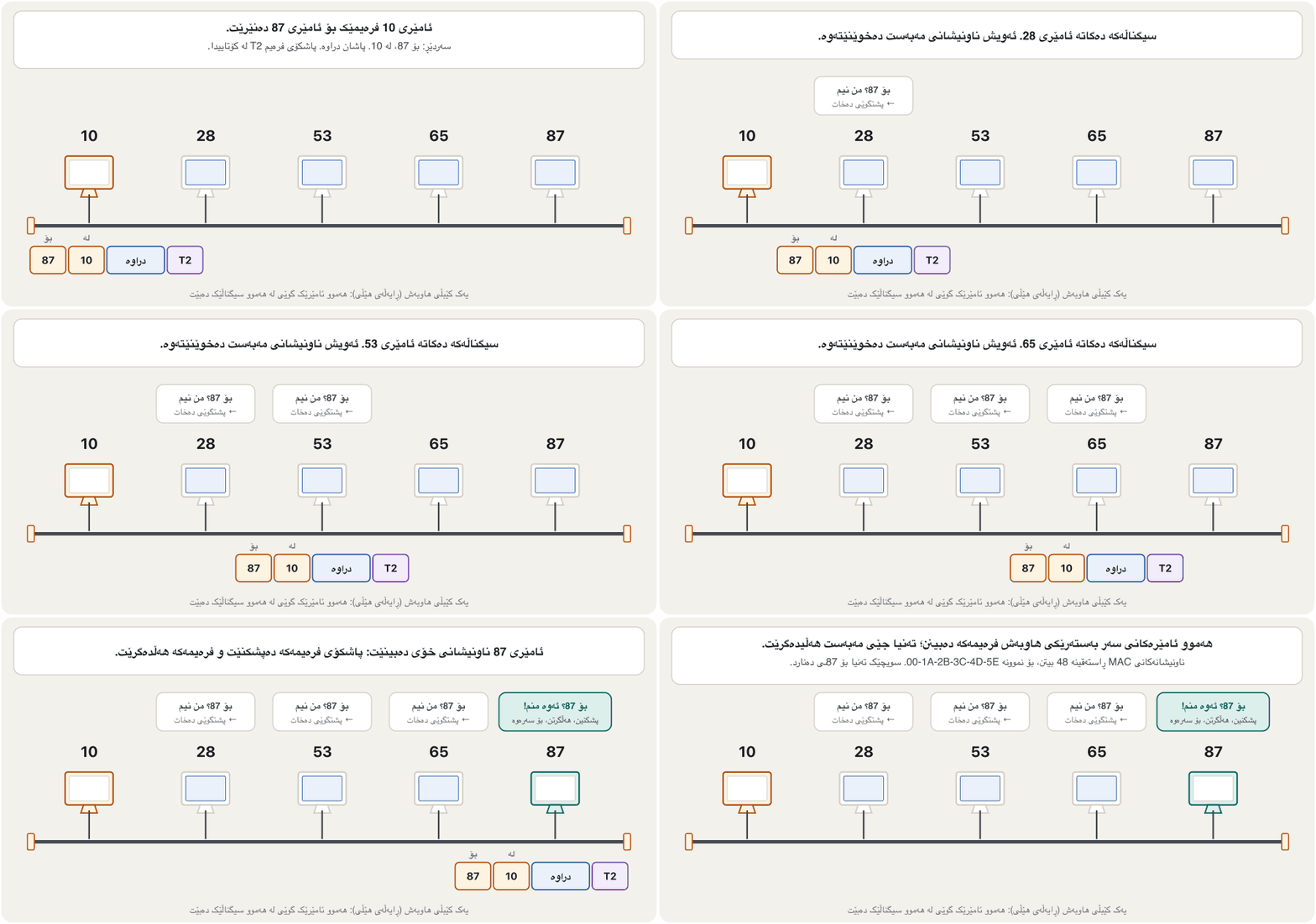
پێنج ئامێر یەک کێبڵی هاوبەش بەکار دەهێنن، . بۆ سادەیی، ناونیشانە فیزیکییەکانیان ژمارەی بچووکن: 10، 28، 53، 65 و 87 ( ڕاستەقینە 48 ). ئامێری 10 بۆ ئامێری 87 دەنێرێت. سەردێڕەکە ناونیشانی مەبەست (87) و ناونیشانی نێرەر (10) هەڵدەگرێت؛ T2 لە کۆتاییدا دێت.
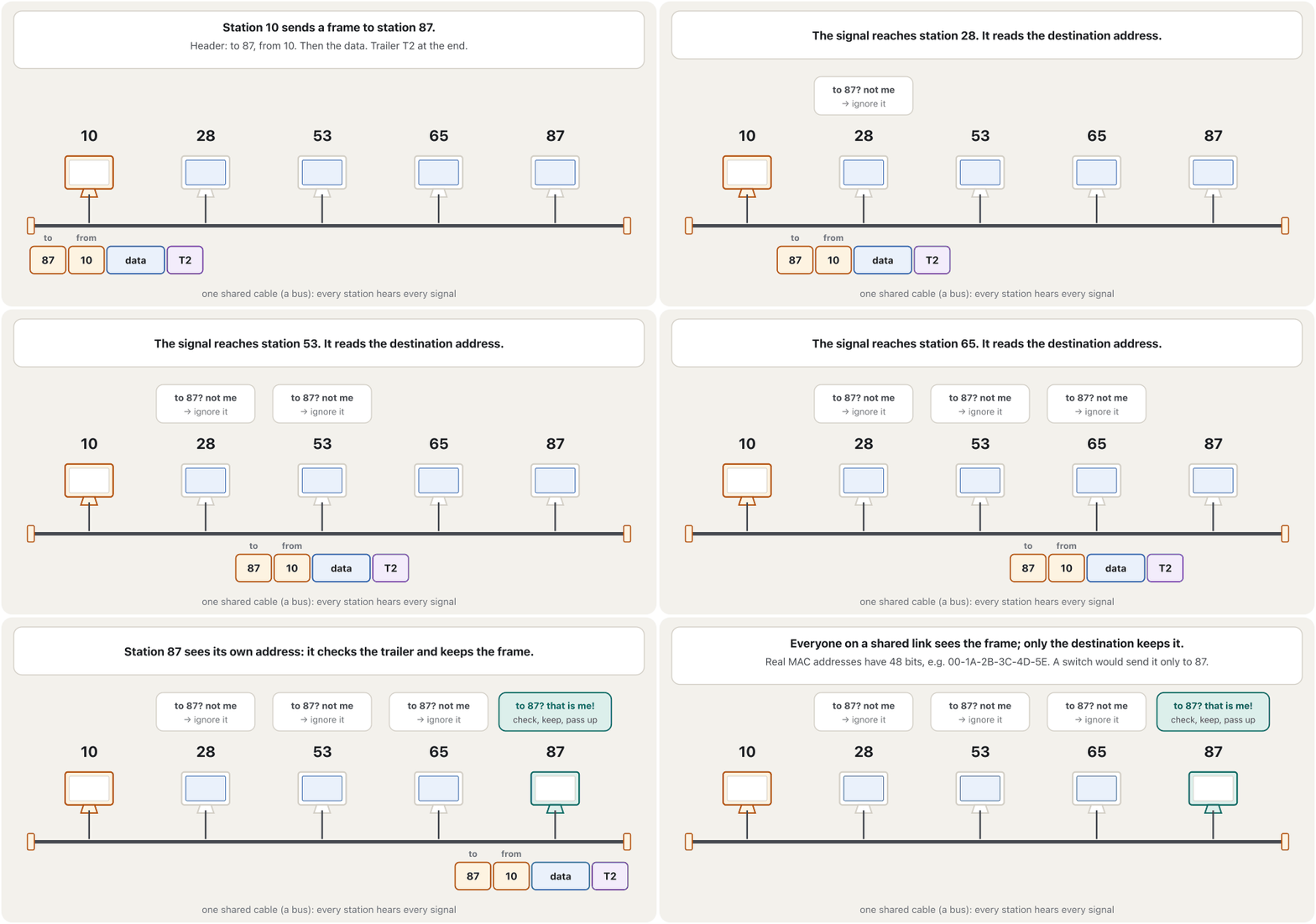
Every station on the cable receives the signal and reads the destination address. Stations 28, 53 and 65 see “87” and ignore the frame; only station 87 checks the trailer, keeps the frame and passes the data up. Today a switch gives every device its own link and sends the frame only out of the port where 87 is — see Bridges and Switches. You can watch a hub and a switch side by side in the CêIT network lab.
هەموو ئامێرێکی سەر کێبڵەکە وەردەگرێت و ناونیشانی مەبەست دەخوێنێتەوە. ئامێرەکانی 28، 53 و 65 «87» دەبینن و پشتگوێی دەخەن؛ تەنیا ئامێری 87 دەپشکنێت، هەڵدەگرێت و دەداتە سەرەوە. ئەمڕۆ بەستەرێکی تایبەت دەداتە هەموو ئامێرێک و تەنیا لەو دەنێرێت کە 87ـی پێوەیە — بڕوانە پردەکانی ڕایەڵە و سویچەکان. دەتوانیت و لە تەنیشت یەکتر لە تاقیگەی ڕایەڵەی CêITـدا ببینیت.
Layer 2: the data link layerچینی 2: چینی بەستەری دراوە
Two sublayers: LLC and MACدوو ژێرچین: LLC و MAC
The IEEE 802 standards for local networks split the data link layer into two sublayers. The upper one, LLC — logical link control, IEEE 802.2 — faces the network layer: it gives it one common interface and says which network-layer protocol is inside the frame. The lower one, MAC — medium access control — is different for each kind of LAN: Ethernet (IEEE 802.3) and Wi-Fi (IEEE 802.11) each have their own MAC, with their own frame format, addresses, error check and rules for taking turns on the medium.
IEEE 802 بۆ دابەش دەکەن بۆ دوو ژێرچین. ژێرچینی سەرەوە، LLC — ، IEEE 802.2 — ڕووی لە : هاوبەشی پێ دەدات و دەڵێت کام لە ناو . ژێرچینی خوارەوە، MAC — — بۆ هەر جۆرێکی LAN جیاوازە: Ethernet (IEEE 802.3) و (IEEE 802.11) هەریەکەیان MACـی خۆیان هەیە، بە شێوەی ، ناونیشان، و یاسای نۆرەگرتنی خۆیان لەسەر .
In practice most Ethernet frames carry no LLC header: a 2-byte type field, the EtherType, names the protocol inside, for example IPv4 or IPv6. Wi-Fi frames do carry a small LLC header for the same purpose.
لە کرداردا زۆربەی Ethernet سەردێڕی LLCـیان تێدا نییە: خانەیەکی جۆری 2 ، EtherType، ناوەوە ناو دەبات، بۆ نموونە IPv4 یان IPv6. بۆ هەمان مەبەست سەردێڕێکی بچووکی LLC هەڵدەگرن.
Layer 3: the network layerچینی 3: چینی ڕایەڵە
The network layer is responsible for the delivery of individual packets from the source host to the destination host, across many networks and links. The data link layer only gets a frame to the next device; the network layer makes sure that each packet gets from its point of origin to its final destination, successfully and efficiently. Its unit of data is the packet: the data from the transport layer with a network-layer header (H3) in front.
بەرپرسە لە گەیاندنی یەک یەک لە سەرچاوەوە بۆ مەبەست، بە ناو چەندین و بەستەردا. تەنیا دەگەیەنێتە ئامێری دواتر؛ دڵنیا دەبێتەوە کە هەر لە شوێنی دەستپێکییەوە بە سەرکەوتوویی و بە کارامەیی دەگاتە جێی مەبەستی کۆتایی. یەکەی : بە سەردێڕێکی (H3) لە پێشەوەی.
It does this with two tools. Logical addressing: every device gets an address that also says which network it is on — an IP address, IPv4 or IPv6. Routing: choosing the best path to the destination. Routing protocols such as OSPF, IS-IS, EIGRP and BGP help routers learn the paths; you will meet them in the routing course.
ئەم کارە بە دوو ئامراز دەکات. ناونیشانکردنی لۆجیکی: هەر ئامێرێک ناونیشانێک وەردەگرێت کە دەڵێت لەسەر کام — ، IPv4 یان IPv6. : هەڵبژاردنی باشترین ڕێگا بەرەو جێی مەبەست. وەک OSPF، IS-IS، EIGRP و BGP یارمەتی دەدەن ڕێگاکان فێر ببن؛ لە کۆرسی دەیانناسیت.
Layer 3 of the : it gives every device a logical address (an ) and moves packets from the source host to the destination host across many networks, choosing the route (). In TCP/IP it is called the internet layer.
چینی 3ی : ناونیشانی لۆجیکی () دەدات بە هەر ئامێرێک و لە سەرچاوەوە بە ناو چەندین ڕایەڵەدا دەگەیەنێتە مەبەست و ڕێگاکە هەڵدەبژێرێت (). لە پێی دەگوترێت چینی ئینتەرنێت.
Layer 3: the network layerچینی 3: چینی ڕایەڵە
Forwarding and routingپێشڕۆکردن و ڕێدۆزی
To move packets across many networks, the network layer gives two related services. Forwarding — older books call it switching — moves each packet that arrives at a router to the right outgoing link: read the destination address, look it up in the routing table, send the packet out. Routing builds that table: routers exchange information and work out the best paths. A computer in Sulaymaniyah that opens a website hosted in Germany has thousands of possible paths; the routers choose for it, hop by hop.
بۆ گواستنەوەی بە ناو چەندین ، دوو خزمەتگوزاریی پەیوەست بە یەکەوە پێشکەش دەکات. — کتێبە کۆنەکان پێی دەڵێن — هەر کە دەگاتە بۆ بەستەری دەرچوونی دروست دەنێرێت: ناونیشانی مەبەست بخوێنەوە، لە بیدۆزەوە، بنێرە. ئەو خشتەیە دروست دەکات: زانیاری ئاڵوگۆڕ دەکەن و باشترین ڕێگاکان دەدۆزنەوە. لە سلێمانی کە دەکاتەوە کە لە ئەڵمانیا دانراوە، هەزاران ڕێگای ئەگەری هەیە؛ بۆی هەڵدەبژێرن.
A packet is not a smaller piece of a segment: it is the segment with an IP header added. Only when a packet is too big for the next link can the network layer cut it into smaller fragments that the destination puts back together — a special case explained in The Network Layer and IPv4.
پارچەیەکی بچووکتری نییە: هەمان کە سەردێڕێکی IPـی بۆ زیاد کراوە. تەنیا کاتێک بۆ بەستەری دواتر زۆر گەورە بێت، دەتوانێت بیکاتە چەند پارچەیەکی بچووکتر کە جێی مەبەست دووپاتە کۆیان دەکاتەوە — حاڵەتێکی تایبەت کە لە چینی ڕایەڵە و IPv4ـدا ڕوون کراوەتەوە.
Layer 3: the network layerچینی 3: چینی ڕایەڵە
Worked example: from A to P across two routersنموونەی کارپێکراو: لە Aـەوە بۆ P بە ناو دوو ڕێدۆزدا
Three networks are joined by two routers. Computer A — logical address A, physical address 10 — on network 1 sends a packet to computer P — logical address P, physical address 95 — on network 3. Watch the two kinds of address:
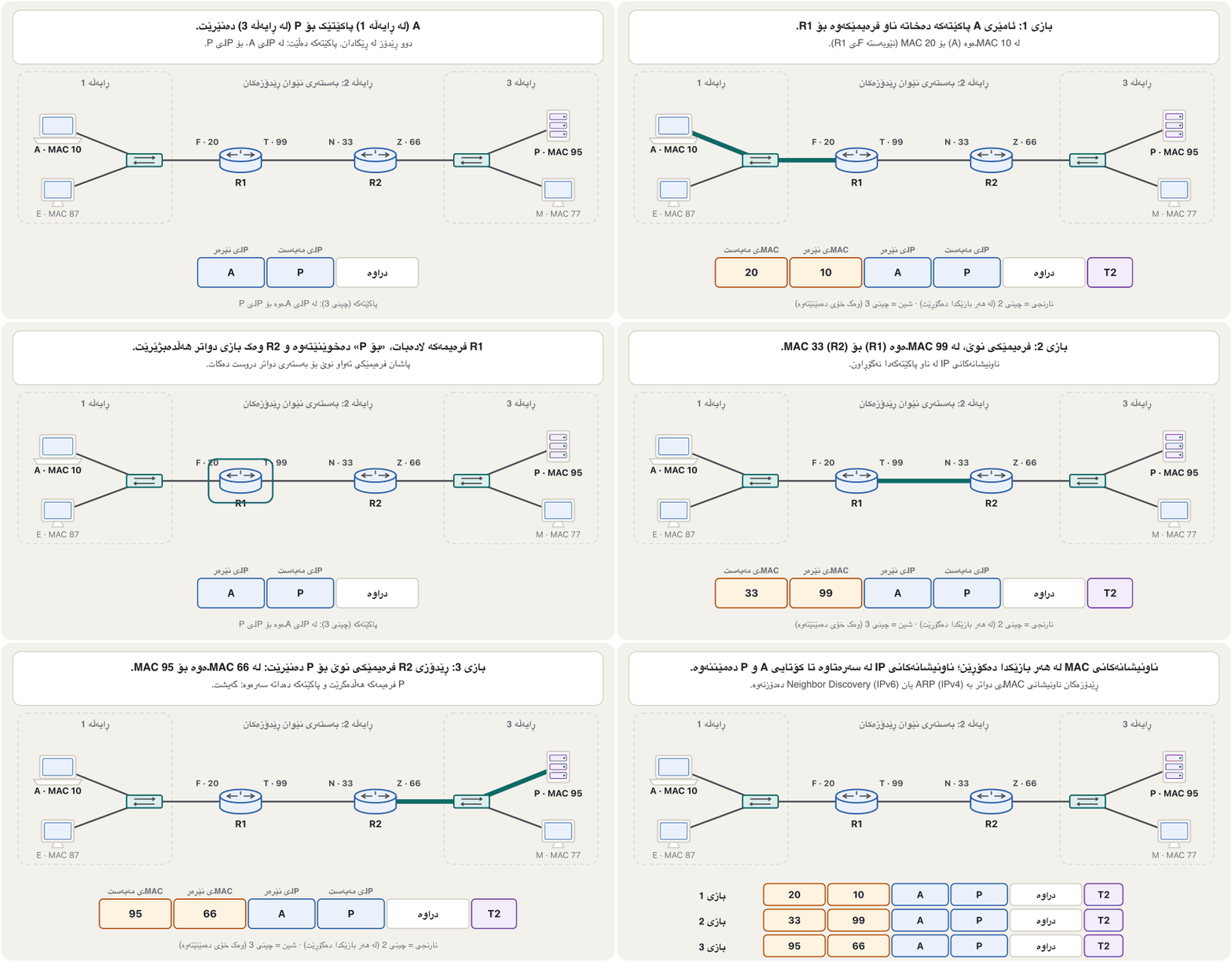
سێ بە دوو پێکەوە بەستراون. A — ناونیشانی لۆجیکی A، ناونیشانی فیزیکی 10 — لەسەر 1 بۆ P دەنێرێت — ناونیشانی لۆجیکی P، ناونیشانی فیزیکی 95 — لەسەر 3. سەیری دوو جۆرە ناونیشانەکە بکە:
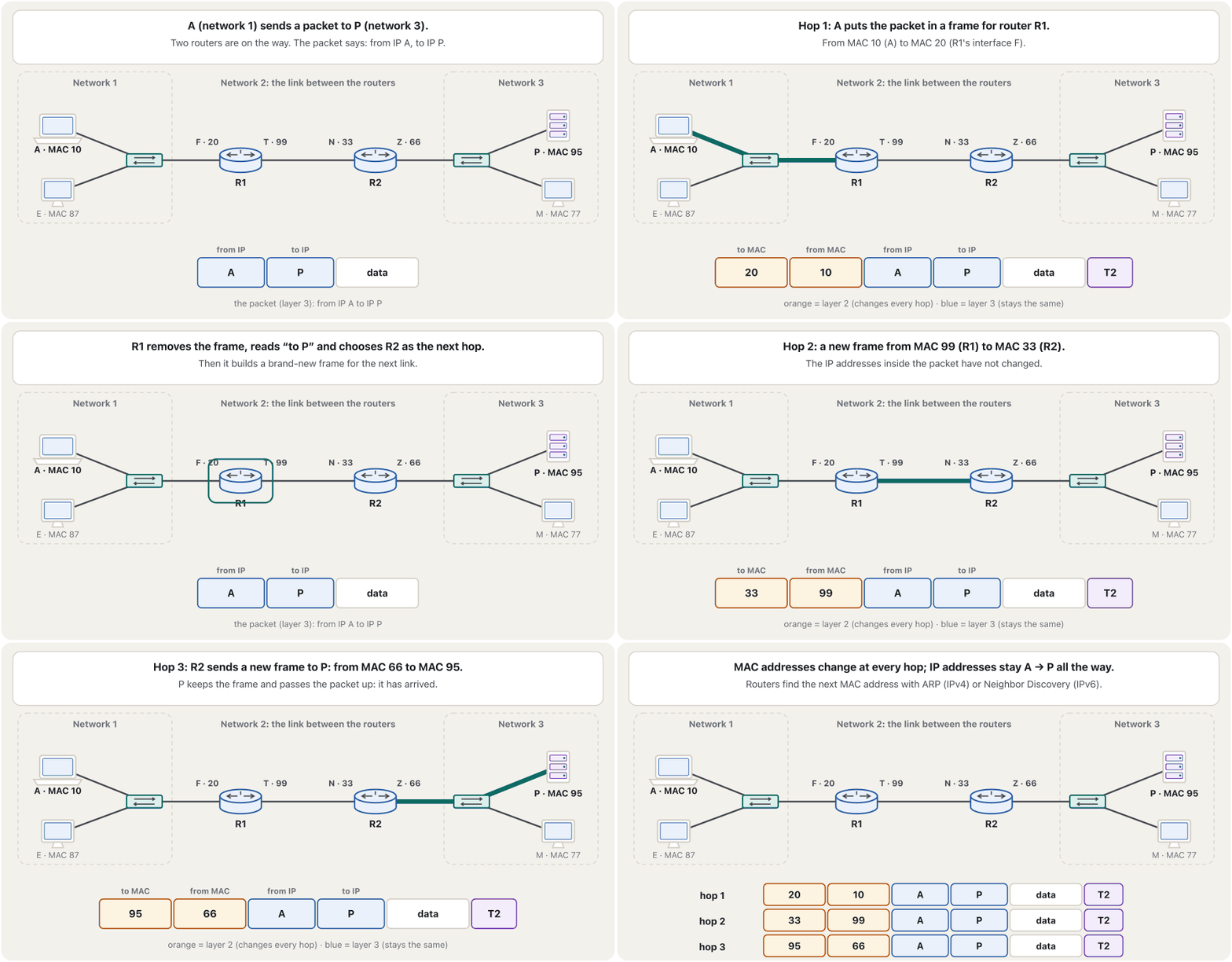
- Hop 1, network 1: a frame from MAC 10 (A) to MAC 20 (R1's interface F).
- Hop 2, the link between the routers: R1 builds a new frame from MAC 99 (its interface T) to MAC 33 (R2's interface N).
- Hop 3, network 3: R2 builds a new frame from MAC 66 (its interface Z) to MAC 95 (P).
- 1، 1: لە MAC 10ـەوە (A) بۆ MAC 20 ( Fـی R1).
- 2، بەستەری نێوان : R1 نوێ دروست دەکات لە MAC 99ـەوە ( Tـی خۆی) بۆ MAC 33 ( Nـی R2).
- 3، 3: R2 نوێ دروست دەکات لە MAC 66ـەوە ( Zـی خۆی) بۆ MAC 95 (P).
So the logical (IP) addresses stay the same from source to destination, while the physical (MAC) addresses change at every hop. A router finds the next MAC address with ARP in IPv4 or with Neighbor Discovery in IPv6 — see ARP; step by step: Hop by hop. Open the “Three networks and two routers” example in the CêIT network lab, send a ping and watch the addresses.
کەواتە ناونیشانە لۆجیکییەکان (IP) لە سەرچاوەوە تا جێی مەبەست وەک خۆیان دەمێننەوە، بەڵام ناونیشانە فیزیکییەکان (MAC) لە هەر دەگۆڕێن. دواتر لە IPv4ـدا بە و لە IPv6ـدا بە Neighbor Discovery دەدۆزێتەوە — بڕوانە ARP؛ هەنگاو بە هەنگاو: باز بە باز. نموونەی «سێ و دوو » لە تاقیگەی ڕایەڵەی CêITـدا بکەرەوە، بنێرە و سەیری ناونیشانەکان بکە.
Common mistakesهەڵە باوەکان
- “Switching and routing happen at the physical layer.” False: both are network-layer services; layer 1 only carries bits.
- “The data link layer corrects errors.” Ethernet only detects them with the FCS and drops bad frames; Wi-Fi sends frames again; TCP repairs what is still missing, end to end.
- Mixing up frame and packet. A frame (layer 2) lives for one hop; the packet (layer 3) inside it travels all the way.
- Thinking MAC addresses go end to end. They change at every router; IP addresses stay the same.
- “A hub or a repeater reads addresses.” They work at layer 1 and only regenerate the signal for everyone.
- Naming IPX or AppleTalk as today's network-layer protocols. In 2026 they are IPv4 and IPv6.
- Forgetting framing and the trailer when you list the jobs of the data link layer.
- « و لە ڕوو دەدەن.» هەڵەیە: هەردووکیان خزمەتگوزاریی ؛ چینی 1 تەنیا دەگوازێتەوە.
- « هەڵەکان ڕاست دەکاتەوە.» Ethernet تەنیا بە FCS دەیاندۆزێتەوە و خراپەکان فڕێ دەدات؛ دووپاتە دەنێرێتەوە؛ TCP ئەوەی هێشتا ون بووە لە سەرێکەوە بۆ سەرەکەی تر چاک دەکاتەوە.
- تێکەڵکردنی و . (چینی 2) تەنیا بۆ یەک دەژی؛ ناوی (چینی 3) تا کۆتایی ڕێگا دەڕوات.
- وا بزانیت لە سەرێکەوە بۆ سەرەکەی تر وەک خۆیان دەمێننەوە. لە هەر دەگۆڕێن؛ وەک خۆیان دەمێننەوە.
- « یان ناونیشان دەخوێنێتەوە.» لە چینی 1دا کار دەکەن و تەنیا بۆ هەمووان دووپاتە بەهێز دەکەنەوە.
- ناوبردنی IPX یان AppleTalk وەک ئەمڕۆی . لە 2026دا IPv4 و IPv6ـن.
- لەبیرچوونەوەی دروستکردنی و کاتێک کارەکانی دەژمێریت.
Exercisesڕاهێنانەکان
What is the main responsibility of the data link layer? Explain your answer with a diagram.
بەرپرسیارێتیی سەرەکیی چییە؟ وەڵامەکەت بە هێڵکارییەک ڕوون بکەرەوە.
Show answerوەڵامەکە پیشان بدە
The data link layer moves frames from one hop (node) to the next without errors. Its jobs:
بەبێ هەڵە لە (نۆدێکەوە) بۆ دواتر دەگوازێتەوە. کارەکانی:
- framing — packing the packet into a frame;
- physical addressing — the source and destination MAC addresses in the header;
- error control — the check value (FCS) in the trailer;
- flow control — not overrunning the next device;
- access control — taking turns on a shared medium.
- دروستکردنی — خستنی ناو ؛
- ناونیشانکردنی فیزیکی — نێرەر و مەبەست لە سەردێڕەکەدا؛
- — ژمارەی پشکنین (FCS) لە ؛
- — نوقمنەکردنی ئامێری دواتر؛
- — نۆرەگرتن لەسەر هاوبەش.
Diagram: at the sender, the packet from layer 3 gets the header H2 (with the MAC addresses) at the front and the trailer T2 (the error check) at the end, and the frame goes down to layer 1 as bits. At the receiver, layer 2 checks T2, removes H2 and T2 and passes the packet up to layer 3. See the picture in Layer 2: the data link layer. A complete answer names framing and the trailer — both are often forgotten.
هێڵکاری: لە نێرەردا چینی 3 سەردێڕی H2 ( تێدایە) لە پێشەوە و T2 () لە کۆتاییدا وەردەگرێت و وەک دادەبەزێتە چینی 1. لە وەرگردا چینی 2 T2 دەپشکنێت، H2 و T2 لادەبات و دەداتە چینی 3. سەیری وێنەکەی چینی 2: چینی بەستەری دراوە بکە. وەڵامێکی تەواو دروستکردنی و ناو دەبات — هەردووکیان زۆرجار لە بیر دەچن.
Say whether each statement is true or false, and correct the false ones. (1) The network layer is responsible for the delivery of individual packets from the source host to the destination host. (2) The two items that happen at the physical layer are switching and routing. (3) On a shared bus every station receives every frame. (4) A router keeps the MAC addresses of a frame and changes its IP addresses.
بڵێ هەر ڕستەیەک ڕاستە یان هەڵە و هەڵەکان ڕاست بکەرەوە. (1) بەرپرسە لە گەیاندنی یەک یەک لە سەرچاوەوە بۆ مەبەست. (2) ئەو دوو شتەی لە ڕوو دەدەن بریتین لە و . (3) لەسەر هەموو ئامێرێک هەموو وەردەگرێت. (4) دەهێڵێتەوە و دەگۆڕێت.
Show answerوەڵامەکە پیشان بدە
- (1) True.
- (2) False: switching (forwarding) and routing are network-layer services.
- (3) True: the signal reaches everyone, but only the destination keeps the frame.
- (4) False: it is the other way round. The router builds a new frame with new MAC addresses; the IP addresses stay the same.
- (1) ڕاستە.
- (2) هەڵەیە: () و خزمەتگوزاریی .
- (3) ڕاستە: دەگاتە هەمووان، بەڵام تەنیا جێی مەبەست هەڵدەگرێت.
- (4) هەڵەیە: پێچەوانەکەیە. نوێ بە نوێوە دروست دەکات؛ وەک خۆیان دەمێننەوە.
A link runs at 1 Gbit/s. (a) How long does one bit last on the wire? (b) A full Ethernet frame is 1,518 bytes. How long does it take to send it?
بەستەرێک بە 1 Gbit/s کار دەکات. (ئا) یەک چەند لەسەر وایەرەکە دەخایەنێت؟ (ب) پڕی Ethernet 1,518 . ناردنی چەندی پێ دەچێت؟
Show answerوەڵامەکە پیشان بدە
One bit lasts one nanosecond; the whole frame takes about 12 microseconds — fast, but at 10 Mbit/s the same frame would take 100 times longer.
یەک یەک نانۆچرکە دەخایەنێت؛ هەموو نزیکەی 12 مایکرۆچرکە دەخایەنێت — خێرایە، بەڵام لە 10 Mbit/s هەمان 100 هێندە زیاتری پێ دەچێت.
The physical layer turns the logical requests of the ___ into hardware operations.چینی فیزیکی داواکارییە لۆجیکییەکانی ___ دەکاتە کاری ڕەقەواڵە.
The data link layer, the layer just above it.
، چینی ڕاستەوخۆ سەرووی.
The data link layer takes packets from the ___ and puts them into frames.چینی بەستەری دراوە پاکێتەکان لە ___ وەردەگرێت و دەیانخاتە ناو فرەیمەکانەوە.
The network layer.
.
What does the header of a frame contain?سەردێڕی فرەیمێک چی تێدایە؟
All of these: addresses, a frame type (what is inside) and the information needed to find where the frame starts — in Ethernet a preamble that synchronises the receiver comes just before it.
هەموو ئەمانە: ناونیشان، جۆری (چی لە ناوەوەیە) و ئەو زانیارییەی بۆ دۆزینەوەی سەرەتای پێویستە — لە Ethernetـدا preamble، کە وەرگر هاوکات دەکات، ڕاستەوخۆ پێش ئەو دێت.
Which OSI layer uses routers and IP addresses so that packets reach the correct system?کام چینی OSI ڕێدۆزەکان و ناونیشانەکانی IP بەکار دەهێنێت تا پاکێتەکان بگەنە سیستەمی دروست؟
The network layer.
.
Which OSI layer adds the source and destination MAC addresses to frames?کام چینی OSI ناونیشانەکانی MACـی نێرەر و مەبەست زیاد دەکات بۆ فرەیمەکان؟
The data link layer.
.
Some networks move data over radio waves. Which OSI layer do the radio waves belong to?هەندێک ڕایەڵە دراوە بە شەپۆلە ڕادیۆییەکان دەگوازنەوە. شەپۆلە ڕادیۆییەکان سەر بە کام چینی OSIـن؟
The physical layer, like cables and fibre: anything that carries the signal from one system to another.
، وەک کێبڵ و فایبەر: هەر شتێک کە لە سیستەمێکەوە بۆ سیستەمێکی تر دەبات.
At which OSI layer do routers work?ڕێدۆزەکان لە کام چینی OSIـدا کار دەکەن؟
The network layer (layer 3).
(چینی 3).
With copper cabling, which layer defines the rules for turning ones and zeros into electrical signals? Which layer deals directly with the hardware?لە کێبڵی مسدا، کام چین یاساکانی کردنی 1 و 0 بە سیگناڵێکی کارەبایی دیاری دەکات؟ کام چین ڕاستەوخۆ مامەڵە لەگەڵ ڕەقەواڵە دەکات؟
The physical layer, in both cases.
، لە هەردوو حاڵەتدا.
Summaryپوختە
- Layers 1–3 are the network support layers; every router on a path uses them.
- Physical layer: bits as signals over one link — media, connectors, voltages, bit rate, synchronisation, line configuration, topology and transmission mode.
- Data link layer: frames hop to hop — framing, MAC addresses, error control with the trailer, flow control and access control; LLC and MAC sublayers in IEEE 802.
- Network layer: packets from the source host to the destination host — logical (IP) addressing, forwarding and routing.
- MAC addresses change at every hop; IP addresses stay the same from A to P.
- چینەکانی 1 تا 3 چینەکانی پشتگیریی ؛ هەموو سەر ڕێگا بەکاریان دەهێنێت.
- : وەک بە یەک بەستەردا — ، ، ، ، هاوکاتکردن، ، و .
- : — دروستکردنی ، ، بە ، و ؛ ژێرچینەکانی LLC و MAC لە IEEE 802ـدا.
- : لە سەرچاوەوە بۆ مەبەست — ناونیشانکردنی لۆجیکی (IP)، و .
- لە هەر دەگۆڕێن؛ لە Aـەوە تا P وەک خۆیان دەمێننەوە.
Videoڤیدیۆ
Watch a videoسەیری ڤیدیۆیەک بکە
A video that viewers liked a lot and praised in their comments, chosen for this lesson.ڤیدیۆیەک کە بینەران زۆریان پێ خۆش بووە و لە کۆمێنتەکانیاندا ستایشیان کردووە، بۆ ئەم وانەیە هەڵبژێردراوە.
Each of the seven OSI layers with real devices, protocols and examples, from cables and signals up to the application.
هەر یەک لە حەوت چینەکەی بە ئامێر، و نموونەی ڕاستەقینە، لە کێبڵ و تا .
Watch 3:52–22:42: layers 1, 2 and 3 with real devices and protocols.
لە 3:52 تا 22:42 سەیر بکە: چینەکانی 1، 2 و 3 بە ئامێر و ڕاستەقینە.
Lesson complete!وانەکە تەواو بوو!
Well done. Review the key terms, then go on to the next lesson.دەستخۆش. سەیرێکی زاراوە سەرەکییەکان بکەرەوە، پاشان بڕۆ بۆ وانەی داهاتوو.
Key termsزاراوە سەرەکییەکان
OSI Layers 4 and 5: Transport and Sessionچینەکانی 4 و 5ی OSI: چینی گواستنەوە و چینی سێشن
Related lecturesوانە پەیوەندیدارەکان
- OSI Layers 4 and 5: Transport and Sessionچینەکانی 4 و 5ی OSI: چینی گواستنەوە و چینی سێشن
- Links: Point-to-Point, Multipoint and Transmission Modesبەستنەوەکان: پەیوەندیی خاڵ بۆ خاڵ، پەیوەندیی فرەخاڵ و شێوازەکانی ناردن
- Physical and Logical Topologiesتۆپۆلۆجیی فیزیکی و تۆپۆلۆجیی لۆجیکی
- MAC Addresses and Ethernet Framesناونیشانەکانی MAC و فرەیمەکانی Ethernet
- The Network Layer and the IPv4 Packetچینی ڕایەڵە و پاکێتی IPv4
- How a Packet Finds Its Way: Gateways and Routing Tablesپاکێت چۆن ڕێگای خۆی دەدۆزێتەوە: دەروازەی بنەڕەتی و خشتەکانی ڕێدۆزی
- Repeaters and Hubsدووپاتەکەرەوەکان و هەبەکان
- Bridges and Switchesپردەکانی ڕایەڵە و سویچەکان
- ARP: From IP Address to MAC AddressARP: لە ناونیشانی IP بۆ ناونیشانی MAC
- Cables and Wireless: Transmission Mediaکێبڵ و بێتەل: هۆکارەکانی گواستنەوە
- IP Addresses and MAC Addressesناونیشانەکانی IP و ناونیشانەکانی MAC
References and further readingسەرچاوەکان و خوێندنەوەی زیاتر
- Wikipedia: Physical layer (functions: bit-by-bit delivery, line coding, synchronisation, bit rate, topology, duplex)
- Wikipedia: Ethernet frame (field sizes, the 4-byte FCS, a CRC-32)
- Wikipedia: Logical link control (LLC and MAC sublayers; Ethernet II EtherType; error and flow control)
- Wikipedia: IEEE 802.2 (LLC, upper part of the data link layer)
- Wikipedia: IEEE 802 (the data link layer divided into LLC and MAC; working groups 802.3 and 802.11)
- Wikipedia: AppleTalk (removed from Mac OS X 10.6 Snow Leopard, 2009)
- Cisco Press: Introduction to Networks Companion Guide (CCNAv7), chapters 4 Physical Layer, 6 Data Link Layer and 8 Network Layer
This lecture is a first edition. The Kurdish text and terminology are waiting for review by Kurdish IT teachers.ئەم وانەیە چاپی یەکەمە. دەقە کوردییەکە و زاراوەکانی چاوەڕێی پێداچوونەوەی مامۆستایانی کوردی بواری IT ن.