Chapterبەش 7 · Lectureوانە 7.2
How E-mail Worksئیمەیڵ چۆن کار دەکات
A short history of e-mail; the address; the five steps from the sender's mail app to the receiver's phone — MUA, MSA, DNS MX look-up, MTA and MDA, with SMTP, IMAP and POP3 — as a diagram and an animation; envelope versus header (why BCC and spoofing work) and a real SMTP conversation; inside a message (header lines, plain text and HTML, MIME attachments) with a Show original lab; webmail, POP3 or IMAP, Exchange and phones; attachment limits, overload and e-mail bankruptcy, business use, mail bombing and tracking pixels; SPF, DKIM and DMARC against spoofing; and comparing two providers.
مێژوویەکی کورتی ؛ ؛ پێنج هەنگاوەکە لە نێرەرەوە تا مۆبایلی وەرگر — MUA، MSA، گەڕانی MX لە ، MTA و MDA، لەگەڵ ، و — وەک هێڵکاری و جوڵەوێنە؛ زەرف بەرامبەر سەردێڕ (بۆچی BCC و کار دەکەن) و گفتوگۆیەکی ڕاستەقینەی ؛ ناو نامەیەک (دێڕەکانی سەردێڕ، دەقی سادە و ، بە ) لەگەڵ تاقیگەی Show original؛ ، یان ، Exchange و مۆبایل؛ سنووری ، زۆریی نامە و مایەپووچبوونی ، بەکارهێنان لە بازرگانیدا، بۆمبڕێژی و ؛ ، و دژی ؛ و بەراوردکردنی دوو دابینکەر.
What you will learnچی فێر دەبیت
- Describe how e-mail developed from host-based mail to Internet SMTP.
- Explain the five steps of delivery with MUA, MSA, DNS MX, MTA and MDA.
- Tell the SMTP envelope from the header, and explain BCC and spoofing with it.
- Read the header, body and MIME parts of a raw message.
- Choose between webmail, POP3 and IMAP for one or several devices.
- Deal with attachment limits, overload, bombing and tracking.
- Explain what SPF, DKIM and DMARC check, and compare two webmail providers.
- وەسف بکەیت چۆن لە نامەی ناو یەک گەشەی کرد بۆ .
- پێنج هەنگاوی گەیاندن بە MUA، MSA، MXـی ، MTA و MDA ڕوون بکەیتەوە.
- SMTP لە جیا بکەیتەوە و BCC و پێ ڕوون بکەیتەوە.
- سەردێڕ، ناوەڕۆک و بەشەکانی نامەیەکی خاو بخوێنیتەوە.
- لە نێوان ، و بۆ یەک یان چەند ئامێرێک هەڵبژێریت.
- مامەڵە لەگەڵ سنووری ، زۆریی نامە، بۆمبڕێژی و بەدواداچوون بکەیت.
- ڕوون بکەیتەوە ، و چی دەپشکنن و دوو دابینکەری بەراورد بکەیت.
A short history of e-mailمێژوویەکی کورتی ئیمەیڵ
E-mail is older than the Internet. It grew in five steps, and each step solved a problem the step before could not:
لە کۆنترە. بە پێنج هەنگاو گەشەی کرد و هەر هەنگاوێک کێشەیەکی چارەسەر کرد کە هەنگاوی پێشووتر نەیدەتوانی:
| Whenکەی | Stepهەنگاو | What changedچی گۆڕا |
|---|---|---|
| 1965 | Host-based mailنامەی ناو یەک | On MIT's time-sharing computer, users of the same machine could leave messages in each other's mailbox files.لەسەر هاوبەشی MIT، هەمان ئامێر دەیانتوانی نامە لە فایلی سندووقی نامەی یەکتردا دابنێن. |
| 1971 | ARPANET mailنامەی ARPANET | Ray Tomlinson changed the SNDMSG program so a message could travel between two computers of the ARPANET, the Internet's ancestor. He chose @ to separate the user's name from the computer's name.Ray Tomlinson SNDMSGـی گۆڕی بۆ ئەوەی نامە بتوانێت لە نێوان دوو ARPANETـدا بڕوات، باپیرەی . @ـی هەڵبژارد بۆ جیاکردنەوەی ناوی لە ناوی . |
| 1970s | From SNDMSG to MSGلە SNDMSGـەوە بۆ MSG | Mail programs such as MSG added the everyday buttons we still use: reply and forward. In 1977 a standard described the message format. نامەی وەک MSG ئەو دوگمە ڕۆژانانەیان زیاد کرد کە هێشتا بەکاریان دەهێنین: reply و forward. لە 1977دا ستانداردێک شێوەی نامەی وەسف کرد. |
| 1978–1990 | E-mail networks and LAN e-mail و | Separate networks (UUCP, BITNET, FidoNet) carried mail between universities and hobbyists. Companies bought LAN e-mail systems (cc:Mail, Microsoft Mail, Lotus Notes) — but each spoke its own language and could not send to the others. (UUCP، BITNET، FidoNet) نامەیان لە نێوان زانکۆکان و حەزلێکەراندا دەگواستەوە. کۆمپانیاکان سیستەمی کڕی (cc:Mail، Microsoft Mail، Lotus Notes) — بەڵام هەر یەکەیان زمانی تایبەتی خۆی هەبوو و نەیدەتوانی بۆ ئەوانی تر بنێرێت. |
| 1982–1995 | Attempts at interoperabilityهەوڵەکانی پێکەوەکارکردن | Gateways translated between systems, and a big international standard (X.400) was promoted. In the end the Internet's simple SMTP (1982) won, and by the mid-1990s almost all mail spoke it. Webmail then brought e-mail to everyone.دەروازەکان لە نێوان سیستەمەکاندا وەرگێڕانیان دەکرد و ستانداردێکی نێودەوڵەتیی گەورە (X.400) پێشخرا. لە کۆتاییدا ـی سادەی (1982) سەرکەوت و تا ناوەڕاستی ساڵانی 1990 نزیکەی هەموو نامەکان بەوە قسەیان دەکرد. پاشان گەیاندە هەمووان. |
The story of the Internet and the Web around it is in The history of the Web.
چیرۆکی و لە دەوری ئەمەوە لە مێژووی وێبدایە.
The address: who and whereناونیشانی ئیمەیڵ: کێ و لە کوێ
An e-mail address has two halves. The part before @ is the local part, usually the user name. The part after @ is a domain name: it tells the Internet which provider's mail servers receive mail for this person. Servers on the way look only at the domain; only the last server reads the local part to choose the mailbox.
دوو نیوەی هەیە. بەشی پێش @ بەشی ناوخۆییـە، زۆرجار . بەشی دوای @ : بە دەڵێت کام دابینکەر نامە بۆ ئەم کەسە وەردەگرن. لە ڕێگادا تەنها سەیری دەکەن؛ تەنها دوایین بەشی ناوخۆیی دەخوێنێتەوە بۆ هەڵبژاردنی سندووقی نامەکە.
shilan.k@b.example
└──┬───┘ └───┬───┘
 local part  domain
(user name)  (provider)
How to say an address aloud, and the English words for its parts, are practised in Saying an email address. All addresses in this lesson use the reserved domains .example, which never belong to real people.
چۆن ناونیشانێک بە دەنگی بەرز بڵێیت و وشە ئینگلیزییەکانی بەشەکانی لە وتنی ناونیشانێکی ئیمەیڵدا ڕاهێنانیان لەسەر دەکرێت. هەموو ناونیشانەکانی ئەم وانەیە دۆمەینی تایبەتکراوی .example بەکار دەهێنن کە هەرگیز هی کەسی ڕاستەقینە نین.
How a message travels: five stepsنامەیەک چۆن دەڕوات: پێنج هەنگاو
Aram (aram@a.example) writes to Shilan (shilan@b.example). They use different providers, so the message needs several programs and servers. Each has a short name, and the names describe the job:
ئارام (aram@a.example) نامە بۆ شیلان (shilan@b.example) دەنووسێت. دابینکەری جیاوازیان هەیە، بۆیە نامەکە پێویستی بە چەند و هەیە. هەر یەکەیان ناوێکی کورتی هەیە و ناوەکان کارەکە وەسف دەکەن:
| Nameناو | Stands forکورتکراوەی | Jobکار |
|---|---|---|
| MUA | Mail User Agent | Your mail program: writes, sends and shows mail (Outlook, the Gmail app, Thunderbird).: نامە دەنووسێت، دەنێرێت و پیشان دەدات (Outlook، Gmail، Thunderbird). |
| MSA | Mail Submission Agent | Your provider's server that accepts your outgoing mail after checking your password. دابینکەرەکەت کە دوای پشکنینی نامە دەرچووەکانت وەردەگرێت. |
| MTA | Mail Transfer Agent | A mail server that passes mail on to the next server with SMTP. کە نامە بە دەگوازێتەوە بۆ داهاتوو. |
| MDA | Mail Delivery Agent | The program that puts the message into the receiver's mailbox.ئەو نامەکە دەخاتە ناو سندووقی نامەی وەرگرەکە. |
How a message travels: five stepsنامەیەک چۆن دەڕوات: پێنج هەنگاو
The five steps one by oneپێنج هەنگاوەکە یەک لە دوای یەک
- Submitناردن
Aram's MUA formats the message as e-mail and hands it to his provider's MSA, smtp.a.example, using the submission protocol — a version of SMTP that asks for his password and runs over an encrypted connection (port 587 or 465).
MUAـی ئارام نامەکە وەک ڕێک دەخات و دەیداتە MSAـی دابینکەرەکەی، smtp.a.example، بە بەکارهێنانی ناردن — وەشانێکی کە داوای دەکات و بە پەیوەندییەکی شفرەکراو کار دەکات ( 587 یان 465).
- Read the envelopeخوێندنەوەی زەرفەکە
The MSA takes the destination address from the SMTP session — the envelope — not from the To line of the message: shilan@b.example. Only the domain, b.example, matters for the route.
MSA ناونیشانی مەبەست لە دانیشتنی وەردەگرێت — — نەک لە دێڕی Toـی نامەکە: shilan@b.example. تەنها ، b.example، بۆ ڕێگاکە گرنگە.
- Ask DNS for the MX recordپرسیار لە DNS بۆ تۆماری MX
The server asks the Domain Name System: «Which mail servers receive mail for b.example?» The DNS server for that domain, ns.b.example, answers with its MX records: mx.b.example, a message transfer agent (MTA) run by Shilan's provider.
لە دەپرسێت: «کام نامە بۆ b.example وەردەگرێت؟» ئەو ، ns.b.example، بە وەڵام دەداتەوە: mx.b.example، MTAـیەک کە دابینکەری شیلان بەڕێوەی دەبات.
- Transfer with SMTPگواستنەوە بە SMTP
smtp.a.example sends the message to mx.b.example with SMTP. On the way it may pass through other MTAs; each one adds a «Received» line at the top of the message. The last one hands it to the MDA.
smtp.a.example نامەکە بە دەنێرێت بۆ mx.b.example. لە ڕێگادا لەوانەیە بە ناو MTAـی تردا تێپەڕێت؛ هەر یەکەیان دێڕێکی «Received» لە سەرەوەی نامەکە زیاد دەکات. دوایینیان دەیداتە MDA.
- Deliver and collectگەیاندن و وەرگرتن
The MDA puts the message into Shilan's mailbox. When she opens her mail app, her MUA collects it with POP3 or IMAP.
MDA نامەکە دەخاتە ناو سندووقی نامەی شیلان. کاتێک دەکاتەوە، MUAـەکەی بە یان وەریدەگرێت.
The DNS look-up in step 3 is the same system that turns a website's name into an address — see Domain names and DNS and DNS look-up.
پرسیاری لە هەنگاوی سێیەمدا هەمان ئەو سیستەمەیە کە ناوی دەکات بە ناونیشان — بڕوانە ناوی دۆمەین و DNS و گەڕانی DNS.
How a message travels: five stepsنامەیەک چۆن دەڕوات: پێنج هەنگاو
Watch the message travelسەیری ڕۆیشتنی نامەکە بکە
Follow the envelope hop by hop, all the way to Shilan's phone and laptop:
بەدوای زەرفەکەدا بڕۆ، هەنگاو بە هەنگاو، تا دەگاتە مۆبایل و شیلان:
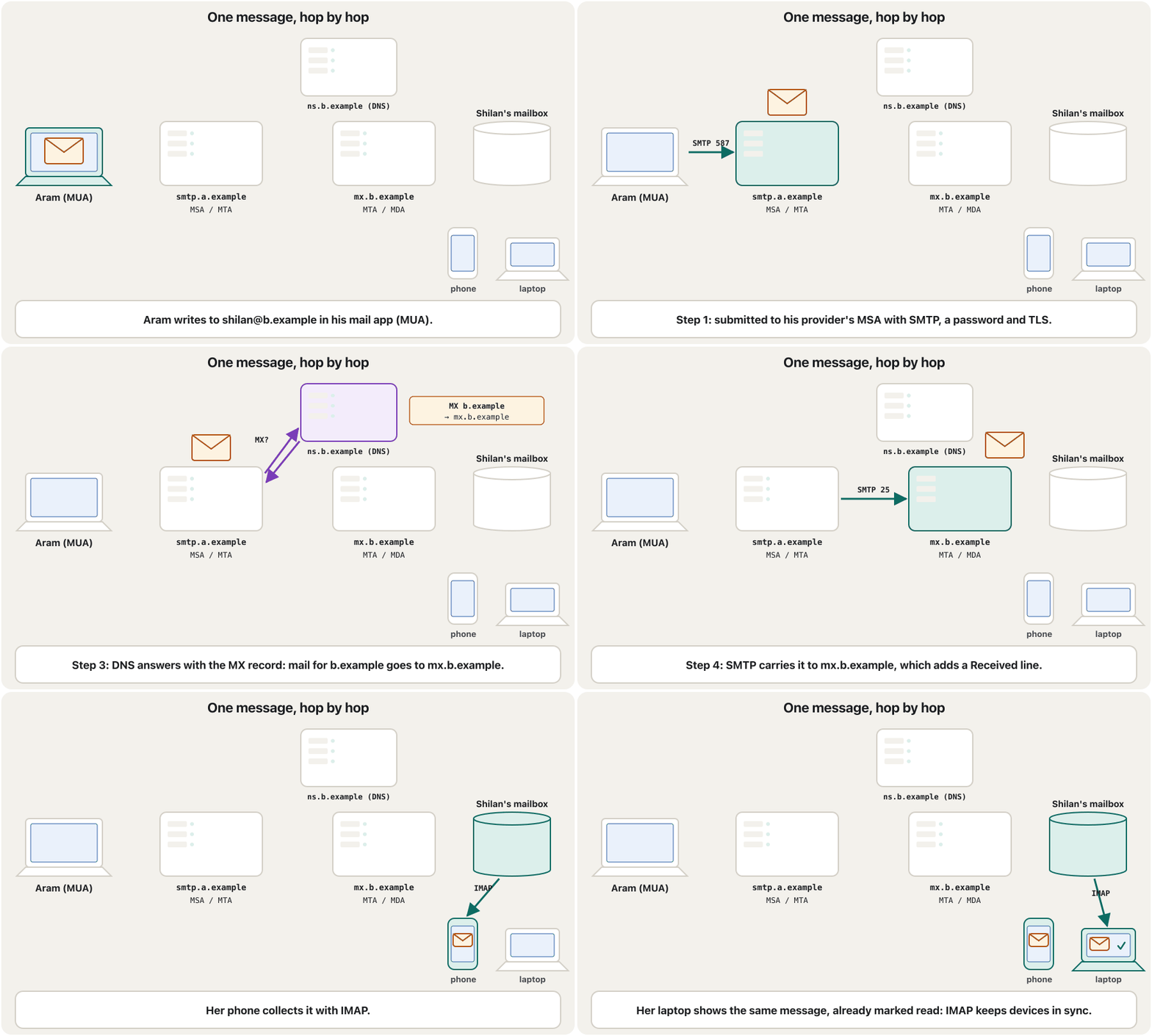
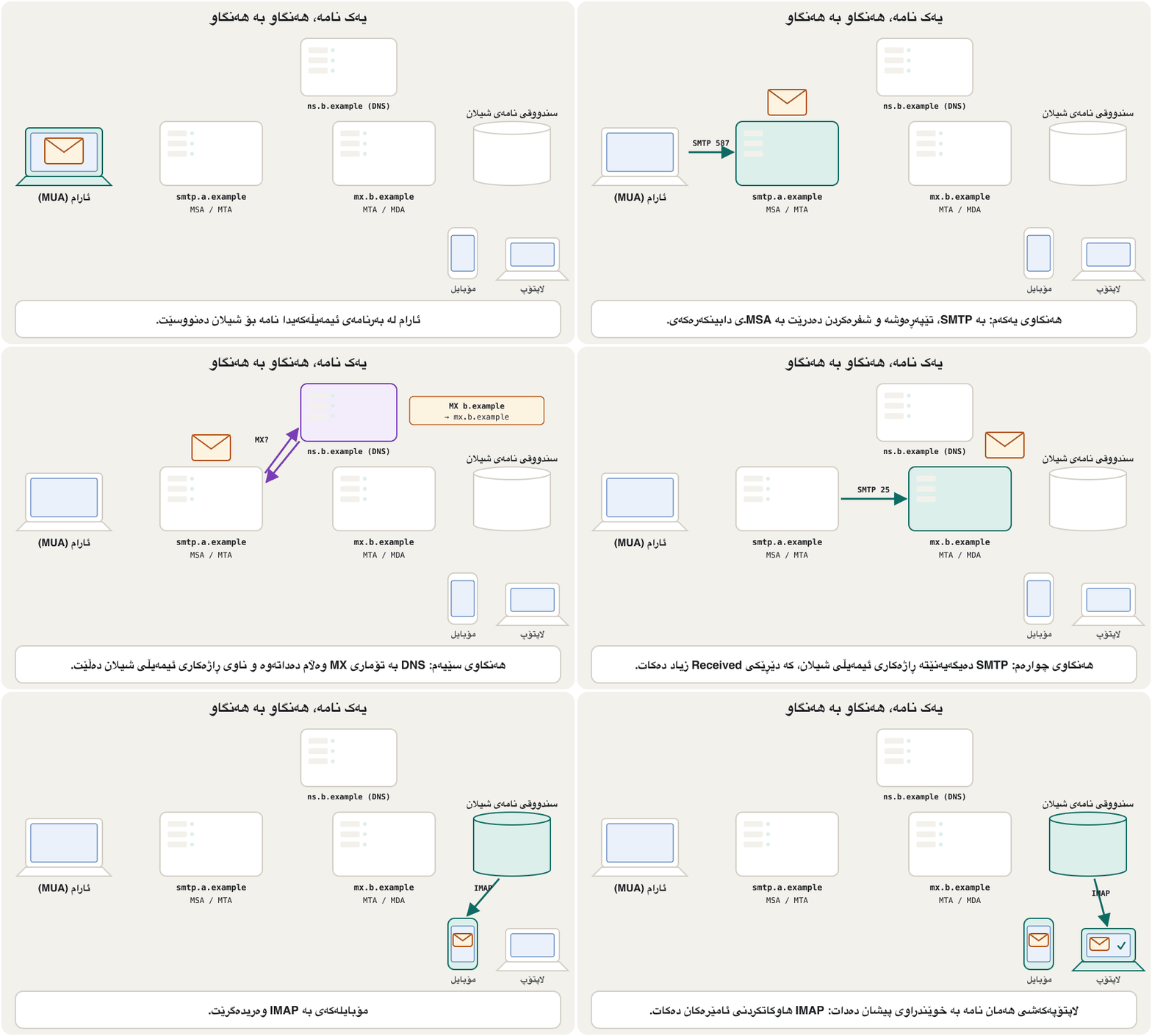
How a message travels: five stepsنامەیەک چۆن دەڕوات: پێنج هەنگاو
Envelope and header: two different «To» linesزەرف و سەردێڕ: دوو دێڕی «To»ـی جیاواز
Step 2 hides an important idea. A message really has two sets of addresses:
هەنگاوی دووەم بیرۆکەیەکی گرنگ دەشارێتەوە. نامەیەک لە ڕاستیدا دوو کۆمەڵە ناونیشانی هەیە:
- The envelope: the addresses the servers exchange with SMTP (
MAIL FROMandRCPT TO). Servers deliver by the envelope. - The header: the From, To, Cc and Date lines written inside the message. Your mail app shows these — but servers do not use them to deliver.
- : ئەو ناونیشانانەی بە ئاڵوگۆڕیان دەکەن (
MAIL FROMوRCPT TO). بەپێی زەرفەکە دەیگەیەنن. - : دێڕەکانی From، To، Cc و Date کە لە ناو نامەکەدا نووسراون. ئەمانە پیشان دەدات — بەڵام بۆ گەیاندن بەکاریان ناهێنن.
The post office reads only the envelope: the name and address written on the outside. It never opens the letter. Inside, the letter starts «Dear Shilan» and ends «Aram» — but the clerk does not check that. You could write any name at the bottom of a letter, and the post office would still deliver it.
پۆستخانە تەنها زەرفەکە دەخوێنێتەوە: ئەو ناو و ناونیشانەی لە دەرەوە نووسراوە. هەرگیز نامەکە ناکاتەوە. لە ناوەوە، نامەکە بە «شیلانی خۆشەویست» دەست پێ دەکات و بە «ئارام» کۆتایی دێت — بەڵام فەرمانبەرەکە ئەوە ناپشکنێت. دەتوانیت هەر ناوێک لە خوارەوەی نامەیەک بنووسیت و پۆستخانە هەر دەیگەیەنێت.
Where the analogy stops workingسنووری ئەم نموونەیە
Real envelopes carry stamps and postmarks; e-mail servers add «Received» lines instead, and today receivers also check SPF, DKIM and DMARC — something the post office never did.
زەرفی ڕاستەقینە پوول و مۆری پۆستی لەسەرە؛ لە جیاتی ئەوە دێڕی «Received» زیاد دەکەن و ئەمڕۆ وەرگرەکان ، و دەپشکنن — شتێک کە پۆستخانە هەرگیز نەیکردووە.
This explains two everyday things. BCC works because a BCC address is put only on the envelope, never in the header, so the other receivers cannot see it. And spoofing is possible because nothing in plain SMTP checks that the From line in the header is true — the defence is explained later in this lesson.
ئەمە دوو شتی ڕۆژانە ڕوون دەکاتەوە. کار دەکات چونکە ناونیشانی BCC تەنها لەسەر زەرفەکە دادەنرێت، هەرگیز لە سەردێڕدا نا، بۆیە وەرگرەکانی تر نایبینن. و دەکرێت چونکە هیچ شتێک لە سادەدا ناپشکنێت کە دێڕی From لە سەردێڕدا ڕاستە — بەرگرییەکەی دواتر لەم وانەیەدا ڕوون کراوەتەوە.
How a message travels: five stepsنامەیەک چۆن دەڕوات: پێنج هەنگاو
Inside SMTP: a short conversationلە ناو SMTPـدا: گفتوگۆیەکی کورت
SMTP is a polite conversation in plain text lines. Here is what smtp.a.example and mx.b.example say to each other in step 4 (C = the sending server, S = the receiving server; the numbers are the receiver's answers, 250 means «OK»):
گفتوگۆیەکی ڕێزدارانەیە بە دێڕی دەقی سادە. ئەمە ئەوەیە کە smtp.a.example و mx.b.example لە هەنگاوی چوارەمدا بە یەکتر دەڵێن (C = نێرەر، S = وەرگر؛ ژمارەکان وەڵامی وەرگرەکەن، 250 واتە «باشە»):
S: 220 mx.b.example ESMTP ready
C: EHLO smtp.a.example
S: 250 Hello smtp.a.example
C: MAIL FROM:<aram@a.example>
S: 250 OK
C: RCPT TO:<shilan@b.example>
S: 250 OK
C: RCPT TO:<karwan@b.example>
S: 250 OK
C: DATA
S: 354 Send the message; end with a line holding only "."
C: From: Aram <aram@a.example>
C: To: Shilan <shilan@b.example>
C: Subject: Lab report
C:
C: Hi Shilan, the report is attached.
C: .
S: 250 Queued for delivery
C: QUIT
S: 221 Bye
Explain the codeڕوونکردنەوەی کۆدەکە
- Lineدێڕی 2-3
EHLO: the sender introduces itself and asks which extensions (such as encryption) the receiver supports.
EHLO: نێرەرەکە خۆی دەناسێنێت و دەپرسێت وەرگرەکە پشتگیریی کام زیادکراوانە دەکات (وەک شفرەکردن).
- Lineدێڕی 4-9
The envelope: one MAIL FROM and one RCPT TO per receiver. Karwan is here but not in the To line below — a BCC.
: یەک MAIL FROM و بۆ هەر وەرگرێک یەک RCPT TO. کاروان لێرەیە بەڵام لە دێڕی Toی خوارەوەدا نییە — BCCـە.
- Lineدێڕی 12-16
The content: the header lines, an empty line, then the body. It ends with a line that holds only a full stop.
ناوەڕۆک: دێڕەکانی سەردێڕ، دێڕێکی بەتاڵ، پاشان ناوەڕۆکی نامەکە. بە دێڕێک کۆتایی دێت کە تەنها خاڵێکی تێدایە.
| Connectionپەیوەندی | Protocol | Port today ئەمڕۆ |
|---|---|---|
| Your app → your provider (sending) ← دابینکەرەکەت (ناردن) | SMTP submission | 465 (TLS) / 587 |
| Server → server ← | SMTP | 25 |
| Your app ← your mailbox (reading)سندووقی نامەکەت ← (خوێندنەوە) | IMAP | 993 (TLS) |
| Your app ← your mailbox (old way)سندووقی نامەکەت ← (ڕێگای کۆن) | POP3 | 995 (TLS) |
Where SMTP, POP3 and IMAP sit among the other protocols that carry data is shown in the protocol table of Data Communication.
شوێنی ، و لە نێوان تری گواستنەوەی لە خشتەی پرۆتۆکۆڵەکانی وانەی پیشان دراوە.
Inside a message: header and bodyلە ناو نامەیەکدا: سەردێڕ و ناوەڕۆک
Every message has two parts. The header is a list of lines, each a name and a value. You know the visible ones — To, Cc, Bcc, From, Date and Subject; their English and how to use them are taught in The parts of an email. But the header also holds lines your app hides: one Received line for every server the message passed, a unique Message-ID, and the results of the sender checks. After one empty line comes the body: the text you read.
هەموو نامەیەک دوو بەشی هەیە. لیستێکی دێڕە، هەر یەکەیان ناوێک و بەهایەک. ئەوانەی دەبینرێن دەناسیت — To، Cc، Bcc، From، Date و Subject؛ ئینگلیزییەکەیان و چۆنیەتیی بەکارهێنانیان لە بەشەکانی ئیمەیڵدا دەخوێندرێن. بەڵام دێڕی شاراوەشی تێدایە کە نایانپیشان دەدات: دێڕێکی Received بۆ هەر کە نامەکە پێیدا تێپەڕیوە، Message-IDـیەکی تایبەت و ئەنجامی پشکنینەکانی نێرەر. دوای دێڕێکی بەتاڵ ناوەڕۆک (body) دێت: ئەو دەقەی دەیخوێنیتەوە.
- Plain text: only letters, no colours or pictures. Every app can show it.
- HTML: formatted like a small web page — bold, colours, pictures, buttons. Most apps send both versions in one message, and your app shows the one it can.
- Content encoding: SMTP was built for simple English text, so Kurdish letters, pictures and attachments are packed as plain text and labelled by MIME (for example
charset=UTF-8for the letters,base64for a file). Base64 makes a file about one third bigger on the way.
- دەقی سادە: تەنها پیت، بێ ڕەنگ و وێنە. هەموو دەتوانێت پیشانی بدات.
- : وەک بچووک ڕێکخراوە — تۆخ، ڕەنگ، وێنە، دوگمە. زۆربەی هەردوو وەشانەکە لە یەک نامەدا دەنێرن و ئەوەیان پیشان دەدات کە دەتوانێت.
- کۆدکردنی ناوەڕۆک: بۆ دەقی سادەی ئینگلیزی دروست کرابوو، بۆیە پیتی کوردی، وێنە و وەک دەقی سادە دەپێچرێنەوە و ناونیشانیان لێ دەدات (بۆ نموونە
charset=UTF-8بۆ پیتەکان،base64بۆ فایلێک). Base64 فایلێک لە ڕێگادا نزیکەی سێیەکێک گەورەتر دەکات.
Received: from smtp.a.example (smtp.a.example [192.0.2.10])
        by mx.b.example with ESMTPS; Fri, 23 Oct 2026 09:14:02 +0300
Authentication-Results: mx.b.example; spf=pass smtp.mailfrom=a.example;
        dkim=pass header.d=a.example; dmarc=pass header.from=a.example
DKIM-Signature: v=1; a=rsa-sha256; d=a.example; s=mail; b=Kx3fQ...
Message-ID: <7f3a2c@a.example>
Date: Fri, 23 Oct 2026 09:14:00 +0300
From: Aram <aram@a.example>
To: Shilan <shilan@b.example>
Subject: Lab report
MIME-Version: 1.0
Content-Type: multipart/mixed; boundary="XYZ"

--XYZ
Content-Type: text/plain; charset=UTF-8

Hi Shilan, the lab report is attached.
--XYZ
Content-Type: application/pdf; name="report.pdf"
Content-Transfer-Encoding: base64

JVBERi0xLjcKJcfsj6IKNSAwIG9iago8PC9MZW5ndGggNiAwIFIv...
--XYZ--
Explain the codeڕوونکردنەوەی کۆدەکە
- Lineدێڕی 1-2
Added by mx.b.example when it received the message. Read Received lines from the bottom up to follow the route.
mx.b.example کاتێک نامەکەی وەرگرت زیادی کرد. دێڕەکانی Received لە خوارەوە بۆ سەرەوە بخوێنەوە بۆ بەدواداچوونی ڕێگاکە.
- Lineدێڕی 3-5
The receiver's checks of the sender (SPF, DKIM, DMARC) and the sender's digital signature.
پشکنینەکانی وەرگر بۆ نێرەر (، ، ) و نێرەر.
- Lineدێڕی 6-10
The header lines you normally see, plus the unique Message-ID.
ئەو دێڕانەی سەردێڕ کە بە ئاسایی دەیانبینیت، لەگەڵ Message-IDـی تایبەت.
- Lineدێڕی 11-12
MIME: this message has several parts, separated by the boundary --XYZ.
: ئەم نامەیە چەند بەشێکی هەیە کە بە سنووری --XYZ جیا کراونەتەوە.
- Lineدێڕی 14-17
Part 1: the body as plain text in UTF-8.
بەشی یەکەم: ناوەڕۆکەکە وەک دەقی سادە بە UTF-8.
- Lineدێڕی 18-23
Part 2: the PDF attachment, packed as Base64 text.
بەشی دووەم: PDFـەکە، کە وەک دەقی Base64 پێچراوەتەوە.
Multipurpose Internet Mail Extensions: the standard that lets one carry several parts — plain text, an HTML version, pictures and — and letters of every language, by packing each part as text with a label that says what it is (its ).
Multipurpose Internet Mail Extensions: ئەو ستانداردەی ڕێگە دەدات یەک چەند بەشێک هەڵبگرێت — دەقی سادە، وەشانێکی HTML، وێنە و — و پیتی هەموو زمانێک، بە پێچانەوەی هەر بەشێک وەک دەق لەگەڵ ناونیشانێک کە دەڵێت ئەو بەشە چییە ().
Inside a message: header and bodyلە ناو نامەیەکدا: سەردێڕ و ناوەڕۆک
Lab: look inside a real messageتاقیگە: سەیری ناو نامەیەکی ڕاستەقینە بکە
Open a message you received from your university or a big company. In Gmail on a computer: open the message, click ⋮ (More) next to Reply, then Show original. In Outlook.com right-click the message › View message source; in the Outlook desktop app use File › Properties (Internet headers); in Apple Mail, View › Message › All Headers. Find: (1) the Message-ID; (2) how many Received lines there are; (3) the SPF, DKIM and DMARC results; (4) the Content-Type of each part.
نامەیەک بکەرەوە کە لە زانکۆکەت یان کۆمپانیایەکی گەورەوە وەرتگرتووە. لە Gmail لەسەر : نامەکە بکەرەوە، لە ⋮ (More) لە تەنیشت Reply بکە، پاشان Show original. لە Outlook.com ڕاست لەسەر نامەکە › View message source؛ لە Outlookـی سەر مێز File › Properties (Internet headers)؛ لە Apple Mail، View › Message › All Headers. بدۆزەوە: (1) Message-ID؛ (2) چەند دێڕی Received هەیە؛ (3) ئەنجامەکانی ، و ؛ (4) Content-Typeـی هەر بەشێک.
Hintئاماژە
Use a message from a well-known organisation: they pass all three checks.
نامەیەک لە ڕێکخراوێکی ناسراوەوە بەکار بهێنە: ئەوان لە هەر سێ پشکنینەکە دەردەچن.
Show answerوەڵامەکە پیشان بدە
Gmail's Show original page begins with a small table: Message ID, Created at, From, To, Subject, then «SPF: PASS», «DKIM: 'PASS'» and «DMARC: 'PASS'» for a real sender. Below it is the full raw message, like the example on the previous screen: usually three to eight Received lines, and Content-Type lines such as text/plain, text/html, image/png or application/pdf. A message that fails SPF or DKIM while claiming to be from a bank is a strong sign of spoofing.
لاپەڕەی Show originalـی Gmail بە خشتەیەکی بچووک دەست پێ دەکات: Message ID، Created at، From، To، Subject، پاشان «SPF: PASS»، «DKIM: 'PASS'» و «DMARC: 'PASS'» بۆ نێرەرێکی ڕاستەقینە. لە ژێریدا هەموو نامە خاوەکە هەیە، وەک نموونەکەی شاشەی پێشوو: زۆرجار سێ تا هەشت دێڕی Received و دێڕی Content-Type وەک text/plain، text/html، image/png یان application/pdf. نامەیەک کە لە یان دەرنەچێت و بانگەشەی ئەوە بکات کە لە بانکێکەوە هاتووە نیشانەیەکی بەهێزی .
Where you read mail: webmail and mail appsلە کوێ نامە دەخوێنیتەوە: ئیمەیڵی وێب و بەرنامەکانی ئیمەیڵ
There are two ways to reach your mailbox:
دوو ڕێگە هەیە بۆ گەیشتن بە سندووقی نامەکەت:
- Webmail — Gmail, Outlook.com, Yahoo Mail, AOL Mail: you sign in on the provider's website from any compatible browser. Nothing is installed and the mail stays on the provider's servers. On a shared computer, always sign out.
- A mail app (an MUA) — Outlook, Apple Mail, Thunderbird or the mail app on your phone: it sends with SMTP and reads with IMAP or POP3. The Gmail and Outlook apps do the same job with their providers' own connections.
- — Gmail، Outlook.com، Yahoo Mail، AOL Mail: لە هەر گونجاوەوە لە دابینکەرەکە دەچیتە ژوورەوە. هیچ دانامەزرێنرێت و نامەکان لەسەر دابینکەرەکە دەمێننەوە. لەسەر هاوبەش، هەمیشە بچۆ دەرەوە.
- (MUA) — Outlook، Apple Mail، Thunderbird یان نامەی سەر مۆبایلەکەت: بە دەنێرێت و بە یان دەخوێنێتەوە. Gmail و Outlook هەمان کار بە پەیوەندییە تایبەتەکانی دابینکەرەکانیان دەکەن.
that you read and write inside a , such as Gmail, Outlook.com or Yahoo Mail on their websites. Nothing needs to be installed: you sign in from any computer.
ئەو لە ناو دەیخوێنیتەوە و دەینووسیت، وەک Gmail، Outlook.com یان Yahoo Mail لەسەر خۆیان. پێویست بە دامەزراندنی هیچ شتێک ناکات: لە هەر دەچیتە ژوورەوە.
Where you read mail: webmail and mail appsلە کوێ نامە دەخوێنیتەوە: ئیمەیڵی وێب و بەرنامەکانی ئیمەیڵ
POP3 or IMAP?POP3 یان IMAP؟
A mail app can collect your mail in two ways. The difference matters as soon as you have more than one device:
دەتوانێت بە دوو ڕێگە نامەکانت وەربگرێت. جیاوازییەکە گرنگ دەبێت هەر کە زیاتر لە یەک ئامێرت هەبێت:
| Featureتایبەتمەندی | POP3 (since 1988) (لە 1988ـەوە) | IMAP (today IMAP4rev2, 2021) (ئەمڕۆ IMAP4rev2، 2021) |
|---|---|---|
| Where the mail livesنامەکان لە کوێ دەمێننەوە | Downloaded to one device, usually deleted from the serverبۆ یەک ئامێر دادەبەزێنرێن، زۆرجار لە دەسڕدرێنەوە | Stays on the server; devices keep copiesلەسەر دەمێننەوە؛ ئامێرەکان کۆپییان هەڵدەگرن |
| Phone + laptopمۆبایل + | Each device sees different mailهەر ئامێرێک نامەی جیاواز دەبینێت | Every device sees the same mail, folders and read marksهەموو ئامێرێک هەمان نامە، و نیشانەی خوێندراو دەبینێت |
| Folders | Only the inboxتەنها | Create, rename and delete folders on the serverدروستکردن، ناوگۆڕین و سڕینەوەی لەسەر |
| Without internetبێ | Everything is already on the deviceهەموو شتێک پێشتر لەسەر ئامێرەکەیە | Recent mail is cached; changes are synced when you reconnectنامە نوێکان هەڵگیراون؛ کاتێک دووبارە دەبەستیتەوە گۆڕانکارییەکان دەکرێت |
| Todayئەمڕۆ | Old and simple; still offeredکۆن و سادە؛ هێشتا هەیە | The default for mail appsڕێگەی بنەڕەتیی |
Internet Message Access Protocol: the that lets read and organise mail that stays on the , so every device sees the same folders and the same read or unread marks. Today's default for mail apps.
Internet Message Access Protocol: ئەو ڕێگە بە دەدات ئەو نامانە بخوێننەوە و ڕێکیان بخەن کە لەسەر دەمێننەوە، بۆیە هەموو ئامێرێک هەمان و هەمان نیشانەی خوێندراو یان نەخوێندراو دەبینێت. ئەمڕۆ ڕێگەی بنەڕەتیی .
POP3 downloads mail to one device and usually deletes it on the server; IMAP keeps mail on the server, so every device sees it.
بۆ یەک ئامێر دادەبەزێنێت و زۆرجار لەسەر دەیانسڕێتەوە؛ لەسەر دەهێڵێتەوە، بۆیە هەموو ئامێرێک دەیانبینێت.
The difference between POP3 and IMAP, and why IMAP suits a phone plus a laptop.
جیاوازیی نێوان و ؛ هەروەها بۆچی گونجاوە کاتێک مۆبایل و هەیە.
Where you read mail: webmail and mail appsلە کوێ نامە دەخوێنیتەوە: ئیمەیڵی وێب و بەرنامەکانی ئیمەیڵ
Phones, Exchange and MAPIمۆبایل، Exchange و MAPI
IMAP is synchronisation for mail — the same idea as cloud storage sync in Cloud storage. That is why smartphones, which people use to check mail while travelling, work so well with it. Mobile mail apps made e-mail reachable everywhere; how apps reach your phone is in Mobile apps and app stores.
بۆ نامە — هەمان بیرۆکەی لە خەزنکردنی هەوری. هەر بۆیە ، کە خەڵک لە کاتی گەشتدا بۆ سەیرکردنی نامە بەکاریان دەهێنن، ئەوەندە باش لەگەڵیدا کار دەکەن. نامەی مۆبایل لە هەموو شوێنێک بەردەست کرد؛ ئەوەی چۆن دەگەنە مۆبایلەکەت لە ئەپەکانی مۆبایل و فرۆشگاکانیاندایە.
Living with e-mailژیان لەگەڵ ئیمەیڵدا
E-mail is easy to send and free, which is both its strength and the source of its problems. The next screens look at the problems in the course notes — size limits, overload, bombing and tracking — and how people deal with them.
ناردنی ئاسان و بێپارەیە، کە هەم خاڵی بەهێزیەتی هەم سەرچاوەی کێشەکانیەتی. شاشەکانی داهاتوو سەیری ئەو کێشانە دەکەن کە لە تێبینییەکانی کۆرسەکەدان — سنووری قەبارە، زۆریی نامە، بۆمبڕێژی و بەدواداچوون — و ئەوەی خەڵک چۆن مامەڵەیان لەگەڵ دەکەن.
Living with e-mailژیان لەگەڵ ئیمەیڵدا
Attachments and their size limitsهاوپێچەکان و سنووری قەبارەیان
Every provider limits how big one message may be, attachments included. Remember that attachments travel as Base64 text, about one third bigger than the file, and that the receiver's provider may have a smaller limit than yours.
هەموو دابینکەرێک سنوور دادەنێت بۆ ئەوەی یەک نامە چەندە گەورە بێت، . لەبیرت بێت کە وەک دەقی Base64 دەڕۆن، نزیکەی سێیەکێک گەورەتر لە فایلەکە و دابینکەری وەرگرەکە لەوانەیە سنوورێکی بچووکتری لە هی تۆ هەبێت.
| Providerدابینکەر | Limit for one messageسنوور بۆ یەک نامە | Bigger filesفایلی گەورەتر |
|---|---|---|
| Gmail | 25 MB of attachments25 MB بۆ | Gmail removes the attachment and puts a Google Drive link in the message insteadGmail لادەبات و لە جیاتی ئەوە Google Drive دەخاتە ناو نامەکە |
| Outlook.com | 20 MB, message and attachments together20 MB، نامە و پێکەوە | Share the file from OneDrive and send the linkفایلەکە لە OneDriveـەوە هاوبەش بکە و بنێرە |
| Company mail (Exchange)نامەی کۆمپانیا (Exchange) | 10 MB by default; the administrator decidesبە بنەڕەت 10 MB؛ بەڕێوەبەر بڕیار دەدات | Use the company's file-sharing serviceخزمەتگوزاریی هاوبەشکردنی فایلی کۆمپانیاکە بەکار بهێنە |
In Kurdish: how to write an e-mail in the Gmail app on a phone and attach photos and files to it.
بە کوردی: چۆن لە Gmail لەسەر مۆبایل بنووسیت و وێنە و وەک پێوەی بلکێنیت.
Kurdish (Sorani): sending photos and files as attachments from the Gmail app on a phone.
بە کوردیی سۆرانی: ناردنی وێنە و وەک لە Gmail لەسەر مۆبایل.
Living with e-mailژیان لەگەڵ ئیمەیڵدا
Too much mail: overload, «e-mail bankruptcy» and businessنامەی زۆر: زۆربوون، «مایەپووچبوونی ئیمەیڵ» و بازرگانی
Because sending is free, people receive far more mail than they can read: information overload. Some people fall so far behind that they give up: they ignore or delete everything old and tell their contacts «if it was important, write again». This is called e-mail bankruptcy (or «e-mail fatigue»).
چونکە ناردن بێپارەیە، خەڵک زۆر زیاتر لەوەی بتوانن بیخوێننەوە نامە وەردەگرن: زۆریی زانیاری (information overload). هەندێک کەس ئەوەندە دوا دەکەون کە واز دەهێنن: گوێ بە هەموو نامە کۆنەکان نادەن یان دەیانسڕنەوە و بە پەیوەندییەکانیان دەڵێن «ئەگەر گرنگ بوو، دووبارە بنووسەوە». ئەمە پێی دەوترێت مایەپووچبوونی (e-mail bankruptcy، یان «ماندووبوونی »).
- Filters (rules) that sort mail into folders or labels as it arrives.
- Unsubscribe from newsletters you never read (use the link in the message, not a reply).
- Archive what is done instead of keeping it in the inbox; search finds it later.
- Turn off notifications for everything that is not urgent.
- (یاساکان) کە نامە لە کاتی گەیشتندا بۆ یان نیشانەکان ڕیز دەکەن.
- وازهێنان لەو نامە هەواڵییانەی هەرگیز نایانخوێنیتەوە (بەستەری ناو نامەکە بەکار بهێنە، نەک وەڵامدانەوە).
- ئەوەی تەواو بووە ئەرشیف بکە لە جیاتی هێشتنەوەی لە ؛ گەڕان دواتر دەیدۆزێتەوە.
- بۆ هەموو ئەو شتانەی پەلە نین بکوژێنەوە.
In business, e-mail was the first electronic medium that everybody accepted — the first «e-revolution» in business communication. Pros: logistics (one message reaches many people at once, anywhere, any time, with files attached) and synchronisation (everyone works from the same information and there is a written record). Cons: information overload, and inconsistency — several replies, versions and threads can say different things, and nobody is sure which decision is the final one.
لە بازرگانیدا، یەکەم ناوەندی ئەلیکترۆنی بوو کە هەمووان قبوڵیان کرد — یەکەم «شۆڕشی ئەلیکترۆنی» لە پەیوەندیی بازرگانیدا. لایەنە باشەکان: لۆجیستی (یەک نامە لە یەک کاتدا دەگاتە زۆر کەس، لە هەر شوێن و هەر کاتێک، لەگەڵ فایلی هاوپێچ) و هاوکاتی (هەمووان لە هەمان زانیارییەوە کار دەکەن و تۆمارێکی نووسراو هەیە). لایەنە خراپەکان: زۆریی زانیاری و ناڕێکی — چەند وەڵام، وەشان و زنجیرەیەک دەکرێت شتی جیاواز بڵێن و کەس دڵنیا نییە کام بڕیار کۆتاییە.
Living with e-mailژیان لەگەڵ ئیمەیڵدا
Mail bombing and trackingبۆمبڕێژیی ئیمەیڵ و بەدواداچوون
E-mail bombing means flooding a mailbox with thousands of messages so that it fills up or the owner cannot find real mail — a denial-of-service attack on one person. A common trick today is «subscription bombing»: the attacker signs the victim up to hundreds of newsletters at once, often to hide one real message, such as a bank's warning about a payment, in the flood. Providers' spam filters stop much of it; report it and contact your bank if a flood starts suddenly.
بۆمبڕێژیی واتە پڕکردنی سندووقی نامەیەک بە هەزارەها نامە بۆ ئەوەی پڕ ببێت یان خاوەنەکەی نەتوانێت نامە ڕاستەقینەکان بدۆزێتەوە — هێرشێکی لەسەر یەک کەس. فێڵێکی باوی ئەمڕۆ «بۆمبڕێژی بە بەشداریکردن»ـە: هێرشبەر لە یەک کاتدا قوربانییەکە لە سەدان نامەی هەواڵیدا بەشدار دەکات، زۆرجار بۆ شاردنەوەی یەک نامەی ڕاستەقینە، وەک ئاگادارکردنەوەی بانکێک دەربارەی پارەدانێک، لە ناو لافاوەکەدا. دابینکەران زۆربەی ڕادەگرن؛ ڕاپۆرتی بکە و ئەگەر لافاوێک لەناکاو دەستی پێ کرد پەیوەندی بە بانکەکەتەوە بکە.
Tracking of sent mail. A sender can ask for a read receipt, which your app may offer to send — you can refuse. Hidden tracking is more common: a tracking pixel is a tiny invisible picture in an HTML message. When your app downloads it, the sender's server learns that you opened the mail, when, on what kind of device and roughly where. Links can be tracked the same way.
بەدواداچوونی نامەی نێردراو. نێرەر دەتوانێت داوای پسوولەی خوێندنەوە (read receipt) بکات، کە لەوانەیە پێشنیاری ناردنی بکات — دەتوانیت ڕەتی بکەیتەوە. بەدواداچوونی شاراوە باوترە: وێنەیەکی زۆر بچووک و نەبینراوە لە نامەیەکی . کاتێک دایدەبەزێنێت، نێرەر دەزانێت کە نامەکەت کردووەتەوە، کەی، لەسەر چ جۆرە ئامێرێک و نزیکەی لە کوێ. بە هەمان شێوە بەدواداچوونیان بۆ دەکرێت.
A tiny, invisible picture in an HTML . When your mail app downloads it from the sender's , the sender learns that you opened the message, when, and roughly where.
وێنەیەکی زۆر بچووک و نەبینراوە لە HTMLـدا. کاتێک لە نێرەرەکەوە دایدەبەزێنێت، نێرەرەکە دەزانێت تۆ نامەکەت کردووەتەوە، کەی و نزیکەی لە کوێ.
Spoofing — and how receivers check senders todayهەڵخەڵەتاندن — و وەرگرەکان ئەمڕۆ چۆن نێرەرەکان دەپشکنن
Spoofing means faking the sender. Because plain SMTP never checks that the From line is true, anyone could send mail «from» your bank or your university. Phishing depends on it. Over the last twenty years three checks were added, and since 2024 the big providers require them: receiving servers look up three DNS records that the real domain publishes:
واتە ساختەکردنی نێرەر. چونکە سادە هەرگیز ناپشکنێت کە دێڕی From ڕاستە، هەر کەسێک دەیتوانی نامە «لە» بانکەکەت یان زانکۆکەتەوە بنێرێت. پشتی پێ دەبەستێت. لە بیست ساڵی ڕابردوودا سێ پشکنین زیاد کران و لە 2024ـەوە دابینکەرە گەورەکان داوایان دەکەن: سێ تۆماری دەپشکنن کە ڕاستەقینە بڵاویان دەکاتەوە:
| Checkپشکنین | The question it answersئەو پرسیارەی وەڵامی دەداتەوە | Howچۆن |
|---|---|---|
| SPFپشکنینی | Is this server allowed to send mail for a.example?ئایا ئەم ڕێگەی پێدراوە بۆ a.example نامە بنێرێت؟ | a.example lists its sending servers in DNS; the receiver compares the connecting server with the list.a.example خۆی لە ڕیز دەکات؛ وەرگرەکە پەیوەندیکەر لەگەڵ لیستەکە بەراورد دەکات. |
| DKIMپشکنینی | Did a.example really send this, unchanged?ئایا بەڕاستی a.example ئەمەی ناردووە، بێ گۆڕان؟ | The sending server signs each message; the public key is in DNS. If one letter changes, the signature fails. نێرەر هەر نامەیەک واژوو دەکات؛ لە . ئەگەر یەک پیت بگۆڕێت، واژووەکە شکست دەهێنێت. |
| DMARCپشکنینی | Does the From domain match a domain that passed SPF or DKIM — and if not, what should happen?ئایا From لەگەڵ دۆمەینێک دەگونجێت کە لە یان دەرچووە — و ئەگەر نا، دەبێت چی ڕووبدات؟ | a.example publishes a policy: none, quarantine (spam folder) or reject; receivers send it reports.a.example سیاسەتێک بڵاو دەکاتەوە: none، quarantine (فۆڵدەری ) یان reject؛ وەرگرەکان ڕاپۆرتی بۆ دەنێرن. |
A record in which a domain tells receivers what to do with mail that uses its name in From but fails and : nothing (none), put it in spam (quarantine) or refuse it (reject). It also asks receivers to send reports.
تۆمارێکی کە تێیدا بە وەرگرەکان دەڵێت چی بکەن بەو نامانەی ناوی ئەو لە From بەکار دەهێنن بەڵام لە و دەردەچن: هیچ (none)، بیخەنە ناو (quarantine) یان ڕەتی بکەنەوە (reject). هەروەها داوای ڕاپۆرت لە وەرگرەکان دەکات.
How SPF, DKIM and DMARC let a receiving server check that a message really comes from the domain in its From line.
، و چۆن ڕێ دەدەن وەرگر بپشکنێت کە نامەکە بەڕاستی لەو هاتووە کە لە دێڕی Fromـدا نووسراوە.
SPF, DKIM and DMARC explained one by one. Note: SPF stands for Sender Policy Framework.
، و یەک لە دوای یەک ڕوون دەکرێنەوە. تێبینی: ناوی ڕاستی SPF بریتییە لە Sender Policy Framework.
Spoofing — and how receivers check senders todayهەڵخەڵەتاندن — و وەرگرەکان ئەمڕۆ چۆن نێرەرەکان دەپشکنن
The rules since 2024, and what they cannot proveیاساکان لە 2024ـەوە و ئەوەی ناتوانن بیسەلمێنن
These checks are now rules. Since February 2024 Gmail asks every sender to use SPF or DKIM, and senders of more than 5,000 messages a day to use SPF, DKIM and DMARC, keep spam complaints low and offer one-click unsubscribe. Outlook.com has required SPF, DKIM and DMARC from such high-volume senders since 5 May 2025; failing mail goes to Junk or is rejected. You can see the results yourself in «Show original» (the lab above).
ئەم پشکنینانە ئێستا یاسان. لە شوباتی 2024ـەوە Gmail داوا لە هەموو نێرەرێک دەکات یان بەکار بهێنێت و لەو نێرەرانەی ڕۆژانە زیاتر لە 5000 نامە دەنێرن کە ، و بەکار بهێنن، سکاڵای کەم ڕابگرن و وازهێنان بە یەک کلیک پێشکەش بکەن. Outlook.com لە 5ـی ئایاری 2025ـەوە ، و لەو نێرەرانە داوا کردووە کە نامەی زۆر دەنێرن؛ نامەی شکستخواردوو دەچێتە Junk یان ڕەت دەکرێتەوە. دەتوانیت ئەنجامەکان خۆت لە «Show original» ببینیت (تاقیگەکەی سەرەوە).
Comparing webmail providersبەراوردکردنی دابینکەرانی ئیمەیڵی وێب
The course lists the features to compare when you choose a webmail provider: product, cost, mailbox storage, maximum attachment, supported languages, POP3, IMAP and SMTP support, and account expiration. Prices and limits change, so learn to check them on each provider's own help pages.
کۆرسەکە ئەو تایبەتمەندییانە ڕیز دەکات کە لە کاتی هەڵبژاردنی دابینکەرێکی بەراورد دەکرێن: بەرهەم، نرخ، شوێنی هەڵگرتنی سندووقی نامە، گەورەترین ، زمانە پشتگیریکراوەکان، پشتگیریی ، و و بەسەرچوونی هەژمار. نرخ و سنوورەکان دەگۆڕێن، بۆیە فێر بە لەسەر لاپەڕەکانی یارمەتیی خودی هەر دابینکەرێک بیانپشکنیت.
Make a table with the nine features of the course and fill it in for the free Gmail and the free Outlook.com, using their help pages. Then say which one you would recommend to a student who has an Android phone and uses Google Drive.
خشتەیەک بە نۆ تایبەتمەندییەکەی کۆرسەکە دروست بکە و بۆ Gmailـی بێپارە و Outlook.comـی بێپارە پڕی بکەرەوە، بە بەکارهێنانی لاپەڕەکانی یارمەتییان. پاشان بڵێ کامیان پێشنیار دەکەیت بۆ قوتابییەک کە مۆبایلی Androidـی هەیە و Google Drive بەکار دەهێنێت.
Hintئاماژە
Search for «Gmail attachment size limit» and «Outlook.com storage limits» on the providers' own support sites.
لەسەر ماڵپەڕەکانی یارمەتیی خودی دابینکەرەکان بگەڕێ بۆ «Gmail attachment size limit» و «Outlook.com storage limits».
Show answerوەڵامەکە پیشان بدە
| Featureتایبەتمەندی | Gmail | Outlook.com |
|---|---|---|
| Productبەرهەم | Google's webmail and apps Google و | Microsoft's webmail and Outlook apps Microsoft و Outlook |
| Costنرخ | Free; more space with Google Oneبێپارە؛ شوێنی زیاتر بە Google One | Free; more with Microsoft 365بێپارە؛ زیاتر بە Microsoft 365 |
| Mailbox storageشوێنی هەڵگرتنی سندووقی نامە | 15 GB, shared with Google Drive and Google Photos15 GB، هاوبەش لەگەڵ Google Drive و Google Photos | 15 GB for mail; attachments also count against the 5 GB Microsoft cloud storage15 GB بۆ نامە؛ لە 5 GBـی Microsoftـیش دەژمێردرێن |
| Maximum attachmentگەورەترین | 25 MB (bigger → Drive link)25 MB (گەورەتر: Drive) | 20 MB with the message (bigger → OneDrive link)20 MB لەگەڵ نامەکە (گەورەتر: OneDrive) |
| Supported languagesزمانە پشتگیریکراوەکان | Many; see Settings › Languageزۆر؛ بڕوانە Settings › Language | Many; see Settings › General › Languageزۆر؛ بڕوانە Settings › General › Language |
| POP3 | Yesبەڵێ | Yesبەڵێ |
| IMAP | Yes (recommended for several devices)بەڵێ (بۆ چەند ئامێرێک پێشنیارکراوە) | Yesبەڵێ |
| SMTP (send from other apps) (ناردن لە ترەوە) | Yesبەڵێ | Yesبەڵێ |
| Account expirationبەسەرچوونی هەژمار | Google may delete an account not used for 2 yearsGoogle دەتوانێت هەژمارێک بسڕێتەوە کە 2 ساڵ بەکار نەهاتبێت | Sign in to the Outlook.com inbox at least once a year, or it is closed; the Microsoft account itself after 2 years without sign-inلانیکەم ساڵی جارێک بچۆ ناو Outlook.com، ئەگەر نا دادەخرێت؛ خودی هەژماری Microsoft دوای 2 ساڵ بێ |
Recommendation: Gmail fits the student best — it is built into Android and shares its space with Google Drive. Remember that the 15 GB is shared, so large attachments and photos fill it faster.
پێشنیار: Gmail باشترین گونجانی بۆ قوتابییەکە هەیە — لە ناو Androidـدا دروست کراوە و شوێنەکەی لەگەڵ Google Drive هاوبەشە. لەبیرت بێت کە 15 GBـەکە هاوبەشە، بۆیە و وێنەکان خێراتر پڕی دەکەنەوە.
Common mistakesهەڵە باوەکان
| Mistakeهەڵە | What is trueئەوەی ڕاستە |
|---|---|
| «SMTP fetches my mail from the server.»« نامەکانم لە دەهێنێت.» | SMTP only sends and transfers. Reading uses IMAP (or POP3). تەنها دەنێرێت و دەگوازێتەوە. خوێندنەوە (یان ) بەکار دەهێنێت. |
| Using POP3 with delete on the phone, then wondering why the laptop has no mail.بەکارهێنانی بە سڕینەوەوە لەسەر مۆبایل، پاشان سەرسوڕمان کە بۆچی نامەی نییە. | Use IMAP on every device.لەسەر هەموو ئامێرێک بەکار بهێنە. |
| «The From line proves who sent it.»«دێڕی From دەیسەلمێنێت کێ ناردوویەتی.» | The From line can be forged. Look at SPF, DKIM and DMARC in Show original, and at the real domain after @.دێڕی From دەکرێت ساختە بکرێت. سەیری ، و لە Show original بکە و ڕاستەقینە دوای @. |
| Putting a whole class in To or Cc.دانانی هەموو پۆلێک لە To یان Cc. | Everyone sees everyone's address. Use Bcc for people who do not know each other.هەمووان ناونیشانی هەمووان دەبینن. Bcc بەکار بهێنە بۆ ئەو کەسانەی یەکتر ناناسن. |
| Attaching a 200 MB video.هاوپێچکردنی ڤیدیۆیەکی 200 MB. | It is over every limit. Share a cloud link instead.لە هەموو سنوورێک تێدەپەڕێت. لە جیاتی ئەوە هەوری هاوبەش بکە. |
| Opening every picture automatically.کردنەوەی خۆکاری هەموو وێنەیەک. | Remote pictures can be tracking pixels. Load them only for senders you trust.وێنە دوورەکان دەکرێت بن. تەنها بۆ ئەو نێرەرانە بیانکەرەوە کە متمانەت پێیانە. |
| Staying signed in to webmail on a shared computer.مانەوە لە ناو لەسەر هاوبەش. | Always sign out.هەمیشە بچۆ دەرەوە. |
Exercisesڕاهێنانەکان
Dilan (dilan@uni.example) sends a message to Hana (hana@mail.example). Describe the five steps, naming the MUA, MSA, DNS MX look-up, MTA, MDA and the protocols used.
دیلان (dilan@uni.example) نامەیەک بۆ هانا (hana@mail.example) دەنێرێت. پێنج هەنگاوەکە وەسف بکە و MUA، MSA، گەڕانی MXـی ، MTA، MDA و ئەو بەکار دێن ناو ببە.
Show answerوەڵامەکە پیشان بدە
- 1. Dilan's MUA formats the message and submits it with SMTP submission (password, TLS) to the MSA of uni.example.
- 2. The MSA reads the destination from the SMTP envelope (RCPT TO hana@mail.example) — not from the header — and takes the domain mail.example.
- 3. It asks DNS for the MX records of mail.example; the answer names the MTA of Hana's provider, for example mx.mail.example.
- 4. The message is transferred with SMTP to mx.mail.example, perhaps through other MTAs, and reaches the MDA.
- 5. The MDA stores it in Hana's mailbox; her MUA collects it with IMAP (or POP3).
- 1. MUAـی دیلان نامەکە ڕێک دەخات و بە ناردنی (، ) دەینێرێت بۆ MSAـی uni.example.
- 2. MSA ناونیشانی مەبەست لە SMTP دەخوێنێتەوە (RCPT TO hana@mail.example) — نەک لە سەردێڕەکە — و mail.example وەردەگرێت.
- 3. داوای mail.example لە دەکات؛ وەڵامەکە ناوی MTAـی دابینکەری هانا دەڵێت، بۆ نموونە mx.mail.example.
- 4. نامەکە بە دەگوازرێتەوە بۆ mx.mail.example، لەوانەیە بە ناو MTAـی تردا و دەگاتە MDA.
- 5. MDA لە سندووقی نامەی هانادا هەڵیدەگرێت؛ MUAـی هانا بە (یان ) وەریدەگرێت.
For each item say whether it belongs to the envelope, the header or the body: (a) RCPT TO:<karwan@b.example> for a BCC receiver; (b) Subject: Exam timetable; (c) Received: from smtp.a.example; (d) «Dear students, …»; (e) MAIL FROM:<aram@a.example>.
بۆ هەر یەکێک بڵێ هی زەرفەکەیە، سەردێڕەکە یان ناوەڕۆکەکە: (أ) RCPT TO:<karwan@b.example> بۆ وەرگرێکی BCC؛ (ب) Subject: Exam timetable؛ (ج) Received: from smtp.a.example؛ (د) «قوتابیانی خۆشەویست، …»؛ (هـ) MAIL FROM:<aram@a.example>.
Show answerوەڵامەکە پیشان بدە
(a) envelope; (b) header; (c) header (added by a server on the way); (d) body; (e) envelope.
(أ) زەرف؛ (ب) سەردێڕ؛ (ج) سەردێڕ (لەلایەن لە ڕێگادا زیاد کراوە)؛ (د) ناوەڕۆک؛ (هـ) زەرف.
Which protocol is used? (a) Your phone shows a new message and marks it read on your laptop too. (b) A university server hands a message to a Gmail server. (c) An old desktop program downloads all mail and deletes it from the server. (d) The sending server finds the mail server of a domain.
کام بەکار دێت؟ (أ) مۆبایلەکەت نامەیەکی نوێ پیشان دەدات و لەسەر وەک خوێندراو نیشانەی دەکات. (ب) زانکۆیەک نامەیەک دەداتە Gmail. (ج) کۆنی سەر مێز هەموو نامەکان دادەبەزێنێت و لە دەیانسڕێتەوە. (د) نێرەر دۆمەینێک دەدۆزێتەوە.
Show answerوەڵامەکە پیشان بدە
(a) IMAP; (b) SMTP; (c) POP3; (d) DNS (the MX record).
(أ) ؛ (ب) ؛ (ج) ؛ (د) ().
Name the problem and one remedy: (a) a 60 MB folder of photos will not send; (b) Soran gets 3,000 newsletter sign-ups in one night and cannot find his bank's message; (c) a shop knows exactly when you read its offer; (d) a manager has 2,000 unread messages and replies to none.
کێشەکە و چارەسەرێک ناو ببە: (أ) وێنەی 60 MB نانێردرێت؛ (ب) سۆران لە شەوێکدا 3000 بەشداریکردنی نامەی هەواڵی بۆ دێت و ناتوانێت نامەی بانکەکەی بدۆزێتەوە؛ (ج) دوکانێک ڕێک دەزانێت کەی پێشکەشکراوەکەیت خوێندووەتەوە؛ (د) بەڕێوەبەرێک 2000 نامەی نەخوێندراوەی هەیە و وەڵامی هیچیان ناداتەوە.
Show answerوەڵامەکە پیشان بدە
- (a) Attachment size limit → share a cloud storage link.
- (b) Mail (subscription) bombing → report it, let the provider's filters work, call the bank directly.
- (c) Tracking (a tracking pixel) → block remote images.
- (d) Information overload, close to e-mail bankruptcy → filters, folders, unsubscribing, archiving.
- (أ) سنووری قەبارەی ← هاوبەش بکە.
- (ب) بۆمبڕێژیی (بە بەشداریکردن) ← ڕاپۆرتی بکە، با دابینکەر کار بکەن، ڕاستەوخۆ پەیوەندی بە بانکەکەوە بکە.
- (ج) بەدواداچوون () ← ڕێگە لە وێنە دوورەکان بگرە.
- (د) زۆریی زانیاری، نزیک لە مایەپووچبوونی ← ، ، وازهێنان لە بەشداریکردن، ئەرشیفکردن.
Two messages claim to come from your university, uni.example. Message A: «spf=pass; dkim=pass header.d=uni.example; dmarc=pass». Message B: «spf=fail; dkim=none; dmarc=fail header.from=uni.example». Which do you trust, and why?
دوو نامە بانگەشەی ئەوە دەکەن کە لە زانکۆکەتەوە هاتوون، uni.example. نامەی A: «spf=pass; dkim=pass header.d=uni.example; dmarc=pass». نامەی B: «spf=fail; dkim=none; dmarc=fail header.from=uni.example». متمانە بە کامیان دەکەیت و بۆچی؟
Show answerوەڵامەکە پیشان بدە
A passed all three checks for uni.example, so it really comes from the university's servers (still read it with care). B was sent by a server the university does not allow, has no university signature and fails DMARC: it is spoofed. Report it and delete it.
A لە هەر سێ پشکنینەکە بۆ uni.example دەرچووە، بۆیە بەڕاستی لە زانکۆکەوە هاتووە (هێشتا بە وریاییەوە بیخوێنەوە). B لەلایەن نێردراوە کە زانکۆ ڕێگەی پێ نادات، واژووی زانکۆی نییە و لە دەرناچێت: ساختەیە. ڕاپۆرتی بکە و بیسڕەوە.
Summaryپوختە
- E-mail grew from mail on one computer (1965) to ARPANET mail with @ (1971); separate networks and LAN systems gave way to SMTP.
- Address = local part @ domain; servers route by the domain and its MX record.
- Five steps: MUA → MSA (SMTP submission) → DNS MX → MTA(s) by SMTP → MDA → mailbox, collected with IMAP or POP3.
- Servers deliver by the envelope (MAIL FROM, RCPT TO), not by the header (From, To) — that is how BCC and spoofing work.
- A message = header lines + body (plain text and/or HTML); attachments and Kurdish letters are carried by MIME.
- Webmail runs in the browser; mail apps use IMAP (synced, today's default) or POP3 (download to one device); Exchange uses MAPI over HTTP.
- Problems: size limits (send links), overload and e-mail bankruptcy, bombing, tracking pixels, spam and viruses, privacy, spoofing.
- SPF (allowed servers), DKIM (signature) and DMARC (policy for the From domain) let receivers reject forged mail.
- لە نامەی ناو یەک (1965)ـەوە گەشەی کرد بۆ نامەی ARPANET بە @ (1971)؛ و سیستەمە جیاکانی جێیان بۆ چۆڵ کرد.
- = بەشی ناوخۆیی @ ؛ بەپێی و ڕێگە دەدۆزنەوە.
- پێنج هەنگاو: MUA نامەکە بە ناردنی دەداتە MSA؛ MSA لە داوای MX دەکات؛ نامەکە بە دەگاتە MTA و پاشان MDA؛ MDA دەیخاتە سندووقی نامە و لەوێوە بە یان وەردەگیرێت.
- بەپێی زەرف (MAIL FROM، RCPT TO) دەیگەیەنن، نەک سەردێڕ (From، To) — BCC و بەم شێوەیە کار دەکەن.
- نامە = دێڕەکانی سەردێڕ + ناوەڕۆک (دەقی سادە و/یان )؛ و پیتی کوردی بە دەگوازرێنەوە.
- لە کار دەکات؛ (بە ، بنەڕەتیی ئەمڕۆ) یان (دابەزاندن بۆ یەک ئامێر) بەکار دەهێنن؛ Exchange، MAPI over HTTP بەکار دەهێنێت.
- کێشەکان: سنووری قەبارە ( بنێرە)، زۆریی نامە و مایەپووچبوونی ، بۆمبڕێژی، ، و ڤایرۆس، ، .
- ()، (واژوو) و (سیاسەت بۆ From) ڕێگە بە وەرگرەکان دەدەن نامەی ساختە ڕەت بکەنەوە.
Why does Shilan's laptop show a message she already read on her phone as read?بۆچی لاپتۆپی شیلان نامەیەک کە پێشتر لەسەر مۆبایلەکەی خوێندوویەتییەوە وەک خوێندراو پیشان دەدات؟
Both use IMAP: the read mark is stored on the server, and every device syncs with it.
هەردووکیان بەکار دەهێنن: نیشانەی خوێندراو لەسەر هەڵدەگیرێت و هەموو ئامێرێک لەگەڵیدا دەکرێت.
What does an MX record tell a sending server?تۆماری MX چی بە ڕاژەکاری نێرەر دەڵێت؟
Which mail servers receive mail for a domain, and in which order to try them.
کام نامە بۆ دۆمەینێک وەردەگرێت و بە چ ڕیزبەندییەک تاقییان بکاتەوە.
Why can a From line be forged?بۆچی دێڕی From دەکرێت ساختە بکرێت؟
Plain SMTP delivers by the envelope and never checks the header. SPF, DKIM and DMARC were added to check senders.
سادە بەپێی زەرف دەیگەیەنێت و هەرگیز سەردێڕەکە ناپشکنێت. ، و بۆ پشکنینی نێرەران زیاد کران.
Videoڤیدیۆ
Watch a videoسەیری ڤیدیۆیەک بکە
A video that viewers liked a lot and praised in their comments, chosen for this lesson.ڤیدیۆیەک کە بینەران زۆریان پێ خۆش بووە و لە کۆمێنتەکانیاندا ستایشیان کردووە، بۆ ئەم وانەیە هەڵبژێردراوە.
How you write and send an e-mail: the protocols, your mail app or webmail, the SMTP server, and why fake senders are a problem.
چۆن دەنووسیت و دەینێریت: ، یان و ؛ هەروەها بۆچی نێرەری ساختە کێشەیە.
Plays 0:00-3:10: the e-mail protocols, mail apps and webmail, sending through the SMTP server, and why spoofing needs checks. Stops before an advert.
لە 0:00 تا 3:10 پەخش دەبێت: ، و ، ناردن لە ڕێگەی ؛ هەروەها بۆچی پێویستی بە پشکنین هەیە. پێش ڕیکلامێک ڕادەوەستێت.
Lesson complete!وانەکە تەواو بوو!
Well done. Review the key terms, then go on to the next lesson.دەستخۆش. سەیرێکی زاراوە سەرەکییەکان بکەرەوە، پاشان بڕۆ بۆ وانەی داهاتوو.
Key termsزاراوە سەرەکییەکان
Cloud Computingهەورەژمێرکاری
Related lecturesوانە پەیوەندیدارەکان
- Communicating Onlineپەیوەندیکردن بە شێوەی ئۆنلاین
- Browsers, Web Servers and URLsتۆڕگەڕەکان، ڕاژەکارەکانی وێب و URL
- IP Addresses and MAC Addressesناونیشانەکانی IP و ناونیشانەکانی MAC
- Social Engineering and Phishingئەندازیاریی کۆمەڵایەتی و فیشینگ
- Malware: Viruses, Worms, Trojans, Ransomware and Spywareنەرمەواڵەی زیانبەخش: ڤایرۆسەکانی کۆمپیوتەر، کرمەکان، ئەسپەکانی ترۆیا، نەرمەواڵەی بارمتەگر و نەرمەواڵەی سیخوڕی
- AI in Cybersecurity: Bias, Privacy, Surveillance and Deepfakesژیریی دەستکرد لە ئاسایشی سایبەردا: لاسەنگی، تایبەتێتی، چاودێری و دیپفەیکەکان
- Cloud Storageخەزنکردنی هەوری
- Data Communication: Modes, Switching and Protocolsپەیوەندیی دراوە: شێوازەکانی ناردن، سویچکردن و پرۆتۆکۆڵەکان
- Mobile Apps and App Storesئەپەکانی مۆبایل و فرۆشگاکانی ئەپ
- Digital Citizenship: Footprints, Netiquette and Cyberbullyingهاووڵاتیبوونی دیجیتاڵی: شوێنپێ دیجیتاڵییەکان، ئادابی ئینتەرنێت و ئازاردانی سایبەری
References and further readingسەرچاوەکان و خوێندنەوەی زیاتر
- RFC 5321: Simple Mail Transfer Protocol (envelope and content, MX look-up, Received lines)
- RFC 9051: Internet Message Access Protocol (IMAP) — Version 4rev2 (2021)
- RFC 1939: Post Office Protocol — Version 3
- RFC 1081: Post Office Protocol – Version 3 (November 1988, the first POP3)
- RFC 8314: Cleartext Considered Obsolete — TLS for e-mail submission and access (ports 465, 993, 995)
- RFC 9989: Domain-based Message Authentication, Reporting, and Conformance (DMARC), May 2026
- Google Workspace Admin Help: Email sender guidelines (SPF, DKIM, DMARC; 5,000 messages a day)
- Microsoft Tech Community: Outlook's new requirements for high-volume senders (2025)
- Microsoft Support: Fix NDR error «550 5.7.515» in Outlook.com (5,000+ messages a day: SPF and DKIM pass, DMARC record, alignment; since 5 May 2025)
- Gmail Help: Attachment size limits (25 MB; Drive link for bigger files)
- Microsoft Support: Send large files with Outlook (20 MB Outlook.com, 10 MB Exchange)
- Microsoft Support: Storage limits in Outlook.com
- Gmail Help: Read Gmail messages on other email clients using POP
- Gmail Help: Trace an email with its full headers (Show original)
- Google Account Help: Inactive Google Account Policy
- Microsoft Services Agreement (effective 30 September 2026): account and Outlook.com inactivity
- Wikipedia: History of email — facts only
This lecture is a first edition. The Kurdish text and terminology are waiting for review by Kurdish IT teachers.ئەم وانەیە چاپی یەکەمە. دەقە کوردییەکە و زاراوەکانی چاوەڕێی پێداچوونەوەی مامۆستایانی کوردی بواری IT ن.