Chapterبەش 2 · Lectureوانە 2.9
Ports and Connectorsدەرچەکان و سەرەکانی کێبڵ
How devices plug into a computer: ports and connectors, USB-C first (data, video and power in one cable), USB versions and today's speed names, USB Power Delivery up to 240 W, HDMI and DisplayPort, Thunderbolt 5, Ethernet, audio jacks and the older ports you may still meet — with drawings of every connector shape.
ئامێرەکان چۆن بە دەبەسترێن: و ، سەرەتا USB-C (، ڤیدیۆ و وزە لە یەک کێبڵدا)، وەشانەکانی USB و ناوەکانی ئەمڕۆی خێرایی، تا 240 W، HDMI و DisplayPort، Thunderbolt 5، Ethernet، و ئەو لەوانەیە هێشتا بیانبینیت — لەگەڵ وێنەی هەموو شێوەکانی .
What you will learnچی فێر دەبیت
- Tell a port from a connector and recognise common connectors by their shape.
- Explain what USB-C can carry and why two USB-C ports can behave differently.
- Read USB version names and today's speed labels (USB 5Gbps … 80Gbps).
- Work out charging power with USB Power Delivery ().
- Choose the right video, network or audio port for a task, and name the legacy ports and what replaced them.
- لە جیا بکەیتەوە و باوەکان بە شێوەکەیان بناسیتەوە.
- ڕوونی بکەیتەوە USB-C چی دەگوازێتەوە و بۆچی دوو USB-C دەتوانن جیاواز ڕەفتار بکەن.
- ناوی وەشانەکانی USB و نیشانەکانی خێرایی ئەمڕۆ بخوێنیتەوە (USB 5Gbps … 80Gbps).
- وزەی چارجکردن بە بژمێریت ().
- گونجاوی ڤیدیۆ، یان دەنگ بۆ کارێک هەڵبژێریت و و جێگرەوەکانیان بناسیت.
Ports and connectorsدەرچەکان و سەرەکانی کێبڵ
Every device you plug into a computer meets it at a port: a shaped socket on the computer, the phone or the monitor. The plug at the end of the cable is the connector. Through ports, peripheral devices reach the motherboard inside the system unit.
هەر ئامێرێک کە بە دەبەستیت، لە پێی دەگات: کونێکی شێوەدار لەسەر ، مۆبایل یان . ئەو سەرەی لە کۆتایی کێبڵەکەدایە . لە ڕێگەی دەگەنە لەناو .
A socket on a computer or device where you plug in a cable, for example a port or an HDMI port.
کونێکە لەسەر کۆمپیوتەر یان ئامێرێک کە کێبڵی تێ دەخەیت، وەک دەرچەی یان دەرچەی HDMI.
The shaped plug at the end of a cable that fits into a matching . Its shape decides which port it fits; what the cable can carry (data, video, power) depends on the cable and on the two devices.
ئەو سەرە شێوەدارەیە لە کۆتایی کێبڵێکدا کە دەچێتە ناو گونجاوەوە. شێوەکەی بڕیار دەدات بچێتە ناو کام ؛ بەڵام ئەوەی کێبڵەکە دەتوانێت بیگوازێتەوە (، ڤیدیۆ، وزە) بەندە بە کێبڵەکە و بە هەردوو ئامێرەکە.
In Kurdish homes you meet more than one kind of wall socket, and a charger bought abroad sometimes needs an adapter. Computer ports are the same idea: a plug fits only its own kind of socket, and an adapter can join two kinds.
لە ماڵە کوردییەکاندا زیاتر لە یەک جۆر پریزی دیوار دەبینیت و کە لە دەرەوە کڕدراوە هەندێک جار پێویستی بە گۆڕەرێک هەیە. هەمان بیرۆکەن: سەرێک تەنها دەچێتە ناو جۆرە کونەکەی خۆیەوە و گۆڕەرێک دەتوانێت دوو جۆر پێکەوە ببەستێت.
Where the analogy stops workingسنووری ئەم نموونەیە
A wall socket carries only power. One computer port can carry data, video and power at once — and two ports with the same shape can still do very different things.
پریزی دیوار تەنها کارەبا دەگوازێتەوە. یەک دەتوانێت لە هەمان کاتدا ، ڤیدیۆ و وزە بگوازێتەوە — و دوو بە هەمان شێوە هێشتا دەتوانن کاری زۆر جیاواز بکەن.
Ports and connectorsدەرچەکان و سەرەکانی کێبڵ
Shapes are keys: male and femaleشێوەکان کلیلن: نێر و مێ
Each kind of port has its own shape, and most shapes fit only one way. The shape is a key: it stops you from pushing a plug into a port that would not understand it — or that might send it the wrong voltage. The shape also tells a technician at a glance what a port is for. Connectors are also called male (pins that stick out) or female (holes that take the pins). A VGA cable ends in a male plug, and the VGA port on the computer is female.
هەر جۆرە شێوەی تایبەتی خۆی هەیە و زۆربەی شێوەکان تەنها بە یەک ئاڕاستە دەچنە ناوەوە. شێوەکە کلیلێکە: ڕێگە دەگرێت لەوەی سەرێک بخەیتە ناو کە لێی تێناگات — یان لەوانەیە هەڵەی بۆ بنێرێت. هەروەها شێوەکە بە یەک سەیرکردن بە تەکنیسیەنێک دەڵێت ئەم بۆ چییە. هەروەها بە نێر (پینی دەرپەڕیویان هەیە) و مێ (کونیان هەیە کە پینەکان وەردەگرن) ناو دەبرێن. کێبڵی VGA بە سەرێکی نێر کۆتایی دێت و VGA لەسەر مێیە.
Behind the port: the interfaceلە پشت دەرچەکەوە: ڕووکار
A port is only the socket. Behind it sits the hardware that really joins the device to the CPU and memory: the device's interface, also called its controller — the USB chip, the sound chip, the network chip or the graphics card. Peripherals are far slower than the CPU and work in many different ways, so the interface stands between them and does three jobs:
تەنها کونەکەیە. لە پشتیەوە هەیە کە بەڕاستی ئامێرەکە بە و دەبەستێت: ئامێرەکە، کە بە ئینگلیزی controllerـیشی پێ دەوترێت — USB، دەنگ، یان . زۆر لە خاوترن و بە شێوەی زۆر جیاواز کار دەکەن، بۆیە لە نێوانیاندا ڕادەوەستێت و سێ کار دەکات:
- It matches speeds between the fast CPU and a slow device.
- It converts signals. A microphone makes an analog signal, a smooth wave. In the sound chip, an analog-to-digital converter (ADC) measures the wave tens of thousands of times a second (a music CD uses 44,100) and turns it into numbers the CPU can use; a digital-to-analog converter (DAC) turns numbers back into a wave for the speakers. See how sound becomes numbers.
- It holds data for a moment in a small memory called a buffer.
- خێرایی ڕێک دەخات لە نێوان خێرا و ئامێرێکی خاودا.
- دەگۆڕێت. دروست دەکات، شەپۆلێکی نەرم. لە دەنگدا، (ADC) شەپۆلەکە دەیان هەزار جار لە چرکەیەکدا دەپێوێت (CDـی مۆسیقا جار) و دەیکات بە ژمارە کە دەتوانێت بەکاریان بهێنێت؛ (DAC) ژمارەکان دەگۆڕێتەوە بۆ شەپۆل بۆ . سەیری چۆن دەنگ دەبێتە ژمارە بکە.
- بۆ کاتێکی کورت ڕادەگرێت لە بچووکدا کە پێی دەوترێت .
Behind the port: the interfaceلە پشت دەرچەکەوە: ڕووکار
Buffers: matching speeds and holding dataبافەرەکان: ڕێکخستنی خێرایی و ڕاگرتنی دراوە
Jobs 1 and 3 work together. The CPU works in nanoseconds; a printer needs seconds for a page. So the computer pours the pages quickly into the printer's buffer and gets on with other work, while the printer prints from its buffer at its own speed. On the computer side, the operating system keeps waiting jobs in the print queue — see the layers.
کاری یەکەم و سێیەم پێکەوە کار دەکەن. بە نانۆچرکە کار دەکات؛ بۆ هەر لاپەڕەیەک چەند چرکەیەکی دەوێت. بۆیە لاپەڕەکان بە خێرایی دەخاتە ناو و دەچێتە سەر کاری تر، لە کاتێکدا بە خێرایی خۆی لە چاپ دەکات. لە لای ، ئەو کارانەی چاوەڕێن لە ڕیزی چاپدا ڕادەگرێت — سەیری چینەکان بکە.
The operating system talks to each interface through its device driver.
لە ڕێگەی درایڤەری ئامێرـەکەیەوە قسە لەگەڵ هەر دەکات.
The ports on a computerدەرچەکانی کۆمپیوتەر
Turn a desktop computer round and you see the rear panel: the ports built into the motherboard. The course notes group a computer's ports into five families: display (video) ports, mouse and keyboard ports, USB ports, other visual and video ports, and sound ports. On a 2026 motherboard most of these jobs are done by USB-A and USB-C, plus HDMI or DisplayPort, one Ethernet port and a few audio jacks.
بسووڕێنە، پانێڵی پشتەوە دەبینیت: ، کە لەناو دروست کراون. تێبینییەکانی کۆرسەکە دەکەنە پێنج خێزان: پیشاندان (ڤیدیۆ)، و ، ، تری وێنە و ڤیدیۆ و دەنگ. لەسەر 2026 زۆربەی ئەم کارانە USB-A و USB-C دەیکەن، لەگەڵ HDMI یان DisplayPort، یەک Ethernet و چەند .
USB-C: one port for almost everythingUSB-C: یەک دەرچە بۆ نزیکەی هەموو شتێک
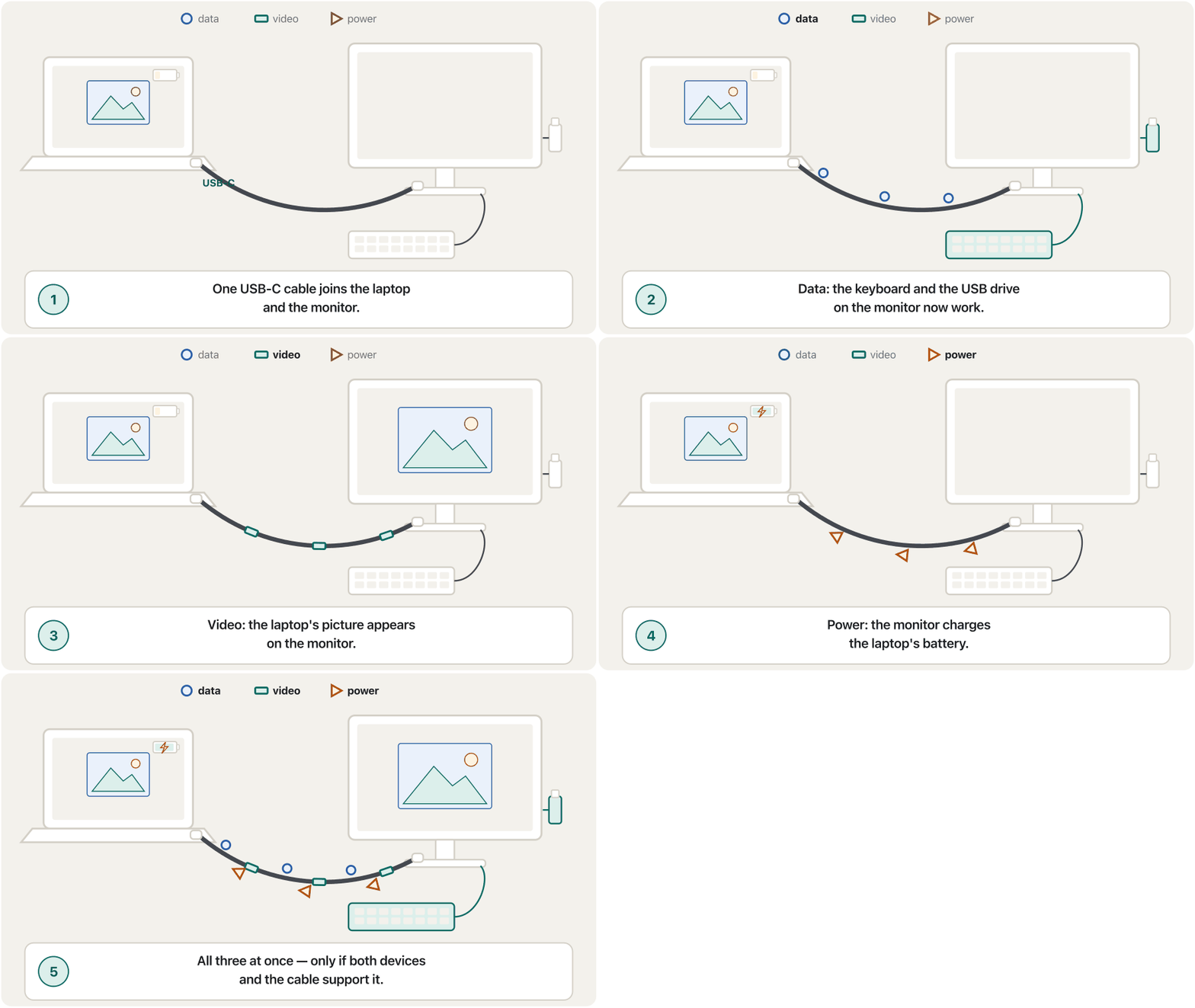
Look at a phone, a laptop or a tablet bought in 2026 and you will almost certainly find USB-C: a small oval port with 24 contacts, published in 2014. It is reversible — the plug goes in either way up — and one cable can carry data, video and power at the same time.
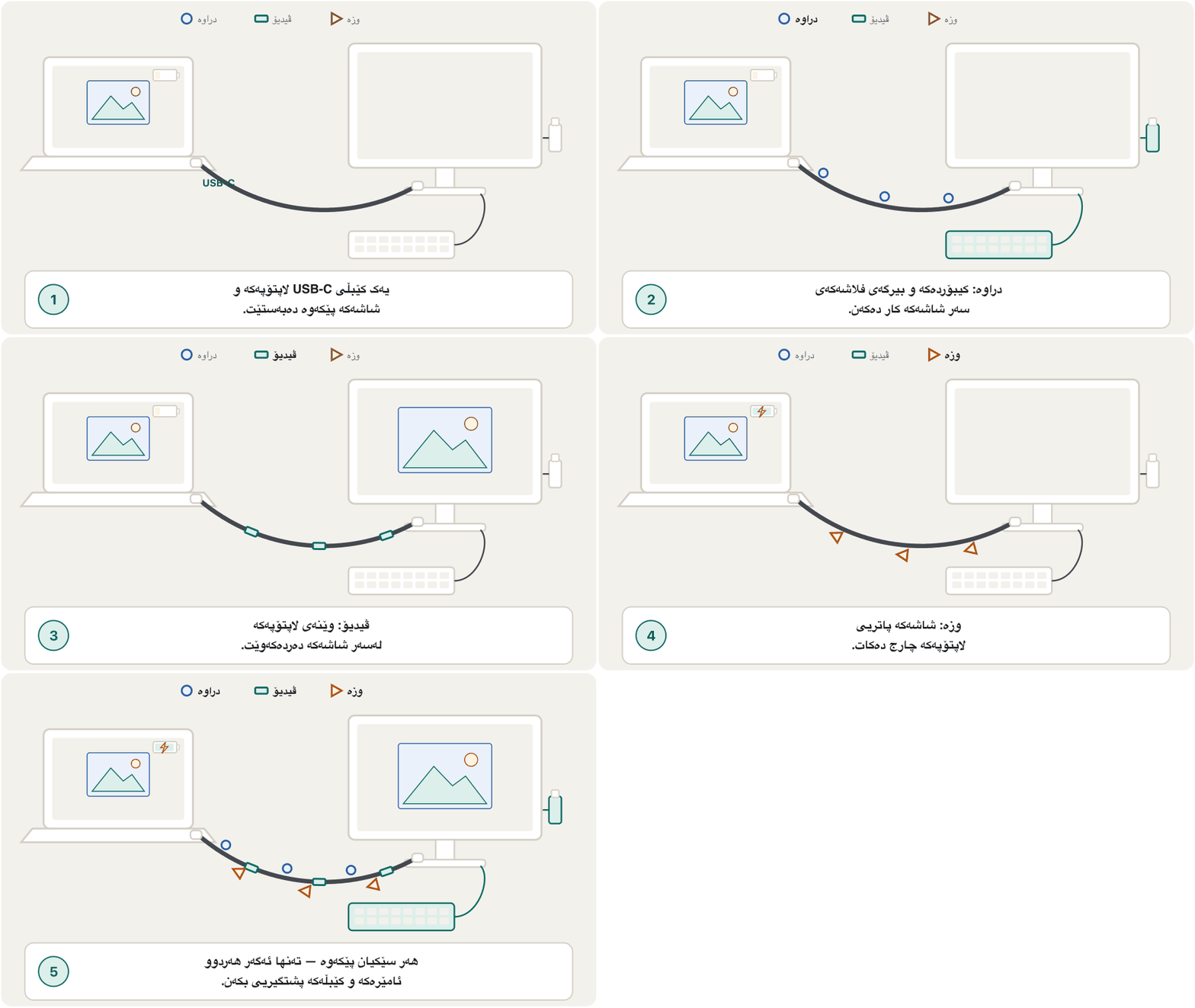
سەیری مۆبایل، یان بکە کە لە 2026دا کڕدراوە، بە دڵنیاییەوە USB-C دەبینیت: بچووکی هێلکەیی بە پەڕەی پەیوەندییەوە، کە لە 2014دا بڵاو کرایەوە. دوولایەنەیە — سەرەکە بە هەر دوو ڕوو دەچێتە ناوەوە — و یەک کێبڵ دەتوانێت لە هەمان کاتدا ، ڤیدیۆ و وزە بگوازێتەوە.
The small, oval, reversible connector used by most new phones and laptops. One USB-C cable can carry data, video and power, depending on what the port supports (USB4, , ).
دەرچە و کێبڵە بچووکە هێلکەییە دوولایەنەکەی کە زۆربەی مۆبایل و لاپتۆپە نوێیەکان بەکاری دەهێنن. یەک کێبڵی USB-C دەتوانێت ، ڤیدیۆ و کارەبا بگوازێتەوە، بەپێی ئەوەی دەرچەکە پشتگیریی چی دەکات (USB4، ، ).
USB-C: one port for almost everythingUSB-C: یەک دەرچە بۆ نزیکەی هەموو شتێک
Why everything moved to USB-Cبۆچی هەموو شتێک چووە سەر USB-C
For years every phone maker used its own connector. Apple's iPhone used Lightning (an 8-pin reversible connector from 2012); Android phones used micro-USB. Then the European Union made USB-C the common charging port: from 28 December 2024 for phones, tablets, cameras, headphones, keyboards, mice and more, and from 28 April 2026 for laptops. Because phones are made for the whole world, almost every new phone and laptop sold in Kurdistan has USB-C too. Apple moved the iPhone 15 to USB-C in September 2023, and since February 2025 every iPhone Apple sells uses USB-C.
بۆ چەندین ساڵ هەر کۆمپانیایەکی مۆبایل تایبەتی خۆی بەکار دەهێنا. iPhoneـی Apple Lightningـی بەکار دەهێنا ( دوولایەنەی هەشت پین لە 2012ـەوە)؛ مۆبایلەکانی Android micro-USBیان بەکار دەهێنا. پاشان یەکێتیی ئەورووپا USB-Cـی کردە هاوبەشی چارج: لە 28ی کانوونی یەکەمی 2024ـەوە بۆ مۆبایل، ، کامێرا، ، ، و زیاتر. هەروەها لە 28ی نیسانی 2026ـەوە بۆ . لەبەر ئەوەی مۆبایل بۆ هەموو جیهان دروست دەکرێت، نزیکەی هەموو مۆبایل و نوێ کە لە کوردستان دەفرۆشرێت USB-Cـی هەیە. Apple لە ئەیلوولی 2023دا iPhone 15ـی گواستەوە بۆ USB-C و لە شوباتی 2025ـەوە هەموو iPhoneـێک کە Apple دەیفرۆشێت USB-C بەکار دەهێنێت.
USB versions, speeds and namesوەشانەکان، خێرایی و ناوەکانی USB
A standard kind of and cable for connecting devices such as a , , or phone charger to a computer.
جۆرێکی ستانداردی و کێبڵە بۆ بەستنەوەی ئامێرەکانی وەک ، ، و شەحنکەری مۆبایل بە کۆمپیوتەرەوە.
USB (Universal Serial Bus) is a standard for the cables, connectors and rules that let computers and devices talk to each other and share power. Each new version was faster:
USB (Universal Serial Bus) ستانداردێکە بۆ کێبڵ، و ئەو یاسایانەی ڕێگە دەدەن و ئامێرەکان قسە لەگەڵ یەکتر بکەن و وزە بەش بکەن. هەر وەشانێکی نوێ خێراتر بوو:
| Version (year)وەشان (ساڵ) | Fastest speedخێراترین خێرایی | Name on the box todayناو لەسەر قوتوو ئەمڕۆ |
|---|---|---|
| USB 1.1 (1998) | 12 Mbps | — |
| USB 2.0 (2000) | 480 Mbps | Hi-Speed USB |
| USB 3.0 (2008) = USB 3.1 Gen 1 = USB 3.2 Gen 1 | 5 Gbps | USB 5Gbps |
| USB 3.1 Gen 2 = USB 3.2 Gen 2 (2013) | 10 Gbps | USB 10Gbps |
| USB 3.2 Gen 2×2 (2017) — USB-C onlyUSB 3.2 Gen 2×2 (2017) — تەنها USB-C | 20 Gbps | USB 20Gbps |
| USB4 (2019) — USB-C onlyUSB4 (2019) — تەنها USB-C | 40 Gbps | USB 40Gbps |
| USB4 Version 2.0 (2022) — USB-C onlyUSB4 Version 2.0 (2022) — تەنها USB-C | 80 Gbps (up to 120 Gbps one way)80 Gbps (تا 120 Gbps بە یەک ئاڕاستە) | USB 80Gbps |
The names became confusing: when USB 3.1 came out, the old USB 3.0 was renamed "USB 3.1 Gen 1", and later "USB 3.2 Gen 1" — the same 5 Gbps. So the USB-IF, the group that runs USB, now tells makers to print the speed on products ("USB 10Gbps", "USB 40Gbps") and says the technical names are "not intended" for buyers. The logos on certified products show the speed and, with power, the watts. Older boxes and logos (the ones in the lecture notes) used marketing names instead: "Hi-Speed USB" for 480 Mbps, "SuperSpeed USB" for 5 Gbps and "SuperSpeed USB 10Gbps" (SuperSpeed+) for 10 Gbps, and some added a mark when the port also gave Power Delivery or DisplayPort video.
ناوەکان تێکەڵ بوون: کاتێک USB 3.1 هات، USB 3.0ـی کۆن ناوی گۆڕا بۆ «USB 3.1 Gen 1» و دواتر «USB 3.2 Gen 1» — هەمان 5 Gbps. بۆیە USB-IF، ئەو دەستەیەی USB بەڕێوە دەبات، ئێستا بە دروستکەران دەڵێت خێراییەکە لەسەر بەرهەمەکان بنووسن («USB 10Gbps»، «USB 40Gbps») و دەڵێت ناوە تەکنیکییەکان «بۆ کڕیار نین». لۆگۆکانی سەر بەرهەمە پەسەندکراوەکان خێراییەکە و، ئەگەر وزەیان تێدا بێت، واتەکە پیشان دەدەن. قوتوو و لۆگۆ کۆنەکان (ئەوانەی لە تێبینییەکانی وانەکەدان) لە جیاتی ئەوە ناوی بازرگانییان بەکار دەهێنا: «Hi-Speed USB» بۆ 480 Mbps، «SuperSpeed USB» بۆ 5 Gbps و «SuperSpeed USB 10Gbps» (SuperSpeed+) بۆ 10 Gbps. هەندێکیشیان نیشانەیەکیان زیاد دەکرد کاتێک Power Delivery یان ڤیدیۆی DisplayPortـیشی دەدا.
USB versions, speeds and namesوەشانەکان، خێرایی و ناوەکانی USB
What the colours inside USB ports meanڕەنگەکانی ناو دەرچەکانی USB واتای چییە
The lecture notes give a colour code for the plastic inside USB-A ports: white = USB 1.0, black = USB 2.0, blue = USB 3.0, teal = USB 3.1, and yellow, red or orange = the port can charge a phone while the computer sleeps.
تێبینییەکانی وانەکە کۆدێکی ڕەنگ دەدەن بۆ پلاستیکی ناو USB-A: سپی = USB 1.0، ڕەش = USB 2.0، شین = USB 3.0، شینی سەوزباو = USB 3.1 و زەرد، سوور یان پرتەقاڵی = دەتوانێت مۆبایل چارج بکات لە کاتێکدا لە دۆخی خەودایە.
USB connector shapesشێوەکانی سەری کێبڵی USB
Over the years USB has had several plug shapes. Today you will mostly meet USB-C and the big flat USB-A; the others are on older devices:
USB بە درێژایی ساڵەکان چەند شێوەیەکی هەبووە. ئەمڕۆ زیاتر USB-C و USB-Aـی گەورە و تەخت دەبینیت؛ ئەوانی تر لەسەر ئامێرە کۆنەکانن:
| Connector | Shapeشێوە | Where you meet itلە کوێ دەیبینیت |
|---|---|---|
| USB-C | Small oval, reversibleهێلکەیی و بچووک، دوولایەنە | Phones, laptops, tablets, chargers, monitors — the modern portمۆبایل، ، ، ، — ئەمڕۆیی |
| USB-A (Type A) | Flat rectangle, fits one wayلاکێشەیەکی تەخت، بە یەک ڕوو دەچێتە ناوەوە | Computers, chargers, flash drives, keyboards and mice، ، ، و |
| USB-B (Type B) | Almost square, top corners cutنزیکەی چوارگۆشە، گۆشەکانی سەرەوە بڕاون | Printers and scanners و |
| Micro-USB (Micro-B) | Thin trapezoidلاکێشەیەکی باریکی لار | Older Android phones, power banks, small gadgetsمۆبایلی Androidـی کۆن، پاوەر بانک، ئامێری بچووک |
| Micro-B SuperSpeed | Micro-B with an extra part beside itMicro-B بە بەشێکی زیادەوە لە تەنیشتی | Older USB 3.0 external hard disks دەرەکیی USB 3.0ـی کۆن |
| Mini-USB (Mini-B) | Small trapezoid with side notchesلاکێشەیەکی لاری بچووک بە کەلێنی لاتەنیشتەوە | Old cameras and MP3 playersکامێرا و MP3 پلەیەری کۆن |
| Lightning | Thin, reversible, 8 pins (Apple)باریک، دوولایەنە، هەشت پین (Apple) | iPhones before the iPhone 15, older iPadsiPhoneـەکانی پێش iPhone 15، iPadـی کۆن |
When the plug and the port do not match, an adapter (converter) joins them: USB-C to USB-A, USB to Ethernet for a laptop with no network port, or USB to PS/2 for an old keyboard. A USB hub turns one port into several. The course figure shows the classic layout: the computer (the host) has Type-A ports, a powered hub (with its own power adapter) gives more Type-A ports, and the devices take Type-B plugs. Today the host and the devices are often USB-C at both ends.
کاتێک سەرەکە و یەک ناگرنەوە، گۆڕەرێک (adapter) پێکەوەیان دەبەستێت: USB-C بۆ USB-A، USB بۆ Ethernet بۆ کە نییە، یان USB بۆ PS/2 بۆ کۆن. هەبی USB یەک دەکات بە چەندین. وێنەکەی کۆرسەکە ڕێکخستنە کلاسیکییەکە پیشان دەدات: (خانەخوێ، host) Type-Aـی هەیە، هەبێکی کارەبادار (بە خۆیەوە) Type-Aـی زیاتر دەدات و ئامێرەکان سەری Type-B وەردەگرن. ئەمڕۆ خانەخوێ و ئامێرەکان زۆرجار لە هەردوو سەرەوە USB-Cـن.
Learn what USB is for and the different USB cables, connectors (Type-A, Type-B, Type-C) and ports on a computer.
فێر دەبیت بۆ چی بەکاردێت و جۆرەکانی کێبڵ و کۆنێکتەری (Type-A، Type-B، Type-C) و سەر دەناسیت.
Watch 3:22-7:48: the connector shapes.
لە 3:22 تا 7:48 سەیر بکە: شێوەی .
Charging through USB: USB Power Deliveryچارجکردن بە USB: USB Power Delivery
Plain USB gives only a little power (USB 2.0: 2.5 W). USB Power Delivery (USB PD) lets the charger and the device talk first and agree on a higher voltage. Power is voltage times current:
USBـی ئاسایی تەنها وزەیەکی کەم دەدات (USB 2.0: 2.5 W). (USB PD) ڕێگە دەدات و ئامێرەکە سەرەتا قسە بکەن و لەسەر بەرزتر ڕێک بکەون. وزە (توانا) = × تەزوو:
Older USB PD stopped at 100 W (20 V, 5 A). USB PD 3.1 adds 28 V, 36 V and 48 V for 140 W, 180 W and 240 W — enough for big gaming laptops — but only with a cable rated for it (5 A, 240 W).
USB PDـی کۆن لە 100 W دەوەستا (20 V، 5 A). USB PD 3.1 28 V، 36 V و 48 V زیاد دەکات بۆ 140 W، 180 W و 240 W — بەسە بۆ گەورەی یاری — بەڵام تەنها بە کێبڵێک کە بۆی دروست کرابێت (5 A، 240 W).
A standard that lets a charger and a device agree on a higher voltage. One cable can then charge phones quickly and power laptops (up to 240 W in the newest version).
ستانداردێکی کە ڕێگە دەدات چارجەر و ئامێرەکە لەسەر بەرزتر ڕێک بکەون، بۆیە یەک کێبڵی دەتوانێت مۆبایل بە خێرایی بارگە بکات و وزەی لاپتۆپ دابین بکات (تا 240 W لە نوێترین وەشاندا).
How USB Power Delivery works: the charger and the device talk first, then agree on a higher voltage and wattage.
چۆن کار دەکات: شەحنکەرەکە و ئامێرەکە سەرەتا قسە لەگەڵ یەک دەکەن، پاشان لەسەر و بەرزتر ڕێک دەکەون.
Watch 5:49-10:01: Power Delivery explained.
لە 5:49 تا 10:01 سەیر بکە: ڕوونکردنەوەی .
Video ports: HDMI, DisplayPort, VGA and DVIدەرچەکانی ڤیدیۆ: HDMI، DisplayPort، VGA و DVI
Video ports send the picture (and often the sound) to a monitor, a TV or a data projector.
ڤیدیۆ وێنەکە (و زۆرجار دەنگەکەش) دەنێرن بۆ ، تیڤی یان .
| Port | Signal | Used forبۆ چی | Todayئەمڕۆ |
|---|---|---|---|
| HDMI | Digital video + audioڤیدیۆ + دەنگی | Monitors, TVs, projectors, game consoles، تیڤی، ، کۆنسۆڵی یاری | HDMI 2.1: 48 Gbps; HDMI 2.2 (June 2025): 96 Gbps with the new Ultra96 cable. Small versions: Mini and Micro HDMI.HDMI 2.1: 48 Gbps؛ HDMI 2.2 (حوزەیرانی 2025): 96 Gbps بە کێبڵی نوێی Ultra96. جۆرە بچووکەکان: Mini و Micro HDMI. |
| DisplayPort | Digital video + audioڤیدیۆ + دەنگی | Computer monitors, graphics cards ، | DisplayPort 2.1: up to 80 Gbps. Also runs inside USB-C and Thunderbolt. Mini DisplayPort on older laptops.DisplayPort 2.1: تا 80 Gbps. لەناو USB-C و Thunderboltـیشدا کار دەکات. Mini DisplayPort لەسەر کۆن. |
| VGA | Analog video only, no sound; 15 pins, often blueتەنها ڤیدیۆی ، بێ دەنگ؛ 15 پین، زۆرجار شین | Old monitors and many classroom projectors کۆن و زۆرێک لە پۆل | Legacy; blurry on big screensکۆن؛ لەسەر گەورە ڕوون نییە |
| DVI | Digital video (DVI-D) or digital + analog (DVI-I); single or dual linkڤیدیۆی (DVI-D) یان + (DVI-I)؛ یەک یان دوو لینک | Monitors from about 2000–2015 نزیکەی 2000–2015 | Legacy; no soundکۆن؛ بێ دەنگ |
Which should you use? For a TV or a projector, HDMI. For a computer monitor, DisplayPort or HDMI — whichever both devices have, at the highest version. If a laptop has only USB-C, a USB-C-to-HDMI cable or a USB-C dock works when the laptop's port supports video (DisplayPort Alt Mode).
کامیان بەکار بهێنیت؟ بۆ تیڤی یان ، HDMI. بۆ ، DisplayPort یان HDMI — هەرکامیان هەردوو ئامێرەکە هەیانبێت، بە بەرزترین وەشان. ئەگەر تەنها USB-Cـی هەبێت، کێبڵی USB-C بۆ HDMI یان dockـێکی USB-C کار دەکات، بە مەرجێک پشتگیریی ڤیدیۆ بکات (DisplayPort Alt Mode).
VGA, DVI, HDMI and DisplayPort compared: analogue or digital, sound or not, and which one to use for a monitor.
، DVI، و بەراورد کراون: یان ، دەنگ دەگوازنەوە یان نا؛ هەروەها کامیان بۆ باشترە.
Watch 0:43-10:53: VGA, DVI, HDMI and DisplayPort.
لە 0:43 تا 10:53 سەیر بکە: ، DVI، و .
Thunderbolt (and Lightning)Thunderbolt (و Lightning)
A very fast connection made by Intel with Apple that uses the connector. It carries data, video and power together: Thunderbolt 4 reaches 40 Gbps and Thunderbolt 5 up to 120 Gbps.
پەیوەندییەکی زۆر خێرایە کە Intel لەگەڵ Apple دروستیان کردووە و دەرچەی بەکار دەهێنێت. ، ڤیدیۆ و کارەبا پێکەوە دەگوازێتەوە: Thunderbolt 4 دەگاتە 40 Gbps و Thunderbolt 5 تا 120 Gbps.
Thunderbolt is a very fast connection made by Intel together with Apple for external devices: fast drives, docks, monitors, video equipment. It has changed shape over time:
Thunderbolt پەیوەندییەکی زۆر خێرایە کە Intel لەگەڵ Apple دروستیان کردووە بۆ ئامێری دەرەکی: درایڤی خێرا، dock، ، ئامێری ڤیدیۆ. بە تێپەڕبوونی کات شێوەی گۆڕاوە:
| Versionوەشان | Connector | Speedخێرایی |
|---|---|---|
| Thunderbolt 1 and 2 | Mini DisplayPort shapeشێوەی Mini DisplayPort | 10 / 20 Gbps |
| Thunderbolt 3 | USB-C | 40 Gbps |
| Thunderbolt 4 | USB-C | 40 Gbps; two 4K monitors; 100 W laptop charging required (up to 140 W possible)40 Gbps؛ دوو 4K؛ چارجی 100 Wـی پێویستە (تا 140 W دەکرێت) |
| Thunderbolt 5 | USB-C | 80 Gbps both ways, up to 120 Gbps one way for heavy video; at least two 6K monitors; laptop charging: 140 W required, up to 240 W possible80 Gbps بە هەردوو ئاڕاستە، تا 120 Gbps بە یەک ئاڕاستە بۆ ڤیدیۆی قورس؛ لانیکەم دوو 6K؛ چارجی : 140 W پێویستە، تا 240 W دەکرێت |
A Thunderbolt port looks exactly like USB-C; a small lightning-bolt symbol next to it tells you the difference. Thunderbolt 4 and 5 ports also work as ordinary USB-C ports, so a normal USB device works in them too.
Thunderbolt ڕێک وەک USB-C دەردەکەوێت؛ هێمایەکی بچووکی هەورەتریشقە لە تەنیشتییەوە جیاوازییەکەت پێ دەڵێت. Thunderbolt 4 و 5 وەک USB-Cـی ئاساییش کار دەکەن، بۆیە ئامێرێکی USBـی ئاسایی تێیاندا کار دەکات.
Lightning was Apple's own small, reversible 8-pin connector for iPhones and iPads from 2012. It is not Thunderbolt and not USB; Apple replaced it with USB-C (iPhone 15, 2023).
Lightning بچووک و دوولایەنەی هەشت پینی تایبەتی Apple بوو بۆ iPhone و iPad لە 2012ـەوە. نە Thunderboltـە و نە USB؛ Apple بە USB-C گۆڕییەوە (iPhone 15، 2023).
Network and audio portsدەرچەکانی ڕایەڵە و دەنگ
Ethernet connects a computer to a network device such as a switch or a router with a cable. Its plug is the square RJ-45 (8 contacts, a small clip on top). Desktop boards in 2026 usually have 1 Gbps or 2.5 Gbps Ethernet; a twisted-pair Ethernet cable can be up to 100 metres long. The narrower RJ-11 plug (fewer contacts) joins a DSL modem or router to the telephone line. An RJ-11 plug fits loosely into an RJ-45 port — never force it; it can bend the port's springs.
Ethernet بە کێبڵ بە ئامێرێکی دەبەستێت وەک یان . سەرەکەی چوارگۆشەیە (هەشت پەڕەی پەیوەندی، قوفڵێکی بچووک لە سەرەوە). بۆردەکانی لە 2026دا زۆرجار Ethernetـی 1 Gbps یان 2.5 Gbpsـیان هەیە؛ کێبڵی Ethernetـی جووتە بادراو دەتوانێت تا 100 مەتر درێژ بێت. سەری باریکتری RJ-11 (پەڕەی کەمتر) DSL یان بە هێڵی تەلەفۆنـەوە دەبەستێت. سەری RJ-11 بە شلی دەچێتە ناو RJ-45ـەوە — هەرگیز بە زۆر مەیخەرە ناوی؛ دەتوانێت فەنەرەکانی ناو بچەمێنێت.
The square plug with eight small metal contacts at the end of an cable, and the matching port on computers, routers and switches.
ئەو پلەگە چوارگۆشەیەیە بە هەشت پەیوەندکاری بچووکی کانزاییەوە کە لە کۆتایی کێبڵی ، هەروەها ئەو دەرچەیەی لەسەر کۆمپیوتەر، و بۆی دانراوە.
The round 3.5 mm audio jack takes speakers, headphones and microphones. Many laptops have one combined jack for a headset (headphones and microphone in one plug); many new phones have none and use USB-C or Bluetooth. Desktop sound ports follow an old colour code (from the PC 99 guide, 1999), and that one is still used:
خڕی 3.5 mm ، و وەردەگرێت. زۆرێک لە یەک جەکی تێکەڵیان هەیە بۆ ( و لە یەک سەردا)؛ زۆرێک لە مۆبایلە نوێکان هیچیان نییە و USB-C یان بەکار دەهێنن. دەنگی کۆدێکی ڕەنگی کۆن دەگرنە بەر (لە ڕێنمایی PC 99، 1999) و ئەمەیان هێشتا بەکار دێت:
| Colourڕەنگ | Jackجەک | Plug inچی تێدا دابنێیت |
|---|---|---|
| Lime greenسەوزی کاڵ | Line out (front speakers)Line out ( پێشەوە) | Headphones or speakers یان |
| Pinkپەمەیی | Microphone in | A microphone |
| Light blueشینی کاڵ | Line in | Sound from another device (a phone, a mixer)دەنگ لە ئامێرێکی ترەوە (مۆبایل، میکسەر) |
| Orange, black, greyپرتەقاڵی، ڕەش، خۆڵەمێشی | Centre/subwoofer, rear and side speakersناوەڕاست/sub-woofer، دواوە و لاتەنیشت | Surround-sound speakers دەنگی دەوروبەر |
Some boards also have S/PDIF digital audio outputs: an optical one (a small square with a red light) or a coaxial one (a round RCA socket), for a home-theatre amplifier.
هەندێک بۆرد دەنگی S/PDIFیشیان هەیە: ئۆپتیکی (چوارگۆشەیەکی بچووک بە ڕووناکییەکی سوورەوە) یان کۆئەکسیاڵ (کونێکی خڕی RCA)، بۆ ئەمپلیفایەری سینەمای ماڵەوە.
Older ports you may still meetئەو دەرچە کۆنانەی لەوانەیە هێشتا بیانبینیت
Schools, offices and repair shops in Kurdistan still have older computers. Recognise these ports — and know what replaced them:
قوتابخانە، فەرمانگە و دوکانی چاککردنەوە لە کوردستان هێشتا کۆنیان هەیە. خوارەوە بناسەوە — و بزانە چی جێگەیانی گرتەوە:
| Port | What it was forبۆ چی بوو | Replaced byچی جێگەی گرتەوە |
|---|---|---|
| PS/2 | Round 6-pin mini-DIN: purple = keyboard, green = mouse (a two-colour port takes either). Older AT keyboards used the bigger 5-pin DIN.mini-DINـی خڕی شەش پین: مۆر = ، سەوز = ( دوو ڕەنگ هەردووکیان وەردەگرێت). ATـیش DINـی گەورەتری پێنج پینیان بەکار دەهێنا. | USB |
| FireWire (IEEE 1394) | Video cameras, external drivesکامێرای ڤیدیۆ، درایڤی دەرەکی | USB, ThunderboltUSB، Thunderbolt |
| eSATA / eSATAp | External SATA drives. eSATA gave signal but no power; eSATAp added USB and 5 V/12 V power in one portدرایڤی SATAـی دەرەکی. eSATA دەدا بەڵام وزەی نەدەدا؛ eSATAp USB و وزەی 5 V/12 Vـی لە یەک زیاد کرد | USB-C, ThunderboltUSB-C، Thunderbolt |
| VGA, DVI, S-Video | Analog/early digital video. VGA is a 15-pin D-sub (DE-15, often called "DB-15" or HD15)ڤیدیۆی / سەرەتایی. VGA جۆرێکی D-subـی 15 پینە (DE-15، زۆرجار پێی دەوترێت «DB-15» یان HD15) | HDMI, DisplayPort, USB-CHDMI، DisplayPort، USB-C |
| Serial (9-pin D-sub, "DB-9") and parallel (25-pin D-sub, DB-25) ports serial (D-subـی 9 پین، «DB-9») و parallel (D-subـی 25 پین، DB-25) | Modems, old printers، کۆن | USB |
| Mini-USB, Micro-USB, LightningMini-USB، Micro-USB، Lightning | Phones, cameras, gadgetsمۆبایل، کامێرا، ئامێری بچووک | USB-C |
| Thunderbolt 1 and 2Thunderbolt 1 و 2 | Fast Mac peripherals خێرا بۆ Mac | Thunderbolt 3–5 (USB-C shape)Thunderbolt 3–5 (شێوەی USB-C) |
Two old connector families explain most of these names. A D-sub connector has a D-shaped metal shell: one row of pins is longer than the other, so it fits only one way. It is named by its shell size and pin count — people say "DB-9" for the 9-pin serial plug, although its exact name is DE-9. A DIN connector is round with small pins and a key notch; the PS/2 port is a smaller mini-DIN.
دوو خێزانی کۆنی زۆربەی ئەم ناوانە ڕوون دەکەنەوە. D-sub قاپێکی کانزایی بە شێوەی Dـی هەیە: ڕیزێکی پینەکان لەوی تر درێژترە، بۆیە تەنها بە یەک ئاڕاستە دەچێتە ناوەوە. بە قەبارەی قاپەکە و ژمارەی پینەکان ناو دەنرێت — خەڵک بە سەری serialـی 9 پین دەڵێن «DB-9»، هەرچەندە ناوە وردەکەی DE-9ـە. DIN خڕە، پینی بچووک و کەلێنێکی کلیلی هەیە؛ PS/2 جۆرێکی بچووکترە کە پێی دەوترێت mini-DIN.
Old keyboards and mice with PS/2 plugs can be used on a new computer with a USB-to-PS/2 adapter.
و کۆن بە سەری PS/2ـەوە دەتوانرێت لەسەر نوێ بە گۆڕەری USB بۆ PS/2 بەکار بهێنرێن.
Common mistakesهەڵە باوەکان
| Mistakeهەڵە | What is trueڕاستییەکە |
|---|---|
| "All USB-C cables are the same."«هەموو کێبڵەکانی USB-C وەک یەکن.» | Same shape, different abilities: speed (480 Mbps to 80 Gbps), video or not, 60 W or 240 W.هەمان شێوە، توانای جیاواز: خێرایی (480 Mbps تا 80 Gbps)، ڤیدیۆ یان نا، 60 W یان 240 W. |
| "A blue USB port is always USB 3."« USBـی شین هەمیشە USB 3ـە.» | Colour is a maker's habit, not a rule. Check the label.ڕەنگ خووی دروستکەرە، نەک یاسا. نیشانەکە بپشکنە. |
| "USB 3.2 is always 20 Gbps."«USB 3.2 هەمیشە 20 Gbpsـە.» | USB 3.2 Gen 1 is 5 Gbps, Gen 2 is 10 Gbps; only Gen 2×2 is 20 Gbps. Look for "USB 20Gbps".USB 3.2 Gen 1 5 Gbpsـە و Gen 2 10 Gbps؛ تەنها Gen 2×2 20 Gbpsـە. بەدوای «USB 20Gbps»دا بگەڕێ. |
| "VGA carries sound."«VGA دەنگ دەگوازێتەوە.» | VGA and DVI are video only; HDMI and DisplayPort carry sound too.VGA و DVI تەنها ڤیدیۆن؛ HDMI و DisplayPort دەنگیش دەگوازنەوە. |
| "A phone cable fits the network port, so it is fine."«کێبڵی تەلەفۆن دەچێتە ناو ، کەواتە باشە.» | RJ-11 in an RJ-45 port does not work for Ethernet and can damage the port.RJ-11 لەناو RJ-45دا بۆ Ethernet کار ناکات و دەتوانێت تێک بدات. |
Exercisesڕاهێنانەکان
Find the difference between USB 3.0, USB 3.1 and USB 3.2.
جیاوازیی نێوان USB 3.0، USB 3.1 و USB 3.2 بدۆزەرەوە.
Show answerوەڵامەکە پیشان بدە
| Nameناو | Speedخێرایی | Box name todayناوی سەر قوتوو ئەمڕۆ |
|---|---|---|
| USB 3.0 = USB 3.1 Gen 1 = USB 3.2 Gen 1 | 5 Gbps | USB 5Gbps |
| USB 3.1 Gen 2 = USB 3.2 Gen 2 | 10 Gbps | USB 10Gbps |
| USB 3.2 Gen 2×2 (USB-C only)USB 3.2 Gen 2×2 (تەنها USB-C) | 20 Gbps | USB 20Gbps |
Each new version renamed the older speeds, so the version number alone does not tell you the speed. That is why USB-IF now asks for the speed in the name.
هەر وەشانێکی نوێ ناوی خێراییە کۆنەکانی گۆڕی، بۆیە ژمارەی وەشان بە تەنها خێراییەکەت پێ نالێت. بۆیە USB-IF ئێستا داوا دەکات خێراییەکە لە ناوەکەدا بێت.
Which port or cable would you use for each? (a) a laptop to a classroom TV; (b) a desktop to the home router; (c) charging a gaming laptop that needs 180 W; (d) a headset with one plug on a laptop; (e) an external SSD that should copy files as fast as possible on a Thunderbolt 5 laptop.
بۆ هەریەکەیان کام یان کێبڵ بەکار دەهێنیت؟ (أ) بۆ تیڤیی پۆل؛ (ب) بۆ ماڵەوە؛ (ج) چارجکردنی یاری کە 180 Wـی پێویستە؛ (د) بە یەک سەرەوە لەسەر ؛ (هـ) SSDـێکی دەرەکی کە دەبێت بە خێراترین شێوە کۆپی بکات لەسەر Thunderbolt 5.
Show answerوەڵامەکە پیشان بدە
- (a) HDMI (or USB-C to HDMI if the laptop has only USB-C with video).
- (b) Ethernet with RJ-45 plugs.
- (c) A USB-C PD 3.1 charger of at least 180 W () and a 240 W-rated cable.
- (d) The combined 3.5 mm audio jack (one TRRS plug).
- (e) The Thunderbolt 5 port with a Thunderbolt 5 cable and an enclosure that supports it.
- (أ) HDMI (یان USB-C بۆ HDMI ئەگەر تەنها USB-Cـی ڤیدیۆداری هەبێت).
- (ب) Ethernet بە سەری RJ-45.
- (ج) USB-C PD 3.1ـی لانیکەم 180 W () لەگەڵ کێبڵێکی 240 W.
- (د) تێکەڵی 3.5 mm (یەک سەری TRRS).
- (هـ) Thunderbolt 5 لەگەڵ کێبڵی Thunderbolt 5 و قاپێک کە پشتگیریی بکات.
A USB-C charger offers , , and . What is its highest power? Can it run a laptop that needs 100 W?
USB-C ئەمانە پێشکەش دەکات: ، ، و . بەرزترین وزەکەی چەندە؟ دەتوانێت کار پێ بکات کە 100 Wـی پێویستە؟
Show answerوەڵامەکە پیشان بدە
It is a 65 W charger. The laptop may charge slowly while switched off, or not keep up while working hard; a 100 W charger is the right one.
65 Wـە. لەوانەیە کاتی کوژانەوە بە خاوی چارج ببێت، یان لە کاتی کاری قورسدا بەشی نەکات؛ 100 W گونجاوەکەیە.
Summaryپوختە
- A port is the socket on the device; a connector is the plug on the cable; shapes are keys.
- USB-C is the main port in 2026: reversible, data + video + power — but abilities depend on the port and cable.
- USB speeds are now named by speed: USB 5, 10, 20, 40, 80Gbps; port colours are only hints.
- USB Power Delivery charges up to 240 W () with the right charger and cable.
- Video: HDMI (TVs, projectors), DisplayPort (monitors); VGA and DVI are legacy. Thunderbolt 3–5 use USB-C.
- Ethernet uses RJ-45; telephone lines RJ-11; sound uses 3.5 mm jacks (green out, pink mic, blue line in).
- کونەکەیە لەسەر ئامێر؛ سەرەکەیە لەسەر کێبڵ؛ شێوەکان کلیلن.
- USB-C سەرەکییەکەی 2026ـە: دوولایەنە، + ڤیدیۆ + وزە — بەڵام تواناکان بەندن بە و کێبڵەکە.
- خێراییەکانی USB ئێستا بە خێرایی ناو دەنرێن: USB 5، 10، 20، 40، 80Gbps؛ ڕەنگی تەنها نیشانەن.
- تا 240 W چارج دەکات () بە و کێبڵی گونجاو.
- ڤیدیۆ: HDMI (تیڤی، )، DisplayPort ()؛ VGA و DVI کۆنن. Thunderbolt 3–5 USB-C بەکار دەهێنن.
- Ethernet بەکار دەهێنێت؛ هێڵی تەلەفۆن RJ-11؛ دەنگ جەکی 3.5 mm (سەوز: line out، پەمەیی: ، شین: line in).
Why can two USB-C ports behave differently?بۆچی دوو دەرچەی USB-C دەتوانن جیاواز ڕەفتار بکەن؟
USB-C is only a connector shape. Each port supports its own speed, video and power, and the cable has limits too.
USB-C تەنها شێوەی . هەر خێرایی، ڤیدیۆ و وزەی خۆی هەیە و کێبڵەکەش سنووری خۆی هەیە.
What replaced PS/2, FireWire and eSATA?چی جێگەی PS/2، FireWire و eSATAـی گرتەوە؟
USB (and for fast drives, USB-C and Thunderbolt).
USB (و بۆ درایڤی خێرا، USB-C و Thunderbolt).
Lesson complete!وانەکە تەواو بوو!
Well done. Review the key terms, then go on to the next lesson.دەستخۆش. سەیرێکی زاراوە سەرەکییەکان بکەرەوە، پاشان بڕۆ بۆ وانەی داهاتوو.
Key termsزاراوە سەرەکییەکان
Building and Caring for a PCپێکەوەنان و چاودێریکردنی کۆمپیوتەر
Related lecturesوانە پەیوەندیدارەکان
- Memory: RAM, ROM and Cacheبیرگە: RAM، ROM و کاش
- Software and Operating Systemsنەرمەواڵە و سیستەمەکانی وەگەڕخەر
- Building and Caring for a PCپێکەوەنان و چاودێریکردنی کۆمپیوتەر
- Input, Output and Devices That Do Bothنێوخستە، دەرخستە و ئەو ئامێرانەی هەردووکیان دەکەن
- Input Devicesئامێرەکانی نێوخستە
- Output Devicesئامێرەکانی دەرخستە
- Inside the Computerناو کۆمپیوتەرەکە
References and further readingسەرچاوەکان و خوێندنەوەی زیاتر
- USB-IF: USB4 Version 2.0 / USB 80Gbps announcement (18 Oct 2022) — PAM3, 120 Gbps asymmetric, spec names not for consumers
- USB-IF: USB Charger (USB Power Delivery) — up to 240 W, 28/36/48 V
- USB-IF: Logo usage guidelines (performance logos USB 5–80Gbps; USB Blue is the logo colour)
- Wikipedia: USB (version history and connector types)
- Wikipedia: USB-C (24 pins, reversible, 2014, alternate modes)
- Wikipedia: USB 3.0 (blue insert recommendation)
- European Commission: EU common charger rules (28 Dec 2024; laptops from 28 Apr 2026)
- Wikipedia: Lightning (connector) — 2012–2025, iPhone 15 moved to USB-C
- Intel: Thunderbolt overview (Thunderbolt 4 and 5 specifications)
- Intel: Thunderbolt 5 technology brief (80/120 Gbps, dual 6K, charging 140 W required / 240 W available)
- HDMI Forum press release (25 June 2025): HDMI 2.2, 96Gbps, Ultra96 cable
- VESA: VESA releases DisplayPort 2.1 (UHBR20, 80 Gbps; USB-C alignment)
- Wikipedia: Modular connector (8P8C/RJ-45, RJ-11)
- Wikipedia: Ethernet over twisted pair (speeds, 100 m)
- Wikipedia: PC 99 (Intel/Microsoft colour code for ports, 1999)
- Wikipedia: D-subminiature (shell sizes A–E, DE-9 vs "DB-9", DE-15 VGA, DB-25)
- Wikipedia: Mini-DIN connector (6-pin PS/2)
This lecture is a first edition. The Kurdish text and terminology are waiting for review by Kurdish IT teachers.ئەم وانەیە چاپی یەکەمە. دەقە کوردییەکە و زاراوەکانی چاوەڕێی پێداچوونەوەی مامۆستایانی کوردی بواری IT ن.