Chapterبەش 6 · Lectureوانە 6.2
Network Hardware: NICs, Switches and Routersڕەقەواڵەی ڕایەڵە: کارتی ڕایەڵە، سویچ و ڕێدۆز
The devices that build a network: servers and clients, the network interface card and its MAC address, why switches replaced hubs (and how a switch learns), routers that join networks, repeaters, bridges and gateways, and the home 'router' box that is really a modem, router, switch and Wi-Fi access point in one.
ئەو ئامێرانەی دروست دەکەن: و ، و ، بۆچی جێی گرتەوە (و چۆن فێر دەبێت)، کە دەبەستن، ، و ؛ هەروەها سندووقی «»ـی ماڵەوە کە لە ڕاستیدا ، ، و لە یەکێکدا.
What you will learnچی فێر دەبیت
- Name the basic components of a network and the job of each.
- Explain what makes a computer a server or a client.
- Describe what a NIC does and what a MAC address is.
- Compare a hub, a switch and a router, and follow how a switch learns MAC addresses.
- Say what repeaters, bridges and gateways do and what is inside a home router box.
- پێکهاتە سەرەکییەکانی و کاری هەر یەکەیان ناو ببەیت.
- ڕوونی بکەیتەوە چی دەکاتە یان .
- وەسفی بکەیت چی دەکات و چییە.
- ، و بەراورد بکەیت و بەدوای ئەوەدا بچیت چۆن فێری دەبێت.
- بڵێیت ، و چی دەکەن و چی لە ناو سندووقی ماڵەوەدایە.
The parts of a computer networkبەشەکانی ڕایەڵەیەکی کۆمپیوتەر
Look at the network of a small office. It has the same building blocks as a school lab or a bank branch:
سەیری ئۆفیسێکی بچووک بکە. هەمان پارچەکانی تاقیگەی قوتابخانەیەک یان لقی بانکێکی هەیە:
| Partبەش | Its jobکارەکەی | Lesson sectionبەشی وانە |
|---|---|---|
| Server | Provides a service to the others: shared files, printing, a website, e-mail.خزمەتگوزارییەک بۆ ئەوانی تر دابین دەکات: فایلی هاوبەش، چاپکردن، ، . | →بڕۆ ← |
| Client | A computer that asks a server for a service and receives the data it sends. کە داوای خزمەتگوزاری لە دەکات و ئەو دەینێرێت وەری دەگرێت. | →بڕۆ ← |
| Transmission medium | What connects them: copper cables, fibre-optic cables, coaxial cables or radio waves.ئەوەی پێکەوەیان دەبەستێت: کێبڵی مس، ، یان شەپۆلی ڕادیۆیی. | →بڕۆ ← |
| Network interface card (NIC) (NIC) | In every device: prepares the data, sends it and receives it.لە هەموو ئامێرێکدا: ئامادە دەکات، دەینێرێت و وەری دەگرێت. | →بڕۆ ← |
| Hub | Joins the computers by copying everything to everyone (obsolete). پێکەوە دەبەستێت بە کۆپیکردنی هەموو شتێک بۆ هەمووان (کۆن بووە). | →بڕۆ ← |
| Switch | Joins the computers and sends each message only to the right one. پێکەوە دەبەستێت و هەر نامەیەک تەنها بۆ ئامێرە دروستەکە دەنێرێت. | →بڕۆ ← |
| Router | Joins different networks to each other and to the internet. جیاواز بە یەکترەوە و بە دەبەستێت. | →بڕۆ ← |
| LAN cableکێبڵی | A wire (usually twisted-pair Ethernet with RJ-45 plugs) joining computers, printers and scanners to the switch.وایەرێک (زۆرجار Ethernet بە سەری ) کە ، و بە دەبەستێت. | →بڕۆ ← |
The parts of a computer networkبەشەکانی ڕایەڵەیەکی کۆمپیوتەر
Four kinds of LAN hardwareچوار جۆر ڕەقەواڵەی ڕایەڵەی ناوچەیی
The course groups the hardware of a local area network (LAN) into four kinds: (1) PCs, workstations and servers; (2) network interface cards; (3) cabling and connectors; (4) the devices that join them all together, which the notes call distributors — hubs, switches, routers and their relatives.
وانەکە دەکاتە چوار جۆر: (1) ، و ؛ (2) ؛ (3) کێبڵ و ؛ (4) ئەو ئامێرانەی هەموویان پێکەوە دەبەستن، کە تێبینییەکان پێیان دەڵێن دابەشکەر — ، ، و خزمەکانیان.
Clients and serversڕاژەخوازەکان و ڕاژەکارەکان
A server is a computer (or a program) that provides a service — files, printing, web pages, e-mail, a database — to other computers over the network. A client is a computer that is connected to the network, asks a server for something and receives the data the server sends back. Your phone opening Instagram is a client; the computer in Meta's data centre that answers is a server.
(یان ) کە خزمەتگوزاری دابین دەکات — فایل، چاپکردن، ، ، — بۆ تر بە ناو . کە بە بەستراوە، داوای شتێک لە دەکات و ئەو دەینێرێتەوە وەری دەگرێت. مۆبایلەکەت کاتێک Instagram دەکاتەوە ؛ ئەو لە Metaـدا وەڵام دەداتەوە .
Clients and serversڕاژەخوازەکان و ڕاژەکارەکان
A server is a role: the tea houseڕاژەکار ڕۆڵێکە: چایخانەکە
The customers at the tables are clients: they ask for tea. The man at the samovar is the server: he does not decide what to make, he waits for orders and serves them. One server can serve many tables.
مشتەرییەکانی سەر مێزەکان : داوای چا دەکەن. پیاوەکەی لای سەماوەرەکە : خۆی بڕیار نادات چی دروست بکات، چاوەڕێی داواکاری دەکات و خزمەتیان دەکات. یەک دەتوانێت خزمەتی زۆر مێز بکات.
Where the analogy stops workingسنووری ئەم نموونەیە
A real server can answer thousands of clients at the same moment, and many servers can share the work.
ڕاستەقینە دەتوانێت لە هەمان ساتدا وەڵامی هەزاران بداتەوە و چەندین دەتوانن کارەکە دابەش بکەن.
The network interface card and the MAC addressکارتی ڕایەڵە و ناونیشانی MAC
Every computer on a network must have a network interface card (NIC). Its job: format the data into network-sized pieces, send them onto the cable or the air, and receive the pieces meant for this computer. Old NICs were separate cards in a slot of the motherboard; today the Ethernet port and the Wi-Fi radio are built into the motherboard or the phone's chip, but they are still NICs.
هەموو لەسەر دەبێت (NIC) هەبێت. کارەکەی: ڕێک دەخات و دەیکاتە پارچەی گونجاو بۆ ، دەیاننێرێت بۆ سەر کێبڵ یان هەوا و ئەو پارچانەی بۆ ئەم هاتوون وەردەگرێت. کۆنەکان کارتی جیا بوون لە کەلێنێکی ؛ ئەمڕۆ Ethernet و ڕادیۆی لە ناو یان مۆبایلەکەدا دروست کراون، بەڵام هێشتا .
The part that connects a computer to a , by cable () or by radio (Wi-Fi). It sends and receives the data and has its own ; today it is usually built into the .
ئەو بەشەیە کە کۆمپیوتەرێک بە دەبەستێتەوە، بە کێبڵ () یان بە ڕادیۆ (). دەنێرێت و وەردەگرێت و خۆی هەیە؛ ئەمڕۆ زۆرجار لەسەر دانراوە.
Every NIC has its own MAC address: a 48-bit number set by the maker, written as 12 hexadecimal digits in six pairs, for example 3C:52:82:4A:9F:10. The first half names the maker; the second half is that card's own number. A piece of data on a LAN travels in a frame, and each frame carries the MAC address of the sender and of the receiver — like the names on an envelope inside one building.
هەموو تایبەتی خۆی هەیە: ژمارەیەکی 48 بیتییە کە دروستکەرەکە دایدەنێت و بە 12 ژمارەی لە شەش جووتدا دەنووسرێت، بۆ نموونە 3C:52:82:4A:9F:10. نیوەی یەکەم ناوی دروستکەرەکەیە؛ نیوەی دووەم ژمارەی تایبەتی ئەو کارتەیە. پارچەیەک لەسەر لە ناو دەڕوات و هەر نێرەر و وەرگر هەڵدەگرێت — وەک ناوەکانی سەر زەرفێک لە ناو یەک بینادا.
A unique hardware address given to every by its maker: 48 bits, written as six pairs of hexadecimal digits. use it to deliver data inside a local network.
ناونیشانێکی ڕەقەواڵەیی تایبەتە کە دروستکەرەکە دەیدات بە هەر : 48 ، بە شەش جووت ژمارەی دەنووسرێت. بەکاری دەهێنن بۆ گەیاندنی لەناو ڕایەڵەیەکی ناوخۆییدا.
One unit of sent across a , with the sender's and the receiver's at the front. A reads these addresses to decide which gets the frame. A travels inside frames.
یەکەیەکی کە بە ناو دەنێردرێت و نێرەر و وەرگر لە سەرەتاکەیدان. ئەو ناونیشانانە دەخوێنێتەوە بۆ ئەوەی بزانێت فرەیمەکە بۆ کام بنێرێت. لەناو فرەیمەکاندا دەگوازرێتەوە.
Hub or switch?هەب یان سویچ؟
A hub joins all the computers of a network. Whatever arrives on one port, the hub copies out of every other port. Every computer receives every frame and must throw away the ones that are not its own, and only one computer can talk at a time, because they all share the same bandwidth.
هەموو پێکەوە دەبەستێت. هەر شتێک لە بگات، لە هەموو ترەوە کۆپی دەکاتەوە. هەموو هەموو وەردەگرێت و دەبێت ئەوانەی هی خۆی نین فڕێ بدات. هەروەها لە هەر کاتێکدا تەنها یەک دەتوانێت قسە بکات، چونکە هەموویان هەمان بەکار دەهێنن.
A switch looks the same from outside, but it is cleverer: it reads the physical (MAC) address in each frame and sends the frame only out of the port where that computer is. Each port gets its own full bandwidth.
لە دەرەوە وەک یەک دەردەکەوێت، بەڵام زیرەکترە: ناونیشانی فیزیکی (MAC) لە هەر دەخوێنێتەوە و تەنها لەو دەنێرێت کە ئەو لێیە. هەر تەواوی خۆی هەیە.
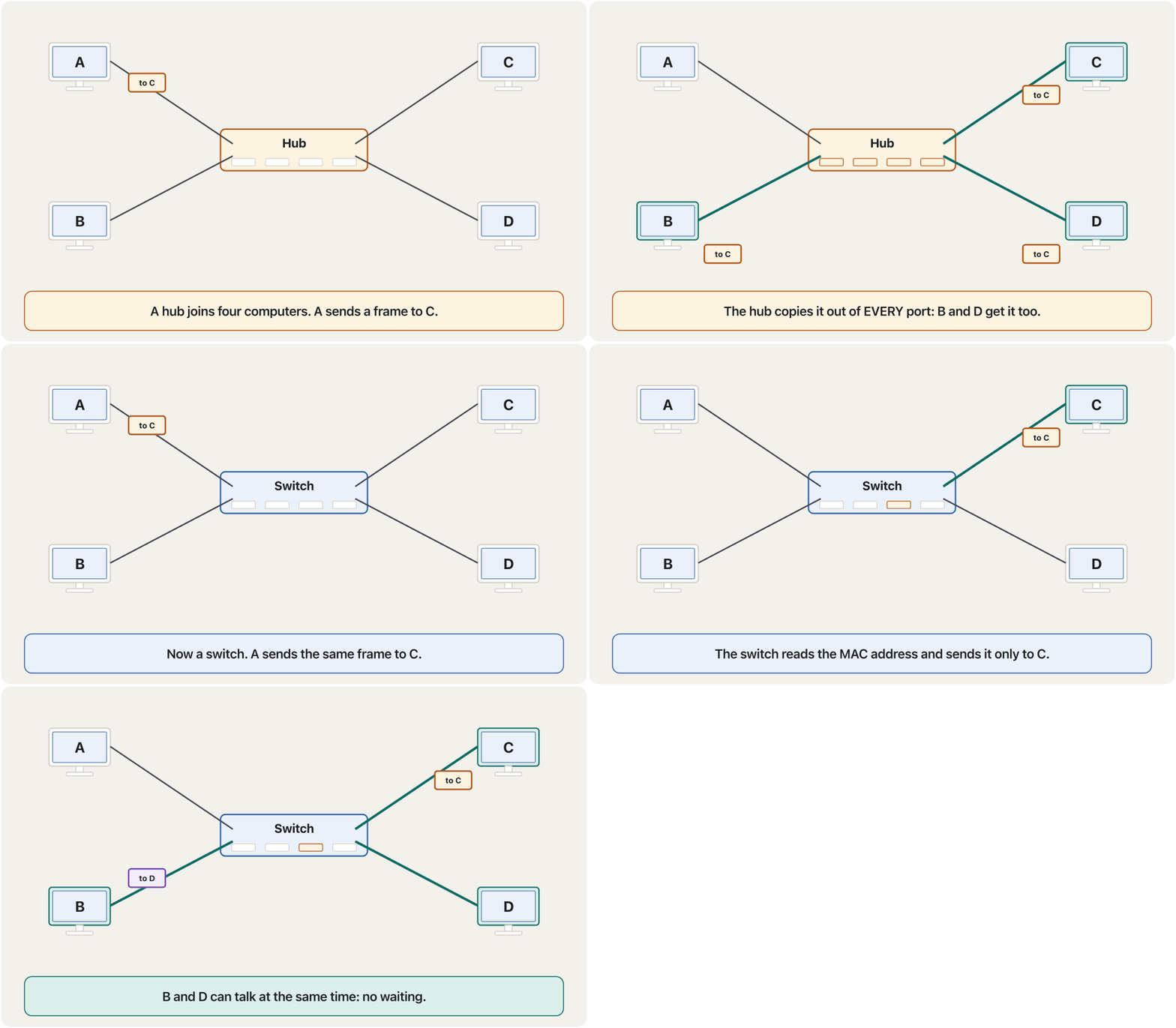
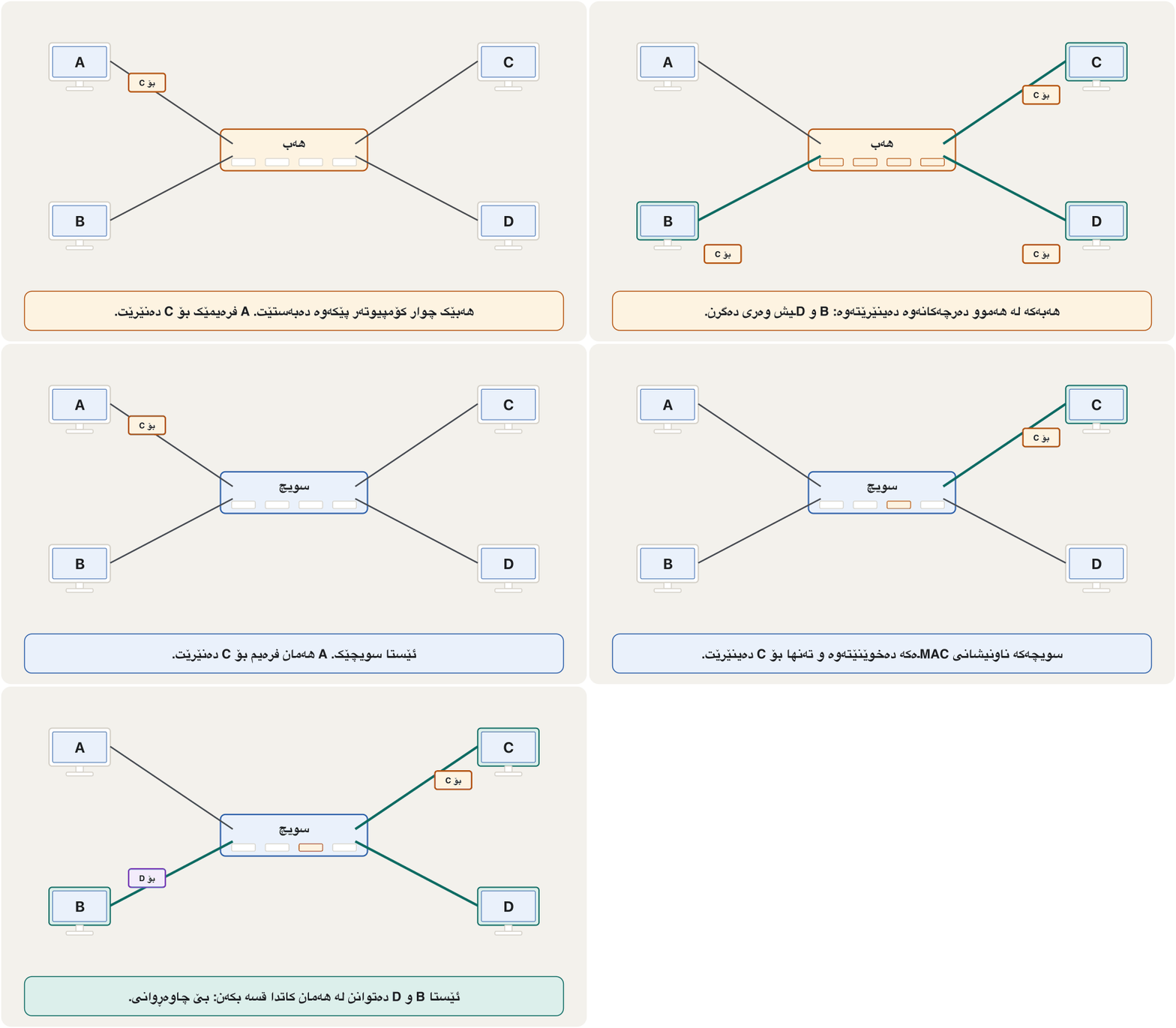
A device with many that connects computers and other devices in a by cable and sends each piece of only to the device it is meant for.
ئامێرێکە کە چەندین هەیە و کۆمپیوتەر و ئامێرەکانی تر بە کێبڵ لەناو پێکەوە دەبەستێتەوە و هەر پارچەیەکی دراوە تەنها بۆ ئەو ئامێرە دەنێرێت کە بۆی نێردراوە.
In Kurdish: a hub copies every frame to all computers, while a switch sends it only to the computer it is for.
بە کوردی: هەموو بۆ هەموو دەکات، بەڵام تەنها بۆ ئەو دەینێرێت کە بۆی نێردراوە.
Kurdish (Sorani), plays 8:25-15:37: a hub and a switch drawn side by side with four computers.
بە کوردیی سۆرانی، لە 8:25 تا 15:37 پەخش دەبێت: و لە تەنیشت یەکەوە لەگەڵ چوار کێشراون.
Hub or switch?هەب یان سویچ؟
How a switch learns where everyone isسویچ چۆن فێر دەبێت هەر کەسێک لە کوێیە
A new switch knows nothing. It learns by reading the sender's MAC address on every frame that arrives and writing down which port it came from. Follow a switch with four computers, A on port 1, B on port 2, C on port 3 and D on port 4:
نوێ هیچ نازانێت. فێر دەبێت بە خوێندنەوەی نێرەر لەسەر هەر کە دەگات و تۆمارکردنی ئەوەی لە کام هاتووە. بەدوای بە چوار بکەوە: A لەسەر 1، B لەسەر 2، C لەسەر 3 و D لەسەر 4:
| Frame | What the switch learns فێری چی دەبێت | What it does with the frameچی لە دەکات | Its table afterخشتەکەی دواتر |
|---|---|---|---|
| A → CA بۆ C | A is on port 1A لەسەر 1ـە | C is unknown: it floods the frame out of ports 2, 3 and 4C نەناسراوە: لە 2، 3 و 4ـەوە بڵاو دەکاتەوە | A=1 |
| C → AC بۆ A | C is on port 3C لەسەر 3ـە | A is known: it sends the frame only out of port 1A ناسراوە: تەنها لە 1ـەوە دەنێرێت | A=1, C=3 |
| B → CB بۆ C | B is on port 2B لەسەر 2ـە | C is known: only port 3C ناسراوە: تەنها 3 | A=1, B=2, C=3 |
| D → BD بۆ B | D is on port 4D لەسەر 4ـە | B is known: only port 2B ناسراوە: تەنها 2 | A=1, B=2, C=3, D=4 |
After a few seconds the switch never has to flood again (except for messages meant for everyone). It also lets each port send and receive at the same time (full duplex), so A can talk to C while B talks to D.
دوای چەند چرکەیەک چیتر پێویست ناکات بڵاو بکاتەوە (جگە لە ئەو نامانەی بۆ هەمووانن). هەروەها ڕێگە بە هەر دەدات لە هەمان کاتدا بنێرێت و وەربگرێت (دوولایەنەی هاوکات)، بۆیە A دەتوانێت لەگەڵ C قسە بکات لە کاتێکدا B لەگەڵ D قسە دەکات.
How a switch learns which device is on which port from the MAC addresses in the frames, and why it is better than a hub.
چۆن لە ڕێگەی ناو فێر دەبێت کام ئامێر لەسەر کام ؛ هەروەها بۆچی لە باشترە.
Plays 5:08-8:48: switching inside a network and the MAC address table.
لە 5:08 تا 8:48 پەخش دەبێت: لەناو و خشتەی .
The router: joining networksڕێدۆز: بەستنەوەی ڕایەڵەکان
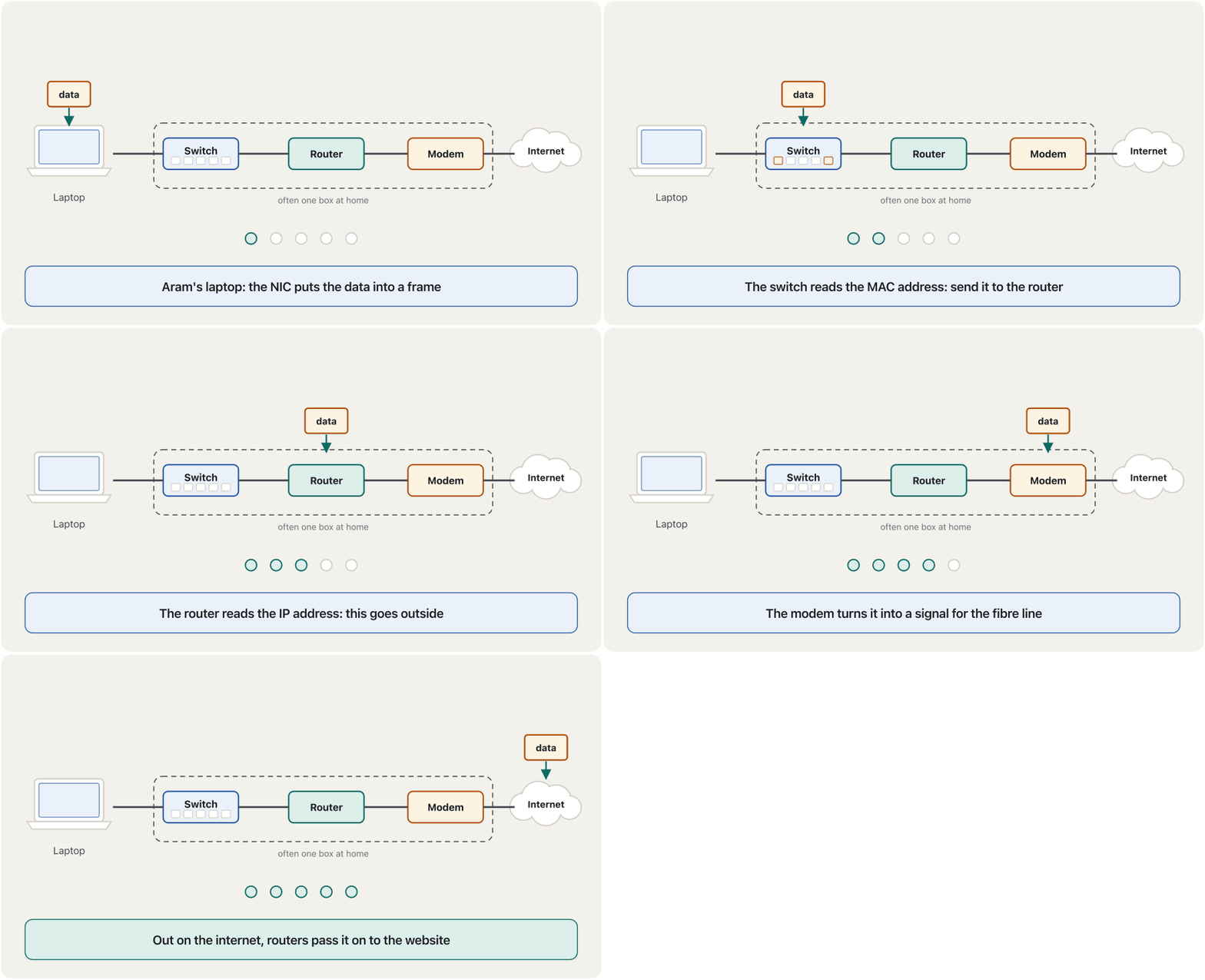
A router joins two or more networks to each other. A switch works inside one network and reads MAC addresses; a router works between networks and reads the IP address in each packet to choose the best path toward its destination. That is routing.
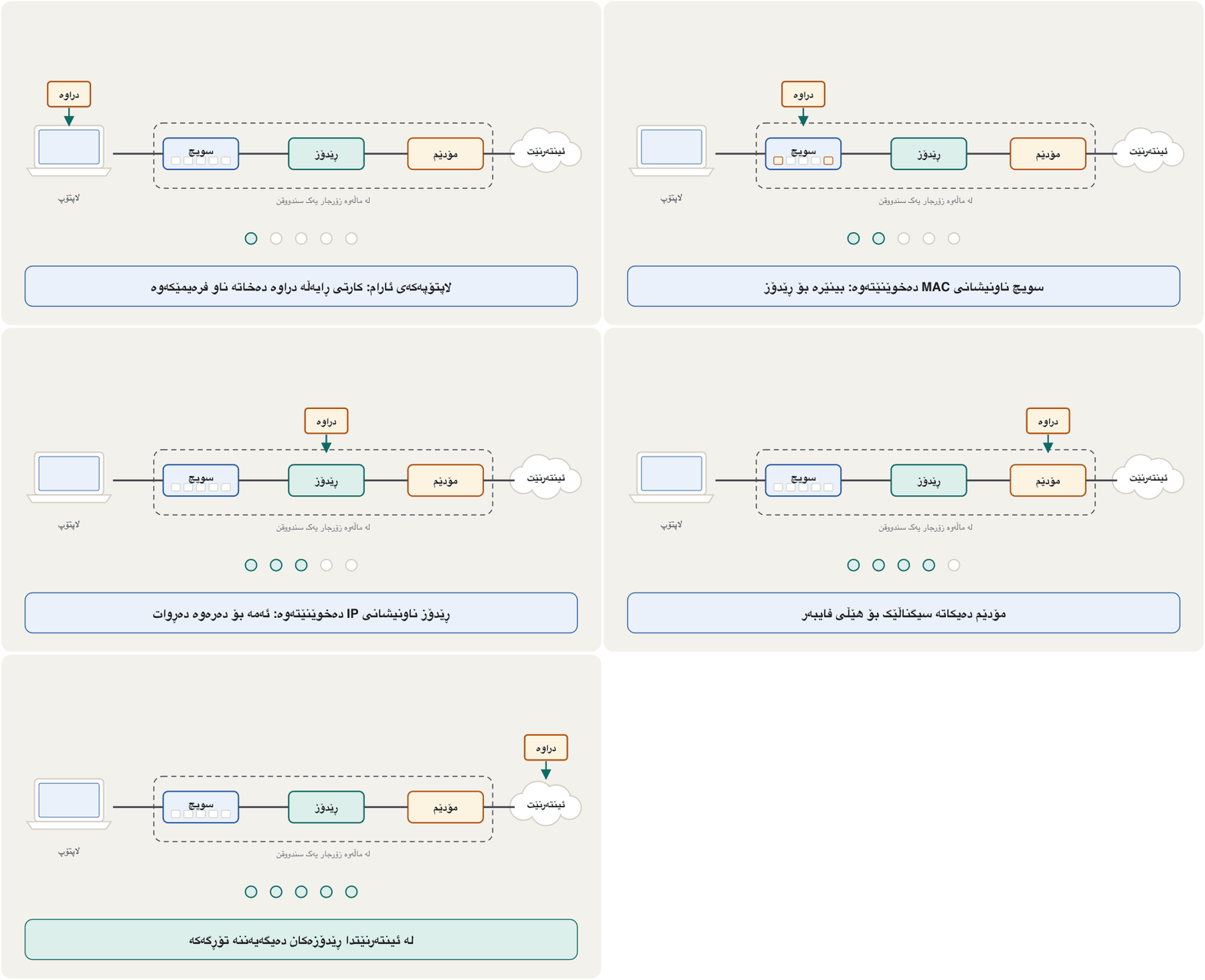
دوو یان زیاتر بە یەکترەوە دەبەستێت. لە ناو یەک کار دەکات و دەخوێنێتەوە؛ لە نێوان کار دەکات و هەر دەخوێنێتەوە بۆ ئەوەی باشترین ڕێگا بەرەو شوێنی مەبەست هەڵبژێرێت. ئەمە .
A device that sends between , for example between your home and the . Home routers usually also make the signal.
ئامێرێکە کە لە نێوان دەگوازێتەوە، بۆ نموونە لە نێوان ڕایەڵە ناوچەییەکەی ماڵەکەت و . ڕێدۆزی ماڵان زۆرجار ئاماژەی دروست دەکات.
Inside one building, the reception desk hands each letter to the right room by the name on it — that is the switch. Between cities, post offices look at the city and street and pass the letter from office to office — that is the router. The internet is thousands of routers passing packets along.
لە ناو یەک بینادا، مێزی پێشوازی هەر نامەیەک بەپێی ئەو ناوەی لەسەریەتی دەداتە ژوورە دروستەکە — ئەمە . لە نێوان شارەکاندا، پۆستەخانەکان سەیری شار و شەقام دەکەن و نامەکە لە پۆستەخانەیەکەوە بۆ یەکێکی تر دەنێرن — ئەمە . هەزاران کە دەگوازنەوە.
Where the analogy stops workingسنووری ئەم نموونەیە
Real routers choose new paths in milliseconds when a link breaks, and a packet may take a different road from the one before it.
ڕاستەقینە کاتێک بەستنەوەیەک دەپچڕێت لە چەند ملیچرکەیەکدا ڕێگای نوێ هەڵدەبژێرن و لەوانەیە ڕێگایەکی جیاواز لە پێشووی بگرێت.
Animated explanation of how a switch joins devices into one network and how a router connects networks, including to the internet.
بە ئەنیمەیشن ڕوون دەکاتەوە چۆن ئامێرەکان دەکاتە یەک و چۆن پێکەوە دەبەستێت، تەنانەت بە .
Plays 2:56-7:21: the review (switches build networks, routers join them) and routers over the internet.
لە 2:56 تا 7:21 پەخش دەبێت: پێداچوونەوە ( دروست دەکەن و پێکەوە دەبەستن)، پاشان لە ڕێگەی .
The router: joining networksڕێدۆز: بەستنەوەی ڕایەڵەکان
Two companies, one router eachدوو کۆمپانیا، هەر یەکە و ڕێدۆزێک
The course gives an example: one company runs a LAN of 100 computers and another company runs a LAN of 150. Each LAN has its own switches. To let the two companies exchange data, each LAN gets a router, and the routers are joined through an internet connection. The 250 computers can now reach each other, while each company's own traffic stays inside its LAN.
وانەکە نموونەیەک دەهێنێتەوە: کۆمپانیایەک 100 هەیە و کۆمپانیایەکی تر 150ـی. هەر خۆی هەیە. بۆ ئەوەی هەردوو کۆمپانیاکە بگۆڕنەوە، هەر بۆ دادەنرێت و بە پەیوەندییەکی پێکەوە دەبەسترێن. ئێستا 250 دەگەنە یەکتر، لە کاتێکدا هاتوچۆی ناوخۆیی هەر کۆمپانیایەک لە ناو خۆیدا دەمێنێتەوە.
Repeaters, bridges, gateways and the restدووبارەکەرەوە، پردی ڕایەڵە، دەروازەی ڕایەڵە و ئەوانی تر
In a wired network with more than two computers you need devices to join them. The notes call them distributors and list six: bridge, repeater, hub, switch, router and gateway. Here is what each one does, from the simplest to the cleverest:
لە تەلداردا کە زیاتر لە دوو هەیە، پێویستت بە ئامێرە بۆ بەستنەوەیان. تێبینییەکان پێیان دەڵێن دابەشکەر و شەشیان ناو دەبەن: ، ، ، ، و . ئەمە کاری هەر یەکەیانە، لە سادەترینەوە بۆ زیرەکترین:
| Deviceئامێر | What it doesچی دەکات | What it looks atسەیری چی دەکات | Todayئەمڕۆ |
|---|---|---|---|
| Repeater | Receives a weak signal and sends it out again at full strength, so it can go further. لاواز وەردەگرێت و بە هێزی تەواو دووبارە دەینێرێتەوە، بۆ ئەوەی دوورتر بڕوات. | Nothing: just the signalهیچ: تەنها | Wi-Fi extenders, fibre amplifiersدرێژکەرەوەی ، بەهێزکەری فایبەر |
| Hub | A repeater with many ports: copies everything to every port. بە چەندین : هەموو شتێک بۆ هەموو کۆپی دەکات. | Nothingهیچ | Obsoleteکۆن بووە |
| Bridge | Joins two parts (segments) of a LAN and passes a frame across only when it is for the other side.دوو بەشی پێکەوە دەبەستێت و تەنها کاتێک دەپەڕێنێتەوە کە بۆ لایەکەی تر بێت. | MAC addresses | Built into switches and Wi-Fi access pointsلە ناو و |
| Switch | A many-port bridge: each frame goes only to the right port. چەند دەرچەیی: هەر تەنها بۆ دروستەکە دەچێت. | MAC addresses | The centre of every LANناوەندی هەموو |
| Router | Joins different networks and chooses the path for each packet. جیاواز دەبەستێت و ڕێگای هەر هەڵدەبژێرێت. | IP addresses | Home box, provider networks, the internetسندووقی ماڵەوە، دابینکەر، |
| Gateway | Joins networks that use different rules (protocols) and translates between them. دەبەستێت کە جیاواز بەکار دەهێنن و لە نێوانیاندا وەریان دەگێڕێت. | Protocols | Your home router is your "default gateway" to the internet ماڵەکەت دەروازەی بنەڕەتیی تۆیە بۆ |
Repeaters, bridges, gateways and the restدووبارەکەرەوە، پردی ڕایەڵە، دەروازەی ڕایەڵە و ئەوانی تر
'Distributors', access points and firewalls«دابەشکەر»، خاڵی دەستڕاگەیشتن و ئاگرەدیوار
Two more devices complete a modern network: a wireless access point lets Wi-Fi devices join the wired LAN, and a firewall checks the traffic between your network and the internet and blocks what is not allowed — see Firewall: the door of a private network.
دوو ئامێری تر نوێ تەواو دەکەن: ڕێگە بە ئامێرەکانی دەدات بچنە ناو و هاتوچۆی نێوان و دەپشکنێت و ئەوەی ڕێگە پێنەدراوە ڕایدەگرێت — سەیری ئاگرەدیوار: دەرگای ڕایەڵەیەکی تایبەت بکە.
The "router" at home is four devices in one«ڕێدۆز»ـی ماڵەوە چوار ئامێرە لە یەکێکدا
The box your internet provider installs at home is usually called 'the router', but it does four jobs: a modem for the provider's line (fibre, DSL or 4G/5G), a router between your home network and the internet, a small switch with LAN ports for cables, and a Wi-Fi access point. Most also contain a firewall and give every device an address automatically (DHCP).
ئەو سندووقەی لە ماڵەوە دایدەنێت زۆرجار پێی دەوترێت «»، بەڵام چوار کار دەکات: بۆ هێڵی دابینکەرەکە (فایبەر، DSL یان 4G/5G)، لە نێوان ماڵەکەت و ، بچووک بە LAN بۆ کێبڵ و . زۆربەیان تێدایە و بە شێوەی خۆکار ناونیشان دەدەنە هەموو ئامێرێک (DHCP).
Common mistakesهەڵە باوەکان
| Mistakeهەڵە | What is trueڕاستییەکە |
|---|---|
| "A switch and a hub are the same."« و وەک یەکن.» | A hub copies every frame to every port; a switch sends it only where it belongs. هەموو بۆ هەموو کۆپی دەکات؛ تەنها بۆ شوێنی خۆی دەینێرێت. |
| "The router is the internet."« خۆی .» | The router is your door to the internet; if the provider's line is down, Wi-Fi works but there is no internet. دەرگای تۆیە بۆ ؛ ئەگەر هێڵی دابینکەرەکە بپچڕێت، کار دەکات بەڵام نییە. |
| "A server is a special kind of computer with an OS."« جۆرێکی تایبەتی کە هەیە.» | Server is a role: any computer that provides a service. ڕۆڵێکە: هەر کە خزمەتگوزاری دابین بکات. |
| "A switch reads IP addresses."« دەخوێنێتەوە.» | An ordinary switch reads MAC addresses; routers read IP addresses. ئاسایی دەخوێنێتەوە؛ . |
| "My laptop has no NIC because there is no card."« نییە چونکە کارتی تێدا نییە.» | The NIC is built into the motherboard (Ethernet) and the Wi-Fi chip. لە ناو (Ethernet) و دروست کراوە. |
Exercisesڕاهێنانەکان
Name the device: (a) joins the 30 PCs of a computer lab so that each message goes only to the right PC; (b) joins the lab's network to the university network; (c) makes a weak signal strong again; (d) translates between two networks that use different protocols; (e) is inside every computer and has a MAC address.
ئامێرەکە ناو ببە: (أ) 30 تاقیگەیەک پێکەوە دەبەستێت بە شێوەیەک کە هەر نامەیەک تەنها بۆ دروستەکە بچێت؛ (ب) تاقیگەکە بە زانکۆوە دەبەستێت؛ (ج) لاواز دووبارە بەهێز دەکاتەوە؛ (د) لە نێوان دوو وەردەگێڕێت کە جیاواز بەکار دەهێنن؛ (هـ) لە ناو هەموو و هەیە.
Show answerوەڵامەکە پیشان بدە
(a) a switch; (b) a router; (c) a repeater; (d) a gateway; (e) a network interface card.
(أ) ؛ (ب) ؛ (ج) ؛ (د) ؛ (هـ) .
Company A has 100 computers and company B has 150, each on its own LAN. They want to share an order system. What does each LAN need, and how many computers can then reach each other?
کۆمپانیای A 100 و کۆمپانیای B 150ی هەیە، هەر یەکەیان لەسەر خۆی. دەیانەوێت سیستەمێکی داواکاری هاوبەش بکەن. هەر پێویستی بە چییە و پاشان چەند دەگەنە یەکتر؟
Show answerوەڵامەکە پیشان بدە
Each LAN keeps its switches for the inside and needs a router to join it to the other network (for example through an internet connection). Then all computers can reach each other, while local traffic stays inside each LAN.
هەر خۆی بۆ ناوەوە دەهێڵێتەوە و پێویستی بە بۆ بەستنەوەی بە ترەوە (بۆ نموونە بە پەیوەندییەکی ). ئەو کاتە هەموو دەگەنە یەکتر، لە کاتێکدا هاتوچۆی ناوخۆیی لە ناو هەر دەمێنێتەوە.
A new switch has Dilan's PC on port 2, the printer on port 5 and the server on port 7. In order: Dilan prints; the printer replies; the server sends Dilan a file. After each frame, what is in the table and where does the frame go?
نوێ دیلانی لەسەر 2، لەسەر 5 و لەسەر 7ـە. بە ڕیز: دیلان چاپ دەکات؛ وەڵام دەداتەوە؛ فایلێک بۆ دیلان دەنێرێت. دوای هەر ، چی لە خشتەکەدایە و بۆ کوێ دەچێت؟
Show answerوەڵامەکە پیشان بدە
- Dilan → printer: learns that Dilan is on port 2; the printer is unknown, so it floods to all ports except 2.
- Printer → Dilan: learns that the printer is on port 5; Dilan is known, so only port 2.
- Server → Dilan: learns that the server is on port 7; Dilan is known, so only port 2. Table: Dilan 2, printer 5, server 7.
- دیلان بۆ : فێر دەبێت دیلان لەسەر 2ـە؛ نەناسراوە، بۆیە بۆ هەموو جگە لە 2 بڵاوی دەکاتەوە.
- بۆ دیلان: فێر دەبێت لەسەر 5ـە؛ دیلان ناسراوە، بۆیە تەنها 2.
- بۆ دیلان: فێر دەبێت لەسەر 7ـە؛ دیلان ناسراوە، بۆیە تەنها 2. خشتە: دیلان 2، 5، 7.
Summaryپوختە
- A network has servers (they provide services) and clients (they ask), joined by a transmission medium through NICs and network devices.
- Every NIC has a 48-bit MAC address; data on a LAN travels in frames that carry the sender's and receiver's MAC addresses.
- A hub copies everything to every port (obsolete); a switch learns MAC addresses and sends each frame only to the right port.
- A router joins networks and chooses paths by IP address.
- Repeater: strengthens a signal; bridge: joins two LAN segments; gateway: translates between protocols.
- The home 'router' is four devices in one: modem, router, switch and Wi-Fi access point (often with a firewall and DHCP).
- (خزمەتگوزاری دابین دەکەن) و (داوا دەکەن)ی هەیە کە بە لە ڕێگەی و ئامێرەکانی بەستراون.
- هەموو 48 هەیە؛ لەسەر لە ناو دەڕوات کە نێرەر و وەرگر هەڵدەگرن.
- هەموو شتێک بۆ هەموو کۆپی دەکات (کۆن بووە)؛ فێری دەبێت و هەر تەنها بۆ دروستەکە دەنێرێت.
- دەبەستێت و بەپێی ڕێگا هەڵدەبژێرێت.
- : بەهێز دەکاتەوە؛ : دوو بەشی دەبەستێت؛ : لە نێوان وەردەگێڕێت.
- «»ـی ماڵەوە چوار ئامێرە لە یەکێکدا: ، ، و (زۆرجار لەگەڵ و ).
Why did switches replace hubs?بۆچی سویچەکان جێی هەبەکانیان گرتەوە؟
A switch sends each frame only to its receiver, so computers do not share one channel and several pairs can talk at once.
هەر تەنها بۆ وەرگرەکەی دەنێرێت، بۆیە یەک کەناڵ بەکار ناهێنن و چەند جووتێک دەتوانن پێکەوە قسە بکەن.
What is the difference between a switch and a router?جیاوازی نێوان سویچ و ڕێدۆز چییە؟
A switch joins devices inside one network using MAC addresses; a router joins networks using IP addresses.
ئامێرەکانی ناو یەک بە دەبەستێت؛ بە دەبەستێت.
Videoڤیدیۆ
Watch a videoسەیری ڤیدیۆیەک بکە
A video that viewers liked a lot and praised in their comments, chosen for this lesson.ڤیدیۆیەک کە بینەران زۆریان پێ خۆش بووە و لە کۆمێنتەکانیاندا ستایشیان کردووە، بۆ ئەم وانەیە هەڵبژێردراوە.
The network devices of a home and an office: modem, router, switch, access point, firewall and more, and what each one does.
ئامێرەکانی ماڵ و نووسینگە: ، ، ، ، و زیاتر، لەگەڵ کاری هەر یەکەیان.
Whole video (7:42), Feb 2026: one overview of the devices this lesson names.
هەموو ڤیدیۆکە (7:42)، شوباتی 2026: تێڕوانینێکی گشتی بۆ ئەو ئامێرانەی ئەم وانەیە ناویان دەهێنێت.
Lesson complete!وانەکە تەواو بوو!
Well done. Review the key terms, then go on to the next lesson.دەستخۆش. سەیرێکی زاراوە سەرەکییەکان بکەرەوە، پاشان بڕۆ بۆ وانەی داهاتوو.
Key termsزاراوە سەرەکییەکان
Cables and Wireless: Transmission Mediaکێبڵ و بێتەل: هۆکارەکانی گواستنەوە
Related lecturesوانە پەیوەندیدارەکان
- Cables and Wireless: Transmission Mediaکێبڵ و بێتەل: هۆکارەکانی گواستنەوە
- Browsers, Web Servers and URLsتۆڕگەڕەکان، ڕاژەکارەکانی وێب و URL
- The Internet and the Webئینتەرنێت و وێب
- Networksڕایەڵەکان
- Binary, Octal and Hex Shortcutsڕێگا کورتەکانی دووانی، هەشتی و شانزەیی
- Types of Networks: LAN, WAN and Moreجۆرەکانی ڕایەڵە: ڕایەڵەی ناوچەیی، ڕایەڵەی فراوان و زیاتر
- IP Addresses and MAC Addressesناونیشانەکانی IP و ناونیشانەکانی MAC
- Data Communication: Modes, Switching and Protocolsپەیوەندیی دراوە: شێوازەکانی ناردن، سویچکردن و پرۆتۆکۆڵەکان
References and further readingسەرچاوەکان و خوێندنەوەی زیاتر
This lecture is a first edition. The Kurdish text and terminology are waiting for review by Kurdish IT teachers.ئەم وانەیە چاپی یەکەمە. دەقە کوردییەکە و زاراوەکانی چاوەڕێی پێداچوونەوەی مامۆستایانی کوردی بواری IT ن.