Chapterبەش 2 · Lectureوانە 2.2
Field Properties: Sizes, Formats and Input Masksتایبەتمەندییەکانی ستوون: قەبارە، Format و ماسکەکانی نێوخستە
Give the fields of the University database the right size, display format, input mask and lookup list — built on a real class project, with its notes corrected.
قەبارەی دروست، Formatـی پیشاندان، و بدە بە University — لەسەر پڕۆژەیەکی ڕاستەقینەی پۆل، بە تێبینییە ڕاستکراوەکانییەوە.
What you will learnچی فێر دەبیت
- Find the field properties of each data type and set Field Size, Format, Decimal Places and Caption sensibly.
- Read and write input masks, including their three sections.
- Build single-value lookup fields and explain why multivalued fields break first normal form.
- هەر بدۆزیتەوە و Field Size، Format، Decimal Places و Caption بە ژیرانە دابنێیت.
- بخوێنیتەوە و بنووسیت، لەگەڵ سێ بەشەکەیان.
- تاکنرخ دروست بکەیت و ڕوون بکەیتەوە بۆچی فرەنرخ دەشکێنن.
The project: rules for every fieldپڕۆژەکە: ڕێسا بۆ هەر ستوونێک
This lesson follows a real class project from the Access practical: a task sheet, the screens a student built for it, and the notes the student wrote on those screens. This is the task, with our lab's field names. This lesson sets the sizes, formats, input masks and lookup lists; lesson 4 adds the default value and the validation rules. The printed sheet and the version shown on the projector are merged; the class used ages 18 to 50.
ئەم وانەیە پەیڕەوی پڕۆژەیەکی ڕاستەقینەی پۆل دەکات لە بەشی پراکتیکیی Access: پەڕەیەکی ئەرک، ئەو شاشانەی قوتابییەک بۆی دروست کرد و ئەو تێبینییانەی قوتابییەکە لەسەر ئەو شاشانە نووسی. ئەمە ئەرکەکەیە بە ناوی تاقیگەکەمان. ئەم وانەیە قەبارە، Format، و دادەنێت؛ وانەی 4 و زیاد دەکات. پەڕە چاپکراوەکە و ئەو وەشانەی لەسەر پڕۆجێکتەر پیشان درا یەک خراون؛ پۆلەکە تەمەنی 18 تا 50ـی بەکارهێنا.
| Field | Data type | What the task asksئەرکەکە چی دەخوازێت |
|---|---|---|
| StudentID | AutoNumber | nothing (it is the key)هیچ () |
| StudentName | Short Text | Field Size 15; the first letter must be a capitalField Size 15؛ یەکەم پیت دەبێت گەورە بێت |
| Phone | Short Text | an input mask like +964 750 000-0000 وەک +964 750 000-0000 |
| DOB | Date/Time | a validation rule: dates from 1/1/1990 to 1/1/2000: ڕێکەوت لە 1/1/1990 تا 1/1/2000 |
| Married | Yes/No | nothingهیچ |
| Age | Number | a validation rule: 18 to 50: 18 تا 50 |
| Department | a lookup with typed values IT, CS, Biology, Accounting بە نرخی نووسراوی IT، CS، Biology، Accounting | Default Value ITDefault Value بە IT |
| CountryID | a lookup that takes its values from the Country table کە نرخەکانی لە Countryـەوە وەردەگرێت | finished in lesson 5لە وانەی 5 تەواو دەکرێت |
| CountryName | Short Text | (Country table, with CountryID AutoNumber); then enter five records( Country، لەگەڵ CountryID AutoNumber)؛ پاشان پێنج بنووسە |
The project: rules for every fieldپڕۆژەکە: ڕێسا بۆ هەر ستوونێک
Why and where: the Field Properties paneبۆچی و لە کوێ: پانێڵی Field Properties
Why field properties? A only decides the kind of value. refine it so that only correct data, in the right range, shown the right way, gets into the table.
بۆچی ؟ تەنها جۆری نرخ دیاری دەکات. وردتری دەکەن بۆ ئەوەی تەنها دروست، لە سنووری دروستدا و بە شێوەی دروست بچێتە ناو .
Where are they? Open the table in and click a field: its properties appear in the lower pane, Field Properties, on two tabs, General and Lookup. The list depends on the data type: a Short Text field has a Field Size from 1 to 255 characters; Number, Currency and AutoNumber have number settings; Date/Time has Show Date Picker. A few properties are also on the Table Fields tab in Datasheet view (Default Value, Field Size, and Required, Unique, Indexed and Validation in the Field Validation group).
لە کوێن؟ لە بکەرەوە و لە بکە: تایبەتمەندییەکانی لە خوارەوە، Field Properties، لە دوو تابدا دەردەکەون، General و Lookup. لیستەکە بەپێی دەگۆڕێت: Short Text Field Sizeـی 1 تا 255 ؛ Number، Currency و AutoNumber ڕێکخستنی ژمارەیان هەیە؛ Date/Time Show Date Pickerـی هەیە. هەندێک تایبەتمەندی لە لە Table Fieldsـن (Default Value، Field Size و لە Field Validation: Required، Unique، Indexed و Validation).
All field properties at a glanceهەموو تایبەتمەندییەکانی ستوون بە یەک نیگا
This table is the map of this lesson and the next: the eleven properties you will use most. Default Value, the validation properties, Required, Allow Zero Length and Indexed are taught in lesson 4. The next screen lists the properties that appear only for some data types.
ئەم ڕێبەری ئەم وانەیە و وانەی دواترە: ئەو یانزە تایبەتمەندییەی زۆرتر بەکاریان دەهێنیت. Default Value، تایبەتمەندییەکانی ، Required، Allow Zero Length و Indexed لە وانەی 4 دەخوێنرێن. شاشەی دواتر ئەو تایبەتمەندییانە لیست دەکات کە تەنها بۆ هەندێک دەردەکەون.
| Propertyتایبەتمەندی | What it doesچی دەکات | In our labلە تاقیگەکەماندا |
|---|---|---|
| Field Size | the largest value or the longest text the field can holdگەورەترین نرخ یان درێژترین دەق کە دەتوانێت هەڵیبگرێت | StudentName 15, Age Byte |
| Format | how the value is shown (not how it is stored)نرخەکە چۆن پیشان دەدرێت (نەک چۆن هەڵدەگیرێت) | FeeIQD #,##0 "IQD" |
| Decimal Places | how many digits after the decimal point are shownچەند ژمارە دوای فاریزە پیشان دەدرێت | FeeIQD 0 |
| Input Mask | a pattern that guides typingشێوەیەکی دیاریکراو کە ڕێنمایی نووسین دەکات | Phone, StudentName |
| Caption | the label shown instead of the field name in datasheets, forms and reportsئەو ناونیشانەی لە جیاتی ناوی لە ، و پیشان دەدرێت | StudentName → Student name (a Kurdish caption works too)StudentName ← Student name (ناونیشانی کوردیش دەبێت) |
| Default Value | the value a new record starts withئەو نرخەی نوێ پێی دەست پێدەکات | Department "IT" |
| Validation Rule | a condition every value must meetمەرجێک کە هەموو نرخێک دەبێت جێبەجێی بکات | Age >=18 And <=50 |
| Validation Text | the message shown when the rule is brokenئەو پەیامەی کاتی شکاندنی ڕێساکە پیشان دەدرێت | "Only between 18 and 50 is allowed!" |
| Required | Yes: the field cannot be left emptyYes: ناتوانرێت بەتاڵ بهێڵدرێتەوە | StudentName, CountryName |
| Allow Zero Length | Yes: an empty text "" is allowed (Short Text, Long Text, Hyperlink)Yes: دەقی بەتاڵ "" ڕێگەپێدراوە (Short Text، Long Text، Hyperlink) | Phone |
| Indexed | No / Yes (Duplicates OK) / Yes (No Duplicates): a faster search, and no repeats with No DuplicatesNo / Yes (Duplicates OK) / Yes (No Duplicates): گەڕانی خێراتر و بە No Duplicates هیچ دووبارەبوونەوەیەک | CountryName (No Duplicates) |
All field properties at a glanceهەموو تایبەتمەندییەکانی ستوون بە یەک نیگا
Properties for some data typesتایبەتمەندی بۆ هەندێک جۆری دراوە
| Propertyتایبەتمەندی | What it doesچی دەکات | In our labلە تاقیگەکەماندا |
|---|---|---|
| New Values | AutoNumber only: Increment (1, 2, 3…) or Randomتەنها AutoNumber: Increment (1، 2، 3…) یان Random | StudentID |
| Unicode Compression | stores text more compactly (Yes by default)دەق بچووکتر هەڵدەگرێت (بە شێوەی بنەڕەتی Yes) | — |
| IME Mode, IME Sentence Mode | control input editors for East Asian languagesئامرازەکانی نووسینی زمانەکانی ڕۆژهەڵاتی ئاسیا کۆنترۆڵ دەکەن | — |
| Append Only | Long Text: keeps the history of every changeLong Text: مێژووی هەموو گۆڕانکارییەک دەهێڵێتەوە | — |
| Text Format | Long Text: Plain Text or Rich Text (bold, colours, stored as HTML)Long Text: Plain Text یان Rich Text (تۆخ، ڕەنگ، وەک HTML هەڵدەگیرێت) | — |
| Text Align | the default alignment in controlsڕیزکردنی بنەڕەتی لە | — |
| Precision, Scale | Number with Field Size Decimal: total digits and digits after the pointNumber بە Field Size Decimal: کۆی ژمارەکان و ژمارەکانی دوای فاریزە | — |
| Expression, Result Type | Calculated fields: the formula and the type of its result Calculated: و جۆری ئەنجامەکەی | — |
| Show Date Picker | Date/Time: show the small calendar next to the cellDate/Time: ڕۆژژمێرە بچووکەکە لە تەنیشت خانەکە پیشان دەدات | DOB |
All field properties at a glanceهەموو تایبەتمەندییەکانی ستوون بە یەک نیگا
Changing a table's designگۆڕینی دیزاینی خشتەیەک
Changing the design of a table: in type a new field in an empty row, or click Insert Rows to put it between two fields; select a field's row and click Delete Rows to delete it — its data is deleted too. To rename a table, close it, then right-click it in the Navigation Pane → Rename. To describe it, right-click it → Table Properties → Description. Delete a table with right-click → Delete (it cannot be undone).
گۆڕینی دیزاینی : لە نوێ لە ڕیزێکی بەتاڵدا بنووسە، یان لە Insert Rows بکە بۆ دانانی لە نێوان دوو ؛ ڕیزی هەڵبژێرە و لە Delete Rows بکە بۆ سڕینەوەی — هەموو لەگەڵیدا دەسڕدرێتەوە. بۆ گۆڕینی ناوی ، دایبخە، پاشان لە ڕاستی لێ بکە ← Rename. بۆ وەسفکردنی، ڕاستی لێ بکە ← Table Properties ← Description. بە ڕاست ← Delete بسڕەوە (ناگەڕێتەوە).
Field SizeField Size: قەبارەی ستوون
Short Text fields hold 1 to 255 characters; choose the size from the longest value you expect. A new Short Text field gets the default size set in File → Options → Object Designers → Default text field size — 255 in the project's screens. Do not leave it: set it yourself. Access stores only the characters that are typed, so Field Size is a limit that keeps wrong data out, not space that is wasted.
Short Text 1 تا 255 هەڵدەگرن؛ قەبارەکە لە درێژترین نرخی چاوەڕوانکراوەوە هەڵبژێرە. نوێی Short Text ئەو قەبارە بنەڕەتییە وەردەگرێت کە لە File → Options ← Object Designers ← Default text field size دانراوە — لە شاشەکانی پڕۆژەکەدا 255. وای بەجێ مەهێڵە: خۆت دیاری بکە. Access تەنها نووسراوەکان هەڵدەگرێت، بۆیە Field Size سنوورێکە کە هەڵە دەرەوە دەهێڵێتەوە، نەک شوێنێک کە بە فیڕۆ دەچێت.
| Field | Field Size | Whyبۆچی |
|---|---|---|
| CountryName | 40 | the longest country names are about 30 lettersدرێژترین ناوی وڵات نزیکەی 30 پیتە |
| StudentName | 15 | the task's size for a first nameقەبارەی ئەرکەکە بۆ ناوی یەکەم |
| Phone | 17 | +964 750 000-1001 is exactly 17 characters+964 750 000-1001 ڕێک 17 |
| Department, DeptCode | 10 | the longest code is Accounting (10 letters)درێژترین کۆد Accountingـە (10 پیت) |
| City | 30 | enough for Kurdistan's city namesبۆ ناوی شارەکانی کوردستان بەسە |
| CourseCode | 4 | two letters and two digits: IT11دوو پیت و دوو ژمارە: IT11 |
Field SizeField Size: قەبارەی ستوون
Number sizesقەبارەکانی Number
For Number fields, Field Size chooses how the number is stored:
بۆ Number، Field Size دیاری دەکات ژمارەکە چۆن هەڵدەگیرێت:
| Field Size | Holdsهەڵدەگرێت | Storageشوێن |
|---|---|---|
| Byte | whole numbers 0 to 255 لە 0 تا 255 | 1 byte |
| Integer | whole numbers −32,768 to 32,767 لە تا 32,767 | 2 bytes |
| Long Integer | whole numbers −2,147,483,648 to 2,147,483,647 — the default لە تا 2,147,483,647 — بنەڕەتییە | 4 bytes |
| Single | fractions, about 7 significant digits، نزیکەی 7 ژمارەی گرنگ | 4 bytes |
| Double | fractions, about 15 significant digits، نزیکەی 15 ژمارەی گرنگ | 8 bytes |
| Decimal | exact decimals, up to 28 digits (set Precision and Scale)ژمارەی دەیی ورد، تا 28 ژمارە (Precision و Scale دیاری بکە) | 12 bytes |
| Replication ID | a GUID, a 16-byte unique codeGUID، کۆدێکی یەکتای 16 | 16 bytes |
Kurdish: Number field properties - Field Size limits (Integer refuses 32,768), Decimal Places, Default Value, then a Validation Rule with a Kurdish message.
بە کوردی: Number: Field Size (Integer ژمارەی 32,768 ڕەت دەکاتەوە)، Decimal Places، ، پاشان بە پەیامێکی کوردی.
Kurdish (Sorani), plays 0:40-4:40: the Field Size choices of a Number field, and a number too big for the chosen size refused in the datasheet.
بە کوردیی سۆرانی، لە 0:40 تا 4:40 پەخش دەبێت: هەڵبژاردنەکانی Field Size بۆ Number، پاشان ژمارەیەک کە بۆ قەبارە هەڵبژێردراوەکە زۆر گەورەیە لە ڕەت دەکرێتەوە.
Field SizeField Size: قەبارەی ستوون
Age, money and AutoNumberتەمەن، پارە و AutoNumber
- Age is a Byte. The project's screen left Age as Long Integer. An age is a whole number from 0 to about 120, so Byte (0–255, 1 byte) is enough; Mark (0–100) and Stage (1–4) are Bytes too. Microsoft's advice: use the smallest size that fits — it is faster and smaller.
- Money is Currency. Currency stores exact amounts with 4 decimal places (15 digits before the point) and uses fixed-point arithmetic, so never becomes 0.30000000000000004. FeeIQD is Currency.
- AutoNumber is a Long Integer (or Replication ID) that Access fills itself; its New Values is Increment (1, 2, 3…) or Random. You cannot type or change it, and gaps after deleted or cancelled records are normal. It is the usual surrogate key.
- Age Byteـە. شاشەی پڕۆژەکە Ageـی بە Long Integer هێشتەوە. تەمەن ژمارەیەکی تەواوە لە 0 تا نزیکەی 120، بۆیە Byte (0 تا 255، یەک ) بەسە؛ Mark (0 تا 100) و Stage (1 تا 4)ـیش Byteـن. ئامۆژگاریی Microsoft: بچووکترین قەبارەی گونجاو بەکاربهێنە — خێراتر و بچووکترە.
- پارە Currencyـە. Currency بڕی ورد بە 4 ژمارەی دوای فاریزە هەڵدەگرێت (15 ژمارە پێش فاریزە) و ژمێرکاریی خاڵی جێگیر بەکاردەهێنێت، بۆیە هەرگیز نابێتە 0.30000000000000004. FeeIQD Currencyـە.
- AutoNumber Long Integerـە (یان Replication ID) کە Access خۆی پڕی دەکاتەوە؛ New Valuesـەکەی Increment (1، 2، 3…) یان Randomـە. ناتوانیت بینووسیت یان بیگۆڕیت و بۆشایی دوای سڕاو یان هەڵوەشێنراو ئاساییە. باوە (کلیلی دەستکرد).
Format: how data looksFormat: دراوە چۆن دەردەکەوێت
Format changes how a value is shown, never what is stored or how it is typed. Each data type has its own predefined formats, and you can write custom ones:
Format ئەوە دەگۆڕێت کە نرخێک چۆن پیشان دەدرێت، هەرگیز ئەوە ناگۆڕێت کە چی هەڵدەگیرێت یان چۆن دەنووسرێت. هەر شێوازی ئامادەی خۆی هەیە و دەتوانیت شێوازی تایبەتیش بنووسیت:
| Data type | Format | Valueنرخ | Shown asوەک ئەمە پیشان دەدرێت |
|---|---|---|---|
| Short Text | > | aram | ARAM |
| Short Text | < | SULAIMANI | sulaimani |
| Short Text | @@@@ @@@ @@@@ | 07500001001 | 0750 000 1001 |
| Number | Standard | 3456.789 | 3,456.79 |
| Number | Percent | 0.45 | 45% |
| Number | Scientific | 3456.789 | 3.46E+03 |
| Currency | #,##0 "IQD" | 450000 | 450,000 IQD |
| Date/Time | Short Date | 1998-03-14 | 14/03/1998 (follows the Windows region)14/03/1998 (پەیڕەوی ناوچەی Windows دەکات) |
| Date/Time | dd/mm/yyyy | 1998-03-14 | 14/03/1998 |
| Date/Time | dddd d mmmm yyyy | 1998-03-14 | Saturday 14 March 1998 |
| Date/Time | ddd d mmm yyyy | 1998-03-14 | Sat 14 Mar 1998 |
| Date/Time | h:nn AM/PM | 09:30 | 9:30 AM |
| Yes/No | Yes/No · True/False · On/Off | −1 | Yes · True · On |
| Yes/No | ;"Married";"Single" | −1 · 0 | Married · Single |
Format: how data looksFormat: دراوە چۆن دەردەکەوێت
Format codes by data typeکۆدەکانی Format بەپێی جۆری دراوە
- Text:
>shows all letters in upper case,<in lower case;@is one character (or a space if there is none),&one character (nothing if there is none). - Number and Currency: General Number, Currency (uses the Windows currency symbol), Euro, Fixed, Standard, Percent, Scientific; Decimal Places sets the digits after the point. Custom:
#a digit if there is one,0a digit or 0,,thousands, text in quotes:#,##0 "IQD". Up to four sections: positive;negative;zero;empty. - Date/Time: General Date, Long Date, Medium Date, Short Date, Long Time, Medium Time, Short Time follow the Windows region. Custom codes:
d dd ddd ddddday,m mm mmm mmmmmonth,yy yyyyyear,h hhhour,n nnminutes (m is the month),AM/PM. Access ignores a custom date format that does not fit your Windows region settings. - Yes/No: Yes/No, True/False or On/Off; custom
;"Married";"Single"— the first section is empty, the second is for Yes, the third for No — with colours;"Married"[Green];"Single"[Red]. It shows only when the field's Display Control (Lookup tab) is a Text Box: a check box ignores formats. The stored value stays −1 or 0.
- دەق:
>هەموو پیتەکان بە گەورە پیشان دەدات،<بە بچووک؛@یەک (یان بۆشایی ئەگەر نەبێت)،&یەک (هیچ ئەگەر نەبێت). - Number و Currency: General Number، Currency (هێمای پارەی Windows بەکاردەهێنێت)، Euro، Fixed، Standard، Percent، Scientific؛ Decimal Places ژمارەکانی دوای فاریزە دیاری دەکات. تایبەت:
#ژمارەیەک ئەگەر هەبێت،0ژمارەیەک یان 0،,هەزارەکان، دەق لە نێوان کۆتەیشندا:#,##0 "IQD". تا چوار بەش: موجەب؛سالب؛سفر؛بەتاڵ. - Date/Time: General Date، Long Date، Medium Date، Short Date، Long Time، Medium Time، Short Time پەیڕەوی ناوچەی Windows دەکەن. کۆدی تایبەت:
d dd ddd ddddڕۆژ،m mm mmm mmmmمانگ،yy yyyyساڵ،h hhکاتژمێر،n nnخولەک (m مانگە)،AM/PM. Access ئەو شێوازە تایبەتەی ڕێکەوت پشتگوێ دەخات کە لەگەڵ ڕێکخستنی ناوچەی Windowsـەکەت نەگونجێت. - Yes/No: Yes/No، True/False یان On/Off؛ تایبەت
;"Married";"Single"— بەشی یەکەم بەتاڵە، دووەم بۆ Yes و سێیەم بۆ No — بە ڕەنگەوە;"Married"[Green];"Single"[Red]. تەنها کاتێک دەردەکەوێت کە Display Controlـی (تابی Lookup) Text Box بێت: شێوازەکان پشتگوێ دەخات. نرخە هەڵگیراوەکە هەر یان 0 دەمێنێتەوە.
Input masksماسکەکانی نێوخستە
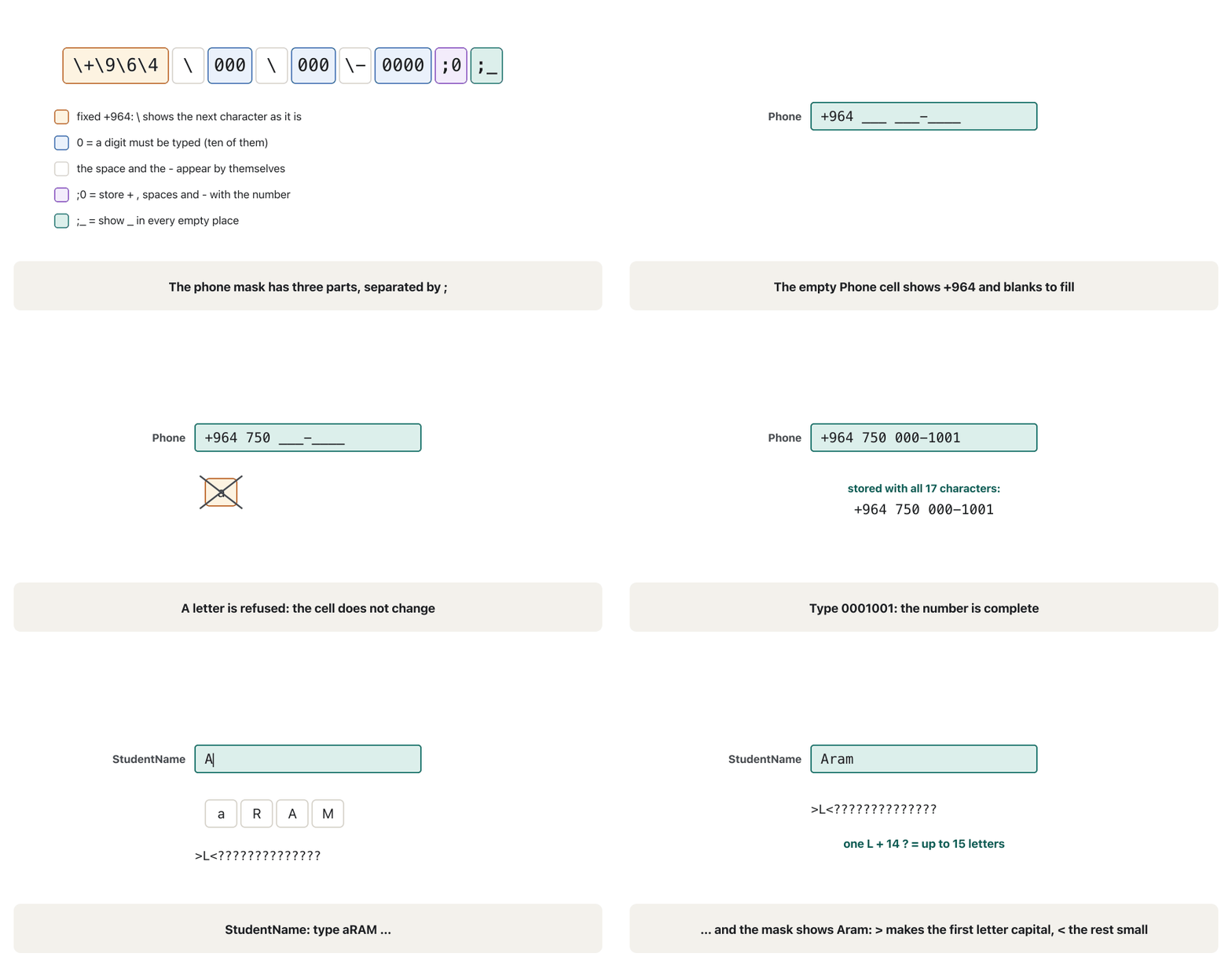
An works while you type: the cell shows fixed characters and blanks, and keys that do not fit are refused. Masks work on Short Text, Number, Currency and Date/Time fields. The animation takes the phone mask of our lab apart and then shows both lab masks at work.
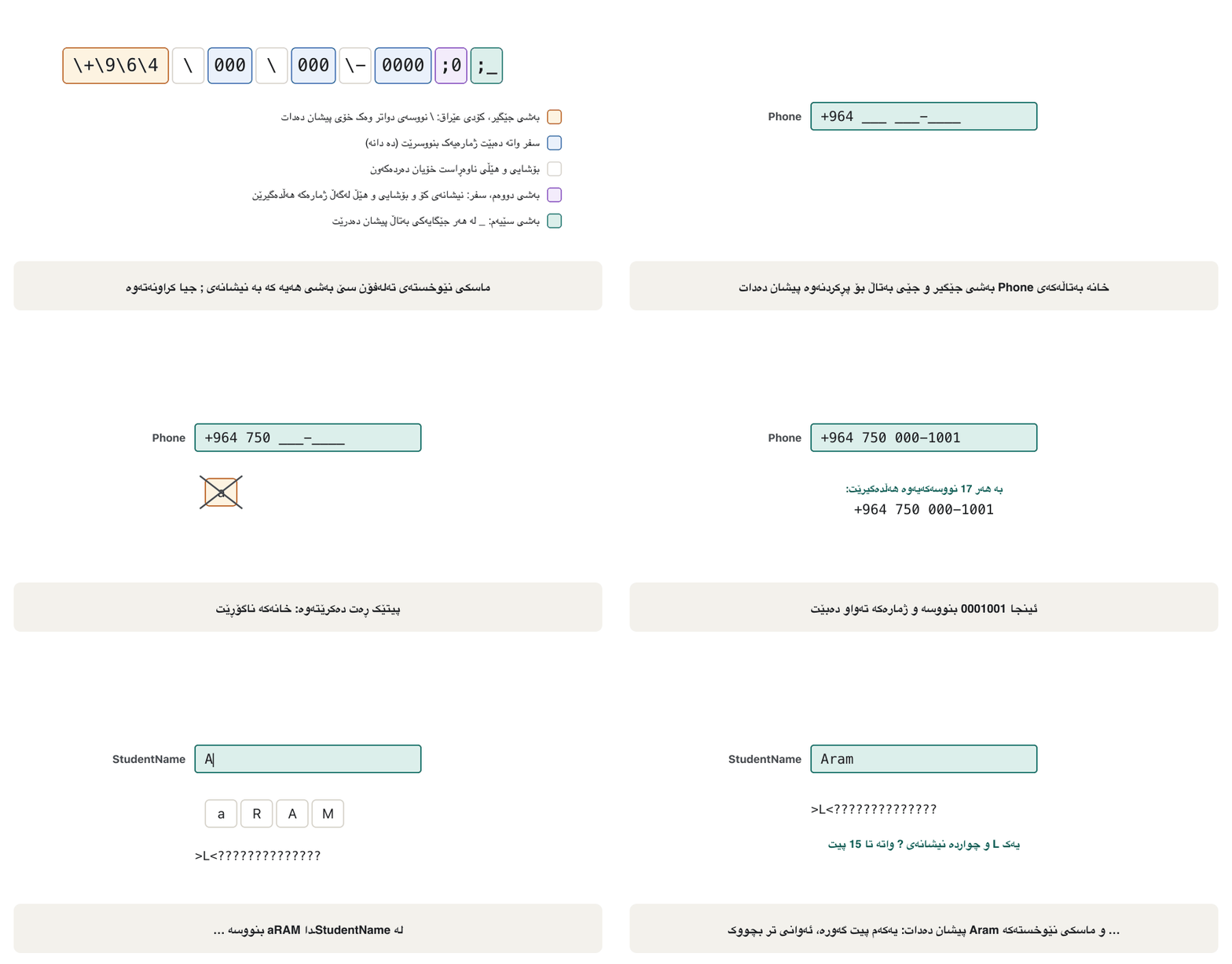
لە کاتی نووسیندا کار دەکات: خانەکە جێگیر و جێی بەتاڵ پیشان دەدات و هەر کە نەگونجێت ڕەت دەکرێتەوە. لەسەر Short Text، Number، Currency و Date/Time کار دەکەن. ئەنیمەیشنەکە تەلەفۆنی تاقیگەکەمان هەڵدەوەشێنێتەوە و پاشان هەردوو تاقیگە لە کاتی کارکردندا پیشان دەدات.
Input masksماسکەکانی نێوخستە
Three sections and the Input Mask Wizardسێ بەش و Input Mask Wizard
A mask has up to three sections separated by semicolons: (1) the mask itself; (2) 0 = store the fixed characters (+, spaces, hyphens) together with the data, 1 or empty = store only what was typed; (3) the placeholder shown in each empty place, _ by default. The easiest start is the Input Mask Wizard: click the Input Mask box, click the … (Build) button, choose a ready mask (Phone Number, Short Date, Medium Date, Password…), test it in Try It, choose how to store the data and click Finish. Edit List adds your own masks to the wizard. For Number and Currency fields you type the mask yourself.
تا سێ بەشی هەیە کە بە جیا کراونەتەوە: (1) خودی ؛ (2) 0 = (+، بۆشایی، هێڵ) لەگەڵ هەڵبگرە، 1 یان بەتاڵ = تەنها ئەوە هەڵبگرە کە نووسراوە؛ (3) ئەو نیشانەیەی لە هەر جێگایەکی بەتاڵ پیشان دەدرێت، بە شێوەی بنەڕەتی _. ئاسانترین دەستپێک Input Mask Wizardـە: لە سندووقی Input Mask بکە، لە … (Build) بکە، ئامادە هەڵبژێرە (Phone Number، Short Date، Medium Date، Password…)، لە Try It تاقی بکەرەوە، شێوەی هەڵگرتنی هەڵبژێرە و لە Finish بکە. Edit List خۆت بۆ زیاد دەکات. بۆ Number و Currency خۆت دەنووسیت.
The course slides read a ready mask, Medium Date 00\->L<LL\-00;0;_: two required digits, a literal -, one capital letter and two small letters, -, two digits; 0 stores the hyphens and _ is the placeholder. Typed 14mar98 becomes 14-Mar-98.
کۆرسەکە ئامادە دەخوێننەوە، Medium Date 00\->L<LL\-00;0;_: دوو ژمارەی پێویست، -ـی جێگیر، یەک پیتی گەورە و دوو پیتی بچووک، -، دوو ژمارە؛ 0 هێڵەکان هەڵدەگرێت و _ نیشانەی جێگایە. نووسینی 14mar98 دەبێتە 14-Mar-98.
Input masksماسکەکانی نێوخستە
Mask charactersنووسەکانی ماسکی نێوخستە
| Character | Meaningواتا |
|---|---|
0 | a digit 0–9 must be typedدەبێت ژمارەیەکی 0 تا 9 بنووسرێت |
9 | a digit or space may be typed (optional)دەکرێت ژمارەیەک یان بۆشایی بنووسرێت (ئارەزوومەندانە) |
# | a digit, space, + or − may be typedدەکرێت ژمارە، بۆشایی، + یان − بنووسرێت |
L | a letter A–Z must be typedدەبێت پیتێکی A تا Z بنووسرێت |
? | a letter A–Z may be typedدەکرێت پیتێکی A تا Z بنووسرێت |
A · a | a letter or digit must · may be typedپیت یان ژمارە دەبێت · دەکرێت بنووسرێت |
& · C | any character or space must · may be typedهەر یان بۆشایی دەبێت · دەکرێت بنووسرێت |
. , : ; - / | decimal, thousands, date and time separators (from the Windows region)جیاکەرەوەکانی دەیی، هەزار، ڕێکەوت و کات (لە ناوچەی Windowsـەوە) |
> · < | the following letters become upper case · lower caseپیتەکانی دواتر گەورە · بچووک دەبن |
! | the mask is displayed from right to left (rarely needed) لە ڕاستەوە بۆ چەپ پیشان دەدرێت (کەم پێویست دەبێت) |
\ | the next character is shown as it is (a literal) دواتر وەک خۆی پیشان دەدرێت |
"…" | the characters in quotes are shown as they areئەو نووسانەی ناو کۆتەیشن وەک خۆیان پیشان دەدرێن |
Password | the whole mask: every character shows as *هەموو : هەر وەک * دەردەکەوێت |
Input masksماسکەکانی نێوخستە
Masks, Format and when not to use a maskماسکی نێوخستە، Format و کەی ماسکی نێوخستە بەکار نەهێنیت
- Format wins on screen. If a field has a Format and a mask, the Format decides how the saved value is shown; the mask only works while typing.
- Only typing is checked. Access ignores masks when data is imported, changed by an action query or set by code — a validation rule protects more.
- When not to use a mask: when some values are exceptions (a mask allows none), for e-mail addresses (their length varies — use a validation rule such as
Is Null Or ((Like "*?@?*.?*") And (Not Like "*[ ,;]*"))), and on a Date/Time field where you want the Date Picker (a mask removes it).
- Format لەسەر شاشە دەباتەوە. ئەگەر Format و هەبێت، Format دیاری دەکات نرخی پاشەکەوتکراو چۆن پیشان بدرێت؛ تەنها لە کاتی نووسیندا کار دەکات.
- تەنها نووسین دەپشکنرێت. Access پشتگوێ دەخات کاتێک دەهێنرێت، بە گۆڕانکاری دەگۆڕدرێت یان بە کۆد دادەنرێت — زیاتر دەپارێزێت.
- کەی بەکار مەهێنە: کاتێک هەندێک نرخ ئاوارتەن ( هیچ ئاوارتەیەک ڕێگە پێنادات)، بۆ (درێژییان جیاوازە — وەک
Is Null Or ((Like "*?@?*.?*") And (Not Like "*[ ,;]*"))بەکاربهێنە) و لەسەر Date/Time کە Date Pickerـت دەوێت ( لای دەبات).
The lab's two masksدوو ماسکی نێوخستەکەی تاقیگە
The project gave two masks. Here are the student's screens, redrawn in today's Access, with the student's notes — corrected.
پڕۆژەکە دوو دانا. ئەمانە شاشەکانی قوتابییەکەن، لە Accessـی ئەمڕۆدا دووبارە کێشراونەتەوە، لەگەڵ تێبینییەکانی قوتابییەکە — ڕاستکراو.
The lab's two masksدوو ماسکی نێوخستەکەی تاقیگە
The name maskماسکی نێوخستەی ناو
- The screen's mask was
>L<followed by seven?, with Field Size 15:>turns the next letter to upper case,Lrequires one letter,<turns the rest to lower case, each?allows one more letter. With 7?only letters fit, so Shilan works but a 10-letter name does not. The fix is>L<followed by 14?: the number of?is Field Size − 1, becauseLis already the first letter. Microsoft's own sample name mask is exactly this. Land?accept the letters A–Z. A name in Kurdish script has no capital letters (why), so the case rule means nothing for it; and because a space is not a letter, a two-word name such as Hana Karim cannot be typed unless the mask usesCor&. For free names a validation rule is often better than a long mask.
- شاشەکە
>L<بوو و حەوت?بە دوایدا، بە Field Size 15:>پیتی دواتر گەورە دەکات،Lیەک پیت پێویست دەکات،<پیتەکانی دواتر بچووک دەکات و هەر?ـێک ڕێگە بە یەک پیتی تر دەدات. بە 7?تەنها پیت جێیان دەبێتەوە، بۆیە Shilan دەنووسرێت بەڵام ناوێکی 10 پیتی نانووسرێت. چارەکە>L<ـە و 14?بە دوایدا: ژمارەی?دەکاتە Field Size کەم یەک، چونکەLخۆی یەکەم پیتە. نموونەی ناوی Microsoft خۆی ڕێک ئەمەیە. Lو?پیتەکانی A تا Z وەردەگرن. ناوێک بە ئەلفوبێی کوردی پیتی گەورەی نییە (بۆچی)، بۆیە ڕێسای گەورە و بچووک هیچ واتایەکی بۆی نییە؛ هەروەها چونکە بۆشایی پیت نییە، ناوێکی دوو وشەیی وەک Hana Karim نانووسرێت مەگەرCیان&بەکاربهێنێت. بۆ ناوی ئازاد زۆرجار لە درێژ باشترە.
>L<???????          the project's mask: 1 + 7 = 8 letters at most
>L<?????????????? corrected: 1 + 14 = 15 letters = Field Size 15The lab's two masksدوو ماسکی نێوخستەکەی تاقیگە
The phone maskماسکی نێوخستەی تەلەفۆن
- True: if you type
+999 999 999-9999into the Input Mask box, Access itself stores\+999\ 999\ 999\-9999— each \ marks the next character as fixed. - But
9means a digit may be typed, so a number with missing digits is accepted, and the first group999lets anyone type any code. Use0(a digit must be typed) and write the country code into the mask:\+\9\6\4\ 000\ 000\-0000;0;_. Now +964 is fixed, 10 digits are required and, with;0, the stored value is+964 750 000-1001: 17 characters, so the Field Size is 17, not the project's 255. - The lecturer's own variant writes a local mobile number,
0000-000-0000(0750-000-1001, 11 digits); the slide wrote it as "XXXX-XXX-XXXX", butXis not a mask character.
- ڕاستە: ئەگەر
+999 999 999-9999لە سندووقی Input Mask بنووسیت، Access خۆی\+999\ 999\ 999\-9999هەڵدەگرێت — هەر \ـێک دواتر وەک جێگیر نیشان دەکات. - بەڵام
9واتە دەکرێت ژمارەیەک بنووسرێت، بۆیە ژمارەیەک کە ژمارەی کەمی تێدا بێت وەردەگیرێت و یەکەم گرووپی999ڕێگە دەدات هەر کۆدێک بنووسرێت.0بەکاربهێنە (دەبێت ژمارەیەک بنووسرێت) و کۆدی وڵات بخە ناو :\+\9\6\4\ 000\ 000\-0000;0;_. ئێستا +964 جێگیرە، 10 ژمارە پێویستن و بە;0نرخی هەڵگیراو+964 750 000-1001ـە: 17 ، بۆیە Field Size 17ـە، نەک 255ـەکەی پڕۆژەکە. - وەشانەکەی مامۆستاکە ژمارەی مۆبایلی ناوخۆیی دەنووسێت،
0000-000-0000(0750-000-1001، 11 ژمارە)؛ وەک «XXXX-XXX-XXXX» نووسیبووی، بەڵامXنییە.
Lookup fieldsستوونەکانی هەڵبژاردن
A offers its values in a drop-down list. The project's Department field is one, with values you type yourself:
نرخەکانی لە پێشکەش دەکات. Departmentـی پڕۆژەکە یەکێکە، بەو نرخانەی خۆت دەیاننووسیت:
In Design view click Department's Data Type and choose Lookup Wizard….
لە لە Data Typeـی Department بکە و Lookup Wizard… هەڵبژێرە.
Choose I will type in the values that I want, keep 1 column and type IT, CS, Biology, Accounting.
I will type in the values that I want هەڵبژێرە، یەک ستوون بهێڵەوە و IT، CS، Biology، Accounting بنووسە.
On the last page keep the label Department, tick Limit To List (only these values) and leave Allow Multiple Values empty. Finish.
لە کۆتا پەڕەدا ناوی Department بهێڵەوە، Limit To List نیشان بکە (تەنها ئەم نرخانە) و Allow Multiple Values بەتاڵ بهێڵەوە. Finish.
The data type stays Short Text. Set Default Value
"IT"and Field Size 10.هەر Short Text دەمێنێتەوە. Default Value
"IT"و Field Size 10 دابنێ.
The wizard filled the Lookup tab: Display Control Combo Box, Row Source Type Value List, Row Source "IT";"CS";"Biology";"Accounting", Bound Column 1, Limit To List Yes. CourseType in Course works the same way with Diploma, Bachelor and Master. A lookup that takes its values from another table — the project's Country field — is built in lesson 5, because it creates a relationship.
تابی Lookupـی پڕ کردەوە: Display Control Combo Box، Row Source Type Value List، Row Source "IT";"CS";"Biology";"Accounting"، Bound Column 1، Limit To List Yes. CourseType لە Courseـدا بە هەمان شێوە کار دەکات بە Diploma، Bachelor و Master. کە نرخەکانی لە ترەوە وەردەگرێت — Countryـی پڕۆژەکە — لە وانەی 5 دروست دەکرێت، چونکە دروست دەکات.
Lookup fieldsستوونەکانی هەڵبژاردن
Allow Multiple Valuesتایبەتمەندیی Allow Multiple Values
Allow Multiple Values turns a field into a multivalued field: one cell holds several values (up to 100), shown as a list with check boxes. The slides build one: a Coordinator field that takes several employees from another table. Microsoft says such a field models a many-to-many relationship, but it puts several values into one cell, which breaks first normal form, and SQL Server receives it as one long delimited text. The clean design is a junction table, like Enrolment in lesson 5.
Allow Multiple Values دەکات بە فرەنرخ: یەک خانە چەند نرخێک هەڵدەگرێت (تا 100)، وەک لیستێک بە پیشان دەدرێت. یەکێک دروست دەکەن: Coordinator کە چەند کارمەندێک لە ترەوە وەردەگرێت. Microsoft دەڵێت ئەم جۆرە نمایش دەکات، بەڵام چەند نرخێک دەخاتە یەک خانەوە، کە شێوەی نۆرماڵی یەکەم دەشکێنێت و SQL Server وەک یەک دەقی درێژی جیاکراو وەری دەگرێت. دیزاینی پاک خشتەی بەستنەوەیە، وەک Enrolment لە وانەی 5.
Exercisesڕاهێنانەکان
Make a copy of Student (Save Object As → StudentPractice) and add a field LocalPhone (Short Text, 11). (1) Give it the input mask 0000-000-0000;0;_ and type 07500001001. (2) Remove the mask, give it the Format @@@@ @@@ @@@@ and type 07500001001 again, then try typing abc. What is stored each time, and what is refused?
کۆپییەکی Student دروست بکە (Save Object As ← StudentPractice) و LocalPhone (Short Text، 11) زیاد بکە. (1) 0000-000-0000;0;_ـی بدەرێ و 07500001001 بنووسە. (2) لاببە، Formatـی @@@@ @@@ @@@@ـی بدەرێ و دووبارە 07500001001 بنووسە، پاشان abc تاقی بکەرەوە. هەر جارێک چی هەڵدەگیرێت و چی ڕەت دەکرێتەوە؟
Show answerوەڵامەکە پیشان بدە
- (1) The mask shows ____-___-____, accepts only digits and stores 0750-000-1001 (with the hyphens, because of
;0) — but then 11 digits + 2 hyphens = 13 characters, so set Field Size 13. The lecturer's slide wrote the mask as "XXXX-XXX-XXXX";Xis not a mask character,0is. - (2) The Format only changes the display: 07500001001 is stored as typed and shown as 0750 000 1001; abc is accepted too, because a Format checks nothing. If a field has both, the Format decides what is shown.
- (1) ____-___-____ پیشان دەدات، تەنها ژمارە وەردەگرێت و 0750-000-1001 هەڵدەگرێت (بە هێڵەکانەوە، بەهۆی
;0) — بەڵام ئەوکات 11 ژمارە و 2 هێڵ دەکاتە 13 ، بۆیە Field Size بکە 13. مامۆستاکە بە «XXXX-XXX-XXXX» نووسیبوو؛Xنییە،0هەیە. - (2) Format تەنها پیشاندانەکە دەگۆڕێت: 07500001001 وەک خۆی هەڵدەگیرێت و وەک 0750 000 1001 پیشان دەدرێت؛ abcـیش وەردەگیرێت، چونکە Format هیچ شتێک ناپشکنێت. ئەگەر هەردووکی هەبێت، Format دیاری دەکات چی پیشان بدرێت.
(a) Show Married as Married/Single instead of a check box. (b) Courses are taught in the morning or in the evening. Store this in Course in two ways — a Yes/No field Evening, and a lookup field TimeOfDay with Morning;Evening — and compare them.
(أ) Married وەک Married/Single پیشان بدە لە جیاتی . (ب) وانەکان بەیانیان یان ئێواران دەوترێنەوە. ئەمە بە دوو ڕێگا لە Courseـدا هەڵبگرە — Yes/Noـی Evening و TimeOfDay بە Morning;Evening — و بەراوردیان بکە.
Show answerوەڵامەکە پیشان بدە
- (a) Married: Lookup tab → Display Control Text Box, then Format
;"Married";"Single". The stored value is still −1/0. - (b) Yes/No is tiny (1 byte) and can never hold a wrong value, but it allows only two answers and its meaning is hidden (is Yes morning or evening?). The lookup reads clearly ("Evening"), and a third value such as Weekend can be added later. For a fact that may grow, choose the lookup.
- (أ) Married: تابی Lookup ← Display Control Text Box، پاشان Format
;"Married";"Single". نرخی هەڵگیراو هێشتا یان 0ـە. - (ب) Yes/No زۆر بچووکە (یەک ) و هەرگیز نرخی هەڵە هەڵناگرێت، بەڵام تەنها دوو وەڵام ڕێگە پێدەدات و واتاکەی شاراوەیە (ئایا Yes بەیانییە یان ئێوارە؟). ڕوون دەخوێنرێتەوە («Evening») و دواتر دەکرێت نرخی سێیەم وەک Weekend زیاد بکرێت. بۆ زانیارییەک کە لەوانەیە گەورە ببێت، هەڵبژێرە.
In StudentPractice add Gender as a single-value lookup (Male; Female), keep LocalPhone with 0000-000-0000;0;_, and type five records.
لە StudentPracticeـدا Gender وەک تاکنرخ زیاد بکە (Male؛ Female)، LocalPhone بە 0000-000-0000;0;_ بهێڵەوە و پێنج بنووسە.
Show answerوەڵامەکە پیشان بدە
- Gender: Lookup Wizard → I will type in the values → Male, Female → Limit To List ticked, Allow Multiple Values not ticked (a single-value list, not "multilevel").
- Five records: the mask refuses a local number with a missing digit, and Gender offers only Male and Female.
- Gender: Lookup Wizard ← I will type in the values ← Male، Female ← Limit To List نیشانکراو، Allow Multiple Values نیشان نەکراو (لیستی تاکنرخ، نەک «multilevel»).
- پێنج : ژمارەیەکی ناوخۆیی کە ژمارەیەکی کەم بێت ڕەت دەکاتەوە و Gender تەنها Male و Female پێشکەش دەکات.
Common mistakesهەڵە باوەکان
| Mistakeهەڵە | Fixچارە |
|---|---|
A name mask with too few ? for Field Size 15 ناو بە ?ـی کەمتر لە پێویست بۆ Field Size 15 | one L + 14 ? (Field Size − 1)یەک L و 14 ? (Field Size کەم یەک) |
9 in a phone mask9 لە تەلەفۆن | 0 makes every digit required0 هەموو ژمارەیەک پێویست دەکات |
| Age as Long IntegerAge وەک Long Integer | Byte: whole numbers 0–255 in one byteByte: لە 0 تا 255 لە یەک |
| Thinking Format checks inputوا بزانیت Format نووسین دەپشکنێت | Format only shows; masks check while typing, and validation rules (lesson 4) check every valueFormat تەنها پیشان دەدات؛ لە کاتی نووسیندا دەپشکنێت و (وانەی 4) هەموو نرخێک دەپشکنن |
| Allowing multiple values for one-value factsڕێگەدان بە چەند نرخێک بۆ زانیاریی تاکنرخ | single-value lookups; junction tables for many-to-many تاکنرخ؛ بۆ زۆر بۆ زۆر |
Summaryپوختە
- Field properties refine a data type: correct data, right range, right look. They are in the lower pane of Design view.
- Field Size: Short Text 1–255 (set it yourself); Number sizes Byte … Decimal (Long Integer default); Currency for money.
- Format changes only the display; an input mask guides typing (three sections: mask;0|1;placeholder).
- Lookup fields offer lists: single-value lists here; a list from another table is a relationship (lesson 5), and real many-to-many facts need a junction table.
- Next: default values and validation rules — the rules that refuse wrong values.
- ورد دەکەنەوە: دروست، سنووری دروست، شێوەی دروست. لە خوارەوەی .
- Field Size: Short Text 1 تا 255 (خۆت دیاری بکە)؛ قەبارەکانی Number لە Byte تا Decimal (Long Integer بنەڕەتییە)؛ Currency بۆ پارە.
- Format تەنها پیشاندان دەگۆڕێت؛ ڕێنمایی نووسین دەکات (سێ بەش: mask;0|1;placeholder).
- لیست پێشکەش دەکەن: لێرە لیستی تاکنرخ؛ لیستێک لە ترەوە (وانەی 5) و ڕاستیی زۆر بۆ زۆر پێویستی بە هەیە.
- دواتر: نرخە بنەڕەتییەکان و ڕێساکانی پشتڕاستکردنەوە — ئەو ڕێسایانەی نرخی هەڵە ڕەت دەکەنەوە.
Does an input mask check imported data?ئایا ماسکی نێوخستە دراوەی هێنراو دەپشکنێت؟
No. Masks work only while typing; use a validation rule for protection.
نەخێر. تەنها لە کاتی نووسیندا کار دەکەن؛ بۆ پاراستن بەکاربهێنە.
How many ? does a name mask need for Field Size 20?ماسکی نێوخستەی ناو بۆ Field Size 20 پێویستی بە چەند ؟ هەیە؟
19: one L for the first letter and 19 ? for the rest (>L< + 19 ?).
19: یەک L بۆ یەکەم پیت و 19 ؟ بۆ ئەوانی تر (>L< و 19 ؟).
Videoڤیدیۆ
Watch a videoسەیری ڤیدیۆیەک بکە
A video that viewers liked a lot and praised in their comments, chosen for this lesson.ڤیدیۆیەک کە بینەران زۆریان پێ خۆش بووە و لە کۆمێنتەکانیاندا ستایشیان کردووە، بۆ ئەم وانەیە هەڵبژێردراوە.
Kurdish: Short Text field properties in Design view (Field Size, Format, Input Mask, Caption and more) and what each changes in the datasheet.
بە کوردی: Short Text لە (Field Size، Format، Input Mask، Caption و هی تر) و هەریەکەیان چی لە دەگۆڕێت.
Kurdish (Sorani), whole video (12:28): Design view, a Short Text field's properties set one by one (Field Size, Format, Input Mask, Caption...) and tested in Datasheet view.
بە کوردیی سۆرانی، هەموو ڤیدیۆکە (12:28): لە Short Text یەک بە یەک دادەنرێن (Field Size، Format، Input Mask، Caption…) و لە تاقی دەکرێنەوە.
Lesson complete!وانەکە تەواو بوو!
Well done. Review the key terms, then go on to the next lesson.دەستخۆش. سەیرێکی زاراوە سەرەکییەکان بکەرەوە، پاشان بڕۆ بۆ وانەی داهاتوو.
Key termsزاراوە سەرەکییەکان
Default Values and Validation Rulesنرخە بنەڕەتییەکان و ڕێساکانی پشتڕاستکردنەوە
Related lecturesوانە پەیوەندیدارەکان
References and further readingسەرچاوەکان و خوێندنەوەی زیاتر
- Microsoft Learn: TextBox.InputMask property (mask sections, characters, Password, Format precedence, ignored on import)
- Microsoft Support: Control data entry formats with input masks
- Microsoft Learn: FieldSize property
- Microsoft Support: Create or delete a multivalued field
- Microsoft Support: Introduction to data types and field properties
- Microsoft Support: Format a date and time field
- Microsoft Support: Format a number or currency field
- Microsoft Support: Format a text field
- Microsoft Learn: Yes/No data type (Format property)
This lecture is a first edition. The Kurdish text and terminology are waiting for review by Kurdish IT teachers.ئەم وانەیە چاپی یەکەمە. دەقە کوردییەکە و زاراوەکانی چاوەڕێی پێداچوونەوەی مامۆستایانی کوردی بواری IT ن.