Chapterبەش 3 · Lectureوانە 3.4
Monitors and Displaysشاشەکان
How screens make pictures: pixels and subpixels, colour depth, resolution, pixel density and aspect ratio, refresh rate and response time, how LCDs work and what LED, mini-LED and QLED really mean, OLED, the TN, IPS and VA panel types, kinds of monitor and HDR, and TVs as displays.
شاشەکان چۆن وێنە دروست دەکەن: و ، ، ، و ، و ، چۆن کار دەکات و ، و بە ڕاستی چین، ، جۆرەکانی پانێڵی TN، IPS و VA، جۆرەکانی و ، هەروەها تیڤی وەک شاشە.
What you will learnچی فێر دەبیت
- Explain pixels, subpixels and colour depth, and calculate the number of colours.
- Read resolutions and aspect ratios, and calculate pixel counts and pixel density.
- Tell refresh rate from response time and frame rate.
- Explain how LCD and OLED screens make a picture and what LED, mini-LED and QLED mean.
- Compare TN, IPS and VA panels and choose a monitor for a job.
- ، و ڕوون بکەیتەوە و ژمارەی ڕەنگەکان حیساب بکەیت.
- و بخوێنیتەوە و ژمارەی و حیساب بکەیت.
- لە و جیا بکەیتەوە.
- ڕوونی بکەیتەوە شاشەکانی و چۆن وێنە دروست دەکەن و ، و چ واتایەکیان هەیە.
- پانێڵەکانی TN، IPS و VA بەراورد بکەیت و بۆ کارێک هەڵبژێریت.
What a display doesشاشە چی دەکات
A display shows text, pictures and video. It is the most used output device: almost everything you do on a computer, you see on a display. Displays are everywhere: in a laptop lid, on the front of a phone, on the back of a digital camera, in a car's navigation system, on a handheld games console and on a smartwatch.
شاشە (display) دەق، وێنە و ڤیدیۆ پیشان دەدات. بەکارهاتووترین : نزیکەی هەموو ئەو شتانەی لەسەر دەیکەیت، لەسەر شاشە دەیبینیت. شاشە لە هەموو شوێنێکە: لە سەرپۆشی ، لە ڕووی پێشەوەی مۆبایل، لە پشتی کامێرای دیجیتاڵ، لە سیستەمی ڕێنیشاندەری ئۆتۆمبێل، لەسەر ئامێری یاریی دەستی و لەسەر کاتژمێری زیرەک.
A screen that shows the computer's output: text, pictures and video. A monitor is a separate screen on a desk; laptops, phones and tablets have a built-in display that works the same way.
کە دەرخستەی پیشان دەدات: دەق، وێنە و ڤیدیۆ. دەکرێت شاشەیەکی جیا بێت لەسەر مێز یان شاشەی ناوەوەی لاپتۆپ، مۆبایل یان تابلێت.
A monitor is a display packaged as a separate device that you connect to a computer, for example an LCD monitor on an office desk. It shows the output and lets you watch what is happening inside the computer.
شاشەیەکە کە وەک ئامێرێکی جیا دروست کراوە و بە دەیبەستیت، بۆ نموونە لەسەر مێزی ئۆفیسێک. پیشان دەدات و ڕێگەت دەدات ببینیت لەناو چی ڕوودەدات. لە کوردیدا بە هەردووکیان زۆرجار دەوترێت «شاشە»؛ هەندێک کەس بە شاشەی سەربەخۆ دەڵێن «مۆنیتەر».
A monitor gets its picture from the computer's graphics card or graphics processor through a cable, usually HDMI, DisplayPort or USB-C; the connectors are explained in Ports and Connectors. The English words of screen specifications are practised in Technical English: Output devices.
وێنەکەی لە یان وەردەگرێت لە ڕێگەی وایەرێکەوە، زۆرجار ، یان USB-C؛ پلاکەکان لە وانەی دەرچەکان و سەرەکانی کێبڵ ڕوون کراونەتەوە. وشە ئینگلیزییەکانی تایبەتمەندییەکانی شاشە لە وانەی ئینگلیزیی تەکنیکی: ئامێرەکانی دەرخستە ڕاهێنانیان لەسەر دەکرێت.
Pixels, subpixels and colourپیکسڵ، ژێرپیکسڵ و ڕەنگ
Look at a screen through a magnifying glass and you see a grid of tiny dots. Each dot is a pixel (picture element), the smallest part of the picture that the screen can control. Every pixel is made of three subpixels: red, green and blue (RGB). By making each subpixel brighter or darker, the screen mixes almost any colour.
سەیری شاشەیەک بکە بە زەڕەبینێکەوە و تۆڕێک لە خاڵی زۆر بچووک دەبینیت. هەر خاڵێک (بەشێکی وێنە)، بچووکترین بەشی وێنەکە کە شاشەکە دەتوانێت کۆنترۆڵی بکات. هەر لە سێ پێکهاتووە: سوور، سەوز و شین (RGB). بە ڕووناکتر یان تاریکترکردنی هەر ، شاشەکە نزیکەی هەموو ڕەنگێک تێکەڵ دەکات.
How many colours? That depends on the colour depth: the number of bits used for each subpixel. With 8 bits a subpixel has 256 brightness levels, so one pixel can show:
چەند ڕەنگ؟ ئەمە پەیوەندی بە هەیە: ژمارەی ئەو بۆ هەر بەکار دێن. بە 8 ، 256 ئاستی ڕووناکیی هەیە، کەواتە یەک دەتوانێت ئەمە پیشان بدات:
With 10 bits per subpixel: 1,024 levels, so 1,024³ ≈ 1.07 billion colours. HDR screens and video use 10 bits so that smooth skies do not show stripes (banding).
بە 10 بۆ هەر : 1,024 ئاست، کەواتە ملیار ڕەنگ. شاشە و ڤیدیۆی 10 بەکار دەهێنن بۆ ئەوەی ئاسمانی ساف هێڵ هێڵ دەرنەکەوێت.
Zoom into a screen: every pixel is made of red, green and blue subpixels whose brightness mixes into any colour.
لە نزیک ببەوە: هەر لە سێ سوور، سەوز و شین پێک دێت کە ڕووناکییەکەیان تێکەڵ دەبێت و هەموو ڕەنگێک دروست دەکات.
Watch 0:30-3:54: pixels, subpixels and colour.
لە 0:30 تا 3:54 سەیر بکە: ، و ڕەنگ.
Resolution: how many pixelsڕوونیی شاشە: چەند پیکسڵ
The number of a screen shows, written as width × height, for example 1920 × 1080. More pixels give a sharper picture.
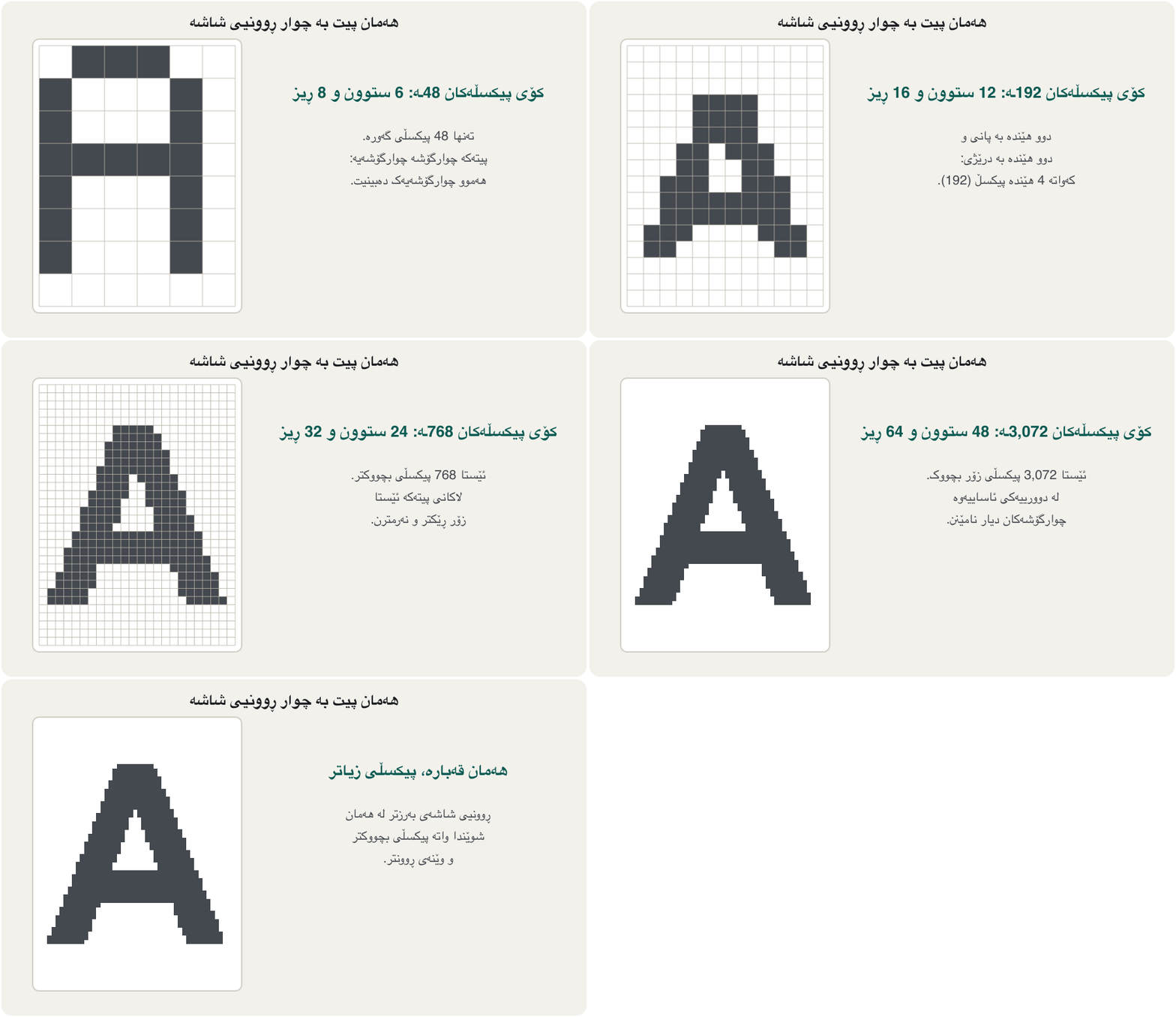
ژمارەی شاشەیەکە و بە شێوەی پانی × بەرزی دەنووسرێت، بۆ نموونە 1920 × 1080. پیکسڵی زیاتر وێنەیەکی ڕوونتر دەدات.
The resolution of a screen is the number of pixels across and down, written width × height: a Full HD screen is 1920 × 1080, that is 1,920 pixels in each row and 1,080 rows.
ژمارەی ئەو کە بە پانی و بە درێژی هەن، بە شێوەی پانی × بەرزی دەنووسرێت: شاشەیەکی Full HD ـە، واتە هەر ڕیزێک 1,920 و 1,080 ڕیز.
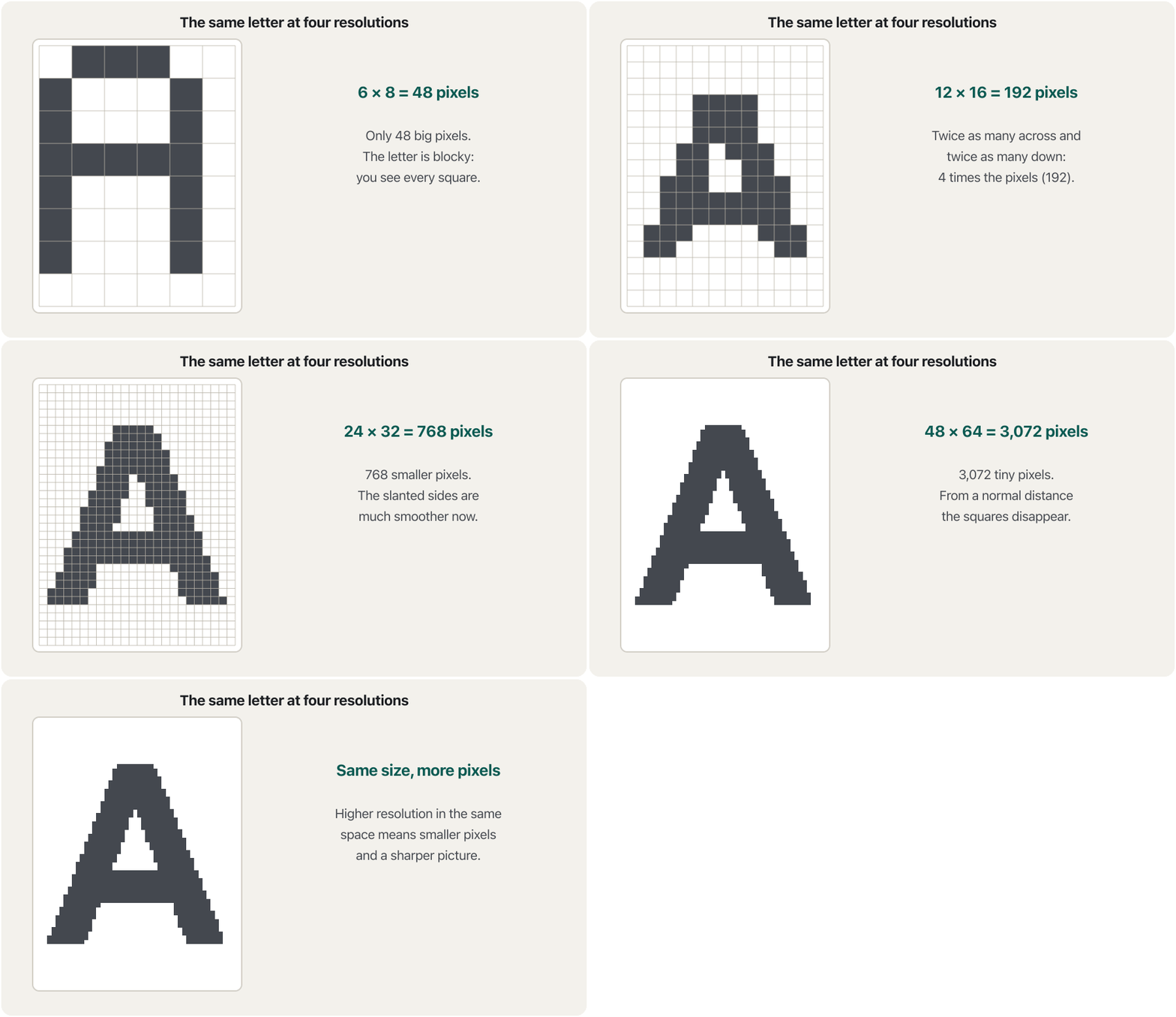
More pixels in the same size of screen means smaller pixels and sharper text. That is why the pixel density matters as much as the resolution. It is measured in pixels per inch (PPI):
زیاتر لە هەمان قەبارەی شاشەدا واتە بچووکتر و دەقی ڕوونتر. بۆیە هێندەی گرنگە. بە لە ئینجێکدا (PPI) دەپێورێت:
A 27-inch 4K monitor has about 163 PPI, almost twice as sharp as a 24-inch Full HD monitor (92 PPI). Phones reach 400–500 PPI because you hold them close.
27 ئینجیی 4K نزیکەی 163 PPIـی هەیە، نزیکەی دوو هێندە ڕوونترە لە 24 ئینجیی Full HD (92 PPI). مۆبایل دەگاتە 400 تا 500 PPI چونکە لە چاوتەوە نزیکی ڕادەگریت.
Resolution: how many pixelsڕوونیی شاشە: چەند پیکسڵ
Resolution names and aspect ratiosناوی ڕوونییەکانی شاشە و ڕێژەی پانی بۆ بەرزی
The aspect ratio is the shape of the screen: width compared to height. Most monitors and TVs today are 16:9 (wide); old monitors were 4:3 (almost square); ultrawide monitors are about 21:9 and super-ultrawide ones 32:9, like two 16:9 screens side by side.
شێوەی شاشەکەیە: پانی بەراورد بە بەرزی. زۆربەی و تیڤییەکانی ئەمڕۆ 16:9ـن (پان)؛ کۆن 4:3 بوون (نزیکەی چوارگۆشە)؛ زۆر پان نزیکەی 21:9ـن و ئەوانەی زۆر زۆر پان 32:9ـن، وەک دوو شاشەی 16:9 لە تەنیشت یەکەوە.
| Aspect ratio | Resolutions (width × height) (پانی × بەرزی) |
|---|---|
| 4:3 | 640 × 480 · 1440 × 1080 · 1920 × 1440 · 2048 × 1536 |
| 16:9 | 1280 × 720 (720p, HD) · 1920 × 1080 (1080p, Full HD) · 2560 × 1440 (1440p, QHD) · 3840 × 2160 (4K UHD) · 5120 × 2880 (5K) · 7680 × 4320 (8K) |
| 21:9 (ultrawide)21:9 (زۆر پان) | 2560 × 1080 · 3440 × 1440 · 5120 × 2160 |
| 32:9 (super-ultrawide)32:9 (زۆر زۆر پان) | 3840 × 1080 · 5120 × 1440 |
Refresh rateڕێژەی نوێبوونەوە
A screen does not show one still picture: it draws a new picture many times every second, like the pages of a flip book. The refresh rate is how many times per second the screen can draw a new picture, measured in hertz (Hz). An office monitor is usually 60 Hz; gaming monitors are 144, 240 Hz or more.
شاشە یەک وێنەی وەستاو پیشان نادات: لە هەر چرکەیەکدا چەندین جار وێنەیەکی نوێ دەکێشێت، وەک لاپەڕەکانی کتێبێکی وێنەی جووڵاو. ئەوەیە شاشەکە لە چرکەیەکدا چەند جار دەتوانێت وێنەیەکی نوێ بکێشێت و بە (Hz) دەپێورێت. ئۆفیس زۆرجار 60 Hzـە؛ یاری 144، 240 Hz یان زیاترن.
Refresh rateڕێژەی نوێبوونەوە
Response time: how fast a pixel changesکاتی وەڵامدانەوە: پیکسڵ چەند خێرا دەگۆڕێت
Response time is something different: how quickly one pixel can change colour, for example from grey to grey, in milliseconds. A slow response leaves a blurry trail behind moving objects (ghosting). OLED pixels change in about 0.1 ms; LCD pixels take about 1–5 ms.
شتێکی ترە: یەک چەند خێرا دەتوانێت ڕەنگ بگۆڕێت، بۆ نموونە لە خۆڵەمێشییەکەوە بۆ خۆڵەمێشییەکی تر، بە میلیچرکە. وەڵامدانەوەی هێواش شوێنەوارێکی تەڵخ لە پشت شتە جووڵاوەکان بەجێ دەهێڵێت (ghosting). لە نزیکەی 0.1 msـدا دەگۆڕێن؛ نزیکەی 1 تا 5 ms دەخایەنن.
How an LCD worksLCD چۆن کار دەکات
LCD stands for liquid-crystal display. Liquid crystals do not make light. They are like tiny window blinds: a voltage turns them so that they let more or less light through. So an LCD needs a light behind it, the backlight, and two polarising filters, one behind the crystals and one in front. Red, green and blue colour filters turn the white light into the three subpixels.
واتە شاشەی کریستاڵی شل. کریستاڵە شلەکان ڕووناکی دروست ناکەن. وەک پەردەی زۆر بچووکی پەنجەرە وان: دەیانسووڕێنێت بۆ ئەوەی ڕووناکیی زیاتر یان کەمتر تێپەڕێنن. بۆیە پێویستی بە ڕووناکییەک لە پشتیەوە هەیە (). هەروەها دوو پاڵێوەری پۆلارایزەری هەیە، یەکێک لە پشت کریستاڵەکان و یەکێک لە پێشیانەوە. پاڵێوەری ڕەنگی سوور، سەوز و شین ڕووناکییە سپییەکە دەکەن بە سێ .
The lecture notes describe the LCD monitor this way: a lifespan of about 30,000 hours, Full HD (1920 × 1080, width by height), thick and heavy, and a low price. Those points describe the older LCDs that were lit by fluorescent tubes (CCFL).
تێبینییەکانی وانە بەم شێوەیە وەسف دەکەن: تەمەنێکی نزیکەی 30,000 کاتژمێر، Full HD (، پانی بە بەرزی)، ئەستوور و قورس و نرخی کەم. ئەم خاڵانە کۆنەکان وەسف دەکەن کە بە لوولەی فلۆرێسنت (CCFL) ڕووناک دەکرانەوە.
How an LCD worksLCD چۆن کار دەکات
LED, mini-LED and QLED screensشاشەی LED، Mini-LED و QLED
Shops sell “LED monitors” and “QLED TVs”, which sounds like a new kind of screen. In fact these are LCDs with better backlights:
دوکانەکان « » و «تیڤیی » دەفرۆشن، کە وا دەردەکەوێت جۆرێکی نوێی شاشە بن. لە ڕاستیدا ئەمانە بە باشتر:
| Name in the shopناو لە دوکاندا | What it really isلە ڕاستیدا چییە | Strengths and weaknessesخاڵی بەهێز و لاواز |
|---|---|---|
| LED monitor | An LCD lit by LEDs at the edge or behind the panel کە بە لە لێوار یان پشتی شاشەکەوە ڕووناک دەکرێتەوە | Brighter, thinner and uses less power than the old fluorescent backlights; faster response (notes: about 50,000 hours)ڕووناکتر، تەنکتر و کارەبای کەمتر بەکار دەهێنێت لە کۆنی لوولەی فلۆرێسنت؛ وەڵامدانەوەی خێراتر (تێبینییەکان: نزیکەی 50,000 کاتژمێر) |
| Mini-LED | An LCD whose backlight has thousands of tiny LEDs in hundreds or thousands of dimming zones کە هەزاران زۆر بچووکی هەیە لە سەدان یان هەزاران ناوچەی کزکردندا | Dark parts of the picture can be dimmed zone by zone: deeper blacks and very bright highlightsبەشە تاریکەکانی وێنە ناوچە بە ناوچە کز دەکرێن: ڕەشی قووڵتر و ڕووناکیی زۆر بەرز |
| QLED | An LCD with a blue LED backlight and a layer of quantum dots that turn blue light into pure red and green بە شین و چینێک quantum dot کە ڕووناکیی شین دەکەن بە سوور و سەوزی پاک | Bright picture, rich colours; more expensive than other LED screensوێنەی ڕووناک و ڕەنگی دەوڵەمەند؛ لە شاشەکانی تری گرانترە |
LED, QLED and mini-LED TVs are LCDs with better backlights; OLED is different because each pixel makes its own light.
تەلەفزیۆنەکانی ، و هەموویان بە باشترەوە؛ جیاوازە چونکە هەر ڕووناکیی خۆی دروست دەکات.
Watch 5:04-11:53: LCD, LED, OLED, QLED and mini-LED.
لە 5:04 تا 11:53 سەیر بکە: ، ، ، و .
OLED: every pixel makes its own lightOLED: هەر پیکسڵێک ڕووناکیی خۆی دروست دەکات
In an OLED (organic light-emitting diode) screen there is no backlight. Every subpixel is a tiny light made of organic material that glows when current flows. A bright white pixel can sit right next to a completely black one, because the black pixel is simply switched off.
لە شاشەی نییە. هەر گڵۆپێکی زۆر بچووکە لە ماددەی ئۆرگانی کە کاتێک کارەبای پێدا دەڕوات ڕووناک دەبێتەوە. سپیی ڕووناک دەکرێت ڕاست لە تەنیشت تەواو ڕەشەوە بێت، چونکە ڕەشەکە بە سادەیی کوژاوەتەوە.
- Perfect blacks and very high contrast, because black pixels give no light.
- Slimmer and lighter: no backlight layer; some OLED screens even bend or fold.
- Very fast response, about 0.1 ms, so moving pictures are sharp.
- Risk of burn-in: if the same still image (a logo, a taskbar) stays for many hours, a faint ghost of it can remain. Screens fight this by moving pixels slightly and refreshing themselves.
- Higher price, and usually less full-screen brightness than the brightest mini-LED screens.
- ڕەشی تەواو و کۆنتراستی زۆر بەرز، چونکە ڕەش هیچ ڕووناکی نادات.
- تەنکتر و سووکتر: چینی نییە؛ هەندێک شاشەی تەنانەت دەچەمێنەوە یان دەقەدێنەوە.
- زۆر خێرا، نزیکەی 0.1 ms، بۆیە وێنە جووڵاوەکان ڕوونن.
- مەترسیی جێمانی وێنە (burn-in): ئەگەر هەمان وێنەی وەستاو (لۆگۆیەک، ) بۆ چەندین کاتژمێر بمێنێتەوە، سێبەرێکی کاڵی لێ بەجێ دەمێنێت. شاشەکان بە کەمێک جووڵاندنی و نوێکردنەوەی خۆیان بەرەنگاری ئەمە دەبنەوە.
- نرخی بەرزتر و زۆرجار ڕووناکیی کەمتر بۆ هەموو شاشەکە بەراورد بە ڕووناکترین شاشەکانی .
Before flat screens: CRT, plasma and SEDپێش شاشە تەختەکان: CRT، پلازما و SED
LCD and OLED were not the first displays. You may still meet these three older names in notes and exams, but none of them is sold today.
و یەکەم شاشەکان نەبوون. لەوانەیە هێشتا ئەم سێ ناوە کۆنە لە تێبینی و تاقیکردنەوەکاندا ببینیت، بەڵام ئەمڕۆ هیچیان نافرۆشرێن.
| Technologyتەکنەلۆژیا | How it made a pictureچۆن وێنەی دروست دەکرد | Strong and weak pointsخاڵی بەهێز و لاواز |
|---|---|---|
| CRT (cathode-ray tube)CRT (لوولەی تیشکی کاتۆد) | An electron beam in a deep glass tube swept across the screen and made coloured dots glowتیشکێکی ئەلیکترۆن لەناو لوولەیەکی شووشەی قووڵدا بەسەر شاشەکەدا دەگەڕا و خاڵە ڕەنگاوڕەنگەکانی ڕووناک دەکردەوە | Wide viewing angles and good colour; but deep, heavy and power-hungry. LCDs replaced it in the 2000s.گۆشەی بینینی فراوان و ڕەنگی باش؛ بەڵام قووڵ، قورس و کارەبا خۆر بوو. لە ساڵانی 2000ـدا جێگەی گرتەوە. |
| Plasmaپلازما | Tiny cells of gas between two glass sheets glowed like small neon lampsخانەی زۆر بچووکی گاز لە نێوان دوو پەڕە شووشەدا وەک گڵۆپی نیۆنی بچووک ڕووناک دەبوونەوە | Excellent viewing angles and contrast; but heavy and only in big sizes (32 inches and up). Makers stopped in 2014.گۆشەی بینین و کۆنتراستی زۆر باش؛ بەڵام قورس بوو و تەنها بە قەبارەی گەورە (32 ئینج و زیاتر) دروست دەکرا. دروستکەران لە 2014ـدا وەستان. |
| SED (surface-conduction electron-emitter display)SED (پیشاندەری دەرکەری ئەلیکترۆن بە گەیاندنی ڕووکار) | A flat panel in which every subpixel had its own tiny electron emitter, like millions of mini CRTsپانێڵێکی تەخت کە هەر دەرکەرێکی ئەلیکترۆنی بچووکی خۆی هەبوو، وەک ملیۆنان CRTـی زۆر بچووک | CRT-like picture in a thin panel, using less power than a CRT; never sold: Canon ended it in 2010.وێنەیەکی وەک CRT لە پانێڵێکی تەنکدا، بە کارەبای کەمتر لە CRT؛ هەرگیز نەفرۆشرا: Canon لە 2010ـدا کۆتایی پێهێنا. |
LCD panel types: TN, IPS and VAجۆرەکانی پانێڵی LCD: TN، IPS و VA
Inside an LCD, the liquid crystals can be arranged in three main ways. The arrangement changes the viewing angles, colours, contrast and speed, so monitor adverts always name the panel type.
لەناو کریستاڵە شلەکان بە سێ ڕێگەی سەرەکی ڕیز دەکرێن. ئەم ڕیزبوونە گۆشەی بینین، ڕەنگ، کۆنتراست و خێرایی دەگۆڕێت، بۆیە ڕیکلامی هەمیشە جۆری پانێڵەکە دەڵێن.
| Featureتایبەتمەندی | TN (twisted nematic) | IPS (in-plane switching) | VA (vertical alignment) |
|---|---|---|---|
| How the crystals sitکریستاڵەکان چۆن دادەنیشن | Twisted between two polarisers set at 90°لە نێوان دوو پۆلارایزەری 90 پلەییدا پێچ دەخۆن | Lie flat and turn parallel to the screenتەخت دەخەون و بە ئاراستەی تەریب لەگەڵ شاشەکە دەسووڕێنەوە | Stand upright (perpendicular) when off, so they block light wellکاتێک کوژاوەن ڕاست دەوەستن (ستوونی)، بۆیە ڕووناکی باش دەگرن |
| Viewing anglesگۆشەی بینین | Poor: colours change when you move your headخراپ: کاتێک سەرت دەجووڵێنیت ڕەنگەکان دەگۆڕێن | Best: up to about 178°باشترین: تا نزیکەی 178 پلە | Good, between TN and IPSباش، لە نێوان TN و IPSـدا |
| Coloursڕەنگ | Poor colour reproductionڕەنگ خراپ پیشان دەدات | Most accurateوردترین | Very good accuracyوردیی زۆر باش |
| Contrast (black)کۆنتراست (ڕەش) | Low, about 1000:1کەم، نزیکەی 1000:1 | Low, about 1000:1 (blacks look grey in the dark)کەم، نزیکەی 1000:1 (لە تاریکیدا ڕەش خۆڵەمێشی دەردەکەوێت) | Best of the three, about 3000:1 or moreباشترینی سێکیان، نزیکەی 3000:1 یان زیاتر |
| Speedخێرایی | Fastest: low response time and input lag, high refresh rates (240 Hz and more)خێراترین: و دواکەوتنی کەم، بەرز (240 Hz و زیاتر) | Fast; slightly slower than TN in the past, now often equalخێرا؛ لە ڕابردوودا کەمێک لە TN هێواشتر بوو، ئێستا زۆرجار وەک یەکن | Slowest: dark scenes can smear in fast gamesهێواشترین: دیمەنی تاریک لە یاریی خێرادا تەڵخ دەبێت |
| Price and useنرخ و بەکارهێنان | Cheapest; competitive gamingهەرزانترین؛ یاریی پێشبڕکێ | Higher price; designers, photographers, video makers, officeنرخی بەرزتر؛ دیزاینەر، وێنەگر، ڤیدیۆکار و ئۆفیس | Middle price; films, dark rooms, general useنرخی مامناوەند؛ فیلم، ژووری تاریک و بەکارهێنانی گشتی |
Kinds of monitorجۆرەکانی شاشە
| Kind of monitorجۆری | What makes it specialچی تایبەتی دەکات |
|---|---|
| General use and businessبەکارهێنانی گشتی و کار | Comfortable, affordable, often 24–27 inches, Full HD or QHD, a stand that adjusts heightئاسوودە و هەرزان، زۆرجار 24 تا 27 ئینج، Full HD یان QHD، پایەیەک کە بەرزییەکەی دەگۆڕدرێت |
| Professionalپیشەیی | Accurate colour for graphic design, photo and video work; often IPS, 10-bit colour, calibrated in the factoryڕەنگی ورد بۆ دیزاینی گرافیک، وێنە و ڤیدیۆ؛ زۆرجار IPS، ڕەنگی 10 و لە کارگەدا ڕێکخراوە |
| Gamingیاری | High refresh rate (144 Hz to 500 Hz and more) and fast response time بەرز (144 Hz تا 500 Hz و زیاتر) و خێرا |
| Ultrawide and curvedزۆر پان و چەماوە | 21:9 or 32:9 and bent towards you: more immersion and a stronger sense of depth; room for several windows side by side21:9 یان 32:9 و بەرەو تۆ چەماوە: هەستی زیاتری بوون لەناو وێنەکەدا و قووڵیی بەهێزتر؛ جێی چەند لە تەنیشت یەکەوە |
| HDR | A wider range of brightness and colour: high contrast, darker blacks and purer, brighter whitesمەودایەکی فراوانتری ڕووناکی و ڕەنگ: کۆنتراستی بەرز، ڕەشی تاریکتر و سپیی پاکتر و ڕووناکتر |
| Touchscreen | You touch the monitor itself: kiosks, shops, portable touch monitorsدەست لە خودی دەدەیت: کیۆسک، دوکان و گەڕۆک |
Kinds of monitorجۆرەکانی شاشە
HDR: more than a labelHDR: زیاتر لە ناوێک
HDR (high dynamic range) needs more than a label. A screen needs high brightness, deep blacks (a high contrast ratio) and 10-bit colour. The VESA DisplayHDR certificate gives a number for the brightness: DisplayHDR 400 is the entry level, DisplayHDR 1000 is very bright, and DisplayHDR True Black tiers are for OLED screens with real blacks.
(مەودای داینامیکیی بەرز) زیاتر لە ناوێکی پێویستە. شاشە پێویستی بە ڕووناکیی بەرز، ڕەشی قووڵ ( بەرز) و ڕەنگی 10 هەیە. بڕوانامەی DisplayHDRـی VESA ژمارەیەک بۆ ڕووناکییەکە دەدات: DisplayHDR 400 ئاستی سەرەتایە، DisplayHDR 1000 زۆر ڕووناکە و ئاستەکانی DisplayHDR True Black بۆ شاشەکانی کە ڕەشی ڕاستەقینەیان هەیە.
TVs as displaysتیڤی وەک شاشە
Many homes use a digital television (DTV) as a big display: you connect a laptop or games console with an HDMI cable. HDTV (high-definition TV) was for years the best kind of digital TV, at 720p or 1080p. A smart TV is an Internet-connected TV with apps, so it can stream films and videos by itself.
زۆرێک لە ماڵەکان تیڤیی دیجیتاڵ (DTV) وەک شاشەیەکی گەورە بەکار دەهێنن: یان ئامێری یاری بە وایەری پێیەوە دەبەستیت. HDTV (تیڤیی وردکاری بەرز) بۆ چەندین ساڵ باشترین جۆری تیڤیی دیجیتاڵ بوو، بە 720p یان 1080p. تیڤییەکە کە بە بەستراوە و هەیە، بۆیە خۆی دەتوانێت فیلم و ڤیدیۆ پەخش بکات.
Common mistakesهەڵە باوەکان
| Mistakeهەڵە | What is trueڕاستییەکە |
|---|---|
| “An LED monitor is not an LCD.”« نییە.» | It is an LCD with an LED backlight; only OLED makes light in every pixel. بە ؛ تەنها لە هەر ڕووناکی دروست دەکات. |
| “A bigger screen is sharper.”«شاشەی گەورەتر ڕوونترە.» | Sharpness depends on pixel density: the same resolution on a bigger screen is less sharp.ڕوونی پەیوەندی بە هەیە: هەمان لەسەر شاشەی گەورەتر کەمتر ڕوونە. |
| “240 Hz always means 240 frames per second.”«240 Hz هەمیشە واتە 240 وێنە لە چرکەیەکدا.» | Only if the computer makes 240 frames; the refresh rate is the most the screen can show.تەنها ئەگەر 240 وێنە دروست بکات؛ زۆرترینە کە شاشەکە دەتوانێت پیشانی بدات. |
| “Refresh rate and response time are the same.”« و یەک شتن.» | Refresh rate = new pictures per second; response time = how fast one pixel changes colour. = وێنەی نوێ لە چرکەیەکدا؛ = یەک چەند خێرا ڕەنگ دەگۆڕێت. |
| “OLED has narrow viewing angles.”« گۆشەی بینینی تەسکی هەیە.» | OLED has very wide viewing angles; its weak points are burn-in and price. گۆشەی بینینی زۆر فراوانی هەیە؛ لایەنە لاوازەکانی جێمانی وێنە و نرخن. |
| “HDTV is the best TV.”«HDTV باشترین تیڤییە.» | 4K is standard today and 8K exists.ئەمڕۆ 4K ئاساییە و 8Kـیش هەیە. |
Exercisesڕاهێنانەکان
(a) How many pixels does a Full HD screen have? (b) How many does a 4K screen have? (c) How many times more is that?
(أ) شاشەیەکی Full HD چەند هەیە؟ (ب) شاشەیەکی 4K چەندی هەیە؟ (ج) ئەمە چەند هێندە زیاترە؟
Show answerوەڵامەکە پیشان بدە
4K has four times the pixels of Full HD, so the graphics card must draw four times as much for every picture.
4K چوار هێندەی Full HD هەیە، بۆیە دەبێت بۆ هەر وێنەیەک چوار هێندە زیاتر بکێشێت.
Work out the pixel density (PPI) of a 24-inch 1920 × 1080 monitor and a 27-inch 2560 × 1440 monitor. Which shows sharper text?
(PPI)ـی 24 ئینجیی و 27 ئینجیی حیساب بکە. کامیان دەقی ڕوونتر پیشان دەدات؟
Hintئاماژە
Use Pythagoras for the diagonal in pixels, then divide by the diagonal in inches.
بۆ هێڵە لارەکە بە یاسای فیساغۆرس بەکار بهێنە، پاشان دابەشی بکە بەسەر هێڵە لارەکە بە ئینج.
Show answerوەڵامەکە پیشان بدە
The 27-inch QHD monitor is sharper (about 109 against 92 PPI), even though it is bigger, because it has many more pixels.
27 ئینجیی QHD ڕوونترە (نزیکەی 109 بەرامبەر 92 PPI)، هەرچەندە گەورەترە، چونکە زۆر زیاتری هەیە.
(a) Is 5120 × 2889 a 16:9 resolution? (b) Is 2560 × 1080 exactly 21:9? (c) How long is each picture shown at 144 Hz?
(أ) ئایا 16:9ـە؟ (ب) ئایا ڕێک 21:9ـە؟ (ج) لە 144 Hzـدا هەر وێنەیەک چەند پیشان دەدرێت؟
Show answerوەڵامەکە پیشان بدە
(a) No: 16:9 needs a height of 2880, so 2889 is a typo. (b) Not exactly: it is 64:27, sold under the rounded name 21:9. (c) About 6.9 milliseconds.
(أ) نەخێر: 16:9 بەرزیی 2880ـی پێویستە، کەواتە 2889 هەڵەی نووسینە. (ب) ڕێک نا: 64:27ـە و بە ناوی خڕکراوەی 21:9 دەفرۆشرێت. (ج) نزیکەی 6.9 میلیچرکە.
Recommend a kind of screen (panel type, refresh rate, size or resolution) for: (a) Karwan, a competitive gamer; (b) Hana, who edits photos; (c) a family that watches films in a dark room; (d) an office worker who uses spreadsheets all day; (e) a shop window sign that shows the same logo all day.
جۆرێک شاشە (جۆری پانێڵ، ، قەبارە یان ) پێشنیار بکە بۆ: (أ) کاروان، یاریزانێکی پێشبڕکێ؛ (ب) هانا کە وێنە دەستکاری دەکات؛ (ج) خێزانێک کە لە ژوورێکی تاریکدا فیلم دەبینن؛ (د) کارمەندێکی ئۆفیس کە هەموو ڕۆژ بەکار دەهێنێت؛ (هـ) تابلۆی پەنجەرەی دوکانێک کە هەموو ڕۆژ هەمان لۆگۆ پیشان دەدات.
Show answerوەڵامەکە پیشان بدە
- (a) A fast monitor with a high refresh rate (240 Hz or more) and low response time: TN, fast IPS or OLED.
- (b) A professional IPS monitor with accurate, 10-bit colour.
- (c) An OLED or mini-LED TV with real HDR: deep blacks and high contrast (a VA panel if the budget is small).
- (d) A 24–27 inch IPS monitor, Full HD or QHD, with a height-adjustable stand set at eye level.
- (e) A bright LCD or mini-LED screen, not OLED, because a fixed logo can cause burn-in.
- (أ) خێرا بە بەرز (240 Hz یان زیاتر) و کەم: TN، IPSـی خێرا یان .
- (ب) پیشەیی IPS بە ڕەنگی وردی 10 .
- (ج) تیڤیی یان بە ڕاستەقینە: ڕەشی قووڵ و کۆنتراستی بەرز (پانێڵی VA ئەگەر بودجە کەم بێت).
- (د) 24 تا 27 ئینجیی IPS، Full HD یان QHD، بە پایەیەک کە بەرزییەکەی دەگۆڕدرێت و بەرامبەر چاو دانراوە.
- (هـ) شاشەیەکی ڕووناکی یان ، نەک ، چونکە لۆگۆیەکی جێگیر دەتوانێت ببێتە هۆی جێمانی وێنە.
An older exam asked: “Which monitor does not have excellent viewing angles: plasma, LCD or CRT?” Give the answer and say what has changed since then.
تاقیکردنەوەیەکی کۆن پرسیویەتی: «کام شاشە گۆشەی بینینی زۆر باشی نییە: پلازما، یان CRT؟» وەڵامەکە بدەرەوە و بڵێ لەو کاتەوە چی گۆڕاوە.
Show answerوەڵامەکە پیشان بدە
LCD. Early (TN) LCDs looked darker and changed colour when seen from the side, while CRT and plasma screens made their own light and looked the same from almost any angle. Today IPS and VA panels (and OLED) have fixed most of this; only cheap TN panels still show it (LCD panel types).
. یەکەم جۆرەکانی (TN) لە لاوە تاریکتر دەردەکەوتن و ڕەنگیان دەگۆڕا، بەڵام شاشەکانی CRT و پلازما ڕووناکیی خۆیان دروست دەکرد و لە نزیکەی هەموو گۆشەیەکەوە وەک یەک دەردەکەوتن. ئەمڕۆ پانێڵەکانی IPS و VA (و ) زۆربەی ئەمەیان چارەسەر کردووە؛ تەنها پانێڵە هەرزانەکانی TN هێشتا وان (جۆرەکانی پانێڵی LCD).
Summaryپوختە
- A display shows text, graphics and video; a monitor is a display packaged as a separate device.
- A picture is a grid of pixels; each pixel has red, green and blue subpixels. 8-bit colour gives about 16.7 million colours, 10-bit about 1.07 billion.
- Resolution = pixels across × down (1080p, 1440p, 4K, 8K). Pixel density (PPI) decides sharpness. Aspect ratio is the shape: 4:3, 16:9, 21:9, 32:9.
- Refresh rate (Hz) = new pictures per second; response time = how fast a pixel changes.
- An LCD filters light from a backlight; LED, mini-LED and QLED screens are LCDs with better backlights. TN is fast, IPS has the best colours and angles, VA the best contrast.
- OLED pixels make their own light: perfect blacks, wide angles, fast response, but a risk of burn-in.
- Before LCD and OLED came CRT tubes (deep and heavy), plasma TVs (great angles, ended 2014) and SED (never sold).
- Monitors come for general use, professional work, gaming, ultrawide/curved, HDR and touch; 4K smart TVs are common displays at home.
- شاشە دەق، گرافیک و ڤیدیۆ پیشان دەدات؛ شاشەیەکە کە وەک ئامێرێکی جیا دروست کراوە.
- وێنە تۆڕێکە لە ؛ هەر سوور، سەوز و شینی هەیە. ڕەنگی 8 نزیکەی 16.7 ملیۆن ڕەنگ دەدات و 10 نزیکەی 1.07 ملیار.
- = بە پانی × بە درێژی (1080p، 1440p، 4K، 8K). (PPI) ڕوونی دیاری دەکات. شێوەکەیە: 4:3، 16:9، 21:9 و 32:9.
- (Hz) = وێنەی نوێ لە چرکەیەکدا؛ = چەند خێرا دەگۆڕێت.
- ئەو ڕووناکییە دەپاڵێوێت کە لە دێت؛ شاشەکانی ، و بە باشتر. TN خێرایە، IPS باشترین ڕەنگ و گۆشەی هەیە و VA باشترین کۆنتراست.
- ڕووناکیی خۆیان دروست دەکەن: ڕەشی تەواو، گۆشەی فراوان و وەڵامدانەوەی خێرا، بەڵام مەترسیی جێمانی وێنە هەیە.
- پێش و ، لوولەی CRT (قووڵ و قورس)، تیڤیی پلازما (گۆشەی باش، لە 2014ـدا کۆتایی هات) و SED (هەرگیز نەفرۆشرا) هەبوون.
- بۆ بەکارهێنانی گشتی، کاری پیشەیی، یاری، زۆر پان/چەماوە، و دەستلێدان هەن؛ 4K شاشەی باوی ماڵن.
What is the difference between resolution and pixel density?جیاوازیی نێوان ڕوونیی شاشە و چڕیی پیکسڵ چییە؟
Resolution counts the pixels (for example 3840 × 2160); pixel density says how tightly they are packed (pixels per inch), which decides how sharp the screen looks.
دەژمێرێت (بۆ نموونە )؛ دەڵێت چەند چڕ ڕیز کراون ( لە ئینجێکدا)، کە ڕوونیی وێنەکە دیاری دەکات.
Why can an OLED show perfect black but an LCD cannot?بۆچی OLED دەتوانێت ڕەشی تەواو پیشان بدات بەڵام LCD ناتوانێت؟
An OLED pixel can switch off completely; an LCD's backlight stays on and a little light leaks through the crystals.
دەتوانێت بە تەواوی بکوژێتەوە؛ هەڵکراو دەمێنێتەوە و کەمێک ڕووناکی بە ناو کریستاڵەکاندا دزە دەکات.
How long is one picture shown on a 60 Hz screen?لەسەر شاشەیەکی 60 Hz یەک وێنە چەند پیشان دەدرێت؟
milliseconds.
میلیچرکە.
Videoڤیدیۆ
Watch a videoسەیری ڤیدیۆیەک بکە
A video that viewers liked a lot and praised in their comments, chosen for this lesson.ڤیدیۆیەک کە بینەران زۆریان پێ خۆش بووە و لە کۆمێنتەکانیاندا ستایشیان کردووە، بۆ ئەم وانەیە هەڵبژێردراوە.
CRT, LCD and OLED monitors, TN, IPS and VA panels, refresh rate, response time, resolution and aspect ratio in one tour.
CRT، و ، پانێڵەکانی TN، IPS و VA، ، ، و لە یەک گەشتدا.
Covers almost every screen of this lesson.
نزیکەی هەموو بەشەکانی ئەم وانەیە دەگرێتەوە.
Lesson complete!وانەکە تەواو بوو!
Well done. Review the key terms, then go on to the next lesson.دەستخۆش. سەیرێکی زاراوە سەرەکییەکان بکەرەوە، پاشان بڕۆ بۆ وانەی داهاتوو.
Key termsزاراوە سەرەکییەکان
Printers, Speakers, Projectors and Assistive Technologyچاپەرەکان، بڵندگۆکان، پرۆجێکتەرەکان و تەکنەلۆژیای یارمەتیدەر
Related lecturesوانە پەیوەندیدارەکان
References and further readingسەرچاوەکان و خوێندنەوەی زیاتر
- Wikipedia: Liquid-crystal display
- Samsung: IPS vs OLED vs VA vs TN monitor buying guide
- Samsung: Mini LED vs OLED
- Samsung: Mini LED vs QLED
- LG: OLED reliability (image retention)
- VESA DisplayHDR: Performance criteria
- Intel: Introducing 10-bit color depth
- ITU-R Recommendation BT.2020 (UHDTV: 3840 × 2160 and 7680 × 4320)
- Wikipedia: 1440p (QHD)
- ASUS: ROG Swift Pro PG248QP (540 Hz)
- LG Newsroom: World's first native 1000Hz Full HD gaming monitor (2026)
- ASUS Press: ROG at Gamescom 2026 (720 Hz OLED monitor)
- Wikipedia: Plasma display (production ended 2014)
- Wikipedia: Surface-conduction electron-emitter display (SED)
- Wikipedia: Light pen (works with CRT beam timing)
This lecture is a first edition. The Kurdish text and terminology are waiting for review by Kurdish IT teachers.ئەم وانەیە چاپی یەکەمە. دەقە کوردییەکە و زاراوەکانی چاوەڕێی پێداچوونەوەی مامۆستایانی کوردی بواری IT ن.