Chapterبەش 4 · Lectureوانە 4.3
SSDs, Memory Cards and Flash DrivesSSD، کارتەکانی بیرگە و بیرگەکانی فلاش
Flash memory and how it stores bits (SLC to QLC), what an SSD is and why it beat the hard disk in laptops, the lecturer's SSD-vs-HDD handout corrected for 2026, SSD shapes and connections (2.5-inch SATA, mSATA, M.2, NVMe over PCIe 3.0–6.0), wear, TBW and TRIM, memory cards and how an SD card works, card speed classes and SD Express, and USB flash drives.
و چۆنیەتی هەڵگرتنی (لە SLC تا QLC)، SSD چییە و بۆچی لە بەزاند، پەڕەی SSD بەرامبەر HDDـی مامۆستا ڕاستکراوە بۆ 2026، شێوە و پەیوەندییەکانی SSD (SATAـی 2.5 ئینج، mSATA، M.2، NVMe بەسەر PCIe 3.0–6.0ـدا)، سوان، TBW و TRIM، و SD چۆن کار دەکات، کارتەکان، SD Express و .
What you will learnچی فێر دەبیت
- Explain how flash memory stores data and what SLC, MLC, TLC and QLC mean.
- Describe an SSD, its advantages over a hard disk, and correct outdated claims about the two.
- Tell a form factor (2.5-inch, M.2) from an interface (SATA, NVMe over PCIe) and estimate their speeds.
- Use TBW, wear leveling and TRIM to judge how long an SSD will last.
- Choose a memory card by family (SDHC, SDXC, SDUC) and speed class, and use USB flash drives safely.
- ڕوون بکەیتەوە چۆن هەڵدەگرێت و SLC، MLC، TLC و QLC واتای چین.
- SSD و سوودەکانی بەراورد بە وەسف بکەیت و بانگەشە کۆنەکانی دەربارەی هەردووکیان ڕاست بکەیتەوە.
- (2.5 ئینج، M.2) لە (SATA، NVMe بەسەر PCIeـدا) جیا بکەیتەوە و خێراییەکانیان بە نزیکەیی بزانیت.
- بە TBW، و TRIM هەڵبسەنگێنیت SSD چەند دەمێنێت.
- بەپێی خێزان (SDHC، SDXC، SDUC) و هەڵبژێریت و بە سەلامەتی بەکار بهێنیت.
Flash memory: storage with no moving partsفلاش مێمۆری: خەزنکردن بەبێ پارچەی جووڵاو
Non-volatile memory on chips with no moving parts, which can be erased and rewritten electrically. It is inside SSDs, USB flash drives, memory cards and phones, and holds a PC's firmware.
بیرگەیەکی زوونەفڕە لەسەر چیپ بەبێ بەشی جووڵاو، کە بە کارەبا دەسڕدرێتەوە و دووبارە دەنووسرێتەوە. لەناو SSD، ، و مۆبایلدایە و کۆمپیوتەریش هەڵدەگرێت.
A hard disk keeps data as magnetism on spinning platters. Flash memory keeps it as tiny amounts of electric charge trapped inside millions of microscopic cells on a chip. A trapped charge stays for years without power, so flash is non-volatile — and because nothing moves, it is fast, silent and does not mind being carried around.
وەک موگناتیس لەسەر سووڕاو هەڵدەگرێت. وەک بڕێکی زۆر کەمی باری کارەبا هەڵدەگرێت کە لەناو ملیۆنان خانەی زۆر وردی سەر گیراوە. بارێکی گیراو ساڵانێک بەبێ کارەبا دەمێنێتەوە، بۆیە زوونەفڕە — و چونکە هیچ شتێک ناجووڵێت، خێرا و بێدەنگە و بەرگەی هەڵگرتن و گواستنەوە دەگرێت.
- Flash was invented by Fujio Masuoka at Toshiba in 1980. The kind used for storage is called NAND flash.
- NAND reads and writes in pages (a few KB) but can only erase whole blocks of many pages. That rule explains TRIM and wear later in this lesson.
- Flash is inside SSDs, USB flash drives, memory cards and every smartphone.
- لە ساڵی 1980ـدا لەلایەن Fujio Masuokaـوە لە Toshiba داهێنرا. ئەو جۆرەی بۆ بەکار دێت پێی دەوترێت NAND.
- NAND بە پەڕە (چەند KBـێک) دەخوێنێتەوە و دەنووسێت، بەڵام تەنها دەتوانێت بلۆکی تەواو بسڕێتەوە کە چەندین پەڕەیان تێدایە. ئەم ڕێسایە دواتر لەم وانەیەدا TRIM و سوان ڕوون دەکاتەوە.
- لەناو SSD، ، و هەموو .
A spice seller in the bazaar keeps hundreds of small jars on a wall. He can see every jar at once and grab any one in a second — no walking to a back room, no turning anything. Flash is like that wall: every cell is reached electronically in about the same short time.
بەهاراتفرۆشێک لە بازاڕ سەدان دەفری بچووکی لەسەر دیوارێک داناوە. دەتوانێت هەموو دەفرەکان پێکەوە ببینێت و لە چرکەیەکدا هەر یەکێکیان هەڵبگرێت — نە دەڕوات بۆ ژووری پشتەوە و نە هیچ شتێک دەسووڕێنێتەوە. وەک ئەو دیوارەیە: دەستگەیشتن بە هەر خانەیەک بە شێوەی ئەلیکترۆنی لە هەمان کاتی کورتدا دەبێت.
Where the analogy stops workingسنووری ئەم نموونەیە
He can refill a jar whenever he likes. A flash cell must have its whole block emptied before it is rewritten, and each cell can be emptied only a limited number of times.
ئەو هەر کاتێک بیەوێت دەتوانێت دەفرێک پڕ بکاتەوە. خانەیەکی فلاش پێش دووبارە نووسین دەبێت هەموو بلۆکەکەی بەتاڵ بکرێتەوە و هەر خانەیەک تەنها ژمارەیەکی سنووردار جار دەتوانرێت بەتاڵ بکرێتەوە.
Zooms into a flash chip: how one memory cell traps electrons and how cells are stacked into strings and pages.
نزیک دەبێتەوە لە فلاش: یەک خانەی چۆن ئەلیکترۆن گیر دەکات و خانەکان چۆن لەسەر یەک ڕیز دەکرێن بۆ زنجیرە و لاپەڕە.
Plays 5:19-10:34: a single flash cell, then vertical strings and pages of cells.
لە 5:19 تا 10:34 پەخش دەبێت: تاکە خانەیەکی فلاش، پاشان زنجیرە ستوونییەکان و لاپەڕەکانی خانە.
SLC, MLC, TLC and QLCSLC، MLC، TLC و QLC
A cell does not only hold «charged» or «empty». It can hold several levels of charge, and each extra bit doubles the number of levels the chip must tell apart:
خانەیەک تەنها «بارکراو» یان «بەتاڵ» هەڵناگرێت. دەتوانێت چەند ئاستێکی بار هەڵبگرێت و هەر زیادە ژمارەی ئەو ئاستانە دوو هێندە دەکات کە دەبێت لە یەکتریان جیا بکاتەوە:
| Typeجۆر | Bits per cell لە هەر خانەیەکدا | Good atباشە بۆ | Weak atلاوازە لە |
|---|---|---|---|
| SLC | 1 | speed and very long lifeخێرایی و تەمەنی زۆر درێژ | very expensive per TBزۆر گرانە بۆ هەر TB |
| MLC | 2 | balance of speed and lifeهاوسەنگیی خێرایی و تەمەن | now rare in new drivesئێستا لە درایڤی نوێدا کەمە |
| TLC | 3 | most home SSDs today: good speed, good priceزۆربەی SSDـی ماڵەوەی ئەمڕۆ: خێرایی و نرخی باش | fewer write cycles than MLCژمارەی نووسینی کەمتر لە MLC |
| QLC | 4 | the most terabytes for the money; huge data-centre SSDsزۆرترین TB بە هەمان پارە؛ SSDـی زۆر گەورەی | slowest writing, fewest write cyclesهێواشترین نووسین، کەمترین ژمارەی نووسین |
What an SSD isSSD چییە
A that keeps data on (flash memory) and has no moving parts. It is much faster, quieter and tougher than a .
کە لەسەر چیپی بیرگەی فلاش هەڵدەگرێت و هیچ پارچەیەکی جووڵاوی تێدا نییە. زۆر خێراتر، بێدەنگتر و بەهێزترە لە .
A solid-state drive (SSD) is a storage device built from flash memory chips plus its own processor, the controller, which manages where every piece of data goes. «Solid state» means it is all electronics — no motors, no platters, no arm. Many SSDs also have a small DRAM cache that helps the controller keep track of the flash; cheaper «DRAM-less» drives borrow a little of the computer's RAM instead.
(SSD) کە لە و پرۆسێسەری تایبەتی خۆی دروست کراوە: ، کە بەڕێوەی دەبات هەر پارچەیەکی بچێتە کوێ. «جێگیر» واتە هەمووی ئەلیکترۆنییە — نە مۆتۆر، نە ، نە باسک. زۆرێک لە SSDـەکان بچووکی DRAMـیشیان هەیە کە یارمەتیی دەدات شوێنی هەموو شتێک لە فلاشەکەدا بزانێت؛ درایڤە هەرزانەکانی «بێ DRAM» لە جیاتی ئەوە کەمێک لە RAMـی بەکار دەهێنن.
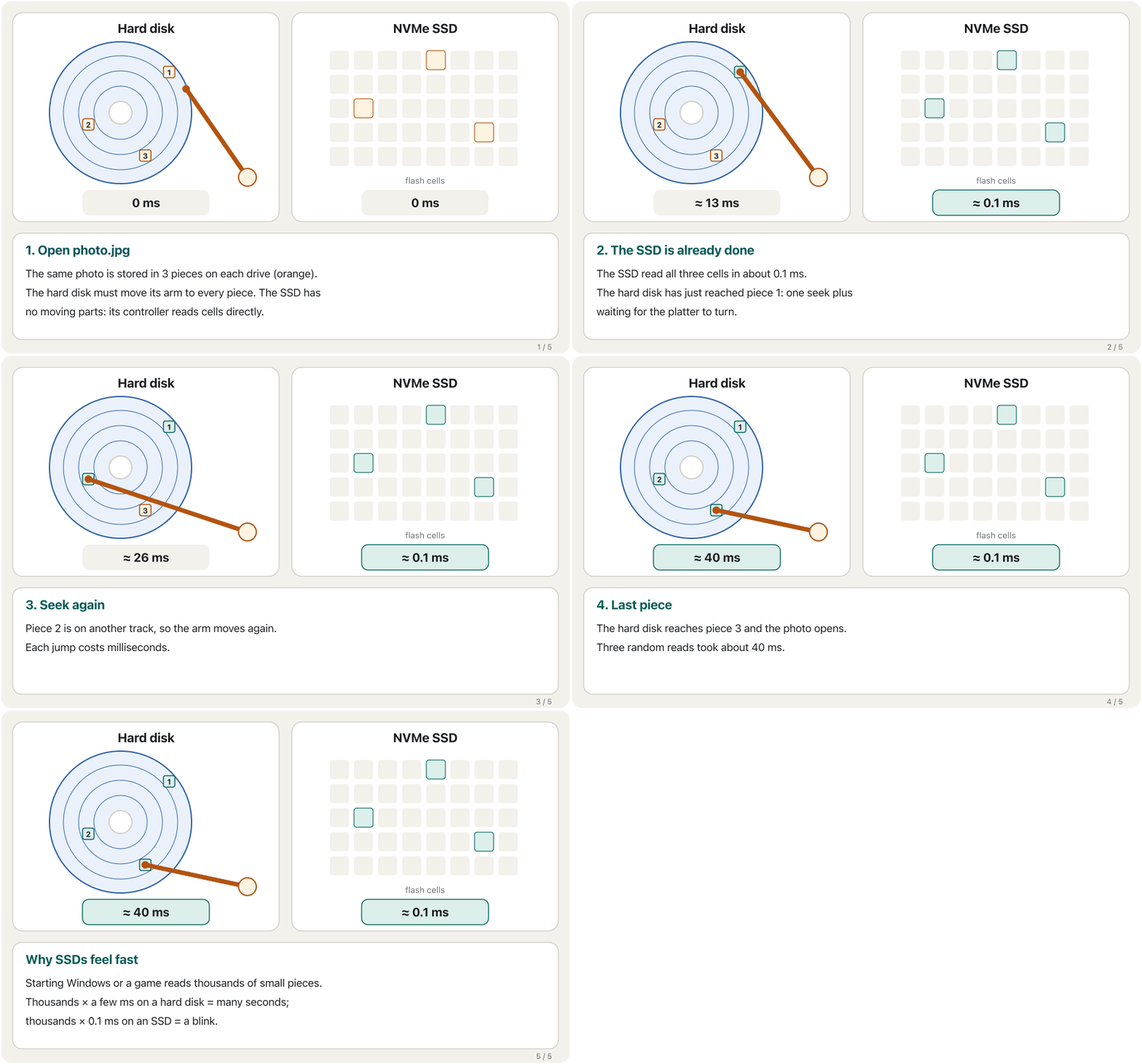
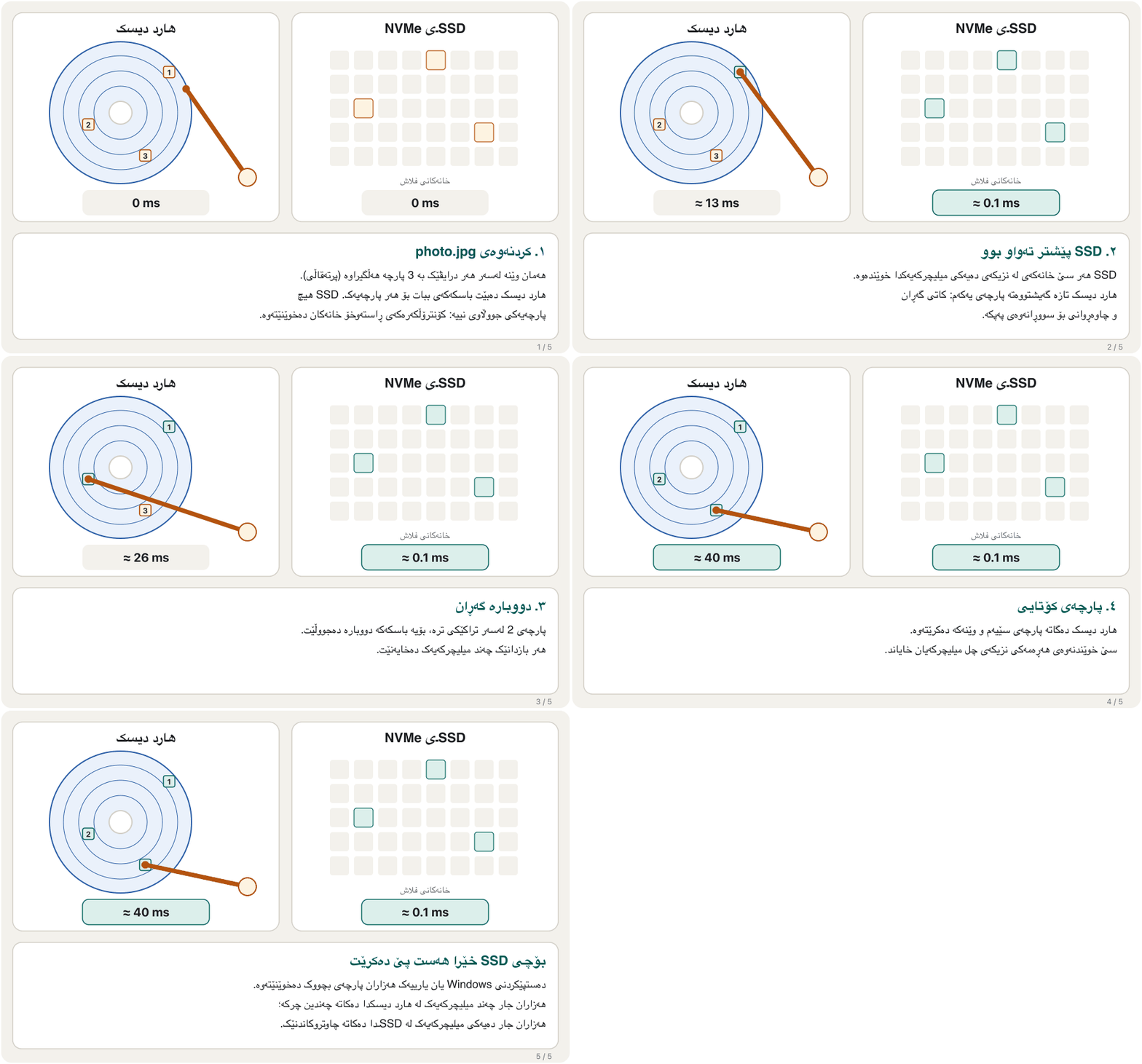
Watch the same photo, stored in three pieces, being opened from a hard disk and from an SSD:
سەیری هەمان وێنە بکە کە بە سێ پارچە هەڵگیراوە و لە و لە SSDـەوە دەکرێتەوە:
Why SSDs replaced hard disks in laptopsبۆچی SSD لە لاپتۆپەکاندا جێگەی هارد دیسکی گرتەوە
The course lists the advantages of SSDs over magnetic hard disks. Each one comes from the same fact — nothing moves:
کۆرسەکە سوودەکانی SSD بەراورد بە موگناتیسی دەژمێرێت. هەموویان لە هەمان ڕاستییەوە دێن — هیچ شتێک ناجووڵێت:
| Advantageسوود | Whyبۆچی |
|---|---|
| Faster access time خێراتر | No seek and no waiting for a platter: about 0.1 ms instead of about 10 ms.نە گەڕان و نە چاوەڕوانی بۆ : نزیکەی 0.1 ms لە جیاتی نزیکەی 10 ms. |
| Faster transfer rates خێراتر | The controller reads many chips at once: up to about 15,000 MB/s instead of 100–300 MB/s. چەندین پێکەوە دەخوێنێتەوە: تا نزیکەی 15,000 MB/s لە جیاتی 100–300 MB/s. |
| Quieterبێدەنگتر | No motor, no clicking arm.نە مۆتۆر، نە باسکی چرکەچرک. |
| More durableبەرگەگرتر | No head to crash: a laptop SSD survives knocks that would kill a spinning disk.سەرێکی تێدا نییە بەر بکەوێت: SSDـی لاپتۆپ بەرگەی ئەو لێدانانە دەگرێت کە دیسکێکی سووڕاو دەکوژن. |
| Lighterسووکتر | A chip on a small board instead of metal platters and motors. لەسەر بۆردێکی بچووک لە جیاتی کانزایی و مۆتۆر. |
| Less powerکارەبای کەمتر | No motor to keep spinning; when idle an SSD uses only a few milliwatts.مۆتۆرێک نییە کە بەردەوام بسووڕێتەوە؛ کاتێک کار ناکات SSD تەنها چەند میلیواتێک دەخوات. |
| Less heatگەرمیی کەمتر | Less power wasted means less heat in total.کارەبای کەمتری بەفیڕۆچوو واتە گەرمیی کەمتر بە گشتی. |
| Longer life*تەمەنی درێژتر* | No mechanical wear — but flash cells wear out with writing (see the wear screen).سوانی میکانیکی نییە — بەڵام خانەکانی فلاش بە نووسین دەسوێن (سەیری بەشی سوان بکە). |
| No defragmentation neededپێویستی بە نییە | Every cell is reached in the same time, so scattered pieces do not slow it down.هەموو خانەیەک لە هەمان کاتدا دەگاتێ، بۆیە پارچەی پەرشوبڵاو هێواشی ناکات. |
Why SSDs replaced hard disks in laptopsبۆچی SSD لە لاپتۆپەکاندا جێگەی هارد دیسکی گرتەوە
Does an SSD really last longer?ئایا SSD بەڕاستی زیاتر دەمێنێت؟
SSD or HDD: the handout, correctedSSD یان HDD: پەڕەی وانەکە، ڕاستکراوە
The lecturer's one-page handout compares the two kinds side by side. Here it is with every row checked against 2026 sources — the rows that changed are marked ✱.
پەڕەی وانەی مامۆستا ئەم دوو جۆرە لە تەنیشت یەک بەراورد دەکات. لێرەدا هەموو ڕیزێک بەراورد کراوە بە سەرچاوەکانی 2026 — ئەو ڕیزانەی گۆڕاون بە ✱ دیار کراون.
| Featureتایبەتمەندی | SSD | HDD |
|---|---|---|
| Nameناو | solid-state drive | hard disk drive |
| ✱ Cost per TB✱ نرخ بۆ هەر TB | higher (about $50–100 in late 2025; flash prices rose sharply in 2026)زیاتر (نزیکەی 50–100 دۆلار لە کۆتایی 2025؛ لە 2026ـدا نرخی فلاش زۆر بەرز بووەوە) | lower (about $10–30 in late 2025)کەمتر (نزیکەی 10–30 دۆلار لە کۆتایی 2025) |
| Speedخێرایی | much fasterزۆر خێراتر | slowerهێواشتر |
| Durabilityبەرگەگرتن | more durable (no moving parts)بەرگەگرترە (پارچەی جووڵاوی نییە) | less durableکەمتر بەرگەگرە |
| ✱ Highest capacity✱ زۆرترین | 245 TB (data centre, 2026); home drives 1–8 TB245 TB (، 2026)؛ درایڤی ماڵەوە 1–8 TB | 44 TB (2026) |
| Energy useبەکارهێنانی کارەبا | less, especially when idleکەمتر، بە تایبەتی کاتێک کار ناکات | more (motor always spinning)زیاتر (مۆتۆر هەمیشە دەسووڕێتەوە) |
| Sizeقەبارە | small (an M.2 stick is 22 × 80 mm)بچووک (پارچەیەکی M.2 22 × 80 mmـە) | largeگەورە |
| Portabilityگواستنەوە | betterباشتر | worseخراپتر |
| ✱ Heat✱ گەرمی | less in total; very fast NVMe drives can get hot under heavy loadبە گشتی کەمتر؛ NVMeـی زۆر خێرا لە کاتی کاری قورسدا گەرم دەبێت | moreزیاتر |
| Noiseدەنگ | silentبێدەنگ | spinning and clickingسووڕانەوە و چرکەچرک |
| ✱ Where used✱ لە کوێ بەکار دێت | laptops, phones, new PCs, fast servers، مۆبایل، نوێ، خێرا | data centres, NAS, backups, cheap bulk storage، NAS، ، زۆر و هەرزان |
| ✱ Invented✱ داهێنان | first SSD idea 1978; first flash SSD 1991 (20 MB)یەکەم بیرۆکەی SSD 1978؛ یەکەم SSDـی فلاش 1991 (20 MB) | 1956 by IBM1956 لەلایەن IBMـەوە |
| Weightکێش | lighterسووکتر | heavierقورستر |
| Power (typical)کارەبا (ئاسایی) | about 2–3 W for a SATA SSD; a few mW idleنزیکەی 2–3 W بۆ SSDـی SATA؛ چەند mW کاتێک کار ناکات | about 6–7 W for a desktop driveنزیکەی 6–7 W بۆ درایڤی |
| Operating system start-upدەستپێکردنی | about 10–13 secondsنزیکەی 10–13 چرکە | about 30–40 secondsنزیکەی 30–40 چرکە |
SSD or HDD: the handout, correctedSSD یان HDD: پەڕەی وانەکە، ڕاستکراوە
The handout, checked in 2026پەڕەکە، پشکنراو لە 2026ـدا
2.5-inch and mSATA SSDsSSDـی 2.5 ئینج و mSATA
The first SSDs for home computers copied the shape and plugs of a laptop hard disk, so they could replace it directly. A 2.5-inch SATA SSD is still the most common upgrade for an old laptop or PC with a hard disk: same size, same SATA data and power cables, far faster. It is cheap per gigabyte and, while the slowest kind of SSD, still plenty fast for everyday work.
یەکەم SSDـەکانی ماڵەوە شێوە و گەیەنەرەکانی لاپتۆپیان وەرگرت، تا ڕاستەوخۆ جێگەی بگرنەوە. SSDـی SATAـی 2.5 ئینج هێشتا باوترین نوێکردنەوەیە بۆ لاپتۆپ یان کۆن کە هەیە: هەمان قەبارە، هەمان کێبڵی SATAـی و کارەبا، زۆر خێراتر. بۆ هەر هەرزانە و هەرچەندە هێواشترین جۆری SSDـە، بۆ کاری ڕۆژانە زۆر خێرایە.
mSATA (mini-SATA) was a bare circuit board without a case, made for small laptops and netbooks where space mattered. It plugged into its own small slot.
mSATA (SATAـی بچووک) بۆردێکی ئەلیکترۆنیی ڕووت بوو بەبێ کەیس، بۆ لاپتۆپی بچووک و نێتبووک کە شوێن تێیاندا گرنگ بوو. لە کونێکی بچووکی تایبەتی خۆیدا دادەنرا.
M.2 and NVMe: a shape and a languageM.2 و NVMe: شێوەیەک و زمانێک
Two names appear on every modern SSD, and they mean different things. M.2 is a form factor: the size and shape of the small stick and its slot. NVMe is the language (command set) the drive uses to talk to the computer over the fast PCIe lanes.
دوو ناو لەسەر هەموو SSDـێکی نوێ دەردەکەون و واتای جیاوازیان هەیە. : قەبارە و شێوەی پارچە بچووکەکە و کونەکەی. زمانەکەیە (کۆمەڵە فەرمانەکە) کە درایڤەکە بەکاری دەهێنێت بۆ قسەکردن لەگەڵ بەسەر هێڵە خێراکانی دا.
- Sizes: 2280 is the usual size in desktops and laptops; short 2230 sticks fit small laptops and handheld game PCs.
- SATA or NVMe: an M.2 stick can speak either. An M.2 SATA SSD is no faster than a 2.5-inch one. An M.2 NVMe SSD uses PCIe and is many times faster. Check what your laptop's slot supports before you buy.
- Keys: the notch in the gold edge. SSDs use the M key (NVMe or SATA) or B+M (usually SATA); Wi-Fi cards use other keys.
- Why NVMe is faster: it was designed for flash, with many command queues in parallel, so it has lower latency and many more input/output operations per second (IOPS) — the Samsung 9100 PRO is rated at up to 2.2 million random reads per second.
- قەبارەکان: 2280 قەبارەی ئاساییە لە و ؛ پارچە کورتەکانی 2230 لە لاپتۆپی بچووک و یاریی دەستیدا جێیان دەبێتەوە.
- SATA یان NVMe: پارچەیەکی M.2 دەتوانێت هەر یەکێکیان بەکار بهێنێت. SSDـی M.2ـی SATA لە SSDـی 2.5 ئینج خێراتر نییە. SSDـی M.2ـی NVMe بەکار دەهێنێت و چەندین جار خێراترە. پێش کڕین بزانە کونی لاپتۆپەکەت چی وەردەگرێت.
- کلیلەکان: کەلێنی ناو لێوارە زێڕینەکە. SSDـەکان کلیلی M (NVMe یان SATA) یان B+M (زۆرجار SATA) بەکار دەهێنن؛ کارتەکانی Wi-Fi کلیلی تر بەکار دەهێنن.
- بۆچی NVMe خێراترە: بۆ دیزاین کراوە، بە چەندین ڕیزی فەرمانی تەریب، بۆیە کەمترە و ژمارەی کارەکانی / لە هەر چرکەیەکدا (IOPS) زۆر زیاترە — Samsung 9100 PRO تا 2.2 ملیۆن خوێندنەوەی هەڕەمەکی لە چرکەیەکدا دەکات.
M.2 is the stick's shape, NVMe is the fast language over PCIe; why SATA limits speed and how to check a slot.
شێوەی پارچەکەیە و زمانە خێراکەیە بە سەر ؛ بۆچی خێرایی سنووردار دەکات و چۆن کەلێنێک بپشکنیت.
Whole video (6:57): M.2 shape, SATA limits, NVMe over PCIe and compatibility.
هەموو ڤیدیۆکە (6:57): شێوەی ، سنوورەکانی ، بە سەر و .
PCIe generations and today's speedsنەوەکانی PCIe و خێراییەکانی ئەمڕۆ
An NVMe SSD normally uses four PCIe lanes (×4). Each new PCIe generation doubles the speed of a lane, so the same M.2 slot gets twice as fast every few years:
SSDـی NVMe بە ئاسایی چوار هێڵی PCIe (×4) بەکار دەهێنێت. هەر نەوەیەکی نوێی خێرایی هەر هێڵێک دوو هێندە دەکات، بۆیە هەمان کونی M.2 هەموو چەند ساڵێک دوو هێندە خێراتر دەبێت:
| Connectionپەیوەندی | Limit of the linkسنووری پەیوەندییەکە | Exampleنموونە |
|---|---|---|
| SATA III | about 600 MB/sنزیکەی 600 MB/s | 2.5-inch SSD: about 550 MB/sSSDـی 2.5 ئینج: نزیکەی 550 MB/s |
| PCIe 3.0 ×4 (8 GT/s per lane)PCIe 3.0 ×4 (8 GT/s بۆ هەر هێڵێک) | about 3,900 MB/sنزیکەی 3,900 MB/s | NVMe drives from about 2016–2019درایڤەکانی NVMe لە نزیکەی 2016–2019 |
| PCIe 4.0 ×4 (16 GT/s) | about 7,900 MB/sنزیکەی 7,900 MB/s | most NVMe drives sold in the early 2020sزۆربەی درایڤەکانی NVMe لە سەرەتای ساڵانی 2020ـدا |
| PCIe 5.0 ×4 (32 GT/s) | about 15,800 MB/sنزیکەی 15,800 MB/s | Samsung 9100 PRO: reads up to 14,800 MB/sSamsung 9100 PRO: تا 14,800 MB/s دەخوێنێتەوە |
| PCIe 6.0 ×4 (64 GT/s) | about 30,000 MB/sنزیکەی 30,000 MB/s | first data-centre SSDs (Micron 9650, 2026): up to 28,000 MB/sیەکەم SSDـەکانی (Micron 9650، 2026): تا 28,000 MB/s |
In 2026 the first PCIe 6.0 SSDs went into data centres, and the PCIe 7.0 standard (128 GT/s per lane) has been published since June 2025; home computers still stop at PCIe 5.0.
لە 2026ـدا یەکەم SSDـەکانی PCIe 6.0 چوونە ناو و ستانداردی PCIe 7.0 (128 GT/s بۆ هەر هێڵێک) لە جوونی 2025ـەوە بڵاو کراوەتەوە؛ ماڵەوە هێشتا لە PCIe 5.0 تێناپەڕن.
PCIe generations and today's speedsنەوەکانی PCIe و خێراییەکانی ئەمڕۆ
Add-in cards and heatکارتی PCIe و گەرمی
PCIe add-in-card SSDs plug into a full PCIe slot like a graphics card. The notes call them the fastest and most expensive kind, about four times a SATA drive. Today ordinary M.2 NVMe drives already use PCIe and reach about 25 times the speed of a SATA SSD; add-in cards are mostly for servers and workstations that need many lanes and room for a big heat sink.
SSDـی کارتی PCIe وەک لە کونێکی تەواوی PCIeـدا دادەنرێت. تێبینییەکان دەڵێن خێراترین و گرانترین جۆرە، نزیکەی چوار هێندەی درایڤێکی SATA. ئەمڕۆ درایڤە ئاساییەکانی M.2ـی NVMe خۆیان PCIe بەکار دەهێنن و دەگەنە نزیکەی 25 هێندەی خێرایی SSDـی SATA؛ کارتەکان زۆرتر بۆ و وێرکستەیشنن کە هێڵی زۆر و شوێن بۆ گەورەیان پێویستە.
Wear, TRIM and how long an SSD lastsسوان، TRIM و SSD چەند دەمێنێت
Every time a flash block is erased, its cells wear a little. After enough cycles a cell can no longer hold its charge reliably. The controller fights this in two ways: wear leveling spreads writing evenly over all blocks, so no block wears out early, and spare blocks quietly replace worn ones.
هەر جارێک بلۆکێکی فلاش دەسڕدرێتەوە، خانەکانی کەمێک دەسوێن. دوای ژمارەیەکی بەس لە سڕینەوە، خانەیەک ئیتر ناتوانێت بارەکەی بە متمانەوە ڕابگرێت. بە دوو ڕێگە ڕووبەڕووی ئەمە دەبێتەوە: نووسین بە یەکسانی بەسەر هەموو بلۆکەکاندا بڵاو دەکاتەوە، تا هیچ بلۆکێک زوو نەسوێت. هەروەها بلۆکی یەدەگ بە بێدەنگی جێگەی سواوەکان دەگرنەوە.
Makers promise a TBW (terabytes written): how much you may write before the warranty ends. A 1 TB Samsung 9100 PRO is rated at 600 TBW with a 5-year warranty. If you write 50 GB every day:
دروستکەران بەڵێن دەدەن (تێرابایتی نووسراو): چەند دەتوانیت بنووسیت پێش ئەوەی گەرەنتییەکە کۆتایی بێت. Samsung 9100 PROـی 1 TB بۆ 600 TBW و گەرەنتیی 5 ساڵ دیاری کراوە. ئەگەر هەموو ڕۆژێک 50 GB بنووسیت:
Far longer than the 5-year warranty — normal home use will not wear a modern SSD out.
زۆر لە گەرەنتیی 5 ساڵ درێژترە — بەکارهێنانی ئاسایی ماڵەوە SSDـێکی نوێ ناسوێنێت.
TRIM solves a different problem. When you delete a file, the operating system tells the SSD which pages are no longer needed, so the controller can erase those blocks in the background and keep writing fast. Windows TRIMs SSDs automatically («Optimize Drives»). Because of TRIM, a deleted file on an SSD is usually gone for good — another reason to keep backups.
کێشەیەکی تر چارەسەر دەکات. کاتێک دەسڕیتەوە، بە SSD دەڵێت کام پەڕانە ئیتر پێویست نین، تا لە پشتەوە ئەو بلۆکانە بسڕێتەوە و نووسین خێرا بمێنێتەوە. Windows خۆکارانە SSD TRIM دەکات («Optimize Drives»). بەهۆی TRIMـەوە، سڕاو لەسەر SSD زۆرجار بۆ هەمیشە دەڕوات — هۆیەکی تر بۆ هەڵگرتنی .
Memory cardsکارتەکانی بیرگە
A small, thin card that stores in cameras, phones and other devices, for example an SD or microSD card.
کارتێکی بچووک و تەنکە کە لە کامیرا و مۆبایل و ئامێری تردا هەڵدەگرێت، بۆ نموونە کارتی SD یان microSD.
A memory card is a small, removable piece of flash storage. You push it into a slot in a camera, phone, tablet, printer, laptop or game console, or into a card reader that plugs into a computer — and take it out again to carry the photos somewhere else.
پارچەیەکی بچووکی کە دەکرێت دەربهێنرێت. دەیخەیتە کونێکی کامێرا، مۆبایل، ، چاپەر، یان ئامێری یاری، یان دەیخەیتە کە بە دەبەسترێت — و دووبارە دەری دەهێنیت بۆ ئەوەی وێنەکان ببەیت بۆ شوێنێکی تر.
| Card in the course listکارت لە لیستی کۆرسەکەدا | What it isچییە | In 2026لە 2026ـدا |
|---|---|---|
| SDHC, SDXCSDHC، SDXC | full-size SD cards, 24 × 32 mm SDـی قەبارە تەواو، 24 × 32 mm | common in camerasلە کامێرادا باوە |
| microSDHC, microSDXCmicroSDHC، microSDXC | tiny SD cards, 11 × 15 mm SDـی زۆر بچووک، 11 × 15 mm | common in phones, drones, game consolesلە مۆبایل، درۆن و ئامێری یاریدا باوە |
| miniSD | a middle size between SD and microSDقەبارەیەکی ناوەند لە نێوان SD و microSD | obsoleteبەسەرچووە |
| CF (CompactFlash) | a larger, thicker card for older professional camerasکارتێکی گەورەتر و ئەستوورتر بۆ کامێرا پیشەییە کۆنەکان | replaced by newer, faster pro cardsکارتی پیشەیی نوێتر و خێراتر جێگەی گرتووەتەوە |
| xD Picture Card | a camera card used by only a few camera makersکارتی کامێرا کە تەنها چەند دروستکەرێک بەکاریان هێنا | obsoleteبەسەرچووە |
| Memory Stick PRO Duo, M2Memory Stick PRO Duo، M2 | one maker's cards for its own cameras and game consolesکارتی یەک دروستکەر بۆ کامێرا و ئامێری یاریی خۆی | obsoleteبەسەرچووە |
Memory cardsکارتەکانی بیرگە
SDHC, SDXC and SDUCSDHC، SDXC و SDUC
| SD familyخێزانی SD | Capacity | Usual file system ئاسایی |
|---|---|---|
| SD (SDSC) | up to 2 GBتا 2 GB | FAT12 / FAT16 |
| SDHC | over 2 GB up to 32 GBزیاتر لە 2 GB تا 32 GB | FAT32 |
| SDXC | over 32 GB up to 2 TBزیاتر لە 32 GB تا 2 TB | exFAT |
| SDUC | over 2 TB up to 128 TBزیاتر لە 2 TB تا 128 TB | exFAT |
How an SD card worksکارتی بیرگەی SD چۆن کار دەکات
- Contactsپەیوەندەکان
When you insert the card, its metal contacts touch the connectors in the reader or slot, so photos and other files can move between the card and the device.
کاتێک کارتەکە دەخەیتە ناوەوە، پەیوەندە کانزاییەکانی بەر گەیەنەرەکانی ناو خوێنەرەوە یان کونەکە دەکەون، تا وێنە و تر لە نێوان کارتەکە و ئامێرەکەدا بگوازرێنەوە.
- Notchکەلێن
A notch on the side holds the card in place, so it does not slip out by accident.
کەلێنێک لە تەنیشتەوە کارتەکە لە شوێنی خۆی ڕادەگرێت، تا بە هەڵە دەرنەچێت.
- Chips and controllerچیپەکان و کۆنترۆڵکەر
Flash memory chips store the data. When the device asks for it, the controller moves it from the chips to the contacts, using its registers as a small temporary store.
هەڵدەگرن. کاتێک ئامێرەکە داوای دەکات، لە دەیگوازێتەوە بۆ پەیوەندەکان و خۆی وەک شوێنێکی کاتیی بچووک بەکار دەهێنێت.
- Lock switchسویچی قوفڵ
Some cards have a write-protect switch. Slide it to «lock» and the device cannot write to or erase the card by mistake.
هەندێک کارت سویچی پاراستن لە نووسینیان هەیە. بیبە بۆ «lock» و ئامێرەکە ناتوانێت بە هەڵە لەسەر کارتەکە بنووسێت یان بیسڕێتەوە.
Card speed classesخێرایی کارتەکان: پۆلەکانی خێرایی
A slow card can ruin a video: if the camera writes faster than the card can save, recording stops. So cards carry speed class symbols. The number in each symbol is the card's minimum writing speed in MB/s.
کارتێکی هێواش دەتوانێت ڤیدیۆیەک تێک بدات: ئەگەر کامێرا لەوە خێراتر بنووسێت کە کارتەکە پاشەکەوت دەکات، تۆمارکردن دەوەستێت. بۆیە کارتەکان هێمای لەسەرە. ژمارەی ناو هەر هێمایەک کەمترین خێرایی نووسینی کارتەکەیە بە MB/s.
| Symbol familyخێزانی هێما | Marksنیشانەکان | Minimum write speedکەمترین خێرایی نووسین |
|---|---|---|
| Speed Class (a C in a circle)Speed Class (پیتی C لەناو بازنەیەکدا) | C2, C4, C6, C10 | 2, 4, 6, 10 MB/s |
| UHS Speed Class (a number in a U)UHS Speed Class (ژمارەیەک لەناو U) | U1, U3 | 10, 30 MB/s |
| Video Speed Class | V6, V10, V30, V60, V90 | 6, 10, 30, 60, 90 MB/s |
| SD Express Speed Class | E150, E300, E450, E600 | 150, 300, 450, 600 MB/s |
For HD video almost any modern card is fine. For 4K or 8K video, cameras usually ask for a Video Speed Class such as V30 or higher — the camera's manual says which. The newest cards, SD Express and microSD Express, use the same PCIe/NVMe connection as SSDs — up to 3,940 MB/s in the SD 8.0 standard — and the Nintendo Switch 2 (2025) works only with microSD Express cards.
بۆ ڤیدیۆی HD نزیکەی هەموو کارتێکی نوێ باشە. بۆ ڤیدیۆی 4K یان 8K، کامێراکان زۆرجار Video Speed Class وەک V30 یان بەرزتر داوا دەکەن — ڕێنمایی کامێراکە دەڵێت کامیان. نوێترین کارتەکان، SD Express و microSD Express، هەمان پەیوەندیی PCIe/NVMeـی SSD بەکار دەهێنن — لە ستانداردی SD 8.0ـدا تا 3,940 MB/s — و Nintendo Switch 2 (2025) تەنها لەگەڵ کارتی microSD Express کار دەکات.
What the speed class symbols on an SD card promise: C, U and V classes, and the new SD Express classes.
لەسەر کارتی SD چی بەڵێن دەدەن: C، U و V، لەگەڵ پۆلە نوێیەکانی SD Express.
Plays 2:54-4:28: the C, U and V speed classes and the SD Express speed classes.
لە 2:54 تا 4:28 پەخش دەبێت: C، U و V، لەگەڵ SD Express.
USB flash drivesبیرگەکانی فلاش
A small that plugs into a port. You use it to carry from one computer to another.
بچووکە کە دەیخەیتە ناو دەرچەیەکی . بۆ گواستنەوەی لە کۆمپیوتەرێکەوە بۆ کۆمپیوتەرێکی تر بەکار دێت.
A USB flash drive is flash memory and a small controller in a stick with a USB plug. You plug it into a USB port and it appears as a drive. Many new flash drives have a USB-C plug, or both USB-A and USB-C, so the same stick works with a laptop and a phone.
و بچووکە لە پارچەیەکدا کە گەیەنەری USBـی هەیە. دەیخەیتە پۆرتێکی USB و وەک درایڤێک دەردەکەوێت. زۆرێک لە نوێ گەیەنەری هەیە، یان هەم USB-A و هەم USB-C، بۆیە هەمان پارچە لەگەڵ لاپتۆپ و مۆبایل کار دەکات.
- Good for: carrying files between computers, giving a presentation, installing an operating system.
- Speeds vary a lot: a cheap stick may write only a few MB/s, a good USB 3 or USB-C drive can beat a hard disk. Look at the speed, not only the capacity.
- Easy to lose: small sticks get lost or stolen. Encrypt sensitive files with the encryption built into Windows or macOS.
- Do not plug in a stick you found: attackers leave infected drives for curious people — see baiting in Social Engineering and Phishing.
- باشە بۆ: گواستنەوەی لە نێوان ، پیشکەشکردنی پرێزێنتەیشن، دامەزراندنی سیستەمی وەگەڕخەر.
- خێراییەکان زۆر جیاوازن: پارچەیەکی هەرزان لەوانەیە تەنها چەند MB/sـێک بنووسێت، باشی USB 3 یان USB-C دەتوانێت لە خێراتر بێت. سەیری خێرایی بکە، نەک تەنها .
- ئاسان ون دەبێت: پارچە بچووکەکان ون دەبن یان دەدزرێن. هەستیار بە ناو Windows یان macOS بپارێزە.
- پارچەیەک کە دۆزیوتەتەوە مەیخەرە ناو : هێرشبەران درایڤی پیسکراو بۆ خەڵکی کونجکاو جێ دەهێڵن — سەیری تەڵەنانەوە لە ئەندازیاریی کۆمەڵایەتی و فیشینگ بکە.
Common mistakesهەڵە باوەکان
| Mistakeهەڵە | What is trueڕاستییەکە |
|---|---|
| «M.2 means fast.»«M.2 واتە خێرا.» | M.2 is only a shape. An M.2 SATA SSD is no faster than a 2.5-inch one; M.2 NVMe is the fast kind.M.2 تەنها شێوەیەکە. SSDـی M.2ـی SATA لە SSDـی 2.5 ئینج خێراتر نییە؛ M.2ـی NVMe جۆرە خێراکەیە. |
| «SSDs run hotter than hard disks.»«SSD لە گەرمتر دەبێت.» | They make less heat overall; only very fast NVMe drives get hot under long heavy load.بە گشتی گەرمیی کەمتر دروست دەکەن؛ تەنها NVMeـی زۆر خێرا لە کاری قورسی درێژدا گەرم دەبێت. |
| «Defragment the SSD every week.»«هەموو هەفتەیەک SSD بکە.» | SSDs need TRIM, not defragmentation — and Windows already does it.SSD پێویستی بە TRIMـە، نەک — و Windows خۆی دەیکات. |
| «An SSD wears out in a year.»«SSD لە ساڵێکدا دەسوێت.» | A 1 TB drive rated 600 TBW lasts decades at 50 GB a day.درایڤێکی 1 TB بە 600 TBW بە 50 GB لە ڕۆژێکدا دەیان ساڵ دەمێنێت. |
| «I can recover a deleted file from my SSD like from a hard disk.»«دەتوانم سڕاو لە SSDـەکەم بگەڕێنمەوە وەک لە .» | After TRIM the pages are usually erased. Only a backup brings it back.دوای TRIM پەڕەکان زۆرجار سڕاونەتەوە. تەنها دەیگەڕێنێتەوە. |
| «A 128 GB card is fast because it is big.»«کارتێکی 128 GB خێرایە چونکە گەورەیە.» | Capacity and speed are separate. Look for the speed class (U3, V30…). و خێرایی جیان. بەدوای بگەڕێ (U3، V30…). |
Exercisesڕاهێنانەکان
The handout says: «Highest capacity: SSD 4 TB, HDD 10 TB» and «Heating: SSD more, HDD less». Rewrite both rows for 2026 and give a reason for each.
پەڕەکە دەڵێت: «زۆرترین : SSD 4 TB، HDD 10 TB» و «گەرمی: SSD زیاتر، HDD کەمتر». هەردوو ڕیزەکە بۆ 2026 بنووسەرەوە و بۆ هەر یەکێکیان هۆیەک بڵێ.
Show answerوەڵامەکە پیشان بدە
- Highest capacity: SSD 245 TB (Micron 6600 ION, data centres, May 2026); HDD 44 TB (Seagate Mozaic 4+, March 2026). Flash density grew faster than disk density.
- Heating: SSDs make less heat (no motor, less power); only fast NVMe drives can get hot under heavy load, so some use a heat sink.
- زۆرترین : SSD 245 TB (Micron 6600 ION، ، مەی 2026)؛ HDD 44 TB (Seagate Mozaic 4+، مارسی 2026). چڕیی فلاش لە چڕیی دیسک خێراتر گەورە بوو.
- گەرمی: SSD گەرمیی کەمتر دروست دەکات (مۆتۆری نییە، کارەبای کەمتر)؛ تەنها NVMeـی خێرا لە کاری قورسدا گەرم دەبێت، بۆیە هەندێکیان بەکار دەهێنن.
A 2 TB SSD is rated at 1,200 TBW. Lana edits video and writes about 200 GB a day. How many years until she reaches the TBW?
SSDـێکی 2 TB بۆ 1,200 TBW دیاری کراوە. لانا ڤیدیۆ دەستکاری دەکات و ڕۆژانە نزیکەی 200 GB دەنووسێت. چەند ساڵی پێدەچێت تا دەگاتە TBWـەکە؟
Show answerوەڵامەکە پیشان بدە
About 16 years — still much longer than a typical 5-year warranty.
نزیکەی 16 ساڵ — هێشتا زۆر لە گەرەنتیی ئاسایی 5 ساڵ درێژترە.
Soran's new camera records 4K video and its manual asks for V30. The shop has: (a) 256 GB Class 10 (C10), (b) 128 GB U3 V30, (c) 512 GB U1. Which one should he buy, and why?
کامێرا نوێیەکەی سۆران ڤیدیۆی 4K تۆمار دەکات و ڕێنماییەکەی V30 داوا دەکات. دووکانەکە ئەمانەی هەیە: (أ) 256 GB Class 10 (C10)، (ب) 128 GB U3 V30، (ج) 512 GB U1. کامیان بکڕێت و بۆچی؟
Show answerوەڵامەکە پیشان بدە
(b). V30 (and U3) guarantee at least 30 MB/s of writing. C10 and U1 promise only 10 MB/s, however big the card is.
(ب). V30 (و U3) لانیکەم 30 MB/s نووسین مسۆگەر دەکەن. C10 و U1 تەنها 10 MB/s بەڵێن دەدەن، هەرچەند کارتەکە گەورە بێت.
Hana's 2019 laptop has a 1 TB 5,400 RPM hard disk and an empty M.2 slot that supports NVMe (PCIe 3.0). What would you suggest, and how fast can the new drive be?
لاپتۆپی 2019ـی هانا 1 TB 5,400 RPMـی هەیە و کونێکی M.2ـی بەتاڵ کە NVMe (PCIe 3.0) وەردەگرێت. چی پێشنیار دەکەیت و درایڤە نوێیەکە چەند خێرا دەبێت؟
Show answerوەڵامەکە پیشان بدە
Put an M.2 2280 NVMe SSD in the slot and install the operating system and programs on it; keep the hard disk for big files and backups. A PCIe 4.0 or 5.0 drive also works but runs at the PCIe 3.0 limit — about 3,900 MB/s — still about 7 times a SATA SSD and far faster than the hard disk.
SSDـێکی M.2 2280ـی NVMe لە کونەکەدا دابنێ و و لەسەری دابمەزرێنە؛ بۆ گەورە و بهێڵەرەوە. درایڤێکی PCIe 4.0 یان 5.0ـیش کار دەکات بەڵام بە سنووری PCIe 3.0 — نزیکەی 3,900 MB/s — کە هێشتا نزیکەی 7 هێندەی SSDـی SATAـیە و زۆر لە خێراترە.
Summaryپوختە
- Flash memory stores bits as trapped charge in cells; it is non-volatile and has no moving parts.
- SLC, MLC, TLC and QLC store 1–4 bits per cell: more bits, more capacity, less endurance.
- An SSD is flash plus its own processor (the controller): faster, quieter, tougher, lighter, cooler and thriftier than a hard disk.
- 2.5-inch and mSATA SSDs use SATA (about 550 MB/s). M.2 is a shape; NVMe over PCIe 4.0/5.0 reaches about 7,000–15,000 MB/s, and the first PCIe 6.0 data-centre SSDs about 28,000 MB/s.
- Flash wears with writing: wear leveling, TBW ratings and TRIM keep SSDs healthy for many years.
- Memory cards: SD and microSD (SDHC, SDXC, SDUC); the speed class number is the minimum write speed in MB/s.
- USB flash drives carry files easily — and are easily lost: encrypt, never plug in a found stick, and keep backups.
- وەک باری گیراو لە خانەکاندا هەڵدەگرێت؛ زوونەفڕە و پارچەی جووڵاوی نییە.
- SLC، MLC، TLC و QLC لە هەر خانەیەکدا 1–4 هەڵدەگرن: زیاتر، زیاتر، بەرگەی کەمتر.
- SSD و پرۆسێسەری خۆیەتی (): لە خێراتر، بێدەنگتر، بەرگەگرتر، سووکتر، ساردتر و کەمخەرجترە.
- SSDـی 2.5 ئینج و mSATA هەردووکیان SATA بەکار دەهێنن (نزیکەی 550 MB/s). M.2 شێوەیەکە؛ NVMe بەسەر PCIe 4.0/5.0ـدا دەگاتە نزیکەی 7,000–15,000 MB/s و یەکەم SSDـەکانی PCIe 6.0ـی نزیکەی 28,000 MB/s.
- بە نووسین دەسوێت: ، TBW و TRIM SSD بۆ چەندین ساڵ ساغ دەهێڵنەوە.
- : SD و microSD (SDHC، SDXC، SDUC)؛ ژمارەی کەمترین خێرایی نووسینە بە MB/s.
- بە ئاسانی دەگوازنەوە — و بە ئاسانیش ون دەبن: بیانپارێزە بە ، هەرگیز پارچەیەکی دۆزراوە بەکار مەهێنە و هەڵبگرە.
Is every M.2 SSD an NVMe SSD?ئایا هەموو SSDـێکی M.2 لە جۆری NVMeـە؟
No. M.2 is the shape; some M.2 SSDs use SATA and are no faster than a 2.5-inch SSD.
نەخێر. M.2 شێوەکەیە؛ هەندێک SSDـی M.2 لە ڕێگەی SATAـەوە کار دەکەن و لە SSDـی 2.5 ئینج خێراتر نین.
Why is an SSD a poor long-term archive on its own?بۆچی SSD بە تەنها ئەرشیفێکی باش نییە بۆ کاتێکی درێژ؟
Left without power for a long time, especially worn and warm, flash can slowly lose its charge. Keep archives in more than one place (3-2-1).
ئەگەر کاتێکی زۆر بەبێ کارەبا بمێنێتەوە، بە تایبەتی سواو و گەرم، کەم کەم بارەکەی لەدەست دەدات. ئەرشیف لە زیاتر لە یەک شوێن هەڵبگرە (3-2-1).
What does V30 on a card mean?V30 لەسەر کارتێک واتای چییە؟
The card can keep writing at least 30 MB/s — enough for most 4K video.
کارتەکە دەتوانێت لانیکەم 30 MB/s بەردەوام بنووسێت — بۆ زۆربەی ڤیدیۆی 4K بەسە.
Lesson complete!وانەکە تەواو بوو!
Well done. Review the key terms, then go on to the next lesson.دەستخۆش. سەیرێکی زاراوە سەرەکییەکان بکەرەوە، پاشان بڕۆ بۆ وانەی داهاتوو.
Key termsزاراوە سەرەکییەکان
Optical Discs, Smart Cards, RFID and NFCدیسکە لەیزەرییەکان، کارتە هۆشمەندەکان، RFID و NFC
Related lecturesوانە پەیوەندیدارەکان
- Optical Discs, Smart Cards, RFID and NFCدیسکە لەیزەرییەکان، کارتە هۆشمەندەکان، RFID و NFC
- The System Unit, Motherboard and Power Supplyکەیس، بۆردی سەرەکی و سەرچاوەی وزە
- Ports and Connectorsدەرچەکان و سەرەکانی کێبڵ
- Memory: RAM, ROM and Cacheبیرگە: RAM، ROM و کاش
- Storage and Filesخەزنکردن و فایلەکان
- Social Engineering and Phishingئەندازیاریی کۆمەڵایەتی و فیشینگ
- Installing and Setting Up Windowsجێگیرکردن و ڕێکخستنی Windows
References and further readingسەرچاوەکان و خوێندنەوەی زیاتر
- Wikipedia: Flash memory (NAND, cells, pages and blocks, endurance)
- Wikipedia: Solid-state drive (SLC–QLC, wear, TRIM, SSD vs HDD, history, form factors)
- NVM Express: About (NVMe definition)
- Wikipedia: M.2 (sizes and keys; SATA or PCIe)
- Samsung: SSD 9100 PRO data sheet (PCIe 5.0 ×4, 14,800 MB/s, TBW, idle power, backward compatibility)
- Micron (5 May 2026): 245 TB Micron 6600 ION data-centre SSD now shipping
- Seagate (3 Mar 2026): Mozaic 4+ hard drives up to 44 TB
- SD Association: Speed Class
- SD Association: Capacity (SD, SDHC, SDXC, SDUC)
- Microsoft Support: Ways to improve your computer's performance (Optimize Drives: defragment HDDs, TRIM SSDs)
- Micron (11 Feb 2026): Micron 9650, the first PCIe Gen6 SSD, in mass production (28,000 MB/s)
- Wikipedia: PCI Express (bandwidth per generation; PCIe 6.0 and 7.0)
- Signal Integrity Journal (12 Jun 2025): PCI-SIG releases the PCIe 7.0 specification (128 GT/s)
- SD Association: Bus speed (Default, High Speed, UHS, SD Express)
- Nintendo Support: microSD and microSD Express card compatibility with Nintendo Switch 2
This lecture is a first edition. The Kurdish text and terminology are waiting for review by Kurdish IT teachers.ئەم وانەیە چاپی یەکەمە. دەقە کوردییەکە و زاراوەکانی چاوەڕێی پێداچوونەوەی مامۆستایانی کوردی بواری IT ن.