Chapterبەش 2 · Lectureوانە 2.2
The System Unit, Motherboard and Power Supplyکەیس، بۆردی سەرەکی و سەرچاوەی وزە
The case and what is inside it; a tour of the motherboard (CPU socket, RAM, M.2 and PCIe slots, chipset, SATA, power connectors, CMOS battery); form factors; why the socket must match the CPU; PCIe lanes and generations; BIOS and UEFI; the power supply from 230 V AC to 12, 5 and 3.3 V DC; chargers, USB-C Power Delivery and UPS.
قاپی و ناوەوەی؛ گەشتێک بەسەر (، ، کەلێنەکانی و ، ، SATA، پلاگەکانی وزە، )؛ ؛ بۆچی سۆکێت دەبێت لەگەڵ بگونجێت؛ هێڵ و نەوەکانی ؛ و ؛ لە ACـی 230 Vـەوە بۆ DCـی 12، 5 و 3.3 V؛ ، و .
What you will learnچی فێر دەبیت
- Describe the system unit and what it holds in a desktop and a laptop.
- Name and locate the main parts of a motherboard and say what each does.
- Explain why the CPU socket and chipset must match the processor.
- Explain PCIe lanes, slot sizes and generations, and work out a link speed.
- Describe what UEFI does when the computer starts.
- Explain how a power supply turns AC into DC, choose its wattage, and compare it with a charger and a UPS.
- و ئەوەی لە و لەخۆی دەگرێت وەسف بکەیت.
- پارچە سەرەکییەکانی ناو ببەیت، شوێنیان بدۆزیتەوە و بڵێیت هەریەکەیان چی دەکات.
- ڕوونی بکەیتەوە بۆچی و دەبێت لەگەڵ پرۆسێسەرەکە بگونجێن.
- هێڵەکانی ، قەبارەی کەلێن و نەوەکان ڕوون بکەیتەوە و خێرایی بەستنەوەیەک حیساب بکەیت.
- وەسفی ئەوە بکەیت کە لە کاتی هەڵبوونی چی دەکات.
- ڕوونی بکەیتەوە چۆن AC دەکات بە DC، بڕی واتی گونجاوی بۆ هەڵبژێریت و بەراوردی بکەیت لەگەڵ و .
The system unit: the caseکەیس: قاپی کۆمپیوتەر
The main box of a . It holds the , the , the , the and the ; the , and plug into it.
سندوقە سەرەکییەکەی . ، ، ، و تێدایە و ، و پێیەوە دەبەسترێن.
The system unit is the case that holds and protects the electronic parts of a computer. In a desktop it is the box (often called the tower) where you place the motherboard, the fans, the disk drives and the power supply. Peripheral devices connect to the motherboard through ports on the outside of the system unit.
ئەو قاپەیە کە پارچە ئەلیکترۆنییەکانی لەخۆ دەگرێت و دەیانپارێزێت. لە ئەو سندوقەیە (زۆرجار پێی دەوترێت تاوەر) کە ، پانکەکان، درایڤەکانی دیسک و تێدا دادەنێیت. لە ڕێگەی لە دەرەوەی بە دەبەسترێن.
Every computer has a case, even when it does not look like a box: the case of a laptop is its body and lid, the case of a phone or a smartwatch is its shell, and an all-in-one hides its case behind the screen. Game consoles, tablets, digital cameras, portable media players and handheld game devices have cases too. The case keeps out dust and knocks and guides the air that cools the parts.
هەموو قاپی هەیە، تەنانەت ئەگەر وەک سندوق دەرنەکەوێت: قاپی لەش و سەرپۆشەکەیەتی، قاپی مۆبایل یان کاتژمێری هۆشمەند توێکڵەکەیەتی و قاپەکەی لە پشت دەشارێتەوە. ئامێرەکانی یاری، ، کامێرای ، و ئامێری یاریی دەستیش قاپیان هەیە. قاپەکە تۆز و لێدان دوور دەخاتەوە و ڕێگای ئەو هەوایە دیاری دەکات کە پارچەکان سارد دەکاتەوە.
The system unit: the caseکەیس: قاپی کۆمپیوتەر
Inside a desktop and a laptopناو کۆمپیوتەری مێزی و لاپتۆپ
Open a desktop case and you find the power supply with its fan, the motherboard, the processor under a heat sink and fan (why chips need cooling), the memory modules, a graphics card (video card) and the drives. Sound is usually handled by a chip on the motherboard (integrated sound ports); older PCs used a separate sound card. A laptop has the same jobs done by smaller parts packed tightly, a battery instead of a big power supply, and often memory and storage soldered to the board.
کاتێک قاپی دەکەیتەوە، و پانکەکەی، ، پرۆسێسەر لە ژێر و پانکە (بۆچی چیپەکان پێویستیان بە ساردکردنەوەیە)، پارچەکانی ، (کارتی ڤیدیۆ) و درایڤەکان دەبینیت. دەنگ زۆرجار سەر کاری دەکات ( دەنگی تێکەڵکراو)؛ کۆن جیایان بەکار دەهێنا. لە هەمان کارەکان پارچەی بچووکتری پێکەوەنووساو دەیکەن، پاتری لە جیاتی گەورە هەیە و زۆرجار و بە بۆردەکەوە لەحیم کراون.
The motherboardبۆردی سەرەکی
The main circuit board inside a . The , and other parts plug into it so they can work together.
تەختە ئەلیکترۆنییە سەرەکییەکەی ناو . و و پارچەکانی تری پێوە دەبەسترێن تا پێکەوە کار بکەن.
The motherboard is the main circuit board of the computer. Every other part plugs into it or connects to it with a cable. It is covered with chips: small electronic parts that contain integrated circuits, millions or billions of tiny transistors on a piece of silicon. Its thin copper lines (traces) carry power and data between the parts.
گەورەترین تەختەی ناو . هەموو پارچەکانی تر پێیەوە دەچەقێنرێن یان بە کێبڵ پێیەوە دەبەسترێن. پڕە لە : پارچەی ئەلیکترۆنیی بچووک کە سووڕی تێکەڵکراویان تێدایە، ملیۆنان یان ملیاران بچووک لەسەر پارچەیەک سیلیکۆن. هێڵە باریکە مسینەکانی وزە و لە نێوان پارچەکاندا دەگوازنەوە.
The course's study summary explains the name: the motherboard acts like a mother, holding all the chips and electronic parts together, the way a mother holds the family together. In Kurdish it is simply the "main board".
پوختەی خوێندنی کۆرسەکە ناوەکە ڕوون دەکاتەوە: وەک دایکێک هەموو و پارچە ئەلیکترۆنییەکان پێکەوە ڕادەگرێت، هەروەک چۆن دایک خێزان پێکەوە ڕادەگرێت. لە کوردیدا تەنها پێی دەڵێین «».
Where the analogy stops workingسنووری ئەم نموونەیە
A mother looks after her children; a motherboard does more than hold the parts: it also connects them, carries their data and delivers their power. And the parts (the "children") can be changed: a new CPU, more RAM.
دایک چاودێریی منداڵەکانی دەکات؛ لە ڕاگرتنی پارچەکان زیاتر دەکات: پێکەوەیان دەبەستێتەوە، دەگوازێتەوە و وزەیان پێدەگەیەنێت. هەروەها پارچەکان («منداڵەکان») دەگۆڕدرێن: نوێ، زیاتر.
The lecture notes name the four key parts every motherboard has: the CPU socket, the CPU itself (once it is installed), the RAM slots and the expansion slots.
تێبینییەکانی وانەکە چوار پارچە سەرەکییەکەی هەموو ناو دەبەن: ، خودی (دوای دانانی)، کەلێنەکانی و .
The motherboardبۆردی سەرەکی
A tour of the motherboardگەشتێک بەسەر بۆردی سەرەکیدا
| Partپارچە | What it is forبۆ چییە |
|---|---|
| CPU socket | Holds the processor chip پرۆسێسەر ڕادەگرێت |
| RAM slots (DIMM)کەلێنەکانی (DIMM) | Hold the memory modules; the slides call them memory card slotsپارچەکانی بیرگە ڕادەگرن؛ سلایدەکان پێیان دەڵێن کەلێنی کارتی |
| Expansion slots (PCIe) () | Hold adapter cards: graphics, network, sound, capture ڕادەگرن: گرافیک، ، دەنگ، تۆمارکردنی ڤیدیۆ |
| M.2 slotsکەلێنەکانی | Hold small NVMe SSDs that use PCIe lanesدرایڤە جێگیرەکانی بچووکی NVMe ڕادەگرن کە هێڵەکانی بەکار دەهێنن |
| SATA ports (the old 'disk drive connectors') SATA («شوێنی بەستنی درایڤی دیسک»ـی کۆن) | Cables to hard disks and 2.5-inch SSDsکێبڵ بۆ و SSDـی 2.5 ئینج |
| 24-pin and 8-pin power connectorsپلاگەکانی وزەی 24 پین و 8 پین | Bring power from the power supply to the board and the CPUوزە لە دەهێنن بۆ بۆردەکە و |
| Rear panel ports پشتەوە | USB, video, network and audio for peripherals (see the ports on a computer)USB، ڤیدیۆ، و دەنگ بۆ (بڕوانە دەرچەکانی کۆمپیوتەر) |
| Front-panel connectorsپلاگەکانی پێشەوە | Wires to the case's power button, lights and front USB portsوایەر بۆ دوگمەی هەڵکردنی قاپەکە، گڵۆپەکان و USBـی پێشەوە |
| Chipset | Manages extra USB, SATA and PCIe connectionsپەیوەندییە زیادەکانی USB، SATA و بەڕێوە دەبات |
| CMOS battery | Keeps the clock (and often the settings) when the PC is unpluggedکاتژمێرەکە (و زۆرجار ڕێکخستنەکان) دەپارێزێت کاتێک لە کارەبا جیا کراوەتەوە |
| Screw holesکونی بورغوو | Fix the board to the case on small standoffsبۆردەکە لەسەر پایەی بچووک بە قاپەکەوە دەبەستن |
The motherboardبۆردی سەرەکی
Board sizes: ATX, microATX, Mini-ITXقەبارەی بۆرد: ATX، microATX، Mini-ITX
Motherboards come in standard sizes called form factors, so that any case and power supply of the same standard fit. Intel introduced the ATX standard in 1995, and it still sets the board size, the screw holes, the rear port area and the size of the power supply.
بە چەند قەبارەیەکی ستاندارد دروست دەکرێن کە پێیان دەوترێت ، بۆ ئەوەی هەر قاپ و لەسەر هەمان ستاندارد بگونجێت. Intel لە 1995 ستانداردی ATXـی هێنایە کایەوە و هێشتا قەبارەی بۆرد، کونی بورغووەکان، ناوچەی پشتەوە و قەبارەی دیاری دەکات.
A bigger board has more slots: the standard allows up to seven expansion slots on ATX, up to four on microATX and one on Mini-ITX (the drawing shows fewer). A smaller board fits a small case. A microATX or Mini-ITX board fits in most ATX cases, but an ATX board does not fit in a Mini-ITX case.
بۆردی گەورەتر کەلێنی زیاتری هەیە: ستانداردەکە تا حەوت بۆ ATX، تا چوار بۆ microATX و یەک بۆ Mini-ITX ڕێگە پێدەدات (وێنەکە کەمتری پیشان دەدات). بۆردی بچووکتر لە قاپی بچووکدا جێی دەبێتەوە. بۆردی microATX یان Mini-ITX لە زۆربەی قاپە ATXـەکاندا جێی دەبێتەوە، بەڵام بۆردی ATX لە قاپی Mini-ITXـدا جێی نابێتەوە.
A laptop motherboard has the same jobs but is much smaller and shaped to fit the body. The processor is usually soldered on, and the slides show it with slots for memory modules, the CMOS battery and ports along its edges.
هەمان کاری هەیە بەڵام زۆر بچووکترە و شێوەکەی بە پێی لەشی ئامێرەکە دیزاین کراوە. پرۆسێسەر زۆرجار لەحیم کراوە و سلایدەکان کەلێنی پارچەکانی ، و لە لێوارەکانیدا پیشان دەدەن.
The CPU socket must match the CPUسۆکێتی CPU دەبێت لەگەڵ CPU بگونجێت
The place on the where the sits. Each socket fits only certain processors, so the CPU and the motherboard must match.
ئەو شوێنەیە لەسەر کە تێدا دادەنرێت. هەر سۆکێتێک تەنها بۆ هەندێک پرۆسێسەری دیاریکراو دەگونجێت، بۆیە دەبێت و بۆردەکە لەگەڵ یەکتر بگونجێن.
Every motherboard has one specific CPU socket, and only certain processors fit it. The socket decides the shape, the number of contacts and the electrical signals. A processor made for another socket will not fit, and even inside the same socket a new processor may need a UEFI update or a newer chipset.
هەموو یەک دیاریکراوی هەیە و تەنها هەندێک پرۆسێسەر تێیدا جێیان دەبێتەوە. شێوە، ژمارەی خاڵەکانی پەیوەندی و دیاری دەکات. پرۆسێسەرێک کە بۆ سۆکێتێکی تر دروست کرابێت جێی نابێتەوە و تەنانەت لەناو هەمان سۆکێتیشدا پرۆسێسەرێکی نوێ لەوانەیە نوێکردنەوەی یان نوێتری پێویست بێت.
There are two main designs. In LGA (land grid array) sockets the pins are in the socket and the processor has flat gold pads: all current Intel desktop chips and AMD's AM5 work this way. In older PGA (pin grid array) designs the pins were on the processor. Laptops and phones usually have the processor soldered to the board (BGA), so it cannot be changed.
دوو دیزاینی سەرەکی هەن. لە سۆکێتی LGAـدا (land grid array) دەرزییەکان لەناو سۆکێتەکەدان و پرۆسێسەرەکە خاڵی تەختی زێڕینی هەیە: هەموو ئێستای Intel بۆ و AM5ـی AMD بەم شێوەیە کار دەکەن. لە دیزاینە کۆنەکانی PGAـدا (pin grid array) دەرزییەکان لەسەر پرۆسێسەرەکە بوون. لە و مۆبایلدا پرۆسێسەر زۆرجار بە بۆردەکەوە لەحیم کراوە (BGA)، بۆیە ناگۆڕدرێت.
| Socketسۆکێت | Typeجۆر | Processors (examples)پرۆسێسەر (نموونە) | Sinceلە |
|---|---|---|---|
| Intel LGA 1851 | LGA, 1851 | Core Ultra 200S desktop (for example Core Ultra 9 285K)Core Ultra 200Sـی (بۆ نموونە Core Ultra 9 285K) | 2024 |
| Intel LGA 1700 | LGA, 1700 | 12th to 14th generation Core (for example Core i9-14900K)Coreـی نەوەی 12 تا 14 (بۆ نموونە Core i9-14900K) | 2021 |
| AMD AM5 | LGA, 1718 | Ryzen 7000, 8000 and 9000; DDR5 onlyRyzen 7000، 8000 و 9000؛ تەنها DDR5 | 2022 |
The CPU socket must match the CPUسۆکێتی CPU دەبێت لەگەڵ CPU بگونجێت
The old socket tableخشتە کۆنەکەی سۆکێتەکان
The chipsetچیپسێت
A group of chips on the that work with the and manage the traffic between it and other parts, such as USB ports, SATA drives and extra PCIe slots. The chipset decides which features a motherboard has.
کۆمەڵێک لەسەر کە لەگەڵ کار دەکەن و هاتوچۆی لە نێوان ئەو و بەشەکانی تردا بەڕێوە دەبەن، وەک دەرچەکانی USB، درایڤەکانی SATA و کەلێنە زیادەکانی PCIe. چیپسێتەکە دیاری دەکات چ تایبەتمەندییەکی هەبێت.
Chipsets are chips that work with the processor and manage other computer features. In older PCs the chipset had two chips: the northbridge (memory and graphics) and the southbridge (slower devices). Since about 2008 the memory controller and the main PCIe lanes have moved into the CPU, so today's chipset is one chip that adds extra USB ports, SATA ports, more PCIe lanes and network and audio links. It talks to the CPU over a fast link.
ئەو کە لەگەڵ پرۆسێسەردا کار دەکەن و تایبەتمەندییەکانی تری بەڕێوە دەبەن. لە کۆندا دوو بوو: northbridge ( و گرافیک) و southbridge (ئامێرە خاوترەکان). لە نزیکەی 2008ـەوە کۆنترۆڵکەری و هێڵە سەرەکییەکانی چوونەتە ناو ، بۆیە ئەمڕۆ یەک کە USB و SATAـی زیاتر، هێڵی زیاتر و بەستنەوەی و دەنگ زیاد دەکات. لە ڕێگەی بەستنەوەیەکی خێراوە لەگەڵ قسە دەکات.
The chipset also decides what a board can do. Intel Z890 and AMD X870 boards, for example, have more ports and lanes and allow overclocking; cheaper B860, H810, B850 or A620 boards have fewer. Each chipset works only with its own socket family.
هەروەها دیاری دەکات بۆردێک چی دەتوانێت بکات. بۆ نموونە بۆردەکانی Intel Z890 و AMD X870 و هێڵی زیاتریان هەیە و ڕێگە بە خێراکردنی زیادە (overclocking) دەدەن؛ بۆردە هەرزانترەکانی B860، H810، B850 یان A620 کەمتریان هەیە. هەر تەنها لەگەڵ خێزانی سۆکێتی خۆیدا کار دەکات.
Expansion slots and PCIe lanesکەلێنەکانی فراوانکەر و هێڵەکانی PCIe
A long socket on the into which you push an , such as a , to give the computer a new ability. Today's expansion slots are slots.
کەلێنێکی درێژە لەسەر کە ، وەک ، تێیدا دادەنرێت تا توانایەکی نوێ بە کۆمپیوتەرەکە ببەخشێت. کەلێنە فراوانکەرەکانی ئەمڕۆ لە جۆری .
Expansion slots let you add cards: a graphics card, a faster network card, a Wi-Fi card, a sound or video-capture card. Today they are all PCIe (PCI Express) slots: PCIe replaced the older PCI, PCI-X and AGP slots and is faster than all of them.
ڕێگەت دەدەن کارت زیاد بکەیت: ، خێراتر، کارتی ، یان کارتی تۆمارکردنی ڤیدیۆ. ئەمڕۆ هەموویان کەلێنی (PCI Express): جێگەی کەلێنە کۆنەکانی PCI، PCI-X و AGPـی گرتەوە و لە هەموویان خێراترە.
PCIe sends data in lanes. One lane is two pairs of wires: one pair sends while the other receives, at the same time (full duplex). A link is named by its number of lanes: x1, x2, x4, x8 or x16, and PC slots come as x1, x4, x8 and x16 (versions up to PCIe 5.0 also defined x12 and x32, but they were almost never used). More lanes carry more data at once: a graphics card uses x16, an NVMe SSD x4, a Wi-Fi card x1.
لە هێڵـدا دەنێرێت. یەک هێڵ دوو جووت وایەرە: جووتێکیان دەنێرێت و ئەوی تریان وەردەگرێت، لە هەمان کاتدا (). هەر بەستنەوەیەک بە ژمارەی هێڵەکانی ناو دەنرێت: x1، x2، x4، x8 یان x16 و کەلێنەکانی x1، x4، x8 و x16ـن (وەشانەکان تا 5.0 x12 و x32ـیشیان دیاری دەکرد، بەڵام نزیکەی هەرگیز بەکار نەهاتن). هێڵی زیاتر لە یەک کاتدا زیاتر دەگوازێتەوە: x16 بەکار دەهێنێت، SSDـی x4 و کارتی x1.
Two rules from the lecture notes: a card fits in a slot of its own size or larger (a x1 card works in a x1, x4, x8 or x16 slot; a x8 card needs x8 or x16). And a slot that looks like x16 does not always use all 16 lanes: many boards wire their second long slot as x4 or x8. Check the motherboard manual.
دوو ڕێسا لە تێبینییەکانی وانەکەوە: کارتێک لە کەلێنێکی هاوقەبارە یان گەورەتردا جێی دەبێتەوە (کارتی x1 لە کەلێنی x1، x4، x8 یان x16دا کار دەکات؛ کارتی x8 کەلێنی x8 یان x16ـی پێویستە). هەروەها کەلێنێک کە وەک x16 دەردەکەوێت هەمیشە هەر 16 هێڵەکە بەکار ناهێنێت: زۆر بۆرد کەلێنی درێژی دووەمیان وەک x4 یان x8 دەبەستنەوە. ڕێنمایی بخوێنەوە.
PCI Express slots explained: lanes, the x1, x4, x8 and x16 sizes, which card fits which slot, and how PCIe replaced older slots.
کەلێنەکانی : هێڵەکان (lanes)، قەبارەکانی x1، x4، x8 و x16، کام کارت لە کام کەلێن جێ دەبێتەوە؛ هەروەها چۆن جێگەی کەلێنە کۆنەکانی گرتەوە.
Plays 0:00–10:09: history, lanes, slot sizes and compatibility.
لە 0:00 تا 10:09 پەخش دەبێت: مێژوو، هێڵەکان (lanes)، قەبارەی کەلێنەکان و لەگەڵ کارتەکان.
Expansion slots and PCIe lanesکەلێنەکانی فراوانکەر و هێڵەکانی PCIe
PCIe generations: each one about twice as fastنەوەکانی PCIe: هەریەکەیان نزیکەی دوو هێندە خێراتر
Each new PCIe version roughly doubles the speed of one lane while the slot stays the same shape. The speed per lane is given in GT/s (billions of transfers per second); the table also shows the useful speed in one direction.
هەر وەشانێکی نوێی نزیکەی دوو هێندە خێرایی یەک هێڵ زیاد دەکات و شێوەی کەلێنەکە وەک خۆی دەمێنێتەوە. خێرایی هەر هێڵێک بە GT/s (ملیار گواستنەوە لە چرکەیەکدا) دەدرێت؛ خشتەکە خێرایی بەسوودیش لە یەک ئاڕاستەدا پیشان دەدات.
| Versionوەشان | Yearساڵ | Per laneهەر هێڵێک | x1, one directionx1، یەک ئاڕاستە | x16, one directionx16، یەک ئاڕاستە |
|---|---|---|---|---|
| 1.0 | 2003 | 2.5 GT/s | 0.25 GB/s | 4 GB/s |
| 2.0 | 2007 | 5 GT/s | 0.5 GB/s | 8 GB/s |
| 3.0 | 2010 | 8 GT/s | ≈ 1 GB/s | ≈ 15.8 GB/s |
| 4.0 | 2017 | 16 GT/s | ≈ 2 GB/s | ≈ 31.5 GB/s |
| 5.0 | 2019 | 32 GT/s | ≈ 3.9 GB/s | ≈ 63 GB/s |
| 6.0 | 2022 | 64 GT/s | ≈ 7.6 GB/s | ≈ 121 GB/s |
| 7.0 | 2025 | 128 GT/s | ≈ 15 GB/s | ≈ 242 GB/s |
An NVMe SSD uses 4 lanes of PCIe 4.0. One PCIe 4.0 lane carries about 1.97 GB/s in each direction. What is the most the SSD's link can carry in one direction? And with PCIe 5.0 (about 3.94 GB/s per lane)?
SSDـێکی 4 هێڵی 4.0 بەکار دەهێنێت. هەر هێڵێکی 4.0 نزیکەی 1.97 GB/s لە هەر ئاڕاستەیەکدا دەگوازێتەوە. بەستنەوەی SSDـەکە لە یەک ئاڕاستەدا زۆرترین چەند دەگوازێتەوە؟ و بە 5.0 (نزیکەی 3.94 GB/s بۆ هەر هێڵێک)؟
Show answerوەڵامەکە پیشان بدە
That is why the fastest PCIe 5.0 SSDs advertise about 14 to 15 GB/s: close to the link's limit. Real drives are compared in PCIe generations and today's speeds.
بۆیە خێراترین SSDـەکانی 5.0 نزیکەی 14 تا 15 GB/s ڕادەگەیەنن: نزیک لە سنووری بەستنەوەکە. درایڤە ڕاستەقینەکان لە نەوەکانی PCIe و خێرایی ئەمڕۆ بەراورد کراون.
BIOS and UEFI: the board's own softwareبایۆس و UEFI: نەرمەواڵەی خودی بۆردەکە
When you press the power button, the CPU cannot load Windows or Android by itself: the operating system is on the SSD, and the SSD is not ready yet. The first program that runs is the motherboard's firmware, kept in a flash chip on the board. For decades it was called the BIOS (basic input/output system). Today it is UEFI, which replaced the BIOS.
کاتێک دوگمەی هەڵکردن دادەگریت، ناتوانێت خۆی Windows یان Android بار بکات: لەسەر SSDـەکەیە و SSDـەکە هێشتا ئامادە نییە. یەکەم کە کار دەکات کە لە فلاش لەسەر بۆردەکە هەڵگیراوە. بۆ چەندین دەیە پێی دەوترا (سیستەمی بنەڕەتیی و ). ئەمڕۆ کە جێگەی گرتەوە.
- Power onهەڵکردن
The power supply gives steady power and the CPU starts running the firmware.
وزەی جێگیر دەدات و دەست بە جێبەجێکردنی دەکات.
- Check the hardwareپشکنینی ڕەقەواڵە
The firmware tests the processor, memory and devices (the power-on self-test, POST). A fault gives beeps or a light code.
پرۆسێسەر، و ئامێرەکان تاقی دەکاتەوە (POST). ئەگەر کێشە هەبێت، دەنگی بیپ یان کۆدی گڵۆپ دەدات.
- Find the boot driveدۆزینەوەی درایڤی بووتکردن
It follows the boot order (SSD first, then USB…) and finds the operating system's loader.
بەپێی ڕیزبەندیی (سەرەتا SSD، پاشان USB…) بارکەری دەدۆزێتەوە.
- Hand overڕادەستکردن
UEFI starts the loader, and the operating system takes control of the computer.
بارکەرەکە دەست پێدەکات و جڵەوی دەگرێتە دەست.
UEFI starts faster, supports drives larger than 2 TB and adds Secure Boot, which only starts signed, trusted boot software. Windows 11 requires a 64-bit processor, UEFI with Secure Boot support, and TPM 2.0 (a security chip). You open the UEFI settings with a key such as Delete or F2 while the PC starts; there you can change the boot order, the clock and fan speeds.
خێراتر دەست پێدەکات، پشتگیریی درایڤی گەورەتر لە 2 TB دەکات و Secure Boot زیاد دەکات کە تەنها واژووکراو و متمانەپێکراو دەست پێدەکات. Windows 11 پرۆسێسەری 64 ، لەگەڵ پشتگیریی Secure Boot و TPM 2.0 ( ) پێویستە. ڕێکخستنەکانی بە دوگمەیەکی وەک Delete یان F2 لە کاتی هەڵبوونی دەکەیتەوە؛ لەوێ دەتوانیت ڕیزبەندیی ، کاتژمێر و خێرایی پانکەکان بگۆڕیت.
What the BIOS does at start-up, where the CMOS settings and battery come in, and how UEFI replaced the old BIOS.
لە کاتی چی دەکات، CMOS و چ ڕۆڵێکیان هەیە؛ هەروەها چۆن جێگەی کۆنی گرتەوە.
BIOS, the CMOS battery and UEFI in one short animation.
، و لە یەک کورتدا.
BIOS and UEFI: the board's own softwareبایۆس و UEFI: نەرمەواڵەی خودی بۆردەکە
The CMOS batteryپاتریی CMOS
A small coin-shaped battery on the . It keeps the computer's clock running while the computer is unplugged, and on many boards it also keeps the settings.
پاترییەکی بچووکی خڕ وەک دراوی ئاسن لەسەر . کاتێک لە کارەبا جیا کراوەتەوە کاتژمێرەکەی بە کارکردوویی دەهێڵێتەوە و لە زۆربەی ڕێکخستنەکانی دەپارێزێت.
The small coin battery on the motherboard (the CMOS battery, usually a CR2032 cell) keeps the clock running while the PC is unplugged, and on many boards it also keeps the UEFI settings. If an old PC forgets the date every time it starts, replace this battery.
پاترییە بچووکە خڕەکەی سەر (، زۆرجار پاتریی CR2032) کاتێک لە کارەبا جیا کراوەتەوە وا دەکات کاتژمێرەکە هەر کار بکات و لە زۆر بۆرددا ڕێکخستنەکانی دەپارێزێت. ئەگەر کۆن هەر جارێک کە هەڵدەکرێت بەروار لەبیر بکات، ئەم پاترییە بگۆڕە.
The power supply unit (PSU)سەرچاوەی وزە (PSU)
The part of a that takes electricity from the wall socket and changes it into the steady, low voltage that the other parts need.
ئەو پارچەیەی کە کارەبا لە پریزەکەوە وەردەگرێت و دەیگۆڕێت بۆ ئەو وۆڵتە نزم و جێگیرەی پارچەکانی تر پێویستیانە.
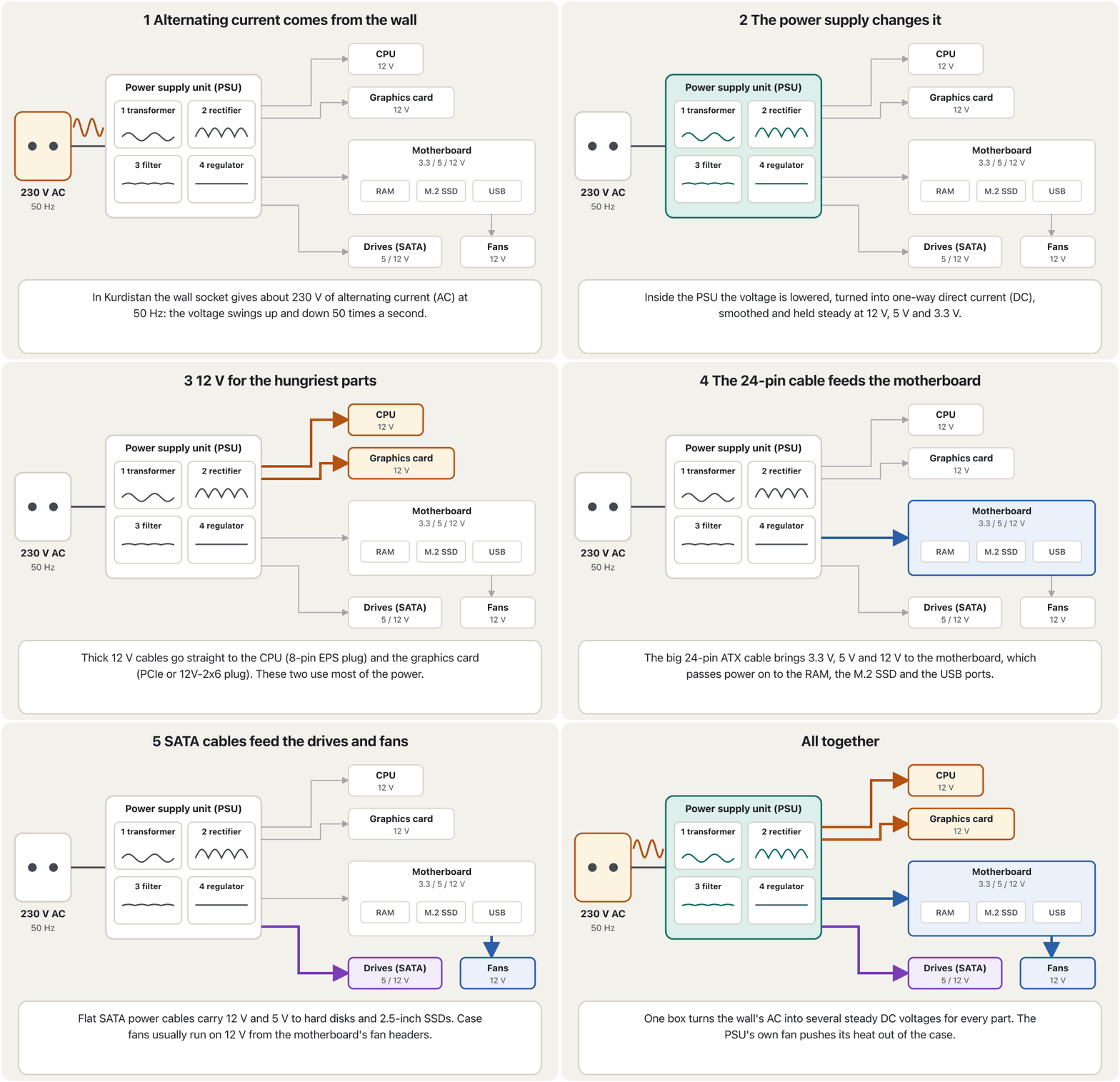
The power supply unit (PSU) gives every other part its power. The wall socket gives alternating current (AC): in Kurdistan about 230 V at 50 Hz, in some countries 110–120 V. Computer parts need low, steady direct current (DC) (AC and DC explains both). The lecture notes describe what happens inside:
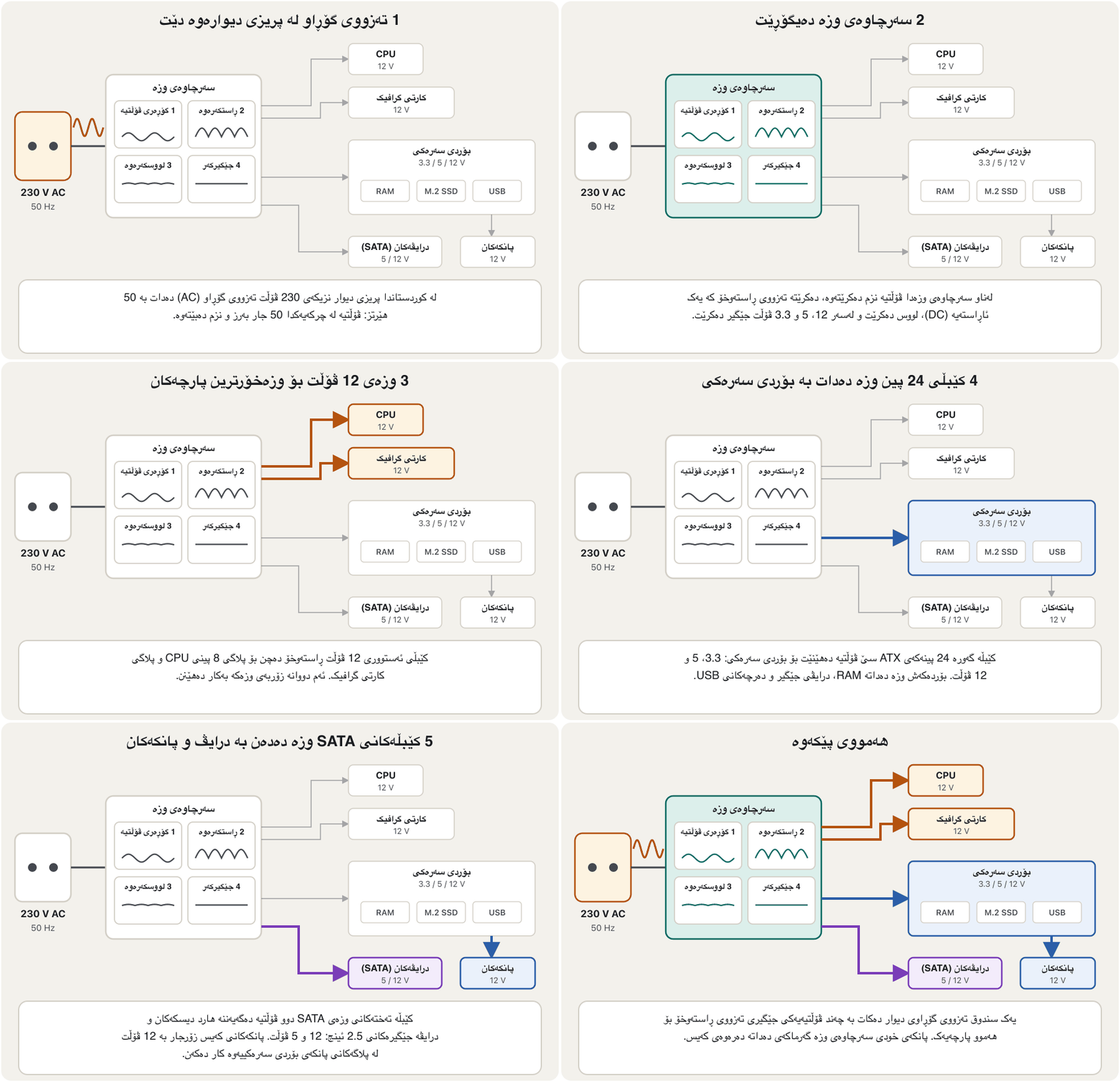
(PSU) وزە دەدات بە هەموو پارچەکانی تر. پریزی دیوار (AC) دەدات: لە کوردستاندا نزیکەی 230 V بە 50 Hz و لە هەندێک وڵاتدا 110 تا 120 V. پارچەکانی پێویستیان بە (DC) نزم و جێگیرە (AC و DC هەردووکیان ڕوون دەکاتەوە). تێبینییەکانی وانەکە ئەوەی لە ناوەوە ڕوو دەدات وەسف دەکەن:
- A transformer controls the incoming voltage, bringing it down.
- The PSU converts AC into DC (a rectifier does this).
- A filter smooths out the DC.
- A voltage regulator controls the DC outputs, so each part gets the right voltage and power.
- گۆڕەری هاتوو کۆنترۆڵ دەکات و نزمی دەکاتەوە.
- PSU AC دەگۆڕێت بۆ DC (ڕاستکەرەوەیەک ئەمە دەکات).
- فلتەرێک DCـەکە لووس دەکات.
- جێگیرکەری دەرچووەکانی DC کۆنترۆڵ دەکات، بۆ ئەوەی هەر پارچەیەک و وزەی دروست وەربگرێت.
A Kurdish (Sorani) explanation of the computer power supply: how it delivers power to every part, its cables, wattage and quality.
ڕوونکردنەوەیەکی کوردیی سۆرانی بۆ : چۆن کارەبا دەگەیەنێتە هەموو بەشەکان، کێبڵەکانی، هێزەکەی بە و جۆرییەکەی.
In Kurdish (Sorani), from the KurdCast series «کەمپیوتەرەکەت بناسە». Plays 0:00–11:00 and stops before the sponsor shops.
بە کوردیی سۆرانی، لە زنجیرەی «کەمپیوتەرەکەت بناسە»ی KurdCast. لە 0:00 تا 11:00 پەخش دەبێت و پێش ڕیکلامی دوکانە سپۆنسەرەکان ڕادەوەستێت.
The power supply unit (PSU)سەرچاوەی وزە (PSU)
Cables and voltagesکێبڵ و ڤۆڵتیەکان
Power-supply cables connect to the drives, the fans and the motherboard: the 24-pin ATX cable to the board, an 8-pin cable to the CPU, PCIe or 12V-2x6 cables to the graphics card and flat SATA cables to the drives. Its main outputs are 12 V (CPU, graphics card, fans), 5 V (USB, drives) and 3.3 V (chips, M.2 SSDs).
کێبڵەکانی بە درایڤەکان، پانکەکان و دەبەسترێن: کێبڵی 24 پینی ATX بۆ بۆردەکە، کێبڵێکی 8 پین بۆ ، کێبڵی PCIe یان 12V-2x6 بۆ و کێبڵی تەختی SATA بۆ درایڤەکان. دەرچووە سەرەکییەکانی 12 V (، ، پانکەکان)، 5 V (USB، درایڤەکان) و 3.3 Vـن (، SSDـی M.2).
The power supply unit (PSU)سەرچاوەی وزە (PSU)
Kinds of power supply and choosing the wattsجۆرەکانی سەرچاوەی وزە و هەڵبژاردنی وات
The lecture notes show several kinds: the standard ATX power supply of a desktop, server power supplies (often two in one server, so one can fail or be changed while the server keeps running), and large retail supplies from 750 W up to 2000 W for powerful gaming PCs and workstations. Modular supplies let you attach only the cables you need.
تێبینییەکانی وانەکە چەند جۆرێک پیشان دەدەن: ستانداردی ATX بۆ ، (زۆرجار دوو دانە لە یەک ، بۆ ئەوەی یەکێکیان تێکبچێت یان بگۆڕدرێت و بەردەوام بێت) و گەورەی بازاڕ لە 750 W تا 2000 W بۆ بەهێزی یاری و . مۆدیولار ڕێگەت دەدات تەنها ئەو کێبڵانە ببەستیت کە پێویستن.
To choose the wattage, add up what the parts use and leave room for peaks. For example: a CPU of 125 W + a graphics card of 220 W + about 80 W for the board, RAM, SSD and fans = 425 W. Builders usually add about 40 % more, so a 650 W PSU is a good choice. A certified efficient PSU (80 PLUS Bronze, Gold…) wastes less electricity as heat.
بۆ هەڵبژاردنی وات، ئەوەی پارچەکان بەکاری دەهێنن کۆ بکەرەوە و جێگە بۆ لووتکەکان بهێڵەوە. بۆ نموونە: 125 W + 220 W + نزیکەی 80 W بۆ بۆرد، ، SSD و پانکەکان = 425 W. ئەوانەی پێکەوە دەنێن زۆرجار نزیکەی 40 % زیاتر دادەنێن، بۆیە PSUـی 650 W هەڵبژاردنێکی باشە. PSUـی کەمخەرجی بڕوانامەدار (80 PLUS Bronze، Gold…) کارەبای کەمتر وەک گەرما بەفیڕۆ دەدات.
The sum of the parts, plus about 40 % headroom, rounded up to the next common PSU size: 650 W.
کۆی پارچەکان، لەگەڵ نزیکەی 40 % جێگەی زیادە، بەرەو قەبارە باوەکەی دواتری PSU بەرز کراوەتەوە: 650 W.
The power supply unit (PSU)سەرچاوەی وزە (PSU)
Laptop chargers and USB-Cچارجەرەکانی لاپتۆپ و USB-C
A small external power supply that plugs into a wall socket and changes into the low that a laptop or phone needs. Many laptops and phones now charge through with .
بچووکی دەرەکییە کە دەخرێتە سۆکێتی دیوار و دەگۆڕێت بۆ ئەو نزمەی لاپتۆپ یان مۆبایل پێویستیەتی. ئێستا زۆر لاپتۆپ و مۆبایل بە و بارگە دەکرێن.
An AC adapter (charger) plugs into the wall and turns AC into one DC voltage. A computer needs several voltages, so the adapter is only the outside part of a laptop's power supply: circuits inside the laptop make the other voltages and charge the battery.
بە پریزی دیوارەوە دەبەسترێت و AC دەگۆڕێت بۆ یەک DC. چەند پێویستە، بۆیە تەنها بەشی دەرەوەی : سووڕەکانی ناو تر دروست دەکەن و پاترییەکە پڕ دەکەنەوە.
Many laptops still use a round barrel plug, like the one pictured in the lecture notes, but today most new laptops, tablets and phones charge through USB-C with USB Power Delivery (PD): the device and the charger agree on a voltage, up to 240 W for large laptops. One charger can then serve your phone, tablet and laptop. How the charger and the device agree, and which cable you need, is taught in Charging through USB.
زۆر هێشتا پلاگی خڕ بەکار دەهێنن، وەک ئەوەی لە وێنەی تێبینییەکانی وانەکەدایە، بەڵام ئەمڕۆ زۆربەی ، و مۆبایلە نوێکان لە ڕێگەی و (PD)ـەوە شەحن دەکرێن: ئامێرەکە و لەسەر ڕێک دەکەون، تا 240 W بۆ گەورە. ئیتر یەک دەتوانێت خزمەتی مۆبایل، و بکات. چۆنیەتیی ڕێککەوتنی و ئامێرەکە و ئەو کێبڵەی پێویستە لە چارجکردن بە USB فێر دەکرێت.
The power supply unit (PSU)سەرچاوەی وزە (PSU)
Laptop battery careچاودێریی پاتریی لاپتۆپ
The power supply unit (PSU)سەرچاوەی وزە (PSU)
A UPS for power cutsUPS بۆ بڕانی کارەبا
A box with a battery that sits between the wall socket and a computer. When the mains power cuts out, it keeps the computer running for a few minutes so you can save your work and shut down safely.
ئامێرێکی پاتریدار کە لە نێوان پریزی دیوار و دادەنرێت. کاتێک کارەبای نیشتمانی یان مۆلیدە دەبڕێت، چەند خولەکێک بە هەڵکراوی دەهێڵێتەوە تا کارەکانت پاشەکەوت بکەیت و بە سەلامەتی بیکوژێنیتەوە.
In Kurdistan the power often switches between the national grid and the neighbourhood generator, and each switch can cut the power for a moment. A desktop PC switches off at once and loses unsaved work. A UPS (uninterruptible power supply) sits between the wall and the PC; its battery keeps the PC running for a few minutes, long enough to save and shut down safely. A laptop already has a battery, so it does not need one.
لە کوردستاندا کارەبا زۆرجار لە نێوان کارەبای نیشتمانی و مۆلیدەی گەڕەکدا دەگۆڕدرێت و هەر گۆڕینێک دەتوانێت بۆ ساتێک کارەبا ببڕێت. یەکسەر دەکوژێتەوە و ئەو کارەی پاشەکەوت نەکراوە لەدەست دەدات. لە نێوان دیوار و دادەنرێت؛ پاترییەکەی چەند خولەکێک بە هەڵکراوی دەهێڵێتەوە، ئەوەندە کە پاشەکەوت بکەیت و بە سەلامەتی بیکوژێنیتەوە. خۆی پاتریی هەیە، بۆیە پێویستی پێی نییە.
Common mistakesهەڵە باوەکان
| Mistakeهەڵە | What is trueڕاستییەکە |
|---|---|
| "Any CPU fits any motherboard."«هەر لە هەر جێی دەبێتەوە.» | The socket (and chipset) must match the processor: AM5 for Ryzen 7000–9000, LGA 1851 for Core Ultra 200S.سۆکێت (و ) دەبێت لەگەڵ پرۆسێسەرەکە بگونجێت: AM5 بۆ Ryzen 7000 تا 9000، LGA 1851 بۆ Core Ultra 200S. |
| "A slot that looks like x16 is always x16."«کەلێنێک کە وەک x16 دەردەکەوێت هەمیشە x16ـە.» | Many long slots are wired x4 or x8. Read the manual.زۆر کەلێنی درێژ وەک x4 یان x8 بەستراون. ڕێنمایی بخوێنەوە. |
| "The CMOS battery powers the computer."« وزە دەدات بە .» | It only keeps the clock (and often the settings) while the PC is unplugged. The PSU powers the computer.تەنها کاتژمێرەکە (و زۆرجار ڕێکخستنەکان) دەپارێزێت کاتێک لە کارەبا جیا کراوەتەوە. PSU وزە دەدات بە . |
| "A bigger-watt PSU makes the PC use more electricity."«PSUـی واتی زیاتر وا دەکات کارەبای زیاتر بەکار بهێنێت.» | The PC takes only what its parts need. A good efficient PSU with some headroom is the safe choice. تەنها ئەوە وەردەگرێت کە پارچەکانی پێویستیانە. PSUـێکی کەمخەرجی باش بە کەمێک جێگەی زیادە هەڵبژاردنی سەلامەتە. |
| "BIOS and UEFI are hardware."« و .» | They are firmware: software stored in a flash chip on the board.: کە لە فلاشی سەر بۆردەکەدا هەڵگیراوە. |
| "A laptop charger is the laptop's whole power supply."« هەموو .» | It gives one DC voltage; the laptop's own circuits make the rest.یەک DC دەدات؛ سووڕەکانی خودی ئەوانی تر دروست دەکەن. |
Exercisesڕاهێنانەکان
Without looking at the drawing, name five parts of a motherboard and say what each one is for.
بەبێ سەیرکردنی وێنەکە، پێنج پارچەی ناو ببە و بڵێ هەریەکەیان بۆ چییە.
Show answerوەڵامەکە پیشان بدە
- CPU socket: holds the processor.
- RAM slots: hold the memory modules.
- PCIe slots: hold expansion cards such as a graphics card.
- M.2 slot: holds an NVMe SSD.
- 24-pin connector: brings power from the PSU.
- Also correct: chipset, SATA ports, CMOS battery, rear ports, front-panel header, screw holes.
- : پرۆسێسەر ڕادەگرێت.
- کەلێنەکانی : پارچەکانی ڕادەگرن.
- کەلێنەکانی : وەک ڕادەگرن.
- کەلێنی : SSDـێکی ڕادەگرێت.
- پلاگی 24 پین: وزە لە PSUـەوە دەهێنێت.
- ئەمانەش ڕاستن: ، SATA، ، پشتەوە، پلاگی پێشەوە، کونی بورغوو.
For each case, say yes or no and why: (a) a x4 capture card in a x16 slot; (b) a x16 graphics card in a x1 slot; (c) an Intel Core Ultra 9 285K on an AM5 board; (d) a Mini-ITX board in an ATX case.
بۆ هەریەکەیان بڵێ بەڵێ یان نەخێر و بۆچی: (أ) کارتێکی تۆمارکردنی x4 لە کەلێنی x16؛ (ب) x16 لە کەلێنی x1؛ (ج) Intel Core Ultra 9 285K لەسەر بۆردی AM5؛ (د) بۆردێکی Mini-ITX لە قاپێکی ATX.
Show answerوەڵامەکە پیشان بدە
- (a) Yes: a card fits a slot of its own size or larger.
- (b) No: a x16 card is too long for a closed x1 slot.
- (c) No: the 285K needs an LGA 1851 socket.
- (d) Yes: ATX cases have the screw holes for smaller boards too.
- (أ) بەڵێ: کارت لە کەلێنی هاوقەبارە یان گەورەتردا جێی دەبێتەوە.
- (ب) نەخێر: کارتی x16 بۆ کەلێنی داخراوی x1 زۆر درێژە.
- (ج) نەخێر: 285K سۆکێتی LGA 1851ـی پێویستە.
- (د) بەڵێ: قاپەکانی ATX کونی بورغوویان بۆ بۆردی بچووکتریش هەیە.
Shilan's new PC has a CPU of 65 W, a graphics card of 160 W, and about 60 W for the board, RAM, SSD and fans. Which PSU should she buy: 300 W, 450 W or 1200 W?
نوێیەکەی شیلان 65 W، 160 W و نزیکەی 60 W بۆ بۆرد، ، SSD و پانکەکانی هەیە. کام PSU بکڕێت: 300 W، 450 W یان 1200 W؟
Show answerوەڵامەکە پیشان بدە
A 450 W PSU is the right choice. 300 W leaves almost no headroom; 1200 W only costs more.
PSUـی 450 W هەڵبژاردنی دروستە. 300 W نزیکەی هیچ جێگەیەکی زیادە ناهێڵێتەوە؛ 1200 W تەنها گرانترە.
Summaryپوختە
- The system unit (case) holds and protects the parts; peripherals connect through its ports.
- The motherboard is the main circuit board: CPU socket, RAM slots, M.2 and PCIe slots, chipset, SATA, power connectors, CMOS battery, ports.
- The socket must match the CPU; the chipset adds extra ports and lanes.
- PCIe sends data in full-duplex lanes (x1, x4, x8, x16); each generation roughly doubles the speed.
- UEFI firmware (which replaced the BIOS) checks the hardware and starts the operating system.
- The PSU turns 230 V AC into steady 12 V, 5 V and 3.3 V DC; a charger gives one DC voltage; a UPS rides through power cuts.
- Lithium-ion laptop batteries need no "conditioning": avoid running them flat and keep them cool.
- پارچەکان لەخۆ دەگرێت و دەیانپارێزێت؛ لە ڕێگەی دەبەسترێن.
- تەختەی سەرەکیی سووڕە: ، کەلێنەکانی ، کەلێنەکانی و ، ، SATA، پلاگەکانی وزە، و .
- دەبێت لەگەڵ بگونجێت؛ و هێڵی زیاتر زیاد دەکات.
- لە هێڵی دەنێرێت (x1، x4، x8، x16)؛ هەر نەوەیەک نزیکەی دوو هێندە خێراتر دەبێت.
- (کە جێگەی گرتەوە) دەپشکنێت و دەست پێدەکات.
- PSU ACـی 230 V دەگۆڕێت بۆ DCـی جێگیری 12 V، 5 V و 3.3 V؛ یەک DC دەدات؛ UPS بڕانی کارەبا پڕ دەکاتەوە.
- پاتریی لیسیۆم-ئایۆنی پێویستی بە «ڕاهێنان» نییە: مەهێڵە تا کۆتایی بەتاڵ ببێت و لە گەرما دووری بخەرەوە.
What are the four key parts of every motherboard, according to the lecture notes?بەپێی تێبینییەکانی وانەکە چوار پارچە سەرەکییەکەی هەموو بۆردێکی سەرەکی چین؟
The CPU socket, the CPU, the RAM slots and the expansion slots.
، ، کەلێنەکانی و .
What does full duplex mean for PCIe?دوولایەنەی هاوکات بۆ PCIe واتای چییە؟
Each lane sends and receives at the same time, over two separate pairs of wires.
هەر هێڵێک لە هەمان کاتدا دەنێرێت و وەردەگرێت، بە دوو جووت وایەری جیا.
What are the four jobs inside a power supply in the lecture notes?چوار کارەکەی ناو سەرچاوەی وزە لە تێبینییەکانی وانەکەدا چین؟
A transformer lowers the voltage, the AC is converted to DC, a filter smooths it and a regulator keeps each output steady.
گۆڕەری نزم دەکاتەوە، AC دەکرێت بە DC، فلتەر لووسی دەکات و جێگیرکەر هەر دەرچوویەک جێگیر دەهێڵێتەوە.
Why does a laptop charger alone not count as a full power supply?بۆچی چارجەری لاپتۆپ بە تەنها سەرچاوەیەکی وزەی تەواو نییە؟
It gives only one DC voltage; the laptop makes the other voltages inside.
تەنها یەک DC دەدات؛ تر لە ناوەوە دروست دەکات.
Videoڤیدیۆ
Watch a videoسەیری ڤیدیۆیەک بکە
A video that viewers liked a lot and praised in their comments, chosen for this lesson.ڤیدیۆیەک کە بینەران زۆریان پێ خۆش بووە و لە کۆمێنتەکانیاندا ستایشیان کردووە، بۆ ئەم وانەیە هەڵبژێردراوە.
Every main part of a modern motherboard and its job: CPU socket, RAM slots, chipset, firmware chip, CMOS battery, PCIe slots and storage connectors.
بەشە گرنگەکانی ئەمڕۆ و ئەرکی هەر یەکەیان: ، کەلێنەکانی ، ، ، ، کەلێنەکانی و .
A 2026 tour of the motherboard. Plays 0:00–2:40: CPU socket, RAM slots, voltage regulators, chipset, BIOS/UEFI chip and CMOS battery. Stops before the PCIe part, whose picture labels two x1 slots as x8 and x4.
گەشتێکی ساڵی 2026 بە ناو . لە 0:00 تا 2:40 پەخش دەبێت: ، کەلێنەکانی ، ڕێکخەرەکانی ، ، / و . پێش بەشی ڕادەوەستێت، چونکە وێنەکەی ئەو بەشە دوو کەلێنی x1 بە هەڵە بە x8 و x4 ناو دەبات.
Lesson complete!وانەکە تەواو بوو!
Well done. Review the key terms, then go on to the next lesson.دەستخۆش. سەیرێکی زاراوە سەرەکییەکان بکەرەوە، پاشان بڕۆ بۆ وانەی داهاتوو.
Key termsزاراوە سەرەکییەکان
The CPU: Control Unit, ALU and CoresCPU: یەکەی جڵەوکردن، ALU و ناوکەکانی پرۆسێسەر
Related lecturesوانە پەیوەندیدارەکان
- The CPU: Control Unit, ALU and CoresCPU: یەکەی جڵەوکردن، ALU و ناوکەکانی پرۆسێسەر
- Memory: RAM, ROM and Cacheبیرگە: RAM، ROM و کاش
- Ports and Connectorsدەرچەکان و سەرەکانی کێبڵ
- Building and Caring for a PCپێکەوەنان و چاودێریکردنی کۆمپیوتەر
- SSDs, Memory Cards and Flash DrivesSSD، کارتەکانی بیرگە و بیرگەکانی فلاش
- Processor Speed, Cache, GPUs and Coolingخێرایی پرۆسێسەر، کاش، GPU و ساردکردنەوە
- Software and Operating Systemsنەرمەواڵە و سیستەمەکانی وەگەڕخەر
- Inside the Computerناو کۆمپیوتەرەکە
References and further readingسەرچاوەکان و خوێندنەوەی زیاتر
- Wikipedia: ATX (form factors and power supply standard)
- Wikipedia: Chipset (northbridge, southbridge, platform controller hub)
- Wikipedia: Socket AM5
- Wikipedia: LGA 1851
- Intel ARK: Core Ultra 9 processor 285K specifications
- Intel ARK: Core i9-14900K specifications
- Wikipedia: PCI Express (versions, lanes, full duplex)
- Converge Digest: PCI-SIG finalizes PCIe 7.0 specification at 128.0 GT/s (June 2025)
- Micron press release (16 March 2026): PCIe Gen6 data-centre SSD in high-volume production (9650, mass production announced 12 February 2026)
- Blocks and Files: PCIe 8.0 draft races ahead, final spec on track for 2028 (May 2026)
- Microsoft Learn: UEFI firmware requirements
- Microsoft: Windows 11 specifications and system requirements
- Wikipedia: Nonvolatile BIOS memory (CMOS battery)
- Wikipedia: Power supply unit (computer)
- USB-IF: USB Charger (USB Power Delivery)
- WorldStandards: Iraq, plugs and voltage (230 V, 50 Hz)
- Battery University BU-808: How to prolong lithium-based batteries
This lecture is a first edition. The Kurdish text and terminology are waiting for review by Kurdish IT teachers.ئەم وانەیە چاپی یەکەمە. دەقە کوردییەکە و زاراوەکانی چاوەڕێی پێداچوونەوەی مامۆستایانی کوردی بواری IT ن.