Chapterبەش 3 · Lectureوانە 3.1
Input, Output and Devices That Do Bothنێوخستە، دەرخستە و ئەو ئامێرانەی هەردووکیان دەکەن
What input and output really are, the six ways we give a computer input and the four ways it gives output, the four types of output, which devices truly do both (and why drives, GPS and modems are not in that group), and how to sort any device with two simple questions.
و بەڕاستی چین، شەش ڕێگاکەی دانی بە و چوار ڕێگاکەی کە دەدات، چوار جۆرەکەی ، کام ئامێرانە بەڕاستی هەردووکیان دەکەن (و بۆچی درایڤ، GPS و لەو گرووپەدا نین) و چۆن هەر ئامێرێک بە دوو پرسیاری سادە ڕیز بکەیت.
What you will learnچی فێر دەبیت
- Define input and output and tell data from instructions.
- Name the six input methods and the four output methods, with example devices.
- Recognise the four types of output: text, graphics, audio and video.
- Explain which devices do both, and why storage drives, GPS and modems belong elsewhere.
- Sort any device with two questions: does it bring data in? does it give results out?
- و پێناسە بکەیت و لە جیا بکەیتەوە.
- شەش ڕێگاکەی و چوار ڕێگاکەی بە نموونەی ئامێرەوە بژمێریت.
- چوار جۆرەکەی بناسیتەوە: دەق، گرافیک، دەنگ و ڤیدیۆ.
- ڕوونی بکەیتەوە کام ئامێرانە هەردووکیان دەکەن و بۆچی درایڤەکانی ، GPS و سەر بە شوێنی ترن.
- هەر ئامێرێک بە دوو پرسیار ڕیز بکەیت: ئایا دەهێنێتە ژوورەوە؟ ئایا ئەنجام دەداتە دەرەوە؟
What is input?نێوخستە چییە؟
This chapter asks two questions: what is input? and what is output? You met both words in the information processing cycle. Here we look at them more closely and sort the devices that do each job.
ئەم بەشە دوو پرسیار دەکات: چییە؟ و چییە؟ هەردوو وشەکەت لە سووڕی چارەسەرکردنی زانیاریدا بینیوە. لێرەدا وردتر سەیریان دەکەین و ئەو ئامێرانە ڕیز دەکەین کە هەر کارێکیان دەکەن.
or commands that go into a , for example from a , a or a . It is the first of a computer's four jobs: input, , and .
ئەو و فەرمانانەیە کە دەچنە ناو ، بۆ نموونە لە ، یان . یەکەمین کاری چوار کارەکەی : نێوخستە، ، و .
Input is any data or instructions that are entered into the memory of a computer. Notice the two kinds. Data is the raw material the computer will work on: the letters of your name, the photo from the camera, the price scanned from a barcode. Instructions tell the computer what to do: a click on Print, a voice command "set an alarm for seven", a tap on Send. Both travel the same way: from the device, through a port or a wireless link, into memory.
هەر یان کە دەخرێتە ناو . سەرنجی ئەم دوو جۆرە بدە. ئەو کەرەستە خاوەیە کە کاری لەسەر دەکات: پیتەکانی ناوەکەت، وێنەکەی کامێرا، ئەو نرخەی لە بارکۆدەوە سکان کرا. بە دەڵێن چی بکات: لەسەر Print، دەنگیی «زەنگێک بۆ کاتژمێر حەوت دابنێ»، پەنجەنانێک بە Sendـدا. هەردووکیان بە هەمان ڕێگادا دەڕۆن: لە ئامێرەکەوە، بە یان پەیوەندییەکی بێوایەردا، بۆ ناو .
Think of a post office. Letters handed in at the counter are the input: nothing can be sorted or sent until it has come in through the counter. Some letters are ordinary mail (data); some are forms that tell the clerks what to do (instructions). Both come in at the same counter.
پۆستەخانەیەک بهێنە بەرچاوت. ئەو نامانەی لە پێشخانەکەوە دەدرێن : هیچ شتێک ڕیز ناکرێت یان نانێردرێت تا لە ڕێگەی پێشخانەکەوە نەیەتە ژوورەوە. هەندێک نامە پۆستی ئاسایین ()؛ هەندێکیان فۆرمن کە بە کارمەندەکان دەڵێن چی بکەن (). هەردووکیان لە هەمان پێشخانەوە دێنە ژوورەوە.
Where the analogy stops workingسنووری ئەم نموونەیە
A post office keeps the real letter; a computer turns what you type or say into numbers (bits) before it stores it.
پۆستەخانە خودی نامەکە دەپارێزێت؛ ئەوەی دەینووسیت یان دەیڵێیت پێش هەڵگرتن دەکاتە ژمارە ().
The ways we give inputڕێگاکانی دانی نێوخستە
The course lists six commonly used input methods. Each method has a family of devices. The next two lessons look at each family in detail; here is the whole map:
کۆرسەکە شەش ڕێگای باوی دەژمێرێت. هەر ڕێگایەک خێزانێک ئامێری هەیە. دوو وانەی داهاتوو هەر خێزانێک بە وردی دەخوێنن؛ ئەمە هەموو نەخشەکەیە:
| Input methodڕێگای | Devices (examples)ئامێرەکان (نموونە) | You use it to…بەکاری دەهێنیت بۆ… |
|---|---|---|
| 1. Keyboard١. | Desktop, laptop and on-screen keyboards ، و سەر | type text, numbers and commandsنووسینی دەق، ژمارە و |
| 2. Pointing devices٢. | Mouse, touchpad (trackpad), trackball, pointing stick (track stick), joystick, game pad، ، ، داری ئاماژە، | move the pointer, click, drag, playجووڵاندنی ، ، ڕاکێشان، یاری |
| 3. Touch screens٣. | Phones, tablets, kiosks, signature pads — and your fingerمۆبایل، ، کیۆسک، تەختەی واژۆ — و پەنجەت | tap, swipe, pinch, sign your nameلێدان، خلیسکاندن، گوشین، واژۆکردن |
| 4. Pen input٤. قەڵەم | Stylus, digital pen, graphics tablet (digitizer)، قەڵەمی دیجیتاڵ، | write and draw by handنووسین و وێنەکێشان بە دەست |
| 5. Motion, voice and video input٥. جووڵە، دەنگ و ڤیدیۆ | Game-console motion sensors, microphone, webcam, phone camera جووڵەی کۆنسۆڵی یاری، ، ، کامێرای مۆبایل | gesture, speak, record, video callئاماژەکردن، قسەکردن، تۆمارکردن، پەیوەندیی ڤیدیۆیی |
| 6. Scanners and reading devices٦. و ئامێرەکانی خوێندنەوە | Scanner, barcode reader, RFID reader, MICR reader, magnetic stripe card reader, fingerprint (biometric) reader, data collection devices، ، خوێنەرەوەی ، خوێنەرەوەی ، خوێنەرەوەی ، خوێنەرەوەی پەنجەمۆر ()، ئامێرەکانی کۆکردنەوەی | read printed, coded or stored data straight into the computerخوێندنەوەی چاپکراو، کۆدکراو یان هەڵگیراو ڕاستەوخۆ بۆ ناو |
Keyboards and pointing devices are taught in Keyboards and pointing devices; touch, pen, voice, video and scanning in Touch, Pen, Voice, Video and Scanning, next in this chapter. For the English names of these devices, see Input devices in the Technical English course.
و لە کیبۆردەکان و ئامێرەکانی ئاماژەکردندا دەخوێنرێن؛ دەستلێدان، قەڵەم، دەنگ، ڤیدیۆ و سکانکردن لە وانەی دەستلێدان، قەڵەم، دەنگ، ڤیدیۆ و سکانکردندا، دواتر لەم بەشەدا. بۆ ناوە ئینگلیزییەکانی ئەم ئامێرانە، سەیری ئامێرەکانی نێوخستە بکە لە کۆرسی ئینگلیزیی تەکنیکیدا.
What is output?دەرخستە چییە؟
The result that a or a gives out after : text and pictures on a screen, sound, a printed page, or passed on to another program. Together with , processing and , it is one of the four main jobs of a computer.
ئەو ئەنجامەیە کە یان دوای دەیداتە دەرەوە: دەق و وێنە لەسەر شاشە، دەنگ، لاپەڕەیەکی چاپکراو، یان کە بۆ بەرنامەیەکی تر دەنێردرێت. لەگەڵ ، چارەسەرکردن و ، یەکێکە لە چوار کارە سەرەکییەکەی کۆمپیوتەر.
Output is data that has been processed into a useful form. It comes after the processing step: the raw data that went in comes back out as information — something a person (or another machine) can use. Your marks go in as numbers; the report card that comes out, with the totals and the average, is output.
ئەو کە بە شێوەیەکی بەسوود بۆ کراوە. دوای هەنگاوی دێت: ئەو خاوەی چووە ژوورەوە وەک دێتەوە دەرەوە — شتێک کە مرۆڤێک (یان ئامێرێکی تر) دەتوانێت بەکاری بهێنێت. نمرەکانت وەک ژمارە دەچنە ژوورەوە؛ ئەو کارنامەیەی بە کۆ و تێکڕاوە دێتە دەرەوە .
Output comes in four main types:
چوار جۆری سەرەکیی هەیە:
| Typeجۆر | What it isچییە | Exampleنموونە |
|---|---|---|
| Textدەق | Letters, numbers and symbolsپیت، ژمارە و هێما | A document on the screen, a printed receiptبەڵگەنامەیەک لەسەر ، پسوولەیەکی چاپکراو |
| Graphicsگرافیک | Pictures, drawings, chartsوێنە، نەخشە، هێڵکاری | A photo on your phone, a chart of salesوێنەیەک لەسەر مۆبایلەکەت، هێڵکارییەکی فرۆشتن |
| Audioدەنگ | Music, speech, soundsمۆسیقا، قسە، دەنگ | A voice message, an alarmپەیامێکی دەنگی، زەنگێکی ئاگادارکردنەوە |
| Videoڤیدیۆ | Moving pictures, usually with soundوێنەی جووڵاو، زۆرجار لەگەڵ دەنگ | A film, a video callفیلمێک، پەیوەندییەکی ڤیدیۆیی |
The ways we get outputڕێگاکانی وەرگرتنی دەرخستە
The course lists four commonly used output methods:
کۆرسەکە چوار ڕێگای باوی دەژمێرێت:
| Output methodڕێگای | Devices (examples)ئامێرەکان (نموونە) | Output typesجۆری |
|---|---|---|
| 1. Displays١. | Monitor, laptop, phone and TV screens, smartwatch، ، مۆبایل و تیڤی، کاتژمێری زیرەک | text, graphics, videoدەق، گرافیک، ڤیدیۆ |
| 2. Printers٢. | Inkjet, laser and photo printers, plotters, 3D printers، و وێنە، ، | text and graphics on paper or other materialدەق و گرافیک لەسەر کاغەز یان کەرەستەی تر |
| 3. Other output devices٣. تر | Speakers, headphones and earbuds, data projector, interactive whiteboard، ، ، | audio, video, a big picture for a classدەنگ، ڤیدیۆ، وێنەیەکی گەورە بۆ پۆل |
| 4. Assistive technology٤. | Screen readers, Braille printers, screen magnifiers، ، | output for people with low vision or other needs بۆ ئەو کەسانەی بینینیان کەمە یان پێداویستیی تریان هەیە |
Displays are taught in Monitors and Displays, and printers, speakers, projectors and assistive technology in Printers, Speakers, Projectors and Assistive Technology, both later in this chapter. The interactive whiteboard is in this list because its main job is to show a big picture; but you can also touch it and write on it, so it really does both (next screen). The English names are practised in Output devices.
لە وانەی شاشە و شاشەکاندا دەخوێنرێن و ، ، و لە چاپەرەکان، بڵندگۆکان، پرۆجێکتەرەکان و تەکنەلۆژیای یارمەتیدەردا، هەردووکیان دواتر لەم بەشەدا. لەم لیستەدایە چونکە کاری سەرەکیی پیشاندانی وێنەیەکی گەورەیە؛ بەڵام دەتوانیت دەستی لێ بدەیت و لەسەری بنووسیت، بۆیە بەڕاستی هەردووکیان دەکات (شاشەی داهاتوو). ناوە ئینگلیزییەکان لە ئامێرەکانی دەرخستەدا ڕاهێنانیان لەسەر دەکرێت.
Devices that do bothئەو ئامێرانەی هەردووکیان دەکەن
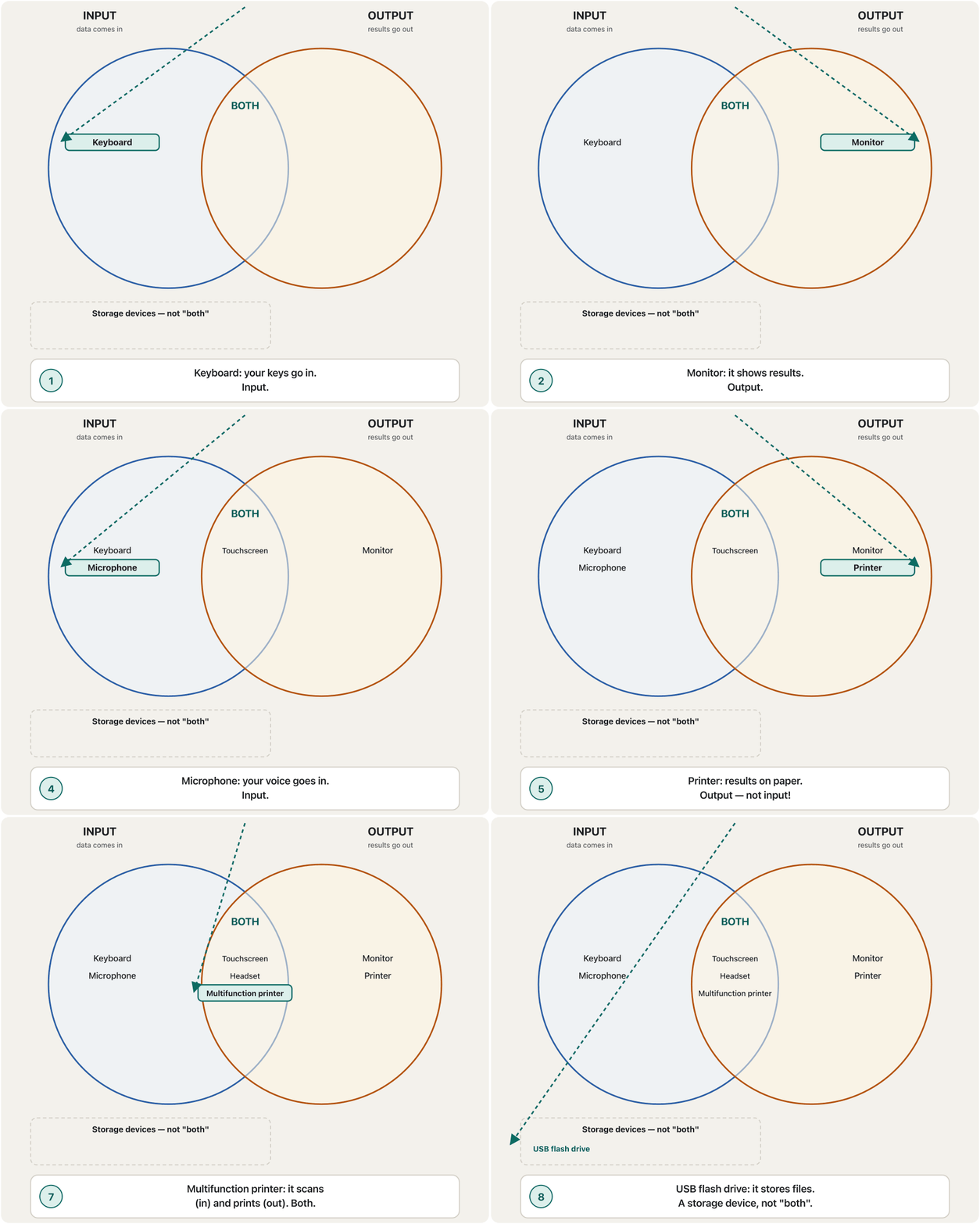
Some devices take input and give output, so they belong to both groups. A touchscreen is the best example: it is a touch panel (input) laid on top of a display (output). Others are a headset (microphone in, headphones out), a VR headset (motion sensors and cameras in, screens and speakers out), a multifunction printer (it scans — input — and prints — output), an interactive whiteboard (a projected picture you can touch and write on) and a fax machine (it scans a page in and prints pages that arrive). A games controller that vibrates also gives a little output.
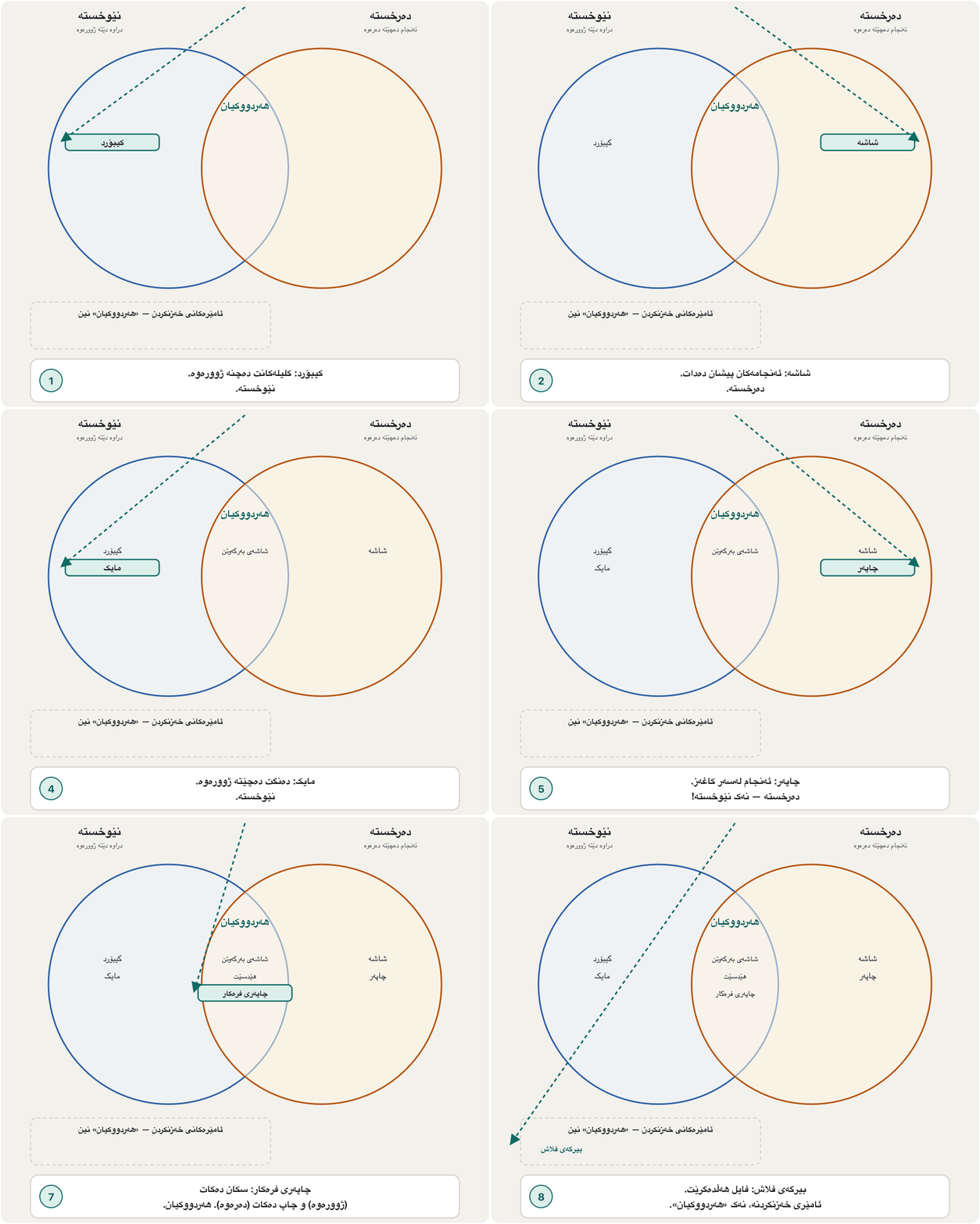
هەندێک ئامێر وەردەگرن و دەدەن، بۆیە سەر بە هەردوو گرووپەکەن. باشترین نموونەیە: پانێڵێکی هەستیار بە دەستلێدانە () کە لەسەر () دانراوە. ئەوانی تر: ( بۆ ژوورەوە، بۆ دەرەوە)، VR ( جووڵە و کامێرا بۆ ژوورەوە، و بۆ دەرەوە)، (سکان دەکات — — و چاپ دەکات — )، (وێنەیەکی پرۆجێکتکراو کە دەتوانیت دەستی لێ بدەیت و لەسەری بنووسیت) و ئامێری فاکس (پەڕەیەک سکان دەکات بۆ ژوورەوە و ئەو پەڕانەی دێن چاپ دەکات). کە دەلەرزێت کەمێک دەدات.
A device that does both jobs: it puts into the computer and also gives results out. A , a , a headset with a microphone and a are examples.
ئامێرێکە کە هەردوو کارەکە دەکات: دەخاتە ناو کۆمپیوتەرەوە و ئەنجامیش دەردەخات. ، ، هێدسێتێک بە مایکەوە و نموونەن.
A touchscreen is two devices in one: a touch-sensing layer for input on top of a display that makes the picture.
دوو ئامێرە لە یەکدا: چینێکی هەستیار بە دەستلێدان بۆ ، لەسەر کە وێنەکە دروست دەکات.
Watch 0:50-7:46: the touch layer (input) on top of the display (output).
لە 0:50 تا 7:46 سەیر بکە: چینی هەستیار بە دەستلێدان () لەسەر ().
Devices that do bothئەو ئامێرانەی هەردووکیان دەکەن
What really does both?بەڕاستی کامانە هەردووکیان دەکەن؟
Devices that do bothئەو ئامێرانەی هەردووکیان دەکەن
Watch the devices find their placeسەیری ئامێرەکان بکە کە شوێنی خۆیان دەدۆزنەوە
To sort a device, ask two questions: does it bring data or instructions in? and does it give results out to a person? Yes and no → input. No and yes → output. Yes and yes → both. If it mainly keeps data, it is a storage device.
بۆ ڕیزکردنی ئامێرێک، دوو پرسیار بکە: ئایا یان دەهێنێتە ژوورەوە؟ و ئایا ئەنجام بۆ کەسێک دەداتە دەرەوە؟ بەڵێ و نەخێر ← . نەخێر و بەڵێ ← . بەڵێ و بەڵێ ← هەردووکیان. ئەگەر زیاتر هەڵدەگرێت، .
Devices that do bothئەو ئامێرانەی هەردووکیان دەکەن
Input or output depends on who is lookingنێوخستە یان دەرخستە بەندە بەوەی کێ سەیر دەکات
We always name input and output from the computer's point of view. A microphone sends out a sound signal, but for the computer that signal is input. A monitor receives a picture, but for the computer that picture is output. Engineers go further: to the processor and memory, reading a file from a drive or a packet from the network is also input, and saving a file is output — that is why storage and network cards are sometimes called I/O devices.
هەمیشە و لە ڕوانگەی ناو دەنێین. دەنگی دەنێرێتە دەرەوە، بەڵام بۆ ئەو . وێنەیەک وەردەگرێت، بەڵام بۆ ئەو وێنەیە . ئەندازیاران زیاتر دەڕۆن: بۆ پرۆسێسەر و ، خوێندنەوەی لە درایڤێکەوە یان لە و — بۆیە هەندێک جار بە و دەوترێت ئامێرەکانی I/O.
Common mistakesهەڵە باوەکان
| Mistakeهەڵە | What is trueڕاستییەکە |
|---|---|
| "A printer is an input device."« .» | It is an output device: it puts results on paper.: ئەنجام لەسەر کاغەز دادەنێت. |
| "GPS is an output device."«GPS .» | A GPS receiver takes signals in; its screen shows the output.وەرگری GPS وەردەگرێت؛ پیشان دەدات. |
| "A USB flash drive is input and output."« و .» | It is a storage device; it keeps files.؛ هەڵدەگرێت. |
| "Input means typing."« واتە نووسین.» | Clicks, taps, voice, photos, scans and sensor readings are all input.، پەنجەنان، دەنگ، وێنە، سکان و خوێندنەوەی هەموویان . |
| "A touchscreen is just a screen."« تەنها .» | It is a touch panel (input) on a display (output): both.پانێڵێکی هەستیارە () لەسەر (): هەردووکیان. |
| "Data and information are the same output."« و هەمان .» | Output is processed data: information in a useful form. ئەو کە بۆ کراوە: بە شێوەیەکی بەسوود. |
Exercisesڕاهێنانەکان
Sort each device into input, output, both, storage or communications, and give a one-line reason: keyboard, monitor, touchscreen, microphone, printer, headset, webcam, speaker, scanner, USB flash drive, projector, barcode reader, VR headset, fax machine, plotter, CD/DVD drive, modem, interactive whiteboard.
هەر ئامێرێک بخەرە یەکێک لە ، ، هەردووکیان، یان پەیوەندی و هۆکارێکی یەک دێڕی بنووسە: ، ، ، ، ، ، ، ، ، ، ، ، VR، ئامێری فاکس، ، درایڤی CD/DVD، ، .
Hintئاماژە
Ask: does it bring data in? does it give results out? does it mainly keep data?
بپرسە: ئایا دەهێنێتە ژوورەوە؟ ئایا ئەنجام دەداتە دەرەوە؟ ئایا زیاتر هەڵدەگرێت؟
Show answerوەڵامەکە پیشان بدە
| Groupگرووپ | Devicesئامێرەکان | Whyبۆچی |
|---|---|---|
| Input | keyboard, microphone, webcam, scanner, barcode reader، ، ، ، | they bring data or instructions in یان دەهێننە ژوورەوە |
| Output | monitor, printer, speaker, projector, plotter، ، ، ، | they give results outئەنجام دەدەنە دەرەوە |
| Bothهەردووکیان | touchscreen, headset, VR headset, fax machine, interactive whiteboard، ، VR، ئامێری فاکس، | one device takes input and gives outputیەک ئامێر وەردەگرێت و دەدات |
| Storage | USB flash drive, CD/DVD drive، درایڤی CD/DVD | they keep data هەڵدەگرن |
| Communicationsپەیوەندی | modem | it sends and receives data over a line لە ڕێگەی هێڵێکەوە دەنێرێت و وەردەگرێت |
For each output type — text, graphics, audio, video — name one device that produces it and one everyday example from school or the bazaar.
بۆ هەر جۆرێکی — دەق، گرافیک، دەنگ، ڤیدیۆ — ئامێرێک بنووسە کە بەرهەمی دەهێنێت و نموونەیەکی ڕۆژانە لە قوتابخانە یان بازاڕەوە.
Show answerوەڵامەکە پیشان بدە
- Text: a receipt printer at a shop prints the list of items and the total.
- Graphics: the classroom projector shows a map or a chart.
- Audio: the school's speakers play the bell; headphones play a lesson recording.
- Video: a monitor or a phone screen plays a video call with your teacher.
- دەق: پسوولەی دوکانێک لیستی کاڵاکان و کۆکە چاپ دەکات.
- گرافیک: پۆل نەخشەیەک یان هێڵکارییەک پیشان دەدات.
- دەنگ: قوتابخانە زەنگەکە لێ دەدەن؛ تۆمارێکی وانە لێ دەدات.
- ڤیدیۆ: یان مۆبایل پەیوەندییەکی ڤیدیۆیی لەگەڵ مامۆستاکەت پیشان دەدات.
Dilan buys medicine. The pharmacist scans the box, types the quantity, and the computer prints a receipt and shows the total on a small customer screen. Name every input and every output, and say which method each belongs to.
دیلان دەرمان دەکڕێت. دەرمانسازەکە قوتووەکە سکان دەکات، ژمارەکە دەنووسێت و پسوولەیەک چاپ دەکات و کۆکە لەسەر بچووکی کڕیار پیشان دەدات. هەموو و هەموو بنووسە و بڵێ هەر یەکەیان سەر بە کام ڕێگایە.
Show answerوەڵامەکە پیشان بدە
- Input: the scanned barcode (scanners and reading devices); the typed quantity (keyboard).
- Output: the printed receipt (printers, text); the total on the customer screen (displays, text).
- In between, the computer processes the data: it finds the price, multiplies it by the quantity and adds the total.
- : بارکۆدە سکانکراوەکە ( و ئامێرەکانی خوێندنەوە)؛ ژمارە نووسراوەکە ().
- : پسوولە چاپکراوەکە (، دەق)؛ کۆکە لەسەر کڕیار (، دەق).
- لە نێوانیاندا دەکات: نرخەکە دەدۆزێتەوە، لە ژمارەکە دەیدات و کۆکە دەکاتەوە.
Summaryپوختە
- Input is any data or instructions entered into a computer's memory.
- Six input methods: keyboard, pointing devices, touch screens, pen, motion/voice/video, scanners and reading devices.
- Output is data processed into a useful form: text, graphics, audio or video.
- Four output methods: displays, printers, other output devices, assistive technology.
- Both: touchscreen, headset, VR headset, multifunction printer, interactive whiteboard, fax. Drives are storage; modems are communications.
- هەر یان کە دەخرێتە ناو .
- شەش ڕێگای : ، ، ، قەڵەم، جووڵە/دەنگ/ڤیدیۆ، و ئامێرەکانی خوێندنەوە.
- ئەو کە بە شێوەیەکی بەسوود بۆ کراوە: دەق، گرافیک، دەنگ یان ڤیدیۆ.
- چوار ڕێگای : ، ، تر، .
- هەردووکیان: ، ، VR، ، ، فاکس. درایڤەکان ؛ پەیوەندین.
What is the difference between input and output?جیاوازیی نێوان نێوخستە و دەرخستە چییە؟
Input goes into the computer's memory; output is the processed result that comes out in a useful form.
دەچێتە ناو ؛ ئەو ئەنجامەیە کە بۆ کراوە و بە شێوەیەکی بەسوود دێتە دەرەوە.
Why is a touchscreen an input/output device?بۆچی شاشەی بەرکەوتن ئامێری نێوخستە و دەرخستەیە؟
It is a touch panel (input) on top of a display (output).
پانێڵێکی هەستیار بە دەستلێدانە () لەسەر ().
Is a USB flash drive "both"?ئایا بیرگەی فلاش «هەردووکیان»ـە؟
In this course it is a storage device: it keeps data. Only from the CPU's point of view is reading and writing it I/O.
لەم کۆرسەدا : هەڵدەگرێت. تەنها لە ڕوانگەی خوێندنەوە و نووسین لەسەری I/Oـیە.
Lesson complete!وانەکە تەواو بوو!
Well done. Review the key terms, then go on to the next lesson.دەستخۆش. سەیرێکی زاراوە سەرەکییەکان بکەرەوە، پاشان بڕۆ بۆ وانەی داهاتوو.
Key termsزاراوە سەرەکییەکان
Keyboards and Pointing Devicesکیبۆرد و ئامێرەکانی ئاماژەکردن
Related lecturesوانە پەیوەندیدارەکان
- Keyboards and Pointing Devicesکیبۆرد و ئامێرەکانی ئاماژەکردن
- Computer Communicationsپەیوەندیی کۆمپیوتەر
- Printers, Speakers, Projectors and Assistive Technologyچاپەرەکان، بڵندگۆکان، پرۆجێکتەرەکان و تەکنەلۆژیای یارمەتیدەر
- Monitors and Displaysشاشەکان
- Touch, Pen, Voice, Video and Scanningدەستلێدان، قەڵەم، دەنگ، ڤیدیۆ و سکانکردن
- The Parts of a Computer Systemپارچەکانی سیستەمی کۆمپیوتەر
- Ports and Connectorsدەرچەکان و سەرەکانی کێبڵ
- Input Devicesئامێرەکانی نێوخستە
- Output Devicesئامێرەکانی دەرخستە
References and further readingسەرچاوەکان و خوێندنەوەی زیاتر
- Wikipedia: Input/output (definition, perspective, devices that do both, storage as I/O from the CPU view)
- Wikipedia: Peripheral (input, output and storage peripherals; external storage doubling as I/O)
- Wikipedia: Touchscreen (a touch panel as input on a display as output)
- GPS.gov archive: the GPS space segment (receivers take signals from satellites)
This lecture is a first edition. The Kurdish text and terminology are waiting for review by Kurdish IT teachers.ئەم وانەیە چاپی یەکەمە. دەقە کوردییەکە و زاراوەکانی چاوەڕێی پێداچوونەوەی مامۆستایانی کوردی بواری IT ن.