Chapterبەش 2 · Lectureوانە 2.8
Memory: RAM, ROM and Cacheبیرگە: RAM، ROM و کاش
Why the CPU needs memory and what each kind does: RAM as the volatile working memory, ROM and updatable firmware, the L1, L2 and L3 caches, SRAM and DRAM, memory modules (DIMM, SO-DIMM, soldered LPDDR5X), DDR4 and DDR5 with today's speeds, how much RAM to buy, virtual memory in short, and the memory hierarchy that ties them together.
بۆچی پێویستی بە هەیە و هەر جۆرێک چی دەکات: وەک کارکردنی زووبفڕ، و نوێکراوە، L1، L2 و L3، و ، مۆدیوڵەکانی (، SO-DIMM، LPDDR5Xـی لەحیمکراو)، DDR4 و DDR5 بە خێراییەکانی ئەمڕۆوە، چەند بکڕیت، بە کورتی و ئەو هەموویان پێکەوە دەبەستێتەوە.
What you will learnچی فێر دەبیت
- Explain why the CPU needs main memory and name its four jobs.
- Tell volatile from non-volatile memory, and RAM from ROM and firmware, with today's facts.
- Describe how the CPU uses the L1, L2 and L3 caches, and what a hit and a miss are.
- Compare SRAM and DRAM, and DDR4 and DDR5, and compute a module's bandwidth.
- Choose a sensible RAM upgrade and explain what virtual memory does.
- Place every kind of memory and storage on the memory hierarchy.
- ڕوونی بکەیتەوە بۆچی پێویستی بە هەیە و چوار کارەکەی بژمێریت.
- لە و لە و جیا بکەیتەوە، بە ڕاستییەکانی ئەمڕۆوە.
- باس بکەیت چۆن L1، L2 و L3 بەکار دەهێنێت و hit و miss چین.
- و ، هەروەها DDR4 و DDR5 بەراورد بکەیت و مۆدیوڵێک بژمێریت.
- زیادکردنێکی گونجاوی هەڵبژێریت و ڕوونی بکەیتەوە چی دەکات.
- هەموو جۆرێکی و لەسەر دابنێیت.
Why the CPU needs memoryبۆچی CPU پێویستی بە بیرگە هەیە
The CPU can only work on things that are close to it. A program and its data first come from a drive or the internet, but the CPU cannot work on them there: it needs a fast working place that it can reach in a moment. That place is the main memory, also called primary storage, internal storage or simply RAM.
تەنها دەتوانێت کار لەسەر ئەو شتانە بکات کە لێی نزیکن. و سەرەتا لە درایڤێک یان لە دێن، بەڵام ناتوانێت لەوێ کاریان لەسەر بکات: پێویستی بە شوێنێکی کارکردنی خێرا هەیە کە لە ساتێکدا بیگاتێ. ئەو شوێنە ، کە پێی دەوترێت ناوخۆیی یان بە سادەیی .
Think of a cook in a kebab shop in the bazaar. The counter in front of the grill is his RAM: it is small, but everything on it is in reach at once. The storeroom at the back is the drive: it holds far more, but every trip there costs time. So before the lunch rush he brings to the counter what he will need. At night the counter is cleared, but the storeroom keeps its stock until morning.
چێشتلێنەرێکی کەبابخانەیەک لە بازاڕدا بهێنە بەرچاوت. پێشخانەکەی بەردەم مەنقەڵەکە وەک وایە: بچووکە، بەڵام هەرچی لەسەریەتی یەکسەر دەستی پێی دەگات. کۆگاکەی دواوە وەک درایڤەکە وایە: زۆر زیاتر هەڵدەگرێت، بەڵام هەر جارێک چوون بۆ ئەوێ کات دەبات. بۆیە پێش قەرەباڵغیی نیوەڕۆ ئەوەی پێویستی دەبێت دەیهێنێتە سەر پێشخانەکە. شەو پێشخانەکە پاک دەکرێتەوە، بەڵام کۆگاکە کاڵاکانی تا بەیانی دەپارێزێت.
Where the analogy stops workingسنووری ئەم نموونەیە
A computer copies: the file stays on the drive and RAM holds a copy. The cook carries the real meat out of the storeroom.
کۆپی دەکات: لەسەر درایڤەکە دەمێنێتەوە و کۆپییەکی هەڵدەگرێت. چێشتلێنەرەکە گۆشتە ڕاستەقینەکە لە کۆگاکە دەردەهێنێت.
Why the CPU needs memoryبۆچی CPU پێویستی بە بیرگە هەیە
The four jobs of main memoryچوار کارەکەی بیرگەی سەرەکی
Main memory has four jobs. It holds: (1) all the data and instructions the CPU needs for the work; (2) the intermediate results while the work is going on; (3) the final results before they are sent to an output device such as the screen or a printer. And (4) everything that comes in from input devices or goes out to output devices passes through main memory on its way. Software must be in memory to run.
چوار کاری هەیە. ئەمانە هەڵدەگرێت: (١) و ، هەموو ئەوەی بۆ کارەکە پێویستی پێیەتی؛ (٢) ئەنجامە نیوەڕێکان لە کاتی کارەکەدا؛ (٣) ئەنجامە کۆتاییەکان پێش ئەوەی بنێردرێن بۆ وەک یان . هەروەها (٤) هەرچی لە دێتە ژوورەوە یان بۆ دەچێتە دەرەوە، لە ڕێگادا بە تێدەپەڕێت. دەبێت لەناو بێت تا کار بکات.
Why the CPU needs memoryبۆچی CPU پێویستی بە بیرگە هەیە
Primary and secondary storageبیرگەی سەرەکی و بیرگەی دووەکی
The size of main memory affects how fast and how capable a computer is. Computers have two kinds of memory: primary and secondary. Today's books call the second kind secondary storage: drives such as SSDs and hard disks that keep files for years (the Storage chapter compares the two in Primary and secondary storage).
قەبارەی کار دەکاتە سەر خێرایی و توانای . دوو جۆر هەیە: سەرەکی و دووەکی. کتێبە ئینگلیزییەکانی ئەمڕۆ بە جۆری دووەم دەڵێن secondary storage و بە کوردی : درایڤی وەک SSD و کە بۆ چەندین ساڵ دەپارێزن (بەشی هەردووکیان لە بیرگەی سەرەکی و بیرگەی دووەکیدا بەراورد دەکات).
Memory that needs power to keep its contents: when the computer is switched off, everything in it is lost. and are volatile.
کە بۆ پاراستنی ناوەڕۆکەکەی پێویستی بە کارەبایە: کاتێک کۆمپیوتەر دەکوژێنرێتەوە، هەموو شتێکی ناوی نامێنێت. و زووبفڕن.
Memory or storage that keeps its contents without power, such as , , SSDs, hard disks and optical discs.
بیرگە یان خەزنکردنێکە کە بەبێ کارەبا ناوەڕۆکەکەی دەپارێزێت، وەک ، ، SSD، و .
This is the most important difference in the whole lesson. RAM is volatile: switch the power off and it is empty. Drives and ROM are non-volatile: they keep their contents without power. That is why you must save your work: saving copies it from volatile RAM to a non-volatile drive.
ئەمە گرنگترین جیاوازیی هەموو وانەکەیە. : کارەبا بکوژێنەوە، بەتاڵ دەبێت. درایڤەکان و : بەبێ کارەبا ناوەڕۆکەکەیان دەپارێزن. بۆیە دەبێت کارەکەت پاشەکەوت بکەیت: پاشەکەوتکردن کارەکە لە زووبفڕەوە کۆپی دەکات بۆ درایڤێکی زوونەفڕ.
RAM: the working memoryRAM: بیرگەی کارکردن
The fast working of a computer. It holds the and in use right now, and it is emptied when the power goes off.
ئەو خێرایەیە کە لە کاتی کارکردندا بەکاری دەهێنێت. ئەو بەرنامە و دراوانەی ئێستا بەکار دێن تێیدا هەڵدەگیرێن و کاتێک کارەبا دەبڕێت هەمووی دەسڕێتەوە.
Random access means the CPU can reach any place in RAM in the same short time, by its address. It does not have to wind through everything before it, as you would on a cassette tape. RAM holds the programs that are running right now, the files you have open, and the parts of the operating system that are in use.
دەستپێگەیشتنی هەڕەمەکی (random access) واتە دەتوانێت بە بگاتە هەر شوێنێکی لە هەمان کاتی کورتدا. پێویست ناکات بە هەموو ئەوەی پێشیدایە تێپەڕێت، وەک لەسەر شریتی کاسێت. ئەوەی لە : هەر کە ئێستا کار دەکات، هەر کە کراوەتەوە و ئەو بەشانەی کە بەکار دێن.
- Changeable: data in RAM can be read and changed any number of times, very fast.
- Fast: RAM is high-speed memory, much faster than any drive.
- Close to the CPU: the CPU reads and writes RAM directly.
- Volatile: it is empty when the power goes off.
- On modules: the chips sit on a small circuit board (a module) that you push into a memory slot on the motherboard, or they are soldered onto the board.
- گۆڕاو: لە دەتوانرێت بێ ژمارە جار بخوێنرێتەوە و بگۆڕدرێت، زۆر بە خێرایی.
- خێرا: خێرایە، زۆر خێراتر لە هەر درایڤێک.
- نزیک لە CPU: ڕاستەوخۆ دەخوێنێتەوە و تێیدا دەنووسێت.
- زووبفڕ: کاتێک کارەبا دەبڕێت بەتاڵ دەبێت.
- لەسەر مۆدیوڵ: لەسەر تەختەیەکی بچووکی کارەبایی (مۆدیوڵ) دانراون کە دەیخەیتە ناو شوێنی لەسەر ، یان ڕاستەوخۆ بە بۆردەکەوە لەحیم کراون.
In Kurdish: what RAM is, how it works with the processor, and how it differs from the phone's internal storage.
بە کوردی: چییە، چۆن لەگەڵ پرۆسێسەردا کار دەکات و چ جیاوازییەکی لەگەڵ ناو مۆبایلدا هەیە.
In Kurdish. Watch 0:00-4:05.
بە کوردی. لە 0:00 تا 4:05 سەیر بکە.
ROM and firmwareROM و پتەوواڵە
whose contents are written when it is made and normally do not change. It keeps its data without power, for example the startup program of a computer.
جۆرێکە لە کە ناوەڕۆکەکەی لە کاتی دروستکردندا دەنووسرێت و بە ئاسایی ناگۆڕێت. بەبێ کارەباش دراوەکانی دەپارێزێت، بۆ نموونە ئەو بەرنامەیەی کە کۆمپیوتەر هەڵدەکات.
When you press the power button, RAM is empty. Something must tell the computer what to do first. That first program is the firmware — on a PC the UEFI (older PCs: the BIOS). It is kept in non-volatile memory on the motherboard, so it is there every time the power comes on. It checks the hardware and starts loading the operating system from the drive into RAM.
کاتێک دوگمەی هەڵکردن دادەگریت، بەتاڵە. شتێک دەبێت بە بڵێت سەرەتا چی بکات. ئەو یەکەم — لە (لە ). لە لەسەر هەڵگیراوە، بۆیە هەموو جارێک کە کارەبا دێت ئامادەیە. دەپشکنێت و دەست دەکات بە بارکردنی لە درایڤەکەوە بۆ ناو .
Software stored permanently on a chip inside a device, which controls that device at the lowest level. Examples are a PC's and the program inside a router, a printer or an SSD; makers can update it.
کە بە هەمیشەیی لەسەر چیپێکی ناو ئامێرێک هەڵگیراوە و لە نزمترین ئاستدا ئەو ئامێرە بەڕێوە دەبات. نموونەکانی: کۆمپیوتەر و ئەو بەرنامەیەی لەناو ، یان SSDـدایە؛ دروستکەرەکان دەتوانن نوێی بکەنەوە.
ROM is used wherever a small memory must keep its contents without power: the firmware of PCs, phones, routers and printers; RFID tags; the tiny computers (microcontrollers) inside washing machines and cars; and medical devices.
لە هەر شوێنێکدا بەکار دێت کە بچووک دەبێت بەبێ کارەبا ناوەڕۆکەکەی بپارێزێت: ، مۆبایل، و ؛ ؛ ئەو (مایکرۆکۆنترۆڵەر) لەناو جلشۆر و ئۆتۆمبێلدان؛ و ئامێرە پزیشکییەکان.
ROM and firmwareROM و پتەوواڵە
ROM today: flash that can be updatedROMـی ئەمڕۆ: فلاشێک کە نوێ دەکرێتەوە
ROM and firmwareROM و پتەوواڵە
RAM and ROM side by sideRAM و ROM لە تەنیشت یەکەوە
The lecturer's handout compares RAM and ROM in six rows. Here is the table with today's facts:
بڵاوکراوەی مامۆستاکە و لە شەش ڕیزدا بەراورد دەکات. ئەمە خشتەکەیە بە ڕاستییەکانی ئەمڕۆوە:
| Featureتایبەتمەندی | RAM | ROM (firmware chip) ( ) |
|---|---|---|
| Data | Changes all the time; can be rewritten any number of timesهەمیشە دەگۆڕێت؛ بێ ژمارە جار دەنووسرێتەوە | Stays the same; can be rewritten only rarely and slowly (firmware update)وەک خۆی دەمێنێتەوە؛ تەنها بە دەگمەن و بە خاوی دەنووسرێتەوە ( ) |
| Without powerبەبێ کارەبا | Lost (volatile)ون دەبێت (زووبفڕ) | Kept (non-volatile)دەمێنێتەوە (زوونەفڕ) |
| Speedخێرایی | Very fastزۆر خێرا | Much slower than RAMزۆر خاوتر لە |
| CPU | Reads and writes it directlyڕاستەوخۆ دەیخوێنێتەوە و تێیدا دەنووسێت | Reads it directly at start-up; usually copies the code to RAM for speedلە کاتی هەڵکردندا ڕاستەوخۆ دەیخوێنێتەوە؛ زۆرجار کۆدەکە بۆ خێرایی کۆپی دەکات بۆ |
| Sizeقەبارە | Large: gigabytes (8, 16, 32 GB …)گەورە: چەند (8، 16، 32 GB …) | Small: megabytesبچووک: چەند |
| Used forبۆ چی بەکار دێت | Main memory (DRAM on modules) and CPU cache (SRAM) ( لەسەر مۆدیوڵ) و CPU () | Firmware (UEFI/BIOS), RFID tags, microcontrollers, medical devices (/)، ، مایکرۆکۆنترۆڵەر، ئامێری پزیشکی |
| Costنرخ | Expensiveگران | A small firmware chip is cheap بچووکی هەرزانە |
Cache: a small, very fast memoryکاش: بیرگەیەکی بچووک و زۆر خێرا
A modern CPU core can do a simple operation in a fraction of a nanosecond, but fetching something from RAM takes about 80 nanoseconds — hundreds of CPU clock ticks. Without help, the CPU would spend most of its time waiting. The help is the cache: a small, very fast memory inside the CPU chip that keeps copies of the data and instructions used most often.
ناوکێکی نوێ دەتوانێت کارێکی سادە لە بەشێکی نانۆچرکەیەکدا بکات، بەڵام هێنانی شتێک لە نزیکەی نانۆچرکە دەخایەنێت — سەدان لێدانی کاتژمێری . ئەگەر یارمەتی نەبێت، زۆربەی کاتەکەی بە چاوەڕوانی دەبات. یارمەتییەکە : بچووک و زۆر خێرا لەناو کە کۆپیی و زۆر بەکارهاتوو هەڵدەگرێت.
A small, very fast that keeps copies of that is used often, so the computer does not have to fetch it again from a slower place.
بچووک و زۆر خێرایە کە کۆپیی ئەو دراوانەی زۆر بەکار دێن تێیدا دادەنرێت، تا ناچار نەبێت جارێکی تر لە شوێنێکی خاوتر بیانهێنێت.
A waiter in a busy tea house carries a tray with tea glasses and sugar: what customers ask for most is on the tray (L1). A few more things are on the counter (L2), and the samovar corner holds more again (L3). Everything else is in the storeroom (RAM): it has all of it, but it is a long walk.
کارمەندێک لە چایخانەیەکی قەرەباڵغدا سینییەک هەڵدەگرێت پڕ لە پەرداخی چا و شەکر: ئەوەی خەڵک زیاتر داوای دەکەن لەسەر سینییەکەیە (L1). هەندێک شتی تر لەسەر پێشخانەکەیە (L2) و گۆشەی سەماوەرەکە زیاتریش هەڵدەگرێت (L3). هەموو شتەکانی تر لە کۆگاکەدان (): هەمووی تێدایە، بەڵام ڕێگاکەی دوورە.
Where the analogy stops workingسنووری ئەم نموونەیە
The waiter decides what to keep on the tray; in a computer the cache hardware decides automatically, from what was used recently. And the cache holds copies — the original stays in RAM.
کارمەندەکە خۆی بڕیار دەدات چی لەسەر سینییەکە بێت؛ لە خۆکارانە بە پشتبەستن بەوەی تازە بەکار هاتووە بڕیار دەدات. هەروەها کۆپی هەڵدەگرێت — ئەسڵەکە لە دەمێنێتەوە.
Learn what CPU cache is: very fast memory next to the processor that keeps copies of data it uses often.
فێر دەبیت چییە: زۆر خێرایە نزیک لە ، کە کۆپیی زۆر بەکارهاتووی تێدا هەڵدەگیرێت.
Cache: a small, very fast memoryکاش: بیرگەیەکی بچووک و زۆر خێرا
Cache hits and missescache hit و cache miss
When the CPU needs something, it looks in the cache first. If the data is there — a cache hit — it gets it at once. If not — a cache miss — it fetches it from RAM and keeps a copy in the cache, because what was used once is likely to be used again soon. Programs repeat the same steps and use data that lie next to each other, so hits are very common.
کاتێک پێویستی بە شتێک دەبێت، سەرەتا لە دەگەڕێت. ئەگەر لەوێ بوو — ئەمە پێی دەوترێت cache hit — یەکسەر وەری دەگرێت. ئەگەر نەبوو — cache miss — لە دەیهێنێت و کۆپییەک لە دادەنێت، چونکە ئەوەی جارێک بەکار هات، لەوانەیە بەم زووانە دووبارە بەکار بێتەوە. هەمان هەنگاو دووبارە دەکەنەوە و ئەو بەکار دەهێنن کە لە تەنیشت یەکترەوەن، بۆیە دۆزینەوە لە زۆر باوە.
Cache: a small, very fast memoryکاش: بیرگەیەکی بچووک و زۆر خێرا
L1, L2 and L3L1، L2 و L3
The lecture slide lists three cache levels and leaves a "?" for you to fill in. Here are the answers:
سلایدەکەی وانەکە سێ ئاستی دەهێنێت و «؟»ـێک بۆ پڕکردنەوە بەجێ دەهێڵێت. ئەمانە وەڵامەکانن:
- L1 — the smallest and fastest, inside each core. It is split in two: one part for instructions, one for data. It is tens of kilobytes per core (for example 32 KiB of L1 data cache).
- L2 — bigger and a little slower, usually one per core: about 1 to 3 MB each.
- L3 — the largest and slowest cache, shared by all the cores: tens of megabytes.
- L1 — بچووکترین و خێراترین، لەناو هەر . دوو بەشە: بەشێک بۆ و بەشێک بۆ . بۆ هەر ناوکێک چەند دە (بۆ نموونە KiB L1 بۆ ).
- L2 — گەورەتر و کەمێک خاوتر، زۆرجار یەکێک بۆ هەر ناوکێک: نزیکەی تا MB.
- L3 — گەورەترین و خاوترین ، کە هەموو ناوکەکان بەشداری تێدا دەکەن: چەند دە .
A real example: Intel's Core Ultra 7 265K desktop processor (2024) has 20 cores, 36 MB of L2 in total and 30 MB of L3 (Intel calls it "Smart Cache"). Compare that with the 32 GB of RAM a computer like this might have: the cache is about a thousand times smaller, and that is why it can be so fast.
نموونەیەکی ڕاستەقینە: پرۆسێسەری Core Ultra 7 265Kـی Intel بۆ (2024) ناوکی هەیە، کۆی MB L2 و MB L3 (Intel پێی دەڵێت «Smart Cache»). بەراوردی بکە بە GB کە وەها لەوانەیە هەیبێت: نزیکەی هەزار جار بچووکترە. هەر ئەمەیە کە ڕێگە دەدات ئەوەندە خێرا بێت.
Two kinds of RAM: SRAM and DRAMدوو جۆر RAM: SRAM و DRAM
RAM is built in two ways, and both are volatile.
بە دوو ڕێگا دروست دەکرێت و هەردووکیان .
| Featureتایبەتمەندی | SRAM (static RAM) (RAMـی جێگیر) | DRAM (dynamic RAM) (RAMـی جووڵاو) |
|---|---|---|
| How one bit is keptیەک چۆن هەڵدەگیرێت | A small circuit of usually six transistors (a latch) with two stable states, 0 and 1بازنەیەکی بچووک کە زۆرجار شەش () بە دوو دۆخی جێگیر، 0 و 1 | A tiny electric charge in a capacitor, switched by one transistor: charged = 1, empty = 0بارگەیەکی کارەبایی زۆر بچووک لە کاپاسیتەرێکدا، بە یەک دەکرێتەوە و دادەخرێت: پڕ = 1، بەتاڵ = 0 |
| Refreshنوێکردنەوە | Not needed: keeps the bit as long as there is powerپێویست نییە: تا کارەبا هەبێت دەپارێزێت | Needed: the charge leaks, so every row is rewritten at least every 64 millisecondsپێویستە: بارگەکە دەڕژێت، بۆیە هەموو ڕیزێک لانیکەم هەر میلیچرکە جارێک دەنووسرێتەوە |
| Speedخێرایی | Fasterخێراتر | Slowerخاوتر |
| Cost and sizeنرخ و قەبارە | Expensive: many transistors per bit, so few bits fit on a chipگران: هەر چەندین دەوێت، بۆیە کەم دەچێتە سەر | Cheap and dense: billions of bits per chipهەرزان و چڕ: ملیارەها لەسەر یەک |
| Used forبۆ چی | CPU cache (and registers) CPU (و ) | Main memory: the RAM modules on the motherboard, phones' RAM: مۆدیوڵەکانی لەسەر ، مۆبایل |
Why is DRAM slower? The lecture notes ask this question. Each DRAM bit is a tiny charge that must be sensed and then written back, and the chip must keep pausing to refresh its rows. An SRAM cell simply holds its value and answers at once. Latches — the circuits SRAM is made of — are taught in Latches and Flip-Flops in the Logic Design course.
بۆچی خاوترە؟ تێبینییەکانی وانەکە ئەم پرسیارە دەکەن. هەر بارگەیەکی زۆر بچووکە کە دەبێت هەست پێ بکرێت و پاشان دووبارە بنووسرێتەوە. هەروەها دەبێت بەردەوام ڕابوەستێت بۆ نوێکردنەوەی ڕیزەکانی. خانەیەکی بە سادەیی بەهاکەی دەپارێزێت و یەکسەر وەڵام دەداتەوە. — ئەو بازنانەی لێ دروست دەکرێت — لە کۆرسی دیزاینی ، لە وانەی لاچەکان و فلیپ-فلۆپەکان دەخوێندرێن.
Memory modules: DIMM, SO-DIMM and soldered memoryمۆدیوڵەکانی بیرگە: DIMM، SO-DIMM و بیرگەی لەحیمکراو
On a desktop motherboard, RAM chips sit on long modules called DIMMs (dual in-line memory modules) that stand in slots next to the CPU. Laptops use the shorter SO-DIMM (small outline DIMM). Phones, tablets and most thin laptops have LPDDR memory (low-power DDR) soldered on the board, next to or on top of the processor: it is smaller, faster and uses less power, but you can never add more later.
لەسەر ، لەسەر مۆدیوڵی درێژ دانراون کە پێیان دەوترێت و لە شوێنی خۆیاندا لە تەنیشت ڕاوەستاون. کورتتر بەکار دەهێنن. مۆبایل، و زۆربەی LPDDRیان (DDRـی کەموزە) هەیە کە ڕاستەوخۆ بە بۆردەکەوە لەحیم کراوە، لە تەنیشت یان لەسەر پرۆسێسەرەکە: بچووکتر، خێراتر و کەموزەترە، بەڵام هەرگیز ناتوانیت دواتر زیادی بکەیت.
A memory module: a small circuit board with chips that clicks into a RAM slot on the . Laptops use the shorter SO-DIMM; some thin laptops and phones have memory soldered on.
پارچەیەکی بیرگەیە: بۆردێکی بچووکە بە چیپەکانی کە لە کەلێنی RAMـی سەر دادەنرێت. لاپتۆپەکان SO-DIMMـی کورتتر بەکار دەهێنن؛ هەندێک لاپتۆپی تەنک و مۆبایل بیرگەکەیان لەسەر بۆردەکە لکێنراوە.
| Memory | Where you find itلە کوێ دەیبینیت | Can you upgrade it?دەتوانیت زیادی بکەیت؟ |
|---|---|---|
| DIMM (DDR4 or DDR5) (DDR4 یان DDR5) | Desktop PCs and servers و | Yes — add or swap modulesبەڵێ — مۆدیوڵ زیاد بکە یان بیگۆڕە |
| SO-DIMM | Many laptops and mini PCsزۆرێک لە و | Yes, if the laptop has a free or replaceable slotبەڵێ، ئەگەر شوێنێکی بەتاڵ یان گۆڕاوی هەبێت |
| Soldered LPDDR5XLPDDR5Xـی لەحیمکراو | Phones, tablets, thin laptops, Apple Macsمۆبایل، ، تەنک، Macـی Apple | No — choose enough when you buyنەخێر — کاتی کڕین بڕی پێویست هەڵبژێرە |
LPDDR5X, the low-power memory in most 2025–2026 phones and thin laptops, reaches up to 10.7 Gbps per pin (Samsung). Its successor LPDDR6 was published by the standards body JEDEC in July 2025.
LPDDR5X، زۆربەی مۆبایل و تەنکەکانی 2025–2026، تا Gbps بۆ هەر پینێک دەگات (Samsung). جێگرەوەکەی، LPDDR6، لە تەممووزی 2025دا لەلایەن JEDECـەوە بڵاو کرایەوە، کە دامەزراوەی ستانداردەکانە.
DDR generations and the notchنەوەکانی DDR و کەلێنەکە
The DRAM in PCs is DDR SDRAM (double data rate): it moves data twice in every clock tick. Since 2000 there have been five generations — DDR, DDR2, DDR3, DDR4 and DDR5. Each one is faster and uses less power than the one before, and each needs its own kind of slot.
ئەو لە (double data rate): لە هەر لێدانێکی کاتژمێردا دوو جار دەگوازێتەوە. لە 2000ـەوە پێنج نەوە هاتوون — DDR، DDR2، DDR3، DDR4 و DDR5. هەریەکەیان لەوەی پێش خۆی خێراترە و وزەی کەمتر دەخوات و هەریەکەیان جۆرە شوێنێکی تایبەت بە خۆی دەوێت.
The family of used as main memory, which moves data twice in each clock tick. Each generation (DDR4, DDR5 …) is faster and uses less power, and its modules have the notch in a different place, so they do not fit each other's slots. LPDDR is the low-power kind for phones and thin laptops.
ئەو خێزانەی کە وەک بیرگەی سەرەکی بەکار دەهێنرێت و لە هەر لێدانێکی کاتژمێردا دوو جار دەگوازێتەوە. هەر نەوەیەک (DDR4، DDR5 …) خێراترە و وزەی کەمتر دەخوات، هەروەها کەلێنی پارچەکانی لە شوێنێکی جیاوازدایە، بۆیە ناچنە ناو کەلێنی یەکترەوە. LPDDR جۆرە کەموزەکەیە بۆ مۆبایل و لاپتۆپی تەنک.
Look at the gold contacts at the bottom of a module: there is a small notch (a gap) in them. The notch is in a different place for every generation. DDR4 and DDR5 modules both have 288 pins and look almost the same, but the notch stops you from pushing a DDR5 module into a DDR4 slot — the voltages and signals are different, so the wrong module could be damaged.
سەیری پەڕە زێڕینەکانی خوارەوەی مۆدیوڵێک بکە: کەلێنێکی بچووکی تێدایە. شوێنی ئەم کەلێنە بۆ هەر نەوەیەک جیاوازە. مۆدیوڵەکانی DDR4 و DDR5 هەردووکیان پینیان هەیە و نزیکەی وەک یەک دەردەکەون، بەڵام کەلێنەکە ڕێگە نادات مۆدیوڵێکی DDR5 بخەیتە شوێنی DDR4ـەوە — و جیاوازن، بۆیە مۆدیوڵی هەڵە لەوانەیە تێک بچێت.
DDR generations and the notchنەوەکانی DDR و کەلێنەکە
DDR4 and DDR5 comparedبەراوردی DDR4 و DDR5
Memory speed is given in MT/s — millions of transfers per second. A DDR5-6400 module makes 6,400 million transfers per second, and each transfer moves 64 bits (8 bytes), so one module can move:
خێرایی بە MT/s دەدرێت — ملیۆن گواستنەوە لە چرکەیەکدا. مۆدیوڵێکی DDR5-6400 لە هەر چرکەیەکدا ملیۆن گواستنەوە دەکات و هەر گواستنەوەیەک ( ) دەبات، بۆیە یەک مۆدیوڵ دەتوانێت ئەمە بگوازێتەوە:
The same sum for DDR4-3200 gives 25.6 GB/s, and for DDR5-8800 it gives 70.4 GB/s — that is why such a module is sold as "PC5-70400". Because DDR moves data twice per clock tick, the memory clock is half the MT/s number: DDR4-3200 ticks at 1.6 GHz, so the lecture table gives DDR4 a 0.8–1.6 GHz clock.
هەمان ژمێرکاری بۆ DDR4-3200 دەکاتە GB/s و بۆ DDR5-8800 دەکاتە GB/s — هەر بۆیە مۆدیوڵێکی وەها بە ناوی «PC5-70400» دەفرۆشرێت. لەبەر ئەوەی DDR لە هەر لێدانێکدا دوو جار دەگوازێتەوە، کاتژمێری نیوەی ژمارەی MT/sـە: DDR4-3200 بە GHz لێ دەدات، بۆیە خشتەی وانەکە کاتژمێری DDR4 بە – GHz دەدات.
| Featureتایبەتمەندی | DDR4 | DDR5 | What it meansواتای چییە |
|---|---|---|---|
| Speedخێرایی | 1600–3200 MT/s | 4800 MT/s at launch; JEDEC raised it to 8800 MT/s (2024) and to 9200 MT/s (2025)4800 MT/s لە سەرەتادا؛ JEDEC بەرزی کردەوە بۆ 8800 MT/s (2024) و بۆ 9200 MT/s (2025) | More bandwidth زیاتر |
| Voltage | 1.2 V | 1.1 V | Less powerوزەی کەمتر |
| Power managementبەڕێوەبردنی وزە | On the motherboardلەسەر | A power chip (PMIC) on the module itself وزە (PMIC) لەسەر خودی مۆدیوڵەکە | Cleaner power, easier to scaleوزەی ڕێکتر، گەورەکردنی ئاسانتر |
| Channels per moduleکەناڵ بۆ هەر مۆدیوڵێک | One 64-bit channel (+8 bits for error checking, ECC)یەک کەناڵی (+ بۆ پشکنینی هەڵە، ECC) | Two independent 32-bit channels (+8 ECC each)دوو کەناڵی سەربەخۆی (هەریەکە + ECC) | Better efficiencyکارایی باشتر |
| Burst lengthدرێژیی بێست | BL8 (burst chop 4) | BL16 (burst chop 8) | More data per request زیاتر بۆ هەر داواکارییەک |
| Largest chip (die)گەورەترین (die) | 16 Gb | 64 Gb | Bigger modulesمۆدیوڵی گەورەتر |
DDR5 today and what comes nextDDR5ـی ئەمڕۆ و ئەوەی دواتر دێت
How much RAM, and when to add moreچەند RAM و کەی زیادی بکەیت
Adding RAM modules is the basic way to upgrade memory. More RAM helps when you see these signs:
زیادکردنی مۆدیوڵی ڕێگا سەرەکییەکەی بەرزکردنەوەی . زیاتر یارمەتی دەدات کاتێک ئەم نیشانانە دەبینیت:
- The computer becomes slow when many programs or browser tabs are open.
- Programs refuse to open, or the system feels unstable.
- Windows shows "insufficient memory" (low memory) messages.
- خاو دەبێت کاتێک یان تابی زۆر کراونەتەوە.
- ناکرێنەوە، یان سیستەمەکە ناجێگیر دیارە.
- Windows پەیامی « بەس نییە» پیشان دەدات.
| Useبەکارهێنان | RAM in 2026 لە 2026دا |
|---|---|
| Lowest that Windows 11 acceptsکەمترین بڕ کە Windows 11 قبوڵی دەکات | 4 GB (it will be slow)4 GB (خاو دەبێت) |
| Browser, office work, online classes، کاری ئۆفیس، وانەی ئۆنلاین | 8 GB works; 16 GB is comfortable8 GB کار دەکات؛ 16 GB ئاسوودەیە |
| Games, programming, photo editingیاری، ، دەستکاریی وێنە | 16 GB recommended; 32 GB with streaming or heavy multitasking16 GB پێشنیار دەکرێت؛ 32 GB لەگەڵ پەخشی ڕاستەوخۆ یان کاری زۆر پێکەوە |
| Video editing, virtual machines, AI toolsدەستکاریی ڤیدیۆ، ، ئامرازەکانی AI | 32 GB or more32 GB یان زیاتر |
How much RAM, and when to add moreچەند RAM و کەی زیادی بکەیت
Before you buy RAMپێش کڕینی RAM
Before you buy RAM, check four things: the type your motherboard takes (DDR4 or DDR5 — never both); how many slots are free; the largest amount the board and CPU support; and whether a laptop's memory is soldered. Install modules in pairs of the same size and speed, in the matching (usually colour-coded) slots shown in the manual, so the memory works in dual channel with twice the bandwidth. Since October 2024 even Apple's cheapest MacBook Air starts with 16 GB.
پێش کڕینی چوار شت بپشکنە: ئەو جۆرەی وەری دەگرێت (DDR4 یان DDR5 — هەرگیز هەردووکیان نا)؛ چەند شوێن بەتاڵە؛ زۆرترین بڕ کە بۆردەکە و پشتگیری دەکەن؛ و ئایا لەحیم کراوە. مۆدیوڵەکان بە جووت دابنێ، بە هەمان قەبارە و خێرایی، لەو شوێنە گونجاوانەی (زۆرجار ڕەنگکراون) کە ڕێبەرنامەی بۆردەکە پیشانی دەدات، بۆ ئەوەی بە دوو کەناڵ و دوو هێندە کار بکات. لە تشرینی یەکەمی 2024ـەوە هەرزانترین MacBook Airـی Appleـیش بە 16 GB دەست پێ دەکات.
Virtual memory, in shortبیرگەی گریمانەیی بە کورتی
What happens when RAM is full and you open one more program? The operating system does not stop. It takes parts of memory that have not been used for a while and moves them out to a hidden file on the drive — the page file (pagefile.sys) in Windows, swap in macOS and Linux. When those parts are needed again, they are brought back into RAM. This is virtual memory: RAM plus space on the drive, used together.
کاتێک پڕ دەبێت و تر دەکەیتەوە چی ڕوو دەدات؟ ناوەستێت. ئەو بەشانەی کە ماوەیەکە بەکار نەهاتوون دەیانگوازێتەوە بۆ شاراوە لەسەر درایڤەکە — لە Windowsـدا page file (pagefile.sys) و لە macOS و Linuxـدا swap. کاتێک ئەو بەشانە دووبارە پێویست بوونەوە، دەگەڕێنرێنەوە بۆ ناو . ئەمە : و شوێنێک لەسەر درایڤەکە، پێکەوە بەکار دێن.
A way for the to use part of a drive as extra memory when is full. Parts of memory that are not being used are moved out to a file on the drive (the page file in Windows, swap in macOS and Linux) and brought back when they are needed. More programs can stay open, but the drive is thousands of times slower than RAM.
ڕێگایەکە بۆ ئەوەی کاتێک پڕ دەبێت، بەشێک لە درایڤەکە وەک بیرگەی زیادە بەکار بهێنێت. ئەو بەشانەی بیرگە کە ئێستا بەکار نایەن دەگوازرێنەوە بۆ فایلێک لەسەر درایڤەکە (لە Windowsـدا page file و لە macOS و Linuxـدا swap) و کاتێک پێویست بوون دەگەڕێنرێنەوە. بەم شێوەیە زیاتر دەتوانن کراوە بمێننەوە، بەڵام درایڤ هەزاران جار لە RAM خاوترە.
Microsoft explains that the most memory Windows can promise to programs (the commit limit) is RAM plus the page file. But a fast SSD answers in about 0.2 milliseconds, while RAM answers in about 82 nanoseconds — roughly 2,400 times faster. So virtual memory keeps the computer from crashing, but it does not make it fast. If a computer uses its page file all day, it needs more RAM.
Microsoft ڕوونی دەکاتەوە کە زۆرترین کە Windows دەتوانێت بەڵێنی بە بدات (commit limit) کۆی و page fileـە. بەڵام SSDـێکی خێرا لە نزیکەی میلیچرکەدا وەڵام دەداتەوە، لە کاتێکدا لە نزیکەی نانۆچرکەدا — نزیکەی جار خێراتر. بۆیە ڕێگە لە ڕاوەستانی دەگرێت، بەڵام خێرای ناکات. ئەگەر هەموو ڕۆژ page fileـەکەی بەکار بهێنێت، پێویستی بە زیاترە.
An SSD read is about 2,400 times slower than a RAM read (latencies from the memory-hierarchy table below).
خوێندنەوە لە SSD نزیکەی جار لە خوێندنەوە لە خاوترە (کاتەکان لە خشتەی لە خوارەوە).
The memory hierarchy: speed, size and costپلەبەندیی بیرگە: خێرایی، قەبارە و نرخ
Now put all of it together. Every computer uses several kinds of memory and storage, arranged like a pyramid. At the top are tiny, very fast and expensive memories close to the CPU. Each step down is bigger, slower and cheaper per byte. No single kind is fast, big and cheap at the same time — so computers use all of them and keep each piece of data at the level where it is needed.
ئێستا هەمووی پێکەوە دابنێ. هەموو چەند جۆرێک و بەکار دەهێنێت کە وەک هەرەمێک ڕیز کراون. لە لووتکەدا زۆر بچووک، زۆر خێرا و گران هەن کە لە نزیکن. هەر پلەیەک بەرەو خوار گەورەترە، خاوترە و بۆ هەر هەرزانترە. هیچ جۆرێک لە هەمان کاتدا خێرا، گەورە و هەرزان نییە — بۆیە هەموویان بەکار دەهێنن و هەر پارچەیەک لەو پلەیەدا دادەنێن کە پێویستە.
The pyramid of memory and storage in a computer. At the top are small, very fast and ; below them is . Lower still are SSDs, hard disks and tape or cloud storage: slower and bigger, but cheaper per byte.
ئەو هەرەمەیە کە بیرگە و خەزنکردن لە کۆمپیوتەردا ڕیز دەکات: لە سەرەوە و بچووک و زۆر خێرا؛ لە خوارەوەیان ؛ پاشان SSD، و تەیپ یان ، کە خاوتر، گەورەتر و بۆ هەر بایتێک هەرزانترن.
| Levelپلە | Typical sizeقەبارەی ئاسایی | Time to get dataکاتی هێنانی | If 1 ns were 1 second …ئەگەر نانۆچرکە چرکە بووایە … |
|---|---|---|---|
| Registers | about 2 KBنزیکەی 2 KB | 0.25 ns | a quarter of a secondچارەکە چرکەیەک |
| L1 cache L1 | 32 KiB per core32 KiB بۆ هەر ناوکێک | 1 ns | 1 second چرکە |
| L2 cache L2 | 1 MB per core1 MB بۆ هەر ناوکێک | 3.5 ns | 3.5 seconds چرکە |
| L3 cache L3 | 16–32 MB | about 12 nsنزیکەی 12 ns | 12 seconds چرکە |
| RAM | 16–64 GB | about 82 nsنزیکەی 82 ns | about 80 secondsنزیکەی چرکە |
| SSD | 1–4 TB | about 0.2 msنزیکەی 0.2 ms | more than 2 daysزیاتر لە دوو ڕۆژ |
| Hard disk | 4–20 TB (largest in 2026: 44 TB)4–20 TB (گەورەترین لە 2026دا: 44 TB) | about 4 msنزیکەی 4 ms | about 7 weeksنزیکەی حەوت هەفتە |
| Tape library, cloud archive، ئەرشیفی هەور | petabytes and moreچەند و زیاتر | minutesچەند خولەکێک | thousands of yearsهەزاران ساڵ |
Registers, cache, RAM and storage drawn to scale: each step down is bigger, slower and cheaper, so computers use all of them.
، ، و بە قەبارەی ڕاستەقینەیان کێشراون: هەر پلەیەک بەرەو خوارەوە گەورەتر، خاوتر و هەرزانترە، بۆیە هەموویان بەکار دەهێنێت.
Watch 0:00-7:58: why computers use registers, cache, memory and storage.
لە 0:00 تا 7:58 سەیر بکە: بۆچی ، ، و بەکار دەهێنن.
The memory hierarchy: speed, size and costپلەبەندیی بیرگە: خێرایی، قەبارە و نرخ
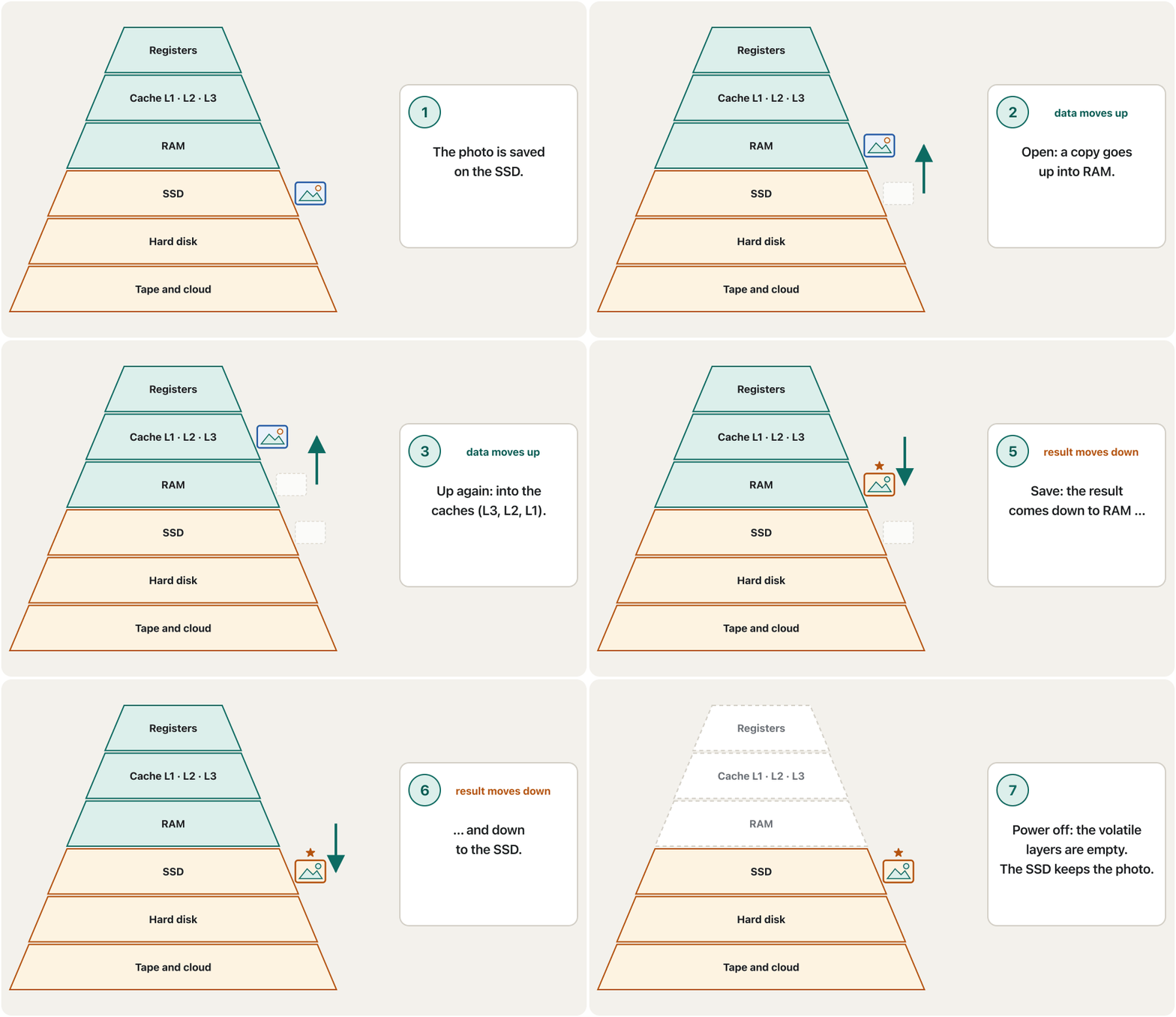
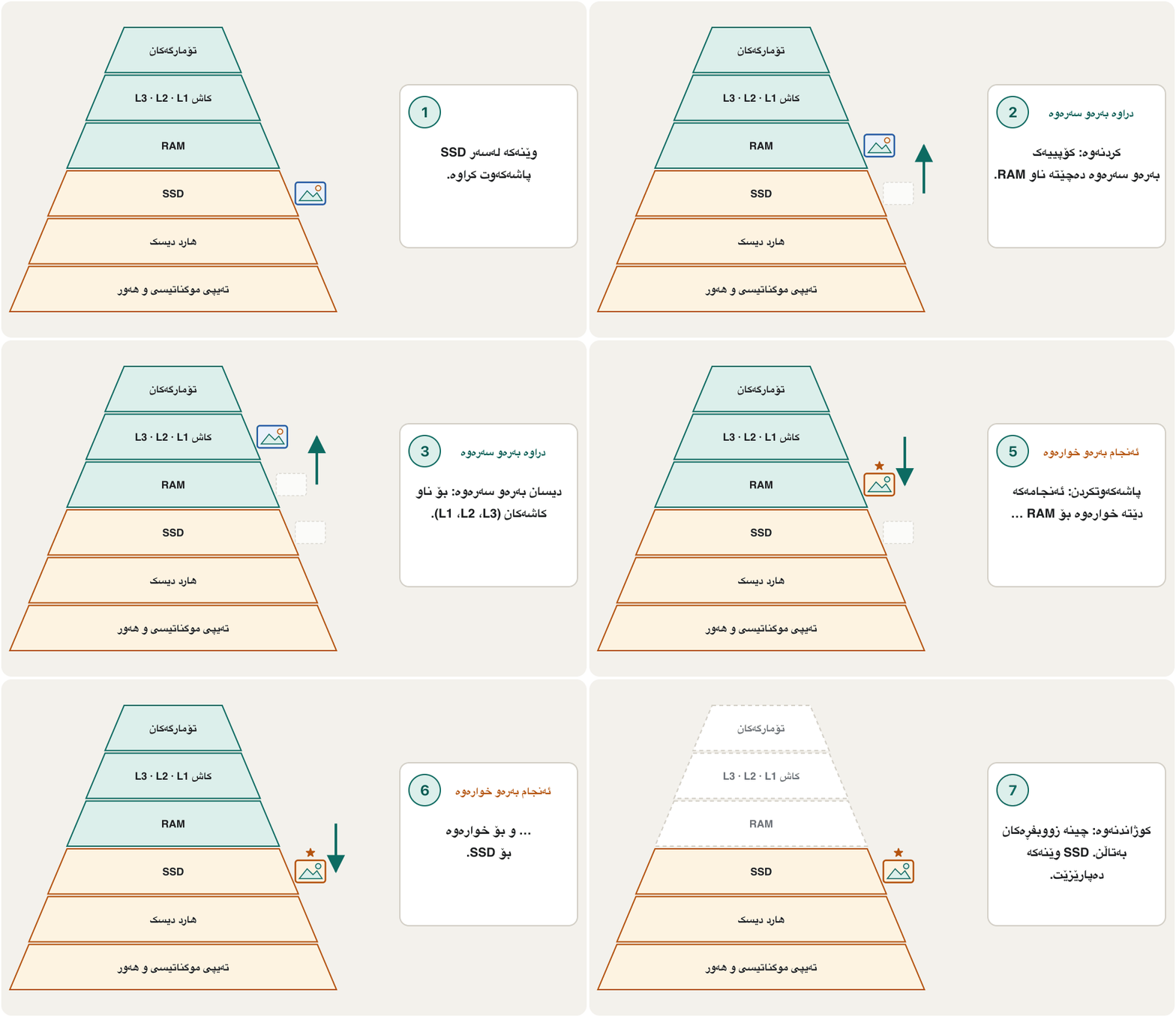
Watch data climb the pyramidسەیری سەرکەوتنی دراوە بە هەرەمەکەدا بکە
When you open a photo, its data climbs the pyramid: from the SSD into RAM, then into the caches and the registers, where the CPU works on it. When you save the edited photo, the result travels back down to the SSD, where it is safe without power.
کاتێک وێنەیەک دەکەیتەوە، بە هەرەمەکەدا سەردەکەوێت: لە SSDـەوە بۆ ناو ، پاشان بۆ ناو و ، کە لەوێ کاری لەسەر دەکات. کاتێک وێنە دەستکاریکراوەکە پاشەکەوت دەکەیت، ئەنجامەکە دەگەڕێتەوە خوارەوە بۆ SSD، کە لەوێ بەبێ کارەبا پارێزراوە.
Common mistakesهەڵە باوەکان
| Mistakeهەڵە | What is trueڕاستییەکە |
|---|---|
| "My phone has 256 GB of memory."«مۆبایلەکەم GB هەیە.» | That is storage (flash). The phone's RAM is much smaller, for example 8 or 12 GB.ئەوە شوێنی (فلاش). مۆبایلەکە زۆر بچووکترە، بۆ نموونە یان GB. |
| "RAM keeps my files when I switch off."« کاتی کوژاندنەوە دەپارێزێت.» | RAM is volatile. Only what you saved to a drive survives. . تەنها ئەوەی لەسەر درایڤ پاشەکەوتت کردووە دەمێنێتەوە. |
| "ROM can never change."« هەرگیز ناگۆڕێت.» | Today's firmware chips are flash and can be updated, slowly and rarely. ئەمڕۆ فلاشن و دەتوانرێت بە خاوی و بە دەگمەن نوێ بکرێنەوە. |
| "Memory is a part of the CPU."« بەشێکە لە CPU.» | RAM is outside the CPU; only registers and cache are inside. لە دەرەوەی ؛ تەنها و لەناویدان. |
| "Any RAM fits any computer."«هەر دەچێتە هەر .» | DDR4 and DDR5 have different notches; laptops need SO-DIMMs; soldered memory cannot be changed.DDR4 و DDR5 کەلێنی جیاوازیان هەیە؛ SO-DIMMـیان دەوێت؛ لەحیمکراو ناگۆڕدرێت. |
| "A big page file is as good as more RAM."«page fileـێکی گەورە هێندەی زیاتر باشە.» | The drive is thousands of times slower than RAM.درایڤ هەزاران جار لە خاوترە. |
Exercisesڕاهێنانەکان
Put these in order from fastest to slowest, and mark each one volatile (V) or non-volatile (N): RAM, hard disk, L2 cache, register, SSD, L1 cache.
ئەمانە لە خێراترینەوە بۆ خاوترین ڕیز بکە و لە تەنیشت هەریەکەیان بنووسە زووبفڕە (V) یان زوونەفڕ (N): ، ، L2، ، SSD، L1.
Hintئاماژە
Use the pyramid: top = fastest.
هەرەمەکە بەکار بهێنە: سەرەوە = خێراترین.
Show answerوەڵامەکە پیشان بدە
Register (V) → L1 cache (V) → L2 cache (V) → RAM (V) → SSD (N) → hard disk (N). Everything above the drives is volatile.
(V) ← L1 (V) ← L2 (V) ← (V) ← SSD (N) ← (N). هەموو ئەوەی لە سەرووی درایڤەکانەوەیە زووبفڕە.
The L1 cache answers in 1 ns. If the data is not there (a miss), the CPU must also wait 82.5 ns for RAM. 95 % of the CPU's requests are hits. What is the average time per request? How many times faster is that than going to RAM every time?
L1 لە نانۆچرکەدا وەڵام دەداتەوە. ئەگەر لەوێ نەبوو (miss)، دەبێت نانۆچرکەی تریش چاوەڕێی بکات. ـی داواکارییەکانی hitـن. تێکڕای کات بۆ هەر داواکارییەک چەندە؟ ئەمە چەند جار خێراترە لەوەی هەموو جارێک بچێتە ؟
Hintئاماژە
Every request pays the 1 ns hit time; only the 5 % misses also pay for RAM.
هەموو داواکارییەک نانۆچرکەکە دەدات؛ تەنها ـی missـەکان نرخی دەدەن.
Show answerوەڵامەکە پیشان بدە
Without a cache every request would take 82.5 ns, so the cache makes memory about times faster on average.
بەبێ هەموو داواکارییەک نانۆچرکەی دەخایاند، بۆیە بە تێکڕا نزیکەی جار خێراتر دەکات.
For each, say RAM or ROM/firmware and why: (a) the web page you are reading now; (b) the program a printer runs when you switch it on; (c) a game you are playing; (d) the code inside a hotel key card's RFID chip.
بۆ هەریەکەیان بڵێ یان / و بۆچی: (أ) ئەو لاپەڕەتۆڕەی ئێستا دەیخوێنیتەوە؛ (ب) ئەو کاتی هەڵکردن جێبەجێی دەکات؛ (ج) یارییەک کە دەیکەیت؛ (د) کۆدی ناو کارتی کلیلی ئوتێلێک.
Show answerوەڵامەکە پیشان بدە
- (a) RAM — it is open and changing now.
- (b) ROM / firmware — it must be there before anything is loaded, without power.
- (c) RAM — the running game and its data are in RAM (the installed game is on the drive).
- (d) ROM — a small, permanent memory without its own power supply.
- (أ) — ئێستا کراوەیە و دەگۆڕێت.
- (ب) / — دەبێت پێش بارکردنی هەر شتێک، بەبێ کارەبا، ئامادە بێت.
- (ج) — یارییە کاراکە و لە (یارییە دامەزراوەکە لەسەر درایڤە).
- (د) — بچووک و هەمیشەیی بەبێ سەرچاوەی کارەبای خۆی.
Dilan has a desktop with a DDR5 motherboard, two 8 GB modules in slots A2 and B2, and two empty slots. She edits videos and Task Manager often shows 15 GB in use. What would you buy, and what must you check first?
دیلان هەیە بە DDR5، دوو مۆدیوڵی GB لە شوێنەکانی A2 و B2 و دوو شوێنی بەتاڵ. ڤیدیۆ دەستکاری دەکات و زۆرجار GB بەکارهاتوو پیشان دەدات. چی دەکڕیت و سەرەتا دەبێت چی بپشکنیت؟
Hintئاماژە
Same type, matched pairs, and the manual's limits.
هەمان جۆر، جووتی هاوشێوە و سنوورەکانی ڕێبەرنامەکە.
Show answerوەڵامەکە پیشان بدە
Buy a matched pair of DDR5 modules (for example GB, or a new GB kit) at the same speed. Check the board's manual for the maximum memory and for how four modules affect speed: with two modules in each channel many boards run DDR5 slower, so a new GB kit in A2/B2 may be the faster choice. Fit them with ESD precautions.
جووتێک مۆدیوڵی DDR5ـی هاوشێوە بکڕە (بۆ نموونە GB، یان کۆمەڵەیەکی نوێی GB) بە هەمان خێرایی. ڕێبەرنامەی بۆردەکە بپشکنە بۆ زۆرترین بڕی و بۆ ئەوەی چوار مۆدیوڵ چۆن کار دەکاتە سەر خێرایی: بە دوو مۆدیوڵ لە هەر کەناڵێکدا زۆرێک لە بۆردەکان DDR5 خاوتر کار پێ دەکەن، بۆیە کۆمەڵەیەکی نوێی GB لە A2/B2 لەوانەیە هەڵبژاردنی خێراتر بێت. بە ڕەچاوکردنی دایان بنێ.
Summaryپوختە
- Main memory (RAM) holds the programs and data the CPU is using; everything passes through it.
- RAM is fast, changeable and volatile; ROM/firmware is small, non-volatile and today usually updatable flash.
- The cache (SRAM) keeps copies of the most used data: L1 and L2 per core, L3 shared; the CPU looks there first.
- Main memory is DRAM (DDR4, DDR5) on DIMMs or SO-DIMMs, or soldered LPDDR5X; the notch keeps generations apart.
- Virtual memory lets programs use the drive when RAM is full — useful, but thousands of times slower.
- The memory hierarchy: the higher, the faster and dearer; the lower, the bigger and cheaper.
- () ئەو و هەڵدەگرێت کە ئێستا بەکاریان دەهێنێت؛ هەموو شتێک پێیدا تێدەپەڕێت.
- خێرا، گۆڕاو و زووبفڕە؛ / بچووک و زوونەفڕە و ئەمڕۆ زۆرجار فلاشێکی نوێکراوەیە.
- () کۆپیی ئەو هەڵدەگرێت کە زیاتر بەکار دێت: L1 و L2 بۆ هەر ناوکێک، L3 هاوبەش؛ سەرەتا لەوێ دەگەڕێت.
- (DDR4، DDR5) لەسەر یان SO-DIMM، یان LPDDR5Xـی لەحیمکراو؛ کەلێنەکە نەوەکان لێک جیا دەکاتەوە.
- ڕێگە دەدات کاتی پڕبوونی درایڤەکە بەکار بێت — بەسوودە، بەڵام هەزاران جار خاوترە.
- : تا بەرزتر، خێراتر و گرانتر؛ تا نزمتر، گەورەتر و هەرزانتر.
Why does a computer need both RAM and a drive?بۆچی کۆمپیوتەر هەم پێویستی بە RAM هەیە و هەم بە درایڤ؟
RAM is fast enough for the CPU but volatile and small; the drive is big and keeps data without power, but is slow.
بەشی خێرایی دەکات بەڵام زووبفڕ و بچووکە؛ درایڤ گەورەیە و بەبێ کارەبا دەپارێزێت، بەڵام خاوە.
What is a cache miss?cache miss چییە؟
The data is not in the cache, so it must be fetched from a slower level (L2, L3 or RAM) and copied into the cache.
لە نییە، بۆیە دەبێت لە پلەیەکی خاوترەوە (L2، L3 یان ) بهێنرێت و بۆ ناو کۆپی بکرێت.
Why is DRAM "dynamic"?بۆچی DRAM «جووڵاو»ە؟
Its bits are charges that leak away, so it must be refreshed constantly (every row at least every 64 ms).
بارگەن کە دەڕژێن، بۆیە دەبێت بەردەوام نوێ بکرێتەوە (هەر ڕیزێک لانیکەم هەر میلیچرکە جارێک).
Videoڤیدیۆ
Watch a videoسەیری ڤیدیۆیەک بکە
A video that viewers liked a lot and praised in their comments, chosen for this lesson.ڤیدیۆیەک کە بینەران زۆریان پێ خۆش بووە و لە کۆمێنتەکانیاندا ستایشیان کردووە، بۆ ئەم وانەیە هەڵبژێردراوە.
Why computers need short-term memory and long-term storage: RAM, fast cache and drives, and their limits, in five minutes.
بۆچی هەم کورتخایەنی پێویستە هەم درێژخایەن: ، خێرا و درایڤەکان، لەگەڵ سنوورەکانیان، لە پێنج خولەکدا.
An overview of the whole lesson.
تێڕوانینێکی گشتی بۆ هەموو وانەکە.
Lesson complete!وانەکە تەواو بوو!
Well done. Review the key terms, then go on to the next lesson.دەستخۆش. سەیرێکی زاراوە سەرەکییەکان بکەرەوە، پاشان بڕۆ بۆ وانەی داهاتوو.
Key termsزاراوە سەرەکییەکان
Ports and Connectorsدەرچەکان و سەرەکانی کێبڵ
Related lecturesوانە پەیوەندیدارەکان
- Building and Caring for a PCپێکەوەنان و چاودێریکردنی کۆمپیوتەر
- Storage Versus Memoryخەزنکردن بەرامبەر بیرگە
- The CPU: Control Unit, ALU and CoresCPU: یەکەی جڵەوکردن، ALU و ناوکەکانی پرۆسێسەر
- Processor Speed, Cache, GPUs and Coolingخێرایی پرۆسێسەر، کاش، GPU و ساردکردنەوە
- Bits, Bytes and Storage Unitsبیتەکان، بایتەکان و یەکەکانی خەزنکردن
- Ports and Connectorsدەرچەکان و سەرەکانی کێبڵ
- What Is a Computer? Data, Input, Processing, Outputکۆمپیوتەر چییە؟ دراوە، نێوخستە، چارەسەرکردن، دەرخستە
- Inside the Computerناو کۆمپیوتەرەکە
- Types of Computersجۆرەکانی کۆمپیوتەر
References and further readingسەرچاوەکان و خوێندنەوەی زیاتر
- Wikipedia: Memory hierarchy (levels, sizes and latencies of a Zen 4 system)
- Wikipedia: CPU cache (hits and misses, L1/L2/L3, split L1, SRAM)
- Wikipedia: Dynamic random-access memory (1T1C cell, 64 ms refresh, SRAM comparison)
- Wikipedia: Read-only memory (mask ROM to flash; firmware updates in place)
- Wikipedia: DDR5 SDRAM (288-pin DIMMs, 1.1 V vs 1.2 V, two subchannels)
- Rambus: Get ready for DDR5 DIMM chipsets (DDR4 vs DDR5 data rates, PMIC, channels, burst length, die density)
- StorageNewsletter: JEDEC publishes JESD79-5C DDR5 standard (timings to 8800, April 2024)
- Faceofit: JEDEC JESD400-5D (DDR5 SPD, version 1.4, October 2025) — support for DDR5 modules up to 9200 MT/s
- StorageNewsletter: JEDEC publishes JESD209-6 LPDDR6 standard (July 2025)
- Samsung Semiconductor: LPDDR5X (up to 10.7 Gbps)
- TrendForce: memory makers prepare DDR6 prototypes, commercialization 2028–29 (May 2026)
- heise online: LPCAMM2 — LPDDR5X as a plug-in module (May 2024)
- Microsoft Learn: Introduction to the page file
- Intel: Core Ultra 7 processor 265K specifications (cores, L2 and L3 cache)
- Intel: How to choose RAM for a gaming PC (dual channel, 16 GB recommended)
- Microsoft: Windows 11 specifications (4 GB RAM minimum)
- Apple Newsroom (30 Oct 2024): MacBook Air starting memory doubles to 16 GB
This lecture is a first edition. The Kurdish text and terminology are waiting for review by Kurdish IT teachers.ئەم وانەیە چاپی یەکەمە. دەقە کوردییەکە و زاراوەکانی چاوەڕێی پێداچوونەوەی مامۆستایانی کوردی بواری IT ن.