Chapterبەش 1 · Lectureوانە 1.1
What Is Microsoft Access?Microsoft Access چییە؟
Meet Microsoft Access for Windows: what a desktop database is, when to choose it instead of Excel or a server, its six kinds of objects, the window, the Navigation Pane, views and the File tab — and create the course's University database.
Microsoft Access بۆ Windows بناسە: سەر کۆمپیوتەر چییە، کەی لە جیاتی Excel یان هەڵیبژێریت، شەش جۆری ، ، ، و File — و Universityـی کۆرسەکە دروست بکە.
What you will learnچی فێر دەبیت
- Say what Access is, which computers run it, and when a spreadsheet or a server DBMS is the better choice.
- Name the six object types and the job of each.
- Create a blank database and name every part of the Access window.
- Use the Navigation Pane, object tabs, views and the File tab.
- بڵێیت Access چییە، لەسەر کام کۆمپیوتەر کار دەکات و کەی یان سەر باشترە.
- ناوی شەش جۆری و کاری هەر یەکێکیان بڵێیت.
- بەتاڵ دروست بکەیت و ناوی هەموو بەشێکی Access بڵێیت.
- ، تابی ، و File بەکاربهێنیت.
Welcome: one database, built step by stepبەخێربێیت: یەک بنکەدراوە، هەنگاو بە هەنگاو
In this course you build one real database in Microsoft Access: University.accdb, the database of a small university. It starts empty in this lesson and grows a little in every lesson:
لەم کۆرسەدا یەک ڕاستەقینە لە Microsoft Access دروست دەکەیت: University.accdb، زانکۆیەکی بچووک. لەم وانەیەدا بەتاڵ دەست پێدەکات و لە هەر وانەیەکدا کەمێک گەورەتر دەبێت:
- Lesson 1 (this one): the file, the Access window and its six kinds of objects.
- Lesson 2: tables, fields and datasheets: the Country and Student tables.
- Lesson 3: field properties: sizes, formats, input masks and lookup lists.
- Lesson 4: default values and validation rules: rules that let only correct data in.
- Lesson 5: relationships: the tables are joined and protect each other.
- Lessons 6–8: queries ask questions, forms are screens for typing, and reports and database tools print the data and look after the file.
- وانەی 1 (ئەم وانەیە): ، Access و شەش جۆرەکەی .
- وانەی 2: خشتەکان، ستوونەکان و پەڕەکانی دراوە: Country و Student.
- وانەی 3: تایبەتمەندییەکانی ستوون: قەبارە، Format، و .
- وانەی 4: نرخە بنەڕەتییەکان و ڕێساکانی پشتڕاستکردنەوە: ئەو ڕێسایانەی تەنها دروست دەهێڵنە ژوورەوە.
- وانەی 5: پەیوەندییەکان: بە یەکەوە دەبەسترێن و یەکتر دەپارێزن.
- وانەکانی 6 تا 8: پرسەکان پرسیار دەکەن، فۆرمەکان شاشەی نووسینن و ڕاپۆرتەکان و ئامرازەکانی بنکەدراوە چاپ دەکەن و چاودێریی دەکەن.
Welcome: one database, built step by stepبەخێربێیت: یەک بنکەدراوە، هەنگاو بە هەنگاو
No Mac version; which Access this course usesوەشانی Mac نییە؛ ئەم کۆرسە کام Access بەکاردەهێنێت
Older guides also mention Access web apps that ran in SharePoint. Microsoft stopped new ones in June 2017 and shut the rest down by April 2018; normal .accdb files were not affected, and for web and mobile apps Microsoft now points to Power Apps and Dataverse.
ڕێبەرە کۆنەکان باسی Access web apps دەکەن کە لە SharePointـدا کاریان دەکرد. Microsoft لە June 2017 دروستکردنی نوێیانی ڕاگرت و تا April 2018 هەموویانی داخست؛ ئاسایی .accdb زیانیان پێنەگەیشت و ئێستا Microsoft بۆ ماڵپەڕ و مۆبایل ئاماژە بۆ Power Apps و Dataverse دەکات.
This course follows Access for Microsoft 365 (Access 2024 looks the same). The course slides were made with Access 2016, and the course author's own photos with Access 2010; older versions look a little different (for example the data type "Text" is now "Short Text", and the Show Table dialog is now the Add Tables pane), but the steps and ideas are the same.
ئەم کۆرسە پەیڕەوی Access for Microsoft 365 دەکات (Access 2024 هەمان شێوەیە). کۆرسەکە بە Access 2016 و وێنەکانی خاوەنی کۆرسەکە بە Access 2010 دروست کراون؛ وەشانە کۆنەکان کەمێک جیاوازن (بۆ نموونە «Text» ئێستا «Short Text»ـە و Show Table ئێستا Add Tablesـە)، بەڵام هەنگاو و بیرۆکەکان هەمان شتن.
What Access isAccess چییە
Microsoft Access is a management system — a DBMS — for one person or a small team. It is part of Microsoft 365. Like every DBMS it stores data in and keeps it correct, but it also builds the screens for typing data () and the printouts () on top of those tables. So a teacher, a shop or a small office can build a whole little application with one program.
Microsoft Access پەیوەندیدارە (سیستەمی بەڕێوەبردنی بنکەدراوە چییە) بۆ یەک کەس یان تیمێکی بچووک و بەشێکە لە Microsoft 365. وەک هەموو لە هەڵدەگرێت و ڕاستی دەهێڵێتەوە، بەڵام هەروەها شاشەکانی نووسینی () و چاپکراوەکان () لەسەر ئەو دروست دەکات. بۆیە مامۆستایەک، دوکانێک یان ئۆفیسێکی بچووک دەتوانێت بە یەک بچووکی تەواو دروست بکات.
What a desktop database program such as Access gives you:
سەر کۆمپیوتەر وەک Access ئەمانەت پێدەدات:
- design the structure: tables, fields and their ;
- data-entry that are easier than a bare grid;
- : rules that refuse wrong values;
- sorting, filtering and that answer questions;
- to print or save as PDF;
- and a programming language (VBA) for advanced users;
- for beginners: , sample databases and step-by-step wizards.
- دیزاینکردنی پێکهاتەکە: ، و ؛
- نووسینی کە لە تۆڕێکی ڕووت ئاسانترن؛
- : ڕێسا کە نرخی هەڵە ڕەت دەکەنەوە؛
- ، و ئەو وەڵامی پرسیار دەدەنەوە؛
- بۆ چاپکردن یان پاشەکەوتکردنیان بە شێوەی PDF؛
- و (VBA) بۆ بەکارهێنەری پێشکەوتوو؛
- بۆ سەرەتاییەکان: ، نموونەیی و هەنگاو بە هەنگاو.
What Access isAccess چییە
A desktop database or a server?بنکەدراوەی سەر کۆمپیوتەر یان ڕاژەکار؟
Access is a desktop database: the whole database — tables, queries, forms, reports — lives in one .accdb file. Access opens that file directly from the disk of one PC, or from a shared folder on the office network. There is no separate server program. In a client/server system such as MySQL, a server program owns the data and many client programs (a website, a phone app, office PCs) send it requests over the network.
Access سەر کۆمپیوتەرە: هەموو — ، ، ، — لە یەک .accdbـدایە. Access ڕاستەوخۆ ئەو لە دیسکی یەک کۆمپیوتەر یان لە هاوبەش لەسەر ئۆفیسەکە دەکاتەوە. هیچ جیا نییە. لە سیستەمێکی وەک MySQL، خاوەنی و چەندین (ماڵپەڕێک، مۆبایل، کۆمپیوتەرەکانی ئۆفیس) بە داواکاری بۆ دەنێرن.
SQLite also keeps a whole database in one file, but it has no screens: programs use it through code. Access adds the full user interface. The layers of a database system (one tier, client/server) are explained in Database system and abstraction.
SQLiteـیش هەموو لە یەک هەڵدەگرێت، بەڵام شاشەی نییە: بە کۆد بەکاری دەهێنن. Access تەواوی بۆ زیاد دەکات. چینەکانی (یەک چین، ) لە سیستەمی بنکەدراوە و ڕووتکردنەوە ڕوون کراونەتەوە.
Move from Access to a server DBMS (MySQL, SQL Server, PostgreSQL) when many people must change data at the same time, when a website or phone app needs the data, when the data grows near Access's limit of 2 GB per file, or when each user needs their own account and permissions.
لە Accessـەوە بگوازەرەوە بۆ سەر (MySQL، SQL Server، PostgreSQL) کاتێک زۆر کەس دەبێت لە یەک کاتدا بگۆڕن، کاتێک ماڵپەڕێک یان مۆبایل پێویستی بە هەیە، کاتێک لە سنووری 2 GBـی هەر Access نزیک دەبێتەوە، یان کاتێک هەر بەکارهێنەرێک هەژمار و مۆڵەتی تایبەتی خۆی پێویستە.
Access or Excel?Access یان Excel؟
Excel and Access both show rows and columns, so beginners often ask which one to use. They are built for different jobs:
Excel و Access هەردووکیان ڕیز و ستوون پیشان دەدەن، بۆیە سەرەتاییەکان زۆرجار دەپرسن کامیان بەکاربهێنن. بۆ دوو کاری جیاواز دروست کراون:
| Comparedبەراورد | Excel (a spreadsheet)Excel (وەک ) | Access (a database)Access (وەک ) |
|---|---|---|
| Best atباشترینە بۆ | numbers, calculations and chartsژمارە، ژمێرکاری و | storing many kinds of data so it is easy to find againهەڵگرتنی زۆر جۆری بە شێوەیەک کە دووبارە بە ئاسانی بدۆزرێتەوە |
| Shape of the dataشێوەی | one big list per sheetیەک لیستی گەورە بۆ هەر پەڕەیەک | many related , joined by keysچەندین پەیوەندیدار کە بە بەستراون |
| Rules on inputڕێسا بۆ نووسین | any cell can hold anything unless you add checksهەر خانەیەک دەتوانێت هەر شتێک هەڵبگرێت مەگەر خۆت پشکنین زیاد بکەیت | every has a and can have rulesهەر هەیە و دەتوانێت ڕێسای هەبێت |
| Screens and printoutsشاشە و چاپکراو | the sheet itselfخودی پەڕەکە | for typing, for printing بۆ نووسین، بۆ چاپ |
| Questionsپرسیار | filters and formulas و | saved across several tables پاشەکەوتکراو لەسەر چەند |
| Typical sizeقەبارەی ئاسایی | one list, one personیەک لیست، یەک کەس | thousands of records, a small teamهەزاران ، تیمێکی بچووک |
Building a real table in Microsoft Access: fields are the columns, records are the rows, and a key field identifies each record.
ڕاستەقینە لە Microsoft Access دروست دەکرێت: دادەنرێن، دەبنە و وەک هەر لەوانی تر جیا دەکاتەوە.
Plays 1:01-2:36 (Advantages of a database over Excel); Access for Microsoft 365.
لە 1:01 تا 2:36 پەخش دەبێت (بەشی Advantages of a database over Excel): سوودەکانی بەرامبەر Excel، بە Access for Microsoft 365.
Access or Excel?Access یان Excel؟
When a spreadsheet is enoughکەی بەرنامەی خشتەیی بەسە
A spreadsheet is still the right tool for a small flat list (one teacher's mark sheet, a shopping list) or for work that is mostly calculation. Choose Access when the same facts would be typed again and again in a sheet, when several lists belong together (students, courses, enrolments), or when wrong input must be stopped.
هێشتا ئامرازی گونجاوە بۆ لیستێکی بچووکی تەخت (لیستی نمرەی مامۆستایەک، لیستی کڕین) یان بۆ کارێک کە زۆربەی ژمێرکارییە. Access هەڵبژێرە کاتێک هەمان زانیاری لە پەڕەیەکدا جار لە دوای جار دەنووسرێتەوە، کاتێک چەند لیستێک پێکەوە پەیوەندییان هەیە (قوتابیان، وانەکان، تۆمارکردنەکان)، یان کاتێک دەبێت ڕێگە لە نووسینی هەڵە بگیرێت.
A spreadsheet is like a teacher's mark sheet: quick to fill in, perfect for adding up marks. A database is like the university registry office: one cabinet for students, one for courses, and a form that must be filled in correctly before anything is filed.
وەک لیستی نمرەی مامۆستایەکە: خێرا پڕ دەکرێتەوە و بۆ کۆکردنەوەی نمرە تەواوە. وەک ئۆفیسی تۆماری زانکۆیە: کەنتۆرێک بۆ قوتابیان، کەنتۆرێک بۆ وانەکان و فۆرمێک کە دەبێت بە دروستی پڕ بکرێتەوە پێش ئەوەی هیچ شتێک بخرێتە ناو کەنتۆر.
Where the analogy stops workingسنووری ئەم نموونەیە
The registry office is slow; Access checks and joins the data in a moment.
ئۆفیسی تۆمار هێواشە؛ Access لە چرکەیەکدا دەپشکنێت و بە یەکەوە دەبەستێت.
The general difference between spreadsheets and databases, with the English words to describe it, is in Spreadsheets and databases; rows and columns in database terms are in tables, rows and columns. Excel itself is taught in the Information Technology course: Spreadsheet Essentials.
جیاوازیی گشتیی نێوان و ، لەگەڵ وشە ئینگلیزییەکانی وەسفکردنی، لە Spreadsheets and databasesـدایە؛ ڕیز و ستوون بە زمانی لە خشتەکان، ڕیز و ستوونەکان ڕوون کراونەتەوە. خودی Excel لە کۆرسی دەخوێندرێت: بنەماکانی بەرنامەی خشتەیی.
The six kinds of objectsشەش جۆرەکەی ئۆبجێکت
Everything you build in Access is an , and all objects are saved together in the one .accdb file. There are six kinds:
هەموو ئەو شتانەی لە Accessـدا دروستی دەکەیت ن و هەموویان پێکەوە لە یەک .accdbـدا هەڵدەگیرێن. شەش جۆریان هەیە:
| Object | Its jobکارەکەی | In our University databaseلە زانکۆکەماندا | Lessonوانە |
|---|---|---|---|
| Table | stores the data on one subject, one record per row یەک بابەت هەڵدەگرێت، هەر لە ڕیزێکدا | Student, Country | 2 |
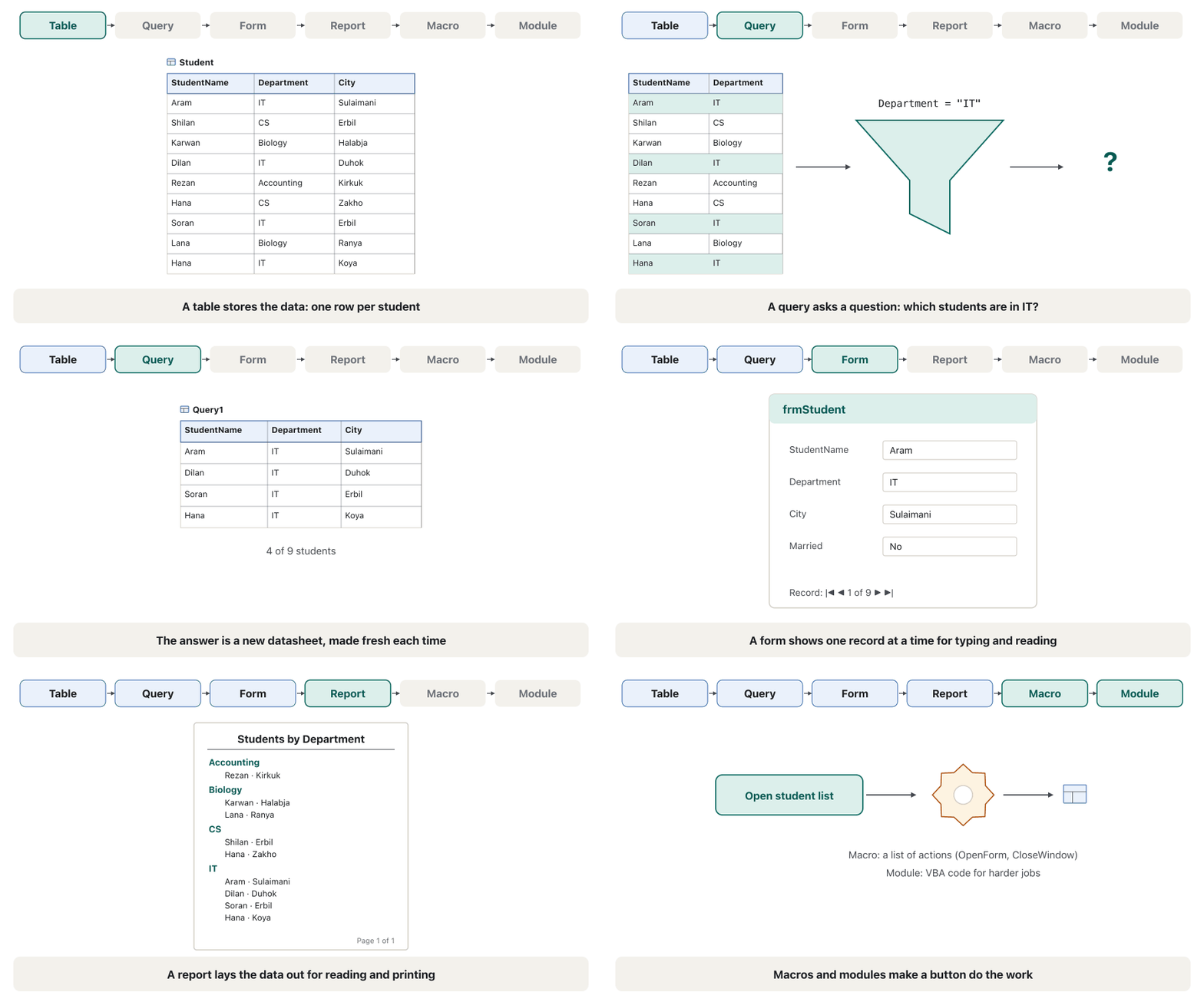
| Query | asks a question and shows only the fields and records that answer itپرسیارێک دەکات و تەنها ئەو و وەڵامی دەدەنەوە پیشان دەدات | the IT studentsقوتابیانی IT | 6 |
| Form | a screen for typing and reading one record at a timeشاشەیەک بۆ نووسین و خوێندنەوەی یەک لە هەر جارێکدا | frmStudent | 7 |
| Report | data laid out for reading and printing کە بۆ خوێندنەوە و چاپ ڕێکخراوە | students by departmentقوتابیان بەپێی بەش | 8 |
| Macro | a saved list of actions, such as "open this form", run by a buttonلیستێکی پاشەکەوتکراوی کار، وەک «ئەم بکەرەوە»، کە کاری پێدەکات | the Close button of the main menu Closeـی لیستە سەرەکییەکە | 7 |
| Module | VBA programming code for jobs a macro cannot doکۆدی بەرنامەسازیی VBA بۆ ئەو کارانەی ناتوانێت بیکات | — (not used in this course)— (لەم کۆرسەدا بەکار نایەت) | — |
The six kinds of objectsشەش جۆرەکەی ئۆبجێکت
How the objects work togetherئۆبجێکتەکان چۆن پێکەوە کار دەکەن
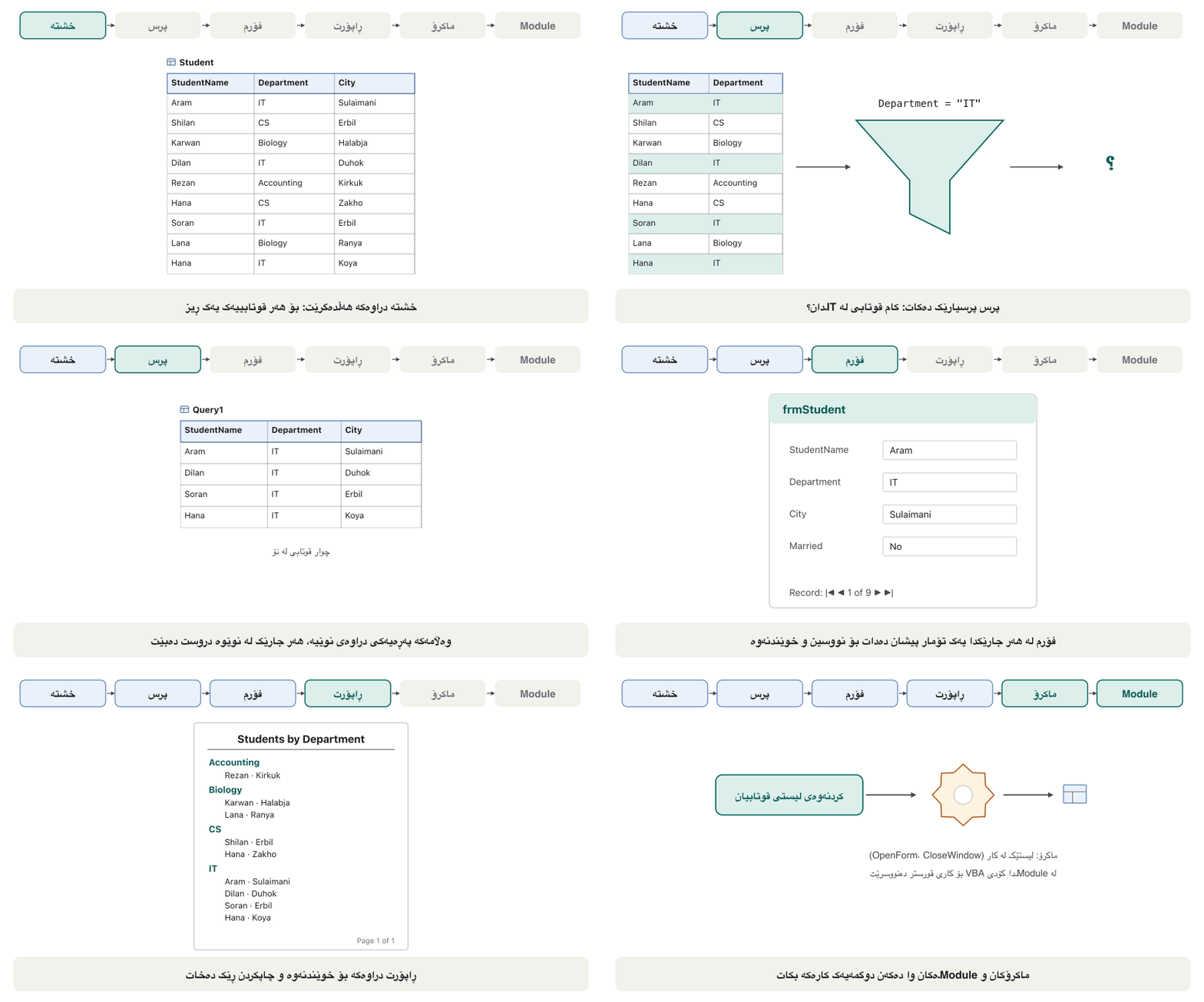
The objects work as a chain: tables hold the data, queries pick from it, and forms and reports show tables or queries to people; macros and modules make buttons do the work. The animation follows one question through the chain.
وەک زنجیرەیەک کار دەکەن: هەڵدەگرن، لێی هەڵدەبژێرن و و یان بە خەڵک پیشان دەدەن؛ و Moduleـەکان وا دەکەن کارەکە بکەن. ئەنیمەیشنەکە یەک پرسیار بەناو زنجیرەکەدا دەبات.
Access words in one tableوشەکانی Access لە یەک خشتەدا
Access's help pages and older guides use these words. Most of the ideas are taught in other CêIT lessons, so the last column links there.
پەڕەکانی یارمەتیی Access و ڕێبەرە کۆنەکان ئەم وشانە بەکاردەهێنن. زۆربەی بیرۆکەکان لە وانەکانی تری CêIT دەخوێنرێن، بۆیە ستوونی کۆتایی بەستەرە بۆ ئەوێ.
| Wordوشە | Meaning in Accessواتای لە Accessـدا | Learn moreزیاتر بخوێنە |
|---|---|---|
| database | all the tables and other objects on one topic, in one .accdb fileهەموو و تری یەک بابەت، لە یەک .accdb | what a database isبنکەدراوە چییە |
| relational database | data split into several tables joined by a common field دابەشکراو بۆ چەند کە بە هاوبەش بەستراون | tables, rows and columnsخشتەکان، ڕیز و ستوون |
| table, field, record، ، | a table holds one subject; a field is a column; a record is one row یەک بابەت هەڵدەگرێت؛ ستوونێکە؛ یەک ڕیزە | fields and recordsستوونەکان و تۆمارەکان |
| datasheet | the row-and-column grid that shows a table or queryئەو تۆڕە ڕیز و ستوونەی یان پیشان دەدات | lesson 2وانەی 2 |
| primary key | the field whose value is different in every recordئەو نرخەکەی لە هەموو جیاوازە | primary keyوانەی کلیلی سەرەکی |
| display formatFormat (شێوەی پیشاندان) | how a field's values are shown (for example 450,000 IQD)چۆنیەتیی پیشاندانی نرخەکانی (بۆ نموونە 450,000 IQD) | lesson 3وانەی 3 |
| flat file (non-relational)فایلی تەخت (ناپەیوەندیدار) | one single table, such as a simple list of names and phonesتەنها یەک ، وەک لیستێکی سادەی ناو و ژمارەی تەلەفۆن | Spreadsheets and databases |
Access words in one tableوشەکانی Access لە یەک خشتەدا
Words about relationships, queries and formsوشەکانی پەیوەندی، پرس و فۆرم
| Wordوشە | Meaning in Accessواتای لە Accessـدا | Learn moreزیاتر بخوێنە |
|---|---|---|
| relationship, join line، هێڵی بەستنەوە | a link between two tables through a common field, drawn as a line: usually one-to-many, sometimes one-to-oneپەیوەندییەک لە نێوان دوو بە هاوبەش، کە وەک هێڵێک دەکێشرێت: زۆرجار ، هەندێک جار یەک بۆ یەک | lesson 5وانەی 5 |
| related table | the table on the "many" side, whose common field takes its values from a primary tableئەو لە لای «زۆر»ـە و هاوبەشەکەی نرخەکانی لە سەرەکییەوە وەردەگرێت | foreign keyوانەی کلیلی بیانی |
| query, select query, criteria، SELECT، | a saved question; a select query only picks fields and records; criteria are its conditionsپرسیارێکی پاشەکەوتکراو؛ SELECT تەنها و هەڵدەبژێرێت؛ criteria واتە | what a query is, criteria; a query as a questionپرس چییە، مەرجەکان؛ پرس وەک پرسیار |
| recordset | the records and fields a query returnsئەو و دەیانگەڕێنێتەوە | what a query isپرس چییە |
| field list, form layoutField List، Layout | a small pane listing a table's fields; how controls are arranged on a form (columnar, tabular, datasheet, justified) بچووک کە لیست دەکات؛ ڕیزکردنی توخمەکان لەسەر (columnar، tabular، datasheet، justified) | field list, form layoutsField List، Layoutـەکانی فۆرم |
Start Access and create the lab fileAccess بکەرەوە و فایلی تاقیگە دروست بکە
Create the file the whole course uses. A database is a file from the first second, so Access asks for its name and folder before it opens:
ئەو دروست بکە کە هەموو کۆرسەکە بەکاری دەهێنێت. لە یەکەم چرکەوە ، بۆیە Access پێش کردنەوە ناو و دەپرسێت:
- Start AccessAccess بکەرەوە
Click Start, type Access and choose Access in the results (or open the list of all apps and click Access). The Start button and the taskbar are shown in the Windows 11 desktop.
لە Start بکە، Access بنووسە و Access لە ئەنجامەکاندا هەڵبژێرە (یان لیستی هەموو بکەرەوە و لە Access بکە). Start و لە ڕوومێزی Windows 11 پیشان دراون.
- Choose Blank databaseBlank database هەڵبژێرە
The start screen shows Blank database, templates, your recent files and Open. Click Blank database.
شاشەی سەرەتای Access Blank database، ، ئەم دواییە و Open پیشان دەدات. لە Blank database بکە.
- Name the file and pick the folderناو و فۆڵدەر دیاری بکە
In File Name type
University(Access adds.accdb). Click the small folder icon beside it to choose where the file goes, for example Documents → Access course.لە File Name
Universityبنووسە (Access خۆی.accdbزیاد دەکات). لە بچووکی لە تەنیشتی بکە بۆ هەڵبژاردنی شوێنی ، بۆ نموونە Documents ← Access course. - Createکلیک لە Create بکە
Click Create. Access saves
University.accdbat once and opens an empty table, Table1, in . Lesson 2 continues from here.لە Create بکە. Access یەکسەر
University.accdbپاشەکەوت دەکات و بەتاڵ، Table1، لە دەکاتەوە. وانەی 2 لێرەوە بەردەوام دەبێت.
A Kurdish (Sorani) introduction to what a database is and what data means, before building one in Access.
ناساندنێک بە کوردیی سۆرانی: چییە و واتای چییە، پێش ئەوەی لە Access دروست بکرێت.
Kurdish (Sorani). Plays 10:37-12:43: Start menu, type Access, Blank database, type the file name, Create; the new file opens with Table1 in Datasheet view.
بە کوردیی سۆرانی، لە 10:37 تا 12:43 پەخش دەبێت: Start، نووسینی Access، Blank database، نووسینی ناوی و Create؛ نوێ بە Table1 لە دەکرێتەوە.
Access file typesجۆرەکانی فایلی Access
The tells you which kind of Access file you have:
پێت دەڵێت چ جۆرە Accessـت هەیە:
| Extension | What it isچییە | What to doچی بکەیت |
|---|---|---|
.accdb | the Access database format since Access 2007; one file holds every objectشێوازی Access لە Access 2007ـەوە؛ یەک هەموو هەڵدەگرێت | use it for all new workبۆ هەموو کارێکی نوێ بەکاری بهێنە |
.mdb | the older format (Access 2003 and earlier)شێوازە کۆنەکە (Access 2003 و پێشتر) | it still opens; convert it with File → Save As → Access Database (*.accdb)هێشتا دەکرێتەوە؛ بە File ← Save As ← Access Database (*.accdb) بیگۆڕە |
.mde | an old .mdb whose design and code are locked کۆنی .mdb کە دیزاین و کۆدەکەی قفڵ کراون | keep the original .mdb to change it ئەسڵییەکەی .mdb بهێڵەوە بۆ گۆڕین |
.accde | an .accdb whose forms, reports and code cannot be changed; the data still can .accdb کە ، و کۆدەکەی ناگۆڕدرێن؛ بەڵام دەگۆڕدرێت | made in lesson 8لە وانەی 8 دروست دەکرێت |
.laccdb | a small lock file Access makes while the database is open بچووکی قفڵ کە Access لە کاتی کرانەوەی دروستی دەکات | ignore it; it disappears when the database is closedگوێی پێ مەدە؛ کاتێک دادەخرێت نامێنێت |
What an extension is, and why Windows may hide it, is explained in file extensions and, for PowerPoint, in the .pptx file.
چییە و بۆچی لەوانەیە Windows بیشارێتەوە لە پاشگرەکانی فایل و بۆ PowerPoint لە فایلی .pptx ڕوون کراوەتەوە.
The Access windowپەنجەرەی Access
This is the Access window with the University database open and the Country table showing. The top part works like every Microsoft 365 app; the Navigation Pane on the left and the record bar at the bottom belong to Access.
ئەمە Accessـە کاتێک University کراوەتەوە و Country پیشان دەدرێت. بەشی سەرەوە وەک هەموو Microsoft 365 کار دەکات؛ لە لای چەپ و شریتی لە خوارەوە تایبەتن بە Access.
The ribbon, the File tab, the Quick Access Toolbar, the Search box (Alt+Q) and contextual tabs work exactly as in PowerPoint: see the ribbon, contextual tabs and the Search box and the Quick Access Toolbar. Press Alt to see KeyTips, the letters that open each tab from the keyboard. What is special in Access is the set of tabs:
، File، ، سندووقی Search (Alt+Q) و وەک PowerPoint کار دەکەن: بڕوانە شریتی فەرمان، تابە کاتییەکان و سندووقی Search و شریتی ئامرازی خێرا. Alt دابگرە بۆ بینینی KeyTips، ئەو پیتانەی هەر بە دەکەنەوە. ئەوەی لە Accessـدا تایبەتە کۆمەڵەی :
| Tab | What you find thereچی لەوێ دەدۆزیتەوە |
|---|---|
| Home | Views, copy and paste, Sort & Filter, Records (New, Save, Delete, Totals), Find, text formattingViews، لەبەرگرتنەوە و لکاندن، Sort & Filter، Records (New، Save، Delete، Totals)، Find، دەق |
| Create | new tables, queries, forms, reports, macros and modules; templates، ، ، ، و Moduleـی نوێ؛ |
| External Data | import and link data from Excel, text files and other databases; exportهێنان و بەستنەوەی لە Excel، دەق و تر؛ ناردنە دەرەوە |
| Database Tools | Compact & Repair, Relationships, analysis toolsCompact & Repair، Relationships، ئامرازەکانی شیکردنەوە |
| Table Fields, Table (contextual)Table Fields، Table () | appear while a table is open in Datasheet viewکاتێک لە کراوەتەوە دەردەکەون |
| Table Design (contextual)Table Design، کە | appears while a table is open in Design viewکاتێک لە کراوەتەوە دەردەکەوێت |
Object tabs and viewsتابی ئۆبجێکتەکان و پیشاندانەکان
Each open object gets its own tab above the work area. Right-click a tab for Save, Close, Close All and the views of that object.
هەر کراوە تابی تایبەتی خۆی لە سەرووی ناوچەی کارەوە هەیە. ڕاست لە تابێک بکە بۆ Save، Close، Close All و ئەو .
Every object can be shown in several views. The views that show data are for using the object; Design view (and Layout view) are for building it:
هەر دەکرێت بە چەند پیشان بدرێت. ئەو پیشان دەدەن بۆ بەکارهێنانی ؛ (و Layout View) بۆ دروستکردنین:
| Object | Views | What they are forبۆ چین |
|---|---|---|
| Table | Datasheet View · Design View | type and read records · build the fieldsنووسین و خوێندنەوەی · دروستکردنی |
| Query | Datasheet View · Design View · SQL View | see the answer · build it in a grid · see or write its SQLبینینی وەڵام · دروستکردنی لە تۆڕێکدا · بینین یان نووسینی SQLـەکەی |
| Form | Form View · Layout View · Design View | use it · arrange it while seeing data · change every partبەکارهێنانی · ڕێکخستنی لە کاتی بینینی · گۆڕینی هەموو بەشێکی |
| Report | Report View · Print Preview · Layout View · Design View | read it · see the printed pages · arrange it · change every partخوێندنەوەی · بینینی لاپەڕە چاپکراوەکان · ڕێکخستنی · گۆڕینی هەموو بەشێکی |
Object tabs and viewsتابی ئۆبجێکتەکان و پیشاندانەکان
Switching viewsگۆڕینی پیشاندان
Switch views with Home → View (the arrow under it lists every view) or with the small view buttons at the right end of the . The ribbon follows you: in a table brings the Table Fields and Table contextual tabs; in it brings Table Design.
بە Home → View (تیرەکەی ژێری هەموو لیست دەکات) یان بە لە کۆتایی ڕاستی بگۆڕە. دوات دەکەوێت: لە Table Fields و Table دەهێنێت؛ لە Table Design دەهێنێت.
The File tab in Accessتابی File لە Accessـدا
The File tab opens the , as in every Office app (what the Backstage view is). In Access it holds:
File دەکاتەوە، وەک هەموو Office (پیشاندانی Backstage چییە). لە Accessـدا ئەمانەی تێدایە:
| Command | In Accessلە Accessـدا |
|---|---|
| New | a blank database or one made from a بەتاڵ یان لە |
| Open | recent databases, or Browse to find an .accdb file ئەم دواییە، یان Browse بۆ دۆزینەوەی .accdb |
| Info | Compact & Repair (lesson 8) and Encrypt with Password (lesson 8)Compact & Repair (وانەی 8) و Encrypt with Password (وانەی 8) |
| Save | saves the design of the open objectدیزاینی کراوەکە پاشەکەوت دەکات |
| Save As | Save Database As makes a copy of the whole file in another name or format; Save Object As copies one object (or saves it as PDF)Save Database As کۆپییەکی هەموو بە ناو یان شێوازێکی تر دروست دەکات؛ Save Object As کۆپیی یەک دروست دەکات (یان وەک PDF پاشەکەوتی دەکات) |
| Quick Print, Print and Print Preview of the open objectQuick Print، Print و Print Previewـی کراوەکە | |
| Close | closes the database; Access stays open دادەخات؛ Access کراوە دەمێنێتەوە |
The File tab in Accessتابی File لە Accessـدا
Records save themselves; the Message Barتۆمارەکان خۆیان پاشەکەوت دەکەن؛ Message Bar
When you open a database that someone else made, a yellow Message Bar may say Security Warning: Some active content has been disabled. Click Enable Content only for files you trust: Access blocks macros and code until then. Why, and how to trust your own folder, is explained in lesson 8.
کاتێک دەکەیتەوە کە کەسێکی تر دروستی کردووە، لەوانەیە Message Barـێکی زەرد بڵێت Security Warning: Some active content has been disabled. تەنها بۆ ئەو متمانەت پێیانە لە Enable Content بکە: تا ئەو کاتە Access و کۆد ڕادەگرێت. بۆچی و چۆن متمانە بە خۆت بکەیت لە وانەی 8 ڕوون کراوەتەوە.
Practiceڕاهێنان
Start Access and create the blank database University.accdb in a folder called Access course. Which object opens by itself, and in which view?
Access بکەرەوە و بەتاڵی University.accdb لە بە ناوی Access course دروست بکە. کام خۆی دەکرێتەوە و لە کام ؟
Show answerوەڵامەکە پیشان بدە
Start → type Access → Blank database → File Name University, folder icon → Access course → Create. Access opens Table1, an empty table, in Datasheet view. Close it without saving for now; lesson 2 builds the real tables.
Start → Access بنووسە ← Blank database ← File Name University، ← Access course ← Create. Access Table1 دەکاتەوە، بەتاڵ، لە . بۆ ئێستا بەبێ پاشەکەوتکردن دایبخە؛ وانەی 2 ڕاستەقینەکان دروست دەکات.
On the start screen open a template database (for example Students or Contacts; the list changes over time). Then save a copy of the whole database as an .accdb file named Template-practice. Which command did you use?
لە شاشەی سەرەتای Access لە بکەرەوە (بۆ نموونە Students یان Contacts؛ لیستەکە بە کات دەگۆڕێت). پاشان کۆپییەکی هەموو وەک .accdb بە ناوی Template-practice پاشەکەوت بکە. چ بەکارهێنا؟
Hintئاماژە
It is the whole database, not one object.
هەموو ، نەک یەک .
Show answerوەڵامەکە پیشان بدە
File → Save As → Save Database As → Access Database (*.accdb) → Save As → name Template-practice. Access closes the open objects, writes the copy and opens it. (Save Object As would copy only one object.) If a yellow Message Bar appears, the template's macros need Enable Content. Then look at File → Print, Account and Options (the course's practice asked for this too).
File ← Save As ← Save Database As ← Access Database (*.accdb) ← Save As ← ناوی Template-practice. Access کراوەکان دادەخات، کۆپییەکە دەنووسێت و دەیکاتەوە. (Save Object As تەنها یەک کۆپی دەکات.) ئەگەر Message Barـی زەرد دەرکەوت، پێویستیان بە Enable Content هەیە. پاشان سەیری File → Print، Account و Options بکە (ڕاهێنانی کۆرسەکەش داوای ئەمەی دەکرد).
In the template database, set the Navigation Pane to Object Type and All Access Objects. Write down one object of each type you can see, and open one table in Datasheet view and then in Design view.
لە ، بکە بە Object Type و All Access Objects. یەک لە هەر جۆرێک کە دەیبینیت بنووسە و یەک لە و پاشان لە بکەرەوە.
Show answerوەڵامەکە پیشان بدە
Click the pane's title → Object Type, then All Access Objects. Typical templates show Tables, Queries, Forms, Reports, often Macros and sometimes Modules. Double-click a table for Datasheet view; Home → View → Design View (or right-click the table → Design View) shows its fields and data types instead of its records.
لە ناونیشانی بکە ← Object Type، پاشان All Access Objects. ئاسایی Tables، Queries، Forms، Reports و زۆرجار Macros و هەندێک جار Modules پیشان دەدەن. لە بکە بۆ ؛ Home → View ← Design View (یان ڕاست لە ← Design View) لە جیاتی و پیشان دەدات.
Common mistakesهەڵە باوەکان
| Mistakeهەڵە | What to doچی بکەیت |
|---|---|
| Looking for Access on a Mac or in the browserگەڕان بە دوای Access لەسەر Mac یان لە ناو | Use a Windows PC; Access is Windows-only.کۆمپیوتەرێکی Windows بەکاربهێنە؛ Access تەنها بۆ Windowsـە. |
| Saving the new database in Downloads and losing itپاشەکەوتکردنی نوێیەکە لە Downloads و ونکردنی | Choose the folder with the folder icon before you click Create.پێش لە Create، بە ، هەڵبژێرە. |
| Pressing Ctrl+S after every record "to be safe"داگرتنی Ctrl+S دوای هەر «بۆ دڵنیایی» | Records save themselves when you leave them; Ctrl+S saves designs. کاتێک بەجێیان دەهێڵیت خۆیان پاشەکەوت دەکەن؛ Ctrl+S دیزاین پاشەکەوت دەکات. |
| Typing data in Design viewنووسینی لە | Design view builds fields; switch to Datasheet view to type records. دروست دەکات؛ بۆ نووسینی بگۆڕە بۆ . |
| Clicking Enable Content on every file لە Enable Content بۆ هەموو | Enable content only in files you trust.تەنها لە جێی متمانە ناوەڕۆکەکە چالاک بکە. |
| The Navigation Pane is gone نەماوە | Press F11 or click the « / » button.F11 دابگرە یان لە « / » بکە. |
Summaryپوختە
- Access is a desktop relational DBMS in Microsoft 365, for Windows only; it builds tables and also forms and reports on top of them.
- The whole database is one
.accdbfile; use a server DBMS for many simultaneous users or web apps. - Six object types: tables, queries, forms, reports, macros, modules (no "Page" any more).
- A new blank database asks for a file name and folder first, then opens Table1 in Datasheet view.
- The Navigation Pane lists the objects (F11 hides it); each open object has a tab; views switch with Home → View or the status bar.
- Records save themselves; Save is for designs; Save Database As copies the whole file.
- Access پەیوەندیداری سەر کۆمپیوتەرە لە Microsoft 365، تەنها بۆ Windows؛ و هەروەها و لەسەریان دروست دەکات.
- هەموو یەک
.accdbـە؛ بۆ زۆر بەکارهێنەری هاوکات یان ماڵپەڕ سەر بەکاربهێنە. - شەش جۆری : ، ، ، ، ، Moduleـەکان (ئیتر «Page» نییە).
- بەتاڵی نوێ سەرەتا ناوی و دەپرسێت، پاشان Table1 لە دەکاتەوە.
- لیست دەکات (F11 دەیشارێتەوە)؛ هەر کراوە تابێکی هەیە؛ بە Home → View یان دەگۆڕدرێن.
- خۆیان پاشەکەوت دەکەن؛ Save بۆ دیزاینە؛ Save Database As هەموو کۆپی دەکات.
Can you install Access on a Mac?دەتوانیت Access لەسەر Mac دابمەزرێنیت؟
No. Access is available only for Windows.
نەخێر. Access تەنها بۆ Windows هەیە.
Which object would you use to type one student at a time?کام ئۆبجێکت بەکاردەهێنیت بۆ نووسینی یەک قوتابی لە هەر جارێکدا؟
A form.
.
What is the difference between Datasheet view and Design view of a table?جیاوازیی نێوان پیشاندانی Datasheet و پیشاندانی Designـی خشتەیەک چییە؟
Datasheet view shows and edits the records; Design view builds the fields, data types and properties.
پیشان دەدات و دەستکارییان دەکات؛ ، و تایبەتمەندییەکان دروست دەکات.
What is a .accde file?فایلێکی .accde چییە؟
An Access database whose forms, reports and code are locked against design changes; the data can still change.
Access کە ، و کۆدەکەی بەرامبەر گۆڕینی دیزاین قفڵ کراون؛ هێشتا دەگۆڕدرێت.
Lesson complete!وانەکە تەواو بوو!
Well done. Review the key terms, then go on to the next lesson.دەستخۆش. سەیرێکی زاراوە سەرەکییەکان بکەرەوە، پاشان بڕۆ بۆ وانەی داهاتوو.
Key termsزاراوە سەرەکییەکان
Tables, Fields and Datasheetsخشتەکان، ستوونەکان و پەڕەکانی دراوە
Related lecturesوانە پەیوەندیدارەکان
- Tables, Fields and Datasheetsخشتەکان، ستوونەکان و پەڕەکانی دراوە
- The PowerPoint Screenپەنجەرەی PowerPoint
- Backstage View and Saving Filesپیشاندانی Backstage و پاشەکەوتکردنی فایلەکان
- Database Management Systemsسیستەمەکانی بەڕێوەبردنی بنکەدراوە
- From Files to Databasesلە فایلەوە بۆ بنکەدراوە
- SQLite Basicsبنەماکانی SQLite
References and further readingسەرچاوەکان و خوێندنەوەی زیاتر
- Microsoft Q&A: Does Microsoft 365 Personal have Access? (Access is only available on Windows)
- Microsoft Support: Access Services in SharePoint roadmap (web apps retired 2017–2018)
- Microsoft Support: Use the Navigation Pane
- Microsoft Support: Create a table and add fields (new database, 2 GB file size)
- Microsoft Support: Guide to the Access user interface
- Microsoft Support: Ways to add, edit and delete records
- Microsoft Support: Keyboard shortcuts for Access
This lecture is a first edition. The Kurdish text and terminology are waiting for review by Kurdish IT teachers.ئەم وانەیە چاپی یەکەمە. دەقە کوردییەکە و زاراوەکانی چاوەڕێی پێداچوونەوەی مامۆستایانی کوردی بواری IT ن.