Chapterبەش 2 · Lectureوانە 2.1
The Parts of a Computer Systemپارچەکانی سیستەمی کۆمپیوتەر
Hardware and software; the five functional units (input, control unit, ALU, memory, output) with memory drawn outside the CPU; primary and secondary memory; the five hardware components (input, output, system unit, storage, communications); peripherals; every part of a desktop PC; and one photo followed through the parts.
و ؛ پێنج یەکە کارکردەکە (، ، ALU، ، ) و لە دەرەوەی ؛ و ؛ پێنج پارچە سەرەکییەکەی (، ، ، ، پەیوەندی)؛ ؛ هەموو پارچەکانی ؛ و وێنەیەک کە بەناو پارچەکاندا بەدوای دەکەوین.
What you will learnچی فێر دەبیت
- Tell hardware from software, and place drivers and firmware correctly.
- Draw and explain the functional units of a computer, with RAM outside the CPU.
- Explain primary and secondary memory, with examples.
- Name the five hardware components and sort any device into the right group.
- Recognise every main part of a desktop PC and follow data between them.
- لە جیا بکەیتەوە و و لە شوێنی ڕاستی خۆیان دابنێیت.
- یەکە کارکردەکانی بکێشیت و ڕوونیان بکەیتەوە، بە لە دەرەوەی .
- و بە نموونەوە ڕوون بکەیتەوە.
- پێنج پارچە سەرەکییەکەی بناسیت و هەر ئامێرێک بخەیتە گرووپی ڕاستەوە.
- هەموو پارچە سەرەکییەکانی بناسیتەوە و لە نێوانیاندا بەدوادا بچیت.
A computer systemسیستەمی کۆمپیوتەر
When you sit at a desktop computer you see a screen, a box, a keyboard and a mouse. Together with everything you plug into it (a printer, speakers, a webcam, a flash drive), these parts are called a computer system. A computer system has two sides: hardware, the parts you can touch, and software, the programs that tell the hardware what to do.
کاتێک لەبەردەم دادەنیشیت، ، سندوقێک، و دەبینیت. ئەم پارچانە لەگەڵ هەموو ئەو شتانەی پێیەوە دەیبەستیت (، ، ، ) پێیان دەوترێت سیستەمی . سیستەمی دوو لای هەیە: ، ئەو پارچانەی دەستیان لێ دەدەیت و ، واتە ، کە بە دەڵێن چی بکات.
Hardware and softwareڕەقەواڵە و نەرمەواڵە
The physical parts of a that you can touch, such as the screen, the keyboard and the chips inside.
بریتییە لە بەشە ماددییەکانی کە دەتوانیت دەستیان لێ بدەیت، وەک شاشە و کیبۆرد و چیپەکانی ناوەوەی.
Hardware is every physical part of a computer: electronic (chips), electrical (power supply, cables) and mechanical (fans, the keys of a keyboard). A quick test from the lecture notes: if you can touch it, it is probably hardware. Examples: the keyboard, mouse and printer (the Kurdish report's examples), the case, drives, monitor, cables and speakers.
هەموو پارچەیەکی فیزیکیی : ئەلیکترۆنی ()، کارەبایی ( و کێبڵ) و میکانیکی (پانکە و دوگمەکانی ). تاقیکردنەوەیەکی خێرا لە تێبینییەکانی وانەکەوە: ئەگەر دەتوانیت دەستی لێ بدەیت، بە ئەگەری زۆر . نموونە: ، و (نموونەکانی ڕاپۆرتە کوردییەکە)، ، درایڤەکان، ، کێبڵ و .
The and instructions that tell a what to do. You cannot touch software; it is stored as .
بریتییە لە و ئەو ڕێنماییانەی کە بە دەڵێن چی بکات. ناتوانیت دەست لە نەرمەواڵە بدەیت؛ وەک هەڵدەگیرێت.
Software is the set of programs and rules that make the hardware work. You cannot touch it: it is information stored as bits. The operating system (Windows, macOS, Linux, Android, iOS) and apps (a browser, a word processor, a game) are software. Hardware and software always work together: hardware without software is a dead box, and software without hardware has nothing to run on.
کۆمەڵێک و ڕێسایە کە کارا دەکەن. ناتوانیت دەستی لێ بدەیت: و وەک هەڵگیراوە. (Windows، macOS، Linux، Android، iOS) و (، ، یاری) . و هەمیشە پێکەوە کار دەکەن: بەبێ سندوقێکی مردووە و بەبێ هیچ شوێنێکی نییە لەسەری کار بکات.
Hardware is like a tembûr: wood, strings and pegs you can hold. Software is like the song: you cannot touch it, but it decides what the tembûr plays. A tembûr with no song is silent; a song with no instrument cannot be heard.
وەک تەمبوورێکە: دار، ژێ و گوێچکە کە دەتوانیت بیگریت. وەک گۆرانییەکەیە: دەستی لێ نادرێت، بەڵام بڕیار دەدات تەمبوورەکە چی لێبدات. تەمبوور بەبێ گۆرانی بێدەنگە؛ گۆرانیش بەبێ ئامێر نابیسترێت.
Where the analogy stops workingسنووری ئەم نموونەیە
A song is played by a person; a computer follows its program by itself, exactly and very fast, and the same hardware can switch to a completely different program in a second.
گۆرانی کەسێک لێی دەدات؛ خۆی جێبەجێ دەکات، ڕێک و زۆر خێرا. هەمان دەتوانێت لە چرکەیەکدا بۆ بە تەواوی جیاواز بگۆڕێت.
Hardware and softwareڕەقەواڵە و نەرمەواڵە
Drivers and firmwareدرایڤەرەکانی ئامێر و پتەوواڵە
What firmware is: the small built-in software that makes hardware work, and how it sits between hardware and the operating system.
چییە: بچووک کە لەناو ئامێرەکەدا دانراوە و دەخاتە کار؛ هەروەها چۆن لە نێوان و جێی دەگرێت.
Plays 0:00–5:12: what firmware is, how it differs from software and drivers, and why firmware security matters. Stops before the sponsor.
لە 0:00 تا 5:12 پەخش دەبێت: چییە، چ جیاوازییەکی لەگەڵ و هەیە، هەروەها بۆچی گرنگە. پێش ڕیکلامی سپۆنسەر ڕادەوەستێت.
The five functional unitsپێنج یەکە کارکردەکە
Inside, every computer, from a phone to a server, is built from the same few functional units. The course's Kurdish report names them: the input unit, the output unit, the control unit, the arithmetic logic unit (ALU) and the memory. Data comes in through the input unit, the CPU (control unit and ALU) processes it using memory, and the result leaves through the output unit.
لە ناوەوە هەموو ، لە مۆبایلەوە تا ، لە هەمان چەند یەکەی کارکرد پێک دێت. ڕاپۆرتە کوردییەکەی کۆرسەکە ناویان دەهێنێت: یەکەی ، یەکەی ، ، (ALU) و . لە یەکەی دێتە ژوورەوە، ( و ALU) بە یارمەتیی کاری لەسەر دەکات و ئەنجامەکە لە یەکەی دەردەچێت.
Think of a bakery in the bazaar. Flour and orders come in at the door (input). The master baker reads each order and tells everyone what to do (control unit); the baker's hands knead, weigh and shape (ALU). Dough waits on the work table (RAM), and the sacks of flour wait in the storeroom (storage). Fresh bread goes out on the counter (output).
بیر لە نانەواخانەیەکی ناو بازاڕ بکەرەوە. ئارد و داواکاری لە دەرگاوە دێنە ژوورەوە (). وەستای نانەوا هەر داواکارییەک دەخوێنێتەوە و بە هەمووان دەڵێت چی بکەن ()؛ دەستەکانی نانەوا هەویر دەشێلن، دەکێشن و شێوەی پێدەدەن (ALU). هەویر لەسەر مێزی کار چاوەڕێ دەکات () و جەوالەکانی ئارد لە کۆگادا (). نانی گەرم لەسەر پێشخانەکە دەچێتە دەرەوە ().
Where the analogy stops workingسنووری ئەم نموونەیە
The bakery keeps its dough when the lights go off; RAM forgets everything when the power goes off. Only storage keeps data without power.
نانەواخانەکە کاتێک کارەبا دەبڕێت هەویرەکەی دەمێنێت؛ بەڵام هەموو شتێک لەبیر دەکات کاتێک کارەبا دەبڕێت. تەنها بەبێ کارەبا دەپارێزێت.
The five functional unitsپێنج یەکە کارکردەکە
Input unit and output unitیەکەی نێوخستە و یەکەی دەرخستە
The input unit is every device that puts data into the computer: in the Kurdish report, the keyboard and the mouse. Some books call it an input device. Today you can add touch screens, microphones, cameras, scanners and sensors. The devices themselves are sorted in Input, output and devices that do both.
یەکەی بریتییە لە هەموو ئەو ئامێرانەی دەخەنە ناو : لە ڕاپۆرتە کوردییەکەدا و . هەندێک کتێب پێی دەڵێن . ئەمڕۆ دەتوانیت ، ، کامێرا، و زیاد بکەیت. خودی ئامێرەکان لە نێوخستە، دەرخستە و ئەو ئامێرانەی هەردووکیان دەکەن پۆلێن کراون.
The output unit is every device that presents information to the user: in the report, the printer and the screen. Some books call it an output device. Speakers, headphones and projectors are output too.
یەکەی بریتییە لە هەموو ئەو ئامێرانەی بۆ دەخەنە ڕوو: لە ڕاپۆرتەکەدا و . هەندێک کتێب پێی دەڵێن . ، و .
The five functional unitsپێنج یەکە کارکردەکە
Control unit and ALUیەکەی جڵەوکردن و ALU
The control unit, as its name says, directs all the operations of the computer. It fetches each instruction, works out what it means and tells the other parts what to do, so every movement of data between the units happens under its control. It does not calculate anything itself.
وەک ناوەکەی ئاماژەی پێدەدات، جڵەوی هەموو کارەکانی دەکات. هەر دەهێنێت، مانای دەدۆزێتەوە و بە بەشەکانی تر دەڵێت چی بکەن، بۆیە هەموو جووڵەیەکی لە نێوان یەکەکاندا بە فەرمانی ئەو دەبێت. خۆی هیچ حیسابێک ناکات.
The arithmetic logic unit (ALU) does all the arithmetic (add, subtract, multiply, divide) and all the logical operations (compare, AND, OR, NOT). This is where data is processed and turns into information. The control unit and the ALU together, with their registers, form the CPU.
(ALU) هەموو (کۆکردنەوە، لێدەرکردن، لێکدان، دابەشکردن) و هەموو (بەراورد، AND، OR، NOT) ئەنجام دەدات. لێرەدا دەگۆڕدرێت بۆ . و ALU پێکەوە، لەگەڵ ، پێک دەهێنن.
The five functional unitsپێنج یەکە کارکردەکە
Memory and storageبیرگە و خەزنکردن
All the data that comes in is kept in memory. The course's Kurdish report divides memory into two kinds, and the slides call them short-term and long-term storage:
هەر کە دێتە ژوورەوە لە هەڵدەگیرێت. ڕاپۆرتە کوردییەکەی کۆرسەکە دەکات بە دوو جۆر و سلایدەکان پێیان دەڵێن کورتخایەن و درێژخایەن:
| Kindجۆر | What it holdsچی هەڵدەگرێت | Examplesنموونە |
|---|---|---|
| Primary memory (short-term) (کورتخایەن) | The programs and data in use right now. RAM is fast but forgets everything when the power goes off; ROM keeps its small start-up program.ئەوەی ئێستا لە کاردایە: و . خێرایە بەڵام کاتێک کارەبا دەبڕێت هەموو شتێک لەبیر دەکات؛ بچووکی دەستپێکردن دەپارێزێت. | RAM (made of DRAM chips), the cache (SRAM), ROM/flash firmware (لە )، ()، / فلاش |
| Secondary memory (long-term storage) ( درێژخایەن) | Programs and files kept for a long time, even with the power off. Slower than RAM. و بۆ ماوەیەکی درێژ، تەنانەت بەبێ کارەبا. لە خاوترە. | SSD, hard disk, flash drive, memory card, optical disc, magnetic tape، ، ، ، ، |
The five functional unitsپێنج یەکە کارکردەکە
One memory for program and dataیەک بیرگە بۆ بەرنامە و دراوە
This model of a computer has a name: the von Neumann architecture. John von Neumann described it in 1945, building on the work of the ENIAC team. Its key idea is the stored program: the program's instructions are kept as numbers in the same memory as the data. To do a different job, the computer simply loads other instructions into memory; nobody has to rewire it. Phones, laptops and servers still follow this idea. See instructions and data sharing RAM in RAM: numbered places for instructions and data; the history is in Gears, punched cards and tubes.
ئەم مۆدێلەی ناوێکی هەیە: تەلارسازیی ڤۆن نۆیمان (von Neumann architecture). جۆن ڤۆن نۆیمان لە 1945دا وەسفی کرد و لەسەر کاری تیمی ENIAC بنیاتی نا. بیرۆکە سەرەکییەکەی ـە (stored program): وەک ژمارە لە هەمان لەگەڵ هەڵدەگیرێن. بۆ کارێکی جیاواز، تەنها تر بار دەکاتە ناو ؛ پێویست ناکات کەس وایەرەکانی بگۆڕێت. مۆبایل، و هێشتا لەسەر ئەم بیرۆکەیە کار دەکەن. بینینی و کە بەش دەکەن: RAM: شوێنی ژمارەدار بۆ ڕێکارنامەکان و دراوە؛ مێژووەکەی: چەرخ، کارتی کونکراو و لوولەی بۆشایی.
Professor Brailsford explains the von Neumann idea: the program and its data are kept in the same memory.
پرۆفیسۆر Brailsford بیرۆکەی von Neumann ڕوون دەکاتەوە: و لە یەک هەڵدەگیرێن.
Plays 1:33–3:34 only: the von Neumann architecture (one memory for instructions and data, control unit, ALU, input and output) and the debate about separate memories. The rest is the life story of John von Neumann.
تەنها لە 1:33 تا 3:34 پەخش دەبێت: دیزاینی von Neumann (یەک بۆ و ، ، ، و ) و گفتوگۆ لەسەر جیاکردنەوەی . باقی ڤیدیۆکە چیرۆکی ژیانی John von Neumannـە.
The five hardware componentsپێنج پارچە سەرەکییەکەی ڕەقەواڵە
The slides group the hardware of any computer into five components. This view looks at the parts you can buy and plug in, while the functional units looked at what happens inside.
سلایدەکان هەر دەکەنە پێنج پارچەی سەرەکی. ئەم دیدە سەیری ئەو پارچانە دەکات کە دەیانکڕیت و دەیانبەستیت، بەڵام یەکە کارکردەکان سەیری ئەوەیان دەکرد کە لە ناوەوە ڕوو دەدات.
| # | Componentپارچە | What it doesچی دەکات | Examplesنموونە |
|---|---|---|---|
| 1 | Input device | Lets you enter data and instructions into the computerڕێگەت دەدات و بخەیتە ناو | keyboard, mouse, touch screen, microphone, scanner، ، ، ، |
| 2 | Output device | Gives information to one or more people دەدات بە یەک یان چەند کەسێک | monitor, printer, speakers, projector، ، ، |
| 3 | System unit | The case that holds the electronic parts that process dataئەو قاپەیە کە پارچە ئەلیکترۆنییەکانی لەخۆ دەگرێت | CPU, RAM, motherboard, power supply (inside the case)، ، ، (لەناو ) |
| 4 | Storage device | Records (writes) and retrieves (reads) data on storage media لەسەر تۆمار دەکات (دەنووسێت) و دەیهێنێتەوە (دەخوێنێتەوە) | SSD, hard disk, flash drive, memory card، ، ، |
| 5 | Communications device | Sends and receives data to and from other computers and mobile devices دەنێرێت و وەردەگرێت بۆ و لە و تر | Wi-Fi adapter, Ethernet port, 5G modem in a phone, Bluetoothئەداپتەری ، ، 5G لە مۆبایلدا، |
The slides give the same idea with four example groups: input devices (keyboard, mouse), output devices (printer, monitor), secondary storage devices (hard disk, CD, DVD) and internal components (CPU, motherboard, RAM). Communications devices get their own lesson: Computer communications.
سلایدەکان هەمان بیرۆکە بە چوار گرووپی نموونە دەدەن: (، )، (، )، ئامێرەکانی (، CD، DVD) و پارچە ناوەکییەکان (، ، ). وانەی خۆیان هەیە: پەیوەندیی کۆمپیوتەر.
The five hardware componentsپێنج پارچە سەرەکییەکەی ڕەقەواڵە
What the slides list inside the system unitئەوەی سلایدەکان لەناو کەیسدا دەیهێنن
Chapter 1 of the slides lists the components of a computer as: the processor; storage, short-term (memory: SRAM, DRAM, ROM) and long-term (hard disk, optical disc, floppy disk, flash drive, magnetic tape); I/O devices; the system unit; the motherboard; the disk drives; and the fan units and the power supply.
بەشی یەکەمی سلایدەکان پارچەکانی بەم شێوەیە دەهێنێت: پرۆسێسەر؛ ، کورتخایەن (: ، ، ) و درێژخایەن (، ، دیسکی فلۆپی، ، )؛ ئامێرەکانی و ؛ ؛ ؛ درایڤەکانی دیسک؛ و پانکەکان و .
The motherboard holds the CPU and its cooling unit, any extra processors, the memory chips for RAM and ROM, the connectors (ports) for peripherals, the expansion slots for device cards, the BIOS chip that starts the computer and gives basic input/output instructions, and the power supply connector. The next lesson, the motherboard tour, goes through it part by part.
و یەکەی ساردکردنەوەکەی، هەر پرۆسێسەرێکی زیادە، بۆ و ، بۆ ، بۆ کارتی ئامێرەکان، کە هەڵدەکات و سەرەتایی و دەدات و شوێنی بەستنی هەڵدەگرێت. وانەی داهاتوو، گەشتێک بەسەر بۆردی سەرەکیدا، پارچە بە پارچە پیایدا دەڕوات.
Peripheralsئامێرە لاوەکییەکان
A device that connects to a from outside and adds a job to it, such as a , a , a or a . A peripheral can be an , an or a .
ئامێرێکە کە لە دەرەوە بە دەبەسترێت و کارێکی بۆ زیاد دەکات، وەک ، ، یان . ئامێری لاوەکی دەکرێت ، یان بێت.
Input and output devices are also called peripherals: devices around the edge of the computer, outside the system unit. They connect through ports with a cable (USB, HDMI, audio) or without one (Bluetooth, Wi-Fi). In a laptop, a tablet or a phone, the keyboard, screen, camera and speakers are built in, but they are still input and output devices. Every kind of port is shown in Ports and connectors.
ئامێرەکانی و پێیان دەوترێت : ئەو ئامێرانەی لە دەوروبەری و لە دەرەوەی . لە ڕێگەی بە کێبڵ (USB، HDMI، دەنگ) یان بەبێ کێبڵ (، ) دەبەسترێن. لە ، یان مۆبایلدا ، ، کامێرا و لەناو ئامێرەکەدا دروست کراون، بەڵام هێشتا و . هەموو جۆرەکانی لە دەرچەکان و گەیەنەرەکان پیشان دراون.
Every part of a desktop PCهەموو پارچەکانی کۆمپیوتەرێکی مێزی
Here is a desktop computer with the side panel of the case taken off. Each number is a part; its colour shows which component group it belongs to.
ئەمە کە پەردەی تەنیشتی لابراوە. هەر ژمارەیەک پارچەیەکە؛ ڕەنگەکەی پیشان دەدات سەر بە کام گرووپە.
The lecture notes name these hardware parts: adapter (expansion card), motherboard, display, memory, keyboard, mouse, hard drive, video card (graphics card), power supply and case. Older drawings also show a modem card, a sound card, a CD/DVD drive and flat ribbon cables. Today the sound and network chips are built into the motherboard, and SATA and M.2 have replaced ribbon cables.
تێبینییەکانی وانەکە ئەم پارچانەی ناو دەبەن: ئەداپتەر ()، ، ، ، ، ، ، کارتی ڤیدیۆ ()، و . وێنە کۆنەکان کارتی ، ، درایڤی CD/DVD و کێبڵی پانی ڕیبنـیش پیشان دەدەن. ئەمڕۆ دەنگ و لەناو دروست کراون و SATA و M.2 جێگەی کێبڵی ڕیبنیان گرتووەتەوە.
A calm 3D tour of a desktop PC: the motherboard, CPU and cooler, RAM, SSD and hard disk, expansion cards, power supply and case.
گەشتێکی ئارامی سێڕەهەندی بە ناو : ، و ساردکەرەوەکەی، ، و ، ، و .
Plays 1:00–7:32: every main part of a desktop PC, shown in 3D.
لە 1:00 تا 7:32 پەخش دەبێت: هەموو بەشە سەرەکییەکانی ، بە شێوەی سێڕەهەندی.
Follow a photo through the computerوێنەیەک لەناو کۆمپیوتەردا بەدوادا بچۆ
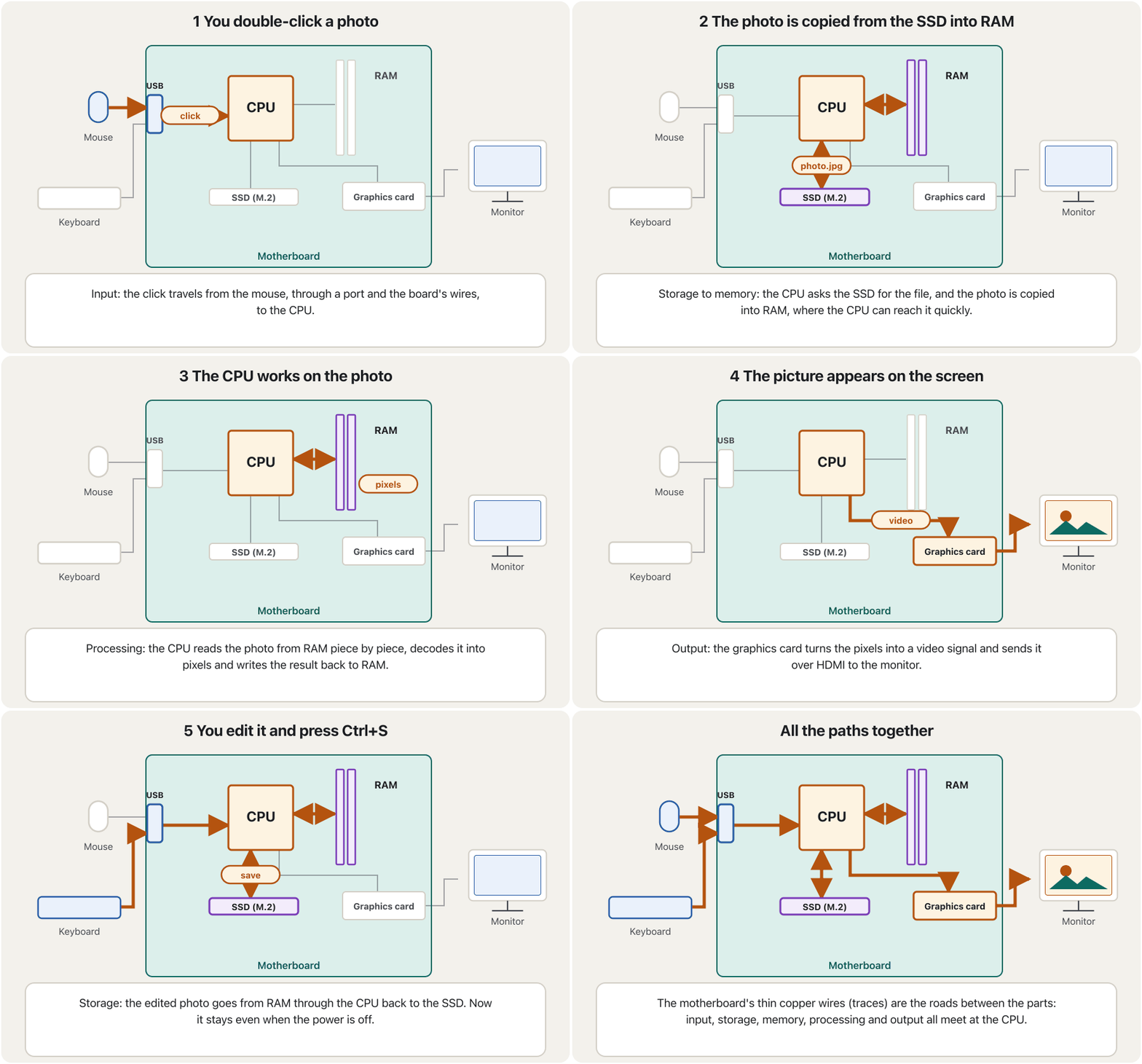
The parts only make sense together. Watch one everyday job, opening and saving a photo, travel along the wires of the motherboard between the mouse, the CPU, RAM, the SSD, the graphics card and the monitor.
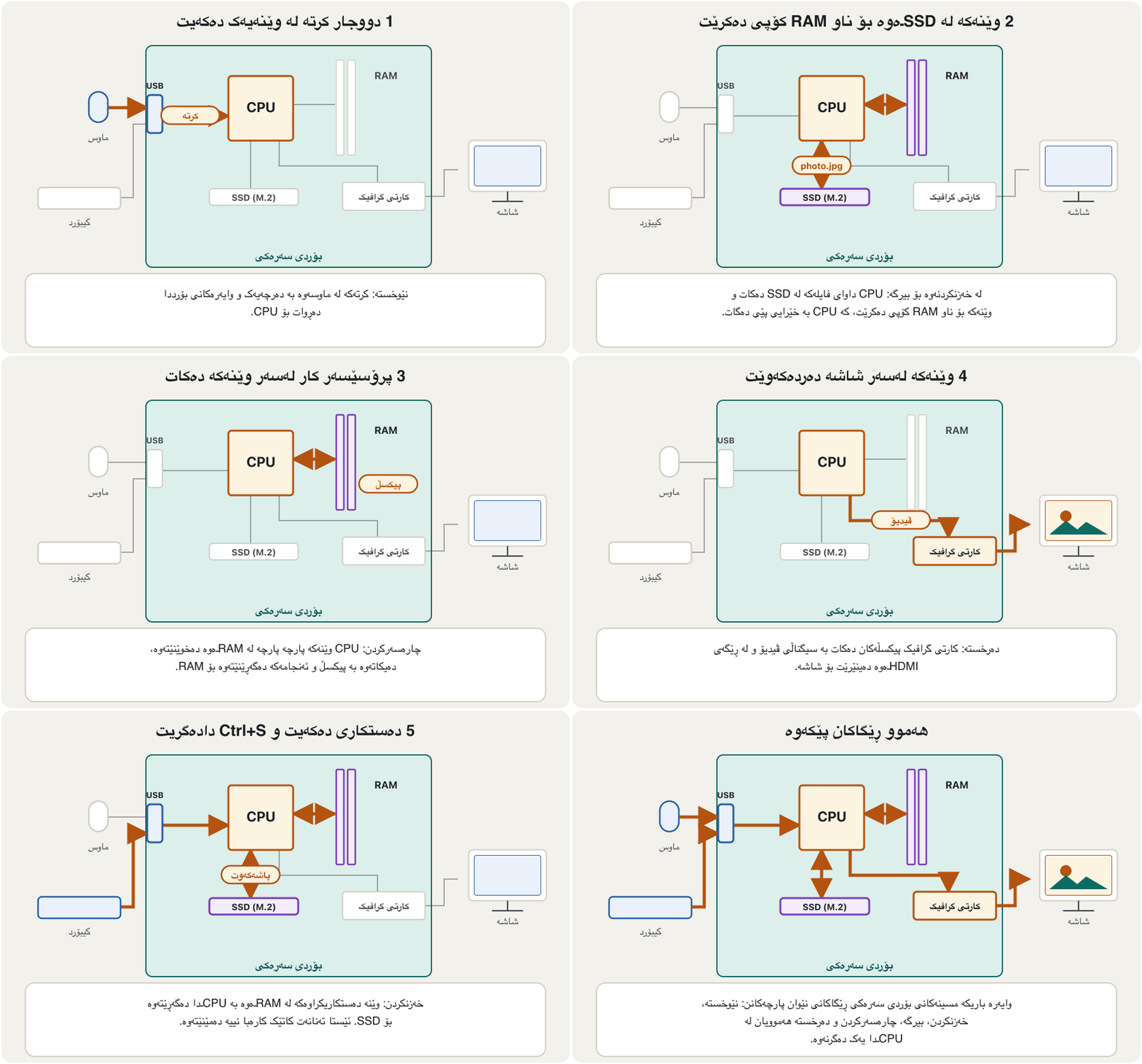
پارچەکان تەنها پێکەوە مانا پەیدا دەکەن. سەیری کارێکی ڕۆژانە بکە، کردنەوە و وێنەیەک، کە بە وایەرەکانی لە نێوان ، ، ، SSD، و دەڕوات.
Sort the partsپارچەکان پۆلێن بکە
The slides show photos of these parts. Put each one in the right group: keyboard, mouse, monitor, scanner, printer, CD-ROM, motherboard, digital camera, speakers, webcam, RAM, hard disk, processor, microphone, memory stick, headset, optical disc drive, USB flash drive.
سلایدەکان وێنەی ئەم پارچانە پیشان دەدەن. هەریەکەیان بخە ناو گرووپی ڕاستەوە: ، ، ، ، ، CD-ROM، ، کامێرای ، ، ، ، ، پرۆسێسەر، ، مێمۆری ستیک، (گوێگرەی مایکدار)، درایڤی ، .
Hintئاماژە
Ask: does it bring data in, send information out, keep it for later, or work on it?
بپرسە: دێنێتە ژوورەوە، دەنێرێتە دەرەوە، بۆ دواتر هەڵیدەگرێت، یان کاری لەسەر دەکات؟
Show answerوەڵامەکە پیشان بدە
| Groupگرووپ | Partsپارچەکان |
|---|---|
| Input | keyboard, mouse, scanner, digital camera, webcam, microphone، ، ، کامێرای ، ، |
| Output | monitor, printer, speakers، ، |
| Input and output و | headset (microphone + headphones) ( + ) |
| Storage | CD-ROM, hard disk, memory stick, optical disc drive, USB flash driveCD-ROM، ، مێمۆری ستیک، درایڤی ، |
| Processing (inside the system unit) (لەناو ) | motherboard, RAM, processor، ، پرۆسێسەر |
RAM is in the processing group here because it works hand in hand with the CPU inside the system unit; it is primary memory, not long-term storage.
لێرەدا لە گرووپی چونکە لەناو شان بە شانی کار دەکات؛ ، نەک درێژخایەن.
The whole computer on one mapهەموو کۆمپیوتەر لەسەر یەک نەخشە
The course slides end the topic with a mind map of the whole computer. Here are its branches, with the lesson of this course that teaches each one:
سلایدەکانی کۆرسەکە بابەتەکە بە نەخشەیەکی بیرکردنەوەی هەموو کۆتایی پێدەهێنن. ئەمانە لقەکانیەتی، لەگەڵ ئەو وانەیەی ئەم کۆرسە کە هەریەکەیان فێر دەکات:
Common mistakesهەڵە باوەکان
| Mistakeهەڵە | What is trueڕاستییەکە |
|---|---|
| "The CPU contains the memory."« تێدایە.» | The CPU contains only registers and a cache. RAM and storage are separate chips. تەنها و تێدایە. و جیان. |
| "The system unit is the monitor."« هەمان .» | The system unit is the case with the motherboard, CPU, RAM, drives and power supply. The monitor is an output device. ئەو قاپەیە کە ، ، ، درایڤەکان و تێدایە. . |
| "RAM is storage: my files are in RAM."« : لە .» | Files are kept on secondary storage (SSD). RAM holds what is open now and forgets it when the power goes off. لەسەر (SSD) هەڵدەگیرێن. ئەوە هەڵدەگرێت کە ئێستا کراوەیە و کاتێک کارەبا دەبڕێت لەبیری دەکات. |
| "Drivers are hardware."«درایڤەر .» | A device driver is software that lets the operating system use a device. کە ڕێگە بە دەدات ئامێرێک بەکار بهێنێت. |
| "Peripherals are only outside things like printers."« تەنها شتی دەرەوەن وەک .» | Built-in keyboards, screens and cameras of laptops and phones are input and output devices too.، و کامێرای ناو و مۆبایلیش و . |
Exercisesڕاهێنانەکان
Without looking, draw the block diagram of a computer: input unit, CPU (control unit, ALU, registers), memory, secondary storage and output unit. Add arrows for the data. Where does RAM go?
بەبێ سەیرکردن دایاگرامی بلۆکی بکێشە: یەکەی ، (، ALU، )، ، و یەکەی . تیر بۆ زیاد بکە. دەچێتە کوێ؟
Show answerوەڵامەکە پیشان بدە
Input → CPU → output in a row. Inside the CPU: the control unit, the ALU and the registers (and cache). RAM goes outside the CPU, joined to it by two-way arrows, and secondary storage is joined to RAM. Compare with the diagram in the five functional units.
← ← لە یەک ڕیزدا. لەناو : ، ALU و (و ). دەچێتە دەرەوەی و بە تیری دوولایەنە پێیەوە دەبەسترێت و بە دەبەسترێت. بەراوردی بکە لەگەڵ دایاگرامەکەی پێنج یەکە کارکردەکە.
Sort these: Windows 11, a webcam, a printer driver, the motherboard, WhatsApp, the power cable, the UEFI firmware, a USB flash drive.
ئەمانە پۆلێن بکە: Windows 11، ، ، ، WhatsApp، کێبڵی کارەبا، ، .
Show answerوەڵامەکە پیشان بدە
- Hardware: the webcam, the motherboard, the power cable, the USB flash drive.
- Software: Windows 11, the printer driver, WhatsApp.
- Firmware (software kept in a chip on the hardware): UEFI.
- : ، ، کێبڵی کارەبا، .
- : Windows 11، ، WhatsApp.
- ( کە لە سەر هەڵگیراوە): .
Your phone has all five hardware components. Name one example of each.
مۆبایلەکەت هەر پێنج پارچە سەرەکییەکەی هەیە. بۆ هەریەکەیان نموونەیەک بنووسە.
Show answerوەڵامەکە پیشان بدە
- Input: the touch screen, the microphone, the cameras.
- Output: the screen, the speaker, the vibration motor.
- System unit: the phone's body with the system-on-a-chip and RAM inside.
- Storage: the built-in flash storage (for example 256 GB).
- Communications: the 5G modem, Wi-Fi and Bluetooth.
- : ، ، کامێراکان.
- : ، ، بزوێنەری لەرزین.
- : لەشی مۆبایلەکە کە و تێدایە.
- : ناوەکی (بۆ نموونە 256 GB).
- پەیوەندی: 5G، و .
Summaryپوختە
- A computer system is the hardware, the software and every device plugged into it.
- Hardware is physical and touchable; software is the programs and rules. They always work together.
- Functional units: input, control unit, ALU, memory, output. The CPU is the control unit + ALU + registers (+ cache); memory is outside it.
- This is the von Neumann (stored-program) architecture: instructions and data share one memory.
- Primary memory (RAM, ROM, cache) is fast and short-term; secondary storage (SSD, hard disk, flash) keeps files without power.
- The five hardware components: input, output, system unit, storage and communications devices.
- Input and output devices are also called peripherals.
- سیستەمی ، و هەموو ئەو ئامێرانەیە کە پێیەوە دەبەسترێن.
- فیزیکییە و دەستی لێ دەدرێت؛ و ڕێساکانە. هەمیشە پێکەوە کار دەکەن.
- یەکە کارکردەکان: ، ، ALU، ، . = + ALU + (+ )؛ لە دەرەوەیەتی.
- ئەمە تەلارسازیی ڤۆن نۆیمانە (): و یەک بەش دەکەن.
- (، ، ) خێرا و کورتخایەنە؛ (، ، فلاش) بەبێ کارەبا دەپارێزێت.
- پێنج پارچە سەرەکییەکەی : ، ، ، و .
- و پێیان دەوترێت .
What are the two kinds of memory in the course's Kurdish report?دوو جۆرەکەی بیرگە لە ڕاپۆرتە کوردییەکەی کۆرسەکەدا چین؟
Primary memory (RAM, ROM, cache) and secondary memory (storage such as SSDs and hard disks).
(، ، ) و ( وەک و ).
Is the control unit part of the CPU?ئایا یەکەی جڵەوکردن بەشێکە لە CPU؟
Yes. The CPU is the control unit, the ALU and the registers (plus cache). Main memory is not part of it.
بەڵێ. بریتییە لە ، ALU و (لەگەڵ ). بەشێک نییە لێی.
Give one example each of an input, output, storage and communications device.بۆ هەریەکە لە ئامێری نێوخستە، ئامێری دەرخستە، ئامێری خەزنکردن و ئامێری پەیوەندی نموونەیەک بنووسە.
For example: a keyboard, a monitor, a flash drive and a Wi-Fi adapter.
بۆ نموونە: ، ، و ئەداپتەری .
Lesson complete!وانەکە تەواو بوو!
Well done. Review the key terms, then go on to the next lesson.دەستخۆش. سەیرێکی زاراوە سەرەکییەکان بکەرەوە، پاشان بڕۆ بۆ وانەی داهاتوو.
Key termsزاراوە سەرەکییەکان
The System Unit, Motherboard and Power Supplyکەیس، بۆردی سەرەکی و سەرچاوەی وزە
Related lecturesوانە پەیوەندیدارەکان
- Types of Computersجۆرەکانی کۆمپیوتەر
- The System Unit, Motherboard and Power Supplyکەیس، بۆردی سەرەکی و سەرچاوەی وزە
- The CPU: Control Unit, ALU and CoresCPU: یەکەی جڵەوکردن، ALU و ناوکەکانی پرۆسێسەر
- Memory: RAM, ROM and Cacheبیرگە: RAM، ROM و کاش
- Storage Versus Memoryخەزنکردن بەرامبەر بیرگە
- Software and Operating Systemsنەرمەواڵە و سیستەمەکانی وەگەڕخەر
- Input, Output and Devices That Do Bothنێوخستە، دەرخستە و ئەو ئامێرانەی هەردووکیان دەکەن
- Ports and Connectorsدەرچەکان و سەرەکانی کێبڵ
- Computer Communicationsپەیوەندیی کۆمپیوتەر
- Inside the Computerناو کۆمپیوتەرەکە
- Computers Around Usکۆمپیوتەرەکان لە دەوروبەرماندا
- How a Computer Runs a Programکۆمپیوتەر چۆن بەرنامەیەک جێبەجێ دەکات
References and further readingسەرچاوەکان و خوێندنەوەی زیاتر
- Wikipedia: Central processing unit (principal components; main memory outside the CPU)
- Microsoft Learn: UEFI firmware requirements (UEFI replaces BIOS)
- Wikipedia: Power supply unit (computer)
- NIST: Prefixes for binary multiples (KiB, MiB, GiB)
- Wikipedia: Von Neumann architecture (First Draft of a Report on the EDVAC, 1945; stored program)
- Centre for Computing History: Douglas Engelbart invents the mouse (patent 3,541,541, 1970)
This lecture is a first edition. The Kurdish text and terminology are waiting for review by Kurdish IT teachers.ئەم وانەیە چاپی یەکەمە. دەقە کوردییەکە و زاراوەکانی چاوەڕێی پێداچوونەوەی مامۆستایانی کوردی بواری IT ن.