Chapterبەش 3 · Lectureوانە 3.5
Printers, Speakers, Projectors and Assistive Technologyچاپەرەکان، بڵندگۆکان، پرۆجێکتەرەکان و تەکنەلۆژیای یارمەتیدەر
Output beyond the screen: impact and nonimpact printers, how dot-matrix, inkjet, ink-tank and laser printers work, the six steps inside a laser printer, solid ink, thermal, dye-sublimation and other special printers, 3-D printing, the 19 questions for choosing a printer and cost per page, speakers, headphones and earbuds, data projectors, interactive whiteboards and assistive technology.
لە دەرەوەی شاشە: و ، ، ، تانکی مەرەکەب و چۆن کار دەکەن، شەش هەنگاوەکەی ناو ، مەرەکەبی ڕەق، ، dye-sublimation و تایبەتی تر، چاپی سێ ڕەهەندی، 19 پرسیارەکە بۆ هەڵبژاردنی و تێچووی هەر لاپەڕەیەک، ، و هێدفۆنی ناو گوێ، ، و .
What you will learnچی فێر دەبیت
- Tell impact from nonimpact printers and explain how a dot-matrix printer forms letters.
- Explain how inkjet and laser printers put an image on paper, including the six laser steps.
- Describe thermal, dye-sublimation, mobile, label, large-format and 3-D printers and where each is used.
- Choose a printer with the 19 questions and compare cost per page.
- Describe speakers, headphones, projectors, interactive whiteboards and assistive technology.
- لە جیا بکەیتەوە و ڕوونی بکەیتەوە چۆن پیت دروست دەکات.
- ڕوونی بکەیتەوە و چۆن وێنە دەخەنە سەر کاغەز، لەوانە شەش هەنگاوەکەی لەیزەر.
- ، dye-sublimation، گەڕۆک، لیبڵ، و وەسف بکەیت و بڵێیت هەریەکەیان لە کوێ بەکار دێت.
- بە 19 پرسیارەکە هەڵبژێریت و تێچووی هەر لاپەڕەیەک بەراورد بکەیت.
- ، ، ، و وەسف بکەیت.
Printers: output you can holdچاپەرەکان: دەرخستە کە دەتوانیت بیگریت
An that puts text and pictures from the computer onto paper.
کە دەق و وێنە لە کۆمپیوتەرەوە دەخاتە سەر کاغەز.
A printer produces text and graphics on a physical medium, such as paper, labels, photo paper, or even plastic in 3-D. The result is called a hard copy, while the picture on a screen is a soft copy.
دەق و گرافیک لەسەر ماددەیەکی فیزیکی دروست دەکات، وەک کاغەز، لیبڵ، کاغەزی وێنە یان تەنانەت پلاستیک بە سێ ڕەهەند. ئەنجامەکە پێی دەوترێت کۆپیی ڕەق (hard copy)، بەڵام وێنەی سەر شاشە کۆپیی نەرمە.
Printers are sorted into two big families by one question: does anything hit the paper? Impact printers strike an inked ribbon against the paper; nonimpact printers make the page without touching it, with ink drops, toner or heat.
بە یەک پرسیار دەکرێنە دوو خێزانی گەورە: ئایا هیچ شتێک لە کاغەزەکە دەدات؟ شریتێکی مەرەکەبدار لە کاغەزەکە دەدەن؛ بێ بەرکەوتن بە کاغەزەکە لاپەڕەکە دروست دەکەن، بە دڵۆپی مەرەکەب، یان گەرما.
An impact printer works like the old typewriter at a government office: something hard hits a ribbon, and the ribbon leaves ink on the paper. An inkjet works like a tiny spray can that never touches the wall.
وەک ئامێری تایپی کۆنی فەرمانگەیەکی حکومی کار دەکات: شتێکی ڕەق لە شریتێک دەدات و شریتەکە مەرەکەب لەسەر کاغەزەکە بەجێ دەهێڵێت. وەک قوتوویەکی ڕەنگی پرژێنی زۆر بچووک کار دەکات کە هەرگیز بەر دیوارەکە ناکەوێت.
Where the analogy stops workingسنووری ئەم نموونەیە
A typewriter hits whole letters; a dot-matrix printer builds letters from dots. And a printer sprays millions of drops exactly where they belong.
ئامێری تایپ پیتی تەواو لێ دەدات؛ پیت لە خاڵ دروست دەکات. ملیۆنان دڵۆپ ڕێک لە شوێنی خۆیان دەپرژێنێت.
Impact printers: the dot-matrix printerچاپەرە لێدەرەکان: چاپەری ماتریکسی خاڵ
A that forms characters by striking pins or letters against an inked ribbon onto the paper. It is noisy, but it can print several carbon copies at once.
کە بە لێدانی دەرزی یان پیت لە شریتێکی مەرەکەبدار بەسەر کاغەزدا نووسەکان دروست دەکات. دەنگی زۆرە، بەڵام دەتوانێت چەند کۆپییەکی کاربۆنی پێکەوە چاپ بکات.
Impact printers form characters and graphics by striking a mechanism against an inked ribbon that touches the paper.
و گرافیک دروست دەکەن بە لێدانی ئامێرێک لە شریتێکی مەرەکەبدار کە بەر کاغەزەکە دەکەوێت.
The classic impact printer is the dot-matrix printer. Its print head holds a column of thin pins, usually 9 or 24. As the head moves along the line, the right pins shoot forward and press the ribbon onto the paper, each one leaving a dot. The dots together form letters, like the bulbs of a shop sign.
ناسراو . سەری چاپەکەی ستوونێک دەرزیی باریکی تێدایە، زۆرجار 9 یان 24. کاتێک سەرەکە بە درێژایی دێڕەکە دەجووڵێت، دەرزییە گونجاوەکان بەرەو پێش دەچن و شریتەکە بە کاغەزەکەوە دەنووسێنن و هەریەکەیان خاڵێک بەجێ دەهێڵێت. خاڵەکان پێکەوە پیت دروست دەکەن، وەک گڵۆپەکانی تابلۆی دوکانێک.
Dot-matrix printers are slow, noisy and print only plain text and simple graphics, yet they are still sold in 2026. Because the pins really strike, they can print through multi-part forms: an original plus several carbonless copies in one pass, such as invoices, bank slips and delivery notes. Epson's LQ-590II, a 24-pin printer, prints an original plus 5 copies.
هێواش و بەدەنگن و تەنها دەقی سادە و گرافیکی سادە چاپ دەکەن، بەڵام هێشتا لە 2026ـدا دەفرۆشرێن. چونکە دەرزییەکان بە ڕاستی لێ دەدەن، دەتوانن بە ناو فۆڕمی چەند بەشیدا چاپ بکەن: ئەسڵێک لەگەڵ چەند کۆپییەکی بێکاربۆن بە یەک جار، وەک پسوولەی فرۆشتن، پسوولەی بانک و پسوولەی گەیاندن. LQ-590IIـی Epson، کە 24 دەرزییە، ئەسڵێک و 5 کۆپی چاپ دەکات.
Nonimpact printersچاپەرە بێلێدانەکان
A that makes text and pictures without striking the paper, such as an , a or a . Nonimpact printers are quieter and give better quality.
کە بەبێ لێدان لە کاغەزەکە دەق و وێنە دروست دەکات، وەک ، یان . ئەم چاپەرانە بێدەنگتر و کوالیتییان باشترە.
A nonimpact printer forms characters and graphics on paper without actually touching the paper.
و گرافیک لەسەر کاغەز دروست دەکات بێ ئەوەی بە ڕاستی دەست لە کاغەزەکە بدات.
Almost every printer in homes and offices today is nonimpact: quieter, faster and sharper than impact printers. The course lists eight kinds; the next screens explain each one.
نزیکەی هەموو ئەو ئەمڕۆ لە ماڵ و ئۆفیسەکاندان : بێدەنگتر، خێراتر و ڕوونتر لە . کۆرسەکە هەشت جۆریان دەهێنێت؛ شاشەکانی داهاتوو هەریەکەیان ڕوون دەکەنەوە.
| Kindجۆر | How it makes the pageچۆن لاپەڕەکە دروست دەکات | Typical useبەکارهێنانی ئاسایی |
|---|---|---|
| 1 Inkjet١ | Sprays tiny drops of liquid inkدڵۆپی زۆر بچووکی مەرەکەبی شل دەپرژێنێت | Homes, students, colour pagesماڵ، خوێندکار و لاپەڕەی ڕەنگاوڕەنگ |
| 2 Photo printer٢ وێنە | Usually inkjet (or dye-sublimation) on photo paperزۆرجار مەرەکەبپرژێن (یان dye-sublimation) لەسەر کاغەزی وێنە | Lab-quality photosوێنەی کوالیتیی تاقیگە |
| 3 Laser٣ | A laser, a drum and toner powder melted by heatلەیزەر، و تۆزی کە بە گەرما دەتوێتەوە | Offices, many pages fastئۆفیس، لاپەڕەی زۆر بە خێرایی |
| 4 All-in-one٤ | Inkjet or laser printer plus a scanner مەرەکەبپرژێن یان لەیزەری لەگەڵ | Print, scan, copy, sometimes faxچاپ، سکان، کۆپی و هەندێک جار فاکس |
| 5 Thermal٥ | Heat on heat-sensitive paperگەرما لەسەر کاغەزی هەستیار بە گەرما | Shop receipts, ticketsپسوولەی دوکان و بلیت |
| 6 Mobile٦ گەڕۆک | Small, battery-poweredبچووک، بە پاتری | Printing from a phone on the moveچاپکردن لە مۆبایلەوە لە کاتی گەشتدا |
| 7 Label٧ لیبڵ | Prints on sticky labelsلەسەر لیبڵی لکاو چاپ دەکات | Parcels, barcodes, pricesپاکەت، و نرخ |
| 8 Plotter and large-format٨ و | Very wide paper rollsلوولەی کاغەزی زۆر پان | Building plans, posters, bannersنەخشەی بیناسازی، پۆستەر و بانەر |
Inkjet printersچاپەرە مەرەکەبپرژێنەکان
A that sprays tiny drops of liquid ink onto the paper. It is cheap to buy and good for colour photos.
کە دڵۆپی زۆر وردی مەرەکەبی شل دەپرژێنێتە سەر کاغەز. کڕینی هەرزانە و بۆ وێنەی ڕەنگاوڕەنگ باشە.
An inkjet printer forms characters and graphics by spraying tiny drops of liquid ink onto the paper. It can print in colour or in black and white.
و گرافیک دروست دەکات بە پرژاندنی دڵۆپی زۆر بچووکی مەرەکەبی شل بەسەر کاغەزەکەدا. دەتوانێت ڕەنگاوڕەنگ یان ڕەش و سپی چاپ بکات.
The print head has hundreds of nozzles thinner than a hair. There are two ways to shoot a drop: a thermal head (HP, Canon) heats the ink for a split second so a tiny bubble pushes a drop out; a piezo head (Epson, Brother) uses a crystal that bends when electricity flows and squeezes the drop out. Colour pages are mixed from cyan, magenta, yellow and black ink.
سەری چاپەکە سەدان کونی لە موو باریکتری هەیە. دوو ڕێگە هەیە بۆ دەرکردنی دڵۆپێک: سەری گەرمی (HP و Canon) بۆ ساتێکی زۆر کورت مەرەکەبەکە گەرم دەکات تا بڵقێکی بچووک دڵۆپێک دەربکات؛ سەری piezo (Epson و Brother) کریستاڵێک بەکار دەهێنێت کە کاتێک کارەبای پێدا دەڕوات دەچەمێتەوە و دڵۆپەکە دەگوشێتە دەرەوە. لاپەڕەی ڕەنگاوڕەنگ لە مەرەکەبی شینی ئاسمانی، ئەرخەوانی، زەرد و ڕەش تێکەڵ دەکرێت.
Inkjets are among the most common printers at home and at work. The idea dates back to the 1950s (Siemens sold the first inkjet devices, chart recorders, in 1951). Printer speed is measured in pages per minute (ppm).
لە باوترین لە ماڵ و شوێنی کاردا. بیرۆکەکە دەگەڕێتەوە بۆ ساڵانی 1950 (Siemens لە 1951ـدا یەکەم ئامێری مەرەکەبپرژێنی فرۆشت کە تۆمارکەری هێڵکاری بوون). خێرایی بە لاپەڕە لە خولەکێکدا (ppm) دەپێورێت.
Inside an inkjet print head: tiny heaters boil ink so bubbles push drops out of hundreds of nozzles.
لەناو سەری چاپی : گەرمکەرەوە زۆر بچووکەکان مەرەکەب دەکوڵێنن و بڵقەکان دڵۆپەکان لە سەدان کونی وردەوە دەردەپەڕێنن.
Watch 0:00-5:36: nozzles, heaters and printing.
لە 0:00 تا 5:36 سەیر بکە: کونە وردەکان، گەرمکەرەوەکان و چاپکردن.
Inkjet printersچاپەرە مەرەکەبپرژێنەکان
Inkjet pros and cons, and ink tanksسوود و زیانی چاپەری مەرەکەبپرژێن و تانکی مەرەکەب
Advantages of inkjet printers
سوودەکانی چاپەری مەرەکەبپرژێن
- Photo-realistic colour prints
- Practically no warm-up time
- Small footprint: it fits on a small desk, and it is cheap to buy
- چاپی ڕەنگاوڕەنگی وەک وێنەی ڕاستەقینە
- نزیکەی هیچ کاتێکی گەرمبوونەوەی ناوێت
- شوێنی کەم دەگرێت: لەسەر مێزێکی بچووک جێ دەبێتەوە و کڕینی هەرزانە
Disadvantages
زیانەکان
- High running cost: cartridges are expensive per page
- Slow for long documents
- Frequent “cartridge empty” warnings
- Nozzles can clog if it is not used for weeks
- Wet prints that can smudge for a moment
- تێچووی بەکارهێنانی بەرز: بۆ هەر لاپەڕەیەک گرانن
- بۆ بەڵگەنامەی درێژ هێواشە
- ئاگادارکردنەوەی بەردەوامی «کارتریج بەتاڵە»
- ئەگەر چەند هەفتەیەک بەکار نەهێنرێت کونەکان دەگیرێن
- چاپی تەڕ کە بۆ ساتێک دەکرێت بسڕێنەوە
Inkjet printersچاپەرە مەرەکەبپرژێنەکان
Photo printersچاپەرەکانی وێنە
A photo printer produces lab-quality photos, the kind you used to collect from a photo studio. Many photo printers use inkjet technology with six or more inks; small ones often use dye-sublimation (next screens).
وێنە وێنەی کوالیتیی تاقیگە دروست دەکات، لەو جۆرەی پێشتر لە ستۆدیۆی وێنەگرتن وەرتدەگرت. زۆرێک لە وێنە تەکنەلۆژیای مەرەکەبپرژێن بە شەش مەرەکەب یان زیاتر بەکار دەهێنن؛ بچووکەکان زۆرجار dye-sublimation بەکار دەهێنن (شاشەکانی داهاتوو).
- PictBridge is a standard (from 2003) that lets you print photos straight from a digital camera connected to the printer by USB, without a computer.
- Many photo printers have a slot for a memory card: you put in the camera's SD card and print from the printer's own screen.
- Today most people print from a phone over Wi-Fi with the maker's app.
- PictBridge ستانداردێکە (لە 2003ـەوە) کە ڕێگەت دەدات وێنە ڕاستەوخۆ لە کامێرایەکی دیجیتاڵەوە چاپ بکەیت کە بە بە بەستراوە، بەبێ .
- زۆرێک لە وێنە کونێکیان بۆ هەیە: کارتی SDـی کامێراکە دەخەیتە ناوی و لە شاشەی خودی چاپ دەکەیت.
- ئەمڕۆ زۆربەی خەڵک لە مۆبایلەوە بە و بە دروستکەرەکە چاپ دەکەن.
Laser printers: how the drum worksچاپەرە لەیزەرییەکان: درەم چۆن کار دەکات
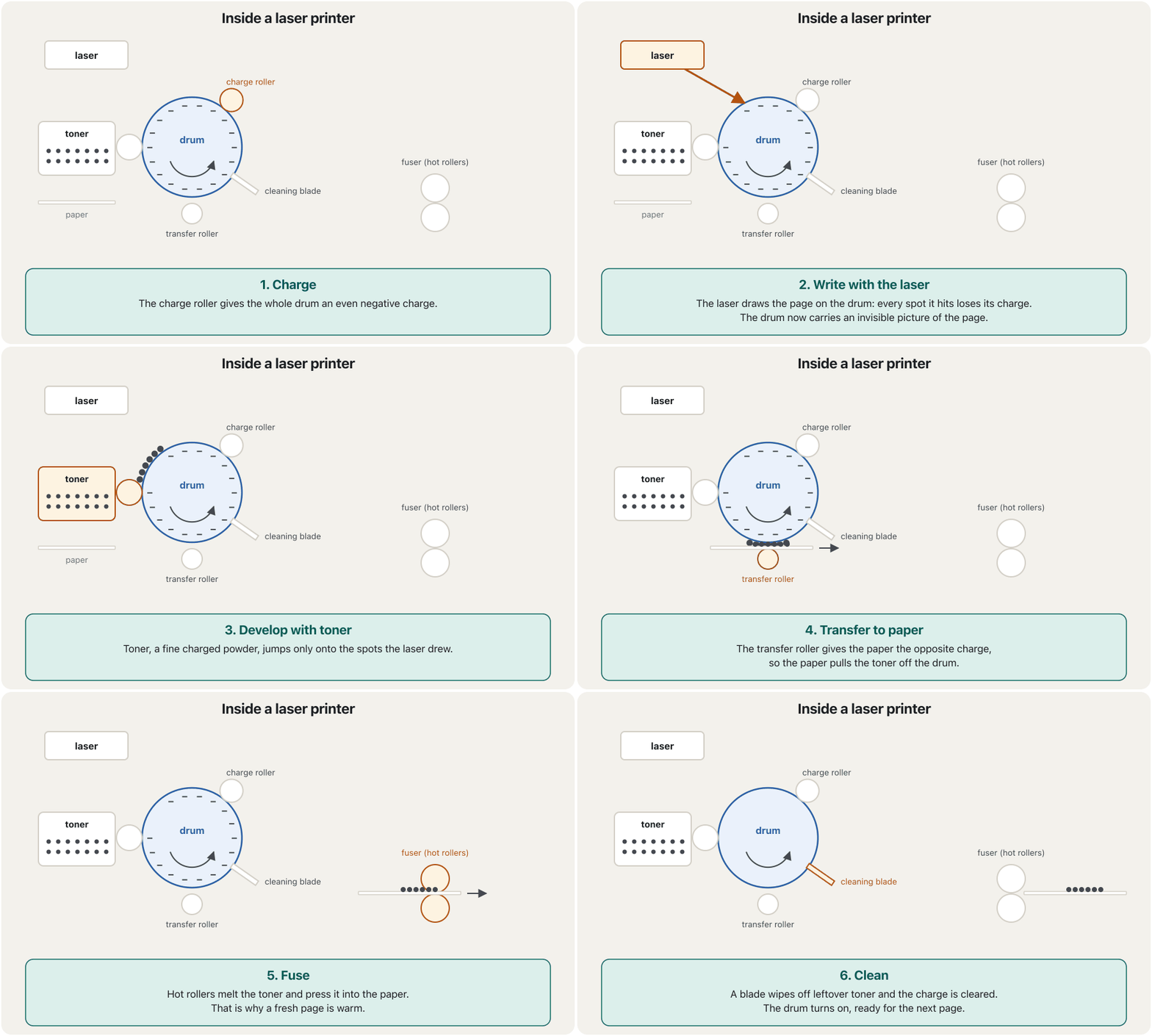
Laser printers are high-speed, high-quality printers, in black and white or in colour. Instead of liquid ink they use toner, a very fine plastic powder, and a turning drum that holds an electric charge. The whole process is done with static electricity, light and heat:
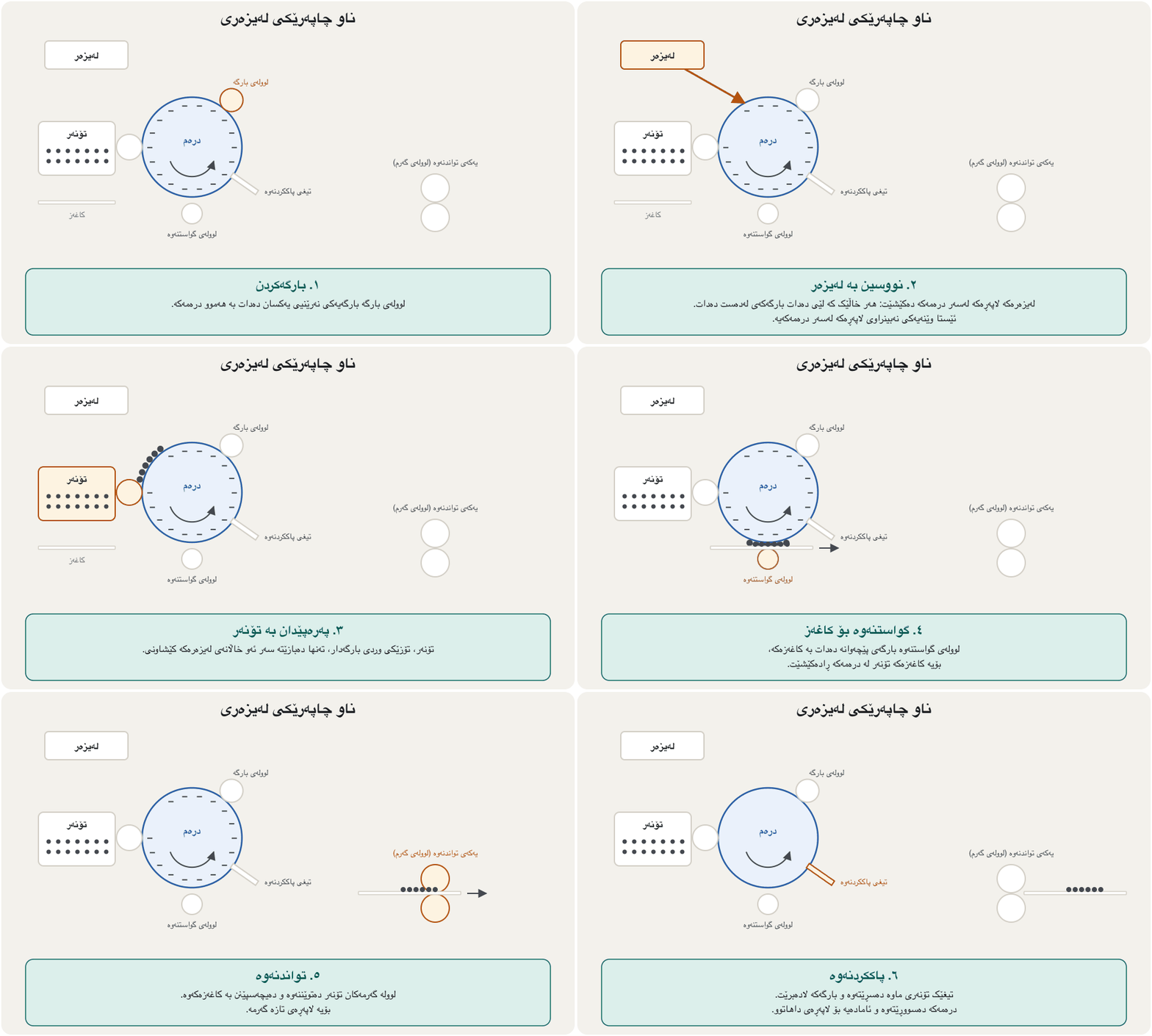
خێرا و کوالیتی بەرزن، ڕەش و سپی یان ڕەنگاوڕەنگ. لە جیاتی مەرەکەبی شل بەکار دەهێنن، تۆزێکی پلاستیکیی زۆر ورد، لەگەڵ خولاوە کە بارگەی کارەبایی هەڵدەگرێت. هەموو کارەکە بە کارەبای ستاتیک، ڕووناکی و گەرما دەکرێت:
Laser printers: how the drum worksچاپەرە لەیزەرییەکان: درەم چۆن کار دەکات
Laser printers: pros and consچاپەرە لەیزەرییەکان: سوود و زیان
Advantages of laser printers
سوودەکانی چاپەری لەیزەری
- More cost-effective than inkjets: one toner prints thousands of pages
- High print speed and sharp text, which increases productivity
- Higher paper capacity; often expandable with extra trays and finishers (stapling, sorting), so it grows with a business
- لە بە قازانجترە: یەک هەزاران لاپەڕە چاپ دەکات
- خێرایی چاپی بەرز و دەقی ڕوون، کە بەرهەمهێنان زیاد دەکات
- توانای کاغەزی زیاتر؛ زۆرجار سینیی زیادە و ئامێری کۆتاییپێهێنان (چەسپاندن و ڕیزکردن)ی بۆ زیاد دەکرێت، بۆیە لەگەڵ کارەکەدا گەورە دەبێت
Disadvantages
زیانەکان
- A short warm-up before the first page
- High power use while the fuser heats up (see the correction below)
- Colour models are bigger and more expensive to buy
- گەرمبوونەوەیەکی کورت پێش یەکەم لاپەڕە
- بەکارهێنانی کارەبای زۆر کاتێک گەرم دەبێتەوە (ڕاستکردنەوەکەی خوارەوە ببینە)
- جۆرە ڕەنگاوڕەنگەکان گەورەتر و کڕینیان گرانترە
Laser printers are still used widely in big offices because, page for page, they are traditionally cheaper and faster than inkjets.
هێشتا بە فراوانی لە ئۆفیسە گەورەکاندا بەکار دێن، چونکە بە پێی لاپەڕە بە شێوەیەکی نەریتی لە هەرزانتر و خێراترن.
Laser printers: how the drum worksچاپەرە لەیزەرییەکان: درەم چۆن کار دەکات
LED printersچاپەرەکانی LED
LED printers work like laser printers, but a row of thousands of tiny LEDs across the whole width of the page lights the drum instead of a laser and a spinning mirror. With fewer moving parts they can be smaller and very reliable; OKI, Brother and Fujifilm make them. The charge, toner, transfer and fusing steps are the same.
چاپەرەکانی وەک کار دەکەن، بەڵام لە جیاتی و ئاوێنەیەکی خولاوە، ڕیزێک لە هەزاران بچووک بە پانیی هەموو لاپەڕەکە ڕووناک دەکەنەوە. چونکە بەشی جووڵاویان کەمترە، دەکرێت بچووکتر و زۆر متمانەپێکراو بن؛ OKI، Brother و Fujifilm دروستیان دەکەن. هەنگاوەکانی بارگەکردن، ، گواستنەوە و تواندنەوە وەک خۆیانن.
Laser printers: how the drum worksچاپەرە لەیزەرییەکان: درەم چۆن کار دەکات
A short history note: solid ink printersتێبینییەکی مێژوویی: چاپەرەکانی مەرەکەبی ڕەق
The lecture notes also describe solid ink printers. They used blocks of wax-like ink that the printer melted; the print head sprayed the melted ink onto a heated drum, which rolled it onto the paper. A solid ink printer needed only one drum, while a typical colour laser printer has four, one for each colour.
تێبینییەکانی وانە باسی مەرەکەبی ڕەقیش دەکەن. پارچە مەرەکەبی وەک مۆمیان بەکار دەهێنا کە دەیتواندەوە؛ سەری چاپەکە مەرەکەبە تواوەکەی دەپرژاندە سەر گەرم کە بەسەر کاغەزەکەدا دەیگلاندەوە. مەرەکەبی ڕەق تەنها یەک پێویست بوو، لە کاتێکدا ڕەنگاوڕەنگی ئاسایی چوار هەیە، یەکێک بۆ هەر ڕەنگێک.
| Advantages (from the notes)سوودەکان (لە تێبینییەکانەوە) | Disadvantages (from the notes)زیانەکان (لە تێبینییەکانەوە) |
|---|---|
| Vibrant colours; ink made from non-toxic vegetable oilsڕەنگی گەش؛ مەرەکەب لە ڕۆنی ڕووەکیی بێ ژەهر | Needed warm-up and cool-down timeکاتی گەرمبوونەوە و ساردبوونەوەی پێویست بوو |
| Compact; ink sticks need little packaging and storage space, which is kinder to the environmentبچووک؛ پارچە مەرەکەبەکان پێچانەوە و شوێنی هەڵگرتنی کەمیان دەویست، کە بۆ ژینگە باشترە | Prints could not be laminated (the wax melts)چاپەکان نەدەکران بە لامینێت (مۆمەکە دەتوایەوە) |
All-in-one, thermal and other special printersچاپەری فرەکار، چاپەری گەرمی و چاپەرەکانی تایبەتی تر
| Printer | What it isچییە | Where you meet itلە کوێ دەیبینیت |
|---|---|---|
| All-in-one (multifunction) | One device that prints, scans, copies and sometimes faxesیەک ئامێر کە چاپ، سکان، کۆپی و هەندێک جار فاکس دەکات | Homes, schools, small officesماڵ، قوتابخانە و ئۆفیسی بچووک |
| Thermal | Makes the image with heated pins (a heated print head) on heat-sensitive paperبە دەرزیی گەرم (سەرێکی چاپی گەرم) لەسەر کاغەزی هەستیار بە گەرما وێنە دروست دەکات | Supermarket and pharmacy receipts, parking and bus tickets, ATM slipsپسوولەی سوپەرمارکێت و دەرمانخانە، بلیتی پارکردن و پاس و پسوولەی ATM |
| Dye-sublimation | A thermal printer for photos: heat turns coloured dye on a ribbon into gas, which soaks into special paper بۆ وێنە: گەرما ڕەنگی سەر شریتێک دەکات بە گاز کە دەچێتە ناو کاغەزێکی تایبەتەوە | Photo kiosks, ID cards, small home photo printersکیۆسکی وێنە، کارتی ناسنامە و بچووکی وێنە لە ماڵەوە |
| Mobile گەڕۆک | Small, light and battery-powered; prints from a phone or laptopبچووک، سووک و بە پاتری؛ لە مۆبایل یان چاپ دەکات | Delivery drivers, police, traffic wardens, field workersشۆفێری گەیاندن، پۆلیس، پۆلیسی هاتوچۆ و کارمەندی مەیدانی |
| Label لیبڵ | A small printer that prints on sticky labels بچووک کە لەسەر لیبڵی لکاو چاپ دەکات | Parcel labels, barcodes, price tags, file foldersلیبڵی پاکەت، ، نرخ و بەرگی فایل |
| Plotter | Produces high-quality line drawings on very large paperنەخشەی کوالیتی بەرز کە لە هێڵ پێکهاتووە لەسەر کاغەزی زۆر گەورە دروست دەکات | Architects and engineers: building plans, mapsئەندازیار و تەلارساز: نەخشەی بینا و نەخشەی جوگرافی |
| Large-format | Creates photo-realistic colour prints on wide rollsچاپی ڕەنگاوڕەنگی وەک وێنەی ڕاستەقینە لەسەر لوولەی پان دروست دەکات | Posters, banners, shop signs, election and event postersپۆستەر، بانەر، تابلۆی دوکان و پۆستەری بۆنە |
All-in-one, thermal and other special printersچاپەری فرەکار، چاپەری گەرمی و چاپەرەکانی تایبەتی تر
Thermal printers: receipts and photosچاپەرە گەرمییەکان: پسوولە و وێنە
Most shop receipts come from direct thermal printers: the paper itself darkens where it is heated, so the printer needs no ink and no ribbon. That is why the printer is so small and quiet, and also why an old receipt fades in the sun or near heat; keep a photo of important receipts.
زۆربەی پسوولەکانی دوکان لە ڕاستەوخۆوە دێن: خودی کاغەزەکە لەو شوێنەی گەرم دەکرێت ڕەش دەبێت، بۆیە نە مەرەکەبی پێویستە و نە شریت. بۆیە ئەوەندە بچووک و بێدەنگە، هەروەها بۆیە پسوولەی کۆن لە بەر خۆر یان نزیک گەرما کاڵ دەبێتەوە؛ وێنەی پسوولە گرنگەکان هەڵبگرە.
3-D printersچاپەرە سێ ڕەهەندییەکان
A machine that makes real objects from a digital design by building them up layer by layer, usually from melted plastic.
ئامێرێکە کە بە پشتبەستن بە دیزاینێکی دیجیتاڵی شتی ڕاستەقینە دروست دەکات؛ چین لەسەر چین، زۆربەی جار لە پلاستیکی تواوە.
A 3-D printer uses a process called additive manufacturing: it creates a real object by adding material one thin horizontal layer at a time, following a 3-D model on the computer.
پرۆسەیەک بەکار دەهێنێت بە ناوی دروستکردنی زیادکەر (additive manufacturing): شتێکی ڕاستەقینە دروست دەکات بە زیادکردنی ماددە، چینێکی تەنکی ئاسۆیی لە دوای چینێک، بەپێی مۆدێلێکی سێ ڕەهەندی لەسەر .
- FDM (fused deposition modelling): a hot nozzle melts plastic filament and draws each layer. It is the most widely used kind for homes, schools and hobbyists.
- SLA (resin printing): a light source hardens liquid resin layer by layer. Finer detail and smoother surfaces, used for dental models, jewellery and small detailed parts.
- 3-D printing is one of the most exciting developments in printing history and keeps getting cheaper: engineers print prototypes, doctors print models of bones, and schools print parts for robots.
- FDM: سەرێکی گەرم دەزووی پلاستیک دەتوێنێتەوە و هەر چینێک دەکێشێت. بەکارهاتووترین جۆرە بۆ ماڵ، قوتابخانە و کەسانی خولیاپەرست.
- SLA (چاپی ڕێزین): سەرچاوەیەکی ڕووناکی ڕێزینی شل چین بە چین ڕەق دەکاتەوە. وردیی زیاتر و ڕووی نەرمتر؛ بۆ مۆدێلی ددان، خشڵ و پارچەی بچووکی ورد بەکار دێت.
- چاپی سێ ڕەهەندی یەکێکە لە سەرنجڕاکێشترین پێشکەوتنەکانی مێژووی چاپ و بەردەوام هەرزانتر دەبێت: ئەندازیاران چاپ دەکەن، پزیشکان مۆدێلی ئێسک و قوتابخانەکان پارچە بۆ ڕۆبۆت.
| Advantages (lecture notes)سوودەکان (تێبینییەکانی وانە) | Disadvantages (lecture notes)زیانەکان (تێبینییەکانی وانە) |
|---|---|
| Real 3-D objects instead of flat printsشتی سێ ڕەهەندیی ڕاستەقینە لە جیاتی چاپی تەخت | High initial cost (for professional machines)تێچووی سەرەتایی بەرز (بۆ ئامێرە پیشەییەکان) |
| Almost limitless shapesشێوەی نزیکەی بێسنوور | Materials cost money: resin is expensiveماددەکان پارەیان دەوێت: ڕێزین گرانە |
| Full customisation: every copy can be differentگونجاندنی تەواو: هەر کۆپییەک دەکرێت جیاواز بێت | Still a developing technology: slow, and layers can showهێشتا تەکنەلۆژیایەکی پەرەسەندووە: هێواشە و چینەکان دەکرێت دیار بن |
Watch how a 3D printer builds a real object layer by layer from melted plastic filament, and what people use 3D printing for.
سەیر بکە چۆن چین بە چین لە دەزووی پلاستیکی تواوە شتێکی ڕاستەقینە دروست دەکات و خەڵک چاپی سێ ڕەهەندی بۆ چی بەکاردەهێنن.
Watch 0:29-3:37: what 3-D printing is and the filament.
لە 0:29 تا 3:37 سەیر بکە: چاپی سێ ڕەهەندی چییە و دەزووە پلاستیکییەکە.
Comparing printers: dpi, ppm and costبەراوردکردنی چاپەرەکان: dpi، ppm و تێچوو
Three numbers help you compare printers. Resolution in dots per inch (dpi): how many dots the printer can place along one inch. Office laser printers usually print at 600 or 1,200 dpi, sharp enough for any text; photo inkjets advertise much higher numbers. Speed in pages per minute (ppm), measured with the ISO/IEC 24734 test so that brands can be compared. Cost: the price to buy, and the cost per page to run it: the price of the ink or toner divided by the number of pages it prints.
سێ ژمارە یارمەتیت دەدەن بەراورد بکەیت. ڕوونیی چاپ بە : لە یەک ئینجدا چەند خاڵ دادەنێت. ئۆفیس زۆرجار بە 600 یان 1,200 dpi چاپ دەکەن، کە بۆ هەموو دەقێک بەس ڕوونە؛ وێنە ژمارەی زۆر بەرزتر ڕادەگەیەنن. خێرایی بە لاپەڕە لە خولەکێکدا (ppm)، کە بە تاقیکردنەوەی ISO/IEC 24734 دەپێورێت تا براندەکان بەراورد بکرێن. تێچوو: نرخی کڕین و تێچووی هەر لاپەڕەیەک بۆ بەکارهێنان: نرخی مەرەکەب یان دابەش بەسەر ژمارەی ئەو لاپەڕانەی چاپیان دەکات.
| Featureتایبەتمەندی | Dot-matrix | Inkjet | Laser |
|---|---|---|---|
| Speedخێرایی | Slowهێواش | Mediumمامناوەند | Fastخێرا |
| Noiseدەنگ | Noisyبەدەنگ | Quietبێدەنگ | Very quietزۆر بێدەنگ |
| Qualityکوالیتی | Poor (dots show)خراپ (خاڵەکان دیارن) | Good; best for photosباش؛ باشترین بۆ وێنە | Very good, sharp textزۆر باش، دەقی ڕوون |
| Price to buyنرخی کڕین | Low to mediumکەم تا مامناوەند | Low (cartridges) or medium (ink tank)کەم (کارتریج) یان مامناوەند (تانکی مەرەکەب) | Medium; small black-and-white lasers are now cheapمامناوەند؛ بچووکی ڕەش و سپی ئێستا هەرزانە |
| Cost per pageتێچووی هەر لاپەڕەیەک | Very low (a ribbon)زۆر کەم (شریتێک) | High with small cartridges, very low with ink tanksبەرز بە کارتریجی بچووک، زۆر کەم بە تانکی مەرەکەب | Lowکەم |
Comparing printers: dpi, ppm and costبەراوردکردنی چاپەرەکان: dpi، ppm و تێچوو
Choosing a printer: 19 questionsهەڵبژاردنی چاپەر: 19 پرسیار
Before buying a printer, ask yourself a series of questions. The course gives nineteen; grouped by topic they are easier to remember:
پێش کڕینی ، زنجیرەیەک پرسیار لە خۆت بکە. کۆرسەکە نۆزدە پرسیار دەدات؛ بە پۆلێنکردن بەپێی بابەت ئاسانتر لەبەر دەکرێن:
| Topicبابەت | Questions to askپرسیارەکان |
|---|---|
| Moneyپارە | 1 What is my budget? 4 What is the cost per page for printing? 14 How much do supplies such as ink, toner and paper cost?١ بودجەکەم چەندە؟ ٤ تێچووی چاپکردنی هەر لاپەڕەیەک چەندە؟ ١٤ پێداویستییەکانی وەک مەرەکەب، و کاغەز چەند دەکەن؟ |
| Speed and amountخێرایی و بڕ | 2 How fast must my printer print? 5 Do I need multiple copies of documents? 17 How much do I print now, and how much will I print in a year or two?٢ دەبێت چەند خێرا چاپ بکات؟ ٥ ئایا چەند کۆپییەکی بەڵگەنامەم پێویستە؟ ١٧ ئێستا چەند چاپ دەکەم و لە ساڵێک یان دوو ساڵی داهاتوودا چەند چاپ دەکەم؟ |
| Colour and photosڕەنگ و وێنە | 3 Do I need a colour printer? 6 Will I print graphics? 7 Do I want to print photos? 8 Do I want to print directly from a memory card?٣ ئایا ڕەنگاوڕەنگم پێویستە؟ ٦ گرافیک چاپ دەکەم؟ ٧ دەمەوێت وێنە چاپ بکەم؟ ٨ دەمەوێت ڕاستەوخۆ لە چاپ بکەم؟ |
| Paperکاغەز | 9 What types of paper does it use? 10 What sizes of paper does it accept? 11 Do I want to print on both sides? 12 How much paper can the tray hold? 15 Can it print on envelopes? 16 How many envelopes can it print at a time?٩ چ جۆرە کاغەزێک بەکار دەهێنێت؟ ١٠ چ قەبارەیەکی کاغەز وەردەگرێت؟ ١١ دەمەوێت لەسەر هەردوو ڕووی کاغەز چاپ بکەم؟ ١٢ سینییەکە چەند کاغەز هەڵدەگرێت؟ ١٥ دەتوانێت لەسەر زەرف چاپ بکات؟ ١٦ لە یەک جاردا چەند زەرف چاپ دەکات؟ |
| Connectionپەیوەندی | 13 Will the printer work with my computer and software? 18 Will it be connected to a network? 19 Do I want wireless printing?١٣ ئایا لەگەڵ و کار دەکات؟ ١٨ ئایا بە دەبەسترێت؟ ١٩ چاپکردنی دەوێت؟ |
Speakers, headphones and earbudsبڵندگۆکان، هێدفۆن و هێدفۆنی ناو گوێ
A speaker turns the computer's sound signal back into sound waves we can hear; it amplifies sound so a room can hear it. Many users attach a speaker system to their computer, games console or phone for higher-quality sound. A surround-sound system has satellite speakers around the room, a centre speaker for voices and a subwoofer for deep bass; a “5.1” system means five speakers and one subwoofer.
دەنگی دەگەڕێنێتەوە بۆ شەپۆلی دەنگ کە دەیبیستین؛ دەنگ بەرز دەکاتەوە تا ژوورێک بیبیستێت. زۆر سیستەمێکی بە ، ئامێری یاری یان مۆبایلەکەیانەوە دەبەستن بۆ دەنگێکی کوالیتی بەرزتر. سیستەمی دەنگی دەوروبەر (surround) لاوەکیی لە دەوری ژوورەکە هەیە، ناوەڕاست بۆ قسە و subwoofer بۆ دەنگی قووڵ (bass)؛ سیستەمی «5.1» واتە پێنج و یەک subwoofer.
- Headphones are speakers that cover the ears or sit on them.
- Earbuds (also called earphones) rest inside the ear canal. Wireless earbuds connect by Bluetooth.
- Many headphones and earbuds have noise cancelling: microphones hear the noise around you and the speaker plays the opposite sound wave to cancel it.
- ئەو کە گوێکان دادەپۆشن یان لەسەریان دادەنیشن.
- هێدفۆنی ناو گوێ (earbuds، پێیان دەوترێت earphonesـیش) لەناو کونی گوێدا دادەنیشن. جۆرە بە دەبەسترێن.
- زۆرێک لە و هێدفۆنەکانی ناو گوێ لابردنی ژاوەژاویان تێدایە: ژاوەژاوی دەوروبەرت دەبیستن و شەپۆلی دەنگی پێچەوانە لێ دەدات بۆ ئەوەی لای ببات.
Projectors and interactive whiteboardsپرۆجێکتەرەکان و تەختە هۆشمەندەکان
An that shines the computer's picture onto a wall or a large screen, so a whole room can see it.
کە وێنەی کۆمپیوتەر دەخاتە سەر دیوار یان پەردەیەکی گەورە، بۆ ئەوەی هەموو کەسانی ژوورەکە بیبینن.
A data projector shows the text and images of a computer or phone screen on a large screen or wall, so that a whole audience can see them clearly. In Kurdistan people often call it «داتاشۆ» (data show).
دەق و وێنەکانی سەر شاشەی یان مۆبایل لەسەر پەردەیەکی گەورە یان دیوارێک پیشان دەدات، بۆ ئەوەی هەموو ئامادەبووان بە ڕوونی بیبینن. لە کوردستان خەڵک زۆرجار پێی دەڵێن «داتاشۆ».
A projector's brightness is measured in lumens: a dark lecture hall needs fewer lumens than a bright classroom with sunlight. Its resolution works like a monitor's (for example 1920 × 1080).
ڕووناکیی بە لومێن دەپێورێت: هۆڵێکی تاریکی وانە لومێنی کەمتری پێویستە لە پۆلێکی ڕووناک بە تیشکی خۆرەوە. وەک هی کار دەکات (بۆ نموونە ).
A large touch-sensitive board that shows a computer's screen. Teachers and students can write, draw and move things on it with a finger or a special pen.
تەختەیەکی گەورەی هەستیار بە دەستلێدانە کە شاشەی کۆمپیوتەرێک پیشان دەدات. مامۆستا و قوتابیان دەتوانن بە پەنجە یان قەڵەمێکی تایبەت () لەسەری بنووسن، وێنە بکێشن و شتەکان بجووڵێنن.
An interactive whiteboard is a touch-sensitive board, like a dry-erase board, that shows the image of a connected computer screen. The teacher can write on it with a pen or a finger, and save or share what was written.
تەختەیەکی هەستیار بە دەستلێدانە، وەک تەختەی ماژیک، کە ئەوە پیشان دەدات کە لەسەر شاشەی ئەو کە پێیەوە بەستراوە. مامۆستا دەتوانێت بە قەڵەم یان پەنجە لەسەری بنووسێت و ئەوەی نووسراوە خەزن بکات یان هاوبەشی بکات.
Assistive technologyتەکنەلۆژیای یارمەتیدەر
Devices and software that help people with disabilities use computers, such as , screen magnifiers, voice control, Braille displays and printers, and head pointers.
ئامێر و کە یارمەتی کەسانی خاوەن پێداویستیی تایبەت دەدەن بۆ بەکارهێنانی کۆمپیوتەر، وەک ، ، کۆنترۆڵ بە دەنگ، شاشە و چاپەری برەیل و نیشاندەری سەر.
Assistive technology is input and output equipment and software that helps people with disabilities use a computer, for example people who cannot see, hear or move their hands well.
بریتییە لە ئامێر و بۆ و کە یارمەتیی کەسانی خاوەن پێداویستیی تایبەت دەدەن بەکار بهێنن، بۆ نموونە ئەوانەی ناتوانن باش ببینن، ببیستن یان دەستیان بجووڵێنن.
- Head-mounted pointer (input): a small reflective dot on a hat or glasses is followed by a camera on the monitor, so the person moves the pointer by moving the head.
- Braille printer (output): presses raised dots into thick paper so that blind people can read the page with their fingers.
- سەر (): خاڵێکی بچووکی درەوشاوە لەسەر کڵاو یان چاویلکە کامێرایەکی سەر شوێنی دەکەوێت، بۆیە کەسەکە بە جووڵاندنی سەری دەجووڵێنێت.
- (): خاڵی بەرز لە کاغەزی ئەستوور دەدات بۆ ئەوەی نابینایان بە پەنجەکانیان لاپەڕەکە بخوێننەوە.
Assistive technologyتەکنەلۆژیای یارمەتیدەر
Built into every computer and phoneلەناو هەموو کۆمپیوتەر و مۆبایلێکدا
Today much assistive technology is built into every computer and phone, free:
ئەمڕۆ بەشێکی زۆری لەناو هەموو و مۆبایلێکدایە، بە خۆڕایی:
| Needپێداویستی | Windows 11لە Windows 11ـدا | Mac and phonesMac و مۆبایل |
|---|---|---|
| Cannot see the screenناتوانێت شاشەکە ببینێت | Narrator, a screen reader: Windows key + Ctrl + EnterNarrator، : Windows key + Ctrl + Enter | VoiceOver: Command + F5 on a Mac; VoiceOver on iPhone and TalkBack on AndroidVoiceOver: Command + F5 لەسەر Mac؛ VoiceOver لە iPhone و TalkBack لە Android |
| Sees poorlyبینینی کزە | Magnifier: Windows key + Plus (+) (Magnifier): Windows key + Plus (+) | Zoom: Option + Command + 8 (after turning on its keyboard shortcuts)Zoom: Option + Command + 8 (دوای هەڵکردنی ) |
| Cannot hearناتوانێت ببیستێت | Live Captions: Windows key + Ctrl + LLive Captions (ژێرنووسی ڕاستەوخۆ): Windows key + Ctrl + L | Live Captions and visual alerts on Mac and phonesLive Captions و ئاگادارکردنەوەی بینراو لە Mac و مۆبایل |
| Cannot use the hands wellناتوانێت باش دەست بەکار بهێنێت | Voice typing and voice access; eye-tracking camerasنووسین بە دەنگ و کۆنترۆڵکردن بە دەنگ؛ کامێرای شوێنکەوتنی چاو | Voice Control; head and eye trackingVoice Control؛ شوێنکەوتنی سەر و چاو |
Watch a man who has been blind since birth write an email while a screen reader reads every word and button aloud.
سەیر بکە پیاوێک کە لە لەدایکبوونییەوە نابینایە چۆن دەنووسێت، لە کاتێکدا هەموو وشە و دوگمەیەکی بە دەنگی بەرز بۆ دەخوێنێتەوە.
A blind man uses VoiceOver, the screen reader built into every Mac, to write an e-mail.
پیاوێکی نابینا VoiceOver بەکار دەهێنێت، ئەو لە هەموو Macـێکدا هەیە، بۆ نووسینی .
Common mistakesهەڵە باوەکان
| Mistakeهەڵە | What is trueڕاستییەکە |
|---|---|
| “Dot-matrix printers are nonimpact printers.”« .» | They are the classic impact printers: pins strike a ribbon.ئەوان ناسراون: دەرزی لە شریت دەدات. |
| “A printer is an input device.”« .» | It is an output device; only an all-in-one, which also scans, does both.؛ تەنها ، کە سکانیش دەکات، هەردووکیان دەکات. |
| “Thermal printers are all dye-sublimation printers.”«هەموو dye-sublimationـن.» | Dye-sublimation is one kind of thermal printer; receipt printers are direct thermal.dye-sublimation جۆرێکە لە ؛ پسوولە گەرمیی ڕاستەوخۆن. |
| “The cheapest printer to buy is the cheapest to own.”«هەرزانترین بۆ کڕین هەرزانترینە بۆ بەکارهێنان.» | Cost per page decides: cheap inkjets often have the most expensive pages.تێچووی هەر لاپەڕەیەک بڕیار دەدات: هەرزان زۆرجار گرانترین لاپەڕەی هەیە. |
| “The laser burns the letters onto the paper.”«لەیزەرەکە پیتەکان لەسەر کاغەزەکە دەسووتێنێت.» | The laser only writes a charge pattern on the drum; heat from the fuser melts the toner.لەیزەرەکە تەنها نەخشێکی بارگە لەسەر دەنووسێت؛ گەرمای دەتوێنێتەوە. |
| “Assistive technology needs expensive extra devices.”« ئامێری زیادەی گرانی پێویستە.» | Screen readers, magnifiers, captions and voice control are built into every modern system.، ، ژێرنووس و کۆنترۆڵکردن بە دەنگ لەناو هەموو سیستەمێکی نوێدان. |
Exercisesڕاهێنانەکان
Choose a printer for each and give one reason: (a) a pharmacy that prints receipts; (b) an architecture office that prints building plans; (c) Aram, a student who prints notes and a few photos at home; (d) a busy office of 20 people; (e) a company that prints invoices with two carbon copies; (f) an engineering student who wants a model of a new part.
بۆ هەریەکەیان هەڵبژێرە و هۆیەک بڵێ: (أ) دەرمانخانەیەک کە پسوولە چاپ دەکات؛ (ب) ئۆفیسێکی تەلارسازی کە نەخشەی بینا چاپ دەکات؛ (ج) ئارام، خوێندکارێک کە لە ماڵەوە تێبینی و چەند وێنەیەک چاپ دەکات؛ (د) ئۆفیسێکی قەرەباڵغی 20 کەسی؛ (هـ) کۆمپانیایەک کە پسوولەی فرۆشتن لەگەڵ دوو کۆپیی کاربۆنی چاپ دەکات؛ (و) خوێندکارێکی ئەندازیاری کە مۆدێلێکی پارچەیەکی نوێی دەوێت.
Show answerوەڵامەکە پیشان بدە
- (a) A direct thermal printer: small, quiet, no ink.
- (b) A plotter or large-format printer: very wide paper.
- (c) An ink-tank inkjet (an all-in-one, so he can also scan): colour photos and a low cost per page.
- (d) A network laser printer, multifunction: fast, cheap per page, big trays.
- (e) A dot-matrix (impact) printer: only impact prints through carbon copies.
- (f) A 3-D printer (FDM): it builds the part layer by layer.
- (أ) ڕاستەوخۆ: بچووک، بێدەنگ و بێ مەرەکەب.
- (ب) یان : کاغەزی زۆر پان.
- (ج) تانکی مەرەکەب (فرەکار، بۆ ئەوەی سکانیش بکات): وێنەی ڕەنگاوڕەنگ و تێچووی کەمی هەر لاپەڕەیەک.
- (د) فرەکاری سەر : خێرا، هەرزان بۆ هەر لاپەڕەیەک و سینیی گەورە.
- (هـ) (): تەنها لێدان بە ناو کۆپیی کاربۆنیدا چاپ دەکات.
- (و) (FDM): پارچەکە چین بە چین دروست دەکات.
Example prices: an inkjet cartridge costs 30,000 IQD and prints 300 pages; a laser toner costs 90,000 IQD and prints 3,000 pages; a set of ink-tank bottles costs 40,000 IQD and prints 6,000 pages. Work out the cost per page of each, and what 1,000 pages a month would cost.
نرخی نموونە: بە 30,000 دینار 300 لاپەڕە چاپ دەکات؛ لەیزەری بە 90,000 دینار 3,000 لاپەڕە؛ کۆمەڵێک بوتڵی تانکی مەرەکەب بە 40,000 دینار 6,000 لاپەڕە. تێچووی هەر لاپەڕەیەکی هەریەکەیان حیساب بکە و بڵێ 1,000 لاپەڕە لە مانگێکدا چەندی تێدەچێت.
Hintئاماژە
Cost per page: divide the price of the supply by the number of pages it prints.
تێچووی هەر لاپەڕەیەک: نرخی پێداویستییەکە دابەش بکە بەسەر ژمارەی ئەو لاپەڕانەی چاپیان دەکات.
Show answerوەڵامەکە پیشان بدە
At 1,000 pages a month the cheap cartridge printer costs about fifteen times as much to run as the ink tank. Paper and electricity come on top.
بە 1,000 لاپەڕە لە مانگێکدا، کارتریجی هەرزان نزیکەی پازدە هێندەی تانکی مەرەکەب تێچووی بەکارهێنانی دەبێت. کاغەز و کارەبا جیایە.
Put these steps in the right order: fuse, write with the laser, clean, charge the drum, transfer to paper, develop with toner.
ئەم هەنگاوانە بە ڕیزی ڕاست دابنێ: تواندنەوە، نووسین بە لەیزەر، پاککردنەوە، بارگەکردنی ، گواستنەوە بۆ کاغەز، پەرەپێدان بە .
Show answerوەڵامەکە پیشان بدە
1 charge the drum → 2 write with the laser → 3 develop with toner → 4 transfer to paper → 5 fuse → 6 clean (then the drum starts again). CompTIA A+ adds “processing” before step 1.
١ بارگەکردنی ← ٢ نووسین بە لەیزەر ← ٣ پەرەپێدان بە ← ٤ گواستنەوە بۆ کاغەز ← ٥ تواندنەوە ← ٦ پاککردنەوە (پاشان دەست پێدەکاتەوە). CompTIA A+ هەنگاوی «processing» پێش هەنگاوی ١ زیاد دەکات.
Exercisesڕاهێنانەکان
More practice: questions from older examsڕاهێنانی زیاتر: پرسیار لە تاقیکردنەوە کۆنەکانەوە
Hana's family business makes wedding invitations: about 500 colour cards a week, printed on thick card and envelopes, sent from a laptop over Wi-Fi. Pick the five most important of the 19 questions and say why.
کاری خێزانی هانا بانگهێشتنامەی بووکێنی دروست دەکات: هەفتانە نزیکەی 500 کارتی ڕەنگاوڕەنگ، لەسەر کارتی ئەستوور و زەرف چاپ دەکرێن و لە بە دەنێردرێن. پێنج گرنگترین پرسیار لە 19 پرسیارەکە هەڵبژێرە و بڵێ بۆچی.
Show answerوەڵامەکە پیشان بدە
- 3 Do I need colour? Yes: the cards are in colour.
- 4 and 14 Cost per page and price of supplies: 2,000 cards a month.
- 9 What types of paper? It must handle thick card.
- 15 and 16 Envelopes, and how many at a time.
- 19 Wireless printing from the laptop.
- ٣ ڕەنگم پێویستە؟ بەڵێ: کارتەکان ڕەنگاوڕەنگن.
- ٤ و ١٤ تێچووی هەر لاپەڕەیەک و نرخی پێداویستییەکان: مانگانە 2,000 کارت.
- ٩ چ جۆرە کاغەزێک؟ دەبێت کارتی ئەستوور وەربگرێت.
- ١٥ و ١٦ زەرف و لە یەک جاردا چەندیان.
- ١٩ چاپکردنی لە .
An older exam asked: “Which printer do you prefer for noise, quality and speed?” Answer it, and say whether your answer changes for photos or for the lowest cost per page.
تاقیکردنەوەیەکی کۆن پرسیویەتی: «بۆ دەنگ، کوالیتی و خێرایی کام بە باشتر دەزانیت؟» وەڵامی بدەرەوە و بڵێ ئایا وەڵامەکەت بۆ وێنە یان بۆ کەمترین تێچووی هەر لاپەڕەیەک دەگۆڕێت.
Show answerوەڵامەکە پیشان بدە
- For office text: a laser printer wins all three: very quiet, sharp text and fast (the exam's answer).
- For photos: a photo inkjet gives better colour.
- For the lowest cost per page at home: an ink-tank inkjet.
- A dot-matrix printer loses on all three: slow, noisy and low quality; it is chosen only for carbon copies.
- بۆ دەقی ئۆفیس: لە هەر سێکیاندا باشترە: زۆر بێدەنگ، دەقی ڕوون و خێرا (وەڵامی تاقیکردنەوەکە).
- بۆ وێنە: وێنە ڕەنگی باشتر دەدات.
- بۆ کەمترین تێچووی هەر لاپەڕەیەک لە ماڵەوە: تانکی مەرەکەب.
- لە هەر سێکیاندا دۆڕاوە: هێواش، بەدەنگ و کوالیتیی کەم؛ تەنها بۆ کۆپیی کاربۆنی هەڵدەبژێردرێت.
Think and discuss: how can new technologies such as artificial intelligence (AI), smart glasses, the Internet of Things (IoT) and virtual reality (VR) serve as assistive technology? Give one example for each.
بیر بکەرەوە و گفتوگۆ بکە: تەکنەلۆژیا نوێیەکانی وەک ، چاویلکەی زیرەک، و چۆن دەتوانن وەک یارمەتی بدەن؟ بۆ هەریەکەیان نموونەیەک بهێنە.
Show answerوەڵامەکە پیشان بدە
- AI: voice assistants that run a phone or a home by speech; apps that describe photos or read printed text aloud for blind users (for example Microsoft's Seeing AI); automatic live captions for deaf users.
- Smart glasses: a small camera on the glasses reads signs or recognises objects and speaks the result.
- IoT: smart lights, doors and heaters that a person in a wheelchair switches on by voice or from a phone.
- VR: safe practice for rehabilitation after an injury, or for daily tasks such as crossing a road.
- : کە مۆبایل یان ماڵ بە قسە بەڕێوە دەبەن؛ ئەپەکان کە وێنە وەسف دەکەن یان دەقی چاپکراو بە دەنگی بەرز بۆ نابینایان دەخوێننەوە (بۆ نموونە Seeing AIـی Microsoft)؛ ژێرنووسی ڕاستەوخۆی خۆکار بۆ کەڕەکان.
- چاویلکەی زیرەک: کامێرایەکی بچووک لەسەر چاویلکەکە تابلۆ دەخوێنێتەوە یان شتەکان دەناسێتەوە و ئەنجامەکە بە دەنگ دەڵێت.
- : گڵۆپ، دەرگا و گەرمکەرەوەی زیرەک کە کەسێکی سەر کورسیی جووڵاو بە دەنگ یان لە مۆبایلەوە هەڵیان دەکات.
- : ڕاهێنانی سەلامەت بۆ چاکبوونەوە دوای برینداربوون، یان بۆ کاری ڕۆژانەی وەک پەڕینەوە لە شەقام.
Summaryپوختە
- A printer makes a hard copy. Impact printers (dot-matrix) strike an inked ribbon and can print carbon copies; nonimpact printers never touch the paper.
- Inkjets spray ink drops (thermal or piezo heads); ink-tank models have a low cost per page; photo printers make lab-quality photos and can use PictBridge or a memory card.
- Laser printers: charge, write, develop, transfer, fuse, clean. Fast, sharp and cheap per page. LED printers light the drum with a row of LEDs instead of a laser.
- Special printers: all-in-one, thermal (receipts) and dye-sublimation (photos), mobile, label, plotters and large-format.
- 3-D printers use additive manufacturing: one layer at a time (FDM filament or SLA resin).
- Compare printers by resolution (dpi), speed (ppm) and cost per page, not only by price; then use the 19 questions.
- Other output: speakers and subwoofers, headphones and earbuds, data projectors («داتاشۆ»), interactive whiteboards.
- Assistive technology (Braille printers, head pointers, screen readers, magnifiers, captions) lets everyone use a computer.
- کۆپیی ڕەق دروست دەکات. () لە شریتێکی مەرەکەبدار دەدەن و دەتوانن کۆپیی کاربۆنی چاپ بکەن؛ هەرگیز بەر کاغەز ناکەون.
- دڵۆپی مەرەکەب دەپرژێنن (سەری گەرمی یان piezo)؛ جۆری تانکی مەرەکەب تێچووی کەمی هەر لاپەڕەیەکیان هەیە؛ وێنە وێنەی کوالیتیی تاقیگە دروست دەکەن و دەتوانن PictBridge یان بەکار بهێنن.
- : بارگەکردن، نووسین، پەرەپێدان، گواستنەوە، تواندنەوە و پاککردنەوە. خێرا، ڕوون و بۆ هەر لاپەڕەیەک هەرزان. چاپەرەکانی لە جیاتی بە ڕیزێک ڕووناک دەکەنەوە.
- تایبەت: ، (پسوولە) و dye-sublimation (وێنە)، گەڕۆک، لیبڵ، و .
- دروستکردنی زیادکەر بەکار دەهێنن: چین لە دوای چین (دەزووی FDM یان ڕێزینی SLA).
- بە ڕوونی (dpi)، خێرایی (ppm) و تێچووی هەر لاپەڕەیەک بەراورد بکە، نەک تەنها بە نرخ؛ پاشان 19 پرسیارەکە بەکار بهێنە.
- تر: و subwoofer، و هێدفۆنی ناو گوێ، («داتاشۆ») و .
- (، سەر، ، و ژێرنووس) ڕێگە دەدات هەموو کەسێک بەکار بهێنێت.
Why can a dot-matrix printer print carbon copies but a laser printer cannot?بۆچی چاپەری ماتریکسی خاڵ دەتوانێت کۆپیی کاربۆنی چاپ بکات بەڵام چاپەری لەیزەری ناتوانێت؟
The dot-matrix pins strike the paper hard enough to mark the sheets underneath; a laser printer never touches the paper.
دەرزییەکانی ئەوەندە بە توندی لە کاغەزەکە دەدەن کە پەڕەکانی ژێرەوەش نیشانە دەکەن؛ هەرگیز بەر کاغەز ناکەوێت.
What does the fuser do?یەکەی تواندنەوە چی دەکات؟
It melts the toner with heat and pressure so it sticks permanently to the paper.
بە گەرما و پەستان دەتوێنێتەوە بۆ ئەوەی بە هەمیشەیی بە کاغەزەکەوە بلکێت.
Why do old shop receipts fade?بۆچی پسوولەی کۆنی دوکان کاڵ دەبێتەوە؟
They are printed on heat-sensitive paper by a direct thermal printer; heat and light change the paper again over time.
لەسەر کاغەزی هەستیار بە گەرما بە ڕاستەوخۆ چاپ کراون؛ گەرما و ڕووناکی بە تێپەڕبوونی کات کاغەزەکە دیسان دەگۆڕن.
Videoڤیدیۆ
Watch a videoسەیری ڤیدیۆیەک بکە
A video that viewers liked a lot and praised in their comments, chosen for this lesson.ڤیدیۆیەک کە بینەران زۆریان پێ خۆش بووە و لە کۆمێنتەکانیاندا ستایشیان کردووە، بۆ ئەم وانەیە هەڵبژێردراوە.
Learn how inkjet, laser, thermal and dot-matrix printers put text and pictures onto paper.
فێر دەبیت چۆن چوار جۆری دەق و وێنە دەخەنە سەر کاغەز: مەرەکەبپرژێن، لەیزەری، گەرمی و dot-matrix.
All four printer types in under 6 minutes.
هەر چوار جۆرەکەی لە کەمتر لە شەش خولەکدا.
Lesson complete!وانەکە تەواو بوو!
Well done. Review the key terms, then go on to the next lesson.دەستخۆش. سەیرێکی زاراوە سەرەکییەکان بکەرەوە، پاشان بڕۆ بۆ وانەی داهاتوو.
Key termsزاراوە سەرەکییەکان
Storage Versus Memoryخەزنکردن بەرامبەر بیرگە
Related lecturesوانە پەیوەندیدارەکان
- Output Devicesئامێرەکانی دەرخستە
- Monitors and Displaysشاشەکان
- Touch, Pen, Voice, Video and Scanningدەستلێدان، قەڵەم، دەنگ، ڤیدیۆ و سکانکردن
- Ports and Connectorsدەرچەکان و سەرەکانی کێبڵ
- Bits, Bytes and Storage Unitsبیتەکان، بایتەکان و یەکەکانی خەزنکردن
- Keyboards and Pointing Devicesکیبۆرد و ئامێرەکانی ئاماژەکردن
References and further readingسەرچاوەکان و خوێندنەوەی زیاتر
- Wikipedia: Dot matrix printing
- Epson: LQ-590II N 24-pin impact dot matrix printer
- Wikipedia: Inkjet printing
- Epson Europe FAQ: piezo print heads
- Professor Messer: Laser printers (CompTIA A+ 220-1101)
- HP Tech Takes: How do laser printers work?
- Computer History Museum: Laser printer (Revolution)
- ETHW Milestone: Development of the commercial laser printer, 1971-1977
- Xerox: Solid ink (discontinued)
- Zebra: ZD421/ZD621 user guide (direct thermal and thermal transfer media)
- Formlabs: FDM vs SLA 3D printers
- Wikipedia: PictBridge
- IEC Webstore: ISO/IEC 24734:2021 (measuring printing productivity)
- Microsoft Support: Keyboard shortcuts in Windows
- Microsoft Support: Use live captions
- Apple Support: Turn VoiceOver on or off on Mac
- OCAD University IDRC (SNOW): Braille embossers
- Wikipedia: Dots per inch (printer resolution)
- Wikipedia: LED printer
This lecture is a first edition. The Kurdish text and terminology are waiting for review by Kurdish IT teachers.ئەم وانەیە چاپی یەکەمە. دەقە کوردییەکە و زاراوەکانی چاوەڕێی پێداچوونەوەی مامۆستایانی کوردی بواری IT ن.