Chapterبەش 4 · Lectureوانە 4.2
Hard Disk Drivesهارد دیسکەکان
How a hard disk keeps data as magnetism on spinning platters: its parts, how the arm seeks and the head reads, tracks, sectors, clusters and formatting, what decides capacity and speed (RPM), sizes and SATA connections, drives tuned for different jobs, external drives, head crashes and the five kinds of failure, and where hard disks are used in 2026.
چۆن وەک موگناتیس لەسەر سووڕاو هەڵدەگرێت: پارچەکانی، باسکەکە چۆن دەگەڕێت و سەرەکە چۆن دەخوێنێتەوە، ، ، و ، چی و خێرایی (RPM) دیاری دەکات، قەبارەکان و پەیوەندیی SATA، درایڤی ڕێکخراو بۆ کاری جیاواز، ، و پێنج جۆرەکەی تێکچوون و ئەوەی لە 2026ـدا لە کوێ بەکار دێن.
What you will learnچی فێر دەبیت
- Name the parts of a hard disk and say what each one does.
- Explain how a sector is found: seek time, rotational latency and access time.
- Describe tracks, sectors, clusters and what formatting does.
- Compare drives by capacity, RPM, form factor and interface, and choose one for a job.
- Recognise a head crash and the five kinds of failure, and know why a backup is always needed.
- پارچەکانی ناو ببەیت و بڵێیت هەر یەکەیان چی دەکات.
- ڕوون بکەیتەوە چۆن دەدۆزرێتەوە: ، و .
- ، ، و کاری وەسف بکەیت.
- درایڤەکان بەپێی ، RPM، و بەراورد بکەیت و یەکێک بۆ کارێک هەڵبژێریت.
- و پێنج جۆرەکەی تێکچوون بناسیتەوە و بزانیت بۆچی هەمیشە پێویستە.
What a hard disk isهارد دیسک چییە
A that keeps on fast-spinning magnetic disks. It is cheap for large amounts of data but slower than a .
کە لەسەر چەند پەپکەیەکی موگناتیسی هەڵدەگرێت کە بە خێرایی دەسووڕێنەوە. بۆ بڕی زۆری دراوە هەرزانە، بەڵام لە خاوترە.
A hard disk drive (HDD, or simply «hard disk») stores data on one or more stiff, round platters. The platters are covered with tiny magnetic particles. Each particle can be magnetised one way or the other, and that direction is a 1 or a 0. Because magnetism stays without electricity, a hard disk is non-volatile: your files are still there after you switch off.
(HDD) لەسەر یەک یان چەند ڕەق و خڕ هەڵدەگرێت. ڕووی بە تەنۆلکەی موگناتیسیی زۆر بچووک داپۆشراوە. هەر تەنۆلکەیەک دەکرێت بە لایەکدا یان بە لایەکەی تردا موگناتیس بکرێت و ئەو ئاڕاستەیە دەبێتە 1 یان 0. چونکە موگناتیس بەبێ کارەبا دەمێنێتەوە، زوونەفڕە: دوای کوژاندنەوەی هەر دەمێنن.
You find hard disks inside desktop computers, in network storage boxes (NAS), in video recorders for security cameras, as external USB drives — and above all in data centres, where thousands of them hold the cloud's photos and backups. Most new laptops and phones no longer have one: they use flash storage instead.
لەناو ، لە سندوقەکانی ، لە ئامێرەکانی تۆمارکردنی ڤیدیۆی کامێرای چاودێری و وەک درایڤی USBـی دەرەکی دەبینیت — لە هەمووشی زیاتر لە ، کە هەزاران وێنە و هەور هەڵدەگرن. زۆربەی و مۆبایلە نوێیەکان ئیتر تێدا نییە: لە جیاتی ئەوە بەکار دەهێنن.
Think of an old gramophone playing a record of Kurdish songs. The record turns, and an arm moves its needle to the right place on the record. A hard disk works the same way: a platter spins, and an arm moves a head to the right place on the platter.
گرامافۆنێکی کۆن بهێنە بەرچاوت کە پلاکێکی گۆرانیی کوردی لێ دەدات. پلاکەکە دەسووڕێتەوە و باسکێک دەرزییەکەی دەبات بۆ شوێنی دروستی سەر پلاکەکە. بە هەمان شێوە کار دەکات: دەسووڕێتەوە و باسکێک سەرێک دەبات بۆ شوێنی دروستی سەر .
Where the analogy stops workingسنووری ئەم نموونەیە
A gramophone needle touches the record and follows one long groove. The head of a hard disk never touches the platter — it flies just above it — and it reads magnetism, not bumps. A disk can also jump straight to any place, and it can write as well as read.
دەرزیی گرامافۆن بەر پلاکەکە دەکەوێت و بە درێژایی یەک هێڵی درێژدا دەڕوات. سەری هەرگیز بەر ناکەوێت — کەمێک بەسەریدا دەفڕێت — و موگناتیس دەخوێنێتەوە نەک بەرزی و نزمی. دیسکەکە دەتوانێت ڕاستەوخۆ بازبدات بۆ هەر شوێنێک و دەتوانێت بنووسێت جگە لە خوێندنەوە.
Inside the boxناوەوەی سندوقەکە
A hard disk is a sealed metal box. Open it (only ever do this with a broken drive!) and you see these parts:
سندوقێکی کانزایی داخراوە. ئەگەر بیکەیتەوە (تەنها لەگەڵ درایڤێکی تێکچوو ئەمە بکە!) ئەم پارچانە دەبینیت:
| Partپارچە | What it doesچی دەکات |
|---|---|
| Platters | Hold the data as magnetism. Most drives have several, stacked on top of each other. وەک موگناتیس هەڵدەگرن. زۆربەی درایڤەکان چەند هەیە کە لەسەر یەک دانراون. |
| Spindle and motor و مۆتۆر | Hold all the platters and spin them together, at the same speed, the whole time the computer is on.هەموو هەڵدەگرن و پێکەوە و بە یەک خێرایی دەیانسووڕێننەوە، بە درێژایی ئەو کاتەی هەڵکراوە. |
| Read/write heads | One head for each surface of each platter. A head writes by magnetising the surface and reads by sensing it.بۆ هەر ڕوویەکی هەر یەک سەر. سەرەکە بە موگناتیسکردنی ڕووەکە دەنووسێت و بە هەستکردن پێی دەخوێنێتەوە. |
| Actuator arm | Carries the heads and swings them in and out across the platters. All arms move together.سەرەکان هەڵدەگرێت و بەرەو ناوەوە و دەرەوە بەسەر دەیانجووڵێنێت. هەموو باسکەکان پێکەوە دەجووڵێن. |
| Circuit boardبۆردی ئەلیکترۆنی | The controller on the board runs the motors, moves the arm, and talks to the computer through the cable. سەر بۆردەکە مۆتۆرەکان کار پێ دەکات، باسکەکە دەجووڵێنێت و لە ڕێگەی کێبڵەکەوە قسە لەگەڵ دەکات. |
3D animation inside a hard disk: platters, spindle, heads and arm, then how bits are written and read as magnetism.
سێڕەهەندی لەناو : ، ، و ، پاشان چۆن وەک موگناتیس دەنووسرێن و دەخوێنرێنەوە.
Plays 1:00-4:42: 3D tour of the parts inside a hard disk — platters, spindle motor, heads, actuator arm and circuit board.
لە 1:00 تا 4:42 پەخش دەبێت: گەشتێکی سێڕەهەندی بە ناو بەشەکانی : ، بزوێنەری ، ، و بۆردی کارەبایی.
How a hard disk reads and writesهارد دیسک چۆن دەخوێنێتەوە و دەنووسێت
Every time a program opens or saves a file, the same four things happen inside the drive:
هەر جارێک دەکاتەوە یان پاشەکەوتی دەکات، هەمان چوار شت لەناو درایڤەکەدا ڕوو دەدەن:
- The board takes chargeبۆردەکە کۆنترۆڵ دەکات
The circuit board controls the arm's movement and a small motor.
بۆردی ئەلیکترۆنی جووڵەی باسکەکە و مۆتۆرێکی بچووک کۆنترۆڵ دەکات.
- The platters spinپەپکەکان دەسووڕێنەوە
The motor spins the platters the whole time the computer is running — for example 7,200 turns a minute.
مۆتۆرەکە بە درێژایی کارکردنی دەسووڕێنێتەوە — بۆ نموونە 7,200 جار لە خولەکێکدا.
- The location is foundشوێنەکە دەدۆزرێتەوە
When software asks for data, the drive works out where the data is (or where new data will go): which surface, which track, which sector.
کاتێک داوای دەکات، درایڤەکە دیاری دەکات لە کوێیە (یان نوێیەکە دەچێتە کوێ): کام ڕوو، کام ، کام .
- The arm moves the headsباسکەکە سەرەکان دەجووڵێنێت
The actuator arm moves the heads over that place, and the head reads or writes as the right sector passes under it.
سەرەکان دەبات بۆ سەر ئەو شوێنە و کاتێک دروستەکە بە ژێریدا تێدەپەڕێت، سەرەکە دەیخوێنێتەوە یان لەسەری دەنووسێت.
3D animation inside a hard disk: platters, spindle, heads and arm, then how bits are written and read as magnetism.
سێڕەهەندی لەناو : ، ، و ، پاشان چۆن وەک موگناتیس دەنووسرێن و دەخوێنرێنەوە.
Plays 4:42-10:11: how the head writes bits as magnetism and reads them back; stops before the sponsor.
لە 4:42 تا 10:11 پەخش دەبێت: چۆن وەک موگناتیس دەنووسێت و دووبارە دەیانخوێنێتەوە؛ پێش ڕیکلامی سپۆنسەر ڕادەوەستێت.
Watch the head: seek, then waitسەیری سەرەکە بکە: گەڕان، پاشان چاوەڕوانی
Reading one sector costs two waits. First the arm must swing the head to the right track — the seek time. Then the head must wait until the spinning platter brings the right sector under it — the rotational latency. Watch both:
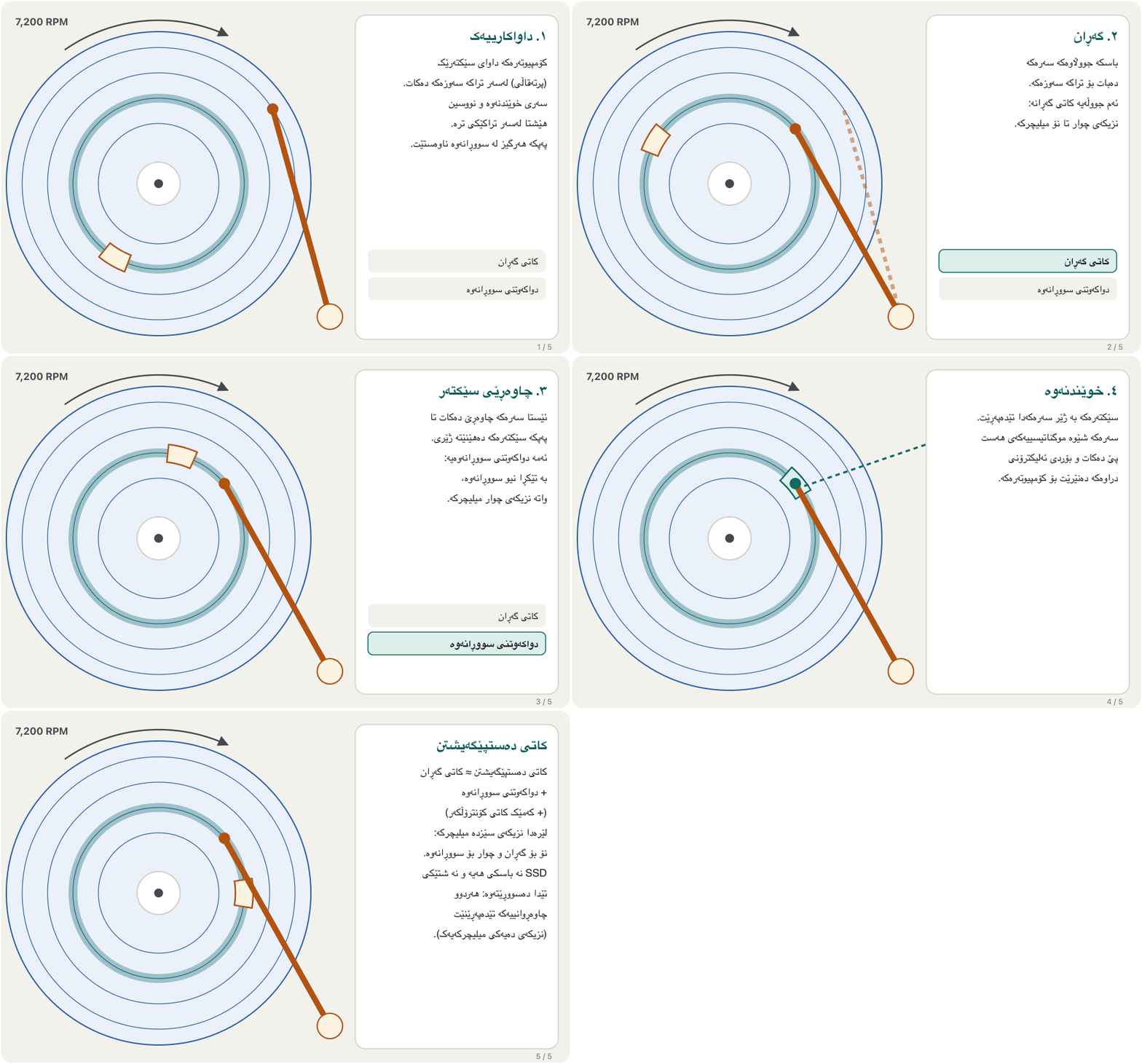
خوێندنەوەی یەک دوو چاوەڕوانیی تێدایە. یەکەم، باسکەکە دەبێت سەرەکە ببات بۆ دروستەکە — ئەمە . دووەم، سەرەکە دەبێت چاوەڕێ بکات تا سووڕاوەکە دروستەکە بهێنێتە ژێری — ئەمە . سەیری هەردووکیان بکە:
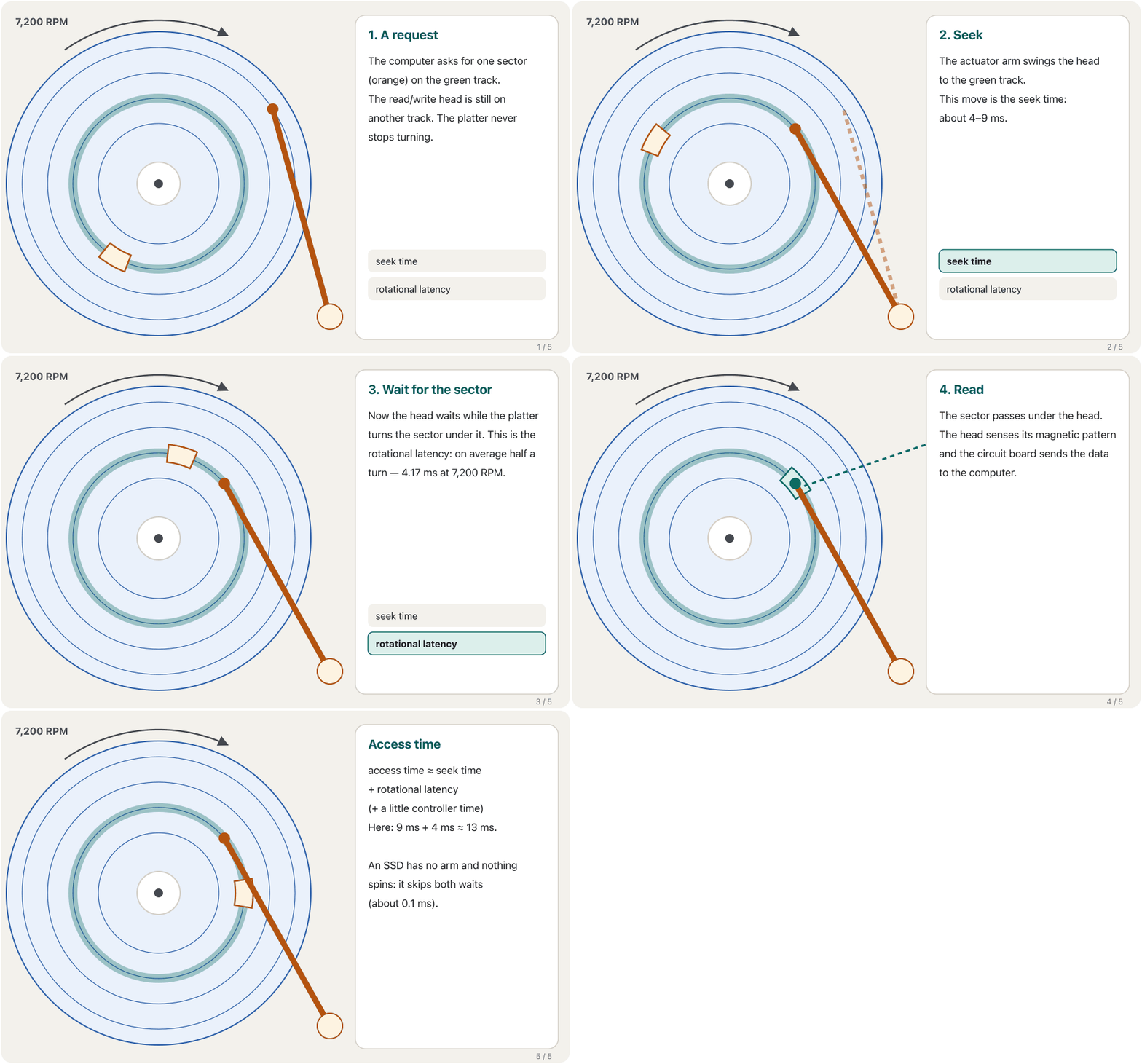
On average the sector you want is half a turn away. At 7,200 RPM one full turn takes .
بە تێکڕا ئەو دەتەوێت نیو سووڕانەوە دوورە. لە 7,200 RPMـدا یەک سووڕانەوەی تەواو دەخایەنێت.
Tracks, sectors and formattingتراکەکان، سێکتەرەکان و فۆرماتکردنی دیسک
A new platter is just a smooth magnetic surface. Before it can hold files it needs a map. Formatting is the process of dividing the disk into tracks and sectors:
نوێ تەنها ڕوویەکی موگناتیسیی لووسە. پێش ئەوەی بتوانێت هەڵبگرێت، پێویستی بە نەخشەیەکە. ئەو کارەیە کە دیسکەکە دابەش دەکات بۆ و :
- A track is one ring on the platter. Unlike a record's groove, the tracks are separate circles, one inside the other.
- A sector is one piece of a track and the smallest amount the drive reads or writes at once: 512 bytes on older disks, 4,096 bytes (4 KB) on modern ones.
- A cluster is a group of sectors that the file system hands out as one unit. Even a tiny file takes at least one whole cluster.
- ئەڵقەیەکە لەسەر . بە پێچەوانەی هێڵی پلاکی گرامافۆن، بازنەی جیان، یەکێکیان لەناو ئەوی تردا.
- پارچەیەکی و بچووکترین بڕە کە درایڤەکە بە یەکجار دەیخوێنێتەوە یان دەینووسێت: 512 لە دیسکە کۆنەکاندا، 4,096 (4 KB) لە دیسکە نوێیەکاندا.
- کۆمەڵێک کە وەک یەک یەکە دابەشیان دەکات. تەنانەت زۆر بچووکیش لانیکەم تەواو دەگرێت.
Scattered files and defragmentingپەرشبوونی فایلەکان و ڕێکخستنەوەی پارچەکان
When a disk fills up and files are deleted and saved again, one file can end up in clusters spread all over the platter. Then the arm must jump many times to read it, and the disk feels slow. Defragmentation moves the pieces of each file next to each other again.
کاتێک دیسکێک پڕ دەبێت و دەسڕدرێنەوە و دووبارە پاشەکەوت دەکرێنەوە، دەکرێت لە بڵاو بەسەر هەموو هەڵبگیرێت. ئەو کاتە باسکەکە دەبێت زۆر جار باز بدات بۆ خوێندنەوەی و دیسکەکە هێواش دەبێت. پارچەکانی هەر دووبارە دەباتەوە تەنیشت یەک.
- Windows does this by itself: by default it optimizes your drives once a week («Defragment and Optimize Drives»).
- For a hard disk, «optimize» means defragment. For an SSD it means TRIM instead — an SSD has no arm, so scattered pieces do not slow it down (see Wear and TRIM).
- Windows خۆی ئەمە دەکات: بە شێوەی بنەڕەتی هەفتەی جارێک درایڤەکانت باش دەکات («Defragment and Optimize Drives»).
- بۆ ، «optimize» واتە . بۆ SSD واتە TRIM — SSD باسکی نییە، بۆیە پارچەی پەرشوبڵاو هێواشی ناکات (سەیری سوان و TRIM بکە).
What decides the capacityچی توانای خەزنکردن دیاری دەکات
Three things decide how much a hard disk can hold: how many platters it has, how the magnetic bits are laid on the surface (longitudinal or perpendicular recording), and the density — how many bits fit on each square centimetre.
سێ شت دیاری دەکەن چەند هەڵدەگرێت: ژمارەی ، چۆن موگناتیسییەکان لەسەر ڕووەکە دادەنرێن (تۆمارکردنی درێژەیی یان ستوونی) و چڕی — واتە چەند لەسەر هەر سانتیمەترێکی چوارگۆشە جێی دەبێتەوە.
Engineers keep finding ways to squeeze bits closer. The newest is HAMR (heat-assisted magnetic recording): a tiny laser heats a spot of the platter for less than a nanosecond, so the head can magnetise a much smaller area. Another trick, SMR (shingled recording), overlaps tracks like roof tiles — more space, but slower writing.
ئەندازیاران بەردەوام ڕێگەی نوێ دەدۆزنەوە بۆ ئەوەی نزیکتر لە یەک دابنێن. نوێترینیان HAMRـە (تۆمارکردنی موگناتیسی بە یارمەتیی گەرمی): زۆر بچووک خاڵێکی بۆ کەمتر لە نانۆچرکەیەک گەرم دەکات، بۆیە سەرەکە دەتوانێت ناوچەیەکی زۆر بچووکتر موگناتیس بکات. ڕێگەیەکی تر، SMR، وەک کاشیی سەربان دەخاتە سەر یەک — شوێنی زیاتر، بەڵام نووسینی هێواشتر.
How more and more bits were squeezed onto a platter: density, perpendicular recording and heat-assisted recording.
چۆن زیاتر و زیاتر خرانە سەر : چڕی، تۆمارکردنی ستوونی و تۆمارکردن بە یارمەتیی گەرمی.
Plays 1:28 to the end: density, new recording methods and the physical limits that decide capacity.
لە 1:28 تا کۆتایی پەخش دەبێت: چڕی، ڕێگا نوێیەکانی تۆمارکردن و ئەو سنوورە فیزیکییانەی دیاری دەکەن.
Spin speed and drive speedخێرایی سووڕانەوە و خێرایی درایڤ
When you compare hard disks, the course lists six characteristics: the number of platters, read/write heads, tracks and sectors, the RPM (revolutions per minute: how fast the platters spin) and the form factor (the drive's size and shape). The RPM matters most for speed: the faster the spin, the shorter the wait for a sector.
کاتێک بەراورد دەکەیت، کۆرسەکە شەش تایبەتمەندی دەژمێرێت: ژمارەی ، ، و ، (سووڕانەوە لە خولەکێکدا: چەند خێرا دەسووڕێنەوە) و (قەبارە و شێوەی درایڤەکە). RPM بۆ خێرایی لە هەمووی گرنگترە: تا سووڕانەوە خێراتر بێت، چاوەڕوانی بۆ کورتتر دەبێت.
| RPM | Typical useبەکارهێنانی ئاسایی | Average rotational latency تێکڕا |
|---|---|---|
| 5,400 | laptop and low-power external drives, big home drivesدرایڤی لاپتۆپ و درایڤی دەرەکیی کەمکارەبا، درایڤی گەورەی ماڵەوە | 5.56 ms |
| 7,200 | most desktop and NAS drivesزۆربەی درایڤەکانی و NAS | 4.17 ms |
| 10,000 | older fast server drivesدرایڤە خێراکانی لە کۆندا | 3.00 ms |
| 15,000 | the fastest server drives (now replaced by SSDs)خێراترین درایڤەکانی (ئێستا SSD جێگەیانی گرتووەتەوە) | 2.00 ms |
Two more numbers describe speed. The seek time of a desktop drive is about 9 ms on average (about 12 ms for laptop drives). Once the head is in place, a modern drive reads about 100 to 300 MB/s in a long run. That is fine for films and backups, but far slower than an SSD for opening many small files.
دوو ژمارەی تر خێرایی ڕوون دەکەنەوە. درایڤێکی بە تێکڕا نزیکەی 9 msـە (نزیکەی 12 ms بۆ درایڤی لاپتۆپ). کاتێک سەرەکە گەیشتە شوێنی خۆی، درایڤێکی نوێ لە خوێندنەوەی درێژدا نزیکەی 100 تا 300 MB/s دەخوێنێتەوە. ئەمە بۆ فیلم و باشە، بەڵام بۆ کردنەوەی زۆر بچووک زۆر لە SSD هێواشترە.
Sizes and connectionsقەبارە و پەیوەندییەکان
Hard disks come in two form factors: 3.5-inch drives for desktop computers and NAS boxes, and smaller 2.5-inch drives, mainly for laptops (and many external drives). The number is roughly the width of the platter area, not the size of the box.
بە دوو دێن: درایڤی 3.5 ئینج بۆ و سندوقەکانی NAS، هەروەها درایڤی بچووکتری 2.5 ئینج، زۆرتر بۆ (و زۆرێک لە درایڤە دەرەکییەکان). ژمارەکە نزیکەی پانیی ناوچەی ، نەک قەبارەی سندوقەکە.
| Interface | Where you meet itلە کوێ دەیبینیت | Status in 2026دۆخی لە 2026ـدا |
|---|---|---|
| PATA (parallel ATA), also called IDEPATA (ATAـی تەریب)، کە پێی دەوترێت IDE | PCs before about 2008: wide 40-pin ribbon cable پێش نزیکەی 2008: کێبڵی تەختی پانی 40 پین | Obsoleteبەسەرچووە |
| SATA (serial ATA)SATA (ATAـی زنجیرەیی) | Almost every internal hard disk today: thin 7-pin data cable plus a power cableنزیکەی هەموو ناوخۆیی ئەمڕۆ: کێبڵی باریکی 7 پینی لەگەڵ کێبڵی کارەبا | Standardستاندارد |
| SAS (serial attached SCSI)SAS (SCSIـی زنجیرەیی) | Servers and data centres; a SAS port also accepts SATA drives و ؛ پۆرتی SAS درایڤی SATAـش وەردەگرێت | Standard in serversستاندارد لە |
| USB | External drives; inside the box is a SATA drive and a small converterدرایڤی دەرەکی؛ لەناو سندوقەکەدا درایڤێکی SATA و گۆڕەرێکی بچووک هەیە | Standard for external drives (USB-C on new ones)ستاندارد بۆ درایڤی دەرەکی (USB-C لە نوێیەکاندا) |
Drives tuned for different jobsدرایڤی ڕێکخراو بۆ کاری جیاواز
The lecture notes describe one maker's colour-coded lines (Western Digital). The useful idea behind them is general: makers tune hard disks for different jobs. A drive for a NAS that runs day and night is built differently from a quiet, cheap drive for a home PC.
تێبینییەکانی وانە باسی هێڵە ڕەنگکراوەکانی یەک دروستکەر (Western Digital) دەکەن. بیرۆکە بەسوودەکەی پشتیان گشتییە: دروستکەران بۆ کاری جیاواز ڕێک دەخەن. درایڤێک بۆ NAS کە شەو و ڕۆژ کار دەکات بە شێوەیەکی جیاواز دروست دەکرێت لە درایڤێکی بێدەنگ و هەرزان بۆ ماڵەوە.
| Jobکار | What it is tuned forبۆ چی ڕێکخراوە | WD colour in the notesڕەنگی WD لە تێبینییەکاندا |
|---|---|---|
| Everyday desktop ڕۆژانە | Low cost, quiet, little heat; good enough speed (7,200 or 5,400 RPM)نرخی کەم، بێدەنگ، گەرمیی کەم؛ خێراییەکی بەس (7,200 یان 5,400 RPM) | Blue (and the old Green)شین (و سەوزی کۆن) |
| Performance and gamingخێرایی و یاری | Speed and a larger cache, for video editing, rendering and games; a bit louderخێرایی و گەورەتر، بۆ دەستکاریی ڤیدیۆ، ڕێندەر و یاری؛ کەمێک بەدەنگتر | Blackڕەش |
| NAS, 24/7NAS، 24/7 | Running day and night in a box with other drives: low power, low noise, handles vibrationکارکردنی شەو و ڕۆژ لە سندوقێکدا لەگەڵ درایڤی تر: کارەبای کەم، دەنگی کەم، بەرگەی لەرینەوە دەگرێت | Redسوور |
| Video surveillance, 24/7چاودێریی ڤیدیۆیی، 24/7 | Writing camera video non-stop; it keeps recording instead of stopping to retry a damaged frameنووسینی ڤیدیۆی کامێرا بەبێ وەستان؛ بەردەوام تۆمار دەکات لە جیاتی ئەوەی بوەستێت بۆ دووبارە هەوڵدانی وێنەیەکی تێکچوو | Purpleمۆر |
Drives tuned for different jobsدرایڤی ڕێکخراو بۆ کاری جیاواز
What the notes say about each colourتێبینییەکان دەربارەی هەر ڕەنگێک چی دەڵێن
External drivesهارد دیسکە دەرەکییەکان
An external hard disk is a separate drive in its own case that you join to a computer or phone with a cable, usually USB. Inside the case is an ordinary hard disk — or an SSD (an «external SSD») — plus a small board that converts SATA to USB. People also call them portable or mobile drives.
درایڤێکی جیایە لە کەیسی خۆیدا کە بە کێبڵێک، زۆرجار USB، دەیبەستیتەوە بە یان مۆبایلەوە. لەناو کەیسەکەدا ئاسایی هەیە — یان SSD («SSDـی دەرەکی») — لەگەڵ بۆردێکی بچووک کە SATA دەگۆڕێت بۆ USB. خەڵک پێیان دەڵێن درایڤی گوازراوە یان مۆبایل.
- Uses: backups, moving big files (films, projects) between computers, extra space for a laptop.
- One drive, several computers: you can unplug it from one laptop and plug it into another.
- Care: an external hard disk has spinning platters — do not move or drop it while it is working, and use «Eject» before unplugging.
- بەکارهێنان: ، گواستنەوەی گەورە (فیلم، پڕۆژە) لە نێوان ، شوێنی زیادە بۆ .
- یەک درایڤ، چەند : دەتوانیت لە دەریبهێنیت و بیخەیتە ترەوە.
- ئاگاداری: سووڕاوی تێدایە — لە کاتی کارکردندا مەیجووڵێنە و مەیخە خوارەوە و پێش دەرهێنان «Eject» بەکار بهێنە.
Head crashبەرکەوتنی سەر
The head never touches the platter. It flies on a thin cushion of air (or helium in big drives) only a few nanometres above the surface. A head crash happens when the head touches the spinning surface — usually after a knock or a drop while the drive is working, or when dirt gets inside. The head scratches the magnetic layer, and the data there is destroyed.
سەرەکە هەرگیز بەر ناکەوێت. لەسەر بالیفێکی تەنکی هەوا (یان هیلیۆم لە درایڤە گەورەکاندا) تەنها چەند نانۆمەترێک بەسەر ڕووەکەوە دەفڕێت. ڕوو دەدات کاتێک سەرەکە بەر ڕووە سووڕاوەکە دەکەوێت — زۆرجار دوای لێدان یان کەوتنە خوارەوە لە کاتی کارکردنی درایڤەکەدا، یان کاتێک پیسی دەچێتە ناوەوە. سەرەکە چینە موگناتیسییەکە دەڕووشێنێت و ئەوێ لەناو دەچێت.
Five ways a hard disk failsپێنج ڕێگەی تێکچوونی هارد دیسک
A head crash is only one kind of failure. The lecture notes list five; here are the first three:
تەنها یەک جۆری تێکچوونە. تێبینییەکانی وانە پێنج جۆر دەژمێرن؛ ئەمانە سێ جۆری یەکەمن:
| Kindجۆر | What happensچی ڕوو دەدات | What to doچی بکەیت |
|---|---|---|
| Electricalکارەبایی | A voltage surge damages the circuit board or the heads. The drive may power on but cannot read, write or start the computer.بەرزبوونەوەیەکی لەناکاوی بۆردی ئەلیکترۆنی یان سەرەکان تێک دەدات. لەوانەیە درایڤەکە هەڵبکرێت بەڵام نەتوانێت بخوێنێتەوە، بنووسێت یان دەست پێ بکات. | Use a surge protector or a UPS; leave data recovery to specialists.پارێزەری کارەبا یان بەکار بهێنە؛ گەڕاندنەوەی بۆ پسپۆڕان جێ بهێڵە. |
| Mechanicalمیکانیکی | Wear and tear, or a hard knock such as dropping an external drive or the laptop around an internal one. Often you hear clicking or grinding.سوان، یان لێدانێکی توند وەک کەوتنە خوارەوەی درایڤێکی دەرەکی یان ئەو لاپتۆپەی درایڤێکی ناوخۆیی تێدایە. زۆرجار دەنگی چرکەچرک یان هاڕین دەبیستیت. | Switch off at once — every extra turn can scratch more data away.یەکسەر بیکوژێنەوە — هەر سووڕانەوەیەکی زیادە دەتوانێت زیاتر بڕووشێنێت. |
| Logicalلۆجیکی | The hardware is fine but the data or file system is damaged: corrupted files, malware, programs closed badly, an improper shut-down. ساغە بەڵام یان تێکچووە: تێکچوو، ، کە بە خراپی داخراون، نادروست. | Repair tools, antivirus, or restore from a backup.ئامرازی چاککردنەوە، دژەڤایرۆس، یان گەڕاندنەوە لە . |
Five ways a hard disk failsپێنج ڕێگەی تێکچوونی هارد دیسک
Bad sectors and firmwareسێکتەری خراپ و پتەوواڵە
The last two kinds of failure in the notes are quieter: nothing clicks, but data becomes hard to reach.
دوو جۆرەکەی کۆتایی تێکچوون لە تێبینییەکاندا بێدەنگترن: هیچ شتێک چرکەچرک ناکات، بەڵام گەیشتن بە قورس دەبێت.
| Kindجۆر | What happensچی ڕوو دەدات | What to doچی بکەیت |
|---|---|---|
| Bad sectors خراپ | Small areas of the platter can no longer be read reliably. The drive moves their data to spare sectors; a growing number is a warning sign.هەندێک ناوچەی بچووکی ئیتر بە متمانەوە ناخوێندرێنەوە. درایڤەکە دەگوازێتەوە بۆ یەدەگ؛ زیادبوونی ژمارەکەیان نیشانەی مەترسییە. | Back up now and plan to replace the drive.ئێستا بکە و پلانی گۆڕینی درایڤەکە دابنێ. |
| Firmware | The drive's own built-in software, which runs its maintenance and talks to the computer, is corrupted. The drive may vanish or show the wrong size. ناوخۆیی درایڤەکە خۆی، کە کاری چاککاری دەکات و قسە لەگەڵ دەکات، تێکچووە. لەوانەیە درایڤەکە دیار نەمێنێت یان قەبارەی هەڵە پیشان بدات. | Check the maker's tools and updates, or ask a specialist.سەیری ئامراز و نوێکردنەوەکانی دروستکەر بکە، یان لە پسپۆڕ بپرسە. |
Hard disks in 2026هارد دیسکەکان لە 2026ـدا
The first hard disk, the IBM 350 of 1956, was as big as a wardrobe: 52 large disks held just 3.75 MB. In March 2026 Seagate began shipping HAMR drives of up to 44 TB to cloud companies — about twelve million times more in a box that fits in your hand.
یەکەم ، IBM 350ـی ساڵی 1956، بە قەد دۆڵابێک گەورە بوو: 52 دیسکی گەورە تەنها 3.75 MBیان هەڵدەگرت. لە مارسی 2026ـدا Seagate دەستی کرد بە ناردنی درایڤی HAMR تا 44 TB بۆ کۆمپانیاکانی هەور — نزیکەی دوازدە ملیۆن هێندە زیاتر لە سندوقێکدا کە لە ناو دەستتدا جێی دەبێتەوە.
| Compareبەراورد | Hard disk | SSD |
|---|---|---|
| Price per terabyte (late 2025)نرخی هەر (کۆتایی 2025) | about $10–30نزیکەی 10–30 دۆلار | about $50–100نزیکەی 50–100 دۆلار |
| Largest single drive (2026)گەورەترین یەک درایڤ (2026) | 44 TB | 245 TB |
| Where you find itلە کوێ دەیبینیت | Data centres, NAS boxes, security recorders, backup and big desktop drives، سندوقەکانی NAS، ئامێری تۆماری چاودێری، درایڤی و درایڤی گەورەی | Laptops, phones, new desktops, fast servers، مۆبایل، نوێ، خێرا |
So hard disks have not disappeared: they moved from our laptops into data centres, where the lowest price per terabyte matters most. Prices change fast — in 2025–2026 AI data centres bought so much flash that SSD prices rose sharply — but hard disks stay the cheapest per terabyte. Organisations often combine several drives so one failure does not lose data — that is RAID, with the levels in RAID and Web Security — but RAID is still not a backup.
کەواتە لەناو نەچوون: لە چوونە ناو ، لەوێ کەمترین نرخ بۆ هەر لە هەموو شتێک گرنگترە. نرخەکان خێرا دەگۆڕێن — لە 2025–2026ـدا بڕێکی ئەوەندە زۆر کڕییان کە نرخی SSD زۆر بەرز بووەوە — بەڵام هێشتا بۆ هەر هەرزانترینە. دامەزراوەکان زۆرجار چەند درایڤێک پێکەوە دەبەستن تا تێکچوونی یەکێکیان لەناو نەبات — پێی دەوترێت RAID و ئاستەکانی لە RAID و ئاسایشی وێبدا ڕوون کراونەتەوە — بەڵام هێشتا نییە.
Common mistakesهەڵە باوەکان
| Mistakeهەڵە | What is trueڕاستییەکە |
|---|---|
| «The head touches the disk, like a record needle.»«سەرەکە بەر دیسکەکە دەکەوێت، وەک دەرزیی گرامافۆن.» | It flies a few nanometres above it. If it touches, that is a head crash.چەند نانۆمەترێک بەسەریدا دەفڕێت. ئەگەر بەری بکەوێت، ئەوە . |
| «Tracks are one long spiral.»« یەک هێڵی پێچاوپێچی درێژن.» | On a hard disk, tracks are separate rings. The single spiral belongs to CDs and DVDs.لە ئەڵقەی جیان. تاکە هێڵە پێچاوپێچەکە هی CD و DVDـیە. |
| «Higher RPM means more capacity.»«RPMـی بەرزتر واتە زیاتر.» | RPM changes speed. Capacity comes from platters, recording method and density.RPM خێرایی دەگۆڕێت. لە ، ڕێگەی تۆمارکردن و چڕییەوە دێت. |
| «Formatting just tidies the disk.»« تەنها دیسکەکە ڕێک دەخات.» | Formatting makes the files on it unreachable. Copy them first. دەستت لە سەری دەبڕێت. سەرەتا کۆپییان بکە. |
| «Defragment my SSD to make it faster.»«SSDـەکەم بکە بۆ ئەوەی خێراتر بێت.» | Defragmenting helps hard disks only. Windows TRIMs SSDs instead. تەنها یارمەتیی دەدات. Windows لە جیاتی ئەوە SSD TRIM دەکات. |
| «My external hard disk is my backup, so I can move it while copying.»« ، بۆیە دەتوانم لە کاتی کۆپیکردندا بیجووڵێنم.» | Never knock a spinning drive — and one copy is not a full backup plan.هەرگیز لە درایڤێکی سووڕاو مەدە — و یەک کۆپی پلانی تەواوی نییە. |
Exercisesڕاهێنانەکان
Without looking back, name the part that (a) holds the data as magnetism, (b) spins all platters together, (c) carries the heads across the platters, (d) reads and writes, (e) controls the motors and talks to the computer.
بەبێ ئەوەی سەیری سەرەوە بکەیتەوە، ناوی ئەو پارچەیە ببە کە (أ) وەک موگناتیس هەڵدەگرێت، (ب) هەموو پێکەوە دەسووڕێنێتەوە، (ج) سەرەکان بەسەر دەبات، (د) دەخوێنێتەوە و دەنووسێت، (هـ) مۆتۆرەکان کۆنترۆڵ دەکات و قسە لەگەڵ دەکات.
Show answerوەڵامەکە پیشان بدە
- (a) platter, (b) spindle and motor, (c) actuator arm, (d) read/write head, (e) circuit board with the controller.
- (أ) ، (ب) و مۆتۆر، (ج) ، (د) ، (هـ) بۆردی ئەلیکترۆنی و .
An old laptop has a 5,400 RPM hard disk with an average seek time of 12 ms. (a) How long does one turn take? (b) What is the average rotational latency? (c) About how long is the access time?
لاپتۆپێکی کۆن 5,400 RPMـی هەیە و تێکڕای 12 msـە. (أ) یەک سووڕانەوە چەند دەخایەنێت؟ (ب) تێکڕا چەندە؟ (ج) نزیکەی چەندە؟
Hintئاماژە
One turn takes 60 seconds divided by the RPM; on average you wait half a turn.
یەک سووڕانەوە = 60 چرکە دابەشی RPM؛ بە تێکڕا نیو سووڕانەوە چاوەڕێ دەکەیت.
Show answerوەڵامەکە پیشان بدە
About 17.6 ms for every random read — about 175 times slower than an NVMe SSD (about 0.1 ms).
نزیکەی 17.6 ms بۆ هەر خوێندنەوەیەکی هەڕەمەکی — نزیکەی 175 جار هێواشتر لە SSDـی NVMe (نزیکەی 0.1 ms).
Match each case to a kind of failure: (a) After a lightning storm the PC does not find its drive; the drive is silent. (b) An external drive fell off the desk while copying and now clicks. (c) Windows says some files are unreadable, and the drive's S.M.A.R.T. count of reallocated sectors keeps growing. (d) After a virus, folders are missing but the drive sounds normal.
هەر حاڵەتێک بە جۆرێکی تێکچوون ببەستەوە: (أ) دوای هەورەبروسکەیەک درایڤەکەی نادۆزێتەوە؛ درایڤەکە بێدەنگە. (ب) لە کاتی کۆپیکردندا لە مێزەکە کەوتە خوارەوە و ئێستا چرکەچرک دەکات. (ج) Windows دەڵێت هەندێک ناخوێندرێنەوە و ژمارەی گوازراوەکان لە S.M.A.R.T.ـدا بەردەوام زیاد دەکات. (د) دوای ڤایرۆسێک هەندێک نەماون بەڵام دەنگی درایڤەکە ئاساییە.
Show answerوەڵامەکە پیشان بدە
- (a) Electrical — a surge damaged the board.
- (b) Mechanical (possibly a head crash) — switch it off at once.
- (c) Bad sectors — back up now and replace the drive.
- (d) Logical — the hardware is fine; clean the malware and restore from a backup.
- (أ) کارەبایی — بەرزبوونەوەی بۆردەکەی تێک داوە.
- (ب) میکانیکی (لەوانەیە ) — یەکسەر بیکوژێنەوە.
- (ج) خراپ — ئێستا بکە و درایڤەکە بگۆڕە.
- (د) لۆجیکی — ساغە؛ پاک بکەرەوە و لە بیگەڕێنەوە.
Karwan runs a small office in Sulaymaniyah. He wants a box on the network that keeps everyone's files day and night, with lots of space for little money. Which kind of hard disk, and which size, should go inside? What else must he still do?
کاروان نووسینگەیەکی بچووکی لە سلێمانی هەیە. سندوقێکی دەوێت لەسەر کە شەو و ڕۆژ هەمووان هەڵبگرێت، بە شوێنێکی زۆر و نرخێکی کەم. چ جۆرە و چ قەبارەیەک بچێتە ناوی؟ هێشتا چی تر دەبێت بکات؟
Show answerوەڵامەکە پیشان بدە
3.5-inch NAS drives (built for 24/7 work, low noise and vibration in a box with other drives), at 5,400 or 7,200 RPM. Two drives can mirror each other (RAID 1) so one failure loses nothing — but he still needs a real backup (for example an external drive or cloud copy kept off-site), because RAID copies mistakes and malware too.
درایڤی NASـی 3.5 ئینج (دروستکراو بۆ کاری 24/7، دەنگ و لەرینەوەی کەم لە سندوقێکدا لەگەڵ درایڤی تر)، بە 5,400 یان 7,200 RPM. دوو درایڤ دەتوانن وێنەی یەکتر بن (RAID 1) تا تێکچوونی یەکێکیان هیچ لەناو نەبات — بەڵام هێشتا پێویستی بە ڕاستەقینەیە (بۆ نموونە یان کۆپیی هەوری لە شوێنێکی تر)، چونکە هەڵە و کۆپی دەکات.
Summaryپوختە
- A hard disk stores data as magnetism on spinning platters; it is non-volatile.
- Parts: platters on one spindle, one read/write head per surface on an actuator arm, a circuit board with the controller.
- To read, the arm seeks to the track, then waits for the sector to spin round: the access time is about the seek time plus the rotational latency.
- Formatting divides the disk into tracks and sectors; the file system hands out clusters.
- Capacity comes from platters, recording method (perpendicular, HAMR) and density; speed from RPM and seek time.
- 3.5-inch for desktops and NAS, 2.5-inch for laptops; SATA inside (SAS in servers), USB outside; IDE is obsolete.
- Drives fail electrically, mechanically (head crash), logically, through bad sectors or firmware — always keep a backup.
- In 2026 hard disks live mostly in data centres and NAS boxes: up to 44 TB, the cheapest storage per terabyte.
- وەک موگناتیس لەسەر سووڕاو هەڵدەگرێت؛ زوونەفڕە.
- پارچەکان: لەسەر یەک ، یەک بۆ هەر ڕوویەک لەسەر ، بۆردێکی ئەلیکترۆنی لەگەڵ .
- بۆ خوێندنەوە، باسکەکە دەگەڕێت بۆ ، پاشان چاوەڕێی سووڕانەوەی دەکات: نزیکەی کۆی و .
- دیسکەکە دابەش دەکات بۆ و ؛ دابەش دەکات.
- لە ، ڕێگەی تۆمارکردن (ستوونی، HAMR) و چڕییەوە دێت؛ خێرایی بەندە بە RPM و .
- 3.5 ئینج بۆ و NAS، 2.5 ئینج بۆ ؛ SATA لە ناوەوە (SAS لە )، USB لە دەرەوە؛ IDE بەسەرچووە.
- درایڤەکان بە شێوەی کارەبایی، میکانیکی ()، لۆجیکی، بەهۆی خراپ یان تێک دەچن — هەمیشە هەڵبگرە.
- لە 2026ـدا زۆرتر لە و سندوقەکانی NASـدان: تا 44 TB، هەرزانترین بۆ هەر .
Why is a hard disk slower than an SSD at opening many small files?بۆچی هارد دیسک لە کردنەوەی زۆر فایلێکی بچووکدا لە SSD هێواشترە؟
Each file needs a seek and a rotational wait — milliseconds each time. An SSD has no moving parts and answers in about 0.1 ms.
هەر و چاوەڕوانیی سووڕانەوەی پێویستە — هەر جارە چەند میلیچرکەیەک. SSD هیچ پارچەیەکی جووڵاوی نییە و لە نزیکەی 0.1 msـدا وەڵام دەداتەوە.
What does the 7,200 in «7,200 RPM» mean?7,200ـی ناو «7,200 RPM» واتای چییە؟
The platters spin 7,200 times a minute — 120 times a second.
لە خولەکێکدا 7,200 جار دەسووڕێنەوە — لە چرکەیەکدا 120 جار.
Is RAID a backup?ئایا RAID باکئەپە؟
No. RAID keeps working when one drive fails, but deleted files, mistakes and malware are copied to every drive at once.
نەخێر. کاتێک درایڤێک تێک دەچێت بەردەوام کار دەکات، بەڵام سڕاوە، هەڵە و یەکسەر بۆ هەموو درایڤەکان کۆپی دەکرێن.
Lesson complete!وانەکە تەواو بوو!
Well done. Review the key terms, then go on to the next lesson.دەستخۆش. سەیرێکی زاراوە سەرەکییەکان بکەرەوە، پاشان بڕۆ بۆ وانەی داهاتوو.
Key termsزاراوە سەرەکییەکان
SSDs, Memory Cards and Flash DrivesSSD، کارتەکانی بیرگە و بیرگەکانی فلاش
Related lecturesوانە پەیوەندیدارەکان
- SSDs, Memory Cards and Flash DrivesSSD، کارتەکانی بیرگە و بیرگەکانی فلاش
- Ports and Connectorsدەرچەکان و سەرەکانی کێبڵ
- RAID, Web Security and Data ProtectionRAID، ئاسایشی وێب و پاراستنی دراوە
- Storage and Filesخەزنکردن و فایلەکان
- Storage for Organisations: RAID, NAS, SAN and Tapeخەزنکردن بۆ دامەزراوەکان: RAID، NAS، SAN و تەیپی موگناتیسی
- Installing and Setting Up Windowsجێگیرکردن و ڕێکخستنی Windows
References and further readingسەرچاوەکان و خوێندنەوەی زیاتر
- Wikipedia: Hard disk drive (parts, recording methods, HAMR and SMR, form factors, IBM 350, error handling)
- Wikipedia: Hard disk drive performance characteristics (seek time, rotational latency, transfer rate)
- Wikipedia: Heat-assisted magnetic recording
- Seagate (3 Mar 2026): Mozaic 4+ hard drives up to 44 TB
- Wikipedia: Solid-state drive (HDD vs SSD: price per GB, speeds, power)
- Microsoft Support: Ways to improve your computer's performance (Defragment and Optimize Drives)
- The Register (28 Oct 2015): WD's Green drives become Blue; what each WD colour is for
- Tom's Hardware (2026): SanDisk raises SSD prices up to 2.8× as the NAND shortage hits
This lecture is a first edition. The Kurdish text and terminology are waiting for review by Kurdish IT teachers.ئەم وانەیە چاپی یەکەمە. دەقە کوردییەکە و زاراوەکانی چاوەڕێی پێداچوونەوەی مامۆستایانی کوردی بواری IT ن.