Chapterبەش 9 · Lectureوانە 9.4
Simulating and Testing Logic Circuitsهاوشێوەکردن و تاقیکردنەوەی سووڕە لۆجیکییەکان
How to try a logic circuit in a simulator and then on a breadboard: why simulate first; the seven steps of any circuit simulator (Multisim as the lab's tool, CircuitVerse for free practice) and why every circuit needs a ground; switches as inputs and logic probes as outputs, with the course author's probe circuits; testing every gate (with an animation); checking hand work with the Logic Converter; moving to a breadboard with 74-series chips and building a half adder; and writing up the experiment.
چۆن لە و پاشان لەسەر تاقی بکەیتەوە: بۆچی سەرەتا هاوشێوە بکەیت؛ حەوت هەنگاوەکەی هەر (Multisim وەک ئامرازی تاقیگە، CircuitVerse بۆ ڕاهێنانی خۆڕایی) و بۆچی هەموو پێویستی بە هەیە؛ وەک و وەک ، بە خاوەنی کۆرسەکە؛ تاقیکردنەوەی هەموو (بە ئەنیمەیشنێک)؛ پشکنینی کاری دەستی بە Logic Converter؛ گواستنەوە بۆ بە زنجیرەی 74 و دروستکردنی ؛ و نووسینی ڕاپۆرتی تاقیکردنەوەکە.
What you will learnچی فێر دەبیت
- Build, ground and run a circuit in a simulator, naming the steps in Multisim and in CircuitVerse.
- Test a gate's truth table with switches and a logic probe and spot a wrong table.
- Use a logic converter to check a truth table, an expression or a NAND-only design.
- Wire 74-series chips on a breadboard (power pins, pull-downs, LED outputs) and build a half adder.
- Write up an experiment in four parts.
- لە دروست بکەیت، بۆ دابنێیت و کاری پێ بکەیت، بە ناوی هەنگاوەکان لە Multisim و CircuitVerseـدا.
- بە و تاقی بکەیتەوە و خشتەیەکی هەڵە بناسیتەوە.
- Logic Converter بۆ پشکنینی ، یان دیزاینێکی تەنها-NAND بەکار بهێنیت.
- زنجیرەی 74 لەسەر ببەستیت (پینەکانی وزە، دابەزێنەر، LEDـی ) و دروست بکەیت.
- ڕاپۆرتی تاقیکردنەوەیەک بە چوار بەش بنووسیت.
Why simulate before you buildبۆچی پێش دروستکردن هاوشێوە بکەیت
A circuit simulator is a program in which you draw a circuit from virtual parts and watch it work. You can measure voltages and currents with instruments that look like the real ones, try ten designs in the time one takes on a breadboard, and nothing burns if you make a mistake. Engineers use simulators (most are based on the SPICE method) before every real build, and teachers use them so that students can compare simulated values with the values they measure in the lab.
کە تێیدا لە پارچەی مەجازی دەکێشیت و سەیری کارکردنی دەکەیت. دەتوانیت و بە ئامێرێک بپێویت کە وەک ئامێرە ڕاستەقینەکان دەردەکەون، لەو کاتەی یەک دیزاین لەسەر دەخایەنێت دە دیزاین تاقی بکەیتەوە و ئەگەر هەڵە بکەیت هیچ شتێک ناسووتێت. ئەندازیاران پێش هەموو دروستکردنێکی ڕاستەقینە بەکار دەهێنن (زۆربەیان لەسەر بنەمای ڕێگای SPICEـن) و مامۆستایان بەکاری دەهێنن بۆ ئەوەی خوێندکاران نرخە هاوشێوەکراوەکان لەگەڵ ئەو نرخانە بەراورد بکەن کە لە تاقیگەدا دەیانپێون.
| Toolئامراز | What it is good forبۆ چی باشە | Costنرخ |
|---|---|---|
| NI Multisim | the lab's tool: analog, digital and mixed circuits with virtual instruments, a logic converter, microcontroller simulation, export to a PCB design programئامرازی تاقیگەکە: ، و تێکەڵ بە ئامێری مەجازی، Logic Converter، هاوشێوەکردنی microcontroller و ناردن بۆ دیزاینی PCB | paid; version 14.3; a 7-day free trial; Windows onlyپارەدار؛ وەشانی 14.3؛ تاقیکردنەوەی خۆڕایی 7 ڕۆژ؛ تەنها Windows |
| CircuitVerse | logic gates to sequential circuits, in the browser; builds a circuit from a truth table or expressionلە تا ، لە ؛ لە یان دروست دەکات | free and open sourceخۆڕایی و سەرچاوە-کراوە |
| PhET Circuit Construction Kit | batteries, bulbs, resistors and meters — the electricity lessonsپاتری، گڵۆپ، و ئامێری پێوانە — وانەکانی کارەبا | free, in the browserخۆڕایی، لە |
This lesson names Multisim's menus because it is the lab's tool, but every step has a twin in CircuitVerse, which you can open at home for free. Get Multisim only from National Instruments' own website.
ئەم وانەیە ناوی Multisim دەهێنێت چونکە ئامرازی تاقیگەکەیە، بەڵام هەموو هەنگاوێک هاوشێوەیەکی لە CircuitVerseـدا هەیە کە دەتوانیت لە ماڵەوە بە خۆڕایی بیکەیتەوە. Multisim تەنها لە ماڵپەڕی خودی National Instrumentsـەوە وەربگرە.
A tour of a circuit simulatorگەڕانێک بە هاوشێوەسازێکی سووڕدا
Whatever the simulator, building a circuit takes the same seven steps. The picture shows a simulator window with the circuit of a Multisim tutorial: a 20 V source, a 10 Ω resistor in series with 20, 30 and 40 Ω resistors in parallel.
هەرچییەک بێت، دروستکردنی هەمان حەوت هەنگاو دەخایەنێت. وێنەکە پەنجەرەی پیشان دەدات بە ڕێنماییەکی Multisim: سەرچاوەیەکی 20 V، 10 Ω بە لەگەڵ 20، 30 و 40 Ω بە .
- New schematicسکیماتیکی نوێ
Open a new, empty circuit. Multisim: File → New → Schematic Capture (Save As and Open are in the same File menu). CircuitVerse: Project → New Project.
نوێی بەتاڵ بکەرەوە. Multisim: File ← New ← Schematic Capture (Save As و Open لە هەمان Fileـدان). CircuitVerse: Project ← New Project.
- Place the partsپارچەکان دابنێ
Choose a part from its group and click on the sheet. Multisim: Place → Component, then Group: Basic → Resistor (for example 1k), Sources → DC source; or use the virtual-component toolbars (View → Toolbars). CircuitVerse: drag gates and inputs from the element panel.
پارچەیەک لە کۆمەڵەکەی هەڵبژێرە و کرتە لەسەر پەڕەکە بکە. Multisim: Place ← Component، پاشان Group: Basic ← Resistor (بۆ نموونە 1k)، Sources ← DC source؛ یان شریتی پارچە مەجازییەکان بەکار بهێنە (View ← Toolbars). CircuitVerse: و لە پانێڵی پارچەکانەوە ڕابکێشە.
- Rotateبسووڕێنە
Turn a part so its legs point the right way. Multisim: right-click, or Ctrl+R (90° clockwise) and Ctrl+Shift+R (counter-clockwise).
پارچەکە بسووڕێنە تا قاچەکانی بە ئاراستەی دروست بن. Multisim: کرتەی ڕاست، یان Ctrl+R (90° بە ئاراستەی میلی کاتژمێر) و Ctrl+Shift+R (بە پێچەوانەوە).
- Wireوایەر بکێشە
Drag from one terminal to another (or Place → Wire). A dot appears where wires join.
لە سەرێکەوە ڕابکێشە بۆ سەرێکی تر (یان Place → Wire). لە شوێنی بەستنی وایەرەکاندا خاڵێک دەردەکەوێت.
- Set the valuesنرخەکان دابنێ
Double-click a part to open its properties and type the value — in the tutorial R1 to R4 become 10, 20, 30 and 40 Ω and the source 20 V.
دووجار کرتە لەسەر پارچەیەک بکە بۆ کردنەوەی تایبەتمەندییەکانی و نرخەکە بنووسە — لە ڕێنماییەکەدا R1 تا R4 دەبن بە 10، 20، 30 و 40 Ω و سەرچاوەکە 20 V.
- Add a groundزەوی زیاد بکە
Connect a ground symbol to the circuit (next screen).
بە ببەستە (پەڕەی داهاتوو).
- Runکاری پێ بکە
Start the simulation and read the instruments. Multisim: Simulate → Run or F5, with run, pause and stop buttons on the toolbar. CircuitVerse simulates all the time: just click the inputs.
هاوشێوەکردنەکە دەست پێبکە و ئامێرەکان بخوێنەوە. Multisim: Simulate ← Run یان F5، بە دوگمەکانی کارپێکردن، ڕاگرتن و وەستاندن لەسەر شریتەکە. CircuitVerse هەمیشە هاوشێوە دەکات: تەنها کرتە لە بکە.
A tour of a circuit simulatorگەڕانێک بە هاوشێوەسازێکی سووڕدا
Ground first, then runسەرەتا زەوی، پاشان کارپێکردن
Every circuit must have a ground before it can be simulated. Voltages are always measured between two points, and the simulator needs one fixed 0 V point to measure all the others from. Multisim refuses to run a circuit with no ground. In logic circuits the ground is also the LOW level (0), and the supply is the HIGH level (1).
هەموو پێش هاوشێوەکردن دەبێت هەبێت. هەمیشە لە نێوان دوو خاڵدا دەپێورێت و پێویستی بە یەک خاڵی جێگیری 0 V هەیە تا هەموو ئەوانی تر لەوەوە بپێوێت. Multisim ڕازی نابێت بێ کار پێ بکات. لە ئاستی LOWـیشە (0) و سەرچاوەکە ئاستی HIGH (1).
The 0 V reference point of a circuit, marked GND: every in the circuit is measured from it. (Earth ground, a wire to the real earth, is a safety connection.)
خاڵی سەرەتای 0 Vـی ، بە GND نیشانە دەکرێت: هەموو ناو لەوەوە دەپێورێت. (زەویی ڕاستەقینە، واتە وایەرێک بۆ ناو زەوی، بۆ سەلامەتییە.)
A tour of a circuit simulatorگەڕانێک بە هاوشێوەسازێکی سووڕدا
Practising for free in CircuitVerseڕاهێنانی خۆڕایی لە CircuitVerseـدا
CircuitVerse is a free, open-source logic simulator that runs in the browser; you can save circuits online with an account or offline in the browser. Its parts for logic labs are:
CircuitVerse لۆجیکیی خۆڕایی و سەرچاوە-کراوەیە کە لە کار دەکات؛ دەتوانیت بە هەژمارێک لەسەر ئینتەرنێت یان بێ ئینتەرنێت لە ناو پاشەکەوت بکەیت. پارچەکانی بۆ تاقیگەی لۆجیک ئەمانەن:
- Input: a toggle you click between 0 and 1 (the twin of an SPDT switch). Button: 1 only while pressed. Power and Ground: fixed 1 and 0.
- Output and Digital LED: show a signal's value, like a logic probe.
- The gates AND, OR, NOT, NAND, NOR, XOR and XNOR.
- Tools → Combinational Analysis builds a circuit from a truth table or a Boolean function; Tools → Hex-Bin-Dec Converter converts numbers.
- Input: دوگمەیەکی گۆڕین کە بە کرتە لە نێوان 0 و 1دا دەیگۆڕیت (هاوشێوەی SPDT). Button: تەنها لە کاتی داگرتندا 1ـە. Power و Ground: 1 و 0ـی جێگیر.
- Output و Digital LED: نرخی پیشان دەدەن، وەک .
- AND، OR، NOT، NAND، NOR، XOR و XNOR.
- Tools ← Combinational Analysis لە یان دروست دەکات؛ Tools ← Hex-Bin-Dec Converter ژمارەکان دەگۆڕێت.
Inputs from switches, outputs on a probeنێوخستە لە سویچەوە، دەرخستە لەسەر پرۆب
A logic experiment in the simulator has three parts. Switches give the inputs: closing a switch connects its input to the supply (1). The gate chip does the logic. A logic probe shows the output: a small lamp that lights when its input is HIGH. The course author's sheet shows four such circuits, one each for AND (7408), OR (7432), NOT (7404) and NAND (7400).
تاقیکردنەوەیەکی لۆجیکی لە سێ بەشی هەیە. دەدەن: داخستنی بە سەرچاوەکەوە (1) دەبەستێت. دەکات. پیشان دەدات: گڵۆپێکی بچووک کە کاتێک HIGHـە هەڵدەبێت. پەڕەی خاوەنی کۆرسەکە چوار لەم جۆرە پیشان دەدات، یەکێک بۆ هەر یەک لە AND (7408)، OR (7432)، NOT (7404) و NAND (7400).
In Multisim the probe lights when its input is above 2.5 V, so it reads a TTL output as 1 or 0. Notice that the gate chips in the screenshots show no power pins: Multisim connects the supply of its TTL parts by itself. On a real breadboard you must wire pin 14 to +5 V and pin 7 to ground yourself (From simulator to breadboard).
لە Multisimـدا هەڵدەبێت کاتێک لە سەرووی 2.5 Vـەوە بێت، بۆیە TTL وەک 1 یان 0 دەخوێنێتەوە. سەرنج بدە کە لە هیچ پینێکی وزەیان پێوە دیار نییە: Multisim خۆی وزەی پارچە TTLـەکانی دەبەستێت. لەسەر ڕاستەقینە دەبێت خۆت پینی 14 بە +5 V و پینی 7 بە ببەستیت (لە هاوشێوەسازەوە بۆ بریدبۆرد).
Inputs from switches, outputs on a probeنێوخستە لە سویچەوە، دەرخستە لەسەر پرۆب
Open switches and safe input voltagesسویچی کراوە و ڤۆڵتیەی بێ مەترسیی نێوخستە
Inputs from switches, outputs on a probeنێوخستە لە سویچەوە، دەرخستە لەسەر پرۆب
Lab: test the OR gateتاقیگە: گەیتی OR تاقی بکەرەوە
Place a DC voltage source and a ground to supply the circuit.
سەرچاوەیەکی DC و دابنێ بۆ وزەدان بە .
Place the gate: Place TTL, then choose the chip, for example 7432N for OR.
دابنێ: Place TTL، پاشان هەڵبژێرە، بۆ نموونە 7432N بۆ OR.
Place the input switches: Place Basic → Switch → SPDT. Double-click each switch and change its Label and its key (Value) so the inputs are A and B.
دابنێ: Place Basic → Switch → SPDT. دووجار کرتە لەسەر هەر بکە و Label و (Value) بگۆڕە تا ببن بە A و B.
Place the output probe: Place Indicator → Probe, in any colour.
دابنێ: Place Indicator ← Probe، بە هەر ڕەنگێک.
Wire everything, run, and flip the switches through 00, 01, 10 and 11, writing down the probe each time.
هەموو شتێک وایەر بکە، کاری پێ بکە و بە 00، 01، 10 و 11دا بگۆڕە و هەر جارێک بنووسەوە.
Inputs from switches, outputs on a probeنێوخستە لە سویچەوە، دەرخستە لەسەر پرۆب
Lab: test every gateتاقیگە: هەموو گەیتێک تاقی بکەرەوە
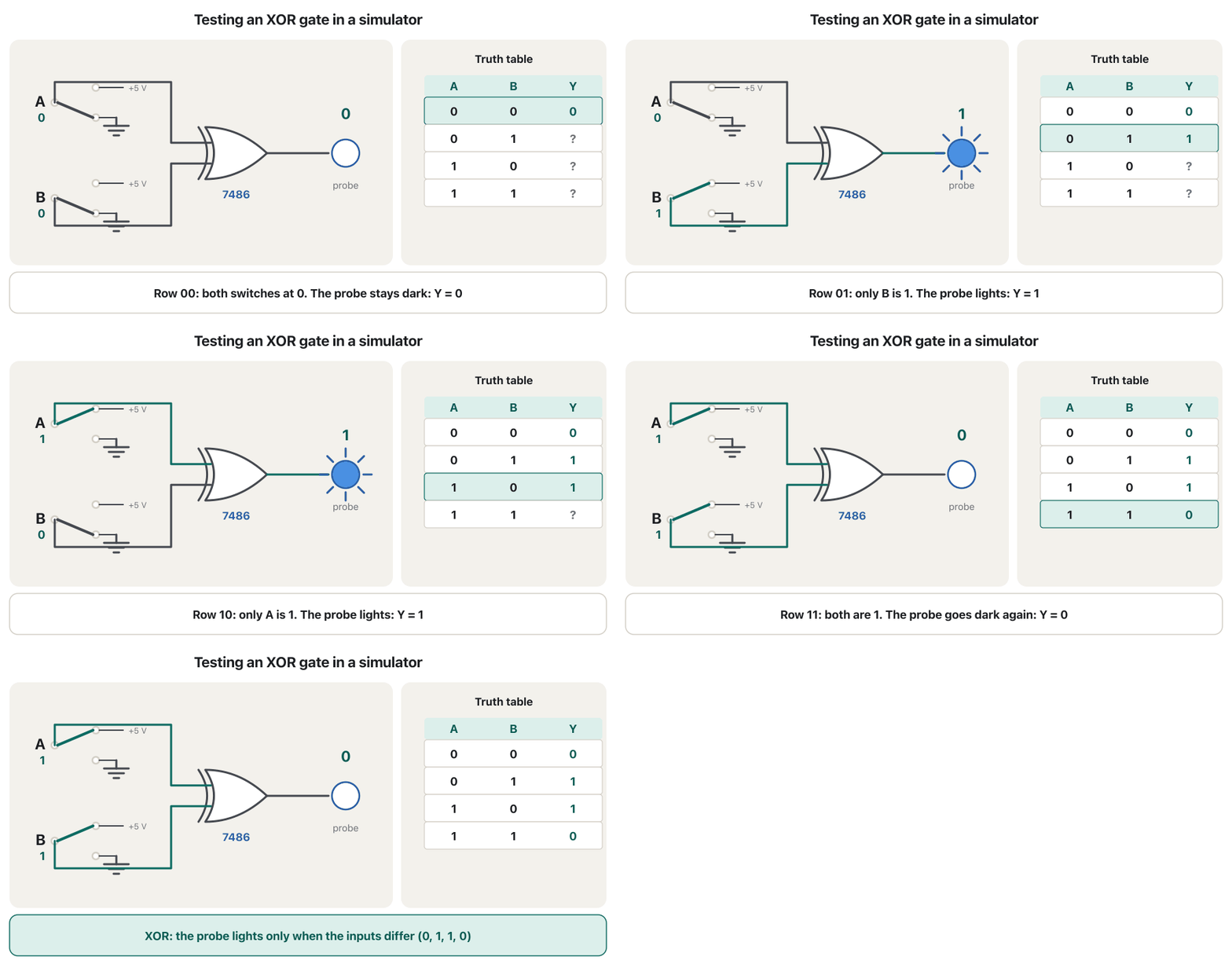
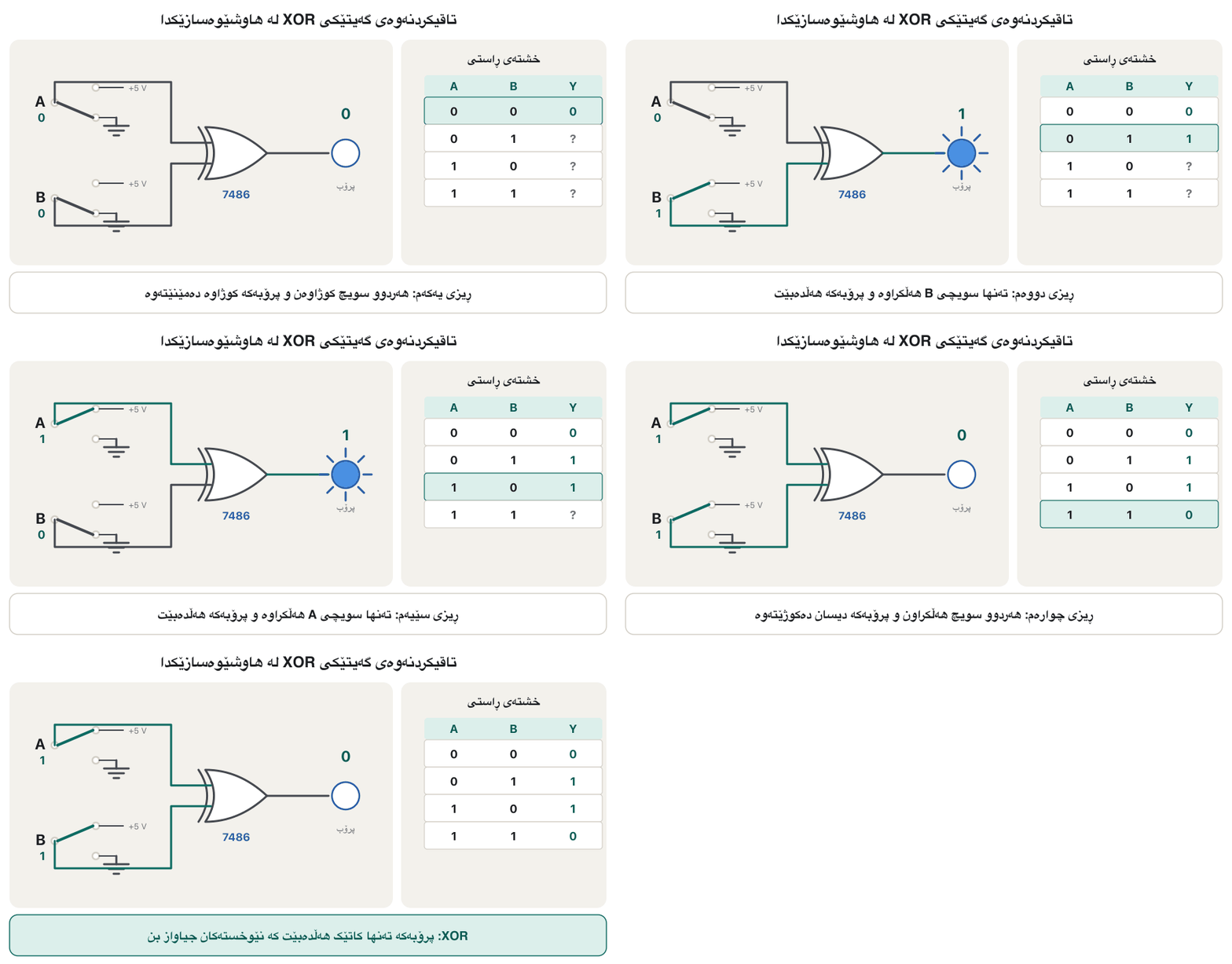
Repeat the OR lab with an AND gate (7408) and an XOR gate (7486), then — as homework — with NOR (7402), NAND (7400) and NOT (7404). Write each truth table from what the probe shows, then compare it with the gate's rule. The animation shows the XOR test row by row.
تاقیگەی OR بە (7408) و (7486) دووبارە بکەرەوە، پاشان — وەک ئەرکی ماڵەوە — بە NOR (7402)، NAND (7400) و NOT (7404). هەر یەکەیان لەوەی پیشانی دەدات بنووسە، پاشان بە یاسای بەراوردی بکە. ئەنیمەیشنەکە تاقیکردنەوەی XOR ڕیز بە ڕیز پیشان دەدات.
| A B | AND | OR | XOR | NAND | NOR |
|---|---|---|---|---|---|
| 0 0 | 0 | 0 | 0 | 1 | 1 |
| 0 1 | 0 | 1 | 1 | 1 | 0 |
| 1 0 | 0 | 1 | 1 | 1 | 0 |
| 1 1 | 1 | 1 | 0 | 0 | 0 |
Let the computer check your workبا کۆمپیوتەر کارەکەت بپشکنێت
Multisim has an instrument with no real-world twin, the Logic Converter. Wired to a circuit, it gives the circuit's truth table. From a truth table it gives the Boolean expression, unsimplified or simplified. From an expression it gives the truth table, a circuit of AND, OR and NOT gates, or a circuit made only of NAND gates. CircuitVerse's Tools → Combinational Analysis does the same job: type a Boolean function or fill in a truth table, and it builds the circuit.
Multisim ئامێرێکی هەیە کە هاوتای ڕاستەقینەی نییە، Logic Converter. کاتێک بە ببەسترێت، دەدات. لە دەدات، سادەنەکراو یان سادەکراو. لە دەربڕینێکەوە ، AND، OR و NOT یان کە تەنها لە پێک هاتووە دەدات. Tools ← Combinational Analysisـی CircuitVerse هەمان کار دەکات: بنووسە یان پڕ بکەرەوە و دروست دەکات.
Let the computer check your workبا کۆمپیوتەر کارەکەت بپشکنێت
Worked example: نموونەی شیکراوە:
A booklet experiment asks you to type into the converter, turn it into a circuit, and read its truth table. Do it by hand first, row by row:
تاقیکردنەوەیەکی دەستنووسەکە داوات لێ دەکات لە ئامێری Logic Converter بنووسیت، بیکەیت بە و بخوێنیتەوە. سەرەتا بە دەست بیکە، ڕیز بە ڕیز:
| A B C | |||
|---|---|---|---|
| 0 0 0 | 0 | 0 | 0 |
| 0 0 1 | 0 | 0 | 0 |
| 0 1 0 | 0 | 0 | 0 |
| 0 1 1 | 0 | 1 | 1 |
| 1 0 0 | 0 | 0 | 0 |
| 1 0 1 | 0 | 1 | 1 |
| 1 1 0 | 1 | 0 | 1 |
| 1 1 1 | 1 | 1 | 1 |
The converter's simplified answer is : expand . This is the majority function — the carry output of a full adder. If your own K-map gives the same three groups, the tool has confirmed your work.
وەڵامی سادەکراوی ئامرازەکە ئەمەیە: . بکەرەوە. ئەمە زۆرینەیە — هەڵگیراوی کۆکەرەوەی تەواو. ئەگەر خۆت هەمان سێ کۆمەڵە بدات، ئامرازەکە کارەکەتی پشتڕاست کردووەتەوە.
Let the computer check your workبا کۆمپیوتەر کارەکەت بپشکنێت
From a circuit to a NAND-only circuitلە سووڕێکەوە بۆ سووڕێک کە تەنها NANDـە
The converter also works backwards. Wire it to a circuit someone gives you, and in three clicks you get (1) its truth table, (2) its Boolean expression, and (3) the same function built from NAND gates only. That last step shows in practice why NAND is a universal gate: one chip type, such as the 7400, can build any circuit.
Logic Converter بە پێچەوانەشەوە کار دەکات. بە ببەستە کە پێت دەدرێت و بە سێ کرتە (1) ، (2) و (3) هەمان کە تەنها لە دروست کراوە وەردەگریت. ئەم هەنگاوەی دوایی بە کردەوە پیشان دەدات بۆچی NAND گەیتی گشتگیرێکە: یەک جۆر ، وەک 7400، دەتوانێت هەموو دروست بکات.
From simulator to breadboardلە هاوشێوەسازەوە بۆ بریدبۆرد
When the simulation works, build the real circuit. A typical adder lab needs: 74-series chips — 7408 (AND), 7432 (OR), 7404 (NOT) and 7486 (XOR); a DIP switch with 1 kΩ resistors for the inputs; a 5 V DC supply; red and green LEDs for the outputs; wires; and a breadboard.
کاتێک هاوشێوەکردنەکە کار دەکات، ڕاستەقینەکە دروست بکە. تاقیگەیەکی زۆرجار پێویستی بەمانەیە: زنجیرەی 74 — 7408 (AND)، 7432 (OR)، 7404 (NOT) و 7486 (XOR)؛ DIP لەگەڵ 1 kΩ بۆ ؛ DCـی 5 V؛ LEDـی سوور و سەوز بۆ ؛ وایەر؛ و بریدبۆرد.
- Find pin 1 by the notch or dot; seen from above, pins 1–7 run along one side and 8–14 come back along the other.
- Pin 14 to +5 V and pin 7 to ground on every chip — the simulator did this for you, the breadboard does not.
- Feed the inputs from the DIP switch, with a 1 kΩ resistor from each input to ground so an open switch reads 0 (an input left floating can read anything). 1 kΩ suits the 74HC and 74LS chips used today; old standard-TTL 74xx inputs push out more current and need a smaller pull-down, such as 330 Ω.
- Show each output on an LED with a series resistor: ON = 1, OFF = 0.
- پینی 1 بە کونە نیوە بازنەییەکە یان خاڵەکە بدۆزەوە؛ لە سەرەوە، پینەکانی 1 تا 7 بە لایەکدا دەڕۆن و 8 تا 14 بە لاکەی تردا دەگەڕێنەوە.
- پینی 14 بۆ +5 V و پینی 7 بۆ لەسەر هەموو — ئەمەی بۆ کردیت، نایکات.
- لە DIPـەوە بدە، لەگەڵ 1 kΩ لە هەر بۆ ، تا کراوە 0 بخوێنێتەوە ( کە بێ بەستن جێبهێڵرێت دەتوانێت هەر شتێک بخوێنێتەوە). 1 kΩ بۆ 74HC و 74LSـی ئەمڕۆ گونجاوە؛ TTLـی ستانداردی کۆنی 74xx زیاتر دەردەدەن و دابەزێنەری بچووکتریان پێویستە، وەک 330 Ω.
- هەر لەسەر LEDـێک پیشان بدە بە بە : هەڵکراو = 1، کوژاوە = 0.
Putting a 7408 AND chip and a 7432 OR chip on a breadboard, powering them and testing each gate's truth table with an LED.
دانانی 7408ـی AND و 7432ـی OR لەسەر ، پێدانی وزەیان و تاقیکردنەوەی هەر بە .
Plays 0:00–9:44: a 7408 placed across the centre gap and powered, then its AND gates and a 7432's OR gates tested with an LED.
لە 0:00 تا 9:44 پەخش دەبێت: 7408 بەسەر بۆشاییە ناوەڕاستەکەدا دادەنرێت و وزەی پێ دەدرێت، پاشان و 7432 بە تاقی دەکرێنەوە.
From simulator to breadboardلە هاوشێوەسازەوە بۆ بریدبۆرد
Build it: the half adder on a breadboardدروستی بکە: نیوەکۆکەرەوە لەسەر بریدبۆرد
The half adder needs one XOR gate for the sum and one AND gate for the carry: and . Use gate 1 of a 7486 and gate 1 of a 7408.
نیوەکۆکەرەوە پێویستی بە هەیە بۆ کۆ و بۆ هەڵگیراو: و . 1ـی 7486 و 1ـی 7408 بەکار بهێنە.
Switch the supply off. Push both chips across the centre gap and wire pin 14 of each to +5 V and pin 7 to ground.
بکوژێنەرەوە. هەردوو بەسەر بۆشاییە ناوەڕاستەکەدا دابنێ و پینی 14ـی هەر یەکەیان بۆ +5 V و پینی 7 بۆ ببەستە.
Wire the DIP switch and the two pull-down resistors, then input A to pin 1 and input B to pin 2 of both chips.
DIP و دوو دابەزێنەرەکە ببەستە، پاشان A بۆ پینی 1 و B بۆ پینی 2ـی هەردوو .
Connect pin 3 of the 7486 (S) and pin 3 of the 7408 (C) to an LED each, through a 1 kΩ resistor, to ground.
پینی 3ـی 7486 (S) و پینی 3ـی 7408 (C) هەر یەکە بە LEDـێکەوە ببەستە، بە 1 kΩـدا، بۆ .
Switch on. Set the inputs to 00, 01, 10 and 11 and note each LED (ON = 1, OFF = 0).
هەڵیبکە. لەسەر 00، 01، 10 و 11 دابنێ و هەر LEDـێک بنووسەوە (هەڵکراو = 1، کوژاوە = 0).
Compare your table with the half adder's truth table, then switch the supply off.
خشتەکەت لەگەڵ بەراورد بکە، پاشان بکوژێنەرەوە.
| A B | S | C |
|---|---|---|
| 0 0 | 0 | 0 |
| 0 1 | 1 | 0 |
| 1 0 | 1 | 0 |
| 1 1 | 0 | 1 |
Step by step: a half adder from a 7486 XOR chip and a 7408 chip on a breadboard, with LEDs for sum and carry.
هەنگاو بە هەنگاو: لە 7486ـی XOR و 7408 لەسەر ، بە بۆ کۆ و .
The half adder built on a breadboard with the 7486 and 7408 chips.
لەسەر بە 7486 و 7408 دروست دەکرێت.
Writing up an experimentنووسینی ڕاپۆرتی تاقیکردنەوە
A lab report is how you prove the circuit worked. The course's lab sheet has a header (subject, experiment number and name, date, student) and four parts:
ڕاپۆرتی تاقیگە ئەو ڕێگایەیە کە پێی دەیسەلمێنیت کاری کردووە. پەڕەی تاقیگەی کۆرسەکە سەرپەڕەیەکی هەیە (بابەت، ژمارە و ناوی تاقیکردنەوە، بەروار، خوێندکار) و چوار بەش:
- Draw the digital design — the circuit with gate symbols, chip numbers and pin numbers.
- Fill up the truth table — what you measured, on the 16-row template (use the first 4 or 8 rows for 2 or 3 inputs).
- Write the digital circuit expression — the Boolean expression of each output.
- Discussion — did the measured table match the expected one? If not, what was wrong (a missing ground, a power pin, a wrong pin, a floating input) and how did you fix it?
- دیزاینە بکێشە — بە ، ژمارەی و ژمارەی پینەکان.
- پڕ بکەرەوە — ئەوەی پێوات، لەسەر قاڵبە شانزە ڕیزییەکە (بۆ دوو یان سێ یەکەم 4 یان 8 ڕیز بەکار بهێنە).
- بنووسە — هەر .
- گفتوگۆ — ئایا خشتە پێوراوەکە لەگەڵ خشتە چاوەڕوانکراوەکە یەکی گرتەوە؟ ئەگەر نا، چی هەڵە بوو ( نەبوو، پینێکی وزە، پینێکی هەڵە، بێ بەستن) و چۆن چاکت کردەوە؟
Common mistakesهەڵە باوەکان
| Mistakeهەڵە | Fixچارەسەر |
|---|---|
| No ground in the simulator. لە نییە. | Add a ground symbol; the simulation will not run without it. زیاد بکە؛ هاوشێوەکردن بەبێ ئەو کار ناکات. |
| Power pins forgotten on the breadboard.پینەکانی وزە لەسەر لەبیر کراون. | Pin 14 to +5 V and pin 7 to ground on every 74-series chip.پینی 14 بۆ +5 V و پینی 7 بۆ لەسەر هەموو زنجیرەی 74. |
| Inputs left floating (a switch that connects to nothing when open). بێ بەستن جێهێڵراون ( کە لە کاتی کراوەییدا بە هیچەوە نابەسترێت). | Use SPDT switches, or a pull-down resistor on each input. SPDT بەکار بهێنە، یان دابەزێنەر لەسەر هەر . |
| Counting pins from the wrong end.ژماردنی پینەکان لە سەرە هەڵەکەوە. | Find the notch or dot: that end has pin 1; count anticlockwise from above.کونە نیوە بازنەییەکە یان خاڵەکە بدۆزەوە: ئەو سەرە پینی 1ـی تێدایە؛ لە سەرەوە بە پێچەوانەی میلی کاتژمێر بژمێرە. |
| Copying a 9 V or 12 V simulator battery to a real chip's input.گواستنەوەی پاترییەکی 9 V یان 12 Vـی بۆ ڕاستەقینە. | Real 74-series inputs must stay between 0 V and the 5 V supply. ڕاستەقینەی زنجیرەی 74 دەبێت لە نێوان 0 V و 5 Vـی سەرچاوەکەدا بمێننەوە. |
| Trusting a printed table instead of the probe.متمانەکردن بە خشتەیەکی چاپکراو لە جیاتی . | Record what you measure, then check it against the gate's rule.ئەوەی دەیپێویت تۆمار بکە، پاشان بە یاسای بیپشکنە. |
| Letting the converter do the K-map for you.هێشتنەوەی Logic Converter بۆ ئەوەی بۆت بکات. | Solve it by hand first; use the tool only to check.سەرەتا بە دەست چارەسەری بکە؛ ئامرازەکە تەنها بۆ پشکنین بەکار بهێنە. |
Exercisesڕاهێنانەکان
Build NOR (7402), NAND (7400) and NOT (7404) circuits in a simulator, each with switches and a probe, and record their truth tables. Before you run them, predict each column.
NOR (7402)، NAND (7400) و NOT (7404) لە دروست بکە، هەر یەکەیان بە و . پاشان تۆمار بکە. پێش کارپێکردن، هەر ستوونێک پێشبینی بکە.
Show answerوەڵامەکە پیشان بدە
| A B | NOR | NAND |
|---|---|---|
| 0 0 | 1 | 1 |
| 0 1 | 0 | 1 |
| 1 0 | 0 | 1 |
| 1 1 | 0 | 0 |
NOT: gives 1 and gives 0. Note that the 7402's pin layout differs from the 7408's: its outputs come first (1Y, 1A, 1B …) — check the data sheet.
NOT: دەکاتە 1 و دەکاتە 0. سەرنج بدە کە ڕیزبەندیی پینەکانی 7402 جیاوازە لە هی 7408: یەکەم دێن (1Y، 1A، 1B …) — پەڕەی زانیارییەکەی بپشکنە.
In the course author's probe circuits, the AND circuit has both DIP switches on, the OR circuit has only one switch on, the NOT circuit's key is open (the simulator reads the open input as 0), and the NAND circuit has both switches on. Which probes are lit?
لە خاوەنی کۆرسەکەدا، AND هەردوو DIPـی هەڵکراوە، OR تەنها یەک هەڵکراوە، NOT کراوەیە ( کراوەکە وەک 0 دەخوێنێتەوە) و NAND هەردوو هەڵکراوە. کام هەڵکراون؟
Show answerوەڵامەکە پیشان بدە
- AND with 11: lit.
- OR with one input 1: lit.
- NOT with 0: lit.
- NAND with 11: dark.
- AND بە 11: هەڵکراو.
- OR کاتێک تەنها یەک 1ـە: هەڵکراو.
- NOT بە 0: هەڵکراو.
- NAND بە 11: کوژاوە.
You type into the logic converter and ask for the truth table. What column does it show, and which single gate does the same job?
لە ئامێری Logic Converter دەنووسیت و داوای دەکەیت. چ ستوونێک پیشان دەدات و کام تاکە هەمان کار دەکات؟
Show answerوەڵامەکە پیشان بدە
00 → 0, 01 → 1, 10 → 1, 11 → 0: this is XOR, one gate of a 7486.
00 ← 0، 01 ← 1، 10 ← 1، 11 ← 0: ئەمە XORـە، 7486.
A 7432 holds four 2-input OR gates (same pins as the 7408). Show how to wire with it, giving the pin numbers.
7432 چوار دوو لەخۆ دەگرێت (هەمان پینەکانی 7408). پیشان بدە چۆن بەم دەبەستیت، بە ژمارەی پینەکانەوە.
Show answerوەڵامەکە پیشان بدە
- A to pin 1 and B to pin 2; gate 1's output () is pin 3.
- Wire pin 3 to pin 4 and C to pin 5; gate 2's output on pin 6 is .
- Pin 14 to +5 V, pin 7 to ground; tie the unused inputs (pins 9, 10, 12, 13) to ground.
- A بۆ پینی 1 و B بۆ پینی 2؛ 1 () پینی 3ـە.
- پینی 3 بە پینی 4ـەوە ببەستە و C بە پینی 5ـەوە؛ 2 لەسەر پینی 6 دەکاتە .
- پینی 14 بۆ +5 V، پینی 7 بۆ ؛ بەکارنەهاتووەکان (پینەکانی 9، 10، 12، 13) بە ببەستە.
In a half-adder experiment the C LED lit for 11 as expected, but the S LED was lit for every input, even 00. Write two sentences for the discussion: what is probably wrong, and how would you check it?
لە تاقیکردنەوەیەکی LEDـی C بۆ 11 هەڵبوو وەک چاوەڕوان دەکرا، بەڵام LEDـی S بۆ هەموو هەڵکراو بوو، تەنانەت 00. دوو ڕستە بۆ گفتوگۆ بنووسە: چی ڕەنگە هەڵە بێت و چۆن دەیپشکنیت؟
Show answerوەڵامەکە پیشان بدە
Possible answer: “S stayed lit even for 00, so the XOR output was HIGH all the time. The 7486's inputs may be floating or its pin 7 not grounded; I measured pins 1, 2 and 7 with the multimeter, found pin 7 open, and grounding it fixed the sum.”
وەڵامێکی گونجاو: «S تەنانەت بۆ 00ـیش هەڵکراو بوو، بۆیە XOR هەمیشە HIGH بوو. لەوانەیە 7486 بێ بەستن بووبن یان پینی 7ـی بە نەبەسترابێت؛ پینەکانی 1، 2 و 7م بە پێوا، بۆم دەرکەوت پینی 7 نەبەستراوە و بەستنی بە کۆکەی چاک کرد.»
Summaryپوختە
- Simulate first: no damaged parts, instruments for free. Multisim is the lab's (paid) tool; CircuitVerse is free in the browser.
- Seven steps: new schematic, place, rotate, wire, set values, ground, run — and no ground means no simulation.
- Inputs from SPDT or DIP switches, outputs on a logic probe (lit = 1); test every gate row by row.
- The Logic Converter / Combinational Analysis turns tables, expressions and circuits into each other — use it to check, not to replace your work.
- On the breadboard: pin 14 = +5 V, pin 7 = GND, pull-downs on the inputs, LEDs with resistors on the outputs.
- Write it up: design, truth table, expression, discussion.
- سەرەتا هاوشێوەی بکە: هیچ پارچەیەک تێک ناچێت، ئامێرەکان بێ پارەن. Multisim ئامرازی (پارەداری) تاقیگەکەیە؛ CircuitVerse لە خۆڕاییە.
- حەوت هەنگاو: سکیماتیکی نوێ، دانان، سووڕاندن، وایەرکێشان، نووسینی نرخەکان، ، کارپێکردن — بێ هاوشێوەکردن نییە.
- لە SPDT یان DIPـەوە، لەسەر (هەڵکراو = 1)؛ هەموو ڕیز بە ڕیز تاقی بکەرەوە.
- Logic Converter / Combinational Analysis خشتە، و بۆ یەکتر دەگۆڕێت — بۆ پشکنین بەکاری بهێنە، نەک لە جیاتی کارەکەت.
- لەسەر : پینی 14 = +5 V، پینی 7 = GND، دابەزێنەر لەسەر ، LED بە لەسەر .
- ڕاپۆرتەکە بنووسە: دیزاین، ، ، گفتوگۆ.
Why do the chips in the simulator screenshots show no power pins?بۆچی چیپەکانی ناو وێنەی شاشەکانی هاوشێوەساز هیچ پینێکی وزەیان پێوە دیار نییە؟
Multisim connects the supply of its TTL parts by itself. On a breadboard you must wire pins 14 and 7 yourself.
Multisim خۆی وزەی پارچە TTLـەکانی دەبەستێت. لەسەر دەبێت خۆت پینەکانی 14 و 7 ببەستیت.
What is the function ?نەخشەی بوولیی چییە؟
The majority function: , 1 when at least two inputs are 1 — the carry of a full adder.
: ، کاتێک 1ـە کە لانیکەم دوو 1 بن — هەڵگیراوی .
Lesson complete!وانەکە تەواو بوو!
Well done. Review the key terms, then go on to the next lesson.دەستخۆش. سەیرێکی زاراوە سەرەکییەکان بکەرەوە، پاشان بڕۆ بۆ وانەی داهاتوو.
Key termsزاراوە سەرەکییەکان
Multiplexers, Decoders and Encodersمەڵتیپلێکسەرەکان، کۆدهەڵوەشێنەرەکان و کۆدکەرەکان
Related lecturesوانە پەیوەندیدارەکان
- Logic Gates, Truth Tables and the NOT Gateگەیتە لۆجیکییەکان، خشتەکانی ڕاستی و گەیتی NOT
- Karnaugh Mapsنەخشەکانی کارنۆ
- From Expression to Circuit and Backلە دەربڕینی بوولییەوە بۆ سووڕ و بە پێچەوانەوە
- Electricity Basics: Voltage, Current and Resistanceبنەماکانی کارەبا: ڤۆڵتیە، تەزوو و بەرگری
- Registers and Countersتۆمارگەکان و ژمێرەرە دیجیتاڵەکان
References and further readingسەرچاوەکان و خوێندنەوەی زیاتر
- NI: Download Multisim (version 14.3, 7-day trial, Windows)
- CircuitVerse: online digital logic simulator
- CircuitVerse documentation: menu bar (Combinational Analysis)
- CircuitVerse documentation: input and output elements
- onsemi: MC74HC08A quad 2-input AND gate data sheet (pin-out)
- PhET Interactive Simulations: Circuit Construction Kit: DC
This lecture is a first edition. The Kurdish text and terminology are waiting for review by Kurdish IT teachers.ئەم وانەیە چاپی یەکەمە. دەقە کوردییەکە و زاراوەکانی چاوەڕێی پێداچوونەوەی مامۆستایانی کوردی بواری IT ن.