Chapterبەش 2 · Lectureوانە 2.10
Building and Caring for a PCپێکەوەنان و چاودێریکردنی کۆمپیوتەر
How to put a desktop PC together safely and in the right order: tools, power and static (ESD) safety, checking that the parts fit, standoffs and the motherboard, the CPU and its triangle, thermal paste and the cooler, installing and removing RAM, drives and the graphics card, the power cables, the first boot and the UEFI check, and keeping a computer clean.
چۆن بە سەلامەتی و بە ڕیزی دروست پێکەوە بنێیت: ئامرازەکان، سەلامەتیی کارەبا و ستاتیک (ESD)، پشکنینی گونجانی پارچەکان، و ، و سێگۆشەکەی، و ساردکەرەوەکە، دانان و دەرهێنانی ، درایڤەکان و ، کێبڵەکانی وزە، یەکەم و پشکنینی و پاک ڕاگرتنی .
What you will learnچی فێر دەبیت
- Work safely inside a computer: power, the power supply and static electricity (ESD).
- Check that a set of parts is compatible (socket, RAM type, board size, power).
- Put the assembly steps in the right order and explain why each step comes where it does.
- Install a CPU, thermal paste, a cooler and RAM correctly, and remove a memory module.
- Connect the power and front-panel cables, check the first boot in the UEFI, and keep a PC clean.
- بە سەلامەتی لەناو کار بکەیت: کارەبا، و کارەبای ستاتیک (ESD).
- بپشکنیت کە کۆمەڵێک پارچە پێکەوە دەگونجێن (سۆکێت، جۆری ، قەبارەی بۆرد، وزە).
- هەنگاوەکانی پێکەوەنان بە ڕیزی دروست دابنێیت و ڕوونی بکەیتەوە بۆچی هەر هەنگاوێک لە شوێنی خۆیدایە.
- ، ، ساردکەرەوە و بە دروستی دابنێیت و مۆدیوڵێکی دەربهێنیت.
- کێبڵەکانی وزە و پانێڵی پێشەوە ببەستیت، یەکەم لە بپشکنیت و پاک ڕابگریت.
Why learn to build a PC?بۆچی فێری پێکەوەنانی کۆمپیوتەر ببیت؟
A desktop computer is not one machine but a set of parts that work together: a case, a motherboard, a CPU with its cooler, RAM, storage, a power supply and often a graphics card. Building (or assembling) a PC means putting these parts together in the right order, connecting them, and checking that the computer starts. IT technicians do the same steps, in smaller pieces, every time they upgrade or repair a computer: adding RAM, changing a drive or cleaning a dusty fan.
یەک ئامێر نییە، بەڵکو کۆمەڵێک پارچەیە کە پێکەوە کار دەکەن: ، ، لەگەڵ ساردکەرەوەکەی، ، ، و زۆرجار . پێکەوەنانی واتە ئەم پارچانە بە ڕیزی دروست بخەیتە سەر یەک، پێکەوەیان ببەستیت و بپشکنیت کە دەست بە کار دەکات. تەکنیسیەنەکانی IT هەمان هەنگاوەکان، بە پارچەی بچووکتر، هەموو جارێک دەکەن کە نوێ دەکەنەوە یان چاکی دەکەنەوە: زیادکردنی ، گۆڕینی درایڤێک یان پاککردنەوەی پانکەیەکی پڕ لە تۆز.
This lesson follows the course's assembly steps, updated for a 2026 PC, and ends with how to keep a computer clean and healthy. The parts themselves are explained in earlier lessons: the motherboard and power supply, the CPU, cooling and memory.
ئەم وانەیە هەنگاوەکانی پێکەوەنانی کۆرسەکە دەگرێتە بەر، نوێکراوە بۆ 2026 و بە چۆنیەتیی پاک و ساغ ڕاگرتنی کۆتایی دێت. خودی پارچەکان لە وانەکانی پێشوودا ڕوون کراونەتەوە: بۆردی سەرەکی و سەرچاوەی وزە، CPU، ساردکردنەوە و بیرگە.
Why learn to build a PC?بۆچی فێری پێکەوەنانی کۆمپیوتەر ببیت؟
Like building a houseوەک دروستکردنی خانوو
Building a PC is like building a house. First the walls and the foundation (the case and the standoffs), then the floor that carries all the wiring (the motherboard), then the rooms are fitted out (CPU, RAM, drives), and only at the end is the electricity switched on (the power supply). Nobody connects the electricity before the wiring is checked.
پێکەوەنانی وەک دروستکردنی خانوو وایە. سەرەتا دیوار و بناغە ( و )، پاشان ئەو زەوییەی هەموو وایەرەکان هەڵدەگرێت ()، پاشان ژوورەکان پڕ دەکرێنەوە (، ، درایڤەکان) و تەنها لە کۆتاییدا کارەبا دەکرێتەوە (). کەس کارەبا ناکاتەوە پێش ئەوەی وایەرەکان بپشکنرێن.
Where the analogy stops workingسنووری ئەم نموونەیە
A house forgives a few centimetres; a PC does not. Each part must match its socket or slot exactly, and the wrong part simply does not fit.
خانوو چەند سانتیمەترێک هەڵە قبوڵ دەکات؛ قبوڵی ناکات. هەر پارچەیەک دەبێت ڕێک لەگەڵ سۆکێت یان شوێنەکەی بگونجێت و پارچەی هەڵە هەر ناچێتە ناوەوە.
Tools and a good place to workئامراز و شوێنێکی باش بۆ کار
Step one in the course is to prepare the system unit: lay out every part you will assemble and check that nothing is missing. You need very few tools:
یەکەم هەنگاو لە کۆرسەکەدا ئامادەکردنی : هەموو ئەو پارچانەی پێکیان دەخەیت دابنێ و بپشکنە کە هیچیان کەم نییە. ئامرازی زۆرت پێویست نییە:
- A Phillips screwdriver (size #2) for the case and the motherboard, and a small one (#0) for the tiny M.2 screw.
- The motherboard manual (paper or PDF): it shows which slots to use and where each cable goes.
- An anti-static wrist strap, a small bowl for screws, a torch and a few cable ties.
- A USB flash drive (8 GB or more) with the operating system installer, for after the first boot.
- دەرنەفیسێکی چوارسەر (قەبارە #2) بۆ و و یەکێکی بچووک (#0) بۆ پێچە بچکۆلەکەی .
- ڕێبەرنامەی (کاغەز یان PDF): پیشانت دەدات کام شوێن بەکار بهێنیت و هەر کێبڵێک بۆ کوێ دەچێت.
- ، قاپێکی بچووک بۆ پێچەکان، چرایەکی دەستی و چەند بەندێکی پلاستیکی بۆ بەستنی کێبڵەکان.
- (8 GB یان زیاتر) کە دامەزرێنەری تێدایە، بۆ دوای یەکەم .
Work at a large table, in good light, on a hard floor — not on a carpet or a bed. Keep drinks away and keep every part in its box or anti-static bag until you need it.
لەسەر مێزێکی گەورە کار بکە، لە ڕووناکییەکی باشدا و لەسەر زەوییەکی ڕەق — نەک لەسەر فەرش یان قەرەوێڵە. خواردنەوە دوور بخەرەوە و هەر پارچەیەک لەناو قوتوو یان کیسە دژە-ستاتیکەکەیدا بهێڵەرەوە تا پێویستت پێی دەبێت.
Safety first: power off and unplugسەرەتا سەلامەتی: کوژاندنەوە و دەرهێنانی وایەر
Before you open a computer or touch any part inside it: shut it down, switch the power supply off and pull out the power cord. Then press the power button for a few seconds to drain the power that is still stored on the board. The course gives these same first steps before installing a processor and before installing memory.
پێش ئەوەی بکەیتەوە یان دەست لە هەر پارچەیەکی ناوی بدەیت: بیکوژێنەرەوە، بکوژێنەرەوە و وایەری کارەباکەی دەربهێنە. پاشان دوگمەی هەڵکردن بۆ چەند چرکەیەک دابگرە تا ئەو کارەبایەی هێشتا لەسەر بۆردەکە ماوە بڕوات. کۆرسەکە هەمان ئەم یەکەم هەنگاوانە پێش دانانی پرۆسێسەر و پێش دانانی دەدات.
Safety first: power off and unplugسەرەتا سەلامەتی: کوژاندنەوە و دەرهێنانی وایەر
Static electricity (ESD)کارەبای ستاتیک (ESD)
Walk across a carpet in winter and touch a door handle: you may feel a tiny shock. That jump of stored electricity is electrostatic discharge (ESD). The same thing can happen between your hand and a memory module or a CPU — and chips can be damaged by discharges far too small for you to feel. Worse, ESD damage may not show at once: the part may work for a while and then fail now and then, which is very hard to find. The course warns that memory modules are especially sensitive.
لە زستاندا بەسەر فەرشێکدا بڕۆ و دەست لە دەسکی دەرگایەک بدە: لەوانەیە شۆکێکی زۆر بچووک هەست پێ بکەیت. ئەو بازدانەی کارەبای کۆکراوە (ESD). هەمان شت دەتوانێت لە نێوان دەستت و مۆدیوڵێکی یان ڕوو بدات — و دەتوانن بە بارگەیەک تێک بچن کە زۆر بچووکترە لەوەی هەستی پێ بکەیت. خراپتر ئەوەیە کە زیانی ESD لەوانەیە یەکسەر دەرنەکەوێت: پارچەکە ماوەیەک کار دەکات و پاشان جار نا جار تێک دەچێت، کە دۆزینەوەی زۆر قورسە. کۆرسەکە ئاگادار دەکاتەوە کە مۆدیوڵەکانی بە تایبەتی هەستیارن.
A sudden jump of static electricity, for example from your fingers to a chip. You may not feel it, but it can damage computer parts, so technicians ground themselves before touching them.
بازدانێکی کتوپڕی کارەبای ستاتیکە، بۆ نموونە لە پەنجەکانتەوە بۆ سەر چیپێک. لەوانەیە هەستی پێ نەکەیت، بەڵام دەتوانێت پارچەکانی کۆمپیوتەر تێک بدات، بۆیە تەکنیکارەکان پێش دەستلێدانیان خۆیان بە زەوی دەبەستنەوە.
Pull a woollen jumper over your head on a dry winter evening and you hear it crackle — that is static jumping. Your body collects the same charge when you walk on a carpet. The wrist strap is like holding the hand of the case all the time: you and the case stay at the same level, so nothing jumps between you.
لە ئێوارەیەکی وشکی زستاندا بلووزێکی خوری لە سەرت دابکەنە و گوێت لە چرتەچرتەکەی دەبێت — ئەوە کارەبای ستاتیکە کە باز دەدات. لەشت کاتێک بەسەر فەرشدا دەڕۆیت هەمان بارگە کۆ دەکاتەوە. وەک ئەوە وایە هەمیشە دەستی بگریت: تۆ و لە هەمان ئاستدا دەمێننەوە، بۆیە هیچ شتێک لە نێوانتاندا باز نادات.
Where the analogy stops workingسنووری ئەم نموونەیە
You can hear and feel big discharges, but the ones that harm chips are usually silent and invisible.
بارگە گەورەکان دەبیسترێن و هەستیان پێ دەکرێت، بەڵام ئەوانەی زیان بە دەگەیەنن زۆرجار بێدەنگ و نادیارن.
Protecting the parts from staticپاراستنی پارچەکان لە ستاتیک
- Wear an anti-static wrist strap and clip it to bare, unpainted metal of the case. The course calls this "wearing a grounding strap" before you prepare the motherboard.
- No strap? Touch the bare metal of the case often, before you pick up each part.
- Hold boards, memory and cards by their edges; never touch the gold contacts or the chips.
- Keep parts in their anti-static bags until you fit them; do not work in a wool jumper on a carpet.
- ببەستە و گیرەکەی بە کانزای ڕووت و بێ ڕەنگی بگرە. کۆرسەکە بەمە دەڵێت «بەستنی پشتێنی زەوی» پێش ئامادەکردنی .
- پشتێنت نییە؟ پێش هەڵگرتنی هەر پارچەیەک، زۆرجار دەست لە کانزای ڕووتی بدە.
- بۆرد، و کارتەکان لە لێوارەکانیانەوە بگرە؛ هەرگیز دەست لە پەڕە زێڕینەکان یان مەدە.
- پارچەکان تا دایاندەنێیت لەناو کیسە دژە-ستاتیکەکانیاندا بهێڵەرەوە؛ بە بلووزی خوری لەسەر فەرش کار مەکە.
Plan: do the parts fit together?پلان: ئایا پارچەکان پێکەوە دەگونجێن؟
"Identify the components" is the first assembly step. For a new build it means more than counting boxes: the parts must be compatible. Five checks catch almost every problem:
«ناسینەوەی پارچەکان» یەکەم هەنگاوی پێکەوەنانە. بۆ نوێ واتای زیاترە لە ژماردنی قوتووەکان: پارچەکان دەبێت پێکەوە بگونجێن. پێنج پشکنین نزیکەی هەموو کێشەیەک دەگرن:
| Checkپشکنین | Must matchدەبێت بگونجێت لەگەڵ | Example (2026)نموونە (2026) |
|---|---|---|
| CPU socket | the CPU | AMD Ryzen 9000 → AM5 board; Intel Core Ultra 200S → LGA 1851 boardAMD Ryzen 9000 ← بۆردی AM5؛ Intel Core Ultra 200S ← بۆردی LGA 1851 |
| RAM typeجۆری | the motherboard | An AM5 board takes DDR5 only; a DDR4 module does not fit a DDR5 slotبۆردی AM5 تەنها DDR5 وەردەگرێت؛ مۆدیوڵی DDR4 ناچێتە شوێنی DDR5ـەوە |
| Board size (form factor) بۆرد | the case | An ATX board needs an ATX case; Mini-ITX cases take only Mini-ITX boardsبۆردی ATX ATXـی دەوێت؛ Mini-ITX تەنها بۆردی Mini-ITX وەردەگرێت |
| Power supply watts and cablesوات و کێبڵەکانی | all the parts togetherهەموو پارچەکان پێکەوە | Add up the parts, add about 40 % headroom; check the graphics card's power plugوزەی پارچەکان کۆ بکەرەوە و نزیکەی 40 % زیاد بکە؛ وزەی بپشکنە |
| Cooler and card sizeقەبارەی ساردکەرەوە و کارت | the socket and the caseسۆکێت و | The cooler needs the right mounting kit and must not be taller than the case allowsساردکەرەوەکە دەبێت پارچەی بەستنی گونجاوی هەبێت و لەوە بەرزتر نەبێت کە ڕێگە دەدات |
The details are in earlier lessons: the CPU socket must match the CPU, board sizes, choosing the watts and DDR generations and the notch. Manufacturers also publish a list of tested memory for each board (ASUS calls it the QVL, the qualified vendor list).
وردەکارییەکان لە وانەکانی پێشوودان: سۆکێتی CPU دەبێت لەگەڵ CPU بگونجێت، قەبارەی بۆردەکان، هەڵبژاردنی وات و نەوەکانی DDR و کەلێنەکە. دروستکەران بۆ هەر بۆردێک لیستێکی تاقیکراوەش بڵاو دەکەنەوە (ASUS پێی دەڵێت QVL، لیستی دابینکەرە پەسەندکراوەکان).
The order of the stepsڕیزی هەنگاوەکان
The course splits assembly into three parts: preparing the system unit, preparing the motherboard, and finishing the system unit. In order:
کۆرسەکە پێکەوەنان دەکاتە سێ بەش: ئامادەکردنی ، ئامادەکردنی و تەواوکردنی . بە ڕیز:
- Prepare the case: identify the parts, remove the side panel, screw in the standoffs.
- Prepare the motherboard: wear the wrist strap, fit the board on the standoffs, insert the CPU, add thermal paste, attach and plug in the cooler, attach the memory.
- Finish the system unit: insert the drives (and in 2026 the M.2 SSD and the graphics card), insert the power supply, connect its cables, plug in, power on — does it boot? — and put the side panel back.
- ئامادە بکە: پارچەکان بناسەرەوە، دیوی لاتەنیشت لاببە و ببەستە.
- ئامادە بکە: ببەستە، بۆردەکە لەسەر دابنێ، بخەرە ناوەوە، زیاد بکە، ساردکەرەوەکە ببەستە و وایەرەکەی ببەستە و دابنێ.
- تەواو بکە: درایڤەکان دابنێ (و لە 2026دا SSDـی و )، دابنێ، کێبڵەکانی ببەستە، وایەری کارەبا ببەستە و هەڵی بکە — ئایا سەردەکەوێت؟ — و دیوی لاتەنیشت بگەڕێنەرەوە.
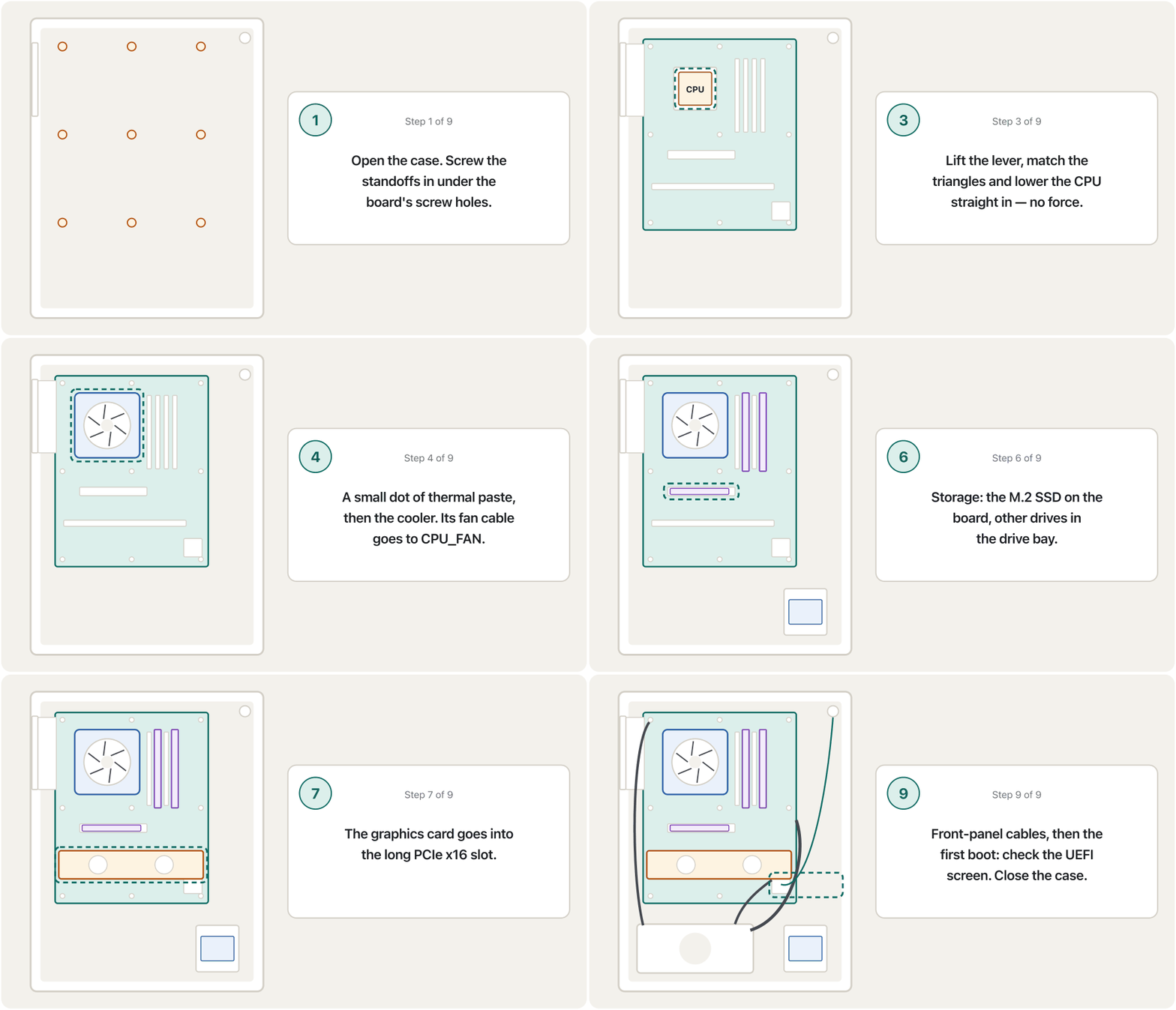
The case, the standoffs and the motherboardکەیس، پایەکانی بۆرد و بۆردی سەرەکی
Remove the side panel of the system unit (usually two screws at the back, or a glass panel with thumb screws). Inside, the flat metal wall where the motherboard sits has rows of small holes. Standoffs are short metal pillars that screw into these holes. The motherboard rests on top of the standoffs, and its screws go into them.
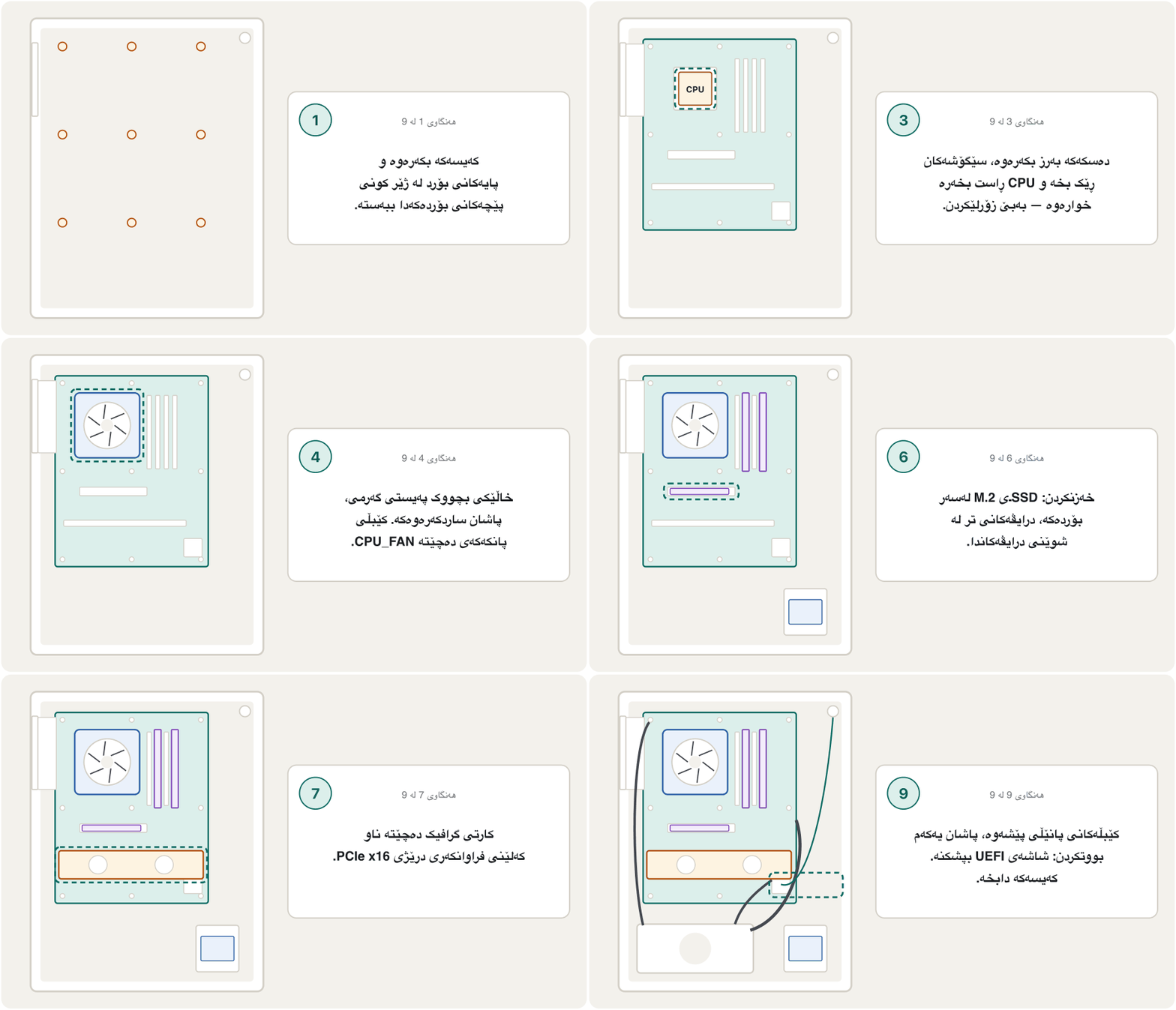
دیوی لاتەنیشتی لاببە (زۆرجار دوو پێچ لە پشتەوە، یان دیوێکی شووشەیی بە پێچی دەستی). لە ناوەوە، ئەو دیوارە کانزاییە تەختەی لەسەری دادەنرێت چەند ڕیزێک کونی بچووکی هەیە. کۆڵەکەی کانزایی کورتن کە لەم کونانەدا دەبەسترێن. لەسەر ڕادەوەستێت و پێچەکانی دەچنە ناویانەوە.
A small metal or plastic pillar, screwed into the , that holds the a few millimetres away from the metal side of the case. The board's screws go into the standoffs, so the board never touches the metal and cannot short-circuit.
پایەیەکی بچووکی کانزایی یان پلاستیکییە کە لە دەبەسترێت و چەند میلیمەترێک لە دیوە کانزاییەکەی کەیس دوور ڕادەگرێت. پێچەکانی بۆردەکە دەچنە ناو ئەم پایانەوە، بۆیە بۆردەکە هەرگیز بەر کانزاکە ناکەوێت و کارەبا ڕێگای هەڵە ناگرێت.
Why not screw the board straight onto the metal? The back of a motherboard is covered in tiny solder points. Touching the metal case would connect them all — a short circuit. The standoffs hold the board a few millimetres away. Put a standoff only where the board has a hole: an extra one under the board can touch the circuits and short them. A full-size ATX board usually takes nine screws; many cases come with the standoffs already fitted.
بۆچی بۆردەکە ڕاستەوخۆ بە کانزاکەوە نەبەستین؟ پشتی پڕە لە خاڵی لەحیمی بچکۆلە. بەرکەوتنی کانزایی هەموویان بە یەکەوە دەبەستێت — کارەبا ڕێگای هەڵە دەگرێت (short circuit). بۆردەکە چەند میلیمەترێک دوور ڕادەگرن. تەنها لەو شوێنەدا دابنێ کە بۆردەکە کونی هەیە: یەکێکی زیادە لە ژێر بۆردەکەدا دەتوانێت بەر بازنەکان بکەوێت و تێکیان بدات. بۆردێکی ATXـی تەواو زۆرجار نۆ پێچی دەوێت؛ زۆرێک لە پێشتر تێدا بەستراوە.
The case, the standoffs and the motherboardکەیس، پایەکانی بۆرد و بۆردی سەرەکی
The I/O shield and laying the boardپلێتی دەرچەکان و دانانی بۆردەکە
Before the board goes in, press the I/O shield (the metal plate with holes for the rear ports) into the back of the case, unless the board has it built in. Lower the board at an angle so its ports slide into the shield, then lay it on the standoffs without dragging it across them, and start with the centre screw.
پێش ئەوەی بۆردەکە بچێتە ناوەوە، پلێتی (ئەو پلێتە کانزاییەی کون کونە بۆ پشتەوە) بخەرە پشتی ، مەگەر بۆردەکە خۆی هەیبێت. بۆردەکە بە لاری دابگرە تا بخلیسکێنە ناو پلێتەکەوە، پاشان بەبێ ڕاکێشان بەسەر دایبنێ و بە پێچی ناوەڕاست دەست پێ بکە.
Installing the CPUدانانی CPU
The course's processor installation has four steps: (1) power off and remove the power cord; (2) use proper anti-static handling; (3) release the CPU retention plate (lift the lever and open the metal frame); (4) insert the CPU into the socket — it only goes in one way.
دانانی پرۆسێسەر لە کۆرسەکەدا چوار هەنگاوە: (١) بیکوژێنەرەوە و وایەری کارەبا دەربهێنە؛ (٢) ڕێکارە دژە-ستاتیکەکان جێبەجێ بکە؛ (٣) پلێتی ڕاگرتنی بکەرەوە (دەسکەکە بەرز بکەرەوە و چوارچێوە کانزاییەکە بکەرەوە)؛ (٤) بخەرە ناو سۆکێتەکەوە — تەنها بە یەک ئاڕاستە دەچێتە ناوەوە.
How do you find that one way? Look for a small triangle printed on one corner of the CPU and a matching triangle on the socket frame (on current Intel boards at the lower-left, on AMD AM5 at the top-left, as the board maker's guide shows). Two notches on the CPU's edges also fit two small keys in the socket. Hold the CPU by its edges, line up the triangles and lower it straight down — no pushing. Then close the frame and lock the lever; on many boards the plastic socket cover pops off by itself. Keep that cover: it protects the socket if the board ever goes back for repair.
ئەو یەک ئاڕاستەیە چۆن دەدۆزیتەوە؟ بەدوای سێگۆشەیەکی بچووکدا بگەڕێ کە لەسەر گۆشەیەکی چاپ کراوە و سێگۆشەیەکی هاوشێوە لەسەر چوارچێوەی سۆکێتەکە (لەسەر بۆردەکانی ئێستای Intel لە خوارەوەی چەپ، لەسەر AM5ـی AMD لە سەرەوەی چەپ، وەک ڕێبەرنامەی دروستکەری بۆردەکە پیشانی دەدات). دوو کەلێن لە لێوارەکانی لەسەر دوو کلیلی بچووکی ناو سۆکێتەکەش جێ دەگرن. لە لێوارەکانیەوە بگرە، سێگۆشەکان ڕێک بخە و ڕاست بەرەو خوارەوە دایبگرە — بەبێ پاڵنان. پاشان چوارچێوەکە دابخە و دەسکەکە قوفڵ بکە؛ لەسەر زۆرێک لە بۆردەکان سەرپۆشە پلاستیکییەکەی سۆکێت خۆی دەکەوێتە دەرەوە. ئەو سەرپۆشە بپارێزە: ئەگەر بۆردەکە بۆ چاککردنەوە بگەڕێنرێتەوە، سۆکێتەکە دەپارێزێت.
A first-person build: lifting the socket lever, placing the CPU by its triangle, and fitting the cooler with thermal paste.
پێکەوەنانێک بە چاوی دروستکەرەکە: بەرزکردنەوەی دەسکی ، دانانی بەپێی سێگۆشە بچووکەکەی و بەستنی ساردکەرەوە لەگەڵ .
Watch 4:38-6:23: installing the CPU.
لە 4:38 تا 6:23 سەیر بکە: دانانی .
Installing the CPUدانانی CPU
Where are the pins?پینەکان لە کوێن؟
Thermal paste and the coolerپەیستی گەرمی و ساردکەرەوەکە
The top of the CPU and the bottom of the cooler look smooth, but under a magnifying glass both are rough. The tiny gaps between them fill with air, and air carries heat badly. Thermal paste fills those gaps so the heat flows into the cooler's heat sink. The course says: place a pea-sized dab of paste on the centre of the CPU. Intel's own guide says "no larger than a grain of rice". The pressure of the cooler spreads it.
سەری و ژێری ساردکەرەوەکە لووس دەردەکەون، بەڵام لە ژێر زەڕەبیندا هەردووکیان زبرن. کەلێنە بچکۆلەکانی نێوانیان پڕ دەبن لە هەوا و هەوا گەرمی بە خراپی دەگوازێتەوە. ئەو کەلێنانە پڕ دەکاتەوە تا گەرمییەکە بڕوات بۆ ناو ساردکەرەوەکە. کۆرسەکە دەڵێت: خاڵێک بە قەبارەی نۆکێک لەسەر ناوەڕاستی دابنێ. ڕێبەرنامەکەی Intel خۆی دەڵێت «لە دەنکە برنجێک گەورەتر نەبێت». فشاری ساردکەرەوەکە بڵاوی دەکاتەوە.
A grey paste spread thinly between a chip and its . It fills tiny air gaps so heat moves easily from the chip to the cooler.
پەیستێکی خۆڵەمێشییە کە بە تەنکی لە نێوان چیپێک و دەدرێت. بۆشاییە بچووکەکانی هەوا پڕ دەکاتەوە تا گەرمی بە ئاسانی لە چیپەکەوە بڕوات بۆ ساردکەرەوەکە.
A first-person build: lifting the socket lever, placing the CPU by its triangle, and fitting the cooler with thermal paste.
پێکەوەنانێک بە چاوی دروستکەرەکە: بەرزکردنەوەی دەسکی ، دانانی بەپێی سێگۆشە بچووکەکەی و بەستنی ساردکەرەوە لەگەڵ .
Watch 8:57-11:54: the cooler brackets, thermal paste, then the cooler is put on and tightened.
لە 8:57 تا 11:54 سەیر بکە: چوارچێوەکانی ساردکەرەوە، ، پاشان ساردکەرەوەکە دادەنرێت و توند دەکرێت.
Thermal paste and the coolerپەیستی گەرمی و ساردکەرەوەکە
Fitting the coolerدانانی ساردکەرەوە
- Check for pasteبپشکنە ئایا پەیستی هەیە
Many coolers come with paste already on their base. If so, add none — and peel off the plastic film that protects the base.
زۆرێک لە ساردکەرەوەکان پێشتر لەسەر ژێرەکەیان هەیە. ئەگەر وا بوو، هیچ زیاد مەکە — و ئەو پەردە پلاستیکییە لاببە کە ژێرەکەی دەپارێزێت.
- Fit the coolerساردکەرەوەکە دابنێ
Put the cooler straight down on the CPU. Its bolts or screws go into the holes around the CPU socket (some coolers need their own bracket first). Tighten them a little at a time, corner to opposite corner, so the pressure is even.
ساردکەرەوەکە ڕاست لەسەر دابنێ. پێچەکانی دەچنە ناو ئەو کونانەی دەوری (هەندێک ساردکەرەوە سەرەتا پارچەی بەستنی خۆیان پێویستە). کەمێک کەمێک بیانبەستە، لە گۆشەیەکەوە بۆ گۆشەی بەرامبەری، تا فشارەکە یەکسان بێت.
- Plug in the fanپانکەکە ببەستە
Plug the cooler's fan cable into the motherboard header marked CPU_FAN. Without it the board may warn you or refuse to start, and the CPU will overheat.
کێبڵی پانکەی ساردکەرەوەکە ببەستە بەو پینانەی کە CPU_FANـیان لەسەر نووسراوە. بەبێ ئەوە بۆردەکە لەوانەیە ئاگادارت بکاتەوە یان دەست بە کار نەکات و زۆر گەرم دەبێت.
The cooler itself — air cooler or liquid cooler — is explained in Heat and cooling.
خودی ساردکەرەوەکە — ساردکەرەوەی هەوایی یان — لە گەرمی و ساردکردنەوەدا ڕوون کراوەتەوە.
Installing and removing RAMدانان و دەرهێنانی RAM
The course's step "attach the memory circuit boards" is quick, but it is where most first builds go wrong. Before you start: power off, unplug, and ground yourself — memory modules are especially easy to damage with static, and the damage may only show later as random crashes.
هەنگاوی «دانانی تەختە کارەباییەکانی » لە کۆرسەکەدا خێرایە، بەڵام ئەو شوێنەیە کە زۆربەی یەکەم پێکەوەنانەکان تێیدا هەڵە دەبن. پێش دەستپێکردن: بیکوژێنەرەوە، وایەرەکەی دەربهێنە و خۆت بە زەوییەوە ببەستە — مۆدیوڵەکانی بە ئاسانی بە ستاتیک تێک دەچن و لەوانەیە زیانەکە تەنها دواتر وەک داڕمانی هەڕەمەکی دەربکەوێت.
- Choose the slotsشوێنەکان هەڵبژێرە
With two modules, use the slots the manual shows for dual channel — on many boards A2 and B2 (the second and fourth slots from the CPU). With four modules, fill all four.
بە دوو مۆدیوڵ، ئەو شوێنانە بەکار بهێنە کە ڕێبەرنامەکە بۆ دوو کەناڵ پیشانی دەدات — لەسەر زۆرێک لە بۆردەکان A2 و B2 (شوێنی دووەم و چوارەم لە ). بە چوار مۆدیوڵ، هەر چواریان پڕ بکەرەوە.
- Open the tabsقوفڵەکان بکەرەوە
Push open the retaining tabs at the end of the slot (some boards have a tab at one end only).
قوفڵە ڕاگرەکانی سەری شوێنەکە بکەرەوە (هەندێک بۆرد تەنها لە یەک سەرەوە قوفڵیان هەیە).
- Match the notchکەلێنەکە ڕێک بخە
Hold the module by its edges and turn it so the notch in its gold contacts sits over the key in the slot. It fits only one way.
مۆدیوڵەکە لە لێوارەکانیەوە بگرە و بیسووڕێنە تا کەلێنی ناو پەڕە زێڕینەکانی لەسەر کلیلی ناو شوێنەکە بێت. تەنها بە یەک ئاڕاستە دەچێتە ناوەوە.
- Press until it clicksدابگرە تا دادەخرێت
Press straight down on both ends with your thumbs until the tabs snap shut by themselves. A module that is half in is the most common reason a new PC shows nothing on the screen.
بە پەنجە گەورەکانت ڕاست بەرەو خوارەوە هەردوو سەری دابگرە تا قوفڵەکان خۆیان دادەخرێن. مۆدیوڵێک کە نیوەی چووبێتە ناوەوە باوترین هۆکارە کە نوێ هیچ لەسەر پیشان نادات.
Installing and removing RAMدانان و دەرهێنانی RAM
Removing a memory moduleدەرهێنانی مۆدیوڵێکی بیرگە
Removing a module (the course's steps): push down on the retaining tabs that hold the module — carefully, so you do not bend them too far. The module lifts slightly out of the slot; once it is released, lift it out by its edges. The drawing on the CPU screen above shows the notch and the tabs.
دەرهێنانی مۆدیوڵێک (هەنگاوەکانی کۆرسەکە): قوفڵە ڕاگرەکان کە مۆدیوڵەکەیان گرتووە دابگرە — بە ئاگاداری، تا زۆر نەیانچەمێنیتەوە. مۆدیوڵەکە کەمێک لە شوێنەکە بەرز دەبێتەوە؛ کاتێک ئازاد بوو، لە لێوارەکانیەوە دەری بهێنە. وێنەکەی شاشەی لە سەرەوە کەلێن و قوفڵەکان پیشان دەدات.
Which RAM to buy, how much, and why pairs give dual channel is explained in How much RAM, and when to add more. After the first boot, check in the UEFI that the full amount appears.
کام بکڕیت، چەند و بۆچی جووت دوو کەناڵ دەدات، لە چەند RAM و کەی زیادی بکەیتدا ڕوون کراوەتەوە. دوای یەکەم ، لە بپشکنە کە هەموو بڕەکە دەردەکەوێت.
Drives and the graphics cardدرایڤەکان و کارتی گرافیک
In a 2026 PC the main drive is usually an M.2 NVMe SSD: a small stick that lies flat on the motherboard. Slide it into the M.2 slot at a slight angle, press it down and fix it with the tiny screw (or the tool-free latch); many boards put a metal heat spreader on top. No cable is needed.
لە 2026ـدا درایڤە سەرەکییەکە زۆرجار SSDـێکی : داردەستێکی بچووک کە تەخت لەسەر ڕادەکشێت. بە لارییەکی کەم بیخلیسکێنە ناو شوێنی ، دایبگرە و بە پێچە بچکۆلەکە (یان قوفڵە بێ ئامرازەکە) جێگیری بکە؛ زۆرێک لە بۆردەکان پارچەیەکی کانزایی ساردکەرەوەی لەسەر دادەنێن. هیچ کێبڵێک پێویست نییە.
Drives and the graphics cardدرایڤەکان و کارتی گرافیک
Drive bays and the graphics cardشوێنی درایڤەکان و کارتی گرافیک
Older-style drives — 2.5-inch SSDs, 3.5-inch hard disks and optical drives — go into drive bays. The course explains: some bays have rails; otherwise slip rails (or a tray) onto the sides of the drive, then slide the drive into an empty bay. For an optical drive, remove the bezel (the small cover on the front of the case); for a hard disk you do not, because it sits inside. The course also advises using the bays as near the top of the system unit as are free; in a modern case, use the bays or trays its manual shows (many cases hide them under a cover or behind the motherboard tray). Each such drive needs two cables: a SATA data cable to the motherboard and a SATA power cable from the power supply.
درایڤە کۆنترەکان — SSDـی 2.5 ئینچ، 3.5 ئینچ و درایڤی — دەچنە ناو شوێنی درایڤەکان. کۆرسەکە ڕوونی دەکاتەوە: هەندێک شوێن ڕەیڵیان هەیە؛ ئەگەر نا، ڕەیڵ (یان سینییەک) بخەرە سەر لاکانی درایڤەکە، پاشان درایڤەکە بخلیسکێنە ناو شوێنێکی بەتاڵەوە. بۆ درایڤی ، ڕووپۆشی پێشەوە (سەرپۆشە بچووکەکەی پێشی ) لاببە؛ بۆ لای نابەیت، چونکە لە ناوەوە دادەنرێت. کۆرسەکە هەروەها ئامۆژگاری دەکات ئەو شوێنانە بەکار بهێنیت کە تا بکرێت نزیکی سەرەوەی و بەتاڵن؛ لە ئەمڕۆدا، ئەو شوێن یان سینییانە بەکار بهێنە کە ڕێبەرنامەکەی پیشانی دەدات (زۆرێک لە لە ژێر سەرپۆشێک یان لە پشتی بۆردەکەدا دەیانشارنەوە). هەر درایڤێکی لەم جۆرە دوو کێبڵی دەوێت: کێبڵی بۆ و کێبڵی وزەی لە .
A graphics card goes into the long PCIe x16 slot nearest the CPU. Remove the metal covers at the back of the case where its ports will be, press the card in until the slot's latch clicks, and fix it with one or two screws. Powerful cards also need their own power cable from the power supply.
دەچێتە ناو شوێنە درێژەکەی x16 کە لە هەمووان نزیکترە لە . ئەو سەرپۆشە کانزاییانەی پشتی لاببە کە کارتەکە لەوێ دەبن، کارتەکە دابگرە تا قوفڵی شوێنەکە دادەخرێت و بە یەک یان دوو پێچ جێگیری بکە. کارتە بەهێزەکان کێبڵی وزەی تایبەتی خۆشیان لە پێویستە.
The power supply and the cablesسەرچاوەی وزە و کێبڵەکان
Insert the power supply into its place in the system unit (usually at the bottom, with its fan facing a vent) and fix it with four screws at the back. Then connect its cables. The course lists the cables to the drives, the optical drive, the motherboard LED panel and the fan; a 2026 build needs these:
بخەرە شوێنی خۆیەوە لە (زۆرجار لە خوارەوە، بە پانکەکەیەوە بەرەو کونێکی هەوا) و بە چوار پێچ لە پشتەوە جێگیری بکە. پاشان کێبڵەکانی ببەستە. کۆرسەکە کێبڵەکانی درایڤەکان، درایڤی ، پانێڵی گڵۆپەکانی و پانکەکە دەژمێرێت؛ 2026 ئەمانەی پێویستە:
| Cableکێبڵ | Goes toدەچێت بۆ | If you forget itئەگەر لەبیرت بچێت |
|---|---|---|
| 24-pin ATX (the widest plug)24-پینی ATX (پانترین سەر) | The motherboard's main power socketسۆکێتی وزەی سەرەکیی | Nothing startsهیچ شتێک دەست پێ ناکات |
| CPU 8-pin (4+4), often labelled CPU or EPS8-پینی CPU (4+4)، زۆرجار CPU یان EPSـی لەسەرە | The top-left corner of the board, near the CPUگۆشەی سەرەوەی چەپی بۆردەکە، نزیک | Fans may spin but the PC does not startلەوانەیە پانکەکان بسووڕێن بەڵام دەست پێ ناکات |
| Graphics card power (8-pin PCIe, or the newer 16-pin)وزەی (8-پینی PCIe، یان 16-پینە نوێکە) | The graphics card | No picture, or the card warns youهیچ وێنەیەک نییە، یان کارتەکە ئاگادارت دەکاتەوە |
| SATA powerوزەی | 2.5-/3.5-inch drives, some fan hubsدرایڤەکانی 2.5/3.5 ئینچ، هەندێک دابەشکەری پانکە | The drive is missingدرایڤەکە دەرناکەوێت |
| Front-panel header (power switch, reset, power LED, drive LED)پینەکانی پانێڵی پێشەوە (دوگمەی هەڵکردن، ڕیسێت، گڵۆپی وزە، گڵۆپی درایڤ) | Small pins at the bottom edge of the board, as the manual showsپینە بچووکەکانی لێواری خوارەوەی بۆردەکە، وەک ڕێبەرنامەکە پیشانی دەدات | The power button does nothingدوگمەی هەڵکردن هیچ ناکات |
| Front USB and audio, case fansUSB و دەنگی پێشەوە، پانکەکانی | Their own headers on the boardپینەکانی تایبەتی خۆیان لەسەر بۆردەکە | Front ports or fans do not work پێشەوە یان پانکەکان کار ناکەن |
How many watts the power supply needs, and the kinds of power supply, are taught in The power supply unit (PSU).
چەند واتی پێویستە و جۆرەکانی لە سەرچاوەی وزە (PSU)دا دەخوێنرێن.
The first bootیەکەم بووتکردن
The course's last steps: plug the power cord into the power supply, power on the computer — does it boot? — and, when everything works, put the side panel back. Here is what "does it boot?" means in practice:
دوایین هەنگاوەکانی کۆرسەکە: وایەری کارەبا بە ببەستە، هەڵبکە — ئایا سەردەکەوێت؟ — و کاتێک هەموو شتێک کار دەکات، دیوی لاتەنیشت بگەڕێنەرەوە. «ئایا سەردەکەوێت؟» بە کردەوە واتای ئەمەیە:
- Connect the monitor (to the graphics card, if there is one), a keyboard and a mouse. Switch the power supply on and press the power button.
- The firmware runs its power-on self-test (POST): it checks the CPU, the memory and the graphics. The first start with new RAM can take a minute while the board trains the memory — wait.
- Press the key shown on the screen (often Delete or F2) to enter the UEFI setup. Check that it shows the right CPU, the full amount of RAM and every drive.
- New memory starts at a safe standard speed. To use the speed printed on the box, turn on its profile (XMP or EXPO, the memory profiles of Intel and AMD) in the UEFI.
- Install the operating system from the USB flash drive — step by step in Installing and Setting Up Windows — then close the case.
- ببەستە (بە ، ئەگەر هەبێت)، و . هەڵبکە و دوگمەی هەڵکردن دابگرە.
- پشکنینی خۆیی کاتی هەڵکردن (POST) دەکات: ، و گرافیک دەپشکنێت. یەکەم هەڵکردن بە نوێ لەوانەیە خولەکێک بخایەنێت تا بۆردەکە ڕێک دەخات — چاوەڕێ بکە.
- ئەو کلیلەی لەسەر پیشان دەدرێت دابگرە (زۆرجار Delete یان F2) بۆ چوونە ناو ڕێکخستنەکانی . بپشکنە کە دروست، هەموو بڕی و هەموو درایڤەکان پیشان دەدات.
- نوێ بە خێراییەکی ستانداردی سەلامەت دەست پێ دەکات. بۆ بەکارهێنانی ئەو خێراییەی لەسەر قوتووەکە نووسراوە، پرۆفایلەکەی (XMP یان EXPO، پرۆفایلەکانی Intel و AMD) لە هەڵبکە.
- لە دابمەزرێنە — هەنگاو بە هەنگاو لە جێگیرکردن و ڕێکخستنی Windowsدا — پاشان دابخە.
The first bootیەکەم بووتکردن
If it does not bootئەگەر بووتکردنەکە سەرنەکەوێت
Caring for a PC: dust and cleaningچاودێریکردنی کۆمپیوتەر: تۆز و پاککردنەوە
A computer that is cleaned now and then lives longer and stays quieter and cooler. Doing small checks and cleaning before something breaks is called preventive maintenance.
کە جار نا جار پاک دەکرێتەوە تەمەنی درێژتر دەبێت و بێدەنگتر و ساردتر دەمێنێتەوە. ئەنجامدانی پشکنین و پاککردنەوەی بچووک پێش ئەوەی شتێک تێک بچێت پێی دەوترێت .
Regular care that stops problems before they happen, such as cleaning dust from fans and keyboards, checking cables, installing updates and keeping .
ئاگالێبوونێکی بەردەوامە کە پێش ڕوودانی کێشەکان ڕێگەیان لێ دەگرێت، وەک لابردنی تۆز لە پانکە و ، پشکنینی کێبڵەکان، جێگیرکردنی و پاراستنی .
- Keyboard (the course's steps): unplug it (or switch off the laptop), turn it upside down and gently shake out crumbs and dust; then clean it with wipes, a soft brush, a vacuum or compressed air.
- Mouse: wipe the sensor window and the feet underneath.
- Inside the case, every three to six months (more often with dust or pets): power off, unplug, ground yourself, then blow dust out of the fans, the heat sink fins and the filters with short bursts of compressed air. Hold each fan still while you blow, so it does not spin too fast. Never open the power supply — blow through its vents only.
- Screen: a soft, dry microfibre cloth; no glass cleaner on a laptop screen.
- Air flow: keep the vents free; do not run a laptop on a bed or a blanket.
- (هەنگاوەکانی کۆرسەکە): وایەرەکەی دەربهێنە (یان بکوژێنەرەوە)، سەروبنی بکە و بە ئارامی وردە خواردن و تۆزەکەی بتەکێنە؛ پاشان بە پەڕۆی پاککەرەوە، فڵچەیەکی نەرم، مەکینەی تۆزمژ یان هەوای پەستێنراو پاکی بکەرەوە.
- : پەنجەرەی هەستەوەرەکە و پێیەکانی ژێرەوەی بسڕە.
- ناو ، هەر سێ بۆ شەش مانگ جارێک (زیاتر ئەگەر تۆز یان ئاژەڵی ماڵ هەبێت): بیکوژێنەرەوە، وایەرەکەی دەربهێنە، خۆت بە زەوییەوە ببەستە، پاشان بە فووی کورتی هەوای پەستێنراو تۆز لە پانکەکان، پەڕەکانی و فلتەرەکان دەربکە. لە کاتی فووکردندا هەر پانکەیەک ڕابگرە تا زۆر خێرا نەسووڕێت. هەرگیز مەکەرەوە — تەنها بە کونەکانیدا فوو بکە.
- : پەڕۆیەکی نەرم و وشکی مایکرۆفایبەر؛ شووشەشۆر لەسەر بەکار مەهێنە.
- ڕۆیشتنی هەوا: کونەکانی هەوا ئازاد بهێڵەرەوە؛ لەسەر قەرەوێڵە یان بەتانی کار پێ مەکە.
Cleaning a desktop safely: switch off, clean the dust filters, fans, CPU cooler and graphics card with a brush and air.
پاککردنەوەی بە سەلامەتی: ، پاشان پاککردنەوەی تۆڕە تۆزگرەکان، پانکەکان، ساردکەرەوەی و بە فڵچە و هەوا.
Watch 0:00-3:34.
لە 0:00 تا 3:34 سەیر بکە.
Caring for a PC: dust and cleaningچاودێریکردنی کۆمپیوتەر: تۆز و پاککردنەوە
Everyday habits: shut down, eject, power cutsخووی ڕۆژانە: کوژاندنەوە، دەرکردنی درایڤ، بڕانی کارەبا
- Shut down properly from the Start menu. Do not switch off at the wall while Windows is running: files that are being written can be damaged.
- Eject a USB drive before you pull it out. In Windows, select the Safely Remove Hardware and Eject Media icon, choose Eject, and wait for "Safe to remove hardware"; on a Mac, press the eject button next to the drive in Finder. This makes sure every file has been completely written.
- In a power cut, switch the computer off at the wall (or at its power strip), and switch it on again only when the power is steady. When the electricity returns — or the house changes between the national grid and a neighbourhood generator — the voltage can jump for a moment, and that surge can damage the power supply. A UPS gives you time to shut down safely.
- بە دروستی بیکوژێنەرەوە لە ڕێگەی Start menu. کاتێک Windows کار دەکات لە پریزی دیوارەوە مەیکوژێنەرەوە: ئەو خەریکی نووسینن لەوانەیە تێک بچن.
- پێش دەرهێنانی ، Eject بکە. لە Windowsـدا ئایکۆنی Safely Remove Hardware and Eject Media هەڵبژێرە، Eject دیاری بکە و چاوەڕێی «Safe to remove hardware» بکە؛ لە Macـدا دوگمەی Eject لە تەنیشت درایڤەکە لە Finderـدا دابگرە. ئەمە دڵنیات دەکاتەوە کە هەموو بە تەواوی نووسراوە.
- کاتێک کارەبا دەبڕێت، لە پریزی دیوارەوە بکوژێنەرەوە (یان لە پریزە درێژکەرەوەکەیەوە) و تەنها کاتێک دووبارە هەڵی بکە کە کارەبا جێگیر بوو. کاتێک کارەبا دەگەڕێتەوە — یان ماڵەکە لە نێوان کارەبای نیشتمانی و مۆلیدەی گەڕەک دەگۆڕێت — لەوانەیە بۆ ساتێک باز بدات و ئەو بازدانە دەتوانێت تێک بدات. UPS کاتت دەداتێ بە سەلامەتی بیکوژێنیتەوە.
Common mistakesهەڵە باوەکان
| Mistakeهەڵە | What is rightڕاستەکەی |
|---|---|
| Pushing the CPU harder until it "fits".پاڵنانی بە هێزتر تا «جێ بگرێت». | It drops in one way only, with no force. Bent socket pins can ruin the board.تەنها بە یەک ئاڕاستە و بەبێ زۆر دادەنیشێت. پینی چەماوەی سۆکێت دەتوانێت بۆردەکە تێک بدات. |
| A big blob of thermal paste.گلۆڵەیەکی گەورەی . | A small dot (rice grain to pea size), or none if the cooler already has paste.خاڵێکی بچووک (قەبارەی دەنکە برنج تا نۆک)، یان هیچ ئەگەر ساردکەرەوەکە پەیستی هەبێت. |
| Leaving the plastic film on the cooler's base.هێشتنەوەی پەردە پلاستیکییەکە لەسەر ژێری ساردکەرەوە. | Peel it off; otherwise heat cannot reach the heat sink.لای ببە؛ ئەگەر نا گەرمی ناگاتە . |
| An extra standoff under the board. زیادە لە ژێر بۆردەکەدا. | Only where the board has a hole; otherwise it can cause a short circuit.تەنها لەو شوێنەی بۆردەکە کونی هەیە؛ ئەگەر نا دەتوانێت کارەبا ڕێگای هەڵە بدات. |
| RAM in any two slots, or half pressed in. لە هەر دوو شوێنێکدا، یان نیوە دانراو. | Use the slots in the manual (often A2, B2) and press until both tabs click.ئەو شوێنانەی ڕێبەرنامەکە بەکار بهێنە (زۆرجار A2، B2) و دابگرە تا هەردوو قوفڵ دادەخرێن. |
| Forgetting the CPU 8-pin cable.لەبیرچوونی کێبڵی 8-پینی . | Without it the board does not start.بەبێ ئەوە بۆردەکە دەست پێ ناکات. |
| Monitor plugged into the motherboard when a graphics card is fitted.بەستنی بە کاتێک دانراوە. | Plug it into the graphics card's ports.بە ببەستە. |
| "I felt no shock, so there was no static."«هیچ شۆکێکم هەست پێ نەکرد، کەواتە ستاتیک نەبوو.» | Damaging discharges are too small to feel; use the wrist strap.بارگە زیانبەخشەکان زۆر بچووکن بۆ هەستپێکردن؛ بەکار بهێنە. |
Exercisesڕاهێنانەکان
These are the course's assembly steps, mixed up. Put them in order: (a) insert the CPU; (b) remove the side panel; (c) attach the memory; (d) screw in the standoffs; (e) put a dab of thermal paste on the CPU; (f) plug in the power cord and power on; (g) wear the grounding strap and fit the motherboard on the standoffs; (h) attach the cooler and plug it into the motherboard; (i) insert the drives; (j) insert the power supply and connect its cables; (k) put the side panel back.
ئەمانە هەنگاوەکانی پێکەوەنانی کۆرسەکەن، تێکەڵ کراون. بە ڕیز دایانبنێ: (أ) بخەرە ناوەوە؛ (ب) دیوی لاتەنیشت لاببە؛ (ج) دابنێ؛ (د) ببەستە؛ (هـ) خاڵێک لەسەر دابنێ؛ (و) وایەری کارەبا ببەستە و هەڵیبکە؛ (ز) پشتێنی زەوی ببەستە و لەسەر دابنێ؛ (ح) ساردکەرەوەکە ببەستە و وایەرەکەی بە ببەستە؛ (ط) درایڤەکان دابنێ؛ (ی) دابنێ و کێبڵەکانی ببەستە؛ (ک) دیوی لاتەنیشت بگەڕێنەرەوە.
Hintئاماژە
Case first, then the board and what sits on it, then drives and power.
سەرەتا ، پاشان بۆردەکە و ئەوەی لەسەری دادەنرێت، پاشان درایڤ و وزە.
Show answerوەڵامەکە پیشان بدە
b → d → g → a → e → h → c → i → j → f → k. Power always comes last, and the panel goes back only after the computer has booted.
ب ← د ← ز ← أ ← هـ ← ح ← ج ← ط ← ی ← و ← ک. کارەبا هەمیشە لە کۆتاییدا دێت و دیوی لاتەنیشت تەنها دوای سەرکەوتوو دەگەڕێتەوە.
Soran wants to build this PC. Find four problems: an AMD Ryzen 9000 processor; a motherboard with an LGA 1851 socket, ATX size; GB DDR4-3200 memory; a 450 W power supply; a graphics card whose maker asks for at least a 650 W power supply; a small Mini-ITX case.
سۆران دەیەوێت ئەم پێکەوە بنێت. چوار کێشە بدۆزەرەوە: پرۆسێسەرێکی AMD Ryzen 9000؛ بە سۆکێتی LGA 1851، قەبارەی ATX؛ GB DDR4-3200؛ 450 W؛ کە دروستکەرەکەی لانیکەم 650 W داوا دەکات؛ بچووکی Mini-ITX.
Hintئاماژە
Use the five checks of the planning screen.
پێنج پشکنینەکەی شاشەی پلان بەکار بهێنە.
Show answerوەڵامەکە پیشان بدە
- Socket: Ryzen 9000 needs an AM5 board; LGA 1851 is for Intel Core Ultra 200S.
- Memory: an AM5 board takes DDR5 only, so the DDR4 kit will not fit.
- Power: 450 W is below the 650 W the graphics card maker asks for.
- Size: an ATX board does not fit a Mini-ITX case.
- سۆکێت: Ryzen 9000 بۆردی AM5ـی دەوێت؛ LGA 1851 بۆ Intel Core Ultra 200Sـە.
- : بۆردی AM5 تەنها DDR5 وەردەگرێت، بۆیە کۆمەڵە DDR4ـەکە ناچێتە ناوەوە.
- وزە: 450 W کەمترە لەو 650 Wـەی دروستکەری داوای دەکات.
- قەبارە: بۆردی ATX ناچێتە ناو Mini-ITXـەوە.
Lana finishes her first build. When she presses the power button, nothing at all happens — no fans, no lights. List, in a sensible order, four things she should check.
لانا یەکەم پێکەوەنانی تەواو دەکات. کاتێک دوگمەی هەڵکردن دادەگرێت، هیچ ڕوو نادات — نە پانکە، نە گڵۆپ. بە ڕیزێکی ژیرانە چوار شت بنووسە کە دەبێت بیانپشکنێت.
Show answerوەڵامەکە پیشان بدە
- The wall socket and the power cord; the switch on the back of the power supply is on (I).
- The front-panel power-switch wires are on the right pins (see the manual).
- The 24-pin and CPU 8-pin cables are pushed fully in.
- No extra standoff is shorting the board; then try the power supply in another PC or with a tester.
- پریزی دیوار و وایەری کارەبا؛ دوگمەی پشتی هەڵکراوە (I).
- وایەرەکانی دوگمەی هەڵکردنی پانێڵی پێشەوە لەسەر پینە دروستەکانن (ڕێبەرنامەکە ببینە).
- کێبڵەکانی 24-پین و 8-پینی CPU بە تەواوی چوونەتە ناوەوە.
- هیچ زیادە بۆردەکە تێک نادات؛ پاشان لە تر یان بە پشکنەرێک تاقی بکەرەوە.
Rezan wants to add RAM to his PC on a dry winter day. He is wearing a wool jumper and the room has a carpet. He has no wrist strap. What should he do, and why?
ڕێزان دەیەوێت لە ڕۆژێکی وشکی زستاندا زیاد بکات بۆ . بلووزێکی خوری لەبەرە و ژوورەکە فەرشی تێدایە. نییە. چی بکات و بۆچی؟
Show answerوەڵامەکە پیشان بدە
Unplug the PC and work at a table on a hard floor if he can; take off the wool jumper; touch the bare metal of the case before he picks up the module and again now and then; hold the module by its edges and keep it in its bag until the last moment. Dry air, wool and carpets build up static, and a discharge too small to feel can damage memory — sometimes in a way that appears only weeks later.
وایەری دەربهێنێت و ئەگەر بتوانێت لەسەر مێزێک لەسەر زەوییەکی ڕەق کار بکات؛ بلووزە خورییەکە دابکەنێت؛ پێش هەڵگرتنی مۆدیوڵەکە و جار نا جاریش دەست لە کانزای ڕووتی بدات؛ مۆدیوڵەکە لە لێوارەکانیەوە بگرێت و تا دوایین ساتەکان لەناو کیسەکەیدا بیهێڵێتەوە. هەوای وشک، خوری و فەرش ستاتیک کۆ دەکەنەوە و بارگەیەک کە زۆر بچووکە بۆ هەستپێکردن دەتوانێت تێک بدات — هەندێک جار بە شێوەیەک کە تەنها چەند هەفتەیەک دواتر دەردەکەوێت.
Summaryپوختە
- Safety first: power off, unplug, never open the power supply; ground yourself against ESD.
- Plan first: socket ↔ CPU, RAM type ↔ board, board size ↔ case, watts ↔ parts.
- Order: case and standoffs → board → CPU → paste → cooler → RAM → drives and cards → power and cables → first boot → close.
- CPU: match the triangles, no force. RAM: match the notch, press until the tabs click.
- After the first boot, check the UEFI; then keep the PC clean with regular preventive maintenance.
- سەرەتا سەلامەتی: بیکوژێنەرەوە، وایەرەکەی دەربهێنە، هەرگیز مەکەرەوە؛ خۆت لە ESD بپارێزە.
- سەرەتا پلان: سۆکێت ↔ ، جۆری ↔ بۆرد، قەبارەی بۆرد ↔ ، وات ↔ پارچەکان.
- ڕیز: و ← بۆرد ← ← پەیست ← ساردکەرەوە ← ← درایڤ و کارت ← وزە و کێبڵ ← یەکەم ← داخستن.
- : سێگۆشەکان ڕێک بخە، بەبێ زۆر. : کەلێنەکە ڕێک بخە، دابگرە تا قوفڵەکان دادەخرێن.
- دوای یەکەم ، بپشکنە؛ پاشان بە بەردەوام پاک ڕابگرە.
Why does a motherboard sit on standoffs?بۆچی بۆردی سەرەکی لەسەر پایەکانی بۆرد دادەنرێت؟
So its circuits never touch the metal case and short out.
تا بازنەکانی هەرگیز بەر کانزایی نەکەون و کارەبا ڕێگای هەڵە نەگرێت.
Why is ESD dangerous even when you feel nothing?بۆچی ESD مەترسیدارە تەنانەت کاتێک هیچ هەست پێ ناکەیت؟
Chips can be damaged by discharges too small to feel, and the damage can appear later.
دەتوانن بە بارگەی زۆر بچووک تێک بچن کە هەستیان پێ ناکرێت و زیانەکە دەتوانێت دواتر دەربکەوێت.
What does thermal paste do?پەیستی گەرمی چی دەکات؟
It fills the tiny air gaps between the CPU and the heat sink so heat flows well.
کەلێنە بچکۆلەکانی هەوا لە نێوان و پڕ دەکاتەوە تا گەرمی باش بڕوات.
Videoڤیدیۆ
Watch a videoسەیری ڤیدیۆیەک بکە
A video that viewers liked a lot and praised in their comments, chosen for this lesson.ڤیدیۆیەک کە بینەران زۆریان پێ خۆش بووە و لە کۆمێنتەکانیاندا ستایشیان کردووە، بۆ ئەم وانەیە هەڵبژێردراوە.
In Kurdish: a whole desktop PC is put together step by step, from the motherboard and CPU to the cables.
بە کوردی: هەنگاو بە هەنگاو بە تەواوی پێکەوە دەنرێت، لە و تا کێبڵەکان.
In Kurdish: the whole build.
بە کوردی: پێکەوەنانی لە سەرەتاوە تا کۆتایی.
Lesson complete!وانەکە تەواو بوو!
Well done. Review the key terms, then go on to the next lesson.دەستخۆش. سەیرێکی زاراوە سەرەکییەکان بکەرەوە، پاشان بڕۆ بۆ وانەی داهاتوو.
Key termsزاراوە سەرەکییەکان
Input, Output and Devices That Do Bothنێوخستە، دەرخستە و ئەو ئامێرانەی هەردووکیان دەکەن
Related lecturesوانە پەیوەندیدارەکان
- The CPU: Control Unit, ALU and CoresCPU: یەکەی جڵەوکردن، ALU و ناوکەکانی پرۆسێسەر
- Troubleshooting and Task Managerچارەسەرکردنی کێشە و بەڕێوەبەری ئەرکەکان
- Processor Speed, Cache, GPUs and Coolingخێرایی پرۆسێسەر، کاش، GPU و ساردکردنەوە
- Ports and Connectorsدەرچەکان و سەرەکانی کێبڵ
- The Parts of a Computer Systemپارچەکانی سیستەمی کۆمپیوتەر
- Keyboards and Pointing Devicesکیبۆرد و ئامێرەکانی ئاماژەکردن
- Inside the Computerناو کۆمپیوتەرەکە
References and further readingسەرچاوەکان و خوێندنەوەی زیاتر
- Intel: How to build a gaming PC (tools, CPU arrow, paste "no larger than a grain of rice", RAM, PSU, standoffs, first boot)
- ASUS support FAQ 1047659: How to install a CPU on the motherboard (LGA1700/1851 and AM5 triangles, socket cover)
- ASUS support FAQ 1047257: How to install DRAM on the motherboard (A2/B2, notch, clip, BIOS check)
- Intel: Extreme Memory Profile (XMP) — modules first boot at JEDEC defaults
- Wikipedia: Electrostatic discharge (latent damage, wrist straps, anti-static bags, humidity)
- Panda Security: How to clean your PC inside and out (every 3–6 months, hold fans, do not open the PSU)
This lecture is a first edition. The Kurdish text and terminology are waiting for review by Kurdish IT teachers.ئەم وانەیە چاپی یەکەمە. دەقە کوردییەکە و زاراوەکانی چاوەڕێی پێداچوونەوەی مامۆستایانی کوردی بواری IT ن.