Chapterبەش 2 · Lectureوانە 2.4
Relationships and Referential Integrityپەیوەندییەکان و دروستیی ئاماژەپێدان
Join the five tables of the University database in the Relationships window: create and read one-to-many lines, enforce referential integrity, choose cascade options, turn the Country lookup into a foreign key, use a junction table and open subdatasheets.
پێنج University لە Relationships ببەستەوە: هێڵی یەک بۆ زۆر دروست بکە و بیخوێنەرەوە، بسەپێنە، هەڵبژاردەکانی cascade هەڵبژێرە، Country بکە بە ، بەکاربهێنە و بکەرەوە.
What you will learnچی فێر دەبیت
- Create, edit and delete relationships in the Relationships window and read their 1 and ∞ ends.
- Explain and use referential integrity, Cascade Update and Cascade Delete.
- Turn a lookup from another table into an enforced foreign key.
- Model a many-to-many relationship with a junction table and use subdatasheets.
- لە Relationships دروست بکەیت، دەستکارییان بکەیت و بیانسڕیتەوە و سەرەکانی 1 و ∞یان بخوێنیتەوە.
- ، Cascade Update و Cascade Delete ڕوون بکەیتەوە و بەکاریان بهێنیت.
- لە ترەوە بکەیت بە سەپێنراو.
- بە نمایش بکەیت و بەکاربهێنیت.
Why tell Access about relationshipsبۆچی پەیوەندییەکان بە Access بناسێنیت
Our tables already share fields: Student.CountryID holds a CountryID, Enrolment.StudentID holds a StudentID. A foreign key pointing to a primary key is the idea taught in database administration. In Access you also tell the program about each link, in the Relationships window. Then Access can:
پێشتر هاوبەشیان هەیە: Student.CountryID ژمارەیەکی CountryID هەڵدەگرێت، Enrolment.StudentID ژمارەیەکی StudentID. کلیلێکی بیانی کە ئاماژە بۆ دەکات ئەو بیرۆکەیەیە کە لە بەڕێوەبردنی دەخوێنرێت. لە Accessـدا هەروەها لە Relationships بە دەڵێیت هەر بەستنەوەیەک چییە. پاشان Access دەتوانێت:
- enforce referential integrity: refuse an enrolment for a student who does not exist, or the deletion of a country that students still use;
- join the tables by itself in every new query that uses both (query Design view, lesson 6);
- show subdatasheets (the + sign) and build subforms and subreports with the related records (main form and subform, grouped reports);
- offer sensible choices in the query, form and report wizards.
- بسەپێنێت: تۆمارکردن بۆ قوتابییەک کە بوونی نییە ڕەت بکاتەوە، یان سڕینەوەی وڵاتێک کە قوتابیان هێشتا بەکاری دەهێنن؛
- لە هەموو نوێدا کە هەردووکیان بەکاردەهێنێت خۆی بە یەکەوە ببەستێت (Design Viewـی پرس، وانەی 6)؛
- (نیشانەی +) پیشان بدات و و بە پەیوەندیدارەوە دروست بکات (فۆرمی سەرەکی و ژێرفۆرم، ڕاپۆرتەکانی گرووپکراو)؛
- لە ، و هەڵبژاردەی گونجاو پێشکەش بکات.
A tea house keeps a list of regular customers and a notebook of unpaid glasses of tea. Each line in the notebook names a customer from the list. Telling Access about the relationship is like the owner's rule: no line for a customer who is not on the list, and no crossing a customer off the list while he still has lines in the notebook.
چایخانەیەک لیستێکی موشتەرییە بەردەوامەکانی هەیە و دەفتەرێک بۆ ئەو پەرداخە چایانەی پارەیان نەدراوە. هەر دێڕێکی دەفتەرەکە ناوی موشتەرییەکی لیستەکە دەهێنێت. ناساندنی بە Access وەک ڕێسای خاوەنی چایخانەکەیە: هیچ دێڕێک بۆ موشتەرییەک کە لە لیستەکەدا نییە و سڕینەوەی هیچ موشتەرییەک لە لیستەکە تا هێشتا دێڕی لە دەفتەرەکەدا هەبێت.
Where the analogy stops workingسنووری ئەم نموونەیە
The owner can forget the rule; Access checks it on every single record.
خاوەنی چایخانە دەکرێت ڕێساکە لەبیر بکات؛ Access لەسەر هەموو دەیپشکنێت.
Building a real table in Microsoft Access: fields are the columns, records are the rows, and a key field identifies each record.
ڕاستەقینە لە Microsoft Access دروست دەکرێت: دادەنرێن، دەبنە و وەک هەر لەوانی تر جیا دەکاتەوە.
Plays 17:16-19:01 (chapter 'Relationships'): the Customer ID in Orders points to Customers, and Access is told about the link. He leaves Enforce Referential Integrity unticked, so his line is thin; the next screens show why to tick it.
لە 17:16 تا 19:01 پەخش دەبێت (بەشی Relationships): Customer ID لە Orders ئاماژە بە Customers دەکات و بە Access دەناسێنرێت. ئەو Enforce Referential Integrity هەڵنابژێرێت، بۆیە هێڵەکەی باریکە؛ بەشەکانی دواتر ڕوون دەکەنەوە بۆچی دەبێت هەڵبژێردرێت.
From a typed list to a Department tableلە لیستێکی نووسراوەوە بۆ خشتەیەکی Department
In lesson 3 Department became a lookup with the typed values IT, CS, Biology, Accounting. That list has limits: it can hold only the codes, not a full name such as Computer Science; renaming CS means editing every student; and Course needs the same list again. The practical lab's answer is a Departments table related to Students. In our database:
لە وانەی 3، Department بوو بە بە نرخە نووسراوەکانی IT، CS، Biology، Accounting. ئەو لیستە سنووری هەیە: تەنها دەتوانێت کۆدەکان هەڵبگرێت، نەک ناوێکی تەواو وەک Computer Science؛ گۆڕینی ناوی CS واتە دەستکاریکردنی هەموو قوتابییەک؛ و Course دووبارە هەمان لیستی پێویستە. وەڵامی تاقیگە پراکتیکییەکە Departmentsـە کە بە Studentsـەوە پەیوەستە. لە :
From a typed list to a Department tableلە لیستێکی نووسراوەوە بۆ خشتەیەکی Department
Build the Department tableخشتەی Department دروست بکە
Create → Table Design: DeptCode Short Text 10 (primary key) and DeptName Short Text 40. Save as
Department.Create → Table Design: DeptCode Short Text 10 () و DeptName Short Text 40. وەک
Departmentپاشەکەوتی بکە.Type four rows: IT · Information Technology; CS · Computer Science; Biology · Biology; Accounting · Accounting. The codes are exactly the old list values, so every Student row stays valid.
چوار ڕیز بنووسە: IT · Information Technology؛ CS · Computer Science؛ Biology · Biology؛ Accounting · Accounting. کۆدەکان ڕێک نرخەکانی لیستە کۆنەکەن، بۆیە هەموو ڕیزێکی Student دروست دەمێنێتەوە.
Open Student in Design view, choose Lookup Wizard… for Department again and pick I want the lookup field to get the values from another table or query → Department → DeptCode and DeptName. The field stays Short Text 10 and now stores DeptCode.
Student لە بکەرەوە، دووبارە بۆ Department Lookup Wizard… هەڵبژێرە و I want the lookup field to get the values from another table or query ← Department → DeptCode و DeptName هەڵبژێرە. هەر Short Text 10 دەمێنێتەوە و ئێستا DeptCode هەڵدەگرێت.
The two related fields may have different names (Student.Department and Department.DeptCode) but they must have the same data type (here Short Text) and matching values. Course.DeptCode will point to the same table.
دوو پەیوەندیدارەکە دەکرێت ناوی جیاوازیان هەبێت (Student.Department و Department.DeptCode) بەڵام دەبێت هەمان (لێرەدا Short Text) و نرخی هاوتایان هەبێت. Course.DeptCode ئاماژە بۆ هەمان دەکات.
The Relationships windowپەنجەرەی Relationships
Close all open tables, then click Database Tools → Relationships.
هەموو کراوە دابخە، پاشان لە Database Tools ← Relationships بکە.
On the Relationships Design tab click Add Tables. The Add Tables pane opens at the side (older Access showed a Show Table dialog). Add Department and Student.
لە Relationships Design لە Add Tables بکە. Add Tables لە تەنیشتەوە دەکرێتەوە (Accessـی کۆن Show Tableـی پیشان دەدا). Department و Student زیاد بکە.
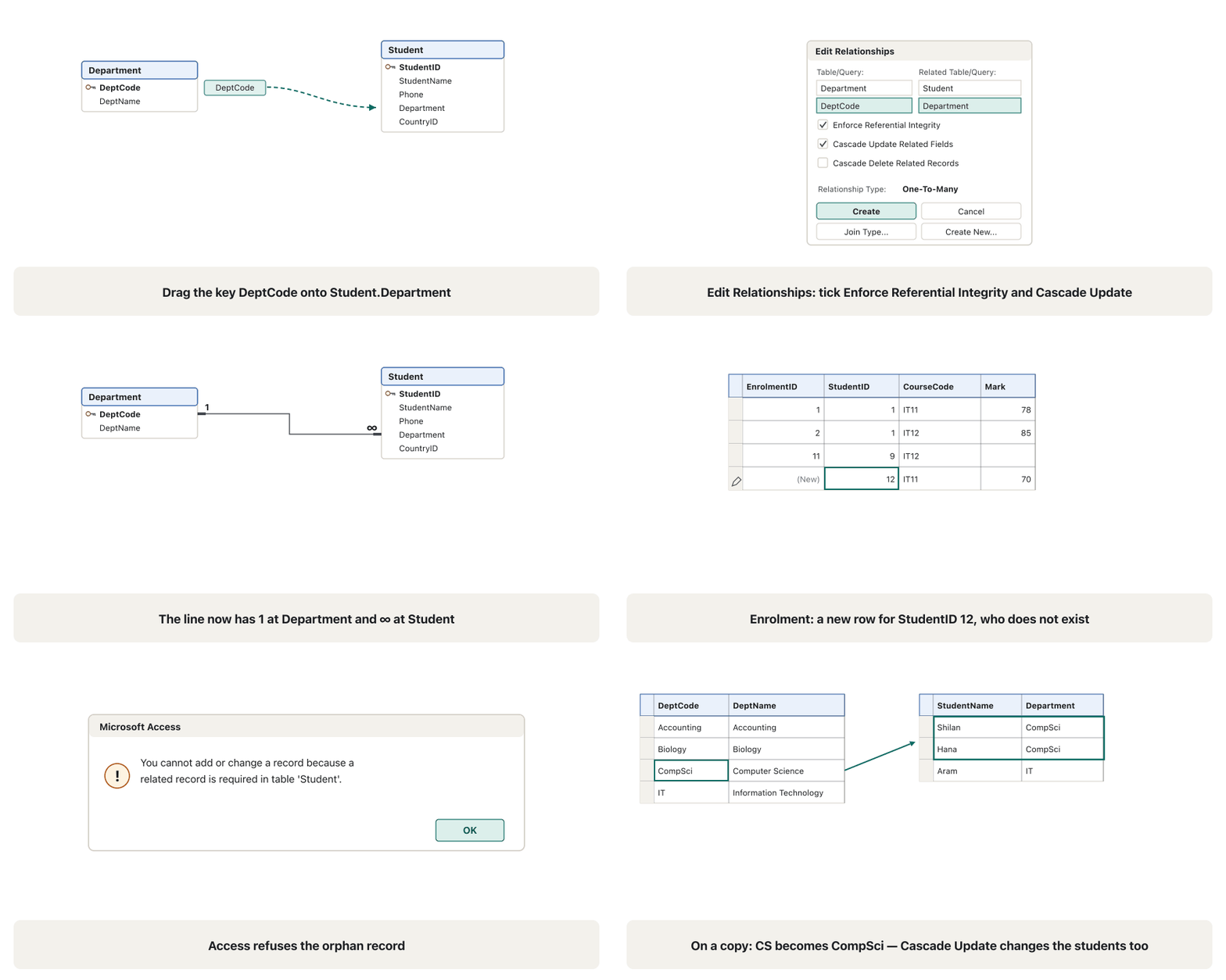
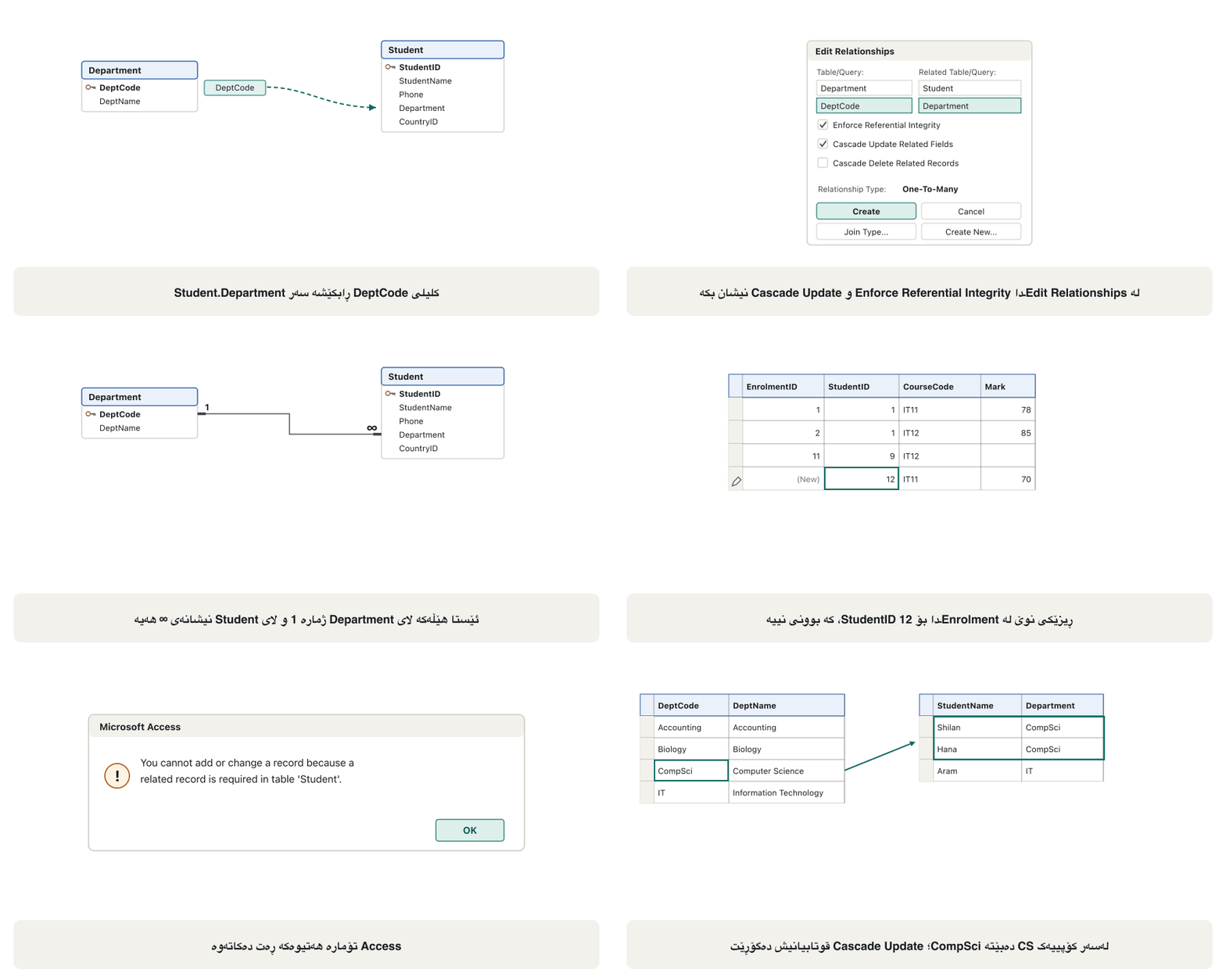
Drag the primary key Department.DeptCode and drop it on the foreign key Student.Department.
Department.DeptCode ڕابکێشە و لەسەر Student.Department دایبنێ.
The Edit Relationships dialog checks the two tables and fields. Tick Enforce Referential Integrity (and here Cascade Update Related Fields, see the cascade screen), then click Create.
Edit Relationships دوو و نیشان دەدات. Enforce Referential Integrity نیشان بکە (و لێرەدا Cascade Update Related Fields، بڕوانە شاشەی cascade)، پاشان لە Create بکە.
Join Type (in the dialog) decides which rows a query returns by default: only matching rows (inner join), all rows of the left table plus matches, or all rows of the right table plus matches. The two outer joins draw an arrow on the line. What an outer join is belongs to the algebra lesson; leave the default (inner) in our lab.
Join Type (لە ) دیاری دەکات بە شێوەی بنەڕەتی کام ڕیزانە دەگەڕێنێتەوە: تەنها ڕیزە هاوتاکان (inner join)، هەموو ڕیزەکانی چەپ لەگەڵ هاوتاکان، یان هەموو ڕیزەکانی ڕاست لەگەڵ هاوتاکان. دوو تیرێک لەسەر هێڵەکە دەکێشن. لێکبەستنی دەرەکی چییە هی وانەی جەبرە؛ لە تاقیگەکەماندا بنەڕەتەکە (inner) بهێڵەوە.
Reading the lineخوێندنەوەی هێڵەکە
- A thin line means a relationship without referential integrity: Access knows the link but does not protect it.
- A line that is thick at both ends with 1 at one end and ∞ at the other is an enforced one-to-many relationship: one department, many students.
- The 1 sits at the table whose field is a primary key (or has a unique index); the ∞ sits at the foreign key. Key fields are shown in bold.
- If both fields are primary keys (or have unique indexes), Access shows 1 at both ends: a one-to-one relationship, which is rare (for example a table of passport details kept apart from Student).
- If the 1 and ∞ appear the wrong way round — ∞ at Department — the design is wrong: you made the wrong field the key, or dragged between the wrong fields.
- هێڵی باریک واتە بەبێ : Access بەستنەوەکە دەزانێت بەڵام نایپارێزێت.
- هێڵێک کە لە هەردوو سەرەوە ئەستوورە و لە سەرێکیدا 1 و لە سەرەکەی تردا ∞ـی هەیە سەپێنراوە (ڕێژەی پەیوەندی): یەک بەش، زۆر قوتابی.
- 1 لای ئەو کە (یان یەکتای هەیە)؛ ∞ لای . بە تۆخی پیشان دەدرێن.
- ئەگەر هەردوو بن (یان یەکتایان هەبێت)، Access لە هەردوو سەرەوە 1 پیشان دەدات: یەک بۆ یەک، کە کەمە (بۆ نموونە زانیاریی پاسپۆرت کە جیا لە Student هەڵدەگیرێت).
- ئەگەر 1 و ∞ بە پێچەوانەوە دەربکەون — ∞ لای Department — دیزاینەکە هەڵەیە: هەڵەت کردووە بە ، یان لە نێوان هەڵەدا ڕاتکێشاوە.
Reading the lineخوێندنەوەی هێڵەکە
A relationships diagram, not an E-R diagramهێڵکاریی پەیوەندییەکان، نەک هێڵکاریی قەوارە و پەیوەندی
Close the window with Close; Access asks whether to save the layout (where the boxes stand) — the relationships themselves are already saved. All Relationships shows every relationship, Clear Layout only clears the picture (the relationships stay), and Relationship Report prints the diagram.
بە Close دابخە؛ Access دەپرسێت ئایا ڕێکخستنەکە پاشەکەوت بکات (سندووقەکان لە کوێن) — خۆیان پێشتر پاشەکەوت کراون. All Relationships هەموو پیشان دەدات، Clear Layout تەنها وێنەکە پاک دەکاتەوە ( دەمێننەوە) و Relationship Report هێڵکارییەکە چاپ دەکات.
What referential integrity forbidsدروستیی ئاماژەپێدان چی قەدەغە دەکات
You can tick Enforce Referential Integrity only when three conditions hold: the field on the "one" side is a primary key or has a unique index; both fields have the same data type — an AutoNumber key matches a Number field with Field Size Long Integer; and both tables are in the same Access database (not linked tables). The data already in the tables must also obey the rule, otherwise Access says the data violates referential integrity rules and creates nothing.
تەنها کاتێک دەتوانیت Enforce Referential Integrity نیشان بکەیت کە سێ مەرج هەبن: لای «یەک» یان یەکتای هەیە؛ هەردوو هەمان هەیە — AutoNumber لەگەڵ Number بە Field Sizeـی Long Integer دەگونجێت؛ و هەردوو لە هەمان Accessـدان (نەک ). پێشتر لە هەیە دەبێت گوێڕایەڵی ڕێساکە بێت، دەنا Access دەڵێت ڕێساکانی دەشکێنێت و هیچ دروست ناکات.
What referential integrity forbidsدروستیی ئاماژەپێدان چی قەدەغە دەکات
Three refusals in our labسێ ڕەتکردنەوە لە تاقیگەکەماندا
Once it is enforced, Access refuses every change that would make an — a record pointing to a record that does not exist (foreign key rules). With our data:
کاتێک سەپێنرا، Access هەموو گۆڕانکارییەک ڕەت دەکاتەوە کە دروست بکات — کە ئاماژە بۆ دەکات کە بوونی نییە (ڕێساکانی کلیلی بیانی). بە ئێمە:
| You try to…هەوڵ دەدەیت… | Access answersAccess وەڵام دەداتەوە |
|---|---|
| add an Enrolment row with StudentID 12 (there is no student 12)ڕیزێکی Enrolment بە StudentID 12 زیاد بکەیت (قوتابیی 12 نییە) | You cannot add or change a record because a related record is required in table 'Student'.You cannot add or change a record because a related record is required in table 'Student'. (پێویستە پەیوەندیدار لە Studentـدا هەبێت) |
| delete Iraq from Country while six students point to CountryID 1Iraq لە Country بسڕیتەوە لە کاتێکدا شەش قوتابی ئاماژە بۆ CountryID 1 دەکەن | The record cannot be deleted or changed because table 'Student' includes related records.The record cannot be deleted or changed because table 'Student' includes related records. (Student پەیوەندیداری تێدایە) |
| change DeptCode IT to InfoTech while students use IT (no cascade)DeptCode لە IT بۆ InfoTech بگۆڕیت لە کاتێکدا قوتابیان IT بەکاردەهێنن (بەبێ cascade) | the same refusal: the related records would become orphansهەمان ڕەتکردنەوە: پەیوەندیدار دەبوونە |
Cascade Update and Cascade DeleteCascade Update و Cascade Delete
With referential integrity enforced you may also tick two cascade options (ON UPDATE and ON DELETE in SQL):
کاتێک سەپێنراوە دەتوانیت دوو هەڵبژاردەی cascadeـیش نیشان بکەیت (ON UPDATE و ON DELETE لە SQLـدا):
- Cascade Update Related Fields: when a primary-key value changes, Access changes every matching foreign key. Try it on a copy of the database (File → Save As → Save Database As): in Department change CS to CompSci, then open Student — Shilan and Hana (6) now say CompSci — and Course: CS21's DeptCode is CompSci too. Our lab keeps CS.
- It does nothing for an AutoNumber key: an AutoNumber value never changes. That is why only our text key DeptCode shows the effect; the lab ticks Cascade Update only on Department → Student and Department → Course.
- Cascade Update Related Fields: کاتێک نرخی دەگۆڕێت، Access هەموو هاوتا دەگۆڕێت. لەسەر کۆپییەکی تاقی بکەرەوە (File ← Save As ← Save Database As): لە Department، CS بگۆڕە بۆ CompSci، پاشان Student بکەرەوە — شیلان و هانا (6) ئێستا CompSci دەڵێن — و Course: DeptCodeـی CS21ـیش CompSciـە. تاقیگەکەمان CS دەهێڵێتەوە.
- بۆ AutoNumber هیچ ناکات: نرخی AutoNumber هەرگیز ناگۆڕێت. بۆیە تەنها دەقیی DeptCodeـمان کاریگەرییەکە پیشان دەدات؛ تاقیگەکە Cascade Update تەنها لەسەر Department → Student و Department → Course نیشان دەکات.
Cascade Update and Cascade DeleteCascade Update و Cascade Delete
Cascade Delete: use with careCascade Delete: بە ئاگاییەوە
- Cascade Delete Related Records: deleting a primary record also deletes its related records. Deleting student Karwan would silently delete his enrolment too (Access shows one general warning). It suits rows that mean nothing alone — the enrolments of a test student — but it is dangerous elsewhere: deleting the IT department would delete four students. Our lab ticks no Cascade Delete; try it only on a copy.
- Cascade Delete Related Records: سڕینەوەی سەرەکی پەیوەندیداریشی دەسڕێتەوە. سڕینەوەی قوتابی کاروان بە بێدەنگی تۆمارکردنەکەشی دەسڕێتەوە (Access تەنها یەک ئاگادارکردنەوەی گشتی پیشان دەدات). بۆ ئەو ڕیزانە گونجاوە کە بە تەنها واتایان نییە — تۆمارکردنەکانی قوتابییەکی تاقیکاری — بەڵام لە شوێنی تر مەترسیدارە: سڕینەوەی بەشی IT چوار قوتابی دەسڕێتەوە. تاقیگەکەمان هیچ Cascade Deleteـێک نیشان ناکات؛ تەنها لەسەر کۆپییەک تاقی بکەرەوە.
The project's Country lookup is a foreign keyستوونی هەڵبژاردنی Countryـی پڕۆژەکە کلیلی بیانییە
The project's last task: Country is a lookup that takes its values from the Country table. Student.CountryID already holds numbers; the wizard makes it show names while it stores numbers:
کۆتا ئەرکی پڕۆژەکە: Country کە نرخەکانی لە Countryـەوە وەردەگرێت. Student.CountryID پێشتر ژمارە هەڵدەگرێت؛ وای لێ دەکات ناو پیشان بدات و ژمارە هەڵبگرێت:
Student in Design view → CountryID → Data Type Lookup Wizard… → I want the lookup field to get the values from another table or query.
Student لە ← CountryID ← Data Type Lookup Wizard… ← I want the lookup field to get the values from another table or query.
Choose the table Country, then the fields CountryID and CountryName; sort by CountryName.
Country هەڵبژێرە، پاشان CountryID و CountryName؛ بەپێی CountryName ڕیزی بکە.
Keep Hide key column (recommended) ticked: the datasheet will show Iraq, Iran… but store 1, 2…
Hide key column (recommended) نیشانکراو بهێڵەوە: Iraq، Iran… پیشان دەدات بەڵام 1، 2… هەڵدەگرێت.
On the last page keep the name CountryID. If you tick Enable Data Integrity (with Restrict Delete), the relationship is enforced at once. Finish and save.
لە کۆتا پەڕەدا ناوی CountryID بهێڵەوە. ئەگەر Enable Data Integrity نیشان بکەیت (لەگەڵ Restrict Delete)، یەکسەر دەسەپێنرێت. Finish و پاشەکەوت بکە.
Edit or delete a relationshipدەستکاریکردن یان سڕینەوەی پەیوەندییەک
- Edit: in the Relationships window double-click the line (or select it and click Edit Relationships). The same dialog lets you change the fields, Enforce Referential Integrity, the cascade options and the Join Type.
- Delete: click the line and press Delete (or right-click it → Delete), then confirm with Yes.
- Close every table, query and form that uses the two tables first: Access cannot change a relationship while they are open.
- Deleting a relationship also removes its referential integrity: orphans can appear again.
- دەستکاری: لە Relationships لە هێڵەکە بکە (یان هەڵیبژێرە و لە Edit Relationships بکە). هەمان ڕێگەت پێدەدات ، Enforce Referential Integrity، هەڵبژاردەکانی cascade و Join Type بگۆڕیت.
- سڕینەوە: لە هێڵەکە بکە و Delete دابگرە (یان ڕاستی لێ بکە ← Delete)، پاشان بە Yes پشتڕاستی بکەرەوە.
- سەرەتا هەموو ئەو ، و دوو بەکاردەهێنن دابخە: Access ناتوانێت بگۆڕێت تا ئەوان کراوە بن.
- سڕینەوەی لادەبات: دەتوانن دووبارە دەربکەون.
Many-to-many through a junction tableزۆر بۆ زۆر بە خشتەیەکی بەستنەوە
A student takes many courses and a course has many students: a many-to-many relationship. No single line can show it. The Enrolment turns it into two one-to-many relationships: Student 1 – ∞ Enrolment ∞ – 1 Course. Each Enrolment row is one student in one course, with the date and the mark.
قوتابییەک زۆر وانە دەخوێنێت و وانەیەک زۆر قوتابیی هەیە: پەیوەندیی زۆر بۆ زۆر. هیچ هێڵێکی تاک ناتوانێت پیشانی بدات. ـی Enrolment دەیکات بە دوو : Student 1 – ∞ Enrolment ∞ – 1 Course. هەر ڕیزێکی Enrolment یەک قوتابییە لە یەک وانەدا، لەگەڵ ڕێکەوت و نمرە.
| One side (1)لای یەک (1) | Many side (∞)لای زۆر (∞) | Fields | Cascade Update |
|---|---|---|---|
| Country | Student | CountryID → CountryID | no (AutoNumber)نەخێر (AutoNumber) |
| Department | Student | DeptCode → Department | yesبەڵێ |
| Department | Course | DeptCode → DeptCode | yesبەڵێ |
| Student | Enrolment | StudentID → StudentID | no (AutoNumber)نەخێر (AutoNumber) |
| Course | Enrolment | CourseCode → CourseCode | noنەخێر |
Add Course and Enrolment to the Relationships window and create the three remaining lines the same way (the figure on the Relationships window screen shows the finished diagram). Before you enforce Enrolment → Student, every Enrolment.StudentID must exist in Student — our sample rows do.
Course و Enrolment زیاد بکە بۆ Relationships و سێ هێڵەکەی تر بە هەمان شێوە دروست بکە (وێنەکەی شاشەی Relationships هێڵکارییە تەواوکراوەکە پیشان دەدات). پێش سەپاندنی Enrolment → Student، هەموو Enrolment.StudentIDـێک دەبێت لە Studentـدا هەبێت — ڕیزە نموونەییەکانمان وان.
Shows why students and classes cannot be linked directly and how a third (joining) table with both keys solves a many-to-many relationship.
پیشان دەدات بۆچی ناکرێت قوتابی و پۆل ڕاستەوخۆ بە یەکەوە ببەسترێنەوە و چۆن سێیەم () کە هەردوو تێدایە، چارەسەر دەکات.
Whole video (7 min): the student-and-class example becomes two one-to-many links through a junction table, like Student - Enrolment - Course.
هەموو ڤیدیۆکە (7 خولەک): نموونەی قوتابی و پۆل لە ڕێگەی دەبێتە دوو ، وەک Student - Enrolment - Course.
Subdatasheetsپەڕەکانی دراوەی ناوەکی
After the relationships exist, open Country in Datasheet view: a + sign appears at the start of each row. Click the + beside Iraq and a opens under it with the six students from Iraq; click − to close it. In Student, the + opens each student's enrolments, and inside those you could go one level deeper.
دوای ئەوەی هەبوون، Country لە بکەرەوە: نیشانەی + لە سەرەتای هەر ڕیزێک دەردەکەوێت. لە +ـی تەنیشت Iraq بکە و ـێک لە ژێریدا دەکرێتەوە بە شەش قوتابییەکەی Iraq؛ لە − بکە بۆ داخستنی. لە Studentـدا، + تۆمارکردنەکانی هەر قوتابییەک دەکاتەوە و لە ناو ئەوانیشدا دەتوانیت ئاستێکی تر بچیتە خوارەوە.
- Access picks the subdatasheet itself (Subdatasheet Name = [Auto] in the table properties of lesson 4); you can choose another related table there.
- Subdatasheet Expanded = Yes opens all of them when the table opens; Home → Records → More → Subdatasheet → Expand All / Collapse All does it by hand.
- You can type in a subdatasheet: a new student typed under Iraq gets CountryID 1 automatically.
- Access خۆی هەڵدەبژێرێت (Subdatasheet Name = [Auto] لە تایبەتمەندییەکانی خشتە کە لە وانەی 4 خوێندران)؛ دەتوانیت لەوێ پەیوەندیداری تر هەڵبژێریت.
- Subdatasheet Expanded = Yes هەموویان کاتی کردنەوەی دەکاتەوە؛ Home → Records → More → Subdatasheet ← Expand All / Collapse All بە دەست دەیکات.
- دەتوانیت لە بنووسیت: قوتابییەکی نوێ کە لە ژێر Iraq دەنووسرێت خۆکارانە CountryID 1 وەردەگرێت.
Practiceڕاهێنان
Open a Microsoft template database (for example Students or Contacts) and save a copy. Open Database Tools → Relationships → All Relationships. For each line, write which table is on the 1 side, which on the ∞ side, and whether integrity is enforced.
Microsoft بکەرەوە (بۆ نموونە Students یان Contacts) و کۆپییەکی پاشەکەوت بکە. Database Tools ← Relationships ← All Relationships بکەرەوە. بۆ هەر هێڵێک بنووسە کام لای 1ـە، کامیان لای ∞ و ئایا دروستی سەپێنراوە.
Show answerوەڵامەکە پیشان بدە
Look at the line ends: thick ends with 1 and ∞ = enforced one-to-many; a thin line = not enforced. The 1 side holds the bold primary key; the ∞ side holds the foreign key with the same values. For example, if the template has a table of guardians or emergency contacts, one student can have several of them, so the student table is on the 1 side.
سەیری سەرەکانی هێڵ بکە: سەری ئەستوور بە 1 و ∞ = سەپێنراو؛ هێڵی باریک = نەسەپێنراو. لای 1 تۆخ هەڵدەگرێت؛ لای ∞ بە هەمان نرخەکان. بۆ نموونە ئەگەر سەرپەرشتیار یان پەیوەندیی فریاکەوتنی تێدا بێت، قوتابییەک دەتوانێت چەندانێکی هەبێت، بۆیە قوتابی لای 1ـە.
In a new practice database, build the lecturer's lab: Departments(DepartmentID, DepartmentName) and Students(StudentID, StudentName, Phone, DOB, DepartmentID). Relate them one-to-many with referential integrity and type five records in each table. Then try to type a student with a DepartmentID that does not exist.
لە ڕاهێنانی نوێدا، تاقیگەکەی مامۆستا دروست بکە: Departments (DepartmentID، DepartmentName) و Students (StudentID، StudentName، Phone، DOB، DepartmentID). بە و بە بیانبەستە و لە هەر پێنج بنووسە. پاشان هەوڵ بدە قوتابییەک بنووسیت بە DepartmentIDـێک کە بوونی نییە.
Show answerوەڵامەکە پیشان بدە
- Departments.DepartmentID AutoNumber (key); Students.DepartmentID Number, Field Size Long Integer — the matching type for an AutoNumber key.
- Type the five departments first, then the students: with integrity enforced, a student can only use an existing DepartmentID.
- A DepartmentID of 99 is refused: a related record is required in table 'Departments'. The lab stored student_age; store DOB instead.
- Departments.DepartmentID AutoNumber ()؛ Students.DepartmentID Number، Field Size Long Integer — جۆری هاوتا بۆ AutoNumber.
- سەرەتا پێنج بەشەکە بنووسە، پاشان قوتابیان: بە سەپاندنی دروستی، قوتابی تەنها دەتوانێت DepartmentIDـێکی هەبوو بەکاربهێنێت.
- DepartmentIDـی 99 ڕەت دەکرێتەوە: a related record is required in table 'Departments'. تاقیگەکە student_ageـی هەڵدەگرت؛ لە جیاتی ئەوە DOB هەڵبگرە.
Build Customer(CustomerID, FirstName, LastName, Phone, City, District), BookOrder(OrderID, CustomerID, BookID, OrderDate) and Book(BookID, Title, Author, PriceIQD). Relate Customer 1–∞ BookOrder ∞–1 Book with referential integrity on both. Then answer: why can one order hold only one book, and how would an OrderLine table fix it?
Customer (CustomerID، FirstName، LastName، Phone، City، District)، BookOrder (OrderID، CustomerID، BookID، OrderDate) و Book (BookID، Title، Author، PriceIQD) دروست بکە. Customer 1 – ∞ BookOrder ∞ – 1 Book بە لەسەر هەردووکیان ببەستە. پاشان وەڵام بدەرەوە: بۆچی یەک داواکاری تەنها دەتوانێت یەک کتێب هەڵبگرێت و OrderLine چۆن چاکی دەکات؟
Show answerوەڵامەکە پیشان بدە
- Keys: CustomerID, OrderID and BookID AutoNumber; BookOrder.CustomerID and BookOrder.BookID Number (Long Integer). Drag Customer.CustomerID → BookOrder.CustomerID and Book.BookID → BookOrder.BookID, tick Enforce Referential Integrity for both.
- BookOrder has one BookID field, so each order row can name only one book. A customer buying three books needs three orders with the same date.
- Fix: Order(OrderID, CustomerID, OrderDate) and OrderLine(OrderLineID, OrderID, BookID, Quantity, PriceIQD) — a junction table between Order and Book, like Enrolment between Student and Course.
- : CustomerID، OrderID و BookID AutoNumber؛ BookOrder.CustomerID و BookOrder.BookID Number (Long Integer). Customer.CustomerID ← BookOrder.CustomerID و Book.BookID ← BookOrder.BookID ڕابکێشە و بۆ هەردووکیان Enforce Referential Integrity نیشان بکە.
- BookOrder یەک BookIDـی هەیە، بۆیە هەر ڕیزێکی داواکاری تەنها دەتوانێت ناوی یەک کتێب بهێنێت. کڕیارێک کە سێ کتێب دەکڕێت پێویستی بە سێ داواکاری بە هەمان ڕێکەوت دەبێت.
- چارە: Order (OrderID، CustomerID، OrderDate) و OrderLine (OrderLineID، OrderID، BookID، Quantity، PriceIQD) — لە نێوان Order و Book، وەک Enrolment لە نێوان Student و Course.
Take Hana's corrected loans design from lesson 2 (Friend with FriendID, Book with BookID, Loan with LoanID, FriendID, BookID). Create both relationships with referential integrity and read the 1 and ∞ ends.
دیزاینە ڕاستکراوەکەی قەرزەکانی هانا لە وانەی 2 وەربگرە (Friend بە FriendID، Book بە BookID، Loan بە LoanID، FriendID، BookID). هەردوو بە دروست بکە و سەرەکانی 1 و ∞ بخوێنەرەوە.
Show answerوەڵامەکە پیشان بدە
Friend.FriendID → Loan.FriendID and Book.BookID → Loan.BookID: the 1 ends sit at Friend and Book, the ∞ ends at Loan. If a ∞ appears at Friend, the key is on the wrong field. Now Access refuses a loan for a friend or a book that does not exist.
Friend.FriendID ← Loan.FriendID و Book.BookID ← Loan.BookID: سەرەکانی 1 لای Friend و Bookـن، سەرەکانی ∞ لای Loan. ئەگەر ∞ لای Friend دەرکەوت، لەسەر هەڵەیە. ئێستا Access قەرز بۆ هاوڕێیەک یان کتێبێک کە بوونی نییە ڕەت دەکاتەوە.
Common mistakesهەڵە باوەکان
| Mistakeهەڵە | What to doچی بکەیت |
|---|---|
| AutoNumber key and a Number foreign key with Field Size Integer or Double AutoNumber و Number بە Field Sizeـی Integer یان Double | Use Long Integer for the foreign key.بۆ Long Integer بەکاربهێنە. |
| Enforcing integrity on data that already has orphansسەپاندنی دروستی لەسەر کە پێشتر تێدایە | Find and fix the bad rows first, then tick Enforce.سەرەتا ڕیزە هەڵەکان بدۆزەرەوە و چاکیان بکە، پاشان Enforce نیشان بکە. |
| Relying on the Lookup Wizard's relationshipپشتبەستن بە Lookup Wizard | Open the line and tick Enforce Referential Integrity.هێڵەکە بکەرەوە و Enforce Referential Integrity نیشان بکە. |
| Ticking Cascade Delete everywhereنیشانکردنی Cascade Delete لە هەموو شوێنێک | Only where child rows mean nothing alone; keep backups.تەنها لەو شوێنەی ڕیزە لاوەکییەکان بە تەنها واتایان نییە؛ بهێڵەوە. |
| Expecting Cascade Update to change AutoNumber keysچاوەڕوانی ئەوەی Cascade Update AutoNumber بگۆڕێت | AutoNumbers never change; cascade matters for text keys like DeptCode.AutoNumber هەرگیز ناگۆڕێت؛ cascade بۆ دەقی وەک DeptCode گرنگە. |
| Calling the Relationships window an E-R diagramناونانی Relationships بە | It is a relationships (database) diagram of real tables.هێڵکاریی ڕاستەقینەیە. |
| Trying to edit a relationship while its tables are openهەوڵدان بۆ دەستکاریکردنی لە کاتێکدا کراوەن | Close the tables, queries and forms first.سەرەتا ، و دابخە. |
Summaryپوختە
- A relationship tells Access how two tables share a field; it then protects the data, joins tables in queries and builds subdatasheets, subforms and subreports.
- Database Tools → Relationships → Add Tables; drag the primary key onto the foreign key; Edit Relationships → Enforce Referential Integrity → Create.
- Thick ends with 1 and ∞ = enforced one-to-many; key fields are bold; it is a relationships diagram, not an E-R diagram.
- Referential integrity needs a key on the 1 side, matching types (AutoNumber ↔ Long Integer) and one database; it refuses orphan records.
- Cascade Update passes changed keys on (not AutoNumbers); Cascade Delete deletes children — use it with care.
- A lookup from another table is a foreign key: tick Enforce yourself. Many-to-many needs a junction table (Enrolment).
- بە Access دەڵێت دوو چۆن هاوبەش دەکەن؛ پاشان دەپارێزێت، لە دەبەستێت و ، و دروست دەکات.
- Database Tools ← Relationships ← Add Tables؛ ڕابکێشە سەر ؛ Edit Relationships ← Enforce Referential Integrity ← Create.
- سەری ئەستوور بە 1 و ∞ = سەپێنراو؛ تۆخن؛ هێڵکاریی ، نەک .
- پێویستی بە لە لای 1، جۆری هاوتا (AutoNumber ↔ Long Integer) و یەک هەیە؛ ڕەت دەکاتەوە.
- Cascade Update گۆڕاو دەگوازێتەوە (نەک AutoNumber)؛ Cascade Delete ڕیزە لاوەکییەکان دەسڕێتەوە — بە ئاگاییەوە بەکاری بهێنە.
- لە ترەوە : خۆت Enforce نیشان بکە. زۆر بۆ زۆر پێویستی بە هەیە (Enrolment).
What does the ∞ end of a line mean?سەری ∞ی هێڵێک واتای چییە؟
It is the "many" side, the table that holds the foreign key.
لای «زۆر»ـە، ئەو هەڵدەگرێت.
Can you relate an AutoNumber key to a Short Text field?دەتوانیت کلیلێکی AutoNumber بە ستوونێکی Short Textـەوە ببەستیت؟
Not with referential integrity: the foreign key must be a Number with Field Size Long Integer.
نەخێر بە : دەبێت Number بێت بە Field Sizeـی Long Integer.
Where do subdatasheets come from?پەڕەکانی دراوەی ناوەکی لە کوێوە دێن؟
From relationships: Access shows the related records of the many side under a + sign.
لە : Access پەیوەندیداری لای زۆر لە ژێر نیشانەی + پیشان دەدات.
Videoڤیدیۆ
Watch a videoسەیری ڤیدیۆیەک بکە
A video that viewers liked a lot and praised in their comments, chosen for this lesson.ڤیدیۆیەک کە بینەران زۆریان پێ خۆش بووە و لە کۆمێنتەکانیاندا ستایشیان کردووە، بۆ ئەم وانەیە هەڵبژێردراوە.
Kurdish: primary and foreign keys, the Relationships window, Enforce Referential Integrity, and the refusal when a customer with orders is deleted.
بە کوردی: و ، Relationships، Enforce Referential Integrity و ڕەتکردنەوەی سڕینەوەی کڕیارێک کە فەرمایشتی هەیە.
Kurdish (Sorani), whole video (17:46): an E-R slide, then Customer-Order-Product linked in the Relationships window with 1 and ∞ ends, and Access refusing to delete a customer who has orders.
بە کوردیی سۆرانی، هەموو ڤیدیۆکە (17:46): E-R، پاشان Customer، Order و Product لە Relationships بە کۆتاییەکانی 1 و ∞ پێکەوە دەبەسترێن؛ لە کۆتاییدا Access ڕێگە نادات کڕیارێک بسڕدرێتەوە کە فەرمایشتی هەیە.
Lesson complete!وانەکە تەواو بوو!
Well done. Review the key terms, then go on to the next lesson.دەستخۆش. سەیرێکی زاراوە سەرەکییەکان بکەرەوە، پاشان بڕۆ بۆ وانەی داهاتوو.
Key termsزاراوە سەرەکییەکان
Queriesپرسەکان
Related lecturesوانە پەیوەندیدارەکان
References and further readingسەرچاوەکان و خوێندنەوەی زیاتر
This lecture is a first edition. The Kurdish text and terminology are waiting for review by Kurdish IT teachers.ئەم وانەیە چاپی یەکەمە. دەقە کوردییەکە و زاراوەکانی چاوەڕێی پێداچوونەوەی مامۆستایانی کوردی بواری IT ن.