Chapterبەش 3 · Lectureوانە 3.2
Keyboards and Pointing Devicesکیبۆرد و ئامێرەکانی ئاماژەکردن
How keyboards and pointing devices put data into a computer: the key groups and toggle keys, keyboard layouts and typing Kurdish on Windows, Mac and phones, kinds of keyboard, membrane and mechanical switches, ergonomics, the pointer and the text cursor, the mouse and how its optical sensor sees movement, DPI, touchpads, trackballs and joysticks.
و چۆن دەخەنە ناو : گرووپەکانی و ، و نووسینی کوردی لە Windows، Mac و مۆبایلدا، جۆرەکانی ، پەردەیی و میکانیکی، ، و نووسین، و چۆن ڕووناکییەکەی جووڵە دەبینێت، DPI، ، و جۆیستیک.
What you will learnچی فێر دەبیت
- Name the key groups of a keyboard and say what toggle keys do.
- Explain what a keyboard layout is and add and use a Kurdish layout on your own devices.
- Compare kinds of keyboard, including membrane and mechanical keyboards, and explain why ergonomics matters.
- Tell the mouse pointer from the text cursor and name the parts and kinds of a mouse.
- Explain how an optical mouse detects movement and calculate with DPI.
- Describe touchpads, trackballs and joysticks.
- گرووپەکانی ناو بهێنیت و بڵێیت چی دەکەن.
- ڕوونی بکەیتەوە چییە و کوردی لەسەر ئامێرەکانی خۆت زیاد بکەیت و بەکاری بهێنیت.
- جۆرەکانی ، لەوانە و ، بەراورد بکەیت و ڕوونی بکەیتەوە بۆچی گرنگە.
- لە نووسین جیا بکەیتەوە و بەش و جۆرەکانی ناو بهێنیت.
- ڕوونی بکەیتەوە چۆن جووڵە دەدۆزێتەوە و بە DPI حیساب بکەیت.
- ، و جۆیستیک وەسف بکەیت.
Your hands talk to the computerدەستەکانت قسە لەگەڵ کۆمپیوتەر دەکەن
Most of the time you give a computer data and instructions with your hands. Two kinds of devices do this job: the keyboard, for typing, and the pointing devices, such as the mouse and the touchpad, for pointing at things on the screen and choosing them.
زۆربەی کات بە دەستەکانت و فەرمان دەدەیت بە . دوو جۆر ئامێر ئەم کارە دەکەن: بۆ نووسین و وەک و بۆ ئاماژەکردن بە شتەکانی سەر شاشە و هەڵبژاردنیان.
An with rows of for typing letters, numbers and commands.
کە چەند ڕیزێک هەیە بۆ نووسینی پیت و ژمارە و ناردنی فەرمان.
A keyboard reaches the computer through a cable to a port on the motherboard (today almost always USB) or without a cable, by Bluetooth or a small USB receiver.
یان بە وایەرێک بە سەر دەبەسترێت (ئەمڕۆ نزیکەی هەمیشە )، یان بەبێ وایەر بە یان وەرگرێکی بچووکی .
Both are input devices: they only send data into the computer. The lesson Input, Output and Devices That Do Both sorts all devices into input, output and both; this lesson looks closely at keyboards and pointing devices. The English names of the keys are practised in Technical English: Input devices.
هەردووکیان : تەنها دەنێرنە ناو . وانەی نێوخستە، دەرخستە و ئەو ئامێرانەی هەردووکیان دەکەن هەموو ئامێرەکان بۆ ، و هەردووکیان پۆلێن دەکات؛ ئەم وانەیە بە وردی سەیری و دەکات. ناوە ئینگلیزییەکانی لە ئینگلیزیی تەکنیکی: ئامێرەکانی نێوخستە ڕاهێنانیان لەسەر دەکرێت.
The key groupsگرووپەکانی دوگمە
A desktop keyboard has more than 100 keys, but they are arranged in a few groups. Each group has its own job, and knowing the groups helps you find a key quickly.
زیاتر لە 100 هەیە، بەڵام لە چەند گرووپێکدا ڕیز کراون. هەر گرووپێک کاری تایبەتی خۆی هەیە و ناسینی گرووپەکان یارمەتیت دەدات زوو دوگمەکە بدۆزیتەوە.
| Groupگرووپ | Keys | What it is forبۆ چییە |
|---|---|---|
| Typing areaناوچەی نووسین | Letters, numbers, punctuation, Space, Enter, Backspaceپیت، ژمارە، نیشانەکانی خاڵبەندی، Space، Enter و Backspace | Typing text and numbersنووسینی دەق و ژمارە |
| Function keys | F1 to F12F1 تا F12 | Special jobs that depend on the program, for example F1 Help, F2 Rename, F5 Refreshکاری تایبەت کە بەپێی بەرنامەکە دەگۆڕێت، بۆ نموونە F1 یارمەتی، F2 گۆڕینی ناو و F5 نوێکردنەوە |
| Toggle keys | Caps Lock, Num Lock, Scroll LockCaps Lock، Num Lock و Scroll Lock | Switch a mode on or off with one pressبە یەک پەنجەنان دۆخێک هەڵدەکەن یان دەیکوژێننەوە |
| Navigation keys جووڵە | Arrow keys, Home, End, Page Up, Page Down, Insert, Delete، Home، End، Page Up، Page Down، Insert و Delete | Move the cursor or the page without the mouse یان لاپەڕەکە بەبێ دەجووڵێنن |
| Keys for keyboard shortcuts بۆ | Ctrl, Alt, Shift, Windows key; on a Mac Command ⌘, Option ⌥, Control; Fn on laptopsCtrl، Alt، Shift و ؛ لە Macـدا Command ⌘، Option ⌥ و Control؛ Fn لەسەر | Held down together with another key to give a command, such as Ctrl+Cلەگەڵ دوگمەیەکی تر پێکەوە دادەگیرێن بۆ دانی ، وەک Ctrl+C |
| Numeric keypad | 0 to 9, + − × ÷, Enter, on the right0 تا 9، + − × ÷ و Enter لە لای ڕاست | Typing many numbers fast, like on a calculator (accountants, cashiers)نووسینی ژمارەی زۆر بە خێرایی وەک لەسەر (ژمێریار و کاشێر) |
| Media and Internet buttonsدوگمەکانی میدیا و | Play/pause, volume, mute; Home page, Search, Mail (on some keyboards)لێدان/وەستاندن، بەرزی دەنگ و بێدەنگکردن؛ ، گەڕان و (لەسەر هەندێک ) | Control music, video and the browser with one press; on laptops they share the F-keysبە یەک پەنجەنان مۆسیقا، ڤیدیۆ و کۆنترۆڵ دەکەن؛ لەسەر لەگەڵ دوگمەکانی F هاوبەشن |
Toggle keys and the Caps Lock testدوگمەی هەڵکردن و کوژاندنەوە و تاقیکردنەوەی Caps Lock
A key that switches a mode on or off each time you press it, such as Caps Lock (capital letters) or Num Lock (the ). A small light often shows when it is on.
دوگمەیەکە کە هەر جارێک دایدەگریت دۆخێک هەڵدەکات یان دەیکوژێنێتەوە، وەک Caps Lock (پیتی گەورە) یان Num Lock (). زۆرجار گڵۆپێکی بچووک پیشانی دەدات کە هەڵکراوە.
A toggle key works like a light switch: press it once and a mode turns on, press it again and the mode turns off. Caps Lock types capital letters, Num Lock makes the keypad type numbers instead of moving the cursor, and Scroll Lock is used by only a few programs today.
وەک گڵۆپ کار دەکات: جارێک پەنجەی پێدا بنێ دۆخێک هەڵدەبێت، جارێکی تر پەنجەی پێدا بنێ دەکوژێتەوە. Caps Lock پیتی گەورە دەنووسێت، Num Lock وا دەکات ژمارە بنووسێت لە جیاتی جووڵاندنی . Scroll Lockـیش ئەمڕۆ تەنها لە چەند بەرنامەیەکی کەمدا بەکار دێت.
A quick test from the lecture notes: if you are not sure a keyboard works, press Caps Lock or Num Lock and watch the small light on the keyboard. If the light turns on and off, the keyboard has power and is talking to the computer.
تاقیکردنەوەیەکی خێرا لە تێبینییەکانی وانەکەوە: ئەگەر دڵنیا نیت کار دەکات، پەنجە بە Caps Lock یان Num Lockـدا بنێ و سەیری گڵۆپە بچووکەکەی سەر بکە. ئەگەر گڵۆپەکە هەڵبوو و کوژایەوە، کارەبای هەیە و لەگەڵ پەیوەندیی هەیە.
Typing Kurdish: keyboard layoutsنووسینی کوردی: ڕیزبەندییەکانی کیبۆرد
Look at a keyboard in Kurdistan: the keys often show English letters and Kurdish letters together. The keys themselves never change. When you press a key, the keyboard only sends the position of the key to the computer; the operating system then decides which character to type. The table it uses is called a keyboard layout.
سەیری لە کوردستان بکە: زۆرجار پیتی ئینگلیزی و کوردییان پێکەوە لەسەرە. خودی دوگمەکان هەرگیز ناگۆڕێن. کاتێک پەنجە بە دوگمەیەکدا دەنێیت، تەنها شوێنی دوگمەکە دەنێرێت بۆ ؛ پاشان بڕیار دەدات کام بنووسێت. ئەو خشتەیەی بەکاری دەهێنێت پێی دەوترێت .
The setting that decides which character each types. The keys stay the same; the changes what they mean, so one can type English, Kurdish or Arabic.
ئەو ڕێکخستنەی کە دیاری دەکات هەر چ دەنووسێت. وەک خۆیان دەمێننەوە؛ واتاکەیان دەگۆڕێت، بۆیە یەک دەتوانێت ئینگلیزی، کوردی یان عەرەبی بنووسێت.
The keys are like the keys of a piano and the layout is the sheet that says which note each key plays. Change the sheet from English to Kurdish and the same key under your finger plays a different letter.
وەک دوگمەکانی پیانۆن و وەک ئەو پەڕەیەیە کە دەڵێت هەر دوگمەیەک کام نۆتە لێدەدات. پەڕەکە لە ئینگلیزییەوە بگۆڕە بۆ کوردی، هەمان دوگمەی ژێر پەنجەت پیتێکی جیاواز دەنووسێت.
Where the analogy stops workingسنووری ئەم نموونەیە
A real piano cannot change its notes; a computer changes the whole layout with one shortcut.
پیانۆی ڕاستەقینە ناتوانێت نۆتەکانی بگۆڕێت؛ بە یەک هەموو دەگۆڕێت.
On the Windows Central Kurdish layout most letters sit on the English key with a similar sound: S types س, D types د, K types ک. The letters that are special to Sorani are on Shift: Shift+R gives ڕ, Shift+L gives ڵ, Shift+Y gives ێ, Shift+S gives ش, Shift+C gives چ and Shift+W gives وو. The number keys type Kurdish digits (١٢٣), and Shift+H types an invisible zero-width non-joiner, which stops two letters from joining.
لە کوردیی ناوەندیی Windowsـدا زۆربەی پیتەکان لەسەر ئەو دوگمە ئینگلیزییەن کە دەنگێکی نزیکیان هەیە: S پیتی س دەنووسێت، D پیتی د و K پیتی ک. ئەو پیتانەی تایبەتن بە سۆرانی لەسەر Shiftـن: Shift+R پیتی ڕ دەدات، Shift+L پیتی ڵ، Shift+Y پیتی ێ، Shift+S پیتی ش، Shift+C پیتی چ و Shift+W پیتی وو. دوگمەکانی ژمارە ژمارەی کوردی (١٢٣) دەنووسن و Shift+H نیشانەیەکی نەبینراو دەنووسێت بە ناوی zero-width non-joiner کە نایەڵێت دوو پیت بەیەکەوە بلکێن.
Typing Kurdish: keyboard layoutsنووسینی کوردی: ڕیزبەندییەکانی کیبۆرد
Adding Kurdish on Windows, Mac and phonesزیادکردنی کوردی لە Windows، Mac و مۆبایلدا
Every common operating system now has a built-in keyboard for Kurdish in Arabic script (Sorani). You add it once and then switch between English and Kurdish while you type.
ئێستا هەموو باوەکان ناوخۆییان هەیە بۆ کوردی بە پیتی عەرەبی (سۆرانی). جارێک زیادی دەکەیت و پاشان لە کاتی نووسیندا لە نێوان ئینگلیزی و کوردیدا دەگۆڕیت.
| Deviceئامێر | Add the Kurdish keyboardزیادکردنی کوردی | Switch while typingگۆڕین لە کاتی نووسیندا |
|---|---|---|
| Windows 11 | Settings > Time & language > Language & region: add the language Central Kurdish (or open Language options > Add a keyboard) and choose the Central Kurdish keyboard.Settings > Time & language > Language & region: زمانی Central Kurdish زیاد بکە (یان Language options > Add a keyboard بکەرەوە) و Central Kurdish هەڵبژێرە. | Windows key+Space cycles through the installed layouts; or click the language icon on the taskbar.Windows key+Space یەک لە دوای یەک دەگۆڕێت کە دامەزراون؛ یان لە زمان لەسەر بکە. |
| macOS | Apple menu > System Settings > Keyboard > Text Input > Edit > + : search for Kurdish and add the Kurdish (Arabic script) input source.Apple menu > System Settings > Keyboard > Text Input > Edit > + : بگەڕێ بۆ Kurdish و سەرچاوەی نووسینی کوردی (بە پیتی عەرەبی) زیاد بکە. | Control-Space switches to the last input source; the Fn/Globe key can be set to change it; or use the Input menu in the menu bar.Control-Space دەگەڕێتەوە بۆ دوایین سەرچاوەی نووسین؛ دەتوانیت دوگمەی Fn/Globe بۆ گۆڕینی ڕێک بخەیت؛ یان Input menu لە شریتی سەرەوە بەکار بهێنە. |
| iPhone, iPad | Settings > General > Keyboard > Keyboards > Add New Keyboard > Kurdish (Arabic).بڕۆ بۆ Settings > General > Keyboard > Keyboards > Add New Keyboard > Kurdish (Arabic). | Tap the globe key on the on-screen keyboard.پەنجە لە دوگمەی گۆی زەوی بدە لەسەر . |
| Android (Gboard) | Gboard settings > Languages > Add keyboard > Kurdish (Iraq), Arabic.Settingsـی Gboard > Languages > Add keyboard > Kurdish (Iraq), Arabic. | Press and hold the space bar, or tap the globe key.دوگمەی بۆشایی دابگرە، یان پەنجە لە دوگمەی گۆی زەوی بدە. |
Kinds of keyboardجۆرەکانی کیبۆرد
Keyboards come in many shapes for different users and devices. The course lists these kinds:
بە چەندین شێوە دروست دەکرێن بۆ و ئامێری جیاواز. وانەکە ئەم جۆرانە دەهێنێت:
| Kindجۆر | What makes it differentچی جیای دەکاتەوە | Who uses itکێ بەکاری دەهێنێت |
|---|---|---|
| Laptop (built-in)ناو | Flat keys in the case; the function keys also control volume and brightness with Fnدوگمەی تەخت لەناو لاشەکەدا؛ لەگەڵ Fn دەنگ و ڕووناکیش کۆنترۆڵ دەکەن | Every laptop userهەموو بەکارهێنەرێکی |
| Wireless | No cable: Bluetooth or a small USB receiver; needs batteries or chargingبێ وایەر: یان وەرگرێکی بچووکی ؛ پاتری یان بارگەکردنی پێویستە | A tidy desk, a TV roomمێزێکی ڕێکوپێک، ژووری تیڤی |
| Gamingیاری | Fast, often mechanical, coloured backlight, extra macro keys, many keys counted at onceخێرا، زۆرجار میکانیکی، ڕووناکیی ڕەنگاوڕەنگ، دوگمەی زیادە بۆ ماکرۆ و هەژمارکردنی چەند دوگمەیەک پێکەوە | Gamersیاریزانەکان |
| Multimediaمیدیا | Extra buttons for music, video, volume and the browserدوگمەی زیادە بۆ مۆسیقا، ڤیدیۆ، دەنگ و | Home usersبەکارهێنەرانی ماڵ |
| Mechanicalمیکانیکی | A separate switch with a spring under every key (next screen) جیا بە سپرینگەوە لە ژێر هەر دوگمەیەکدا (شاشەی داهاتوو) | Typists, programmers, gamersنووسەران، و یاریزانان |
| Ergonomic | Split or curved shape that keeps the wrists straightشێوەی دابەشکراو یان چەماوە کە مەچەک ڕاست ڕادەگرێت | People who type for hoursئەوانەی چەند کاتژمێر دەنووسن |
| Flexibleنەرم | Soft silicone that rolls up; waterproofسیلیکۆنی نەرم کە دەپێچرێتەوە؛ ئاو تێی ناچێت | Travel, dusty or wet placesگەشت، شوێنی تۆزاوی یان تەڕ |
| Hand (one-handed)یەک دەستی | A small block of keys for one handبلۆکێکی بچووکی دوگمە بۆ یەک دەست | Gamers (the other hand holds the mouse)یاریزان (دەستەکەی تر دەگرێت) |
| Virtual (on-screen) | Drawn on a touchscreen; you tap the keysلەسەر کێشراوە؛ پەنجە لە دوگمەکان دەدەیت | Phones, tablets, kiosks, people who cannot use a normal keyboardمۆبایل، ، کیۆسک و ئەوانەی ناتوانن ئاسایی بەکار بهێنن |
| Projectionپرۆجێکشن | A small device shines a picture of a keyboard on the desk and a sensor sees your fingersئامێرێکی بچووک وێنەی دەخاتە سەر مێز و پەنجەکانت دەبینێت | Rare; a gadgetدەگمەنە؛ ئامێرێکی سەرنجڕاکێش |
| Tablet keyboard (clip-on) (لکاو) | Clips onto a tablet and often doubles as a coverبە دەلکێت و زۆرجار وەک بەرگیش کار دەکات | Students who write long texts on a tabletئەو خوێندکارانەی دەقی درێژ لەسەر دەنووسن |
In Sorani Kurdish: a keyboard buying guide (sizes such as full, TKL and mini; wired or wireless; battery; switches) shown on real gaming keyboards.
بە کوردیی سۆرانی: ڕێنمایی کڕینی — قەبارەکان (Full، TKL، Mini)، بە وایەر یان ، پاتری و سویچەکان — لەسەر یاریی ڕاستەقینە.
In Sorani, plays 0:55–4:40: kinds of keyboard by size, by connection (wired, wireless, battery) and by switches. A sponsor slide before it and a shop visit after it are not played.
بە سۆرانی، لە 0:55 تا 4:40 پەخش دەبێت: جۆرەکانی بەپێی قەبارە، شێوەی پەیوەستبوون (بە وایەر، ، پاتری) و سویچەکان. سلایدی سپۆنسەر پێش ئەمە و سەردانی دوکانێک دوای ئەمە پەخش ناکرێن.
Inside a key: membrane or mechanicalناو دوگمەیەک: پەردەیی یان میکانیکی
Under every key there is a small switch. When the switch closes a circuit, the keyboard's chip knows which key you pressed and sends its position to the computer. There are two main ways to build that switch.
لە ژێر هەر دوگمەیەکدا بچووک هەیە. کاتێک سووڕێک دادەخات، دەزانێت پەنجەت بە کام دوگمەدا ناوە و شوێنەکەی دەنێرێت بۆ . دوو ڕێگای سەرەکی هەیە بۆ دروستکردنی ئەو .
| Featureتایبەتمەندی | Membrane (rubber dome) | Mechanical |
|---|---|---|
| How a press is madeپەنجەنان چۆن دروست دەبێت | A rubber dome pushes two plastic sheets togetherگومەزێکی لاستیکی دوو پەردەی پلاستیکی بەیەکەوە دەنووسێنێت | A spring-loaded switch closes metal contacts سپرینگدار خاڵی کانزایی دادەخات |
| Feel and soundهەست و دەنگ | Soft and quietنەرم و بێدەنگ | Clear click or bump; louderکلیک یان هەستێکی ڕوون؛ دەنگی زیاترە |
| Priceنرخ | Cheapهەرزان | More expensiveگرانتر |
| Life and repairتەمەن و چاککردنەوە | Wears out as the domes get soft; usually replaced, not repairedکاتێک گومەزەکان نەرم دەبن دەفەوتێت؛ زۆرجار دەگۆڕدرێت نەک چاک بکرێتەوە | Lasts longer; a single switch or keycap can be replacedزیاتر دەمێنێتەوە؛ دەتوانرێت یەک یان یەک سەری دوگمە بگۆڕدرێت |
| Spillsڕژانی ئاو | The sealed sheets resist small spillsپەردە داخراوەکان بەرگری لە ڕژانی کەم دەکەن | Open switches are hurt more easily by liquid کراوەکان زووتر بە شلە زیانیان پێدەگات |
| Where you find itلە کوێ دەیبینیت | Most office keyboards; laptops use a thin version (scissor switch)زۆربەی ئۆفیس؛ جۆرێکی تەنکی بەکار دەهێنن (scissor switch) | Gaming, programming, heavy typingیاری، و نووسینی زۆر |
Inside a normal keyboard: rubber domes press two plastic sheets together, and a chip scans the key grid to find the key.
لەناو ئاساییدا: گومەزە لاستیکییەکان دوو پەڕەی پلاستیکی بە یەکەوە دەنووسێنن و تۆڕی دەپشکنێت تا بدۆزێتەوە.
Watch 1:06-6:21: how a membrane keyboard works. Mechanical switches follow at 7:39, after a sponsor.
لە 1:06 تا 6:21 سەیر بکە: چۆن کار دەکات. باسی دوای ڕیکلامی سپۆنسەر لە 7:39 دێت.
Comfortable and safe typingنووسینی ئاسوودە و سەلامەت
The study of how to design desks, chairs, screens and devices so that people can work comfortably and safely, without pain or injury.
زانستی دیزاینکردنی مێز، کورسی، شاشە و ئامێرەکانە بە شێوەیەک کە خەڵک بە ئاسوودەیی و سەلامەتی کار بکەن، بەبێ ئازار و زیان.
Ergonomics brings comfort, efficiency and safety into the design of the workplace: the desk, the chair and the devices.
ئاسوودەیی، کارایی و سەلامەتی دەهێنێتە ناو دیزاینی شوێنی کار: مێز، کورسی و ئامێرەکان.
Typing for hours with bent wrists can cause a repetitive strain injury (RSI): pain in the wrist, hand or arm that comes from the same small movement repeated thousands of times. An ergonomic keyboard is designed to reduce that risk: it is split or curved so your wrists stay straight, and it often has a palm rest.
نووسین بۆ چەند کاتژمێرێک بە مەچەکی چەماوە دەکرێت ببێتە هۆی : ئازار لە مەچەک، دەست یان باسکدا کە لە دووبارەبوونەوەی هەمان جووڵەی بچووک بە هەزاران جار دێت. ئێرگۆنۆمی بۆ کەمکردنەوەی ئەو مەترسییە دیزاین کراوە: دابەشکراو یان چەماوەیە تا مەچەکەکانت ڕاست بمێننەوە و زۆرجار شوێنی دانانی لەپی دەستی هەیە.
- Adjustable tilt legs: small feet under the keyboard change its angle. Many experts advise keeping it flat or even tilted slightly away, so the wrists do not bend up.
- Spill resistance: sealed keyboards survive a cup of tea knocked over at the desk.
- Keep the mouse close, at the same height as the keyboard, so you do not stretch your arm.
- Take short breaks and change position; no keyboard protects you from sitting still for hours.
- پێی گۆشەگۆڕ: پێی بچووکی ژێر گۆشەکەی دەگۆڕن. زۆر پسپۆڕ ئامۆژگاری دەکەن تەخت بێت یان کەمێک بەرەو دواوە لار بێت، تا مەچەک بەرەو سەرەوە نەچەمێتەوە.
- بەرگری لە ڕژان: داخراو لە ڕژانی پیاڵەیەک چا لەسەر مێز ڕزگاری دەبێت.
- نزیک ڕابگرە، لە هەمان بەرزیی ، تا باسکت درێژ نەکەیتەوە.
- پشووی کورت بدە و شوێنی خۆت بگۆڕە؛ هیچ لە دانیشتنی بێجووڵەی چەند کاتژمێر ناتپارێزێت.
How to sit, how far the screen should be and the 20-20-20 rule for your eyes are in Technical English: Using screens safely.
چۆن دابنیشیت، شاشە چەند دوور بێت و یاسای 20-20-20 بۆ چاوەکانت لە وانەی ئینگلیزیی تەکنیکی: بەکارهێنانی شاشە بە سەلامەتی باس کراون.
Pointing devices, the pointer and the cursorئامێرەکانی ئاماژەکردن، نیشاندەری ماوس و نیشاندەری نووسین
An that moves the on the screen and selects things, such as a , a , a or a .
کە لەسەر شاشە دەجووڵێنێت و شتەکان هەڵدەبژێرێت، وەک ، ، یان .
A pointer is a small symbol on the screen, usually an arrow, whose position and shape change as you move a pointing device. The shape tells you what will happen: an arrow selects, a hand opens a link, an I-beam means you can type, a spinning circle means wait.
هێمایەکی بچووکە لەسەر شاشە، زۆرجار تیرێک، کە شوێن و شێوەکەی دەگۆڕێت کاتێک دەجووڵێنیت. شێوەکەی پێت دەڵێت چی ڕوودەدات: تیر هەڵدەبژێرێت، دەست دەکاتەوە، هێڵی I واتە دەتوانیت بنووسیت و بازنەی خولاوە واتە چاوەڕێ بکە.
The course summary calls the pointer a cursor too, and many people do. Strictly there are two symbols: the mouse pointer, which follows the mouse, and the text cursor (insertion point), the blinking line where the next letter will appear. In a document you can point somewhere with the mouse pointer while the text cursor stays where you are typing, until you click.
پوختەی کۆرسەکە بە دەڵێت cursor و زۆر کەسیش وا دەڵێن. بە وردی دوو هێما هەن: کە شوێن دەکەوێت و نووسین، ئەو هێڵە ترووسکەدارەی پیتی داهاتوو لێی دەردەکەوێت. لە بەڵگەنامەیەکدا دەتوانیت بە ئاماژە بۆ شوێنێک بکەیت و نووسین لەو شوێنەی دەنووسیت بمێنێتەوە، تا دەکەیت.
Why “mouse”? A Kurdish glossary in the course material tells the story: the first mice had a small, soap-shaped body and a cable that looked like a tail, so people compared the device to a mouse. Its definition: the small hand-held device used to control the cursor on the computer screen.
بۆچی «ماوس»؟ فەرهەنگۆکێکی کوردی لە کەرەستەکانی کۆرسەکەدا چیرۆکەکە دەگێڕێتەوە: یەکەم لاشەیەکی بچووکی وەک پارچە سابوونیان هەبوو و وایەرێک کە وەک کلک وابوو، بۆیە خەڵک ئامێرەکەیان بە مشک چواند. پێناسەکەی ئەوەیە: ئەو ئامێرە بچووکە دەستییە کە بۆ کۆنترۆڵکردنی سەر شاشەی بەکار دێت.
The mouseماوس
A small that you move on the desk to move the on the screen. You press its buttons to .
بچووکە کە لەسەر مێز دەیجووڵێنیت بۆ جووڵاندنی لەسەر شاشە. دوگمەکانی دادەگریت بۆ .
A mouse fits comfortably under the palm of your hand. Moving it on the desk moves the pointer; its buttons click.
بە ئاسوودەیی لە ژێر لەپی دەستتدا جێی دەبێتەوە. جووڵاندنی لەسەر مێز دەجووڵێنێت؛ دوگمەکانی دەکەن.
The left button selects and opens, the right button opens a short menu of options, the wheel scrolls (and clicks when pressed), and the thumb buttons go back and forward in a browser. Gaming mice add more buttons for game commands.
دوگمەی چەپ هەڵدەبژێرێت و دەکاتەوە، دوگمەی ڕاست کورتی هەڵبژاردنەکان دەکاتەوە، ویل دەکات (و کاتێک پەنجەی پێدا دەنێیت دەکات). دوگمەکانی پەنجە گەورەش لە دەگەڕێنەوە دواوە و دەچنە پێشەوە. یاری دوگمەی زیاتر بۆ فەرمانەکانی یاری زیاد دەکەن.
How a mouse connects, then and now. The first PC mice plugged into a serial port; from 1987 the small round PS/2 port took over, and since the late 1990s almost every wired mouse uses USB. Wireless mice use a tiny USB receiver (2.4 GHz radio) or Bluetooth. Some early cordless mice used infrared light, but it needed a clear line of sight and disappeared. The old ports are shown in Older ports you may still meet.
چۆن دەبەسترێت، پێشتر و ئێستا. یەکەم PC بە سێریاڵ (serial) دەبەسترانەوە؛ لە 1987ـەوە خڕی بچووکی PS/2 جێگەی گرتەوە و لە کۆتایی ساڵانی نەوەدەکانەوە نزیکەی هەموو وایەردار بەکار دەهێنێت. وەرگرێکی زۆر بچووکی (ڕادیۆی 2.4 GHz) یان بەکار دەهێنن. هەندێک بێوایەری سەرەتایی تیشکی ژێرسووریان بەکار دەهێنا، بەڵام دەبوو ڕێگای نێوانیان کراوە بێت، بۆیە نەما. کۆنەکان لێرە پیشان دراون: ئەو دەرچە کۆنانەی لەوانەیە هێشتا بیانبینیت.
The mouseماوس
Kinds of mouse and how they connectجۆرەکانی ماوس و چۆن دەبەسترێن
| Kind of mouseجۆری | What it meansواتاکەی |
|---|---|
| Opticalڕووناکی | Sees the desk with an LED and a tiny camera (next screen); the normal mouse todayبە و کامێرایەکی زۆر بچووک مێزەکە دەبینێت (شاشەی داهاتوو)؛ ئاسایی ئەمڕۆ |
| Laserلەیزەری | An optical mouse that uses an invisible infrared laser; it tracks on more surfaces, even glossy ones کە لەیزەرێکی ژێرسووری نەبینراو بەکار دەهێنێت؛ لەسەر ڕووی زیاتر کار دەکات، تەنانەت ڕووی بریقەدار |
| Wireless | No cable: Bluetooth or a USB receiver; uses a batteryبێ وایەر: یان وەرگری ؛ پاتری بەکار دەهێنێت |
| Gamingیاری | High DPI, fast sensor, extra buttons, light weightDPIـی بەرز، خێرا، دوگمەی زیادە و سووکی |
| Ergonomic (vertical)ئێرگۆنۆمی (ستوونی) | Held like a handshake so the forearm does not twistوەک تەوقەکردن دەگیرێت تا باسک نەسووڕێتەوە |
| Touch mouse بەرکەوتن | Its top is a small touch surface for scrolling and gesturesسەرەکەی ڕووێکی بچووکی بەرکەوتنە بۆ و |
| 3D mouse سێ ڕەهەندی | A knob that moves and turns 3D models in design programsدەسکێک کە مۆدێلی سێ ڕەهەندی لە بەرنامەکانی دیزایندا دەجووڵێنێت و دەیسووڕێنێت |
| Pen (stylus) mouse قەڵەمی | Shaped like a pen; held between the fingersوەک قەڵەم دروست کراوە؛ لە نێوان پەنجەکاندا دەگیرێت |
| Trackball | A ball you roll with your thumb or fingers; the device itself does not move (below)تۆپێک کە بە پەنجە گەورە یان پەنجەکانت دەیگلێریت؛ خودی ئامێرەکە ناجووڵێت (لە خوارەوە) |
| Mechanical (ball)میکانیکی (تۆپ) | A rubber ball underneath turned two small wheels; obsoleteتۆپێکی لاستیکی لە ژێرەوە دوو چەرخی بچووکی دەسووڕاند؛ کۆن بووە |
| Foot mouse پێ | Moved with the foot on a pad or with pedals, for people who cannot use their hands (assistive technology)بە پێ دەجووڵێنرێت، لەسەر پادێک یان بە پێدال؛ بۆ ئەو کەسانەی ناتوانن دەستیان بەکار بهێنن (تەکنەلۆژیای یارمەتیدەر) |
The mouseماوس
A short history of the mouseمێژوویەکی کورتی ماوس
- 1961–1963: Douglas Engelbart at the Stanford Research Institute (SRI) had the idea. Its formal name was “X-Y position indicator for a display system”.
- 1964: his engineer Bill English built the first mouse: a wooden box with two knife-edged metal wheels at right angles and one button.
- 1968: Engelbart showed the mouse to the world in a famous demonstration, with three-button mice.
- 1968–1973: the rolling ball: Telefunken in Germany described a ball mouse in 1968; Bill English's team at Xerox PARC built one from 1972 for the Alto computer.
- 1980: the first optical mice (Steve Kirsch; Richard Lyon at Xerox) used light instead of a ball, but worked only on their own printed mouse pad.
- 1996 and 1999: Microsoft's IntelliMouse made the scroll wheel common (1996); IntelliMouse with IntelliEye (1999) used an LED and a tiny camera sensor that works on almost any desk, with no pad: How an optical mouse sees movement.
- 1961 تا 1963: دۆگلاس ئینگڵبارت (Douglas Engelbart) لە پەیمانگای توێژینەوەی ستانفۆرد (SRI) بیرۆکەکەی هەبوو. ناوە فەرمییەکەی «X-Y position indicator for a display system» بوو.
- 1964: ئەندازیارەکەی، بیل ئینگلیش (Bill English)، یەکەم دروست کرد: سندوقێکی دارین بە دوو چەرخی کانزایی تیژ کە گۆشەی ڕاستیان لەگەڵ یەک دروست دەکرد و یەک دوگمە.
- 1968: ئینگڵبارت لە پیشاندانێکی بەناوبانگدا پیشانی جیهان دا، بە سێ دوگمەیی.
- 1968 تا 1973: تۆپی گلێر هات: Telefunken لە ئەڵمانیا لە 1968ـدا تۆپداری وەسف کرد؛ تیمەکەی بیل ئینگلیش لە Xerox PARC لە 1972ـەوە یەکێکی بۆ Alto دروست کرد.
- 1980: یەکەم جۆرەکانی (Steve Kirsch؛ Richard Lyon لە Xerox) لە جیاتی تۆپ ڕووناکییان بەکار دەهێنا، بەڵام تەنها لەسەر ماوسپادی چاپکراوی تایبەتی خۆیان کاریان دەکرد.
- 1996 و 1999: IntelliMouseـی Microsoft ویلی باو کرد (1996)؛ IntelliMouse with IntelliEye (1999) گڵۆپی و کامێرای زۆر بچووکی بەکار هێنا کە لەسەر نزیکەی هەموو مێزێک کار دەکات، بێ پاد: ماوسی ڕووناکی چۆن جووڵە دەبینێت.
How an optical mouse sees movementماوسی ڕووناکی چۆن جووڵە دەبینێت
The most common mouse is the optical mouse. It has no moving parts for tracking: it uses the light of an LED reflected from the desk. Inside are an LED, a small lens (the notes call it a prism), a tiny camera sensor (CMOS), a chip that compares pictures (a DSP) and the USB connection.
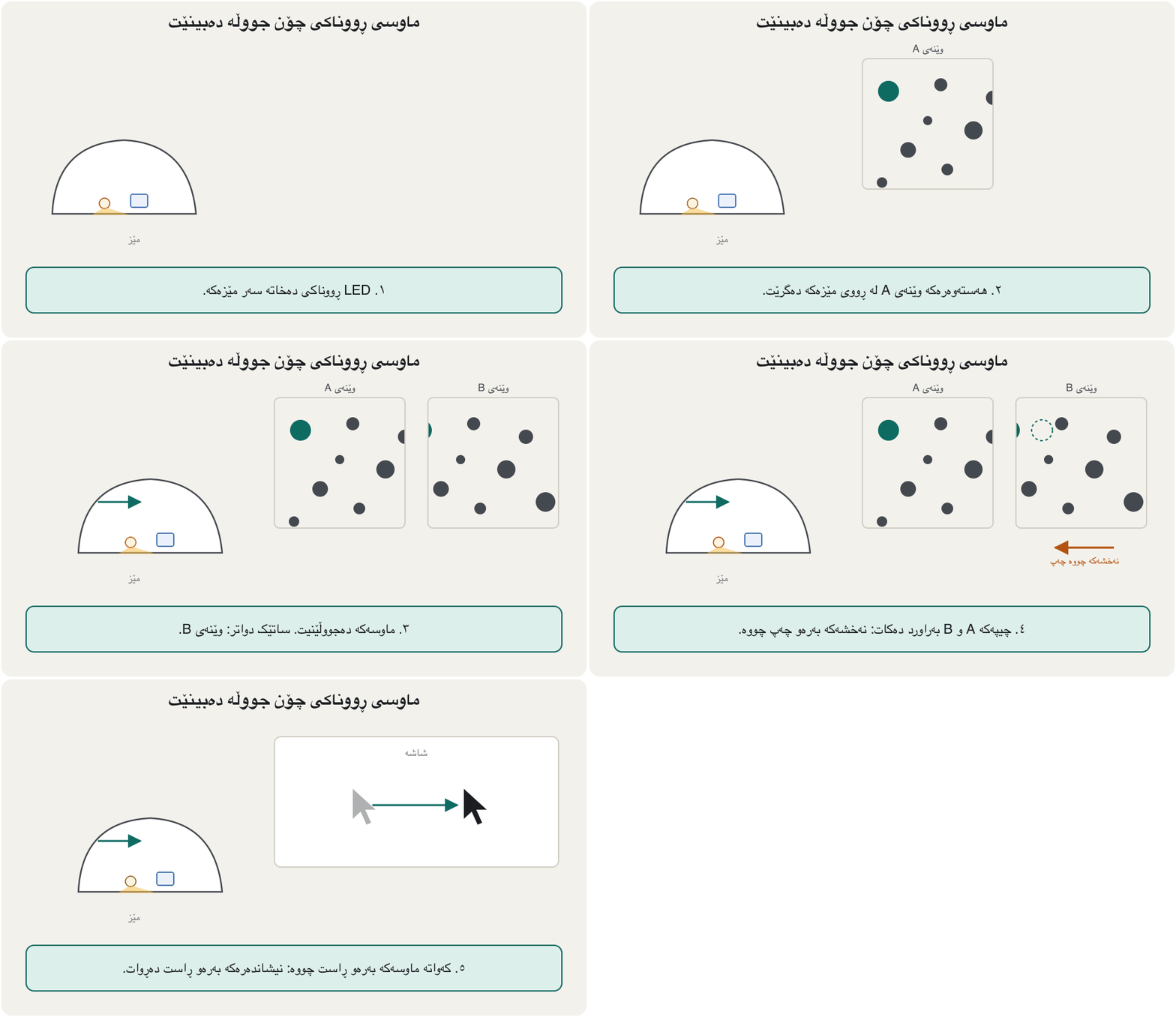
باوترین . هیچ بەشێکی جووڵاوی نییە بۆ شوێنکەوتنی جووڵە: ڕووناکیی بەکار دەهێنێت کە لە مێزەکەوە دەگەڕێتەوە. لەناویدا گڵۆپێکی ، هاوێنەیەکی بچووک (تێبینییەکان پێی دەڵێن پریزم)، کامێرای زۆر بچووک (CMOS)، کە وێنەکان بەراورد دەکات (DSP) و پەیوەندیی هەن.
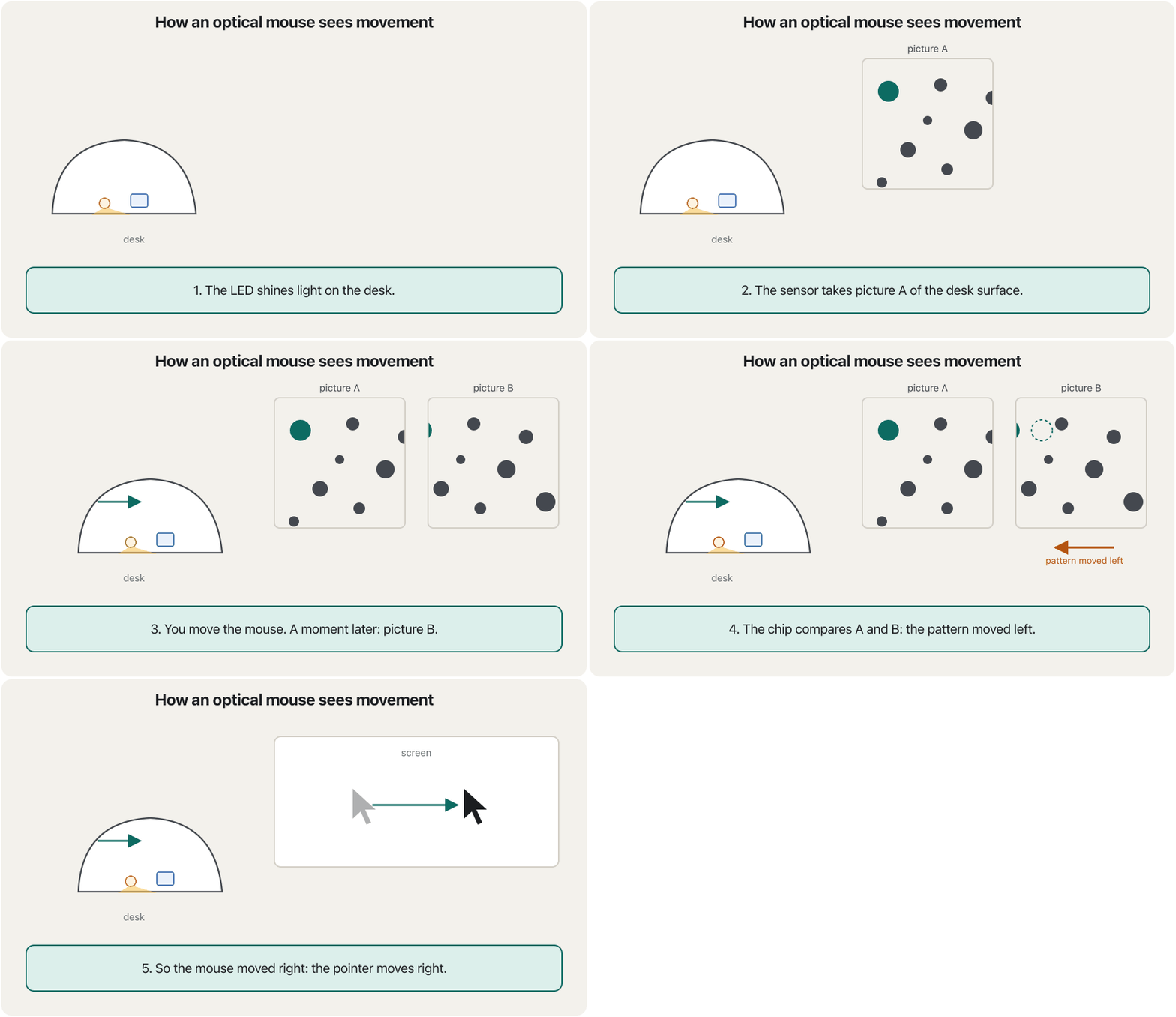
The sensor takes a thousand or more pictures every second. Each picture shows tiny bumps and fibres of the desk. The chip compares each picture with the one before: if the pattern moved 3 dots to the left, the mouse moved 3 dots to the right, and the chip tells the computer how far to move the pointer.
هەزار وێنە یان زیاتر لە هەر چرکەیەکدا دەگرێت. هەر وێنەیەک قوڵپ و ڕیشاڵی زۆر بچووکی مێزەکە پیشان دەدات. هەر وێنەیەک لەگەڵ وێنەی پێشووتر بەراورد دەکات: ئەگەر نەخشەکە 3 خاڵ بەرەو چەپ چووبێت، 3 خاڵ بەرەو ڕاست چووە و بە دەڵێت چەند بجووڵێنێت.
Inside an optical mouse: an LED lights the desk and a tiny camera takes thousands of pictures a second to see movement.
لەناو : مێزەکە ڕووناک دەکاتەوە و کامێرایەکی زۆر بچووک لە هەر چرکەیەکدا هەزاران وێنە دەگرێت تا جووڵە ببینێت.
Watch 0:00-3:16: inside the mouse and its image sensor.
لە 0:00 تا 3:16 سەیر بکە: ناوەوەی و وێنەکەی.
DPI: how sensitive a mouse isDPI: ماوس چەند هەستیارە
Mice are rated in dots per inch (DPI): how many steps the mouse reports when it moves one inch (2.54 cm). The higher the number, the more sensitive the mouse: a small hand movement moves the pointer further. The lecture notes give a range of 100 to 6,400 DPI, with higher values used for gaming and design.
بە (DPI) هەڵدەسەنگێنرێن: کاتێک یەک ئینج (2.54 سانتیمەتر) دەجووڵێت چەند هەنگاو ڕادەگەیەنێت. تا ژمارەکە بەرزتر بێت هەستیارترە: جووڵەیەکی بچووکی دەست زیاتر دەبات. تێبینییەکانی وانە مەودای 100 تا 6,400 DPI دەدەن و بەهای بەرزتر بۆ یاری و دیزاین بەکار دێت.
At 800 DPI, moving 1 inch gives 800 steps. If one step moves the pointer one pixel (no pointer acceleration), crossing a 1920-pixel-wide screen needs inches, about 6.1 cm of hand movement; at 1600 DPI only 1.2 inches, about 3 cm.
بە 800 DPI، جووڵاندنی یەک ئینج 800 هەنگاو دەدات. ئەگەر هەر هەنگاوێک یەک بجووڵێنێت (بەبێ خێراکردنی )، بۆ بڕینی شاشەیەکی 1920 پان ئینج پێویستە، نزیکەی 6.1 سانتیمەتر جووڵەی دەست؛ بە 1600 DPI تەنها 1.2 ئینج، نزیکەی 3 سانتیمەتر.
Touchpad and trackballتاچپاد و تراکبۆڵ
The flat, touch-sensitive area below a keyboard. You slide your finger on it to move the , like a built-in .
ڕووبەرێکی تەخت و هەستیارە لە خوارەوەی کیبۆردی . پەنجەی پێدا دەخشێنیت بۆ جووڵاندنی ؛ وەک ناو لاپتۆپەکە کار دەکات.
A touchpad is a small, flat, rectangular pointing device that is sensitive to pressure and motion. You slide one finger to move the pointer, tap to click, and use two fingers to scroll.
بچووک، تەخت و لاکێشەییە کە هەست بە پەستان و جووڵە دەکات. پەنجەیەک دەخلیسکێنیت بۆ جووڵاندنی ، پەنجەیەکی سووکی لێ دەدەیت بۆ و دوو پەنجە بۆ بەکار دەهێنیت.
A that stays still while you roll a ball on its top or side with your thumb or fingers. It needs less desk space and less arm movement than a .
کە جێگیر دەمێنێتەوە و تۆ بە پەنجە گەورە یان پەنجەکانت تۆپێکی سەر یان تەنیشتی دەخولێنیتەوە. لە شوێنی کەمتری سەر مێز و جووڵەی کەمتری باسک پێویستە.
A trackball is a stationary pointing device with a ball on its top or side. You roll the ball with your thumb or fingers; the device itself stays still, so it needs little desk space and is kind to the shoulder.
جێگیرە کە تۆپێکی لەسەر یان لە لایەکی هەیە. تۆپەکە بە پەنجە گەورە یان پەنجەکانت دەگلێریت؛ خودی ئامێرەکە ناجووڵێت، بۆیە شوێنی کەمی سەر مێز پێویستە و بۆ شان ئاسانترە.
Touchpad and trackballتاچپاد و تراکبۆڵ
Joysticks and game controllersجۆیستیک و کۆنترۆڵەکانی یاری
A joystick is a stick that you tilt to move something on the screen. The lecture notes describe a stick with a ball at each end: the lower ball sits in a socket, so the stick can lean, and the upper ball is the handle. Today joysticks are used mainly in games and flight simulators, and in machines such as cranes, drones and electric wheelchairs. A game controller (gamepad) has two small joysticks, called thumbsticks, plus buttons.
جۆیستیک دارێکە کە لاری دەکەیتەوە بۆ جووڵاندنی شتێک لەسەر شاشە. تێبینییەکانی وانە دارێک وەسف دەکەن کە لە هەر سەرێکیدا تۆپێکی هەیە: تۆپی خوارەوە لەناو قاپێکدا دانراوە، بۆیە دارەکە دەتوانێت لار ببێتەوە و تۆپی سەرەوە دەسکەکەیە. ئەمڕۆ جۆیستیک بە زۆری لە یاری و لاساییکەرەوەی فڕیندا بەکار دێت، هەروەها لە ئامێری وەک قوڵەنگ، درۆن و کورسیی کارەبایی. دوو جۆیستیکی بچووکی هەیە بە ناوی thumbstick لەگەڵ چەند دوگمەیەک.
Common mistakesهەڵە باوەکان
| Mistakeهەڵە | What is trueڕاستییەکە |
|---|---|
| “To type Kurdish I need a Kurdish keyboard.”«بۆ نووسینی کوردی کوردیم پێویستە.» | Any keyboard can type Kurdish: add the Kurdish keyboard layout in the operating system. Stickers only help you find the letters.هەر دەتوانێت کوردی بنووسێت: کوردی لە زیاد بکە. ستیکەرەکان تەنها یارمەتیت دەدەن پیتەکان بدۆزیتەوە. |
| “A touchpad is a mouse.”« .» | It is a separate pointing device; both are pointing devices. جیایە؛ هەردووکیان . |
| “The pointer and the text cursor are the same.”« و نووسین یەک شتن.» | The pointer follows the mouse; the text cursor blinks where the next letter goes. شوێن دەکەوێت؛ نووسین لەو شوێنە ترووسکە دەدات کە پیتی داهاتوو دەچێتە ئەوێ. |
| “Higher DPI is always better.”«DPIـی بەرزتر هەمیشە باشترە.» | Too high makes the pointer jumpy; choose what lets you point accurately.DPIـی زۆر بەرز وا دەکات باز بدات؛ ئەوە هەڵبژێرە کە ڕێگات دەدات بە وردی ئاماژە بکەیت. |
| “If the Caps Lock light works, every key works.”«ئەگەر گڵۆپی Caps Lock کار بکات، هەموو دوگمەکان کار دەکەن.» | The light only proves power and a connection.گڵۆپەکە تەنها کارەبا و پەیوەندی دەسەلمێنێت. |
| “Mechanical mice and mechanical keyboards are both old.”« میکانیکی و میکانیکی هەردووکیان کۆنن.» | The ball mouse is obsolete; mechanical keyboards are popular and modern. تۆپی کۆن بووە؛ باو و نوێن. |
Exercisesڕاهێنانەکان
Choose a keyboard and a pointing device for each person and give one reason: (a) a cashier who types many prices; (b) a gamer; (c) Hana, whose wrist hurts after long typing; (d) a designer who draws on screen all day.
بۆ هەر کەسێک و هەڵبژێرە و هۆیەک بنووسە: (أ) کاشێرێک کە نرخی زۆر دەنووسێت؛ (ب) یاریزانێک؛ (ج) هانا کە دوای نووسینی درێژ مەچەکی ئازار دەدات؛ (د) دیزاینەرێک کە هەموو ڕۆژ لەسەر شاشە وێنە دەکێشێت.
Show answerوەڵامەکە پیشان بدە
- (a) A keyboard with a numeric keypad (or a separate USB keypad) and a normal optical mouse.
- (b) A mechanical gaming keyboard with n-key rollover and a gaming mouse with a fast, high-DPI sensor.
- (c) A split or curved ergonomic keyboard, a vertical mouse or a trackball, and regular breaks.
- (d) A graphics tablet with a pen (next lesson) and a 3D mouse for turning models.
- (أ) بە (یان جیای ) و ئاسایی.
- (ب) یاری بە n-key rollover و یاری بە خێرا و DPIـی بەرز.
- (ج) ئێرگۆنۆمیی دابەشکراو یان چەماوە، ستوونی یان و پشووی بەردەوام.
- (د) لەگەڵ قەڵەم (وانەی داهاتوو) و سێ ڕەهەندی بۆ سووڕاندنی مۆدێلەکان.
Using the Windows Central Kurdish layout in this lesson, write the keys you press to type the word «ڕێڵ».
بە بەکارهێنانی کوردیی ناوەندیی Windows لەم وانەیەدا، ئەو دوگمانە بنووسە کە بۆ نووسینی وشەی «ڕێڵ» پەنجەیان پێدا دەنێیت.
Hintئاماژە
Look for the orange letters on R, Y and L.
بۆ پیتە پرتەقاڵییەکانی سەر R، Y و L بگەڕێ.
Show answerوەڵامەکە پیشان بدە
Shift+R (ڕ), Shift+Y (ێ), Shift+L (ڵ). All three Sorani letters are on Shift.
Shift+R (ڕ)، Shift+Y (ێ)، Shift+L (ڵ). هەر سێ پیتە سۆرانییەکە لەسەر Shiftـن.
A mouse is set to 1200 DPI and pointer acceleration is off, so one step moves the pointer one pixel. How far must you move the mouse to cross a screen that is 2400 pixels wide? Give the answer in inches and in centimetres.
لەسەر 1200 DPI ڕێکخراوە و خێراکردنی کوژاوەتەوە، بۆیە هەر هەنگاوێک یەک دەجووڵێنێت. دەبێت چەند بجووڵێنیت بۆ بڕینی شاشەیەک کە 2400 پانە؟ وەڵامەکە بە ئینج و سانتیمەتر بدە.
Show answerوەڵامەکە پیشان بدە
About 5 cm of hand movement.
نزیکەی 5 سانتیمەتر جووڵەی دەست.
Rezan says: “My keyboard light comes on with Caps Lock, so the broken letter E must be a software problem.” Is he right? What would you check?
ڕێزان دەڵێت: «گڵۆپی بە Caps Lock هەڵدەبێت، کەواتە پیتی E کە کار ناکات دەبێت کێشەی بێت.» ڕاست دەکات؟ تۆ چی دەپشکنیت؟
Show answerوەڵامەکە پیشان بدە
Not necessarily. The light only proves power and a connection. Test the E key in another program, try the keyboard on another computer, check for dirt under the key, and check that the right keyboard layout is selected (in the Kurdish layout E types ە, not E).
هەمیشە نا. گڵۆپەکە تەنها کارەبا و پەیوەندی دەسەلمێنێت. دوگمەی E لە بەرنامەیەکی تردا تاقی بکەرەوە، لەسەر تر تاقی بکەرەوە، سەیری پیسی بکە لە ژێر دوگمەکەدا و دڵنیابە دروست هەڵبژێردراوە (لە کوردیدا E پیتی ە دەنووسێت نەک E).
Summaryپوختە
- Keyboards and pointing devices are input devices; they connect by USB or wirelessly (Bluetooth or a USB receiver).
- Key groups: typing area, function keys, toggle keys, navigation keys, keys for shortcuts, media and Internet buttons, and the numeric keypad.
- A keyboard layout decides which character a key types; Windows, macOS, iPhone and Android all include Kurdish (Sorani) layouts. On Windows, Sorani letters ڕ ڵ ێ ش چ are on Shift.
- Membrane keyboards are cheap and quiet; mechanical keyboards have a spring switch under every key and last longer.
- Ergonomic keyboards keep the wrists straight and reduce repetitive strain injuries.
- The mouse pointer follows the mouse; the text cursor shows where you type.
- The mouse began as Engelbart's wooden prototype (1964); ball mice were replaced by LED optical mice from 1999. Mice connected by serial, then PS/2, now USB or wireless.
- An optical mouse photographs the desk a thousand or more times a second and compares the pictures; DPI says how many steps it reports per inch.
- Touchpads, trackballs and joysticks are other pointing devices; joysticks move in any direction.
- و ؛ بە یان بێ وایەر ( یان وەرگری ) دەبەسترێن.
- گرووپەکانی : ناوچەی نووسین، ، ، جووڵە، بۆ ، دوگمەکانی میدیا و و .
- دیاری دەکات دوگمەیەک کام دەنووسێت؛ Windows، macOS، iPhone و Android هەموویان کوردی (سۆرانی)یان تێدایە. لە Windowsـدا پیتە سۆرانییەکانی ڕ ڵ ێ ش چ لەسەر Shiftـن.
- هەرزان و بێدەنگن؛ سپرینگداریان لە ژێر هەر دوگمەیەکدا هەیە و زیاتر دەمێننەوە.
- ئێرگۆنۆمی مەچەک ڕاست ڕادەگرێت و کەم دەکاتەوەەوە.
- شوێن دەکەوێت؛ نووسین نیشان دەدات لە کوێ دەنووسیت.
- بە نموونە دارینەکەی ئینگڵبارت (1964) دەستی پێکرد؛ لە 1999ـەوە بە جێگەی تۆپداری گرتەوە. پێشتر بە سێریاڵ و پاشان PS/2 دەبەسترا، ئێستا بە یان بێ وایەر.
- لە چرکەیەکدا هەزار جار یان زیاتر وێنەی مێزەکە دەگرێت و وێنەکان بەراورد دەکات؛ DPI دەڵێت لە هەر ئینجێکدا چەند هەنگاو ڕادەگەیەنێت.
- ، و جۆیستیک ترن؛ جۆیستیک بە هەر ئاراستەیەک دەجووڵێت.
What is a toggle key? Give two examples.دوگمەی هەڵکردن و کوژاندنەوە چییە؟ دوو نموونە بهێنە.
A key that turns a mode on with one press and off with the next, such as Caps Lock and Num Lock.
دوگمەیەکە کە بە یەک پەنجەنان دۆخێک هەڵدەکات و بە پەنجەنانی دواتر دەیکوژێنێتەوە، وەک Caps Lock و Num Lock.
Why can an optical mouse fail on a glass table?بۆچی ماوسی ڕووناکی دەکرێت لەسەر مێزی شووشە کار نەکات؟
Its sensor needs a visible pattern on the surface; glass shows none, so it cannot compare pictures.
پێویستی بە نەخشێکی دیار لەسەر ڕووەکەیە؛ شووشە هیچ نەخشێک پیشان نادات، بۆیە ناتوانێت وێنەکان بەراورد بکات.
What does an ergonomic keyboard try to prevent?کیبۆردێکی ئێرگۆنۆمی هەوڵی ڕێگرتن لە چی دەدات؟
Repetitive strain injuries of the wrist and hand.
لە مەچەک و دەستدا.
How do you type چ on the Windows Central Kurdish layout?لە ڕیزبەندیی کیبۆردی کوردیی ناوەندیی Windowsـدا چۆن چ دەنووسیت؟
Shift+C.
بە Shift+C.
Lesson complete!وانەکە تەواو بوو!
Well done. Review the key terms, then go on to the next lesson.دەستخۆش. سەیرێکی زاراوە سەرەکییەکان بکەرەوە، پاشان بڕۆ بۆ وانەی داهاتوو.
Key termsزاراوە سەرەکییەکان
Touch, Pen, Voice, Video and Scanningدەستلێدان، قەڵەم، دەنگ، ڤیدیۆ و سکانکردن
Related lecturesوانە پەیوەندیدارەکان
- Input Devicesئامێرەکانی نێوخستە
- Touch, Pen, Voice, Video and Scanningدەستلێدان، قەڵەم، دەنگ، ڤیدیۆ و سکانکردن
- The Parts of a Computer Systemپارچەکانی سیستەمی کۆمپیوتەر
- Output Devicesئامێرەکانی دەرخستە
- Keyboard Shortcuts for Windows and Macکورتەڕێکانی کیبۆرد بۆ Windows و Mac
- Printers, Speakers, Projectors and Assistive Technologyچاپەرەکان، بڵندگۆکان، پرۆجێکتەرەکان و تەکنەلۆژیای یارمەتیدەر
References and further readingسەرچاوەکان و خوێندنەوەی زیاتر
- Microsoft Learn: Keyboard identifiers and input method editors for Windows (Central Kurdish, KLID 00000492)
- Microsoft Learn: Central Kurdish keyboard (interactive layout)
- Microsoft Support: Manage the input and display language settings in Windows
- Apple Support: Write in another language on your Mac
- Apple: iOS and iPadOS feature availability (QuickType keyboard languages)
- Apple: macOS feature availability (QuickType keyboard languages)
- Gboard Help: Set up Gboard (languages)
- Wikipedia: Keyboard technology (membrane, scissor and mechanical switches)
- Wikipedia: Optical mouse
- Logitech: Logitech G introduces HERO 25K sensor (2020)
- Logitech G: HERO 2 sensor guide
- ASUS ROG Harpe II Extreme Edition 20 (AimPoint Pro 65K sensor)
- Microsoft Support: Keyboard shortcuts in Windows (Windows logo key + Spacebar)
- Computer History Museum: The mouse (Revolution)
- Wikipedia: Computer mouse (history and interfaces)
This lecture is a first edition. The Kurdish text and terminology are waiting for review by Kurdish IT teachers.ئەم وانەیە چاپی یەکەمە. دەقە کوردییەکە و زاراوەکانی چاوەڕێی پێداچوونەوەی مامۆستایانی کوردی بواری IT ن.