Chapterبەش 3 · Lectureوانە 3.1
Queriesپرسەکان
Ask the University database questions: select queries from a wizard or the design grid, criteria with AND and OR, wildcards and Null, sorting and top values, calculated fields such as the age, parameter, totals and crosstab queries, the Find Duplicates and Find Unmatched wizards, action queries on a copy, and the SQL behind every query.
پرسیار لە University بکە: Select بە یان تۆڕی دیزاین، بە AND و OR، و Null، و بەرزترین نرخەکان، وەک تەمەن، ، و ، Find Duplicates و Find Unmatched، لەسەر کۆپییەک و ئەو SQLـەی لە پشت هەموو .
What you will learnچی فێر دەبیت
- Build select queries with the Simple Query Wizard and in Design view, from one or several related tables.
- Write criteria with AND and OR rows, comparisons, In, Between, dates, Like with Access wildcards and Is Null, and predict the answer.
- Add calculated fields, parameters, totals and crosstabs, and explain why a computed age beats a stored one.
- Find duplicates and unmatched records, and run the four action queries safely on a copy.
- Read a query's SQL view and tell Access-only syntax from standard SQL.
- Select بە Simple Query Wizard و لە دروست بکەیت، لە یەک یان چەند پەیوەندیدارەوە.
- بە ڕیزەکانی AND و OR، بەراورد، In، Between، ڕێکەوت، Like بە Access و Is Null بنووسیت و پێشبینیی وەڵامەکە بکەیت.
- ، ، کۆکردنەوە و Crosstab زیاد بکەیت و ڕوون بکەیتەوە بۆچی تەمەنی ژمێردراو لە تەمەنی هەڵگیراو باشترە.
- دووبارە و بێ هاوتا بدۆزیتەوە و چوار جۆرەکەی بە سەلامەتی لەسەر کۆپییەک Run بکەیت.
- SQL Viewـی بخوێنیتەوە و ڕێنووسی تایبەتی Access لە SQLـی ستاندارد جیا بکەیتەوە.
What a query is in Accessپرس لە Accessـدا چییە
A is a saved question with a name: Which IT students live in Erbil? What is the average mark of each course? Access stores the question, not the answer. Every time you open (run) the query, Access works the answer out again from the tables. So a student you type in today is in tomorrow's answer without any extra work.
پرسیارێکی پاشەکەوتکراوە بە ناوێکەوە: کام قوتابیی IT لە Erbil دەژین؟ تێکڕای نمرەی هەر وانەیەک چەندە؟ Access پرسیارەکە هەڵدەگرێت، نەک وەڵامەکە. هەر جارێک دەکەیتەوە (کاری پێدەکەیت)، Access وەڵامەکە دووبارە لە دەدۆزێتەوە. بۆیە قوتابییەک کە ئەمڕۆ دەینووسیت بەبێ هیچ کارێکی زیاتر لە وەڵامی بەیانیدا دەبێت.
The answer is shown as a . Access calls it a recordset (older books say dynaset): the records and fields the query returns, a . In a simple select query you can even type in that datasheet, and the change goes into the table underneath — the query has no data of its own.
وەڵامەکە وەک پیشان دەدرێت. Access ناوی دەنێت recordset (کتێبە کۆنەکان دەڵێن dynaset): و وەڵامی ، واتە . لە Selectـی سادەدا دەتوانیت لە هەمان بنووسیت و گۆڕانکارییەکە دەچێتە ناو ژێرەوە — هیچ تایبەتی خۆی نییە.
What a query is in Accessپرس لە Accessـدا چییە
The kinds of queryجۆرەکانی پرس
| Kind of queryجۆری | What it doesچی دەکات | Our exampleنموونەکەمان |
|---|---|---|
| Select | picks fields and records, never changes data و هەڵدەبژێرێت، هەرگیز ناگۆڕێت | qryStudentContacts |
| Parameter | a select query that asks for a value when it runs: Select کە کاتی کارکردن داوای نرخێک دەکات | qryStudentsInCity |
| Totals | groups records and counts, sums or averages each group: گرووپ دەکات و هەر گرووپێک دەژمێرێت، کۆ دەکاتەوە یان تێکڕای دەردەهێنێت | qryMarksByCourse |
| Crosstab | a grid of totals: one field down the side, another across the top: تۆڕێکی ئەنجام — بە لای چەپدا، تر بە سەرەوە | qryDeptByCountry |
| Action (Make Table, Append, Update, Delete) | changes the data itself — on a copy first!: خۆی دەگۆڕێت — سەرەتا لەسەر کۆپییەک! | raise every fee by 10%زیادکردنی هەموو کرێیەک بە 10% |
The Simple Query Wizardیاریدەدەری Simple Query
The quickest way to a select query is a : a few pages of questions, and Access builds the query for you. Our first one lists every student's phone and city:
خێراترین ڕێگا بۆ Select ـە: چەند پەڕەیەک پرسیار و Access بۆت دروست دەکات. یەکەمینمان ژمارەی تەلەفۆن و شاری هەموو قوتابییەک لیست دەکات:
Create → Queries → Query Wizard → Simple Query Wizard → OK.
Create → Queries ← Query Wizard بکەرەوە، Simple Query Wizard هەڵبژێرە و OK بکە.
In Tables/Queries choose Table: Student. Move StudentName, Phone and City from Available Fields to Selected Fields with > (>> moves every field). Next.
لە Tables/Queriesـدا Table: Student هەڵبژێرە. StudentName، Phone و City بە > لە Available Fieldsـەوە بگوازەرەوە بۆ Selected Fields (>> هەموو دەگوازێتەوە). Next.
Type the title
qryStudentContacts, keep Open the query to view information and click Finish.ناونیشانی
qryStudentContactsبنووسە، Open the query to view information بهێڵەوە و لە Finish بکە.
The query opens in : nine rows, three columns. Lana's Phone cell is empty — her number is unknown (Null, lesson 4).
لە دەکرێتەوە: نۆ ڕیز، سێ ستوون. خانەی Phoneـی لانا بەتاڵە — ژمارەکەی نەزانراوە (Null، وانەی 4).
- Run it again: double-click it in the . For a select query, opening it is running it.
- Rename it: right-click → Rename.
- Delete it: select it → Home → Records → Delete (or the Delete key) → Yes. Only the question is deleted, never the data in the tables — but there is no .
- دووبارە کاری پێبکە: لە لێ بکە. بۆ Select، کردنەوە هەمان کارپێکردنە.
- ناوی بگۆڕە: ڕاست ← Rename.
- بیسڕەوە: هەڵیبژێرە ← Home → Records → Delete (یان Delete) ← Yes. تەنها پرسیارەکە دەسڕدرێتەوە، هەرگیز ناو نا — بەڵام هیچ نییە.
The Simple Query Wizardیاریدەدەری Simple Query
Fields from two tablesستوونەکان لە دوو خشتەوە
The wizard can take fields from several related tables. Check the relationship first (Database Tools → Relationships, lesson 5). Then choose StudentName and Department from Student and CountryName from Country, and save the query as qryStudentCountry. Access joins the tables along the Country 1–∞ Student line by itself:
دەتوانێت لە چەند پەیوەندیدارەوە وەربگرێت. سەرەتا بپشکنە (Database Tools ← Relationships، وانەی 5). پاشان StudentName و Department لە Studentـەوە و CountryName لە Countryـەوە هەڵبژێرە و وەک qryStudentCountry پاشەکەوت بکە. Access خۆی بە درێژایی هێڵی Country 1–∞ Student دەبەستێتەوە:
| StudentName | Department | CountryName |
|---|---|---|
| Aram | IT | Iraq |
| Shilan | CS | Iraq |
| Karwan | Biology | Iran |
| Dilan | IT | Türkiye |
| Rezan | Accounting | Iraq |
| Hana | CS | Syria |
| Soran | IT | Iraq |
| Lana | Biology | Iraq |
| Hana | IT | Iraq |
When the chosen fields include numbers (for example Mark), the wizard also asks Detail or Summary: Detail lists every record; Summary lets you tick Sum, Avg, Min, Max or Count records — a quick (more below). If you pick fields from tables that have no relationship, the wizard cannot join them and stops with a message: create the relationship first.
کاتێک هەڵبژێردراو ژمارەیان تێدایە (بۆ نموونە Mark)، هەروەها دەپرسێت Detail یان Summary: Detail هەموو لیست دەکات؛ Summary ڕێگە دەدات Sum، Avg، Min، Max یان Count records نیشان بکەیت — خێرا (لە خوارەوە زیاتر). ئەگەر لە دوو هەڵبژێریت کە هیچ نییە، ناتوانێت بیانبەستێتەوە و بە پەیامێک دەوەستێت: سەرەتا دروست بکە.
Building a query in Design viewدروستکردنی پرس لە پیشاندانی Designـدا
The wizard is quick, but every real query is finished in . Create → Queries → Query Design opens an empty query and the Add Tables pane (older Access: the Show Table dialog). On its Tables tab double-click Student and Department (the Queries tab offers saved queries). The window has two halves:
خێرایە، بەڵام هەموو ڕاستەقینە لە تەواو دەکرێت. Create → Queries ← Query Design بەتاڵ و Add Tables دەکاتەوە (Accessـی کۆن: Show Table). لە تابی Tablesـدا لە Student و Department بکە (تابی Queries پاشەکەوتکراو پیشان دەدات). دوو بەشی هەیە:
- Top — the tables: one field list per table, joined by the relationship line of lesson 5 (Department 1–∞ Student). Access uses that line to join the tables in the query.
- Bottom — the design grid, one column per field, with the rows Field, Table, Sort, Show, Criteria and or. A Total row appears when you switch Totals on, a Crosstab row in a crosstab query, and Update To, Append To or Delete rows in action queries.
- سەرەوە — : بۆ هەر لیستێکی ، بە هێڵی وانەی 5 بەستراونەتەوە (Department 1–∞ Student). Access ئەو هێڵە بەکاردەهێنێت بۆ بەستنەوەی لە .
- خوارەوە — تۆڕی دیزاین، هەر لە ستوونێکی خۆیدا، بە ڕیزەکانی Field، Table، Sort، Show، Criteria و or. ڕیزی Total کاتێک Totals دادەگیرسێنیت دەردەکەوێت، ڕیزی Crosstab لە و ڕیزەکانی Update To، Append To یان Delete لە .
Building a real table in Microsoft Access: fields are the columns, records are the rows, and a key field identifies each record.
ڕاستەقینە لە Microsoft Access دروست دەکرێت: دادەنرێن، دەبنە و وەک هەر لەوانی تر جیا دەکاتەوە.
Plays 22:12-27:51 (chapter 'Queries'): Query Design with two related tables, fields added to the grid, the criterion =No, Run, then the same query in SQL view.
لە 22:12 تا 27:51 پەخش دەبێت (بەشی Queries): Query Design بە دوو پەیوەندیدار، زیادکردنی بۆ تۆڕەکەی خوارەوە، =No، Run و پاشان هەمان لە View.
Building a query in Design viewدروستکردنی پرس لە پیشاندانی Designـدا
Fields, Show and Runستوونەکان، Show و Run
Put fields in the grid: double-click them in a field list, drag them down, or pick them in the Field row's list. The
*at the top of a field list adds every field at once (Student.*).بخەرە ناو تۆڕەکە: لە لیستی لێ بکە، بۆ خوارەوە ڕایان بکێشە، یان لە لیستی ڕیزی Fieldـدا هەڵیانبژێرە.
*ـی سەرەوەی لیستێکی هەموو پێکەوە زیاد دەکات (Student.*).Untick Show for a field you need only for a condition or a sort: it works but is not shown.
Show لابدە بۆ کە تەنها بۆ یان پێویستتە: کار دەکات بەڵام پیشان نادرێت.
Query Design → Results → Run (the red !) shows the answer. For a select query, switching to Datasheet View does the same; for an action query only Run changes data.
Query Design ← Results → Run (!ـی سوور) وەڵامەکە پیشان دەدات. بۆ Select، چوونە هەمان کار دەکات؛ بۆ تەنها Run دەگۆڕێت.
Save with Ctrl+S and a name such as
qryITInErbilOrDuhok; close it. Right-click the query → Design View to change it later.بە Ctrl+S و ناوێکی وەک
qryITInErbilOrDuhokپاشەکەوتی بکە و دایبخە. بۆ گۆڕینی دواتر ڕاست لە بکە ← Design View.
Building a query in Design viewدروستکردنی پرس لە پیشاندانی Designـدا
The same table twice, or no line at allهەمان خشتە دوو جار، یان بێ هیچ هێڵێک
- The same table twice: add Student again and Access names the second copy
Student_1. Usually this is a slip — click the extra field list and press Delete. That removes the table from the query only, never from the database. Query Setup → Add Tables brings the pane back. - Two tables with no line between them: Access pairs every row of one with every row of the other — Student × Country gives rows, a Cartesian product. Create the relationship, or drag the matching field from one list onto the other to draw a join line in this query only.
- هەمان دوو جار: Student دووبارە زیاد بکە و Access ناوی کۆپیی دووەم دەنێت
Student_1. زۆربەی جار ئەمە هەڵەیەکی بچووکە — لە لیستە زیادەکەی بکە و Delete دابگرە. ئەمە تەنها لە لادەبات، هەرگیز لە نا. Query Setup ← Add Tables دەگەڕێنێتەوە. - دوو بەبێ هێڵ لە نێوانیاندا: Access هەموو ڕیزێکی یەکێکیان لەگەڵ هەموو ڕیزێکی ئەوی تر جووت دەکات — Student × Country دەبێتە ڕیز، لێکدانی دیکارتی. دروست بکە، یان هاوتا لە لیستێکەوە ڕابکێشە سەر ئەوی تر بۆ کێشانی هێڵی تەنها لەم .
Criteria: conditions in the gridمەرجەکان لە تۆڕی دیزایندا
A criterion is a condition typed in the Criteria row under a field. It uses the same expressions as a validation rule — the operator table (=, <>, Between … And …, In (…), Not, Like, Is Null, Date()) lives in lesson 4 and is not repeated here. Text goes in double quotes, numbers do not, dates go between # signs and are best written #yyyy-mm-dd#. With our lab:
دەربڕینێکە لە ڕیزی Criteria لە ژێر دەنووسرێت. هەمان وەک بەکاردەهێنێت — خشتەی (=، <>، Between … And …، In (…)، Not، Like، Is Null، Date()) لە وانەی 4ـدایە و لێرە دووبارە ناکرێتەوە. دەق لە نێوان دوو نیشانەی "دا دەنووسرێت، ژمارە نا، ڕێکەوت لە نێوان نیشانەی #دا و باشترە وەک #yyyy-mm-dd# بنووسرێت. بە تاقیگەکەمان:
| Field | Criteria | Meaningواتا | Answer in our labوەڵام لە تاقیگەکەماندا |
|---|---|---|---|
| Department | "IT" | equals IT (the = can be left out)یەکسانە بە IT (= دەتوانرێت نەنووسرێت) | Aram, Dilan, Soran, Hana (9)ئارام، دیلان، سۆران، هانا (9) |
| Department | Not "IT" | anything but IT (same as <>"IT")هەر شتێک جگە لە IT (وەک <>"IT") | 5 students5 قوتابی |
| City | In ("Erbil","Duhok") | one of the listed valuesیەکێک لە نرخە لیستکراوەکان | Shilan, Dilan, Soranشیلان، دیلان، سۆران |
| Age | Between 18 And 30 | 18 to 30, both ends included18 تا 30، هەردوو سەر لەخۆدەگرێت | Aram, Shilan, Dilan, Hana (6), Lanaئارام، شیلان، دیلان، هانا (6)، لانا |
| DOB | <#1995-01-01# | born before 1995پێش 1995 لەدایکبووە | Rezan, Soran, Hana (9)ڕێزان، سۆران، هانا (9) |
Year([DOB]) | 1999 | a calculated column: the year of birth is 1999: ساڵی لەدایکبوون 1999ـە | Shilanشیلان |
| EnrolDate | >=Date()-30 | the last 30 days (on 24 October 2026: from 24 September)30 ڕۆژی ڕابردوو (لە 24ی ئۆکتۆبەری 2026: لە 24ی سێپتەمبەرەوە) | enrolments 10 and 11تۆمارکردنەکانی 10 و 11 |
| Married | Yes | the box is ticked (also True or -1)چوارگۆشەکە نیشانکراوە (هەروەها True یان -1) | Karwan, Rezan, Hana (9)کاروان، ڕێزان، هانا (9) |
| Mark | <50 | below 50کەمتر لە 50 | Hana (6) in CS21 with 47هانا (6) لە CS21 بە 47 |
Criteria: conditions in the gridمەرجەکان لە تۆڕی دیزایندا
AND on one row, OR on the nextAND لە یەک ڕیزدا، OR لە ڕیزی دواتردا
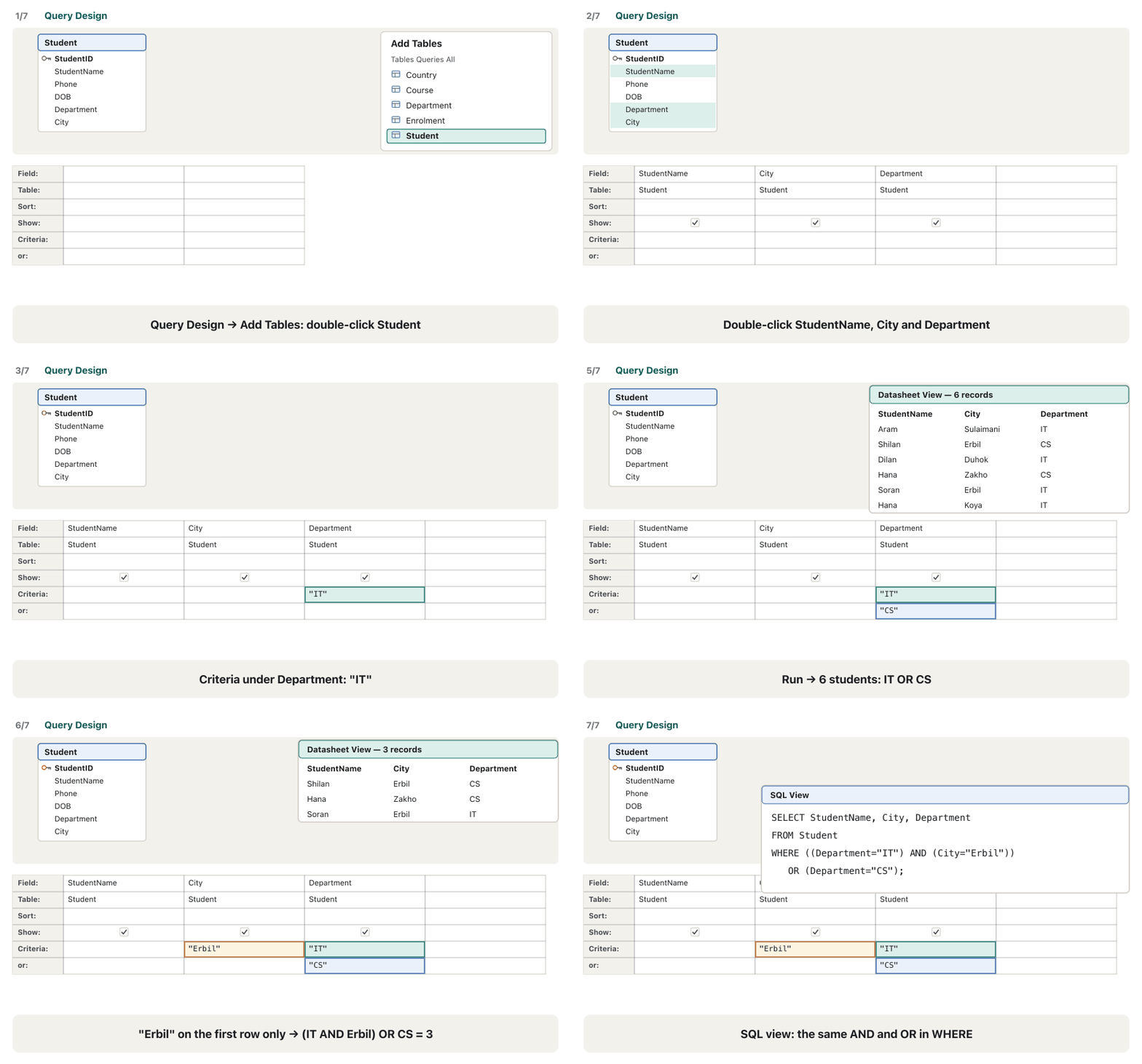
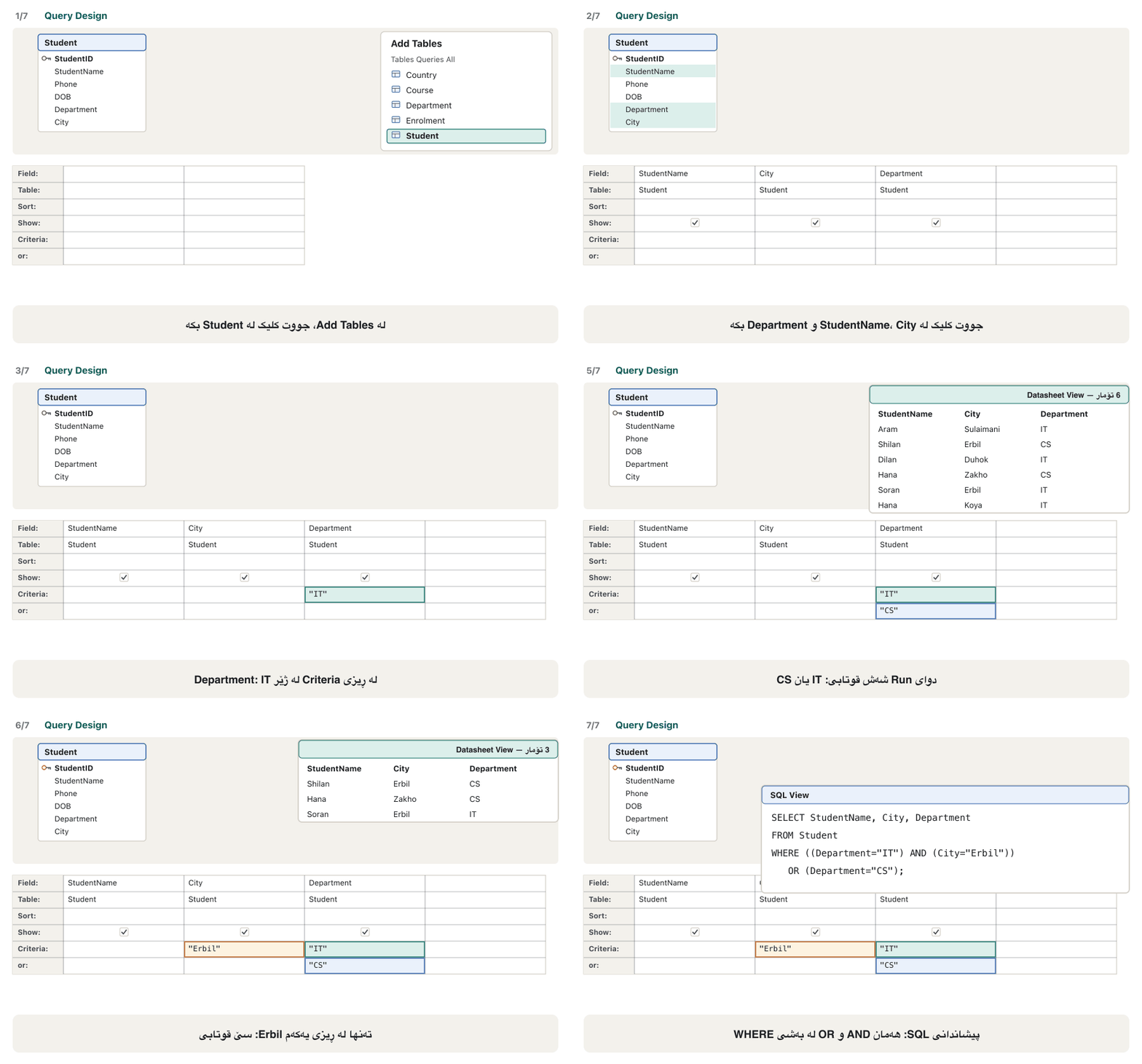
Several conditions combine by where you type them. Conditions on the same row must all be true (AND): Department "IT" and City "Erbil" on one row → only Soran. Conditions on different rows (Criteria, or, and the rows below) are alternatives (OR): "IT" on the Criteria row and "CS" on the or row → six students. Two choices for one field can also share a cell: "Erbil" Or "Duhok". Watch the AND and OR change the answer:
چەند بەپێی ئەو شوێنەی دەیاننووسیت پێکەوە دەبەسترێن. لە هەمان ڕیزدا هەموویان دەبێت ڕاست بن (AND): Department "IT" و City "Erbil" لە یەک ڕیزدا ← تەنها سۆران. لە ڕیزی جیاوازدا (Criteria، or و ڕیزەکانی خوارەوە) هەڵبژاردەی یەکترن (OR): "IT" لە ڕیزی Criteria و "CS" لە ڕیزی or ← شەش قوتابی. دوو هەڵبژاردە بۆ یەک دەتوانن یەک خانە بەکاربهێنن: "Erbil" Or "Duhok". سەیر بکە AND و OR چۆن وەڵامەکە دەگۆڕن:
Criteria: conditions in the gridمەرجەکان لە تۆڕی دیزایندا
Capital or small letters?پیتی گەورە یان بچووک؟
Patterns with Like, and empty valuesشێواز بە Like و نرخی بەتاڵ
Like compares text with a pattern made of . Type S* and Access writes Like "S*" for you. Access's own wildcards:
Like دەق لەگەڵ شێوازێک بەراورد دەکات کە لە دروست بووە. S* بنووسە و Access خۆی Like "S*" دەنووسێت. تایبەتی Access:
| Wildcard | Stands forجێی چی دەگرێتەوە | Criteria | Answer in our labوەڵام لە تاقیگەکەماندا |
|---|---|---|---|
* | any number of characters, also noneهەر ژمارەیەک ، تەنانەت هیچ | Like "S*" | Shilan, Soranشیلان، سۆران |
* | …at the start: ends with…لە سەرەتادا: بەم کۆتایی دێت | Like "*an" | Shilan, Karwan, Dilan, Soranشیلان، کاروان، دیلان، سۆران |
? | exactly one characterڕێک یەک | Like "?a*" | Karwan, Hana, Lana, Hana (second letter a)کاروان، هانا، لانا، هانا (پیتی دووەم a) |
# | exactly one digitڕێک یەک ژمارە | Like "IT##" | courses IT11, IT12وانەکانی IT11، IT12 |
[A-D] | one character from A to Dیەک لە A تا D | Like "[A-D]*" | Aram, Dilanئارام، دیلان |
[!A-D] | one character that is NOT from A to Dیەک کە لە A تا D نییە | Like "[!A-D]*" | the other 7 students7 قوتابییەکەی تر |
[*] | a real * (or ?, #) inside brackets*ـێکی ڕاستەقینە (یان ?، #) لە ناو کەوانەدا | Like "*[#]*" | text that contains a # signدەقێک کە نیشانەی #ـی تێدایە |
| Phone | the phone starts with +964 75ژمارەی تەلەفۆن بە +964 75 دەست پێدەکات | Like "+964 75*" | Aram, Karwan, Rezan, Soranئارام، کاروان، ڕێزان، سۆران |
Patterns with Like, and empty valuesشێواز بە Like و نرخی بەتاڵ
Access * ? or SQL % _* ?ـی Access یان % _ـی SQL
Patterns with Like, and empty valuesشێواز بە Like و نرخی بەتاڵ
Empty values: Is Nullنرخی بەتاڵ: Is Null
Empty values need their own test. Is Null finds a field with no value: Phone Is Null → Lana; Mark Is Null → Hana (9) in IT12, not graded yet. Is Not Null keeps the rest: ten marks. Never write = Null — nothing is ever equal to an unknown value, so it finds nothing. A Mark of 0 is a real mark, not Null. A zero-length text "" (we know there is none) is different from Null (we do not know) — see lesson 4; "" Or Is Null finds both. SQL's IS NULL works the same way (NULL in SQL).
نرخی بەتاڵ پشکنینی تایبەتی خۆی پێویستە. Is Null ئەو دەدۆزێتەوە کە هیچ نرخێکی نییە: Phone Is Null ← لانا؛ Mark Is Null ← هانا (9) لە IT12، هێشتا نمرەی پێ نەدراوە. Is Not Null ئەوانی تر دەهێڵێتەوە: دە نمرە. هەرگیز = Null مەنووسە — هیچ شتێک هەرگیز یەکسان نییە بە نرخێکی نەزانراو، بۆیە هیچ نادۆزێتەوە. Markـی 0 نمرەیەکی ڕاستەقینەیە، نەک . دەقی بێ درێژی "" (دەزانین نییە) جیاوازە لە (نازانین) — بڕوانە وانەی 4؛ "" Or Is Null هەردووکیان دەدۆزێتەوە. IS NULLـی SQL بە هەمان شێوە کار دەکات (NULL لە SQL).
Sort, hide and top valuesڕیزکردن، شاردنەوە و بەرزترین نرخەکان
- Sort row: choose Ascending or Descending under a field. With several sorted fields Access sorts by the leftmost first. To list students by Department and, inside each department, by name, put Department to the left of StudentName: Accounting — Rezan; Biology — Karwan, Lana; CS — Hana, Shilan; IT — Aram, Dilan, Hana, Soran.
- Show box: a field can sort or filter without appearing (Department above can be hidden once the order is right).
- Top values: Query Design → Query Setup → Return (shows All) can be set to 5, 25 or 5% … together with a sort. Sort Mark Descending and set Return to 3: Soran 95 (IT11), Shilan 91 (CS21), Dilan 88 (IT12). Rows that tie with the last one are shown too.
- Format in a query: click a column of the grid → Property Sheet → Format
#,##0 "IQD"or a Caption. It changes only how this query shows the field (formats). - A filter becomes a query: in a table, Home → Sort & Filter → Advanced → Advanced Filter/Sort opens a small design grid; Advanced → Save As Query keeps it as a query with a name.
- ڕیزی Sort: لە ژێر Ascending یان Descending هەڵبژێرە. کاتێک چەند ڕیز دەکرێن، Access سەرەتا بەپێی چەپترینیان ڕیز دەکات. بۆ لیستکردنی قوتابیان بەپێی Department و لە ناو هەر بەشێکدا بەپێی ناو، Department بخە لای چەپی StudentName: Accounting — ڕێزان؛ Biology — کاروان، لانا؛ CS — هانا، شیلان؛ IT — ئارام، دیلان، هانا، سۆران.
- Show: دەتوانێت ڕیز بکات یان بەبێ ئەوەی دەربکەوێت (Departmentـی سەرەوە دەتوانرێت بشاردرێتەوە کاتێک ڕیزبەندییەکە دروست بوو).
- بەرزترین نرخەکان: Query Design ← Query Setup ← Return (All پیشان دەدات) دەتوانرێت بکرێتە 5، 25 یان 5% … لەگەڵ . Mark بە Descending ڕیز بکە و Return بکە بە 3: سۆران 95 (IT11)، شیلان 91 (CS21)، دیلان 88 (IT12). ئەو ڕیزانەی لەگەڵ دوایین یەکسانن ئەوانیش پیشان دەدرێن.
- Format لە : لە ستوونێکی تۆڕەکە بکە ← Property Sheet ← Format
#,##0 "IQD"یان Caption. تەنها ئەوە دەگۆڕێت کە ئەم چۆن پیشان دەدات (Format). - دەبێتە : لە ، Home → Sort & Filter → Advanced ← Advanced Filter/Sort تۆڕێکی دیزاینی بچووک دەکاتەوە؛ Advanced ← Save As Query وەک بە ناوێکەوە هەڵیدەگرێت.
Calculated fields and the ageستوونە ژمێردراوەکان و تەمەن
A is a column that does not exist in any table: Access works it out from an every time the query runs. In an empty Field cell type a name, a colon and the expression — Name: expression. For a long expression press Shift+F2 (Zoom), or right-click → Build… to open the Expression Builder, which lists the fields, (such as Date() and Year()) and to click.
ستوونێکە کە لە هیچ نییە: Access هەر جارێک کار دەکات لە دەیژمێرێت. لە خانەیەکی بەتاڵی Fieldـدا ناوێک، دوو خاڵ (:) و بنووسە — Name: expression. بۆ درێژ Shift+F2 (Zoom) دابگرە، یان ڕاست ← Build… بۆ کردنەوەی Expression Builder کە ، (وەک Date() و Year()) و لیست دەکات بۆ ئەوەی لێ بکەیت.
AgeThisYear: Year(Date())-Year([DOB])On 24 October 2026: Aram 28 · Shilan 27 · Karwan 31 · Dilan 29 · Rezan 34 · Hana 26 · Soran 32 · Lana 30 · Hana 33
Explain the codeڕوونکردنەوەی کۆدەکە
- Lineدێڕی 1
Date()is today;Year()takes the year out of a date. for Aram.Date()ئەمڕۆیە؛Year()ساڵ لە ڕێکەوتێک دەردەهێنێت. بۆ ئارام.
Compare it with the stored Age of lesson 4: Shilan shows 27 but her stored Age is 26, and Lana shows 30 against 29. Their birthdays (2 November, 5 December) have not come yet this year. Year(Date())-Year([DOB]) is the age reached this year, not today's age. Today's exact age needs one more step: subtract 1 when the birthday is still to come.
بەراوردی بکە لەگەڵ Ageـی هەڵگیراوی وانەی 4: شیلان 27 پیشان دەدات بەڵام Ageـی هەڵگیراوی 26ـە و لانا 30 بەرامبەر 29. ڕۆژی لەدایکبوونیان (2ی نۆڤەمبەر، 5ی دیسەمبەر) هێشتا ئەمساڵ نەهاتووە. Year(Date())-Year([DOB]) ئەو تەمەنەیە کە ئەمساڵ پێی دەگات، نەک تەمەنی ئەمڕۆ. تەمەنی ڕێکی ئەمڕۆ هەنگاوێکی تری پێویستە: 1 لێ دەربکە ئەگەر ڕۆژی لەدایکبوون هێشتا نەهاتبێت.
Calculated fields and the ageستوونە ژمێردراوەکان و تەمەن
Today's exact age, and why we compute itتەمەنی ڕێکی ئەمڕۆ و بۆچی دەیژمێرین
The extra step fits in one expression. Put it next to AgeThisYear and compare the two columns:
هەنگاوە زیادەکە لە یەک جێی دەبێتەوە. لە تەنیشت AgeThisYear دایبنێ و دوو ستوونەکە بەراورد بکە:
AgeNow: DateDiff("yyyy",[DOB],Date()) + (Format([DOB],"mmdd")>Format(Date(),"mmdd"))On 24 October 2026: Aram 28 · Shilan 26 · Karwan 31 · Dilan 29 · Rezan 34 · Hana 26 · Soran 32 · Lana 29 · Hana 33
Explain the codeڕوونکردنەوەی کۆدەکە
- Lineدێڕی 1
DateDiff("yyyy",…)counts the change of years, like the first formula. The comparison compares month+day as text ("1102" > "1024" for Shilan). In Access a true comparison is and a false one 0, so 1 is taken away only when the birthday is still ahead.DateDiff("yyyy",…)گۆڕانی ساڵەکان دەژمێرێت، وەک یەکەم ڕێگا. بەراوردەکە مانگ و ڕۆژ وەک دەق بەراورد دەکات ("1102" > "1024" بۆ شیلان). لە Accessـدا بەراوردی ڕاست نرخی دەدات و هەڵە 0، بۆیە تەنها کاتێک 1 لادەبرێت کە ڕۆژی لەدایکبوون هێشتا لە پێشەوەیە.
Calculated fields and the ageستوونە ژمێردراوەکان و تەمەن
Prices and labelsنرخ و ناونیشان
A calculated field can also work on money and text. Two more from our lab:
دەتوانێت لەسەر پارە و دەقیش کار بکات. دوانی تر لە تاقیگەکەمانەوە:
| Calculated field | Result in our labئەنجام لە تاقیگەکەماندا |
|---|---|
FeeAfterDiscount: [FeeIQD]*0.9 | IT11 405,000 · IT12 270,000 · CS21 450,000 · BI11 360,000 · AC11 315,000 IQD |
Label: [StudentName] & " (" & [City] & ")" | Aram (Sulaimani), Shilan (Erbil), …Aram (Sulaimani)، Shilan (Erbil)، … |
Criteria work on stored and calculated columns alike, and may use arithmetic. Courses that cost at least 400,000 IQD: FeeIQD >=400000 → IT11, CS21, BI11. Courses that cost less than 400,000 IQD after the discount: <400000 under FeeAfterDiscount → IT12, BI11, AC11. (The Kurdish booklet in the sources does the same with salaries: employees earning 400,000 dinars or more.)
بە هەمان شێوە لەسەر ستوونی هەڵگیراو و ژمێردراو کار دەکەن و دەتوانن بەکاربهێنن. ئەو وانانەی لانیکەم 400,000 IQD تێدەچن: FeeIQD >=400000 ← IT11، CS21، BI11. ئەو وانانەی دوای داشکاندن کەمتر لە 400,000 IQD تێدەچن: <400000 لە ژێر FeeAfterDiscount ← IT12، BI11، AC11. (نامیلکە کوردییەکەی سەرچاوەکان هەمان شت بە مووچە دەکات: ئەو فەرمانبەرانەی 400,000 دینار یان زیاتر وەردەگرن.)
Calculated fields and the ageستوونە ژمێردراوەکان و تەمەن
More operators and date functionsکارپێکەرەکانی تر و کردارەکانی ڕێکەوت
Besides + - * / and & (the operator table), expressions in Access know a few more operators and many date functions:
جگە لە + - * / و & (خشتەی کارپێکەرەکان)، لە Accessـدا چەند تر و زۆر ڕێکەوت دەناسن:
| Operator or function یان | What it doesچی دەکات | Exampleنموونە | Resultئەنجام |
|---|---|---|---|
| \ | divides and drops the fractionدابەش دەکات و کەرتەکە فڕێ دەدات | [FeeIQD]\1000 (IT11) | 450 |
Mod | the remainder of a division دابەشکردن | [Mark] Mod 10 (Aram, IT11) | 8 |
^ | raises a number to a powerژمارەیەک بەرز دەکاتەوە بۆ | [Stage]^2 (CS21) | 4 |
Day() · Month() | the day · the month of a dateڕۆژ · مانگی ڕێکەوتێک | Month([EnrolDate]) (Hana, IT12) | 10 |
Weekday() | the day of the week: 1 = Sunday … 7 = Saturdayڕۆژی هەفتە: 1 = یەکشەممە … 7 = شەممە | Weekday(#2026-09-14#) | 2 (a Monday)2 (دووشەممە) |
#…# with a time#…# لەگەڵ کات | a time valueنرخی کات | #16:30# | 4:30 PM |
Parameter queries: ask each timeپرسەکانی پارامیتەر: هەر جارێک بپرسە
A asks for a value when it runs. Type a question in square brackets in the Criteria row: under City, [Which city?]. Save the query as qryStudentsInCity and run it: the Enter Parameter Value box shows Which city?; type Erbil → Shilan and Soran; type Koya → Hana (9). One query now answers every city.
کاتی کارکردن داوای نرخێک دەکات. پرسیارێک لە ناو کەوانەی چوارگۆشەدا لە ڕیزی Criteria بنووسە: لە ژێر City، [Which city?]. وەک qryStudentsInCity پاشەکەوت بکە و کاری پێبکە: سندووقی Enter Parameter Value Which city? پیشان دەدات؛ Erbil بنووسە ← شیلان و سۆران؛ Koya بنووسە ← هانا (9). ئێستا یەک وەڵامی هەموو شارێک دەداتەوە.
| Criteria | Underلە ژێر | You typeدەنووسیت | Answerوەڵام |
|---|---|---|---|
[Student number?] | StudentID | 4 | Dilanدیلان |
Like [First letters?] & "*" | StudentName | Ha | Hana (6), Hana (9) — leave it empty to get everyoneهانا (6)، هانا (9) — بەتاڵی بهێڵەوە بۆ هەمووان |
Between [From date?] And [To date?] | EnrolDate | 14/09/2026 · 16/09/2026 | enrolments 1–5تۆمارکردنەکانی 1–5 |
<=[Highest fee?] | FeeIQD (with Stage 1)FeeIQD (لەگەڵ Stage 1) | 400000 | IT12, BI11, AC11IT12، BI11، AC11 |
Kurdish: a parameter query that asks for a start and end date each time it runs, using Between [Start Date] And [End Date].
بە کوردی: کە هەر جارێک کار دەکات بەرواری دەستپێک و کۆتایی دەپرسێت، بە Between [Start Date] And [End Date].
Kurdish (Sorani), plays 10:20 to the end: prompts in square brackets in the Criteria row and the Enter Parameter Value box asking for dates. The first part (calculated fields) is skipped.
بە کوردیی سۆرانی، لە 10:20 تا کۆتایی پەخش دەبێت: پرسیار لەناو کەوانەی چوارگۆشە لە ڕیزی Criteria و Enter Parameter Value کە بەروار دەپرسێت. بەشی یەکەم () پەخش ناکرێت.
Parameter queries: ask each timeپرسەکانی پارامیتەر: هەر جارێک بپرسە
Prompts, data types and safe valuesپرسیار، جۆری دراوە و نرخی سەلامەت
- The prompt text must not contain a full stop
.or!, and must not be the name of a field —[City]would quietly use the City field instead of asking. - Query Design → Show/Hide → Parameters opens the Query Parameters dialog: type each prompt exactly as in the Criteria row and choose its Data Type (Date/Time for the two dates, Currency for the fee). A wrong answer such as yesterday then gets a clear message instead of a strange result.
- Dates are typed the way Windows shows them (14/09/2026 with a day/month/year setting); only
#…#dates written inside an expression are read month/day/year.
- دەقی پرسیارەکە نابێت خاڵ
.یان!ـی تێدا بێت و نابێت ناوی بێت —[City]بە بێدەنگی City بەکاردەهێنێت لە جیاتی پرسیار. - Query Design ← Show/Hide ← Parameters Query Parameters دەکاتەوە: هەر پرسیارێک ڕێک وەک ڕیزی Criteria بنووسە و Data Typeـەکەی هەڵبژێرە (Date/Time بۆ دوو ڕێکەوتەکە، Currency بۆ کرێ). ئینجا وەڵامێکی هەڵە وەک دوێنێ پەیامێکی ڕوون وەردەگرێت لە جیاتی ئەنجامێکی سەیر.
- ڕێکەوت بەو شێوەیە دەنووسرێت کە Windows پیشانی دەدات (14/09/2026 بە ڕێکخستنی ڕۆژ/مانگ/ساڵ)؛ تەنها ڕێکەوتی
#…#کە لە ناو نووسراوە وەک مانگ/ڕۆژ/ساڵ دەخوێندرێتەوە.
The answer you type is used only as a value, never as part of the query's design. That is the same safe "value slot" a prepared statement gives a web program. A form can supply the values too, so a user picks the dates on a screen before a report opens (forms).
ئەو وەڵامەی دەینووسیت تەنها وەک نرخ بەکاردێت، هەرگیز وەک بەشێک لە دیزاینی نا. ئەوە هەمان «شوێنی نرخ»ـی سەلامەتە کە ڕستەی ئامادەکراو بە وێب دەدات. دەتوانێت نرخەکان بدات، بۆ ئەوەی پێش کردنەوەی ڕێکەوتەکان لەسەر شاشەیەک هەڵبژێرێت (فۆرمەکان).
Totals queries: one answer per groupپرسەکانی کۆکردنەوە: بۆ هەر گرووپێک یەک وەڵام
The Total row of a datasheet (lesson 2) gives one answer for a whole column. A gives one answer per group. In Design view click Query Design → Show/Hide → Totals (Σ): a Total row appears, set to Group By. Leave Group By under the fields that form the groups and choose a under the field to summarise:
ڕیزی Totalـی (وانەی 2) یەک وەڵام بۆ هەموو ستوونێک دەدات. یەک وەڵام بۆ هەر گرووپێک دەدات. لە لە Query Design ← Show/Hide ← Totals (Σ) بکە: ڕیزی Total دەردەکەوێت، لەسەر Group By. Group By لە ژێر ئەو بهێڵەوە کە گرووپەکان دروست دەکەن و لە ژێر دەتەوێت کورتی بکەیتەوە هەڵبژێرە:
| Function | Givesدەدات | Field typesجۆری |
|---|---|---|
| Sum | the totalکۆی گشتی | Number, CurrencyNumber، Currency |
| Avg | the averageتێکڕا | Number, Currency, Date/TimeNumber، Currency، Date/Time |
| Min · Max | the smallest · largest (A–Z for text)بچووکترین · گەورەترین (A–Z بۆ دەق) | Number, Currency, Date/Time, Short TextNumber، Currency، Date/Time، Short Text |
| Count | how many values — empty (Null) values are not countedچەند نرخ — نرخی بەتاڵ (Null) ناژمێردرێت | every typeهەموو جۆرێک |
| StDev · Var | standard deviation · variance · | Number, CurrencyNumber، Currency |
| First · Last | the value from the first · last record Access reads — not the smallest or largestنرخی یەکەم · دوایین کە Access دەیخوێنێتەوە — نەک بچووکترین یان گەورەترین | every typeهەموو جۆرێک |
| Expression · Where | a calculation made of other totals · a condition applied before groupingژماردنێک لە ئەنجامی تر · کە پێش گرووپکردن جێبەجێ دەکرێت | — |
Totals queries: one answer per groupپرسەکانی کۆکردنەوە: بۆ هەر گرووپێک یەک وەڵام
Average and count per courseتێکڕا و ژمارە بۆ هەر وانەیەک
qryMarksByCourse: add Course and Enrolment; put CourseCode and Title (Group By), then Mark twice — once with Avg, once with Count. Access names the columns AvgOfMark and CountOfMark:
qryMarksByCourse: Course و Enrolment زیاد بکە؛ CourseCode و Title (Group By) دابنێ، پاشان Mark دوو جار — جارێک بە Avg، جارێک بە Count. Access ناوی ستوونەکان دەنێت AvgOfMark و CountOfMark:
| CourseCode | Title | AvgOfMark | CountOfMark |
|---|---|---|---|
| BI11 | Cell Biology | 76.5 | 2 |
| CS21 | Python Programming | 69 | 2 |
| IT11 | Database Fundamentals | 74.5 | 4 |
| IT12 | Access Lab | 86.5 | 2 |
Totals queries: one answer per groupپرسەکانی کۆکردنەوە: بۆ هەر گرووپێک یەک وەڵام
Conditions before and after groupingمەرجەکان پێش و دوای گرووپکردن
- Students per department: Department (Group By) and StudentID (Count) → Accounting 1, Biology 2, CS 2, IT 4.
- A condition on a total —
>=75in the Criteria row under AvgOfMark — removes whole groups after grouping: only BI11 (76.5) and IT12 (86.5) stay. SQL calls itHAVING. - Where — add Mark once more, choose Where in the Total row and
>=50as criteria — removes records before grouping: CS21's average becomes 91, because Hana's 47 is left out. SQL calls itWHERE. The SQL side is taught in aggregate functions, HAVING and filter before or after grouping?.
- قوتابیانی هەر بەشێک: Department (Group By) و StudentID (Count) ← Accounting 1، Biology 2، CS 2، IT 4.
- لەسەر ئەنجامێک —
>=75لە ڕیزی Criteria لە ژێر AvgOfMark — گرووپـی تەواو دوای گرووپکردن لادەبات: تەنها BI11 (76.5) و IT12 (86.5) دەمێننەوە. SQL ناوی دەنێتHAVING. - Where — Mark جارێکی تر زیاد بکە، لە ڕیزی Total Where و وەک
>=50هەڵبژێرە — پێش گرووپکردن لادەبات: تێکڕای CS21 دەبێتە 91، چونکە 47ـی هانا دەرچووە. SQL ناوی دەنێتWHERE. لایەنی SQL لە کردارەکانی کۆکردنەوە، HAVING و پێش یان دوای گرووپکردن؟ دەخوێنرێت.
Crosstab queries: a grid of totalsپرسەکانی Crosstab: تۆڕێکی ئەنجام
A turns a list into a grid, like a PivotTable in Excel: the values of one field run down the side (row headings), the values of another run across the top (column headings), and each cell holds a count, sum or average. Our question: how many students does each department have from each country?
لیستێک دەکات بە تۆڕێک، وەک PivotTable لە Excel: نرخەکانی بە درێژایی لای چەپ دێن (سەردێڕی ڕیز)، نرخەکانی تر بە پانایی سەرەوە (سەردێڕی ستوون) و هەر خانەیەک ژمارە، کۆ یان تێکڕایەک هەڵدەگرێت. پرسیارەکەمان: هەر بەشێک چەند قوتابیی لە هەر وڵاتێک هەیە؟
The Crosstab Query Wizard reads one table or query. Department is in Student and CountryName in Country, so use the query
qryStudentCountryfrom the wizard screen above.Crosstab Query Wizard تەنها یەک یان دەخوێنێتەوە. Department لە Student و CountryName لە Countryـدایە، بۆیە
qryStudentCountryلە شاشەی سەرەوە بەکاربهێنە.Create → Query Wizard → Crosstab Query Wizard → View: Queries →
qryStudentCountry.Create ← Query Wizard ← Crosstab Query Wizard بکەرەوە، لە View Queries و پاشان
qryStudentCountryهەڵبژێرە.Row headings: Department (up to three fields). Column headings: CountryName (one field). Value: StudentName with Count (one field). Keep Yes, include row sums.
سەردێڕی ڕیز: Department (تا سێ ). سەردێڕی ستوون: CountryName (یەک ). نرخ: StudentName بە Count (یەک ). Yes, include row sums بهێڵەوە.
Name it
qryDeptByCountry→ Finish.ناوی بنێ
qryDeptByCountry← Finish.
Kurdish: the Crosstab Query Wizard step by step - row headings, column headings and a Sum, giving a grid of totals per city and job.
بە کوردی: Crosstab Query Wizard هەنگاو بە هەنگاو: سەردێڕی ، سەردێڕی و Sum، کە تۆڕی کۆی گشتی بەپێی شار و کار دەدات.
Kurdish (Sorani), whole video (7:01): Create > Query Wizard > Crosstab Query Wizard; the result shows salary totals with cities as rows and jobs as columns.
بە کوردیی سۆرانی، هەموو ڤیدیۆکە (7:01): Create، پاشان Query Wizard، پاشان Crosstab Query Wizard؛ لە کۆتاییدا کۆی مووچە پیشان دەدرێت، شارەکان وەک و کارەکان وەک .
Crosstab queries: a grid of totalsپرسەکانی Crosstab: تۆڕێکی ئەنجام
Reading the crosstabخوێندنەوەی ئەنجامی Crosstab
| Department | Total Of StudentName | Iran | Iraq | Syria | Türkiye |
|---|---|---|---|---|---|
| Accounting | 1 | 1 | |||
| Biology | 2 | 1 | 1 | ||
| CS | 2 | 1 | 1 | ||
| IT | 4 | 3 | 1 |
- If the column field is a Date/Time, the wizard offers to group it by Year, Quarter, Month or Date — for example enrolments per month.
- In Design view you can build the same query from several tables: Query Design → Query Type → Crosstab, then set the new Crosstab row to Row Heading, Column Heading or Value (with Count in the Total row).
- Its SQL is Access-only:
TRANSFORM Count(StudentName) … PIVOT CountryName(see the SQL view screen).
- ئەگەر سەردێڕی ستوون Date/Time بێت، پێشنیاری گرووپکردنی بەپێی Year، Quarter، Month یان Date دەکات — بۆ نموونە تۆمارکردن بۆ هەر مانگێک.
- لە دەتوانیت هەمان لە چەند دروست بکەیت: Query Design ← Query Type ← Crosstab، پاشان ڕیزی نوێی Crosstab بکە بە Row Heading، Column Heading یان Value (لەگەڵ Count لە ڕیزی Total).
- SQLـەکەی تەنها هی Accessـە:
TRANSFORM Count(StudentName) … PIVOT CountryName(بڕوانە شاشەی SQL View).
Two wizards that find problemsدوو یاریدەدەر کە کێشە دەدۆزنەوە
Find Duplicates Query Wizard — rows that share a value. Choose Student, the field StudentName, then the extra fields StudentID, Phone and City; name it qryDuplicateNames. Answer: Hana 6 (+964 772 000-1006, Zakho) and Hana 9 (+964 773 000-1009, Koya). Different phones, cities and birthdays: two people with one name. This is why a name is never a primary key (lesson 2). Behind the wizard is SQL's GROUP BY StudentName HAVING Count(*)>1 (GROUP BY and HAVING in SQL).
Find Duplicates Query Wizard — ئەو ڕیزانەی نرخێکی هاوبەشیان هەیە. Student، StudentName و پاشان زیادەی StudentID، Phone و City هەڵبژێرە؛ ناوی بنێ qryDuplicateNames. وەڵام: هانا 6 (+964 772 000-1006، Zakho) و هانا 9 (+964 773 000-1009، Koya). ژمارەی تەلەفۆن، شار و ڕۆژی لەدایکبوونی جیاواز: دوو کەس بە یەک ناو. بۆیە ناو هەرگیز نییە (وانەی 2). لە پشت GROUP BY StudentName HAVING Count(*)>1ـی SQL هەیە (GROUP BY و HAVING لە SQL).
Find Unmatched Query Wizard — rows that have no partner in a related table. Choose Student (the records you want), then Enrolment (the related table), match StudentID ⇔ StudentID, show StudentID and StudentName, and name it qryStudentsWithoutCourses. Answer: Rezan — he is not enrolled in any course. The same wizard finds Germany (Country with no Student) and AC11 (Course with no Enrolment).
Find Unmatched Query Wizard — ئەو ڕیزانەی لە پەیوەندیداردا هاوتایان نییە. Student هەڵبژێرە (ئەو دەتەوێت)، پاشان Enrolment ( پەیوەندیدار)، StudentID ⇔ StudentID بەیەکەوە ببەستە، StudentID و StudentName پیشان بدە و ناوی بنێ qryStudentsWithoutCourses. وەڵام: ڕێزان — لە هیچ وانەیەکدا تۆمار نەکراوە. هەمان Germany (Country بەبێ Student) و AC11 (Course بەبێ Enrolment) دەدۆزێتەوە.
SELECT Student.StudentID, Student.StudentName
FROM Student LEFT JOIN Enrolment
  ON Student.StudentID = Enrolment.StudentID
WHERE Enrolment.StudentID Is Null;StudentID StudentName 5 Rezan
Explain the codeڕوونکردنەوەی کۆدەکە
- Lineدێڕی 2-3
LEFT JOINkeeps every student, also those with no enrolment — an outer join.LEFT JOINهەموو قوتابییەک دەهێڵێتەوە، ئەوانەش کە هیچ تۆمارکردنێکیان نییە — لێکبەستنی دەرەکی.- Lineدێڕی 4
For a student without a partner the Enrolment columns are empty, so
Is Nullkeeps exactly those students.بۆ قوتابییەک کە هاوتای نییە ستوونەکانی Enrolment بەتاڵن، بۆیە
Is Nullڕێک ئەو قوتابیانە دەهێڵێتەوە.
Action queries — on a copy firstپرسەکانی گۆڕانکاری — سەرەتا لەسەر کۆپییەک
Action queries — on a copy firstپرسەکانی گۆڕانکاری — سەرەتا لەسەر کۆپییەک
The four action queriesچوار جۆرەکەی پرسی گۆڕانکاری
Turn a select query into an action query with Query Design → Query Type. Our four, on a copy of University.accdb:
Select بە Query Design ← Query Type بکە بە . چوارەکەمان، لەسەر کۆپییەکی University.accdb:
| Typeجۆر | What it doesچی دەکات | Our exampleنموونەکەمان | Resultئەنجام |
|---|---|---|---|
| Make Table | saves the answer as a new table (a table with the same name is replaced)وەڵامەکە وەک نوێ پاشەکەوت دەکات ( بە هەمان ناو جێگەی دەگیرێتەوە) | Enrolment + Course, criteria DeptCode "IT" → table EnrolArchiveEnrolment + Course، DeptCode "IT" ← EnrolArchive | 7 rows7 ڕیز |
| Append | adds the answer's rows to an existing tableڕیزەکانی وەڵامەکە بۆ هەبوو زیاد دەکات | the same with "CS", Append To EnrolArchiveهەمان شت بە "CS"، Append To EnrolArchive | +2 rows → 9+2 ڕیز ← 9 |
| Update | changes values in the matching records (Update To row)نرخەکان لە هاوتادا دەگۆڕێت (ڕیزی Update To) | Course: FeeIQD Update To [FeeIQD]*1.1 | 5 rows: 495,000 · 330,000 · 550,000 · 440,000 · 385,000 (sum 2,200,000)5 ڕیز: 495,000 · 330,000 · 550,000 · 440,000 · 385,000 (کۆ 2,200,000) |
| Delete | deletes the matching records هاوتا دەسڕێتەوە | EnrolArchive, Mark Is NullEnrolArchive، Mark Is Null | 1 row (Hana's ungraded IT12)1 ڕیز (IT12ـی هانا بەبێ نمرە) |
Action queries — on a copy firstپرسەکانی گۆڕانکاری — سەرەتا لەسەر کۆپییەک
Run once, trust first — and a subqueryیەک جار Run، سەرەتا متمانە — و ژێرپرسێک
- Run an update twice and you add 10% twice (21% in total). After Run, close the query and check the table.
- Double-clicking an action query in the Navigation Pane runs it (its icon has a !). Open it with right-click → Design View to look at it.
- In a database you have not trusted, Access blocks action queries; the status bar says This action or event has been blocked by Disabled Mode. Click Enable Content on the Message Bar first — why, in lesson 8.
- ئەگەر Update دوو جار Run بکەیت، دوو جار 10% زیاد دەکەیت (کۆی 21%). دوای Run، دابخە و بپشکنە.
- لە لە کاری پێدەکات (ئایکۆنەکەی !ـی هەیە). بۆ سەیرکردنی، بە ڕاست ← Design View بیکەرەوە.
- لە کە متمانەت پێ نەکردووە، Access ڕادەگرێت؛ دەڵێت This action or event has been blocked by Disabled Mode. سەرەتا لە Enable Content لەسەر Message Bar بکە — بۆچی، لە وانەی 8.
One more criteria trick from the same toolbox — a subquery, a whole query inside a criterion. Marks above the average of all marks: under Mark type >(SELECT Avg(Mark) FROM Enrolment). The average is 76.2, so six rows stay: 78, 85, 91, 88, 95, 81. The SQL behind each action query is in INSERT, UPDATE and DELETE.
فێڵێکی تری لە هەمان سندووقی ئامرازەوە — ، تەواو لە ناو . نمرەکانی سەرووی تێکڕای هەموو نمرەکان: لە ژێر Mark بنووسە >(SELECT Avg(Mark) FROM Enrolment). تێکڕاکە 76.2ـە، بۆیە شەش ڕیز دەمێننەوە: 78، 85، 91، 88، 95، 81. SQLـی هەر لە INSERT، UPDATE و DELETEـدایە.
SQL view: the query behind the gridSQL View: پرسەکە لە پشت تۆڕەکەوە
The design grid is the query tool a database program gives people who do not write code: you tick the columns and type the conditions, and the program writes the query (query by example). In Access that query is SQL. Open any query and choose Home → View → SQL View. Our IT students in Duhok or Erbil:
تۆڕی دیزاین ئەو ئامرازی ـیە کە دەیدات بەو کەسانەی کۆد نانووسن: ستوونەکان نیشان دەکەیت و دەنووسیت و دەنووسێت (query by example). لە Accessـدا ئەو SQLـە. هەر بکەرەوە و Home → View ← SQL View هەڵبژێرە. قوتابیانی IT لە Duhok یان Erbilـمان:
SELECT Student.StudentName, Student.City, Department.DeptName
FROM Department INNER JOIN Student
  ON Department.DeptCode = Student.Department
WHERE (((Student.City)="Duhok") AND ((Student.Department)="IT"))
   OR (((Student.City)="Erbil") AND ((Student.Department)="IT"))
ORDER BY Student.StudentName;StudentName City DeptName Dilan Duhok Information Technology Soran Erbil Information Technology
Explain the codeڕوونکردنەوەی کۆدەکە
- Lineدێڕی 1
The fields with Show ticked — projection.
ئەو Showـیان نیشانکراوە — دەرهێنانی ستوون.
- Lineدێڕی 2-3
The relationship line became an
INNER JOIN(joins).هێڵی بووە بە
INNER JOIN(لێکبەستنەکان).- Lineدێڕی 4-5
Each grid row became one bracket group; the rows are joined with OR — the criteria are a selection. Department is in WHERE but not in SELECT, because its Show box is cleared.
هەر ڕیزێکی تۆڕەکە بووە بە یەک گرووپی کەوانە؛ ڕیزەکان بە OR بەستراون — هەڵبژاردنـن. Department لە WHEREـدایە بەڵام لە SELECTـدا نییە، چونکە Showـەکەی لابراوە.
SQL view: the query behind the gridSQL View: پرسەکە لە پشت تۆڕەکەوە
Access-only SQL and standard SQLSQLـی تایبەتی Access و SQLـی ستاندارد
The totals query looks like this in SQL view. Most of it is standard SQL; a few parts are Access's own:
لە SQL Viewـدا بەم شێوەیەیە. زۆربەی SQLـی ستانداردە؛ چەند بەشێکی تایبەتی Accessـە:
SELECT Enrolment.CourseCode, Course.Title,
       Avg(Enrolment.Mark) AS AvgOfMark, Count(Enrolment.Mark) AS CountOfMark
FROM Course INNER JOIN Enrolment ON Course.CourseCode = Enrolment.CourseCode
GROUP BY Enrolment.CourseCode, Course.Title;CourseCode Title AvgOfMark CountOfMark BI11 Cell Biology 76.5 2 CS21 Python Programming 69 2 IT11 Database Fundamentals 74.5 4 IT12 Access Lab 86.5 2
| In Access SQLلە SQLـی Access | In MySQL and most SQL databasesلە MySQL و زۆربەی SQL |
|---|---|
[Student Name] | `Student Name` (MySQL) — or better, no spaces in names`Student Name` (MySQL) — یان باشتر، ناو بەبێ بۆشایی |
#2026-09-14# | '2026-09-14' |
Like "S*" | LIKE 'S%' |
True is True یەکسانە بە | TRUE is 1 in MySQLTRUE لە MySQLـدا 1ـە |
make-table: SELECT … INTO EnrolArchive FROM …بۆ Make Table: SELECT … INTO EnrolArchive FROM … | CREATE TABLE EnrolArchive AS SELECT … (MySQL)CREATE TABLE EnrolArchive AS SELECT … (MySQL) |
crosstab: TRANSFORM Count(…) SELECT … PIVOT CountryNameبۆ Crosstab: TRANSFORM Count(…) SELECT … PIVOT CountryName | no such statement (GROUP BY with conditional counts)فەرمانێکی وا نییە (GROUP BY لەگەڵ ژماردنی مەرجدار) |
append, update, delete: INSERT INTO … SELECT, UPDATE … SET, DELETE FROMAppend، Update، Delete: INSERT INTO … SELECT، UPDATE … SET، DELETE FROM | the same statementsهەمان فەرمانەکان |
You can also type SQL in SQL view and switch back to Design view: Access redraws the grid. This course stops here — SQL itself is taught in SELECT, in Better SELECT queries and SQL functions, aggregates and GROUP BY — including the order in which SQL reads a SELECT — and as relational algebra in from algebra to SQL.
دەتوانیت SQL لە SQL View بنووسیت و بگەڕێیتەوە بۆ : Access تۆڕەکە دووبارە دەکێشێتەوە. ئەم کۆرسە لێرە دەوەستێت — SQL خۆی لە SELECT، لە Better SELECT queries و SQL functions, aggregates and GROUP BY — لەوانە ڕیزبەندیی خوێندنەوەی SELECT لە SQLـدا — و وەک جەبری پەیوەندی لە لە جەبرەوە بۆ SQL دەخوێنرێت.
Practiceڕاهێنان
Build a query on Student, Enrolment and Course that shows StudentName, Title and Mark, sorted by Title and, inside each course, by Mark from high to low. How many rows do you get, and why is one mark empty?
لەسەر Student، Enrolment و Course دروست بکە کە StudentName، Title و Mark پیشان بدات، بەپێی Title و لە ناو هەر وانەیەکدا بەپێی Mark لە بەرزەوە بۆ نزم ڕیز کرابێت. چەند ڕیز وەردەگریت و بۆچی نمرەیەک بەتاڵە؟
Show answerوەڵامەکە پیشان بدە
Add the three tables (the two lines of lesson 5 join them). Sort: Title Ascending, Mark Descending — Title must be left of Mark. Eleven rows, one per enrolment; Hana's IT12 mark is Null (not graded yet), and an empty value sorts last when sorting from high to low.
سێ زیاد بکە (دوو هێڵەکەی وانەی 5 دەیانبەستنەوە). Sort: Title Ascending، Mark Descending — Title دەبێت لای چەپی Mark بێت. یازدە ڕیز، بۆ هەر تۆمارکردنێک یەک؛ نمرەی IT12ـی هانا Nullـە (هێشتا نمرەی پێ نەدراوە) و نرخی بەتاڵ لە ڕیزکردنی بەرز بۆ نزمدا دەچێتە کۆتایی.
| Title | StudentName | Mark |
|---|---|---|
| Access Lab | Dilan | 88 |
| Access Lab | Aram | 85 |
| Access Lab | Hana | |
| Cell Biology | Lana | 81 |
| Cell Biology | Karwan | 72 |
| Database Fundamentals | Soran | 95 |
| Database Fundamentals | Aram | 78 |
| Database Fundamentals | Shilan | 66 |
| Database Fundamentals | Dilan | 59 |
| Python Programming | Shilan | 91 |
| Python Programming | Hana | 47 |
Make a parameter query that asks Student number? and shows that student's courses: CourseCode, Title, EnrolDate and Mark. What does it show for 1?
دروست بکە کە بپرسێت Student number? و وانەکانی ئەو قوتابییە پیشان بدات: CourseCode، Title، EnrolDate و Mark. بۆ 1 چی پیشان دەدات؟
Show answerوەڵامەکە پیشان بدە
Enrolment + Course; fields StudentID (Show cleared, Criteria [Student number?]), CourseCode, Title, EnrolDate, Mark. For 1 (Aram): IT11 Database Fundamentals 2026-09-14 78, and IT12 Access Lab 2026-09-14 85.
Enrolment + Course؛ StudentID (Show لابراو، Criteria [Student number?])، CourseCode، Title، EnrolDate، Mark. بۆ 1 (ئارام): IT11 Database Fundamentals 2026-09-14 78 و IT12 Access Lab 2026-09-14 85.
Open qryStudentContacts in Design view. Add Department with the criterion "IT" (not shown) and run it. Then change it to list the IT courses that cost at least 400,000 IQD instead (a new query on Course).
qryStudentContacts لە بکەرەوە. Department بە «IT» (پیشان نەدراو) زیاد بکە و کاری پێبکە. پاشان نوێ لەسەر Course دروست بکە کە ئەو وانانەی IT لیست بکات کە لانیکەم 400,000 IQD تێدەچن.
Show answerوەڵامەکە پیشان بدە
- Four IT students: Aram, Dilan, Soran, Hana (9) — with name, phone and city only.
- Course query: DeptCode
"IT"and FeeIQD>=400000on the same row → only IT11 Database Fundamentals (IT12 costs 300,000).
- چوار قوتابیی IT: ئارام، دیلان، سۆران، هانا (9) — تەنها بە ناو، ژمارەی تەلەفۆن و شار.
- Course: DeptCode
"IT"و FeeIQD>=400000لە هەمان ڕیزدا ← تەنها IT11 Database Fundamentals (IT12 300,000 تێدەچێت).
On a copy of the lab, type a new Enrolment row for Rezan (StudentID 5, AC11, Mark empty). Run qryStudentsWithoutCourses again. Then try to type a row with StudentID 12. What happens each time?
لەسەر کۆپییەکی تاقیگە، ڕیزێکی نوێی Enrolment بۆ ڕێزان بنووسە (StudentID 5، AC11، Mark بەتاڵ). دووبارە کار بە qryStudentsWithoutCourses بکە. پاشان هەوڵ بدە ڕیزێک بە StudentID 12 بنووسیت. هەر جارێک چی ڕوو دەدات؟
Show answerوەڵامەکە پیشان بدە
- EnrolmentID is filled in by AutoNumber and EnrolDate by its default
=Date(). The query now returns no rows: every student has an enrolment. Nothing in the query was changed — it ran again on new data. - StudentID 12 is refused: referential integrity requires a student 12 (lesson 5).
- Delete Rezan's test row again so your lab matches the next lessons.
- EnrolmentID بە AutoNumber و EnrolDate بە
=Date()پڕ دەکرێنەوە. ئێستا هیچ ڕیزێک ناگەڕێنێتەوە: هەموو قوتابییەک تۆمارکردنی هەیە. هیچ شتێک لە نەگۆڕا — تەنها دووبارە لەسەر نوێ کاری کرد. - StudentID 12 ڕەت دەکرێتەوە: پێویستی بە قوتابیی 12 هەیە (وانەی 5).
- ڕیزە تاقیکارییەکەی ڕێزان دووبارە بسڕەوە بۆ ئەوەی تاقیگەکەت لەگەڵ وانەکانی داهاتوو بگونجێت.
Answer with a totals query on Student, then list the married students with a select query.
بە لەسەر Student وەڵام بدەرەوە، پاشان قوتابییە خێزاندارەکان بە Select لیست بکە.
Show answerوەڵامەکە پیشان بدە
Totals: Married (Group By) and StudentID (Count) → No 6, Yes 3. Select: Married with the criterion Yes → Karwan, Rezan, Hana (9).
Totals: Married (Group By) و StudentID (Count) ← No 6، Yes 3. Select: Married بە Yes ← کاروان، ڕێزان، هانا (9).
Lab: the IT practical exam in Accessتاقیگە: تاقیکردنەوەی پراکتیکیی IT لە Access
An old IT practical exam asked for one table, employees, with five employees, and four tasks, all done in Microsoft Access. The table and the same tasks in SQL are in Lab: tasks from a practical exam. Build the table in a new database in Access (the same field names; Short Text for the text fields, Number for age and basic_salary) and solve the tasks with Access tools instead of SQL.
تاقیکردنەوەیەکی پراکتیکیی کۆنی IT داوای یەک ، employees، بە پێنج فەرمانبەر و چوار ئەرکی کرد و هەمووی لە Microsoft Access ئەنجام درا. و هەمان ئەرکەکان بە SQL لە تاقیگە: ئەرکەکانی تاقیکردنەوەیەکی پراکتیکیدان. لە نوێدا لە Access دروست بکە (هەمان ناوی ؛ Short Text بۆ دەقەکان و Number بۆ age و basic_salary) و ئەرکەکان بە ئامرازەکانی Access چارەسەر بکە، نەک بە SQL.
(a) Make sure that no field can be left empty, and prove that it works. (b) List who lives in sul; also list who earns 825 and works in IT. (c) Give a 20 % raise to every employee whose basic salary is below 600. (d) Change every address sul to Sulaymaniyah.
(أ) دڵنیا بەرەوە کە هیچ بەتاڵ ناهێڵرێتەوە و بیسەلمێنە کە کار دەکات. (ب) ئەوانە لیست بکە کە لە sul دەژین؛ هەروەها ئەوانەی 825 وەردەگرن و لە IT کار دەکەن. (ج) مووچەی هەموو فەرمانبەرێک کە مووچەی بنەڕەتیی لە 600 کەمترە 20% زیاد بکە. (د) هەموو ناونیشانێکی sul بگۆڕە بۆ Sulaymaniyah.
Hintئاماژە
(c) and (d) change data: use update queries, and run them on a copy of the database.
(ج) و (د) دەگۆڕن: Update بەکاربهێنە و لەسەر کۆپییەکی کاریان پێبکە.
Show answerوەڵامەکە پیشان بدە
- (a) In Design view set Required = Yes on every field and Allow Zero Length = No on the Short Text fields (Required, Allow Zero Length and Indexed). Test: type a new record without a department and try to leave it. Access does not save it until department has a value, like
NOT NULLin the SQL lab. - (b) Two select queries on employees. Criteria
"sul"under address → Soran, Karwan and Shilan. Criteria825under basic_salary and"IT"under department on the same row (AND) → Shilan. - (c) An update query: field basic_salary, Update To
[basic_salary]*1.2, Criteria<600. Look at Datasheet view first: it shows the 2 rows that will change. After Run, Hana's 560 is 672 and Karwan's 400 is 480. - (d) An update query: field address, Update To
"Sulaymaniyah", Criteria"sul"→ 3 rows (Soran, Karwan, Shilan). Access compares text without caring about capital letters, soSulorSULwould change too (Capital or small letters?). After this, the first query of (b) finds nobody.
- (أ) لە Required = Yes بۆ هەموو و Allow Zero Length = No بۆ Short Text دابنێ (Required، Allow Zero Length و Indexed). تاقیکردنەوە: نوێ بەبێ department بنووسە و هەوڵ بدە لێی دەربچیت. Access هەڵیناگرێت تا department نرخێکی هەبێت، وەک
NOT NULLلە تاقیگەی SQLـدا. - (ب) دوو Select لەسەر employees. Criteria
"sul"لە ژێر address ← سۆران، کاروان و شیلان. Criteria825لە ژێر basic_salary و"IT"لە ژێر department لە هەمان ڕیزدا (AND) ← شیلان. - (ج) Update: basic_salary، Update To
[basic_salary]*1.2، Criteria<600. سەرەتا سەیری بکە: ئەو 2 ڕیزە پیشان دەدات کە دەگۆڕێن. دوای Run، 560ـی هانا دەبێتە 672 و 400ـی کاروان دەبێتە 480. - (د) Update: address، Update To
"Sulaymaniyah"، Criteria"sul"← 3 ڕیز (سۆران، کاروان، شیلان). Access دەق بەبێ گرنگیدان بە پیتی گەورە و بچووک بەراورد دەکات، بۆیەSulیانSULـیش دەگۆڕان (پیتی گەورە یان بچووک؟). دوای ئەمە، یەکەم (ب) کەس نادۆزێتەوە.
Common mistakesهەڵە باوەکان
| Mistakeهەڵە | What to doچی بکەیت |
|---|---|
| Typing the shared condition ("IT") on the first row only when you use the or rowنووسینی هاوبەش («IT») تەنها لە ڕیزی یەکەم کاتێک ڕیزی or بەکاردەهێنیت | Repeat it on every or row.لە هەموو ڕیزێکی orـدا دووبارەی بکەرەوە. |
= Null to find empty values= Null بۆ دۆزینەوەی نرخی بەتاڵ | Use Is Null / Is Not Null.Is Null / Is Not Null بەکاربهێنە. |
SQL wildcards % and _ in an Access criterion SQL % و _ لە Access | Use * and ? (and # for a digit).* و ? بەکاربهێنە (و # بۆ ژمارەیەک). |
| Two tables with no join line: 45 rows instead of 9دوو بەبێ هێڵی : 45 ڕیز لە جیاتی 9 | Create the relationship (lesson 5) or draw a join line. دروست بکە (وانەی 5) یان هێڵی بکێشە. |
| Running an update query twice, or double-clicking an action query to "look at it"دوو جار Runـکردنی Update، یان لە بۆ «سەیرکردنی» | Back up, preview in Datasheet View, run once; open it in Design view to look.، بینین لە Datasheet View، یەک جار Run؛ بۆ سەیرکردن لە بیکەرەوە. |
| Keeping the stored Age up to date by handنوێکردنەوەی Ageـی هەڵگیراو بە دەست | Compute it from DOB in a calculated field.لە DOBـەوە لە بیژمێرە. |
Writing #1/2/2000# and meaning 1 Februaryنووسینی #1/2/2000# بە مەبەستی 1ی شوبات | Write #2000-02-01#: Access reads #…# dates month/day/year.بنووسە #2000-02-01#: Access ڕێکەوتی #…# وەک مانگ/ڕۆژ/ساڵ دەخوێنێتەوە. |
| Expecting Count to count empty marksچاوەڕوانی ئەوەی Count نمرەی بەتاڵیش بژمێرێت | Count a field that is never empty (EnrolmentID) to count rows.بۆ ژماردنی ڕیز، بژمێرە کە هەرگیز بەتاڵ نییە (EnrolmentID). |
A parameter prompt that is a field name, such as [City]پرسیاری کە ناوی ، وەک [City] | Write a question that is not a field name: [Which city?].پرسیارێک بنووسە کە ناوی نەبێت: [Which city?]. |
Summaryپوختە
- A query is a saved question; Access runs it again on the tables every time, and shows the recordset as a datasheet.
- Build it with a wizard (Simple, Crosstab, Find Duplicates, Find Unmatched) or in Design view: Add Tables, then the grid rows Field, Table, Sort, Show, Criteria, or.
- Criteria on one row = AND, on different rows = OR; text in quotes, dates as #yyyy-mm-dd#; Access wildcards * ? # [ ]; Is Null for empty values; text is not case-sensitive.
- Calculated fields (Name: expression) compute values such as the age reached this year; computing beats storing.
- Parameter queries ask for a value; totals queries summarise each group; crosstab queries make a grid; action queries change data — back up, preview, no Undo.
- Every query is SQL underneath (SQL view); # dates, [names], * wildcards, SELECT INTO and TRANSFORM are Access's own.
- پرسیارێکی پاشەکەوتکراوە؛ Access هەموو جارێک دووبارە لەسەر کاری پێدەکات و recordsetـەکە وەک پیشان دەدات.
- بە (Simple، Crosstab، Find Duplicates، Find Unmatched) یان لە دروستی بکە: Add Tables، پاشان ڕیزەکانی تۆڕ Field، Table، Sort، Show، Criteria، or.
- لە یەک ڕیزدا = AND، لە ڕیزی جیاوازدا = OR؛ دەق لە نێوان ""، ڕێکەوت وەک #yyyy-mm-dd#؛ Access * ? # [ ]؛ Is Null بۆ نرخی بەتاڵ؛ پیتی گەورە و بچووک جیاوازی نییە.
- (Name: expression) نرخی وەک ئەو تەمەنەی ئەمساڵ پێی دەگات دەژمێرن؛ ژماردن لە هەڵگرتن باشترە.
- داوای نرخێک دەکەن؛ هەر گرووپێک کورت دەکەنەوە؛ تۆڕێک دروست دەکەن؛ دەگۆڕن — ، پێشبینین، هیچ نییە.
- هەموو لە ژێرەوە SQLـە (SQL View)؛ ڕێکەوتی #، [ناو]، *، SELECT INTO و TRANSFORM هی Access خۆین.
Summaryپوختە
Check yourselfخۆت تاقی بکەرەوە
What is the difference between the Criteria row and the or row?جیاوازیی نێوان ڕیزی Criteria و ڕیزی or چییە؟
Conditions on one row must all be true (AND); each further row is another possibility (OR).
لە یەک ڕیزدا دەبێت هەموویان ڕاست بن (AND)؛ هەر ڕیزێکی تر ئەگەرێکی ترە (OR).
Why does Count of Mark give 10 although Enrolment has 11 rows?بۆچی Countـی Mark 10 دەدات لە کاتێکدا Enrolment 11 ڕیزی هەیە؟
Count skips Null values, and Hana's IT12 mark is still empty.
Count نرخی Null ناژمێرێت و نمرەی IT12ـی هانا هێشتا بەتاڵە.
Which wizard shows that Rezan is not enrolled in any course?کام یاریدەدەر پیشان دەدات کە ڕێزان لە هیچ وانەیەکدا تۆمار نەکراوە؟
The Find Unmatched Query Wizard (Student against Enrolment) — an outer join with Is Null.
Find Unmatched Query Wizard (Student بەرامبەر Enrolment) — لەگەڵ Is Null.
What three things do you do before running an action query?پێش Runـکردنی پرسێکی گۆڕانکاری چ سێ شتێک دەکەیت؟
Make a backup or work on a copy, look at the rows in Datasheet View, then run it once and read the confirmation.
دروست بکە یان لەسەر کۆپییەک کار بکە، ڕیزەکان لە Datasheet View ببینە، پاشان یەک جار Runـی بکە و پشتڕاستکردنەوەکە بخوێنەرەوە.
Videoڤیدیۆ
Watch a videoسەیری ڤیدیۆیەک بکە
A video that viewers liked a lot and praised in their comments, chosen for this lesson.ڤیدیۆیەک کە بینەران زۆریان پێ خۆش بووە و لە کۆمێنتەکانیاندا ستایشیان کردووە، بۆ ئەم وانەیە هەڵبژێردراوە.
Kurdish: what a query is (select and action queries), then a first query built in Design view with fields, criteria and Run.
بە کوردی: چییە ( Select و )، پاشان یەکەم لە بە ، و Run دروست دەکرێت.
Kurdish (Sorani), whole video (11:45): a slide on Access objects and the two kinds of query, then a query on Customer built in Design view with a criterion.
بە کوردیی سۆرانی، هەموو ڤیدیۆکە (11:45): دەربارەی Access و دوو جۆرەکەی ، پاشان لەسەر Customer لە بە دروست دەکرێت.
Lesson complete!وانەکە تەواو بوو!
Well done. Review the key terms, then go on to the next lesson.دەستخۆش. سەیرێکی زاراوە سەرەکییەکان بکەرەوە، پاشان بڕۆ بۆ وانەی داهاتوو.
Key termsزاراوە سەرەکییەکان
Formsفۆرمەکان
Related lecturesوانە پەیوەندیدارەکان
- Field Properties: Sizes, Formats and Input Masksتایبەتمەندییەکانی ستوون: قەبارە، Format و ماسکەکانی نێوخستە
- Formsفۆرمەکان
- Reports, Import/Export and Database Toolsڕاپۆرتەکان، هێنان/هەناردن و ئامرازەکانی بنکەدراوە
- Databases and SQL basicsبنکەدراوەکان و بنەماکانی SQL
- Relational Algebra and Relational Calculusجەبری پەیوەندیدار و ژمێرکاریی پەیوەندیدار
- Securing Data in PHP and MySQLپاراستنی دراوە لە PHP و MySQL
References and further readingسەرچاوەکان و خوێندنەوەی زیاتر
- Microsoft Support: Introduction to queries
- Microsoft Support: Examples of query criteria
- Microsoft Support: Examples of wildcard characters
- Microsoft Support: Access wildcard character reference (ANSI-89 and ANSI-92)
- Microsoft Support: Make summary data easier to read by using a crosstab query
- Microsoft Support: Decide whether to trust a database
This lecture is a first edition. The Kurdish text and terminology are waiting for review by Kurdish IT teachers.ئەم وانەیە چاپی یەکەمە. دەقە کوردییەکە و زاراوەکانی چاوەڕێی پێداچوونەوەی مامۆستایانی کوردی بواری IT ن.