Chapterبەش 4 · Lectureوانە 4.1
Storage Versus Memoryخەزنکردن بەرامبەر بیرگە
Why a computer needs both memory and storage, what «volatile» means, primary and secondary storage, storage media and devices, reading and writing, capacity units, access time and transfer rate, sequential and direct access, the memory and storage ladder, a map of every kind of storage in this chapter, the 3-2-1 backup rule, and why deleting a file does not erase it.
بۆچی پێویستی بە و هەردووکیانە، «زووبفڕ» واتای چییە، و ، و ، خوێندنەوە و نووسین، یەکەکانی ، و ، دەستپێگەیشتنی زنجیرەیی و ڕاستەوخۆ، پەیژەی و ، نەخشەی هەموو جۆرەکانی لەم بەشەدا، و ئەوەی بۆچی سڕینەوەی لەناوی نابات.
What you will learnچی فێر دەبیت
- Tell memory from storage and explain what volatile and non-volatile mean.
- Use the words primary and secondary storage, storage medium, storage device, reading and writing correctly.
- Say what capacity means and know typical storage sizes in 2026.
- Explain the difference between access time and transfer rate, and place each kind of storage on the speed ladder.
- Tell sequential from direct access, and explain why a deleted file can often be recovered.
- Name the members of the storage family and plan a 3-2-1 backup.
- لە جیا بکەیتەوە و ڕوون بکەیتەوە زووبفڕ و زوونەفڕ واتای چین.
- وشەکانی ، ، ، ، خوێندنەوە و نووسین بە دروستی بەکار بهێنیت.
- بڵێیت چییە و قەبارە ئاساییەکانی لە 2026ـدا بزانیت.
- جیاوازیی و ڕوون بکەیتەوە و هەر جۆرێکی لەسەر پەیژەی خێرایی دابنێیت.
- دەستپێگەیشتنی زنجیرەیی لە ڕاستەوخۆ جیا بکەیتەوە و ڕوون بکەیتەوە بۆچی سڕاو زۆرجار دەگەڕێتەوە.
- ئەندامانی خێزانی ناو ببەیت و پلانی 3-2-1 دابنێیت.
Memory and storage: two different jobsبیرگە و خەزنکردن: دوو کاری جیاواز
Keeping and for later, even when the power is off, on a such as an SSD, a hard disk or . In technical English, memory usually means RAM, and storage means the SSD or hard disk.
هەڵگرتنی و بۆ دواتر، تەنانەت کاتێک کارەبا نییە، لەسەر وەک SSD، هارد دیسک یان . لە ئینگلیزیی تەکنیکیدا memory زۆرجار واتە و storage واتە SSD یان هارد دیسک.
Every computer keeps data in two kinds of places. Memory (RAM) holds the programs and data the computer is using right now. Storage keeps programs and files for later — tomorrow, next month, next year — on an SSD, a hard disk, a memory card or in the cloud.
هەموو لە دوو جۆر شوێندا هەڵدەگرێت. (RAM) ئەو و هەڵدەگرێت کە ئێستا بەکاری دەهێنێت. و بۆ دواتر دەپارێزێت — بۆ سبەی، مانگی داهاتوو، ساڵی داهاتوو — لەسەر SSD، ، یان لە هەوردا.
The two work as a team. When you open a photo, the computer copies it from storage into memory, and the CPU works on the copy in memory. When you save, the new version is copied back to storage. Shops often mix the two words: a phone advert that says «8 GB + 256 GB» means 8 GB of memory (RAM) and 256 GB of storage.
ئەم دووانە وەک تیمێک کار دەکەن. کاتێک وێنەیەک دەکەیتەوە، لە کۆپیی دەکات بۆ ناو و لەسەر ئەو کۆپییەی ناو کار دەکات. کاتێک پاشەکەوت دەکەیت، وەشانە نوێیەکە دەگەڕێتەوە بۆ . دووکانەکان زۆرجار ئەم دوو وشەیە تێکەڵ دەکەن: ڕیکلامی مۆبایلێک کە دەڵێت «8 GB + 256 GB» واتە 8 GB (RAM) و 256 GB .
Shilan is studying for an exam. The few books she is using are open on her desk (memory): she reaches them in a second, but the desk is small. All her other books stand in the bookcase in the next room (storage): it holds far more, but fetching a book takes longer. At night she clears the desk; the bookcase stays full.
شیلان خەریکی خوێندنە بۆ تاقیکردنەوەیەک. ئەو چەند کتێبەی ئێستا بەکاریان دەهێنێت لەسەر مێزەکەی کراوەن (): لە چرکەیەکدا دەستی پێیان دەگات، بەڵام مێزەکە بچووکە. هەموو کتێبەکانی تری لە کتێبخانەکەی ژووری تەنیشتدان (): زۆر زیاتر دەگرێت، بەڵام هێنانی کتێبێک کاتی زیاتری دەوێت. شەوان مێزەکە چۆڵ دەکات؛ کتێبخانەکە پڕ دەمێنێتەوە.
Where the analogy stops workingسنووری ئەم نموونەیە
A computer does not move the file: it copies it into memory, and the original stays in storage. And memory is not cleared by a person at night — it empties by itself the moment the power goes off.
ناگوازێتەوە: کۆپیی دەکات بۆ ناو و ڕەسەنەکە لە دەمێنێتەوە. هەروەها کەس شەوان پاک ناکاتەوە — هەر کە کارەبا بڕا خۆی بەتاڵ دەبێتەوە.
A garage and workbench analogy: RAM is the small fast workspace, the SSD or hard drive is the big store that keeps everything.
لێکچواندنێکی گەراج و مێزی کار: مێزە کارە بچووک و خێراکەیە، یان ئەمبارە گەورەکەیە کە هەموو شتێک هەڵدەگرێت.
Whole video (3:34): memory versus storage with one everyday analogy.
هەموو ڤیدیۆکە (3:34): بەراورد بە ، بە یەک لێکچواندنی ڕۆژانە.
Switch off: what stays and what goesکوژاندنەوە: چی دەمێنێت و چی دەڕوات
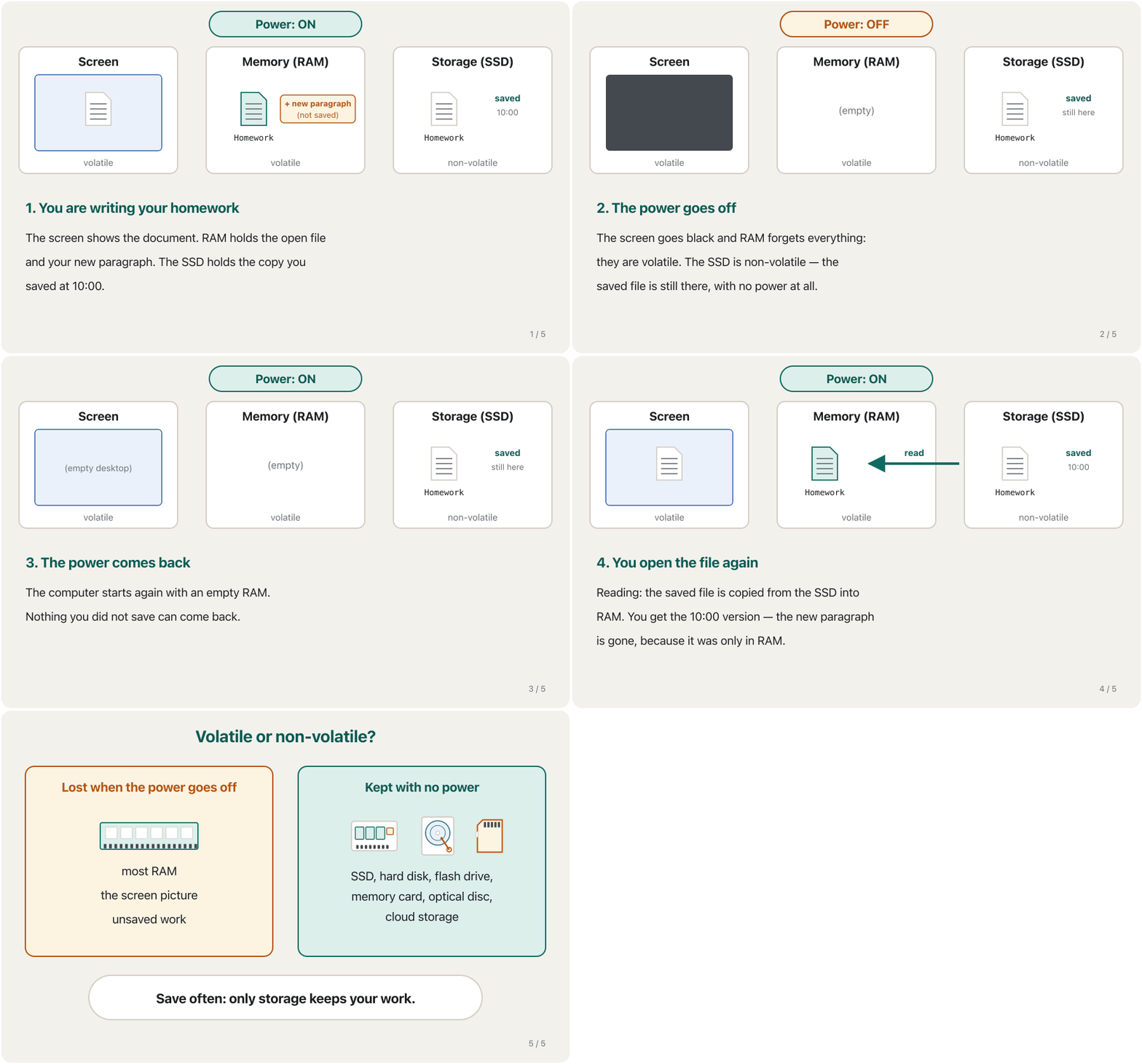
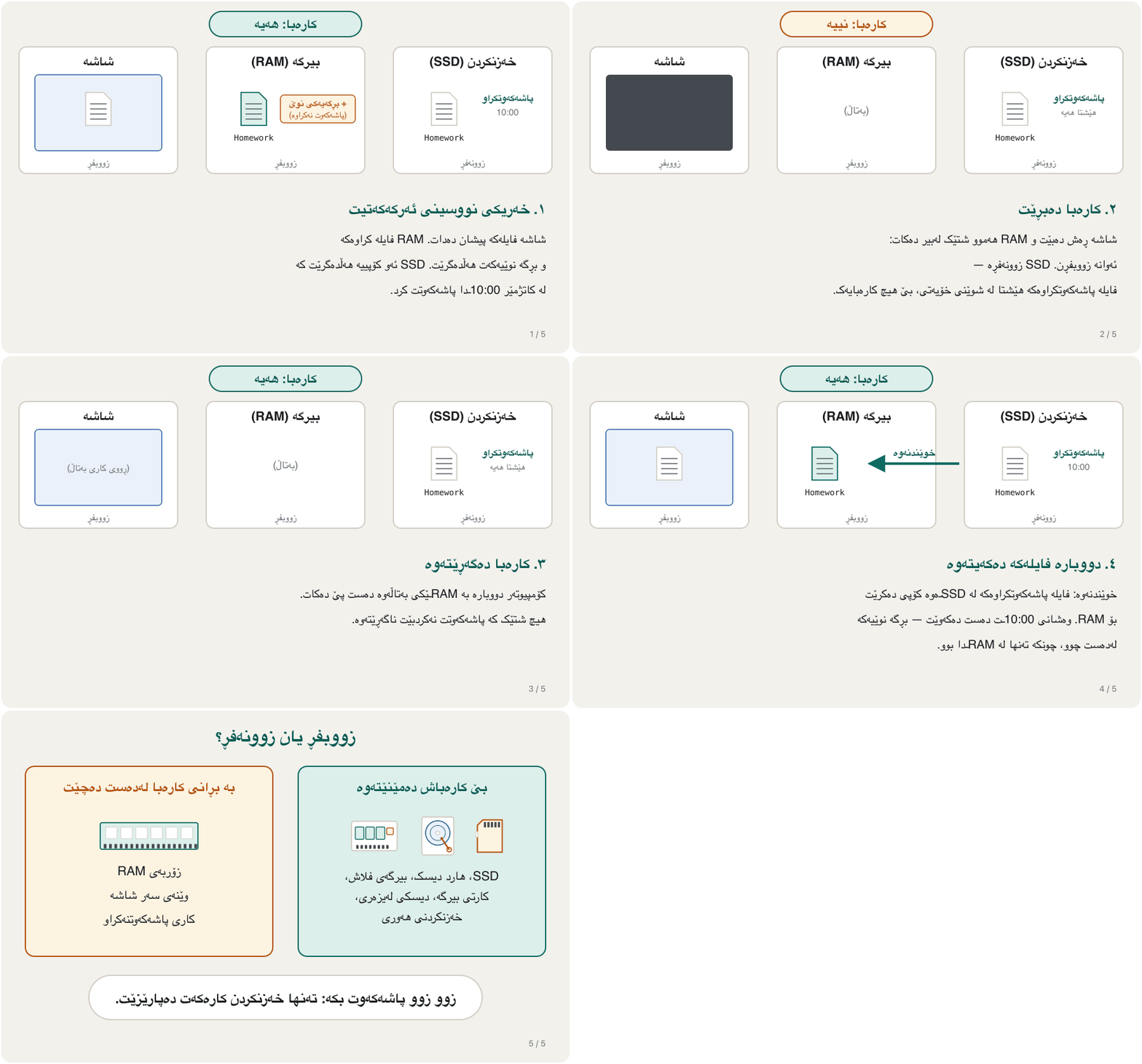
The big difference between memory and storage is volatility. Volatile means «needs power to keep its data». The picture on the screen and the contents of most RAM are volatile: they vanish when the power goes off. Storage is non-volatile: what is saved on a storage medium stays there with the computer switched off.
گەورەترین جیاوازیی نێوان و ئەوەیە کە یەکەمیان زووبفڕە و دووەمیان نا. زووبفڕ واتە «بۆ پاراستنی خۆی پێویستی بە کارەبایە». وێنەی سەر شاشە و ناوەڕۆکی زۆربەی RAM زووبفڕن: کە کارەبا بڕا نامێنن — بۆیە RAM . زوونەفڕە: ئەوەی لەسەر پاشەکەوت کراوە بە کوژاوەیی هەر دەمێنێتەوە. ناو SSD و جۆرێکن لە .
Watch what happens to a homework file when the power goes off and comes back:
سەیر بکە چی بەسەر ئەرکێکی ماڵەوەدا دێت کاتێک کارەبا دەبڕێت و دەگەڕێتەوە:
Programs meet the same rule. A variable lives in RAM, so it is forgotten when the program ends; a program that must remember something — a score, a list of names — writes it to a file in storage. See Why files? Variables forget in the Python course.
هەمان ڕێسایان لەسەرە. لە RAMـدا دەژی، بۆیە کاتێک کۆتایی دێت لەبیر دەچێت؛ کە دەبێت شتێک لەبیر بێت — خاڵی یارییەک، لیستێکی ناو — دەینووسێتە ناو لە . سەیری بۆچی فایل؟ گۆڕاوەکان لەبیر دەکەن لە کۆرسی Pythonـدا بکە.
Primary and secondary storageبیرگەی سەرەکی و بیرگەی دووەکی
Many books, the second lecturer's notes and the memory lesson (Primary and secondary storage) use another pair of names. Primary storage is the memory the CPU works with directly. Secondary storage is everything that keeps data for the long term. So «primary storage» is another name for memory, and «secondary storage» is another name for storage.
زۆرێک لە کتێبەکان، تێبینییەکانی مامۆستای دووەم و وانەی (بیرگەی سەرەکی و بیرگەی دووەکی) جووتە ناوێکی تر بەکار دەهێنن. ئەو کە ڕاستەوخۆ کاری لەگەڵ دەکات. هەموو ئەو شتانەیە کە بۆ کاتێکی درێژ دەپارێزن. کەواتە «» ناوێکی ترە بۆ و «» ناوێکی ترە بۆ .
| Featureتایبەتمەندی | Primary storage | Secondary storage |
|---|---|---|
| Sizeقەبارە | Generally smaller (GB)بەگشتی بچووکتر (GB) | Usually large (hundreds of GB to many TB)زۆرجار گەورە (سەدان GB تا چەندین TB) |
| How long it keeps data بۆ چەند دەپارێزێت | Temporarily — while the power is onبۆ کاتێکی کورت — تا کارەبا هەبێت | Permanently — also with the power offبە هەمیشەیی — بە کوژاوەییش |
| Where it isلە کوێیە | Inside the computerلەناو | Inside or outside (internal or external)لە ناوەوە یان دەرەوە (ناوخۆیی یان دەرەکی) |
| Speedخێرایی | Fastest accessخێراترین دەستپێگەیشتن | Slowerخاوتر |
| Can the CPU use it directly?دەتوانێت ڕاستەوخۆ بەکاری بهێنێت؟ | Yesبەڵێ | No — data is first copied into RAMنەخێر — سەرەتا کۆپی دەکرێت بۆ RAM |
| Examplesنموونە | RAM, cacheRAM، | SSD, hard disk, optical disc drive, USB flash drive, memory cardSSD، ، ، ، |
The CPU can only run programs and use data that are in primary storage. That is why every program must be copied from the SSD into RAM before it runs, and why a computer with too little RAM feels slow. The picture of the five units of a computer, with memory outside the CPU, is in The Parts of a Computer System.
تەنها دەتوانێت ئەو و بەکار بهێنێت کە لە . بۆیە هەموو پێش ئەوەی کار بکات دەبێت لە SSDـەوە کۆپی بکرێت بۆ RAM، هەر بۆیەش کە RAMـی کەمی هەبێت هەست بە خاوی دەکرێت. وێنەی پێنج یەکەکەی ، کە تێیدا لە دەرەوەی ، لە پارچەکانی سیستەمی کۆمپیوتەردا هەیە.
Storage media and storage devicesناوەندەکانی خەزنکردن و ئامێرەکانی خەزنکردن
Two more words help you talk about storage clearly. A storage medium (plural: media) is the physical material that holds the data: a magnetic platter, a flash memory chip, a plastic disc, a magnetic tape. A storage device is the hardware that records data onto the medium (writes) and gets it back (reads). In everyday speech both are simply called «storage».
دوو وشەی تر یارمەتیت دەدەن بە ڕوونی باسی بکەیت. ئەو کەرەستە ماددییەیە کە هەڵدەگرێت: موگناتیسی، ، دیسکێکی پلاستیکی، . ئەو کە لەسەر ناوەندەکە تۆمار دەکات (دەنووسێت) و دەیهێنێتەوە (دەیخوێنێتەوە). لە قسەی ڕۆژانەدا هەردووکیان بە سادەیی پێیان دەوترێت «».
| Medium (holds the data) ( هەڵدەگرێت) | Device (reads and writes it) (دەیخوێنێتەوە و دەینووسێت) | Separate or together?جیان یان پێکەوەن؟ |
|---|---|---|
| Optical disc (CD, DVD, Blu-ray) (CD، DVD، Blu-ray) | Optical drive | Separate: you take the disc outجیان: دیسکەکە دەردەهێنیت |
| Memory card | Card reader or the slot in a camera یان کونی کامێرا | Separateجیان |
| Magnetic platters | Hard disk drive | Together: sealed in one boxپێکەوەن: لە یەک سندوقی داخراودا |
| Flash memory chips | SSD, USB flash driveSSD، | Togetherپێکەوەن |
A storage device can be internal (inside the case, like the SSD of a laptop) or external (a separate box joined by a cable, like a USB hard disk or a box that holds several drives). Cloud storage is a special case: your files are kept on servers on the Internet, and the real media are transparent — invisible to you. You never see which disk in which data centre holds your photo. More in Cloud Storage.
دەکرێت ناوخۆیی بێت (لەناو کەیسەکەدا، وەک SSDـی لاپتۆپ) یان دەرەکی (سندوقێکی جیا کە بە کێبڵێک دەبەسترێتەوە، وەک USB یان سندوقێک کە چەند درایڤێک دەگرێت). حاڵەتێکی تایبەتە: لەسەر لە هەڵدەگیرێن و ڕاستەقینەکان بۆ تۆ دیار نین (کتێبەکە پێی دەڵێت transparent). هەرگیز نابینیت کام دیسک لە کام وێنەکەتی هەڵگرتووە. زیاتر لە خەزنکردنی هەوری.
Reading and writingخوێندنەوە و نووسین
Storage has two basic actions, and both are named from the point of view of memory. Reading moves items from a storage medium into memory. Writing moves items from memory onto a storage medium.
دوو کاری بنەڕەتیی هەیە و هەردووکیان لە گۆشەنیگای ناونراون. خوێندنەوە شتەکان لە دەگوازێتەوە بۆ ناو . نووسین شتەکان لە دەگوازێتەوە بۆ سەر .
- Openکردنەوە
You double-click
Homework.docx. The computer reads it: the file is copied from the SSD into RAM.دوو جار کلیک لە
Homework.docxدەکەیت. دەیخوێنێتەوە: لە SSDـەوە کۆپی دەکرێت بۆ ناو RAM. - Editدەستکاری
You type a new paragraph. The change exists only in RAM — the copy on the SSD has not changed yet.
بڕگەیەکی نوێ دەنووسیت. گۆڕانکارییەکە تەنها لە RAMـدا هەیە — کۆپییەکەی سەر SSD هێشتا نەگۆڕاوە.
- Saveپاشەکەوتکردن
You press
Ctrl+S(Cmd+Son a Mac). The computer writes: the new version goes from RAM to the SSD.Ctrl+Sدادەگریت (لە MacـداCmd+S). دەنووسێت: وەشانە نوێیەکە لە RAMـەوە دەچێتە سەر SSD. - Closeداخستن
You close the file. Its copy in RAM is freed for other programs; the saved copy waits on the SSD.
دادەخەیت. کۆپییەکەی ناو RAM بۆ تر ئازاد دەکرێت؛ کۆپییە پاشەکەوتکراوەکە لەسەر SSD چاوەڕێ دەکات.
Capacity: how much fitsتوانای خەزنکردن: چەندی تێدا جێی دەبێتەوە
Capacity is the number of bytes a storage medium can hold. The numbers are huge, so we count in units — kilobyte, megabyte, gigabyte, terabyte, petabyte and on up to the yottabyte, each about a thousand times the one before; the whole ladder, the course's table with its powers of two and why a «1 TB» drive shows 931 GB in Windows are in Bits, Bytes and Storage Units.
ژمارەی ئەو کە دەتوانێت هەڵیان بگرێت. ژمارەکان زۆر گەورەن، بۆیە بە یەکە دەیانژمێرین — ، ، ، ، و هەتا ، هەر یەکەیەک نزیکەی هەزار هێندەی یەکەی پێش خۆی؛ هەموو پەیژەکە، خشتەی کۆرسەکە بە توانەکانی دووەوە و ئەوەی بۆچی درایڤێکی «1 TB» لە Windowsـدا 931 GB پیشان دەدات لە بیتەکان، بایتەکان و یەکەکانی خەزنکردندا ڕوون کراونەتەوە.
| Device in 2026ئامێر لە 2026ـدا | Typical capacity ئاسایی |
|---|---|
| Smartphone | 128 GB – 1 TB |
| Laptop SSDSSDـی لاپتۆپ | 512 GB – 2 TB |
| Home NVMe SSD (one M.2 stick)SSDـی NVMeـی ماڵەوە (یەک پارچەی M.2) | 1 – 8 TB |
| Largest hard disk (data centres)گەورەترین () | 44 TB |
| Largest SSD (data centres)گەورەترین SSD () | 245 TB |
| A big cloud data centre گەورەی هەور | many exabytesچەندین |
Access time: how long you waitکاتی دەستپێگەیشتن: چەند چاوەڕێ دەکەیت
Access time measures how long you wait before the data starts to arrive. The course gives it two meanings: (1) for a storage device, the time it takes to find an item on its medium; (2) for memory, the time it takes to deliver an item from memory to the processor.
دەپێوێت چەند چاوەڕێ دەکەیت تا دەست بە گەیشتن دەکات. کۆرسەکە دوو واتای پێ دەدات: (١) بۆ ، ئەو کاتەی پێویستە تا شتێک لەسەر ناوەندەکەی بدۆزێتەوە؛ (٢) بۆ ، ئەو کاتەی پێویستە تا شتێک لە بگەیەنێتە پرۆسێسەر.
You call a taxi in Erbil. Access time is how long until it reaches your door. Transfer rate is how many people it carries each trip. A taxi arrives fast but carries four people; a minibus arrives later but carries twenty.
لە هەولێر تەکسییەک بانگ دەکەیت. ئەوەیە چەند دەخایەنێت تا دەگاتە بەر دەرگاکەت. ئەوەیە لە هەر گەشتێکدا چەند کەس هەڵدەگرێت. تەکسی زوو دەگات بەڵام چوار کەس دەبات؛ پاسێکی بچووک درەنگتر دەگات بەڵام بیست کەس دەبات.
Where the analogy stops workingسنووری ئەم نموونەیە
Storage devices do both at once: a modern SSD is like a taxi that arrives at once and is also very big.
هەردووکیان پێکەوە دەکەن: SSDـێکی نوێ وەک تەکسییەکە کە یەکسەر دەگات و زۆریش گەورەیە.
Sequential or direct access?دەستپێگەیشتنی زنجیرەیی یان ڕاستەوخۆ؟
How a device reaches an item also decides how long you wait. Sequential access means the data can only be read in a fixed order, one item after another. A magnetic tape works like this: to reach record 900, it must first wind past records 1 to 899. Direct access (also called random access) means the device can go straight to any item: a hard disk swings its arm to the right track, and an SSD, a memory card or RAM simply uses the item's address.
ئەوەی ئامێرێک چۆن دەگاتە شتێک، ئەویش دیاری دەکات چەند چاوەڕێ دەکەیت. دەستپێگەیشتنی زنجیرەیی (sequential access) واتە تەنها بە ڕیزێکی دیاریکراو دەخوێندرێتەوە، یەک لە دوای یەک. بەم شێوەیە کار دەکات: بۆ گەیشتن بە ژمارە 900، دەبێت سەرەتا بە یەک تا 899ـدا تێپەڕێت. دەستپێگەیشتنی ڕاستەوخۆ (direct access، کە پێی دەوترێت هەڕەمەکیش) واتە ئامێرەکە دەتوانێت یەکسەر بچێتە سەر هەر شتێک: باسکەکەی دەبات بۆ دروستەکە و SSD، یان RAM تەنها ناونیشانی ئەو شتە بەکار دەهێنن.
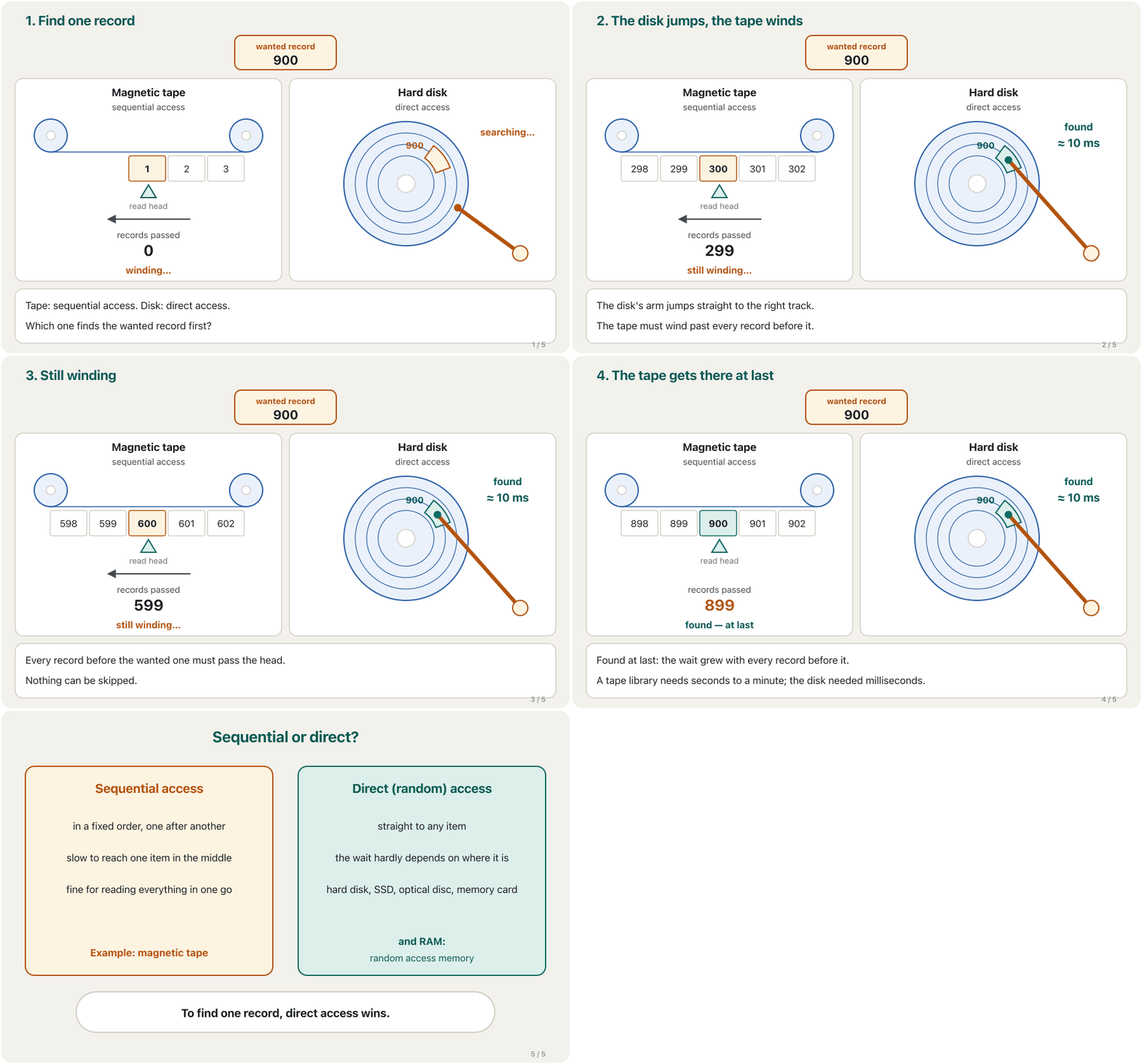
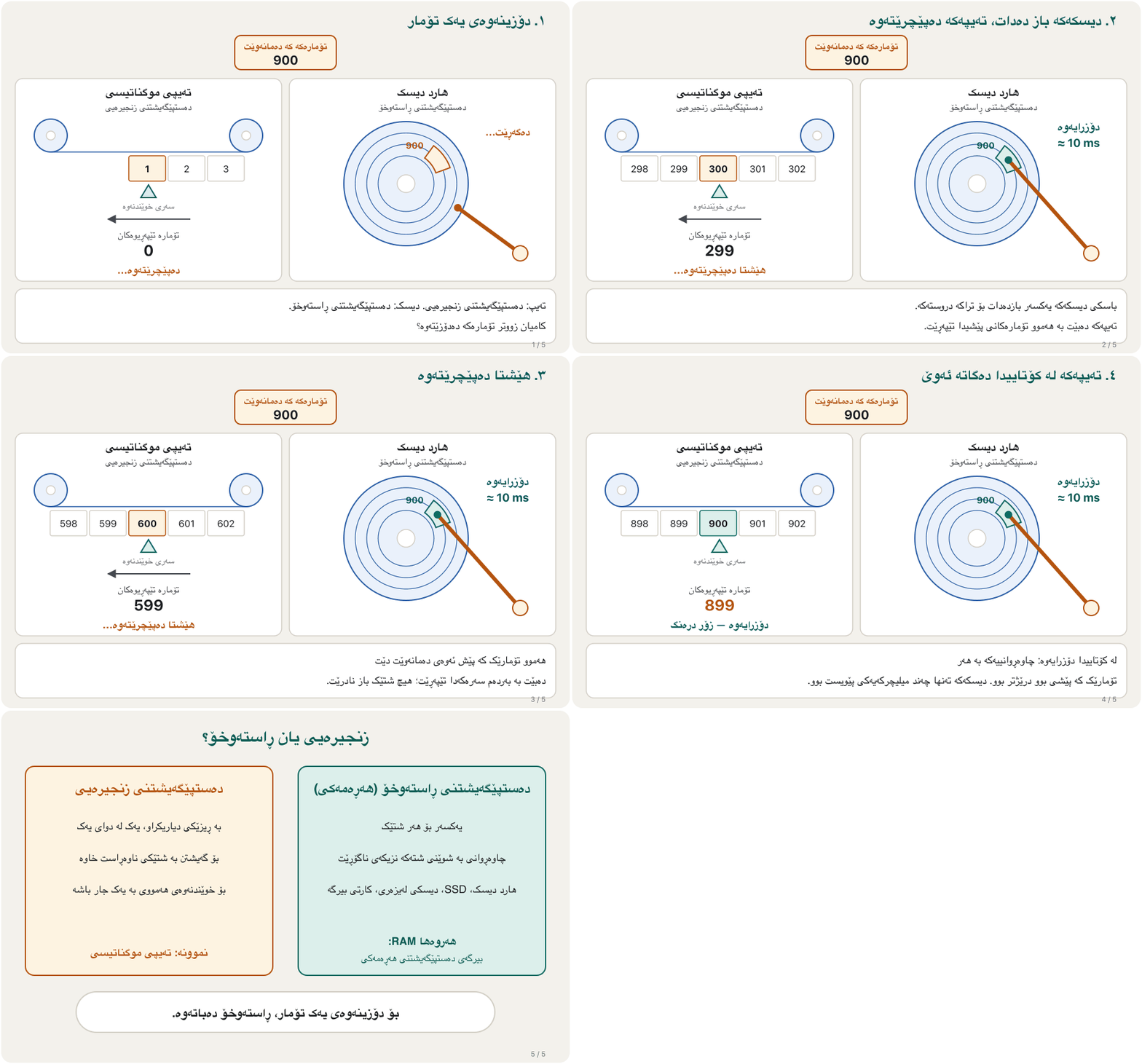
So, to find one item in the middle, sequential access is slower: the wait grows with every item that comes before it. To read everything from start to end — a full backup — it is fine, and that is why organisations still use tape for backups. The «random» in RAM (random access memory) means exactly this: any address is reached in the same short time (RAM).
کەواتە بۆ دۆزینەوەی یەک شت لە ناوەڕاستدا، دەستپێگەیشتنی زنجیرەیی خاوترە: چاوەڕوانییەکە بە هەر شتێک کە پێش ئەو دێت درێژتر دەبێت. بەڵام بۆ خوێندنەوەی هەموو شتێک لە سەرەتاوە تا کۆتایی — وەک تەواو — کێشە نییە، هەر بۆیە دامەزراوەکان هێشتا تەیپی موگناتیسی بۆ بەکار دەهێنن. وشەی «هەڕەمەکی» لە ناوی RAMـدا (random access memory) هەر ئەم واتایەی هەیە: هەر ناونیشانێک لە هەمان کاتی کورتدا دەدۆزرێتەوە (RAM).
Transfer rate: how fast it flowsخێرایی گواستنەوە: چەند خێرا دەڕوات
Access time does not tell the whole story. Transfer rate is a different measure: once the data is flowing, how many megabytes arrive each second (MB/s). A device can be slow to start but fast to deliver, or the other way round.
هەموو چیرۆکەکە ناڵێت. پێوەرێکی جیاوازە: کاتێک دەستی بە ڕۆیشتن کرد، لە هەر چرکەیەکدا چەند دەگات (MB/s). ئامێرێک دەکرێت درەنگ دەست پێ بکات بەڵام خێرا بگەیەنێت، یان بە پێچەوانەوە.
| Where the data is لە کوێیە | Access time (wait before data starts) (چاوەڕوانی پێش دەستپێکردن) | Transfer rate (once it flows) (کاتێک دەڕوات) |
|---|---|---|
| RAM | about 80–100 nanosecondsنزیکەی 80–100 نانۆچرکە | tens of thousands of MB/sدەیان هەزار MB/s |
| NVMe SSDSSDـی NVMe | about 0.05–0.1 millisecondsنزیکەی 0.05–0.1 میلیچرکە | up to about 15,000 MB/sتا نزیکەی 15,000 MB/s |
| Hard disk | about 3–12 milliseconds (an arm moves, the disk turns)نزیکەی 3–12 میلیچرکە (باسکێک دەجووڵێت و دیسکەکە دەسووڕێتەوە) | about 100–300 MB/sنزیکەی 100–300 MB/s |
| Tape in a library لە کتێبخانەیەکی تەیپدا | seconds to a minute (a robot loads and winds the tape)چەند چرکەیەک تا خولەکێک (ڕۆبۆتێک تەیپەکە دادەنێت و دەیپێچێتەوە) | about 400 MB/s (LTO-9)نزیکەی 400 MB/s (LTO-9) |
Look at the tape row: it is the slowest to start but, once the tape is running, it delivers data faster than a hard disk. That is why tape is still used for big backups that are written and read in one long go (see Tape: old, cheap and still important). The same ladder, stretched into human time, is in Memory: RAM, ROM and Cache.
سەیری ڕیزی بکە: لە هەمووان درەنگتر دەست پێ دەکات، بەڵام کە تەیپەکە کەوتە ڕێ، لە خێراتر دەگەیەنێت. بۆیە هێشتا بۆ گەورە بەکار دێت کە بە یەک جار و بە درێژی دەنووسرێن و دەخوێندرێنەوە (سەیری تەیپی موگناتیسی: کۆن، هەرزان و هێشتا گرنگ بکە). هەمان پەیژە، درێژکراوە بۆ کاتی مرۆڤ، لە بیرگە: RAM، ROM و کاشدا هەیە.
The memory and storage ladderپەیژەی بیرگە و خەزنکردن
Put everything in order of speed and you get a ladder (a memory hierarchy). The higher a step, the faster it is — and the smaller and more expensive per gigabyte. Computers use a little of the fast, expensive kinds and a lot of the slow, cheap kinds. You met this pyramid in the memory lesson; here we look at its lower, non-volatile half.
هەموو شتێک بەپێی خێرایی ڕیز بکە، پەیژەیەکت دەست دەکەوێت (). پلە تا بەرزتر بێت خێراترە — هەروەها بچووکتر و بۆ هەر گرانترە. کەمێک لە جۆرە خێرا و گرانەکان و زۆرێک لە جۆرە خاو و هەرزانەکان بەکار دەهێنن. ئەم هەرەمەت لە وانەی بینیوە؛ لێرەدا سەیری نیوەی خوارەوەی دەکەین، کە زوونەفڕە.
| Levelپلە | What it holds (course table)چی هەڵدەگرێت (خشتەی کۆرسەکە) |
|---|---|
| Memory (most RAM) — fastest transfer (زۆربەی RAM) — خێراترین گواستنەوە | Programs that are running and the data they need, what is on the screen, and commands passing between parts such as the disk, the processor and the graphics card کە لە کاردان و ئەو پێویستیانە، ئەوەی لەسەر شاشەیە و ئەو فەرمانانەی لە نێوان پارچەکاندا دەڕۆن، وەک دیسک، پرۆسێسەر و |
| SSDs and hard disksSSD و | The operating system, applications, your files (photos, music, videos) and backups، ، (وێنە، مۆسیقا، ڤیدیۆ) و |
| USB flash drives and memory cards و | Photos and files you carry from one device to anotherوێنە و کە لە ئامێرێکەوە دەیانبەیت بۆ ئامێرێکی تر |
| Optical discs — slowest transfer — هێواشترین گواستنەوە | Software, films and music sold on disc، فیلم و مۆسیقا کە لەسەر دیسک دەفرۆشرێن |
The storage family: a map of this chapterخێزانی خەزنکردن: نەخشەی ئەم بەشە
Storage comes in many forms. They can be sorted by where they live: inside the computer, in your pocket, across a network, or on a card or tag. Each group has its own lesson in this chapter.
شێوەی زۆرە. دەکرێت بەپێی شوێنیان ڕیز بکرێن: لەناو ، لە گیرفانتدا، لە ڕێگەی ، یان لەسەر کارت یان تاگێک. هەر گرووپێک وانەی خۆی لەم بەشەدا هەیە.
- Hard disks, including external ones: Hard Disk Drives
- SSDs, memory cards and USB flash drives: SSDs, Memory Cards and Flash Drives
- Optical discs, stripe cards, smart cards, RFID and NFC: Optical Discs, Smart Cards, RFID and NFC
- RAID, NAS, SAN and tape in organisations: Storage for Organisations
- Cloud storage: Cloud Storage
- ، بە دەرەکییەکانیشەوە: هارد دیسکەکان
- SSD، و : SSD، کارتەکانی بیرگە و بیرگەکانی فلاش
- ، کارتی هێڵدار، ، RFID و NFC: دیسکە لەیزەرییەکان، کارتە هۆشمەندەکان، RFID و NFC
- RAID، NAS، SAN و لە دامەزراوەکاندا: خەزنکردن بۆ دامەزراوەکان
- : خەزنکردنی هەوری
You meet every common kind of storage: hard drive, SSD, cloud storage, NAS, optical disc, USB flash drive and memory card.
هەموو جۆرە باوەکانی دەناسیت: ، ، ، NAS، ، و .
Whole video (8:24): one short stop for each kind of storage this chapter teaches.
هەموو ڤیدیۆکە (8:24): وەستانێکی کورت لەسەر هەر جۆرێکی کە ئەم بەشەی کۆرسەکە فێری دەکات.
Keep copies: the 3-2-1 backup ruleکۆپی هەڵبگرە: ڕێسای باکئەپی 3-2-1
Every storage device can fail, be lost or be stolen — so the files that matter need a backup, a second copy kept somewhere else. A simple and widely used rule tells you how many copies are enough:
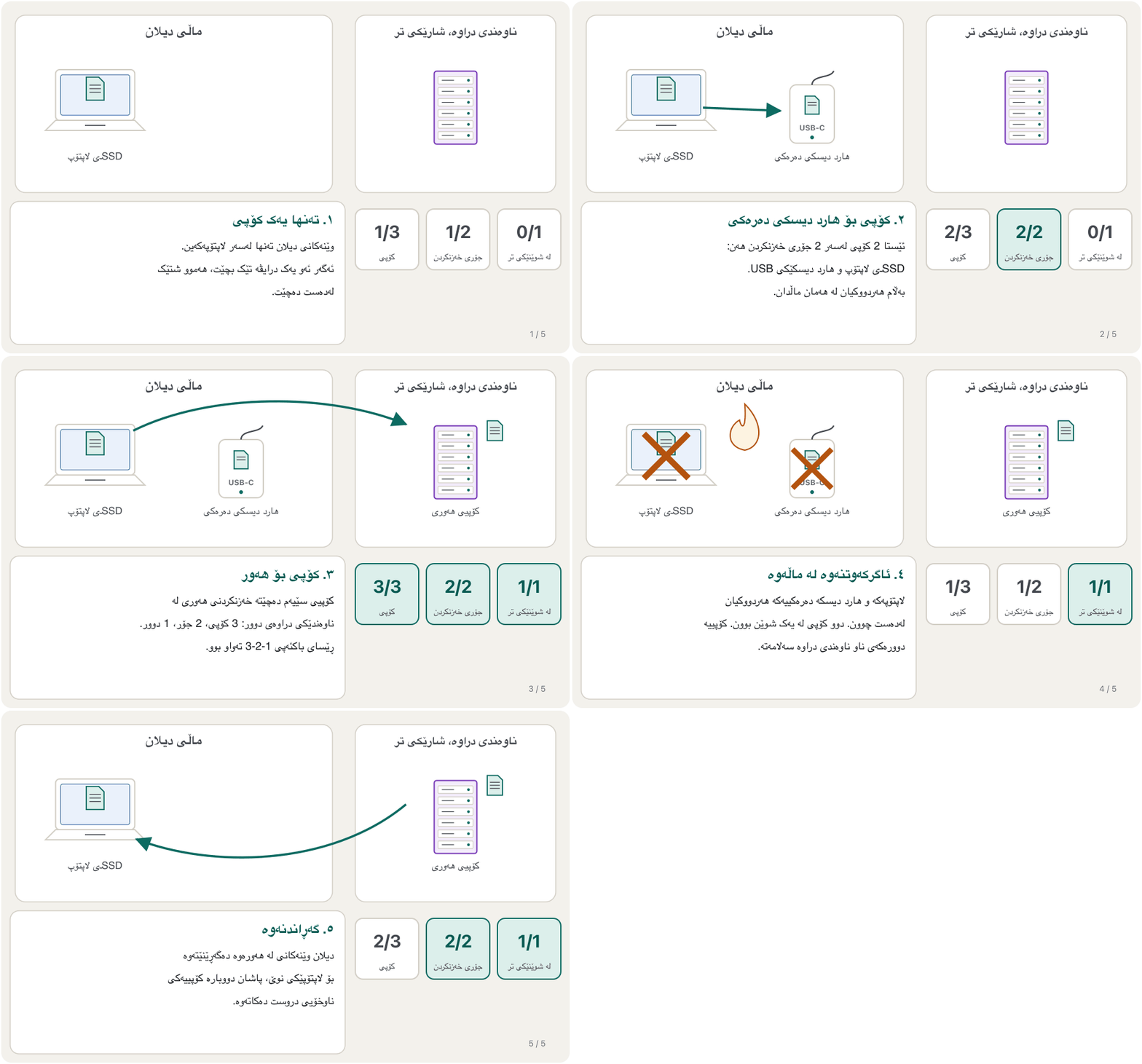
هەر لەوانەیە تێک بچێت، ون بێت یان بدزرێت — بۆیە ئەو گرنگن پێویستیان بە هەیە، واتە کۆپییەکی دووەم کە لە شوێنێکی تر هەڵدەگیرێت. ڕێسایەکی سادە و بەربڵاو پێت دەڵێت چەند کۆپی بەسە:
- 3 copies of every important file: the original and two backups.
- 2 different kinds of storage, so one kind of problem cannot destroy them all (for example an SSD and an external hard disk).
- 1 copy kept off-site — in another building or city, or in cloud storage.
- 3 کۆپی لە هەر گرنگ: ڕەسەنەکە و دوو .
- 2 جۆری جیاوازی ، تا یەک جۆرە کێشە نەتوانێت هەموویان لەناو ببات (بۆ نموونە SSD و ).
- 1 کۆپی لە شوێنێکی تر — لە باڵەخانە یان شارێکی تر، یان لە .
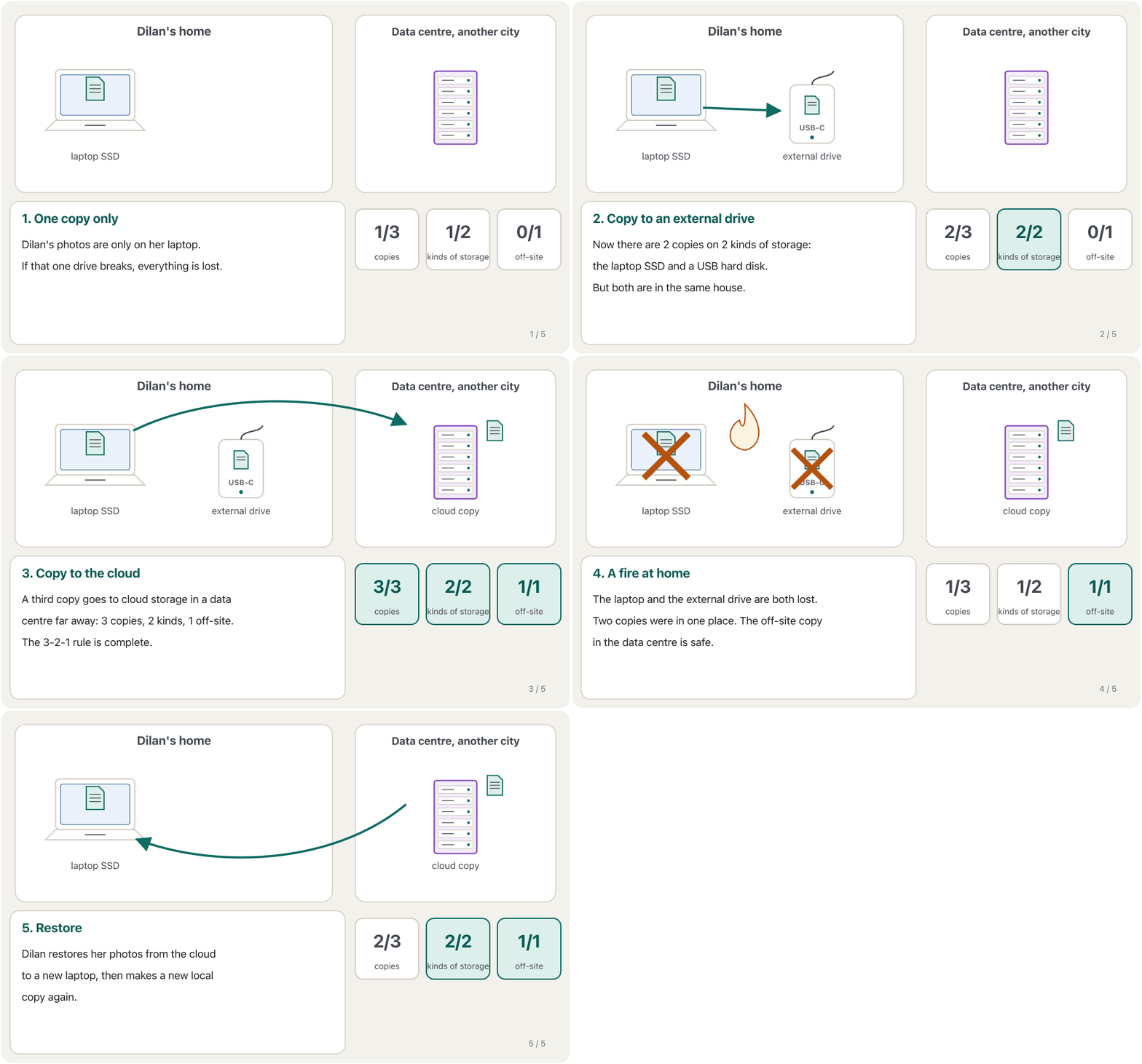
Many families keep the papers of their house with great care: the original in a safe place at home, a photocopy in another drawer, and a photo of it on a phone or with a relative in another city. If one is lost, the others remain.
زۆر خێزان بە وریاییەوە بەڵگەنامەکانی خانووەکەیان دەپارێزن: ڕەسەنەکە لە شوێنێکی پارێزراوی ماڵەوە، فۆتۆکۆپییەک لە چەکمەجەیەکی تر و وێنەیەکی لەسەر مۆبایل یان لای خزمێک لە شارێکی تر. ئەگەر یەکێکیان ون بێت، ئەوانی تر دەمێننەوە.
Where the analogy stops workingسنووری ئەم نموونەیە
A photocopy cannot be «restored» into a new original, but a backup file is an exact copy of the original.
فۆتۆکۆپی ناکرێت «بگەڕێنرێتەوە» بۆ ڕەسەنێکی نوێ، بەڵام کۆپییەکی وەک یەکی ڕەسەنەکەیە.
You learn the 3-2-1 backup rule: keep three copies of your files, on two kinds of media, with one copy in another place.
یاسای 3-2-1 بۆ فێر دەبیت: سێ کۆپی لە هەڵبگرە، لەسەر دوو جۆری جیاوازی و یەک کۆپی لە شوێنێکی تر.
Plays 0:00-5:18: the 3-2-1 rule, why media fail and off-site copies; stops before the outro.
لە 0:00 تا 5:18 پەخش دەبێت: ، بۆچی تێک دەچن و ؛ پێش کۆتایی ڤیدیۆکە ڕادەوەستێت.
Deleting is not erasingسڕینەوە بە واتای لەناوبردن نییە
When you delete a file — even with Shift + Delete, or by emptying the Recycle Bin — the operating system usually does not wipe its bits. It only marks the clusters the file used as free space that new files may take. Until something new is written over them, the old bits are still there.
کاتێک دەسڕیتەوە — تەنانەت بە Shift + Delete، یان بە بەتاڵکردنەوەی سەبەتەی سڕاوەکان — زۆرجار خودی ئەو پاک ناکاتەوە. تەنها ئەو کە گرتبوونی وەک شوێنی بەتاڵ نیشانە دەکات، کە دەتوانن بیگرن. تا شتێکی نوێ لەسەریان نەنووسرێت، هێشتا لە شوێنی خۆیانن.
That is why data recovery — getting deleted, damaged or lost data back from storage — often works, but only while the space has not been overwritten. If you delete something by mistake, stop using that drive at once and try a recovery tool, such as Microsoft's free Windows File Recovery, or restore the file from your backup. On an SSD, TRIM usually clears deleted pages soon (Wear and TRIM), and a broken drive needs specialists (Five ways a hard disk fails).
هەر بۆیە گەڕاندنەوەی (data recovery) — واتە هێنانەوەی سڕاو، تێکچوو یان ونبوو لە — زۆرجار سەر دەگرێت، بەڵام تەنها تا ئەو کاتەی شتی نوێ لەسەر ئەو شوێنە نەنووسراوە. ئەگەر شتێکت بە هەڵە سڕییەوە، یەکسەر واز لە بەکارهێنانی ئەو درایڤە بهێنە و ئامرازێکی گەڕاندنەوە تاقی بکەرەوە، وەک Windows File Recoveryـی بێبەرانبەری Microsoft، یان لە بگەڕێنەوە. لەسەر SSD، زۆرجار بە زوویی پەڕە سڕاوەکان پاک دەکاتەوە (سوان و TRIM) و درایڤێکی تێکشکاو پێویستی بە پسپۆڕە (پێنج ڕێگەی تێکچوونی هارد دیسک).
Deleting is not erasingسڕینەوە بە واتای لەناوبردن نییە
Before you give a drive awayپێش ئەوەی درایڤێک بدەیت بە کەسێکی تر
Because deleted data can come back, storage brings two security worries. Unwanted deletion: protect important files with passwords, limited access and backups, so nobody can delete them — by mistake or on purpose. Unwanted recovery: before you sell, give away or throw out an old computer, phone, memory card or drive, wipe it properly — a full format, which writes zeros over the whole drive (quick or full format), the maker's secure-erase tool for an SSD, or a factory reset of an encrypted phone — or physically destroy it. Criminals search thrown-away devices and papers (dumpster diving).
چونکە سڕاو دەتوانێت بگەڕێتەوە، دوو نیگەرانیی ئاسایشی لەگەڵ خۆی دەهێنێت. سڕینەوەی نەویستراو: گرنگ بە ، سنووردارکردنی دەستپێگەیشتن و بپارێزە، تا کەس نەتوانێت بیانسڕێتەوە — بە هەڵە یان بە ئەنقەست. گەڕاندنەوەی نەویستراو: پێش ئەوەی ، مۆبایلێک، یان درایڤێکی کۆن بفرۆشیت، ببەخشیت یان فڕێی بدەیت، بە دروستی پاکی بکەرەوە — بە فۆرماتێکی تەواو، کە سفر بەسەر هەموو درایڤەکەدا دەنووسێت (فۆرماتی خێرا یان تەواو)، بە ئامرازی سڕینەوەی سەلامەتی دروستکەر بۆ SSD، یان بە گەڕاندنەوەی مۆبایلێکی شفرەکراو بۆ دۆخی کارگە — یان بە شێوەی فیزیکی تێکی بشکێنە. تاوانباران بەدوای ئامێر و کاغەزی فڕێدراودا دەگەڕێن (گەڕان لە زبڵداندا).
Common mistakesهەڵە باوەکان
| Mistakeهەڵە | What is trueڕاستییەکە |
|---|---|
| «My phone has 256 GB of memory.»«مۆبایلەکەم 256 GB هەیە.» | That is storage. Memory (RAM) is the smaller number, such as 8 GB.ئەوە . (RAM) ژمارە بچووکەکەیە، وەک 8 GB. |
| «RAM keeps my work when I switch off.»«RAM کارەکەم دەپارێزێت کاتێک دەیکوژێنمەوە.» | RAM is volatile. Only what you saved to storage survives.RAM . تەنها ئەوەی لە پاشەکەوتت کردووە دەمێنێتەوە. |
| «Reading means copying from memory to the disk.»«خوێندنەوە واتە کۆپیکردن لە بۆ دیسک.» | That is writing. Reading goes from storage into memory.ئەوە نووسینە. خوێندنەوە لە دەچێتە ناو . |
| «Access time and transfer rate are the same thing.»« و یەک شتن.» | Access time is the wait before data starts to come; transfer rate is how much arrives each second. چاوەڕوانییە پێش ئەوەی دەست بە هاتن بکات؛ ئەوەیە لە هەر چرکەیەکدا چەندی دەگات. |
| «My new 1 TB drive is broken: Windows shows 931 GB.»«درایڤە نوێیە 1 TBـەکەم تێکچووە: Windows 931 GB پیشان دەدات.» | The maker counts 1,000s and Windows counts 1,024s: the same bytes, see Why a «1 TB» drive shows 931 GB.دروستکەرەکە بە 1,000 دەژمێرێت و Windows بە 1,024: هەمان ، سەیری بۆچی درایڤێکی «1 TB» 931 GB پیشان دەدات بکە. |
| «I copied my photos to an external drive, so I have a backup.»«وێنەکانم کۆپی کرد بۆ ، کەواتە هەیە.» | It is a start, but if both are at home, one fire or theft can take both. Keep one copy off-site.سەرەتایەکە، بەڵام ئەگەر هەردووکیان لە ماڵەوە بن، یەک ئاگرکەوتنەوە یان دزی دەتوانێت هەردووکیان ببات. کۆپییەک لە شوێنێکی تر هەڵبگرە. |
| «I emptied the Recycle Bin, so my files are gone for good.»« بەتاڵ کردەوە، کەواتە بۆ هەمیشە ڕۆیشتن.» | Usually only the space is marked free; recovery tools can often find the files until they are overwritten. Wipe a drive before you give it away.زۆرجار تەنها شوێنەکە وەک بەتاڵ نیشانە دەکرێت؛ ئامرازەکانی گەڕاندنەوە زۆرجار دەدۆزنەوە تا شتی نوێیان لەسەر نەنووسرێت. پێش ئەوەی درایڤێک بدەیت بە کەسێکی تر، پاکی بکەرەوە. |
Exercisesڕاهێنانەکان
(Quiz 2A, from the lecture notes) List the types of storage you know, grouped by how they store the data. The same quiz also asked: what is an IGP?
(تاقیکردنەوەی کورتی 2A، لە تێبینییەکانی مامۆستا) ئەو جۆرانەی کە دەیانناسیت بژمێرە، بەپێی ئەوەی چۆن هەڵدەگرن گرووپیان بکە. هەمان تاقیکردنەوە ئەمەشی پرسیبوو: IGP چییە؟
Show answerوەڵامەکە پیشان بدە
- Magnetic: hard disk drives, magnetic tape, magnetic stripe cards.
- Flash (solid-state): SSDs, USB flash drives, memory cards, the chip in a smart card.
- Optical: CD, DVD and Blu-ray discs.
- Over a network: cloud storage, NAS.
- Radio tags: RFID and NFC tags hold a little data in a chip.
- موگناتیسی: ، ، .
- فلاش (جێگیر): SSD، ، ، .
- لەیزەری: دیسکەکانی CD، DVD و Blu-ray.
- لە ڕێگەی : ، NAS.
- تاگی ڕادیۆیی: و کەمێک لە هەڵدەگرن.
An IGP (integrated graphics processor) is a graphics processor built into the CPU, not a separate graphics card. It is explained in Processor Speed, Cache, GPUs and Cooling.
IGP () پرۆسێسەرێکی گرافیکییە کە لەناو دروست کراوە، نەک جیا. لە خێرایی پرۆسێسەر، کاش، GPU و ساردکردنەوەدا ڕوون کراوەتەوە.
Sort these into volatile and non-volatile: RAM, an SSD, the picture on the screen, a memory card, the CPU cache, a DVD.
ئەمانە بکە بە دوو گرووپی زووبفڕ و زوونەفڕ: RAM، SSD، وێنەی سەر شاشە، ، CPU، DVD.
Show answerوەڵامەکە پیشان بدە
| Volatileزووبفڕ | Non-volatileزوونەفڕ |
|---|---|
| RAM | SSD |
| The picture on the screenوێنەی سەر شاشە | Memory card |
| CPU cache CPU | DVD |
Say whether each statement is true or false, and correct the false ones: (a) A hard disk is an example of main memory. (b) Magnetic tape gives direct access. (c) Emptying the Recycle Bin destroys a file's bits at once. (d) The contents of most RAM are volatile.
بڵێ هەر ڕستەیەک ڕاستە یان هەڵە و هەڵەکان ڕاست بکەرەوە: (أ) نموونەیەکی . (ب) دەستپێگەیشتنی ڕاستەوخۆ دەدات. (ج) بەتاڵکردنەوەی یەکسەر لەناو دەبات. (د) ناوەڕۆکی زۆربەی RAM .
Show answerوەڵامەکە پیشان بدە
- (a) False — a hard disk is secondary storage. Main memory (primary storage) is RAM, together with ROM and the cache.
- (b) False — tape gives sequential access: it must wind past every earlier record.
- (c) False — usually only the space is marked free; the bits stay until they are overwritten.
- (d) True — they vanish when the power goes off.
- (أ) هەڵەیە — . RAMـە، لەگەڵ ROM و .
- (ب) هەڵەیە — دەستپێگەیشتنی زنجیرەیی دەدات: دەبێت بە هەموو تێپەڕێت.
- (ج) هەڵەیە — زۆرجار تەنها شوێنەکە وەک بەتاڵ نیشانە دەکرێت؛ دەمێننەوە تا شتی نوێیان لەسەر دەنووسرێت.
- (د) ڕاستە — کە کارەبا بڕا نامێنن.
Explain the difference between sequential and direct access, with an example of each. Which one is faster when you need one record in the middle, and why?
جیاوازیی نێوان دەستپێگەیشتنی زنجیرەیی و ڕاستەوخۆ ڕوون بکەرەوە و بۆ هەر یەکێکیان نموونەیەک بهێنەوە. کاتێک لە ناوەڕاستدا پێویستە، کامیان خێراترە و بۆچی؟
Show answerوەڵامەکە پیشان بدە
Sequential access reads the data only in a fixed order — magnetic tape is the example. Direct access jumps straight to any item — a hard disk, an SSD, an optical disc, a memory card or RAM. Direct access is faster for one record in the middle: the tape must first pass every record before it, so its wait grows with the record's position, while the disk or SSD goes straight there.
دەستپێگەیشتنی زنجیرەیی تەنها بە ڕیزێکی دیاریکراو دەخوێنێتەوە — نموونەکەی . دەستپێگەیشتنی ڕاستەوخۆ یەکسەر بازدەدات بۆ هەر شتێک — ، SSD، ، یان RAM. بۆ لە ناوەڕاستدا ڕاستەوخۆ خێراترە: تەیپەکە دەبێت سەرەتا بە هەموو تێپەڕێت کە پێش ئەون، بۆیە چاوەڕوانییەکەی بەپێی شوێنی درێژتر دەبێت، بەڵام دیسک یان SSD یەکسەر دەچێتە ئەوێ.
Use a spare USB flash drive with nothing important on it. Make a file test.txt, delete it with Shift + Delete, then try to get it back with a recovery tool (for example Microsoft's free Windows File Recovery from the Microsoft Store). Then do a full format of the drive and try again. What happens each time, and why?
بەکار بهێنە کە هیچ شتێکی گرنگی لەسەر نییە. بە ناوی test.txt دروست بکە، بە Shift + Delete بیسڕەوە، پاشان هەوڵ بدە بە ئامرازێکی گەڕاندنەوە بیهێنیتەوە (بۆ نموونە Windows File Recoveryـی بێبەرانبەری Microsoft لە Microsoft Storeـەوە). پاشان فۆرماتێکی تەواوی درایڤەکە بکە و دووبارە هەوڵ بدەرەوە. هەر جارێک چی ڕوو دەدات و بۆچی؟
Show answerوەڵامەکە پیشان بدە
After Shift + Delete the tool usually finds test.txt again: only its space was marked free. After the full format, Windows has written zeros over the whole drive, so the file cannot come back. (On SSDs the first try may already fail, because TRIM clears deleted pages.)
دوای Shift + Delete ئامرازەکە زۆرجار test.txt دەدۆزێتەوە: تەنها شوێنەکەی وەک بەتاڵ نیشانە کرابوو. دوای فۆرماتی تەواو، Windows سفری بەسەر هەموو درایڤەکەدا نووسیوە، بۆیە ناگەڕێتەوە. (لەسەر SSD لەوانەیە هەوڵی یەکەمیش سەر نەگرێت، چونکە پەڕە سڕاوەکان پاک دەکاتەوە.)
A phone photo is about 4 MB. How many photos fit on a 64 GB memory card? Count like the card maker () and ignore the space the file system uses.
وێنەیەکی مۆبایل نزیکەی 4 MBـە. چەند وێنە لەسەر 64 GB جێی دەبێتەوە؟ وەک دروستکەری کارتەکە بژمێرە () و ئەو شوێنە لەبەرچاو مەگرە کە دەیگرێت.
Show answerوەڵامەکە پیشان بدە
About 16,000 photos. In real life a little less, because the file system needs some space.
نزیکەی 16,000 وێنە. لە ڕاستیدا کەمێک کەمتر، چونکە هەندێک شوێنی پێویستە.
Aram runs a small photo studio in Duhok. All his work is on one desktop PC. Plan a 3-2-1 backup for him.
ئارام ستۆدیۆیەکی بچووکی وێنەگرتنی لە دهۆک هەیە. هەموو کارەکانی لەسەر یەک . پلانێکی 3-2-1 بۆ دابنێ.
Show answerوەڵامەکە پیشان بدە
- Copy 1: the originals on the PC's SSD.
- Copy 2: an external hard disk, updated every evening — a second kind of storage.
- Copy 3: off-site — cloud storage, or a second external drive kept at his home and swapped every week.
- Then test: once a month, restore one folder to check that the backup really works.
- کۆپیی 1: ڕەسەنەکان لەسەر SSDـی کۆمپیوتەرەکە.
- کۆپیی 2: ، هەموو ئێوارەیەک نوێ دەکرێتەوە — جۆرێکی دووەمی .
- کۆپیی 3: لە شوێنێکی تر — ، یان دووەم کە لە ماڵەکەی هەڵدەگیرێت و هەموو هەفتەیەک دەگۆڕدرێتەوە.
- پاشان تاقی بکەرەوە: مانگی جارێک فۆڵدەرێک بگەڕێنەوە بۆ ئەوەی دڵنیا بیت بەڕاستی کار دەکات.
Summaryپوختە
- Memory (RAM, primary storage) holds what is in use now; it is fast, small and volatile.
- Storage (secondary storage) keeps programs and files for later; it is slower, bigger and non-volatile.
- A storage medium holds the data; a storage device reads and writes it. Reading = storage → memory; writing = memory → storage.
- Capacity is counted in bytes: KB, MB, GB, TB, PB, EB, ZB, YB.
- Access time is the wait before data arrives; transfer rate is how fast it flows. RAM waits nanoseconds, SSDs a tenth of a millisecond, hard disks milliseconds.
- Sequential access (tape) reads in a fixed order; direct access (disks, SSDs, cards, RAM) jumps straight to any item.
- The storage family: hard disks, SSDs, flash drives and cards, optical discs, cloud and network storage, and cards and tags.
- Back up with 3-2-1: three copies, two kinds of storage, one off-site.
- Deleting a file usually only marks its space as free: it can often be recovered until it is overwritten — wipe a drive before you give it away.
- (RAM، ) ئەوەی ئێستا لە کاردایە هەڵدەگرێت؛ خێرا، بچووک و زووبفڕە.
- () و بۆ دواتر دەپارێزێت؛ خاوتر، گەورەتر و زوونەفڕە.
- هەڵدەگرێت؛ دەیخوێنێتەوە و دەینووسێت. خوێندنەوە = ← ؛ نووسین = ← .
- بە دەژمێردرێت: KB، MB، GB، TB، PB، EB، ZB، YB.
- چاوەڕوانییە پێش گەیشتنی ؛ خێرایی ڕۆیشتنییەتی. RAM نانۆچرکە چاوەڕێ دەکات، SSD دەیەکی میلیچرکەیەک، چەند میلیچرکەیەک.
- دەستپێگەیشتنی زنجیرەیی () بە ڕیزێکی دیاریکراو دەخوێنێتەوە؛ دەستپێگەیشتنی ڕاستەوخۆ (دیسک، SSD، کارت، RAM) یەکسەر بازدەدات بۆ هەر شتێک.
- خێزانی : ، SSD، و کارتەکان، ، هەوری و ، هەروەها کارت و تاگەکان.
- بە 3-2-1 بکە: سێ کۆپی، دوو جۆری ، یەکێک لە شوێنێکی تر.
- سڕینەوەی زۆرجار تەنها شوێنەکەی وەک بەتاڵ نیشانە دەکات: تا شتی نوێی لەسەر نەنووسرێت زۆرجار دەگەڕێتەوە — پێش ئەوەی درایڤێک بدەیت بە کەسێکی تر، پاکی بکەرەوە.
Why must a program be copied into RAM before it runs?بۆچی دەبێت بەرنامەیەک پێش کارکردن کۆپی بکرێت بۆ ناو RAM؟
Because the CPU can work directly only with primary storage (RAM and cache), not with the SSD or hard disk.
چونکە تەنها دەتوانێت ڕاستەوخۆ لەگەڵ (RAM و ) کار بکات، نەک لەگەڵ SSD یان .
Is a memory card a medium or a device?کارتی بیرگە ناوەندە یان ئامێر؟
It is a medium (with its own controller inside); the camera slot or card reader is the device that reads it.
ناوەندە (کە خۆی تێدایە)؛ کونی کامێرا یان ئەو ئامێرەیە کە دەیخوێنێتەوە.
What does the «1» in 3-2-1 protect you from?«1»ـی ناو 3-2-1 لە چی دەتپارێزێت؟
From one disaster in one place — a fire, a flood or a theft — taking every copy at once.
لەوەی یەک کارەسات لە یەک شوێندا — ئاگرکەوتنەوە، لافاو یان دزی — هەموو کۆپییەکان پێکەوە ببات.
Lesson complete!وانەکە تەواو بوو!
Well done. Review the key terms, then go on to the next lesson.دەستخۆش. سەیرێکی زاراوە سەرەکییەکان بکەرەوە، پاشان بڕۆ بۆ وانەی داهاتوو.
Key termsزاراوە سەرەکییەکان
Hard Disk Drivesهارد دیسکەکان
Related lecturesوانە پەیوەندیدارەکان
- Hard Disk Drivesهارد دیسکەکان
- SSDs, Memory Cards and Flash DrivesSSD، کارتەکانی بیرگە و بیرگەکانی فلاش
- Optical Discs, Smart Cards, RFID and NFCدیسکە لەیزەرییەکان، کارتە هۆشمەندەکان، RFID و NFC
- Storage and Filesخەزنکردن و فایلەکان
- Backup and Recoveryباکئەپ و گەڕاندنەوەی دراوە
- Storage for Organisations: RAID, NAS, SAN and Tapeخەزنکردن بۆ دامەزراوەکان: RAID، NAS، SAN و تەیپی موگناتیسی
- Cloud Storageخەزنکردنی هەوری
- Using Windows: Desktop, Files and Everyday Toolsبەکارهێنانی Windows: ڕوومێز، فایلەکان و ئامرازە ڕۆژانەکان
References and further readingسەرچاوەکان و خوێندنەوەی زیاتر
- Wikipedia: Computer data storage (primary, secondary and tertiary storage; volatility; access times)
- Wikipedia: Solid-state drive (access times and transfer rates of SSDs and hard disks)
- NIST: Prefixes for binary multiples
- Apple Support: How storage capacity is measured
- CISA (US-CERT): Data Backup Options — the 3-2-1 rule
- LTO Program: LTO-9 (18 TB, 400 MB/s native)
- Samsung: SSD 9100 PRO data sheet (M.2 2280, PCIe 5.0 x4, 1–8 TB, up to 14,800 MB/s)
- Seagate (3 Mar 2026): Mozaic 4+ hard drives up to 44 TB
- Micron (5 May 2026): 245 TB Micron 6600 ION data-centre SSD now shipping
- Wikipedia: Sequential access
- Microsoft Support: Recover lost files on Windows (Windows File Recovery)
- NIST SP 800-88 Rev. 2: Guidelines for Media Sanitization (Sept. 2025)
This lecture is a first edition. The Kurdish text and terminology are waiting for review by Kurdish IT teachers.ئەم وانەیە چاپی یەکەمە. دەقە کوردییەکە و زاراوەکانی چاوەڕێی پێداچوونەوەی مامۆستایانی کوردی بواری IT ن.