Chapterبەش 2 · Lectureوانە 2.5
Registers and Busesتۆمارگەکان و تێپەڕگەکان
The CPU's own tiny storage — PC, IR, MAR, MDR, the accumulator, the status register and the general-purpose registers — and the three buses that join it to memory and devices: the data bus, the address bus and the control bus. With an animated read and write, the rule for addresses, and how buses look in a PC today.
کۆگا بچووکەکەی خودی — PC، IR، MAR، MDR، ، و — لەگەڵ سێ کە بە و ئامێرەکانەوەی دەبەستن: ، و . لەگەڵ جوڵەوێنەی خوێندنەوە و نووسین، یاسای بۆ ناونیشانەکان و لە کۆمپیوتەرێکی کەسیی ئەمڕۆدا چۆنن.
What you will learnچی فێر دەبیت
- Explain what a register is and why it is faster than RAM.
- Give the job of PC, IR, MAR, MDR, ACC, the status register and the general-purpose registers.
- Describe the data, address and control buses, their directions and typical signals.
- Follow a memory read and a memory write across the three buses.
- Work out how many addresses n address lines can reach.
- ڕوونی بکەیتەوە چییە و بۆچی لە خێراترە.
- کاری PC، IR، MAR، MDR، ACC، و بڵێیت.
- ، و ، ئاڕاستەکانیان و وەسف بکەیت.
- خوێندنەوە و نووسینێکی بە سێ بگریتەوە.
- دیاری بکەیت n هێڵی ناونیشان دەگەنە چەند ناونیشان.
Registers: the CPU's own tiny storageتۆمارگەکان: کۆگا بچووکەکەی خودی CPU
A group of flip-flops that stores one binary word, for example 8, 32 or 64 bits. A processor keeps the numbers it is working on in registers.
کۆمەڵێک کە یەک هەڵدەگرێت، بۆ نموونە 8، 32 یان 64 بیت. ئەو ژمارانەی کاریان لەسەر دەکات لە تۆمارگەکاندا هەڵیان دەگرێت.
Registers are very fast storage places that hold data for a short time while the CPU works on it. A CPU needs several of them: one for the next instruction's address, one for the instruction itself, some for the numbers it is adding, and so on. Inside, each register is a row of flip-flops.
شوێنی هەڵگرتنی زۆر خێران کە بۆ کاتێکی کورت هەڵدەگرن لە کاتێکدا کاری لەسەر دەکات. پێویستی بە چەندانیانە: یەکێک بۆ ناونیشانی دواتر، یەکێک بۆ خودی ، هەندێک بۆ ئەو ژمارانەی کۆیان دەکاتەوە و هتد. لە ناوەوە هەر ڕیزێک فلیپ-فلۆپە.
A register is a single storage place inside the CPU. Memory (RAM) is outside the CPU and is reached through the buses. That is why registers are the fastest storage in the whole computer — and why there are so few of them: today's PC and phone processors have only 16 to 32 general-purpose registers, each 64 bits wide.
تاکە شوێنێکی هەڵگرتنە لەناو CPUـدا. بیرگە (RAM) لە دەرەوەی و لە ڕێگەی پێی دەگەیەنرێت. بۆیە خێراترین شوێنی هەڵگرتنن لە هەموو — هەر بۆیەش ژمارەیان کەمە: پرۆسێسەرەکانی ئەمڕۆی کۆمپیوتەری کەسی و مۆبایل تەنها 16 تا 32 64 هەیە.
A tailor in the bazaar keeps a few things in his hands and on his table: the piece he is cutting, the tape, the chalk (registers). The rolls of cloth are on the shop shelves, a few steps away (RAM). Older stock waits in a store room across the street (the SSD or hard disk).
بەرگدروویەک لە بازاڕدا چەند شتێک لە دەستیدا و لەسەر مێزەکەی هەڵدەگرێت: ئەو پارچەیەی دەیبڕێت، مەتر و تەباشیر (). تۆپە قوماشەکان لەسەر ڕەفەی دووکانەکەن، چەند هەنگاوێک دوورتر (). کاڵای کۆنتر لە کۆگایەکی ئەو بەری شەقامەکە چاوەڕێ دەکەن ( یان ).
Where the analogy stops workingسنووری ئەم نموونەیە
A CPU fetches from RAM in a few dozen nanoseconds (billionths of a second), and it never «thinks» about what to keep in hand: the program's instructions decide which value goes into which register.
لە چەند دە نانۆچرکەیەکدا (هەر نانۆچرکەیەک ملیاریەکی چرکەیە) لە دەهێنێت و هەرگیز «بیر ناکاتەوە» کە چی لە دەستیدا بهێڵێتەوە: بڕیار دەدەن کام بەها بچێتە ناو کام .
The registers and their jobsتۆمارگەکان و کارەکانیان
Each register has one job. The table lists the registers the course slides name, with what each one held while the 5 + 2 program ran.
هەر یەک کاری هەیە. خشتەکە پیشان دەدات کە سلایدەکانی وانەکە ناویان دەبەن، لەگەڵ ئەوەی هەریەکەیان چی هەڵگرتبوو لە کاتی جێبەجێبوونی بەرنامەی کۆکردنەوەی 5 و 2.
| Register | Short nameناوی کورت | Jobکار | Example from 5 + 2نموونە لە |
|---|---|---|---|
| Program counter | PC | Holds the address of the next instruction to fetch.ناونیشانی دواتر هەڵدەگرێت کە دەبێت بهێنرێت. | 0, 1, 2, 3, then 40، 1، 2، 3، پاشان 4 |
| Instruction register | IR | Holds the instruction being carried out now.ئەو هەڵدەگرێت کە ئێستا جێبەجێ دەکرێت. | LOAD A1 → R1 |
| Memory address register | MAR | Holds the address the CPU is about to read from or write to.ئەو ناونیشانە هەڵدەگرێت کە خەریکە لێی بخوێنێتەوە یان تێیدا بنووسێت. | A1 |
| Memory data register | MDR | Holds the value travelling between memory and the CPU.ئەو بەهایە هەڵدەگرێت کە لە نێوان و دەگوازرێتەوە. | 5 |
| Accumulator | ACC | In simple CPUs, collects the results of calculations.لە سادەکاندا ئەنجامی حیسابەکان کۆ دەکاتەوە. | (the slide's LOAD 4, ADD 5 program)( LOAD 4، ADD 5ـی سلایدەکە) |
| Status register | flags | Single bits (flags) that describe the last result: zero? negative? too big? تاک () کە دوایین ئەنجام وەسف دەکەن: سفر؟ سالب؟ زۆر گەورە؟ | after : zero flag = 1دوای : سفر دەبێتە 1 |
| General-purpose registers | R0, R1, R2 … | Hold the numbers and variables the program is using.ئەو ژمارە و هەڵدەگرن کە بەکاریان دەهێنێت. | R1 = 5, R2 = 2, R3 = 7 |
The registers at work: the program counter, memory address register, memory data register, instruction register and accumulator during fetch, decode and execute.
لە کاتی کاردا: ، ، ، و لە کاتی ، شیکردنەوە و جێبەجێکردندا.
Each register's job, shown step by step on a simple CPU diagram.
ئەرکی هەر ، هەنگاو بە هەنگاو لەسەر نەخشەیەکی سادەی .
The registers and their jobsتۆمارگەکان و کارەکانیان
MAR and MDR: the CPU's door to memoryMAR و MDR: دەرگای CPU بۆ بیرگە
Every move of data between main memory and the processor passes through two registers. The MAR (memory address register) holds where: the address. The MDR (memory data register) holds what: the data being read or written.
هەموو گواستنەوەیەکی لە نێوان و پرۆسێسەردا بە دوو تێدەپەڕێت. MAR () شوێنەکە هەڵدەگرێت: ناونیشانەکە. MDR () شتەکە هەڵدەگرێت: ئەو دەخوێندرێتەوە یان دەنووسرێت.
When LOAD A1 → R1 ran: MAR = A1, memory sent back 5, MDR = 5, and then 5 was copied into R1. MAR is joined to the address bus and MDR to the data bus.
کاتێک LOAD A1 → R1 جێبەجێ بوو: MAR = A1، ژمارە 5ی ناردەوە، MDR = 5، پاشان 5 کۆپی کرا بۆ R1. MAR بە بەستراوە و MDR بە .
The registers and their jobsتۆمارگەکان و کارەکانیان
PC, IR and the accumulatorPC، IR و تۆمارگەی کۆکەرەوە
The program counter (PC) points to the next instruction to be fetched from memory. The instruction register (IR) holds the instruction that is being carried out now. Together they keep the CPU moving through a program, as How a computer runs a program shows step by step. Inside, the PC is a counter that can also be loaded.
(PC) ئاماژە بە دواتر دەکات کە دەبێت لە بهێنرێت. (IR) ئەو هەڵدەگرێت کە ئێستا جێبەجێ دەکرێت. ئەم دووانە پێکەوە بە ناو بەرەو پێش دەبەن، وەک کۆمپیوتەر چۆن بەرنامەیەک جێبەجێ دەکات هەنگاو بە هەنگاو پیشانی دەدات. لە ناوەوە PC ژمێرەرێکی دیجیتاڵە کە دەتوانرێت بەهای تێدا بار بکرێت.
The accumulator (ACC) is the register where simple CPUs collect results: LOAD puts a number in it, ADD adds to it, STORE copies it back to memory.
(ACC) ئەو کە سادەکان ئەنجامەکانی تێدا کۆ دەکەنەوە: LOAD ژمارەیەک دەخاتە ناوی، ADD شتێکی بۆ زیاد دەکات، STORE دەیگەڕێنێتەوە بۆ .
The registers and their jobsتۆمارگەکان و کارەکانیان
Status flags and general-purpose registersئاڵاکانی دۆخ و تۆمارگە گشتییەکان
The status register is a row of single bits called flags. After each calculation the ALU sets them: the zero flag becomes 1 if the result was 0, another flag if it was negative, another if it was too big to fit. Instructions such as «jump if equal» read these flags — this is how a program makes decisions.
ڕیزێکە لە تاک کە پێیان دەوترێت . دوای هەر حیسابێک یەکەی ژیربێژیی بیرکارییانە دیاریان دەکات: سفر دەبێتە 1 ئەگەر ئەنجامەکە 0 بوو، تر ئەگەر سالب بوو، تر ئەگەر زۆر گەورە بوو و جێی نەدەبووەوە. وەک «ئەگەر یەکسان بوو باز بدە» ئەم دەخوێننەوە — بەم شێوەیە بڕیار دەدات.
General-purpose registers (R0, R1, R2 …) are included on most CPUs and are used for high-speed temporary storage of a program's variables. An x86-64 PC processor has 16 of them (Intel's announced APX extension doubles this to 32 on future chips); a 64-bit Arm processor has 31.
(R0، R1، R2 …) لە زۆربەی هەن و بۆ هەڵگرتنی خێرا و کاتیی بەکار دێن. پرۆسێسەرێکی x86-64ـی کۆمپیوتەری کەسی 16 دانەی هەیە (درێژکراوەی APX کە Intel ڕایگەیاندووە ئەمە بۆ داهاتوو دەکاتە 32)؛ پرۆسێسەرێکی Armـی 64 31 دانەی هەیە.
Buses: the shared roads inside the computerتێپەڕگەکان: ڕێگا هاوبەشەکانی ناو کۆمپیوتەر
A set of parallel wires or lines that carries data, addresses or control signals between the parts of a computer, like a road that all the parts share.
کۆمەڵێک تەل یان هێڵی تەریبە کە ، ناونیشان یان جڵەوکردن لە نێوان بەشەکانی کۆمپیوتەردا دەگوازێتەوە، وەک ڕێگایەک کە هەموو بەشەکان بە هاوبەشی بەکاری دەهێنن.
A bus is a set of parallel wires (lines) that carries signals between parts of the computer. The system bus is part of the motherboard: it joins the CPU, the memory and the I/O modules, which in turn connect to I/O devices such as the keyboard or printer. Inside the CPU there are buses too — the internal bus — joining the registers, the ALU and the control unit. In today's processors these paths are at least 64 lines wide, and wider still for the vector registers.
کۆمەڵێک تەلی (هێڵی) تەریبە کە لە نێوان بەشەکانی دەگوازێتەوە. بەشێکە لە : ، و مۆدیولەکانی / بەیەکەوە دەبەستێت، کە ئەوانیش بە و وەک یان دەبەسترێنەوە. لەناو هەیە — ناوەکی — کە ، و بەیەکەوە دەبەستێت. لە پرۆسێسەرەکانی ئەمڕۆدا ئەم ڕێڕەوانە لانیکەم 64 هێڵ پانن و بۆ ڤێکتەری پانتریشن.
Think of the post office. The address bus is the address written on the parcel — only the sender (the CPU) writes it. The data bus is the parcel itself, which can travel to a house or come back from it. The control bus is the note on top: «deliver this» (write) or «collect a parcel» (read).
بیر لە پۆستەخانە بکەرەوە. ئەو ناونیشانەیە کە لەسەر پاکەتەکە نووسراوە — تەنها نێرەر () دەینووسێت. خودی پاکەتەکەیە کە دەکرێت بچێت بۆ ماڵێک یان لەوێوە بگەڕێتەوە. ئەو تێبینییەیە کە لەسەرەوەی دانراوە: «ئەمە بگەیەنە» (نووسین) یان «پاکەتێک وەربگرە» (خوێندنەوە).
Where the analogy stops workingسنووری ئەم نموونەیە
The three buses work at the same moment, as electrical signals on many wires, billions of times a second — not one parcel at a time.
سێ لە هەمان ساتدا کار دەکەن، وەک کارەبایی لەسەر چەندین تەل، ملیارەها جار لە چرکەیەکدا — نەک یەک پاکەت لە هەر جارێکدا.
Data bus, address bus and control busتێپەڕگەی دراوە، تێپەڕگەی ناونیشان و تێپەڕگەی جڵەوکردن
The system bus is made of three groups of lines, each with its own job:
لە سێ کۆمەڵە هێڵ پێکهاتووە و هەریەکەیان کاری خۆی هەیە:
| Bus | Carriesچی دەگوازێتەوە | Directionئاڕاستە | Lines in the slidesژمارەی هێڵ لە سلایدەکاندا | Signal namesناوی هێڵەکان |
|---|---|---|---|---|
| Data bus | The data itself, between the CPU and memory or I/O devicesخودی ، لە نێوان و یان ئامێرەکانی / | Both ways: out of the CPU for a write, into the CPU for a readدوولایەنە: بۆ نووسین لە دەردەچێت، بۆ خوێندنەوە دێتە ناو | 8, 16, 32, 64 | D0, D1, D2, D3 … |
| Address bus | An address, from the CPU to memory or I/O devicesناونیشانێک، لە بۆ یان ئامێرەکانی / | One way: the CPU supplies the addressیەک لایەنە: ناونیشانەکە دەدات | 16, 20, 24 (old chips)16، 20، 24 ( کۆنەکان) | A0, A1, A2, A3 … |
| Control bus | Signals that coordinate the CPU's activities; each signal has its own purposeئەو کارەکانی ڕێک دەخەن؛ هەر مەبەستی خۆی هەیە | Each line is out, in or both waysهەر هێڵێک یان دەرچوونە، یان هاتنە ژوورەوە، یان دوولایەنە | 10–20 | /RD, /WR, CLK, /IRQ |
/RD— read: «send me the data at this address»./WR— write: «store the data on the data bus at this address».CLK— the clock: the regular beat that keeps every part in step./IRQ— interrupt request: a device (for example the keyboard) asks the CPU for attention.
/RD— خوێندنەوە: «ئەو لەم ناونیشانەدایە بۆم بنێرە»./WR— نووسین: «ئەو لەسەر لەم ناونیشانەدا هەڵبگرە».CLK— : لێدانی ڕێکوپێک کە هەموو بەشەکان پێکەوە ڕێک دەخات./IRQ— داوای پچڕاندن: ئامێرێک (بۆ نموونە ) داوا لە دەکات ئاگاداری بێت.
Data bus, address bus and control busتێپەڕگەی دراوە، تێپەڕگەی ناونیشان و تێپەڕگەی جڵەوکردن
A read and a write, step by stepخوێندنەوە و نووسین، هەنگاو بە هەنگاو
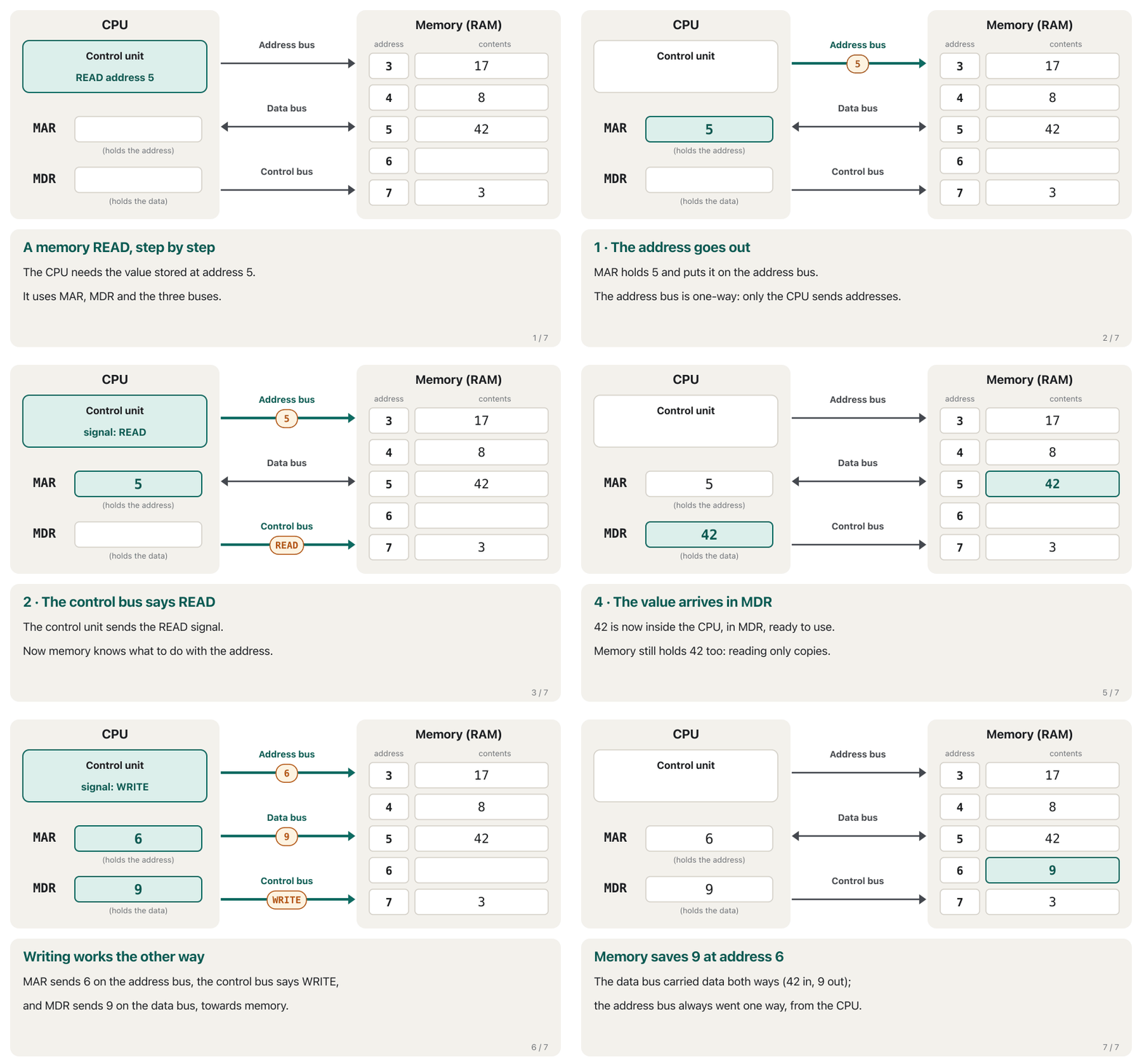
Watch the three buses work together. First the CPU reads the value at address 5, then it writes 9 into address 6.
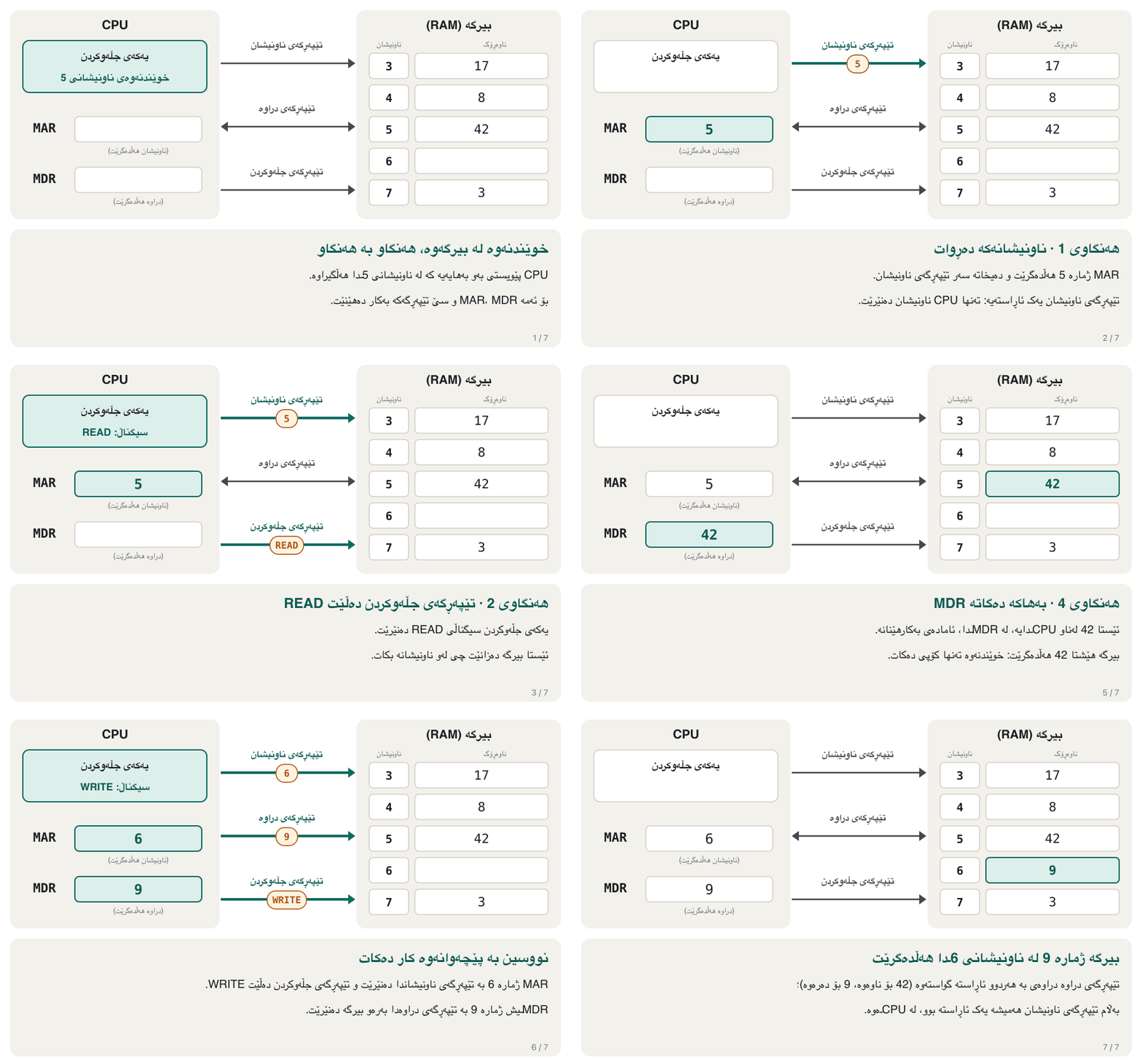
سەیری کارکردنی سێ پێکەوە بکە. سەرەتا بەهای ناونیشانی 5 دەخوێنێتەوە، پاشان ژمارە 9 لە ناونیشانی 6ـدا دەنووسێت.
- Address outناونیشان دەردەچێت
MAR puts the address on the address bus.
MAR ناونیشانەکە دەخاتە سەر .
- Commandفەرمان
The control bus carries READ (or WRITE).
READ (یان WRITE) دەبات.
- Data movesدراوە دەجووڵێت
On a read, memory puts the value on the data bus and it arrives in MDR. On a write, MDR puts the value on the data bus and memory saves it.
لە خوێندنەوەدا بەهاکە دەخاتە سەر و دەگاتە MDR. لە نووسیندا MDR بەهاکە دەخاتە سەر و هەڵیدەگرێت.
Data bus, address bus and control busتێپەڕگەی دراوە، تێپەڕگەی ناونیشان و تێپەڕگەی جڵەوکردن
Sharing one wire: tri-state outputsهاوبەشیکردنی یەک تەل: دەرچوونی سێدۆخی
The CPU, memory and other chips all hang on the same data-bus wires. If two of them put different values on one wire at the same moment, the wire would get a confused voltage and the chips could overheat. So their bus outputs are tri-state (three-state): besides 0 and 1, an output can be switched off — disconnected, which engineers call high impedance and write as Z.
، و تر هەموویان بە هەمان تەلەکانی بەستراون. ئەگەر دوانیان لە هەمان ساتدا دوو بەهای جیاواز بخەنە سەر یەک تەل، تێکەڵ دەبێت و لەوانەیە زۆر گەرم ببن. بۆیە دەرچوونی ئەم بۆ سەر سێدۆخییە (tri-state): جگە لە 0 و 1، دەتوانرێت دەرچوونەکە بکوژێنرێتەوە — واتە پچڕاو، کە ئەندازیاران پێی دەڵێن «بەرگریی بەرز» (high impedance) و بە Z دەینووسن.
Each chip has an enable input. The address and control signals enable only the chip whose turn it is: that chip drives the wire with 0s and 1s, and every other chip stays disconnected. The small circuit that joins a chip to the bus or lets it go is called a bus driver (a tri-state buffer).
هەر هێڵێکی چالاککردنی هەیە. ناونیشان و جڵەوکردن تەنها ئەو چالاک دەکەن کە نۆرەی ئەوە: ئەو 0 و 1 دەخاتە سەر تەلەکە و هەموو تر پچڕاو دەمێننەوە. ئەو پارچە بچووکەی بە دەبەستێت یان لێی دەپچڕێنێت پێی دەوترێت لێخوڕی (bus driver یان tri-state buffer).
Why many parts can share one bus only if all but one stay silent: bus contention and three-state outputs, shown in a logic simulator.
بۆچی چەند بەشێک تەنها کاتێک دەتوانن یەک هاوبەش بکەن کە جگە لە یەکێکیان هەموو بێدەنگ بن: پێکدادان و دەرچوونی سێدۆخی، لە لۆجیکیدا.
Plays 4:45–12:23: the shared bus, what goes wrong when two outputs drive it, and three-state outputs.
لە 4:45 تا 12:23 پەخش دەبێت: هاوبەش، چی تێک دەچێت کاتێک دوو دەرچوون لە هەمان کاتدا بەسەریدا زاڵ دەبن، پاشان دەرچوونی سێدۆخی (three-state).
How many addresses can n lines reach?n هێڵ دەگەنە چەند ناونیشان؟
Each address line is one bit: 0 or 1. With n lines the CPU can put 2 × 2 × … × 2 (n times) different patterns on the address bus, so it can reach this many memory places:
هەر هێڵێکی ناونیشان یەک : 0 یان 1. بە n هێڵ، دەتوانێت (n جار) نەخشی جیاواز بخاتە سەر ، بۆیە دەگاتە ئەم ژمارەیە لە شوێنەکانی :
Why each extra bit doubles the count is explained in Logic Design: How many patterns do N bits give?
بۆچی هەر زیادە ژمارەکە دوو هێندە دەکات لە کۆرسی دیزاینی ڕوون کراوەتەوە: N بیت چەند نەخش دەدات؟
| Address linesهێڵی ناونیشان | Addressesژمارەی ناونیشان | If each place holds 1 byteئەگەر هەر شوێنێک 1 هەڵبگرێت |
|---|---|---|
| 16 | 64 KiB | |
| 20 | 1 MiB — the Intel 8086 (1978)1 MiB — پرۆسێسەری Intel 8086 (1978) | |
| 24 | 16 MiB | |
| 32 | 4 GiB | |
| 48 | ≈ 281 trillion ≈ 281 تریلیۆن | 256 TiB |
KiB, MiB, GiB and TiB are the binary units ( bytes). They are explained in Bits, bytes and storage units.
KiB، MiB، GiB و TiB یەکە دووانییەکانن ( ). لە بیتەکان، بایتەکان و یەکەکانی خەزنکردن ڕوون کراونەتەوە.
Buses in today's computersتێپەڕگەکان لە کۆمپیوتەرەکانی ئەمڕۆدا
In older PCs one shared front-side bus joined the CPU to everything else. In today's PCs and servers that design is gone: the memory controller sits inside the CPU, so RAM connects straight to the processor through its own memory channels (64 data lines per memory module; DDR5 splits them into two 32-line channels), and graphics cards and SSDs connect through their own PCIe lanes. These are point-to-point links, not one bus that everybody shares. You can still see the lines as thin copper tracks running between the CPU socket, the memory slots and the expansion slots of the motherboard.
لە کۆمپیوتەرە کەسییە کۆنەکاندا یەک front-side busـی هاوبەش بە هەموو شتێکی ترەوە دەبەست. لە کۆمپیوتەری کەسی و ئەمڕۆدا ئەو دیزاینە نەماوە: کۆنترۆڵکەری لەناو ، بۆیە لە ڕێگەی کەناڵەکانی خۆیەوە (64 هێڵی بۆ هەر پارچەیەکی ؛ DDR5 ئەمانە دەکات بە دوو کەناڵی 32 هێڵی) ڕاستەوخۆ بە پرۆسێسەرەکەوە دەبەسترێت. هەروەها و لە ڕێگەی هێڵەکانی PCIeـی خۆیانەوە دەبەسترێن. ئەمانە بەستنەوەی خاڵ بە خاڵن، نەک یەک کە هەمووان بە هاوبەشی بەکاری دەهێنن. هێشتا دەتوانیت هێڵەکان ببینیت وەک ڕێڕەوی باریکی مس کە لە نێوان ، کەلێنەکانی و دەڕۆن.
Buses in today's computersتێپەڕگەکان لە کۆمپیوتەرەکانی ئەمڕۆدا
The exception: direct memory access (DMA)حاڵەتە جیاوازەکە: گەیشتنی ڕاستەوخۆ بە بیرگە (DMA)
Direct memory access: how a DMA controller moves data between a device and memory so the CPU does not have to copy every byte.
گەیشتنی ڕاستەوخۆ بە (DMA): یەکەی DMA چۆن لە نێوان ئامێرێک و دەگوازێتەوە، تا ناچار نەبێت خۆی هەموو بگوازێتەوە.
DMA in three minutes.
DMA لە سێ خولەکدا.
Common mistakesهەڵە باوەکان
| Mistakeهەڵە | What is trueڕاستییەکە |
|---|---|
| «Registers are part of RAM.»« بەشێکن لە .» | Registers are inside the CPU; RAM is outside and reached through the buses. لەناو ؛ لە دەرەوەیە و لە ڕێگەی پێی دەگەیەنرێت. |
| «MAR holds the data that is read.»«MAR ئەو دەخوێندرێتەوە هەڵدەگرێت.» | MAR holds the address; MDR holds the data.MAR ناونیشانەکە هەڵدەگرێت؛ MDR . |
| «The address bus carries data both ways.»« بە هەردوو ئاڕاستە دەگوازێتەوە.» | The address bus goes one way, from the CPU (DMA is the exception). The data bus goes both ways. یەک ئاڕاستەیە، لە (DMA حاڵەتی جیاوازە). دوولایەنەیە. |
| «The control bus carries the numbers being added.»« ئەو ژمارانە دەگوازێتەوە کە کۆ دەکرێنەوە.» | The control bus carries signals such as READ, WRITE, the clock and interrupt requests. Numbers travel on the data bus. وەک READ، WRITE، کاتژمێر و داوای پچڕاندن دەگوازێتەوە. ژمارەکان بە دەڕۆن. |
| «More address lines make the computer faster.»«هێڵی ناونیشانی زیاتر خێراتر دەکات.» | More address lines let the CPU reach more memory places (2 to the power n). Speed depends on other things.هێڵی ناونیشانی زیاتر وا دەکات بگاتە شوێنی زیاتری (). خێرایی بە شتی تر دەبەسترێتەوە. |
Exercisesڕاهێنانەکان
In the 5 + 2 program, the CPU fetches and runs LOAD A2 → R2 from address 1, and A2 holds 2. Give PC, MAR, MDR and IR right after the fetch, and MAR, MDR and R2 right after the execute.
لە کۆکردنەوەی 5 و 2ـدا، LOAD A2 → R2 لە ناونیشانی 1ـەوە دەهێنێت و جێبەجێی دەکات. A2 ژمارە 2 هەڵدەگرێت. PC، MAR، MDR و IR ڕاستەوخۆ دوای هێنان بنووسە. پاشان MAR، MDR و R2 ڕاستەوخۆ دوای جێبەجێکردن.
Show answerوەڵامەکە پیشان بدە
| Momentکات | PC | MAR | MDR | IR | R2 |
|---|---|---|---|---|---|
| after fetchدوای هێنان | 2 | 1 | LOAD A2 → R2 | LOAD A2 → R2 | — |
| after executeدوای جێبەجێکردن | 2 | A2 | 2 | LOAD A2 → R2 | 2 |
During the fetch, MAR holds the instruction's address (1) and MDR the instruction; during the execute they hold the data's address (A2) and the data (2).
لە کاتی هێنان، MAR ناونیشانی (1) و MDR خودی هەڵدەگرن؛ لە کاتی جێبەجێکردندا ناونیشانی (A2) و خودی (2) هەڵدەگرن.
(a) A processor has 30 address lines. How many memory places can it reach, and how much memory is that if each place holds one byte? (b) How many address lines are needed for 4 GiB of byte places?
(أ) پرۆسێسەرێک 30 هێڵی ناونیشانی هەیە. دەگاتە چەند شوێنی ؟ ئەگەر هەر شوێنێک یەک هەڵبگرێت، ئەمە چەند ؟ (ب) بۆ 4 GiB لە شوێنی چەند هێڵی ناونیشان پێویستە؟
Show answerوەڵامەکە پیشان بدە
(b) 4 GiB = , so 32 address lines.
(ب) ، بۆیە 32 هێڵی ناونیشان.
For each item say which bus carries it and in which direction: (a) the address 7 for a read; (b) the value 9 being written to memory; (c) the READ signal; (d) a keyboard asking the CPU for attention.
بۆ هەریەکەیان بڵێ کام دەیگوازێتەوە و بە کام ئاڕاستەدا: (أ) ناونیشانی 7 بۆ خوێندنەوە؛ (ب) بەهای 9 کە لە دەنووسرێت؛ (ج) READ؛ (د) کە داوا لە دەکات ئاگاداری بێت.
Show answerوەڵامەکە پیشان بدە
- (a) Address bus, CPU → memory.
- (b) Data bus, CPU → memory (a write).
- (c) Control bus, CPU → memory.
- (d) Control bus (the interrupt request line, IRQ), device → CPU.
- (أ) ، لە بۆ .
- (ب) ، لە بۆ (نووسین).
- (ج) ، لە بۆ .
- (د) (هێڵی داوای پچڕاندن، IRQ)، لە ئامێرەکەوە بۆ .
Without looking back, name the three parts of the system bus and write one sentence about the job of each.
بەبێ سەیرکردنەوەی بەشەکانی پێشوو، سێ بەشی ناو ببە و بۆ کاری هەریەکەیان ڕستەیەک بنووسە.
Show answerوەڵامەکە پیشان بدە
- Control bus — signals such as read, write, clock and interrupt that coordinate the CPU's work.
- Address bus — the address of the memory place or device, sent by the CPU.
- Data bus — the data itself, in either direction.
- — وەک خوێندنەوە، نووسین، کاتژمێر و پچڕاندن کە کاری ڕێک دەخەن.
- — ناونیشانی شوێنی یان ئامێرەکە، کە دەینێرێت.
- — خودی ، بە هەر دوو ئاڕاستە.
(a) What is the main job of the system bus? (b) Why is the data bus two-way, while the address bus is one-way?
(أ) کاری سەرەکیی چییە؟ (ب) بۆچی دوولایەنەیە، بەڵام یەک لایەنەیە؟
Show answerوەڵامەکە پیشان بدە
(a) The system bus is the shared set of wires on the motherboard that carries data, addresses and control signals between the CPU, memory and the I/O modules: it is how the parts of the computer communicate. (b) Data has to travel both ways — into the CPU when it reads and out of it when it writes. An address only ever goes from the CPU, which decides which place to use, to memory or a device; memory never has to send an address back, so one direction is enough. (A DMA controller is the exception: it can also put addresses on the bus.)
(أ) ئەو کۆمەڵە تەلە هاوبەشەیە لەسەر کە ، ناونیشان و جڵەوکردن لە نێوان ، و مۆدیولەکانی / دەگوازێتەوە: بەشەکانی بەم شێوەیە پەیوەندی بە یەکترەوە دەکەن. (ب) دەبێت بە هەردوو ئاڕاستە بڕوات — کاتێک دەخوێنێتەوە دێتە ژوورەوە و کاتێک دەنووسێت دەچێتە دەرەوە. ناونیشان هەمیشە تەنها لە دەچێت بۆ یان ئامێرێک، چونکە بڕیار دەدات کام شوێن بەکار بێت؛ هەرگیز پێویست ناکات ناونیشانێک بگەڕێنێتەوە، بۆیە یەک ئاڕاستە بەسە. (کۆنترۆڵکەری DMA حاڵەتی جیاوازە: ئەویش دەتوانێت ناونیشان بخاتە سەر .)
Summaryپوختە
- Registers are tiny, very fast storage places inside the CPU; RAM is outside it.
- PC = address of the next instruction; IR = the current instruction; MAR = the address being used; MDR = the data moving in or out; ACC = results in simple CPUs; status register = flags; R0, R1 … = general-purpose.
- The system bus on the motherboard has three parts: the data bus (both ways), the address bus (one way, from the CPU) and the control bus (signals).
- n address lines reach places: 20 lines give 1 MiB, 32 lines 4 GiB.
- Today the memory controller is inside the CPU, and RAM, graphics cards and SSDs use direct links (memory channels, PCIe) instead of one shared bus.
- شوێنی هەڵگرتنی بچووک و زۆر خێران لەناو ؛ لە دەرەوەیەتی.
- PC = ناونیشانی دواتر؛ IR = ئێستا؛ MAR = ئەو ناونیشانەی بەکار دێت؛ MDR = ئەو دێتە ژوورەوە یان دەچێتە دەرەوە؛ ACC = ئەنجامەکان لە سادەکاندا؛ = ؛ R0، R1 … = .
- لەسەر سێ بەشی هەیە: (دوولایەنە)، (یەک لایەنە، لە ) و ().
- n هێڵی ناونیشان دەگەنە شوێن: 20 هێڵ 1 MiB و 32 هێڵ 4 GiB دەدەن.
- ئەمڕۆ کۆنترۆڵکەری لەناو . ، و لە جیاتی یەک هاوبەش بەستنەوەی ڕاستەوخۆ بەکار دەهێنن (کەناڵەکانی ، ).
Why can't the ALU add numbers straight from RAM?بۆچی یەکەی ژیربێژیی بیرکارییانە ناتوانێت ژمارەکان ڕاستەوخۆ لە RAMـەوە کۆ بکاتەوە؟
RAM is outside the CPU. Values must first come over the buses into registers (through MDR); the ALU works only on registers.
لە دەرەوەی . سەرەتا دەبێت بەهاکان بە بێنە ناو (بە MDRـدا)؛ تەنها لەسەر کار دەکات.
What is the difference between MAR and the PC? Both hold addresses.جیاوازیی نێوان MAR و PC چییە؟ هەردووکیان ناونیشان هەڵدەگرن.
The PC holds the address of the next instruction. MAR holds whatever address is being read or written right now — an instruction's or a piece of data's.
PC ناونیشانی دواتر هەڵدەگرێت. MAR هەر ناونیشانێک هەڵدەگرێت کە ئێستا دەخوێندرێتەوە یان دەنووسرێت — هی بێت یان هی .
How can several chips share the same data-bus wires without clashing?چۆن چەند چیپێک دەتوانن هەمان تەلەکانی تێپەڕگەی دراوە بەکار بهێنن بەبێ ئەوەی تووشی یەکتر ببن؟
Their outputs are tri-state: only the chip that is enabled drives the wires; all the others are disconnected (high impedance, Z).
دەرچوونەکانیان سێدۆخین: تەنها ئەو چالاک کراوە بەها دەخاتە سەر تەلەکان؛ هەموو ئەوانی تر پچڕاون («بەرگریی بەرز»، Z).
Videoڤیدیۆ
Watch a videoسەیری ڤیدیۆیەک بکە
A video that viewers liked a lot and praised in their comments, chosen for this lesson.ڤیدیۆیەک کە بینەران زۆریان پێ خۆش بووە و لە کۆمێنتەکانیاندا ستایشیان کردووە، بۆ ئەم وانەیە هەڵبژێردراوە.
Inside a CPU: the control unit, ALU, registers and the buses to memory, and how a program runs through the fetch-decode-execute cycle.
لەناو : ، ، و بەرەو ؛ هەروەها چۆن بە (، شیکردنەوە، جێبەجێکردن) کار دەکات.
Plays 0:35–7:54: CPU architecture with registers and buses, then how a program runs.
لە 0:35 تا 7:54 پەخش دەبێت: پێکهاتەی لەگەڵ و ، پاشان چۆن جێبەجێ دەکرێت.
Lesson complete!وانەکە تەواو بوو!
Well done. Review the key terms, then go on to the next lesson.دەستخۆش. سەیرێکی زاراوە سەرەکییەکان بکەرەوە، پاشان بڕۆ بۆ وانەی داهاتوو.
Key termsزاراوە سەرەکییەکان
How a Computer Runs a Programکۆمپیوتەر چۆن بەرنامەیەک جێبەجێ دەکات
Related lecturesوانە پەیوەندیدارەکان
- Memory: RAM, ROM and Cacheبیرگە: RAM، ROM و کاش
- The CPU: Control Unit, ALU and CoresCPU: یەکەی جڵەوکردن، ALU و ناوکەکانی پرۆسێسەر
- How a Computer Runs a Programکۆمپیوتەر چۆن بەرنامەیەک جێبەجێ دەکات
- Processor Speed, Cache, GPUs and Coolingخێرایی پرۆسێسەر، کاش، GPU و ساردکردنەوە
- Bits, Bytes and Storage Unitsبیتەکان، بایتەکان و یەکەکانی خەزنکردن
- Number Systems and Place Valueسیستەمە ژمارەییەکان و بەهای خانەیی
- Inside the Computerناو کۆمپیوتەرەکە
References and further readingسەرچاوەکان و خوێندنەوەی زیاتر
- Wikipedia: Processor register
- Wikipedia: System bus
- Wikipedia: Address bus
- Wikipedia: Direct memory access
- Wikipedia: Intel 8086 (20-bit address bus, 1 MiB)
- Wikipedia: x86-64 (48-bit physical addresses; 52 bits with 5-level paging since 2021)
- Wikipedia: Instruction cycle (PC, MAR, MDR, IR)
- Wikipedia: Three-state logic (tri-state outputs, high impedance, bus drivers)
- Wikipedia: DDR5 SDRAM (two independent 32-bit subchannels per DIMM)
- Intel: Advanced Performance Extensions (APX) — 32 general-purpose registers
This lecture is a first edition. The Kurdish text and terminology are waiting for review by Kurdish IT teachers.ئەم وانەیە چاپی یەکەمە. دەقە کوردییەکە و زاراوەکانی چاوەڕێی پێداچوونەوەی مامۆستایانی کوردی بواری IT ن.